What's inside
- Key Takeaways
- Quick Picks
- How Did We Separate Sound Cards From Converters in This Lineup?
- Why Send Digital Audio Out of a PC at All?
- What Are the Real Limits of the SPDIF Format?
- How Does a Digital Path Change Everyday PC Habits?
- Should You Worry About Jitter and Cable Quality on a Digital Path?
- How Do Cards and Converters Compare at a Glance?
- Which Digital Socket Does Your Equipment Actually Want?
- How Do You Set Up a Digital Output Path Properly?
- What Should You Do When the Digital Path Misbehaves?
- What Mistakes Send Buyers Down the Wrong Digital Path?
- Final Recommendation
- Frequently Asked Questions
- Related Guides
As an Amazon Associate I earn from qualifying purchases. This post may contain affiliate links at no extra cost to you.
[widgetverdict.com] is reader-supported. When you buy through links on our site, we may earn an affiliate commission.
The best external sound cards with digital out all exist to solve one elegant problem: a computer’s analogue outputs are the noisiest part of its audio chain, because the conversion from digital to analogue happens inside a case full of switching power supplies and graphics cards. Move that conversion outside — into a receiver, a DAC, or a powered speaker with its own digital input — and the PC’s job shrinks to handing over a clean stream of numbers. That hand-over needs a digital output, and a surprising number of modern machines, laptops especially, do not have one. The six products below restore it, and they divide honestly into two kinds: full USB sound cards that happen to include a digital output among their talents, and dedicated converters whose only job is turning USB into SPDIF. Both kinds are useful; they are not interchangeable, and this guide labels each one plainly.
Where to buy: product names throughout link to the Amazon listings this guide is based on. With digital audio adapters, verify two things on the listing before ordering: the connector type at the digital end — optical Toslink and coaxial RCA are both “digital out” but they are not the same plug — and the direction of conversion, because lookalike adapters exist that run the other way. The listing photographs show the actual sockets; trust them over the headline if the two ever disagree.
Key Takeaways
- A digital output lets an external receiver or DAC do the conversion, keeping analogue signals away from the electrical noise inside the PC.
- Two product kinds share this shelf: genuine USB sound cards with a digital output included, and single-purpose USB-to-SPDIF converters. Converters are labelled as converters throughout this guide.
- Optical Toslink and coaxial RCA carry the same SPDIF signal in different physical forms; match the adapter to the socket your equipment actually has.
- Digital out from a PC is stereo PCM by default; multichannel arrives only as a pre-encoded Dolby Digital or DTS stream passed through from content that has one.
- One-way converters are exactly that — the Tackston listing itself warns it does not support 5.1 surround and is not for TVs, and honest limits like those should steer, not scare, the right buyer.
- The strongest reason to buy is a destination that converts better than your PC does: a receiver, a quality DAC, or digital-input powered speakers.
Quick Picks
| Pick | Badge | Why it is here |
|---|---|---|
| Optimal Shop USB 6-Channel 5.1 Adapter | Sound card with SPDIF | A full six-channel USB sound card whose digital output is one talent among several, including analogue surround. |
| Newfame USB 5.1 Sound Card SPDIF | Optical-first sound card | A plug-and-play USB card built around its 5.1-channel SPDIF optical output for feeding external decoders. |
| LiNKFOR USB to SPDIF Converter | Converter — three output forms | A dedicated USB-to-SPDIF converter offering optical, coaxial RCA and 3.5 mm digital forms for PCM audio. |
| Tackston USB to Optical SPDIF Adapter | Converter — optical only | A one-way, driver-free USB-to-Toslink converter with unusually honest stated limits. |
| SENECESLI USB 6-Channel Sound Card | Sound card with optical out | A six-channel USB 2.0 card with a digital optical SPDIF output for laptops and desktops alike. |
| Denash 6-Channel USB Sound Card | Sound card with digital optical | Another full external card whose listing leads with its digital optical SPDIF output for PC and laptop audio. |
How Did We Separate Sound Cards From Converters in This Lineup?
The distinction sounds pedantic until you are holding the wrong box. A sound card is an audio device in its own right: it accepts audio from the computer, and it can also produce analogue sound itself — for headphones, for speakers — usually alongside microphone or line inputs. A converter is a translator: digital audio enters as USB and leaves as SPDIF, unchanged in content, different in format. It has no analogue output of its own to listen to, no input for a microphone, and no ambitions beyond the translation. Buyers who need analogue sound as well as digital need a card; buyers whose receiver or DAC does all the listening need only a converter, and paying for card features they will never touch is waste in the other direction.
Selection therefore started with destination equipment. We required every pick to offer a genuine digital output — optical, coaxial, or both — and then deliberately mixed the two kinds so the comparison could teach the difference with real examples: four full cards of the inexpensive six-channel family, and two dedicated converters, one flexible and one deliberately minimal. Manufacturer claims are reported as claims throughout, and where a listing states a limitation in its own words — as the Tackston does about surround — we quote the spirit of that limit approvingly, because a maker who tells you what a product cannot do is giving you the most valuable specification on the page.
Why Send Digital Audio Out of a PC at All?
Because of where conversion happens. Every digital audio file must eventually become analogue voltage to move a speaker, and the only question is which device performs that transformation. Inside a PC, the converter works millimetres from components that switch large currents thousands of times a second; the faint whine that tracks your mouse movement and the buzz that rises when a game loads are that environment leaking into the analogue stage. A digital output sidesteps the entire fight: the stream leaving the PC is numbers, immune to that interference, and the conversion happens inside a receiver or DAC whose designers controlled its power supply and layout for exactly that purpose. This is why a modest receiver often sounds cleaner fed digitally from a noisy PC than the PC’s own outputs ever manage.
There is a fourth, quieter reason that archivists and musicians understand: repeatability. An analogue output’s sound depends on the specific machine, its power supply’s mood and the cable run of the day. A digital feed is the same stream every time, which means a recording checked through a DAC today can be checked identically next year on a different computer, and a measurement made once stays meaningful. For anyone who makes things — mixes, podcasts, videos — rather than only consuming them, that consistency turns a convenience feature into a working tool.
The second reason is consolidation. A receiver-centred room — films, a console, a turntable — already has one device switching and converting everything. A PC that joins that room digitally becomes one more tidy source on the receiver’s remote rather than a special case with its own volume quirks and a nest of analogue leads. The third reason is distance and isolation: an optical fibre carries no electrical connection between the two chassis at all, which breaks the ground loops that cause the classic hum when a PC meets a separately powered amplifier. Anyone who has heard that hum vanish the moment an optical cable replaced an analogue one understands this category instantly.
There is one honest counterweight. A digital output is a commitment to stereo PCM as the default language, with multichannel available only when the content itself carries an encoded stream to pass through. Listeners whose priority is multichannel game audio produced live by the PC should read the surround-focused companion guide in this series before assuming digital is their route; for music, films and general listening into good external equipment, it very often is.
What Are the Real Limits of the SPDIF Format?
SPDIF is a standard from the CD era, and its limits are worth knowing precisely because they are so rarely the problem. In its common form it carries two channels of uncompressed PCM audio, or one compressed multichannel stream in the Dolby Digital or DTS formats — the same arrangement a DVD player used. What it cannot carry is uncompressed multichannel: there is no SPDIF mode where six or eight discrete PCM channels travel down the fibre, which is why the passthrough conversation in this guide always involves encoding. Buyers graduating from HDMI-based systems sometimes expect otherwise, and the disappointment is entirely a format fact, not a product flaw.
Sample-rate ceilings follow the same pattern. Optical Toslink in its classic form is happiest at the rates films and music actually use, and while the interface’s modern implementations stretch further, the practical point is that the content library of the world — CDs, streaming, games, films — lives at rates SPDIF handles without breaking a sweat. The format’s genuine weakness is not fidelity but flexibility: no room correction data, no object-based audio formats, no return channel. None of those absences matters for the job this category does, which is moving stereo and encoded surround from a computer to equipment that handles them well. Judging SPDIF products by whether they transcend SPDIF is a category error; judge them by whether they deliver the format faithfully, in the physical form your destination accepts, without adding noise, dropouts or configuration theatre.
How Does a Digital Path Change Everyday PC Habits?
More than first-time buyers expect, and mostly for the better. Volume control migrates: the destination’s knob or remote becomes the master, and the PC’s software volume should be left at full for the cleanest feed, which ends the two-volume confusion where a quiet PC slider hides behind a loud receiver. Application behaviour simplifies too, because every programme on the machine — browser, game, music player — exits through the same digital door into the same conversion, so the system’s sound character stops changing with whichever jack a given app happened to favour.
There are small disciplines to adopt. Because the feed is bit-transparent when set up correctly, any processing you actually want — night-mode compression at the receiver, a music player’s crossfeed — should be applied deliberately at one point in the chain rather than accumulated accidentally at three. And because the PC no longer makes the sound, its own audio hardware becomes irrelevant to quality: a future motherboard swap or a move to a laptop changes nothing about your listening, since the converter or card carries the digital identity of the setup with it. That decoupling is, in the long run, the deepest argument for this category — your sound stops being a property of whichever computer you happen to own this year.
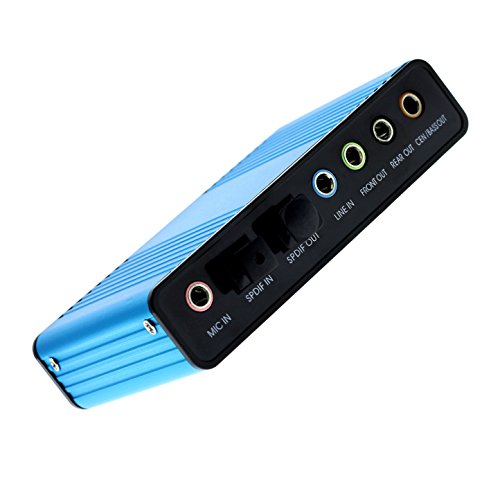
Optimal Shop USB 6-Channel 5.1 Adapter — Sound card with SPDIF
In the surround roundup this adapter stars as an analogue device; here it earns its place from the opposite direction, as the full sound card whose SPDIF port lets it moonlight as a digital source. That dual citizenship is its charm. As a card, it produces six channels of analogue audio for a powered speaker set; as a digital source, it can hand a stream to a receiver instead. A buyer whose setup is mid-transition — analogue speakers today, a receiver planned for the winter — is exactly who such a two-path device serves, because whichever destination survives the upgrade, the adapter still fits.
Judged purely as a digital source, expectations should stay level: the SPDIF output’s job is faithful delivery of what the PC sends, and the inexpensive card around it is utility engineering, not a statement DAC. Its digital port is best understood as a valuable option included in a versatile card, rather than as the refined centrepiece a dedicated converter offers. There is a maintenance angle to this card’s longevity that digital-first buyers overlook. Because its analogue outputs exist, a receiver failure or a house move that separates you from the receiver does not silence the computer — the speaker path is still there, ready to be reconnected in minutes. Redundancy is unfashionable in product design, but in household audio, where equipment fails on its own schedule and rooms get rearranged, a device with two ways to make sound keeps earning its drawer space long after a single-path device would have been retired.
That framing matters for value: if the digital output is the only feature you will ever use, a converter below does the one job with less clutter; if there is any chance the analogue outputs or the card’s general Swiss-army character will serve you, this remains one of the most flexible inexpensive audio purchases a PC owner can make.
- Device kind: full USB sound card (analogue and digital)
- Digital output: S/PDIF alongside six-channel analogue output
- Connection: USB 2.0
- Angle in this guide: the card to buy when the destination might change
Strengths
- Analogue multichannel and digital output in one inexpensive device
- Survives a setup change from speakers to receiver without replacement
- Long-selling design with predictable driver behaviour
Trade-offs
- Digital output is one feature among many, not a specialised design
- Utility-grade conversion for its analogue side
- Buyers certain of a digital-only future pay for unused analogue hardware
Best for: transitional setups and generalists who want one adapter that can feed speakers today and a receiver tomorrow. If your destination is permanently digital and already chosen, the dedicated converters further down are the tidier purchase.

Newfame USB 5.1 Sound Card SPDIF — Optical-first sound card
Where the Optimal Shop treats digital as a sideline, the Newfame’s listing makes its SPDIF optical output the headline: a plug-and-play USB sound card for PC and laptop, built to deliver a 5.1-channel optical feed for gaming, music and streaming. In this guide’s terms it is still a sound card — a USB audio device in its own right — but one whose design centre sits at the digital socket. The natural home is a laptop or compact PC parked near a receiver or a decoder-equipped speaker system, where the card’s arrival completes a chain the computer could not complete alone.
The passthrough discipline from the surround guide applies with full force here: the card delivers, the downstream device decodes, and pre-encoded film soundtracks are the content that shines. What the digital-out framing adds is the noise argument. A laptop’s own headphone jack is frequently its worst audio component — thin, hiss-prone, and shared with a microphone circuit — and routing around it entirely, sending numbers to equipment that converts properly, can transform film night on an otherwise ordinary machine. For a buyer whose complaint is specifically “my laptop sounds bad through the receiver,” this category of device is not an accessory; it is the direct fix, and the Newfame is its straightforward expression.
It is worth pausing on why a laptop’s own output so often disappoints through good equipment. The jack was designed for earbuds on a train: low power, shared with a microphone contact, and converted by a codec chosen for cost and battery life. Played through earbuds, its shortcomings hide. Played through a receiver and real speakers at room volume, every one of them is magnified — the hiss in quiet passages, the flatness in dense ones. An optical bridge like this one does not merely add a port; it excuses the laptop from a job it was never equipped to do, and lets the receiver be the audio device for both of them.
- Device kind: USB sound card with digital-first positioning
- Digital output: SPDIF optical, described as 5.1-channel
- Setup style: plug-and-play, per its listing
- Angle in this guide: the laptop-to-receiver bridge
Strengths
- Optical output is the design centre, not an afterthought
- Bypasses a laptop’s noisy analogue jack entirely
- Simple setup story for film and streaming chains
Trade-offs
- Surround still depends on encoded content and a decoder downstream
- Less analogue versatility than the six-channel card family
- Basic accompanying analogue output for local listening
Best for: film and streaming watchers whose PC or laptop needs an optical voice to speak to a receiver. Buyers who also need to drive analogue speakers directly should look at the six-channel cards, which keep that door open.
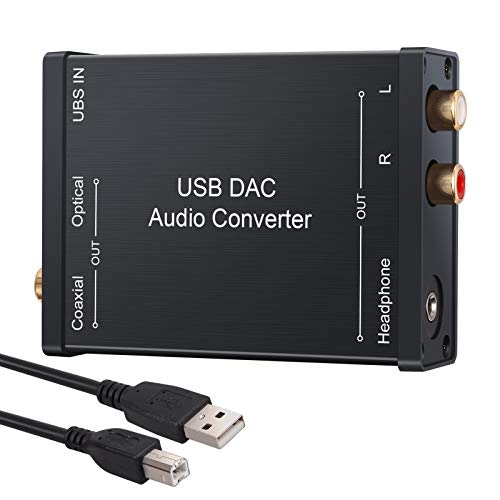
LiNKFOR USB to SPDIF Converter — Converter, three output forms
Now for the honest converters, and the LiNKFOR is the flexible one. Its listing describes a USB-to-SPDIF coaxial RCA and 3.5 mm audio converter supporting PCM, compatible with Windows, Mac, PS3 and PS4 for digital audio conversion. Note what it does not claim: it is not presented as a sound card, because it is not one — it produces no analogue audio of its own. What it offers instead is format generosity at the digital end. SPDIF travels in two physical forms, optical Toslink and coaxial RCA, plus a mini-optical variant that hides inside some 3.5 mm sockets, and this converter’s spread of outputs means it can meet whichever socket your DAC or receiver actually presents, without a second adapter dangling off the first.
The PCM wording is the specification that matters most and the one buyers skim past. This is a stereo digital path: the converter carries PCM audio from the computer to the destination, which suits music, desktop sound, streaming audio and console stereo perfectly. It is not a multichannel encoder, and film surround would need the soundtrack to arrive already encoded in a form the destination accepts — manage that expectation and the LiNKFOR is a model of a product doing one job completely. The console compatibility in its listing is a genuine differentiator, too: a PS3 or PS4-era setup needing its audio lifted into a DAC or receiver chain is a real use case that pure PC cards ignore.
Converters like this also find quiet employment in recording-adjacent work, which surprises people. A producer checking a mix on a proper DAC, a streamer routing a second PC’s audio digitally into the main machine’s chain to avoid ground-loop hum, a retro-computing enthusiast feeding a modern amplifier — all are translation jobs, and translation is the whole product. The LiNKFOR’s spread of output forms makes it the converter most likely to fit an unplanned job that arrives later, which is a legitimate reason to choose it over a narrower device even when today’s destination is known.
- Device kind: dedicated converter (no analogue output of its own)
- Outputs: SPDIF optical, coaxial RCA, 3.5 mm digital form
- Audio format stated: PCM
- Compatibility stated: Windows, Mac, PS3, PS4
Strengths
- Multiple digital output forms meet almost any destination socket
- Honest converter positioning — no inflated sound-card claims
- Console compatibility widens its usefulness beyond PCs
Trade-offs
- No analogue output: headphones cannot plug into the converter itself
- PCM focus means no multichannel encoding tricks
- One-way translation only, like every converter here
Best for: feeding a DAC or receiver from a PC, Mac or older console when you are unsure which digital socket the destination offers — or know it is coaxial. If you also need to plug headphones into the device itself, you need a sound card, and the picks above and below are that product.
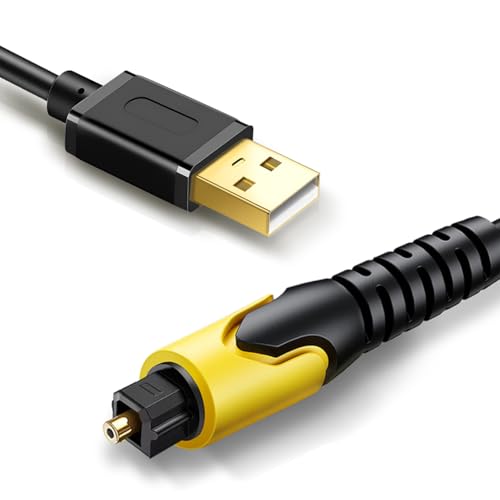
Tackston USB to Optical SPDIF Adapter — Converter, optical only
The Tackston listing should be taught in product-writing classes. It describes a USB-to-optical SPDIF Toslink adapter for Windows and macOS, then states its limits in the title itself: one-way from USB to optical, not for TV, does not support 5.1 surround sound, no driver required. In a category drowning in inflated badges, a maker printing “not for TV” and “no 5.1” on its own box is performing a public service — and, not coincidentally, defining its perfect buyer precisely: someone who wants stereo digital audio out of a computer and into an optical-input DAC, soundbar or powered speaker, with zero installation ceremony.
Within that brief, the product is close to ideal. No driver means the operating system’s own USB audio handling does the work, which is exactly what a stereo PCM path needs and nothing more. The one-way nature deserves a beat of emphasis for first-time buyers of converters generally: this device cannot bring audio from a TV or console into the computer, cannot feed a microphone, and cannot produce analogue sound. It is a door that opens outward only. Buyers who read that sentence and nod are its audience; buyers who feel a flicker of disappointment have just been saved a return by the most honest listing in this guide, and should look at the full sound cards instead.
The soundbar scenario deserves explicit mention because it is probably this adapter’s commonest real job. Many soundbars offer an optical input and sound dramatically better than laptop speakers, yet the laptop has no optical socket and its HDMI port is busy driving a monitor. A driver-free USB-to-optical bridge resolves that geometry in one cable run, permanently, for roughly the cost of the pizza eaten during the first film it improves. Products do not need to be ambitious to be right; they need to fit the gap in the system, and this one is shaped exactly like a very common gap.
- Device kind: dedicated converter, USB to optical only
- Direction: one-way, USB to Toslink, as stated by the maker
- Stated limits: not for TV use, no 5.1 surround support
- Setup: no driver required, Windows and macOS
Strengths
- Exemplary honesty about what the device cannot do
- Driver-free setup is genuinely plug-and-play for stereo digital
- Single-purpose design keeps cost and complexity minimal
Trade-offs
- Stereo only — surround seekers must look elsewhere entirely
- No coaxial option for destinations lacking optical
- No analogue output and no input of any kind
Best for: the clean stereo job — a computer feeding an optical-input DAC or speaker system, nothing more asked and nothing more delivered. Anyone whose plans include surround, recording or analogue listening should pass it by with respect and choose a card.

SENECESLI USB 6-Channel Sound Card — Sound card with optical out
The SENECESLI represents the modern no-name branch of the six-channel family: a USB 2.0 external sound card with six-channel 5.1 surround and a digital optical SPDIF output, pitched at laptops, desktops and any machine with a USB port. In this guide’s framing, its interest is the combination — a buyer gets the analogue multichannel outputs for a speaker set and the optical output for a receiver, in the current generation of this long-established adapter design. For a household whose audio equipment is a mixture of eras, that combination remains the pragmatic centre of the whole category.
The guidance for unbranded members of a mature family is consistent: the design pattern is proven even when the badge is new, and the arrival checks matter more than the logo. Verify the optical socket exists as listed, configure the multichannel layout in the operating system rather than assuming it, and run the channel test before the return window closes. Do that, and a card like this is a low-drama way to give a modern laptop both an analogue surround voice and a digital one — the two output philosophies that the rest of this guide treats as alternatives, carried in a single inexpensive box.
One scenario flatters this combination in particular: the student or renter whose “system” is assembled from gifts and hand-me-downs — a speaker set from a sibling, a receiver from a parent, a laptop from last year. Nobody chose that equipment to work together, and the connective tissue that makes it a system anyway is an adapter with every output philosophy on board. Cards in this family are the audio equivalent of a multi-tool: rarely the finest instrument for a specialist, and repeatedly the reason a mismatched collection of gear becomes a working whole by Friday.
- Device kind: complete USB sound card covering both output types
- Analogue: six-channel 5.1 surround outputs
- Digital output: optical SPDIF
- Connection: USB 2.0, for laptops and desktops
Strengths
- Both output philosophies — analogue channels and optical digital — in one unit
- Follows a mature, well-understood adapter design pattern
- Broad machine compatibility through plain USB 2.0
Trade-offs
- Unbranded support and documentation are minimal
- Arrival verification is essential; listings in this tier occasionally drift from units
- Conversion quality is utility-grade on the analogue side
Best for: mixed-era households wanting analogue surround and an optical feed from one adapter, comfortable verifying a budget unit on arrival. Buyers who prize a maker’s support desk over flexibility should weigh the older branded names in this family instead.
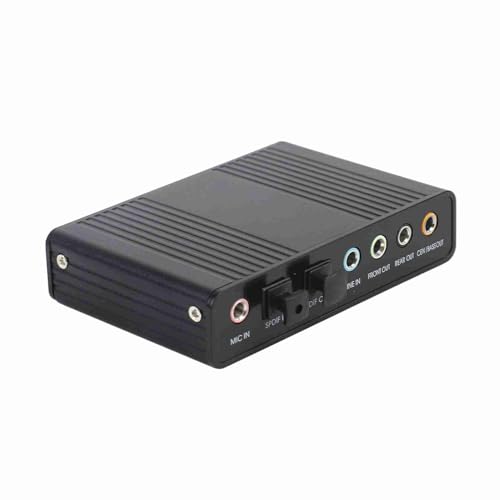
Denash 6-Channel USB Sound Card — Sound card with digital optical
The Denash closes the roundup as a second current-generation expression of the same idea: a six-channel external USB sound card for PC and laptop whose listing leads with its digital optical SPDIF output. Having two near-sibling cards in one guide is deliberate. This tier of the market is a commodity design sold under rotating names, and pretending otherwise would mislead more than including both: the practical advice is to choose between them on the listing’s current photographs, the exact port arrangement shown, and which seller’s page describes the unit most carefully at the moment you order.
That commodity reality also frames the Denash’s proper expectations. Its digital output is a delivery mechanism for the PC’s stream; its analogue outputs serve a speaker set adequately; its construction serves a desk rather than a decade. None of that diminishes its usefulness for the actual job — giving a laptop an optical voice and a desktop a spare multichannel path — provided the buyer performs the arrival checks this guide keeps recommending and treats any individual unit’s quirks as a returns question rather than a research failure. In a mature commodity category, the disciplined buyer, not the brand, is the quality control.
There is also a fair question to answer about why this guide includes two siblings rather than declaring one the winner: because at this tier, availability and listing accuracy fluctuate faster than product quality does. A guide that pretends a permanent champion exists among rotating commodity listings would be inventing precision. What can be said permanently is how to choose — match the photographed ports to your destination, prefer the listing that describes its own unit most specifically, verify on arrival — and that method transfers to whichever sibling, or successor badge, is on sale the week you shop.
- Device kind: USB sound card offering analogue plus digital paths
- Analogue: six-channel external surround arrangement
- Digital output: optical SPDIF, headline feature in its listing
- Connection: USB, for PC and laptop
Strengths
- Optical output plus analogue multichannel in the familiar family design
- Listing leads with the digital feature this guide cares about
- Gives laptops a complete external audio identity in one unit
Trade-offs
- Commodity-tier support; the listing page is the manual
- Verify ports against photographs before and after ordering
- Not a refinement of the design — a current instance of it
Best for: buyers who want the six-channel family’s full output menu from a current listing and are happy to verify on arrival. If a named maker’s documentation matters more than a fresh listing, the family’s older branded members remain the alternative.
Should You Worry About Jitter and Cable Quality on a Digital Path?
Digital audio attracts a particular species of anxiety, and a buying guide owes its readers a calm verdict. Jitter — tiny timing irregularities in the digital stream — is real physics, and it is also, at the levels produced by competent modern equipment, far below the threshold where listeners reliably identify it in controlled tests. A budget adapter that delivers the stream without dropouts is not secretly smearing your music in a way a costlier converter would rescue. What actually differs between a careless digital path and a careful one is cruder: dropouts, clicks, a connection that loses lock when the sample rate changes, an optical socket so loose the cable falls out when the desk is bumped. Those are the faults worth screening for on arrival, and every pick here should be judged on them rather than on audiophile folklore.
Cables deserve the same demystification. An optical cable either delivers the light pulses intact or it does not; there is no graduated scale of fibre virtue at normal domestic lengths, and a modest cable in good condition is the complete solution. Coaxial cables ask slightly more respect for impedance and connector fit, but “slightly” is the operative word — a sound, snug cable is sufficient, and money beyond that buys appearance and peace of mind rather than measurable delivery. Spend the savings where conversion actually happens: the destination. This category’s entire philosophy is that the PC end of a digital chain should be boring, reliable and cheap, so that the interesting money lives in the equipment making the sound.
How Do Cards and Converters Compare at a Glance?
| Product | Kind | Digital out | Analogue sound of its own |
|---|---|---|---|
| Optimal Shop 6-Channel | Sound card | SPDIF | Yes — 5.1 analogue outputs |
| Newfame USB 5.1 SPDIF | Sound card | Optical SPDIF | Basic local output |
| LiNKFOR USB to SPDIF | Converter | Optical, coaxial, 3.5 mm digital | None |
| Tackston USB to Optical | Converter | Optical only | None |
| SENECESLI 6-Channel | Sound card | Optical SPDIF | Yes — 5.1 analogue outputs |
| Denash 6-Channel | Sound card | Optical SPDIF | Yes — 5.1 analogue outputs |
The “analogue sound of its own” column is the whole guide in miniature. A “None” is not a defect — it is a definition. Converters end at the digital socket and rely on your other equipment for everything audible, which is why they pair naturally with a receiver or DAC you already respect. Cards are self-sufficient and scrappier. Choosing between the columns is really choosing where your system’s intelligence lives: in the destination equipment, or in the adapter itself.
Which Digital Socket Does Your Equipment Actually Want?
Before choosing among these six, walk to your destination device and look at its back panel — this ten-second inspection decides more than any review. An optical Toslink socket is a small square door or hole, sometimes labelled “digital in” or “optical.” A coaxial digital input is a single RCA socket, usually orange or black and labelled “coax” or “digital.” Powered speakers with digital inputs almost always chose optical. Receivers commonly offer both. Standalone DACs vary by era: older audiophile DACs are frequently coaxial-only, which is the single strongest argument for the LiNKFOR’s format spread.
While you are at the back panel, note the labels as well as the shapes. Inputs named “TV,” “SAT” or “GAME” are all equally usable for a PC — the names are suggestions, not restrictions — but the label matters when you later reach for the remote and must remember which source the computer lives on. A strip of tape with “PC” written on it, placed beside the chosen input, has saved more evenings than any setting in this guide. Choose the input you will remember, not the one the receiver’s designer expected you to use.
One trap deserves naming: the 3.5 mm socket that is secretly optical. Some laptops and small devices hide a mini-Toslink transmitter inside a headphone-sized jack, and the LiNKFOR’s inclusion of a 3.5 mm digital form speaks to that world. If your destination has such a socket, the correct cable or adapter tip matters more than the converter choice. And if your destination has no digital input at all — analogue-only powered speakers, a vintage amplifier — then this entire category is the wrong shop, and the analogue-output cards in our best external 5.1 channel sound cards roundup are where your money belongs.
How Do You Set Up a Digital Output Path Properly?
Physical first: connect the Toslink or coaxial cable between the adapter and the destination, select the matching input on the receiver or DAC, and only then open the computer’s sound settings to choose the USB device as the default output. Set the default format to a standard rate — the 48 kHz family suits films and games, the 44.1 kHz family suits music — and, where your player offers it, hand the application exclusive control so a film’s soundtrack is not resampled by the operating system’s mixer on its way out.
For film surround, configure the player to pass the encoded track through untouched — the setting is usually called passthrough, bitstream, or “allow SPDIF output” depending on the software — and confirm at the receiver that its display names the format it is decoding. If it reports plain stereo PCM while playing a film known to carry a surround track, the player is decoding early; the fix is in the player’s audio menu, not in the adapter. Music listeners should do the opposite check: a player resampling everything to the highest available rate adds nothing, and a clean, unmolested stereo PCM feed is the goal the whole category exists to deliver.
One more setting earns its mention: the operating system’s own enhancements and spatial modes should be switched off for a digital feed you intend to be faithful. Those features exist to reshape analogue headphone listening; applied upstream of a digital output, they quietly rewrite the stream your receiver was supposed to receive untouched, and they are a common hidden cause when a carefully built digital chain sounds oddly processed. The destination may apply its own modes — a receiver’s night mode, a DAC’s filter choice — and those are legitimate because they are visible and chosen. The rule is one chef: let the destination season the sound, and let everything upstream of it practise restraint.
Volume discipline completes the setup. A digital feed typically leaves the PC at full scale, with level controlled at the destination — which is correct and safer for quality, but means the receiver’s volume knob is now the only one that matters. Set it before the first film’s opening logo teaches you that lesson at full blast.
What Should You Do When the Digital Path Misbehaves?
Digital faults are mercifully binary, which makes them easier to hunt than analogue gremlins. Total silence with a new setup almost always resolves into one of four causes: the destination is set to the wrong input, the computer is still using its previous default device, the optical cable is not fully seated at one end, or the player software is muted upstream of the output. Work through them in that order, changing one thing at a time, and resist the urge to reinstall anything until the physical layer is proven — an unseated Toslink plug has impersonated a dead adapter in more homes than any electronic failure ever will.
Intermittent faults have their own short list. Dropouts when a film’s soundtrack changes format point to the destination re-locking its decoder, which is normal once and a cable or seating problem when it repeats. Clicks and pops during sample-rate changes suggest the operating system’s shared mode is resampling; giving the player exclusive control usually settles it. A feed that works for music but arrives as stereo for films returns to the passthrough setting discussed in the setup section. And a hum, on a supposedly digital chain, is diagnostic gold: light carries no hum, so a humming optical setup means something analogue elsewhere in the system — a second connection between the same two devices is the usual suspect, and removing it restores the isolation you paid for.
Keep notes as you go. A digital chain, once configured, tends to stay configured for years, and the two minutes spent writing down which input, which default format and which player setting made it sing will be repaid the first time an operating-system update reshuffles the deck and you restore your working setup from the note instead of from memory and folklore.
What Mistakes Send Buyers Down the Wrong Digital Path?
The most expensive mistake is expecting a converter to make sound. A converter with no analogue output connected to nothing but headphones produces silence and a returns label; the product was fine, the category was wrong. The second mistake is the mirror image: buying a full sound card to feed a high-quality DAC, then using only its digital output — paying for analogue circuitry that will never be heard. Know which half of the shelf your chain needs before the shelf’s badges start negotiating.
Third, buyers assume “digital out” implies surround. It implies delivery. Multichannel over SPDIF exists only as an encoded stream, and neither a stereo PCM converter nor an honest listing like the Tackston’s will conjure one from a game that is not providing it. Fourth, format blindness: ordering an optical-only device for a coaxial-only DAC, a mistake entirely prevented by the back-panel inspection in the section above. Fifth, running the new digital path and the old analogue path simultaneously into the same system, then chasing an echo that is really two conversions racing. Retire the old path when the new one works. Listeners whose real destination is a pair of serious headphones, incidentally, may not need this category at all — the amp-focused options in our best sound cards for headphones guide solve that problem at the analogue end, properly.
Final Recommendation
Decide what your digital output is for, and the six sort themselves. If a receiver or DAC is the destination and stereo is the job — the majority of real-world cases — the Tackston is the purest purchase here: one cable’s worth of function, honestly described, nothing to configure. If the destination’s socket is coaxial or uncertain, the LiNKFOR’s three output forms earn their keep. If the destination is still undecided, or analogue speakers share the desk, the six-channel card family — Optimal Shop for the proven design, SENECESLI or Denash for current listings — keeps every door open at once, and the Newfame suits the laptop whose whole purpose is feeding a decoder for film night.
Our own order of purchase would start with the destination audit, not the product: the best digital output is the one that matches the socket and the decoder you already own, and in this category the humblest honest converter, correctly matched, will outperform a mis-specified card every evening of the week. Readers pairing a new digital path with a first recording setup should also glance at our best sound cards under 50 dollars roundup before spending twice — the budget tier covers basic playback needs well enough that the digital budget can go entirely toward the destination equipment, where conversion quality actually lives.
Frequently Asked Questions
How long will an SPDIF-based setup remain useful?
Longer than most PC peripherals manage. The format is frozen — it will not gain features, but it will not lose compatibility either, because receivers, DACs and powered speakers continue to ship with optical and coaxial inputs as a matter of routine. A converter or card bought today should serve every destination you are likely to own for years, and it will move between computers without drivers or drama. The realistic expiry is physical: a worn socket, a lost cable, a house move that changes the geometry. Buy the format with confidence and the specific unit with the arrival checks this guide recommends, and the pairing of those two attitudes is the whole strategy.
Does a digital output sound better than analogue from the same PC?
It sounds like whatever converts it. The digital path itself neither improves nor degrades the audio — it relocates the conversion to your receiver or DAC. If that equipment converts better than the PC’s internal stage, which is commonly the case with laptops and basic desktops, the result is cleaner sound with less interference. If your PC already has an excellent sound card, the audible difference may be negligible, and the benefit becomes convenience and ground-loop immunity instead.
Can I get 5.1 surround through one of these digital outputs?
Only as an encoded stream passed through from content that carries one — a film’s Dolby Digital or DTS track travelling to a decoder. None of these products encodes a game’s live multichannel audio into such a stream, and the Tackston states its stereo-only nature outright. For game surround, analogue multichannel outputs or headphone processing are the realistic routes, as the surround companion guide explains.
What is the difference between optical and coaxial SPDIF?
The signal is the same; the medium differs. Optical travels as light through fibre, which makes it immune to electrical interference and breaks ground loops between devices. Coaxial travels as an electrical signal over an RCA cable, which some older audiophile equipment prefers and supports exclusively. Choose by the socket your destination provides; where both exist, optical’s isolation makes it the safer default in PC-centred systems.
Will a USB-to-SPDIF converter work with my TV?
Almost certainly not in the direction you are imagining. These converters take audio from a computer’s USB port outward; a TV is not a USB audio host for them, and the Tackston’s listing says “not for TV” in so many words. Getting TV audio into better speakers is a different connection problem, usually solved by the TV’s own optical or HDMI ARC output feeding the destination directly, with no computer involved.
Do I need to install drivers for a converter?
Generally no for the dedicated converters: stereo USB audio is a standard class that Windows and macOS handle natively, and the Tackston advertises its driver-free nature as a feature. The full sound cards may offer optional software for their surround and configuration features. In both cases, if a listing promises a driver download from an unfamiliar site, prefer the operating system’s built-in handling first.
Is USB or the motherboard’s own optical output better, if my PC has one?
If your motherboard already provides an optical output, it is delivering the same SPDIF stream these adapters deliver, and adding a USB device to do the identical job gains nothing in fidelity. The reasons to add one anyway are practical: the motherboard port may be occupied, awkwardly placed, or absent on the laptop you actually use, and a USB path moves between machines. Fidelity is a tie; logistics decide. This is also why desktops with a good internal sound card and a digital output rarely need anything on this page.
Can a converter improve my headphone listening?
Indirectly, and only with help. A converter feeds a DAC, and if that DAC has a headphone output better than your PC’s — most do — the chain improves. But the converter alone does nothing for headphones, since they cannot plug into it. Listeners whose chain is simply PC-to-headphones should buy a DAC/amp or headphone-focused sound card directly rather than assembling the chain backwards.
Related Guides
The digital-output question rarely travels alone. If the receiver at the end of your new optical cable has you thinking about speakers, the surround roundup linked earlier separates the analogue and passthrough routes for driving a real 5.1 set. If the destination turns out to be your own ears, the headphone guide linked in the mistakes section ranks the amp stages that make demanding headphones worth owning. And if this whole investigation began with a fixed budget for fixing a PC’s sound, the budget roundup linked in the recommendation shows how far the entry tier stretches — often far enough that the smart money moves from the adapter to the destination, which is where, as this guide has argued from its first paragraph, the sound is actually made. If you take one habit from this page into every future audio purchase, let it be the back-panel inspection: the sockets on the equipment you own are facts, everything printed on a box is a claim, and the ten seconds spent reading the facts will outperform an evening spent weighing the claims.


