What's inside
- Where to Buy
- Key Takeaways
- Quick Picks
- How the Picks Were Chosen
- Side-by-Side Comparison
- What Makes the Best Monitors for iMac 5K Retina Display Match the Panel?
- Which Connections Does a Mac Desk Actually Need?
- Should the Second Screen Ever Out-Spec the iMac?
- Common Mistakes
- Frequently Asked Questions
- Final Recommendation
As an Amazon Associate I earn from qualifying purchases. This post may contain affiliate links at no extra cost to you.
[SITE_DOMAIN] is reader-supported. When you buy through links on our site, we may earn an affiliate commission at no extra cost to you. Prices and availability change; check the Amazon listing for the current details.
Where to Buy
If you are matching a 5K iMac, open the Amazon listing behind each pick to confirm the variant, compare its full specifications against your Retina display, and check availability first.
- LG UltraFine 27MD5KL-B 27-inch 5K Monitor – View on Amazon
- Samsung ViewFinity S8 27-inch – View on Amazon
- BenQ PD2730S – View on Amazon
- ViewSonic VP2788-5K – View on Amazon
- KTC 27in 5K Monitor – View on Amazon
- ASUS ProArt PA32QCV – View on Amazon
The search for the best monitors for imac 5k retina display starts from a position of unusual strength: the screen already on the desk is superb. A 5K iMac panel sits in the 218 PPI density class, with wide colour and a finish most standalone monitors never match, which is why so many second screens disappoint. They are not bad monitors; they are merely standing next to a great one, at a different density, with different colour behaviour, and the eye crosses between them fifty times a day.
The honest goal is therefore specific. A companion should carry the same 5120×2880 grid, or consciously step above it, present colour in the same P3 family the Mac ecosystem grades in, and connect the way Macs prefer to connect, over Thunderbolt or USB-C with enough power delivery to matter. Five of the six picks here are true 5K panels by their printed pixel counts. The sixth is a 6K step-up, labelled as such everywhere it appears in this guide.
Readers whose Mac is a mini rather than an iMac, and who want the camera inside the monitor rather than clipped to it, will find that neighbouring problem answered in a companion guide devoted to that camera-equipped desk. This guide stays with the iMac’s particular challenge: not finding a good monitor, but finding one that survives comparison with the monitor Apple already built into the machine.
Every figure in the reviews comes from the verified listing title of its product, and the silences are recorded where they fall, because at this end of the market the difference between two excellent panels is usually a number one title prints and another omits. Read the paperwork closely and the six sort themselves by the kind of desk they serve.
A note on expectations before the reviews begin: no companion will be the iMac’s identical twin in every respect, because finish, backlight character and menu philosophy differ between makers. The goal is narrower and achievable, a pair that agrees on density and colour closely enough that the eye stops auditing the seam. Every pick here can reach that standard; they differ in how much of the agreement is printed in advance and how much is settled on the desk in the first ten minutes.
Key Takeaways
- Five picks carry the true 5120×2880 grid; the ASUS ProArt steps up to 6K and is labelled as a step-up.
- Only the BenQ prints its density, 218 PPI, the exact class of the iMac’s own panel.
- Gamut claims cluster at 98 to 99 percent P3, with ViewSonic adding Pantone Validated status.
- Power delivery runs from 65W on the KTC to 100W on the ViewSonic; LG’s title states no wattage.
- Thunderbolt 4 appears on the BenQ, ViewSonic and ASUS titles; the Samsung names USB-C without a wattage.
- The KTC is the value route, with ambitious printed colour figures and a dual mode to verify.
Quick Picks
| Pick | Badge | Why it is here |
|---|---|---|
| LG UltraFine 27MD5KL-B | The Apple-native original | The purpose-built 5K Mac companion, IPS, in the iMac’s own size and resolution class. |
| Samsung ViewFinity S8 27-inch | 5K with the pixel count printed | 5120×2880 stated outright, HDR10, Eye Saver Mode and USB-C. |
| BenQ PD2730S | The designer’s 5K | 218 PPI in writing, 98% P3, uniformity, Thunderbolt 4 at 90W, daisy chain and KVM. |
| ViewSonic VP2788-5K | Pantone Validated colour | Every port printed, 100W delivery, 99% DCI-P3 and Pantone validation. |
| KTC 27in 5K Monitor | The value route | 5120×2880 stated twice, 99% DCI-P3 claimed, 65W Type-C, dual mode to verify. |
| ASUS ProArt PA32QCV | The 6K step-up | 32-inch 6K, Calman Verified, MacBook Color Match and DisplayHDR 600. |
How the Picks Were Chosen
The gate for this guide was the grid. A pick had to state a 5K resolution, print the 5120×2880 multiplication, or, in the single deliberate exception, declare a 6K panel clearly enough to be presented as a step-up rather than smuggled in as a match. That rule produced a list with no impostors: every screen here either twins the iMac’s resolution or honestly exceeds it, and the reviews keep the distinction in view whenever the two ideas might blur.
Within the gate, the selection balanced the three arguments buyers actually have with themselves. The first is fidelity: density, gamut and uniformity, argued hardest by the BenQ and ViewSonic. The second is fit: ports, wattage and switching features for desks with more than one machine, where the ViewSonic and the ASUS Auto KVM speak loudest. The third is value, carried by the KTC, whose printed figures invite a verify-on-arrival mindset rather than blind faith.
What was excluded matters too. The market is full of 4K monitors marketed to Mac owners as Retina-like, and none appear here, because a 4K panel beside a 5K iMac reintroduces exactly the density mismatch this guide exists to solve. Readers tempted by those should also note how different the neighbouring problems are: the screens in our survey of console Monitors answer a console’s fixed output, a question with nothing in common with matching a Mac panel.
One more selection principle deserves stating, because it explains the guide’s shape: no pick was admitted on reputation alone. The LG UltraFine’s fame is real, yet it sits here on the same terms as the KTC, a printed 5K-class claim in a verified title, with its silences recorded as faithfully as the BenQ’s abundance. Reputation may break a tie between two documented equals; it was never allowed to substitute for documentation.

LG UltraFine 27MD5KL-B 27-inch 5K Monitor
The Apple-native original
- Display size: 27 inch
- Panel type: IPS LCD
- Resolution: 5K UHD
- Designed for: Apple Mac, per the title
- Refresh rate: Not stated in the listing title – verify with the manufacturer documentation
- Ports: Not stated in the listing title – verify with the manufacturer documentation
- Colour coverage: Not stated in the listing title – verify with the manufacturer documentation
Some products define a category so completely that their sparest title still tells the story. The LG UltraFine 27MD5KL-B says only that it is a 27-inch IPS LCD 5K UHD monitor for Apple Mac, and for the audience of this guide that is nearly enough: this is the panel that grew up alongside the 5K iMac, built to sit beside one and match it. Same size class, same 5K resolution family, same design language of a screen that exists to disappear behind its image.
That matching is the entire purchase case, and it is stronger than it sounds. A second screen that shares the iMac’s resolution avoids the quiet irritations of mismatched pairs: windows that resize as they cross the gap, text that changes apparent size between displays, scaling compromises that make one screen the good one and the other the overflow. A true 5K companion keeps both halves of the desk at the same density, so the iMac’s panel stops being a hard act to follow.
The honesty section of this review is its spec box. LG’s title states no refresh rate, no port list and no colour gamut figure, so those lines record the mandated silence rather than borrowing numbers from the product’s considerable reputation. Buyers should confirm the connection type and its wattage, the brightness and the gamut from the manufacturer documentation, because a monitor bought to match an iMac deserves matching paperwork too. What the title does certify is the class: IPS, 5K, 27 inches, Mac-first.
IPS is worth a sentence of its own in a matching context. The iMac’s own panel is an IPS-class display with generous viewing angles, so a companion in the same technology keeps colour behaviour consistent when the two are viewed slightly off-axis, as a two-screen desk inevitably views them. A VA or TN companion would introduce a visible personality difference every time the eye crossed the bezel; this panel’s technology choice is precisely about never noticing the crossing.
Ownership of an UltraFine has always been about the ecosystem fit: a display conceived for Mac conventions rather than adapted to them. The practical checks before ordering are the documentation ones already named, plus a desk measurement, because two 27-inch screens side by side command real width. None of that diminishes the pick’s role in this guide. It is the reference companion, the screen against which the other five are judged for how completely they serve a 5K iMac household.
It also sets the value question the rest of the guide answers. Everything below either undercuts this LG on positioning, out-documents it on colour paperwork, or out-sizes it entirely. A reader who values the original, purpose-built pairing above all paperwork can stop reading here with a clear conscience; a reader who wants the numbers printed should keep going, because the next picks print a great many of them.
A practical ritual improves any matched pair: spend ten minutes with the same photograph open on both screens, nudging the companion’s brightness until the two agree, because brightness mismatch is the difference the eye notices most and the one no specification can pre-solve. Panels remember the setting, the ritual happens once, and from then on the pair behaves like one wide display with a seam rather than two displays with a rivalry.
Strengths
- Purpose-built for Apple Mac, the category-defining 5K companion
- IPS panel matches the iMac’s own viewing-angle character
- Same 27-inch 5K class keeps a two-screen desk at one density
Trade-offs
- The title states no refresh rate, ports or gamut, so all three need verifying
- Two 27-inch panels side by side demand a genuinely wide desk
- Newer rivals print far more specification in their titles
Best for: a two-screen iMac desk seeking the purpose-built companion in the same 5K class
Not suited for: a paperwork-led purchase seeking every figure printed in the listing title itself
LG keeps this title brief, so Check price on Amazon and then the manufacturer documentation for the ports and gamut figures.

Samsung ViewFinity S8 27-inch
5K with the pixel count printed
- Screen size: 27 inch
- Line: ViewFinity S8 (S80HF) Series
- Resolution: 5K (5120×2880), stated in the title
- HDR: HDR10
- Eye care: Eye Saver Mode
- Ports: USB-C port named; other ports Not stated in the listing title – verify with the manufacturer documentation
- Software: Samsung Display Manager
- Model code: LS27H800EFAXZA
Samsung does in its title what LG declined to do in the pick above: it prints the multiplication. The ViewFinity S8 states 5K as 5120×2880 outright, which is the full true-5K grid, the same pixel count as the 5K iMac panel this guide is matching. There is no class to interpret and no label to audit. For a buyer burned by resolution marketing elsewhere, that single parenthetical is worth more than a page of adjectives.
HDR10 is the named HDR flavour, the baseline HDR standard rather than a VESA brightness tier, so expectations should be set accordingly: the panel accepts and processes HDR10 signals, and the title makes no peak-brightness promise beyond that. Eye Saver Mode is Samsung’s eye-comfort setting, aimed at the long document hours a high-resolution desk actually accumulates, and it signals that this ViewFinity is pitched at professionals first and entertainment second.
A USB-C port is printed, confirming the modern single-cable direction for a Mac desk, though the title withholds the power-delivery wattage, so a laptop-charging expectation should be verified in Samsung’s documentation before the cable plan is finalised. The rest of the port list is likewise unstated. Samsung Display Manager is the named software, Samsung’s window-and-display management utility, a small but real quality-of-life feature on a 5120-wide canvas where window wrangling is a daily chore.
Positioning matters for this pick. The ViewFinity line is Samsung’s professional display family, and this S8 applies that sensibility to the exact resolution an iMac owner is shopping for, without gaming refresh claims or esports styling. A desk that hosts design work, documents and video calls all day, beside a 5K iMac doing the same, is the natural home. The specification as printed is narrower than the BenQ and ViewSonic paperwork below, no gamut percentage, no uniformity claim, but what it prints, it prints unambiguously.
There is also a support-ecosystem consideration. Samsung’s display software and service network are those of a major manufacturer, which counts for a screen expected to serve for many years beside an iMac with a long working life of its own. Firmware and software attention tend to follow the big brands’ professional lines, and a companion monitor is a long-relationship purchase, not a seasonal one.
In the guide’s internal order, the S8 is the straightforward true-5K answer: the right grid, printed plainly, from a professional line, with eye care and USB-C confirmed and the remaining details left, honestly and visibly, to the documentation. Readers who found the LG above too much a matter of reputation will find this title’s directness refreshing.
Window management deserves a mention on a 5120-wide canvas, because the S8’s width is wasted on a single maximised window. Samsung’s Display Manager exists for exactly this, tiling applications into sensible grids, and a 5K companion earns its desk space when two or three documents share it in permanent arrangement. Owners who set up their layout once, deliberately, consistently report the second screen paying for itself in reclaimed attention rather than in pixels.
Strengths
- The full 5120×2880 grid is printed in the title, no label to interpret
- Professional ViewFinity positioning with Eye Saver Mode for long days
- USB-C confirmed, with display-management software included
Trade-offs
- USB-C wattage is not stated, so laptop charging needs a documentation check
- No colour gamut percentage appears in the title
- HDR10 is a signal standard here, not a certified brightness tier
Best for: a professional desk seeking the true 5K grid stated plainly by a major maker
Not suited for: a colour-grading workflow seeking a printed gamut figure to certify against
Samsung prints the grid but not the USB-C wattage, so Check price on Amazon and confirm the power figure in the documentation.

BenQ PD2730S
The designer’s 5K: 218 PPI with Thunderbolt 4
- Diagonal: 27 inch
- Resolution: 5K, 218 PPI as stated in the title
- Colour coverage: 98% P3
- Contrast: 2000:1, as stated
- Ports: Thunderbolt 4 with 90W, per the title
- Panel finish: Nano Matte Panel
- Features: Uniformity technology, Daisy Chain, KVM
- Stand: Height adjustable
- Aimed at: 3D artists, VFX animators and game designers, per the title
BenQ prints the single most important number in this entire guide: 218 PPI. That is the pixel density of the 5K iMac’s own panel class, the famous Retina figure, and BenQ states it in the title so the matching question is settled by arithmetic rather than by hope. A 27-inch 5K panel at 218 PPI beside a 5K iMac is a density-identical companion; text rendered on one is text rendered on the other, pixel for pixel in character.
The rest of the title reads like a designer’s checklist completed in full. Colour coverage is 98 percent P3, the wide gamut creative work on Mac revolves around. Uniformity technology addresses the quiet killer of large panels, brightness and colour drift from centre to edge, which matters when a design must look the same in the corner of the screen as in the middle. A 2000:1 contrast figure is printed, strong for an IPS-class panel, and the Nano Matte finish cuts reflections for rooms where the window cannot be moved and the deadline cannot either.
Connectivity is the professional full set as described: Thunderbolt 4 carrying 90W, enough authority to run and charge a serious laptop through the display cable, plus daisy chaining, so a second display can hang from the first instead of consuming another port on the computer, and a KVM, so two machines can share the screen and peripherals. On a Mac desk that also hosts a work laptop, those three features together convert the monitor from a panel into the desk’s switching centre.
BenQ also names its audience without embarrassment: 3D artists, VFX animators and game designers. That targeting explains the specification’s priorities, uniformity and gamut over gaming refresh, matte finish over showroom gloss. Notably absent from the title is any refresh-rate claim beyond the class norm, and this review will not invent one; the documentation holds it. The PD line’s proposition is that colour truth is the feature, and every printed line of this title serves that proposition.
The stand is height adjustable as stated, and a designer’s long hours make that more than a footnote: a matte, uniform, correctly dense panel at the wrong height still produces a sore neck and a subtly wrong viewing angle on its colours. Set the height so the centre of the panel meets a natural gaze, and the uniformity the title promises is the uniformity the eye actually receives.
For the iMac owner whose work is colour, this is the guide’s most completely argued pick. It matches the density in writing, prints its gamut, its contrast, its connector and its wattage, and adds the two workflow features, daisy chain and KVM, that multi-machine Mac desks genuinely use. The paperwork crown of the six sits here.
One more BenQ detail rewards attention: the audience named in the title works in rendered and composited imagery, where a preview that shifts colour between the centre and the corner of the screen quietly corrupts judgement. Uniformity technology is unglamorous and nearly invisible when it works, which is the point. Professionals do not buy it for the days it saves them; they buy it for the one day it saves them from shipping work that was never the colour they approved.
Strengths
- 218 PPI is stated in the title, the exact density class of the 5K iMac panel
- 98% P3 with uniformity technology serves colour-critical creative work
- Thunderbolt 4 at 90W, daisy chain and KVM make it a desk hub
Trade-offs
- No refresh-rate figure is printed for anyone hoping for gaming speed
- Nano Matte finish trades showroom punch for reflection control
- The professional feature set aims past casual second-screen needs
Best for: a colour-led studio desk seeking density, gamut and uniformity all in writing
Not suited for: a gaming-leaning desk seeking a printed refresh rate to pair with the pixels
BenQ prints nearly everything a designer could ask, so Check price on Amazon mainly to confirm the variant and the current listing.
ViewSonic VP2788-5K
Pantone Validated colour with 100W delivery
- Screen size: 27 inch
- Resolution: 5K
- Panel type: IPS designer display
- Ports: Thunderbolt 4, USB C, HDMI, DisplayPort
- Power delivery: 100W
- Colour: 99% DCI-P3, sRGB coverage stated, Pantone Validated
- HDR: HDR400
- Stand: Adjustable stand
- Positioning: Mac Ready, per the title
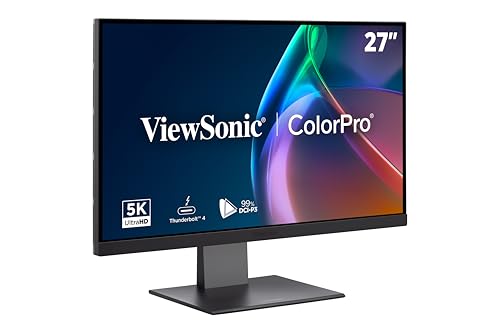
ViewSonic arrives with the fullest port list in the guide and the strongest power figure: Thunderbolt 4, USB-C, HDMI and DisplayPort are all printed, and power delivery is rated at 100W, the highest wattage any title here claims. For a Mac desk that also hosts a Windows machine, a visiting game console of the kind our guide to xbox Series S Monitors matches to its own screens, or a stream of visiting laptops, that port completeness ends the adapter era. Everything plugs into the monitor; the monitor plugs into the Mac; the desk’s cable population drops by half.
Colour paperwork is the other headline. The title claims 99 percent DCI-P3, one point above the BenQ’s P3 figure, adds an sRGB claim, and carries the words Pantone Validated, a certification that the panel’s colour reproduction has been assessed against Pantone’s own standards. For brand and print-adjacent work, where a client’s colour is a specific named ink, that validation is a credential the other titles here do not offer. HDR400 is also printed, an entry-level HDR tier stated plainly rather than dressed up.
The phrase Mac Ready does the positioning in two words, and the specification backs the phrase instead of merely wearing it: the right 5K class, the Thunderbolt connection Macs use natively, and power delivery with headroom to spare. An adjustable stand is stated without its axes, so the exact movements belong to the documentation check, and no refresh rate is printed, in keeping with this guide’s designer-first contingent. This is a colour and connectivity purchase, not a motion purchase.
Compared directly with the BenQ above, the trade is legible. BenQ prints density, uniformity, contrast and daisy chaining; ViewSonic prints ports, wattage, a point more gamut and the Pantone credential. A single-Mac studio may feel the BenQ’s uniformity argument more; a multi-machine, multi-OS desk will feel ViewSonic’s ports every single day. Neither is the other’s superior; they are answers to different desk inventories, which is exactly what a good guide should surface.
There is a longevity angle to port completeness that deserves emphasis. A monitor outlives the computers connected to it, often twice over. A panel with every current connection standard on its back panel is a panel that the next machine, whatever port it favours, can still drive at full quality. The 100W delivery similarly future-proofs the charging role, covering hungrier laptops than the one currently on the desk.
As the fourth pick, the VP2788-5K is the connectivity-and-colour maximalist of the true-5K group: every port named, the biggest wattage, a validated colour claim, and an HDR tier stated without inflation. Desks with many machines and exacting colour needs will find their specification already written, in this title, in full.
The Pantone credential deserves a precise reading, because it is easy to over- and under-rate. Validation means the panel’s reproduction of Pantone’s colour system has been tested against Pantone’s own criteria; it does not turn a monitor into a press proof, and nothing at this level does. What it does is move colour confidence from the manufacturer’s say-so to a third party’s test, and in client work, where a brand colour is a contractual object, that move has genuine professional weight.
Strengths
- Every major port is printed: Thunderbolt 4, USB-C, HDMI and DisplayPort
- 100W power delivery is the strongest charging figure in the guide
- Pantone Validated colour with 99% DCI-P3 serves brand-critical work
Trade-offs
- Stand movements are described only as adjustable, axes unstated
- No refresh-rate figure appears in the title
- HDR400 is an entry tier, whatever the colour credentials around it
Best for: a multi-machine desk seeking every port and the fullest colour paperwork together
Not suited for: a single-purpose desk seeking daisy chaining and uniformity claims instead
ViewSonic leaves almost nothing to verify, so Check price on Amazon to confirm the stand axes and the current listing details.

KTC 27in 5K Monitor
The value route to a stated 5120×2880
- Display size: 27 inch
- Resolution: 5120×2880, stated twice in the title
- Dual mode: 5K2K Dual Mode, per the title
- Ports: 65W Type-C port, HDMI and DisplayPort
- Compatibility: Mac mini named in the title
- HDR: HDR400
- Colour: 99% DCI-P3, 100% sRGB, ΔE<2 as stated
- Model: H27P3
KTC is the value entrant, and its title works harder than the bigger brands’ in one specific way: it states 5120×2880 twice. Whatever else is true of this panel, the grid is not in doubt; it is the full true-5K pixel count on a 27-inch screen, the same class as every pick above. The colour claims are printed too, 99 percent DCI-P3, 100 percent sRGB and a Delta E figure under 2, which on paper matches or beats the gamut paperwork of the premium names, at a positioning the title itself frames as the accessible route.
One phrase needs the guide’s honesty treatment: the title pairs that 5120×2880 grid with the words 5K2K Dual Mode. Read carefully, the sensible interpretation is a dual-mode arrangement, full 5K as the native grid with a 5K2K mode available, a feature pattern this guide has met on gaming panels that trade resolution for refresh. The title does not print the second mode’s refresh rate, so the documentation must confirm what the dual mode actually delivers before it is counted as a feature rather than a phrase.
Connectivity is complete on paper: a Type-C port with 65W, a wattage that covers most laptops’ needs if not the hungriest, plus HDMI and DisplayPort. The title names Mac mini compatibility explicitly, a useful signal for the many Mac mini desks in the same household class as the iMac audience, though iMac owners should note the naming and take it as general Mac-friendliness rather than a specific iMac claim. HDR400 is stated, the entry tier, consistent with the pick’s value positioning.
The smaller-brand calculus applies here as it did in the gaming guides, and it deserves plain statement: KTC’s specification per unit of money is aggressive, its printed colour claims are ambitious, and its long-term firmware and support depth is less proven than BenQ’s, ViewSonic’s or LG’s. None of that falsifies a single printed figure; it simply prices the risk honestly. A buyer comfortable verifying claims on arrival, and returning within the window if the panel disappoints, is the buyer this pick rewards.
There is a real audience for exactly this trade. Not every second screen serves colour-critical client work; many serve documents, code, browsing and video beside the iMac’s own superb panel, which remains the desk’s reference display. For that overflow-and-companion role, a true-5K grid with strong printed colour figures at a value position is a rational allocation, keeping the iMac’s screen as the quality anchor while the KTC doubles the workspace.
Judged as printed, then: the right grid, stated twice; colour figures that embarrass pricier titles; a dual mode that needs one documentation check; and a brand whose youth is the honest caveat. The value pick of the six, with its homework clearly labelled.
Setup advice specific to this pick: on arrival, before judging anything else, run the panel at its native grid for a full working day beside the iMac and compare the same documents on both. Value panels occasionally reveal their compromises in uniformity or in text rendering at small sizes, and the first day, inside the returns window, is when that discovery is free. If it passes that honest day, it will very likely pass the next thousand.
Strengths
- True 5120×2880 grid stated twice, with 99% DCI-P3 printed alongside
- 65W Type-C plus HDMI and DisplayPort cover a normal Mac desk fully
- Value positioning brings the 5K companion class within easier reach
Trade-offs
- The 5K2K dual mode’s refresh rate is not printed and needs verifying
- Colour claims are ambitious for the class and worth checking on arrival
- A younger brand’s support depth is less proven than the majors’
Best for: a workspace-first desk seeking a second true-5K screen at a value position
Not suited for: a client-colour workflow seeking a validation pedigree behind the gamut claims
KTC prints its grid twice but not its dual-mode rate, so Check price on Amazon and check that figure in the documentation.

ASUS ProArt PA32QCV
The 6K step-up, presented as exactly that
- Panel size: 32 inch
- Resolution class: 6K, per the title
- Colour: 98% DCI-P3, Calman Verified, Delta E<2 as stated
- Ports: Thunderbolt 4
- Panel treatment: LuxPixel AGLR
- Feature: MacBook Color Match, Auto KVM
- HDR: DisplayHDR 600
- Stand: Ergonomic stand
This final pick is not a 5K monitor, and the guide gains nothing by pretending otherwise. The ASUS ProArt PA32QCV is a 32-inch 6K panel, a higher grid than the iMac’s 5K, included deliberately as the step-up option for the reader whose second screen is allowed to out-resolve the first. A 6K canvas beside a 5K iMac gives the desk a new reference display: more room, more pixels, and a panel aimed squarely at professional colour work.
The ProArt credentials are the strongest creator paperwork in the guide. Calman Verified means the panel’s calibration has been assessed by the industry’s reference calibration house; Delta E under 2 is printed as the colour-accuracy figure; 98 percent DCI-P3 covers the gamut; and a feature named MacBook Color Match exists specifically to align the panel’s presentation with Apple’s own screens, which is precisely the anxiety an iMac household brings to a third-party display. DisplayHDR 600 adds a mid-tier HDR certification none of the true-5K picks above can match.
LuxPixel AGLR is ASUS’s anti-glare, low-reflection panel treatment, the glossy-versus-matte argument settled in favour of controlled rooms staying controlled. Thunderbolt 4 is the named connection, and Auto KVM switches the screen and peripherals between machines automatically as sources change, a quality-of-life feature that multi-Mac desks feel daily. The ergonomic stand is stated in general terms, its exact axes a documentation detail.
The matching question must be answered honestly for a 6K companion: its density differs from the iMac’s panel, so the two screens will not be pixel-identical twins the way the BenQ at a stated 218 PPI aims to be. macOS handles mixed-density pairs gracefully in practice, scaling each display on its own terms, but a buyer whose entire goal is a seamless twin should choose the twin. This ASUS is for the buyer whose goal quietly changed during the search, from matching the iMac to surpassing it.
Size compounds the step-up: 32 inches at 6K is a commanding main display, and many owners will find the iMac becoming the companion and this panel the primary, an inversion worth anticipating in desk planning and in where the good chair faces. That is not a flaw in the pick; it is the pick’s actual proposition, and it should be bought as such, with the desk arranged around it deliberately.
As a closing entry, the PA32QCV marks the top of the guide’s ambition ladder: true-5K companions below in every flavour from value to validated, and above them this, the screen for the reader who looked at matching the iMac, considered the paperwork, and decided the second screen should be the best screen in the house.
There is a cabling footnote to the step-up: a 6K Thunderbolt display is exactly the workload the Thunderbolt standard’s current generation was built for, and cable quality stops being a superstition at this bandwidth. Use the cable ASUS supplies or a certified equivalent of modest length, and the connection will be the least interesting part of ownership, which is what every owner of a reference display quietly wants.
Strengths
- 6K resolution steps above the iMac’s grid for a new reference display
- Calman Verified with Delta E under 2 and a MacBook Color Match mode
- DisplayHDR 600 and Auto KVM round out the strongest feature paperwork
Trade-offs
- A 6K panel is not a density twin for the 5K iMac it accompanies
- Thunderbolt 4 is the only connection the title names
- At 32 inches it may displace the iMac as the desk’s primary screen
Best for: a step-up desk seeking a 6K reference panel that out-resolves the iMac itself
Not suited for: a twin-matching desk seeking identical 218-class density across both screens
The ProArt is the step-up play, so Check price on Amazon to confirm the full port list beyond its named Thunderbolt 4.
Side-by-Side Comparison
| Pick | Size | Resolution | Refresh rate | HDR | Colour |
|---|---|---|---|---|---|
| LG UltraFine 27MD5KL-B | 27 inch | 5K UHD | Not stated in title | Not stated in title | IPS LCD |
| Samsung ViewFinity S8 | 27 inch | 5120×2880 | Not stated in title | HDR10 | Not stated in title |
| BenQ PD2730S | 27 inch | 5K, 218 PPI | Not stated in title | Not stated in title | 98% P3 |
| ViewSonic VP2788-5K | 27 inch | 5K | Not stated in title | HDR400 | 99% DCI-P3 |
| KTC H27P3 | 27 inch | 5120×2880 | Dual mode, rate not stated | HDR400 | 99% DCI-P3 |
| ASUS ProArt PA32QCV | 32 inch | 6K | Not stated in title | DisplayHDR 600 | 98% DCI-P3 |
What Makes the Best Monitors for iMac 5K Retina Display Match the Panel?
Density is a ratio, not a resolution. Pixels per inch comes from dividing the grid by the glass, which is why a 27-inch 5120×2880 panel lands in the same 218-class as the iMac’s display while a hypothetical 32-inch panel with the same grid would land lower and look softer beside it. This is the arithmetic that makes 27 inches the default size in this guide: at that diagonal, 5K and the iMac’s density are the same statement said two ways.
macOS adds a second layer, its scaling system, which renders the interface at a comfortable size while keeping applications at full panel density. A density-matched pair lets both screens share one scaling logic and one apparent text size, so a window dragged across the bezel arrives unchanged. A mismatched pair forces compromises that are individually small and collectively exhausting, which is why owners of lesser companions so often describe the second screen as the spare rather than the partner.
Colour matching follows the same philosophy. The Mac ecosystem grades in P3, so a companion claiming 98 or 99 percent of P3 is speaking the iMac’s native language, while an sRGB-only panel translates everything into a smaller vocabulary. The ASUS MacBook Color Match feature and the Pantone and Calman credentials elsewhere in the guide are all attempts at the same goal: two screens, one colour opinion.
Brightness agreement is the last piece of the matching puzzle, and it is set by eye, not by specification. Two panels at identical paper brightness can still present differently in a real room, so the ritual is empirical: the same image on both screens, the companion adjusted until the eye stops noticing a step as it crosses. Do it in the room’s normal light, at the hour you work most, and the match will hold for the hours that matter.
Which Connections Does a Mac Desk Actually Need?
One cable is the dream the titles are selling, and the wattage figures decide whether the dream holds. A Thunderbolt or USB-C connection carrying the picture plus 90 or 100 watts, as the BenQ and ViewSonic print, can run the display and charge a hungry laptop from a single lead. At 65 watts, the KTC covers most machines but may merely slow a big laptop’s discharge under load. Where a title prints no wattage, as LG’s and Samsung’s do here in full or in part, the documentation check is not optional; it is the purchase.
Daisy chaining and KVM switching are the second-order features that separate a panel from a hub. A daisy chain lets a third screen hang from the second, precious on Macs with limited ports. A KVM, manual on the BenQ and automatic on the ASUS, lets a work laptop and a personal machine share the display and its peripherals without a cable ritual twice a day. Households with one machine can ignore both features safely; households with two will wonder how they lived without them.
HDMI and DisplayPort, printed proudly by the ViewSonic and the KTC, matter for the non-Mac guests: a work-issued Windows laptop, a media box, a console visiting from the living room. The camera-minded mini owner can explore the neighbouring version of this desk problem in our guide to monitors for Mac Mini With a Camera, but for a Mac desk the rule is simple: Thunderbolt for the Mac, at a wattage you have verified, and at least one legacy port for everything else life brings home.
A word about cable length, the detail that ruins more tidy desks than any specification: measure the run from the Mac to the intended panel position before ordering, because high-bandwidth Thunderbolt cables are made short for signal reasons, and a companion screen placed beyond the cable’s honest reach forces either a desk rearrangement or a compromise in connection quality. The tape measure is part of the monitor purchase; treat it with the same seriousness as the gamut figures.
Should the Second Screen Ever Out-Spec the iMac?
The ASUS ProArt in this guide forces the question, and the honest answer is: sometimes, deliberately. A 6K, Calman Verified panel with a colour-match mode is not a companion in the twin sense; it is a promotion, making the standalone screen the desk’s reference and the iMac its satellite. For colour professionals whose deliverables are judged on the big screen, that inversion is not indulgence but workflow, and macOS handles the mixed densities without drama.
The costs are real and should be bought knowingly. A step-up panel breaks the pixel-twin elegance, asks more of the desk at 32 inches, and reframes the iMac, a superb machine, as the second screen in its own home. Buyers who mostly want more room for documents and code gain little from the promotion and should take a true-5K twin instead, at a friendlier position in the range.
The deciding question is which screen your eyes should trust. If the answer is the iMac’s, buy its twin and keep the hierarchy. If the answer is shifting, toward client colour work judged on the larger canvas, buy the step-up and arrange the desk around the new reference. Both decisions are respectable; the only disreputable one is drifting into a 6K purchase while telling yourself it is a matching exercise.
There is a middle path between twin and step-up that deserves naming, because many readers are quietly standing on it: buy the true-5K twin now for the match, and let the step-up question wait for the next iMac replacement cycle, when the whole desk’s hierarchy is renegotiated anyway. Screens outlast the plans made for them, and a faithful twin bought today remains a superb second screen in every future arrangement, including the one where a 6K panel eventually takes the centre.
Common Mistakes
Buying a 4K monitor as a Retina substitute. Beside a 5K iMac, a 4K panel’s lower density is visible in every line of text, and no amount of colour quality disguises the mismatch. The entire premise of this guide is that the grid must match or deliberately exceed; 4K does neither.
Ignoring the wattage behind a USB-C claim. A port’s existence and its power delivery are different facts, and titles print them separately when they print them at all. A laptop that drains while plugged into its monitor is a daily irritation purchased by skipping a two-minute documentation check.
Assuming two screens of the same size are the same density. Size and grid together make density, which is why the 32-inch 6K ASUS and a hypothetical 32-inch 5K panel are different propositions from the 27-inch 5K twins. Do the division before doing the deal.
Judging colour by a single gamut percentage. Gamut says how wide a panel’s colour vocabulary is; uniformity, Delta E and validations like Pantone and Calman say how truthfully it speaks. The strongest titles in this guide print several of those together, and the strongest purchases weigh them together too.
Placing the companion by symmetry instead of by use. Two screens arranged for a photograph, centred on the desk with the chair between them, serve neither screen’s owner; the primary display belongs directly in front of the chair and the companion angled beside it, even when the result looks less tidy. Ergonomics is measured in necks, not in pictures of desks, and a week of use will vote for the angled arrangement every time.
Frequently Asked Questions
Will a 5K monitor look identical to my iMac’s screen?
In density, the true-5K 27-inch picks match the iMac’s class, and the BenQ states the shared 218 PPI figure outright. In colour and finish, each panel has its own character, matte or treated surfaces differ from the iMac’s, and calibration narrows the gap further. Expect a convincing partnership rather than a clone, with the ASUS MacBook Color Match mode existing precisely to close the last of the distance.
What is the difference between Thunderbolt 4 and USB-C on these monitors?
Thunderbolt 4 is the stricter standard built on the same connector, guaranteeing data and display capabilities that a plain USB-C port may or may not carry in full. For a Mac desk, a printed Thunderbolt 4 claim, as on the BenQ, ViewSonic and ASUS here, is the surest single-cable promise. Where a title says only USB-C, the documentation decides what that port truly does.
How much power delivery does my setup need?
Enough to cover the hungriest machine you intend to charge through the screen. The guide’s printed range runs from 65W on the KTC to 100W on the ViewSonic, with the BenQ at 90W. Smaller laptops live happily at the lower figures; large performance laptops under load want the top of the range. An iMac itself, being a desktop, does not draw from the monitor at all, so the wattage question is about the laptops in the household.
Is the 6K ASUS overkill beside a 5K iMac?
As a matching exercise, yes; as a reference-display upgrade, no. It carries more pixels, the guide’s strongest calibration credentials and a colour-match mode aimed at Apple screens. Buy it to promote the second screen to primary status, with the desk rearranged accordingly, rather than to twin the iMac, a job the true-5K picks do more faithfully.
Does the KTC’s dual mode matter for an iMac desk?
Only if the second mode’s terms check out. The title pairs a stated 5120×2880 grid with a 5K2K dual-mode label and prints no refresh figure for it, so the manufacturer documentation must explain what the mode trades and gains. For document and design work the native grid is the whole story; the dual mode is a bonus to be verified, not a reason to buy.
Why do some titles omit refresh rate entirely?
Because these are professional panels whose buyers shop on colour and density, and title space is finite. The omission does not imply a poor figure, but it does mean the documentation holds the answer, and anyone hoping to game seriously on the second screen should retrieve it before ordering rather than after unboxing.
Can one of these monitors serve two Macs?
Yes, and two picks are built for it. The BenQ’s KVM shares the screen and peripherals between machines at a button press, and the ASUS Auto KVM switches as the active source changes. Add daisy chaining on the BenQ for a third display, and a two-Mac household can run a genuinely shared desk from a single panel.
Should both screens run the same scaling setting?
On a density-matched pair, yes, and that sameness is precisely the convenience the matching buys: one apparent text size, windows that keep their dimensions across the bezel, and no per-screen mental adjustment. Mixed pairs can be coaxed into cooperation with different settings per display, and macOS allows it, but the daily friction of the workaround is the tax this guide’s whole premise exists to avoid paying.
How wide a desk does a matched pair need?
Wider than instinct suggests. Two 27-inch panels side by side, the companion angled inward, occupy roughly a metre and a quarter of frontage once the iMac’s own stand and a keyboard’s working room are counted, and the 32-inch ASUS step-up asks for more again. Measure the desk before the delivery, not during it; a tape measure applied early has saved more monitor purchases than any review, including this one.
Final Recommendation
The twin brief has a clear paperwork winner and several honourable answers. The BenQ PD2730S states the density, the gamut, the contrast, the connector and the wattage, and adds uniformity, daisy chaining and a KVM; it is the most completely argued companion in the guide. The ViewSonic counters with every port, 100 watts and a Pantone credential, the LG remains the purpose-built original, and the Samsung the plainly stated professional option.
Between those poles, the Samsung and the KTC mark the guide’s honest middle: one stating its grid plainly from a professional line, the other stating its grid twice at a value position, each leaving a short, clearly labelled list of figures for the documentation to confirm. A guide’s job is not to make those checks disappear; it is to make them few, specific and known before the box is opened, and on that standard every pick here can be bought with a clear head.
The KTC holds the value end with its homework labelled, and the ASUS ProArt waits at the top for the reader who decides the second screen should out-rank the first. None of the six asks you to accept a lower density beside your iMac, which was the one unacceptable outcome when this search began.
Whichever panel earns the place, verify its one or two silent figures in the documentation, set the scaling once, and then enjoy the rarest sensation in monitor buying: a second screen that never once reminds you it is second, however many hours the two of them spend working side by side through the longest of working weeks in the year.