What's inside
- Key Takeaways
- Quick Picks
- How Did We Choose These Affordable Graphics Cards?
- What Does “Affordable” Actually Buy at Each Tier?
- Which Affordable Graphics Card Fits Your Library?
- What Should You Look at First When Comparing Affordable Cards?
- How Long Will an Affordable Card Stay Useful?
- Which Affordable Card Suits the Build You Are Actually Planning?
- How Do the Six Affordable Picks Compare Side by Side?
- How Should You Install and Set Up a Budget Graphics Card?
- Should an Affordable Build Choose NVIDIA or AMD?
- What Mistakes Do Budget Graphics Buyers Keep Making?
- How Much Does the Rest of the PC Matter at This Tier?
- What Should You Do in the First Week with a New Affordable Card?
- Final Recommendation
- Frequently Asked Questions
- Related Guides
As an Amazon Associate I earn from qualifying purchases. This post may contain affiliate links at no extra cost to you.
widgetverdict.com is reader-supported. When you buy through links on our site, we may earn an affiliate commission.
Where to buy: all six cards below are sold through Amazon, and each name in the quick picks table links to the exact listing whose title we checked. Stock on the older cards moves around, so open the listing itself rather than trusting a search-result thumbnail.
“Affordable” means something different in graphics cards than it does in almost any other PC part, and getting the best affordable graphics cards onto a shortlist starts with admitting that. A cheap processor still runs the same software as an expensive one, only slower. A cheap graphics card changes which games you can sensibly play, at which resolution, with which settings — the card draws a line through your library. The six cards in this guide sit on both sides of that line, deliberately. At the top stand two genuinely modern cards, an RTX 5060 and a Radeon RX 7600, that handle current releases at 1080p without apology and reach into 1440p with sensible settings. Below them sit two RTX 3050 6GB cards, the honest entry point to NVIDIA’s ray tracing and DLSS upscaling for builders whose budget stops earlier. And at the bottom, two much older designs — an RX 580 and an RX 550 — that still earn a place for the specific, narrower jobs they do well: older games, esports titles, second machines, and PCs that simply need a picture.
What this guide refuses to do is blur those tiers together. Every pick is labelled with the resolution and the kind of library it actually serves, because the most expensive mistake in budget graphics is not overspending — it is buying a card one tier too low for the games you own, then buying again within the year. Read the tier descriptions before the product names. If your library is current releases, your shortlist is the top three cards here. If it is a back catalogue and a handful of competitive titles, the cheaper half of this list stops being a compromise and starts being the sensible purchase.
Key Takeaways
- The ASUS TUF RTX 5060 is the only card here we would hand to someone building for current releases without a follow-up question about their library.
- ASRock’s RX 7600 Challenger Pro counters with 8GB of GDDR6, a triple-fan cooler and a 2695MHz boost clock for buyers who prefer AMD’s raster value.
- Both RTX 3050 6GB cards trade memory capacity for access to DLSS and modern drivers; they suit 1080p play in slightly older or lighter titles.
- The MOUGOL RX 580’s 8GB of memory keeps old favourites comfortable, but its architecture belongs to an earlier era of efficiency.
- MAXSUN’s RX 550 is a display card with light gaming ability, not a budget gaming card — buy it for the job it actually does.
- Memory capacity is the quiet dividing line in this class: 8GB is the floor for new releases, 6GB demands settings discipline, 4GB belongs to older games.
Quick Picks
| Pick | Badge | Why it is here |
|---|---|---|
| ASUS TUF Gaming GeForce RTX 5060 8GB | Best Overall | The newest architecture in the guide, GDDR7 memory and a heavy-duty 3.1-slot cooler make it the affordable card with the longest useful life. |
| ASRock Radeon RX 7600 Challenger Pro 8GB | Best AMD Value | RDNA 3 silicon, a triple-fan cooler that idles silently and the highest stated boost clock in this line-up. |
| MSI GeForce RTX 3050 Ventus 2X 6G OC | Best Tight-Budget NVIDIA | A compact twin-fan route into DLSS and ray tracing for 1080p libraries that lean older or lighter. |
| GIGABYTE GeForce RTX 3050 Windforce OC 6G | Best Compact Alternative | The same 6GB formula in GIGABYTE’s Windforce twin-fan dress, for builders loyal to that cooler family. |
| MOUGOL Radeon RX 580 8GB | Best Legacy Bargain | A full 8GB frame buffer and a 256-bit bus keep last decade’s favourites smooth at 1080p. |
| MAXSUN AMD Radeon RX 550 4GB | Cheapest Way to a Picture | An ITX-sized card that adds displays and light esports play to a PC with no graphics output of its own. |
How Did We Choose These Affordable Graphics Cards?
Affordability alone admits hundreds of listings, most of them old stock wearing new product pages, so the first filter was honesty of purpose: every card here had to have a job it still does properly in a current PC. That eliminated the anonymous no-name boards built on decade-old chips with misleading names, and it eliminated several cards whose only argument was a low number on the listing. What survived had to clear three further bars. The driver story had to be alive — a card abandoned by its manufacturer’s current driver branch becomes a liability the first time a game or Windows update moves on. The memory configuration had to match the job we assign it, because a generous core strapped to a starved frame buffer ages badly. And the cooler had to be a real design from a recognisable board partner, with fans and a shroud proportioned to the chip underneath, not a decorative shell.
Within that filtered field we ranked by tier rather than by tiny differences between near-identical boards. Two listings here share the RTX 3050 6GB chip, and we kept both because board partner, cooler and case fit genuinely differ between them, and because at this end of the market availability decides as many purchases as specification does. Specifications quoted in the mini spec boxes come from the verified listing titles themselves — memory size and type, bus width, boost clock where the title states it, interface and slot format. Where a title does not state a figure, the box leaves it out rather than borrowing a number from a different board using the same chip, because clock speeds and power limits are set by the partner, not by the chip’s name.
What Does “Affordable” Actually Buy at Each Tier?
The top tier, occupied by the RTX 5060 and RX 7600, is where current releases live. These are cards designed in the present generation’s terms: fast GDDR memory, modern video encoders, upscaling that is a feature rather than a rescue measure, and enough rendering muscle that 1080p at high settings is the default expectation rather than the optimistic one. A builder who plays new games on release weekend belongs here, full stop — the saving from dropping a tier is repaid, with interest, in settings menus.
The middle tier, the RTX 3050 6GB pair, is the tier of the back catalogue plus the present’s lighter half. Competitive titles, remasters, indie releases and the enormous library of games from five to ten years ago run well here, and DLSS stretches the card further in the titles that support it. What this tier cannot do is promise the same treatment to next year’s heaviest releases; 6GB of memory is the binding constraint, and it binds harder every season. Buy it with your eyes open and it is a fair trade of money for scope.
The bottom tier is not failed gaming hardware — it is hardware from an era when 1080p medium was the whole ambition, plus one card, the RX 550, that was always a display adapter first. The RX 580’s 8GB buffer remains genuinely useful for the games of its period and the esports titles that never stopped being popular. The RX 550 answers a different question entirely: a processor with no integrated graphics, a motherboard with the wrong outputs, a second PC that needs two monitors. Judged on those questions, both cards succeed. Judged on this year’s releases, both were retired years ago, and this guide will not pretend otherwise in their individual sections.
Which Affordable Graphics Card Fits Your Library?

ASUS TUF Gaming GeForce RTX 5060 8GB — Best Overall
The TUF RTX 5060 is the card that makes the word “affordable” stop requiring an asterisk. Its 8GB of GDDR7 memory is the fastest memory fitted to anything in this guide, and GDDR7’s bandwidth matters precisely at the settings affordable cards usually surrender first — texture quality and resolution scaling headroom. The RTX 5060 chip brings NVIDIA’s current-generation feature set with it: the latest DLSS upscaling generation, ray tracing hardware several revisions removed from the RTX 3050s further down this page, and a modern media engine for anyone whose PC also records or streams their play. For a buyer whose alternative is stretching a mid-tier card across five years, this is the purchase that postpones the next one longest.
ASUS builds the TUF version like it expects the card to be judged in a decade. The cooler occupies 3.1 slots, which is a serious claim on a small case’s interior, and in return it gives the chip a large, slow-turning thermal solution of the kind that stays quiet under sustained load rather than merely surviving it. The listing title’s “military-grade” language refers to component choices ASUS makes across the TUF line — the practical translation is a board built with durability as a stated design goal, backed by the PCIe 5.0 interface and HDMI and DisplayPort 2.1 outputs that will not be the reason a future monitor upgrade stalls. Measure your case before ordering; a 3.1-slot card in a case that fits 2.5 is not a tight fit, it is a non-fit, and the card’s one real demand is room.
- Memory: 8GB GDDR7
- Interface: PCIe 5.0
- Outputs: HDMI and DisplayPort 2.1
- Format: 3.1-slot, TUF Gaming OC Edition board
Strengths
- Current-generation architecture with the newest DLSS and ray tracing hardware in this guide.
- GDDR7 bandwidth gives its 8GB more working room than the same capacity in older memory.
- The oversized TUF cooler trades case space for quiet, sustained clocks.
Trade-offs
- 8GB still asks for judgement at 1440p in the heaviest texture loads.
- A 3.1-slot cooler rules out genuinely small cases.
- It costs the most here by a clear margin over the 3050 pair.
Best for: builders playing current releases at 1080p who want one purchase to last. Skip it if your case is compact or your library is entirely older titles — the tiers below exist for you.

ASRock Radeon RX 7600 Challenger Pro 8GB — Best AMD Value
ASRock’s Challenger Pro takes the RX 7600 — AMD’s RDNA 3 design for exactly this market — and dresses it in a cooler that belongs a class higher. Three fans across the card, a stated boost clock of 2695MHz, and a 0dB silent mode that stops the fans entirely when the card is idling or handling desktop work: that specification reads like a card with something to prove, and in raw rasterised gaming, the traditional rendering that still dominates most libraries, the RX 7600’s argument is frames per unit of money. AMD’s FSR upscaling covers the titles where native 1080p needs help, and the card reaches into 1440p in lighter games more convincingly than anything cheaper on this page.
The honest boundaries are two. Ray tracing is present but is not this architecture’s strength; a buyer whose favourite games lean heavily on ray-traced lighting will feel the difference against the NVIDIA cards here. And the 8GB of GDDR6 rides a narrower memory path than the RTX 5060’s GDDR7, so texture-heavy scenes at higher resolutions lean sooner on settings reductions. Neither point dents the card’s actual proposition. ASRock is a board partner that treats the Challenger line as its value flagship, the triple-fan cooler gives the silicon thermal headroom that two-fan rivals in this class often lack, and PCIe 4.0 support means it slots into the enormous installed base of slightly older motherboards without negotiation.
- Memory: 8GB GDDR6
- Architecture: AMD RDNA 3
- Boost clock: 2695MHz (as stated in the listing title)
- Interface: PCIe 4.0
- Cooling: triple fans with 0dB silent mode
Strengths
- Strongest raster performance argument in the guide relative to its tier.
- Triple-fan cooler with fan-stop behaviour is unusual at this level.
- PCIe 4.0 fits the older motherboards budget builders actually own.
Trade-offs
- Ray tracing performance trails the NVIDIA options here.
- GDDR6 bandwidth caps its 1440p ambitions sooner than the 5060’s GDDR7.
- FSR, while widely supported, is not in every title DLSS reaches.
Best for: raster-focused 1080p players and light 1440p explorers who value cooler quality. Skip it if ray-traced lighting in current releases is the centre of your library.

MSI GeForce RTX 3050 Ventus 2X 6G OC — Best Tight-Budget NVIDIA
Understand what the 6GB RTX 3050 is and it becomes easy to recommend for the right desk. NVIDIA cut this version of the chip for the entry market: 6GB of GDDR6 running at 14 Gbps across a 96-bit bus, with MSI’s listing stating a 1492MHz boost clock. That memory system is the card in one sentence — enough for 1080p at moderate settings in the enormous library of games from the last decade and the lighter half of the current one, not enough to promise texture quality in the newest heavy releases. What the card adds over the older designs below it is the modern NVIDIA software story: DLSS upscaling that can rescue a demanding title’s frame rate by rendering internally lower and reconstructing, ray tracing hardware for the games that offer it as an option rather than a requirement, and a place in the current driver branch.
MSI’s Ventus line is the company’s straightforward, no-decoration board family, and the 2X twin-fan cooler suits the chip’s modest thermal output without pretending to be more than it is. The card’s compact footprint is its quiet virtue: builds in older or smaller cases, office PCs being promoted into light gaming duty, and second machines are exactly where a full-length flagship cooler cannot go and this card can. Buyers should simply be clear-eyed that the “OC” in the name is a factory overclock of degrees, not a different card — the tier is set by the 6GB buffer and the 96-bit bus, and within that tier this is a cleanly executed example from a major board partner.
- Memory: 6GB GDDR6, 14 Gbps, 96-bit bus
- Boost clock: 1492MHz (as stated in the listing title)
- Cooling: Ventus 2X twin-fan design
- Features: DLSS upscaling and ray tracing support
Strengths
- DLSS gives it a recovery tool the older cards in this guide lack.
- Compact twin-fan board fits cases the top two picks cannot.
- Current driver support keeps new Windows and game updates uneventful.
Trade-offs
- 6GB and a 96-bit bus cap texture settings in recent heavy releases.
- Ray tracing is usable only with restraint and usually with DLSS helping.
- Two listings in this guide use this same chip, so compare cooler and availability.
Best for: 1080p players whose libraries lean older, lighter or competitive, in cases of any size. Skip it if this year’s biggest releases at high settings are the plan.

GIGABYTE GeForce RTX 3050 Windforce OC 6G — Best Compact Alternative
Two cards built on the same chip earn separate places in a guide when the reason to choose between them is real, and here it is: GIGABYTE’s Windforce cooler is a long-running design family with its own habits — fans tuned as a counter-rotating pair in this cooler lineage to smooth airflow where the two fans meet, and a board layout that has made Windforce cards a default recommendation in small and mid-sized cases for years. The silicon story matches the MSI above: 6GB of GDDR6 on a 96-bit interface, DLSS in the software stack, ray tracing available at sensible settings, and a performance envelope aimed at 1080p in the broad middle of the games library rather than its cutting edge.
Why list both? Because at the affordable end, the deciding factors are often embarrassingly practical: which card is actually in stock this week, which one fits the clearance between your drive cage and the front panel, which board partner’s warranty process you already know. GIGABYTE’s V2 revision of this board, noted in the listing title, reflects the small running changes partners make across a card’s production life. Judge this pick on the same terms as its twin — it is a modern-featured entry card with a well-known cooler, and a builder who finds this one available and the MSI gone has lost nothing by taking it. What neither 3050 can do is change the tier maths: 6GB is 6GB, and the settings discipline described above applies identically.
- Memory: 6GB GDDR6, 96-bit bus
- Cooling: 2X WINDFORCE fan system
- Revision: V2 board (GV-N3050WF2OCV2-6GD)
- Features: DLSS upscaling and ray tracing support
Strengths
- Windforce is a proven cooler family with predictable behaviour in small cases.
- Same modern NVIDIA software stack as the MSI, including DLSS.
- A genuine second source when one 3050 listing is unavailable.
Trade-offs
- Identical memory ceiling to the MSI — 6GB across 96 bits.
- Performance differences versus its twin are cooler-deep, not chip-deep.
- New heavy releases will still demand settings compromises.
Best for: builders who want the 3050 tier in GIGABYTE’s cooler, or who find it the available one. Skip it for the same reasons you would skip its twin — a current-release library deserves the top tier.
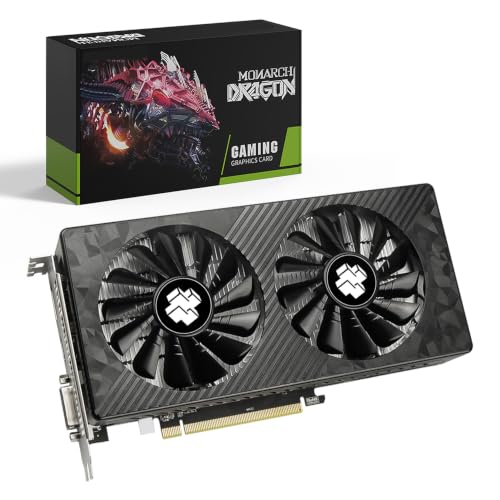
MOUGOL Radeon RX 580 8GB — Best Legacy Bargain
The RX 580 is a design from 2017, and this guide includes it without embarrassment because the games of its era did not stop being good when the hardware moved on. MOUGOL’s board carries the full configuration: 8GB of GDDR5 across a 256-bit bus with 2048 stream processors, outputs spanning HDMI, DisplayPort and DVI, and a PCIe 3.0 interface that drops into practically any desktop built in the last twelve years. For the library it was designed for — the big releases of the mid-to-late 2010s, the esports titles that still fill servers, the indie catalogue — that memory capacity and bus width remain a comfortable match, and 1080p play in those games is a settled, known quantity rather than a hope.
The terms of the bargain need stating plainly. This architecture predates modern upscaling entirely; there is no DLSS or hardware ray tracing here, and AMD’s driver attention has long since moved to newer generations, so a buyer is purchasing a finished product, not a developing one. The design also draws its performance from an older, thirstier process generation than the cards above it — the practical consequence is more heat in the case and a power supply question worth asking in a very old machine, not a number we will invent here. MOUGOL is a smaller brand than the partners above, which places more weight on checking the individual listing carefully. Within those terms, for a second PC, a child’s first gaming machine stocked with classics, or a media-and-games box for the living room, the RX 580’s 8GB remains a rational purchase that the display cards below cannot imitate.
- Memory: 8GB GDDR5, 256-bit bus
- Stream processors: 2048SP (as stated in the listing title)
- Interface: PCIe 3.0 x16
- Outputs: HDMI, DisplayPort and DVI
Strengths
- 8GB of memory is more than the newer 3050 pair carries.
- The games of its era run at 1080p without settings anxiety.
- DVI output keeps older monitors in service without adapters.
Trade-offs
- No modern upscaling and no ray tracing hardware at all.
- An older, less efficient architecture that warms a small case.
- Driver development has moved on; treat it as finished hardware.
Best for: classic libraries, esports staples and second PCs at 1080p. Skip it if anything in your library released recently — the 3050 tier exists precisely for that step up.

MAXSUN AMD Radeon RX 550 4GB — Cheapest Way to a Picture
Last on this page and first in one specific queue: the machine that has no picture at all. A large class of processors ships without integrated graphics, and when one of those sits in a motherboard with tired outputs, a PC can be perfectly healthy and perfectly blind. MAXSUN’s RX 550 answers that problem in ITX form — a short, compact board with 4GB of GDDR5 on a 128-bit bus, DirectX 12 support and a PCIe 3.0 x16 interface, sized for the small-form-factor cases where a full-length card physically cannot go. It gives a desktop modern display outputs, multi-monitor ability, and hardware that handles desktop work, video and everyday applications without borrowing system memory the way integrated solutions do.
Its gaming ability is real but narrow, and this guide will describe it at its true size: older titles, very light indie games, and esports games run at reduced settings and resolutions are within reach; anything resembling a modern release is not, and no settings menu changes that. The listing title calls it a gaming card, as listings do, but the honest shelf for the RX 550 is beside the GT-series display cards in our under-200-dollars guide. Buyers choosing between this and the RX 580 above should decide by library, not by the small price gap: displays and light duty point here, an actual back catalogue of 3D games points up the page. As the cheapest route to a working, multi-monitor desktop, though, the RX 550’s proposition is complete in itself.
- Memory: 4GB GDDR5, 128-bit bus
- Format: ITX-sized compact board
- Interface: PCIe 3.0 x16
- Support: DirectX 12
Strengths
- ITX length fits small cases that exclude every other pick here.
- Dedicated 4GB memory leaves system RAM entirely to the PC.
- Solves no-display and multi-monitor problems in one slot.
Trade-offs
- Gaming reach ends at older and very light titles.
- An ageing architecture with a finished driver story.
- The RX 580 above serves game libraries far better for the step up.
Best for: display duty, office and home PCs, and small cases needing outputs. Skip it if games beyond the lightest are the purpose — that is the RX 580’s job, or the 3050s’ above it.
What Should You Look at First When Comparing Affordable Cards?
Start with the generation, because generation is the one specification that quietly contains all the others. A card’s generation decides its driver future, its upscaling technology, its video encoder, its efficiency and the instruction set its silicon speaks. Two cards with identical memory sizes and similar names can be separated by six years of engineering, and the market prices them confusingly close together because the older card’s listing was written to catch the same searches. The practical test takes ten seconds: find the architecture’s launch era. Anything from the current or immediately previous generation is a developing product with years of driver attention ahead. Anything two or more generations back is a finished product — which, as the RX 580’s section argues, can still be the right purchase, but should be made knowingly, at a finished product’s price.
Memory comes second, and it must be read as a system rather than a number. Capacity is the headline — 8GB, 6GB, 4GB in this guide’s descending order — but the bus width and memory type decide how fast that capacity can be reached. The RTX 3050’s 6GB sits behind a 96-bit bus, which is why it behaves like a 1080p card despite a modern chip. The RX 580’s 8GB sits behind a 256-bit bus of an older memory type, which is why it feeds its era’s games so comfortably. The RX 550’s 4GB of GDDR5 is worth more, frame for frame, than a hypothetical 8GB of slow DDR memory would be. Buyers who learn to read the three figures together — capacity, bus, type — will never be fooled by a listing again, because listings are engineered to be read one figure at a time.
Third, read the cooler as a promise about noise. At the affordable end, the difference between two boards on one chip is mostly the difference between their coolers, and the cooler decides whether the PC is a machine you sit beside happily. Twin fans are the class standard and are adequate for every chip in this guide. Triple fans, like the ASRock’s, buy lower speeds and lower noise under the same load. Fan-stop behaviour — the 0dB mode in the RX 7600’s title — buys silence at the desktop, where these PCs spend most of their lives. None of this appears in a frame rate, and all of it appears in your evenings. A buyer choosing between the two RTX 3050 boards in this guide is, in truth, choosing a cooler and a maker; the silicon has already been chosen for them.
Fourth, check the outputs against the monitors you actually own, including the old one you keep meaning to replace. The RX 580’s DVI socket looks like an antique until the day it saves a perfectly good older monitor from an adapter chain. The RTX 5060’s DisplayPort 2.1 looks like future-proofing until you realise your next monitor will assume it. Outputs are the least glamorous line in any spec box and the one most likely to generate a second order — for a cable, an adapter, or a different card — when it is ignored. The same applies, with interest, to physical size: slot count and card length are specifications, and the 3.1-slot TUF card’s section states its demand openly because a card that does not fit has a performance of exactly zero.
Fifth, consider the power supply you already have, in the general terms this class allows. Newer architectures do their work with notably better efficiency than the designs they replaced, which is one of the quiet arguments for the RTX 5060 and RX 7600 at the top of this guide: they ask less of an ageing supply while delivering more. The older cards are not unreasonable — the RX 580’s generation simply predates the efficiency push — but a very old or very small power supply is a legitimate reason to prefer a newer, thriftier card, or to budget for a supply alongside the card rather than discovering the pairing’s limits under load. The check costs nothing: read the supply’s label, note its age and capacity class, and let that information sit beside the card’s tier in your decision.
Finally, weigh the maker’s warranty and the listing’s clarity as part of the product. At this end of the market, the difference between a major board partner and an unfamiliar name is not performance — it is what happens in month fourteen. ASUS, ASRock, GIGABYTE and MSI run established support operations; the smaller brands in this guide, MOUGOL and MAXSUN, ask the buyer to lean harder on the marketplace’s own protections and on a careful reading of the individual listing at purchase time. That is not a reason to refuse them — the RX 580’s value case depends on its maker being small — but it is a reason to screenshot the listing, keep the box, and buy with the return window in mind. Affordable hardware rewards the organised buyer.
How Long Will an Affordable Card Stay Useful?
The honest answer is that usefulness is library-shaped. A card stays useful for exactly as long as the games you play remain within its competence, which is why two buyers can purchase the same RTX 3050 on the same day and get two and six years of service respectively — the first chasing new releases, the second working through a decade of classics. This is also why the tier structure of this guide matters more than any individual recommendation in it. The buyer who knows their library’s newest title can locate their tier in one step: current releases point to the top two cards, a library centred five years back points to the 3050s, a library of classics points to the RX 580, and a library that is mostly a desktop points to the RX 550 without any apology required.
Three forces shorten a card’s useful life, and a buyer can see all three coming. The first is memory pressure: texture sizes grow with each release cycle, and the card’s buffer is the wall they eventually hit — the force that makes 8GB the guide’s recommended floor for new-release players. The second is feature drift: new games increasingly assume current upscaling and, occasionally, current ray tracing hardware, so a card outside the current driver and feature branch ages faster than its raw speed suggests. The third is driver attention itself, which follows the manufacturers’ current lines and thins, politely and inevitably, for the finished products. None of these forces operates on a schedule a guide can print. All three argue for the same behaviour: buy the tier your library needs today, with one eye on the direction it is drifting, rather than the tier a benchmark table flatters.
There is also a resale and hand-me-down economy to affordable cards that flagship buyers never enjoy. A well-kept RTX 3050 or RX 7600, retired from a main machine in three years, is exactly the card a child’s first PC or a living-room box will want, and the market for such cards is deep precisely because their competence is so well mapped. The RX 580’s presence in this guide, eight years after its architecture launched, is that economy made visible: cards at this level do not die, they descend — from main machine to second machine to media box — and a buyer who purchases a recognised board from a recognised maker is buying every step of that descent at once. It is the least measurable argument in this guide and, for many households, the most real one.
Which Affordable Card Suits the Build You Are Actually Planning?
Consider four common builds and watch the tiers choose themselves. The first is the new budget gaming PC, assembled this year around a current processor and a 1080p monitor, intended to play new releases on the weekends they launch. Its card is the RTX 5060 if the budget reaches and the RX 7600 if it does not, and no other card in this guide should be allowed to talk it down a tier — the saving is small against the machine’s whole cost, and the settings compromises begin immediately. The second build is the same machine specced by a player whose library is a rolling five-year window rather than this season’s chart. That player’s honest card is a 3050, either board, and the money released belongs in storage or the monitor, where it will be felt every day rather than in frames the library never requests.
The third build is the revival: an older family PC, a hand-me-down tower, a machine whose processor was respectable some years ago and whose owner wants it gaming again for a younger player. Revival builds are the RX 580’s natural parish — its PCIe 3.0 interface and DVI output speak the old machine’s language fluently, and its library is the one a younger player should be introduced to anyway. The fourth build is not a gaming build at all: the home office PC around a graphics-less processor, the media machine, the second desk. Its card is the RX 550, bought for outputs and quiet competence, and any money spent above it on gaming capability is money spent on a machine that will spend its life in spreadsheets. Four builds, four different correct answers, one guide — the tier was never a ranking of worth, only a matching of intent.
A last scenario deserves its sentence because it arrives in every generation: the emergency replacement, where a card has died and the machine must work tonight. The emergency buyer should buy the tier they were already in, or the RX 550 as a bridge if funds are mid-gathering, and resist the panic upgrade — a card bought in a hurry at the wrong tier is the most expensive kind there is, because it will be bought twice like all the others.
How Do the Six Affordable Picks Compare Side by Side?
| Pick | Memory | Bus | Interface | Honest role |
|---|---|---|---|---|
| ASUS TUF RTX 5060 | 8GB GDDR7 | Not stated in listing title | PCIe 5.0 | Current releases at 1080p, some 1440p |
| ASRock RX 7600 Challenger Pro | 8GB GDDR6 | Not stated in listing title | PCIe 4.0 | Raster 1080p strength, light 1440p |
| MSI RTX 3050 Ventus 2X 6G | 6GB GDDR6 | 96-bit | PCIe | 1080p back catalogue with DLSS |
| GIGABYTE RTX 3050 Windforce 6G | 6GB GDDR6 | 96-bit | PCIe | 1080p back catalogue with DLSS |
| MOUGOL RX 580 | 8GB GDDR5 | 256-bit | PCIe 3.0 | Classic-era 1080p and esports |
| MAXSUN RX 550 | 4GB GDDR5 | 128-bit | PCIe 3.0 | Displays first, lightest games second |
Read the table by the memory column and the pattern of the whole guide appears: capacity decides the library, and memory generation decides how gracefully that capacity is used. The RTX 5060’s GDDR7 moves data far faster than the RX 580’s GDDR5 despite both cards carrying 8GB, which is why equal numbers in one column do not mean equal cards. The 3050 pair shows the opposite lesson — a modern chip on a narrow 96-bit bus is a deliberate balancing act, fine at 1080p, exposed at higher resolutions. If your shortlist crosses tiers, decide by the newest game you genuinely intend to play, not by the average of your library; the average game forgives, the newest one invoices.
How Should You Install and Set Up a Budget Graphics Card?
Begin before the card arrives: open your case, measure the clearance from the expansion slot to whatever the card’s cooler would meet — drive cage, front fan, cable bundle — and check your power supply for the connector situation the listing describes, since boards differ. With the PC off and unplugged, seat the card fully in the top PCIe x16 slot until the retention latch closes, secure the bracket screw, and connect the display cable to the card rather than the motherboard; that last step sounds too obvious to write down and remains the single most common reason a new card appears to do nothing. A PC that keeps using integrated graphics because the monitor is plugged into the wrong port has embarrassed more builders than any driver issue.
Software comes second. Download the current driver from NVIDIA or AMD directly rather than trusting the disc-era habit of installing whatever a listing links to, choose the clean installation option if you are replacing a card from the other manufacturer, and reboot before judging anything. Then open one game you know well and set it deliberately: resolution at your monitor’s native figure, textures one notch below your instinct, upscaling on if the title offers it. A budget card rewards five minutes of honest settings work with years of stable performance, and punishes the “ultra everything” default with exactly the stutter that makes buyers wrongly conclude the card is faulty.
Should an Affordable Build Choose NVIDIA or AMD?
The tribal version of this question is unanswerable and the practical version is easy, because at the affordable tier the two makers are selling genuinely different bundles. NVIDIA’s bundle, represented here by the RTX 5060 and the two 3050s, leans on software: DLSS upscaling with the widest support in current games, ray tracing hardware that leads its class, and an encoder story that matters to anyone who records or streams. AMD’s bundle, represented by the RX 7600 and the two older Radeons, leans on hardware generosity: strong traditional raster performance for the money, memory configurations that have historically been the more generous at a given tier, and coolers — at least in ASRock’s hands here — that punch above their class. Neither bundle is the correct one. Your library’s habits are the correct one, and they are knowable: count how many of your games use ray tracing meaningfully, how many support DLSS or FSR, and whether you ever record your play. The answers pick the maker more reliably than any review can.
Upscaling deserves its own paragraph because at this tier it is not a garnish — it is load-bearing. A budget card’s native performance is a fixed quantity, but its upscaled performance is a multiplier applied in every supported title, and the multiplier’s quality decides whether the feature is a lifeline or a last resort. DLSS, in its current generation on the RTX 5060 and its earlier form on the 3050s, is the more polished reconstruction, and its support list across recent releases is long. FSR’s counter-argument is reach: it appears in a wide spread of titles and asks nothing about which card you own. At 1080p, the resolution this guide’s cards call home, both techniques work with less source material than they enjoy at higher resolutions, so the quality mode settings are the sensible defaults and the aggressive performance modes should be treated as emergency measures. A buyer whose three favourite games all speak one dialect has been given their answer by their own shelf.
One more consideration belongs to households rather than libraries: the second screen and the second job. Many affordable cards spend half their lives doing non-gaming work — driving a television for films, accelerating a browser, feeding a capture or a stream. NVIDIA’s encoder heritage makes its cards the default suggestion for buyers who stream their play, while AMD’s cards have their own loyalists for pure raster value. The honest summary is that at this tier, the makers differ at the margins of features while agreeing on the centre: 1080p gaming, honestly tiered, at prices that leave money for the rest of the machine. Choose the margin that matches your habits and do not relitigate it afterwards — the card will be too busy being useful.
What Mistakes Do Budget Graphics Buyers Keep Making?
The first is shopping by the chip name alone. “RTX” spans cards separated by multiples of performance, and an RX 580 and an RX 7600 share almost nothing but a naming scheme; the generation and the memory system are the card, the badge is the envelope. The second mistake is mirror-image thinking about memory: assuming 8GB on a 2017 card equals 8GB on a current one, when bandwidth and architecture make them different substances entirely. Third is ignoring the case. Two of the six cards here exist specifically because coolers have physical dimensions, and a card returned for fit reasons helps nobody.
Fourth, buyers of the older cards forget the finished-product bargain: no new features will arrive, driver updates will thin out, and that is acceptable only when the purchase was made for the library the card already serves. Fifth, and most quietly expensive, is buying one tier too low for a library that includes new releases — the saving is real but so is the second purchase, and it usually arrives within a year, at which point the cheap card was the expensive one. This guide’s tiers are drawn where they are so that mistake is hard to make by accident.
How Much Does the Rest of the PC Matter at This Tier?
More than card marketing admits, and less than forum arguments claim. A graphics card does not render in isolation: the processor feeds it, the system memory holds the world it draws from, and storage decides how quickly that world arrives. At the affordable tier the practical consequence is balance. A current card like the RTX 5060 dropped into a genuinely elderly machine will spend part of its life waiting for the processor in simulation-heavy and competitive titles, and the owner will blame the card for a ceiling that lives elsewhere. The same money divided between a tier-lower card and a processor upgrade can produce the faster machine. This is not an argument against the top tier — it is an argument for reading your own PC before reading this guide’s table, and for remembering that the card is one line in a system, not the system itself.
The monitor deserves the same honesty. Every card in this guide was tiered against 1080p, because that is the resolution affordable gaming overwhelmingly happens at — but a buyer running a high-refresh 1080p panel is asking a different question from a buyer on a 60Hz screen, and a buyer with a 1440p monitor should be reading our 1440p guide instead of stretching this one. Refresh rate is a frame-rate order the card must fill; resolution is a pixel order; the pair of them together is the actual job description. State yours before you shop, and the tiers in this guide stop being a ranking and become a matching exercise — which is all a good guide ever is.
What Should You Do in the First Week with a New Affordable Card?
Run the library, not a benchmark. Open the three games that made you buy the card, at your monitor’s native resolution, and play them the way you actually play — a benchmark’s score will be forgotten by Friday, but the lived answer to “does it run my games the way I hoped” is the purchase’s real verdict. Note the settings each game settles at, because that notebook page is your card’s true specification, written in your own library’s language. Check the machine’s manners under a long session while you are there: a cooler that stays composed, a case that does not turn into a radiator, a second screen that behaves. If anything disappoints, the return window is the time to learn it, and a tier adjustment made in week one costs a parcel; made in month six, it costs a card.
Final Recommendation
Buy the tier your newest game demands and let the older games take care of themselves — they always do. The TUF RTX 5060 is the recommendation for anyone whose library includes the present; the RX 7600 Challenger Pro is its raster-minded AMD counterpart; the two RTX 3050s serve the back catalogue with modern software manners; the RX 580 remains the connoisseur’s bargain for the classics; and the RX 550 is a display card wearing its heart on its sleeve. For this guide’s money, the sweet purchase is the one at the tier boundary you actually live on — and if that boundary is tonight’s new release, the 5060’s GDDR7 and long driver future make it the affordable card that stays affordable longest, because you will not be replacing it next year.
Frequently Asked Questions
How much memory does an affordable graphics card need in practice?
For current releases at 1080p, 8GB is the working floor, and the cards at the top of this guide carry exactly that. Six gigabytes remains serviceable for older and lighter libraries with texture settings managed honestly. Four gigabytes belongs to display duty and the lightest games. The number matters because textures are the first thing a starved card sacrifices, and they are the setting players notice most.
Is the RTX 3050 6GB still worth buying?
Yes, for the library it was built for: the last decade’s games, competitive titles and lighter current releases at 1080p, with DLSS available as a genuine performance tool in supported games. It is not worth buying as a discounted route into this year’s heaviest releases, because its 6GB buffer and narrow bus were never aimed there. Two board partners offer it in this guide; choose on cooler, fit and availability.
Can an RX 580 still run modern games?
It can start many of them, which is a different claim from running them well. The RX 580’s 8GB buffer helps it at 1080p with reduced settings in less demanding current titles, but the architecture predates modern upscaling, and its driver story is finished. Buy it for the classics and esports titles it serves properly, not as a lottery ticket on new releases.
Does PCIe 5.0 versus 4.0 versus 3.0 matter for these cards?
Far less than the marketing suggests at this level. Cards are broadly compatible across generations of the slot, and the performance differences for affordable cards between recent PCIe generations are small compared with the differences between the cards themselves. Check that your motherboard has a physical x16 slot and the case has the room; the generation number on the interface is the last thing to weigh.
Should I choose the RTX 5060 or the RX 7600?
Decide by feature, not tribe. The RTX 5060 brings GDDR7 bandwidth and NVIDIA’s current DLSS generation, and suits buyers who value upscaling quality and ray tracing. The RX 7600 counters with strong traditional raster performance and a triple-fan cooler at its tier. Both are 8GB cards aimed at the same resolutions; your library’s use of ray tracing and upscaling is the honest tiebreaker.
Related Guides
Continue with Best Graphics Cards 4K Gaming for the high-resolution end of the market, step sideways to Best Graphics Cards to Run a 1440 Monitor if a monitor upgrade is part of the same plan, or tighten the budget further with Best Graphics Cards Under 200 Dollars.


