What's inside
- Key Takeaways
- Quick Picks
- How We Chose These Picks
- Why Does Memory Type Matter More Than Memory Size in a Mini Card?
- How Do You Choose Between a Mini Card for Gaming and One for Displays?
- Comparing the Six Mini Cards at a Glance
- Which Buying Mistakes Follow Mini Cards Home?
- How Do You Fit a Mini Card Into a Computer That Was Never Meant to Game?
- How Did the Mini Card Become the Default Upgrade for Small Computers?
- What Should You Check in the Rest of the Machine Before Buying?
- Living With a Mini Card: Heat, Noise and the Long Term
- A Note on Second Careers: What a Mini Card Does After Its First Job
- Reading Mini-Card Reviews Elsewhere Without Being Led Astray
- Final Recommendation
- Frequently Asked Questions
- Related Guides
As an Amazon Associate I earn from qualifying purchases. This post may contain affiliate links at no extra cost to you.
[widgetverdict.com] is reader-supported. When you buy through links on our site, we may earn an affiliate commission.
Where to buy: each of the six short cards below links to a checked Amazon listing, and because mini cards are sold under loose naming, every entry states plainly what its size actually buys you and what its GPU can actually do.
The best mini graphics cards answer a different question from the one a strict Mini-ITX build asks. This guide is not about whether a card satisfies a particular case standard; it is about the broad family of short, slim and single-fan cards that fit where full-size graphics cards cannot go — compact office desktops, small home-theatre boxes, ageing slim towers, and modest gaming builds in cases with short expansion bays. A mini card is defined by its silhouette rather than by a certification, and that silhouette is what lets an ordinary small computer gain a real display output, a second monitor, or a modest amount of gaming ability without a new case, a new power supply or a rebuild.
Honesty about performance matters more in this family than in any other corner of the graphics market, because the six cards below span an enormous range. The GTX 1050 and RX 550 models are genuine light-gaming cards with GDDR5 memory. The GT 1030 and GT 730 occupy the display-plus-a-little-more tier, and the GT 210 sits at the very bottom as a basic output device. Their boxes use similar words; their silicon does not. This guide keeps those tiers separated in every section, so a reader who needs a card for a grandparent’s photo library and a reader who needs one for a child’s first gaming PC can both leave with the right purchase.
Key Takeaways
- The MAXSUN GTX 1050 4GB Low Profile is the strongest mini card here and the default light-gaming choice.
- Two RX 550 cards with GDDR5 memory cover small gaming and multi-monitor work at a lower tier.
- The MSI GT 1030 uses DDR4 memory, which makes it slower than GDDR5 GT 1030 variants despite the familiar name.
- The QTHREE GT 730 is a connectivity card first, offering four display connections in a low-profile shape.
- The Glorto GT 210 adds a basic screen output to old systems and should never be bought for games.
- Memory type separates these cards more reliably than the number printed beside the memory size.
Quick Picks
| Pick | Badge | Why it earns its place |
|---|---|---|
| MAXSUN GTX 1050 4GB Low Profile | Best mini gaming card | GDDR5 memory and a low-profile mini shape for small gaming builds. |
| MAXSUN RX 550 4GB | Best three-output mini | DVI, HDMI and DisplayPort on a compact GDDR5 card for mixed monitor setups. |
| Glorto GeForce GT 210 1GB | Basic output only | The simplest way to give an old small PC an HDMI screen connection. |
| MSI GT 1030 4GB | Compact display upgrade | A single-fan low-profile card for extra monitors and light media duties. |
| 51RISC Radeon RX 550 Low Profile | Half-height GDDR5 value | Low-profile RX 550 for small desktops wanting light gaming and 4K output. |
| QTHREE GT 730 4GB | Most connections, small size | Two HDMI ports plus DisplayPort and VGA in one low-profile card. |
How We Chose These Picks
Size came first, but size described broadly: a card qualified as mini when its design was short, slim, low-profile or single-fan in a way that suits compact computers generally, without requiring the strict enclosure standard that governs a dedicated Mini-ITX guide. That wider net is deliberate. Most small PCs in homes and offices are not ITX showpieces; they are slim office desktops, hand-me-down towers and media boxes whose owners simply need a card that fits the bay they already own.
Within that net we ranked by memory type before memory size, because this market segment hides its biggest performance gap there. GDDR5 cards were treated as gaming-capable at their tier, DDR4 variants were marked down for the bandwidth they surrender, and DDR3 cards were classified as display devices regardless of the capacity printed on the box. A buyer who learns only that one distinction from this guide will avoid the most common mini-card disappointment entirely.
Outputs decided the remaining places. A mini card is frequently bought to fix a connection problem — a missing DisplayPort, a television that needs HDMI, a legacy monitor that only speaks VGA — so cards offering a useful spread of ports earned credit that raw benchmarks would not give them. The QTHREE GT 730’s four connections and the Glorto GT 210’s simple HDMI-and-VGA pairing are in this guide for exactly that reason, clearly labelled so nobody mistakes connectivity for speed.
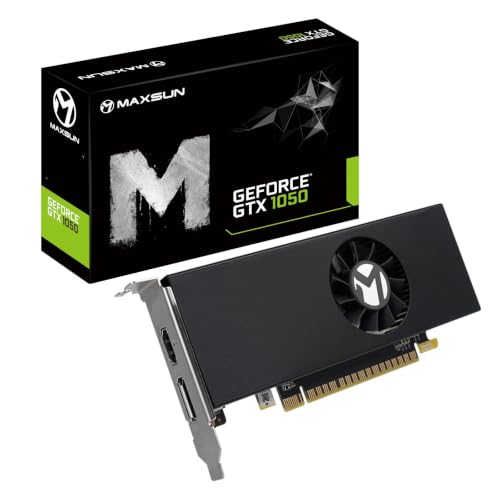
MAXSUN GTX 1050 4GB Low Profile — Best mini gaming card
MAXSUN’s GTX 1050 low-profile card leads this guide because it is the one entry that combines a genuinely gaming-capable GPU with the small silhouette the whole category promises. The listing describes a mini, slim, small-form-factor design with GDDR5 memory on a 128-bit interface and DisplayPort plus HDMI outputs, and that combination places it a clear class above the display-oriented cards below. In a compact case, this is the card that turns a modest small PC into a machine that can actually host games night.
The GTX 1050’s natural territory is 1080p gaming with settings chosen sensibly. Esports titles are its home ground, where it delivers smooth play without drama, and the huge library of games from its own era and earlier runs the way their makers intended. Newer demanding releases ask for compromises in resolution scaling and texture quality, and buyers should accept that bargain knowingly: this is the top of the mini class in this guide, not a rival to full-size modern cards that could never fit the cases these readers own.
Four gigabytes of GDDR5 is the specification doing quiet work here. It gives the card the bandwidth to use its GPU fully, which is precisely what the DDR4 and DDR3 cards further down cannot claim, and it provides enough capacity for the texture settings of the games this card is actually bought to play. Anyone cross-shopping a cheaper GT 1030 should understand that the gap is not a small step but a change of category, from a display card that can game a little to a gaming card that happens to be small.
Installation is the other half of its appeal. Low-profile mini cards of this class typically ask nothing exotic of the host machine, which matters because their buyers are usually upgrading a finished computer rather than assembling one. Check the bracket supplied against your case, confirm the power supply is healthy rather than merely adequate on paper, and the card drops into machines that were never designed with gaming in mind and gives them a second career.
- Memory: 4GB GDDR5, 128-bit
- Form: low profile, mini slim small form factor
- Outputs: DisplayPort and HDMI
- GPU class: GeForce GTX 1050
Strengths
- Strongest gaming performance in this mini roundup
- GDDR5 memory used at its full bandwidth
- Compact shape suits ordinary small desktops
Trade-offs
- Modern AAA games need reduced settings
- Small cooler works harder than full-size equivalents
- Bracket fit still needs confirming per case
Best for: small gaming builds and compact PCs that need real 1080p light gaming
Skip it if: you play the newest releases at high settings or own a full-size case with room for larger cards

MAXSUN RX 550 4GB — Best three-output mini
This MAXSUN RX 550 is the full-height-leaning sibling in a family this guide meets twice, presented here as a compact ITX-style card with three display outputs: DVI-D dual link, HDMI and DisplayPort. That port spread is its signature. A small desk PC driving a modern DisplayPort monitor beside an older DVI screen is a common real-world arrangement, and this card serves it from a single slot without adapters, which is a practical virtue no benchmark chart records.
The RX 550 GPU with 4GB of GDDR5 memory defines its performance honestly. It is a light-gaming and everyday-acceleration card: esports titles at friendly settings, older games at native resolution, smooth multi-monitor desktop work, and video playback that keeps an ageing processor from struggling. It sits one clear tier below the GTX 1050 above, and readers choosing between them should decide by library — recent and competitive games point upward, established and casual ones are perfectly at home here.
Because this version carries the standard bracket orientation rather than the half-height emphasis of the 51RISC card below, it suits compact towers and small desktops whose expansion area has normal height but limited length. That distinction is the whole game in mini cards: two machines can both reject a full-size card for entirely different dimensional reasons, and this RX 550 answers the length problem while its low-profile sibling answers the height problem.
As a daily driver it has one more quiet strength: maturity. The RX 550 generation is thoroughly understood by current operating systems, installs without drama, and behaves predictably across the mixed monitor setups its three outputs invite. For a family or office machine that must simply work every morning, that predictability is worth as much as a few frames per second.
- Memory: 4GB GDDR5, 128-bit
- Form: compact ITX-style card
- Outputs: DVI-D dual link, HDMI, DisplayPort
- Interface: PCI Express x16 3.0
Strengths
- Three distinct outputs cover mixed-age monitor desks
- GDDR5 memory keeps light gaming credible
- Compact board suits shorter expansion bays
Trade-offs
- A tier below the GTX 1050 for gaming
- Standard height rules out half-height cases
- No modern upscaling features
Best for: compact desktops with mixed monitors and light gaming ambitions
Skip it if: your case is half-height or your games are current demanding releases

Glorto GeForce GT 210 1GB — Basic output only
The Glorto GeForce GT 210 is the smallest promise in this guide: a 1GB DDR3 low-profile card whose listing calls it an entry-level GPU for PC, SFF and HTPC use, with HDMI and VGA outputs. Everything about that description is modest, and this review will keep it that way, because the GT 210 is a useful product precisely when it is bought for the humble job it describes and a poor one the moment it is asked to be anything else.
That job is giving a computer a screen it otherwise could not drive. An old office machine whose integrated graphics failed, a small PC with no HDMI for a modern television, a legacy monitor that speaks only VGA, a spare-parts system assembled for a single task — the GT 210 answers all of these for the cost of a modest peripheral. Its low-profile shape fits the slim cases such machines usually inhabit, and its demands on the power supply are negligible by modern standards.
Gaming must be addressed directly because listings in this class rarely address it at all. The GT 210 cannot run modern games, cannot run most games of the last decade at playable settings, and should not be purchased by anyone whose plans include the word gaming in any tense. Even video duties should be scoped honestly: basic playback and desktop display are fine, while modern streaming codecs and high-resolution ambitions belong to the other cards in this guide.
Bought with those limits understood, the Glorto card is not a compromise but a tool, in the same family as a replacement power cable or a USB hub. It keeps an old small computer useful for another few years at a desk, in a workshop or attached to a spare television, and there are households where that is exactly the upgrade that was needed.
- Memory: 1GB DDR3
- Form: low profile
- Outputs: HDMI and VGA
- Interface: PCI Express 1.0 x16
Strengths
- Gives old systems HDMI and VGA from one small card
- Fits slim cases that reject larger cards
- Negligible demands on ageing power supplies
Trade-offs
- No gaming capability worth the name
- DDR3 memory and 1GB capacity are minimal
- Modern video codec support is limited
Best for: an old or spare small PC that needs a basic display connection
Skip it if: games, streaming ambitions or multi-monitor work feature in the plan at all

MSI GT 1030 4GB — Compact display upgrade
MSI’s GT 1030 4GD4 LP OC is the card in this guide that teaches the category’s most valuable lesson, because its name promises familiarity while its memory tells a different story. The 4GD4 in its model name is the tell: this variant carries DDR4 memory on a 64-bit interface, and DDR4 in a GT 1030 delivers markedly less bandwidth than the GDDR5 fitted to other cards sharing the same GPU name. The GPU is identical; the experience is not, and buyers who compare only the large print will miss the difference entirely.
Judged as what it is, the card has a coherent role. It is a compact, single-fan, low-profile display upgrade for small PCs: extra monitors for office work, a DisplayPort or HDMI connection a motherboard lacks, smooth desktop behaviour and light media playback, with HDCP support that suits its home-theatre leanings. Games at the lightest end — older titles, simple indie games, casual fare — run acceptably, but this is a display card with gaming as a footnote, not the reverse.
MSI’s execution of the concept is tidy. A single fan keeps the card short and quiet in ordinary use, the low-profile design suits slim desktops, and the brand’s software support is a comfort for owners who value painless installation in a family machine. None of that changes the memory arithmetic, and this guide’s advice is specific: if a GDDR5 GT 1030 or the GTX 1050 above is within reach, the difference is worth having; if this DDR4 card is what the budget and the case allow, buy it for displays and be pleased with it on those terms.
The wider lesson deserves repeating because it recurs across this whole category. In mini cards, the memory type printed in the small specification lines matters more than the capacity in the headline, and a 4GB DDR4 card can be slower in practice than a 2GB GDDR5 card. Read for the letters after the number, here and in every future small-card purchase.
- Memory: 4GB DDR4, 64-bit
- Form: low profile, single fan
- Outputs: DisplayPort and HDMI
- GPU class: GeForce GT 1030
Strengths
- Compact and quiet for display duties
- DisplayPort plus HDMI covers modern screens
- Reputable execution of a simple concept
Trade-offs
- DDR4 memory is far slower than GDDR5 variants
- Gaming is limited to the lightest titles
- Same GPU name as faster cards invites confusion
Best for: small PCs needing extra modern display outputs and light media work
Skip it if: you believe the GT 1030 name guarantees GDDR5 performance, or gaming is a priority

51RISC Radeon RX 550 Low Profile — Half-height GDDR5 value
The 51RISC RX 550 Low Profile returns in this guide wearing its other hat. Where a strict enclosure-focused roundup treats it as a fitting solution, here it stands as the half-height representative of the mini family: a 4GB GDDR5 card shaped for the shallow expansion areas of small desktops and Mini PCs, advertising 4K display support for desktop work. The silicon is the same RX 550 found in the MAXSUN card above; the silhouette and the intended case are what differ, and in this category silhouette is destiny.
Performance follows the RX 550 pattern established earlier in this guide. Light gaming is genuine — esports titles at moderated settings, older strategy and role-playing games, family favourites from the last decade — and everyday work across several monitors is smooth. The GDDR5 memory is the credential that separates it from the DDR4 and DDR3 cards around it, giving its modest GPU the bandwidth to do its job properly rather than advertising a capacity it cannot feed.
The buyers this card serves best are owners of the slim desktops that offices and schools bought by the thousand, machines with half-height bays and integrated graphics that struggle with modern displays. For those computers, a low-profile GDDR5 card is close to a transformation: monitors multiply, video smooths out, and light games appear on machines that previously had none. Confirm the bracket arrangement in the listing before ordering, since half-height ownership lives and dies by that small piece of metal.
Against the MAXSUN RX 550, the choice is purely dimensional. Standard-height compact case with a short bay: the MAXSUN. Half-height slim desktop: this 51RISC. Against the GTX 1050, the choice is ambition: the NVIDIA card games a tier higher, while this card fits the shallower cases and carries the multi-monitor brief with equal confidence.
- Memory: 4GB GDDR5
- Form: low profile, small form factor
- Display role: 4K output and multi-monitor desktop
- GPU class: Radeon RX 550
Strengths
- Half-height shape fits slim office desktops
- GDDR5 memory at this size is the key credential
- Light gaming plus several displays from one slot
Trade-offs
- RX 550 pace caps gaming ambition
- Bracket contents must be verified
- Shares its tier with the standard-height MAXSUN
Best for: slim half-height desktops needing displays, media and light games
Skip it if: your case takes standard-height cards and gaming is the main goal

QTHREE GT 730 4GB — Most connections, small size
QTHREE’s GT 730 closes the guide with the widest rear panel of the six: two HDMI ports, DisplayPort and VGA on one low-profile card. That quartet is the product. A small PC asked to drive a pair of HDMI screens, a DisplayPort monitor and perhaps a legacy VGA display — a trading desk in miniature, a monitoring station, a presentation machine — can do it from this single slot, and no other card in this guide offers that spread.
The performance story must be told in the same breath, because the GT 730 name invites the same confusion as the GT 1030 above. This card carries DDR3 memory on a 64-bit interface, and its 4GB capacity figure describes storage, not speed. Desktop work across several screens is its competence; video playback at ordinary resolutions is fine; gaming beyond the lightest historical titles is not part of the offer, whatever the capacity number suggests to a hurried reader.
Within its proper role, the card is genuinely convenient. Low-profile dimensions suit the small systems that usually host multi-screen utility setups, the port mix avoids a drawer of adapters, and Windows 11 support is claimed in the listing for buyers keeping an older machine current. A reception-area display wall, a workshop monitoring PC or a home office with mixed-age screens are all natural homes for it.
Buy it as a connectivity solution and it will satisfy. Buy it as a gaming card because four gigabytes sounded like plenty, and it will join the long line of mini cards purchased for their headline numbers. This guide’s consistent advice applies one final time: in this family, the letters describing the memory and the ports on the back tell you more than the number describing the capacity.
- Memory: 4GB DDR3, 64-bit
- Form: low profile
- Outputs: 2x HDMI, DisplayPort, VGA
- Interface: PCI Express x8
Strengths
- Four display connections on one small card
- Covers modern and legacy screens without adapters
- Low-profile shape suits utility small PCs
Trade-offs
- DDR3 memory rules out meaningful gaming
- Capacity figure flatters its actual speed
- Single-purpose: connectivity is the whole case
Best for: small PCs that must drive several mixed-age displays at once
Skip it if: gaming performance matters more than the number of screens
Why Does Memory Type Matter More Than Memory Size in a Mini Card?
Graphics memory has one job: feeding the GPU data fast enough that the processor never waits. Capacity decides how much data can be held; bandwidth decides how quickly it can be delivered, and bandwidth is the product of the memory type and the width of the interface it travels across. GDDR5 was designed for graphics workloads and moves data at several times the rate of the DDR3 and DDR4 memory borrowed from system RAM. A GPU starved by slow memory behaves like a smaller GPU, which is why two cards sharing the GT 1030 name can deliver noticeably different experiences, and why a 4GB DDR3 card can be outrun by a 2GB GDDR5 card in the games both can play.
The mini segment is where this gap does the most damage, because small cards are bought by exactly the readers least likely to be warned about it. The headline number is the capacity, printed large; the type is a suffix in a model code or a line in a specification table. Sellers of GDDR5 cards announce the fact proudly, as MAXSUN does in this guide with its note about being faster than the DDR4 variant, while DDR3 and DDR4 listings lean on capacity. Reading the suffix — GD5, D4, D3 in model names — takes two seconds and is worth more than any other single habit a small-card buyer can learn.
None of this makes slow-memory cards useless; it makes them specialised. A monitoring station driving four static screens needs capacity and ports, not bandwidth, and the QTHREE GT 730 serves it well. An office desktop needs its documents rendered, not its frames raced. Bandwidth becomes decisive only when the card is asked to game or to accelerate moving, changing content at pace — and the moment gaming enters the brief, GDDR5 is the floor this guide recommends.
How Do You Choose Between a Mini Card for Gaming and One for Displays?
Start by naming the machine’s busiest hour. If that hour is a game, the shortlist narrows immediately to the GDDR5 cards: the GTX 1050 for the strongest light gaming in this guide, the two RX 550 variants for a tier below, chosen between by the height of your case’s expansion area. Everything else in this guide will technically launch many games and satisfy in almost none, and a display card bought hopefully for gaming is the single most returned species of mini card.
If the busiest hour is work, the criteria invert. Count the screens, list their inputs, and let the port panel decide: the MAXSUN RX 550’s three distinct outputs for a mixed desk, the QTHREE GT 730’s four connections for a wall of displays, the GT 210’s simple pairing for one legacy screen. Gaming ability becomes a bonus to enjoy rather than a requirement to fund, and the money saved against a gaming card is better spent on the monitors themselves.
Many households sit between those poles, and for them the RX 550 cards are this guide’s centre of gravity: real GDDR5 pace for the family’s older and lighter games, proper multi-monitor behaviour for weekday work, and dimensions that fit the small computers such households actually own. The GTX 1050 is the upgrade from that centre when games matter more; the display cards are the step down when they matter less. Choose the tier by the calendar, not by the advertisement.
Comparing the Six Mini Cards at a Glance
| Card | Memory | Outputs | Honest role |
|---|---|---|---|
| MAXSUN GTX 1050 Low Profile | 4GB GDDR5 | DisplayPort, HDMI | Light gaming in small cases |
| MAXSUN RX 550 | 4GB GDDR5 | DVI-D, HDMI, DisplayPort | Mixed-monitor desk plus light games |
| Glorto GT 210 | 1GB DDR3 | HDMI, VGA | One basic or legacy display |
| MSI GT 1030 4GD4 | 4GB DDR4 | DisplayPort, HDMI | Display upgrade, lightest gaming |
| 51RISC RX 550 Low Profile | 4GB GDDR5 | Multi-monitor, 4K output | Half-height light gaming and work |
| QTHREE GT 730 | 4GB DDR3 | 2x HDMI, DisplayPort, VGA | Several screens, utility setups |
Read the memory column before the others and the table tells the truth at a glance: the three GDDR5 cards are the gaming and all-round tier, the DDR4 card is a display upgrade with modest extras, and the DDR3 cards are connection devices. The outputs column then sorts within each tier by the screens you own. Any mini card, from any maker, can be placed on this same grid in seconds, and a listing that resists being placed — memory type unstated, outputs unphotographed — is a listing to leave alone.
Which Buying Mistakes Follow Mini Cards Home?
Buying by capacity is the first, and this guide has returned to it deliberately because it is the mistake the segment is built around. Four gigabytes of DDR3 is not more graphics card than two gigabytes of GDDR5; it is a larger, slower warehouse behind the same small door. The second mistake is its mirror image: buying a famous GPU name without its suffix. GT 1030 cards exist in both memory types, GTX 1050 cards in several capacities, and the suffix letters in the model code are where the truth lives.
Dimension assumptions run third. Mini describes a family, not a measurement, and a low-profile card can still be too long for a particular slim case while a short standard-height card fits it perfectly. Measure the bay in both directions, note the bracket height your case accepts, and compare against the listing’s stated form rather than against the word mini. The fourth mistake is forgetting the rest of the machine: an old power supply at the end of its life, a processor too slow to feed even a modest card, or a case whose only expansion slot is already occupied by the network card the household depends on.
The final mistake is emotional rather than technical: buying a display card while secretly hoping for a gaming card, because the price was kind and the box said graphics in large letters. Hope is not a specification. The tiers in this guide are labelled plainly so that the purchase can be made with open eyes, and a display card bought knowingly, for displays, gives years of uncomplaining service.
How Do You Fit a Mini Card Into a Computer That Was Never Meant to Game?
Begin with the machine switched off, unplugged and opened on a table with room to work, because slim desktops hide their expansion slots under drive cages and cable looms that reward patience. Photograph the interior before touching anything; the picture is your reassembly map. Remove the blanking plate behind the slot your card will occupy, noting whether the case uses screws or a clamp bar, and check the bracket height one final time against the card in your hand before the card goes anywhere near the motherboard.
Seat the card with steady, even pressure until it is fully home, then secure it before reconnecting anything else. In cramped cases the card can sit slightly askew while appearing installed, so confirm the bracket sits flush and the card’s edge connector has disappeared evenly into the slot. Route any cable you displaced away from the card’s fan, replace the covers you removed in reverse order, and only then connect the displays — to the new card’s outputs, not the motherboard’s, a small error that has convinced many owners their new card was faulty.
First boot belongs to the drivers. Let the operating system find the card, install the maker’s current driver package, and then set each display’s resolution and arrangement before opening a single game. Test with the machine’s ordinary work first — the documents, browser and video it lives on — and only then explore its new gaming reach, starting with the lightest titles. A card introduced to its machine in that order earns trust, and problems, if any appear, announce which layer they belong to.
How Did the Mini Card Become the Default Upgrade for Small Computers?
The mini graphics card exists because the standard graphics card quietly assumed a standard computer, and most computers are not standard. The slim desktops that fill offices, classrooms and spare bedrooms were designed around processors with integrated graphics and a purchasing spreadsheet, not around gaming. Their cases are shallow, their power supplies are modest, and their expansion bays accept cards measured in centimetres of height rather than the full profile of a gaming tower. For years, owners of such machines who needed a better display output or a little graphical pace had no product aimed at them at all, only full-size cards that physically could not enter the case.
Manufacturers answered with the pattern this guide collects: take a modest GPU, mount it on a short board, cool it with a single small fan, and shape the bracket for a half-height bay. The performance ceiling of that formula is set by physics — a small cooler and a slot-powered appetite cannot feed a flagship GPU — but its floor turned out to be surprisingly useful. A GDDR5 card in this shape plays the world’s most popular games at modest settings, because those games are engineered for the largest possible audience, and it transforms multi-monitor work for machines whose integrated graphics were designed in a more frugal era.
The category’s confusion grew alongside its usefulness. Once mini cards proved popular, the same shapes were filled with far weaker silicon and slower memory, sold on capacity numbers and familiar GPU names. The result is the market this guide tries to make legible: a family where the best and worst members share a silhouette, a shelf and often a price conversation, while differing by multiples in what they can actually do. Shape tells you a card will fit. Only the specifications tell you whether fitting was worth it.
What Should You Check in the Rest of the Machine Before Buying?
A mini card is an upgrade to a system, and systems fail at their weakest component rather than their newest. The processor matters first: a small PC built around a very old or deliberately low-power CPU can hold back even an RX 550 in games, because the card waits for instructions the processor cannot issue quickly enough. For display duties this hardly matters at all, which is one more reason the display-tier cards in this guide find happy homes in elderly machines, but a gaming hopeful should confirm the processor belongs to a plausible era for the games in question.
The power supply deserves a look inside the case rather than a glance at a label. Small OEM supplies age, their capacitors tire, and a unit that has run an integrated-graphics desktop for a decade may greet its first real graphics load unhappily. The cards in this guide were chosen for modest appetites precisely because their hosts are like this, yet a supply that is visibly dust-choked, audibly strained at idle or older than the machine’s warranty by many years is a candidate for replacement before it is a foundation for upgrades.
Memory and storage complete the audit. A gaming mini build with very little system RAM will stutter in ways owners often blame on the new card, and a nearly full mechanical hard drive makes every machine feel slower than its graphics hardware. None of these checks require expertise: open the case, read the labels, look at the task manager’s account of the machine’s ordinary day. Ten minutes of this honesty before ordering prevents the most common mini-card disappointment of all, which is a good card installed in a machine that needed three smaller kindnesses first.
Living With a Mini Card: Heat, Noise and the Long Term
Small cards ask small courtesies. Their coolers are compact, so their heatsinks clog faster than the deep fin stacks of tower cards, and a mini card in a carpeted room or a workshop environment benefits from a brief cleaning whenever the case is opened for any other reason. Their fans are small, so they spin faster to move the same air, and their sound is a higher note that carries differently through a quiet room; a card bought with headroom above the games actually played will spend its life below that note, which is the practical argument for the GTX 1050 in a bedroom build whose games an RX 550 could technically run.
Software habits matter at this scale. Capping frame rates to the display’s refresh rate spares the card from rendering frames nobody sees and the case from removing the resulting heat. Letting a display-tier card do display work — rather than asking it to upscale video or accelerate effects it was never built for — keeps it in the territory where it feels responsive. Owners who treat the tiers in this guide as descriptions of a card’s working life, rather than as challenges to be argued with, report the longest and quietest service.
And the long term is genuinely long for the right jobs. A display card’s duties do not escalate the way gaming demands do: a monitor driven well today is driven identically in five years, and the GT 210 and GT 730 class of card routinely outlasts the machines around it, migrating from a retired office PC to a workshop screen to a spare-room television. Gaming cards age against a moving target and should be bought for the library that exists; connection cards age against nothing at all. That difference, understood at purchase, is the difference between a mini card that disappoints in a year and one that is still quietly useful in a decade.
A Note on Second Careers: What a Mini Card Does After Its First Job
Few components enjoy as many second careers as a small graphics card. The gaming mini that is outgrown by its owner’s library does not become waste; it becomes the display card in a parent’s PC, the multi-monitor heart of a home office assembled from spares, or the HDMI source for a television in a room that never had a computer before. Because these cards fit almost anywhere and ask almost nothing of a power supply, they migrate between machines with an ease that full-size cards, wedded to big cases and big supplies, can never match. When you buy one of the recognised designs in this guide, part of what you are buying is that portability of purpose.
This afterlife should influence the purchase in one specific way: it rewards buying the honest version of a tier rather than the flattering one. A GDDR5 RX 550 bought today for light gaming becomes, in five years, a superb display and media card, because its memory was real and its outputs were modern. A DDR3 card bought today on a capacity number becomes, in five years, a card whose ports are its only remaining virtue. The first purchase keeps giving; the second was finished giving on the day it arrived. Mini cards are inexpensive enough that this difference costs little at the till and compounds for a decade afterward.
It also explains why this guide treats even the humblest entry, the GT 210, with a straight face. A card whose entire job is one screen on an old machine will do that job through several changes of owner and purpose, and there is a real household economy in components that refuse to become obsolete at the tasks they were honestly bought for. The sin in this category was never weakness. It was disguise — weakness dressed as strength in the headline numbers — and every review above is written to strip that disguise away while respecting the genuine work each tier performs.
Reading Mini-Card Reviews Elsewhere Without Being Led Astray
Armed with the tiers in this guide, the wider world of mini-card commentary becomes easier to navigate. Reviews that benchmark a display-tier card against gaming cards and declare it a failure are answering a question its buyers never asked, while listings that benchmark a DDR3 card in a single undemanding title and declare it a gaming bargain are answering dishonestly. The useful question is always within-tier: among GDDR5 light-gaming cards, which fits and performs best; among display cards, which offers the ports and reliability the desk requires. Cross-tier comparisons produce drama and returns in roughly equal measure.
Photographs deserve the same within-tier scepticism. A mini card photographed alone looks substantial; photographed in a hand or beside a standard card, its true scale emerges, and that scale is the product. When a listing avoids any image that establishes size, bracket height or the rear panel’s contents, it is avoiding the three facts its buyers most need. The listings behind this guide state their forms and outputs plainly, and that plainness, more than any single specification, is what a careful buyer should learn to shop for.
One more ownership note belongs in any honest account of this category: keep the spare bracket. Mini cards frequently arrive with both bracket heights in the box, and the one you do not fit today is the one that decides whether the card can move to a different small machine in three years’ time. A small labelled bag in the case’s accessory box, or taped inside the side panel where some builders keep it, preserves the card’s whole future for the sake of ten seconds’ tidiness. Cards in this family change homes more often than any other component, and the bracket is their passport.
Keep the driver situation equally simple. These are mature, well-understood GPUs, and the current driver package from the chip maker is the right one in almost every case; exotic or repackaged driver bundles sold alongside budget cards add risk without adding performance. Install from the source, let the operating system’s own updates handle the rest, and a mini card will ask for less software attention across its life than almost anything else in the machine.
Finally, set the household’s expectations out loud when the card is for a shared machine. A mini card that gives a family PC two extra screens, smooth video and a shelf of older games is a complete success on those terms, and it stays a success as long as nobody measures it against a nephew’s full-size gaming rig. Most disappointment with this category is a failure of framing rather than of hardware: the card did what its tier does, in a machine that needed exactly that, while being judged for a tier it never claimed. Name the job when you install it, and the card will be thanked for years instead of apologised for.
There is a small ritual worth performing a week after installation, once the novelty has faded: open the machine’s ordinary workload and ask whether the original problem is actually gone. The second monitor lights without coaxing, the television receives its signal, the family’s games open at settings that feel like themselves. If the answer is yes, the mini card has done the whole of its job, and the wisest next step is to close the case, stop shopping, and let an inexpensive component enjoy the long, unremarked career that is this category’s definition of success.
Should the card ever move on to another machine, pass its story along with it: which bracket is fitted, which memory type it carries, which duties it performed well. That thirty-second briefing is the difference between the next owner repeating this guide’s lessons from experience and benefiting from yours, and in a category where hardware circulates through families and workplaces for years, the briefing travels as usefully as the card itself.
And if the purchase is still undecided after all of the above, let the machine itself cast the deciding vote. Photograph its open case, count its screens and their cables, and write down the three things it will actually be asked to do next month. Matched against the tiers in this guide, those three facts select the card almost every time, because mini cards succeed by correspondence with a real computer’s real life rather than by victory in an abstract comparison.
That correspondence is worth stating once more in its plainest form, because it is the sentence this whole category keeps trying to teach: a card that fits the case, feeds its GPU with proper memory, and connects the screens on the desk is the right card, even when a larger number somewhere else in the catalogue tried to argue otherwise during the shopping.
Buyers who follow that sentence rarely return a mini card, and sellers of honest listings rely on exactly those buyers. The six cards above were chosen so that each tier’s promise is kept by its hardware; all that remains is for the reader to choose the tier that matches the machine standing open on the table.
Choose it, fit it, and let the small machine get back to work.
Final Recommendation
For most readers, the MAXSUN GTX 1050 Low Profile is the mini card to buy, because it games a clear tier above everything else here while keeping the small silhouette that defines the category. Desks with several monitors and lighter games belong to the two RX 550 cards, split by bracket height; connection problems belong to the QTHREE GT 730 and the MSI GT 1030; and the Glorto GT 210 should be bought only to give an old machine a screen. In a category sold on confusing numbers, the rule that survives is simple: the type of memory, not the size of it, decides what a mini card really is.
Frequently Asked Questions
Is a mini graphics card slower than a full-size card with the same GPU?
Usually only slightly, and the difference lives in cooling rather than silicon. A compact cooler sustains marginally lower clocks under long loads than a large dual-fan design, which matters in extended sessions and barely at all in everyday play. The far larger gaps in this category come from memory type, not from the card’s physical size.
Why do two GT 1030 cards perform so differently?
Because the name covers two memory configurations. GDDR5 variants feed the GPU at graphics-memory speeds, while DDR4 variants like the MSI card in this guide use system-style memory with far less bandwidth. The GPU is shared; the experience is not, which is why this guide names the memory type in every single review.
Can a mini card run two or three monitors?
Yes, and several cards here are bought for exactly that. The MAXSUN RX 550 drives three displays across three different connector types, the QTHREE GT 730 offers four connections, and the RX 550’s 4K output claim concerns desktop displays rather than gaming. Match the port list to your screens before ordering.
Do these cards need a new power supply?
The display-tier cards ask very little, and the light-gaming cards were chosen partly for modest appetites that suit the small power supplies in compact machines. Check the specific card’s connector requirements against your unit, and treat an ageing, unnamed power supply as a reason for caution rather than optimism.
Will a low-profile card fit my slim office desktop?
That is the case type they are designed for, provided the bracket supplied matches your machine’s half-height rear opening and the card’s length clears your drive cage. Measure both dimensions and read the listing’s bracket description; those two checks settle nearly every slim-desktop fitting question.
What is the cheapest card here that can honestly game?
The RX 550 cards are the floor for genuine gaming in this guide, handling esports and older titles at sensible settings through their GDDR5 memory. Below them, the GT 1030 DDR4 manages only the lightest games, and the GT 210 should not be considered a gaming product at all.
Related Guides
Small machines that earn their keep in design work follow different rules, and best cad cam graphics cards examines that professional and semi-professional territory frankly. When the budget itself is the smallest dimension, best low profile graphics cards under 60 maps the lowest tier and its memory trap in detail. And readers whose small card will drive a very wide screen should finish with best graphics cards for ultrawide monitors, where the performance demands rise sharply with the pixel count.


