What's inside
- Key Takeaways
- Quick Picks
- How We Chose These Picks
- Why Does 3440×1440 Punish Cards That Felt Fast at 1080p?
- How Should You Set an Ultrawide Game Up for the Card You Own?
- The Ladder at a Glance
- Which Ultrawide Buying Mistakes Cost the Most?
- How Do You Install and Configure a Card for an Ultrawide Setup?
- What Does an Ultrawide Do to the Rest of the Desk?
- How Do Refresh Rate and Resolution Trade Against Each Other?
- Looking After a Hard-Working Card
- Why Do Ultrawide Owners Rarely Go Back?
- Final Recommendation
- Frequently Asked Questions
- Related Guides
As an Amazon Associate I earn from qualifying purchases. This post may contain affiliate links at no extra cost to you.
[widgetverdict.com] is reader-supported. When you buy through links on our site, we may earn an affiliate commission.
Where to buy: the six cards below link to checked Amazon listings spanning three hardware generations, and this guide judges every one of them against a single resolution, because an ultrawide monitor is a pixel count before it is a shape.
The best graphics cards for ultrawide monitors are chosen against 3440×1440, the resolution that defines the mainstream ultrawide experience, and that number should be understood before any card is discussed. A 3440×1440 panel holds roughly four-fifths as many pixels as a 4K screen and well over twice as many as a 1080p one, which means a graphics card stepping up from a standard monitor to an ultrawide is taking on close to a 4K-class workload while its owner may still be thinking in 1080p habits. Cards that felt generous on the old screen feel merely adequate on the new one, and cards that were adequate become a negotiation with the settings menu.
This shortlist is built as a ladder across that reality. At the top, the MSI RTX 4070 Ti and the Sapphire RX 9070 GRE treat 3440×1440 as home territory. In the middle, the GIGABYTE RTX 3060 12GB and the ASUS ROG Strix RTX 4060 make the resolution work through memory capacity and modern upscaling respectively. At the base stand two respected veterans, the RTX 2070 Super and the GTX 1070, which can drive an ultrawide honestly if their owners accept the reduced settings their generations require. Every review below states its card’s settlement with the resolution plainly, because at 3440×1440 the settings menu is where specifications become evenings.
Key Takeaways
- 3440×1440 is close to a 4K workload; choose the card for the pixel count, not the screen’s shape.
- The MSI RTX 4070 Ti is the strongest card here and the choice for high settings and high refresh.
- Sapphire’s RX 9070 GRE brings current AMD RDNA 4 hardware and 12GB of memory to the resolution.
- The RTX 3060’s 12GB of memory ages gracefully at ultrawide resolutions even as its GPU tier moderates settings.
- The ROG Strix RTX 4060 leans on DLSS 3 and efficiency, with 8GB its clear boundary.
- The RTX 2070 Super and GTX 1070 are the floor: playable ultrawide with settings deliberately reduced.
Quick Picks
| Pick | Badge | Why it earns its place |
|---|---|---|
| GIGABYTE RTX 3060 Gaming OC 12G | Memory-rich all-rounder | 12GB of GDDR6 and a triple-fan cooler for mainstream ultrawide play. |
| Sapphire Pulse RX 9070 GRE 12GB | Current AMD power | RDNA 4 architecture with 12GB for high-refresh ultrawide gaming. |
| MSI GeForce RTX 4070 Ti 12GB | The top of this ladder | Ada Lovelace performance with a 2760 MHz extreme clock for demanding ultrawide play. |
| ASUS ROG Strix RTX 4060 OC | Efficient modern option | DLSS 3, HDMI 2.1a and a premium Strix cooler in an 8GB card. |
| ASUS RTX 2070 Super EVO 8GB | Veteran with ray tracing | An older flagship tier that still drives ultrawide at managed settings. |
| EVGA GeForce GTX 1070 SC ACX 3.0 | The honest floor | The oldest card here, viable at 3440×1440 with settings turned down. |
How We Chose These Picks
Every card was judged at 3440×1440 first and at other resolutions second, because ultrawide owners live at that resolution and a card’s reputation earned at 1080p does not transfer. Memory capacity received unusual weight in the ranking: ultrawide textures and frame buffers consume more than their 1080p equivalents, and the 12GB cards in this guide hold a genuine structural advantage over 8GB cards as games grow, independent of raw GPU speed.
Upscaling support was treated as a first-class feature rather than a footnote. At this pixel count, DLSS and FSR are not emergency measures but the normal way many games are played, and a card whose generation supports the current versions — frame generation included, on the RTX 4070 Ti and RTX 4060 — owns a longer useful life at ultrawide than its raster performance alone would predict. The older cards were included with their absence of those features stated, not smoothed over.
Finally, the ladder was kept honest at its base. Ultrawide monitors are now common enough that many owners arrive with a GTX 1070 or RTX 2070 Super already in the machine, and a guide that pretended those cards cannot light the screen would be lying in the direction of sales. They can, at settings this guide describes precisely. Readers who recognise their own card at the ladder’s foot can game tonight and upgrade deliberately, which is a better service than manufactured urgency.
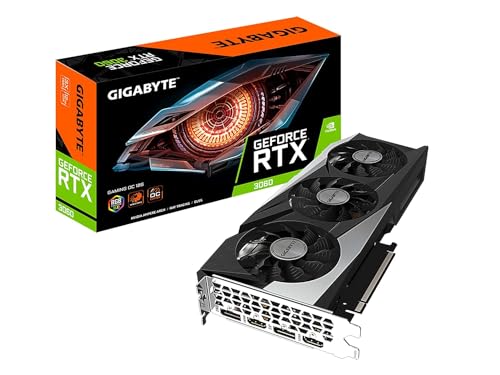
GIGABYTE RTX 3060 Gaming OC 12G — Memory-rich all-rounder
GIGABYTE’s RTX 3060 Gaming OC is the card in this guide whose reputation improves as resolutions rise, because its defining specification — 12GB of GDDR6 on a 192-bit interface — matters more at 3440×1440 than it ever did at 1080p. Ultrawide gaming consumes memory in textures, in frame buffers and in the sprawling draw distances of open-world titles, and this card’s capacity lets it hold those assets without the stutter that visits leaner cards when a new area streams in.
The GPU itself is a mainstream Ampere design, and this review will not promote it beyond that. At ultrawide, current demanding games ask it for medium settings and the assistance of DLSS, which it supports in its widely adopted form. Esports and older titles, by contrast, run at the resolution’s full sweep without complaint, and the enormous middle library of games from the last several years settles into the comfortable pattern of high textures — where the memory earns its keep — with moderated effects.
GIGABYTE’s Gaming OC execution suits the sustained nature of ultrawide loads. Three WINDFORCE fans over a substantial cooler keep the card composed through long sessions at high utilisation, which is the normal state of a card feeding five million pixels. A dual-fan card can match its benchmarks in a short test and still be the louder companion across a winter of evenings; at this resolution, cooling stamina is a performance feature.
Buy it as the ladder’s sensible middle: more future in its memory than in its GPU, honest settings in current games, and a cooler built for the workload’s duration. Owners stepping up from 1080p with this card will feel the ultrawide’s breadth without the settings anxiety that greets the 8GB veterans below.
- Memory: 12GB GDDR6, 192-bit
- Cooler: 3x WINDFORCE fans
- Revision: REV2.0, model GV-N3060
- Architecture: NVIDIA Ampere
Strengths
- 12GB capacity suits ultrawide texture loads
- Triple-fan cooler sustains long sessions
- DLSS support widely available in current games
Trade-offs
- Mainstream GPU tier moderates settings in new releases
- No frame-generation support
- Large cooler needs a case with room
Best for: mainstream ultrawide gamers who value memory headroom and calm cooling
Skip it if: you want high settings and high refresh in the newest games at once
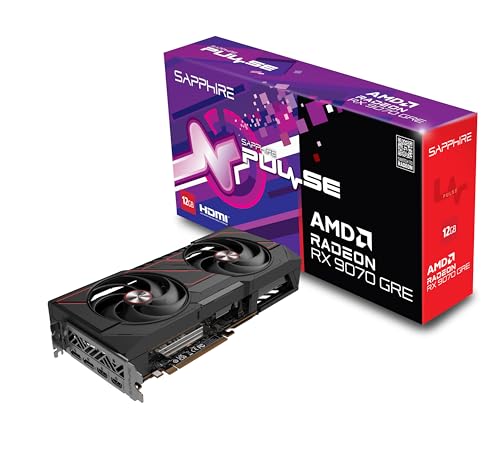
Sapphire Pulse RX 9070 GRE 12GB — Current AMD power
Sapphire’s Pulse RX 9070 GRE brings the newest architecture in this guide to the ultrawide question, pairing AMD’s RDNA 4 design with 12GB of GDDR6 in Sapphire’s respected Pulse execution. Current silicon matters at 3440×1440 for two reasons: raw throughput per watt has climbed with each recent generation, and upscaling quality has climbed with it, so a modern card at this resolution is playing a different game from an older card with similar paper specifications.
In practice, this is a high-settings ultrawide card. The resolution that makes the veterans below negotiate is the resolution this card was built around, and 12GB gives its textures room to match. High-refresh ultrawide monitors — the 144Hz and 165Hz panels that have become the category’s standard — find in this card a partner that can feed them in a wide range of titles, with FSR upscaling extending that reach into the most demanding releases rather than rescuing them from failure.
Sapphire’s Pulse line has earned its place in AMD builds by doing the unglamorous things well: sensible cooling, restrained acoustics and none of the flagship tax that decorates halo models. In a guide whose readers have already spent seriously on a wide screen, that restraint is a feature, because the money not spent on the card’s cosmetics is the money that bought the monitor’s refresh rate in the first place.
Against the RTX 4070 Ti above it in raw standing, this card is the alternative rather than the understudy: a different ecosystem, a different upscaling family, and a performance tier close enough that the choice can be made on the games and features a household actually uses. AMD-leaning ultrawide owners need not look further down the ladder at all.
- Memory: 12GB GDDR6
- Architecture: AMD RDNA 4
- Model: Sapphire Pulse 11354-01-20G
- Edition: Gaming OC
Strengths
- Current architecture with modern upscaling
- 12GB suits the resolution’s texture demands
- Pulse cooling is composed under load
Trade-offs
- Ecosystem choice locks in AMD’s feature family
- High-refresh ultrawide still rewards upscaling in top titles
- Availability of GRE editions can vary by region
Best for: high-refresh ultrawide gamers in AMD’s ecosystem
Skip it if: your games depend on NVIDIA-specific features or frame generation

MSI GeForce RTX 4070 Ti 12GB — The top of this ladder
The MSI RTX 4070 Ti Gaming X Trio is the strongest card in this guide by a clear margin, and at 3440×1440 that margin is spent exactly where ultrawide owners feel it: settings and refresh rate at the same time. Its listing states the essentials of the Ada Lovelace tier — 12GB of GDDR6X memory on a 192-bit interface, an extreme clock of 2760 MHz, and MSI’s Tri-Frozr 3 cooler across three fans — and the result is a card for which the ultrawide resolution is not a stretch goal but a design assumption.
The experience it buys is the absence of negotiation. Current games at high settings, ray tracing that can be enabled without immediately reaching for compromises, and DLSS 3 with frame generation for the titles that support it, which at this pixel count transforms demanding releases from managed to fluid. High-refresh ultrawide panels stop being aspirational specifications and become the rate the card actually delivers, in far more of the library than any other entry here can claim.
MSI’s Trio execution is sized for that performance. This is a large, three-fan card, and the case audit that smaller guides can skip is mandatory here: length, thickness and power connections all need confirming against a chassis that may have been bought in a more modest era. Ultrawide builds are often showcase builds, and the Trio looks the part, but its dimensions are a specification, not a style choice, and they should be measured like one.
Buy it when the monitor is a high-refresh ultrawide and the intention is to use all of it, for years, across the library as it grows. It is the most expensive seat on this ladder and the only one from which the resolution never asks a question the card cannot answer.
- Memory: 12GB GDDR6X, 192-bit
- Clock: extreme clock 2760 MHz
- Cooler: Tri-Frozr 3, three fans
- Architecture: Ada Lovelace
Strengths
- Strongest ultrawide performance in this guide
- DLSS 3 frame generation extends demanding titles
- Ray tracing usable at this resolution
Trade-offs
- Large card demands a case audit
- Premium tier pricing within this ladder
- 12GB is generous now, not limitless forever
Best for: high-refresh ultrawide owners who want high settings without negotiation
Skip it if: your case or power supply belongs to a much smaller build

ASUS ROG Strix RTX 4060 OC — Efficient modern option
ASUS’s ROG Strix RTX 4060 OC is the ladder’s study in efficiency: an Ada Lovelace card with 8GB of GDDR6, DLSS 3, HDMI 2.1a and DisplayPort 1.4a, wrapped in the most elaborate cooler in this guide’s middle tier. Its proposition at 3440×1440 is modern rather than mighty — it reaches the resolution through the current generation’s tricks, upscaling and frame generation chief among them, instead of through the raw capacity the 12GB cards above it carry.
That proposition works better than sceptics expected when this tier launched, because DLSS 3’s frame generation is at its most valuable exactly here, at a resolution where the base frame rate sits in the middle ranges that generation lifts into fluidity. In supported titles the Strix delivers an ultrawide experience beyond its specifications; in titles without that support, it is an 8GB card at five million pixels, and settings must be set with the memory boundary in view, textures first among them.
The Strix execution itself is the premium expression of its GPU: Axial-tech fans, a cooler with thermal headroom the chip rarely troubles, 0dB behaviour at light loads and the build quality the ROG line charges for. Whether that premium is rational depends on the household. In a quiet room with a showcase case, the card’s manners are a feature; in a closed case under a desk, the RTX 3060’s memory may be the wiser spend, and this guide’s honesty requires saying so beside the card it affects.
Choose it for a modern, efficient ultrawide build whose games support the current DLSS feature set, and whose owner values cool, quiet operation and the newest display outputs. Its HDMI 2.1a also makes it the ladder’s natural citizen in a living-room ultrawide setup, where the screen is as much television as monitor.
- Memory: 8GB GDDR6
- Features: DLSS 3, 0dB fan technology
- Outputs: HDMI 2.1a, DisplayPort 1.4a
- Cooler: ROG Strix Axial-tech design
Strengths
- Frame generation lifts supported ultrawide titles
- Cool, quiet and efficient under load
- Newest display outputs in the middle tier
Trade-offs
- 8GB is the resolution’s tightest modern budget
- Strix premium prices the cooler, not the GPU
- Unsupported titles expose the raw tier
Best for: efficient ultrawide builds whose games use DLSS 3 features
Skip it if: your library ignores frame generation or leans on heavy textures

ASUS RTX 2070 Super EVO 8GB — Veteran with ray tracing
The RTX 2070 Super was a flagship-tier card of its generation, and ASUS’s dual-fan EVO edition remains a coherent ultrawide proposition for owners whose expectations are set by its era. Eight gigabytes of GDDR6, hardware ray tracing of the first generation and performance that defined high-end 1440p play in its day translate, at 3440×1440, into a card that runs the resolution at deliberately managed settings — which is a workable life, provided the managing is done knowingly.
The settings conversation is specific. In current games, this card’s ultrawide pattern is medium textures where memory allows, effects reduced before resolution is surrendered, and DLSS in its earlier form where games offer it, without the frame generation the Ada cards above use to escape their limits. In the library of its own era and the esports catalogue, it remains thoroughly at home, and many ultrawide owners running one today are not suffering; they are simply playing the games the card knows.
Its honest role in this guide is the upgrade baseline. A reader whose machine already holds a 2070 Super and whose new ultrawide has just arrived does not need to panic-buy; they need this paragraph. The card will drive the screen tonight, across most of a typical library, and the upgrade to the ladder’s top can be made when the settings compromises begin to cost more enjoyment than the new card costs money. That day is a personal threshold, not a specification.
Buy one today only at a price that respects its generation, for a library weighted toward its era. As a deliberate purchase for a new ultrawide build, the modern cards above it offer more future for the money; as an owned card or a fairly priced veteran, it earns its place on the ladder’s lower rungs without apology.
- Memory: 8GB GDDR6
- Cooler: dual-fan EVO edition
- Features: first-generation hardware ray tracing
- Architecture: NVIDIA Turing
Strengths
- Flagship-tier silicon of its generation
- Ray tracing and early DLSS support
- Drives ultrawide across a large library
Trade-offs
- Settings must be managed in current games
- No frame generation to extend it
- 8GB at this resolution requires texture care
Best for: owners and fair-priced buyers with libraries from its era
Skip it if: you are building new and expecting current high settings
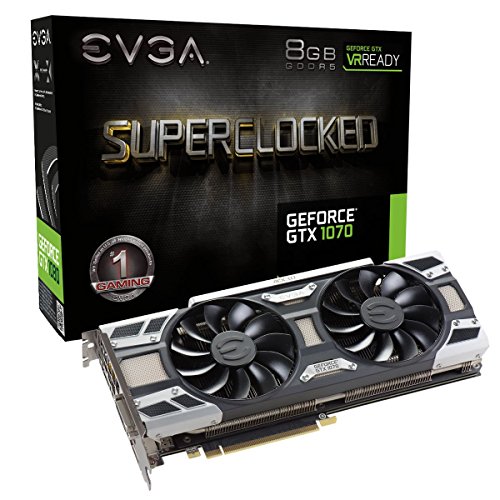
EVGA GeForce GTX 1070 SC ACX 3.0 — The honest floor
EVGA’s GTX 1070 SC closes the ladder at its floor, and this guide places it there with respect and precision in equal measure. In its era the GTX 1070 was the card that made high-resolution gaming ordinary, and its 8GB of GDDR5 was generous enough that, years later, it can still present 3440×1440 to a screen without embarrassing itself — at settings that acknowledge the distance between its generation and the present one.
That distance must be described exactly. There is no hardware ray tracing, no DLSS, no modern upscaling family to call on; the card renders every pixel it shows by the traditional method. At ultrawide, current games therefore mean low-to-medium settings and, in the most demanding titles, a rendered resolution below the panel’s native count with the display upscaling. Older games, strategy titles, simulations with modest demands and the esports catalogue remain genuinely enjoyable, which is why so many of these cards are still in service.
EVGA’s ACX 3.0 cooler and the Superclocked specification were the premium expression of this GPU, and the card’s build quality is part of why examples remain trustworthy long after their era. For an ultrawide owner whose GTX 1070 is already installed, this guide’s message is permissive: connect the monitor, set the settings with the honesty above, and play. The upgrade path up this ladder will be there when the compromises accumulate past enjoyment.
As a fresh purchase for ultrawide in the current market, it makes sense only at veteran pricing and for a veteran library. Its presence here is principally a calibration point — the floor below which this guide will not recommend ultrawide gaming at all — and floors are useful precisely because they tell every other rung how high it stands.
- Memory: 8GB GDDR5
- Cooler: EVGA ACX 3.0
- Edition: SC, Superclocked
- Architecture: NVIDIA Pascal
Strengths
- Generous memory for its generation
- Build quality that has aged well
- Huge older library remains enjoyable at ultrawide
Trade-offs
- No ray tracing or DLSS of any kind
- Current games need low settings or sub-native rendering
- Oldest display and feature standards here
Best for: owners keeping a trusted card in ultrawide service, and veteran-library buyers
Skip it if: a new build or any expectation of modern features
Why Does 3440×1440 Punish Cards That Felt Fast at 1080p?
The arithmetic is unforgiving. A 1080p frame contains about two million pixels; a 3440×1440 frame contains just under five million, and every one of them must be shaded, textured and lit for every frame the monitor shows. A card delivering a comfortable sixty frames per second at 1080p is being asked for nearly two and a half times the work to hold the same rate on an ultrawide, which is why the upgrade so often feels like a downgrade until the graphics card is upgraded to match. The monitor did not get slower. The job got bigger.
Memory feels the same multiplication. Textures are stored at resolutions chosen for the display, frame buffers scale with pixel count, and open-world games stream assets for a wider field of view than a standard screen ever shows. This is the structural reason 12GB cards anchor this guide’s recommendations and 8GB cards carry texture caveats at this resolution even when their GPUs are newer. Capacity is not a luxury specification at ultrawide; it is the resolution’s admission price, paid once and collected every session.
Upscaling exists in its modern, respected form largely because of resolutions like this one. Rendering internally at a lower count and reconstructing the ultrawide frame lets a card spend its budget where the eye notices — edges, motion, lighting — and the current implementations are good enough that most owners play this way permanently rather than as a compromise. A buyer choosing between the ladder’s generations is, in large part, choosing which generation of that reconstruction they will live with.
How Should You Set an Ultrawide Game Up for the Card You Own?
Begin with textures, because at this resolution they are both the most visible setting and the most memory-hungry. Cards with 12GB can usually hold high textures even when other settings fall; 8GB cards should set textures first, deliberately, rather than letting a preset choose for them. The common preset trap — a global medium that wastes memory on effects while starving textures — produces the worst version of an ultrawide image, soft where the screen is widest.
Next, spend the upscaling your generation owns. Ada cards should enable DLSS with frame generation where a title offers it; Ampere and RDNA cards should use their upscaling quality modes as the default rather than the fallback; the veterans without upscaling should reduce the settings that cost geometry and effects before touching resolution, because an ultrawide’s immersion survives lowered shadows far better than a blurred image. In every case, cap the frame rate a few frames below the monitor’s maximum for the smoothest variable-refresh behaviour.
Finally, respect the aspect ratio’s effect on fields of view. Ultrawide games widen the horizontal view, which changes how demanding a scene is and how a game feels to play; some older titles need community fixes or menu settings to render the ratio correctly at all. A few minutes in a game’s display menu, and occasionally in its configuration files, is part of ultrawide ownership, and the cards in this guide reward it equally — the resolution is a partnership between the hardware and the household’s willingness to set it up once, properly.
The Ladder at a Glance
| Card | Memory | Upscaling era | Ultrawide settlement |
|---|---|---|---|
| MSI RTX 4070 Ti | 12GB GDDR6X | DLSS 3, frame generation | High settings, high refresh |
| Sapphire RX 9070 GRE | 12GB GDDR6 | Current FSR family | High settings, high refresh |
| GIGABYTE RTX 3060 12G | 12GB GDDR6 | DLSS | Medium settings, high textures |
| ASUS ROG Strix RTX 4060 | 8GB GDDR6 | DLSS 3, frame generation | Upscaling-led, texture care |
| ASUS RTX 2070 Super EVO | 8GB GDDR6 | Early DLSS | Managed settings, older library |
| EVGA GTX 1070 SC | 8GB GDDR5 | None | Reduced settings, veteran library |
The upscaling column predicts a card’s ultrawide future almost as reliably as its memory column predicts its present, because this resolution is where rendering assistance stopped being optional. Read the two columns together and the ladder’s order explains itself without a single benchmark.
Which Ultrawide Buying Mistakes Cost the Most?
Carrying a 1080p card’s reputation across to an ultrawide is the first and most expensive, because it converts a monitor upgrade into a settings disappointment that owners often misdiagnose as a faulty panel. The second is buying memory by the GPU’s tier rather than by the resolution: an 8GB card that is perfectly judged for 1440p can be the tight fit at 3440×1440, and the difference appears in exactly the open-world games ultrawide owners buy the screen for.
Ignoring the case and power supply runs third, and this ladder’s top is where it bites. The RTX 4070 Ti Trio is a large card with serious power requirements, and ultrawide upgrades often happen in machines built for a smaller era. Measure before ordering, and include the power connectors’ clearance in the measurement. The fourth mistake is subtler: buying a high-refresh ultrawide and a floor-tier card in the same season, then blaming the monitor’s refresh rate for a frame rate the card never promised.
The final mistake is upgrading in the wrong order out of impatience. A reader torn between the monitor and the card should usually buy the monitor first and live, briefly and knowingly, on this ladder’s lower rungs, because an ultrawide at managed settings is still the ultrawide experience, while a powerful card on a narrow screen is a promise deferred. The ladder exists so that interval can be enjoyed rather than endured.
How Do You Install and Configure a Card for an Ultrawide Setup?
Physically, follow the discipline any large card deserves: confirm the case dimensions and power supply first, seat the card fully, support its weight if the design is heavy, and connect the display with the best cable the monitor’s ports allow — DisplayPort for full refresh at this resolution on most panels, with HDMI 2.1-class connections as the modern alternative where the card offers them. Several disappointments blamed on cards are, on inspection, cables from an older drawer quietly capping the refresh rate.
In software, set the resolution and refresh rate explicitly in the operating system rather than trusting defaults, enable the monitor’s variable-refresh mode in both the panel’s menu and the driver, and update the driver before the first game rather than after the first confusion. Then configure one demanding game carefully — textures for your memory, upscaling for your generation, a frame cap below the panel’s ceiling — and use its settings as the template for the rest of the library.
Give the new arrangement a week before judging it. Ultrawide changes how games frame their worlds, how desktops organise windows and how eyes move, and the first evening’s strangeness is adaptation, not verdict. Owners who still feel the settings compromises after that week have learned something precise about which rung of the ladder they belong on, and the upgrade, when it comes, will be bought with unusual certainty.
What Does an Ultrawide Do to the Rest of the Desk?
A graphics card decision at this resolution never stays a graphics card decision, because 3440×1440 rearranges the whole desk around it. The monitor itself is wide enough to change posture: owners sit slightly further back, turn their heads across a genuine arc, and discover that the periphery of a game — the rival at the edge, the minimap in the corner — is information they previously played without. Productivity changes in parallel. Two full documents sit side by side without overlap, timelines in editing software unspool to a useful length, and spreadsheets stop feeling like keyholes. The card’s job is to keep all of that fluid, in games and in the working day alike, which is why this guide weighs memory and upscaling for desktop-spanning workloads rather than for benchmarks alone.
The desk’s other hardware feels the change too. A wider screen invites a second life as a television for streamed film, whose aspect ratio fills an ultrawide more completely than it ever filled a standard panel, and suddenly the card’s video outputs and its behaviour at light loads — the Strix card’s silent fans, for instance — matter to the purchase. Speakers migrate outward, lamps move, and the machine that was a gaming PC becomes the room’s screen in general. Cards bought for that room should be bought as citizens of it: quiet at idle, modern in their outputs, and strong in the evening’s games.
There is also a social dimension that specifications never mention. An ultrawide is the first monitor that spectators can genuinely share, wide enough that a second chair sees the game rather than a shoulder of it, and owners report their machines becoming household furniture in a way standard rigs never quite achieve. That is one more reason the ladder’s lower rungs deserve their respectful treatment: a veteran card driving the family’s wide screen at managed settings is performing a household service, and it will be remembered fondly for it long after its benchmarks are forgotten.
How Do Refresh Rate and Resolution Trade Against Each Other?
Every ultrawide purchase is secretly two purchases — a pixel count and a refresh rate — and the graphics card must fund both from the same budget of work. A 3440×1440 panel at 60Hz asks the card for five million pixels sixty times a second; the increasingly common 144Hz and 165Hz panels ask for the same frame nearly three times as often. Owners who carry a card’s 1080p frame rates in their heads are therefore miscalibrated twice over when they shop for this category, once for the pixels and once for the pace, and the disappointment that follows is arithmetic rather than anyone’s fault.
The ladder in this guide can be read as a set of answers to that double demand. The top two cards fund both purchases in most of the library. The middle two fund the pixels fully and the pace selectively, through upscaling and frame generation, which is why their reviews dwell on features rather than on raw output. The veterans fund the pixels at reduced settings and the pace only in lighter games, a settlement their owners should make consciously: an ultrawide at a smooth sixty, with settings chosen well, is a better evening than the same screen chasing a rate its card cannot hold and stuttering across the attempt.
Variable refresh is the technology that forgives the gap, letting the panel match the card’s actual delivery instead of punishing every missed frame with a tear or a judder. At ultrawide counts it is close to essential, and it is why the cable, the port and the driver settings in this guide’s installation section matter as much as the card choice: an ultrawide running without its adaptive sync engaged is an ultrawide with its best feature switched off, and many owners have lived that way for months without knowing the menu existed.
Looking After a Hard-Working Card
Ultrawide cards live harder lives than their 1080p siblings, because their ordinary state is high utilisation for long sessions, and ownership habits should adjust accordingly. Dust is the first tax: a triple-fan cooler moving serious air through a case will load its heatsinks with the room’s lint across a season, and temperatures creep in a way owners misread as the card ageing. A cleaning rhythm matched to the room — twice a year in most homes, quarterly in workshops or pet households — restores the first month’s acoustics more reliably than any software adjustment.
Thermal paste and fan bearings are the longer story. Cards of the veteran rungs in this guide are old enough that their original paste has dried toward powder and their fans have opinions about certain speeds; a repaste is a known remedy for a card that runs hotter than its reviews once promised, and it belongs to the same maintenance honesty as this guide’s settings advice. None of this is required of the newer cards, whose owners should simply keep the intakes clear and the drivers current, but a ladder that includes veterans should say plainly how veterans are kept.
Software care completes the picture. Ultrawide owners should keep a note of the per-game settings they settled on, because driver updates and game patches occasionally reset them, and reconstructing a careful configuration from memory is a poorer evening than restoring it from a note. The households that enjoy this category most are the ones that treat setup as a one-time investment with a written record — which is, in the end, the same advice this guide gives for workstation purchases, gaming PCs and every other machine whose configuration was earned rather than defaulted.
Why Do Ultrawide Owners Rarely Go Back?
Ask owners who have lived with 3440×1440 for a year whether they would return to a standard screen and the answer is usually a laugh, and that loyalty should inform how the card is bought. The monitor will stay for a long time — through one graphics card, probably through two — which inverts the usual upgrade logic. The card is the consumable in this partnership and the screen is the fixture, so a card bought slightly above today’s library is not indulgence but alignment with the fixture’s lifespan. This is the deepest argument for the ladder’s upper rungs, and for the 12GB memory figures that recur through this guide like a refrain.
The same loyalty explains the category’s second-hand customs. Ultrawide owners upgrading their cards sell the old one into a market of 1080p and 1440p buyers for whom it is a promotion, which softens the true cost of climbing this ladder in a way few other upgrades enjoy. A GTX 1070 that floors this guide is, on a standard screen, still a respectable card; an RTX 3060 leaving an ultrawide desk becomes somebody else’s high point. Owners who buy recognised cards with known names and honest specifications participate in that circulation, and the ladder’s rungs hold their value roughly in proportion to how truthfully they were described at purchase.
None of this obliges any reader to spend at the top. It obliges them to spend knowingly, with the monitor’s long life in view, and to forgive a veteran card its settings compromises as a stage in a longer story rather than a failure of the present one. The ultrawide on the desk is a commitment measured in years. The six cards above are six ways of honouring it, at six levels of means, and the guide’s only insistence is that the honouring be done with open eyes.
A practical coda for readers choosing between the two ecosystems at the ladder’s top: look at the games on your shelf rather than at the brands on the boxes. Titles differ in which upscaling family they favour, in whether frame generation exists for them at all, and in how their ray tracing is implemented, and a household’s twenty most-played games will lean, measurably, toward one side or the other. Either flagship-tier choice in this guide will be defended by its owner within a month; the shelf’s lean is simply the evidence of which defence will be easier to make honestly.
And a word for readers whose ultrawide is a 2560×1080 panel rather than the 3440×1440 this guide is calibrated to: your pixel count is far kinder, and every card here stands effectively one rung higher on your screen than it does in these reviews. The veterans become comfortable, the middle becomes generous, and the top becomes extravagant. Read the ladder with that single adjustment and its advice holds, because the guide’s method — count the pixels, then choose — was the point all along.
There is one more test worth performing before any card in this guide is ordered, and it costs nothing but an evening. Play the game you play most, on your current screen, and notice honestly where its demands sit: the open world that already makes your machine breathe, or the light title that would run on anything. Then imagine that demand multiplied by the ultrawide’s pixel count, as this guide’s arithmetic describes. Readers whose favourite game is the demanding kind should buy a rung higher than instinct suggests; readers whose favourite is the light kind can buy the ladder’s middle with a clear conscience and spend the difference on the chair their longer sessions will thank them for.
That test works because it replaces the abstraction of a tier with the specificity of a library, and libraries, not tiers, are what graphics cards actually serve. Two neighbours can own the same ultrawide and need cards two rungs apart, because one plays flight simulators and the other plays strategy games from a decade ago. This guide’s ladder is a map; the library is the territory; and the reader who consults both will not be surprised by the card that arrives.
Surprises, in this category, are almost never the card’s fault. They are the residue of a purchase made against a specification sheet instead of against a room: a panel whose refresh rate nobody checked against the cable, a case whose length nobody measured against the flagship, a library whose appetite nobody admitted to until the settings menu admitted it for them. The remedies in this guide are unglamorous — count, measure, confess the library — and they are complete. A buyer who performs those three small acts will find that the ultrawide experience matches the brochure, possibly for the first time in the history of the format.
Which is, finally, what the format deserves. An ultrawide used well changes how games look, how work arranges itself and how a room gathers around a screen, and it asks only that its graphics card be chosen with the same breadth of vision it provides. Choose it that way, and the wide horizon on the desk will be matched by the one in the machine.
One last detail belongs to the veterans’ owners specifically, because it is the cheapest performance available anywhere in this guide. A card of the GTX 1070’s or RTX 2070 Super’s age, in a case of the same age, is often running behind a heatsink full of dust, a fan curve set by a previous owner, and a driver several generations old. An hour of cleaning, updating and deliberate setting can return a measurable share of the performance the years appeared to take, and it should always precede the verdict that the card itself is finished. Many ladders are climbed a season later than necessary because that hour was never spent.
Spend it, whatever rung you occupy. The ultrawide will repay the attention in the only currency it deals in: evenings where the width of the world on the desk is matched, frame after frame, by the machine underneath it.
And when the card finally arrives and the first game opens across the full width of the panel, resist the urge to judge it in the menu screen. Menus are unrepresentative; the verdict lives twenty minutes in, in the busiest scene your library owns, with the settings this guide helped you choose holding steady around you. Judge it there, and the ladder will have done its work — because a card that holds its settlement in the worst scene of your favourite game will hold it everywhere else you take it.
That is the standard this guide has applied to itself throughout: not whether a card’s specifications impress in a table, but whether its settlement with five million pixels survives the worst scene of an ordinary owner’s favourite game, on the hundredth evening as on the first. The cards at the ladder’s top pass that test without being asked twice. The cards in its middle pass it with their features engaged and their settings chosen. The veterans pass it in the library they were built for. A buyer who knows which of those sentences describes their own evenings already knows which card to order.
Order it, then, with the monitor’s manual open beside the order — refresh rate, ports and panel size checked one final time against the card’s outputs and appetite — because the last verification in this category takes two minutes and prevents the only disappointments that hardware this good should never cause. After that, the remaining work is the pleasant kind: a driver, a cable, a settings menu, and then the wide world itself.
The wide world, it turns out, was the specification that mattered from the beginning. Every figure in this guide — the pixel counts, the memory capacities, the clock speeds — is a proxy for a single experience: a game world that continues past the edge of where a standard screen would have stopped, rendered smoothly enough to forget the machinery producing it. Keep that experience as the measure, and the ladder’s rungs arrange themselves around your library without further argument.
Forgetting the machinery is, in the end, the whole purpose of buying it well. A card chosen against the true pixel count, with memory to spare and upscaling matched to its generation, disappears beneath the game it renders, and an ultrawide disappears into the room it dominates, until what remains is only the evening itself. That disappearance is the product. Everything in this guide is instructions for achieving it.
Follow them in order — pixels first, memory second, features third, measurements always — and the card that arrives will be the card the monitor was waiting for, whether it is the flagship at the ladder’s summit or the veteran already sitting in the machine, newly understood and newly forgiven its honest limits.
Understanding, in this category, is worth frames per second. An owner who knows exactly what their card can hold at 3440×1440 stops chasing the settings that were never available and starts enjoying the ones that are, and that contentment — measurable in evenings rather than in benchmarks — is the true top of this ladder.
Climb only as high as your library asks, then stay there and play. The view from every rung of a well-chosen ladder is wide.
Wide enough, in fact, to change what the room is for — which is why the choice deserved this much care in the first place.
Care spent, pixels counted, card chosen: the rest is play.
And play, at this width, rarely disappoints anyone who prepared for it.
Final Recommendation
Match the card to the monitor’s full ambition. High-refresh ultrawide owners should buy the MSI RTX 4070 Ti, or the Sapphire RX 9070 GRE in AMD’s ecosystem, and stop thinking about settings for years. Mainstream ultrawide owners are served best by the RTX 3060’s memory or the Strix RTX 4060’s modern features, chosen by whether their library leans on textures or on DLSS 3. And owners of the two veterans should play tonight at the settings this guide describes, upgrading when the compromises — not the calendar — say so. An ultrawide is a commitment to five million pixels; the right card is simply the one that honours it.
Frequently Asked Questions
Is 8GB of memory enough for 3440×1440?
It is workable with deliberate texture settings and, on the RTX 4060, with frame generation doing part of the lifting, but it is the tightest budget this resolution accepts. The 12GB cards in this guide remove the question from most games, which is why they anchor the recommendations for buyers purchasing today.
Can a GTX 1070 really drive an ultrawide monitor?
Yes, at reduced settings and without any modern upscaling or ray tracing, across a large library of older and lighter games. This guide includes it as the honest floor: enjoyable for the right library, and a clear signal of when an upgrade has become due for the wrong one.
Which is better for ultrawide, the RTX 3060 12GB or the RTX 4060?
They answer different questions. The 3060’s memory suits texture-heavy games and ages calmly; the 4060’s DLSS 3 frame generation lifts supported titles beyond its tier. Choose by your library’s habits rather than by the generation number, which is this ladder’s most instructive comparison.
Do I need a new power supply for the RTX 4070 Ti?
Possibly, and the check is mandatory rather than optional: the Trio is a large, high-performance card with serious power connections, and ultrawide upgrades often live in machines built for smaller cards. Verify wattage, connectors and physical clearance together before ordering.
Does ultrawide gaming need DisplayPort?
On most panels, DisplayPort is the reliable route to the full resolution at full refresh with variable refresh enabled, while the newest HDMI standards on cards like the Strix RTX 4060 can serve where the monitor supports them equally. The cable matters as much as the port; use a certified cable of the current standard.
Should I buy the monitor or the graphics card first?
Usually the monitor, living briefly on this ladder’s lower settings if your current card is one of the veterans here. An ultrawide at managed settings delivers the experience immediately, and the subsequent card upgrade can then be chosen against the panel you actually own rather than the one you imagined.
Related Guides
An ultrawide paired with an AMD card leads naturally to best freesync graphics cards, where the adaptive-sync side of the desk is examined in full. Readers downsizing the rest of the build around a wide screen will find the fitting rules in best graphics cards for mini itx applied at their strictest. And the short-card family as a whole, for compact machines that still drive wide displays, is surveyed in best mini graphics cards.


