What's inside
- Key Takeaways
- Quick Picks
- How We Chose These Picks
- Comparison Table
- What Do the Best Affordable Android Phones Really Cost Across Four Years?
- How Do You Stretch an Affordable Phone Further?
- Which Affordable Phone Fits a Student, a Parent, a Worker?
- How Do Carrier Deals Distort What Affordable Means?
- What Do Affordable-Phone Owners Report After a Year?
- Which Features Look Expensive But Cost You Nothing?
- How Do You Compare Two Affordable Phones in a Shop in Ten Minutes?
- Can an Affordable Phone Run a Small Business?
- Common Mistakes
- Final Recommendation
- How Should You Time an Affordable Purchase?
- Why Does the Second Year Decide Whether You Chose Well?
- What Role Should a Case and Insurance Play in the Budget?
- A Short Word About Pride and Pockets
- How Do You Move Into a New Affordable Phone Without Losing a Weekend?
- What Changes When the Whole Family Buys Affordable?
- The Quiet Arithmetic of Staying Put
- Before You Decide, Borrow a Friend’s Perspective
- A Note on Gifts, Guilt and Good Intentions
- Frequently Asked Questions
- Related Guides
As an Amazon Associate I earn from qualifying purchases. This post may contain affiliate links at no extra cost to you.
widgetverdict.com is reader-supported. When you buy through links on our site, we may earn an affiliate commission.
Where to buy: linked models below lead to their Amazon listings; check price on Amazon there, since affordable handsets rotate through promotions constantly. Searching for the best afforadble android phones — the phrase thousands type with a typo and a tight wallet — really asks a subtler question than “what is cheapest?” Affordable means the total bill across years of ownership stays low: purchase, case, one battery service perhaps, and no forced replacement because software support ended early.
That definition reshapes the shortlist immediately. A bargain that dies in eighteen months costs more per year than a sturdier phone serving four. A handset needing a storage upgrade, a second device for work, or an early replacement after a cracked unrepairable screen quietly bills you twice. Every pick here was judged on cost per year of happy service, the only exchange rate that matters to a household budget.
Readers landing here typically stand between two temptations. One whispers that last year’s discounted flagship must be smarter than any purpose-built budget phone. The other insists the absolute floor price is the only honest choice. Both temptations contain a fragment of truth and a larger trap, and the reviews below untangle them model by model, because affordable is a verdict you reach per phone, not a shelf in a shop.
Key Takeaways
- Judge affordability across the whole ownership span; a phone replaced early is the expensive phone, whatever its launch discount claimed.
- Google’s Pixel 7a brings flagship-grade photography and long software support into genuinely affordable territory through renewed listings.
- Samsung’s A-series pairs published update roadmaps with repair networks, lowering the hidden costs first-time buyers forget to budget.
- Motorola answers with clean software and stamina, trimming the frustration tax that pushes owners into premature upgrades.
- A stylus, a brighter screen or a better camera can each define value — affordability follows your priorities, not a universal ranking.
Quick Picks
| Pick | Badge | Why it earns a slot |
|---|---|---|
| Google Pixel 7a | Camera bargain | Computational photography far beyond its class, now circulating at friendly renewed prices. |
| Samsung Galaxy A35 5G | Balanced all-rounder | Bright screen, sturdy build and long support in one sensible package. |
| Samsung Galaxy A15 5G | Lowest safe entry | The cheapest route into Samsung’s update ecosystem and accessory world. |
| Motorola Moto G Stylus 5G (2024) | Notes and sketches | A built-in pen turns a modest phone into a pocket notebook. |
| Motorola Moto G Power 5G (2024) | Weekend battery | Endurance that frees owners from carrying chargers everywhere. |
| TCL 50 XL 5G | Entertainment screen | Smooth, roomy display and stereo speakers for video-first buyers. |
How We Chose These Picks
Our yardstick started with a calendar rather than a receipt. Each candidate needed a plausible four-year story: software support documented by its maker, a battery chemistry and capacity able to age gracefully, and enough performance headroom that ordinary apps in three years will not overwhelm it. Phones whose stories ended at year two were priced accordingly in our thinking — as rentals, not purchases — and most fell off the list.
Repair economics came next. Screen replacement quotes, battery service availability and local parts supply vary enormously between brands, and an affordable phone with an unrepairable screen is a lottery ticket. Samsung and Google service networks, plus Motorola’s sheer parts volume, kept their models credible; exotic imports with no service footprint needed overwhelming strengths elsewhere to survive, and none managed it for this general-affordability brief.
We also weighted the frustration tax, invisible on invoices yet decisive in real households. A phone that stutters through the school run’s payment app, loses the boarding pass at the gate, or delivers notifications an hour late trains its owner to shop for a replacement long before the hardware dies. Smooth-enough performance, reliable radios and honest software were therefore treated as affordability features in their own right.
Lastly, variety was deliberate. Affordable buyers are not one person: a photography-loving parent, a note-taking student, a field worker and a streaming grandparent all deserve a named recommendation rather than a compromise averaged into blandness. Six picks, six definitions of value — read the verdicts, find your definition, and the ranking order becomes almost irrelevant.
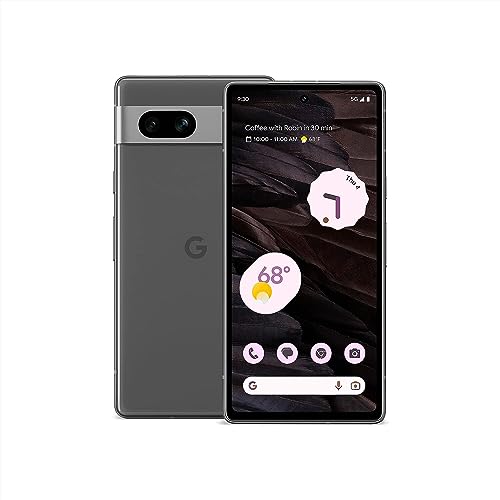
Google Pixel 7a — Camera bargain
Photography rewrites the affordability equation for the Pixel 7a. Parents who would otherwise buy a separate compact camera, or upgrade phones chasing better birthday photos, can stop at this handset and pocket the difference. Google’s image processing squeezes startling quality from modest hardware: faces stay natural under restaurant lighting, moving toddlers freeze more often than rivals manage, and night scenes hold together where similarly priced phones dissolve into watercolour.
The renewed route shapes this recommendation. The listing in our pool is a refurbished unit, which trims the price into affordable territory while demanding the usual checks — battery health expectations, cosmetic grading, return terms. Buyers comfortable with renewed devices gain Google’s long update runway and a compact, one-hand friendly body that new budget phones, growing ever larger, increasingly refuse to offer.
Daily behaviour is pure Pixel: clean software, features like call screening and voice-typing that genuinely save minutes, and an interface free of duplicated app stores and preloaded games. The Tensor processor runs warm under sustained gaming and charging speeds lag the fastest rivals, but for communication, photography and browsing, the experience feels borrowed from a far pricier shelf.
Longevity seals the value case. Google supports this model with years of platform and security updates, the camera will still impress relatives in three years, and the compact size suits owners tired of two-handed phones. As an affordable purchase measured across its whole life — purchase discount, camera savings, long support — the 7a argues persuasively that it is the smartest money on this page.
- Camera: Google computational photography, strong low-light results
- Body: compact by modern standards, one-hand friendly
- Software: clean Android, extended update support from Google
- Condition: renewed listing — verify grade and returns
- Charging: wired plus wireless charging support
Strengths
- Family photography outclasses every similarly priced rival here.
- Compact dimensions welcome smaller hands and shallower pockets.
- Software features save time daily rather than decorating spec sheets.
Trade-offs
- Renewed condition means battery history varies between units.
- Sustained gaming warms the body and drains quickly.
- Charging speeds trail the fastest-charging competitors.
Best for: parents and photography lovers wanting flagship photos affordably. Not suited for: buyers insisting on brand-new devices or marathon gaming.

Samsung Galaxy A35 5G — Balanced all-rounder
Balance rarely excites, yet balance is what most households actually need, and the Galaxy A35 delivers it with unusual completeness. The display is bright and smooth, the build shrugs off daily knocks with a confidence cheaper-feeling rivals lack, water resistance survives kitchen splashes and rainy dog walks, and the cameras handle the family archive without embarrassing anyone. Nothing leads the class outright; everything avoids trailing it.
Samsung’s software commitment transforms the ownership maths. Years of Android upgrades and security patches mean banking, health and work apps keep functioning long after rivals become risky. For a buyer stretching a budget precisely because money is tight, that guarantee against forced replacement is worth more than a marginally faster chip in a phone abandoned by its maker next spring.
Performance sits comfortably in the sensible zone. Social apps, navigation, streaming and school platforms flow without drama, and the phone sustains its pace through a busy day without heating theatrics. Keen gamers will find its ceiling in demanding titles, where settings need trimming; everyone else will simply never think about the processor, which is the highest compliment a mid-priced phone can earn.
Consider also the ecosystem discount. Cases, chargers, screen protectors and repair quotes for a mainstream Samsung are cheap because they are everywhere, and a future trade-in or resale finds buyers instantly. The A35 is the pick for shoppers who want one decision to stay correct for years — the definition of affordable that survives contact with real life.
- Display: bright AMOLED, 120Hz refresh rate
- Build: water resistance for everyday splashes
- Storage: 128GB, expandable on many configurations
- Updates: multi-year Samsung support commitment
- Cameras: versatile main camera with stabilisation
Strengths
- No glaring weakness anywhere in the daily experience.
- Support lifespan protects the purchase for years.
- Resale and accessory markets stay deep and cheap.
Trade-offs
- Demanding games require reduced graphics settings.
- Design conservatism will not thrill style-led buyers.
- Charging is competent rather than class-leading.
Best for: households wanting one dependable phone for many years. Not suited for: hardcore gamers or fashion-first shoppers.

Samsung Galaxy A15 5G — Lowest safe entry
Every affordability guide needs a floor, and the Galaxy A15 marks the level below which compromises stop being charming. Cheaper handsets exist, but they begin surrendering update support, screen quality or basic reliability. The A15 holds all three: an AMOLED display that flatters everything from maps to streamed drama, Samsung’s published multi-year support, and a battery that treats a long day as a warm-up.
First-time smartphone owners and relatives graduating from ancient handsets benefit from Samsung’s familiarity. The interface mirrors millions of other Galaxy devices, so a family member can troubleshoot over the phone from memory, and video tutorials exist for literally every setting. That support-by-community effect never appears in reviews, yet it saves real households real weekends of frustration.
Honesty about pace is required. The A15 opens apps a breath slower than pricier siblings, juggles fewer of them before reloading, and its cameras prefer generous light. Owners whose routines centre on messaging, calls, browsing and video will rarely notice; owners running businesses from their pockets should climb to the A35 and consider the difference an investment rather than an indulgence.
As the entry ticket into safe, supported, repairable Android ownership, though, nothing undercuts it without cutting something essential. Students, spare-phone seekers and careful gift buyers can purchase the A15 confident that affordable here does not secretly mean disposable — the distinction this entire guide exists to defend.
- Display: Super AMOLED with strong outdoor visibility
- Storage: 128GB plus microSD expansion
- Support: Samsung’s multi-year update promise
- Battery: full-day-plus endurance for typical routines
- Network: 5G in US unlocked configuration
Strengths
- Lowest price that still buys long software support.
- Screen quality embarrasses cheaper LCD rivals.
- Huge owner community makes help easy to find.
Trade-offs
- Multitasking reveals its budget processor quickly.
- Camera performance fades as light falls.
- Plastic build feels functional rather than premium.
Best for: first phones, spare phones and cautious gift purchases. Not suited for: power users running demanding apps all day.

Motorola Moto G Stylus 5G (2024) — Notes and sketches
A pen changes what a phone is for. The Moto G Stylus carries its stylus inside the body, always present for the moments paper is not: signing a delivery form, marking up a screenshot of a leaking pipe for the plumber, sketching a garden layout on the bus, or a student annotating lecture slides minutes before an exam. That single accessory, bundled rather than sold separately, redefines this handset’s value story completely.
Motorola tuned the surrounding phone sensibly. The large display gives handwriting room to breathe, palm rejection behaves well enough for lists and diagrams, and the note app opens the moment the pen slides out — a small friction removal that determines whether a feature gets used daily or forgotten by February. Performance matches the A-series rivals here, adequate for productivity and media while declining heavy gaming invitations.
Students on budgets feel this pick most keenly. A separate tablet for notes costs real money; a laptop is heavier and slower to wake. The Stylus consolidates phone, notebook and sketchpad into one affordable object that fits a jacket pocket, and its battery survives a lecture day without rationing. Artists should calibrate expectations — this pen serves handwriting and annotation, not pressure-sensitive illustration — but writers, list-makers and form-fillers get the genuine article.
Ownership costs stay friendly. Motorola’s clean software avoids subscription nudges, the body tolerates student life in a decent case, and replacement styli are inexpensive when one inevitably rolls under a train seat. For the note-taking tribe, no rival on this page is remotely as affordable, because no rival includes the tool the tribe actually came to buy.
- Stylus: built-in pen stored in the body
- Display: large panel suited to handwriting and reading
- Memory: 8GB RAM, 128GB storage (US configuration)
- Software: near-stock Android with note shortcuts
- Network: 5G, unlocked for US use
Strengths
- Handwriting and annotation arrive free, integrated and always available.
- Large screen doubles as a comfortable reading surface.
- Student-friendly consolidation replaces a separate note tablet.
Trade-offs
- Pen lacks the pressure sensitivity illustrators expect.
- Update support trails Samsung and Google schedules.
- Gaming performance sits firmly in the casual tier.
Best for: students, list-makers, form-signers and sketch-note thinkers. Not suited for: digital artists needing a professional pen, or update maximalists.

Motorola Moto G Power 5G (2024) — Weekend battery
Some buyers measure affordability in chargers not bought, power banks not carried and replacements not forced by a battery murdered through constant deep discharge. The Moto G Power speaks directly to them. Its endurance stretches across a weekend of moderate use, and batteries cycled gently age slowly — meaning this phone defends its value in year three in a way spec-sheet rivals with frailer stamina cannot.
Outdoor workers, festival-goers, new parents and anyone whose day lacks a desk will feel the benefit concretely. Navigation to a site, photos of progress, messages to family, music through a break — the gauge descends politely instead of panicking by mid-afternoon. Motorola’s restrained software deserves partial credit, sipping standby power instead of running a carnival of background processes through the night.
The trade ledger is familiar: a bigger, heavier body, a screen that prioritises smoothness over the Samsung’s contrast, cameras aimed at documentation. None of these should trouble the endurance-seeking buyer, who typically wears gloves, carries tools and values a phone that simply refuses to die during the shift. In gloved hands, incidentally, Motorola’s gesture shortcuts — chop for torch, twist for camera — stop being gimmicks and become the fastest interface available.
Priced against the cost of a mid-range phone plus the power bank, cables and eventual battery service that phone demands, the Power’s arithmetic wins quietly. It is the affordable choice for people whose scarcest resource is not money at the till but certainty at six in the evening, far from home, with one bar of battery anxiety they never have to feel.
- Battery: large cell with multi-day light-use potential
- Display: 6.7-inch, 120Hz refresh rate
- Memory: 8GB RAM in US configuration
- Software: gesture shortcuts, lightly skinned Android
- Build: substantial, work-friendly dimensions
Strengths
- Endurance removes daily charging anxiety entirely.
- Gentle battery cycling promises graceful ageing.
- Gesture controls shine with gloves or full hands.
Trade-offs
- Weight and size suit pockets unevenly.
- Screen contrast trails AMOLED competitors.
- Cameras document rather than delight.
Best for: outdoor workers, travellers and weekend-away minimalists. Not suited for: compact-phone devotees or keen photographers.

TCL 50 XL 5G — Entertainment screen
Households that cancelled a television subscription and watch everything on phones should read this entry twice. TCL, a company built on displays, gives the 50 XL a big, smooth panel and stereo speakers that together turn a train seat into a tolerable cinema. When the phone is the screen — for sport, series and video calls alike — spending the affordable budget on display and audio rather than camera hardware is not a compromise but a correct allocation.
The 120Hz refresh deserves its reputation among owners. Interface motion feels expensive, long articles scroll without the judder that tires eyes, and casual games gain a fluidity their graphics settings alone would never deliver. Paired with 5G connectivity, the whole entertainment pipeline — stream, scroll, share — runs at a pace that embarrasses the price segment’s reputation for sluggishness.
Where does the money visibly not go? Camera versatility, software longevity and brand prestige. The main camera handles daylight social photography respectably, then the supporting cast contributes little. TCL’s update promises are shorter than the Korean and Californian rivals here. Buyers keeping phones two to three years and watching video nightly will never care; buyers planning a four-year tenure should weigh the A35’s support story instead.
As an affordable entertainment appliance that also makes calls, the TCL earns its place honestly. It asks a clear question — what do you actually stare at for four hours a day? — and spends its entire budget answering it. For the streaming-first household, that focus is the most financially literate choice on this page.
- Display: 6.78-inch, 120Hz, tuned for video
- Audio: stereo speakers for media and calls
- Storage: 128GB with expansion options
- Network: 5G connectivity
- Battery: full-day cell, wired charging
Strengths
- Screen and speaker pairing leads this group for entertainment.
- Scrolling fluidity makes everyday use feel premium.
- 5G streaming performance suits cord-cutting households.
Trade-offs
- Software support window is comparatively short.
- Secondary cameras contribute little real value.
- Brand resale demand trails Samsung and Google.
Best for: streamers, sports watchers and video-calling families. Not suited for: four-year keepers or camera enthusiasts.
Comparison Table
| Model | Defining strength | Support outlook | Value profile |
|---|---|---|---|
| Pixel 7a | Photography | Long, from Google | Renewed bargain, camera savings |
| Galaxy A35 5G | Balance | Long, from Samsung | Four-year household anchor |
| Galaxy A15 5G | Entry price with support | Long, from Samsung | Safe floor for careful budgets |
| Moto G Stylus 5G | Built-in pen | Moderate | Phone plus notebook in one |
| Moto G Power 5G | Battery life | Moderate | Fewer accessories, slower battery ageing |
| TCL 50 XL 5G | Display and audio | Shorter | Entertainment per dollar maximised |
What Do the Best Affordable Android Phones Really Cost Across Four Years?
Run the arithmetic honestly and surprises emerge. The purchase is merely the first line: add a case and protector, a replacement charging cable or two, perhaps a battery service in year three, and the resale or trade-in credit at the end. A phone bought slightly dearer but supported longer, repaired cheaper and resold easier routinely posts the lowest four-year total — which is why this guide keeps returning to support policies that look boring in a launch headline.
Forced replacement is the budget-killer hiding inside cheap purchases. When a maker stops patching a phone, banking apps withdraw support, security risks accumulate, and the owner shops again years earlier than planned. Two phones in four years at a bargain price cost more than one sensible phone across the same span, before counting the hours lost migrating data twice. Affordability, properly understood, is mostly the art of buying once.
There is an environmental echo worth hearing too. The greenest, thriftiest phone is the one already manufactured that stays in service, and every year of extended use defers mining, shipping and disposal costs no invoice shows. Choosing support-rich models is therefore both household economics and quiet sustainability — a rare alignment where the cheapest decision and the responsible one are the same decision.
How Do You Stretch an Affordable Phone Further?
Treat storage as a garden, not a warehouse. Review the largest apps quarterly, evict games finished last year, and let cloud archives hold the video backlog. Phones slow down as storage fills, so this single habit preserves the snappiness you paid for better than any booster app — most of which, frankly, cause the very clutter they promise to cure.
Feed the battery gently. Charging overnight is fine on modern devices, but avoiding constant heat — gaming while fast-charging on a summer dashboard — slows chemical ageing noticeably. Owners of the endurance picks here have an easier path: fewer cycles, shallower discharges, and a battery still healthy when cheaper rivals are begging for service.
Learn your phone’s free talents before buying apps or accessories. Built-in document scanning, call screening, live captioning and note tools on these models replace paid subscriptions and gadgets. The Stylus owner’s pen, the Pixel’s transcription, Samsung’s automation routines — each is money already spent, waiting to be used rather than duplicated.
Which Affordable Phone Fits a Student, a Parent, a Worker?
Students should start from the Stylus or the Pixel 7a depending on whether their notes or their social photography matter more; both consolidate devices a student budget cannot buy separately. The A15 serves as the sensible default for a first independent phone, cheap enough to lose without tears, supported long enough to survive a degree.
Parents buying for themselves gravitate to the 7a’s camera or the A35’s balance, while parents buying for teenagers should prioritise the A15’s repairability and the Power’s battery — the two traits that survive contact with adolescent life. Grandparents, finally, deserve the TCL’s big screen or the Power’s forgiving stamina, matched to whether video calls or charging habits dominate their routine.
Workers split by environment: outdoor and mobile roles take the Power, desk-and-meetings roles take the A35, creative and client-facing roles justify the 7a’s camera for product shots and site documentation. Notice how no persona was assigned “the cheapest one” — affordability done properly starts from the job, then finds the lowest honest price for doing it well.
How Do Carrier Deals Distort What Affordable Means?
Walk into a carrier shop and affordability gets quoted monthly, a framing designed to make expensive phones feel painless and cheap phones feel pointless. A handset described as free usually arrives attached to a premium plan tier, a long commitment and a trade-in demand for your current device. Totalled honestly across the contract, many such arrangements cost more than buying one of this guide’s unlocked picks outright and choosing a modest prepaid plan.
The maths deserves doing on paper before signing anything. Write the plan’s monthly premium over the cheapest plan meeting your data needs, multiply by the contract length, add any activation and insurance charges, then compare that figure against the outright purchase route. Households routinely discover a four-figure gap wearing a “free phone” costume, and the discovery takes five minutes with a calculator nobody in the shop will offer you.
None of this makes carrier deals universally foolish. Families consolidating lines, employers reimbursing plans and buyers who genuinely need the premium tier anyway can extract real value from promotions. The mistake is evaluating the phone’s price in isolation from the plan it drags behind it — affordability lives in the combined bill, and the combined bill is where disciplined buyers win their quiet victories.
What Do Affordable-Phone Owners Report After a Year?
Anniversary conversations with budget buyers share a rhythm: early anxiety, rapid forgetting, then a mild pride. The anxiety centres on whether colleagues will notice the modest badge; the forgetting arrives when the phone simply handles work, family and entertainment without incident; the pride surfaces when a friend complains about a cracked flagship whose repair quote exceeds the entire cost of the budget phone sitting safely in its case nearby.
Complaints, when they come, cluster predictably. Camera disappointment at indoor events leads, followed by storage pressure from messaging archives and the occasional slow morning when several apps update simultaneously. Notably absent from the complaint list: the missing premium materials, the absent exotic features, the benchmark scores. Owners mourn only what touches their routine, confirming this guide’s insistence on matching compromises to the corners of life you never visit.
A subtler report deserves attention: several owners described becoming calmer phone users. A device that is affordable to repair and replace lowers the stakes of every pavement, puddle and playground. That psychological dividend never appears in reviews, yet for parents of young children and workers in rough environments it may outweigh every specification on this page combined.
Which Features Look Expensive But Cost You Nothing?
Software features carry no shelf premium yet separate satisfying affordable phones from dreary ones. Call screening that silences scam callers, live captions that rescue a video watched beside a sleeping baby, voice typing accurate enough to draft messages while cooking — these live in the Pixel’s software and increasingly in Samsung’s and Motorola’s, and they deliver daily value rivalling hardware costing far more. Before paying extra for any phone, inventory the free talents of the cheaper candidate; you may already own the feature you were about to purchase.
Automation deserves special mention for busy households. Routines that silence the phone at the school gate, read messages aloud in the car, or dim the screen at bedtime remove dozens of weekly micro-tasks. Affordable phones running modern Android support most of these tricks; the only investment is an evening spent configuring them, after which the handset quietly behaves like a device with a personal assistant included in the price.
Accessibility tools follow the same pattern. Magnification, hearing-aid compatibility, voice control and high-contrast themes are engineered into every model here, transforming an affordable handset into a genuinely capable assistive device for relatives who might otherwise be sold specialist hardware. Families caring for ageing parents should test these menus in-store; the capability gap between a mainstream affordable phone and dedicated accessibility gadgets has narrowed to nearly nothing.
How Do You Compare Two Affordable Phones in a Shop in Ten Minutes?
Forget benchmarks; run errands. Open the camera and photograph the shop’s own signage, then zoom into the saved image to judge honest sharpness. Type a long sentence quickly and feel whether the keyboard keeps faith with your thumbs. Load a heavy website over the shop Wi-Fi, scroll to the bottom, and watch for stutters that will only worsen as your real apps and archives move in.
Carry the phone to the window. Screens that dazzle under retail spotlights often surrender in daylight, and since your life happens partly outdoors, the window test predicts more satisfaction than any showroom demo loop. Check the call speaker against your ear, the fingerprint reader against your actual thumb, and the body against your actual pocket — trousers included, because dimensions on a webpage never mention denim.
Ask two questions of the staff and weigh the answers heavily: what does a screen replacement cost for this exact model, and how long will its maker publish security updates? A shop that can answer both clearly is selling you a supported product. A shop that waves both away is selling you a box, and boxes are not phones, however affordable the sticker on them appears.
Can an Affordable Phone Run a Small Business?
Market traders, cleaners, tutors and delivery drivers increasingly run entire operations from handsets, and the affordable tier now clears that bar with room to spare. Card readers pair happily, invoicing apps run smoothly, and the cameras document work, receipts and deliveries at quality clients accept without comment. The question for a sole trader is rarely whether a budget phone can do the job; it is whether its owner has organised the job properly on the phone.
Organisation means separating business from personal life inside one device: a work profile or second user space for client apps, cloud folders divided by customer, and a backup routine treated as sacred as the till. The Samsung and Pixel picks here handle work profiles gracefully, while the Motorola pair’s clean software keeps a single mixed space tidy for owners whose businesses are simpler.
Reliability planning matters more than raw power at this level. A trader whose phone dies mid-market loses a day’s takings, dwarfing any savings from a cheaper handset. That is the practical argument for the Power’s battery or the A35’s repair network: for business users, affordable means the phone never becomes the reason money was lost, and uptime is the specification that pays the rent.
Common Mistakes
Equating affordable with the smallest number on a shelf tag is the founding error of this market. That number excludes support length, repair pricing, accessory costs and replacement timing — the very factors deciding what a phone costs a household across its life. Buyers who learn to read a four-year total instead of a one-day price stop making this mistake permanently.
Buying last year’s flagship blindly comes next. Yesterday’s hero can be a superb renewed bargain — the Pixel 7a on this page proves it — but only when its remaining update runway and battery condition are verified. A flagship with eighteen months of support left is a shorter purchase than a humble new phone with four years promised, regardless of how premium its materials feel.
Overbuying storage while underbuying support inverts real priorities. Cloud archives make modest storage workable for most people, whereas no accessory can purchase extra years of security patches from a maker who has moved on. Spend first on the calendar, then on capacity, then on decoration — in that order, every time.
Skipping the renewed checks wastes the category’s best bargains. Renewed units vary; grades, battery guarantees and return windows separate a smart discount from a stranger’s problem phone. Ten minutes reading those terms is the difference between the 7a story ending in delight and ending in a forum complaint.
Finally, many buyers forget to price the switch itself. A new charging standard, a different case size, a cloud migration — small frictions that add up. Staying within a familiar ecosystem, or choosing models with ubiquitous accessories, trims the transition bill in ways spec comparisons never capture.
Final Recommendation
Households wanting one answer should take the Galaxy A35 5G. It balances screen, build, cameras, support and repair economics with no weak leg for the stool to wobble on, and its four-year cost story is the most predictable here. Predictability is what a stretched budget needs most.
Photographers should override that default without hesitation: the Pixel 7a’s camera saves real money for anyone who would otherwise chase better photos through pricier hardware, and its renewed pricing is the sharpest value play on this page when bought from a seller with clear grading and returns. Note-takers take the Stylus, endurance seekers take the Power, streamers take the TCL, and the truly budget-pressed take the A15 knowing its support keeps it honest.
Whichever name you choose, buy it as a four-year decision: case it, update it, keep its storage breathing, and let affordability compound quietly in your favour month after month.
How Should You Time an Affordable Purchase?
Phone pricing breathes in seasons. New models push predecessors down, holiday promotions compress margins, and carrier-unlocked variants fluctuate independently of the locked versions on shop shelves. A buyer with a functioning phone and a month of patience can often capture a model a full tier above their budget by waiting for the predecessor’s price to settle after its successor’s launch — the oldest trick in this market, still working because impatience is the industry’s favourite subsidy.
Renewed inventory follows its own calendar, swelling after flagship launch weekends when trade-ins flood refurbishers. Shopping the Pixel 7a class of device in those windows improves both selection and grading honesty, since sellers compete on quality when supply is deep. Conversely, the week before a major holiday, renewed stock thins and prices firm; the disciplined buyer shops the flood, not the drought.
Urgency rewrites the advice, of course. A dead phone before a work trip justifies buying the available A35 today rather than theorising about next month’s promotion. Affordability includes the cost of being unreachable — missed shifts, missed family news, a borrowed handset’s indignities — and honest guides should admit that sometimes the affordable choice is simply the phone you can hold tonight, bought from a seller whose returns desk you trust.
Why Does the Second Year Decide Whether You Chose Well?
Year one flatters almost every phone. Batteries are fresh, storage is empty, the software is current, and novelty forgives minor irritations. The honest verdict on an affordable purchase arrives in year two, when the battery has cycled hundreds of times, the photo library numbers in thousands, and the first major Android upgrade separates makers who support their budget lines from makers who merely sold them.
Support-rich picks age like furniture: a wobble here, a scratch there, fundamentally sound. Abandoned picks age like fast fashion, visibly tired by the second season and quietly embarrassing by the third. This divergence is why our shortlist tolerated slightly higher entry prices for Samsung and Google models — the second and third years are where their value compounds, and compounding is the entire philosophy of affordable buying compressed into one word.
Owners can tilt the ageing curve themselves. A battery replacement at the right moment, a factory refresh after a major upgrade, a new case when the old one yellows — small mid-life investments that restore a phone’s dignity for a fraction of replacement cost. Budget for one such refresh when you buy, and the four-year plan stops being optimism and becomes a schedule you control.
What Role Should a Case and Insurance Play in the Budget?
Protection pricing confuses buyers because the ratios look absurd: a case costing a tenth of the phone feels extravagant until the first pavement meeting reframes it as the cheapest component of the entire purchase. At affordable prices, self-insuring usually beats formal insurance — premiums and deductibles approach the handset’s value quickly — but physical protection is non-negotiable, because an unrepaired cracked screen converts an affordable phone into an expensive paperweight with a data plan.
Choose protection matched to your environment rather than your anxiety. Office workers need slim grip and scratch defence; site workers need corner armour and port covers; parents need whatever survives being thrown by a toddler into a paddling pool’s general direction. The models here all enjoy deep case catalogues — one more hidden dividend of buying mainstream — so the right armour exists at a fair price for every lifestyle represented on this page.
Register the purchase, photograph the serial number, and store the receipt digitally before the box goes to recycling. When something does go wrong, the households who recover fastest are not the ones who bought the most expensive phone; they are the ones who can produce paperwork in ninety seconds. Organisation is an affordability feature, and it costs nothing but ten minutes on delivery day.
A Short Word About Pride and Pockets
Somewhere in every affordability discussion lurks embarrassment, and it deserves dragging into daylight. Phones became status jewellery, and choosing a modest model can feel like announcing a smaller life. Yet the owners we hear from describe the opposite sensation after a few months: a private amusement at watching larger sums chase smaller improvements, and a growing attachment to a device chosen by arithmetic rather than advertising. The affordable phone, bought deliberately and used fully, is not a compromise worn in public. It is evidence of a household that knows what its money is for — and that knowledge, unlike a flagship, never needs replacing when a newer model launches.
How Do You Move Into a New Affordable Phone Without Losing a Weekend?
Migration dread keeps people clinging to dying phones, yet modern transfers have become mercifully mechanical. Charge both devices, connect them as the setup wizard suggests, and let photos, messages and apps flow across while you make tea. The genuine work is not the transfer; it is the fortnight of two-factor prompts afterwards, as banks and services confirm your new hardware is really you.
Prepare before the new phone arrives. Update the old handset, complete a fresh backup, and gather passwords somewhere secure rather than relying on the old phone’s saved logins, which do not always travel. List the five apps whose absence would ruin your Monday — banking, work chat, transit, authenticator, family group — and verify each one personally on day one instead of discovering gaps under pressure.
Keep the old phone, wiped only after a month of quiet confidence, as the household spare. That drawer device is the cheapest insurance in this entire guide: a loaner during repairs, a travel backup, a child’s emergency handset. Affordable phones earn their keep twice — once as your daily device, and again as the safety net that makes their own eventual replacement a calm errand rather than a crisis.
What Changes When the Whole Family Buys Affordable?
Households standardising on affordable models discover economies no single buyer can access. Chargers, cables and cases become interchangeable, a spare handset always exists in a drawer, and the family’s collective knowledge deepens because everyone troubleshoots the same handful of devices. A parent who has solved a notification problem on their own A-series can solve it again on a child’s phone from memory, in the car, without a search engine.
There is a fairness dividend too. Siblings carrying comparable handsets argue less than siblings separated by a flagship and a hand-me-down, and parents upgrading in rotation — one member per year, devices cascading downward — keep the whole fleet modern on a budget that would buy a single premium phone outright. The cascade turns affordability from an individual compromise into a family system, quietly elegant and remarkably cheap to run.
Standardising does not require identical models. This page deliberately offers a photographer’s Pixel, a note-taker’s Stylus, a worker’s Power and all-round Samsungs within one affordable family, because personalities differ even when budgets align. Buy the variety your household needs, keep the chargers common and the support horizons long, and the fleet effect delivers its savings without forcing anyone into the wrong phone.
The Quiet Arithmetic of Staying Put
One final calculation rarely appears in phone reviews: the value of not shopping. Every upgrade cycle consumes evenings of research, a weekend of migration, a fortnight of small frictions and the low-grade anxiety of money spent. An affordable phone bought well and kept for four years returns those hours to their owner four times over. Multiply by a household and the saved attention becomes a genuine asset — weekends spent on anything other than handset logistics, because the handsets were chosen once, correctly, and then allowed to disappear into daily life, which is where good tools belong.
That disappearance is the true test this guide applies. A phone you stop thinking about — because the battery behaves, the software updates itself, the camera pleases the family chat and the bill never surprises — has delivered everything affordability promises. Chase that invisibility, in whichever of these six shapes fits your hand and habits, and the purchase will keep repaying you in the currency of unremarkable, dependable days.
Before You Decide, Borrow a Friend’s Perspective
Ask one question of anyone whose phone habits resemble yours and whose judgement you trust: what do you actually dislike about your handset after a year? Strangers’ reviews describe launches; friends describe Tuesdays. Their answers will rarely mention the features dominating advertisements, and will almost always circle the battery, the camera at family events, the storage warnings and the updates — the same four pillars this guide has leaned on throughout. If their complaint list matches a pick’s known trade-offs and none of those trade-offs touch your routine, you have found your phone, and the deliberation can end with confidence rather than exhaustion.
A Note on Gifts, Guilt and Good Intentions
Buying an affordable phone for someone else carries a social risk the solo buyer never faces: the recipient may read the modest badge as a modest opinion of them. Defuse that reading with presentation. Set the phone up completely, load the family photos, fit the case, and hand it over working rather than boxed, with its strengths narrated — the camera chosen for their grandchildren pictures, the battery chosen for their long days out. A gift introduced as a considered selection lands as generosity; the same hardware handed over silently can land as an afterthought, and the difference costs nothing but ten minutes of care.
The same principle governs buying for yourself, honestly. Present the phone to your own future self properly: migrate with care, configure the home screen deliberately, learn two or three of its cleverer tricks in the first week. Owners who invest that small ceremony report stronger satisfaction months later, because the device entered their life as a chosen tool rather than a stopgap, and tools chosen with respect tend to be treated — and to perform — accordingly.
Write down, finally, what would make you replace this phone, and tape the note inside a kitchen drawer: a dead battery that no longer holds a day, a banking app withdrawn for age, a screen injury beyond economical repair. Deciding the exit criteria in advance protects you from both errors — clinging to a phone past its safe life, and abandoning a healthy one because an advertisement made an ordinary Tuesday feel inadequate.
Revisit that note once a year, on the phone’s birthday if you remember it. If none of your exit conditions has arrived, congratulate the purchase, clear the storage, perhaps treat the handset to a fresh case, and return it to service. This tiny ritual is how affordable phones become five-year phones in real households — not through luck, but through owners who decided in advance what “still good enough” actually means.
Frequently Asked Questions
Does affordable mean settling for a bad phone?
Not anymore. The models gathered here run modern apps, photograph family life credibly, stream high-definition video and receive years of security care. What you surrender versus flagships is mostly speed headroom, exotic materials and camera versatility in difficult light — luxuries whose absence most owners stop noticing within a fortnight of ordinary use.
Is a renewed phone a sensible affordable choice?
Renewed flagships and near-flagships can be the smartest money in this entire category, provided the seller grades condition honestly, guarantees battery health thresholds and accepts returns. Verify those three terms and the discount is real; skip the verification and you are gambling rather than saving, which are opposite activities wearing similar clothes.
How much storage should an affordable phone have?
Most households thrive on the configurations listed here when paired with routine cloud offloading of videos. Heavy game libraries and offline media collections argue for the roomiest variant or microSD expansion where offered. Audit your current phone’s usage screen before ordering; it predicts your future needs more accurately than any generic advice.
Which brand supports affordable phones longest?
Samsung and Google publish the most generous commitments in this line-up, stretching years beyond Motorola’s and TCL’s schedules. If your buying plan assumes four or more years of service, that difference should weigh heavily; if you replace phones every two years anyway, spend the savings on the screen or battery you will enjoy daily instead.
When is the cheapest phone actually the right phone?
When it is a spare, a child’s first handset, a travel backup or a temporary replacement with a known short mission. The Galaxy A15 shows that even then, cheap need not mean unsupported. Match the phone’s honest lifespan to the job’s honest duration and the lowest price becomes a rational choice rather than a false economy.
Related Guides
Keep exploring with the strict-budget Android phones ranked by a firm low ceiling, compare the affordable Android phones under a mid-level budget cap, or read about unlocked Android phones that free you from carrier contracts.



[…] comparing with our guide to affordable Android phones under a larger budget, browse the roundup of unlocked Android phones for carrier freedom, or step up through the best […]