What's inside
- Key Takeaways
- Quick Picks
- How We Chose These Picks
- Comparison Table
- How Do the Best Affordable Android Phones Under 200 Divide Into Rungs?
- What Does the Top of This Budget Buy That Last Year It Could Not?
- What Gaming Is Realistic Under This Ceiling?
- How Should Camera Expectations Be Calibrated at Each Rung?
- How Does Storage Strategy Change by Rung?
- How Do You Protect a Phone at This Level Without Doubling the Bill?
- What Happens to These Phones at Resale and Trade-In Time?
- How Should Upgraders From Much Older Phones Prepare?
- Common Mistakes
- Final Recommendation
- Why Do Families End Up Owning Three Different Rungs at Once?
- What Should a Renewed Buyer Inspect in the First Forty-Eight Hours?
- The Case for Buying the Phone You Can Also Afford to Lose
- A Field Guide to Reading “Under 200” Listings Elsewhere
- One Ceiling, Six Honest Answers
- What If Two People Share One Budget and One Phone?
- The Environmental Ledger of a Sensible Ceiling
- A Closing Checklist Taped to the Fridge
- Frequently Asked Questions
- Related Guides
As an Amazon Associate I earn from qualifying purchases. This post may contain affiliate links at no extra cost to you.
widgetverdict.com is reader-supported. When you buy through links on our site, we may earn an affiliate commission.
Where to buy: each linked model below leads to its Amazon page; check price on Amazon before deciding, because the best affordable android phones under 200 shuffle positions whenever a promotion lands. Two hundred is the most interesting ceiling in the Android market — high enough to buy genuine quality, low enough that every dollar still argues for its place. This guide treats that ceiling as a ladder with three rungs, and places each phone on the rung where its money works hardest.
The bottom rung buys competence: a supported, big-screen phone that handles modern life without apology. The middle rung buys comfort — smoother screens, better cameras, builds that feel like they belong to a pricier shelf. The top rung buys near-flagship moments: photography or displays that occasionally fool friends into guessing a much larger number was spent. Knowing which rung your life requires is the whole skill this page teaches.
Buyers err in both directions along the ladder. Some camp on the bottom rung out of habit although their photography, work or gaming would flourish one rung up. Others stretch to the top automatically, purchasing camera hardware their group-chat usage never exercises. Read the rung descriptions first, locate your honest rung, then let the reviews within it fight for your money.
Key Takeaways
- Divide the budget into rungs and shop within one; comparing across rungs manufactures dissatisfaction with perfectly suitable phones.
- The middle rung currently offers the richest value, where AMOLED screens and stabilised cameras meet long update promises.
- Renewed former flagships and upper-midrange models at the top rung deliver photography no new budget phone matches.
- Xiaomi’s Redmi Note line spends its allocation on display and charging spectacle, trading update length for immediate wow.
- Money saved by choosing a lower rung is real money — spend the difference on storage, protection or nothing at all.
Quick Picks
| Pick | Badge | Why it earns a slot |
|---|---|---|
| Samsung Galaxy A35 5G | Sweet-spot champion | The middle rung perfected: bright screen, sturdy build, years of support. |
| Google Pixel 7a | Top-rung camera | Renewed pricing drags flagship photography down to this ceiling. |
| Xiaomi Redmi Note 13 Pro 4G | Display showpiece | A gorgeous AMOLED and huge storage for GSM-network buyers. |
| Motorola Moto G Stylus 5G (2024) | Productivity rung | A built-in pen no rival at this ceiling includes. |
| Samsung Galaxy A15 5G | Bottom-rung safety | Maximum support and screen quality for minimum spend. |
| Motorola Moto G Power 5G (2024) | Endurance rung | Battery life that outlasts every rival gathered here. |
How We Chose These Picks
Rung placement came first, price second — deliberately backwards from most guides. We asked what each model does better than the rung below it and whether that improvement touches ordinary life: a screen readable at a sunny platform, a camera that saves the indoor birthday shot, an update promise extending a year further. Models whose premium bought only benchmark bragging were demoted, however impressive their launch presentations looked.
Support horizons were priced into every rung. A top-rung phone with two years of patches remaining can be a worse purchase than a middle-rung phone with four, because the ceiling you are really buying is time. Renewed listings were therefore judged on remaining runway, not original launch glory, and the Pixel’s long Google support is precisely why it survives that scrutiny here.
Network fit filtered the field quietly. Xiaomi’s contender is a GSM device, splendid on compatible carriers and a paperweight on the wrong one, so its review states that plainly rather than burying it. Every other pick speaks fluent US carrier, giving readers who cannot be bothered with band charts safe defaults on every rung.
Finally, each rung received exactly the phones earning their climb. Six models, three altitudes of ambition — and an explicit permission slip, repeated in the final recommendation, to buy lower than your maximum whenever the lower rung already does your whole job. A budget ceiling is a limit, not a target.

Samsung Galaxy A35 5G — Sweet-spot champion
Stand on the middle rung and look both ways: below, phones apologise for their cameras and screens; above, prices climb for refinements measured in millimetres and milliseconds. The Galaxy A35 occupies the precise point where apologies end. Its AMOLED display glows with the richness people associate with flagships, the refresh rate keeps motion civilised, and the glass-and-frame construction feels like it wandered down from a costlier family portrait.
Water resistance earns its keep in unglamorous moments — a spilled drink across the café table, rain catching you between the car and the office, a toddler’s enthusiastic bath-time splash. Cheaper phones treat those moments as Russian roulette. Samsung also fits a stabilised main camera that rescues walking shots and dimmer rooms, widening the range of family moments this phone captures acceptably instead of aspirationally.
Support stretches the value across years. Samsung’s published roadmap for this model runs far beyond the payment receipt’s lifespan, keeping work, banking and health apps welcome long after trendier rivals are politely shown the door. For the buyer whose two hundred must become four years of service, that roadmap is not a footnote; it is the product.
Performance will not headline a gaming channel, and Samsung’s charging pace remains polite rather than thrilling. Neither matters to the middle rung’s actual residents, who want a phone that photographs the dog, survives the weather, navigates the holiday and still feels fresh at the next contract renewal. Measured against that brief, the A35 is not merely a good choice under this ceiling — it is the choice the ceiling seems designed around.
- Display: AMOLED, 120Hz, strong outdoor brightness
- Build: water resistance, glass front, sturdy frame
- Camera: stabilised main camera for steadier shots
- Support: multi-year Samsung updates
- Storage: 128GB with expansion on many variants
Strengths
- Feels a full tier pricier in hand and in sunlight.
- Support runway converts the price into years cheaply.
- Weather resistance removes everyday accident anxiety.
Trade-offs
- Gaming ceiling arrives in demanding titles.
- Charging speed is outpaced by Xiaomi’s rival.
- Design plays safe beside bolder competitors.
Best for: the majority — buyers wanting one phone that does everything well. Not suited for: competitive mobile gamers or charging-speed obsessives.
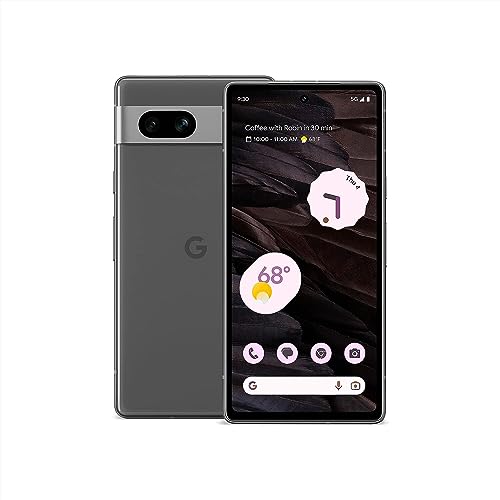
Google Pixel 7a — Top-rung camera
Photography is the one flagship trait that refuses to trickle down on schedule, which is why the renewed Pixel 7a crowns this ladder. New phones at this ceiling photograph competently; the 7a photographs memorably. Its processing rescues the shots families actually take — wriggling children under kitchen lights, grandparents across a restaurant table, the dog mid-shake — with a success rate no new budget rival approaches.
Renewed status is the tollbooth on this route, and honest buyers should approach it methodically. The pool listing is refurbished, so grading, battery expectations and return terms deserve reading before the price seduces you. Sellers of this model are plentiful and competition keeps standards visible; a unit arriving below its described grade goes back, and the next one usually arrives right.
Beyond the camera, the 7a offers the compact body this category keeps abandoning. It operates one-handed on a crowded train, vanishes into a jacket pocket, and still delivers Google’s cleanest software with years of updates remaining. Wireless charging — nearly extinct among new phones at this ceiling — survives here as a renewed-flagship inheritance, joining call screening and transcription tricks that save minutes weekly.
Heat under sustained gaming and a battery sized for a day rather than a weekend mark its limits. But rung logic resolves the choice cleanly: if your memories matter more than your marathon sessions, the top of this budget belongs to Google’s camera, and the premium over the middle rung buys photographs your family will still be sharing when the phone itself is a drawer spare.
- Camera: class-defining computational photography
- Body: compact, pocketable, one-hand friendly
- Charging: wireless charging included
- Software: clean Android, long remaining Google support
- Condition: renewed — check grade and returns carefully
Strengths
- Family photos outclass every new rival at this ceiling.
- Compact size defies the ever-growing budget phone trend.
- Software intelligence saves time in calls and messages.
Trade-offs
- Renewed units vary in battery history.
- Sustained gaming warms the chassis noticeably.
- Battery endurance is a day, not a weekend.
Best for: parents, travellers and anyone whose camera roll is the point. Not suited for: marathon gamers or buyers wanting a brand-new sealed box.

Xiaomi Redmi Note 13 Pro 4G — Display showpiece
Pick up the Redmi Note 13 Pro in a dim room and the screen makes its argument before any specification can. The AMOLED panel is lush, bright and bordered by bezels thin enough to embarrass phones above this ceiling, and the whole device feels engineered to win exactly the first-impression contest it is currently winning on you. Xiaomi understands theatre, and this handset is its best affordable production.
Storage generosity backs the spectacle with substance. The listed configuration carries cavernous internal space — enough for years of photos, offline video libraries and game installs without the deletion rituals humbler phones impose. Charging speed joins the extravagance, refilling the battery during a shower-and-breakfast routine that leaves rivals still hungry at the door.
Now the honest footnotes, which decide whether this pick is yours. The radio is GSM-only territory: superb on T-Mobile and its prepaid relatives, unwelcome on Verizon’s network, so carrier homework is mandatory before desire hardens into an order. The 4G in its name is literal — no 5G — and Xiaomi’s update cadence and interface advertising require patience and a setup evening of pruning.
Buyers on compatible networks who prize screen, storage and charging over update aristocracy get a startling amount of phone here. The Note 13 Pro is the rung where spectacle lives, and spectacle, honestly labelled with its carrier conditions, is a legitimate thing to spend a budget on — provided your SIM agrees.
- Display: AMOLED, 120Hz, slim bezels
- Storage: very generous internal capacity on listed variant
- Charging: rapid wired charging
- Network: GSM only — T-Mobile family friendly, no Verizon
- Camera: high-resolution main camera, daylight-strong
Strengths
- Screen quality rivals phones well above this ceiling.
- Storage abundance ends deletion anxiety for years.
- Charging speed transforms daily routines.
Trade-offs
- GSM-only radio excludes Verizon customers entirely.
- No 5G connectivity on this variant.
- Interface extras need pruning during setup.
Best for: GSM-network media lovers wanting maximum spectacle per dollar. Not suited for: Verizon customers or update-policy purists.

Motorola Moto G Stylus 5G (2024) — Productivity rung
Every ladder needs a rung that changes the shape of the climb, and Motorola’s pen does exactly that. Under this ceiling, no other phone lets you annotate a contract, sketch a measurement for the hardware shop, or take lecture notes without buying a separate accessory ecosystem. The stylus lives inside the phone, charges nothing, pairs with nothing, and appears the instant an idea does — the only productivity feature in this guide with zero friction.
The supporting hardware respects the pen’s mission. A large, smooth display gives handwriting physical room, the note interface wakes with the pen’s removal, and performance handles documents, browsing and media with the same unflustered competence as its Motorola sibling. Students splitting attention between seminar slides and part-time jobs will find the combination quietly transformative: one device, carried always, capturing everything.
Artistic limits deserve naming. The pen tracks position, not the pressure nuance illustrators need, so sketching stays at the diagram-and-doodle level rather than finished artwork. Motorola’s update schedule also trails the Samsung and Google entries here, meaning this phone’s runway is measured in fewer years — a genuine cost to weigh against the pen’s daily usefulness.
For the right owner the equation is not close. A separate tablet plus any rival phone doubles the spend and halves the chance the note tool is present when inspiration strikes at a bus stop. If your life runs on lists, markups and marginalia, this rung is not a compromise on the way upward; it is the destination.
- Stylus: integrated pen, stored in-body
- Display: large panel for writing and reading
- Memory: 8GB RAM, 128GB storage (US build)
- Software: note shortcuts tied to pen removal
- Network: 5G unlocked for US carriers
Strengths
- Handwriting capability is unique at this ceiling.
- Consolidates phone and notebook into one purchase.
- Clean software keeps focus on work, not decoration.
Trade-offs
- Pen suits notes, not professional illustration.
- Update runway shorter than Samsung’s or Google’s.
- Camera system is serviceable rather than special.
Best for: students, tradespeople measuring on site, relentless list-makers. Not suited for: digital artists or buyers planning a five-year tenure.

Samsung Galaxy A15 5G — Bottom-rung safety
Defending the bottom rung matters, because most real purchases under this ceiling happen there. The Galaxy A15 proves a low rung need not mean a flimsy one: Samsung fits an AMOLED screen that shames the LCDs surrounding it at this level, promises years of updates its cheaper rivals cannot match, and surrounds the phone with the deepest accessory and repair ecosystem in the business.
Daily manners are calm. Messaging, banking, maps and streamed video proceed without drama, the battery closes the day with something in reserve, and One UI’s familiarity means help is always one family member away. Buyers upgrading a relative from an ancient handset will especially value how little relearning Samsung demands; the icons sit where a decade of Galaxy phones put them.
The rung’s compromises are pace and polish. App launches carry a small pause, heavier games need modest settings, and the plastic build prioritises durability over delight. None of these will trouble the bottom rung’s true residents — first-time owners, spare-phone buyers, students on strict allowances — who need dependability far more than they need flair.
Spend the money this pick saves you deliberately: on the storage upgrade if offered, on a proper case, or on nothing at all. The A15 exists to demonstrate that the wisest purchase under a ceiling is sometimes the one leaving most of the ceiling unspent, provided support and screen quality survive the saving — and here, uniquely, they do.
- Display: Super AMOLED, unusual quality for its rung
- Support: Samsung multi-year update commitment
- Storage: 128GB plus microSD slot
- Battery: dependable full-day endurance
- Network: 5G, US unlocked
Strengths
- Support and screen quality lead the bottom rung clearly.
- Repair and accessory availability is unmatched.
- Leaves budget headroom for case, storage or savings.
Trade-offs
- Everyday pace is patient rather than brisk.
- Cameras prefer daylight and still subjects.
- Build materials feel purely functional.
Best for: first phones, family spares and disciplined savers. Not suited for: gamers or buyers wanting a premium in-hand feel.

Motorola Moto G Power 5G (2024) — Endurance rung
Ask Power owners what they bought and they rarely mention the phone at all; they describe the charger they stopped carrying. This handset’s rung is defined by absence — of battery anxiety, of mid-afternoon socket hunting, of the low-percentage panic that edits other people’s days. Its large battery and Motorola’s frugal software stretch a charge across a weekend of honest use.
The working day showcases it best. Navigation between jobs, photographs of completed work, hotspot duty for a laptop, family messages through the evening — the gauge declines with unusual politeness. Gesture shortcuts earn their mention here too: a double chop summons the torch in a dark plant room, a wrist twist opens the camera with gloves on, small mercies compounding across a working year.
Costs are paid in pocket bulk and screen subtlety. The Power is a handful, its LCD cannot match the A35’s contrast in a dark film scene, and its cameras document rather than inspire. Motorola’s update promise, while respectable, ends sooner than Samsung’s, so the endurance champion’s own lifespan ironically needs planning around its software horizon.
None of that dents its case for the buyers it serves. If your days happen outdoors, on roads, on sites or on call, the most valuable specification under this ceiling is the one still working at hour fourteen. The Power is that specification with a phone attached, and for its tribe it renders the rest of the ladder academic.
- Battery: large cell, weekend-capable light use
- Display: 6.7-inch LCD, 120Hz
- Memory: 8GB RAM in US configuration
- Software: gesture shortcuts, near-stock Android
- Network: 5G unlocked
Strengths
- Endurance outlasts every rival on this page.
- Gestures genuinely help gloved, busy hands.
- Clean software preserves standby battery.
Trade-offs
- Size and weight are ever-present.
- Screen contrast trails the AMOLED picks.
- Software support ends earlier than Samsung’s.
Best for: drivers, site workers, carers and weekend travellers. Not suited for: small-handed users or photography-led buyers.
Comparison Table
| Model | Rung | Headline virtue | Honest limitation |
|---|---|---|---|
| Galaxy A35 5G | Middle | Balance with long support | Gaming ceiling |
| Pixel 7a | Top | Camera excellence | Renewed condition checks |
| Redmi Note 13 Pro 4G | Top (GSM) | Screen, storage, charging | No Verizon, no 5G |
| Moto G Stylus 5G | Middle | Built-in pen | Shorter support runway |
| Galaxy A15 5G | Bottom | Support plus AMOLED | Patient pace |
| Moto G Power 5G | Bottom–middle | Weekend battery | Bulk and LCD contrast |
How Do the Best Affordable Android Phones Under 200 Divide Into Rungs?
Audit last month’s phone use before reading another review. Your screen-time report names the apps that actually govern your days; your photo library reveals whether you shoot in daylight parks or dim restaurants; your battery graph confesses whether you end days at forty percent or four. Those three exhibits, freely available on your current handset, locate your rung more truthfully than any personality quiz.
Then interrogate the upgrade temptation directly. Moving up a rung should buy a named improvement you can describe in a sentence — “the indoor photos will stop embarrassing me” qualifies; “it is just better” does not. If the sentence will not form, the lower rung already contains your phone, and the unspent difference is the guide working exactly as intended.
Households buying for others should apply the audit to the recipient’s life, not the giver’s ambitions. A parent gifting the top-rung camera phone to a grandparent who video-calls and reads news has purchased excellence in a department the recipient never visits, while the bottom rung’s bigger effective simplicity goes unrewarded. Generosity is matching the rung to the life, not maximising the receipt.
What Does the Top of This Budget Buy That Last Year It Could Not?
Progress at this ceiling arrives as inheritance. Stabilised cameras, water resistance, AMOLED panels at high refresh rates and wireless charging all began life as flagship jewellery, and each year one more heirloom drops into reach of this budget. The current top rung’s richness — a renewed Pixel photographing like a flagship, a Xiaomi screen glowing like one — would have required doubling the spend remarkably recently.
The inheritance pattern carries a buying lesson: patience compounds. A model eighteen months into its life, still supported for years, frequently delivers yesterday’s flagship experience at today’s budget price, which is the entire renewed argument in one sentence. Buyers willing to let the market’s novelty premium evaporate in someone else’s hands inherit better phones than buyers who insist on sealed boxes at the same money.
Expect the ladder itself to keep shifting upward. Next year’s middle rung will inherit today’s top-rung cameras, and the honest response is not to wait forever — a phone is needed now, and today’s rungs are genuinely good — but to buy the rung whose support runway lets you skip a generation comfortably when the ladder next moves.
What Gaming Is Realistic Under This Ceiling?
Mobile gaming divides sharply at this budget. Puzzle titles, card games, strategy classics and the vast library of indie games run beautifully on every pick here, and even demanding racing and battle titles play acceptably once graphics settings bow to the hardware. The ceiling only embarrasses itself when a buyer expects flagship settings in the heaviest releases — an expectation no honest guide should encourage at this money.
Among these six, sustained sessions favour the Motorola pair’s clean software and the A35’s steadier thermals, while the Pixel 7a’s processor delivers strong bursts before warmth trims its pace. Screen refresh rates flatter everything: the 120Hz panels make even modest frame rates feel responsive, which is why casual gamers often report these phones as faster than their specifications confess.
Parents evaluating a gaming phone for a teenager should weigh the ecosystem around the silicon. Storage for large installs, a battery surviving an after-school session, and a case surviving the celebration when a match is won matter as much as frame rates. By that fuller accounting, the ladder holds up well — choose the Stylus for the student who also takes notes, the Power for the one whose battery always dies first, and set the graphics expectations together before the first download.
How Should Camera Expectations Be Calibrated at Each Rung?
Daylight forgives almost everything under this ceiling. Every pick photographs parks, pets, documents and holiday views at quality social platforms display happily, and differences shrink to taste in colour rendering. The rungs separate after sunset and indoors, where processing muscle and stabilisation decide whether a birthday candle shot becomes a keepsake or a smudge.
The Pixel 7a owns that difficult territory outright, the A35 follows with honourable stabilised efforts, and the rest ask for steady hands and realistic hopes. Buyers whose family life happens at evening events — recitals, restaurants, winter school runs — should weight this section heavily, because it describes the precise moments when a phone either earns its premium or exposes its rung.
Video follows a similar pattern with a twist: stabilisation matters more than resolution figures, since a smooth walking clip at modest resolution pleases viewers more than a sharper one bouncing with every step. Test any candidate by filming a corridor walk during the return window; your eyes will grade it more honestly than any specification table.
How Does Storage Strategy Change by Rung?
Storage pressure is the silent tax of the lower rungs. Bottom-rung buyers should treat expansion as part of the purchase: a memory card for photos and video, cloud sync for the irreplaceable, and a quarterly habit of evicting finished games. Managed that way, modest internal space stops being a limitation and becomes merely a routine, like charging.
Middle-rung buyers gain breathing room rather than freedom from thought. The larger internal allocations here absorb a couple of years of casual accumulation, which is precisely the danger — the reckoning arrives later and larger. The same quarterly habit, adopted while it still feels unnecessary, keeps a middle-rung phone brisk into the years when its owner has stopped expecting to maintain it.
Top-rung buyers of the Redmi inherit storage abundance that changes behaviour entirely: offline film libraries for flights, uncompressed photo hoarding, game collections installed on whim. Abundance has one shadow — backups neglected because nothing ever forces the issue — so even the generously stored should let cloud sync run quietly. Space is a comfort; copies are a safeguard, and confusing the two is how libraries vanish with a dropped phone.
How Do You Protect a Phone at This Level Without Doubling the Bill?
Protection economics flip as prices fall: the case that seems proportionate on a flagship looks indulgent here, right up until a repair quote exceeding the phone’s replacement value arrives. The rational kit is boring and cheap — a case with real corner engineering, a glass protector fitted on day one, and a charging cable that will not fray into a fire hazard by spring. Everything beyond that kit should justify itself against the phone’s actual replacement cost.
Extended warranties deserve particular scepticism at this ceiling. Premiums plus deductibles commonly approach the price of simply buying the bottom-rung pick as a replacement, and the claim process consumes weeks a household spare solves in minutes. Self-insurance — the protection kit, a drawer spare, cloud backups — quietly outperforms most paper policies for phones in this bracket.
Software protection completes the kit at no cost. A reputable password manager, two-factor authentication on the accounts that matter, and automatic backups transform most phone disasters from catastrophes into errands. Buyers at this ceiling are often told security is a premium feature; on modern Android it is a settings menu, and enabling it is the highest-value ten minutes in this entire guide after the carrier check.
What Happens to These Phones at Resale and Trade-In Time?
Mainstream badges liquidate effortlessly. A used A35 or Pixel finds buyers in any city within days, trade-in programmes quote them without hesitation, and that liquidity should be counted as part of the purchase price recovered rather than a bonus discovered later. The Xiaomi, splendid as it is for its owner, resells into a thinner, GSM-savvy niche — another honest line in its ledger for buyers who rotate devices frequently.
Condition discipline pays disproportionately at this level. A phone kept in a case with its box, charger and a battery still holding a respectable day routinely commands the top of its resale band, effectively refunding the protection kit several times over. Conversely, a cracked flagship-tier bargain bought renewed can fall below the bottom rung’s tidy example at resale, a reminder that total value includes the exit as well as the entrance.
Trade-in timing interacts with the ladder too. Manufacturers’ launch promotions often inflate trade values for their own previous models, so a Samsung owner climbing within the family during launch season can find the middle rung effectively discounted by loyalty arithmetic. None of this should drive the initial choice, but a buyer already torn between two picks may fairly let exit liquidity cast the deciding vote.
How Should Upgraders From Much Older Phones Prepare?
Many buyers under this ceiling arrive from handsets five or more years old, and the jump deserves choreography. Accounts have accumulated, passwords live in the old phone’s memory, and two-factor codes route to a device about to be retired. Spend an evening before the new phone arrives updating contact details with your bank, saving backup codes for important accounts, and confirming your photo archive exists somewhere beyond the ageing handset itself.
Expect a brief strangeness even with a familiar brand. Gestures have replaced buttons, settings have moved house, and the camera now offers modes your old phone never dreamed of. The household trick that works: set up the new phone beside the old one on a quiet evening, migrate everything, then carry both for two days — the new as primary, the old as a reference — before wiping anything. Confidence built gradually beats a frantic search for a missing authenticator at midnight.
The reward for this care is disproportionate delight. Owners stepping up from genuinely old hardware experience this budget’s modern screens, batteries and cameras as revelation rather than compromise, and their satisfaction routinely exceeds that of flagship upgraders spending five times more. If that is your situation, buy with confidence: whichever rung you choose will feel like the future arriving early.
Common Mistakes
Spending the entire ceiling because it exists is this category’s signature error. A ceiling describes the most you may spend, not the amount a good outcome requires, and buyers who treat it as a target routinely purchase camera hardware, storage and speed their routines never touch. The disciplined question is never “what is the best phone under the cap?” but “what is the cheapest phone that does my whole job well?” — subtly different, financially enormous.
Comparing a renewed flagship’s camera against a new phone’s warranty as if they were the same currency causes endless confusion. They are different goods: one buys image quality today, the other buys certainty across years. Decide which currency your household values before comparing models, or every review will seem to contradict the last.
Forgetting the carrier check on the Xiaomi wastes more weekends than any other mistake here. Its GSM-only radio is a splendid match for the right networks and an absolute refusal on Verizon, and no software update will ever negotiate that difference. Two minutes with your carrier’s compatibility checker protects the entire purchase.
Buying storage at the top rung while ignoring support length inverts the ladder’s logic. Photos can migrate to cloud archives and cards; a lapsed security runway cannot be extended at any price. Under this ceiling especially, years outrank gigabytes whenever the two compete for the same dollars.
Finally, skipping the return-window reality check — photographing your actual family, driving your actual commute, calling from your actual kitchen dead zone — leaves the ladder’s promise untested until it is too late to climb down. Every pick here deserves a fortnight’s probation in your real life before the verdict hardens.
Final Recommendation
Start at the middle. The Galaxy A35 5G is this ceiling’s centre of gravity: screen, build, camera, support and price arranged with an evenness no rival matches, and the safest single answer for a buyer who wants the deliberation to end. Most readers should buy it and spend their remaining attention on literally anything else.
Climb only with a reason in hand. Photographers climb to the Pixel 7a and accept renewed homework as the price of flagship images. GSM-network media lovers climb sideways to the Redmi Note 13 Pro for its screen and storage theatre. Note-takers descend happily to the Stylus, endurance workers to the Power, and disciplined savers to the A15 — each move a deliberate trade, none a consolation.
That is the ladder used properly: not a ranking of worth, but a map of where two hundred can take you, with the exits clearly marked at every level.
Why Do Families End Up Owning Three Different Rungs at Once?
Look inside a typical household’s pockets and the ladder explains itself. One parent carries the A35 because work email, school apps and family photography all demand reliability. A teenager carries the A15, priced for loss and homework in equal measure. A grandparent carries the Power, forgiving of forgotten chargers. Nobody coordinated this; the rungs simply matched the lives, which is the strongest evidence that tier thinking beats ranking thinking.
The family pattern also exposes a truth about ceilings: they are per-person, not per-household. Spending the full amount on the member whose phone runs the family’s logistics and memories, while economising on the member who needs calls and a bus app, produces a happier household than splitting the difference evenly into three identical compromises. Budgets serve lives, and lives under one roof still differ.
Hand-me-downs complete the system. The parent’s A35 becomes the teenager’s upgrade in year three, its support runway still respectable, its case already bought. A ladder purchased with cascading in mind — long support at the top, durability at the bottom — turns one year’s shopping into half a decade of household coverage.
What Should a Renewed Buyer Inspect in the First Forty-Eight Hours?
Renewed purchases carry a short, intense probation, and the Pixel 7a’s buyers should run it like a checklist rather than a vibe. Charge the phone fully, then let it idle overnight: excessive standby drain announces a tired battery more honestly than any settings screen. Run the manufacturer’s hardware diagnostics, photograph a white wall and a dark room to expose sensor spots, and make a long call on speaker and earpiece alike.
Inspect the unglamorous hardware too. Charging ports loosen, buttons soften, and water-resistance seals on renewed devices should be treated as historical rather than current — swim with a renewed phone at your own risk regardless of its original certification. Cosmetic grading deserves verification against the listing’s language; a scratch described as light that arrives as a crack is a return, full stop.
Complete the probation by living normally at full speed: install everything, migrate fully, use the phone as your only device for both days. Problems that hide from benchmarks surface under genuine load, and discovering them inside the return window converts a potential grievance into a simple exchange. Renewed buying rewards exactly this brisk diligence — forty-eight hours of attention in exchange for a tier of hardware the budget could not otherwise reach.
The Case for Buying the Phone You Can Also Afford to Lose
There is a freedom unique to this ceiling that flagship owners quietly envy: the phone is replaceable. It can go to the beach, the building site, the festival and the toddler’s sticky hands without a bodyguard of anxiety, because the worst realistic outcome is an errand, not a financial event. Several owners we spoke with described this as the feature they would least surrender — more valuable than any camera — and it reframes the entire ladder: the top rung buys better photographs, but every rung buys peace of mind that money above this ceiling cannot.
Hold that thought while deciding. If your life is rough on objects, the wisest purchase may be a lower rung bought twice across four years rather than a top rung defended anxiously throughout them. If your life is gentle and your photography ambitious, climb without guilt. The ceiling’s gift is that both strategies are respectable here, and the ladder exists so you can choose yours with eyes open.
A Field Guide to Reading “Under 200” Listings Elsewhere
Other roundups of this budget deserve sceptical reading, because the category attracts lazy curation. Watch for lists padded with last-generation models whose update runways have quietly expired, carrier-locked units presented as bargains without the contract arithmetic attached, and import variants whose band support the writer never checked. A list that does not discuss support length or network fit is not guiding a purchase; it is filling a page.
The healthiest habit a reader can take from this guide is comparative suspicion: for any phone recommended anywhere under this ceiling, ask who supports it, for how long, on which networks, and what its screen replacement costs. Four questions, answerable in minutes, separate the genuine bargains of this remarkable budget from its decorated traps — and they work at every rung, in every shop, long after this particular shortlist has been refreshed by newer models.
One Ceiling, Six Honest Answers
Step back from the individual reviews and the collection tells a hopeful story about where phone value now lives. Under a ceiling that once bought misery, a buyer today can choose among a photographer’s tool, a note-taker’s companion, a worker’s battery, a traveller’s screen and two Samsung all-rounders with years of support — every one of them a complete, modern smartphone that its owner need never apologise for. The deliberation this guide asks of you is real but bounded: name your rung, verify your network, respect the return window, and the rest is taste. Few purchases in technology reward a modest budget this generously, and fewer still forgive a careful buyer this completely when the choice is merely good rather than perfect.
What If Two People Share One Budget and One Phone?
Couples and carers sometimes run a household from a single handset — the family bookings, the school messages, the shared shopping list — and this ceiling serves that arrangement better than folklore suggests. Modern Android supports multiple user profiles and work spaces, so one A35 can carry two people’s apps in separated compartments, while the Power’s battery survives the doubled workload that would strand a lesser phone by dinner.
Sharing changes the buying priorities subtly. Storage headroom matters twice as fast, a fingerprint reader enrolling several fingers becomes a headline feature rather than a footnote, and the camera serves two families’ worth of grandchildren. The middle rung’s balance wins most shared households, while the Stylus tempts any pair whose shared life runs on lists — shopping, medication schedules, the running ledger of who promised what to whom.
Agree the sharing rules before the phone arrives: whose account owns purchases, how notifications divide, what happens when the phone is lost and two lives go dark simultaneously. That last scenario argues for the cloud backup discipline this guide keeps recommending, doubled in importance when the drawer spare would otherwise be a stranger’s old handset with neither person’s life inside it.
The Environmental Ledger of a Sensible Ceiling
Every phone carries an environmental cost paid before its first charge — mined metals, factory energy, a container ship’s patience — and the only way to amortise that cost honourably is years of service. A budget buyer who chooses a support-rich model and keeps it four years runs one of the lightest technology footprints available, lighter than a flagship replaced at the first cracked corner or a bargain abandoned when its patches stop. The ladder’s support-first logic is therefore not only thrift; it is the rare purchasing philosophy where the household budget and the planet’s ledger record the same decision as a win, and where buying less often quietly outperforms buying greener.
When a phone here finally retires, retire it properly: wipe it, pass it down the family cascade if life remains, or recycle it through a programme that recovers its materials. A handset that served four years and then became a child’s first phone or a grandparent’s spare has justified its manufacture several times over — the fitting final rung of a ladder built on getting full value from every step.
A Closing Checklist Taped to the Fridge
Before any money moves, run the five checks this guide has scattered across its sections, gathered here for the moment of decision. Confirm your rung by auditing last month’s actual phone use. Confirm your network against the exact model, especially for the Xiaomi. Confirm the support runway in years, in writing, from the maker. Confirm the seller’s return terms and grading language if buying renewed. Confirm the protection kit is in the basket beside the phone, not deferred to a payday that forgets. Five confirmations, perhaps twenty minutes in total, standing between a household and the most reliably satisfying purchase this budget can make — a small ceremony of care that every rung of the ladder rewards equally.
And if, after all five checks, two phones remain tied in your mind, break the tie with the hand, not the spreadsheet: whichever device your thumb prefers in a shop, whichever screen your eyes relax in front of, is the one you will enjoy on the thousandth ordinary day, long after the comparison tables have been forgotten. Budgets decide what you may buy; ergonomics decide what you will love, and a guide that respects both has done its whole job.
Keep this page’s rung language for the next purchase too, whenever it comes. Technologies will rename the models, promotions will shuffle their order, and some new heirloom feature will descend into reach — but the discipline of naming your rung, pricing the years and verifying the network will sort that future shortlist as reliably as it sorted this one. That is the durable purchase hiding inside a two-hundred ceiling: not any single handset, but a way of choosing that keeps working after every model here has retired.
One practical footnote for the household treasurer: photograph the receipt and the box’s model label on delivery day, and store both with your other appliance records. Warranty conversations, insurance inventories and future trade-in quotes all move faster with that evidence at hand, and the two minutes it takes have a way of repaying themselves at the least convenient moment imaginable — which is, of course, precisely when documentation matters most.
Share the ladder thinking with whoever asks your advice at the next family gathering, because someone always does. The most useful sentence you can hand them is not a model name — model names expire — but the rung question itself: what does your month actually ask of a phone? Watching a relative answer that honestly, then choose below their ceiling with money left for the case and the quiet confidence of a supported handset, is this guide’s philosophy propagating exactly as intended.
Then close the tabs. The research phase of a phone purchase has a natural half-life, after which additional comparison yields anxiety rather than insight. You have a rung, a shortlist of honest phones, and a checklist that fits on a fridge door; the remaining variable is simply which delivery day suits your week. Choose it, and let the ladder become what it was always meant to be — a phone in your pocket, doing its job, while your attention returns to the life the budget was protecting.
If the choice still wobbles between the A35’s balance and the 7a’s camera, let one memory decide: picture the last photograph you wished had come out better. If it was a person you love in imperfect light, climb to the Pixel. If no such photograph comes to mind, the middle rung was yours all along, and the deliberation ends there.
Either way, you will be holding a phone this ceiling can be proud of.
Frequently Asked Questions
Is it better to buy new or renewed under this ceiling?
Both routes are legitimate and they purchase different virtues. New buys warranty simplicity, a fresh battery and the full support runway; renewed buys hardware a tier above, most dramatically the Pixel 7a’s camera. Households that dread hassle should buy new; confident shoppers who read grading and return terms carefully can let renewed stock stretch the ceiling furthest.
How much better is the middle rung than the bottom, really?
The gap shows in sunlight, in dim rooms and in year three. Brighter, smoother screens, stabilised cameras and stronger builds are daily pleasures, not luxuries, once experienced. Yet the bottom rung’s support and AMOLED keep it respectable — the honest summary is that the middle rung buys comfort, while the bottom buys competence, and many lives need only competence.
Does the Redmi Note 13 Pro work on my carrier?
It serves GSM networks — T-Mobile and prepaid brands riding its towers are the natural home — and it does not work on Verizon. AT&T’s allowlist approach makes checking your exact situation worthwhile there too. Run the phone’s identity through your carrier’s compatibility checker before ordering; the answer takes minutes and is absolute.
Which pick lasts longest before feeling old?
Support runway decides most of it, favouring the Samsung pair and the Pixel, whose makers publish the longest commitments here. Battery behaviour and storage headroom share the remaining influence. A phone still patched, still holding a day’s charge and still storing your library in year four feels young regardless of its launch date.
Should I wait for prices to drop further?
Waiting rewards buyers whose current phone still serves them, especially around successor launches when predecessors slide. It punishes buyers limping on cracked screens and dying batteries, for whom weeks of frustration cost more than any plausible saving. Decide which buyer you are before letting a calendar make the decision for you.
Should you choose an unlocked phone or a carrier-locked one?
An unlocked phone is usually the calmer purchase at this level, even when a locked alternative looks tempting. Unlocked models let you change carriers when coverage, travel or household plans change, and they avoid the unlocking conditions, waiting periods and remaining-balance rules that can follow a network deal. A locked phone can still suit a buyer who is certain about staying with one carrier for the full term and has checked those conditions carefully in advance. Whichever route you choose, confirm the exact model supports your carrier’s bands, keep the unlocking terms in writing, and test your own SIM during the return window.
Related Guides
Explore neighbouring budgets through the hundred-dollar Android phones ranked by a strict ceiling, the general guide to affordable Android phones and total ownership cost, and the Chinese Android phones worth importing, with honest network warnings.



[…] exploring with the strict-budget Android phones ranked by a firm low ceiling, compare the affordable Android phones under a mid-level budget cap, or read about unlocked Android […]