What's inside
- Key Takeaways
- Quick Picks
- How We Chose These Picks
- Comparison Table
- Why Did the Best 8MP and 5.5 Inch Screen Android Phones Under 100 Stop Being Defined by Megapixels?
- How Big Should a Screen Actually Be in Your Hand?
- What Is Pixel Binning, and Why Does It End the Numbers Argument?
- How Do You Test a Camera Properly During the Return Window?
- What About Children, Homework and the Scanning-App Test?
- LCD, AMOLED and the Budget Screen Zoo, Explained Simply
- What Should a Workplace Device Buyer Take From This Brief?
- Common Mistakes
- Final Recommendation
- Setting Up a Big-Screen Phone for Ageing Eyes
- Why Do Legacy Specification Searches Keep Working?
- A Buyer’s Walk Through One Saturday Morning With Each Screen
- The Photograph That Settles Every Argument
- Keeping the New Phone Feeling New
- A Farewell to the Numbers That Brought You Here
- Frequently Asked Questions
- Related Guides
As an Amazon Associate I earn from qualifying purchases. This post may contain affiliate links at no extra cost to you.
widgetverdict.com is reader-supported. When you buy through links on our site, we may earn an affiliate commission.
Where to buy: the Amazon listings for every linked model below are the place to check price on Amazon, rather than trusting any figure quoted elsewhere. Now, an honest word about the search that brought you here. Looking for the best 8mp and 5.5 inch screen android phones under 100 describes a specification from another era: eight megapixels was a respectable camera headline when phones cost three times this budget, and a five-and-a-half-inch screen once counted as enormous. The delightful news is that the modern budget market has sprinted past both numbers, and this guide will show you what your money actually buys today.
Every phone below carries a main camera resolving several times that eight-megapixel floor and a display comfortably larger than the five-and-a-half-inch minimum, while respecting the one part of the brief that remains genuinely demanding: the budget ceiling. So read the old specification as a doorway rather than a destination. Your real criteria — a screen big enough to enjoy, a camera honest enough for family life, a price that stays in two figures’ neighbourhood — are all alive and well, and they are what we ranked.
Why do people still search the old numbers? Sometimes an employer or school specifies a minimum device for a scanning or learning app. Sometimes a parent is matching a grandparent’s beloved, discontinued handset feature for feature. Sometimes the searcher simply remembers when those figures meant quality and has not yet heard how far the floor has risen. Whatever brought you here, the answer is better than the question: the floor became the basement, and the phones live upstairs now.
Key Takeaways
- Eight megapixels is a historical floor, not a target — every pick here multiplies it, so judge cameras by results in low light, not by the count.
- Screens have grown well beyond five and a half inches across this budget, shifting the real question to comfort, sharpness and outdoor brightness.
- The budget ceiling is the brief’s only demanding clause, and it is met by phones cycling through promotions rather than exotic no-name hardware.
- Processing matters more than pixels: a well-tuned modest camera outphotographs a huge sensor count paired with weak software every evening.
- Buyers replacing a beloved old handset should compare physical size in the hand, because modern screens deliver more view in different proportions.
Quick Picks
| Pick | Badge | Why it earns a slot |
|---|---|---|
| Samsung Galaxy A15 5G | Sharpest value screen | An AMOLED display and a capable camera, far beyond the old floor. |
| TCL 50 XL 5G | Biggest smooth view | A tall, fluid 120Hz screen with stereo sound for media lovers. |
| Xiaomi Redmi 15C 4G | Largest canvas | The most screen inches in this group, with a battery to match. |
| Motorola Moto G Power 5G (2024) | All-day view | A large display that stays lit from dawn shift to midnight. |
| Xiaomi Redmi 13C | Prose-only pick | The familiar, roomy starter for GSM households. |
| OnePlus Nord N30 5G | Prose-only pick | A high-resolution camera and rapid charging when sourced well. |
How We Chose These Picks
We began by retiring the headline numbers respectfully. A camera’s megapixel count predicts almost nothing about the photograph a grandparent will treasure, because sensor size, lens quality and processing decide how those pixels behave when light gets scarce. Our camera filter therefore asked about outcomes — faces at indoor birthdays, documents scanned at kitchen tables, dogs moving faster than autofocus expects — and every survivor clears the old eight-megapixel bar as a trivial side effect of being a modern phone.
The screen filter translated the old five-and-a-half-inch demand into its modern meaning: enough view to read, watch and video-call without strain. Size alone did not qualify a phone; we weighed sharpness, brightness and refresh behaviour, because a huge dim panel serves its owner worse than a slightly smaller bright one. Each pick’s display was judged as a reading and viewing instrument first and a dimension second.
The budget filter stayed literal. This brief’s ceiling is its spine, so candidates had to live credibly at or below it through normal retail promotions from accountable sellers — no grey-market mirages, no listings whose price depends on a contract. Phones meeting the ceiling only through fiction were excluded, however beautifully they photographed.
Support and network sanity closed the selection. A phone exceeding yesterday’s camera floor still fails its owner if its maker abandons it or its radio ignores the family carrier, so the familiar disciplines — update runway, GSM versus broader compatibility, seller accountability — were applied with the same strictness as in any modern guide. The result is six phones that answer an old question with new, better hardware.

Samsung Galaxy A15 5G — Sharpest value screen
If the old brief’s spirit was “a screen I can actually see”, the Galaxy A15 is its modern fulfilment. The Super AMOLED panel renders text with an ink-on-paper crispness that LCD rivals at this money approximate politely, and its brightness keeps maps and messages legible in the kind of sunlight that turns cheaper screens into mirrors. Measured against the five-and-a-half-inch memory, it is larger in every direction that matters — area, contrast, clarity.
The camera tells the same generational story. Its main sensor gathers multiples of the old eight-megapixel count, but the number is the least interesting part: Samsung’s processing holds colours honest at family gatherings, keeps faces recognisable under restaurant lighting, and produces the sort of dependable, unspectacular excellence that fills albums rather than winning contests. For a buyer whose reference point is a beloved older handset, the first indoor photograph from this phone usually ends the comparison.
Ownership around those two headline virtues is reassuringly mainstream. Samsung promises years of updates, cases hang in every shop, and the battery completes ordinary days without negotiation. Pace under heavy multitasking is the known toll, and the camera still prefers a steady hand after dark — footnotes a buyer graduating from the old specification era will read as luxuries rather than flaws.
Choose this one when the brief behind the brief is visibility and dependability: a relative who needs text to be legible, a worker scanning documents outdoors, anyone whose old phone’s screen and camera both feel tired. It exceeds the letter of the old specification so completely that the numbers stop mattering within a day of ownership.
- Display: Super AMOLED, 90Hz, strong sunlight legibility
- Camera: modern multi-lens system, main sensor far above the old floor
- Support: Samsung multi-year update commitment
- Storage: 128GB plus microSD expansion
- Battery: full-day endurance for typical routines
Strengths
- Screen clarity and contrast lead this entire group.
- Camera dependability suits family documentation.
- Support and accessories make ownership effortless.
Trade-offs
- Multitasking pace remains budget-class.
- Night shots need still subjects and patience.
- Charging is slower than the fastest rivals.
Best for: readers, outdoor workers and relatives upgrading from ageing handsets. Not suited for: heavy gamers or impatient multitaskers.
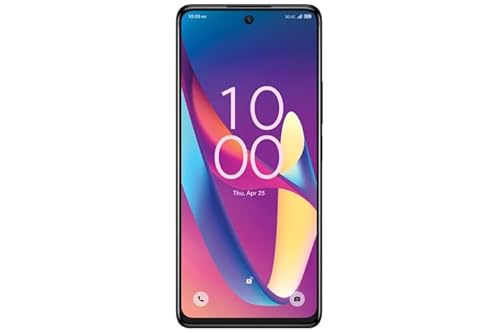
TCL 50 XL 5G — Biggest smooth view
TCL builds televisions for a living, and the 50 XL applies that household knowledge to the question this brief is secretly asking: what will I be looking at all day? The answer is a tall 6.78-inch panel refreshing at 120Hz, so scrolling a recipe, a feed or a grandchild’s photo stream feels like the screen is keeping up with your thumb instead of interviewing it. Against the old five-and-a-half-inch standard, the gain is not incremental; it is a different category of view.
Sound completes the viewing instrument. Stereo speakers mean the video call with family abroad does not require a quiet room and a cupped ear, and streamed sport on a kitchen counter sounds like an event rather than a rumour. For households where the phone has quietly become the television, this pairing — big fluid picture, honest audio — is the most relevant specification on the page, worth more than any camera count.
The camera system clears the historical floor without campaigning on it. Daylight photographs are bright and shareable, the main sensor does the real work, and the supporting lenses matter less than their presence in the menu suggests. TCL’s shorter update runway is the structural compromise, acceptable for the two-to-three-year entertainment-first ownership this phone invites.
Buy it when the screen is the product — when your days run through streamed matches, video calls, long reads and social rivers — and let the camera be the pleasant supporting actor it is, several generations beyond the number in the search that brought you here.
- Display: 6.78-inch, 120Hz refresh rate
- Audio: stereo speakers for calls and media
- Network: 5G on supported carriers
- Storage: 128GB, expandable
- Camera: capable main camera, daylight-strong
Strengths
- Viewing experience — size, fluidity, sound — leads its brief.
- Scrolling smoothness flatters every app, every day.
- 5G streaming suits cord-cutting households.
Trade-offs
- Update support is the shortest runway here.
- Secondary cameras add little beyond the main one.
- Glossy finish attracts fingerprints eagerly.
Best for: streamers, sports fans and video-calling families. Not suited for: buyers planning four-plus years on one handset.

Xiaomi Redmi 15C 4G — Largest canvas
Somewhere a product planner at Xiaomi read briefs like this one and decided to answer the size question permanently. The Redmi 15C’s display sprawls toward seven inches, turning the phone into a small reading tablet that happens to make calls. Recipes fill the screen without scrolling, video calls show faces at near-life size, and the large-print generation — readers who enlarge text and then run out of room for it — finally gets a canvas that accommodates the enlargement.
A big screen is a battery liability until engineering answers it, and Xiaomi’s answer is a large cell plus frugal internals plus assertive background management. The combination yields days of light use, though the assertiveness asks one favour in return: whitelist the apps whose notifications must arrive instantly, a five-minute settings visit that this guide recommends for every Xiaomi on the page.
The camera clears the old floor by the usual modern multiple, behaving best in daylight and on still subjects, while the radio is the specification requiring genuine attention: 4G GSM only, at home on T-Mobile-family networks, absent from Verizon’s world entirely. Buyers on the right network receive the largest view in this guide for the least money; buyers on the wrong one receive a beautiful paperweight, and the difference is a two-minute carrier check.
For the reader-first, call-second household — the grandparent with the morning news habit, the student reading set texts on the bus, the market trader whose price lists live on screen — this is the brief’s most literal modern answer: not five and a half inches, but nearly seven, with a camera from a different decade than the one in the question.
- Display: approximately 6.9-inch class, reading-scale canvas
- Battery: large cell, multi-day light use
- Storage: 128GB with microSD slot
- Network: 4G GSM; no Verizon service
- Extras: headphone jack, side fingerprint reader
Strengths
- Largest view in the group transforms reading comfort.
- Battery endurance matches the screen’s ambition.
- Text enlargement finally has room to breathe.
Trade-offs
- No 5G and no Verizon compatibility.
- Notification behaviour needs one settings adjustment.
- Low-light photography is modest.
Best for: readers, large-print users and video callers on GSM networks. Not suited for: Verizon households or compact-phone loyalists.

Motorola Moto G Power 5G (2024) — All-day view
A screen’s size means little at 4 p.m. if the battery surrendered at lunch, which is the Moto G Power’s opening argument in a brief about viewing. Its 6.7-inch, 120Hz display stays available — on building sites, delivery rounds, hospital corridors and festival fields — because the battery behind it was specified by people who consider a dead screen a failed screen, whatever its diagonal measured in the shop.
Motorola’s software keeps that view uncluttered. The near-stock interface puts no decorative carnival between you and the content, gesture shortcuts summon the camera or torch without unlocking gymnastics, and the panel’s smoothness makes long documents and feeds easy on the eyes during the hours this phone will actually be stared at. Readers coming from an older, smaller handset notice the breathing room immediately: fewer zooms, longer lines, calmer eyes.
The camera performs the modern baseline with Motorola’s characteristic honesty — good colour in daylight, documentation-grade results for work, no miracles promised after dark — and clears the historical megapixel floor as a matter of course. Support length is the structural caveat, trailing Samsung’s roadmap, so buyers planning a long tenure should weigh the A15’s calendar against this phone’s stamina.
When the brief’s real author is a working day that never sits near a socket, this is the pick: a big, smooth, durable view that is still awake when the day finally ends, attached to a phone that treats endurance as a headline rather than a footnote.
- Display: 6.7-inch LCD, 120Hz
- Battery: large cell for multi-day light use
- Memory: 8GB RAM, 128GB storage (US build)
- Software: clean Android with gesture shortcuts
- Network: 5G unlocked for US carriers
Strengths
- The big screen stays lit longer than any rival’s here.
- Clean interface keeps content centre-stage.
- Gesture controls help busy, gloved hands.
Trade-offs
- LCD contrast trails the Samsung AMOLED.
- Update runway is mid-pack.
- Heft is noticeable across long days.
Best for: workers and travellers whose screens must outlast their shifts. Not suited for: contrast connoisseurs or small-handed users.
Xiaomi Redmi 13C — Prose-only pick
Familiarity is an underrated specification, and the Redmi 13C is the most familiar object in this guide to millions of households. Its 6.74-inch display answers the size question generously, its battery behaves, its camera clears the old floor in daylight, and its interface is the one half the extended family already knows how to operate — which means help, when needed, is a phone call to a relative rather than a search through forums in a second language.
Starter-phone duties suit it precisely. A child’s first handset, a grandparent’s upgrade from a genuinely ancient device, a spare that lives in the car: in each role the 13C’s virtues — big view, simple manners, headphone jack, replaceable price — matter more than the flagship traits it never claimed. School apps, video lessons and family calls all run within its competence, and its size flatters the video-heavy way younger users actually communicate.
Listings are why this recommendation carries no link. Variants differ in bands and storage, sellers differ in accountability, and the correct purchase is a verified GSM variant from a seller whose returns process is written in plain sight. Families who complete that small vetting get the phone they expected; the guide simply refuses to pretend one link can guarantee it.
- Display: 6.74-inch, 90Hz
- Battery: 5,000mAh class, full-day-plus
- Network: 4G GSM variants — verify per listing
- Extras: headphone jack, fingerprint reader
- Status: prose-only; vet the exact variant
Strengths
- Family familiarity makes support effortless.
- Screen size flatters lessons and video calls.
- Price removes the fear from first-phone duty.
Trade-offs
- Variant and seller vetting is unavoidable.
- Performance and cameras stay basic.
- Warranty runs through the seller.
Best for: GSM families buying starters, spares and grandparent upgrades. Not suited for: Verizon households or buyers wanting a guaranteed one-click spec.
OnePlus Nord N30 5G — Prose-only pick
Every era’s floor becomes a later era’s punchline, and the Nord N30’s camera is the punchline here: a main sensor counting its megapixels in the hundreds rather than single digits, mounted on a phone that periodically visits this brief’s budget neighbourhood. Resolution alone does not make its photographs great — processing and light still rule — but for document scanning, product listings and daylight detail, the sheer resolving power is a genuine tool rather than a trophy.
The supporting act is unusually complete for the money when the phone surfaces at the right price: a smooth 120Hz display well beyond the old size floor, stereo speakers, a headphone jack, and charging so rapid that the battery’s size becomes a secondary conversation. Students and sellers photographing inventory all day will understand this phone’s cult following within a week of ownership.
Availability chaos earns the prose-only label. The model drifts through carrier promotions and marketplace listings unevenly, its name invites confusion with lesser Nord siblings, and the correct unit at the correct price is a find rather than a fixture. Patient shoppers who verify the exact model from a reputable seller may land the most camera-heavy answer to this brief available anywhere; everyone else should take the linked certainty above and never look back.
- Camera: very high-resolution main sensor
- Display: 6.72-inch LCD, 120Hz
- Charging: very fast wired charging
- Audio: stereo speakers, headphone jack
- Status: prose-only; availability and model confusion
Strengths
- Detail capture for documents and listings leads the brief.
- Charging speed rescues any schedule.
- Display and audio make media feel premium.
Trade-offs
- Finding the correct model takes patience.
- Resolution does not rescue poor light.
- Update support is mid-pack at best.
Best for: patient bargain hunters, students and marketplace sellers. Not suited for: buyers needing a phone this week from a uniform listing.
Comparison Table
| Model | Screen story | Camera story | Watch out for |
|---|---|---|---|
| Galaxy A15 5G | AMOLED clarity | Dependable all-rounder | Budget multitasking pace |
| TCL 50 XL 5G | 120Hz plus stereo sound | Bright daylight results | Shorter update runway |
| Redmi 15C 4G | Largest canvas | Daylight-capable | GSM only, no Verizon |
| Moto G Power 5G | Big and enduring | Documentation-grade | LCD contrast, heft |
| Redmi 13C | Roomy and familiar | Basic but willing | Listing vetting |
| Nord N30 5G | Smooth 120Hz | Highest detail capture | Availability hunting |
Why Did the Best 8MP and 5.5 Inch Screen Android Phones Under 100 Stop Being Defined by Megapixels?
A short history explains the brief’s archaeology. In the early smartphone era, sensor counts climbed from two to five to eight megapixels, and each climb visibly improved photographs, teaching a generation of buyers to shop by the number. Then physics intervened: cramming more pixels onto a tiny sensor shrank each pixel’s light-gathering ability, and manufacturers discovered that processing — combining frames, correcting colour, rescuing shadows computationally — improved real photographs more than raw counts ever had.
The modern consequence is liberating. A contemporary budget camera with a modest count and mature processing will outphotograph a celebrated eight-megapixel flagship from the era when that number headlined, in every condition except nostalgia. Buyers should therefore read camera sections for outcomes — low-light behaviour, skin tones, stabilisation, shutter speed with moving children — and treat the megapixel line the way they treat a car’s top speed: true, printed, and nearly irrelevant to the school run.
One exception keeps the count honest: cropping and documents. High-resolution sensors like the Nord N30’s let a photographed page, whiteboard or product be zoomed and cropped while staying legible, a real utility for students and sellers. Resolution is a tool with specific jobs, not a grade of overall quality — and a buyer who understands that sentence understands modern phone cameras better than most marketing departments would prefer.
How Big Should a Screen Actually Be in Your Hand?
Diagonal inches flatter modern phones because today’s tall, narrow aspect ratios stretch the measurement while keeping width pocketable. The honest comparison for a buyer replacing a beloved older handset is width and weight in the hand, not the headline diagonal: many a five-and-a-half-inch-era phone was wider, relative to its view, than the six-and-three-quarter-inch successors in this guide, and the new arrivals often prove easier to hold than the numbers suggest.
Ergonomics still deserve a shop test. Reach the top corner with your thumb, type a sentence one-handed, slide the phone into your actual pocket and sit down. Large-print readers and video callers will forgive dimensions that commuters curse, and commuters forgive weights that readers never notice. The brief asked for at least five and a half inches; your hand gets the final vote on how far beyond that floor your comfort extends.
Sharpness completes the size conversation. At these diagonals, the difference between panel resolutions is visible mainly in small text and fine photo detail, while brightness decides the outdoor verdict outright. Prioritise a bright, clear panel over an extra fraction of an inch — your eyes will thank the decision at every bus stop, long after the unboxing measurements are forgotten.
What Is Pixel Binning, and Why Does It End the Numbers Argument?
Modern phone cameras perform a trick that makes their headline counts doubly misleading: they merge neighbouring pixels into larger virtual ones when light is scarce. A sensor advertising a towering count may photograph your evening kitchen using a fraction of those pixels combined, producing a brighter, cleaner image at a modest final resolution — often not far from the historical numbers in this brief, arrived at by a vastly smarter route. The eight-megapixel photograph never died; it grew up, moved inside better hardware, and stopped being the whole story.
This is why two cameras with wildly different counts can produce similar evening results, and why a lower-count camera with large pixels and good processing can humiliate a higher-count rival after dark. The specification sheet is not lying, exactly; it is answering a question from 2012 with complete sincerity. Buyers in this decade should ask the modern questions instead — how does it handle a candlelit birthday, a fluorescent classroom, a dog at dusk — and demand sample answers rather than arithmetic.
Daylight restores some dignity to resolution, which is why the Nord N30’s enormous count genuinely serves document work and cropping. The mature position, and this guide’s, is that megapixels are a tool specification like a van’s cargo volume: decisive for the jobs needing it, decorative for everyone else, and never a summary of the whole vehicle.
How Do You Test a Camera Properly During the Return Window?
Design a rehearsal from your own album’s greatest hits. Photograph the fastest child or pet you know, indoors, moving. Shoot the family across a restaurant table with a window behind them — the exposure trap that defeats more cameras than any laboratory. Scan a page of small print and zoom until the letters confess their sharpness. Film thirty seconds of a walk while narrating, then listen for wind handling and watch for the bounce your stride adds.
Repeat the set at dusk, because the difference between these phones lives almost entirely in the hour when family life actually happens. A pick that pleases you in that light will please you for years; a pick that only performs at noon in a park is a fair-weather friend, and the return window exists precisely to expose the distinction while exchanges are still free.
Finally, send the photographs the way your life sends them — into the family chat, onto a printed page, up to a marketplace listing — and judge them at their destinations rather than pinched and zoomed on the phone itself. Cameras are bought for audiences, and the audience’s screen is the only review site that has ever mattered.
What About Children, Homework and the Scanning-App Test?
A quiet army of buyers arrives at this brief through school gates. Homework platforms ask children to photograph worksheets, upload reading records and join video lessons, and the family phone — or the child’s first phone — must clear those tasks without drama. Every pick here does: the cameras resolve worksheet print crisply, the screens display a full page without constant zooming, and the batteries survive the school day plus the bus ride’s entertainment shift.
Parents should still run the household rehearsal. Install the actual school app, photograph an actual worksheet in the actual kitchen light, and upload it over the actual home connection. Five minutes converts a specification debate into a verdict, and the return window stands open if a particular platform dislikes a particular handset — a rare event, but one whose cost is measured in Monday-morning tears rather than money.
Durability thinking completes the school brief. A big screen is a bigger target, so the case budget is not optional for a child’s device, and the picks’ replaceable prices are a genuine feature for the parent signing the cheque. The Redmi 13C and A15 lead this sub-brief for exactly that reason: capable enough for every platform, inexpensive enough that the inevitable playground incident stays a story rather than a sanction.
LCD, AMOLED and the Budget Screen Zoo, Explained Simply
Two display families populate this page, and the difference is visible from across a room. AMOLED panels — the Samsung’s — light each pixel individually, producing true blacks, rich contrast and strong sunlight behaviour, which is why text looks printed and evening video looks cinematic. LCD panels — the TCL, Motorola and Xiaomi entries — light the whole screen from behind, trading some contrast for size, smoothness and price, and at their best, as the TCL demonstrates, the trade is barely visible in ordinary rooms.
Refresh rate is the second vocabulary word worth owning. The standard sixty refreshes per second served phones for a decade; the 90Hz and 120Hz panels here redraw more often, making scrolling and animation feel liquid. It is a comfort feature rather than a capability one — no app requires it — but comfort, experienced hundreds of times daily, has a way of becoming the feature owners mention first when asked what they would not give back.
Resolution, the third word, matters least at these sizes for most eyes. Beyond a certain density the eye stops resolving individual pixels at reading distance, and brightness plus contrast take over the quality story. That is the technical permission slip to stop comparing screen numbers the way the old brief compared camera numbers — by the largest figure — and start comparing them the way this guide does: by reading a page, in your light, with your eyes.
What Should a Workplace Device Buyer Take From This Brief?
Small employers still issue phones against minimum specifications written years ago — a camera floor for site documentation, a screen floor for form-filling — and then discover the modern market hands them far better tools at the same money. The procurement lesson is to update the internal specification to outcomes: photographs legible at arm’s length, forms completable without zooming, a battery surviving the shift, and a support window covering the deployment. Written that way, every pick here qualifies, and the choice returns to price, carrier and the repair ecosystem the fleet will lean on.
Fleets amplify small virtues. A model with cases in every wholesaler, screens replaceable in every town and an interface the whole crew already knows will outserve a marginally faster exotic across fifty units and three years. That is why the Samsung and Motorola picks dominate real-world small fleets despite the Xiaomi pair’s spectacle: logistics is a specification too, and at fleet scale it is often the deciding one.
For the individual worker handed this brief by an employer, the translation is simpler: any phone above will satisfy the paperwork, so choose by your own days — the Power for the road, the TCL for the media breaks, the A15 for the sunlight — and let the employer’s decade-old numbers retire in peace.
Common Mistakes
Shopping by the megapixel count is the mistake this entire brief tempts, and it leads buyers past better cameras toward bigger numbers with weaker processing. A photograph is made by light, glass and software in that order; the count merely records the result. Judge sample outcomes in the conditions your life photographs — kitchens, school halls, gardens at dusk — and let the arithmetic retire with the era that taught it to you.
Assuming a bigger screen is automatically a better screen repeats the error in glass. Dim, coarse panels exist at every size, and a huge display you cannot read in sunlight is a liability wearing a headline. Brightness, contrast and touch quality are the screen’s character; diagonal is merely its biography.
Buying a discontinued lookalike to match an old specification exactly wastes the market’s progress. The beloved handset being replaced earned its affection through reliability, not through its spec sheet, and its true successor is whichever modern phone delivers that reliability now — usually one of the supported, mainstream picks above — rather than a museum piece with the right numbers and no future.
Forgetting the network check on the Xiaomi pair converts a screen bargain into a connectivity lesson. Both Redmi models here are GSM citizens; Verizon households should choose the Samsung, TCL or Motorola and enjoy identical liberation from the old specification without the carrier heartbreak.
Finally, overlooking the return window’s diagnostic power wastes the buyer’s best tool. Photograph your real subjects, read your real documents, video-call your real family in the first fortnight. A phone that delights in those rehearsals has answered the brief completely, whatever numbers anyone printed on its box.
Final Recommendation
Most readers should take the Galaxy A15 5G and stop translating old specifications into new money. Its screen is the clearest here, its camera the most dependable, its support the longest, and it renders the brief’s historical numbers so thoroughly obsolete that the only remaining question is why anyone still searches them — a question this page exists to answer kindly.
Deviate for named reasons. Media-first households take the TCL’s fluid screen and stereo voice; large-print readers on GSM networks take the Redmi 15C’s canvas; workers whose screens must outlive their shifts take the Moto G Power. The prose-only pair reward patient, seller-literate shoppers — the 13C for family familiarity, the Nord N30 for document-grade detail and charging theatre.
Whichever you choose, you are buying far more phone than the search promised: a camera from a richer era, a screen from a bigger one, at a price from the brief’s own. That is the happiest outcome a specification time capsule can produce.
Setting Up a Big-Screen Phone for Ageing Eyes
A large display only fulfils its promise after ten minutes of configuration, and households buying for older relatives should treat that configuration as part of the gift. Raise the text size until a text message reads at arm’s length, switch the display zoom so icons grow with the words, and place the four essential tiles — phone, messages, camera, family chat — in the thumb’s home territory at the screen’s base.
Sound and touch deserve the same attention. Set the ringtone loud with vibration strong, enable the setting that answers calls by lifting the phone where offered, and rehearse the video call together until the buttons are muscle memory rather than a puzzle solved live in front of grandchildren. A printed card inside the case, listing your number and the two gestures that matter, has rescued more family tech moments than any specification ever printed.
The picks divide naturally for this audience: the Redmi 15C offers the largest canvas for the least money on GSM networks, the A15 offers the clearest text and the longest support for a phone that may serve half a decade, and the Moto G Power forgives the forgotten charging night that every household knows is coming. Choose by the relative’s carrier and habits, configure with love, and the old specification that started the search becomes a story the family tells at dinner.
Why Do Legacy Specification Searches Keep Working?
Search behaviour changes more slowly than technology. Buyers type the numbers that once signalled quality — a camera count, a screen size, a memory figure — for years after the industry moved the goalposts, because those numbers are what their last satisfying purchase taught them. Retailers and less scrupulous guides exploit the lag, labelling old stock with the beloved figures and letting nostalgia close the sale.
The honest response, which this page has attempted throughout, is translation rather than mockery. The searcher’s underlying desires — a camera that will not embarrass the family album, a screen that will not strain ageing eyes, a bill that stays two-figure — are entirely reasonable and entirely achievable. Only the vocabulary aged. A guide’s job is to honour the desire, update the vocabulary, and hand over phones that satisfy the person rather than the phrase they typed.
Keep that translation habit for every future purchase. When a specification excites you, ask what outcome it once promised and whether modern products deliver that outcome by another route. Brightness replaced inches, processing replaced pixels, support years replaced almost everything — and the buyer who shops for outcomes stops being exploitable by numbers, in this category and every other.
A Buyer’s Walk Through One Saturday Morning With Each Screen
Imagine the same errands on every device. The market list at dawn: the A15’s AMOLED reads like paper, the 15C’s sheer size forgives sleepy eyes, the TCL glides as the list scrolls. The bus timetable in full sun: brightness decides, and the Samsung and TCL hold their composure while humbler panels — none of them here — would have surrendered to reflections. The grandchild’s video call from the café: faces at near-life scale on the Xiaomi canvas, voices clear through the TCL’s stereo pair, the Motorola still showing yesterday’s charge because it never needed last night’s socket.
None of those moments appears on a specification sheet, yet they are the moments the specification was always trying to predict. The old numbers — a camera count, a diagonal — were proxies for a life the buyer wanted the phone to fit. Modern proxies are better: brightness for the bus stop, processing for the birthday, battery for the shift, support for the years. Judge the six above by those proxies against your own Saturday, and the right one will identify itself without a single megapixel being consulted.
The Photograph That Settles Every Argument
Before ordering, borrow any modern budget phone — a friend’s, a relative’s, a shop’s demonstrator — and take one photograph of the people you love in the room where you actually live, at the hour you actually gather. Then compare it honestly with the output of the ageing handset this purchase replaces. That single frame, more than any guide including this one, will calibrate your expectations: the generational leap is not subtle, and it is achieved by every pick on this page, because the floor the brief remembers has been underneath the entire market for years.
Buyers who perform that small experiment stop shopping by inherited numbers within the hour. They start asking the questions this guide has asked — about light, size in the hand, battery by bedtime, support by year — and they choose, usually quickly, the phone whose answers fit their rooms and routines. The experiment costs nothing, requires no expertise, and converts a specification time capsule into a decision a family can feel. Take the photograph first; the rest of the purchase is paperwork.
Keeping the New Phone Feeling New
The leap from an old handset feels miraculous for a month and ordinary by the second, which tempts owners to neglect the habits that preserve it. Resist with three small rituals. Keep a sliver of storage permanently free so updates install without eviction dramas. Restart the phone weekly, a ten-second ceremony that clears the accumulated oddities of budget software. And review the photo library monthly, archiving the treasures and deleting the seventeen near-identical frames of the same sunset, because storage discipline is the difference between a phone that ages like the Samsung in this guide and one that ages like a drawer.
Protect the screen you chose so carefully. The case and glass protector belong on before the first outing, not after the first scratch has taught the lesson at retail price. At this budget a screen repair can rival the handset’s value, which makes the protector the highest-return accessory in the entire purchase — the final translation of the brief’s spirit, since a screen’s size and clarity only matter for exactly as long as the glass survives.
A Farewell to the Numbers That Brought You Here
There is something touching about this brief, honestly. It preserves the moment when a camera count and a screen diagonal were how ordinary people — not engineers, not reviewers — described wanting a better phone, and it arrives in a market that can finally honour the wanting extravagantly at the asking price. Every handset above is, among its other virtues, an answer to a decade-old wish list, delivered late and over-delivered in every particular: the camera multiplied, the screen stretched, the price held exactly where the wish was made.
So retire the numbers with gratitude rather than embarrassment. They served their era, they found this page, and this page has translated them into six phones that will read your documents, show your films, photograph your people and survive your days — all beneath the ceiling the wish insisted on. Choose the one whose modern virtues match your modern life, and let the old specification rest. It has earned it, and so, frankly, have you.
One practical keepsake before you go: write down, somewhere you will find it in three years, what you actually bought the phone for — the reading, the grandchildren’s calls, the worksheet uploads, the shift work. When upgrade season’s advertisements begin insisting your perfectly serviceable handset is obsolete, that note is the counter-argument in your own handwriting. Phones are replaced for reasons; let yours be written by you, in advance, rather than by a marketing calendar that has never seen your kitchen light or met your dog.
And if a relative teases the modest badge on the back, show them the photograph from the café, the worksheet scanned at midnight, the video call that filled the screen with a grandchild’s face. The old specification promised a camera and a view; the new phone delivers both so completely that the teasing tends to end with a question — where did you get it, and does it come in their carrier too? That is the sound of a brief fulfilled, a decade after it was written.
Choose tonight, while the translation is fresh: name the carrier, name the eyes that will read the screen, name the light your photographs live in. Three answers, and the shortlist above resolves into a single phone with the calm inevitability of a sum done correctly. Order it, case it, set it up beside the people it was bought for, and let its first photograph — bright, enormous, unmistakably modern — be the last word on what eight megapixels and five and a half inches grew up to become.
Keep the receipt and the box until the return window closes, run the rehearsals this guide described — the moving child, the backlit table, the worksheet at midnight — and if the phone passes your life as comfortably as it passed this page’s filters, retire the old handset to its drawer with thanks. Few upgrades in technology deliver a generational leap at a two-figure price; when one does, the correct response is not more deliberation, but a well-protected phone and a family group chat about to receive noticeably better photographs.
Send the first of those photographs to whoever taught you the old numbers — the parent whose handset defined them, the colleague whose specification sheet you copied, the friend still squinting at a five-inch screen on principle. Conversions in this market happen one honest image at a time, and your kitchen, your light and your people are the most persuasive reviewers this category will ever have. The brief began as a search query; let it end as a photograph worth keeping.
And keep this page’s translation table in your head for the next time a specification tries to sell you a number instead of an outcome: brightness for inches, processing for pixels, years of support for everything. Armed with those three exchanges, no future brief — however its figures are dressed — can lead you anywhere but to the phone your life actually asked for.
That phone is on this page, priced beneath the ceiling the old wish insisted on, carrying a camera and a screen its numbers would not believe. The only step left is the pleasant one: pick it up, feel its weight, read one page on it in your own light, and notice how completely the future has answered a question from the past.
When it has, close the specification tabs without ceremony. The deliberation ends the way the best purchases do — not with the largest number on a box, but with a screen you can read, a camera you can trust and a bill that stayed exactly where your household needed it to stay.
That is the whole brief, fulfilled.
Frequently Asked Questions
Are eight-megapixel cameras still sold on new phones?
Rarely as a headline, because the market moved on. Modern budget phones carry main cameras with far higher counts and, more importantly, far better processing, while genuinely low-resolution sensors survive mainly as secondary depth or macro helpers. If a new phone advertises eight megapixels as its main camera in this era, treat the listing as a museum exhibit or a warning, and choose any pick above instead.
What screen size replaced the old five-and-a-half-inch standard?
The centre of the market now sits well above six and a half inches, with tall aspect ratios keeping the bodies manageable. Buyers replacing an older handset should compare width and weight in the hand rather than diagonals on paper; most discover the modern large screen is easier to live with than feared, and readers and video callers usually refuse to go back within a week.
Does a higher megapixel count mean better photos?
Not by itself, and this is the single most useful sentence in modern camera shopping. Sensor size, lens quality and software processing decide how photographs look in real light; resolution mainly governs how far you can crop and how much detail documents retain. A well-processed modest camera beats a poorly processed enormous one at every family event you will ever photograph.
Can these phones handle scanning apps and school platforms?
Comfortably. Document scanning leans on camera clarity and processing, both of which exceed the old floor across this whole list, and school, banking and workplace apps run within every pick’s competence. Buyers with a specific mandated app should still install and test it inside the return window — a five-minute rehearsal that converts assumption into certainty.
Which pick suits a grandparent replacing an old favourite?
Match the trait they loved. If it was readability, the Redmi 15C’s canvas or the A15’s clarity answers; if it was simplicity and support, the A15’s familiarity and update runway win; if the old phone was always dying by teatime, the Moto G Power ends that story. Set the new phone up beside them, enlarge the text together, and let the first video call with the grandchildren close the sale.
How do you check network bands before buying a cheap international model?
Start with the exact variant, not the headline model name, because the same phone often ships in regional versions with different radios. Find its full band list on the maker’s specification page, then compare the LTE and 5G bands against the list your carrier publishes for its own network, paying closest attention to the bands used heavily in your area. Next, run the phone’s IMEI through the carrier’s compatibility checker when one is available, since band support alone does not guarantee activation. Finally, test calls, texts and mobile data indoors during the return window, because a phone that works outdoors can still struggle inside buildings.
Related Guides
Keep reading with the hundred-dollar Android phones chosen by a strict budget ceiling, the affordable Android phones guide built on total ownership cost, and the unlocked Android phones that move freely between carriers.



[…] with the affordable unlocked Android phones for carrier freedom without the band homework, compare the Android phones under a mid-level budget from mainstream brands, or browse the general […]