What's inside
- Key Takeaways
- Quick Picks
- How Did We Pick the Best Graphics Cards for Virtual Reality?
- Why Does VR Punish a Weak Graphics Card So Much Harder Than Flat Gaming?
- How Much Memory Does a VR Headset Actually Need From Your Card?
- Which Headsets Ask the Most of a Graphics Card?
- Can a Laptop or Integrated Graphics Do PCVR Instead?
- How Long Will Each Tier in This Guide Stay Relevant?
- Every Pick, Examined on Its Own Terms
- Side by Side: the VR Lineup at a Glance
- What Settings Should You Change First When a Title Struggles?
- How Do You Set Up a PC So the Headset Gets the Best of Your Card?
- How Should You Think About Comfort Settings Before Blaming the Card?
- How Do You Test a New VR Card While You Can Still Return It?
- What Do VR Buyers Most Often Get Wrong?
- Final Recommendation
- Frequently Asked Questions
- Related Guides
As an Amazon Associate I earn from qualifying purchases. This post may contain affiliate links at no extra cost to you.
widgetverdict.com is reader-supported. When you buy through links on our site, we may earn an affiliate commission.
Where to buy: the five linked cards below are Amazon listings, reached from the quick picks table and from each card’s review heading. The sixth slot is a prose-only discussion of used previous-generation flagships, deliberately left unlinked because used-card listings change daily and no single listing deserves a recommendation. Check the exact board name and memory figure on any listing before ordering.
Choosing among the best graphics cards for virtual reality starts with an admission most roundups avoid: PCVR is two different hobbies wearing one headset. The first is the vast back catalogue of VR games built for an earlier hardware era — rhythm games, social worlds, sim lobbies and the classics that still fill most players’ libraries. The second is the current wave of high-resolution headsets and demanding ports that treat a graphics card the way a stress test does. A card can be honestly excellent for the first hobby and honestly inadequate for the second, and any guide that does not separate them is selling you a compromise without telling you its terms.
So this guide separates them. The GTX 1660 Super here is presented as what it is: the floor. It is the minimum class of card on which PCVR remains a good experience across the older catalogue, helped by its VR Ready positioning when new, and it is not a recommendation for driving a modern high-resolution headset at its native panels. The RTX 3060 12GB is the roomy budget step above that floor. The current-generation cards — the RTX 5060 Ti 16GB and the Radeon RX 9060 XT 16GB — are the picks aimed at today’s headsets, with the memory and modern display outputs those headsets assume. The RTX 5060 8GB sits between, capable and current but with a framebuffer that asks its owner to manage settings thoughtfully. Modern PCVR headsets want more GPU than the older cards in any list, this one included, and the reviews below say exactly where each card’s ceiling is.
One structural note: two desktop PCs with “VR” in their names surfaced while this guide was researched, and they are not here, because a prebuilt desktop is not a graphics card and does not belong in a graphics card guide however it is marketed. What follows is six graphics options — five cards you can buy new at a verified listing, and one used-market route discussed honestly — each judged on the only VR questions that matter: can it hold the frame rate your headset demands, at the resolution your headset renders, for the length of a real session?
A word on how to read the prices you will meet along the way, without this guide printing any: VR cards hold their value oddly, because each headset launch renews demand for exactly the midrange cards this guide covers. A card that looks merely adequate as a flat-screen purchase can be the correct VR purchase at the same money, because the workloads value different things. Keep the pairing — headset, library, card — in front of every comparison and the market’s noise falls away.
Key Takeaways
- The GTX 1660 Super is the floor class for PCVR — fine for the older catalogue, not for modern high-resolution headsets.
- The RTX 5060 Ti 16GB and RX 9060 XT 16GB are the current-generation picks aimed at today’s headsets.
- VRAM matters in VR because headsets render two high-resolution views; 16GB cards age far better here than 8GB cards.
- The RTX 3060’s 12GB framebuffer keeps it relevant for VR long after its flat-screen peers faded.
- Frame-rate consistency matters more in VR than peak frame rate — a dropped frame in a headset is felt in the body, not just seen.
- Used previous-generation flagships are a legitimate route, discussed prose-only because listings change daily.
- Test any new card inside its return window with your own three favourite titles and one long session.
Quick Picks
| Pick | Badge | Why it is here |
|---|---|---|
| GIGABYTE GeForce RTX 3060 Gaming OC 12G | Best Budget VR Card | 12GB of memory and a triple-fan cooler keep the big VR back catalogue smooth at a modest tier. |
| ASUS Dual GeForce RTX 5060 Ti 16GB | Best VR Card Overall | Current-generation NVIDIA power with 16GB of GDDR7 and modern outputs for today’s headsets. |
| ASUS Dual Radeon RX 9060 XT 16GB | Best AMD VR Card | RDNA current-generation performance and 16GB of memory in a compact dual-fan board. |
| MSI GeForce GTX 1660 Super Gaming X | The Honest Floor | The minimum class that still delivers a good experience across the older VR catalogue. |
| ASUS TUF Gaming GeForce RTX 5060 8GB | Best Compact Current Card | Current-generation silicon in a rugged TUF build, with an 8GB framebuffer to manage thoughtfully. |
| Previous-generation flagships, bought used | Best Used-Market Route | Retired high-end cards still outmuscle new budget boards in VR — if you buy the used market carefully. |
How Did We Pick the Best Graphics Cards for Virtual Reality?
VR imposes a workload flat gaming does not, so the selection criteria differ from a normal graphics roundup. A headset renders the scene twice, once per eye, at resolutions that now rival or exceed a 1440p monitor per eye on current hardware, and it demands the result at a fixed refresh the player cannot negotiate with. Miss that refresh and the headset’s reprojection steps in, which ranges from acceptable to queasy depending on the game and the player. We therefore weighted sustained performance and memory capacity above headline gaming benchmarks, because VR punishes both weaknesses immediately and physically.
Memory earned its weight honestly. VR texture loads are heavy, supersampling — rendering above panel resolution to sharpen the image, a setting VR players actually use — inflates framebuffer demand further, and the social and simulation titles people spend hundreds of hours in are not gentle. Cards with 16GB were favoured for current headsets, 12GB accepted as the budget route, and 8GB included only where the rest of the package justified it, with the limitation stated in the review rather than discovered by the buyer.
We also required the boring virtues: current display outputs that connect to headsets without adapter archaeology, coolers that sustain clocks through a two-hour session rather than a two-minute benchmark, and board sizes that fit ordinary cases. Every linked pick is a current retail listing verified for this guide. The used-market slot is prose-only by design — the route is real, but no individual used listing stays recommendable long enough to link.
Two candidate cards were cut late in the process for instructive reasons. One strong flat-screen performer was dropped because its framebuffer repeated the 8GB compromise without the TUF board’s compensating build and features — one managed-memory pick is a choice, two is a pattern. And a pair of VR-branded prebuilt desktops were excluded at the door, as the introduction notes, because this guide recommends graphics cards and a desktop is not one, whatever its marketing says.
Why Does VR Punish a Weak Graphics Card So Much Harder Than Flat Gaming?
Three reasons compound. First, the rendering load: two viewpoints, high per-eye resolutions, and a wide field of view that shows more of the scene than a monitor ever does. Second, the frame-rate contract: a monitor game dipping from high frame rates to merely good ones is a mild annoyance, while a headset missing its target refresh hands the problem to reprojection, and the player’s vestibular system joins the review process. Third, latency: the delay between moving your head and seeing the world respond must stay tiny, and every part of the pipeline — GPU included — spends from the same small budget. A monitor hides a slow frame behind the last one; a headset has nowhere to hide it, because the world itself is supposed to stay nailed to the room around you while your head moves through it.
This is why VR buyers should read graphics card reviews differently. A card praised for running flat games at high settings on a 1440p monitor may be a mediocre VR card if its memory is tight or its performance inconsistent, because VR converts inconsistency into discomfort. Conversely, a card with a large framebuffer and steady delivery — the RTX 3060 12GB is the standing example — can be a better VR purchase than a nominally faster card with less memory. Judge VR cards on steadiness and capacity first, and on peak numbers second.
It is also why the floor matters and why this guide names one. Below a certain class of card, PCVR stops being a settings problem and becomes an experience problem: reprojection everywhere, resolutions scaled down until the image smears, and sessions that end early. The GTX 1660 Super sits on the right side of that line for the older catalogue. Cards below it — the entry display-class boards that fill other corners of this site — do not, and no guide should pretend otherwise.
How Much Memory Does a VR Headset Actually Need From Your Card?
More than the same games need on a monitor, and the gap widens with each headset generation. Current mainstream headsets render at resolutions where 8GB is workable with discipline, 12GB is comfortable, and 16GB is the figure that lets a card stop thinking about memory entirely. Simulation titles and social VR worlds with user-generated content are the greediest: they load large environments and keep loading them, and the framebuffer is where that appetite lands.
Supersampling deserves its own warning, because VR players discover it early and love it. Rendering above the panel’s native resolution and downscaling buys a visibly sharper image, and it is the first setting enthusiasts raise. It is also a direct multiplier on memory and rendering load. A card that runs a headset at native resolution with memory to spare can be pushed into reprojection by an enthusiastic supersampling slider, and the owner concludes the card is weak when the setting was simply greedy. Buy memory for the settings you will actually use, including this one.
The practical reading of this guide’s lineup follows from that. The 16GB current-generation cards are the buy-once answer for today’s headsets. The 12GB RTX 3060 is the budget answer with genuine headroom. The 8GB RTX 5060 is a current card whose owner accepts managing settings as the price of its tier. And the 6GB GTX 1660 Super belongs to the older catalogue and older headsets, where its memory matches the era it serves.
Which Headsets Ask the Most of a Graphics Card?
Headsets divide roughly into three appetite classes, and matching your card to your class is the whole game. The first class is the standalone-first generation and its PCVR mode: headsets designed around mobile chips, driven over a cable or Wi-Fi at moderate resolutions. These are the most forgiving, and they are why the floor in this guide can be as modest as a GTX 1660 Super for the older catalogue. The second class is the current mainstream — headsets with panels that want a proper desktop card rendering at full resolution and refresh. This is the class the RTX 3060 serves on a budget and the 16GB current cards serve properly.
The third class is the enthusiast tier: high-resolution headsets, wide field-of-view designs and simulation-focused hardware that render at resolutions rivalling a pair of 4K monitors. Buyers in this class should read this guide’s top end as their starting point, not its ceiling — and should be honest that some of these headsets genuinely want flagship cards beyond this list’s scope. A guide that pretends a midrange card flatters a flagship headset does its readers no service; the pairing will be found out in the first demanding title, at the buyer’s expense.
Refresh rate multiplies everything above. A headset running its panels faster asks proportionally more of the card at the same resolution, and several headsets offer owners a choice of refresh modes. Choosing the mode your card can hold natively, rather than the highest mode the headset advertises, is the single most effective free upgrade in PCVR — the steady lower refresh feels better than the higher one sustained by reprojection, every time, in every title.
Can a Laptop or Integrated Graphics Do PCVR Instead?
The question arrives with every VR purchase, so it deserves a straight answer. Modern integrated graphics have become genuinely capable for flat gaming at modest settings, and standalone headsets have blurred the categories further by offering a PCVR mode. But PCVR as this guide means it — a desktop card driving a headset at native resolution and refresh across a real library — remains beyond integrated graphics except as a demonstration. The rendering load is simply of a different order, and the experience of trying is a tour of every reprojection artefact the runtime owns.
Laptop GPUs occupy the honest middle. A gaming laptop with a proper discrete GPU can be a fine VR machine, and for players who need the PC to travel it may be the right machine. The cautions are thermal and nominal: laptop chips share names with desktop cards while running at lower power, so a laptop card’s VR ceiling sits below its desktop namesake’s, and sustained sessions test laptop cooling in ways short demos do not. None of the picks in this guide are laptop parts — this is a desktop graphics card guide — but a reader choosing between a laptop and a desktop-plus-card should know the desktop card route delivers more VR per unit of money, every time.
There is one more alternative worth dismissing cleanly: cloud-rendered VR and streaming a flat game into a headset theatre mode are real things, and neither is PCVR in the sense that decides a graphics card purchase. If your interest is a virtual cinema screen for flat games, almost any card in this guide is already overqualified, and the floor pick will delight you.
How Long Will Each Tier in This Guide Stay Relevant?
Relevance in VR is set by headset generations, and headsets now turn over on a rhythm of a few years. Read the tiers against that clock. The current-generation 16GB cards are specced for the headsets on sale today and carry the memory profile the next mainstream generation is most likely to assume; they are the three-to-five-year purchases in this list. The RTX 3060 12GB is a card for the present headset generation bought at a discount — entirely rational if your headset is of its era, with the understanding that the next headset may retire it.
The 8GB RTX 5060 splits the difference oddly: its architecture will be supported for years, but its framebuffer may age faster than its silicon, which is the reverse of the usual pattern and worth understanding before buying. The GTX 1660 Super’s relevance is already bounded to the older catalogue — it will play that catalogue indefinitely, because the catalogue is finished growing more demanding, and in that narrow sense it will never become a worse card than it is today. The used flagships obey the same logic as the 3060 with more power and less warranty: relevance measured against today’s headsets, purchased at yesterday’s prices.
The practical conclusion is that VR cards should be bought against a named headset and a named library, with a rough generation in mind — not against an abstract future. Every tier in this guide is the right purchase for somebody’s actual setup, and the wrong purchase for somebody else’s, which is why the reviews keep repeating the pairing question. Answer the pairing question honestly and the tier chooses itself.
Every Pick, Examined on Its Own Terms
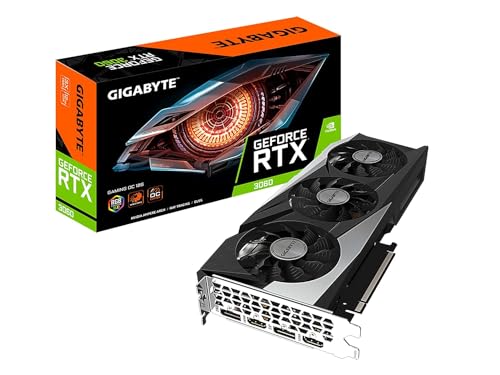
GIGABYTE GeForce RTX 3060 Gaming OC 12G — Best Budget VR Card
The RTX 3060’s second career as a VR favourite rests on one specification: 12GB of GDDR6 on a card of its tier. When this board launched, that framebuffer looked generous; in VR it turned out to be prescient. Headsets ask more of memory than monitors do, and the 3060’s capacity lets it hold the big social worlds, the simulation environments and the texture-heavy ports that squeeze 8GB cards into stutters and reprojection. GIGABYTE’s Gaming OC version wraps the chip in a three-fan WINDFORCE cooler, which matters in VR specifically: sessions are long, loads are sustained, and a card that holds its clocks in hour two is worth more than one that sprints through a benchmark and throttles through a dungeon.
Its place in the VR landscape is the value seat for the enormous back catalogue and for mainstream headsets run at sensible settings. It will drive current headsets respectably in the majority of titles, with supersampling kept honest and the most demanding recent ports treated as settings exercises rather than showcases. What it is not is a future-proofing play: each headset generation raises the rendering bar, and the 3060’s architecture is two generations behind the current picks in this guide. Buy it for the library and the headset you have, at the price tier it occupies, and it remains the easiest budget recommendation in VR. Buy it expecting it to anchor a high-resolution headset purchase in two years, and you are planning a second purchase.
There is a social-VR footnote that strengthens its case further. The big platform worlds where many players effectively live are built to run on modest hardware — their audiences demand it — and they reward memory and steadiness over raw power. The 3060’s profile matches that world almost exactly, which is why so many long-serving VR rigs in the wild are built around this card or its close relatives.
- Memory: 12GB GDDR6, 192-bit bus
- Cooling: 3X WINDFORCE fans
- Revision: REV2.0 board
- Interface: PCIe 4.0 generation
- Role: budget VR for mainstream headsets and the back catalogue
Strengths
- 12GB framebuffer outlasts 8GB rivals in memory-hungry VR worlds.
- Triple-fan cooler sustains clocks through long sessions.
- A mature, well-understood card with deep driver support.
Trade-offs
- Two architectures old beside the current-generation picks here.
- High-resolution modern headsets will push it into settings compromises.
- No AV1-era media features for the streaming-curious owner.
Best for: VR players on mainstream headsets whose libraries centre on the established catalogue. Skip it if a high-resolution headset upgrade is already on your calendar — buy the current-generation memory instead.

ASUS Dual GeForce RTX 5060 Ti 16GB — Best VR Card Overall
If this guide has a centre of gravity, it is this board. The RTX 5060 Ti in ASUS’s Dual form pairs current-generation NVIDIA architecture with 16GB of GDDR7 — the memory figure current headsets actually want — in a 2.5-slot dual-fan card that fits ordinary cases and asks nothing exotic of a power supply. Its output panel is the modern one headsets assume: HDMI 2.1b and DisplayPort 2.1b. ASUS adds its Axial-tech fans, a dual BIOS, and 0dB behaviour that keeps the card silent on the desktop between sessions.
For VR the package reads as a checklist of what the workload rewards. Sixteen gigabytes absorb the texture loads and supersampling habits that punish smaller framebuffers. Current-generation rendering power holds headset refresh rates in recent titles where the older picks in this guide begin negotiating. And NVIDIA’s current DLSS generation gives demanding ports a legitimate lever — upscaling inside a headset is a trade the player can see, but at current quality levels it is often the difference between native refresh and reprojection, which is the trade that actually matters. This is the card to buy when the headset is current, the library is growing, and the intention is to stop thinking about the GPU for several years.
Its Dual BIOS deserves a practical mention for VR owners specifically: one profile can be left at quiet, conservative behaviour for the living-room machine while the other carries your preferred performance settings, and switching between them is a physical toggle rather than a software expedition. Small feature, real quality-of-life value in a PC that serves two moods.
- Memory: 16GB GDDR7
- Interface: PCIe 5.0
- Outputs: HDMI 2.1b, DisplayPort 2.1b
- Form factor: 2.5-slot, Axial-tech dual fans, 0dB technology
- Extras: dual BIOS
Strengths
- 16GB of fast GDDR7 matches current headsets’ real appetite.
- Current DLSS generation helps demanding ports hold refresh.
- Compact 2.5-slot body fits cases the big flagships cannot.
Trade-offs
- Costs meaningfully more than the RTX 3060 route into VR.
- Still a midrange card — extreme headsets and heavy supersampling find its ceiling.
- Dual-fan cooling is adequate rather than luxurious under marathon loads.
Best for: owners of current headsets who want one card to carry this headset generation. Skip it if your VR is entirely the older catalogue — the 3060 covers that library for less.
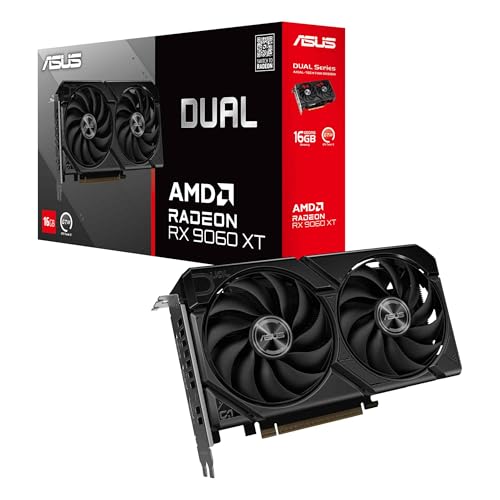
ASUS Dual Radeon RX 9060 XT 16GB — Best AMD VR Card
The RX 9060 XT is AMD’s current-generation answer to the same brief the 5060 Ti answers: modern architecture, 16GB of memory, compact dual-fan board, current outputs. ASUS’s Dual version keeps the formula clean — GDDR6 memory where NVIDIA uses GDDR7, DisplayPort 2.1a beside HDMI 2.1b, Axial-tech fans with 0dB idle behaviour, and a 2.5-slot body that suits the smaller cases VR rigs often live in, since the VR PC frequently sits in a living room rather than an office.
In VR terms its virtues mirror its rival’s: the framebuffer is the right size for current headsets, the rendering power is current-generation, and FSR gives demanding titles the same kind of lever DLSS gives the NVIDIA card. The honest differences are ecosystem ones. Some VR titles and runtimes have historically been tuned first on NVIDIA hardware, and a buyer whose library centres on a specific simulation or platform should check that title’s community wisdom before choosing a side. For the general catalogue, this is a fully credible current-generation VR card, and for buyers whose flat-screen gaming already lives in AMD’s ecosystem it is the natural single-card answer to both jobs.
AMD’s recent generations have also closed the driver-maturity gap that older VR buyers remember, and the current runtimes treat Radeon hardware as a first-class citizen in the mainstream catalogue. The remaining homework is title-specific, not brand-wide: check the two or three games you actually live in, and if they run happily on Radeon — most do — the ecosystem argument settles itself.
- Memory: 16GB GDDR6
- Interface: PCIe 5.0
- Outputs: HDMI 2.1b, DisplayPort 2.1a
- Form factor: 2.5-slot design, Axial-tech fans, 0dB technology
- Architecture: current-generation RDNA
Strengths
- 16GB framebuffer sized for current headsets and supersampling.
- Current-generation performance with FSR as the settings lever.
- Compact board suits living-room VR PCs and smaller cases.
Trade-offs
- GDDR6 where the NVIDIA rival carries faster GDDR7.
- A few VR titles are tuned NVIDIA-first; check your core games.
- Ray-traced VR titles remain the rival ecosystem’s home turf.
Best for: AMD-ecosystem players and living-room VR builds wanting current-generation headroom. Skip it if your one essential VR title is documented to favour NVIDIA hardware — loyalty to a game beats loyalty to a brand.

MSI GeForce GTX 1660 Super Gaming X — The Honest Floor
This guide keeps the GTX 1660 Super in print for one reason: honesty about where PCVR starts. MSI’s Gaming X version was sold as a VR Ready card in its era, with 6GB of GDDR6, a dual-fan cooler and the full output set of its day, and for the VR catalogue of its era — which remains the majority of what most players own — it still delivers a genuinely good experience. Rhythm games, social worlds, older simulation titles and the foundational VR library run on this class of hardware the way they were designed to.
Everything about its inclusion is bounded, and the bounds belong in the open. Six gigabytes is below what current headsets want; modern high-resolution panels will push this card into reduced render resolutions and reprojection in demanding titles, and some recent ports will simply be beyond it. It has no answer to that, and pretending otherwise would make this guide useless. What it offers is the legitimate minimum: the cheapest honest seat for a player with an older headset and an established library, or a stopgap that keeps VR playable while a bigger upgrade is saved for. Judged as that, it earns its slot. Judged as a card for a new high-resolution headset, it is the wrong purchase, and the current-generation picks above exist precisely for that buyer.
There is also a hand-me-down logic that keeps this card useful in households: it is the classic second-rig VR card, moving to a child’s or a spare machine to run the family catalogue when the main rig upgrades. A floor card with a long second life is a different value proposition from a floor card with none, and the 1660 Super’s catalogue strength gives it exactly that afterlife.
- Memory: 6GB GDDR6, 192-bit bus
- Outputs: HDMI and DisplayPort set of its generation
- Cooling: dual-fan Gaming X design
- Positioning: VR Ready in its era
- Role: entry floor for older headsets and the classic catalogue
Strengths
- The established catalogue of VR games runs properly on it.
- GDDR6 memory was ahead of its class and still helps.
- A well-made board from MSI’s respected Gaming line.
Trade-offs
- 6GB is below the appetite of current high-resolution headsets.
- Recent demanding ports will exceed what it can hold at refresh.
- Its generation’s features stop well short of current upscaling tech.
Best for: players with older headsets and established libraries who need the honest minimum. Skip it if the headset is new or high-resolution — that pairing disappoints in both directions.

ASUS TUF Gaming GeForce RTX 5060 8GB — Best Compact Current Card
The RTX 5060 in ASUS’s TUF clothing is the current-generation card for buyers whose first constraint is the machine itself. TUF boards are built to a durability brief — military-grade components, a protective PCB coating, a substantial 3.1-slot cooler with Axial-tech fans — and the result is a card that feels engineered for the PC that lives under a television or in a shared room and gets moved, dusted and occasionally knocked. Its silicon is fully current: GDDR7 memory, PCIe 5.0, HDMI and DisplayPort 2.1 outputs, and the present DLSS generation.
The qualification is the framebuffer, and it is stated here rather than in a footnote: 8GB. In VR that figure buys a specific ownership style. Mainstream headsets at native resolution with sensible settings — yes, comfortably, on current-generation rendering power. Enthusiast supersampling, the greediest social worlds, the heaviest simulation scenery — those become negotiations, and the owner manages texture settings the way the 16GB owners never think about. None of that makes it a bad card; it makes it a card with a known ceiling, bought by people who value its build and its current features over memory headroom. If your VR ambitions are growing, the 16GB boards above are the better spend. If your VR is a defined library on a mainstream headset, this TUF will serve it sturdily for years.
The TUF treatment has one more VR-specific virtue: headsets tether their owners near the PC, and VR rigs get repositioned, replugged and transported to other rooms more than desk machines do. A card built with a coated PCB and reinforced components tolerates that life measurably better than a delicate flagship cooler assembly, and for a machine that travels to demonstrations, classrooms or friends’ houses, the durability is not decoration.
- Memory: 8GB GDDR7
- Interface: PCIe 5.0
- Outputs: HDMI and DisplayPort 2.1
- Form factor: 3.1-slot, Axial-tech fans
- Build: military-grade components, protective PCB coating
Strengths
- Current-generation silicon and upscaling in a rugged build.
- TUF durability suits living-room and frequently moved PCs.
- GDDR7 speed partially offsets the smaller framebuffer.
Trade-offs
- 8GB is the tightest current-generation framebuffer in this guide.
- Supersampling enthusiasm will find the memory ceiling quickly.
- The 3.1-slot cooler is wide for a card of its class.
Best for: mainstream-headset players who prize build quality and current features. Skip it if you supersample heavily or live in the big social VR worlds — buy the 16GB memory instead.
Previous-Generation Flagships, Bought Used — Best Used-Market Route
The sixth route into good VR is not a listing but a market: the retired flagships of one and two generations ago, sold used as their owners chase the current generation. Cards that once anchored high-end rigs — the top tiers of the RTX 30-series and their contemporaries — still carry large framebuffers and rendering power that dwarf new budget boards, and in VR, where memory and steadiness rule, that combination ages gracefully. A carefully bought used flagship can deliver a current-headset experience that no new card at the same spend can match.
The discipline is in the buying, because this slot is prose-only precisely so that no stale listing inherits this guide’s trust. Buy from sellers with returns, favour cards with a documented life in a gaming PC, ask about mining history and walk away from evasive answers, and test on arrival under a sustained VR load — twenty minutes in your most demanding title will reveal thermal or stability problems a desktop idle hides. Check the physical card against its supposed model; flagship names get borrowed by lesser boards in sloppy listings. Do all that, and the used flagship is the enthusiast’s shortcut. Skip the discipline, and it is a lottery ticket with a fan attached.
Price discipline completes the route. The used flagship only makes sense while it costs clearly less than the new card whose experience it approximates — the moment listings drift up toward new-card money, the warranty and current features of the new card win the argument. Watch the market for a few weeks rather than pouncing on the first listing; retired flagships are a river, not a puddle, and patience is the toll this route charges instead of cash.
- Route: retired flagship cards from the second-hand market
- Appeal: large framebuffers and flagship rendering power at used prices
- Risk control: returns window, documented history, sustained-load testing
- Watch for: mining wear, mislabelled models, missing accessories
- Listing status: discussed as a class — no single listing is endorsed
Strengths
- Flagship memory capacity at a fraction of its launch-tier cost.
- Rendering power that still exceeds new midrange boards in VR loads.
- A deep market means genuine choice of models and board partners.
Trade-offs
- No warranty relationship and an unknown service history.
- Older architectures miss current upscaling and media features.
- Every purchase requires the buyer’s own inspection and testing.
Best for: confident buyers who test hardware properly and know the models they are hunting. Skip it if returns and troubleshooting sound like chores — a new card’s warranty is worth real money to you.
Side by Side: the VR Lineup at a Glance
| Pick | Memory | Generation | Outputs | VR role |
|---|---|---|---|---|
| GIGABYTE RTX 3060 Gaming OC 12G | 12GB GDDR6 | RTX 30-series | HDMI, DisplayPort | Budget seat for mainstream headsets |
| ASUS Dual RTX 5060 Ti 16GB | 16GB GDDR7 | Current RTX | HDMI 2.1b, DP 2.1b | Current headsets, buy-once tier |
| ASUS Dual RX 9060 XT 16GB | 16GB GDDR6 | Current RDNA | HDMI 2.1b, DP 2.1a | AMD route to current headsets |
| MSI GTX 1660 Super Gaming X | 6GB GDDR6 | GTX 16-series | HDMI, DisplayPort | Floor for older headsets and catalogue |
| ASUS TUF RTX 5060 8GB | 8GB GDDR7 | Current RTX | HDMI, DP 2.1 | Current features, managed settings |
| Used previous flagships | Large, model-dependent | Retired flagship | Model-dependent | Enthusiast shortcut, buyer-tested |
What Settings Should You Change First When a Title Struggles?
Every VR owner eventually meets the title that humbles their card, and the order in which you reach for settings decides how much picture quality you keep. Start with the render resolution scale, in small steps: it is the master dial for both rendering load and memory pressure, and a modest reduction buys back refresh headroom with the least visible damage inside a headset. The native-refresh contract matters more than the last increment of sharpness, and this dial is where that trade is made.
Next, look at the settings that cost memory rather than shading: texture quality first, because VR titles load large texture sets and the framebuffer figures in this guide are the budget they spend from. An 8GB card at high textures and a lowered resolution scale will usually play better than the same card defending ultra textures at full scale. Shadows and volumetric effects follow — both are expensive, both scale down gracefully, and in the enclosed spaces of many VR titles their absence is barely mourned.
Leave the headset’s refresh mode as the last lever, and use it knowingly. Dropping to a lower refresh the card can hold natively converts a reprojection-filled session into a steady one, and steady wins. What you should not do is stack every compromise at once and conclude the card is hopeless: change one dial at a time, in the order above, and most titles on most of these cards settle into honest, comfortable play.
How Do You Set Up a PC So the Headset Gets the Best of Your Card?
Begin with the connection. A wired headset should land on the card’s own outputs with the cable the headset maker specifies — DisplayPort for the headsets that use it, since adapters and docks introduce exactly the negotiation failures VR does not forgive. Wireless PCVR shifts the burden rather than removing it: the card still renders everything, and the network must carry it, so a dedicated router near the play space matters as much as the GPU in that arrangement.
Then set the render resolution deliberately. Every VR runtime offers a resolution scale, and the correct procedure is to start at the headset’s native target, confirm your essential titles hold refresh there, and only then raise supersampling in the titles with headroom to spare. Raising it globally because a menu offered it is how capable cards acquire undeserved reputations. Keep the runtime’s reprojection behaviour in mind as a safety net, not a strategy: a game that lives in reprojection is telling you its settings exceed the card, and the fix is in the settings, not in hoping your stomach adapts.
Finally, give the card air and power like any sustained-load component. VR sessions run the GPU at high utilisation for hours, in a room the player is also warming by moving around. A case with honest airflow and a power supply with headroom keeps clocks where the first ten minutes promised they would be. And keep drivers reasonably current: VR runtimes and headset software update often, and the pairing of a fresh runtime with an ancient driver is a recurring source of mysteries in every VR forum on earth. Update the runtime and the driver in the same sitting, and restart the machine afterwards like you mean it.
How Should You Think About Comfort Settings Before Blaming the Card?
Some VR discomfort is hardware truth, and some is configuration wearing a disguise. Before concluding a card is too weak, check the settings that cost the player rather than the GPU: forced smooth-turning in a game you play standing, vignette options disabled, and frame-rate targets set above the headset’s actual refresh by a copied settings guide. A card rendering beautifully at the wrong target produces a worse experience than a weaker card rendering steadily at the right one.
Play space and session habits matter too. New VR players take long sessions in demanding titles and blame the resulting misery on the hardware; veterans build up, take breaks, and know their own limits. The card’s job is to hold its refresh honestly. Everything else — the settings that respect the player, the session lengths that respect the human — is configuration, and it is free, which is why it should be exhausted before money is spent.
Fit belongs on the same checklist, unglamorous as it sounds. A headset worn slightly loose shifts its lenses off the eyes’ sweet spot and manufactures blur that owners routinely attribute to rendering resolution — and then try to fix with supersampling, spending the card’s headroom on an optical problem. Adjust the strap and the lens spacing first. The number of VR disappointments that end at a strap adjustment is one of the hobby’s open secrets, and it costs nothing to check before the card takes the blame.
How Do You Test a New VR Card While You Can Still Return It?
The return window is a testing budget; spend it deliberately. On day one, run your three most-played titles at the headset’s native resolution and refresh, and watch the frame-time graph every VR runtime can overlay. You are looking for the pattern, not a number: occasional single dips in loading moments are normal, while a rhythm of reprojection in ordinary play means the settings exceed the card, and the remedy is a settings change you should make while the comparison with your old card is fresh.
Then run the hardest title you own, the one you bought the card hoping to tame, for a full session rather than a five-minute lap. Thermal behaviour, fan noise in a quiet room, and clock stability in hour two are the properties benchmarks hide and ownership reveals. A card that is glorious for ten minutes and ordinary for two hours has told you something worth knowing inside the window.
Finally, test the unglamorous paths: the headset waking from sleep, the runtime switching between titles, the wireless link if you use one. VR friction lives in transitions, and a card-and-driver combination that handles them cleanly is worth more than a slightly faster one that needs a reboot ceremony. If the card passes your library, your session length and your transitions, keep it with confidence and stop reading graphics card guides for a while.
What Do VR Buyers Most Often Get Wrong?
The commonest error is buying the card for the headset they have read about rather than the one they own. A card that is perfect for a mainstream headset is a strange purchase for a player about to order a high-resolution flagship headset, and the reverse pairing wastes money just as surely. Headset first, card second, always — the headset defines the resolution and refresh the card must serve.
The second error is shopping by flat-screen reviews alone. A card’s 1440p monitor verdict does not transfer cleanly into a headset, where memory capacity and frame-time consistency outrank the peak numbers those reviews headline. The third error is the opposite snobbery: dismissing the older catalogue. Most VR libraries are mostly older titles, and a floor-class card that plays them beautifully is a rational purchase for the player who actually owns that library — the mistake is not buying the 1660 Super, it is buying it for the wrong headset and the wrong games.
And the quiet error: forgetting the rest of the machine. A strong card behind a struggling CPU, in a case with no airflow, driving a headset through a bargain cable, will be blamed for all of it. VR is a chain, and it performs at the level of its weakest link with unusual honesty.
A fifth error has become common enough to name: buying on a launch-week review of a card’s flat-screen performance in two showcase titles, then discovering its behaviour across a fifty-game VR library is a different story. VR libraries are long-tailed — indie titles, early-access worlds, simulation mods — and driver behaviour across that tail is part of what you are buying. The mature cards in this guide have known tails; the newest cards earn theirs over their first year, which is a fair trade for their headroom but should be a conscious one.
Final Recommendation
For most buyers reading this guide, the answer is the ASUS Dual RTX 5060 Ti 16GB: current architecture, the right framebuffer, modern outputs, and a size that fits real cases — the card that serves today’s headsets without negotiation. AMD-ecosystem players should take the RX 9060 XT 16GB as its mirror. Budget buyers with mainstream headsets should take the RTX 3060 12GB and enjoy the catalogue it serves so well, while the GTX 1660 Super remains the truthful floor for older headsets, and the TUF RTX 5060 suits buyers who prize build and current features over memory headroom.
Whichever route you take, buy the card for the headset on your face and the library on your drive, because in VR the honest match between the three of them — headset, games and card — is worth more than any single specification, and it is the match you will feel in your stomach when it is wrong.
And keep the receipt-window discipline from the testing section in mind whichever card arrives: three favourite titles, one hardest title, one long session, and the transitions in between. A card that passes your own library in your own room has answered the only review that was ever going to matter, and this guide’s job is simply to make sure the card you test is one that deserved the audition.
Frequently Asked Questions
Is the GTX 1660 Super still enough for VR?
For the older catalogue and older headsets, yes — that is the workload it was sold for, and it still does it well. For current high-resolution headsets and recent demanding ports, no: its 6GB framebuffer and its generation’s rendering power sit below what those headsets ask. The card did not get worse; the headsets moved.
Why does VRAM matter so much more in VR?
Because the headset renders two high-resolution views, uses large texture sets, and invites supersampling on top — all of which live in the framebuffer. When VRAM runs out, the penalty arrives as stutter and reprojection, which in a headset is a physical sensation rather than a graph on a monitor. Capacity buys smoothness you can feel. It is also why this guide treats the 16GB cards as the buy-once tier and describes the smaller framebuffers in terms of the management they require, rather than pretending all six slots are equivalent.
Can I use one of these cards for wireless PCVR?
Yes — the card renders the game exactly as it does for a wired headset, and the stream is then carried by your network. The practical requirement shifts to the router: a modern Wi-Fi setup near the play space, ideally dedicated to the headset. A strong card behind a congested network still produces a poor wireless experience, and no graphics card purchase can fix a router problem wearing a GPU costume.
Should I buy the 8GB RTX 5060 or the 12GB RTX 3060?
For VR specifically, the 3060’s memory is the safer long-term asset, while the 5060 offers current architecture, features and efficiency with a tighter framebuffer. If your library is the established catalogue, take the memory. If you value current features and play lighter titles at native resolution, the 5060 serves well — with its ceiling understood.
Do I need DisplayPort for a VR headset?
It depends on the headset. Many wired PCVR headsets connect by DisplayPort for the bandwidth their panels need, others use HDMI or USB-carried video. Check your headset’s specified connection and confirm the card offers it natively — every linked card here covers the mainstream connections of its generation, and adapters are the workaround of last resort.
Is a stronger card wasted on a standalone headset used with a PC?
No — when a standalone headset is driven by a PC, the PC’s card does all the rendering, and the headset’s panels set the demand exactly as a dedicated PCVR headset’s would. The headset’s own mobile chip sits the session out. Buy for the panels and the refresh the headset will run at over the link, which is the same arithmetic as any other headset in this guide.
Related Guides
The same encoder and rendering questions follow these cards into other rooms of the cluster. Creators weighing a card that can play and broadcast at once should read the best graphics cards for streaming games, pilots rendering enormous scenery should see the best flight simulator graphics cards, and 3D artists will find the rendering-first view in the best blender 3d graphics cards.



[…] across this cluster. The same Ada and Blackwell silicon renders virtual worlds in our guide to the best graphics cards for virtual reality, the encoder side of the professional stack is examined in the best graphics cards for streaming […]