What's inside
- Where to Buy
- Key Takeaways
- Quick Picks
- How We Chose These Picks
- Comparison
- How to Choose an Inexpensive Photo Editing Monitor
- Does a Budget Photographer Really Need Adobe RGB?
- QHD or 4K — Where Should Tight Money Go?
- Can a 24-Inch Screen Be a Photographer’s Main Monitor?
- Common Mistakes When Buying a Budget Photo Monitor
- Final Recommendation
- Frequently Asked Questions
- Related Guides
As an Amazon Associate I earn from qualifying purchases. This post may contain affiliate links at no extra cost to you.
[SITE_DOMAIN] is reader-supported. When you buy through links on our site, we may earn an affiliate commission.
Where to Buy
Careful money deserves a careful shelf to shop from, and Amazon lists all six panels in this guide. The BenQ SW270C stands at the head of the set as the colour specialist, so check price on Amazon on its page before assuming a photographer’s panel must cost flagship money. The ASUS VA27AQ is the straightforward QHD office-grade screen with a printed sRGB figure, while the ASUS ProArt PA278QV carries the ProArt badge and Calman verification into the same size class. The Philips 27E1N1800A is the lone 4K panel in the six, its listing leading with resolution and a long warranty. Two 24-inch screens close the set for smaller desks: the ViewSonic VP2456A with Pantone validation and strong USB-C charging, and the ASUS VA24DQSB with its docking-station ambitions.
Inexpensive is a dangerous word in colour work, because the savings usually hide in the specification that matters. The best inexpensive photo editing monitors are not the cheapest screens with a camera word in the listing; they are the panels whose titles still print a colour claim a photographer can hold the maker to — a gamut percentage, a verification brand, a calibration architecture — at the lower end of the market. A screen that will judge skin tones, wedding whites and product colours for paying clients has to be believed, and belief at this level is bought with printed evidence, not with adjectives.
The six titles divide into three honest tiers. At the top stands the BenQ SW270C, a genuine photographer’s instrument — 99% AdobeRGB, hardware calibration, a 16-bit 3D LUT, a Delta E of two or less — that happens to sit in this price conversation because its QHD resolution keeps it below the 4K flagships. In the middle, the two ASUS 27-inch QHD models and the Philips 4K trade in sRGB claims, verification and resolution. At the compact end, two 24-inch 1080p panels serve small desks and second screens, one of them Pantone validated with 90W charging, the other built around docking. Each tier is defensible; the reviews mark exactly where each one’s colour story ends.
Resolution is the visible compromise throughout. Only the Philips reaches 4K. Three panels sit at QHD — the sensible middle for photo work at 27 inches — and two sit at 1080p on 24-inch frames, where a photograph is judged whole rather than inspected closely. Buyers should decide before ordering whether their week is culling and colour judgement, which QHD serves beautifully, or heavy retouching at magnification, which pushes toward the Philips or out of this guide’s price territory altogether.
Key Takeaways
- The BenQ SW270C prints a full photographer’s specification — 99% AdobeRGB, hardware calibration, 16-bit 3D LUT, DeltaE ≤2 — at a QHD panel’s price position.
- The ASUS ProArt PA278QV is the verification pick: Calman Verified, 100% sRGB and Rec.709 in a 27-inch QHD frame.
- The Philips 27E1N1800A is the only 4K panel in the six, and its title prints no gamut percentage at all.
- Both 24-inch picks are 1080p: the ViewSonic VP2456A claims 100% sRGB with Pantone validation, the ASUS VA24DQSB claims no gamut figure.
- USB-C appears on only two titles — the SW270C at 60W and the VP2456A at 90W — so docking shoppers should read connections pick by pick.
Quick Picks
| Pick | Badge | Why it earns a place |
|---|---|---|
| BenQ SW270C | The real photographer’s panel | 27-inch QHD, 99% AdobeRGB, hardware calibration, 16-bit 3D LUT and DeltaE ≤2. |
| ASUS VA27AQ | The plain QHD workhorse | 27-inch QHD IPS with 99% sRGB, three input types and eye-care features. |
| ASUS ProArt PA278QV | Verified on a budget | 27-inch QHD, Calman Verified, 100% sRGB, Rec.709 and an anti-glare ergonomic stand. |
| Philips 27E1N1800A | 4K without the flagship tier | 27-inch 4K IPS with HDR10, DisplayPort 1.4 and a four-year replacement warranty. |
| ViewSonic VP2456A | The small Pantone desk | 24-inch 1080p, 100% sRGB, Pantone Validated, 120Hz and 90W USB-C with a hub. |
| ASUS VA24DQSB | The docking second screen | 24-inch 1080p IPS with USB docking, height adjustment and three video inputs. |
How We Chose These Picks
The gate for this guide was a printed colour claim at a modest market position. Five of the six titles print a gamut percentage or a verification brand. The sixth, the ASUS VA24DQSB, prints neither, and it is included deliberately as the docking-led option — with its spec box recording the absence in the standard words, so no reader mistakes it for a colour instrument. A budget guide that hid such a panel’s limits would be doing marketing, not reviewing.
Size honesty shaped the set. Budget photo guides often pretend a 24-inch 1080p screen is interchangeable with a 27-inch QHD one, and the pretence costs buyers a working year. This guide keeps the two sizes in separate, labelled roles: 27-inch panels for primary judgement, 24-inch panels for compact desks and companion screens, with the resolution trade-off stated in every review rather than discovered after delivery.
Calibration claims were weighed by strength. Hardware calibration with a LUT outranks third-party verification, which outranks a bare gamut percentage, which outranks silence. The ranking produced the review order’s logic — the SW270C first because its architecture belongs to a higher price class entirely — and it also produced the guide’s central advice: at this end of the market, one strong colour claim is worth more than five decorative features.
What was excluded: the long tail of budget screens whose titles promise vivid colour, wide viewing and eye comfort without printing a single measurable colour figure. Some of them are perfectly decent office monitors. None of them gives a photographer evidence to buy on, and evidence is the entire currency of this guide.

BenQ SW270C — The real photographer’s panel
Everything else in this guide is a compromise negotiated gracefully; the SW270C is the genuine article at a negotiated resolution. Its title prints the full photographer’s litany: a 27-inch QHD 1440p photo and video editing monitor with 99% AdobeRGB, 100% sRGB and 97% P3, an IPS panel, hardware calibration, a 16-bit 3D LUT, a Delta E of two or less, uniformity, Pantone, AQCOLOR, an ergonomic stand and USB-C at 60W. Read that beside the budget panels below and the category error becomes clear — this is a professional instrument whose QHD grid, rather than any colour shortcoming, places it in an inexpensive guide.
Adobe RGB at 99% is the headline because print is the SW270C’s home. A photographer delivering to paper, to albums, to gallery walls needs the screen to show the printer’s territory before the proof is struck, and this panel prints the coverage to do it. The 97% P3 figure keeps video and screen work honest alongside. Hardware calibration with a 16-bit LUT then protects the investment across years: the panel’s internal table can be re-measured and rewritten as the backlight ages, so the surface the photographer trusts in year three is the same surface bought in year one, restored rather than merely remembered.
QHD at 27 inches is the deliberate trade. The interface sits at its designed scale, the whole image is judged comfortably, and inspection work happens at magnifications that show a useful region of the file. Retouchers who live at pixel level for entire days will feel the ceiling; photographers whose judgement happens at fit-to-screen and moderate zoom — the majority of working practice — will not. Uniformity in the title addresses the corner-drift that makes gradient and vignette calls unreliable on lesser panels, and the Pantone clause serves the commercial photographer’s branding clients.
Suits the print-led photographer building a first serious desk, the studio that needs a second colour-true seat without a second flagship outlay, and any buyer whose work is colour-critical but resolution-tolerant. The 60W USB-C figure is the modest clause: a hungry workstation laptop may want its own adapter alongside the dock. That is the complete list of meaningful cautions, which is itself the review’s verdict on where this panel sits.
- Size and resolution: 27-inch, QHD 1440p
- Colour: 99% AdobeRGB, 100% sRGB, 97% P3
- Accuracy: Delta E ≤2, uniformity stated
- Calibration: hardware calibrated, 16-bit 3D LUT
- Extras: Pantone stated, AQCOLOR, ergonomic stand
- Panel: IPS
- Connection: USB-C with 60W power delivery
Strengths
- A complete photographer’s colour architecture at a QHD price position.
- 99% AdobeRGB plus 97% P3 covers print and screen deliverables in one panel.
- Hardware calibration keeps the panel correctable across years of drift.
Trade-offs
- QHD density caps pixel-level retouching compared with a 4K panel.
- 60W USB-C charging is modest for workstation-class laptops.
- No bundled calibrator is named, so the instrument is a separate purchase.
Best for: a print-led photographer who wants a genuine Adobe RGB instrument without entering the 4K flagship tier. Not suited for: a retoucher whose paid work is full-magnification skin and product detail all day, because the QHD grid shows its ceiling at that zoom.
The SW270C also reframes the budget conversation for the whole guide. Buyers often assume the inexpensive tier means accepting an unmeasured screen and hoping; this panel demonstrates the alternative allocation — spend on colour architecture, save on pixels. For photography, that ordering is usually correct. Prints are judged by colour long before they are judged by the sharpness of the screen they were edited on, and a colour-true QHD panel will produce more saleable work than a colour-vague 4K one at the same outlay.
Ownership asks for one habit and one purchase. The purchase is a calibrator, since the architecture is present but the instrument is not in the title. The habit is a verification rhythm — monthly for deadline work, and always before a print run that cannot be repeated. Build both from the first week and the SW270C behaves like what its title claims: a professional reference that simply happens to render at 1440p.
Before the reviews begin, one piece of budget arithmetic is worth doing in the open. The gap between this guide’s tiers is not only money; it is the kind of evidence the money buys. Moving up within the six trades an undocumented screen for a documented one, a documented one for a verified one, and a verified one for a panel with a calibration architecture of its own. Photographers should locate their work on that ladder before locating it on a price ladder, because the two ladders do not rise together — the SW270C’s colour paperwork outclasses panels that cost more elsewhere purely on resolution. A budget spent by evidence rather than by inches is the theme every review below returns to.

ASUS VA27AQ — The plain QHD workhorse
The VA27AQ is the honest generalist of the set: a 27-inch 1440p QHD IPS monitor with HDMI, DisplayPort and VGA inputs, a printed 99% sRGB figure, a frameless design, a 1ms response claim, built-in speakers, low blue light and flicker-free features, VESA wall mounting and an EPEAT listing. Nothing in that title reaches for the photographer’s vocabulary — no Adobe RGB, no calibration architecture, no verification brand — and the review should not pretend otherwise. What it offers is a QHD canvas with a stated sRGB claim at the accessible end of the market, from a maker whose name supports the claim.
For a large class of photo work, that is genuinely sufficient. Images bound for screens — portfolios, platforms, client galleries, e-commerce — live in sRGB, and a panel covering 99% of that space with an IPS panel’s stable viewing angles will judge them dependably. The photographer’s discipline matters more than the panel’s pedigree at this level: consistent room light, a fixed brightness, and the same screen used for every judgement will produce more consistent output than a finer panel used carelessly.
The connections tell the workhorse story. HDMI, DisplayPort and legacy VGA mean this screen accepts whatever the desk contains — the new laptop, the older tower, the spare machine — without adapters. Speakers and eye-care features serve the long general-purpose day. VESA mounting lets it float above a small desk or serve later as a wall-mounted preview screen in a studio. None of this is colour science, and all of it is the texture of real working life at a budget.
Suits the screen-bound photographer, the student building a first editing desk, and the studio equipping an assistant’s seat for culling and sRGB work. Print photographers should pass: with no Adobe RGB figure printed, soft-proofing for paper would rest on hope. Buyers who need verification in writing should step to the ProArt sibling reviewed next, which shares this panel’s size and resolution and adds exactly that.
- Size and resolution: 27-inch, QHD 2560 x 1440
- Colour: 99% sRGB
- Panel: IPS, frameless
- Response: 1ms stated
- Connections: HDMI, DisplayPort, VGA
- Extras: speakers, low blue light, flicker free, VESA wall mount, EPEAT
- Adobe RGB coverage: Not stated in the listing title — verify with the manufacturer documentation
- Calibration method: Not stated in the listing title — verify with the manufacturer documentation
Strengths
- 99% sRGB at QHD covers screen-bound photo work dependably.
- Three input types accept new and legacy machines without adapters.
- VESA mounting and eye-care features suit long general-purpose days.
Trade-offs
- No Adobe RGB or P3 figure is printed for print or video colour.
- No USB-C docking appears in the title.
- No calibration or verification claim is made.
Best for: a screen-bound photographer or student who needs a dependable QHD sRGB panel for culling and online work. Not suited for: a print photographer soft-proofing paper deliverables, because the title states no Adobe RGB coverage to proof against.
There is a respectable career path for this monitor inside a growing practice. It begins as the main screen of a screen-bound workflow, serves as the culling and correspondence seat when a colour flagship arrives, and ends as the studio’s client-preview display, where its size and clean frameless look flatter finished work. Budget panels bought with that trajectory in mind are rarely wasted money; budget panels bought as pretend print references are. The VA27AQ’s title, to its credit, never asks to be mistaken for the latter.
Set expectations in the first session: fix the brightness at a level the room can sustain all day, choose the sRGB-oriented picture behaviour if the menu offers it, and judge a set of already-delivered images whose on-screen appearance is known. That calibration of the owner, rather than of the panel, is the ritual this tier depends on — and performed honestly, it closes much of the gap between this screen and costlier ones for everyday screen work.
A QHD panel also asks a small favour of the desk: run the editing software at its native resolution and resist scaling tricks that soften the interface. At 27 inches the VA27AQ’s grid is fine enough that Lightroom-style grids of thumbnails stay legible and a cull can be judged at speed — a real workflow benefit for the high-volume shooter, whose bottleneck is decisions per hour rather than pixels per inch. Wedding and event photographers, who may face two thousand frames on a Monday, will recognise that benefit immediately; it is the unglamorous reason QHD remains the working photographer’s default long after 4K became affordable.

ASUS ProArt PA278QV — Verified on a budget
The PA278QV carries the ProArt badge into the QHD budget tier and brings its paperwork with it: a 27-inch 1440p QHD professional monitor, Calman Verified, IPS, height adjustable, with 100% sRGB, eye care, an anti-glare surface, an ergonomic stand and Rec.709. The verification is the clause that separates it from its VA-series sibling above. Calman is the calibration world’s reference software house, and a verified panel has had its accuracy measured against that standard before shipping — a printed, checkable claim rather than a mood.
Rec.709 in the title speaks to video-adjacent photographers and hybrid workers: it is the broadcast HD colour space, and its presence signals that the panel’s colour behaviour has been considered for moving images as well as stills. Combined with full sRGB coverage, the claim set describes a screen for deliverables that live on other screens — which, at this budget, is the honest centre of the market. No Adobe RGB is printed, and print-led buyers should take their shortlist to the SW270C above; the ProArt’s territory is the verified screen-bound workflow.
The physical details suit judgement work. Anti-glare treatment keeps a bright room from rewriting the image, and a height-adjustable ergonomic stand lets the panel meet the chair rather than the other way round — a small thing across one afternoon, a significant thing across a working year of culling sessions. Eye-care features acknowledge the same long hours. ProArt models have built their reputation on exactly this combination of measured colour and working ergonomics, and the title here preserves the pattern at an accessible position.
Suits the photographer whose clients view work on screens, the hybrid worker who wants Rec.709 awareness for occasional video, and any buyer who values a verification brand over a raw percentage. Between this and the VA27AQ — same size, same resolution, same maker — the decision is precisely the value of the Calman claim and the ProArt ergonomics, and buyers who judge colour for money should generally pay it.
- Size and resolution: 27-inch, 1440p QHD
- Colour: 100% sRGB, Rec.709
- Verification: Calman Verified
- Panel: IPS, anti-glare
- Stand: height adjustable, ergonomic
- Extras: eye care
- Adobe RGB coverage: Not stated in the listing title — verify with the manufacturer documentation
- USB-C connection: Not stated in the listing title — verify with the manufacturer documentation
Strengths
- Calman Verified status gives budget buyers a checkable accuracy claim.
- 100% sRGB with Rec.709 covers screen stills and HD video colour.
- Anti-glare surface and height adjustment suit long judgement sessions.
Trade-offs
- No Adobe RGB figure is printed for print soft-proofing.
- No hardware-calibration architecture is claimed for later correction.
- QHD resolution sits below the 4K option in this guide.
Best for: a screen-bound photographer or hybrid worker who wants third-party verified colour at a QHD budget. Not suited for: a print-led studio, because the title states no Adobe RGB coverage for paper work.
Verification deserves a clear-eyed paragraph, because it is both valuable and limited. A Calman Verified panel leaves the factory measured — that is a real and purchasable good, sparing the buyer the anxiety of the unmeasured screen. It does not maintain itself. Panels drift with age and hours, and a verified start without an owner’s later checks becomes a historical document. Budget buyers should therefore treat the PA278QV’s verification as the first entry in a record they keep, verifying again with a borrowed or bought instrument as the panel ages into its second year.
Position this screen as the room’s reference from day one: the panel clients’ work is judged on, kept at fixed settings, its picture mode noted in the studio’s records. In a small practice, that clerical discipline — one trusted surface, settings written down, changes made deliberately — delivers most of what expensive colour management promises, and the PA278QV is built to be the surface it happens on.
Buyers choosing between the two ASUS 27-inch models should notice what the ProArt premium actually purchases, because it is a clean experiment in how this market prices trust. The size, resolution and maker are shared. The ProArt adds a verification brand, an anti-glare surface, height adjustment and Rec.709. None of those additions makes a photograph sharper; all of them make a judgement more defensible. A hobbyist may rationally decline them. A photographer whose colour calls are questioned by clients — and every professional’s eventually are — is buying, with the PA278QV, the ability to point at a measurement instead of an opinion.

Philips 27E1N1800A — 4K without the flagship tier
Philips takes the opposite bet from BenQ in this guide: resolution first, colour claims later — or, in the title’s case, not at all. The 27E1N1800A offers a 27-inch 4K UHD IPS panel with HDR, built-in speakers, HDMI 2.0, DisplayPort 1.4, VESA mounting, HDR10, LowBlue and flicker-free features, and a four-year advance replacement warranty. No gamut percentage appears anywhere in that title. The review therefore credits the panel with exactly what is printed — the sharpest canvas in this guide and a notably long warranty — and records its colour specification as unstated, for the buyer to verify on the listing before trusting it with paid colour work.
Why include a 4K panel with an undocumented gamut in a photo guide? Because retouching is a real photographic discipline, and it is resolution-hungry in a way colour judgement is not. Skin work, product detail, restoration of scanned originals, compositing — these happen at magnification, where the QHD panels above show their grid and this Philips keeps resolving. A retoucher whose colour references live on a second, trusted screen could rationally choose this as the working canvas. The guide includes it for that reader, labelled honestly.
The warranty deserves its own sentence. Four years of advance replacement cover is the longest support promise in this guide, and at the budget end of the market — where a panel failure in year two is a genuine financial event for a small practice — that promise has practical value that specification tables understate. HDR10 and the eye-care features round out a generalist’s specification; the speakers serve the desk that watches as much as it edits.
Suits the retouch-led workflow with colour referenced elsewhere, the photographer stepping up from 1080p who prizes inspection density, and the buyer who weighs warranty length heavily. Colour-first buyers should not choose it as a sole reference on this evidence: the listing check for gamut and accuracy figures is not optional homework here, it is the purchase’s foundation.
- Size and resolution: 27-inch, 4K UHD 3840 x 2160
- Panel: IPS
- HDR: HDR10 stated
- Connections: HDMI 2.0, DisplayPort 1.4
- Extras: built-in speakers, VESA, LowBlue, flicker-free
- Warranty: 4-year advance replacement warranty
- Colour gamut: Not stated in the listing title — verify with the manufacturer documentation
- Calibration or verification: Not stated in the listing title — verify with the manufacturer documentation
Strengths
- 4K density serves retouching and inspection better than any rival here.
- A four-year advance replacement warranty leads this guide’s support terms.
- DisplayPort 1.4 and HDMI 2.0 cover modern desk connections.
Trade-offs
- No gamut percentage is printed, so colour claims rest on the listing check.
- No verification or calibration claim appears in the title.
- No USB-C docking is named.
Best for: a retouch-led photographer who references colour on a second trusted screen and wants 4K inspection density. Not suited for: a buyer choosing a sole colour reference for paid work, because this title prints no gamut figure to buy on.
The Philips clarifies the guide’s philosophy by contrast. Every other 27-inch pick leads with colour and concedes resolution; this one leads with resolution and is silent on colour. Neither ordering is dishonest — but they serve different workers, and the disaster case is the buyer who assumes the two orderings are interchangeable. A practice that discovers, after delivery, that its new 4K canvas came with an undocumented gamut has bought a second screen at main-screen money. Read the title, price the silence, and the Philips becomes a perfectly rational purchase for the desk that knows its colour lives elsewhere.
If it joins a two-screen desk, assign roles in writing on the first day: the Philips magnifies, the trusted panel judges, and no colour decision is ever taken from the 4K screen alone. Studios that formalise that division get the best of this panel — its density, its warranty, its modern inputs — without ever asking it to be the thing its title never claimed.
The warranty clause also hints at the Philips’s intended life. Advance replacement — a unit shipped before the failed one returns — is a business-continuity feature, written for desks that cannot go dark for a fortnight. Small practices and home studios are exactly such desks: there is no IT department’s spare screen waiting in a cupboard. A buyer comparing this panel against a colour-documented rival should therefore weigh two different kinds of risk against each other — the risk of an undocumented gamut, answered by a listing check, and the risk of downtime, answered by the warranty — and choose the risk their practice can least afford.
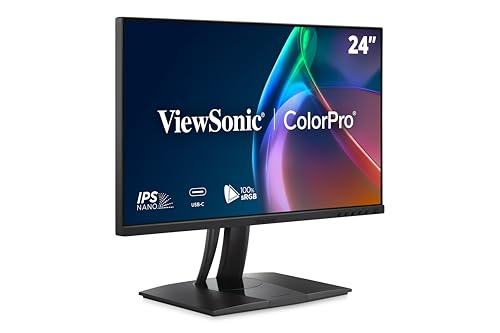
ViewSonic VP2456A — The small Pantone desk
ViewSonic’s compact ColorPro packs a surprising amount of printed colour discipline into a 24-inch 1080p frame: 100% sRGB, Pantone validation, a 120Hz refresh figure, 90W USB-C charging, HDMI, DisplayPort and a USB hub, with photo editing, design, Mac and PC all named in the title. The compromises are size and resolution, stated plainly by the title itself. The claims that remain — full sRGB, a validation brand, and the strongest laptop charging in this guide — are exactly the claims a small screen-bound desk needs.
Pantone validation at this size and position is the differentiator. A designer-photographer producing brand material, social assets and web imagery works inside sRGB and Pantone references all day, and a validated panel renders that system faithfully without pretending to a print-photography gamut it does not claim. No Adobe RGB figure appears, and album-and-gallery photographers should look to the SW270C; the VP2456A’s honesty about its territory is part of its appeal.
Ninety watts of USB-C with a hub turns the little panel into the desk’s docking station: laptop charged, peripherals attached, one cable to lift when leaving. The 120Hz figure, unusual in a colour-led listing, smooths scrolling through long culls and gives the screen a second life for casual motion work. At 24 inches and 1080p the photograph is judged whole — composition, colour, exposure — while pixel-level retouching is beyond its brief and the review says so without apology.
Suits the compact home studio, the brand-and-social creator, the laptop-first worker whose desk is a docking exercise, and any practice buying a colour-disciplined companion screen for a larger main panel. It is also the natural recommendation for a spare-room studio where a 27-inch screen would crowd out the printer, the tablet and the coffee in some order of importance.
- Size and resolution: 24-inch, 1080p
- Colour: 100% sRGB, Pantone Validated
- Refresh: 120Hz stated
- Connection: USB-C with 90W power delivery, HDMI, DisplayPort
- Extras: USB hub
- Platform framing: Mac and PC named
- Adobe RGB coverage: Not stated in the listing title — verify with the manufacturer documentation
- Panel type: Not stated in the listing title — verify with the manufacturer documentation
Strengths
- Pantone validation plus full sRGB serves brand and screen work faithfully.
- 90W USB-C with a hub is the strongest docking offer in this guide.
- A compact 24-inch frame fits desks a 27-inch panel would crowd.
Trade-offs
- 1080p density rules out pixel-level retouching.
- No Adobe RGB figure is printed for print workflows.
- 24 inches shows less of a large image at working zoom.
Best for: a compact, laptop-first studio doing brand, social and screen-bound photo work through a single USB-C cable. Not suited for: a retoucher inspecting skin and product detail at full magnification, because a 24-inch 1080p grid cannot show that work.
Small screens attract a particular buyer error: they are purchased as temporary, then kept for five years. The VP2456A withstands that fate better than most because its colour claim and its dock are grown-up specifications — the screen a practice outgrows in size it does not outgrow in discipline, and it migrates gracefully to the second-desk role with its hub still earning its keep. Buyers should nonetheless measure the desk honestly first: if the working week already strains against 24 inches, the QHD 27-inch picks above are the wiser first purchase.
One setup note matters for this panel’s audience. Laptop-first workers should route everything through the monitor’s hub once — drives, reader, backup disk — and then resist replugging peripherals directly into the laptop out of habit. The single-cable desk only delivers its calm if the ritual is kept, and the VP2456A’s whole design assumes an owner willing to keep it.
The compact tier also suits a living arrangement the larger panels ignore: the shared household desk. A 24-inch screen that docks a work laptop by day and serves the household machine by night, with its colour claim printed for the photographer’s hours and its hub serving everyone else’s, is a genuinely domestic instrument. The VP2456A’s Mac-and-PC naming in its own title acknowledges that double life. Practices run from kitchen tables and spare rooms — a large share of the budget photography world — should read the two 24-inch reviews as written for them, not as consolation prizes for smaller rooms.

ASUS VA24DQSB — The docking second screen
The VA24DQSB is included for its desk, not its colour — and the review will keep that distinction bright. Its title offers a 24-inch 1080p Full HD IPS monitor with USB docking, DisplayPort, a 75Hz refresh, speakers, Adaptive-Sync, VESA wall mounting, a frameless design, HDMI, DisplayPort and VGA inputs, and a height-adjustable ergonomic stand. No gamut percentage, no verification brand, no calibration claim appears anywhere in it. As a colour instrument it is undocumented; as a piece of studio furniture — a docking companion screen with an IPS panel and a proper stand — it is well specified.
Why does a photo guide include it at all? Because real studios buy second screens, and second screens get bought badly when guides pretend every purchase is a reference purchase. The companion panel’s jobs are palettes, culling grids, client email, reference documents and the delivered-work preview — tasks where an IPS panel’s stable angles and a height-adjustable stand matter and a gamut figure does not. The VA24DQSB’s USB docking tidies exactly that desk, and its three input types accept whatever machine the studio rotates through the seat.
The discipline this pick requires is role discipline. Colour judgement must stay on the studio’s reference panel — an SW270C, a PA278QV — and never migrate to the companion screen because it happens to be closer to the chair. Studios that enforce that rule gain a tidy, ergonomic second seat; studios that let it blur will eventually approve a file on an unmeasured surface and learn the lesson at print prices.
Suits the assistant’s desk, the culling station, the client-facing preview seat and any photographer building a two-screen setup whose reference panel already exists. Buyers still choosing their first and only photo monitor should not start here — the five picks above all print colour evidence this one does not, and a first screen must be a judging screen.
- Size and resolution: 24-inch, 1080p Full HD
- Panel: IPS, frameless
- Refresh: 75Hz, Adaptive-Sync
- Connections: HDMI, DisplayPort, VGA
- Extras: USB docking, speakers, VESA wall mount, height adjustable ergonomic stand
- Colour gamut: Not stated in the listing title — verify with the manufacturer documentation
- Verification or calibration: Not stated in the listing title — verify with the manufacturer documentation
Strengths
- USB docking plus three input types tidy a multi-machine second seat.
- A height-adjustable ergonomic stand is rare at this size and position.
- IPS viewing stability suits shared preview and culling work.
Trade-offs
- No colour figure of any kind is printed in the title.
- 1080p at 24 inches limits inspection work.
- It cannot serve as a studio’s colour reference on this evidence.
Best for: a studio’s second seat — culling, palettes, previews and correspondence — docked beside an established reference panel. Not suited for: a photographer buying a first and only editing monitor, because the title states no gamut or verification claim to judge colour by.
There is a budget logic worth stating plainly in this pick’s favour. Money in a small studio is finite, and a pound spent documenting the second screen’s colour is a pound not spent on the reference panel, the calibrator or the backup drive. The VA24DQSB lets a practice equip the companion seat cheaply and completely — stand, dock, inputs — while the colour budget concentrates where colour is actually judged. That is not a compromise of the guide’s standards; it is the standards applied with a sense of proportion.
Label the roles physically if the studio is busy: a small card on the reference panel’s bezel has ended more arguments than any policy document. The companion screen’s job is to make the reference screen’s job easier — more room for everything that is not the image — and the VA24DQSB, bought as furniture and used with discipline, does that job completely.
One more discipline separates successful budget purchases from regretted ones: the first-week test. Whichever panel arrives, judge a set of images whose correct appearance is already known — delivered client work, a printed photograph held beside the screen, a familiar face — before trusting the panel with anything new. Discrepancies discovered in that week are information about settings, room light or, occasionally, a unit worth exchanging while exchange is simple. The test costs an afternoon and converts a purchase into a known instrument, which is the entire ambition of budget colour work: not the finest screen in the world, but a screen whose behaviour its owner has personally verified.
Comparison
| Pick | Size / Resolution | Printed colour claim | Verification / calibration | Notable from title |
|---|---|---|---|---|
| BenQ SW270C | 27″ / QHD | 99% AdobeRGB, 100% sRGB, 97% P3 | Hardware calibration, 16-bit 3D LUT, Delta E ≤2 | USB-C 60W, Pantone stated, uniformity |
| ASUS VA27AQ | 27″ / QHD | 99% sRGB | Not stated in the listing title | HDMI, DisplayPort, VGA, speakers |
| ASUS ProArt PA278QV | 27″ / QHD | 100% sRGB, Rec.709 | Calman Verified | Anti-glare, height adjustable |
| Philips 27E1N1800A | 27″ / 4K UHD | Not stated in the listing title | Not stated in the listing title | HDR10, 4-year replacement warranty |
| ViewSonic VP2456A | 24″ / 1080p | 100% sRGB, Pantone Validated | Pantone validation | USB-C 90W, USB hub, 120Hz |
| ASUS VA24DQSB | 24″ / 1080p | Not stated in the listing title | Not stated in the listing title | USB docking, height adjustable, VGA |
The colour-claim column is the guide in miniature. One panel prints a professional’s full specification, two print sRGB figures with a verification or validation brand attached, one prints an sRGB figure alone, and two print nothing at all. Price position alone does not predict the column — the documented and the undocumented sit side by side at this end of the market — which is why the title, not the tag, has to drive the decision.
Resolution runs almost inversely to documentation here: the sole 4K panel is the one with no printed gamut. That is not a law of the market, but it is a fair picture of where budget engineering money goes, and it frames the buyer’s real choice — pixels or proof — more honestly than any ranking could.
How to Choose an Inexpensive Photo Editing Monitor
Decide what the screen will judge. Work destined for paper requires Adobe RGB in writing, and in this guide that requirement leads to exactly one door: the SW270C. Work destined for screens requires sRGB completeness, ideally with a verification or validation brand behind it — the PA278QV or the VP2456A. Work that is mostly retouching, with colour judged elsewhere, can spend on resolution instead and take the Philips. The deliverable chooses the panel; the budget only chooses which tier of that panel’s family is affordable.
Count the colour claim before counting features. Speakers, refresh rates, sync technologies and input counts fill titles at this level because they are cheap to add and easy to list. A gamut percentage with a maker’s name behind it, a verification from a calibration house, or a LUT architecture are the expensive, meaningful lines. A useful exercise: cover the title’s feature list and read only its colour sentences. If nothing remains, the screen is furniture, however handsome.
Treat resolution as a workflow question, not a status symbol. QHD at 27 inches is the sweet spot for judgement-led photography — whole-image assessment, comfortable interface, adequate inspection. 1080p at 24 inches serves compact and companion roles honestly. 4K earns its premium when magnification work dominates the week. Buyers who match the grid to the week’s actual zoom habits rarely regret the choice; buyers who buy the biggest number often discover they needed the colour claim instead.
Finally, budget for the ecosystem, not just the panel. A calibrator for the SW270C, a listing check for the undocumented picks, a VESA arm for the cramped desk — these small sums protect the large one. The cheapest monitor purchase is the one made once, on evidence, with its supporting costs counted in advance.
Does a Budget Photographer Really Need Adobe RGB?
Only if paper is involved — but paper has a way of arriving uninvited. The portfolio that lives online for two years gets printed for an exhibition; the e-commerce shoot becomes a catalogue; the wedding album was always paper, waiting at the end of the workflow. Photographers certain their output is screen-only can buy the verified sRGB picks here with a clear conscience. Photographers with any print in their present or plausible future should treat the SW270C’s Adobe RGB figure as the price of sleeping well, because discovering a gamut shortfall after a print run is the most expensive education this category offers.
QHD or 4K — Where Should Tight Money Go?
Follow the zoom. If most hours are spent judging whole images — exposure, colour, composition across a cull — QHD at 27 inches spends the money where the eyes live, and the savings can fund the colour claim or the calibrator. If most hours are spent at magnification, retouching and inspecting, 4K stops being a luxury and becomes the tool itself, and the Philips exists in this guide for that desk. The error is buying 4K for status while the colour claim goes undocumented: sharpness impresses visitors, but clients pay for colour they can trust.
Can a 24-Inch Screen Be a Photographer’s Main Monitor?
Yes, under two conditions: the work is screen-bound, and the panel’s colour claim is printed. The VP2456A meets both — full sRGB with Pantone validation, judged whole at 24 inches — and for a compact brand-and-social practice it can be the main screen without apology. The conditions fail together when the work turns to print or to heavy retouching: the gamut is undocumented for paper, and the 1080p grid cannot show fine detail. Size itself is not the disqualifier; the match between the screen’s evidence and the week’s work is.
Common Mistakes When Buying a Budget Photo Monitor
Assuming every screen in a photo guide is a colour instrument is the foundational error at this level. Two of this guide’s six titles print no gamut figure at all, and they are included for defined non-colour roles. A buyer who skips the spec boxes and orders by size and price can end up approving client work on an unmeasured panel — a mistake that stays invisible until a print or a client comparison exposes it, at the worst possible moment.
Spending the whole budget on resolution is the second trap. A 4K panel with an undocumented gamut shows a photographer their uncertainty in exquisite detail. The ordering that serves photography is colour evidence first, size second, resolution third — and at a fixed budget, something must yield. Let it be the pixels: clients have never once complained that an edit was performed at QHD, but they notice wrong colour from across the room.
Forgetting the cost of ownership completes the trio. The SW270C wants a calibrator; the undocumented picks want a listing check and a defined role; every panel wants consistent room light and fixed settings. A purchase that consumes the entire budget and leaves nothing for those small necessities is not finished, however good the panel. Count the ecosystem before checkout, while the arithmetic is still free.
Final Recommendation
Print-bound photographers should buy the BenQ SW270C without overthinking the alternatives — it is a professional colour instrument that a QHD grid has priced kindly, and nothing else here prints its architecture. Screen-bound photographers should take the ASUS ProArt PA278QV for its Calman verification, or the ViewSonic VP2456A where the desk is compact and the work is brand-led. The ASUS VA27AQ serves the generalist culling desk, the Philips serves the retoucher with colour referenced elsewhere, and the VA24DQSB equips the second seat. My own money, starting a small practice from nothing, goes to the SW270C and a calibrator bought the same month — the pair that turns a budget desk into a believable one.
Keep the paperwork habit from the first purchase: the listing, the model code and the first verification result, filed together. Budget studios grow by evidence, and the monitor bought on evidence today becomes the reference the whole practice trusts tomorrow.
Second-hand temptation deserves a warning of its own in this tier. Used professional panels circulate cheaply, and a worn flagship can look like a shortcut past every compromise in this guide. Backlights age, uniformity fades and a panel’s remaining accurate life is invisible in a listing photograph. A new, documented budget panel with its warranty intact — or, in the Philips’s case, a four-year replacement promise — is usually the sounder purchase for a working practice, because its evidence is current rather than historical. Buy used for a second seat if you must; buy the reference new.
Frequently Asked Questions
Is QHD enough for professional photo editing?
For judgement-led work — culling, exposure, colour, composition — yes, comfortably, and the SW270C’s presence in this guide proves that a professional colour architecture can live behind a QHD grid. Retouching at sustained magnification is where QHD shows its limit, and specialists in that work should weight the 4K Philips or save toward a 4K colour panel. The honest dividing line is the week’s zoom habits, not the photographer’s seriousness.
What is the difference between Pantone Validated and Calman Verified?
They certify different things. Pantone validation checks the panel against Pantone’s colour system, serving brand and design work where spot colours are specified. Calman verification measures the panel’s colour accuracy against the calibration industry’s reference software, serving judgement work generally. The VP2456A carries the first, the PA278QV the second; a brand-led desk benefits most from Pantone’s claim, a photo-led desk from Calman’s.
Can I calibrate one of the undocumented panels and trust it?
A calibrator can profile any of these screens and improve its accuracy, and for screen-bound work that may be entirely sufficient. What calibration cannot do is widen a gamut the panel does not have, or retroactively give a buyer the maker’s printed claim to rely on. Studios doing paid print work should still start from a documented panel; studios doing screen work can reasonably calibrate a budget screen and verify the result against known images.
Why does this guide include monitors with no gamut figure at all?
Because studios buy second screens and retouching canvases as well as references, and those purchases deserve honest guidance too. The Philips is labelled as a resolution-led pick with an undocumented gamut, and the VA24DQSB as a docking companion — each with the standard not-stated sentence in its spec box. Excluding them would not make the purchases disappear; it would only make them uninformed.
How long should a budget editing monitor last?
Plan on years, and protect the plan with verification. Panels drift gradually, so a screen checked on a rhythm — and recalibrated where its architecture allows, as the SW270C’s does — can serve a practice through several computer generations. The Philips’s four-year warranty is the longest printed backstop here; for the others, the owner’s verification record is the real longevity document.
A final note on patience: this tier rewards buyers who can wait for their exact panel rather than grabbing a near substitute on a deadline. Model codes at the budget end differ by a letter and a colour claim, and the wrong variant arriving in the right-sized box is a common, quiet disappointment. Order by the full model name, confirm it again on the delivery label, and only then let the screen anywhere near client work.
Related Guides
Readers equipping a fuller desk will find the wider field in our complete guide to monitors for photo editing and video. Those whose budget stretches toward the grading tier should compare the professional video editing monitors above this price class. And the step beyond professional, into broadcast and mastering territory, is mapped in our look at reference monitors for video editing.


