What's inside
- Where to Buy
- Key Takeaways
- Quick Picks
- How We Chose These Picks
- Comparison Table: Six Rugged Machines by Their Printed Claims
- How to Choose Among These Six for Field Duty
- What Is the Difference Between an IP Rating and a Military Standard?
- How Should a Field Team Plan Storage for Disconnected Work?
- What Connectivity Should a Buyer Arrange Beyond the Laptop Itself?
- How Does Glove Use Change the Way a Field Laptop Should Be Specified?
- Common Mistakes When Buying a Laptop for Field Work
- Final Recommendation
- Frequently Asked Questions
- Related Guides
As an Amazon Associate I earn from qualifying purchases. This post may contain affiliate links at no extra cost to you.
[SITE_DOMAIN] is reader-supported. When you buy through links on our site, we may earn an affiliate commission.
Where to Buy
Field machines should be bought slowly, because the specification that saves a working day is rarely the one in the largest type. ONERugged’s N14T in its i5-1135G7 build needs its IP65 and MIL-STD-810G lines read together, since they describe different kinds of protection. Dell’s Latitude 5430 Rugged with 512GB of storage should be confirmed as the 16GB configuration before it joins a fleet order. Durabook’s S15 in the 15.6-inch build asks the buyer to notice its 256GB drive and plan storage accordingly. Its smaller sibling, the Durabook S14I with the Core Ultra i5-125U, is bought for the newer processor in the compact body. MUNBYN’s IRX16 sunlight-readable machine should show its replaceable SSD and IP65 lines on the page. ONERugged’s N14M with the Ultra 7 155H and 32GB closes the set; verify that memory figure, because it is the reason the machine is here.
Field work is computing with weather in it. The office assumptions — a desk, a socket, a roof, a chair — fall away one by one, and what remains is a person standing somewhere inconvenient, holding a machine that must open, connect, display and record before the moment passes. The best field work laptops are therefore judged by a harsher and more specific set of questions than ordinary business machines. Can the screen be read at noon? Does the enclosure keep out the dust of the place and the water of the sky? Will the battery outlast the route? Can the machine take the knock that the day eventually delivers? This guide compares six rugged laptops whose titles answer those questions in print, and it grades each answer by how precisely it is stated.
Precision matters because field buyers cannot afford hopeful readings. One title here prints both an IP65 rating and a MIL-STD-810G line, and the review explains what each does and does not promise. Two print 1000-nits screens, the daylight figure that recurs across serious field machines. One prints dual batteries with capacities; others stay silent about their power arrangements, and their spec boxes record the silence rather than filling it with the category’s habits. Storage runs from 256GB to 512GB, memory from 16GB to 32GB, screens from 14 inches to 15.6, and processors from an 11th-generation Core i5 to a Core Ultra 7 — a spread that maps onto the real spread of field jobs, from route inspection to crew-based plant work.
It helps to picture the buyers, because the same six machines rearrange themselves completely from one working life to another. There is the pipeline inspector whose office is a right-of-way and whose evidence is photographic. There is the plant technician whose laptop lives on a bench between the gate and the unit, touched by gloved hands and read by two people at once. There is the utilities auditor moving between substations with a credential card and a checklist. There is the surveyor whose software does real computation in a vehicle cab. And there is the fleet manager buying for all of them at once, for whom sameness is a feature no specification table captures. Each review below names its buyer in its verdict, and a reader who recognises their own day in one of those portraits can read the rest of the guide as commentary on a decision already half made.
Geography organises the shortlist. The 14-inch machines — the ONERugged N14T, the Dell Latitude 5430 Rugged, the Durabook S14I, the ONERugged N14M — are the walkers: built for a person who carries the computer between points all day. The 15.6-inch pair — the Durabook S15 and the MUNBYN IRX16 — are the station machines: carried to a place, then worked at, with screens large enough for drawings and data tables. Every linked pick runs Windows 11 Pro, the edition field organisations image and manage. Choose your geography first and half the guide sorts itself.
Key Takeaways
- The ONERugged N14T is the only title here printing both IP65 and MIL-STD-810G, on an i5-1135G7 build with 16GB and 256GB.
- The MUNBYN IRX16 combines a 1000-nits sunlight-readable screen, IP65 and a replaceable SSD at 15.6 inches, with two-year protection stated.
- The ONERugged N14M carries the guide’s strongest field specification: Core Ultra 7 155H, 32GB, a 1000-nits screen and dual batteries.
- The Dell Latitude 5430 Rugged brings the established fleet name, with the guide’s joint-largest storage at 512GB among the 14-inch picks.
- Both Durabooks carry smartcard readers and backlit keyboards; both also carry the guide’s smallest storage, 256GB.
- No title here states a cellular modem, so off-network routes need a connectivity plan beyond the laptop itself.
Quick Picks
| Pick | Badge | Why it is here |
|---|---|---|
| ONERugged N14T 14in | The Certified Walker | IP65 and MIL-STD-810G both printed, with WiFi 6 in a 14-inch field body. |
| Dell Latitude 5430 Rugged | The Fleet Name | Latitude rugged lineage, 16GB and 512GB for organisations that standardise. |
| Durabook S15 | The Station Screen | 15.6 inches of FHD for drawings at the site table, with a smartcard reader. |
| Durabook S14I | The Compact Credential | Core Ultra i5-125U and a smartcard reader in the portable 14-inch Durabook. |
| MUNBYN IRX16 Rugged | The Sunlight Station | 1000 nits, IP65 and a replaceable SSD across a 15.6-inch screen. |
| ONERugged N14M 14in | The Heavy Spec | Ultra 7 155H, 32GB and dual batteries for the longest, brightest routes. |
How We Chose These Picks
Field duty was broken into the four stresses that define it. Light came first: a screen that fails at noon fails entirely, so printed brightness claims were weighted heavily — 1000 nits where a title states it, and an honest not-stated line where none does. Weather came second: ingress ratings and military-standard lines were read as the precise claims they are, with IP65 and MIL-STD-810G treated as different sentences about different tests, never merged into a general aura of toughness. Power came third, because a field machine’s working day is measured in distance from the nearest socket; dual batteries with printed capacities earned their emphasis, and titles silent on batteries were left silent in their spec boxes. Distance came fourth: the format split between 14-inch walkers and 15.6-inch stations structured the whole comparison.
Beneath the field layer, the computing layer had to stay credible. Sixteen gigabytes of memory is the floor here and 32GB the ceiling, storage runs 256GB to 512GB, and every machine runs Windows 11 Pro — the baseline for forms, telemetry, mapping and reporting software, for device management by a distant IT desk, and for the credential systems that two of these machines serve with built-in smartcard readers. Processors span four Intel generations, and the reviews read them as headroom for the field software stack rather than as a league table: the oldest chip here still runs the documentation workload, while the newest buys years of tolerance for heavier mapping and data tools.
Crews were considered as well as individuals. Much field computing is handed over — between shifts, between the office and the route, between the person who gathered the data and the person who must defend it — and handovers punish idiosyncratic machines. A fleet of identical units, imaged identically, with identical docks and cases, hands over cleanly; a drawer of individually optimised laptops does not. That is the institutional logic behind the Latitude’s presence and behind the repeated Windows 11 Pro baseline across the guide: the operating system edition is the one on which management tools, credential policies and support habits are standardised. A lone operator can ignore the fleet argument entirely, and the printed-ratings machines will usually serve that reader better; an organisation should let it weigh heavily.
Connectivity was read with a cold eye. WiFi 6 is stated on several titles and Wi-Fi generically on others, Bluetooth appears once, and no title in this guide claims a built-in cellular modem. That absence shapes real deployments — a route beyond network coverage needs a vehicle router, a phone hotspot or an offline-first software plan — and the guide flags it rather than letting a buyer discover it at the far end of a pipeline. Serviceability closed the selection: a replaceable SSD, stated by MUNBYN, is the kind of line that decides whether a failure in year two is an afternoon’s swap or a procurement process.
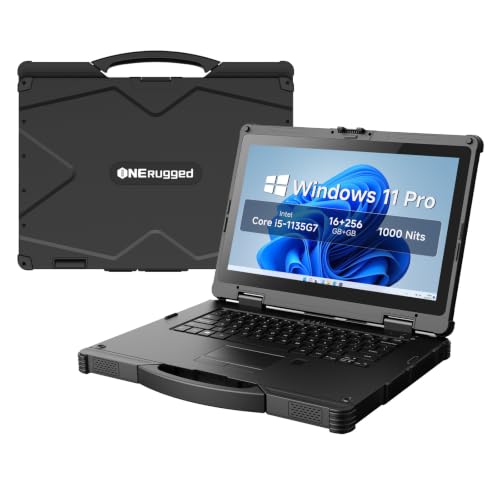
ONERugged N14T 14in — The Certified Walker
The N14T’s title carries the fullest protection sentence of any 14-inch machine here: a rugged laptop computer with an Intel Core i5-1135G7, 16GB of memory, a 256GB SSD, Windows 11 Pro, an industrial positioning, IP65 waterproof wording, MIL-STD-810G, WiFi 6, and an explicit outdoor field work designation. Two different promises live in that sentence. IP65 speaks of the enclosure — dust-tight, resistant to water jets. The military standard line speaks of a test regime for environmental stresses such as vibration, shock and temperature. Neither makes the machine invincible, and the review treats them as the specific, bounded claims they are — which is still more printed evidence than most rugged listings offer.
The platform is the oldest in the guide, an 11th-generation Core i5, and for the field software stack — forms, inspection applications, documents, telemetry dashboards — that is sufficient headroom, honestly stated. Sixteen gigabytes supports the stack; 256GB is the storage figure to plan around, adequate for connected work and tight for a season of local imagery. No brightness figure is printed, so a buyer whose route is spent in hard sun should fetch the screen specification from the manufacturer’s documentation before ranking this machine against the 1000-nits pair. WiFi 6 is stated, which covers the depot and the site cabin; beyond them, the connectivity plan is yours to make.
- Processor: Intel Core i5-1135G7
- Memory: 16GB RAM
- Storage: 256GB SSD
- Display: 14-inch; brightness not stated in the listing title — verify with the manufacturer documentation
- Ingress rating stated in the title: IP65
- Standard named in the title: MIL-STD-810G
- Wireless: WiFi 6
- Operating system: Windows 11 Pro
Strengths
- Both an IP rating and a military standard are printed in the title.
- A 14-inch format suits inspectors who walk between points all day.
- WiFi 6 and Windows 11 Pro match the managed field baseline.
Trade-offs
- The i5-1135G7 is the oldest processor generation in this guide.
- 256GB of storage is tight for imagery-heavy disconnected work.
- No screen brightness figure is printed for hard-sun routes.
Best for: an inspector on foot in wet, dusty country, who needs the protection claims in writing and whose software stack is the standard field set.
Not suited for: a route worker whose day is spent reading the screen in direct midday sun — this title prints no brightness figure, and the 1000-nits machines below state theirs.
The N14T’s virtue is that its promises can be quoted. When a procurement officer, an insurer or a safety manager asks what the machine is rated for, the answer exists in the listing itself rather than in a salesperson’s memory. Field organisations run on exactly that kind of quotable evidence, and a modest specification wrapped in precise claims will often serve them better than a grander specification wrapped in adjectives.
Training is the other half of this machine’s deployment, and it is short because the machine is honest about itself. A new inspector can be taught the N14T’s working assumptions in one briefing: what its rating covers, what it does not, how the day’s data syncs, and where the machine sleeps and charges. Compare that with the folklore that accumulates around an unspecified laptop — guesses about rain, arguments about drops — and the value of printed claims becomes organisational, not just technical. Equipment whose limits are written down gets respected; equipment whose limits are rumoured gets tested by the weather at the least convenient moment of the season.
Equip it as a walker: a case that leaves the ports accessible, an offline copy of the day’s territory, and a charging habit at the depot each night. So equipped, its printed ratings stop being marketing and become the day’s working assumptions.

Dell Latitude 5430 Rugged — The Fleet Name
Dell’s Latitude 5430 Rugged arrives with the longest institutional memory in this guide. Its title describes a 14-inch rugged notebook with a Full HD screen at 1920 x 1080, an 11th-generation Intel Core i5-1145G7 quad-core at 2.60 GHz, 16GB of total memory and a 512GB SSD, in black. The Latitude rugged line has served police, utility and field-service fleets for years, and that lineage is a real purchasing factor for organisations: docks, mounts, spares and technician familiarity accumulate around a line, and a machine that joins an existing ecosystem costs less to own than its specification suggests.
The specification itself is balanced rather than dramatic. The 512GB drive is the joint-largest among the 14-inch picks here, which suits fleets whose machines hold local records through a shift pattern. Sixteen gigabytes runs the field stack. The i5-1145G7 is a contemporary of the N14T’s chip, with the same honest reading: ample for documentation and telemetry, not the choice for heavy local processing. Notably, this title prints no IP figure and no military standard line, despite the rugged designation in the product name — the ratings for this model live in Dell’s documentation, and a fleet buyer comparing rated figures should pull them from there rather than from this listing. Screen brightness is likewise unstated in the title.
- Processor: Intel Core i5-1145G7, 11th generation, quad-core, 2.60 GHz as stated
- Memory: 16GB total RAM
- Storage: 512GB SSD
- Display: 14-inch Full HD, 1920 x 1080
- Ingress rating: Not stated in the listing title — verify with the manufacturer documentation
- Brightness: Not stated in the listing title — verify with the manufacturer documentation
- Operating system: Not stated in the listing title — verify with the manufacturer documentation
Strengths
- An established rugged fleet line with deep accessory and service ecosystems.
- 512GB of storage leads the 14-inch group for local records.
- A plainly stated Full HD panel and quad-core specification, without embellishment.
Trade-offs
- No IP or military-standard figure is printed in this title.
- The operating system is not stated in the title and must be confirmed.
- An 11th-generation platform matches, rather than advances, the guide’s floor.
Best for: a fleet manager adding units to an existing Latitude rugged deployment, where docks, mounts and spares already wait in the depot.
Not suited for: a buyer comparing ingress ratings line by line from listings alone — this title prints none, so the comparison must be finished in Dell’s documentation before the order.
There is a conservatism to this listing that suits its audience. Fleets do not buy excitement; they buy continuity, and a title that states a screen, a chip, memory and storage in plain figures — leaving the ceremonial claims to the documentation — reads like a document written for the people who will actually sign the order. Judge it in that spirit, verify the unstated lines upstream, and the 5430 Rugged is the guide’s safest institutional purchase.
The depot test is where this machine quietly wins its keep. A fleet laptop is charged, imaged, mounted, dismounted, cleaned and handed over hundreds of times, and the cost of a model lives in those repetitions: whether the mount from the last generation still fits, whether the depot’s docks light it without argument, whether a replacement unit can be imaged from the same master as its predecessor. A buyer with an existing Latitude rugged estate already owns the answers, and they are worth more than a brighter screen or a newer chip bought cold. That is not nostalgia; it is the arithmetic of total cost, and it is why established fleet lines persist in guides like this one long after their processors stop being the newest sentence in the room.
For a lone buyer without an existing Dell ecosystem, the calculus shifts: the lineage premium buys less when no docks or spares are waiting, and the printed-evidence machines around it make stronger first-machine arguments. Context, as ever in field buying, is a specification too.

Durabook S15 — The Station Screen
In the durability guide elsewhere in this programme the S15 is weighed as procurement; here it is weighed as a working station outdoors, and the emphasis moves accordingly. The title describes a rugged laptop with an Intel Core i5-1235U, a 15.6-inch FHD screen specified as non-touch, 16GB of memory, a 256GB SSD, a backlit keyboard, a webcam, a smartcard reader and Windows 11 Pro. Carried to a site and set on a tailgate, a cabin table or a plant-room bench, that screen becomes the point of the machine: drawings open at a size two people can read, a data table stops requiring zoom, and the day’s records are reviewed where the work happened rather than back at the office.
The non-touch panel, easy to misread as an omission, is a field decision: a screen that never asks for a fingertip works the same with gloves on, in drizzle, and under a layer of site dust, and the backlit keyboard extends the working day into the unlit hours at both ends of a shift. The smartcard reader serves the gated facility — the laptop authenticates its user at the plant the same way the gate authenticated the person. Storage is the constraint to plan around, as it was in the other guide and remains here: 256GB asks for a connected workflow or a disciplined external-drive habit. No ingress figure is printed in the title, so the rated numbers belong to Durabook’s documentation, to be fetched before the machine is trusted to a wet site.
- Processor: Intel Core i5-1235U
- Memory: 16GB
- Storage: 256GB SSD
- Display: 15.6-inch FHD, non-touch as stated in the title
- Ingress rating: Not stated in the listing title — verify with the manufacturer documentation
- Credential hardware stated in the title: smartcard reader
- Keyboard: backlit, as stated in the title
- Operating system: Windows 11 Pro
Strengths
- The 15.6-inch screen is a genuine two-person surface for drawings and tables.
- A glove-compatible non-touch panel and backlit keys suit shift conditions.
- The smartcard reader authenticates the user at credentialled facilities.
Trade-offs
- 256GB is the joint-smallest storage here and binds offline media work.
- No brightness figure is printed for sustained direct-sun use.
- At 15.6 rugged inches, it is a station machine, not an all-day carry.
Best for: a plant technician who works from a vehicle or site table, reviews drawings with a colleague, and signs in with a credential card at gated facilities.
Not suited for: an inspector who walks a long route between points — the 15.6-inch rugged format spends its portability on screen, and the 14-inch picks carry the walking brief better.
The S15’s field personality is sociable. So much rugged marketing imagines a lone figure in extreme weather, but most field computing happens in small crews around a shared surface, and a machine specified for that reality — big readable screen, keys that work in the dark, credentials that work at the gate — fits the actual day more closely than a smaller, more extreme design would.
Give it a mount or a table, a network or a disciplined sync habit, and it becomes the site’s fixed point: the place where the day’s findings gather before they travel home.

Durabook S14I — The Compact Credential
The S14I folds the Durabook formula into the walking format and updates its processor on the way. The title describes a rugged laptop with a Core Ultra i5-125U, a 14.0-inch FHD screen specified as non-touch, 16GB of memory, a 256GB SSD, a backlit keyboard, a webcam, a smartcard reader and Windows 11 Pro. Against its larger sibling, the trade is explicit: two inches of screen surrendered for a machine that can be carried between points all day, and a processor a generation newer than the S15’s i5-1235U as compensation.
For the credentialled walker — the inspector who signs in at facility after facility, the auditor moving between plants — this is the most precisely aimed specification in the guide. The smartcard reader travels with the machine instead of dangling from it. The backlit keyboard covers the plant room and the early start. The non-touch FHD panel keeps the glove-and-glare logic of the bigger Durabook. Storage repeats the family constraint at 256GB, and no ingress or brightness figure is printed, so the same two documentation checks apply: the rated protection and the screen’s daylight figure, fetched from Durabook’s pages for this build before a wet or sunlit deployment is planned around it.
- Processor: Core Ultra i5-125U
- Memory: 16GB
- Storage: 256GB SSD
- Display: 14.0-inch FHD, non-touch as stated in the title
- Ingress rating: Not stated in the listing title — verify with the manufacturer documentation
- Credential hardware stated in the title: smartcard reader
- Keyboard: backlit, as stated in the title
- Operating system: Windows 11 Pro
Strengths
- A smartcard reader in a genuinely portable 14-inch rugged body.
- The Core Ultra i5-125U is a newer platform than its larger sibling carries.
- Backlit keys and a non-touch panel suit gloves, glare and dim plant rooms.
Trade-offs
- 256GB of storage repeats the family’s tightest ceiling.
- Neither an ingress rating nor a brightness figure is printed in the title.
- The 14-inch screen crowds drawings that the S15 displays comfortably.
Best for: an inspector or auditor walking between credentialled facilities, who needs the card reader, the backlit keys and the rugged build in a carryable 14-inch form.
Not suited for: a two-person drawing review at a site table — the 14.0-inch panel is a personal screen, and the S15’s extra inches exist for exactly that gathering.
Sibling comparisons are usually unkind to the smaller machine, but the S14I makes its own argument cleanly: everything the Durabook name means at this specification level, minus the screen area a walker rarely uses and plus a newer processor. Buyers torn between the two Durabooks should decide by the working posture — carried or stationed — and let the screens follow that decision rather than lead it.
Consider the handover moment once more, because the S14I is built for a life of them. An auditor arriving at an unfamiliar facility needs three things in the first five minutes: a machine that wakes without ceremony, a credential that the gate’s system accepts, and a screen that shows the checklist at the light the plant actually has. The S14I’s printed specification addresses the second directly and the first and third by class — a current low-power Ultra processor, a matte non-touch FHD panel, keys lit for dim rooms. Machines reveal their design intent in such moments, and this one’s intent is plainly the professional who is always arriving somewhere new.
Its documentation homework is also the lightest kind: two figures to fetch, both standard for the line, and then the machine can be ordered into the route it was shaped for.

MUNBYN IRX16 Rugged — The Sunlight Station
The IRX16 is the station-format machine that prints its daylight credentials. Its title describes a rugged laptop with a 15.6-inch screen, Windows 11 Pro, an Intel i5-1235U, 16GB of DDR5 memory and a 512GB replaceable SSD, Wi-Fi 6, a 1000-nits sunlight-readable display, an IP65 waterproof designation and two-year protection, marked as new. Read the lines together and a coherent field station emerges: a big screen specified for sun, an enclosure rated for dust and water jets, storage that doubles the Durabook’s figure and can be replaced when it wears, and a protection term stated in the title.
The replaceable SSD deserves its field reading. On a sealed machine, a failing drive in a remote posting becomes a shipping exercise; on this one, the title promises a swap. The 512GB capacity suits a station that accumulates the day’s imagery and records locally before an evening sync. Sixteen gigabytes of DDR5 runs the stack. What the title does not print is a battery arrangement — no dual-battery line here, unlike its smaller IRX18 sibling in the durability guide — so endurance for this build should be taken from MUNBYN’s documentation by anyone planning a socket-free day. No smartcard reader is stated either; gated sites should note the difference from the Durabooks.
- Processor: Intel i5-1235U
- Memory: 16GB DDR5
- Storage: 512GB, replaceable SSD as stated in the title
- Display: 15.6-inch, 1000 nits sunlight readable as stated
- Ingress rating stated in the title: IP65
- Battery arrangement: Not stated in the listing title — verify with the manufacturer documentation
- Wireless: Wi-Fi 6
- Operating system: Windows 11 Pro
Strengths
- IP65 and a 1000-nits sunlight-readable screen are both stated in the title.
- A replaceable 512GB SSD doubles the station storage and eases service.
- Two-year protection is printed in the title, a term worth reading closely.
Trade-offs
- No battery arrangement is printed, so socket-free endurance needs documentation.
- No smartcard reader is stated for credential-gated facilities.
- A 15.6-inch rugged station is vehicle-and-table equipment, not a walker’s.
Best for: a site engineer stationed outdoors with drawings and records on one bright screen, on sites where dust and spray are daily facts rather than risks.
Not suited for: a gated-facility inspector whose access depends on a built-in smartcard reader — none is stated in this title, and the Durabooks print theirs.
The IRX16 and the S15 make an instructive pair at the same size: one prints brightness, ingress and serviceability; the other prints credentials and keyboard. Field buyers should let their own site’s facts choose between those vocabularies — sun and spray on one side, gates and gloves on the other — because the two machines are answers to two different, equally real versions of outdoors.
Data discipline at a station deserves its own habit, because a station machine gathers other people’s findings as well as its owner’s. The IRX16’s 512GB, doubled against the Durabook pair, gives that gathering a local home, but capacity is not a backup: the station ritual should end each day with the day’s records copied somewhere that is not the machine — the depot server, the vehicle system, an external drive kept separately. Rugged design protects the laptop from the site; only routine protects the site’s data from the laptop’s eventual failure, theft or reassignment. A buyer choosing between the two station machines on storage should therefore price the sync habit as part of the machine, whichever name is finally ordered.
Whichever vocabulary wins, the station format rewards a fixed ritual: same vehicle position, same evening sync, same charging point. The IRX16’s printed claims are built to survive that ritual for seasons.

ONERugged N14M 14in — The Heavy Spec
The N14M takes the walking format and loads it with the guide’s strongest computing specification. Its title describes a 14-inch rugged laptop running Windows 11 Pro, positioned as a heavy-duty outdoor AI PC, with an Intel Core Ultra 7 155H, 32GB of memory and a 256GB drive, WiFi 6 and Bluetooth 5.1, and a 1000-nits screen with dual batteries of 4700mAh and 1300mAh. Every field axis this guide tracks is addressed in that sentence except a printed ingress rating: daylight by the brightness figure, endurance by the dual batteries, processing headroom by the Ultra 7, memory by the 32GB that doubles the guide’s floor.
That combination suits the field roles that have quietly become computing-heavy: the inspector whose mapping and imagery tools run locally, the engineer whose data applications travel with her, the surveyor whose software stack would make an ordinary rugged machine feel thin. Thirty-two gigabytes keeps those stacks resident through a day of stops and starts. The dual batteries organise the day around work rather than around charging. The compromises are the familiar ones, stated plainly: 256GB of storage against the imagery such roles generate, and an ingress figure that must be fetched from ONERugged’s documentation before the machine is trusted to wet work, since the title prints heavy-duty positioning rather than a rating.
- Processor: Intel Core Ultra 7 155H
- Memory: 32GB
- Storage: 256GB
- Display: 14-inch, 1000 nits as stated in the title
- Ingress rating: Not stated in the listing title — verify with the manufacturer documentation
- Batteries: 4700mAh plus 1300mAh dual batteries, as stated
- Wireless: WiFi 6, Bluetooth 5.1
- Operating system: Windows 11 Pro
Strengths
- An Ultra 7 155H with 32GB is the strongest computing pairing in this guide.
- Dual batteries and a 1000-nits screen answer endurance and daylight together.
- Bluetooth 5.1 is stated alongside WiFi 6 for the peripheral shelf.
Trade-offs
- 256GB of storage is tight against the imagery its own roles generate.
- No ingress rating is printed in the title despite the outdoor positioning.
- Its headroom is wasted on light forms-only routes that the N14T covers.
Best for: a field engineer running mapping, imagery or data tools locally through a long bright route, who needs memory and battery depth in a 14-inch body.
Not suited for: a forms-only inspector whose applications are light — the N14T covers that route with printed ratings, and the N14M’s extra headroom would ride along unused.
The N14M is where this guide’s two value systems meet. The evidence system asks for its missing rating and notes the storage ceiling; the capability system reads an Ultra 7, 32GB, dual batteries and a four-figure brightness claim and recognises the machine a demanding route has been waiting for. Both readings are correct, and the purchase sequence honours both: fetch the rating, plan the storage, then enjoy the specification.
One deployment pattern suits this machine particularly well: the specialist’s personal unit. Where the fleet machines are shared and standardised, the N14M reads as the laptop issued to the one person whose workload justifies it — the engineer running models at the site, the surveyor processing in the vehicle, the inspector whose imagery pipeline lives on the device. Issuing a heavy specification personally rather than fleet-wide keeps the cost honest and the machine maintained by someone who depends on it, and the dual batteries and bright screen make that person the crew’s informal data station by the second week of any project.
For organisations, it also marks a sensible ceiling. Field fleets rarely need more computing than this in a walking format; beyond it, the work usually belongs on a station machine or a vehicle system instead.
Comparison Table: Six Rugged Machines by Their Printed Claims
| Pick | Processor (as listed) | Memory | Storage | Screen | Rating in title |
|---|---|---|---|---|---|
| ONERugged N14T | Core i5-1135G7 | 16GB | 256GB SSD | 14-inch | IP65 and MIL-STD-810G |
| Dell Latitude 5430 Rugged | Core i5-1145G7 | 16GB | 512GB SSD | 14-inch FHD | Not stated in the listing title |
| Durabook S15 | Core i5-1235U | 16GB | 256GB SSD | 15.6-inch FHD non-touch | Not stated in the listing title |
| Durabook S14I | Core Ultra i5-125U | 16GB | 256GB SSD | 14.0-inch FHD non-touch | Not stated in the listing title |
| MUNBYN IRX16 | Intel i5-1235U | 16GB DDR5 | 512GB replaceable SSD | 15.6-inch, 1000 nits | IP65 |
| ONERugged N14M | Core Ultra 7 155H | 32GB | 256GB | 14-inch, 1000 nits | Not stated in the listing title |
The table’s most useful column is its last, precisely because it is uneven. Two machines state a rating in the title; four ask for a documentation visit, and that visit is a normal part of professional buying rather than a defect. Sort next by posture — the four 14-inch walkers against the two 15.6-inch stations — and finally by the computing figures, where the N14M’s 32GB and the stations’ 512GB drives mark the two different kinds of headroom field work consumes.
How to Choose Among These Six for Field Duty
Decide the posture first. Walkers — inspectors, auditors, route technicians — should stay in the 14-inch group, where the choice then turns on evidence and workload: the N14T for printed ratings, the Latitude 5430 for fleet continuity and storage, the S14I for credentialled sites, the N14M for heavy local software and long bright routes. Station workers — plant technicians, site engineers, crew leads — should take the 15.6-inch pair and choose by vocabulary: the MUNBYN IRX16 speaks sun, spray and serviceability; the Durabook S15 speaks gates, gloves and shared screens.
Budget should be allocated across the whole deployment, not concentrated in the laptop. A sensible field purchase reserves money for the mount or case that fits the chosen format, for a second charging arrangement at the depot, for the external storage the disconnected arithmetic may demand, and for the connectivity answer the route requires. Buyers who spend the entire budget on the machine and improvise the rest discover that field performance is a property of the system, and that a mid-tier rugged laptop inside a complete system outperforms a flagship inside an improvised one on almost every working day of the year. The specification figures in this guide should therefore be read as the centre of a budget, not as its total.
Then run the three checks this guide keeps repeating, because field purchases are where they pay best. Fetch any rating the title omits, from the manufacturer’s documentation for the exact build. Read the storage line against your disconnected workload, not your connected one. And plan connectivity honestly: no title here states a cellular modem, so a route beyond Wi-Fi needs its own answer — a vehicle router, a hotspot, or software that works offline and syncs at the depot. A machine chosen through posture, ratings, storage and connectivity, in that order, will fit its route the way a boot fits: noticed only when it is wrong.
What Is the Difference Between an IP Rating and a Military Standard?
They certify different things, and the N14T’s title — the only one here printing both — is the place to learn the distinction. An IP code rates the enclosure against ingress: dust in the first digit, water in the second, tested under defined conditions. IP65, printed by the N14T and the MUNBYN IRX16, means dust-tight and resistant to water jets. A military standard designation such as MIL-STD-810G refers to a programme of environmental tests — shock, vibration, temperature, humidity among them — applied according to the standard’s methods. A machine can carry either, both or neither, and the claims do not substitute for each other. Buyers should therefore ask two separate questions of any rugged listing: what keeps the weather out, and what knocks was the design tested against? Listings that answer both in print are rare and valuable; listings that answer neither are asking for a documentation visit, which this guide has prescribed for four of its six picks.
How Should a Field Team Plan Storage for Disconnected Work?
By measuring the disconnected day, not the average day. The connected field role syncs forms, drawings and telemetry continuously, and 256GB — the figure carried by four of these six machines — is a workable home for it. The disconnected role accumulates: a week of inspection imagery, offline map tiles for a territory, local copies of drawings for a whole facility. That accumulation should be estimated in gigabytes per day, multiplied by the longest stretch between syncs, and then doubled, because field data grows in the direction of more evidence, never less. Teams whose arithmetic outruns 256GB should look at the 512GB machines — the Latitude 5430 and the IRX16 — or build an external-drive ritual into the route, with the same discipline as the charging ritual. Storage discovered to be short at the far end of a route is the most preventable failure in field computing.
What Connectivity Should a Buyer Arrange Beyond the Laptop Itself?
Start from the printed baseline: WiFi 6 on several of these titles, Wi-Fi unnamed by generation on others, Bluetooth 5.1 stated once, and no cellular modem claimed anywhere in the guide. That baseline covers depots, site cabins and any facility with its own network. Beyond it, the route decides. Vehicle-based crews commonly run a vehicle router, turning the cab into the network the laptop already knows. Walkers beyond coverage need offline-first software and a sync ritual, or a phone hotspot with a data plan sized to the imagery the day generates. Satellite messengers and dedicated field routers serve the genuinely remote. None of these arrangements is a laptop specification, which is exactly the point: connectivity for field work is a system the buyer assembles, and the laptop’s stated radios are only its first component.
How Does Glove Use Change the Way a Field Laptop Should Be Specified?
More than most buyers expect, because gloves quietly delete features. A touchscreen that demands a bare fingertip becomes a decoration in winter or around machinery, which is the practical logic behind the Durabooks’ specified non-touch panels: the screen’s job is to display, and the keyboard’s job is to accept input, with gloves on throughout. Trackpads shrink in usefulness under gloves as well, which pushes real field work toward keyboard shortcuts, rugged mice kept in the vehicle, and software chosen for keyboard navigation. None of those companions appears in a listing title, and that is precisely why they belong in the buying conversation: the laptop is the centre of a field system, and the system must work in the clothing the job requires.
Keyboard backlighting, printed by both Durabooks, belongs to the same conversation. Field days start before dawn and end after dusk for much of the year, and a backlit deck is the difference between typing by sight and typing by memory in a dark cabin. A buyer comparing the two Durabooks against the brighter-screened machines should weigh these human-interface lines — backlight stated, touch declined, credentials built in — as field evidence of the same rank as a brightness figure, because they describe how the machine behaves in the hands that will actually hold it, in the light that will actually be available.
Common Mistakes When Buying a Laptop for Field Work
Treating a rugged name as a rated promise is the standing error of this category. Four of the six titles here print no ingress figure, including machines from respected rugged lines, and a buyer who assumes the rating from the badge may deploy a machine beyond its tested envelope. The fix is procedural and cheap: the rating lives in the manufacturer’s documentation, and fetching it takes minutes. Do the minutes.
Buying the screen by size alone causes the daylight version of the same disappointment. Fourteen inches and 15.6 inches describe area, not readability; the brightness figure describes readability, and only two titles here print one. A crew that will read drawings at noon should rank the 1000-nits claims as first-class evidence, and should fetch the missing figures for the other four before deciding that size settled the question. The third error is organisational rather than technical: issuing a field fleet without the rituals that make field computing work — the evening charge, the depot sync, the case and mount that fit the format. The finest rugged laptop in this guide will underperform its specification inside a sloppy routine, and an ordinary one will shine inside a good one.
Finally, resist buying computing headroom as a substitute for field fitness. An Ultra 7 in an unrated deployment is a fast machine in the wrong story; a modest chip inside printed ratings is the right story told plainly. The N14M earns its headroom because its brightness and batteries keep it in the field argument; let every specification in your own shortlist pass the same test.
Final Recommendation
For printed protection on a walking route, take the ONERugged N14T. For fleet continuity, take the Dell Latitude 5430 Rugged and verify its unstated lines in Dell’s documentation. For credentialled walking, take the Durabook S14I; for a shared station screen at a gated plant, take its S15 sibling. For sun and spray at a fixed station, take the MUNBYN IRX16. And for the heaviest local workload on the longest bright route, take the ONERugged N14M, with its rating fetched and its storage planned before the first deployment.
Finally, a word for the person who will carry whichever machine is chosen, because field purchases are ultimately ergonomic decisions wearing technical clothes. The difference between the 14-inch group and the 15.6-inch pair is felt in the shoulder by the third hour of a route, not in the specification table. The difference between a screen that reads at noon and one that does not is felt in the eyes by the second week. A wise buyer lets the carrier handle both formats before the order, walks a corridor with each, opens a drawing on each in the brightest room available, and treats those ten minutes as evidence of the same rank as any figure printed in this guide.
Close the purchase the field way: ratings in writing, storage measured against the disconnected week, connectivity planned beyond the laptop’s own radios, and the evening rituals — charge, sync, inspect — agreed before the machine’s first route. Field work forgives many things, but it rarely forgives an assumption, and a buying process with no assumptions left in it is the best protection any of these machines can be given.
Frequently Asked Questions
Which field laptop states both an IP rating and a military standard?
The ONERugged N14T: its title prints IP65 and MIL-STD-810G together. The MUNBYN IRX16 also states IP65. The other four titles print no ingress figure, so their ratings should be taken from the manufacturers’ documentation.
Are 14-inch rugged laptops big enough for drawings?
For personal review, yes — a 14-inch FHD panel shows a drawing legibly to the person holding it, and the walking formats in this guide all use that size for a reason. The limit appears when the screen becomes a meeting: a second person leaning in, a dimension called out across a tailgate, a table of figures that must be compared against a paper original held beside the lid. For two people reading together, the 15.6-inch Durabook S15 and MUNBYN IRX16 are the comfortable surfaces. Walkers trade that shared area for a machine they can carry between points all day.
Do any of these laptops have built-in cellular data?
No title in this guide claims a cellular modem. WiFi 6 is stated on several picks and Bluetooth 5.1 on one. Routes beyond Wi-Fi coverage need a vehicle router, a hotspot or an offline-first plan.
Why do the Durabooks use non-touch screens?
Their titles specify FHD non-touch panels, a field choice that keeps the screen working identically with gloves, in drizzle and under dust. Touch is a convenience in an office; on site, consistency is worth more.
Is 256GB enough for inspection work?
For connected work that syncs as it goes, yes. Four of the six machines here carry exactly that figure, and their makers plainly specified them for the connected pattern: forms submitted from the site network, drawings fetched per job, records living on a server the laptop merely visits. The figure becomes a constraint only when the route leaves coverage or the evidence turns photographic, and both conditions are knowable before purchase — which is why this guide treats storage as a planning question rather than a specification contest, and why the two 512GB machines are recommended for the disconnected pattern rather than praised as generally superior. For disconnected routes accumulating imagery, mapping and drawings, measure the disconnected week and consider the 512GB Latitude 5430 or MUNBYN IRX16, or build an external-drive ritual into the route.
What does a 1000-nits screen actually help with?
Reading the display in direct daylight without hunting for shade. The figure also correlates with intent: a maker who specifies a four-figure brightness panel has designed the whole machine around outdoor use, and its other choices — the enclosure, the batteries, the keyboard — tend to follow that intent. Treat the printed number as both a screen specification and a clue about the design brief behind the machine, while remembering that brightness alone does not rate an enclosure, which is why this guide tracks the two claims separately wherever they appear. The ONERugged N14M and the MUNBYN IRX16 print the figure in their titles; where a title omits brightness, the figure should be fetched from documentation before a sunlit deployment is planned.
Related Guides
Field buying borders two neighbouring categories: our durable laptops for work guide, where the same rugged names are weighed as long-life purchases including the renewed flagship route, and the work laptops for battery life roundup, for readers whose routes are long but whose environments are kinder.
Related guides
- Best 3.0 Qualcomm Quick Chargers: QC 3.0 Adapters That Still Earn Their Outlet
- Best Time Machine Compatible Hard Drives: Mac-Ready and Reformatted Picks
- Best 3D Mechanical Engineering Laptops: Certified Workstations for CAD and Simulation
- Best Tattoo Printers: Thermal Stencil Machines for Clean, Lasting Transfers


