What's inside
- Where to Buy
- Key Takeaways
- Quick Picks
- How We Chose These Picks
- Comparison Table: Armour, Paperwork and Honest Labels
- How to Choose Among These Six for Hard Use
- What Does an IP65 Rating Actually Promise a Working Laptop?
- How Much Storage Does Field Work Really Need?
- When Is a Renewed Rugged Laptop the Smart Buy, and When Is It a Trap?
- Does a Brighter Screen Really Change Outdoor Work?
- Common Mistakes When Buying a Laptop for Hard Use
- Final Recommendation
- Frequently Asked Questions
- Related Guides
As an Amazon Associate I earn from qualifying purchases. This post may contain affiliate links at no extra cost to you.
[SITE_DOMAIN] is reader-supported. When you buy through links on our site, we may earn an affiliate commission.
Where to Buy
Rugged and work-tough machines are bought on their protection details, so read each page for the exact wording of its claims. MUNBYN’s IRX18 rugged laptop in the i5-1235U build should be checked for its IP65 line, its dual-battery figures and its two-year protection note. Lenovo’s ThinkPad E16 with the Ultra 7 255H, 64GB and a terabyte is a memory-and-storage purchase, so verify those two figures first. Durabook’s S15 rugged laptop asks for its 256GB drive to be noticed before ordering, because its siblings carry more. ONERugged’s N15M heavy-duty outdoor machine should show the Ultra 5 125H beside its 1000-nits screen claim. Dell’s Inspiron 15 touchscreen business build needs its split storage — 512GB of SSD plus a 500GB external drive — understood as printed, not assumed to be a single internal terabyte.
Work breaks laptops in unglamorous ways: a knock off a tailgate, a splash across a site cabin table, a screen flexed in an overstuffed bag, a battery that gives up an hour before the shift does. The best durable laptops for work are the ones whose designs answer those specific insults, and this guide reads six candidates strictly by what their listings claim. Three are purpose-built rugged machines with ingress ratings, sunlight-readable screens or dual batteries printed in their titles. Two are mainstream business laptops whose titles make no rugged claim at all, included because many buyers searching for durability actually need a well-built office machine that will be treated kindly — and the difference between those two needs is exactly what this guide exists to separate. The sixth entry is a prose-only discussion of the previous-generation rugged flagships that circulate on Amazon as renewed stock.
Start with the vocabulary, because durability marketing depends on blurring it. An IP65 line in a title is a testable claim about dust and water jets. A brightness figure of 1000 nits is a claim about working in daylight. A dual-battery arrangement with capacities printed is a claim about swapping or extending power in the field. By contrast, words like business, enterprise and AI-ready describe a market, not a chassis. Where a title in this guide states a protection figure, the review leans on it; where a title is silent about protection, the review says so in the spec box and judges the machine as what it demonstrably is — a business laptop with strong specifications, whose durability will depend on how gently its owner treats it.
The specifications beneath the armour are workmanlike throughout. Memory runs from 16GB in the rugged trio to a striking 64GB in the ThinkPad. Storage runs from the Durabook’s modest 256GB to a terabyte in the ThinkPad and, in split form, the Dell. Screens run from 14 inches in the MUNBYN to 15.6 in the Durabook and the Dell, all FHD where a resolution is printed. Every linked machine runs Windows 11 Pro. Read in that light, the shortlist divides by workplace: the site, the yard and the inspection route on one side; the office, the depot desk and the home study on the other; and the renewed market underneath both, for buyers who understand exactly what renewed means.
Key Takeaways
- The MUNBYN IRX18 states IP65, a 1000-nits screen, dual batteries of 4700mAh and 1300mAh, a replaceable SSD and two-year protection in its title.
- The ONERugged N15M pairs an Intel Core Ultra 5 125H with a 1000-nits display and the same dual-battery capacities, in a 15-inch heavy-duty body.
- The Durabook S15 is the established rugged name here, with a smartcard reader and a backlit keyboard, but the smallest storage in the guide at 256GB.
- The ThinkPad E16 makes no rugged claim in its title; its case rests on 64GB of DDR5, a terabyte SSD and fast charging.
- The Dell Inspiron 15 Touch likewise claims no protection rating; its terabyte is split between a 512GB SSD and a 500GB external drive.
- Previous-generation rugged flagships appear on Amazon almost entirely as renewed stock, and are covered here prose-only with the checks that route demands.
Quick Picks
| Pick | Badge | Why it is here |
|---|---|---|
| MUNBYN IRX18 Rugged 14in | The Rated Compact | IP65, 1000 nits, dual batteries and a replaceable SSD in a 14-inch Windows 11 Pro body. |
| Lenovo ThinkPad E16 Ultra 7 | The Heavy-Lifting Business Build | 64GB of DDR5 and a 1TB SSD for desk work that outgrew ordinary business specifications. |
| Durabook S15 | The Rugged Establishment | A 15.6-inch rugged Durabook with smartcard reader and backlit keyboard for credentialled sites. |
| ONERugged N15M 15in | The Bright 15 | Core Ultra 5 125H, 1000 nits and dual batteries in a heavy-duty outdoor design. |
| Dell Inspiron 15 Touch Business | The Mainstream Option | A touchscreen business Dell with 16GB and split SSD-plus-external storage for office duty. |
| Previous-generation rugged flagships | The Renewed Route | Latitude Rugged and Toughbook class machines, sold renewed; covered without a link, with warnings. |
How We Chose These Picks
Durability was defined by the failures it prevents. The environmental failure — dust in a port, water across a keyboard, a screen washed out by noon sun — is answered by the claims printed in the rugged titles: IP65 on the MUNBYN, heavy-duty outdoor positioning with a 1000-nits screen on the ONERugged, the Durabook name and rugged designation on the S15. The energy failure — a machine dying mid-inspection — is answered by the dual-battery arrangements two titles print with capacities attached, 4700mAh plus 1300mAh, and by the fast-charging line in the ThinkPad’s title. The data failure — a drive that cannot be serviced or a credential that cannot be read — is answered by the MUNBYN’s replaceable SSD and the Durabook’s smartcard reader, small lines in their titles with outsized consequences on real sites.
Alongside the armour, the ordinary specifications had to remain employable. A rugged machine with too little storage becomes a rugged paperweight, so the Durabook’s 256GB is flagged in its review rather than forgiven. Sixteen gigabytes of memory is the floor across the linked set, with the ThinkPad’s 64GB standing as the guide’s ceiling for desk-bound analysis work. Screens were read for the workplace: 1000-nits claims where daylight is the enemy, touch on the Dell where the work is presentations and forms, a plain FHD panel on the Durabook where gloves and glare make touch a secondary concern — the title calls it non-touch outright, a piece of honesty this guide appreciates.
Two linked picks were admitted under a different flag, and the flag is printed in their reviews rather than hidden. The ThinkPad E16 and the Dell Inspiron 15 Touch state no ingress rating, no military standard and no rugged designation in their titles. They are here because a large share of durability searches come from offices whose machines die of old age and coffee, not of drops and dust — and for those buyers, memory, storage, a business build and Windows 11 Pro are the durability that matters. Anyone whose workplace involves ladders, tailgates or weather should read straight past them to the rugged trio and the renewed route.
Weight was weighed, in both senses, because durability equipment is carried by people whose day is already physical. The rugged machines here trade portability for protection in different proportions: the 14-inch MUNBYN is the one a lone inspector can carry between points all day, the 15 and 15.6-inch rugged pair assume a vehicle, a cart or a site table, and the business machines assume a bag and a desk. No title in this guide prints a weight figure, so that judgement is made from format and class rather than from a number — and a buyer whose route is measured in miles should treat the format question as seriously as the rating question, because the toughest laptop in the world protects nothing when it is left in the truck for being heavy.
The renewed route itself was given a prose-only place rather than a link, for reasons its own section explains in full: the previous-generation flagship rugged lines reach Amazon through renewed and refurbished channels, with battery condition and warranty resting on the individual seller. Presenting such a machine beside new stock with a fresh link would blur exactly the distinction this guide is trying to keep bright.

MUNBYN IRX18 Rugged 14in — The Rated Compact
The MUNBYN IRX18 prints the most complete protection sentence in this guide. Its title describes a 14-inch rugged laptop running Windows 11 Pro on an Intel i5-1235U, with 16GB of memory and a 512GB drive that is specifically described as a replaceable SSD, a 1000-nits high-brightness screen, dual batteries of 4700mAh and 1300mAh, Wi-Fi 6, an IP65 rating and two-year protection, marked as new. Each clause answers a field failure by name. IP65 addresses the dust and the hose-down. The brightness figure addresses the midday yard. The dual batteries address the long inspection. The replaceable drive addresses the service call that, on a sealed machine, becomes a replacement instead.
Fourteen inches is the right size for this brief: large enough for forms, drawings and telemetry, small enough for a vehicle cab and a carry case that already holds tools. The i5-1235U is a known, efficient part, well matched to the documentation-and-data work rugged machines actually do, and 16GB with 512GB keeps that work local when the site’s connectivity is a rumour. Wi-Fi 6 is stated; no cellular modem is claimed in the title, so routes that depend on mobile data should plan a hotspot or a different machine. The two-year protection line deserves a slow read on the listing, since protection terms are where rugged purchases are quietly won and lost.
- Processor: Intel i5-1235U
- Memory: 16GB
- Storage: 512GB, replaceable SSD as stated in the title
- Display: 14-inch, 1000 nits high brightness as stated
- Ingress rating stated in the title: IP65
- Batteries: 4700mAh plus 1300mAh dual batteries, as stated
- Wireless: Wi-Fi 6
- Operating system: Windows 11 Pro
Strengths
- IP65 is stated in the title, the clearest environmental claim in this guide.
- Dual batteries with printed capacities suit long inspections away from sockets.
- A replaceable SSD makes the most likely service event a swap, not a write-off.
Trade-offs
- No cellular modem is claimed in the title for routes beyond Wi-Fi range.
- The 14-inch screen is the smallest here for drawing-heavy review work.
- Protection terms behind the two-year line must be read on the listing itself.
Best for: a site inspector or utilities technician working outdoors on Wi-Fi-covered sites, who needs a rated 14-inch machine with swappable-feeling endurance.
Not suited for: a surveyor whose routes run beyond Wi-Fi coverage all day — no cellular connection is stated in this title, and the field plan would hang on a separate hotspot.
For readers weighing the MUNBYN against the longer-established rugged names, its argument is transparency of specification: the claims a buyer needs are printed in one sentence, with numbers attached. That does not settle questions of long-term parts supply or service networks, which sit outside any listing title, and a fleet buyer should ask them of the seller directly. For a single machine bought for a known job, though, the printed sentence is unusually complete.
Accessories deserve a sentence in any rugged purchase, because protection is a system rather than a shell. A vehicle mount that fits the 14-inch format, a carry case that respects the port covers instead of crushing them, and a charging arrangement at the depot that tops both batteries overnight — these unglamorous companions decide whether the rated machine arrives at the site ready. None of them appears in the listing title, and none should be assumed to be in the box; the listing page and the seller are where the in-box contents live. Budget for the system, not just the laptop, and the protection you paid for survives contact with logistics.
Pair it with the job it describes and the IRX18 is easy to place: clipped into a vehicle in the morning, carried across a plant at noon, still awake for the report at the end of the shift because its second battery carried the afternoon. Machines earn their keep in exactly that unremarkable continuity.
Lenovo ThinkPad E16 Ultra 7 — The Heavy-Lifting Business Build
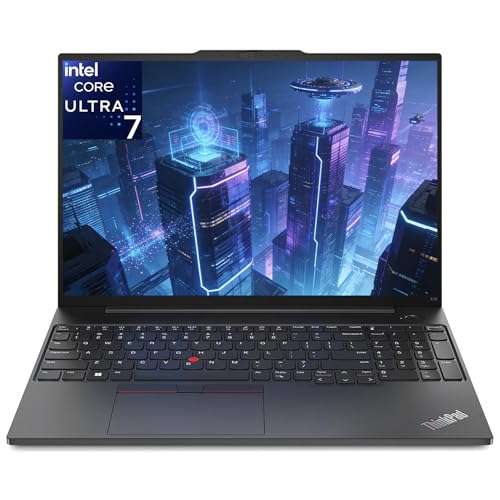
Let the framing be exact: nothing in this ThinkPad’s title claims ruggedness, and this review will not lend it any. What the title does describe is a Lenovo ThinkPad E16 built for enterprise business work, AI-ready in the listing’s phrasing, with an Intel Ultra 7 255H, 64GB of DDR5 memory and a 1TB SSD, a fingerprint reader, long battery life and fast charging in the listing’s words, and Windows 11 Pro. Judged as a business machine rather than as armour, that is a formidable specification — the largest memory figure in this guide by a factor of four over the floor, on a current high-performance Intel platform.
Its place in a durability guide is the office truth that most work laptops are never dropped from height or drowned; they are outlived. They die by accumulation — years of files, a dozen resident applications, an analysis workbook that grew teeth — and by batteries that fade. Sixty-four gigabytes answers the accumulation with years of headroom. A terabyte answers the archive. Fast charging, stated in the title, answers the faded-battery afternoon with minutes at a socket instead of hours. The fingerprint reader keeps sign-in habitual in a shared office. None of that survives a fall onto concrete, and a buyer whose risk is physical should stop reading here and return to the rugged trio above and below.
- Processor: Intel Ultra 7 255H
- Memory: 64GB DDR5
- Storage: 1TB SSD
- Display: 16-inch class, from the E16 name; resolution not stated in the listing title — verify with the manufacturer documentation
- Ingress or rugged rating: Not stated in the listing title — verify with the manufacturer documentation
- Security named in the title: fingerprint reader
- Battery wording in the title: long battery life and fast charging, with no hour figure stated
- Operating system: Windows 11 Pro
Strengths
- 64GB of DDR5 is the guide’s memory ceiling, built for analysis-heavy desk work.
- A 1TB SSD and fast charging suit a machine expected to serve a long cycle.
- The ThinkPad business line and Windows 11 Pro fit managed office fleets.
Trade-offs
- No rugged or ingress claim is stated in the title; it is not a site machine.
- Screen resolution is not printed in the title and needs a documentation check.
- Its strengths are wasted on light document work that never touches the ceiling.
Best for: an analyst or engineer whose laptop lives on desks and in meeting rooms, and whose durability problem is a growing workload across a long replacement cycle.
Not suited for: a field technician working around water, dust or drops — this title states no IP rating and no rugged designation, so the environment would be gambling against a business chassis.
There is a respectable argument that this is the most durable machine in the guide for the majority of readers, if durability is measured in years of useful service rather than in survived accidents. A machine that still feels unhurried in its fourth year gets replaced later, handled more carefully and cursed less. That is a different virtue from the MUNBYN’s, and the guide’s honesty consists in refusing to confuse the two.
Buy it as the office instrument it is — imaged by IT, docked at a desk, carried in a padded bag — and its specification will still be answering questions long after lighter business builds have begun to negotiate.

Durabook S15 — The Rugged Establishment
Durabook builds rugged machines as its main business, and the S15’s title reads like a specification written for a procurement officer: a rugged laptop with an Intel Core i5-1235U, a 15.6-inch FHD screen described as non-touch, 16GB of memory, a 256GB SSD, a backlit keyboard, a webcam, a smartcard reader and Windows 11 Pro. The smartcard reader is the line that separates this machine’s world from the others here. Sites that issue credential cards — government facilities, utilities, defence-adjacent contractors, large industrial plants — need a reader built in, not dangling from a cable, and the S15 states one in its title.
The 15.6-inch non-touch FHD panel suits gloved and bright environments where touch is unreliable and a matte, readable surface matters more; the backlit keyboard covers the early shift and the unlit cabin. Sixteen gigabytes is the working floor, adequate for the documentation, telemetry and reporting loads rugged machines carry. The honest weakness is storage: 256GB is the smallest figure in this guide, and a role that accumulates local imagery, drawings or offline maps will feel that ceiling quickly and should plan external or network storage from day one. No ingress rating is printed in this title — a notable silence from a rugged specialist — so the exact protection figures belong to Durabook’s documentation for this build, and a buyer comparing IP claims line by line should fetch them there.
- Processor: Intel Core i5-1235U
- Memory: 16GB
- Storage: 256GB SSD
- Display: 15.6-inch FHD, non-touch as stated in the title
- Ingress rating: Not stated in the listing title — verify with the manufacturer documentation
- Credential hardware stated in the title: smartcard reader
- Keyboard: backlit, as stated in the title
- Operating system: Windows 11 Pro
Strengths
- A built-in smartcard reader serves credentialled sites without a dangling accessory.
- The rugged Durabook line and a backlit keyboard fit shift work in poor light.
- A non-touch FHD panel is a deliberate, glove-friendly choice for field review.
Trade-offs
- 256GB of storage is the guide’s smallest figure and will bind media-heavy roles.
- No IP rating is printed in the title, so protection figures need the documentation.
- The same i5-1235U as the MUNBYN means performance is parity, not progress.
Best for: a technician entering credential-controlled facilities, whose smartcard, backlit keys and rugged 15.6-inch chassis are daily requirements rather than occasional comforts.
Not suited for: a field photographer or drone operator storing a season of imagery locally — the 256GB drive is a hard ceiling that no rugged virtue relaxes.
The S15 also appears in this programme’s field-work guide, where it is reviewed from the outdoor-work angle; here the emphasis is its place in a durability shortlist, and the verdict differs accordingly. Against the newer rugged entrants, the Durabook’s case is specialisation: a maker whose catalogue is rugged machines, a reader for the credentials secure sites demand, and a specification with no decorative fat on it.
Deployment details reward attention with this machine. A smartcard workflow depends on the site’s middleware as much as on the reader, so an organisation rolling S15s across a facility should pilot one unit against its actual credential system before the fleet order — a half-day test that has saved more than one procurement from an expensive surprise. The backlit keyboard and non-touch screen, meanwhile, suit the rhythm of plant work: gloves off for the keyboard, gloves irrelevant for a screen that never asks to be tapped, and a webcam for the supervisor call from the cabin. Each detail is small; together they describe a machine specified by people who have watched field work happen, which is the deepest compliment a specification can earn.
Its storage ceiling, stated plainly, is almost a credential of its own. Rugged machines are bought to a role, and the S15’s role is the connected site where files live on the network and the laptop is a hardened window onto them. Equip it for that role and the small drive stops mattering; equip it as a lone archive and it will complain within a season.

ONERugged N15M 15in — The Bright 15
The ONERugged N15M scales the rugged formula to 15 inches and a newer processor generation. Its title describes a rugged laptop running Windows 11 Pro, positioned as a heavy-duty outdoor AI PC, with an Intel Core Ultra 5 125H, 16GB of memory and a 512GB drive, WiFi 6 and Bluetooth 5.1, and — the figures that define it — a 1000-nits screen with dual batteries of 4700mAh and 1300mAh. That battery pairing matches the MUNBYN’s printed capacities, and the brightness matches its daylight claim, while the Ultra 5 125H moves the processing a generation forward from the i5-1235U pair.
Fifteen inches changes the field compromise. The screen shows a drawing, a schematic or a data table at a size a crew can gather around, and the cost is a machine that wants a vehicle mount or a site table rather than a hip. For inspections performed from a truck, surveys run from a tripod table, or plant rounds with a cart, that trade is usually correct. No ingress rating is printed in this title — heavy-duty and outdoor are positioning words, not test results — so the documentation check applies here just as it did to the Durabook: fetch the rated figures for this build before trusting it to a wet environment. WiFi 6 and Bluetooth 5.1 are both stated, covering the site network and the peripheral shelf.
- Processor: Intel Core Ultra 5 125H
- Memory: 16GB
- Storage: 512GB
- Display: 15-inch, 1000 nits as stated in the title
- Ingress rating: Not stated in the listing title — verify with the manufacturer documentation
- Batteries: 4700mAh plus 1300mAh dual batteries, as stated
- Wireless: WiFi 6, Bluetooth 5.1
- Operating system: Windows 11 Pro
Strengths
- A 1000-nits screen and dual batteries answer daylight and endurance together.
- The Core Ultra 5 125H is the newest processor generation among the rugged trio.
- A 15-inch panel lets a small crew read a schematic together at a site table.
Trade-offs
- No IP figure is printed in the title despite the outdoor positioning.
- Fifteen rugged inches is a vehicle-and-table machine, not a carry-all-day one.
- No smartcard reader is stated for credential-controlled facilities.
Best for: a crew lead inspecting from a vehicle or site table, who needs a bright 15-inch screen and dual-battery endurance on a current Intel platform.
Not suited for: a lone inspector on foot covering long distances between points — the 15-inch heavy-duty format spends its size on screen, and the walk will feel every bit of it.
Read beside the MUNBYN, the N15M clarifies the rugged choice in this guide: same printed brightness, same printed battery capacities, newer processor, larger screen, and an ingress rating that must be fetched from documentation rather than read off the title. A buyer whose environment is dry-but-rough — vibration, knocks, glare — may find the positioning sufficient; a buyer whose environment is wet should do the paperwork first.
That paperwork habit, repeated across this guide, is not pedantry. Rugged purchases fail socially before they fail physically: a machine trusted beyond its rating drowns, and the argument about whose fault it was outlasts the laptop. Buy the rating you can cite, and the N15M’s genuine strengths — screen, batteries, platform — can be enjoyed without a reservation attached.

Dell Inspiron 15 Touch Business — The Mainstream Option
The Dell Inspiron 15 Touch is the guide’s control sample: a mainstream business laptop whose title claims an office suite, AI Copilot features, a 15.6-inch FHD IPS touchscreen, a 10-core Intel i5 rated up to 4.5GHz in the listing’s phrasing, 16GB of memory, storage described as 1TB made of a 512GB SSD plus a 500GB external drive, Wi-Fi 6, bundled accessories and Windows 11 Pro. No protection rating, no rugged designation, no military standard appears anywhere in that sentence, and this review treats the machine accordingly — as a capable office laptop whose durability is the ordinary kind: a known brand’s business-adjacent build, sensible specifications, and an owner who keeps it on desks.
Within that honest frame, there is plenty to like. The touchscreen suits form-filling, presentations and the shared-desk rhythm of a small office. Sixteen gigabytes runs the standard office set. The storage arrangement needs a clear eye: the internal drive is 512GB, and the second 500GB arrives as an external unit, which is genuinely useful as a backup or archive drive but does not behave like internal storage for installed applications. A buyer who reads the title carefully gets a fair deal; a buyer who reads only the terabyte will misunderstand what is in the box, which is why this guide spells the split out in the spec box and the takeaways alike.
- Processor: 10-core Intel i5, up to 4.5GHz as phrased in the title
- Memory: 16GB RAM
- Storage: 512GB SSD plus 500GB external drive, as stated in the title
- Display: 15.6-inch FHD IPS touchscreen
- Ingress or rugged rating: Not stated in the listing title — verify with the manufacturer documentation
- Wireless: Wi-Fi 6
- Operating system: Windows 11 Pro
Strengths
- A touchscreen FHD IPS panel suits forms, presentations and shared office desks.
- The bundled external drive gives backup and archive space from day one.
- Windows 11 Pro and Wi-Fi 6 match the rest of the guide’s business baseline.
Trade-offs
- Internal storage is 512GB; the headline terabyte includes an external drive.
- No durability claim of any kind is stated in the title.
- An external drive is one more object to carry, lose or leave behind.
Best for: a small-office manager whose laptop lives on desks and in meeting rooms, and who values a touchscreen and bundled backup storage over any form of armour.
Not suited for: a site engineer whose workplace includes rain, dust or ladder work — this title states no protection figure at all, and the machine should not be asked to pretend otherwise.
Why include it in a durability guide at all? Because search behaviour says thousands of buyers use the word durable to mean something closer to lasting: a machine that will not embarrass them in year three. For that buyer, the Inspiron’s honest mainstream specification, read carefully, may be the right purchase — provided the word’s other meaning, the rated and rugged one, is not what their workplace actually demands.
The distinction is the whole lesson of this pick. Buy it for an office and it will likely serve quietly for years. Buy it for a scaffold and no specification in its title ever promised to save it.
Previous-Generation Rugged Flagships — The Renewed Route, Taken with Open Eyes
The most famous rugged laptops ever made — the flagship lines sold under names like Latitude Rugged and Toughbook — built their reputations in police cars, ambulances and military logistics, and their previous generations now circulate widely on Amazon. They arrive, however, almost entirely as renewed or refurbished stock rather than as new machines, and this guide therefore covers the class without a purchase link and without pretending otherwise. A renewed flagship can be a genuinely shrewd buy: the chassis engineering that made these machines famous does not expire, and a well-refurbished unit offers rated protection that new budget rugged machines strain to match.
The conditions are the purchase. Battery first: a renewed machine’s battery has a history, its remaining capacity differs from one unit to the next, and the seller’s description of it deserves more scrutiny than any other line in the listing — ask what is guaranteed, not what is typical. Warranty second: renewed warranties are seller warranties, shorter and narrower than the manufacturer cover these machines carried when new, and the difference decides whether a failure is an inconvenience or a write-off. Condition third: screens, port covers and seals are the parts that make a rugged machine rugged, and a unit whose seals have perished is a heavy ordinary laptop wearing a famous name. Buyers who verify all three — ideally with a returns window that allows an honest inspection on arrival — can own a piece of the flagship class at a fraction of its original cost. Buyers who cannot verify them should buy new from the linked trio above and sleep better.
- Class: previous-generation flagship rugged lines, Latitude Rugged and Toughbook class
- Channel: renewed and refurbished listings, as the class is sold on Amazon
- Battery: condition differs on every renewed unit; verify the seller’s stated guarantee
- Warranty: seller-provided on renewed stock, not the original manufacturer cover
- Seals and port covers: inspect on arrival; protection depends on their condition
- Link: none in this guide, by design
Strengths
- Flagship rugged engineering and rated protection at renewed prices.
- Chassis and keyboards designed for a decade of service, not a product cycle.
- Wide circulation means parts and knowledge remain easy to find.
Trade-offs
- Battery health is a per-unit question with no new-machine guarantee.
- Seller warranties are shorter and narrower than original manufacturer cover.
- Worn seals can quietly retire the very protection the name promises.
Best for: an experienced buyer who can inspect a unit on arrival, test its battery and seals, and work within a seller’s returns window if the answers disappoint.
Not suited for: a fleet purchase that needs uniform condition and manufacturer warranty across every unit — renewed stock varies by definition, and a fleet cannot be built on variance.
Inspection, when the unit arrives, should be methodical rather than hopeful. Charge it fully and run it on battery through an ordinary working day before trusting any capacity claim. Work every port, since port covers exist to protect connectors that a previous life may already have damaged. Run water over a cloth, not over the machine, and check that seals sit flush and covers close with their original resistance. Read the screen outdoors at noon, because a tired panel that looked acceptable on a desk can wash out in the yard. Each test takes minutes; together they convert a renewed gamble into a renewed decision, which is the only form in which this route should ever be taken.
Treat the renewed route as a skilled trade rather than a shortcut and it rewards the skill. The machines are famous for a reason; the channel is simply honest about being second-hand, and the buyer should be equally honest about whether second-hand terms fit the job the machine is being bought to do.
Comparison Table: Armour, Paperwork and Honest Labels
| Pick | Processor (as listed) | Memory | Storage | Screen | Protection stated in title |
|---|---|---|---|---|---|
| MUNBYN IRX18 | Intel i5-1235U | 16GB | 512GB replaceable SSD | 14-inch, 1000 nits | IP65 |
| ThinkPad E16 Ultra 7 | Intel Ultra 7 255H | 64GB DDR5 | 1TB SSD | 16-inch class | None stated |
| Durabook S15 | Intel Core i5-1235U | 16GB | 256GB SSD | 15.6-inch FHD non-touch | Rugged line; rating not stated |
| ONERugged N15M | Intel Core Ultra 5 125H | 16GB | 512GB | 15-inch, 1000 nits | Rating not stated |
| Dell Inspiron 15 Touch | 10-core Intel i5 | 16GB | 512GB SSD + 500GB external | 15.6-inch FHD touch | None stated |
| Renewed rugged flagships | Previous flagship generations | Depends on the individual unit | Depends on the individual unit | Panel condition checked on arrival | Rated when new; condition governs |
The final column is the guide in miniature. One linked machine states a testable rating in its title. Two rugged machines ask for their ratings to be fetched from documentation. Two business machines state nothing and are judged as business machines. And the renewed class carries ratings that were earned when new and must be re-earned, unit by unit, by inspection. A buyer who sorts by that column first will rarely buy the wrong kind of tough.
How to Choose Among These Six for Hard Use
Name your environment before you name a machine. If it includes water, dust or washdowns, only rated protection counts: the MUNBYN states IP65 in its title, and the Durabook and ONERugged require their documentation fetched before they join that conversation. If it includes daylight, the 1000-nits screens of the MUNBYN and the ONERugged are the printed answer. If it includes credential checks at a gate, the Durabook’s smartcard reader is the only stated solution here. If it includes long hours beyond sockets, the dual batteries printed by MUNBYN and ONERugged are the figures to compare.
Then consider who maintains the machine after the purchase, because durability includes the service story. A replaceable SSD, stated in the MUNBYN’s title, means the most data-critical component can be swapped by a technician without replacing the unit. A two-year protection line means a term exists to be read and claimed against. A seller warranty on a renewed unit means a named counterparty. Against those, a sealed mainstream machine offers the manufacturer’s standard cover and nothing more exotic. None of these arrangements is automatically superior; they suit different organisations. A firm with its own IT bench values replaceable parts. A lone operator values a long protection term. A fleet values uniformity above either. Let the service story you can actually use rank beside the rating you can actually cite.
If, on honest reflection, your environment is an office with a kettle rather than a yard with a hose, choose on the business figures instead: the ThinkPad’s 64GB and terabyte for a long, growing workload, the Dell’s touchscreen and split storage for a small shared office. And if your budget reaches toward the famous names, take the renewed route only with the inspection discipline its section describes — battery guarantee read, warranty terms read, seals checked on arrival, returns window kept open until all three pass.
What Does an IP65 Rating Actually Promise a Working Laptop?
In plain terms, the first digit speaks of dust — the 6 in IP65 denotes a dust-tight enclosure — and the second speaks of water, the 5 denoting protection against water jets rather than immersion. That distinction matters at work: a machine rated IP65, as the MUNBYN’s title states, is built for rain, spray and dusty air, not for being dropped in a tank or a flooded trench. Buyers whose work risks immersion need a higher second digit and should look for it in writing. The broader lesson travels across the whole guide: a rating is a sentence with a precise meaning, and reading it precisely — rather than treating any IP line as a general promise of invincibility — is what separates a protected purchase from a hopeful one.
How Much Storage Does Field Work Really Need?
Less than office work, until the day it needs much more. The connected field role — forms submitted to a server, drawings fetched per job, telemetry streamed rather than stored — lives comfortably in the Durabook’s 256GB, which is plainly the role that machine was specified for. The disconnected role is another country: offline mapping, local imagery from inspections, drone footage held until the return to base, or a site whose network is a weekly visit from a vehicle with a hotspot. That role should start at the 512GB carried by the MUNBYN and the ONERugged and treat the Dell’s external-drive arrangement as a warning about reading storage lines carefully wherever they appear. Estimate your disconnected week honestly, double it for the season you have not met yet, and buy the figure that survives the doubling.
When Is a Renewed Rugged Laptop the Smart Buy, and When Is It a Trap?
It is the smart buy when three conditions coincide: the buyer’s work genuinely needs rated protection, the seller states a battery guarantee and a warranty in writing, and the purchase carries a returns window long enough for a real inspection — seals, port covers, battery behaviour under a day’s load. It is a trap when any of the three is missing and the famous name is asked to substitute for them. A flagship badge on a unit with a tired battery and perished seals is not a bargain at any price, because the buyer has paid for protection the unit no longer provides. The renewed section above was written prose-only for exactly this reason: the class deserves respect, and the channel deserves scrutiny, and a guide serves its readers by keeping those two sentences separate.
Does a Brighter Screen Really Change Outdoor Work?
Yes, and the mechanism is mundane: a screen that cannot outshout daylight forces the worker to hunt for shade, tilt the lid, or postpone the reading, and each workaround costs time and occasionally accuracy. The 1000-nits figures printed by the MUNBYN and the ONERugged are claims that the display was specified against that exact problem. Brightness is not the whole of outdoor readability — glare control and viewing angle share the work, and neither is quantified in these titles — but a printed four-figure brightness number is the strongest single signal a listing can send that the machine expects to be used outside. Indoor buyers can safely ignore the figure; it buys them nothing at a desk. Outdoor buyers should treat its absence as a question to ask, in the same spirit as an absent IP rating.
There is a battery corollary worth planning around. A very bright screen run at full output all day draws harder on any battery, which is part of why the two 1000-nits machines in this guide also print dual batteries: the specification tells a coherent story when its lines are read together. Screen, batteries and rating form a triangle in rugged design, and a listing that prints all three corners — as the MUNBYN’s title does — is describing a machine whose compromises were made deliberately.
Common Mistakes When Buying a Laptop for Hard Use
Reading positioning words as test results is the error that fills repair benches. Heavy-duty, outdoor and rugged are descriptions a seller chooses; an IP figure is a result a laboratory produced. Two machines in this guide print the laboratory kind of evidence in their titles or carry it one documentation check away, and the reviews mark the difference every time it appears. A buyer who learns to ask which kind of sentence they are reading will make this mistake only once.
Ignoring the battery arrangement is the second error, and it is a planning failure rather than a specification failure. Dual batteries with printed capacities — the arrangement the MUNBYN and the ONERugged share — change how a shift is organised: the second pack carries the afternoon, and charging becomes an evening habit instead of a midday emergency. A buyer who compares only processors will miss the feature their future self would have ranked first. The renewed version of the same error is graver: assuming a second-hand battery behaves like a new one, when its remaining life is the single most variable figure in the entire purchase.
A fourth error hides in the accessories budget: buying the rugged machine and then carrying it in a soft sleeve, mounting it on an unrated bracket, or charging it from whatever cable is nearest. Protection is only as strong as the weakest companion the machine travels with. The two-year protection line in the MUNBYN’s title and the warranty questions in the renewed section belong to the same habit — reading the support arrangement as part of the product. A buyer who prices the mount, the case and the cover alongside the laptop will spend slightly more on the day and considerably less across the machine’s life.
Finally, do not buy a business laptop for a building site out of brand loyalty, and do not buy a rugged laptop for an office out of anxiety. The ThinkPad and the Dell in this guide are good machines pointed at the workplaces their titles describe. The rugged trio are good machines pointed at theirs. Durability money spent across that boundary buys weight without protection in one direction and fragility without cause in the other.
Final Recommendation
For rated protection in a carryable size, take the MUNBYN IRX18: IP65, dual batteries, a bright screen and a replaceable drive, all stated in one title. For credentialled sites, take the Durabook S15 and its smartcard reader, with storage planned around its 256GB. For crew work in daylight, take the ONERugged N15M after fetching its rated figures from documentation. For the office whose durability problem is time rather than weather, take the ThinkPad E16 for its 64GB and terabyte, or the Dell Inspiron 15 Touch for a smaller shared desk. And for the famous names, take the renewed route only with battery, warranty and seals verified in writing.
One last consideration belongs to the person who will sign for the machine rather than use it. Procurement for hard-use laptops goes wrong most often at the handover between the person who knows the workplace and the person who knows the catalogue. The workplace expert says the yard is wet, the routes are long and the gate needs a card; the catalogue expert hears three adjectives and buys a handsome business laptop. This guide has tried to translate between those two speakers — ratings for wet, batteries for long, a reader for the gate — and a purchase that keeps the translation intact, checking each workplace word against a printed figure, will arrive at the right machine by whichever route it travels.
Let the closing check match the category: open the listing, find the protection sentence, and ask whether it is a rating, a positioning phrase or a silence. Then check the battery arrangement and the storage line with the same care. A laptop bought for hard use will be tested by its workplace soon enough; the purchase should be the last calm decision in its life, not the first hopeful one.
Frequently Asked Questions
Which of these laptops states a waterproof-style rating in its title?
The MUNBYN IRX18, with IP65 printed in its title — a dust-tight enclosure with protection against water jets, which covers rain, spray and washdown-style cleaning rather than immersion. Any buyer whose work risks a machine being submerged should look for a higher water digit in writing, from whichever maker supplies it, rather than stretching the meaning of the rating a title actually prints. The Durabook S15 and the ONERugged N15M are rugged machines whose exact ratings are not printed in their titles, so their figures should be taken from the manufacturers’ documentation for the exact builds.
Is the ThinkPad E16 a rugged laptop?
No claim of the kind appears in its title. It is a high-specification business machine — Ultra 7 255H, 64GB of DDR5, a terabyte SSD — whose durability case rests on serving a long office life, not on surviving site conditions.
What should I check first on a renewed rugged laptop?
The battery guarantee, in writing: what capacity or behaviour the seller promises, and for how long. Then the warranty terms, then the physical seals and port covers on arrival, while the returns window is still open.
Why do two picks here carry two batteries?
The MUNBYN IRX18 and the ONERugged N15M both print dual batteries of 4700mAh plus 1300mAh in their titles. The arrangement extends the working day away from sockets, which for inspection and site work is often the difference between finishing the route and abandoning it.
Is 256GB enough storage on the Durabook S15?
For the connected role it was specified for — forms, documents and telemetry against a network — yes. For disconnected work with local imagery, mapping or footage, it is the guide’s tightest ceiling, and external or network storage should be planned from the start.
The Dell says 1TB of storage. Is that one internal drive?
No. Its title describes 512GB of SSD plus a 500GB external drive. The internal figure governs installed applications and everyday files; the external unit suits backup and archive duty. Reading that split before purchase is exactly the habit this guide recommends. The same habit applies to headline memory and processor lines everywhere in this category: a figure is only as useful as the buyer’s understanding of what it is attached to, and in rugged buying — where a misunderstood line can mean a machine trusted beyond its rating — that understanding is worth more than any single specification on the page.
Related Guides
Hard-use buying continues in the neighbouring categories: our field work laptops guide, where several of these rugged names are judged purely on outdoor duty, and the business laptops with a numeric keypad roundup, for the desk-bound machines that feed the figures the field collects.