What's inside
- Key Takeaways
- Quick Picks
- How Did We Choose These Picks?
- What Do Wattage and Port Counts Really Tell You?
- Where Does GaN Actually Make a Difference?
- How Do the Six Anker Chargers Compare Side by Side?
- How Should You Match a Charger to Your Actual Kit?
- What Mistakes Do Charger Buyers Keep Making?
- What Does Living With a Display-Equipped Charger Change?
- How Should You Care for a GaN Charger?
- How Does Power Sharing Play Out on a Real Working Day?
- What Changes When You Travel With Each Tier?
- How Should a Desk Setup Use These Chargers?
- When Is One Charger Not Enough, However Good It Is?
- What Should You Check in the First Week of Ownership?
- How Do These Chargers Age Over Years of Daily Use?
- Which Anker Charger Fits Which Kind of Buyer?
- What About Heat, Noise and the Small Hours?
- Final Recommendation
- Frequently Asked Questions
- Related Guides
As an Amazon Associate I earn from qualifying purchases. This post may contain affiliate links at no extra cost to you.
widgetverdict.com is reader-supported. When you buy through links on our site, we may earn an affiliate commission.
Where to buy: All six chargers in this guide are sold through Amazon; follow the linked product names in the quick picks table or the detailed reviews to reach the right listing, and double-check the wattage in the listing title before ordering, because this family reuses similar names across very different power levels.
Finding the best Anker chargers used to be a short conversation, because the range was small enough to memorise. It is not small any more. The six models gathered here span a pocketable 30-watt Nano for a single phone and a 160-watt Prime flagship that can pour up to 140 watts into one hungry laptop while still feeding two other devices. Between those poles sit three different 100-watt-class designs and a 67-watt all-rounder, and the differences that matter are not the headline numbers but the port layouts, the displays, the folding pins and the way each unit divides its power when everything you own is plugged in at once.
That last point deserves emphasis before any individual review. A multi-port charger’s badge wattage is a shared pool, not a promise to every socket. Plug a laptop, a tablet and a phone into a 100-watt unit and each device negotiates a slice; the laptop’s slice shrinks compared with charging it alone. None of that is deception — it is physics with a fixed ceiling — but it means the right question is never just how many watts, it is how many watts remain for your laptop when your phone joins it at midnight in a hotel room. This guide keeps returning to that question, because it is the one that decides whether a charger feels generous or disappointing six months after purchase.
Key Takeaways
- Total wattage is shared across ports, so judge a charger by what your main device still gets when the other ports are busy.
- The 67-watt three-port model is the balanced default for a phone, a tablet and a mainstream laptop.
- Two distinct 100-watt three-port designs appear here: one built around a smart display and touch control, one Prime model built around folding pins and compact travel manners.
- The 140-watt four-port and 160-watt three-port flagships serve multi-laptop households and heavy travellers, not single-phone owners.
- The 30-watt Nano remains the right answer for one device, a jacket pocket and a light bag.
- GaN construction keeps every model here smaller and cooler-running than older silicon designs of similar output.
Quick Picks
| Pick | Badge | Why it earns its place |
|---|---|---|
| Anker 67W GaN Wall Charger | The balanced default | Sixty-seven watts across three ports in a compact GaN body, sized for a phone, a tablet and a thin laptop together. |
| Anker 100W Max USB C Charger | The display-equipped traveller | One hundred watts, three ports, a smart display and touch control in an ultra-compact GaN design. |
| Anker Prime Charger | The folding-pin Prime | One hundred watts maximum across three ports in a compact foldable body from the Prime line. |
| Anker 140W Max 4-Port GaN Charging Blocks | The four-port hub | One hundred forty watts across four ports with a smart display and touch controls for desk or travel duty. |
| Anker Prime Charger | The single-device sprinter | One hundred sixty watts total, with up to 140 watts available to one device, plus a smart display and touch control. |
| Anker Nano Phone Charger | The pocket minimalist | Thirty watts from a portable, foldable single-port USB-C GaN charger made for phones. |
How Did We Choose These Picks?
We limited the field to wall chargers with verified listings whose wattage, port count and distinguishing features could be stated exactly, then arranged them as a ladder rather than a contest. A ladder is the honest shape for this category: each rung exists because a real kit list demands it, from the student with one phone to the consultant travelling with two laptops. Any model that merely duplicated a rung without changing size, ports or behaviour was left out.
Within the ladder we weighted sustained usefulness over novelty, with one deliberate exception: the newer display-equipped models earned their places because a visible readout of what each port is doing genuinely changes how owners load a charger. Seeing a laptop draw far less than expected prompts a cable swap or a port change on the spot, instead of a slow mystery at the other end of a workday. Folding pins, body size and how a charger sits in a crowded power strip received equal attention, because those are the traits that decide whether a charger gets carried or gets left in a drawer.
What Do Wattage and Port Counts Really Tell You?
Wattage is a ceiling on the whole conversation between charger and devices. A phone sipping from a 160-watt flagship takes no more than it would from the 30-watt Nano; phones negotiate what they need, and the surplus simply stays in reserve. Where surplus matters is simultaneity and appetite: a large laptop under load, a tablet topping up before a flight, earbuds and a watch drawing their small shares. Add the appetites honestly and the right ceiling usually reveals itself, often one rung lower than marketing hopes you will buy.
Port count shapes behaviour as much as power does. Three ports invite a nightly ritual — laptop, phone, tablet — that one cable shuffle used to serve badly. Four ports, as on the 140-watt model here, suit a desk where a second laptop, a partner’s phone or a camera battery joins regularly. But every added port tempts overloading: the discipline is to know which device is the priority and give it the port and cable that let it draw fully, rather than expecting the charger to read your mind.
Cables are the silent half of every wattage claim. A cable rated below a charger’s output quietly caps the session no matter which flagship you bought, and long, thin, travel-worn cables are frequent culprits when a laptop charges slower than expected. Before blaming any unit in this guide, swap in the cable that shipped with your laptop and test again. It is the cheapest diagnostic in the whole category.
Where Does GaN Actually Make a Difference?
Gallium nitride switching components let a charger move power in a smaller body with less waste heat than older designs, and every model in this six uses that advantage. The practical dividend is not abstract: a 100-watt charger that once resembled a laptop brick now resembles a chunky phone plug, which changes whether it lives in your bag permanently. Less heat also means a charger can sit in a fabric travel pouch or a crowded strip without becoming the warmest object in the room, though no charger should ever be buried under bedding or insulation while working hard.
GaN does not repeal judgement. A compact body still concentrates its electronics, and sustained full-output charging will make any of these units warm to the touch. Warm is normal; too hot to hold comfortably is a signal to check ventilation, cable condition and whether the load genuinely matches the rating. Buyers who run a charger at its ceiling for eight hours a day, every day, should choose the rung above their arithmetic rather than the rung that merely equals it.

Anker 67W GaN Wall Charger — The balanced default
The listing describes a 67-watt GaN wall charger with three ports, pitched as a compact fast charger for MacBook Pro and Air class laptops, Pixelbook, iPad Pro and iPhones. Read that device list as a portrait of its intended desk: one mainstream laptop, one large tablet, one phone, all fed from a body small enough to disappear behind a monitor stand. For the enormous middle of the buying public, this is the charger the rest of the range has to argue against.
Its virtue is proportion. Sixty-seven watts is enough to charge a thin laptop at full speed when it works alone, and enough to keep that laptop fed while a phone fast-charges beside it, which describes most evenings more accurately than a three-device emergency does. The three-port layout removes the nightly negotiation about whose device gets the good charger. In a household of two, this single unit on a kitchen counter can quietly end cable borrowing altogether.
The limits appear when appetites grow: a large workstation laptop will want more than this ceiling offers even solo, and three hungry devices at once will divide 67 watts into noticeably modest slices. It also lacks the display feedback of the newer flagships, so diagnosing a slow session falls back on cable swaps and patience. None of that dents its role. This is the sensible centre of the range, and most buyers reading this guide should start here and justify moving, rather than starting at the flagship and justifying the excess.
- Total output: 67 watts
- Ports: 3
- Design: compact GaN wall charger
- Intended partners, per listing: MacBook Pro/Air class laptops, iPad Pro, iPhone, Pixelbook
- Form: fixed all-in-one wall plug design
Strengths
- Balanced output for the classic laptop-plus-phone-plus-tablet trio.
- Compact body suits permanent bag carry and tidy desks.
- Three ports end most household charging negotiations.
Trade-offs
- Large workstation laptops exceed its comfortable ceiling.
- Three simultaneous hungry devices divide a modest pool.
- No display to show how power is being shared.
Best for: most laptop owners who charge a phone and tablet alongside, at home or on the road.
Not suited for: owners of big workstation laptops or anyone regularly charging two laptops at once.
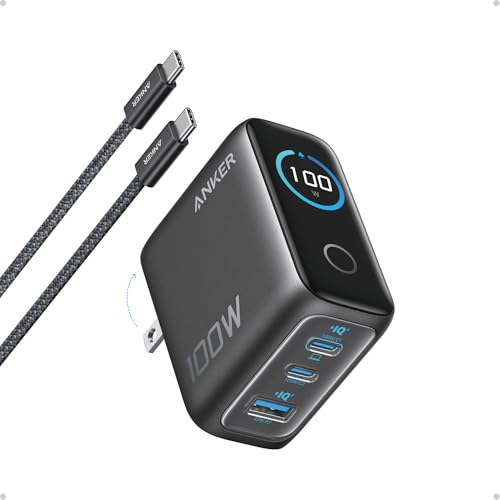
Anker 100W Max USB C Charger — The display-equipped traveller
This listing describes a 100-watt maximum, three-port GaN charger with a smart display and touch control, in an ultra-compact body aimed at laptops and the newest iPhones. The display is the personality here: it turns the invisible negotiation between ports into something you can watch, which sounds like a gimmick until the first time it shows your laptop drawing a trickle because a cable or port choice is wrong. Information, presented at the moment of plugging in, prevents the particular frustration of discovering a half-charged laptop at departure time.
One hundred watts changes the travel equation for owners of larger laptops. A machine that merely sipped from a 67-watt unit can feed properly here, with meaningful headroom left for a phone. The ultra-compact claim matters in the specific geography of hotel rooms, where the only free outlet often hides behind a bedside cabinet and a bulky charger simply will not fit or stay seated. A small body with folding travel manners earns its place in a bag in a way a slightly cheaper brick never does.
Touch control on a charger will divide opinion, and fairly: physical simplicity has its own reliability. Treat the controls as a bonus layer for adjusting display behaviour rather than a reason to buy, and judge this model on its core — full 100-watt output, three ports, small body, visible power information. Judged that way it is the traveller’s pick of the six, especially for anyone whose laptop is their livelihood and whose charging happens in unfamiliar outlets.
- Total output: 100 watts maximum
- Ports: 3
- Display: smart display with touch control
- Design: ultra-compact GaN body
- Intended partners, per listing: laptops and recent iPhone models
Strengths
- Live display exposes slow cables and poor port choices instantly.
- Full 100-watt ceiling feeds larger laptops with headroom.
- Small body fits awkward hotel and airport outlets.
Trade-offs
- Touch controls add complexity some owners will never use.
- Three ports still share one pool under heavy combined load.
- Display features command a premium over plain 100-watt designs.
Best for: frequent travellers with a substantial laptop who want to see charging happen, not guess.
Not suited for: buyers who prefer the plainest possible charger and charge one small device at a time.
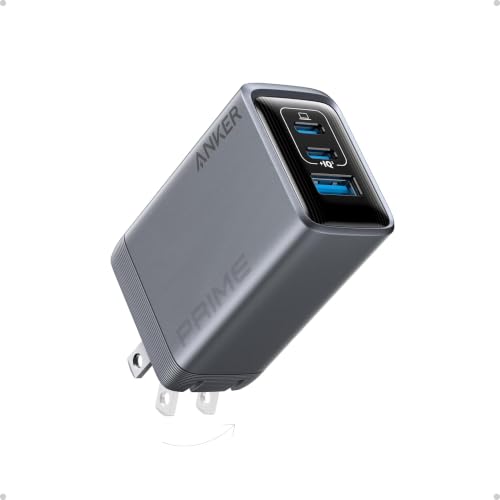
Anker Prime Charger — The folding-pin Prime
The Prime badge marks Anker’s premium tier, and this listing describes a 100-watt maximum, three-port, compact foldable USB-C charger for MacBook Pro and Air class machines, iPad Pro and recent iPhones. Foldable pins sound like a footnote until you have fished a charger out of a bag and found its prongs have scratched a tablet screen or snagged a cable bundle; pins that tuck away make a charger genuinely more portable, not just smaller on a spec sheet.
Choosing between this Prime and the display-equipped 100-watt model above is the most interesting decision in the guide, because the ceilings match and the philosophies differ. The Prime bets on physical refinement — the fold, the finish, the way it carries — while its sibling bets on information. A buyer who charges in familiar places and values how a tool feels will lean Prime. A buyer who charges in strange places and values diagnosis will lean display. Neither answer is wrong; they are answers to different travel lives.
In daily output terms expect full-speed service for a mainstream laptop, graceful sharing with a phone and tablet, and the same shared-pool arithmetic as every multi-port design. The Prime’s compact foldable body also sits neatly in a power strip without swallowing neighbouring sockets as readily as wider bricks do, a small courtesy that housemates and colleagues notice. If your charging life is one bag, one desk and a premium on things that pack flat, this is the 100-watt rung to take.
- Total output: 100 watts maximum
- Ports: 3
- Design: compact, foldable pins
- Line: Anker Prime
- Intended partners, per listing: MacBook Pro/Air class laptops, iPad Pro, recent iPhones
Strengths
- Folding pins protect bags, screens and the charger itself.
- Full 100-watt output in a notably travel-shaped body.
- Prime-tier finish suits a permanent place in a daily carry.
Trade-offs
- No live display for checking per-port behaviour.
- Premium tier pricing logic applies.
- Three busy ports still split the same 100-watt pool.
Best for: daily carriers who want 100 watts that pack flat and feel finished.
Not suited for: buyers who want on-screen charging data or a fourth port for a desk hub role.

Anker 140W Max 4-Port GaN Charging Blocks — The four-port hub
Four ports change a charger’s job description. The listing describes 140 watts maximum across four ports, with a smart display and touch controls, aimed at MacBooks, iPads and iPhones. That is no longer a personal charger; it is a small charging station for a desk, a family counter or a two-person travel kit, and it should be judged by how gracefully it serves a crowd rather than how fast it serves one device.
The display earns its keep most in exactly that crowd setting, because contention is where confusion lives. When a partner’s phone, your laptop, a tablet and earbuds share one pool, seeing the distribution prevents the quiet theft of watts from the device that matters most. One hundred forty watts is a deep pool: a substantial laptop can feed well while two smaller devices charge at satisfying speed, a combination that would strangle a 67-watt unit.
Size is the honest cost. This is the desk-anchored end of portable, happiest living on one surface and feeding everything within cable reach, though it still travels far better than the separate bricks it replaces. Households consolidating a nest of single chargers into one station will feel the benefit daily — one outlet, one body, every device accounted for. Just remember the pool rule at its largest scale: four ports invite four devices, and even 140 watts divides when everything arrives empty at once.
- Total output: 140 watts maximum
- Ports: 4
- Display: smart display with touch controls
- Design: GaN charging block
- Intended partners, per listing: MacBook, iPad and iPhone families
Strengths
- Four ports consolidate a household’s scattered chargers into one station.
- Deep 140-watt pool keeps a real laptop fed amid company.
- Display makes multi-device sharing visible and manageable.
Trade-offs
- Largest body here; better as a base station than a pocket carry.
- Four simultaneous empty devices still divide the pool.
- More capability than a single-device owner can use.
Best for: shared desks, families and pairs who travel with several substantial devices.
Not suited for: minimalists who charge one phone and resent carrying anything larger than necessary.

Anker Prime Charger — The single-device sprinter
The flagship listing describes a 160-watt maximum, three-port GaN Prime charger with a smart display and touch control, capable of up to 140 watts of fast charging for one device. That single-device figure is the headline that matters: a small club of large laptops can actually accept charge at such rates, and for their owners the difference between a 100-watt ceiling and 140 watts delivered is measured in reclaimed working time during short stops between meetings.
Notice what the design refuses to do: it does not add a fourth port. Three ports at this tier is a statement that priority beats crowd service — one device gets the royal treatment while two others share the remainder respectably. The display supports that philosophy, letting the owner confirm the main machine is truly drawing its feast rather than sipping politely. For a video editor, developer or engineer whose laptop is both tool and bottleneck, that confirmation is worth money.
Everyone else should admire it and buy a lower rung. A phone cannot drink 140 watts; a thin ultrabook will not either, and paying flagship money for unused ceiling is the category’s most common waste. The Prime 160-watt model is a specialist that knows its audience precisely: owners of genuinely power-hungry laptops who also carry a phone and a tablet, and who measure charging in minutes saved per day. If that sentence describes your bag, nothing else in this six is built for you the way this is.
- Total output: 160 watts maximum
- Single-device output: up to 140 watts
- Ports: 3
- Display: smart display with touch control
- Line: Anker Prime, GaN design
Strengths
- Up to 140 watts to one device serves the hungriest laptops here.
- Three-port layout protects the main device’s priority.
- Display verifies at a glance that full-rate charging is happening.
Trade-offs
- Most phones and thin laptops cannot use its ceiling.
- Flagship positioning for capability many buyers will never touch.
- No fourth port for crowd-charging households.
Best for: owners of high-draw laptops who charge against the clock and carry two companions.
Not suited for: phone-first buyers or thin-laptop owners whose machines sip well below this ceiling.

Anker Nano Phone Charger — The pocket minimalist
After five chargers competing on abundance, the Nano competes on absence. The listing describes a 30-watt, portable and foldable single-port USB-C GaN charger for iPhones across many generations and Galaxy devices. Thirty watts is, not coincidentally, a full meal for a phone: modern handsets fast-charge happily in exactly this territory, so the Nano gives a phone everything it can take while asking for the least space any charger in this guide occupies.
Its natural habitats are the jacket pocket, the small handbag, the gym bag and the spare charger that lives permanently in a car console. Folding pins keep it snag-free among clothes and cables. Because it serves one device, there is no pool arithmetic, no port politics, no display to consult — plug in, charge quickly, leave. For travellers who carry a separate laptop brick anyway, the Nano is the phone charger that should accompany it, instead of forcing the laptop’s charger to commute between devices.
The boundaries are absolute, and the Nano is honest about them. It will not meaningfully charge a laptop beyond a slow trickle of maintenance, it cannot serve two devices in any order except one after the other, and a tablet will accept its output patiently rather than quickly. Buy it as a specialist and it is perfect. Buy it as your only charger for a multi-device life and it will feel like a bottleneck within a week. Specialisation, clearly labelled, is a virtue this guide wishes more listings practised.
- Total output: 30 watts
- Ports: 1 USB-C
- Design: portable, foldable, GaN
- Intended partners, per listing: iPhone models and Galaxy phones
- Role: dedicated phone charger
Strengths
- Smallest, lightest carry in this guide with folding pins.
- Thirty watts fully serves modern phone fast charging.
- Single-purpose simplicity: no settings, no sharing, no fuss.
Trade-offs
- One port only, so devices queue rather than share.
- Not a laptop charger in any practical sense.
- Tablets charge, but slowly compared with the bigger picks.
Best for: phone-first carriers who want a dedicated fast charger that vanishes into a pocket.
Not suited for: anyone expecting one charger to run a laptop and a phone together.
How Do the Six Anker Chargers Compare Side by Side?
| Pick | Total output | Ports | Display | Defining trait |
|---|---|---|---|---|
| Anker 67W GaN Wall Charger | 67W | 3 | No | Balanced everyday trio |
| Anker 100W Max USB C Charger | 100W | 3 | Yes, touch control | Visible power, travel size |
| Anker Prime Charger (100W) | 100W | 3 | No | Folding pins, Prime finish |
| Anker 140W 4-Port | 140W | 4 | Yes, touch controls | Household charging station |
| Anker Prime Charger (160W) | 160W, up to 140W single | 3 | Yes, touch control | Maximum single-device speed |
| Anker Nano 30W | 30W | 1 | No | Pocketable phone specialist |
Two chargers share the Prime name and similar wattage language, so use the table’s defining-trait column, not the badge, when ordering. The 100-watt Prime folds; the 160-watt Prime sprints. Confusing them is the one ordering mistake this guide most wants to prevent, which is why their full listing names appear in every review heading above.
How Should You Match a Charger to Your Actual Kit?
Write your kit list down, with the largest device first. If the largest device is a phone, the Nano plus discipline beats every flagship. If it is a thin laptop, the 67-watt model’s three ports cover the classic trio with room to spare. If it is a large laptop, skip to the 100-watt pair and choose between display information and folding-pin refinement. If two people or four devices share the charger, the 140-watt four-port stops being a luxury and becomes the tidy answer. Reserve the 160-watt Prime for the verified case: a laptop that can truly accept very high USB-C wattage and a schedule that punishes slow charging.
Then consider where charging happens. A charger that lives on one desk can be the four-port station; a charger that lives in a bag should fold, weigh little and survive being sat on occasionally. Many households end up, sensibly, with two of these six: a station at home and a Nano or a Prime in the bag. That pairing costs less than one flagship pressed into both jobs badly, and it matches how devices actually move through a week.
What Mistakes Do Charger Buyers Keep Making?
Buying the badge number without the sharing arithmetic leads the list, followed closely by pairing a powerful charger with an elderly cable that caps it silently. A third error is choosing by phone needs and forgetting the laptop entirely, then wondering why the laptop loses charge during heavy work while plugged in. Fourth, owners crowd a charger into a sealed drawer or bury it under soft furnishings, then blame the design for heat that any electronics would struggle with. Finally, travellers overlook pin design until a rigid charger has worried a screen or refused to sit in a recessed hotel outlet; folding pins exist precisely because that lesson was learned the hard way.
What Does Living With a Display-Equipped Charger Change?
Three of the six picks here can show you power moving, and the effect on habits is larger than expected. Owners start noticing that the cable in the spare room delivers half the rate of the cable at the desk, that one port behaves differently under multi-device load, and that a tablet left plugged in overnight was actually finished by midnight. That visibility converts charging from superstition into management. It also settles household disputes with evidence: when a laptop is charging slowly, the display shows whether the charger, the cable or the crowd of other devices is responsible, and the fix takes seconds.
The counterpoint is that information can become theatre. A display does not add watts, and a buyer whose routine is one phone on a nightstand gains nothing from watching numbers they will never act on. The honest split in this range is therefore philosophical as much as technical. Choose the display models when you manage several devices or troubleshoot unfamiliar outlets while travelling. Choose the plain models when your routine is settled and your charger can be, in the best sense, invisible. Both instincts are respected somewhere in this six, which is what a mature product family should offer.
There is also a longevity angle to consider with any feature-rich charger: more electronics means more to maintain, and touch surfaces invite interaction that plain bricks never see. Anker’s premium tiers exist to carry that complexity with better fit and finish, and the Prime models here are the natural home for buyers who want the features and the build in the same object. A charger is handled daily, dropped occasionally and trusted nightly; paying for one that tolerates that life gracefully is not indulgence, it is arithmetic over years.
How Should You Care for a GaN Charger?
Treat heat as information. Let air reach the body, keep it out of bedding and sofa cushions during heavy sessions, and unplug it during a thunderstorm-prone night if it feeds nothing important. Inspect cables at the strain reliefs, where flexing concentrates, and retire any cable whose jacket splits or whose connector wobbles; a failing cable makes a healthy charger look guilty. When travelling, let folding pins do their job rather than forcing a charger into a packed bag prongs-first against a screen.
Finally, resist the drawer of duplicates. One well-chosen charger per role — station, travel, pocket — outperforms five mediocre ones scattered by habit. Label the travel unit, keep its cable with it, and the morning packing routine loses one small friction forever. The six models in this guide were chosen so that each role has exactly one obvious candidate; that clarity, more than any single specification, is what a good shortlist owes you.
How Does Power Sharing Play Out on a Real Working Day?
Abstract sharing rules become concrete at about four in the afternoon, when a laptop at forty percent meets a phone at twenty and a train leaves in ninety minutes. On the 67-watt model, the laptop keeps the larger share and the phone still gains meaningful charge, because phones sip compared with computers. Both leave usable. On either 100-watt model, the same scene ends with both devices comfortable, and the laptop’s owner stops doing mental arithmetic entirely. That absence of arithmetic is, in practice, what the extra money buys across this whole range.
Evenings tell the opposite story. Overnight, time is abundant and wattage is nearly irrelevant: every pick here, Nano included for its single phone, finishes its work long before the alarm. Buyers should therefore size a charger for their worst afternoon, not their average night. A charger bought for the night will disappoint in the afternoon crunch; a charger bought for the crunch will feel effortlessly adequate every night. That single reframing explains most of the ladder — the flagships are afternoon insurance for people whose afternoons are expensive.
Weekends add a third pattern: the shared household surge, when visitors, children and partners all arrive at the same counter with cables in hand. This is the four-port model’s finest hour and the Nano’s clearest limit. A household that hosts that surge weekly should not ask a three-port charger to mediate it. Conversely, a single occupant in a studio flat may never witness a surge in a year of evenings, and for that reader the four-port’s extra socket is furniture, not function. Matching the charger to the social pattern of the home is as important as matching it to the devices.
What Changes When You Travel With Each Tier?
Travel punishes chargers in specific ways: recessed outlets behind furniture, strips already crowded by strangers in airport lounges, bags compressed under seats, and the occasional socket so loose that a heavy brick sags out of it mid-session. Compact GaN bodies mitigate most of this, but the tiers still behave differently. The Nano is immune to nearly all of it — it weighs little, sags never, and fits the outlet nobody else wanted. The folding Prime follows closely, its tucked pins protecting both itself and everything it shares a pouch with.
The display-equipped 100-watt model earns its travel keep differently: unfamiliar outlets and borrowed cables are exactly where unknown charging behaviour hides, and the readout replaces guesswork at the moment it matters. The 140-watt four-port travels as a deliberate base camp — one charger on the hotel desk serving two people’s kit — and justifies its size only when the party and the device count are genuinely plural. The 160-watt Prime travels when the laptop’s appetite travels, typically in the bag of someone whose work cannot wait for a slow charge in a short layover.
One travel habit serves every tier: carry the cable with the charger, matched to it, rather than trusting whatever cable a destination provides. Hotel lamps with built-in USB sockets are notoriously weak, conference-room cables are strangers, and the charger you researched deserves better than to be judged through either. A short, sturdy, correctly rated cable in the same pouch turns any of these six into the charger you actually evaluated at home.
How Should a Desk Setup Use These Chargers?
A fixed desk rewards a different arrangement than a bag does. The four-port model belongs under or behind the monitor, cables routed once and left alone, so that laptop, phone, tablet and a rotating fourth device each have a known home. That permanence is the point: a desk charger should disappear into infrastructure. The 67-watt model plays the same role for a smaller desk, while the display-equipped units suit desks where devices rotate — a workbench, a studio, a repair corner — because the readout helps whoever plugs in next understand what they are getting.
Cable management decides whether a desk setup feels calm or chaotic. Short cables for devices that live beside the charger, one longer cable for the laptop whose position shifts, and nothing draped across the keyboard’s territory. Heat deserves one clear rule: a charger working hard under a desk needs air on at least two sides, so resist the cable-tidy box that seals it in with its own warmth. GaN runs cooler than what it replaced, not cold, and ventilation remains the cheapest reliability upgrade in any setup.
Finally, think about the second seat. Many home offices host a partner, a child doing homework or a colleague for a day. A charger with a spare port and visible behaviour turns that visit into a non-event, while a single-port setup turns it into a negotiation. The four-port and the 67-watt models absorb guests gracefully at opposite scales. Choosing between them is really choosing how social your desk is — a question about your household disguised as a question about watts.
When Is One Charger Not Enough, However Good It Is?
Geography defeats wattage. A charger cannot be on the nightstand and in the travel bag on the same morning, and the forgotten-charger scramble is the most common charging failure of all — not slow charging, but absent charging. Households solve this with roles, not power: a station that never moves, a travel unit that never leaves the bag, a Nano that never leaves the car or the coat. Two mid-tier chargers in fixed roles routinely outperform one flagship asked to be everywhere.
The second case is simultaneity across rooms. A teenager’s phone upstairs, a laptop downstairs and a tablet in the kitchen cannot share one pool no matter how deep it is. Here the ladder’s lower rungs shine as duplicates: a Nano by the bed, the 67-watt on the family counter, and the flagship reserved for the desk where its ceiling matters. Total spend often lands near one premium unit, while daily convenience lands far higher. This guide lists six chargers as rivals, but the wisest purchase it can recommend is frequently a pairing — and the pairings practically suggest themselves once rooms, roles and routines are listed honestly.
What Should You Check in the First Week of Ownership?
Run one deliberate test with each new charger: your main device alone, from a low battery, timed against your previous charger. That single observation confirms the unit, the cable and the device agree with each other, and it gives you a personal baseline that no review can supply. Then repeat the scene with your usual companions plugged in, and note what changes. On the display models the numbers narrate the test for you; on the plain models, the time taken tells the same story more slowly.
Check the physical fit in the outlets where the charger will actually live. Some sockets sit so close together that a wide body evicts its neighbour; some strips place sockets at angles that favour one orientation. A charger that fits your real strip, your real wall and your real bedside cabinet is worth more than a theoretically superior one that migrates to the least useful socket in the house. Also confirm the pins feel secure — a charger that sags in a worn outlet will interrupt sessions in ways that mimic electronic faults.
Finally, decide the charger’s role and write it on your packing list or tape it to the drawer, in spirit if not literally. Role clarity is what prevents the flagship from emigrating to a kitchen counter where a Nano would do, leaving the desk that needed it stranded. A week of small verifications, done once, converts a purchase into a system — and systems, unlike gadgets, keep working while you think about other things.
How Do These Chargers Age Over Years of Daily Use?
The failure points of a wall charger are mundane: a cable frayed at the neck, a pin loosened by a thousand insertions, a body scuffed by bag travel until it looks older than it is. The electronics themselves, GaN designs included, tend to outlast the mechanical story around them. Folding-pin models remove one entire category of wear, which is a quiet argument for the Prime 100-watt beyond its finish. Fixed-pin models ask only that they travel in a pouch rather than loose among keys and tools.
Device churn matters more than charger decay. Phones and laptops change every few years, and their appetites drift upward slowly. A charger bought one rung above today’s arithmetic — the 100-watt instead of the 67, for a household clearly heading toward a bigger laptop — often serves two generations of devices, while an exactly-sized charger gets replaced with the next machine. The exception is the Nano’s role, which barely changes: phones have hovered near its wattage for years, and a pocket charger bought today has every chance of suiting the phone after next.
Support and standards form the last ageing factor. USB-C charging standards evolve, but they evolve compatibly; a sound charger from this range will keep feeding future devices at respectable rates even when it no longer feeds them at their maximum. Buy the rung your life justifies, treat cables as consumables, keep the body ventilated and its pins protected, and any of these six should still be on duty when the devices it was bought for have been replaced — which is the quiet definition of a good charger purchase.
Which Anker Charger Fits Which Kind of Buyer?
The student with a phone, a tablet for notes and a borrowed-laptop budget should look at the 67-watt model and stop reading; it covers that desk completely and leaves money for the bag it all travels in. The young professional whose laptop is new, large and central to the working day should weigh the two 100-watt designs against each other and choose by temperament — data or design — rather than by any difference in ceiling, because there is none. The parent managing a household counter where devices queue like aircraft should go directly to the four-port station and enjoy the silence that follows the end of charger disputes.
The consultant, editor or engineer whose laptop specification includes a genuinely high charging rate, and whose diary includes short gaps between long sessions, is the 160-watt Prime’s natural owner; for that reader the flagship is not extravagance but equipment. The commuter whose phone dies by three in the afternoon and whose bag is already heavy is the Nano’s natural owner, and that reader should resist every upsell in this guide with a clear conscience. The gift buyer, finally, should default to the 67-watt model for any recipient whose kit is unknown: it is the rung least likely to be wrong, because it flatters the widest range of devices without demanding that the recipient reorganise anything.
Notice that every one of those portraits is drawn from devices, rooms and routines — never from budget alone. A cheaper charger that misses the kit is expensive within a month, when its replacement is ordered. A flagship that matches the kit exactly is economical across the years it serves. That is the editorial spine of this guide, and it is why the reviews above keep returning to who each charger is for rather than merely what each charger is.
What About Heat, Noise and the Small Hours?
Chargers live closer to sleep than most electronics: on nightstands, in hotel rooms, beside a child’s bed. All six models here are silent in normal operation in the way owners mean — no fan, no hum that a quiet room reveals — and their warmth under load is a matter of placement rather than concern. A charger working hard in open air on a hard surface is behaving as designed. The same charger under a pillow is not, and no badge on any box licenses that arrangement.
Nightstand duty also rewards the plain models in a way spec sheets ignore: a bright display at two in the morning is a feature with a cost, and buyers sensitive to light should consider where a display-equipped charger will sleep before choosing it. Touch controls that dim or darken the readout answer much of that concern, and testing the nightstand arrangement during the first week, while exchanges are easy, is the practical move. Small hours reveal small truths about products; a charger is one of the few purchases where those truths are worth checking deliberately.
One more scenario deserves a paragraph because it decides real purchases every day: the work bag that crosses between office, home and travel without ever being fully unpacked. A charger living that life should be the one whose absence is noticed least and whose presence solves the most — for most professionals that is a 100-watt model, folding or display-equipped according to taste, paired with one known-good cable looped beside it. The bag becomes a self-contained charging kit, the desk keeps its own station, and the two systems stop raiding each other. Organised that way, charging stops appearing in the mental list of things to remember before leaving, which is the true finish line for this entire category of purchase.
It is also worth saying plainly what this guide did not do: it did not rank these six by affection for the brand, and it did not treat the newest or largest model as the automatic winner. Anker’s range is a ladder because charging needs are a ladder. The Nano is not a failed flagship and the flagship is not an overgrown Nano; each is the correct answer to a different, clearly describable life. Read the portraits, recognise your own, and the choice makes itself.
Before ordering, run one final check that takes less than a minute: read your laptop’s own charging specification, in its manual or its maker’s support pages, and note the wattage it asks for. That number, more than any badge in this guide, names your rung. Match the charger to it, add a port for the phone you charge beside the laptop every night, and the shortlist collapses to one or two models. Shopping for chargers feels complicated only while that one fact is missing; with it in hand, the six reviews above become a confirmation rather than a search.
Households replacing a drawer of ageing chargers often ask whether to standardise on one model everywhere for simplicity. Resist the tidy instinct. Standardising on the flagship everywhere wastes its ceiling in phone-only corners, while standardising on the Nano everywhere strands the laptop that matters. Standardise instead on the system: one station, one travel unit, one pocket unit, each from the rung its role demands, all from a family whose cables and behaviour you already understand. Uniformity of understanding beats uniformity of hardware, and it is cheaper besides.
Keep the box, the receipt and the listing details for whichever model you choose, at least through the first season of use. Chargers are swapped between bags and rooms so often that, months later, owners genuinely forget which ceiling and which port layout they own, and the small printed record settles arguments with future purchases before they start.
That small archive habit costs nothing and pays out quietly for years.
Final Recommendation
Let your largest device decide: phone-only carriers should pocket the Nano, the classic laptop trio belongs with the 67-watt model, travellers with serious laptops should pick between the display-equipped 100-watt charger and the folding Prime on whether they value information or packability more, shared desks deserve the 140-watt four-port, and only owners of genuinely high-draw laptops will ever feel the 160-watt Prime flex — so buy the rung your kit actually stands on, not the rung above it.
Frequently Asked Questions
Will a 160-watt charger charge my phone faster than the 30-watt Nano?
Almost certainly not. Phones draw what they are designed to draw, and a modern phone’s fast-charging appetite sits close to what the Nano provides. The flagship’s surplus exists for large laptops and simultaneous loads.
Why are there two different 100-watt chargers in one guide?
Because they solve different problems at the same ceiling: one adds a smart display and touch control for visibility, the other is a Prime model with folding pins for carry. Wattage alone does not describe a charger.
Can the 67-watt model run a laptop and charge a phone at the same time?
Yes, that pairing is its home territory. The laptop’s share falls compared with charging alone, but a mainstream laptop stays fed while a phone fast-charges beside it.
Does a display on a charger actually help?
It helps when several devices share one unit or when you charge in unfamiliar places, because it exposes slow cables and unexpected sharing immediately. For a single settled nightstand routine, it adds little.
What cable should I pair with these chargers?
Use a USB-C cable rated at or above your charger’s output for the laptop port — the cable that came with the laptop is the safest default — and keep a shorter, sturdy cable in the travel kit for phones.
Is the Nano powerful enough for a tablet?
It will charge a tablet, but slowly compared with the multi-port models here. If a tablet is a daily work tool rather than an occasional passenger, step up to the 67-watt pick.
Related Guides
Best Car Battery Chargers and Jump Starters
Best Automatic Marine Battery Chargers
Related guide: Best Anker Wireless Chargers
Related guide: Best Home Level 2 EV Chargers
Related guide: Best Tesla Chargers



[…] Best Anker Chargers […]