What's inside
- Key Takeaways
- Quick Picks
- How did we weigh silence against cooling when choosing these six?
- Where does PC noise actually come from?
- Which school should your build follow — sealed or airflow?
- Six routes to a quieter mid tower, reviewed individually
- How the six compare when the room goes quiet
- How do you build inside a quiet case so it stays quiet?
- What do quiet-case buyers most often misunderstand?
- How does a quiet case behave across a whole year?
- What separates a quiet gaming build from a quiet office build?
- How should you audition a quiet case after the build?
- What role do hard drives, pumps and coil whine play?
- How do these cases suit a home studio or streaming room?
- Final Recommendation
- Frequently Asked Questions
- Related Guides
As an Amazon Associate I earn from qualifying purchases. This post may contain affiliate links at no extra cost to you.
widgetverdict.com is reader-supported. When you buy through links on our site, we may earn an affiliate commission.
Where to buy: order these cases through their Amazon listings, and before the box arrives, decide where the finished PC will live — under the desk, beside it, or in another room entirely — because a quiet case earns its premium only when the room lets you hear the difference.
The best quiet pc mid tower cases are exercises in managed contradiction. A PC case must breathe or the components cook, and it must seal or the fan noise escapes, and every design here is a different negotiation between those two demands. Two of them come from be quiet!, a maker whose entire brand is the negotiation itself. One is Fractal Design’s Define 7, the modular heavyweight of the silence world. Antec’s P7 S attacks the problem with sound-dampening panels and a mesh front that seems to argue with its own brief, and Phanteks closes the group with a closed-panel design whose name states its intention outright.
Silence in a case comes from three sources, and it helps to keep them separate while reading. The first is damping: insulation mats and solid panels that absorb and block sound, the Silent Base 802’s stated speciality. The second is airflow efficiency: a case that moves air easily can spin its fans slowly, and slow fans are quiet fans, which is the Pure Base 501 Airflow’s wager. The third is fan quality and count at low speed — several modest fans turning gently usually beat two fans working hard, and the preinstalled fan counts in these titles, from two to four, are therefore real specifications and not packing filler.
What a quiet case cannot do is silence components. A screaming graphics card fan, a rattling hard drive and a coil-whining power supply will be audible through any case, merely less so. The case is the last stage of a quiet build, not a substitute for choosing quiet parts, and this guide will keep returning to that honesty. Readers placing the finished machine beside a desk should also settle the desk itself — the guides to best computer desks with hutch and best electric stand up desks cover the furniture half of a quiet room.
Key Takeaways
- Two design schools divide the group: sealed and damped (Silent Base 802, Define 7, Phanteks XT Pro Silent) versus airflow-led (Pure Base 501 Airflow, Antec P7 S).
- Preinstalled fan counts run from two 140mm PWM fans in the Pure Base pair to four PWM fans in the Antec P7 S.
- The Silent Base 802 is the only pick whose title names extra thick insulation mats and a fan controller.
- Every pick includes USB Type-C front connectivity in some generation — check each title for its exact wording.
- The Define 7 is the modular option: E-ATX support and a layout that reconfigures for storage or cooling priorities.
- A quiet case finishes a quiet build; it cannot rescue loud components, only soften them.
Quick Picks
| Pick | Badge | Why it earns its place |
|---|---|---|
| be quiet! Pure Base 501 Airflow Black | The airflow wager | Two preinstalled 140mm PWM fans and an airflow-optimised design that keeps fan speeds, and therefore noise, low. |
| be quiet! Pure Base 501 Black | The sealed sibling | The same 501 platform in its standard black form, with two 140mm PWM fans and vertical GPU support. |
| be quiet! Silent Base 802 Black | The insulation flagship | Extra thick insulation mats, three installed fans, a fan controller and room for 420mm radiators. |
| Fractal Design Define 7 Solid | The modular vault | A solid-panel E-ATX mid tower in brushed aluminium and steel, built around silence and reconfigurable layout. |
| Antec P7 S Silent ATX Mid Tower | The four-fan pragmatist | Four PWM fans, sound-dampening side panels and dual side mesh intake in a design that hedges both schools. |
| Phanteks XT Pro Silent Mid-Tower | The closed-panel minimalist | Three M25-120 fans behind closed panels, in a chassis that states its silent intent in its name. |
How did we weigh silence against cooling when choosing these six?
By refusing to treat them as opposites with a winner. A case that seals beautifully and cooks its graphics card will end up louder than an airflow case, because the card’s fans will scream against the heat the sealed box created. A case that breathes freely but leaves a straight, unbaffled path from fan to ear wastes its own advantage. The six here all understand the balance from one direction or another: they either damp a fundamentally adequate airflow design, or they make airflow efficient enough that the fans can afford to be lazy.
We also read the titles strictly. Where a listing states insulation, fan counts or radiator support, those facts anchor the review. Where a title is terse — the Define 7’s is a single line — the review says what the case’s design is known for in the category without inventing a specification list, and flags the documentation as the place to confirm dimensions and clearances before a build is planned around them.
Where does PC noise actually come from?
From moving air and moving parts, in that order for most builds. Fans dominate: case fans, the CPU cooler’s fan, the graphics card’s fans and the power supply’s fan each contribute a tone, and the sum is what you hear across the room. Turbulence adds its own layer — air forced through tight grilles and sharp bends hisses in a way that pure fan hum does not — which is why case design matters beyond the fans themselves: a case that gives air a wide, straight, slow path produces less turbulence noise at the same cooling result.
Mechanical noise is the second family. Spinning hard drives hum and click, pumps in liquid coolers buzz faintly, and vibration couples everything into the desk and floor if the case’s feet and panels let it. Damping mats fight airborne sound; mass and decoupling fight vibration. The heavy, insulated designs here — the Silent Base 802 with its extra thick mats, the Define 7 with its steel and aluminium — work on both families at once, which is part of why they weigh what they weigh. A quiet build on a hard floor under a desk will still telegraph some vibration through the furniture, a detail worth knowing before blaming the case.
Which school should your build follow — sealed or airflow?
Follow your components. A modest build — a mid-range graphics card, a sensible CPU, no overclocking ambitions — produces little heat, and a sealed, damped case like the Phanteks XT Pro Silent or the standard Pure Base 501 will keep it near-silent without thermal drama. A powerful build produces heat in quantities that sealed boxes struggle to shed quietly, and there the airflow school wins by physics: the Pure Base 501 Airflow or the Antec P7 S will cool it with slow fans, and slow fans in an open case beat fast fans in a sealed one.
Room temperature casts a vote too. A build in a cool study has thermal headroom a build in a warm attic room does not, and summer exposes optimistic cooling choices that winter forgave. The honest method is to plan for the hottest week of your year and the loudest component you own, then choose the case that handles both without its fans working hard. Every pick here can be that case for some build; none of them can be it for every build.
Six routes to a quieter mid tower, reviewed individually

be quiet! Pure Base 501 Airflow Black — The airflow wager
The Airflow variant of the Pure Base 501 makes the efficiency argument in its purest form: optimise the air pressure and the path, fit two preinstalled 140mm PWM fans, and let physics do the silencing. Large fans turning slowly move the air of small fans turning quickly, with a lower tone that the ear tolerates better, and PWM control lets the motherboard hold those fans at the bottom of their range until the build genuinely warms. For a gaming build with a hot graphics card, this is the be quiet! design that makes the most sense.
The title adds the platform’s practicalities: a compact footprint for a mid tower, vertical GPU installation support for builders who show or specially mount their card, and USB 3.2 Gen.2 Type-C on the front panel. Compact matters in this category — quiet cases trend large, because insulation and baffles take room, and a design that keeps the box modest while keeping the airflow honest serves the under-desk reality most builds live in.
The wager’s cost is the one its name admits: an airflow front is a more open path for sound than a sealed, damped front, so component noise — especially a graphics card under load — escapes more directly than it would from the Silent Base. The bet is that your fans, running slow, will be quieter than your components would be inside a hotter sealed box. For powerful builds that bet usually wins. Its current price sits on the Pure Base 501 Airflow’s Amazon listing.
- Fans: 2 preinstalled 140mm PWM fans, per the listing title
- Design focus: optimised air pressure and airflow, as the title states
- GPU: vertical GPU installation supported
- Front connectivity: USB 3.2 Gen.2 Type-C
- Format: ATX midi tower, compact for the class
- Insulation: the title makes no insulation claim — this variant’s silence comes from airflow efficiency
Strengths
- Slow-turning 140mm fans cool powerful builds at low noise — the right physics for hot components.
- Compact dimensions suit under-desk placement better than most quiet cases.
- Modern front Type-C connectivity matches current motherboards.
Trade-offs
- The open airflow path lets graphics card noise escape more directly than a damped case.
- Two fans is a starting point; large builds may add more, which must also stay slow to stay quiet.
- Vertical GPU mounting can crowd the card against the panel in some configurations.
Best for: a gaming build with a powerful graphics card that needs cooling headroom to stay quiet.
Not suited for: a low-power build in a bedroom, where a sealed damped case would be quieter still.

be quiet! Pure Base 501 Black — The sealed sibling
Read the two 501 titles side by side and they look like twins: same fans, same compact platform, same vertical GPU support, same front Type-C. The difference is the word Airflow, present in one and absent in the other, and in be quiet!’s range that word marks the front panel’s philosophy — the standard 501 leans toward the sealed, sound-conscious side of the family’s balance, the Airflow toward the breathing side. This review treats the standard model as the quieter-room choice of the pair, while noting plainly that the titles themselves differ by that single word and the maker’s documentation is where the panel construction is spelled out.
For a modest build — the office PC, the media machine, the mid-range gaming rig that never overclocks — the sealed sibling is arguably the smarter default. Its thermal task is lighter, so the airflow it trades away costs little, and the sound path it closes is the one your ear lives nearest. Two 140mm PWM fans still move the air such a build produces, at speeds that keep them near the floor of audibility.
Builders should nonetheless respect the pairing logic: this is the 501 for builds whose heat they have honestly summed, not the 501 for a flagship graphics card and a flagship CPU in a warm room. Choose between the siblings by component heat, not by which product photograph looks calmer. The standard Pure Base 501’s Amazon listing carries its current price and the panel details the title compresses away.
- Fans: 2 preinstalled 140mm PWM fans, per the listing title
- Design focus: the standard 501 front, without the Airflow designation of its sibling
- GPU: vertical GPU installation supported
- Front connectivity: USB 3.2 Gen.2 Type-C
- Format: ATX midi tower, compact for the class
- Panel construction detail: the title does not describe it — be quiet!’s documentation holds the specifics
Strengths
- The quieter-leaning half of the 501 pair for modest, cool-running builds.
- Shares the platform’s compact size and modern front connectivity.
- Two large PWM fans give gentle airflow without aftermarket additions.
Trade-offs
- Less airflow headroom than its Airflow sibling for flagship components.
- The title’s brevity means panel and clearance details need a documentation check.
- Still a two-fan start; storage-heavy builds may want additional slow intake.
Best for: an office, media or mid-range gaming build in a room where quiet outranks thermal extremes.
Not suited for: a flagship CPU and GPU pairing in a warm room — that build belongs in the Airflow.

be quiet! Silent Base 802 Black — The insulation flagship
The Silent Base 802 is what be quiet! builds when silence is the brief rather than a consideration. Its title reads like the category’s manifesto: three installed fans, an I/O panel with a fan controller, USB 3.2 Gen. 2 Type-C, support for water cooling up to 420mm, and extra thick insulation mats. Each item earns its place in the argument. The insulation attacks airborne noise directly. The fan controller lets the user, not just the motherboard, arbitrate between silence and cooling. The radiator support means even a liquid-cooled build — pump noise and all — can live inside the damped box.
Three fans fitted from the factory, in a case designed around controlled airflow paths, give the 802 the other half of the quiet equation: it does not merely block sound, it avoids creating it. This is the case for the builder who records audio in the same room, who works nights beside a sleeping household, or who simply wants the machine’s presence reduced to a glance at its power light. Size and weight follow the insulation honestly — damped cases are substantial objects, and the 802 should be measured against its space like furniture, which the desk guides linked earlier in this article can help plan.
The cautions are proportionate. A flagship case invites a flagship build, and the 802’s cooling, while well designed, still asks powerful components to respect the sealed philosophy: plan fan curves gently, use the radiator support if your build runs hot, and let the controller do its arbitrating. Pricing for the Silent Base 802 is on its Amazon listing, where the interchangeable panel details — this design is known for offering airflow and silence configurations — can be confirmed in the maker’s own description.
- Fans: 3 installed fans, per the listing title
- Insulation: extra thick insulation mats, as the title states
- Control: I/O panel with fan controller named in the title
- Cooling support: water cooling up to 420mm, per the title
- Front connectivity: USB 3.2 Gen. 2 Type-C
- Format: ATX midi tower
Strengths
- The most complete silence specification here — insulation, controller and fitted fans together.
- 420mm radiator support lets liquid-cooled performance builds join the quiet room.
- A fan controller puts the silence-cooling balance in the user’s hand, not just the BIOS.
Trade-offs
- Insulation makes it one of the more substantial cases to house and move.
- Flagship positioning means its value is wasted on a very modest build.
- Sealed philosophy still requires honest fan-curve planning with hot components.
Best for: a recording room, a night worker, or any builder for whom silence is the first specification.
Not suited for: a budget office build, or a cramped space that cannot give the case its room.
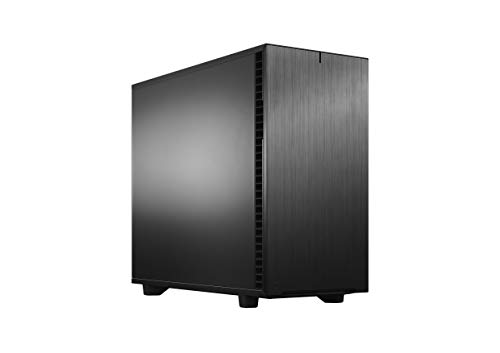
Fractal Design Define 7 Solid — The modular vault
Fractal’s title for the Define 7 is a single line — black, solid, brushed aluminium and steel, E-ATX, silent, modular, mid tower — and every word in it is load-bearing. Solid means the side panel is a panel, not a window: no glass, no view, and no apology, because glass is a sounding board and this case is for builders who choose quiet over display. Brushed aluminium over steel describes a case with genuine mass, and mass is a silencing material in itself, resisting the vibration that thin panels broadcast. Modular is the Define line’s signature: the interior reconfigures between storage density and open cooling, so the same case serves a file-hoarding workstation and a clean gaming build across its life.
E-ATX support in a mid tower widens the motherboard choice to boards most mid towers refuse, and it signals the case’s workstation ambitions. The Define 7 is the pick here most likely to be bought twice by the same person across a decade — not because the first wore out, but because a second machine in the house inherits the standard. Its silence approach is the Scandinavian one: heavy materials, sealed solid panels, and an interior laid out so fans need not hurry.
The title’s terseness means the practical figures — clearances, fan positions, drive counts in each layout — live in Fractal’s documentation, and a modular case demands that reading more than most, because the layout you choose changes the numbers. Weight deserves respect in delivery and placement alike. The Define 7’s Amazon listing carries its current price, and builders planning a wall of storage should confirm the accessory situation there, since modular ecosystems reward those who check what ships in the box.
- Panels: solid side panel — no window, per the listing title
- Materials: brushed aluminium and steel, as the title states
- Motherboard support: E-ATX within a mid tower format
- Layout: modular interior, per the title
- Finish: black
- Fan and clearance figures: the title is a single line — Fractal’s documentation carries the build numbers
Strengths
- Solid panels and heavy materials silence by construction, not by accessory.
- Modular layout adapts between storage-heavy and cooling-led builds across years.
- E-ATX support in a mid tower suits serious workstation motherboards.
Trade-offs
- No window means no component display — a deliberate loss some builders will feel.
- Mass makes it the case you place once and move reluctantly.
- The terse title pushes more pre-purchase reading onto the builder.
Best for: a workstation or long-life build valuing silence, mass and reconfigurable layout over display.
Not suited for: a showcase build built around visible components and lighting.
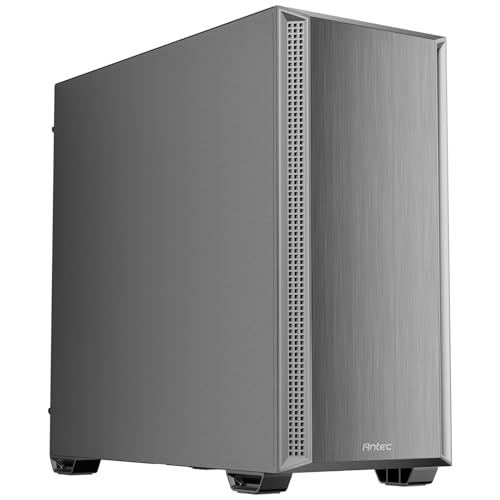
Antec P7 S Silent ATX Mid Tower — The four-fan pragmatist
The Antec P7 S reads like a negotiation between the two schools, settled by an engineer. Its title lists four PWM fans included, a dual side mesh front intake, sound-dampening side panels, 360mm top radiator support and USB Type-C 3.2 Gen 2. Translated: the front breathes through mesh at the sides — intake without a wide-open face — the panels damp what the components produce, and four fans share the work so none of them needs to spin hard. That last point is the quiet builder’s favourite arithmetic: airflow divided by four gentle fans is quieter than the same airflow from two busy ones.
The top radiator support extends the design to liquid cooling, and a 360mm radiator exhausting upward is a natural fit for a case whose front is partly reserved. Antec’s P-series heritage is silence-minded office and home builds, and the P7 S continues it with modern connectivity and fan counts that earlier generations made buyers add themselves. Four fitted PWM fans also simplify the build’s shopping list — the case arrives with its airflow plan substantially complete.
The hedge has a price: a mesh intake, however side-routed, is a more open sound path than the Silent Base’s sealed face, so the P7 S will not match the flagship’s hush with a loud graphics card at full tilt. It counters with cooling that keeps that card’s fans calmer. Which effect wins depends on the card, as this guide keeps admitting because it keeps being true. The P7 S’s Amazon listing carries its current price and the fan placement details.
- Fans: 4 PWM fans included, per the listing title
- Panels: sound-dampening side panels, as the title states
- Intake: dual side mesh front intake, per the title
- Cooling support: 360mm top radiator support
- Front connectivity: USB Type-C 3.2 Gen 2
- Format: ATX mid tower
Strengths
- Four fitted PWM fans share the work gently — the quietest arithmetic in the group.
- Damped panels plus side-routed mesh intake hedge both silence schools at once.
- Top radiator support gives liquid cooling a natural home.
Trade-offs
- Mesh intake leaks more component noise than a fully sealed front.
- Four fans mean four cables to route and four curve points to tune.
- Its balanced design is the outright winner at neither silence nor airflow extremes.
Best for: a gaming or mixed build wanting fitted fans, damped panels and cooling headroom in one box.
Not suited for: a recording-room build needing the sealed flagship’s maximum hush.

Phanteks XT Pro Silent Mid-Tower — The closed-panel minimalist
Phanteks names this case the way a manifesto would: XT Pro Silent, with closed panels. In a market where mid towers compete to be fish tanks, a closed-panel gaming chassis is a statement of priorities — the build inside is for its owner, not for an audience, and the panels that would have been glass are instead part of the silencing. The title completes the picture with three M25-120 fans included and USB-C 3.2 Gen2 connectivity, in black.
Three 120mm fans behind closed panels describe a measured airflow plan: enough movement for a mainstream gaming build, delivered by fans the maker chose and fitted, in a box whose openings are where the designer put them rather than wherever a window’s frame leaks. Phanteks’ case-building reputation rests on thoughtful interiors, and a silent variant of a pro chassis inherits that practicality — cable routing and clearances planned by people who build in their own cases.
The closed-panel philosophy’s limits are the familiar ones: very hot builds will want more intake freedom than a sealed design prefers, and the title does not publish radiator or clearance figures, so a liquid-cooled or oversized-card build should be planned from Phanteks’ documentation rather than from hope. For the mainstream gaming and office builds it targets, the XT Pro Silent is the quiet choice that does not ask its owner to join a silence enthusiast’s hobby. Its current price is on the Phanteks listing on Amazon.
- Fans: 3 M25-120 fans included, per the listing title
- Panels: closed panels, as the title states
- Front connectivity: USB-C 3.2 Gen2
- Format: mid-tower gaming chassis
- Finish: black
- Radiator and clearance figures: the title does not publish them — Phanteks’ documentation is the source to check
Strengths
- Closed panels silence by design and end the glass-versus-quiet debate by refusal.
- Three fitted fans complete the airflow plan out of the box.
- A gaming chassis tuned for quiet rather than display suits shared rooms.
Trade-offs
- Sealed design gives the hottest builds less intake freedom.
- No window, no showcase — the interior is private by intention.
- Cooling figures require documentation reading before an ambitious build.
Best for: a mainstream gaming or office build in a shared room, owned by someone indifferent to display windows.
Not suited for: a showcase build, or a flagship liquid-cooled rig planned without checking clearances.
How the six compare when the room goes quiet
| Case | Silence approach | Fans fitted | Notable support |
|---|---|---|---|
| Pure Base 501 Airflow | Airflow efficiency | 2 x 140mm PWM | Vertical GPU, USB 3.2 Gen.2 Type-C |
| Pure Base 501 | Sealed-leaning standard front | 2 x 140mm PWM | Vertical GPU, USB 3.2 Gen.2 Type-C |
| Silent Base 802 | Extra thick insulation mats | 3 | Fan controller, 420mm radiators |
| Define 7 Solid | Mass and solid panels | See maker documents | E-ATX, modular layout |
| Antec P7 S | Damped panels, mesh side intake | 4 PWM | 360mm top radiator |
| Phanteks XT Pro Silent | Closed panels | 3 x M25-120 | USB-C 3.2 Gen2 |
The pattern worth seeing is that fitted fan count and silence do not trade against each other the way intuition suggests. The four-fan Antec can be quieter than a two-fan case at the same cooling, because sharing work is what lets fans loiter. What the table cannot show is your graphics card, which will contribute more noise than any of these cases at full load — the case decides how much of that contribution reaches your ears, and how hard the card must work, and therefore how much it contributes in the first place.
How do you build inside a quiet case so it stays quiet?
Fan curves are the build. Set them lazy: let temperatures ride a few degrees higher at idle and light load in exchange for fans that stay at their floor, and reserve the ramp for genuine sustained load. Most default curves are written for cooling pride rather than for ears, and the first hour spent softening yours is the highest-value hour in a quiet build’s life. Route cables out of the intake path, because turbulence is noise, and a tidy interior is an acoustic feature as much as an aesthetic one.
Decouple what vibrates. Hard drives belong on whatever damped mounting the case provides, the pump of a liquid cooler belongs at the speed where its buzz drops below audibility, and the finished case belongs on a surface that does not drum — carpet or a mat under a desk beats bare wood over a hollow floor. If the PC will live beside a floating desk setup like those in best floating desks, remember that wall-mounted furniture and a vibrating tower make poor neighbours, and give the case floor space of its own.
What do quiet-case buyers most often misunderstand?
That the case is a multiplier, not a cure. A loud graphics card inside a Silent Base 802 becomes a quieter loud graphics card. Buyers who expect transformation blame the case for the components’ character, when the honest sequence is quiet components first, quiet case to finish. The second misunderstanding is sealing a hot build and then raising fan speeds to survive it, producing a louder machine than an airflow case would have given them — the schools exist because builds differ.
The third is ignoring placement. A quiet case on a desk beside your ear works harder than the same case under the desk, and both work harder than a case in a ventilated cupboard or the next room with cables run through. Placement is free silencing, and it should be spent before money is.
How does a quiet case behave across a whole year?
Summer is the audit. A build that whispers in January can hum in July, because the room’s ambient temperature sets the floor from which every component climbs, and fan curves respond to the climb. This is the practical argument for headroom: a case chosen with cooling margin — the Airflow’s open path, the Antec’s four fans, the Silent Base’s radiator room — spends summer at the same fan speeds as winter, while a case chosen at its limit spends summer apologising. When you read owner impressions of any quiet case, weight the ones written in a heatwave.
Dust is the slow variable. Filters and intakes accumulate a felt that strangles airflow gradually enough to escape notice, and the fans compensate by degrees until a build that was silent at purchase is merely quiet a year later. The remedy is unglamorous: filters cleaned on a calendar rhythm rather than on a suspicion, intake paths vacuumed, and the interior inspected when a side panel comes off for any other reason. Damped cases hide their dust behind solid panels, which makes the calendar more important, not less — out of sight is a property of the problem as much as of the mess.
Fan bearings age too, and a fan that was silent at purchase can develop a tick or a hum in its second year that no curve will tune away. This is where fitted-fan quality and standard sizes repay their keep: a 140mm or 120mm fan is a commodity part, replaceable in minutes, and a case whose silence depends on ordinary fans is a case whose silence can be restored. Keep the receipt, note the fan sizes in the build’s records, and treat a newly noisy fan as a maintenance item rather than a verdict on the case.
What separates a quiet gaming build from a quiet office build?
The load shape. An office build’s noise problem is a constant low murmur during the working day, and almost any pick here solves it, because the components idle and browse at a fraction of their capacity. A gaming build’s problem is a forty-minute storm: the graphics card at full draw, its fans at their working speed, the case fans answering. Designing for the storm is what separates the schools in this guide — the Airflow and the Antec exist for it — while designing for the murmur lets the sealed cases win on damping alone.
The room’s role differs too. The office build shares its room with calls, where a microphone sits closer to the PC than the user’s ear does and reports noise the user has stopped hearing. Streamers and call-heavy workers should audition their build through the microphone, not the chair. The gaming build shares its room with speakers or a headset, which forgive more, and with other people, who forgive less at midnight. A household’s tolerance, honestly assessed, is a specification like any other.
Upgrade paths diverge last. The office build’s case can serve a decade of modest boards, which is the Define 7’s natural biography. The gaming build will meet hotter cards, and its case should have the airflow or radiator room to greet them — a reason the Silent Base’s 420mm support and the Antec’s top mount matter to buyers whose current card is not their last.
How should you audition a quiet case after the build?
With a routine, not an impression. Run the machine at idle for ten minutes and listen from your chair, then from the doorway, then from the next room with the door as you normally keep it. Load the graphics card with your most demanding game or render for twenty minutes — long enough for temperatures and curves to settle — and repeat the circuit. Note which source dominates at each distance: fan hum, turbulence hiss, drive noise, pump buzz, coil whine under load. Each has a different remedy, and naming the source is most of the cure.
Then adjust one variable at a time. Soften the case fan curve and re-run the load. Slow the pump. Move the case six inches. Re-seat a panel that a cable is pressing against. Quiet building is empirical because every combination of components writes its own acoustic signature, and the case you bought is the instrument panel for tuning it, not a guarantee printed on a box. The builders who end up with genuinely quiet machines are the ones who spend that first evening tuning; the ones who do not, blame the case in a review.
What role do hard drives, pumps and coil whine play?
They are the noises a case is worst at hiding, because they are not fan noise. A spinning hard drive’s hum is a vibration before it is a sound, and it travels through the case’s frame into the desk unless the drive sits in damped mounts and the case sits on a forgiving surface. In a build chasing true quiet, the honest answer is to retire spinning drives from the main case entirely — solid-state storage inside, the archive on a network device in another room — and every pick here suits that modern arrangement, since none of them stakes its design on a wall of drive bays the way older towers did.
Pump buzz is a tone, narrow and insistent, and tones defeat damping more easily than broadband fan noise does. The defence is selection and speed: a pump run below its maximum usually drops its note beneath the room’s floor, and mounting that keeps the pump off resonant panels matters as much as the pump itself. Coil whine — the high electrical note some graphics cards and power supplies sing under particular loads — is the least case-fixable noise of all. Damping softens it; distance defeats it; a different component ends it. A buyer tormented by whine should spend on placement and component choice before expecting any case, however insulated, to perform the exorcism.
How do these cases suit a home studio or streaming room?
A studio inverts the usual priorities: the microphone is the ear that matters, it sits close, and it is merciless about tones a human listener filters out. In that room the Silent Base 802’s specification — insulation, controller, fitted fans — reads like a studio equipment list, and its fan controller earns special value, because a recording session can pin the fans to their floor for an hour in a way a BIOS curve, chasing temperatures, will not. The Define 7’s mass serves the same room by refusing to resonate.
Distance remains the studio’s cheapest tool. A case across the room behind a soft furnishing can be a louder case than a quiet case under the desk and still record cleaner, because microphones obey geometry. Studios should also mind the floor path: a tower on a hard floor couples its vibration into the room’s structure and occasionally into a microphone stand, a route a mat under the case interrupts for almost no money. The quiet-case purchase, in a studio, is the final ten percent of a noise strategy whose first ninety percent is placement, component choice and fan discipline.
Final Recommendation
Choose the Silent Base 802 when silence is the specification and the budget follows it; its insulation, controller and fitted fans form the most complete hush here. Choose the Pure Base 501 Airflow for a hot gaming build, its sealed sibling for a cool one, the Define 7 for a heavy modular workstation, the Antec P7 S for the balanced four-fan middle, and the Phanteks when you want a gaming chassis that minds its own business. Then finish the job the case started: gentle curves, decoupled drives, and a placement that lets the quietest component in the chain be the room itself.
Frequently Asked Questions
Can a case make a loud graphics card silent?
No — it can make it quieter, by damping its sound and by cooling it well enough that its fans run slower. The card’s own cooler sets the floor. If silence is the goal, choose the card for its cooler first and the case to complete the work, in that order.
Is a solid side panel really quieter than glass?
Generally yes. Glass is rigid, reflective and often less damped at its mounts, while a solid steel panel — especially backed by insulation, as in the damped designs here — absorbs and blocks more. The difference is modest beside fan noise, but in a build chasing the last degrees of hush, the Define 7 and Phanteks’ solid philosophy is the rational one.
How many case fans does a quiet build need?
Enough to move the build’s air at low individual speeds. The fitted counts here — two to four — are all workable starting points; what matters is the curve each fan follows. Adding a fan and slowing all of them is a legitimate quieting move, provided the case’s intake path stays unobstructed.
Does liquid cooling belong in a quiet build?
It can: a large radiator lets fans turn slowly, and the Silent Base 802’s 420mm support and the Antec’s 360mm top mount both anticipate it. The pump becomes the noise to manage — run it at the speed where it disappears — and a badly mounted pump can undo the whole exercise.
Where should a quiet PC live in the room?
As far from ears as cables allow, on a surface that does not amplify vibration, with intake air that is cool and unobstructed. Under a desk on carpet is the classic compromise; beside the desk at ear height is the worst common placement, whatever the case.
What should I check before building in the Define 7?
Its layout choices. A modular case’s clearances and drive counts change with the configuration you build, so read Fractal’s documentation for the layout you intend — storage-led or cooling-led — and confirm your graphics card and radiator plans against that configuration’s figures.
Will a quiet case make my PC overheat?
Only if the build’s heat exceeds the design’s intent and the fan curves are set for silence at any cost. These six include airflow-led and radiator-ready designs precisely so that hot builds have a quiet route that does not involve cooking. Monitor temperatures under your real load in the first week, set curves that respect both numbers, and the sealed-versus-airflow choice you made at purchase will do the rest.
Are more fans always quieter?
More fans sharing the same airflow can each turn slower, which is quieter per fan and usually quieter overall — the Antec P7 S’s four-fan design rests on that arithmetic. But every fan is also a bearing that can age, a cable to route and a tone in the chord. Four good fans on a lazy curve beat six mediocre fans on an eager one, every time.
Should I replace the fitted fans immediately?
Almost never. The fitted fans in these cases were chosen by makers whose reputations ride on the result, and they deserve a tuned curve and a fair audition before replacement is considered. Replace a fan when it develops a noise of its own, or when a specific build outgrows the fitted set — not as a ritual of seriousness performed on day one.
Does a quiet case help in a shared house at night?
It helps most with the sound that travels least well through walls — the mid-frequency fan hum that a household hears through a door. Damped, solid-panel designs like the Silent Base 802 and the Define 7 are the strongest here. The remaining night noise is usually the user’s own schedule: renders and downloads set to finish before the house sleeps will do more than any panel.
How do I stop my desk from humming along with the PC?
Break the vibration path at both ends. At the case end, confirm its feet sit fully on the surface and no panel is pressed by a cable into a buzz. At the desk end, a mat or a set of isolating feet under the case interrupts the coupling, and moving the case off the desk entirely — to the floor on carpet, or to a low stand — removes the desk from the circuit altogether. A humming desk is rarely the case’s fault alone; it is the furniture volunteering as a loudspeaker, and it can be stood down.
Is vertical GPU mounting compatible with a quiet build?
It can be, with a clearance caveat. A vertically mounted card sits close to the side panel, and in a solid-panel case that closeness can starve the card’s fans and make them work harder — the opposite of the quiet intent. Both Pure Base 501 variants support the orientation, per their titles, but a builder chasing silence should test the card’s temperatures and fan speeds in the conventional mount first, and adopt the vertical mount only if the numbers forgive it.
What is the first setting to change on a new quiet build?
The fan curve, before any hardware is touched. Factory and motherboard defaults are written to impress reviewers with temperatures, not to spare owners’ ears. Set the case fans to their floor until the components reach a genuinely warm threshold, let the CPU curve follow the same philosophy, and live with the result for a week before deciding the case has failed you. Most quiet builds are one curve away from the silence their hardware already owns.
Can a quiet case live inside a cupboard or media cabinet?
Only if the cabinet breathes. A sealed cupboard recreates the hot-box problem at furniture scale, and even an airflow case will recycle its own exhaust until its fans are working hard enough to defeat the cupboard’s muffling. A cabinet with generous rear and base ventilation, clearance around the case, and a door left ajar under load can work; a cabinet bought for tidiness and closed for silence usually produces a louder PC than the open floor did. Measure the cabinet’s air path with the same suspicion you would apply to a case’s front panel.
Why does my quiet PC seem louder at night?
Because the room got quieter, not the PC louder. Night removes the masking noise of the day — traffic, conversation, the house itself — and the same fan hum that vanished at noon stands alone at midnight. This is why night workers and bedroom builds should judge a case by its midnight audition, and why the fan controller on a design like the Silent Base 802, which can pin speeds for the small hours, is a feature with a real constituency.
How long should a good quiet case serve?
Through several component generations, if the format allows it — and that longevity is an argument for the standardised, generously supported designs here. ATX and E-ATX mounting, ordinary fan sizes and front connectivity that matches current boards mean the case rarely forces an upgrade; it is usually retired by taste or by a format change, not by failure. The Define 7’s modular interior and the Silent Base’s radiator room are both, in their different ways, insurance policies written against the next build’s requirements.
What is the cheapest real improvement after a quiet case?
Time spent tuning, which costs nothing, followed by distance, which costs a longer cable. After those, a mat under the case and a set of fan-curve profiles for day and night complete the inexpensive list. Money spent beyond that point should go to the loudest component the audition identified — a graphics card cooler, a power supply, a pump — because the case has already contributed everything a case can.
Do I need to replace my components to benefit from a quiet case?
No. Moving an existing build into a damped or efficiently cooled case is a legitimate upgrade on its own, and it teaches you which of your components actually deserved their noisy reputation — often only one does, and it is cheaper to replace one card or power supply later than a whole machine now. Transplant with care: photograph the wiring, keep the motherboard’s standoff pattern in mind when moving between formats, and treat the rebuild as the chance to set the fan curves the original build never got.
Which of these six is the safest single recommendation?
For a buyer who will not say what the build contains, the Antec P7 S is the hedge that rarely embarrasses: four fitted fans, damped panels, an intake that breathes and radiator room above. For a buyer who can say — hot build, cool build, recording room — the sharper tools in this guide will beat the hedge, and the sections above exist to make that saying possible.
Should the case fans exhaust more than they intake?
For quiet, a slight positive pressure — intake a touch stronger than exhaust, through filtered openings — keeps dust out of the unfiltered gaps and lets the intake fans, usually the largest and slowest, set the acoustic tone. The exact balance matters less than the discipline of achieving it deliberately rather than by accident.
One last check before ordering?
Measure the space the case will occupy, including the clearance its intakes need, and confirm the front connectivity against your motherboard’s headers. Both checks take minutes; both prevent the commonest returns in this category.
Related Guides
Complete the quiet room with the furniture guides: best computer desks with hutch for a fixed workstation, best electric stand up desks for a moving one, and best floating desks for the wall-mounted alternative.


