What's inside
- Key Takeaways
- Quick Picks
- How did we choose these picks?
- What makes AMOLED different from every screen before it?
- How do these screens behave outdoors, where screens go to fail?
- What is it like to read and watch on AMOLED at night?
- Which AMOLED screens deserve your eyes?
- How do the six AMOLED screens compare side by side?
- Which AMOLED phone fits which kind of viewer?
- How long does an AMOLED screen stay this good?
- How should you set up an AMOLED screen for your eyes?
- What should you test in the shop before the screen wins you?
- What mistakes do AMOLED shoppers keep making?
- Final Recommendation
- Frequently Asked Questions
- Related Guides
As an Amazon Associate I earn from qualifying purchases. This post may contain affiliate links at no extra cost to you.
widgetverdict.com is reader-supported. When you buy through links on our site, we may earn an affiliate commission.
Where to buy: all six phones below link to checked Amazon listings; two are international configurations, and their reviews flag the carrier check that should precede any order.
The screen is the part of the phone you actually live with, and one display technology has won the argument so completely that the interesting question is no longer whether to buy it, but whose version of it suits your eyes. The best amoled screen smartphones gather the finest current examples of AMOLED and its close cousin pOLED: panels whose every pixel lights itself, so black is truly black, contrast is effectively bottomless, colours hold their nerve in bright rooms, and a dark interface theme genuinely saves power. The six phones here — from Samsung, Google, OnePlus, Nothing and Xiaomi — all refresh at 120Hz or beyond and all cost less than the flagships whose panels they rival, which makes this the rare guide where the best screens are not behind the highest prices.
It is worth pausing on how completely this technology has democratised. Five years ago a panel of this quality — self-lit, high-refresh, bright enough for a beach — was the flagship’s crown jewel, guarded by the highest prices in the shop. The six phones in this guide carry that jewel at tiers stretching from the sensible to the genuinely affordable, which means the screen decision has inverted: the question is no longer whether you can afford a great display, but which flavour of great display your eyes prefer. That is a luxurious problem, and this guide treats it with the seriousness luxuries deserve.
A word of method before the names, because display marketing is a swamp of heroic numbers. Peak brightness figures are measured on small patches of screen for short bursts and tell you little about a whole page of text at a bus stop; we discuss brightness in the terms your eyes will use — legible in summer sun, comfortable at midnight — rather than in laboratory nits we cannot verify in your hand. Likewise PWM, the rapid pulsing some panels use to dim: we describe which makers attend to eye comfort at low brightness and advise sensitive readers honestly, without pretending a specification sheet can predict an individual headache. Your eyes are the instrument. This guide teaches you what to listen for.
Our Top Picks
Key Takeaways
- Every pick runs an AMOLED or pOLED panel at 120Hz or faster.
- The Galaxy A56 is the best all-round AMOLED buy for most people.
- The OnePlus 15R’s 165Hz panel is the motion specialist of the group.
- The Pixel 9a’s pOLED is the calmest, most colour-faithful screen here.
- The Redmi Note 14 Pro delivers a curved flagship-feeling AMOLED for far less.
- The Galaxy A37 brings AMOLED and IP68 together at a friendly tier.
Quick Picks
| Pick | Badge | Why it earns its place |
|---|---|---|
| Samsung Galaxy A56 | Best all-round AMOLED | 6.7-inch Super AMOLED at 120Hz in a metal frame. |
| Samsung Galaxy A37 | Best value with IP68 | AMOLED, slim body and flagship-grade sealing. |
| Nothing Phone (2a) Plus | Best design around a screen | 6.7-inch 120Hz AMOLED framed by the Glyph interface. |
| Xiaomi Redmi Note 14 Pro | Best curved AMOLED on a budget | 6.67-inch curved panel that feels a class above its price. |
| OnePlus 15R | Best for motion and gaming | Up to 165Hz with the stamina to feed it all day. |
| Google Pixel 9a | Best colour faithfulness | pOLED tuned for accuracy rather than theatre. |
How did we choose these picks?
Panel type was the entry ticket — genuine AMOLED or pOLED, self-lit pixels, no LCD substitutes — and refresh rate the second: 120Hz minimum, because the step from 60Hz is the single most felt upgrade in modern phones and this guide refuses to recommend yesterday’s motion. Beyond the tickets, we judged the qualities that separate good AMOLED from great. Outdoor legibility first: not a peak figure, but whether a map, a message and a camera viewfinder stay readable under a summer sky. Second, low-brightness behaviour — the midnight test — where panels reveal their dimming character and where sensitive eyes meet PWM. Third, colour discipline: whether the panel’s vivid mode is a choice rather than a sentence, and how faithfully photographs are shown. Fourth, the phone around the panel — battery to feed it, brightness headroom in the software, and a body that does the screen justice.
One more judging habit is worth recording, because it changed our own rankings: we read on every panel for a sustained session rather than glancing at test patterns. Test patterns flatter specifications; a chapter of a novel exposes comfort — the evenness of the whites, the behaviour of the panel at reading brightness, the absence of colour shift as your grip changes the viewing angle. The phones that rose in our estimation during those chapters are the phones whose panels were tuned by people who read, and the effect is visible in the order above.
We also weighted honesty about configuration. Two picks are international listings whose network bands need checking; the reviews say so where it applies, because the finest screen in the world cannot display a signal the phone cannot receive.
What makes AMOLED different from every screen before it?
The principle is simple and its consequences are everywhere. In an LCD, one backlight illuminates the whole panel and liquid crystals shutter the light pixel by pixel — black is a shutter closed over a lamp that is still on, which is why LCD blacks glow faintly grey in a dark room. In AMOLED, each pixel is its own tiny lamp. Black is the lamp switched off: absolute, powerless, and free. From that single fact flow the technology’s signatures — contrast that makes night scenes and starfields genuinely dramatic, colours that stay saturated because they are emitted rather than filtered, response times so fast that motion blur belongs to the content rather than the panel, and the ability to light only the pixels an always-on clock needs, sipping power while the rest of the screen sleeps.
The pOLED variant in the Pixel replaces the glass substrate with plastic, allowing a thinner, lighter panel with narrow borders; in the hand the difference from AMOLED is construction rather than character, and we treat the two as one family throughout this guide. The technology’s historical weaknesses deserve their honest sentence: early AMOLED could suffer image retention with static elements left for months, and manufacturing costs kept it flagship-only for years. Both stories have faded — modern panels manage their pixels actively, and the six phones here prove the price barrier has fallen — but the dimming method remains a live topic. Most AMOLED panels lower brightness partly by pulsing the pixels rapidly, a technique called PWM dimming, and a minority of users are sensitive to it at low brightness, experiencing strain or headaches that others never meet. Makers increasingly offer gentler dimming behaviours and higher pulse frequencies that most sensitive users tolerate well; the practical advice is in our mistakes section, and it begins with a week of honest self-observation rather than fear.
HDR video deserves its own honest paragraph, because it is the feature most likely to be demonstrated to you in a shop and least likely to be explained. High dynamic range content carries brightness information beyond the standard range, and an AMOLED panel’s ability to place a genuine black beside a brilliant highlight in the same frame is what the format was designed for: candle flames with darkness around them, stadium floodlights over a night pitch, the sunlit window in a dim room. All six phones here handle the mainstream HDR formats their services offer, and the practical advice is simply to watch for the effect in the content you already stream rather than in a showroom loop — the series you are halfway through will tell you more, in its darkest episode, than any demonstration.
Refresh rate is the other half of the modern screen story, and it is simpler than its marketing. The rate is how many times per second the picture is redrawn: 60 was the standard for decades, 120 doubles the steps in every scroll and swipe, and the 165Hz panel in this guide pushes further into diminishing but delightful returns. Content itself rarely exceeds 60 frames per second — films and most video live far below it — so the benefit is in the interface and in games that support it: motion that feels less like a flip-book and more like glass. Adaptive implementations, present across this list, lower the rate when the image is still, which is how a 120Hz phone can also be an efficient one.
How do these screens behave outdoors, where screens go to fail?
Sunlight is the examination no laboratory figure can sit for you, because outdoor legibility is a system: panel brightness, yes, but also the anti-reflective behaviour of the glass, the software’s willingness to boost contrast for a map or a viewfinder, and the colour tuning that keeps a washed-out scene readable rather than merely bright. All six phones here pass the summer test — a message read at a bus stop, a boarding pass scanned at a gate, a photograph framed on a beach — and they pass it by different routes. Samsung’s panels bring the deepest experience in bright-room tuning, the fruit of making displays for half the industry. The OnePlus and Redmi chase brightness with large, efficient panels. The Pixel spends its brightness carefully and compensates with contrast discipline, which the eye reads as clarity.
Two practical habits multiply any panel’s outdoor worth. The first is polarised sunglasses awareness: some panel orientations black out through polarised lenses in one rotation, so a quick tilt test in the shop — phone turned landscape and portrait behind your own sunglasses — is worth more than a page of figures, particularly for drivers and sailors who navigate by the screen. The second is the humble brightness gesture: every phone here lets a quick swipe raise brightness for the thirty seconds you actually need it, and owners who learn the gesture stop fearing the sun more effectively than any specification could protect them. Outdoor excellence, in the end, is a partnership between a good panel and an owner who has rehearsed two small moves.
What is it like to read and watch on AMOLED at night?
Night is where this technology stops being a specification and becomes a kindness. A dark room, a sleeping partner, an article worth finishing: an LCD phone lights the whole panel to show you a page, leaking grey light from every black margin, while an AMOLED lights only the words. The page floats; the room stays dark; the eyes stay calm. Every phone in this guide pairs that physical advantage with the software courtesies — scheduled warm colour, extra-dim modes for the truly dark hours, reading modes in the browser and book apps — and the combination is the strongest argument in this entire article for the reader who has not yet made the switch.
Films after dark are the other half of the story, and the reason home-cinema language keeps attaching itself to these panels. A night scene in a series — a face lit by a doorway, a city under rain — is rendered with its shadows intact rather than fogged, and HDR video formats, supported across this list, map their brightest highlights against those true blacks to produce the depth the format promises. The A56 and the Redmi make the most theatrical fist of it on size and curve; the Pixel makes the most faithful; the OnePlus the most fluid. Choose your cinema by temperament, but know that the technology underneath all three is the same small miracle: a screen that can show you darkness by simply switching off.
Which AMOLED screens deserve your eyes?

Samsung Galaxy A56 — Best all-round AMOLED
Samsung manufactures the panels half this industry buys, and the A56 is where that expertise meets a sane price. Its 6.7-inch Super AMOLED runs at 120Hz with the brightness to hold a map steady in summer glare and the colour confidence Samsung tunes into everything it ships: vivid when you want spectacle, natural when you choose the calmer profile in settings. In a metal frame with IP67 sealing, it feels like the screen’s proper home rather than a budget compromise, and Samsung’s display software — adaptive brightness that learns, an eye-comfort mode for the evening — is the most practised in the business.
The phone around the panel supports a long relationship: an Exynos 1580 that keeps the interface fluid, a 50-megapixel stabilised main camera, a 5,000mAh battery, and update support measured in years. This listing is an international dual-SIM configuration, so verify your carrier’s bands before ordering. For the buyer who wants the definitive mainstream AMOLED experience without flagship money — bright, smooth, dependable, supported — the A56 is the screen this guide would hand to a friend.
- Panel: 6.7-inch Super AMOLED, 120Hz
- Processor: Exynos 1580, 8GB RAM in this configuration
- Cameras: 50MP main with OIS, ultrawide, macro
- Battery: 5,000mAh
- Build: metal frame, IP67 sealing
Strengths
- Bright, confident panel from the industry’s panel maker
- Colour profiles let you choose vivid or natural
- Long software support protects the screen’s home
Trade-offs
- International listing — check carrier bands
- No telephoto camera behind the screen
- Peak specifications trail the flagships it resembles
There is a confidence to living with a Samsung panel that statistics do not capture: this is the technology in its maker’s own house, tuned by the people who manufacture it, and it shows in small mercies — the way adaptive brightness settles instead of hunting, the way the natural profile is actually natural. Owners migrating from any other screen technology will feel the upgrade in the first hour; owners migrating from an older Samsung will feel the refinement instead, which is its own kind of progress.
Best for: mainstream buyers who want the reference AMOLED experience. Not suited for: Verizon-style network customers on this listing.
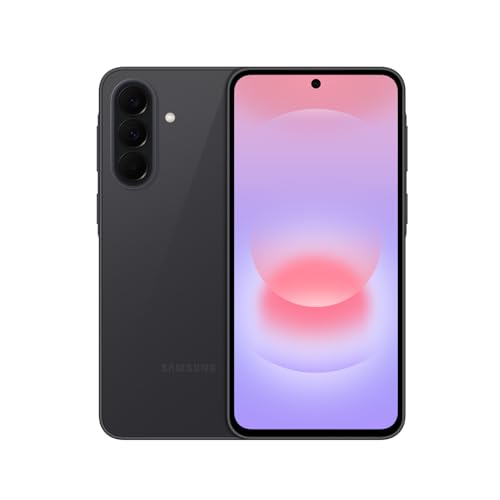
Samsung Galaxy A37 — Best value with IP68
The A37’s proposition is a small marvel of priorities: a proper Samsung AMOLED display, a slim and tidy body, a triple camera, a 5,000mAh battery — and IP68 sealing, the flagship-grade dust and water rating that phones at friendlier prices usually surrender first. For the screen’s owner, that sealing is not an abstract spec; it is the difference between reading in the bath, navigating in the rain and filming at the pool with confidence or with a plastic bag. The panel itself carries Samsung’s family virtues — deep contrast, confident colour, outdoor legibility — in the A-series’ most accessible current form.
As a newer model in Samsung’s line, the A37 also benefits from the current generation of the company’s display tuning and software support expectations. Its compromises are the tier’s honest ones: performance aimed at daily life rather than gaming leaderboards, and a camera set that is versatile rather than exceptional. But judged as this guide judges — by the screen and the life lived in front of it — the A37 may be the value peak of the entire list: the AMOLED experience, sealed like a flagship, at a price that leaves the rest of the budget alive.
- Panel: AMOLED display, slim-profile design
- Processor: Samsung mid-range platform for daily use
- Cameras: triple camera system
- Battery: 5,000mAh
- Build: IP68 dust and water resistance
Strengths
- IP68 sealing at this tier is a genuine coup
- Samsung panel quality and tuning
- Slim body makes the screen feel larger
Trade-offs
- Performance is mainstream, not gaming-grade
- Camera system is versatile rather than stellar
- Newer model — accessory shelves still filling
Think of the buyer this phone quietly serves best: the swimmer, the sailor, the parent at the splash park, the worker in the rain — people for whom a phone’s water rating is not a brochure line but a weekly fact. For them the A37’s combination is close to unique at its level, and the AMOLED in front of them is bright enough to read through wet sunglasses and spray. A screen you do not have to shelter is a screen you use more, and use is the entire point.
Best for: value buyers who refuse to choose between screen and sealing. Not suited for: demanding mobile gamers.

Nothing Phone (2a) Plus — Best design around a screen
Every phone in this guide is a rectangle of light; the Nothing is the only one that treats the rectangle’s frame as part of the artwork. Its 6.7-inch AMOLED runs at 120Hz with the family’s signature contrast and a clean, uncluttered presentation — Nothing OS keeps its dot-matrix personality mostly at the edges, letting the panel itself be about the content — while the Glyph lights on the transparent back handle notifications so the screen can stay dark and the evening stay yours. As a philosophy of screen time, it is the most considered here: the display blazes when summoned and abstains when not.
The supporting cast is strong — Dimensity 7350 Pro pace, a triple 50-megapixel camera system, 50W charging for the 5,000mAh battery — and the caveats are the brand’s familiar ones: modest water resistance rather than a high IP rating, and US carrier certification narrower than Samsung’s, so the band check matters. For the buyer whose screen is also a statement, no other panel in this guide arrives in such distinctive company.
- Panel: 6.7-inch AMOLED, 120Hz
- Processor: MediaTek Dimensity 7350 Pro, 12GB RAM
- Cameras: triple 50MP system including selfie camera
- Battery: 5,000mAh, 50W fast charging
- Build: transparent back with Glyph interface
Strengths
- Screen philosophy that respects your attention
- Fast charging and fluid performance
- Design no rival can be confused with
Trade-offs
- No high-grade water resistance
- US carrier fit needs checking
- Glyph styling divides taste
The Glyph deserves a final, fair assessment in a screen guide, because it is easy to file as decoration and wrong to do so. By moving the triage of notifications off the display — a pattern of light for the important, silence for the rest — it measurably changes how often the screen wakes in an evening, and a screen that wakes less is a battery saved, an attention kept and a panel preserved. Nothing built a notification philosophy and disguised it as a light show; the (2a) Plus’s AMOLED benefits from the disguise every single day.
Best for: design-led buyers who want AMOLED with character. Not suited for: buyers needing IP68 or universal carrier support.

Xiaomi Redmi Note 14 Pro — Best curved AMOLED on a budget
The Redmi Note 14 Pro’s screen performs a conjuring trick: a 6.67-inch AMOLED, curving gently into the frame, refreshing at 120Hz, with the brightness and contrast that used to announce a flagship — at a price that announces a Redmi. The curve is the tactile headline, narrowing the phone in the hand and giving films and photographs an edge-to-edge spill that flat panels cannot imitate; in good light the 200-megapixel main camera feeds the panel images worthy of it. For sheer screen-per-money, nothing in this guide is in the Redmi’s postcode.
The conditions are by now familiar in this guide and bear their repetition: this is an international model aimed at GSM networks such as T-Mobile and Mint, unsuited to Verizon-style carriers, running Xiaomi’s feature-rich but busier software with a shorter update horizon than Samsung’s. Buyers inside those conditions — and there are many — receive the most theatrical AMOLED experience in this list for the least money, which is exactly the bargain this phone exists to offer.
- Panel: 6.67-inch curved AMOLED, 120Hz
- Processor: MediaTek Dimensity 7300 Ultra class
- Cameras: 200MP main with optical stabilisation
- Battery: about 5,110mAh
- Networks: GSM carriers such as T-Mobile and Mint; check first
Strengths
- Curved flagship-feeling panel at a mid-range tier
- High-resolution camera feeds the screen well
- Slim, light handling for the size
Trade-offs
- Not for Verizon-style networks
- Software carries extra pre-installed apps
- Shorter update commitment than Samsung or Google
A word on the curve’s practicalities, since buyers ask: modern curved panels have largely tamed the accidental-touch and glare complaints of the early years, palm-rejection is competent, and the remaining costs are a fussier screen-protector fitting and a preference for the maker’s own cases. In exchange, the phone feels like a single poured object rather than an assembled one — and for the film watcher, the image genuinely seems to continue around the hand. Whether that sensation is worth the small frictions is a taste question this phone answers more cheaply than any rival.
Best for: GSM-carrier buyers who want the most screen for the money. Not suited for: set-and-forget software devotees.

OnePlus 15R — Best for motion and gaming
If the screen’s job is movement, the 15R is the specialist. Its panel refreshes at up to 165Hz — beyond the A56’s 120Hz, beyond the flagships most makers sell — and the difference, while past the point of necessity, is not past the point of pleasure: scrolling acquires a liquid certainty, supported games run with a smoothness that recalibrates expectations, and the interface’s every flick feels engineered rather than rendered. OnePlus pairs the panel with the two things a fast screen demands — Snapdragon 8 Gen 5 power to feed it frames and a 7,400mAh battery to feed it hours — making this the only phone here whose screen never has to apologise to its battery.
Colour tuning leans vivid and confident, photographs and video look splendid, and the panel’s outdoor behaviour is strong. The trade-offs sit elsewhere in the phone — camera processing a step behind the Pixel’s judgement, a shorter update window than Google’s — because the panel itself has no real weakness to confess. For gamers, scrollers and anyone whose phone is primarily a moving picture, this is the AMOLED to beat.
- Panel: 6.83-inch OLED class, up to 165Hz
- Processor: Snapdragon 8 Gen 5, 12GB RAM
- Cameras: flagship-adjacent multi-lens system
- Battery: 7,400mAh with very fast charging
- Build: premium glass and metal construction
Strengths
- Fastest, smoothest motion in this guide
- Battery sized for the screen’s appetite
- Flagship-class performance behind the panel
Trade-offs
- Camera processing trails Pixel and Samsung
- 165Hz benefits interface and games, not films
- Update window shorter than Google’s
There is an honesty in this phone’s priorities that screen shoppers should appreciate: OnePlus spent its panel budget where motion lives, rather than distributing it across laboratory categories. The result is a screen whose superiority is felt in the wrist and the thumb within a minute of picking it up — the most democratic kind of excellence, available to every owner in every app, rather than reserved for a test pattern. If your current phone’s 60Hz or even 120Hz has begun to feel like walking through water, the 15R is the cure with a battery attached.
Best for: gamers and heavy scrollers who live in motion. Not suited for: stills photographers choosing by camera alone.

Google Pixel 9a — Best colour faithfulness
The Pixel 9a’s pOLED is the panel for people who distrust theatre. Where rivals tune for the showroom — saturation that makes a demo video sing — Google tunes for truth: photographs appear as the camera judged them, skin keeps its actual colour, and the screen’s considerable brightness is spent on legibility rather than spectacle. At 6.3 inches and up to 120Hz it is also the most wieldable screen here, set in a compact, flat-sided body with IP68 sealing and a battery that outlasts bigger phones — the panel as a precision instrument rather than a cinema.
Around it sits the familiar 9a argument: Tensor G4 intelligence, the benchmark camera processing, and years of updates. Its screen will not win a brightness duel in a shop window against the vivid Samsungs, and that is precisely its owner’s point. If your phone is where your photographs live and your reading happens, the Pixel’s faithful panel is the connoisseur’s choice of this entire guide — the screen that shows you the world rather than a poster of it.
- Panel: 6.3-inch pOLED, up to 120Hz
- Processor: Google Tensor G4, 8GB RAM
- Cameras: 48MP main with OIS, 13MP ultrawide
- Battery: about 5,100mAh
- Build: flat aluminium frame, IP68 sealing
Strengths
- Most faithful colour reproduction here
- Compact size keeps the panel one-handable
- Camera and screen share one honest philosophy
Trade-offs
- Less showroom drama than the vivid rivals
- Slow charging
- Smaller canvas for film and split-screen
Pixel owners develop a recognisable loyalty, and the screen is a quiet cause of it: a panel that never shouts lets the phone recede, until what remains in the hand feels less like a device performing and more like a window being held. After a month with the 9a, more theatrical screens can read as effortful — a compliment to Google’s restraint that no benchmark will ever record, and the reason this smallest panel in the guide keeps winning arguments against larger ones.
Best for: photographers and readers who value accuracy. Not suited for: buyers who want the biggest, boldest display.
How do the six AMOLED screens compare side by side?
| Phone | Panel | Refresh | Tuning character | Best screen job |
|---|---|---|---|---|
| Galaxy A56 | 6.7-inch Super AMOLED | 120Hz | Vivid or natural, your choice | Everyday everything |
| Galaxy A37 | AMOLED | High-refresh class | Confident Samsung colour | Value with IP68 |
| Nothing (2a) Plus | 6.7-inch AMOLED | 120Hz | Clean, content-first | Design-led daily use |
| Redmi Note 14 Pro | 6.67-inch curved AMOLED | 120Hz | Rich and theatrical | Films on a budget |
| OnePlus 15R | 6.83-inch OLED class | Up to 165Hz | Vivid, motion-first | Gaming and scrolling |
| Pixel 9a | 6.3-inch pOLED | Up to 120Hz | Faithful and calm | Photos and reading |
Which AMOLED phone fits which kind of viewer?
The film watcher who streams nightly and judges a phone by its darkest scenes should start with size and contrast discipline: the A56 for the complete package, the Redmi for the curved cinema feeling on a GSM carrier, both delivering the true blacks that make HDR content honest. The reader — books in bed, long reads on trains — should go directly to the Pixel 9a, whose calm tuning and one-handable size respect the habit, with the A56 as the larger-format alternative. The gamer and the compulsive scroller have one address: the OnePlus 15R, whose 165Hz panel and stamina exist precisely for motion that never sits still.
The swimmer, the sailor and the rain-worker have the A37 and its improbable IP68-at-the-price. The design-led buyer who wants the screen framed like an object has the Nothing (2a) Plus. And the buyer who simply wants the reference experience — the screen the category is judged by, in a phone with no drama attached — has the A56 again, which is why it leads this guide despite the charms arranged around it. Six panels, one technology, six different answers to the question of what a screen is for: that spread is the sign of a mature market, and it makes the matching exercise in this section the most valuable few minutes of your purchase.
How long does an AMOLED screen stay this good?
Longer than the phone around it, in most ownership stories. Panel ageing in modern AMOLED is gradual and managed — the software shifts pixels, balances wear and caps the abusive brightness habits — so the screen you enjoy in month one is recognisably the screen of year three, with any decline measured in laboratory terms rather than in regret. The realistic screen risks are physical, not chemical: the scratch, the crack, the pressure mark from a bag’s contents, which is why this guide keeps returning to the protector and the case as the panel’s true longevity plan. Software support is the other half of a screen’s life, since a display is only as good as the system painting it; the Samsung and Google picks carry the longest commitments here, and their panels will be flattered by new software long after launch. Buy the panel you love, protect it like the expensive component it is, and it will repay you at every glance for years.
How should you set up an AMOLED screen for your eyes?
Ten minutes in the display settings will shape years of looking. Begin with the colour profile: every phone here offers a vivid and a natural mode, and the honest way to choose is with your own photographs, not the demo reel — skin and sky should look like the day you remember. Set adaptive brightness on and then correct it for a few days whenever it guesses wrong; the system learns your rooms, and a trained adaptive setting beats a manual slider you will forget to move. In the evening, enable the warm night mode on a schedule rather than by hand, and lower the white point of your reading apps; eye fatigue at midnight is usually a brightness and colour-temperature story, not a panel verdict.
Then spend the technology’s unique gifts deliberately. Choose a dark theme — on AMOLED it is both easier on night eyes and genuinely lighter on the battery, since black pixels draw nothing. Configure the always-on display to show the time and the few notifications that matter, or schedule it off overnight. If you are among the minority who notice flicker sensitivity at low brightness, experiment before concluding: raise the minimum brightness you use in bed, try the maker’s eye-comfort options, and read at a slightly lit distance for the first week — many sensitive users settle comfortably, and those who do not have learned something worth knowing inside the returns window rather than outside it.
Do not neglect the font and scaling choices while you are in these menus. AMOLED’s sharpness rewards a slightly larger default text size more gracefully than LCD ever did, because the contrast carries the letterforms; readers who raise the size one step and enable the bolder text option often discover that the new screen feels less like a gadget and more like print. It costs nothing, it can be undone in seconds, and it is the setting owners most often thank themselves for a year later.
What should you test in the shop before the screen wins you?
Bring your own content — this is the whole method. Open three of your own photographs: a face in daylight, a night scene, a picture you love whose colours you know. A screen that renders those honestly will render your life honestly, while a screen that flatters a demo reel may spend years exaggerating your memories. Read a page of a real article at your preferred size, in the natural colour profile and then the vivid one, and notice which your eyes relax into. Scroll a long page slowly and then quickly; the 120Hz panels here should hold the text together in a way your old phone cannot, and the sensation, once felt, is the refresh rate argument settled without a single number.
Then do the two environmental tests shops never suggest. Carry the phone to the window — or the door — and read a map in daylight, because that is the screen’s hardest hour and its most common one. And cup your hands around it, dim it to bedtime level, and read for a full minute: this is where dimming character lives, where sensitive eyes learn what they need to know, and where the Pixel’s calm and the Samsungs’ polish make their quiet cases. Five unhurried minutes of this testing is worth more than any review, including this one — a fact this guide is happy to print, because a screen chosen by your own eyes rarely disappoints them later.
Add one more test if photography matters to you: take the same photograph with the shop’s demo unit and view it beside the same scene with your naked eye. The panel that shows you the scene you just saw — not a more saturated souvenir of it — is the panel your archive deserves, and performing this small experiment explains the Pixel’s following more eloquently than any colour-accuracy chart we could print.
What mistakes do AMOLED shoppers keep making?
The first is buying by the peak brightness number, a laboratory figure for a small patch of screen that predicts your bus-stop experience about as well as a top speed predicts a commute. Judge by whole-screen legibility in real sun, where every phone here performs honourably. The second is fearing burn-in as if it were 2013: modern panels shift and manage their pixels actively, and the realistic residual advice is merely to vary static elements and use the always-on display as designed. The third is leaving the vivid profile on and then blaming the camera for loud colours — the photograph was faithful; the screen was performing.
Fourth, ignoring PWM until it becomes a grievance. If you know you are flicker-sensitive, weight the eye-comfort features and the returns window in your decision, and test at bedtime brightness specifically, since that is where dimming behaviour lives. Fifth, skipping the screen protector because the glass is modern and tough: AMOLED panels are the most expensive component in these phones, and the protector is the one accessory whose value is never theoretical. Sixth, comparing screens in a bright shop under fluorescent light and calling it a test — take the phone to the window, open your own photographs, and read a page of your own book. The screen you are buying is the one in your life, not the one in the lighting department.
Seventh, setting the new panel to maximum brightness permanently because the first day was sunny, then blaming the battery for the arithmetic. Adaptive brightness exists precisely to arbitrate between the pavement and the bedroom; owners who let it work report both better legibility and better endurance than owners who pin the slider, and the panel’s lifespan quietly thanks them as well.
Final Recommendation
The Galaxy A56 is this guide’s answer for most eyes: a bright, smooth, beautifully tuned Super AMOLED in a metal body with years of support, at a price that respects the rest of your life. Step to the A37 if the budget tightens and the IP68 sealing charms you — it should — or to the Redmi Note 14 Pro if your GSM carrier agrees and you want the curved flagship feeling for the least money. The OnePlus 15R owns motion, the Pixel 9a owns truth, and the Nothing (2a) Plus owns the room it enters. If our own eyes had to sign for one panel tonight, they would sign for the A56 — while admitting that an evening spent reading on the Pixel’s calm pOLED is the pleasure this category’s vivid majority will never quite understand.
A closing thought for the undecided: of every component in a modern phone, the screen is the one whose quality you will sample most often and forgive least. Processors idle, cameras wait for occasions, batteries merely endure — but the panel performs at every glance, in every light, for the whole life of the device. It is the correct place to spend a disproportionate share of your attention and, where the choice demands it, your budget. The six phones above were chosen so that whichever you pick, that investment lands on a panel worthy of it.
Set the phone up on its first evening the way this guide’s setup section describes — colour profile chosen by your own photographs, adaptive brightness trained, evening warmth scheduled, dark theme enabled — and the panel will repay the half hour every day of its service. Screens are often bought in a hurry and lived with for years; these six reward the buyer who reverses that order, choosing slowly and then simply enjoying the looking.
Frequently Asked Questions
What is the difference between AMOLED and pOLED?
Construction, not character. Both light every pixel individually, delivering the same true blacks and contrast. pOLED builds the panel on a plastic substrate instead of glass, allowing thinner, lighter designs with narrow borders — the Pixel 9a’s approach. In daily viewing the two are siblings; choose by the phone around the panel rather than by the letter in front of OLED.
How do I protect an AMOLED screen properly?
With the boring trilogy that works: a tempered-glass protector fitted on day one, a case whose lips rise above the panel’s plane, and the habit of a pocket or compartment the phone does not share with keys. Add two AMOLED-specific courtesies — avoid leaving a static, bright image displayed for hours at maximum brightness, and let the always-on display use its designed, shifting, dim presentation rather than any forced alternative — and the panel’s own management systems will handle the rest for years.
Does a dark theme really save battery on AMOLED?
Yes, measurably, because black pixels are switched off and draw no power. The saving scales with how much of your interface is truly black and how bright you run the screen; at modest brightness with mixed content it is a helpful margin rather than a transformation. The always-on display exploits the same principle, lighting a few hundred pixels to show the time. On an LCD, by contrast, dark themes save nothing — the backlight burns regardless.
Will an AMOLED screen burn in?
Modern panels are engineered against it with pixel shifting, brightness management and refreshed interface elements, and for typical mixed use it is a negligible risk over a phone’s life. The residual caution applies to genuinely static, bright elements displayed for many hours daily — a fixed navigation bar in a delivery driver’s all-day app, for instance — where varying the layout and using dark themes is cheap insurance. For the overwhelming majority of owners, this is a solved problem wearing an old reputation.
Are curved AMOLED screens better than flat ones?
They are different rather than better. The curve, as the Redmi Note 14 Pro demonstrates, narrows the phone in the hand, gives video an edge-spilling drama and feels like a single poured object; the flat panels of the other five are easier to protect, kinder under screen protectors and free of edge reflections in bright rooms. Photographers and case-users generally prefer flat; film watchers and design lovers gravitate to the curve. Neither choice is a quality verdict — it is a taste with minor practical footnotes, priced here from the Redmi’s friendly tier upward.
What is PWM dimming, and should I worry about it?
It is the technique of pulsing pixels rapidly to control perceived brightness, used in some form by most OLED panels, especially at low brightness. Most people never perceive it. A minority experience eye strain or headaches attributable to flicker, and for them the mitigations are real: makers increasingly use higher pulse frequencies and gentler low-brightness behaviour, and settings such as eye-comfort modes help some users. If you suspect sensitivity, test any phone here at bedtime brightness during the returns window — your own eyes are the only instrument that can settle the question.
Should I choose vivid or natural colour?
Choose with your photographs, as the setup section advises — but know the temperaments involved. Vivid flatters landscapes, games and video, and makes a new screen feel like an event; natural flatters faces, food and any photograph you intend to print or edit. Many owners settle on vivid for the first delighted month and migrate to natural as the novelty fades and accuracy starts to feel like luxury. Every phone here offers both, which is the actual premium feature: a panel that lets you change your mind.
If children use the phone, note that their games and videos are produced in vivid colours already, and the natural profile often looks “wrong” to young eyes for exactly one evening before it starts looking like the world. Households that share a device for photography should standardise on one profile, so that the family archive is judged consistently from capture to print.
Is a bigger AMOLED always better?
No — it is better for films, split-screen and ageing eyes, and worse for pockets, one-handed reach and weight. The spread in this guide, from the Pixel’s 6.3 inches to the OnePlus’s 6.83, exists because viewers differ more than panels do. Choose the size by the hand and the habit, then let the technology do its work at that size; a smaller AMOLED that is always with you outperforms a larger one left at home in every metric that matters.
Can I tell AMOLED from LCD without a label?
Instantly, in a dark room: display a black image full-screen and the AMOLED disappears into the darkness while an LCD glows faintly grey from its backlight. In daylight the giveaway is subtler — contrast in shadowed parts of photographs, and the depth of night scenes. The test needs no equipment and works in any shop, which is why it remains the quickest screen education available to a buyer.
Does AMOLED use more battery than LCD?
It depends entirely on what you show it — which is the technology’s essential charm. Dark content, dark themes and night scenes draw dramatically less power than an LCD’s always-on backlight; a bright white page at full sunlight brightness can draw comparable or greater power. Real usage is a mixture, and the adaptive refresh and brightness systems across this list manage the arithmetic for you. The honest summary: AMOLED gives you control over the screen’s appetite, and rewards the dark-theme habits this guide recommends.
Do I need a special charger or settings to protect the panel?
No special charger — the panel’s care is behavioural rather than electrical. The protections that matter are the ones in our protection answer: a glass protector, a raised-lip case, sane brightness habits and the avoidance of static bright images left for hours. Modern AMOLED panels manage their own pixel health quietly in the background; your contribution is simply not to fight them, and to let features like the always-on display operate in their designed, dim, shifting form.
Which of these screens is best for outdoor work?
For legibility under a working sky, the A56’s combination of brightness, anti-glare behaviour and Samsung’s outdoor tuning makes it the safest pair of eyes on a site or a deck — with the A37 close behind and adding the sealing that outdoor work eventually requests. The OnePlus counters with sheer panel size and brightness headroom. Whichever you choose, rehearse the two habits from our outdoor section — the polarised-lens check and the quick brightness gesture — because they contribute as much to outdoor readability as the panel itself.
Is 120Hz worth it over 60Hz?
For the interface, unambiguously: scrolling, swiping and animations become visibly smoother, and the difference is one of the few upgrades every user feels within a minute. Films and most video are unaffected, since they are produced at lower frame rates. All six phones here meet the 120Hz standard, with the OnePlus 15R extending to 165Hz for gaming and interface fluidity — a luxury, honestly labelled, on top of a necessity already served.
Why can an AMOLED screen look slightly grainy or tinted at very low brightness?
At the dimmest settings each pixel is being driven with very little current, and tiny differences between individual pixels become easier to see as faint grain, uneven patches or a slight green cast, especially on a plain grey background in a dark room. It varies from panel to panel and is most noticeable during the first careful inspection at night. Raising brightness a notch, using the extra-dim feature cautiously, and judging the screen at the level you genuinely read at will tell you whether it matters in real use.
Related Guides
Protect the panel you chose with the best screen protectors for AMOLED phones, feed a bright display on the move using the best power banks for heavy screen days, and compare the tier above in the best flagship smartphone displays ranked.
Related guides
- Best 4K Monitors for MacBook Pro: USB-C Panels With Real Power Delivery
- Best Routers for Remote Work: VPN Gateways, Travel Routers and Home Wi-Fi That Holds a Call
- Best Analog Smartwatches: Real Hands, Hidden Brains — the Honest Hybrid Guide
- Best B-W LaserJet Printers: Six Monochrome Lasers for Black-and-White Work



[…] the value flagship setup with the best slim cases that keep a premium feel, feed a fast-charging phone properly using the best high-wattage USB-C chargers, and compare the […]