What's inside
- Key Takeaways
- Quick Picks
- How Did We Choose at the Sweet-Spot Tier?
- What Does the Extra Money Buy Over the $200 Tier?
- Which Are the Best 300 Dollar Smartphones in Detail?
- How Do the Six Compare Side by Side?
- How Should You Spend at This Tier: New Mid-Range or Older Flagship?
- What Mistakes Do Buyers Make at the Sweet-Spot Tier?
- How Long Will a $300 Phone Stay Good?
- How Do the Software Experiences Actually Differ Day to Day?
- Why Does Charging Speed Deserve More Attention Than It Gets?
- How Do the Cameras Compare in the Conditions That Actually Ruin Photos?
- Which Phone Suits Which Owner? Five Scenarios
- What About Cases, Accessories and the Second Life of These Phones?
- How Do the Screens Compare When You Live on Them?
- What Does Battery Life Look Like Across a Real Week?
- When Is the Right Moment to Buy at This Tier?
- Final Recommendation
- Frequently Asked Questions
- Related Guides
As an Amazon Associate I earn from qualifying purchases. This post may contain affiliate links at no extra cost to you.
widgetverdict.com is reader-supported. When you buy through links on our site, we may earn an affiliate commission.
Where to buy: each of the six phones below links to an Amazon listing verified for this guide, and all six are unlocked models you can take to the carrier of your choice. As with the tier below, treat $300 as the frame of the neighbourhood rather than a promise about any single handset — prices inside the frame drift with promotions, and a phone that belongs in this guide belongs here because of what it is, not what it costs this week.
There is a reason the best 300 dollar smartphones attract more argument than any other category we cover: this is the tier where phones stop apologising. One step up from the budget floor, the compromises change character. Screens become OLED almost everywhere. Processors gain the headroom to stay smooth for years rather than months. Cameras start producing photographs you would frame rather than merely keep. And software support stretches from a token gesture into a genuine ownership plan. The question at $300 is no longer “what must I endure?” but “which excellence do I want?” — because each of the six phones below is excellent at a different thing.
Google’s Pixel 8a argues that intelligence and photography matter most. Nothing’s Phone (2a) argues that design and software character do. Motorola splits its own vote between a stylus you will either love or never touch, and a battery-led bruiser built to be dropped. Samsung fields two polished all-rounders separated mainly by generation. This guide’s job is to make those arguments fairly and then tell you which one wins for which kind of owner.
Our Top Picks
Key Takeaways
- The $300 tier is the market’s sweet spot: OLED screens, capable processors and multi-year support arrive together here for the first time.
- The Pixel 8a is the camera and software pick, with seven years of updates and Google’s image processing doing work its hardware alone could not.
- Nothing’s Phone (2a) is the character pick — a distinctive design and clean software that feel like a flagship’s personality at a third of the cost.
- Motorola’s Moto G Stylus 2025 is the only phone here with a built-in pen; the Moto G Power 2025 is the durability and endurance entry.
- Samsung’s Galaxy A35 and A37 bring AMOLED screens, water resistance and the longest support in class after the Pixel — choosing between them is a generation question.
- At this tier, last year’s discounts matter: several of these phones began life priced higher and settled here, which is why the value is so strong.
Quick Picks
| Pick | Badge | Why it earns its place |
|---|---|---|
| Google Pixel 8a | Best camera and smartest software | Seven years of updates and image processing that flatters every photograph you take. |
| Nothing Phone (2a) | Best design and personality | A transparent-backed phone with a glyph light interface and clean software that stands apart from the slab crowd. |
| Motorola Moto G Stylus 2025 | Best for note-takers | The only built-in stylus at the tier, wrapped around a bright OLED screen and fast charging. |
| Samsung Galaxy A35 | Best Samsung value | AMOLED, IP67 sealing and Samsung’s ecosystem polish at the friendliest Samsung price here. |
| Samsung Galaxy A37 | Best future-proof Samsung | The newer generation of the same formula, with the longest remaining support runway of the pair. |
| Motorola Moto G Power 2025 | Best battery and toughness | Two-day endurance thinking, serious water and drop credentials, and even wireless charging. |
How Did We Choose at the Sweet-Spot Tier?
Our method at $300 differs from the budget tier in one important way: we stopped forgiving. A $200 phone may plead its price when its camera smears or its updates end early; a $300 phone is competing against discounted former flagships and the used market, so it must justify itself against genuinely good alternatives. We required an OLED-class screen or an exceptional reason to lack one, a processor with multi-year headroom, a support commitment of at least several years, and a camera whose output we would happily show someone without prefacing it with the price.
Within those gates, we deliberately chose diversity over duplication. Six near-identical all-rounders would make a tidy table and a useless guide, because buyers at this tier are really choosing a speciality: photography, note-taking, endurance, design, ecosystem. Each pick below is the strongest expression of one speciality we could verify at the tier, and the detailed sections are written to expose each phone’s weakness as clearly as its gift — the Pixel’s modest charging, the Nothing phone’s carrier quirks, the stylus phone’s software runway. A guide that only praises is a brochure; this one intends to be a decision.
What Does the Extra Money Buy Over the $200 Tier?
Four things, in descending order of daily importance. First, processing headroom: the chips here — Google’s Tensor G3, Samsung’s and Motorola’s mid-range silicon, Nothing’s Dimensity — hold their smoothness under the accumulating weight of apps and years in a way budget processors do not, and the difference is most visible in year three rather than week one. Second, screens: OLED panels with true blacks and strong brightness replace the LCD compromises below, and once you have read in bed on OLED, the way back is hard. Third, cameras: better sensors married to much better processing, which is why the Pixel 8a photographs like a phone from a class above.
Fourth, and quietly most valuable, is time. Support windows at this tier stretch to five, six, even seven years, and charging speeds climb from overnight patience to genuinely useful top-ups. What the extra money does not buy is a different category of object: these remain plastic-or-glass mid-range phones without the telephoto lenses, titanium rails and satellite tricks of the flagship world. The tier’s charm is that so few people actually need those things, and its trap is paying flagship money for them out of habit.
Which Are the Best 300 Dollar Smartphones in Detail?
Google Pixel 8a — Best camera and smartest software
The Pixel 8a is the phone that makes this tier feel unfair to everyone else. Its camera hardware is respectable rather than remarkable — a 64-megapixel main sensor, a 13-megapixel ultrawide — but Google’s computational photography turns that hardware into the most reliable point-and-shoot in this guide. Skin tones stay honest, night scenes stay clean, moving children stay recognisable, and the editing tools that arrive with Google’s software — the ones that remove photobombers, sharpen blurred faces and rescue badly framed shots — are genuinely useful rather than keynote decoration. If photographs are the reason you carry a phone, the argument ends here. One buying note for this tier: the Pixel 8a listing currently showing on Amazon is a Renewed Premium unit rather than a new phone, so this guide leaves it unlinked — if you want a new 8a at this budget, check Google’s own store or another authorised retailer instead.
The rest of the phone is a study in priorities. The Tensor G3 processor is built for Google’s AI features rather than benchmark trophies, and in daily use it feels swift and stays current: seven years of operating system and security updates from launch is the longest promise in this guide, outlasting even Samsung’s. The 6.1-inch OLED screen runs at 120Hz and makes the 8a the most one-hand-friendly phone here, a virtue so rare now that it deserves emphasis. Wireless charging is present, IP67 sealing is present, and the software is the cleanest Android Google makes.
The compromises are charging speed and thermal manners. Wired charging is slow by the standards of this guide — the Motorolas below refill in a fraction of the time — and the Tensor chip warms up and throttles under sustained gaming in a way its rivals do not. Battery capacity is the smallest here, though efficiency keeps real-world endurance respectable rather than remarkable. Buy the 8a for its brain and its camera; accept that it sips power slowly and prefers its workloads in bursts.
- Display: 6.1-inch OLED, 120Hz
- Main camera: 64 megapixels with Google computational photography
- Processor: Google Tensor G3
- Updates: seven years of OS and security support
- Extras: wireless charging, IP67 sealing
Strengths
- Photography that embarrasses phones costing far more, especially of people and at night.
- Seven-year support promise and first-in-line access to new Android versions and features.
- Compact, one-handable size that has nearly vanished from the rest of the market.
Trade-offs
- Slow wired charging — the Motorolas in this guide refill dramatically faster.
- Processor heats and slows under long gaming sessions.
- Smallest battery here; heavy users will charge nightly without exception.
Best for: photographers, parents, and anyone who wants Google’s software and the longest support at the tier. Not suited for: marathon gamers or buyers who need a flat battery fixed in twenty minutes.

Nothing Phone (2a) — Best design and personality
Every other phone in this guide is a black slab with a logo. The Nothing Phone (2a) is a transparent-backed object with a ring of lights where the camera plateau should be, and that difference is not vanity — it is a considered answer to the question of what a mid-range phone can be besides cheaper. The glyph lights on the back are genuinely functional: they show charging progress, count down timers, and can be assigned patterns per contact so you know who is calling while the phone lies face-down in a meeting. Nothing OS, the software, extends the same philosophy — a dot-matrix visual identity, a home screen that can be stripped to monochrome calm, and a near-total absence of bloatware.
Beneath the personality sits a well-judged phone. The 6.7-inch AMOLED screen runs at 120Hz, the Dimensity processor keeps the interface fluid, the dual 50-megapixel cameras produce clean, natural-looking photographs without Samsung’s saturation or Google’s wizardry, and the 5,000mAh battery with fast charging handles a long day with something left. Nothing’s update commitment is respectable — several years of platform and security support — if not in the Pixel’s or Samsung’s league.
The caveats are about fit rather than quality. Nothing is a young company with a thinner service network than the giants, and US buyers should confirm band support for their carrier, because the phone’s network tuning has historically favoured T-Mobile-style GSM networks over Verizon. There is no wireless charging and no formal water-resistance rating to lean on. Buy it because it makes you smile when you pick it up — a legitimate reason that spec sheets cannot measure — and because the phone underneath the design is honest.
- Display: 6.7-inch AMOLED, 120Hz
- Design: transparent back with glyph light interface
- Cameras: dual 50-megapixel rear system
- Battery: 5,000mAh with fast wired charging
- Software: Nothing OS, minimal bloatware
Strengths
- Design and software character that no rival at any price quite duplicates.
- Clean, fluid interface unburdened by the duplicate apps that crowd Samsung and Xiaomi phones.
- Balanced hardware — screen, battery, cameras — with no single weak pillar.
Trade-offs
- US carrier fit needs checking, especially for Verizon customers.
- No wireless charging and no strong water-resistance rating.
- Smaller brand means a thinner repair and support network than Samsung or Google.
Best for: buyers bored by identical slabs who still want sound hardware and clean software. Not suited for: Verizon-first buyers or anyone who values a deep local service network over character.

Motorola Moto G Stylus 2025 — Best for note-takers
There is exactly one reason to put a stylus phone in this guide, and the Moto G Stylus 2025 states it every time you slide the pen from its silo: some thoughts are faster handwritten. Shopping lists on the lock screen without unlocking, annotations on a screenshot before sending it to a contractor, a signature on a delivery form, a sketch of a garden layout — the stylus converts the phone from a consumption device into a capture device, and at this tier nothing else does. Motorola’s pen is a simple capacitive-precision instrument rather than a pressure-sensitive artist’s tool, but for handwriting and marking up, simple is precisely what the tasks need.
Motorola wrapped the pen in the strongest Moto G hardware here. The 6.7-inch pOLED screen runs at 120Hz and outclasses the LCDs of cheaper Motos; the Snapdragon processor is a genuine step up in responsiveness; the main camera carries optical stabilisation and a good Sony sensor; and charging is properly fast, with a large battery behind it. The software adds the expected pen shortcuts — a note opens the moment the stylus leaves its silo — without disturbing Motorola’s clean Android.
The familiar Motorola caveats apply: update support is shorter than Samsung’s or Google’s, and the pen itself is a small thing that can be lost, though replacements are cheap and the phone works perfectly well with a fingertip while you wait. The real question is self-knowledge. If you have ever wished you could scribble on your phone, this is the only pick that answers; if you have not, the same money buys the Pixel’s camera or the Power’s toughness below, and the stylus becomes a passenger.
- Display: 6.7-inch pOLED, 120Hz
- Stylus: built-in, stored in the body
- Main camera: 50 megapixels with optical stabilisation
- Battery: 5,000mAh with fast wired charging
- Software: near-stock Android with pen shortcuts
Strengths
- The only integrated pen at the tier — notes, mark-ups and signatures without unlocking or accessories.
- OLED screen and stabilised camera lift it above the usual Moto G formula.
- Fast charging and clean software keep the daily experience friction-free.
Trade-offs
- Update runway is shorter than the Pixel’s and Samsungs’ in this guide.
- The stylus is a handwriting tool, not a pressure-sensitive drawing instrument.
- Buyers who never write by hand are paying for a feature that will live in its silo.
Best for: list-makers, annotators, field workers and anyone whose thoughts arrive faster by hand. Not suited for: artists needing pressure sensitivity, or buyers who know the pen would never leave the phone.

Samsung Galaxy A35 — Best Samsung value
The Galaxy A35 is the pragmatist’s Samsung: it takes the formula that makes the A-series the default mid-range recommendation — a bright Super AMOLED screen, IP67 water resistance, a stabilised main camera, a 5,000mAh battery, microSD expansion — and delivers it at the friendliest price in this guide’s Samsung contingent. It appears in our dual-SIM guide too, in its global configuration, which tells you something about its versatility: this is a phone with no serious weakness, bought by people who intend to keep it.
Daily life with the A35 is defined by the screen and the software. The 6.6-inch AMOLED at 120Hz is the equal of anything here for colour and brightness, and Samsung’s One UI, whatever its clutter, brings features the cleaner rivals lack — deep customisation, a mature ecosystem of accessories and cases, and integration with Samsung tablets, watches and earbuds that many households already own. The Exynos processor handles the everyday workload without drama and only asks for patience in heavy games.
Its position in this guide is a value judgement: the A37 below is the same idea one generation newer, with a longer support runway ahead of it. The A35 counters with maturity — a known quantity, widely reviewed, widely cased, often the softer street price as the newer model takes the spotlight. If the difference between them is small on the day you buy, take the newer phone; if the A35 is meaningfully cheaper, it gives up remarkably little, and its four generations of platform updates and five years of patches still beat most of this tier.
- Display: 6.6-inch Super AMOLED, 120Hz
- Main camera: 50 megapixels with optical stabilisation
- Battery: 5,000mAh
- Build: IP67 water resistance, microSD expansion
- Updates: four Android generations, five years of security patches
Strengths
- Complete, balanced package — screen, sealing, storage expansion — with no missing basics.
- Samsung’s accessory and case ecosystem is the deepest in this guide.
- Often the best-value route into AMOLED and IP67 once the newer generation arrives.
Trade-offs
- One generation older than the A37, so its support clock started earlier.
- Charging is unhurried compared with the Motorolas here.
- One UI’s duplicate apps and extras need a setup tidy that cleaner rivals skip.
Best for: Samsung households and value hunters who want the complete A-series formula at its friendliest price. Not suited for: buyers who keep phones longest and should maximise support runway with the A37 or Pixel.
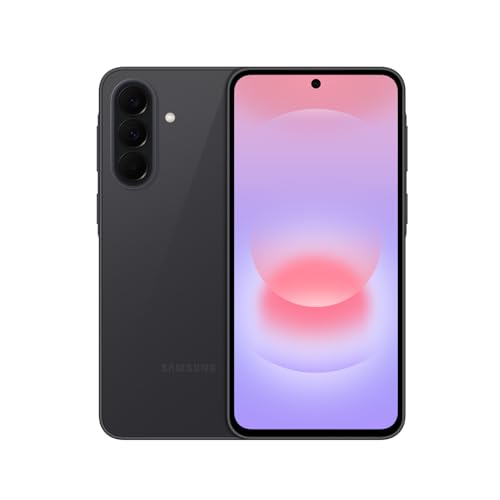
Samsung Galaxy A37 — Best future-proof Samsung
If the A35 is the value play, the Galaxy A37 is the patience play: the same Samsung formula — Super AMOLED screen at 120Hz, stabilised 50-megapixel main camera, 5,000mAh battery, IP67 sealing — in its newest generation, which matters chiefly because of the calendar. Samsung’s extended support commitment for this class of phone means the A37’s update runway stretches further into the future than any Samsung in this guide, and for a buyer whose habit is to run a phone until it can no longer be patched, that runway is the product.
Generation-over-generation changes in this line are evolutionary, and the A37 is honest about it: refinements to the processor’s efficiency, the camera’s processing, the brightness headroom, rather than a reinvention. That is not a criticism. The A-series formula was already the most complete at the tier; polishing it while extending its support is what a mature product line should do, and the result is the Samsung we would buy today with a four-to-five-year horizon in mind.
The decision between the two Samsungs in this guide is therefore unusually simple, and it is about you rather than the phones. Keep a phone for two to three years and buy on the day’s value — the A35 will often win. Keep a phone until support ends and buy the runway — the A37 wins every time. Both share the family’s standing caveats: charging that trails Motorola, an interface that rewards ten minutes of tidying, and secondary cameras that exist to fill a spec line rather than to be used with love.
- Screen: Super AMOLED panel in the 120Hz class
- Camera: stabilised 50-megapixel main unit
- Battery: 5,000mAh cell
- Sealing: IP67 water resistance
- Support: newest generation of Samsung’s extended commitment for the class
Strengths
- Longest remaining Samsung support runway in this guide.
- The complete A-series formula in its most refined form — screen, sealing, camera, battery.
- Efficiency refinements stretch the same battery capacity further through a day.
Trade-offs
- Evolutionary step over the A35 — owners of that phone gain little by switching.
- Street prices start firmer than its sibling’s discounted position.
- Charging speed and interface clutter remain the family’s known compromises.
Best for: long-horizon Samsung buyers who want the newest generation and the full support window ahead of them. Not suited for: A35 owners, or bargain hunters happier taking last generation’s discount.

Motorola Moto G Power 2025 — Best battery and toughness
The Moto G Power 2025 is built around a suspicion that its owner will be rough with it, and it answers with the strongest durability credentials in this guide: high-grade water and dust sealing, military-standard drop testing, and a design that treats a worksite, a boat deck or a toddler’s throwing arm as operating conditions rather than accidents. Layered on that toughness is the Power line’s traditional virtue — a 5,000mAh battery tuned for two-day life — and a surprise that budget phones are not supposed to have: wireless charging, which turns every café table pad and car cradle into a top-up.
The screen is the honest compromise. It is a large LCD at 120Hz — smooth, bright enough, and clearly a step below the OLED panels elsewhere in this guide for contrast and dark-room video. The processor is a mid-range Dimensity that handles daily work and light gaming without fuss and without flourish, and the cameras are competent daylight tools. Motorola’s software stays clean, and its update commitment, while shorter than Samsung’s, is adequate for the phone’s likely working life.
Choose the Power if your phone’s enemies are physical: weather, drops, dust, long shifts far from sockets. Its sealing and battery are not spec-sheet ornaments; they are the difference between a phone that survives your job and one that becomes a claim. Buyers whose phones live gentler lives will get more daily pleasure from the OLED picks above — which is exactly the kind of trade this guide exists to make explicit.
- Display: large LCD, 120Hz
- Battery: 5,000mAh, two-day tuning
- Durability: high-grade water/dust sealing, military-standard drop testing
- Charging: fast wired plus wireless charging
- Software: near-stock Android
Strengths
- Toughness credentials lead this guide — the phone most likely to survive your actual life.
- Wireless charging at this tier is a genuine rarity and daily convenience.
- Two-day battery tuning suits shift workers and heavy travellers.
Trade-offs
- LCD screen concedes contrast and black levels to every OLED pick here.
- Cameras are workmanlike rather than delightful.
- Bulkier and heavier in the hand than the sleek picks — the price of the armour.
Best for: outdoor workers, clumsy owners, and anyone whose phones die physically before they die electronically. Not suited for: screen connoisseurs or photographers, who should take the Pixel or a Samsung.
How Do the Six Compare Side by Side?
| Phone | Screen | Defining strength | Support outlook | Watch out for |
|---|---|---|---|---|
| Pixel 8a | 6.1-inch OLED 120Hz | Camera and Google AI | Seven years | Slow charging, gaming heat |
| Nothing Phone (2a) | 6.7-inch AMOLED 120Hz | Design and clean software | Several years | Carrier fit, no wireless charging |
| Moto G Stylus 2025 | 6.7-inch pOLED 120Hz | Built-in stylus | Moderate | Pen is for writing, not art |
| Galaxy A35 | 6.6-inch AMOLED 120Hz | Complete value formula | Four OS generations | Older generation, slow charging |
| Galaxy A37 | AMOLED 120Hz class | Newest Samsung runway | Longest Samsung here | Firmer launch pricing |
| Moto G Power 2025 | Large LCD 120Hz | Toughness and endurance | Moderate | LCD contrast, bulk |
How Should You Spend at This Tier: New Mid-Range or Older Flagship?
Every $300 buyer eventually faces the ghost at the feast: a flagship from two or three years ago, discounted or renewed into this neighbourhood, with a famous name and a spec sheet from a richer world. Sometimes that ghost wins — a well-kept former flagship brings telephoto cameras and premium materials no phone here matches. But the comparison is rarely as one-sided as nostalgia paints it. The older flagship’s battery has lived a life, its support window is mostly spent, its remaining updates can be counted on one hand, and its repair parts grow scarcer each year. The new mid-range phones in this guide counter with fresh batteries, full support runways — seven years in the Pixel’s case — and warranties that start today.
Our rule of thumb: if the older flagship would arrive with less than half its support life remaining, buy new from this guide. The exception is the photographer who specifically needs a telephoto lens, a feature this tier omits entirely; for that buyer alone, a carefully verified renewed flagship is a rational detour, bought from a seller whose condition grading you trust. Everyone else is better served by a phone whose clock starts when they open the box.
What Mistakes Do Buyers Make at the Sweet-Spot Tier?
The characteristic mistake here is paying for the wrong excellence — choosing the stylus phone for its screen and never writing a note, or the Pixel for its support and then gaming on it nightly until its thermals annoy you into an early upgrade. The picks at this tier are specialised enough that self-knowledge is the whole game: name the two things you do most with a phone, and let the table above match them. A second mistake is ignoring the carrier check on the less mainstream brands. Nothing and the imported flavours of familiar names reward a two-minute band verification; skipping it turns a bargain into a return label.
Buyers also underrate charging speed until they live without it. The difference between the Pixel’s unhurried refill and the Motorolas’ fast top-up is invisible in a spec table and enormous on the morning you wake to a dead phone before a flight. If your life includes such mornings — most lives do — weight charging more heavily than reviewers do. Finally, at this tier more than any other, people forget to price the whole purchase: a case, a decent charger where none is included, and the plan the unlocked phone lets you choose. The phone is the headline; the ownership is the article.
How Long Will a $300 Phone Stay Good?
Longer than any tier below it, and the reason is the support arithmetic. The Pixel 8a’s seven-year promise and the Samsungs’ extended windows mean the software in this guide is designed to be current into the early 2030s in the best cases. Hardware ageing at this level is similarly kind: the processors here have the headroom that budget chips lack, the batteries are standard sizes that independent shops replace cheaply, and OLED screens do not degrade in any way a normal owner will notice across a normal ownership.
The realistic lifespan is therefore set by you rather than the phone: four to five years is a comfortable expectation for the Pixel and the Samsungs, three to four for the Motorolas and the Nothing phone, whose support windows close sooner. That is flagship-class longevity at a third of flagship money, and it reframes the tier’s value entirely — cost per year, the only honest way to price a phone, is where the best 300 dollar smartphones quietly beat everything above and below them.
How Do the Software Experiences Actually Differ Day to Day?
Six phones, four philosophies of Android, and the differences are not cosmetic. Google’s Pixel software is the reference experience: first to receive new versions, laced with AI features that genuinely save time — call screening that interrogates spammers so you do not have to, transcription that turns voicemail and recordings into searchable text, photo tools that fix the pictures you already took. Living with a Pixel feels like living slightly in the future, and its seven-year runway means that feeling compounds rather than expiring.
Samsung’s One UI is the maximalist answer: every feature, every customisation, a settings menu like a department store. Owners who enjoy arranging their phone precisely — themes, routines that automate the day, deep integration with a Galaxy Watch or tablet — find depth here that Google does not offer. The cost is clutter to tidy at setup and the occasional duplicate app asking for your allegiance. Nothing OS takes the opposite aesthetic path: a monochrome-leaning, dot-matrix-styled interface designed to be calmer and less attention-hungry, with the glyph lights doing notification work so the screen can stay dark. It is the only software here with a point of view about your attention, and some buyers will cross the street for exactly that.
Motorola’s near-stock Android is the quiet professional: almost no decoration, a few genuinely useful gestures — chop for the torch, twist for the camera — and nothing between you and your apps. On the Stylus it adds pen shortcuts that feel native rather than bolted on. The trade across both Motorola phones is time: their update commitments are the shortest in this guide, so the software you buy is largely the software you keep. None of these philosophies is wrong; they are answers to different questions about what a phone is for, and at this tier you finally get to choose among real answers.
Why Does Charging Speed Deserve More Attention Than It Gets?
Because it is the specification that interacts with your worst mornings. A phone’s battery capacity tells you how the good days go; its charging speed tells you how the bad ones recover. The spread in this guide is wide. The Motorolas and the Nothing phone refill at speeds that turn a shower-and-coffee interval into half a battery or better. The Samsungs are moderate. The Pixel 8a is unhurried — plan an overnight charge or a desk-top-up habit, because a forgotten charge cannot be rescued in fifteen minutes.
Wireless charging splits the guide differently again: the Pixel and the Moto G Power have it, the rest do not, and its value is not speed but placement — a pad on the desk or the car cradle that keeps the phone perpetually near full without a thought. Owners whose days are desk-shaped barely think about battery at all with a pad in reach; owners whose days are field-shaped should weight the Power’s combination of a two-day battery, fast wired recovery and wireless convenience as the endurance package it is. Match the charging story to your routine the way you would match the camera to your subjects, and this tier stops having a wrong answer.
How Do the Cameras Compare in the Conditions That Actually Ruin Photos?
Specification tables will tell you that nearly every phone here has a 50-megapixel main camera, and that sentence is nearly useless, because photographs are ruined by conditions, not by pixel counts. Consider the four situations that produce most of the disappointment in people’s camera rolls. Indoor evening light, warm and dim: the Pixel’s processing wins outright, the stabilised Samsungs and the Moto G Stylus follow, and the unstabilised LCD phones of the tier below are not in this conversation at all — one more reason this tier exists. Moving subjects, which is to say children and animals: again the Pixel, whose shutter discipline and face-aware sharpening were designed for exactly this, with the stabilised cameras behind it and the Moto G Power’s honest but basic system last.
Backlight — a person against a bright window or a sunset — is where computational photography earns its name, and the ordering stays similar: Google first, Samsung’s processing a respectable second, Nothing’s natural look appealing but less rescuing, Motorola competent. Zoom is the condition where this entire tier confesses together: none of these phones carries a dedicated telephoto lens, digital zoom softens quickly on all of them, and the correct technique is the photographer’s oldest one — walk closer. Video reverses some of the order: stabilised Samsungs and the Stylus shoot the smoothest walking footage, the Pixel is strong but warms on long clips, and the Power is the pick only if the alternative is no footage because a lesser phone died in the rain.
The practical conclusion is that camera choice at this tier is really a choice about which failures you can live with. If your archive is people indoors, the Pixel’s failures are the rarest. If your footage is hikes and job sites, Samsung’s stabilisation and the Power’s survival odds matter more. Nobody at $300 gets everything, but everybody gets a camera that is honest in daylight — and daylight, most days, is where life happens.
Which Phone Suits Which Owner? Five Scenarios
The parent building the family archive. Your camera roll is the family history and most of it is shot indoors, one-handed, at subjects who will not hold still. Buy the Pixel 8a. Its processing forgives your conditions, its size leaves a hand free, and its seven-year support means the phone that photographs the toddler may still be patched when that toddler needs a hand-me-down. Add the larger storage if you can; archives grow in one direction only.
The professional whose phone is a notebook. Site visits, measurements, marked-up screenshots, lists written faster than thumbs can type. Buy the Moto G Stylus 2025. The pen is not a gimmick in your hands; it is the difference between capturing a thought where it happened and promising yourself you will remember it later. You will not. The stylus remembers for you, and the OLED screen makes the notes worth rereading.
The outdoor earner. Your phone rides in a truck cab, a tool belt, a boat. It will be dropped, rained on and used with gloves at arm’s length. Buy the Moto G Power 2025, put it in the toughest case you can find anyway, and enjoy the only phone here that treats your working conditions as its design brief. Its camera will document the work adequately, its battery will outlast the shift, and its wireless charging will forgive the grit in the charging port.
The Samsung household. There is a Galaxy tablet on the counter, a watch on your wrist, earbuds in your bag. Buy the A37 if you keep phones until they retire, the A35 if you shop the day’s value — and stop reading comparisons, because ecosystem coherence is worth more to you than any rival’s single advantage. Your photos will sync, your watch will pair, your accessories will fit the household’s accumulated knowledge.
The design-conscious minimalist. You are tired of phones that all look like the same appliance and shout for attention with badges and banners. Buy the Nothing Phone (2a) — after the carrier check its section insists on — and enjoy the glyph lights telling you who called while the screen stayed dark in the meeting. It is the rare mid-range phone that reduces your phone’s noise instead of adding features to it.
What About Cases, Accessories and the Second Life of These Phones?
Ownership does not end at the handset, and the accessory landscape quietly separates these six. The Samsungs and the Pixel sit inside enormous ecosystems: cases in every material and price, screen protectors cut precisely, car mounts, docks and a repair shop in every town that stocks their parts. The Motorolas are close behind — Moto G models sell in such volume that accessories are plentiful and cheap. The Nothing phone, as the youngest brand here, has a thinner shelf: official and third-party cases exist, but the exotic variety and the walk-in repair familiarity of the giants are not there yet, and owners should buy their case with the phone rather than assuming a local shop will stock one.
Second life follows the same gradient. A Pixel or Galaxy handed down in year three is still patched, still cased by a thousand options, still wanted. That matters to the total cost story more than resale price — few of these phones will be sold for meaningful money — because the hand-me-down is where mid-range phones earn their second salary: a teenager’s first phone, a parent’s upgrade, a spare that saves a holiday when a flagship drowns. The support windows decide which of these six can take that second job. The Pixel and Samsungs can; the shorter-supported picks arrive at year three closer to retirement. When you choose among near-equals in this guide, you are often really choosing the length of the phone’s second career.
How Do the Screens Compare When You Live on Them?
Five of the six screens here are OLED-family panels, and living on them is the tier’s most immediate daily upgrade over the budget class: blacks that are truly off, contrast that makes photographs look printed, and brightness headroom that keeps maps readable in summer sun. Between the OLEDs, the differences are of size and flavour rather than quality. The Pixel’s 6.1-inch panel is the one-handable outlier, bright and sharp. The Samsungs bring the saturated, vivid tuning many people simply prefer for video. The Nothing phone’s AMOLED is large and even, the Stylus’s pOLED adds the pen layer without dulling the picture, and both run at 120Hz smoothness that makes the whole interface feel more expensive than the phone is.
The Moto G Power’s LCD is the deliberate exception, and it deserves a fair hearing rather than a dismissal. It is big, smooth at 120Hz, and bright enough for outdoor work — and LCD has one underappreciated virtue for the Power’s audience: it is cheaper to replace when the phone’s rough life finally cracks it, and it does not suffer the burn-in anxieties of OLED over very long service. What it concedes is contrast, especially for video in the dark. If your screen time is work in daylight, the concession is theoretical; if your screen time is films in bed, it is nightly. As with everything in this guide, the right screen is the one matched to where your hours actually go.
What Does Battery Life Look Like Across a Real Week?
Manufacturers quote capacity; owners live patterns, and the patterns separate these six more honestly than milliamp-hours do. Motorola’s Power model is the only phone here designed around the two-day pattern: a big cell, an efficient-enough processor and an LCD that sips at moderate brightness. Its natural owner charges on a rhythm — Sunday night, Wednesday night — rather than nightly, and forgets where the cable is between times. The Nothing phone and the two Samsungs occupy the comfortable middle: a full day for almost anyone, a second evening for the moderate, and fast enough charging on the Nothing that the pattern hardly matters.
The Pixel 8a lives at the nightly end of the guide, and it is worth being precise rather than alarmist about that. Its smaller battery and AI-hungry processor deliver a genuine full day for typical use — messages, maps, music, an hour of camera, an evening of browsing — and then ask for the cable, which its slow charging makes an overnight arrangement rather than a morning rescue. Owners who adapt to the rhythm never think about it; owners whose days are unpredictable, who navigate for hours or hotspot for a laptop, will feel the difference between the Pixel and the Power as the difference between a phone that serves the day and a phone that must be managed through it.
Across all six, the same three habits decide more than the hardware does. Signal strength is the silent variable: a day in weak coverage can cost any of these phones a third of its battery as the radio works harder, which is why two owners of the same model report different lives. Screen brightness left on automatic outdoors settings drains faster than a fixed comfortable level indoors. And background appetites — the social apps refreshing, the photo backup uploading on mobile data — tax the smaller batteries first. Judge the phones by your pattern, not by the biggest number in the table, and the endurance question at this tier mostly dissolves.
When Is the Right Moment to Buy at This Tier?
Mid-range phones live on a predictable price rhythm, and a little timing discipline is worth real money here. New generations launch, the previous generation softens, and promotional seasons — the big retail events scattered through the year — pull the whole tier down a step before it floats back. The practical consequence for this guide’s six: the A35 and the Pixel 8a, as the senior models here, are the most likely to be found at the friendly end of the $300 frame, while the A37, as the newest Samsung, will hold its firmer position longest. None of that changes which phone you should buy; it changes what you should pay for it, and the discipline is simply to decide the model first and let timing serve the decision rather than reverse it.
The one timing mistake to avoid is buying the outgoing generation days before its successor’s support advantage becomes the whole story. At this tier, where support windows are a primary reason to buy, a slightly older phone at a slightly lower figure can be the more expensive purchase once cost per supported year is calculated. Run that arithmetic — expected years of patches divided into the price — whenever two generations of the same line sit side by side, as the A35 and A37 do here. It takes thirty seconds and it is the sharpest tool this tier offers a careful buyer.
There is one more timing consideration, and it concerns your old phone rather than the new one. Every month a working handset stays in service is a month its replacement’s price tends to soften and its successor draws closer, so the genuinely optimal moment is usually “when the old phone’s battery, screen or support actually gives out” rather than a date on a launch calendar. Buy on need, from this shortlist, at the friendliest figure the season offers — in that order — and the tier will reward you.
Final Recommendation
Start with the Pixel 8a unless you have a reason not to: its camera, its seven years of support and its manageable size make it the default answer at this tier, and its flaws — slow charging, gaming warmth — are the kind most owners never meet. Deviate with confidence when your life points elsewhere. Note-takers should take the Moto G Stylus and never look back; the physically endangered should take the Moto G Power; design lovers should take the Nothing Phone (2a) and enjoy owning the only interesting object in the room. Samsung loyalists should buy the A37 for its runway, or the A35 when the day’s pricing makes the older phone the smarter money. The sweet spot is real, and it is crowded — the best 300 dollar smartphones are the ones whose particular excellence matches the phone-shaped hole in your particular life.
Frequently Asked Questions
Is $300 the best value tier in smartphones?
By cost per year of supported, pleasant ownership, yes — this is where OLED screens, capable processors and long update promises first arrive together. The tiers above buy cameras and materials; the tiers below ask for compromises in support and speed. Buyers who keep phones for years extract more value per dollar here than anywhere else in the market.
Can these phones handle gaming?
Mainstream games run well on all six, and casual gaming is a pleasure on the 120Hz screens. Sustained sessions of the most demanding titles separate them: the Pixel 8a warms and throttles, the mid-range chips in the Samsungs and Motorolas settle at moderate settings, and none matches a dedicated gaming phone. Occasional players are well served; daily marathon players should look at performance-focused models.
Which of these has the best camera for family photos?
The Pixel 8a, and it is not close. Google’s processing handles the exact conditions family photography happens in — indoor light, moving subjects, mixed skin tones, backlit school plays — more forgivingly than any rival here. The A17-class stabilised Samsungs in the tier below are good; the Nothing phone is natural and clean; but the Pixel is the one that rescues photographs the others lose.
Do I need to worry about carrier compatibility with these?
Mostly no for the Samsungs, Motorolas and the Pixel, which are mainstream unlocked US models. The Nothing Phone (2a) deserves a band check against your carrier, particularly if you are with Verizon, because its tuning favours GSM-style networks. Two minutes with your carrier’s compatibility checker, using the exact model, settles the question for any phone in this guide.
How much storage should I choose at this tier?
Choose generously if you keep phones for years — photo libraries and app sizes only grow. The Samsungs here soften the decision with microSD expansion, which makes their base storage tiers safer than the sealed rivals’. On the Pixel and Nothing phone, where no card slot exists, the larger storage variant is the one regret-free purchase in this guide.
Are these phones water resistant enough for the pool?
The Samsungs and the Pixel carry IP67 ratings and the Moto G Power carries even stronger sealing — all of which mean survival of splashes, rain and brief accidental immersion, not a licence to swim with them. Seals age, chlorine and salt water are hostile, and warranties exclude liquid damage regardless of the rating. Treat water resistance as accident insurance, not a feature to exercise.
Related Guides
If your budget stretches or shrinks, the neighbouring tiers are covered in best 200 dollar smartphones and best 500 dollar smartphones, and readers whose second line or travel plans drive the purchase will find best dual-SIM smartphones a useful companion to this one.
Related guides
- Best 3.0 Qualcomm Quick Chargers: QC 3.0 Adapters That Still Earn Their Outlet
- Best 3D Mechanical Engineering Laptops: Certified Workstations for CAD and Simulation
- Best Tattoo Printers: Thermal Stencil Machines for Clean, Lasting Transfers
- Best 15 Laptops Under $1000: Six 15-Inch Machines That Spend the Budget Honestly



[…] weighing this tier against the next one up will find the natural sequels in best smartphones under $300 and best affordable smartphones, while best smartphones for battery life takes the endurance […]