What's inside
- Key Takeaways
- Quick Picks
- How We Chose These Picks
- What Does Multi-GPU Actually Mean Now That the Gaming Version Is Gone?
- Frame or Tower — Which Species Suits Your Workload?
- The Six Picks, Species by Species
- How Do You Plan Power and Risers for a Frame Build, Step by Step?
- What Does a Machine-Learning or Rendering Workstation Need From Its Case?
- How Should the Room Itself Be Planned Around a Multi-Card Machine?
- How Do You Keep a Multi-Card Machine Reliable Across Years?
- What Should You Check Before Adding a Second Card to a Tower You Already Own?
- What Does the Second-Hand Market Teach About These Purchases?
- Capacity and Species — the Whole Field on One Table
- Which Misjudgements Haunt This Category Most?
- Final Recommendation
- Frequently Asked Questions
- Related Guides
As an Amazon Associate I earn from qualifying purchases. This post may contain affiliate links at no extra cost to you.
widgetverdict.com is reader-supported. When you buy through links on our site, we may earn an affiliate commission.
Where to buy: this category mixes mining frames with roomy towers, so every pick below links to its listing with its species labelled in the badge — two of the six are open frames that ship without fans or cards, and the other four are enclosed cases that merely have room for more than one graphics card.
Any honest guide to the best multi gpu pc cases has to begin with an obituary. Multi-GPU gaming, in the SLI and CrossFire sense — two cards sharing one game’s frames — is dead. The bridges vanished from flagship cards, game support withered, and a single modern graphics card now outruns the paired setups the old marketing promised. Nobody in this guide will sell you that dream, because it cannot be bought anymore. What the phrase “multi-GPU” means in the present tense is compute: mining rigs, rendering nodes, machine-learning workstations, and storage-plus-accelerator builds where several cards work on separate tasks side by side, indifferent to whether a game engine approves.
The six picks divide along that reality. Two are open-air mining frames in the most literal sense — the Deep In The Mines 8 GPU case built for exactly one Biostar motherboard, and a steel 12 GPU frame that supports dual power supplies and arrives, as its title warns, as frame only. The other four are enclosed towers with multi-card room for conventional builders: the Antec Flux Pro, a premium full tower that is pointedly not a mining frame; the DARKROCK Classico Storage Master, an ATX case that pairs card room with serious drive capacity; the Phanteks EX5 Plus, a multi-chamber ATX design with a 360 AIO included; and the darkFlash DY460, a panoramic full tower with 400mm of card clearance. Same shelf, four different species of product.
Why keep the enclosed towers in a multi-GPU guide at all? Because the modern multi-card builder is usually not mining: they are running one card for display and another for rendering, encoding, or compute experiments, or they simply need a tower whose slot spacing and card clearance do not foreclose a second card later. For that buyer, a fine full tower with honest dimensions beats a mining frame on every axis that matters — cooling control, noise, dust, and the small matter of living beside the machine.
Key Takeaways
- Multi-GPU gaming as a frame-sharing technology is finished; today’s multi-card builds are mining, rendering, and compute rigs where each card works independently.
- The two open frames are specialist mining hardware — one fits only the Biostar TB360-BTC D+ motherboard, and the twelve-card frame ships without fans or graphics cards.
- The Antec Flux Pro is a premium enclosed full tower, not a mining frame, and it is the pick for a workstation that happens to hold more than one card.
- The DARKROCK Classico Storage Master pairs its card room with ten 3.5-inch drive bays, suiting storage-plus-compute builds.
- The Phanteks EX5 Plus includes a 360 AIO, and the darkFlash DY460 offers 400mm of card clearance behind 330 degrees of panoramic glass.
Quick Picks
| Pick | Badge | Why it earns its place |
|---|---|---|
| Deep In The Mines 8 GPU Case (Biostar TB360-BTC D+) | Mining frame, single-board loyalty | An eight-card frame engineered for one specific Biostar mining motherboard — absolute focus, zero generality. |
| Mining Rig Frame for 12 GPU (Open Air) | Mining frame, maximum card count | A steel open-air frame for twelve cards with dual power supply support, sold as frame only. |
| Antec Flux Pro Full-Tower E-ATX Case | Premium tower, not a mining frame | Six PWM fans, a walnut wood front, a temperature display for CPU and GPU, and 420mm radiator support in an enclosed E-ATX tower. |
| DARKROCK Classico Storage Master ATX Case | Storage tower with card room | Ten 3.5-inch and three 2.5-inch drive mounts, four fans fitted, and vertical GPU mounting in an ATX case. |
| Phanteks EX5 Plus ATX Multi-Chamber Case | Multi-chamber with cooling included | An ATX multi-chamber design that bundles a 360 AIO and ARGB lighting into the purchase. |
| darkFlash DY460 Full Tower | Panoramic tower, long-card ready | 330-degree panoramic glass, four ARGB PWM fans, a top 360mm radiator position, and 400mm of graphics card clearance. |
How We Chose These Picks
The first decision was taxonomy, because this category punishes vagueness more than any other in the batch. Every pick is labelled by species — mining frame or enclosed tower — in its badge, its analysis, and the comparison table, and no enclosed tower is credited with mining intentions it does not state, just as no frame is dressed up as a case. The Antec Flux Pro’s section says plainly what it is: a high-end tower for workstations, present because multi-card compute builders buy towers too.
The second decision was evidence discipline. Card counts, drive bays, radiator positions, and clearances come from the listing titles and nothing else; the frames’ titles are admirably blunt about what is excluded, and this guide repeats those exclusions rather than softening them. Where a title is thin — the Phanteks EX5 Plus says the least of the six — the spec box reflects the thinness instead of padding it with plausible numbers.
The third decision was audience honesty. Miners, compute builders, and gamers tempted by old SLI nostalgia need three different conversations, and the structure of this guide holds all three without letting any of them borrow the others’ promises. If you finish this page wanting a frame, you will know exactly what a frame omits. If you finish wanting a tower, you will know its card room is a means, not a performance multiplier.
What Does Multi-GPU Actually Mean Now That the Gaming Version Is Gone?
The surviving pattern is parallel independence. Each card takes its own workload — a mining algorithm, a render tile, a model training shard, an encode stream — and the system’s total output is the sum of solo performances. No bridge, no shared frame buffer, no game profile required. This is why the category’s hardware looks the way it does: mining frames maximise card count and spacing for airflow across many mid-range cards, while compute towers maximise power delivery, cooling, and slot room for a few expensive ones.
The death of the gaming version deserves one more paragraph, because it still sells hardware to the unwary. Paired-card gaming depended on driver profiles and engine cooperation that vendors no longer maintain; modern titles ignore a second card or, in unlucky cases, run worse with one installed. A buyer assembling two cards today for frame rates is purchasing a museum exhibit. The same two cards, aimed at rendering or learning workloads, are a rational workstation. The hardware did not change; the software contract did, and this guide prices its advice accordingly.
Power and heat write the real specifications of any multi-card build. Cards that each draw serious wattage sum into a household-circuit conversation, and their exhaust sums into a room-temperature conversation. The twelve-card frame’s dual power supply support is not a luxury feature — it is the arithmetic of twelve cards made visible. Enclosed towers face the same sums at smaller scale, which is why fan counts and radiator support receive so much attention in the pick analyses below.
Frame or Tower — Which Species Suits Your Workload?
Choose a frame when card count is the workload’s whole point and the machine will live where open hardware is acceptable: a garage, a workshop, a ventilated room of its own. Frames trade every enclosure virtue — dust control, noise containment, safety around pets and children, appearance — for density and access. Cards hang in open air where they can be swapped in minutes and cooled by room-scale airflow, and the frame asks nothing of the room except that it not be a living space anyone loves.
Choose a tower when the machine shares your rooms and your hours. An enclosed multi-card build is a workstation first: it must be quiet enough to think beside, clean enough to open without a dust event, and presentable enough for the desk it occupies. The cost is density — no tower here approaches twelve cards — and the discipline of managing heat inside a box, which the Flux Pro’s six fans and the DY460’s panoramic airflow plan address in their different dialects.
The hybrid answer is the storage-and-compute tower, embodied by the Classico Storage Master: a few cards, a wall of drives, one enclosed machine that renders by day and archives by night. Buyers whose multi-GPU interest is really a home-server interest will find that pattern more durable than either extreme, and it is the pattern least likely to be resold in disappointment a season later.
The Six Picks, Species by Species

Deep In The Mines 8 GPU Case (Biostar TB360-BTC D+) — Mining frame, single-board loyalty
This is the most specialised object in the guide, and its title is a model of honesty: an eight-GPU case for only the Biostar TB360-BTC D+ motherboard. That single word “only” does more consumer protection than most full paragraphs. The frame’s mounts, spacing, and layout are engineered around one mining board’s slot arrangement, and in exchange for that narrowness the owner gets an eight-card rig whose geometry was designed rather than improvised — cards spaced by someone who measured that exact board, not by a universal bracket hoping for the best.
For the miner already running the TB360-BTC D+, or buying it deliberately, this is the cleanest path in the guide to eight cards: no test-bench improvisation, no frame wrestling, just a purpose-built skeleton. The open-air format carries the species’ usual terms — the room provides the cooling environment, the dust arrives uninvited, and the finished rig is industrial equipment that belongs in a space zoned for it. Nothing about the listing pretends otherwise, which is precisely why it earns its place.
The flip side is absolute. A frame married to one motherboard inherits that board’s entire destiny: if the board leaves your plans, the frame leaves with it, and its resale audience is the set of people running the same board. Buyers not already committed to the Biostar should read the next pick instead — or reconsider whether mining is their workload at all, because this frame is the point of no return rendered in steel.
- Species: open mining frame
- Card capacity named in the title: 8 GPUs
- Motherboard requirement named in the title: Biostar TB360-BTC D+ only
- Included components: the title describes a case for that board and lists no bundled fans or cards, so budget the rig’s remaining hardware separately
- Power supply arrangement: the title for this frame publishes no supply configuration, so confirm the intended layout with the seller’s documentation before ordering units
Strengths
- Engineered around one board’s geometry, so eight cards mount with designed spacing rather than adapted brackets.
- The title’s exclusivity warning is printed up front, eliminating the most expensive misunderstanding in its class.
- Open-air access makes card swaps and inspection as fast as this hobby allows.
Trade-offs
- It fits exactly one motherboard; every other board on earth is incompatible by design.
- Open hardware offers no dust, noise, or contact protection for the cards it holds.
- The resale and reuse audience is limited to owners of the same Biostar board.
Best for: a miner committed to the Biostar TB360-BTC D+ who wants eight cards mounted in a frame designed for that board alone. Not suited for: any builder whose motherboard is a different model, because the title’s “only” is a hard compatibility boundary, not a suggestion.

Mining Rig Frame for 12 GPU (Open Air) — Mining frame, maximum card count
If the Biostar frame is a tailored suit, this twelve-card steel frame is a warehouse. Its title stacks the essential facts without ornament: steel open-air construction, support for dual power supplies, suitability for the coin-mining workloads it names, and the blunt closing note that this is frame only, with fans and GPUs not included. Twelve cards is the largest capacity in this guide by a wide margin, and the dual-supply support acknowledges the electrical reality of feeding them — no single mainstream unit should be asked to carry that load, and this frame does not ask.
The open-air steel design serves the mining use case directly. Cards hang exposed where room air and added fans can sweep across them, risers and cabling stay reachable, and a failed card can be lifted out without opening anything. In a dedicated mining space — ventilated, dust-tolerant, visited rather than lived in — those are the virtues that matter, and enclosures are simply overhead. The frame’s generality is its other virtue: unlike the Biostar-specific pick, it is not married to one board, so it can follow a miner across platform changes.
The omissions deserve their own emphasis because they define the true purchase. Frame only means the buyer supplies the motherboard, twelve cards’ worth of risers and power, the dual supplies themselves, every fan, and the room. The finished rig’s noise and heat are the room’s problem at industrial scale. Anyone picturing this frame under a desk has misunderstood the product so completely that the title’s bluntness exists to rescue them — read it, believe it, and zone accordingly.
- Species: open-air mining frame, steel
- Card capacity named in the title: 12 GPUs
- Power provision named in the title: support for dual power supplies
- Included components, per the title: frame only — fans and GPUs are explicitly not included
- Intended use named in the title: crypto coin mining tools
- Motherboard specificity: no single board is named in this title, unlike the Biostar-specific frame above
Strengths
- Twelve-card capacity with dual-supply support is the density ceiling of this guide.
- Board-agnostic design survives platform changes that would orphan a fitted frame.
- Open steel construction keeps every card reachable for service and cooling improvisation.
Trade-offs
- The purchase is a skeleton: cards, fans, supplies, board, and risers are all separate lines in the budget.
- Twelve cards of heat and noise demand a dedicated, ventilated space — this is not living-room hardware.
- Nothing encloses the rig, so dust management becomes the owner’s permanent chore.
Best for: an established miner scaling to a twelve-card rig in a dedicated space, who values board freedom and dual-supply headroom. Not suited for: a home office or bedroom installation, because an open twelve-card frame exports its heat and noise directly into whatever room hosts it.

Antec Flux Pro Full-Tower E-ATX Case — Premium tower, not a mining frame
A necessary clarification, in bold daylight: the Antec Flux Pro is not mining equipment. It is a premium enclosed full tower for E-ATX workstations, and it appears in this guide because the modern multi-card builder — rendering, learning, encoding — usually needs exactly that: a tower with the slot room, cooling depth, and power-supply arrangement to run more than one card inside a machine that still belongs in a studio. Its title lists six PWM fans included, a walnut wood front panel, high airflow, a 90-degree rotated PSU mount, 420mm radiator support, and a CPU and GPU temperature display. That is a workstation’s specification, written for someone who will sit beside it.
The temperature display is the detail that reveals the intended owner. A miner does not need a case-front readout; a workstation owner checking whether the second card’s render has pushed the first card’s thermals does. The rotated supply mount and the walnut front tell the same story from different angles — engineering spent on the interior layout, and a finish spent on rooms where clients and cameras visit. Six fitted PWM fans mean the cooling plan starts complete, and 420mm of radiator support gives a liquid plan for the processor room to grow.
What the Flux Pro will not do is scale like a frame. Its multi-card story is a few cards in a fine box, cooled and quieted, not a dozen cards in open air. Buyers whose workload is counted in cards-per-rack should return to the frames without embarrassment; buyers whose workload is counted in deadlines will find this the most civilised multi-card home in the guide.
- Species: enclosed full-tower workstation case — explicitly not an open mining frame
- Board class named in the title: E-ATX full tower
- Fans named in the title: six PWM fans included
- Radiator support named in the title: 420mm
- Display named in the title: CPU and GPU temperature readout
- Materials named in the title: walnut wood front panel
- Power provision named in the title: 90-degree rotated PSU mount
Strengths
- A complete premium workstation environment — fans fitted, temperatures displayed, radiator room reserved.
- The walnut front and enclosed design keep a multi-card machine welcome in a studio or office.
- E-ATX depth suits the large boards that serious multi-card compute builds are usually based on.
Trade-offs
- Card capacity is tower-scale, not frame-scale; density miners are served by the open frames instead.
- A full tower of this class claims serious desk or floor territory permanently.
- The title publishes no explicit card-count figure, so multi-card slot plans should be checked against Antec’s layout documentation.
Best for: a rendering or machine-learning workstation running two or three cards in a room where people work, with liquid cooling in its future. Not suited for: a mining operation counting cards by the dozen, because this tower’s virtues — enclosure, finish, quiet engineering — are precisely what mining density discards.

DARKROCK Classico Storage Master ATX Case — Storage tower with card room
The Classico Storage Master’s name is its thesis: storage first, in an ATX case that also makes room for graphics ambition. The title counts the bays plainly — ten 3.5-inch hard drive mounts and three 2.5-inch SSD mounts — alongside four fitted 120mm fans, USB 3.0 readiness, 360mm radiator support on top and front, and vertical GPU mounting. For the builder whose multi-card interest is really a home-server-and-compute interest, those numbers describe a single enclosed machine that archives everything and still accelerates something.
Consider the workload this serves. A media and backup server that also renders, transcodes, or runs a local model needs drive density every day and card room on the days projects land. Ten spinning drives is a serious home archive — the kind that swallows a family’s photo history, a studio’s project back-catalogue, and a media library without negotiation. The vertical GPU mounting option adds a presentational touch unusual in a storage-led case, suggesting DARKROCK expects some of these machines to be seen, not just shelved.
The compromises are the storage tower’s eternal ones. Ten drives generate their own heat and vibration community inside the same air as the graphics card, so the four fitted fans are a beginning rather than a guarantee, and the 360mm radiator positions matter for keeping the processor’s heat out of the drives’ neighbourhood. The title also frames this as an ATX case — big-board E-ATX workstation plans should compare against the Flux Pro before committing.
- Species: enclosed ATX storage tower
- Drive capacity named in the title: ten 3.5-inch HDD and three 2.5-inch SSD mounts
- Fans named in the title: four 120mm fans fitted
- Radiator support named in the title: 360mm on top and front
- Graphics provision named in the title: vertical GPU mounting
- Connectivity named in the title: USB 3.0 ready
Strengths
- Thirteen total drive mounts give a home archive genuine depth inside the same box as the compute.
- Radiator support at two positions lets the cooling plan route heat away from the drive stack.
- Four fans arrive fitted, so the storage-plus-card build starts with working airflow.
Trade-offs
- A full complement of drives adds heat and vibration that the cooling plan must actively manage.
- ATX sizing caps the board ambitions below the E-ATX workstation class.
- Card room here serves a card or two beside the storage mission — it is not a density play.
Best for: a home server that must also render or compute, where ten drive bays matter weekly and a graphics card matters when projects arrive. Not suited for: a pure mining build, because an enclosed storage tower spends its volume on drives that mining does not need.

Phanteks EX5 Plus ATX Multi-Chamber Case — Multi-chamber with cooling included
The EX5 Plus carries the shortest title in this guide, and this analysis will respect its brevity rather than invent a longer one. What Phanteks states: an ATX multi-chamber PC case, a 360 AIO included, and ARGB LED lighting. The included liquid cooler is the commercial headline — an all-in-one 360mm unit in the box removes the single largest cooling purchase from a new build’s list and guarantees that the case and cooler were, at minimum, introduced to each other before shipping.
The multi-chamber layout is the architectural headline. Chambers segregate the power supply and cabling from the component hall, which in a multi-card build earns its keep twice: the cards’ airflow corridor stays uncluttered, and the considerable wiring of a two-card, multi-drive machine has somewhere to be other than in front of an intake. Phanteks has a long reputation in enthusiast cases, and a chambered ATX design with bundled liquid cooling is aimed squarely at the builder who wants the workstation pattern without speccing every component of it.
The honesty paragraph is about the title’s silence. No card-length figure, fan count, drive count, or slot claim appears in it, so any of those numbers must come from Phanteks’ own documentation before a specific multi-card plan is committed. That is not a defect in the case; it is a defect in shopping from titles alone, and this guide flags it rather than filling the gaps with estimates dressed as facts.
- Species: enclosed ATX multi-chamber case
- Cooling named in the title: 360 AIO included
- Lighting named in the title: ARGB LED
- Layout named in the title: multi-chamber
- Card clearance: Phanteks’ listing title for the EX5 Plus publishes no graphics card length, so a long-card or multi-card plan needs the manufacturer’s dimension sheet first
- Drive capacity: no bay count appears in this title either — confirm storage fitment in the same documentation pass
Strengths
- A 360 AIO in the box collapses the cooling decision and guarantees case-and-cooler compatibility.
- The chambered interior keeps multi-card wiring out of the airflow path by design.
- ARGB lighting arrives integrated rather than as a separate ecosystem purchase.
Trade-offs
- The title’s brevity pushes real homework — card lengths, bays, fan counts — onto the manufacturer’s pages.
- A bundled cooler is a fixed choice; builders with a preferred AIO or air tower pay for one they may not use.
- Multi-chamber is not multi-system and not mining density — it organises one workstation build.
Best for: a builder assembling a chambered ATX workstation who is glad to have the liquid cooler chosen and bundled by the case maker. Not suited for: a planner who needs card-count and clearance figures guaranteed by the listing itself, because this title leaves those numbers to the documentation.
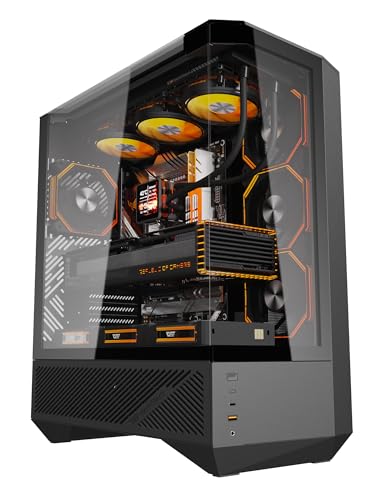
darkFlash DY460 Full Tower — Panoramic tower, long-card ready
The DY460 closes the guide as the showpiece tower: a full tower wrapped in 330 degrees of panoramic glass, with four ARGB PWM fans, a dual-chamber back-connect layout, a top 360mm radiator position, 400mm of graphics card clearance, and USB-C at 10Gbps. That clearance figure is its multi-GPU credential — 400mm is room for the longest current cards, and a full tower’s slot field gives a second card a plausible home in a build that still presents like a display piece.
Back-connect support deserves its sentence in any modern tower analysis: boards that route their connectors to the rear let the panoramic hall stay free of cable crossings, which matters doubly when two cards’ power leads enter the same view. The four fitted fans carry the INF34 designation in the title and give the glass enclosure a working airflow start; the top radiator position suits the processor’s loop while the cards breathe horizontally beneath it.
Glass at 330 degrees is also a commitment. It shows everything, forgives nothing, and turns the second card’s wiring into part of the exhibition; builders who relish that discipline get the best seat in this guide, and builders who do not should choose the Flux Pro’s walnut-fronted sobriety instead. The DY460 is not a mining tool and does not pretend to be — it is what a multi-card workstation looks like when it is dressed for company.
- Species: enclosed full tower, dual-chamber
- Graphics card clearance named in the title: 400mm
- Panels named in the title: 330-degree panoramic glass
- Fans named in the title: four ARGB PWM fans
- Radiator position named in the title: top 360mm
- Connectivity named in the title: USB-C 10Gbps, with back-connect ATX support
Strengths
- 400mm of card clearance is the most generous stated figure among the enclosed picks.
- Back-connect support keeps a two-card build’s power wiring out of the panoramic view.
- Four fitted ARGB PWM fans and a top radiator position complete the cooling outline at purchase.
Trade-offs
- Panoramic glass demands exhibition-grade cable work from a build category famous for heavy power leads.
- Full-tower volume is permanent furniture, not a sometime thing.
- Like every tower here, its card count is a few — density belongs to the frames.
Best for: a two-card workstation or gaming-plus-compute build that will live behind glass on a desk that receives guests. Not suited for: a mining rack plan, because a panoramic tower spends its budget on presentation that open-air density has no use for.
How Do You Plan Power and Risers for a Frame Build, Step by Step?
Begin with the card list and its arithmetic, written down. Twelve cards is not a specification until each card’s draw is summed with the platform’s, and the total is divided sensibly across the dual supplies the big frame supports — risers powered from the same supply as the card they serve, loads balanced so neither unit idles while the other strains. The Biostar-fitted frame simplifies the board side of the plan to a single decision already made, but its eight cards demand the same written sums. Rigs planned on paper start; rigs planned on optimism trip breakers.
Risers deserve their own paragraph because frame builds live or die by them. Each card in an open frame connects through a riser, and each riser is a cable, a small board, and a power lead that must be routed, secured, and kept clear of fan blades and hot surfaces. Buy risers as a matched set from a reputable source, route them with slack rather than tension, and keep spares — a frame with one dead riser is a frame mining at eleven-twelfths of its rent. This unglamorous hardware is where experienced miners spend money that beginners spend on stickers.
Commission the rig in stages. Boot the board with one card, confirm the platform sees it, then add cards in groups, watching temperatures and supply loads at each stage. A fault introduced at card nine is findable when cards one through eight were verified an hour earlier; the same fault in a fully populated first boot is a weekend. The open frame’s accessibility — its whole design premise — pays its dividend precisely here, in a build process that can be staged without opening a case twelve times.
What Does a Machine-Learning or Rendering Workstation Need From Its Case?
These workloads invert the miner’s priorities. Card count shrinks to two or three, card value climbs steeply, and the machine moves into a room with people in it. The case owes that pattern four things: slot spacing that lets thick cards breathe rather than sandwich, power-supply room for a unit sized to the summed draw, cooling depth for sustained full-load hours rather than gaming bursts, and acoustic manners. The Flux Pro’s specification — six PWM fans, 420mm radiator support, a live temperature display — reads like it was written against that list, because it was written for that desk.
Sustained load is the phrase to plan around. A render or training run holds cards at full draw for hours, where a game fluctuates; cooling that is adequate for bursts can creep upward across a long job until clocks sag and the job finishes late. Builders should soak-test a new multi-card workstation at full combined load for an hour before trusting it with a deadline, and should treat the temperature display on a case like the Flux Pro as the monitoring instrument it is rather than as decoration.
Memory and storage join the plan quietly. Large models and project files make the Classico Storage Master’s drive wall relevant to this audience too — a workstation that archives its own datasets avoids the network shuffle that eats the time the second card was bought to save. The species question, asked honestly, often resolves to a tower with both card room and bays, which is why that pick exists in this guide at all.
How Should the Room Itself Be Planned Around a Multi-Card Machine?
Every watt a rig consumes becomes heat in its room, with an efficiency no engineer can improve. A frame of twelve cards is therefore a space heater with a revenue stream, and its room needs a heat exit — ventilation, a window strategy, or a climate system sized for the load — planned with the same seriousness as its power. Miners learn this in their first summer if they skip it in their first spring. Tower builders face the gentler version: a workstation under a desk in a small office will warm that office across a long render, and a door left ajar is a legitimate part of the cooling specification.
Noise zoning follows heat zoning. Open frames belong behind a door that closes; enclosed towers earn their place in shared rooms by containing what they can. Dust completes the trio — rooms with carpets, pets, or workshop traffic will feed an open frame a steady diet of fibres, and the owner’s cleaning rhythm becomes part of the machine’s reliability plan. None of these considerations appear in any listing title, and all of them decide whether a multi-card machine is still running happily in its second year.
How Do You Keep a Multi-Card Machine Reliable Across Years?
Reliability in this category is mostly housekeeping performed on schedule. Fans are consumables with bearings that announce their decline politely before they fail, and a rig — frame or tower — that gets a monthly look and a quarterly clean rarely surprises its owner. Cards under sustained load benefit from the same attention: dust mats on coolers are thermal insulation installed by neglect, and five minutes with a blower restores what the specification promised. The open frames make this easy and necessary in equal measure; the towers make it necessary and slightly less easy, which is an argument for scheduling rather than for skipping.
Monitoring is the second habit. A workstation with a case-front temperature display, like the Flux Pro, invites a glance that catches a failing fan or a clogged filter while the symptom is still a number rather than a shutdown. Frame rigs need the software equivalent — temperatures and card health watched by the mining or compute platform, with alerts the owner actually reads. Multi-card machines fail one card at a time, and the owner who notices early loses an afternoon; the owner who notices late loses a job.
Spares complete the picture at a level proportionate to the rig’s importance: a riser and a fan for a frame, a fan and a cable for a tower, and backups of whatever the machine’s storage holds — a discipline the Classico Storage Master’s bay count makes easy to honour and embarrassing to skip. None of this is advanced practice. It is the difference between a multi-card machine as infrastructure and the same machine as a recurring emergency.
What Should You Check Before Adding a Second Card to a Tower You Already Own?
Start at the motherboard, not the case. A second card needs a slot with real electrical lanes behind it, spaced far enough from the first card that neither cooler suffocates — a check performed in the board’s manual, where slot sharing and lane division are printed without marketing. Many boards divide their lanes when a second slot is populated, which is harmless for compute and worth knowing before the parts are ordered. Then measure the physical run: card length against the case’s stated clearance, card thickness against the slot gap, and power leads against the supply’s remaining connectors.
The power supply audit comes next and is not optional. Sum the new total draw honestly, including the processor under the same workload that will load the cards, and compare it against the supply’s capacity with headroom to spare. A supply that was generous for one card can be marginal for two, and marginal supplies announce themselves under exactly the sustained loads multi-card builds exist to run. If the audit fails, the supply joins the shopping list — a cheaper lesson than the instability it prevents.
Finish with a thermal rehearsal. Install the card, run the real workload for an hour, and watch both cards’ temperatures rather than the new one’s alone; the first card’s cooling often changes most, because its intake now drinks the second card’s exhaust. Fan curves, a repositioned intake, or in panoramic towers a reconsidered radiator placement can each reclaim the difference. The towers in this guide — the DY460 with its stated 400mm clearance, the Flux Pro with its fitted six fans — give that rehearsal room to succeed; a cramped case turns it into a verdict against the whole idea.
What Does the Second-Hand Market Teach About These Purchases?
Used listings are a category’s confession booth, and this one confesses consistently. Mining frames flood resale whenever coin economics dip, which teaches two lessons at once: frames are durable, simple steel that survives ownership changes well, and their value is hostage to a market the owner does not control. A frame bought at the top of a cycle is a tool; the same frame bought in a dip is a bargain with the same geometry. The Biostar-fitted frame narrows even that market to owners of one board, which is the final practical consequence of its specialisation.
Towers age differently. A premium enclosed case like the Flux Pro holds its usefulness across platform generations because its job — housing a workstation — does not depend on any coin, algorithm, or fashion. Storage towers follow the same curve: the Classico’s bays serve whoever owns drives, in any year. Buyers choosing between species with resale in mind should therefore price the frame as equipment for a campaign and the tower as furniture for a practice. Both framings are respectable; confusing them is what generates the disappointed listings that teach the rest of us.
There is also a buyer’s opportunity hiding in the confession: a second-hand frame, inspected for straight rails and intact mounts, delivers its full function at a fraction of its first price, because steel does not wear out on any schedule that matters. The same logic applies weakly to towers — fans age, glass scratches, and a used showcase shows its years — which is why the used market rewards frame hunters and merely tolerates tower hunters.
Capacity and Species — the Whole Field on One Table
| Pick | Species | Card story per title | Watch-out per title |
|---|---|---|---|
| Deep In The Mines 8 GPU Case | Open mining frame | 8 GPUs | Biostar TB360-BTC D+ only |
| Mining Rig Frame for 12 GPU | Open mining frame | 12 GPUs, dual PSU support | Frame only — fans and GPUs excluded |
| Antec Flux Pro | Enclosed E-ATX tower | Workstation card room, 420mm radiator | Not a mining frame |
| DARKROCK Classico Storage Master | Enclosed ATX tower | Vertical GPU mounting, 360mm top/front | Storage-led: ten HDD bays |
| Phanteks EX5 Plus | Enclosed ATX multi-chamber | 360 AIO included | Title states few dimensions |
| darkFlash DY460 | Enclosed full tower | 400mm card clearance | Panoramic glass shows all wiring |
Notice also what the table cannot show: the room, the circuit, and the owner’s tolerance, which together veto more rows than any specification does. Bring those three facts to the table and the correct row usually selects itself.
The species column decides the room the machine will live in; the card-story column decides the workload it can feed. A buyer who aligns those two columns with their actual life will be served by any row here. A buyer who shops the first column by price alone will meet the frame’s exclusions or the tower’s density ceiling at the worst possible moment — after delivery.
Which Misjudgements Haunt This Category Most?
The founding misjudgement is nostalgia: assembling two cards for gaming frame rates in an era when the software contract that made it work has been withdrawn. It produces the most expensive disappointment in PC building, because everything powers on and nothing improves. The second misjudgement is its opposite — buying a mining frame for a workstation, then discovering that open-air density in a lived-in room means noise at conversation volume, dust in every connector, and a rig that no household member will tolerate at full song.
Third is the frame-only surprise, which the twelve-card pick’s title works hard to prevent and buyers still manage: a skeleton arrives, and the budget discovers it still owes cards, risers, dual supplies, fans, and a board. Fourth is power complacency in towers — two high-draw cards plus a flagship processor is a circuit-level sum, and the build that trips a breaker under render load was planned on hope rather than arithmetic. Fifth, and quietest, is ignoring the room: every card in every pick converts electricity to heat with perfect efficiency, and the room is the final heatsink for all of them.
Final Recommendation
Let the workload name the species. Mining at density belongs to the frames: the twelve-card steel frame for board freedom and dual supplies, the Biostar-fitted frame for the owner of that exact board who wants its eight cards mounted by design. Compute in a lived-in room belongs to the towers: the Flux Pro for the serious workstation, the Classico Storage Master when drives share the mission, the EX5 Plus when a bundled AIO simplifies the build, and the DY460 when the result must also perform behind glass. And gaming belongs to a single strong card in any of the towers — the kindest sentence in this guide is that the second card’s budget, spent on a better first card, is the only multi-GPU gaming upgrade that still works. Choose by species, power the choice honestly, and give the heat somewhere to go; the cards will do the rest. If this guide leaves you with one durable habit, let it be reading the species word in every title before the capacity number — frame or tower, fitted or general, included or frame-only — because in this category the noun has always mattered more than the number, and the buyers who learn that from a webpage instead of a delivery note are the ones still running their rigs, calmly, years from now.
Frequently Asked Questions
Can I still game on two graphics cards in SLI or CrossFire?
Not in any way this guide can recommend. The vendor support, driver profiles, and engine cooperation that paired-card gaming required have been withdrawn, and current flagship cards no longer offer the bridge connections the technology used. A second card installed for games will typically sit idle or be ignored by the title you are playing. Spend the same money on a stronger single card, or aim the second card at a compute workload where parallel independence is the whole design.
What else must I buy alongside a mining frame?
Everything that makes it a computer. The twelve-card frame’s title says it directly — frame only, fans and GPUs not included — and the full list runs to a motherboard, risers for each card, the cards themselves, dual power supplies on the large frame, storage, and the room-scale cooling your space requires. The Biostar-fitted frame narrows the board question to one model and leaves the rest of the list equally real. Budget the rig, not the skeleton.
How many cards can an enclosed tower realistically run?
A few, bounded by slot spacing, card thickness, power delivery, and the tower’s ability to move their combined heat. The enclosed picks here are designed around workstation patterns — a display card plus one or two compute companions — rather than rack density. The DY460’s 400mm clearance and the Flux Pro’s cooling depth describe room and thermal headroom for that pattern; anyone whose plan counts beyond three cards should be shopping the frames and a room to put them in.
Is a storage-heavy case a sensible home for a compute card?
Yes, for the large class of builds whose archive is the point and whose compute is episodic — the Classico Storage Master’s ten 3.5-inch bays with vertical GPU mounting is built for exactly that double life. The discipline is thermal: drives and cards share air, so fan setup and radiator placement should route the processor’s and card’s heat away from the drive stack, and sustained full-load compute in a fully populated drive chassis deserves a temperature check under real load.
What power supply planning does a multi-card build demand?
Arithmetic before aesthetics. Sum every card’s draw, the processor’s, and the platform’s, then choose supplies with genuine headroom above the total — or, at frame scale, split the load across dual supplies as the twelve-card frame supports. Household circuits join the calculation at the top end: a rig that approaches a room circuit’s limit needs a different room or a smaller rig, and discovering that under load is the expensive way to learn it.
Can a tower bought today become a frame build later?
The two species do not convert into each other; a tower’s panels, mounts, and airflow design assume enclosure, and a frame offers nothing to enclose. What carries across a change of direction is everything else — cards, supplies within their limits, storage, and the lessons. Builders unsure of their trajectory should start with the tower, whose usefulness survives the widest range of futures, and treat a later frame as the dedicated second rig it properly is.
Are open frames safe around pets and children?
They are exposed hardware, and should be zoned like it. Cards, risers, and power leads sit in open air at heights a curious hand or paw can reach, fans spin unguarded, and surfaces run hot under load. A frame belongs in a room with a door — a workshop, a utility space, a ventilated corner of a garage — rather than in family circulation. Households that cannot offer that room should build in an enclosed tower and accept its lower card ceiling as the price of a machine that shares their space safely.
Does a second card double rendering or training speed?
It can approach that in workloads designed to divide cleanly — tiled rendering, sharded training, parallel encodes — and it falls short in workloads with heavy communication between cards or stages that run on one card alone. The honest planning figure is a strong gain, verified against benchmarks of your actual software, rather than a doubling assumed from the card count. This is the parallel-independence bargain stated at this guide’s start: the cards do not cooperate, so the software must do the dividing, and software varies.
How loud is a twelve-card frame, honestly?
Loud enough to decide the room question by itself. Twelve cards under mining load, cooled by open air and whatever fans the owner adds, produce an industrial soundscape — not a single loud fan but a chorus that carries through doors and floors. No figure in the frame’s title promises otherwise, and no placement trick inside a lived-in home changes the conclusion. Treat the frame’s noise as a zoning requirement stated in plain language: the rig goes where its sound is acceptable, or the rig does not get built at that scale.
Which pick suits a first multi-card experiment on a modest scale?
An enclosed tower, almost always. A first experiment needs the forgiveness of a case that manages its own cooling and contains its own noise while the owner learns the workload’s real appetite — the EX5 Plus, with its bundled AIO and chambered layout, asks the fewest simultaneous questions of a newcomer, and the Classico Storage Master suits experimenters whose projects arrive with data attached. Frames reward experience; they are where the second rig lives, not the first.
Related Guides
Multi-card plans lead naturally to the neighbours of this category: the best wall-mountable pc cases roundup covers open and wall-hung formats for builds leaving the desk, the best silent pc cases with great airflow guide handles enclosed machines that must stay civilised in shared rooms, and the best top-mount radiator pc cases collection details the towers whose cooling plans start at the roof.


