What's inside
- Key Takeaways
- Quick Picks
- How We Chose These Picks
- What Does a Vertical Mount Cost Your Graphics Card Thermally?
- Which Vertical Cases Earn Their Place, Pick by Pick?
- How Do the Six Vertical Cases Compare Side by Side?
- What Should You Settle Before Ordering a Vertical Case?
- How Do You Install a Card Vertically Without the Usual Failures?
- How Does Riser Cable Quality Show Itself in Daily Use?
- Which Graphics Cards Suit Vertical Mounting Best?
- What Mistakes Turn a Vertical Build Into a Troubleshooting Session?
- Final Recommendation
- Frequently Asked Questions
- Related Guides
As an Amazon Associate I earn from qualifying purchases. This post may contain affiliate links at no extra cost to you.
[widgetverdict.com] is reader-supported. When you buy through links on our site, we may earn an affiliate commission.
Where to buy: every case below links to a checked Amazon listing; two state a vertical GPU kit or mount in their titles, and the rest are flagged wherever the riser question is left for the buyer to settle.
The best gpu vertical mount pc cases answer a wish that horizontal mounting cannot: to look at the graphics card itself. A modern card is the most expensive and most styled component in a gaming PC — shrouded, lit, badged — and the standard layout shows you its backplate and one thin edge. Turning the card ninety degrees, fans facing the glass, turns the build’s centrepiece to face its audience. That is the entire romance of the vertical mount, and this guide will not pretend the romance is free. A card standing upright breathes differently from a card lying flat, it reaches its slot through a ribbon of cable that must be bought, matched and seated correctly, and in the wrong case its fans end up pressed so close to the side glass that the display and the cooling are in direct competition.
So the picks below are judged on the mechanics, not the photograph. The HAVN HS 420 VGPU states a PCIe 5.0 vertical GPU kit in its title — the riser question answered in writing. The ARCTIC Xtender VG states a vertical GPU mount in its title and builds a full tower around it. The SSUPD Xhuttle is designed around vertical GPU airflow, the MUSETEX around a vertical mounting design, and the darkFlash LAND451 around a vertical graphics card layout — three cases whose architecture is committed even where their titles leave the riser’s inclusion unstated. And the Antec C8, a fine dual-chamber full tower, closes the list with a warning label: its title says nothing about vertical mounting at all, and its section below treats that silence exactly as a buyer should.
One principle runs through everything that follows. A vertical mount is two purchases wearing one name — the case’s bracket or rotated layout, and the riser cable that carries the signal. A case can provide the first and leave the second to you, and a riser bought casually, at the wrong PCIe generation or the wrong length, is the single most common reason a beautiful vertical build boots to a black screen. Read each pick for what its title actually commits to, and budget for what it does not.
Key Takeaways
- Vertical mounting is a display decision with a thermal price: the card’s fans face the glass, and the gap between card and glass decides how hard they work.
- Only two picks state the hardware in their titles — the HAVN HS 420 VGPU with its PCIe 5.0 vertical GPU kit, and the ARCTIC Xtender VG with its vertical GPU mount.
- The Antec C8’s title is silent on vertical mounting; its spec box below says so plainly, and the feature must be verified with the manufacturer documentation.
- A riser cable is a PCIe link, not a ribbon of wire: generation and length must match the build, or the card may not train at full speed.
- Dual-chamber panoramic cases dominate this category because their width buys the card-to-glass distance that slim cases cannot.
- Decide the card first: its thickness in slots determines which of these six layouts can hold it upright without choking it.
Quick Picks
| Pick | Badge | Why it earns its place |
|---|---|---|
| SSUPD Xhuttle ATX Mid Tower (Vertical GPU Design) | The airflow-first vertical layout | A dual-chamber mid tower designed around vertical GPU airflow, with three reverse ARGB fans and panoramic glass. |
| HAVN HS 420 VGPU Mid Tower (Vertical GPU Kit) | The kit-included flagship | A PCIe 5.0 vertical GPU kit stated in the title, eleven 140mm fan slots and room for two 420mm radiators. |
| ARCTIC Xtender VG (Vertical GPU Mount) | The full-tower vertical mount | Vertical mount in the title, five pre-mounted A-RGB fans and two 420mm radiator positions in an E-ATX big tower. |
| MUSETEX PC Case (Vertical GPU Mounting Design) | The five-fan mid tower | A vertical mounting design with five PWM ARGB fans fitted, 360mm radiator support and a 270-degree glass view. |
| darkFlash LAND451 ATX Case (Vertical Graphics Card) | The BTF-ready vertical case | Vertical graphics card layout, back-connect motherboard support and room for cards up to 420mm with dual 360mm AIO support. |
| Antec C8 ARGB Full Tower E-ATX Case | The verify-first dual chamber | A seamless-glass E-ATX full tower with three ARGB PWM fans — included with its vertical silence stated, not smoothed over. |
How We Chose These Picks
We began by separating architecture from accessory. Some cases are designed around the upright card — their layout, airflow path and glass all assume it — while others merely tolerate it through an optional bracket. Both can be legitimate, but they are different products, and a pick had to be honest about which it is. The SSUPD, HAVN, ARCTIC, MUSETEX and darkFlash all commit in their titles to a vertical design, mount or kit. The Antec commits to nothing of the sort in its title, and it is included deliberately as the control case: the popular dual-chamber tower a buyer might assume is vertical-ready, examined with its paperwork actually read.
Next we weighted the riser question, because it is where vertical builds quietly succeed or fail. A stated kit — the HAVN’s PCIe 5.0 set — removes a purchase, a compatibility gamble and a generation mismatch in one stroke. A stated mount, as on the ARCTIC, fixes the mechanical half. Where a title describes a vertical design without naming the cable, we say so in that pick’s section and spec box, in that pick’s own words, and the buyer should settle the point on the full listing before ordering rather than discovering it with the card in hand.
Finally, we required the cooling story to survive the rotation. A vertical card exhausts and intakes in new directions, and a case that turns the card without rethinking its air is a display cabinet with a heating problem. The picks below bring serious fan provision — three reverse fans on the Xhuttle, five pre-mounted units on the ARCTIC and MUSETEX, eleven 140mm slots on the HAVN — or, in the LAND451’s case, radiator room on two fronts. The prettiest pick that could not feed its card did not make the list; the list is short because the intersection of honest paperwork and honest airflow is short.
What Does a Vertical Mount Cost Your Graphics Card Thermally?
The mechanism is simple geometry. A horizontally mounted card draws air from the open space beneath it — usually the whole lower chamber — and exhausts along its edges. Stood upright behind glass, the same card draws air through the gap between its fans and the side panel. Make that gap generous and the card barely notices the rotation; make it thin, and the fans are breathing through a straw, recycling their own exhaust against a warm sheet of tempered glass. This is why the dual-chamber format dominates the category: the width that looks like wasted space in a photograph is, in a vertical build, the card’s air supply.
Thickness is the multiplier. A two-slot card in a roomy chamber keeps a healthy gap almost regardless of bracket position. The flagship cards of the current generation run far thicker, and every extra slot of cooler eats the gap from the inside. A buyer planning an upright flagship should read a case’s vertical clearance the way they read GPU length in a compact build — as a hard ceiling, checked against the exact card, not as a vibe. Where a title gives no vertical clearance figure, and several below do not, the full listing and the manufacturer’s documentation are the only honest sources, and the check takes minutes.
There is one genuine thermal upside to set against the risk, and the Xhuttle is built around it: a vertical card’s exhaust can be aimed. In a layout designed for it, the card’s hot air rises along a path the case’s fans are arranged to continue, rather than pooling under a horizontal card and warming the motherboard’s lower edge. Rotation done by design can neutralise its own cost. Rotation done as an afterthought, in a case that merely permits it, almost never does — which is precisely the distinction the picks below were chosen to illustrate.
Which Vertical Cases Earn Their Place, Pick by Pick?

SSUPD Xhuttle ATX Mid Tower (Vertical GPU Design) — The airflow-first vertical layout
SSUPD built its name on small-form-factor cases where every airflow path is an argument, and the Xhuttle carries that temperament into a dual-chamber ATX mid tower organised around one phrase in its title: vertical GPU airflow. Not vertical GPU display, not vertical GPU compatible — airflow. The card stands upright as the layout’s organising principle, with panoramic tempered glass to show it, three 120mm ARGB reverse fans fitted, and an RGB strip for the frame. Reverse-blade fans matter here beyond tidiness: in a showcase layout, intake fans would normally present their frames and hubs to the glass, and reverse blades let the pretty face point outward while the air still moves the right way.
The build experience follows from the design’s single-mindedness. Because the upright card is the plan rather than an option, there is no bracket Tetris and no decision about which expansion slots to sacrifice; the card’s position, the chamber’s width and the fans’ orientation were settled by SSUPD before the box was sealed. For a buyer whose previous vertical build was an adapter kit in a case that resented it, that coherence is the product. The mid-tower footprint also keeps the whole arrangement desk-plausible in a way the two 420mm-radiator giants below are not.
The title’s silence is about the cable. “Vertical GPU airflow” describes the layout; it does not state that a riser cable is in the box, nor its PCIe generation. SSUPD’s design may well integrate the connection — but this guide does not upgrade may-well into fact. Open the full listing, find the riser line, and confirm its generation matches your card and board before ordering. If it does, the Xhuttle is the most considered vertical-first design here; if a separate riser is needed, it joins the LAND451 and MUSETEX in the budget-for-one column, and its airflow argument still stands.
- Form factor: ATX mid tower, dual-chamber design
- Vertical layout: designed for vertical GPU airflow, per the listing title
- Glass: panoramic tempered glass
- Fans included: 3 x 120mm ARGB reverse fans, plus an RGB strip
- Riser cable: the listing title does not say whether one is included — settle it on the full product page
- Radiator support: not quantified in the listing title, so check the product page if liquid cooling is planned
Strengths
- The vertical card is the design’s premise, so its airflow path is engineered rather than improvised.
- Reverse-blade fans keep the glass-facing side clean while still feeding the chamber.
- Mid-tower scale keeps a panoramic vertical build on a normal desk.
Trade-offs
- Riser inclusion and generation are unstated in the title — a mandatory listing check.
- Three fitted fans is a starting set; radiator plans need figures the title does not give.
- The layout’s commitment cuts both ways: builders who later want a horizontal card chose the wrong case.
Best for: a showcase ATX build that wants the upright card treated as an airflow design, in a footprint a desk can hold. Not suited for: an order that needs the riser cable’s inclusion guaranteed by the title alone — the HAVN below states its kit outright. Confirm the Xhuttle’s riser arrangement on its listing, and if it matches your card’s generation, this is vertical mounting done by intention.

HAVN HS 420 VGPU Mid Tower (Vertical GPU Kit) — The kit-included flagship
The HS 420 VGPU carries the most complete title in this guide, and its centrepiece is four words long: PCIe 5.0 vertical GPU kit. HAVN does not say the case supports vertical mounting, or suits it, or can be adapted to it — it names the kit and the current PCIe generation in the same breath, which settles the two questions that sink vertical builds: is the hardware present, and will it carry a current card’s link at full speed. Around that answer sits a dual-chamber mid tower of serious capacity — eleven 140mm fan slots, support for two 420mm radiators, a tempered glass view, a PWM fan hub and a cable system HAVN calls SimpliCable.
Those supporting numbers are not decoration; they are the thermal budget that a vertical flagship card spends. Eleven large fan positions let the builder establish a genuine bottom-to-top current past the upright card, and dual 420mm radiator support means a processor and even a card on liquid can be accommodated without evicting the display layout. The fan hub matters for the same reason: eleven fans wired ad hoc become the cable mess the glass then exhibits, while a hub plus a deliberate cable system keeps the chamber’s backstage as composed as its stage.
The costs are scale and commitment. A case offering two 420mm radiators is not a compact object, and its fan slots are an invitation the wallet must answer — the title counts positions, not eleven included fans. Builders should also note what a kit being PCIe 5.0 implies for older hardware: the link is current-generation, which is exactly right for a new flagship build and worth a compatibility glance for anyone transplanting an elderly card and board. For the buyer assembling a no-asterisks vertical showcase around a current card, though, this is the pick whose paperwork needs the fewest follow-up questions.
- Form factor: dual-chamber mid tower, ATX
- Vertical hardware: PCIe 5.0 vertical GPU kit, stated in the listing title
- Fan capacity: 11 x 140mm fan slots, with a PWM fan hub
- Radiator support: 2 x 420mm
- Cable system: SimpliCable cable management, per the title
- Panel: tempered glass
Strengths
- The kit and its PCIe 5.0 rating are stated in the title — the riser gamble is removed entirely.
- Eleven 140mm slots and dual 420mm radiator support give the upright card a real thermal budget.
- A PWM hub and a named cable system keep a many-fan build tidy behind glass.
Trade-offs
- Fan slots are positions, not included fans; filling eleven is a second purchase.
- The chassis is sized for its radiator ambitions and will dominate a small desk.
- Modest cards and air-cooled builds pay for capacity they will never touch.
Best for: a current-generation flagship card going upright with liquid cooling in the plan and no appetite for riser roulette. Not suited for: a compact desk or a two-fan air build, which would rattle around inside its capacity. If your parts list is as serious as the HS 420 VGPU’s title, check the listing’s dimensions against your space and order the most self-contained vertical package here.

ARCTIC Xtender VG (Vertical GPU Mount) — The full-tower vertical mount
ARCTIC is a cooling company that happens to sell this case, and the Xtender VG reads like it: a full tower — the title says big tower, twice, in case the point escaped anyone — with a vertical GPU mount named outright, tinted panorama glass, five A-RGB fans pre-mounted, E-ATX support and room for two 420mm radiators. Where HAVN sells the kit, ARCTIC sells the mount plus the airflow establishment around it. Five fans already mounted is the largest factory-fitted provision in this guide, and in a tower of this volume it establishes the front-to-back and bottom-to-top currents before the builder adds a thing.
Scale is the thermal argument again, played at maximum. A full tower’s chamber keeps the upright card’s fans well clear of the tinted glass, and the dual 420mm radiator positions mean the processor’s heat never has to share a single radiator’s compromise. E-ATX support widens the board menu to the largest enthusiast platforms, whose extra width horizontal builds often waste; here the tower simply absorbs it. ARCTIC’s background shows in the priorities — this is the pick for the builder who thinks of the case as cooling infrastructure that happens to display a card, rather than a display that happens to need cooling.
The cautions are the honest corollaries of size. This tower needs floor or a serious desk, a room layout that tolerates it, and an owner who will not be moving it often. The title states the mount; whether the riser cable itself is in the box is a separate line the buyer should find on the full listing, because mount and cable are different objects and this guide keeps them separate even when a brand is trustworthy. Tinted glass also dims the interior it displays — a deliberate aesthetic, but a builder chasing maximum card visibility should know the Xhuttle and MUSETEX wear clearer panes. If none of that deters you, the Xtender VG is the vertical mount with the least thermal anxiety attached.
- Form factor: full tower (big tower), E-ATX support
- Vertical hardware: vertical GPU mount, stated in the listing title
- Glass: tempered panorama glass, tinted
- Fans included: 5 x A-RGB, pre-mounted
- Radiator support: 2 x 420mm
- Riser cable: the listing title names the mount, not the cable — confirm what is in the box on the product page
Strengths
- Five pre-mounted fans is the strongest factory airflow provision in this guide.
- Full-tower volume keeps the upright card’s fans far from the glass — the healthiest gap here.
- Dual 420mm radiator support and E-ATX room cover the largest builds without compromise.
Trade-offs
- The tower’s size and weight demand floor space and a settled room layout.
- Tinted glass softens the display that vertical mounting exists to create.
- The mount is stated but the cable is not — one listing check remains before ordering.
Best for: a large E-ATX or liquid-cooled build that wants the upright card given the most air and the most factory fans. Not suited for: a small desk, a frequently moved machine, or a buyer who wants untinted glass. Verify the Xtender VG’s box contents for the riser on its listing, give it the floor space it asks for, and it will keep a vertical flagship calmer than anything else here.

MUSETEX PC Case (Vertical GPU Mounting Design) — The five-fan mid tower
MUSETEX’s entry is the populist of the group: an ATX mid tower whose title leads with its vertical GPU mounting design and then gets practical — five PWM ARGB fans pre-installed, 360mm radiator support, a Type-C port, and 270 degrees of tempered glass wrapping the front and side so the upright card is visible from two angles at once. That wrap is the design’s signature. A vertical card is a face; the MUSETEX gives it a corner window, so the build reads as a display from wherever the chair happens to be, not only from directly beside it.
Five fitted PWM fans is a genuinely complete starting system — the same count as the full-tower ARCTIC’s, in a mid-tower footprint — and PWM control means those fans can be run on a curve that keeps the upright card fed at idle-quiet speeds. The 360mm radiator support covers the mainstream liquid-cooling plan for the processor, which is the plan most vertical showcases actually run. Taken together, the title describes a case that expects to be bought, built in an evening and photographed, with no second order for fans standing between the buyer and the finished object.
Its open question is the familiar one, and it is asked plainly: the title says mounting design, and a design is not a cable. Whether a riser ships in the box, and at which PCIe generation, must be read on the full listing, and the build budget should hold a riser in reserve until that line is found. The mid-tower chamber also asks the thickness question more sharply than the two giants do — a very thick flagship card upright in a standard-width mid tower lives closer to that 270-degree glass, so measure the card’s slots against the listing’s vertical clearance. Within those two checks, this is the most immediately complete vertical package at a mid-tower scale.
- Form factor: ATX mid tower
- Vertical layout: vertical GPU mounting design, per the listing title
- Fans included: 5 x PWM ARGB, pre-installed
- Radiator support: 360mm
- Glass: 270-degree full-view tempered glass
- Front connectivity: Type-C port; riser cable inclusion is not described in the listing title — read the product page before budgeting the build
Strengths
- Five pre-installed PWM ARGB fans make the cooling and lighting complete on day one.
- The 270-degree glass wrap shows the upright card from front and side alike.
- 360mm radiator support covers the standard processor liquid-cooling plan.
Trade-offs
- Riser inclusion and generation are not stated; the build may need one bought separately.
- Mid-tower width leaves thick cards closer to the glass than the full tower does.
- Five fans of ARGB cabling need disciplined routing to keep the wrap-around view clean.
Best for: an ATX showcase build that wants fans, glass and the vertical design settled in one box at mid-tower scale. Not suited for: the very thickest flagship cards, whose upright clearance in a standard-width chamber must be proven first — the Xtender VG’s volume is the safer home. Find the riser line on the MUSETEX listing, measure your card, and if both check out, this is the fastest route here from box to photograph.
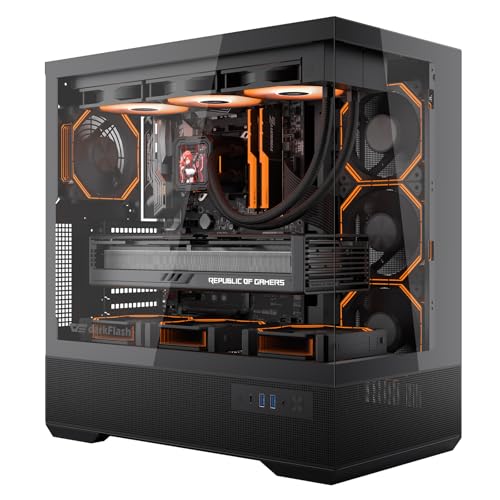
darkFlash LAND451 ATX Case (Vertical Graphics Card) — The BTF-ready vertical case
The LAND451 pairs the vertical card with the other great tidiness idea of the moment: its title promises a vertical graphics card layout in a full-view mid tower that also supports BTF back-connect motherboards, takes cards up to 420mm, fits dual 360mm AIO cooling, and adds a Type-C port. The pairing is thoughtful. A back-connect board removes the cable clutter from the motherboard’s face; a vertical mount turns the card into the interior’s single exhibit; together they produce the emptiest-looking chamber in this guide — a card, floating in glass, with almost no visible wiring to explain it.
The 420mm card ceiling deserves emphasis because vertical builds fail on dimensions in two directions, and length is the quieter one. A flagship card that fits horizontally may foul a front radiator or a chamber wall when rotated, depending on where the bracket places it; a stated ceiling that reaches 420mm, alongside room for two 360mm AIOs, says darkFlash laid the geometry out with current cards open on the desk. Builders planning a processor AIO plus a long upright card — the standard showcase recipe — are precisely the audience those two figures address.
Now the discipline. The title says vertical graphics card; it does not say kit, mount or riser, and the difference is a purchase. Treat the cable as unconfirmed until the full listing states it, and if one must be bought, match its generation to the board and card and its length to a mid tower’s run. The BTF support carries the same condition as every back-connect feature: it rewards a BTF board bought for the purpose and does nothing for a conventional one. Neither caveat dents the case’s design logic — but a buyer who budgets for the board and possibly the riser will enjoy that logic, while a buyer who assumed both were included will meet it at the checkout instead.
- Form factor: ATX, full-view mid tower
- Vertical layout: vertical graphics card design, per the listing title
- Motherboard support: BTF back-connect boards supported
- GPU support: cards up to 420mm
- Cooling support: up to dual 360mm AIO
- Front connectivity: Type-C port; whether a riser cable ships with the case is not something the listing title confirms — check the product page
Strengths
- Vertical layout plus BTF support produces the cleanest possible interior of the six.
- A 420mm card ceiling and dual 360mm AIO room fit the standard flagship showcase recipe.
- Full-view glass gives the upright card an unobstructed stage.
Trade-offs
- The riser cable’s inclusion is unconfirmed by the title — budget as if buying one.
- BTF benefits require a back-connect motherboard purchased separately.
- The empty-interior aesthetic exposes any routing shortcut the builder does take.
Best for: a builder pairing a BTF board with a long flagship card for the emptiest glass interior achievable in this guide. Not suited for: a conventional-board build expecting the case alone to supply the riser and the tidiness both. Read the LAND451’s listing for its riser contents, plan the cable if it is absent, and the result is the most architectural build here.

Antec C8 ARGB Full Tower E-ATX Case — The verify-first dual chamber
Here is the guide’s honesty exercise, included on purpose. The Antec C8 is a well-regarded dual-chamber full tower: E-ATX support, three ARGB PWM fans, seamless tempered glass across front and side, support for the RTX 40 series generation of cards, 360mm radiator support and USB Type-C, all stated in its title. What the title does not state — anywhere, in any wording — is vertical mounting. No kit, no mount, no vertical design. A buyer browsing dual-chamber glass towers could easily assume the feature travels with the format. This pick exists to say: read the title you were given, not the one the category led you to expect.
Antec may document vertical support in the C8’s full materials; many dual-chamber cases do offer it as a bracket arrangement. But “may” is not a specification, and this guide’s rule — set out in the brief for this very pick — is that a silent title earns a verify instruction, not an assumption. The spec box below therefore records the point exactly as a careful buyer should hold it: unstated, to be confirmed against the manufacturer documentation before money moves. If the documentation confirms a vertical arrangement and its riser requirements, the C8’s fundamentals — chamber width, glass, three PWM ARGB fans, E-ATX room — make it a credible home for an upright card.
Judged on what is stated, the C8’s strengths are real. The seamless glass across two faces is the display surface vertical builders want; the dual-chamber width is the geometry that gives an upright card its air gap; three fitted ARGB PWM fans start the airflow story; and 360mm radiator support covers a processor AIO. Its section is not a rejection — it is a demonstration of the two-minute check this entire category demands, performed in public, on a case good enough that the check is worth doing. Do the check, and let the documentation, not the silhouette, make the C8 a vertical pick or a horizontal one.
- Form factor: full tower, E-ATX, dual chamber
- Fans included: 3 x ARGB PWM
- Glass: seamless tempered glass front and side panels
- GPU note from the title: RTX 40 series GPU support; radiator support 360mm; USB Type-C
- Vertical mounting: the listing title is silent on this point — check the manufacturer documentation before assuming the case mounts a card upright
- Riser cable: likewise unaddressed by the listing title, so its status follows the same documentation check
Strengths
- Dual-chamber width and seamless two-face glass are exactly the raw materials a vertical build wants.
- Three fitted ARGB PWM fans and 360mm radiator support give a stated, workable cooling base.
- E-ATX full-tower room absorbs the largest boards and cards without dimensional drama.
Trade-offs
- Vertical mounting is not a titled feature; buying it for that purpose without verification is a gamble.
- Any riser requirement is equally undocumented in the title.
- Three fans is a base, not the establishment the ARCTIC’s five provide at this tower scale.
Best for: a buyer who loves the C8’s glass and chamber and is willing to confirm vertical support in Antec’s documentation before committing — or who is content to run the card horizontally in a superb case. Not suited for: anyone ordering today on the assumption that dual-chamber glass implies an upright mount. Open the C8’s documentation first; if it confirms the bracket, this tower’s fundamentals do the rest.
How Do the Six Vertical Cases Compare Side by Side?
| Pick | Form factor | Vertical status in title | Fans included | Headline figure from the title |
|---|---|---|---|---|
| SSUPD Xhuttle | ATX mid tower, dual chamber | Vertical GPU airflow design | 3 x 120mm ARGB reverse | Panoramic tempered glass |
| HAVN HS 420 VGPU | Dual-chamber mid tower | PCIe 5.0 vertical GPU kit | Slots for 11 x 140mm, PWM hub | 2 x 420mm radiator support |
| ARCTIC Xtender VG | Full tower, E-ATX | Vertical GPU mount | 5 x A-RGB pre-mounted | 2 x 420mm radiator support |
| MUSETEX GR3 | ATX mid tower | Vertical mounting design | 5 x PWM ARGB pre-installed | 360mm radiator support, 270-degree glass |
| darkFlash LAND451 | ATX mid tower, full view | Vertical graphics card layout | Not stated in title | GPU up to 420mm, dual 360mm AIO |
| Antec C8 ARGB | Full tower, E-ATX | Not stated — verify with documentation | 3 x ARGB PWM | 360mm radiator support, seamless glass |
The middle column is the whole guide in one glance. One pick states a kit, one states a mount, three state a design, and one states nothing. Price the three design picks with a riser possibly still to buy, price the Antec with a verification step still to take, and the comparison becomes honest arithmetic instead of brochure poetry.
What Should You Settle Before Ordering a Vertical Case?
Settle the riser first, in writing, for your exact pick. The questions are three: is a cable included, which PCIe generation is it rated for, and is its length right for the case’s layout. A riser rated a generation behind the board and card can force the slot to be manually set to the older speed in the BIOS before the machine will boot reliably — a known ritual among vertical builders, and one the HAVN’s stated PCIe 5.0 kit exists to spare you. If your pick’s title is a design rather than a kit, find the cable’s line on the full listing; if the listing is vague, the manufacturer’s documentation for the case is the deciding document, exactly as with the Antec.
Settle the card’s thickness next. Count its slots honestly — backplate to fan shroud, including any protruding shroud sculpting — and set that against the case’s vertical clearance wherever the listing states it. The geometry that matters is the remaining gap between the card’s fans and the glass. The full tower and the dual-chamber picks buy that gap with width; the standard mid towers ask you to verify it. A card that fits with a finger’s width to spare will run warmer and louder upright than it ever did flat, and no fan curve fully refunds a gap that was never there.
Then settle the rest of the expansion bay. A vertical bracket typically claims the horizontal slot area, which can evict a capture card, a sound card or a second expansion device the build was quietly depending on. Showcase builds rarely carry such passengers, but workstation hybrids do, and discovering the eviction after the glass is on is a special frustration. Finally, plan the display outputs: an upright card’s ports face upward or inward depending on the layout, and cable bends at the case’s top or rear need room in the desk layout. None of these checks takes long. Together they are the difference between a vertical build that is a photograph and one that is also a computer.
How Do You Install a Card Vertically Without the Usual Failures?
Begin on the bench with the link, not the card. Seat the riser cable’s plug into the motherboard’s primary slot and click its latch, then connect the card to the riser’s socket outside the case if the layout allows a test fit, and boot the bare assembly before anything is screwed down. A riser that is faulty, under-seated or generation-mismatched announces itself here — as a black screen or a link trained at reduced speed — while the fix is still a reseat rather than a disassembly. Set the slot’s PCIe generation manually in the BIOS at this stage if the combination needs it; doing so with the card temporarily horizontal is a two-minute job that becomes an evening’s archaeology once the build is vertical and glassed.
Mount the bracket or orient the layout next, following the case’s own order — the designed-in picks each have one, and improvising against it is how screw holes cross-thread. Dress the riser ribbon flat, with a gentle fold rather than a crease, and keep it clear of fan blades and the card’s own backplate heat. Route the card’s power leads before the card goes upright, arriving from below or behind so the connectors meet the card’s sockets without a visible diagonal across the glass. In the BTF-oriented LAND451 this choreography is half done by the board; in the others it is the builder’s ten minutes of care.
Seat the card, secure it, and then — before the glass — run the machine under a real graphics load and watch the card’s temperature against its horizontal baseline if you know it. A few degrees is the rotation’s normal tax in a well-gapped case. A climb that keeps going is the gap telling you it is too thin, and the remedies are mechanical, in order: confirm no protective film or shipping plastic remains on the card or glass, confirm the intake fans nearest the card actually spin in the intended direction — the Xhuttle’s reverse blades exist to prevent exactly this confusion — and only then consider fan curves. Close the glass last, photograph honestly, and keep the riser receipt; it is the component most likely to be revisited in the build’s whole life.
How Does Riser Cable Quality Show Itself in Daily Use?
A good riser is invisible, which is precisely the problem: its quality announces itself only in the negative, through failures that impersonate other components. The classic signature is a machine that boots perfectly on a bench, or after a reseat, and then drops its display under load, or wakes from sleep to a black screen, or trains its link at a lower speed on some mornings and the full speed on others. Because the symptoms wander, they get blamed on drivers, on the card, on the monitor — anywhere but the ribbon of cable folded behind the card. Builders who have lived through one marginal riser develop a reflex: in any vertical build with intermittent display behaviour, the riser is suspect number one, and swapping in a known-good cable is the cheapest diagnostic in the entire troubleshooting tree.
Construction explains the variance. A riser carries a high-speed differential signal along a flexible ribbon, and its shielding, its impedance discipline and its connector quality decide how much of that signal survives the journey — a journey that gets harder with every PCIe generation, because each generation doubles the signalling rate the same physical ribbon must carry. This is why generation ratings on risers are not marketing garnish: a cable comfortable at an older generation’s rate may be marginal at the current one, passing a boot test and failing under sustained traffic. It is also why the stated kit in the HAVN’s title carries weight beyond convenience — a manufacturer that rates its included cable at PCIe 5.0 has staked the case’s reputation on that ribbon surviving the current generation’s demands.
Length discipline is the third quality axis, and the one builders control. A riser should be long enough to fold in one gentle curve and no longer; every surplus centimetre is ribbon that must be folded again, tucked against something warm, or pressed near a fan’s sweep. When buying a cable separately for the design-titled picks — the Xhuttle, MUSETEX or LAND451, if their listings leave the cable to you — the case manufacturer’s own specified length is the figure to match, not the longest available “for safety”. In riser cables, slack is not safety. Slack is a second fold, a hotter resting place, and one more variable in a link that rewards having as few variables as possible.
Which Graphics Cards Suit Vertical Mounting Best?
The ideal vertical card is a contradiction resolved: visually rich on its fan face, mechanically modest in its thickness. Cards whose shrouds carry the design — sculpted fan surrounds, lighting in the face rather than only the edge, a backplate worth reading — repay the rotation every time the room’s light catches them. Cards designed as plain slabs, handsome only in profile, gain almost nothing; their owners pay the thermal tax for a view of three fans and a sticker. Before choosing a case for a card already owned, it is worth literally looking at the card’s face and asking whether that is the surface the next three years of glances should land on.
Thickness sorts the field more decisively than beauty does. Two-slot and slim two-and-a-half-slot cards upright almost anywhere in this guide, keeping a workable gap in the mid towers as well as the giants. The thick flagship coolers — the cards whose shrouds overhang their brackets by a slot or more — belong in the wide chambers: the Xtender VG’s full tower, the HAVN’s dual-chamber shell, the Xhuttle’s purpose-built layout. A useful habit is to measure the card’s cooler from the bracket face outward and compare it against the vertical clearance the listing states, treating any undocumented clearance as unknown rather than generous. The LAND451’s stated 420mm addresses length; thickness lives in a different line of the specification sheet, and it is the line vertical buyers most often forget to read.
Cooling architecture matters last, and subtly. Cards that exhaust through their fin stacks along the top and bottom edges behave predictably upright, feeding the case’s vertical current. Designs that dump a large share of their heat from the card’s rear, towards the bracket, ask the case to clear that air from a corner it may not ventilate well once the card stands against it. None of this disqualifies a card — the picks here move serious air — but a rear-exhausting flagship in a snug mid tower is the combination most likely to need the fan-curve tuning the installation section describes. Know your card’s exhaust habit before the build, and the upright version of it will hold no surprises.
What Mistakes Turn a Vertical Build Into a Troubleshooting Session?
The first is assuming inclusion. A case titled with a vertical design and a case titled with a vertical kit are different products, and this guide contains both, plus one case — the Antec — whose title promises neither. Builders who order on the silhouette discover the missing cable with the card already unboxed. The second mistake is its mirror: buying a premium riser blindly, at a length the case’s run does not need, so the excess ribbon folds against a fan or a hot backplate. Match length to the layout the manufacturer intended.
Third, the generation trap: a riser rated below the board and card, left on automatic link training, producing intermittent black screens that get blamed on drivers for a month. The fix — fixing the slot generation in the BIOS — is famous precisely because the mistake is common. Fourth, thickness denial: a flagship card mounted upright in a chamber whose gap was designed around slimmer cards, then “solved” with fan curves until the machine sounds like a vacuum cleaner wearing a glass box. The gap is physical; respect it at purchase time. Fifth, forgetting the other slots: the capture card or interface that no longer fits once the bracket claims the bay.
The last mistake is aesthetic, and it is the one the photographs never warn about: routing the card’s power leads as an afterthought, so the single visible cable in the entire glass chamber cuts diagonally across the exhibit. Vertical mounting is bought with thermals, money and effort for one return — the view. A two-minute reroute before the glass goes on protects the entire investment.
Final Recommendation
If the riser question should simply not exist, the HAVN HS 420 VGPU states its PCIe 5.0 kit in the title and surrounds it with the fan and radiator capacity a flagship showcase spends. If scale and calm matter most, the ARCTIC Xtender VG’s full tower and five pre-mounted fans give an upright card the easiest breathing here. The SSUPD Xhuttle is the thinker’s pick — vertical as an airflow design, at a desk-friendly size — and the MUSETEX the populist’s, with five fans and wrap-around glass in a mid tower. The darkFlash LAND451 pairs the upright card with a back-connect board for the emptiest interior of all, and the Antec C8 stands as the guide’s reminder that a silent title means verify, never assume. Choose by what the paperwork states, feed the card its gap, and the vertical build will be what the photographs promised: the best-looking component you own, finally facing the room.
Frequently Asked Questions
Do all vertical cases include a riser cable?
No, and the titles in this guide show the whole spectrum: the HAVN states a PCIe 5.0 vertical GPU kit, the ARCTIC states a mount, and the SSUPD, MUSETEX and darkFlash describe vertical designs without the title confirming a cable. The Antec C8’s title does not address vertical mounting at all. In every case, the full listing’s contents line is the deciding evidence.
Will a vertical mount make my graphics card hotter?
It depends almost entirely on the gap between the card’s fans and the side glass. Wide dual-chamber and full-tower layouts preserve a healthy gap and the increase is small; a thick card pressed close to glass in a narrow case can run noticeably warmer and louder. Check the card’s slot thickness against the case’s vertical clearance before ordering, not after building.
What PCIe generation should a riser cable be?
Match it to the newest link in the chain — the board’s slot and the card. A riser rated a generation lower can still work, but often only after the slot is manually set to that generation in the BIOS, and it caps the link there. A kit rated at the current generation, like the HAVN’s stated PCIe 5.0 set, removes both the cap and the ritual.
Can I still use other expansion cards with a vertical GPU?
Often not in the same bay area: a vertical bracket typically occupies the horizontal slots the card would otherwise leave free. Builds depending on a capture card or another expansion device should confirm the layout in the case’s documentation before committing, or choose a design whose vertical position leaves the needed slot accessible.
Is vertical mounting worth it for a card without lighting or a styled shroud?
Rarely on display grounds alone, since the view is the main return on the thermal and financial cost. It can still make sense in a designed layout like the Xhuttle’s, where the upright card’s exhaust path is part of the case’s airflow plan — but a plain card in a plain build loses little by lying flat and breathing freely.
Why does the Antec C8 appear in a vertical-mount guide if its title is silent?
Deliberately, as the verification case. The C8 is a popular dual-chamber glass tower of exactly the kind buyers assume is vertical-ready, and its section demonstrates the check this category demands: the title is silent, so the manufacturer documentation decides. If it confirms support, the case’s width and glass make it a credible pick; if not, it remains an excellent horizontal tower.
Related Guides
Related guides
- Best 3D Mechanical Engineering Laptops: Certified Workstations for CAD and Simulation
- Best Tattoo Printers: Thermal Stencil Machines for Clean, Lasting Transfers
- Best 14-Inch High-End Laptops: Flagships From Apple, Lenovo, ASUS and LG
- Best 15 Laptops Under $1000: Six 15-Inch Machines That Spend the Budget Honestly


