What's inside
- Key Takeaways
- Quick Picks
- How We Chose These Picks
- How Is the Headline Wattage Actually Divided?
- The Six Chargers, Pick by Pick
- How Do the Six Compare Side by Side?
- How Do You Plan a Charging Setup for a Whole Household?
- What Should a Traveller Check Before Trusting One Brick?
- How Does Heat Behave When Every Port Is Working?
- What Happens to Charging Speeds as Devices Finish?
- Why Do Cables Decide More Than the Box Suggests?
- What Mistakes Do Multiport Charger Buyers Keep Making?
- Final Recommendation
- Frequently Asked Questions
- Related Guides
As an Amazon Associate I earn from qualifying purchases. This post may contain affiliate links at no extra cost to you.
[widgetverdict.com] is reader-supported. When you buy through links on our site, we may earn an affiliate commission.
Where to buy: each charger below is sold through its linked listing; two are desktop stations that live on a desk, and four are wall chargers built to travel, so check the form factor as carefully as the wattage.
The best usb c multiport chargers all advertise one big number, and this guide begins by taking that number apart, because it is the most misunderstood figure in the category. The wattage on the box is a total — the entire output the charger can produce across every port at once — not a promise made to each socket individually. A 100-watt charger feeding a laptop, a tablet and a phone simultaneously is dividing its hundred watts three ways, in proportions set by its internal design, and the laptop that charges at full pace when plugged in alone will charge more slowly in company. None of that is deception; it is arithmetic. But a buyer who does not know the arithmetic will misread every product in this category, so the picks below are judged on how their totals divide, how many ports share them, and how honestly each design suits the desk or the travel bag it is aimed at.
The field divides by shape before it divides by power. Four picks are wall chargers — compact GaN bricks with foldable prongs on two of them — built to replace the handful of adapters rattling in a travel bag. Two are desktop stations with six ports apiece, built to sit permanently where a household’s devices congregate and end the nightly negotiation over sockets. Between the shapes sits a spread of totals from 100 to 200 watts, and one protocol detail worth learning before the picks: PPS, a fine-grained voltage adjustment within USB Power Delivery that Samsung’s fast-charging phones specifically request. Only one pick names PPS in its title, and Galaxy owners should note which one.
GaN is the enabling technology behind the whole category and deserves its sentence. Gallium nitride components switch more efficiently than the silicon they replaced, which is why a charger delivering a hundred watts can now be a pocketable brick rather than a warm slab. Efficiency is not a vanity metric here: less wasted energy means less heat in a device that may run all night beside a bed or all day inside a crowded power strip, and the compactness is what makes the multiport idea practical at all. Every pick below is a GaN design where its title says so, and the two that do not say so are judged on their other stated merits.
Key Takeaways
- The headline wattage is a shared total across all ports, never a per-port promise — a 100W charger with three devices attached divides its output three ways.
- Two picks are six-port desktop stations (UGREEN 100W, Anker Prime 200W) and four are wall chargers; choose the shape before the wattage.
- The Anker Prime’s 200W total is the only figure here that can feed two demanding laptops and still leave meaningful power for phones.
- The Amazon Basics unit carries the largest wall-charger total at 120W across three ports.
- Only the Baseus names PPS in its title — the protocol Samsung Galaxy fast charging specifically leans on.
- The Anker 100W wall charger adds a smart display and touch control, and its title notes a cable is included and the unit is not a battery.
Quick Picks
| Pick | Badge | Why it earns its place |
|---|---|---|
| UGREEN Nexode 100W GaN Charger (4-Port) | The travel four-port | 100W GaN wall charger with four ports and foldable prongs, sized for a laptop plus the rest of a travel kit. |
| Anker 100W USB-C Charger (3-Port) | The display-equipped brick | 100W across three ports with a smart display and touch control, cable included, in an ultra-compact GaN body. |
| UGREEN 100W Charging Station (6-Port) | The desk organiser | Six ports — four USB-C and two USB-A — sharing 100W with smart power distribution for a household charging corner. |
| Anker Prime 200W Charging Station (6-Port) | The two-laptop station | 200W across six ports, the only total here that treats two laptops as a normal evening rather than a compromise. |
| Amazon Basics 120W GaN Wall Charger (3-Port) | The high-total wall unit | 120W across three ports in a compact travel-friendly wall charger, the largest total in a brick this shape. |
| Baseus 100W USB-C Charger (3-Port) | The PPS pick | 100W foldable three-port charger that names PPS in its title, speaking directly to Samsung Galaxy fast charging. |
How We Chose These Picks
We started with the division problem. A multiport charger is a small power economy, and a pick had to make its economy legible: total wattage stated, port count stated, and the port mix stated where the design mixes USB-C with USB-A. Every pick below carries all three facts in its title, which is rarer in this category than it should be. Chargers that advertised a total while hiding the port count, or that blurred wall and desktop forms, were set aside; a buyer comparing economies needs the whole budget on the table.
We then balanced the two shapes deliberately, because they answer different lives. The wall chargers compete on the travel question — how much of a trip’s charging can one brick absorb — while the stations compete on the household question — how many devices can one permanent corner serve without a queue. A guide of six wall chargers would abandon the family desk; a guide of stations would abandon the traveller. Four and two reflects where the market’s energy is, with the stations present in both a moderate and a maximal form so the household decision gets a real comparison.
Protocol literacy was the third filter. USB Power Delivery is the shared language every pick speaks, but the dialects matter at the margins: PPS for Samsung phones is the clearest case, and we kept the one pick that names it because a Galaxy owner reading a generic 100W claim cannot tell whether their phone’s fastest mode is invited. Where a title does not name a protocol, this guide does not invent it — the spec boxes record the silence, and the analysis treats unnamed features as unverified rather than absent.
Finally, we looked for the small print that reveals a maker’s honesty. The Anker wall charger’s title, for instance, pauses to state that a cable is included and that the product is not a battery — a clarification plainly aimed at buyers confusing chargers with power banks. Makers who clarify the confusable points in their own headlines tend to be makers whose other claims can be read at face value, and in a category built on one big ambiguous number, that habit is worth rewarding.
How Is the Headline Wattage Actually Divided?
Run the thought experiment the product pages hope you will skip. A 100-watt, three-port charger sits on a hotel desk. Into the first port goes a laptop that wants 65 watts to charge at full pace. Into the second, a tablet content with 20. Into the third, a phone asking for 15. The requests sum exactly to the total, everyone is fed, and the evening is a success. Now swap the tablet for a second laptop wanting 65. The requests total 145 against a supply of 100, and the charger must arbitrate — typically by capping each laptop port at a reduced figure, so both machines charge, but at a pace their owners would describe as overnight rather than rapid. The charger did not lie. The buyers simply read a total as a per-port promise.
Different designs arbitrate differently, and the differences are the real product. Some chargers reserve a privileged first port that keeps a high ceiling while later ports share what remains; others rebalance everything whenever a device is added or removed, which is why a laptop’s charge can visibly stutter when a phone joins — the economy is being re-divided in real time. Desktop stations with stated smart power distribution, like the UGREEN six-port below, make that arbitration their headline feature. Wall chargers tend to publish their split diagrams in the listing’s fine print rather than the title, which is why this guide keeps directing travellers to the split chart: the chart, not the total, predicts your trip.
The practical translation is a buying rule: shop for the simultaneous case, not the solo case. Decide which devices genuinely charge together in your life — for most travellers, a laptop and a phone overnight; for most households, everything, every night — and then read each pick’s total against that crowd. A 100W unit is generous for the traveller’s pair and merely adequate for the household’s six. A 200W station reverses the judgement. Wattage is a budget, and budgets are judged against the household that spends them.
One more subtlety hides in the cables, which this category’s buyers chronically underrate. High-wattage USB-C charging depends on the cable as well as the brick: cables are rated, and a cable that cannot carry the higher currents quietly caps the negotiation no matter what the charger offers. When a laptop charges slowly from a capable brick, the cable is the first suspect to swap. None of the picks’ titles promise miracles through a tired cable, and the Anker’s inclusion of a cable in the box is a small, real convenience precisely because it removes that variable on day one.
The Six Chargers, Pick by Pick

UGREEN Nexode 100W GaN Charger (4-Port) — The travel four-port
The Nexode is the pick for the traveller whose bag holds a laptop, a tablet, a phone and one more thing — a watch charger, a partner’s phone, a camera battery cradle — and who is tired of carrying four separate bricks to feed them. Four ports sharing 100 watts is a considered travel economy: alone, the laptop takes the pace it wants; overnight, the whole kit refills in parallel at divided rates that nobody notices because everyone is asleep. The foldable prongs named in its title are the detail that separates a travel charger from a desk charger pressed into travel — prongs that fold sit flat in a pouch, snag nothing, and survive being the heaviest object in a soft bag.
Its stated compatibility list reads like a boarding gate: MacBook Pro and Air, iPad Pro, recent iPhones, Galaxy S-series, Pixel, Steam Deck. That breadth matters because a travel brick is bought for the devices you own today and judged, on the road, by the device you forgot it had to cover. The honest boundary is the simultaneous case rehearsed earlier: two demanding laptops will divide the hundred and both will sip rather than gulp. A two-laptop travelling pair should read the Anker Prime station’s paragraph, accept its desk-bound shape, or simply agree that one laptop charges while the other works — a rota most colleagues manage without noticing.
There is a temperament to four-port travel charging worth naming: it converts the hotel room’s single convenient socket from a bottleneck into a hub. The traveller stops performing the nightly triage — laptop first, phone on the bathroom outlet, tablet forgotten and flat by morning — and plugs everything into one point by the bed. That small domestication of the hotel room is the Nexode’s real product, and its hundred watts are sized to make the hub feel effortless rather than rationed.
- Total output: 100W, shared across all ports
- Ports: 4 (port mix not broken down in the listing title — check the full listing for the USB-C and USB-A split)
- Design: GaN wall charger, foldable prongs, described as compact
- Stated compatibility: MacBook Pro and Air, iPad Pro, iPhone, Galaxy, Pixel and Steam Deck families
- PPS support: not named in the listing title — Galaxy owners wanting the fastest mode should verify on the full listing
Strengths
- Four ports cover a full travel kit from one socket, ending the hotel-room triage.
- Foldable prongs make it a genuine bag charger rather than a desk unit on tour.
- A hundred watts alone feeds a demanding laptop at full pace when the other ports rest.
Trade-offs
- Two laptops at once divide the total and both charge at reduced pace.
- The port mix is not stated in its title, so USB-A-dependent travellers must check the listing.
- As a wall unit it sits at the socket; devices charge where the outlet is, not where you sit.
Best for: a solo traveller carrying a laptop plus two or three smaller devices who wants one foldable brick to replace the adapter bundle. Not suited for: two travellers sharing two hungry laptops nightly, or a household wanting a permanent charging corner.
Travellers can open the Nexode listing to confirm its port mix and split chart against the exact kit in their bag.
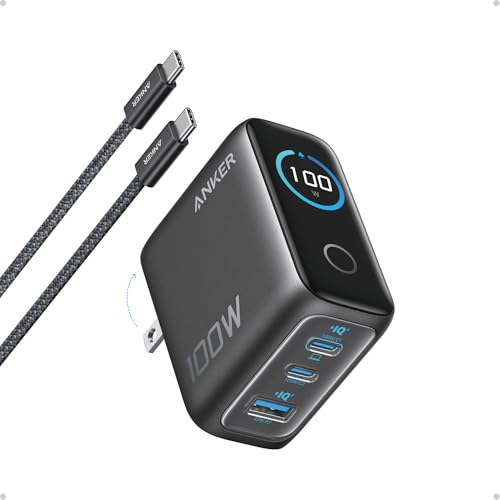
Anker 100W USB-C Charger (3-Port) — The display-equipped brick
Anker’s three-port entry is the most information-forward wall charger here: a smart display and touch control ride on an ultra-compact GaN body, and the title closes with two clarifications — a cable is included, and the unit is not a battery. The display is the interesting gamble. On most chargers the division of watts is invisible and the user guesses why a laptop is sipping; a display that reports what the ports are doing turns the invisible economy into something the owner can watch, learn and plan around. For the traveller who charges a laptop, a tablet and a phone nightly, seeing the split beats wondering about it.
Three ports at 100 watts is a tighter economy than the Nexode’s four, and the pick should be judged on that honesty: this is a charger for a defined kit of three, not a hub for a family’s worth of devices. Within its three, the arithmetic is kind — a laptop at full pace leaves a meaningful remainder for a phone, and the included cable removes the cable-rating variable that silently caps so many charging setups. The touch control pairs with the display as the interface to whatever the unit lets the owner adjust or inspect; the title names the features without detailing their full scope, and the careful buyer will read the listing for what exactly the controls govern before treating them as a deciding factor.
The non-battery clarification deserves the appreciation this guide promised in its selection notes. A compact 100W brick with a display is precisely the sort of object a hurried shopper could mistake for a power bank, and Anker’s title spends words preventing that mistake rather than harvesting it. Makers who disambiguate against their own interest in the headline earn the benefit of the doubt on the claims that remain, and the remaining claims here — GaN, three ports, a hundred shared watts — are stated plainly enough to test.
- Total output: 100W maximum, shared across ports
- Ports: 3
- Interface named in the title: smart display with touch control
- Included per the title: a cable; the unit is explicitly not a battery
- Stated compatibility: iPhone, iPad and MacBook families named
Strengths
- The display makes the watt division visible instead of leaving the owner to guess.
- An included cable removes the commonest silent bottleneck on the first day.
- Three ports at this total suits a defined personal kit without paying for unused sockets.
Trade-offs
- A fourth device has nowhere to go; growing kits will outgrow it sooner than the four-port Nexode.
- What the touch controls govern is not detailed in the title, so their value needs listing-level verification.
- Like every wall unit here, it charges at the socket’s location rather than at a desk’s centre.
Best for: a traveller or commuter with a settled three-device kit who values seeing the charging split and wants a cable in the box. Not suited for: a four-device traveller, or a buyer who wanted a power bank — the title itself warns that this is not one.
Three-device owners can read the Anker listing’s display description to see exactly what the screen reports before deciding it matters to them.
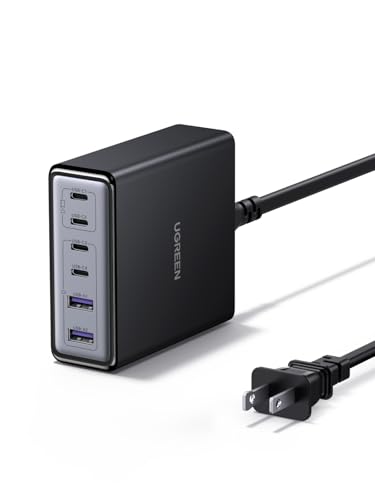
UGREEN 100W Charging Station (6-Port) — The desk organiser
UGREEN’s station takes the hundred-watt economy and spreads it across six sockets — four USB-C and two USB-A, a mix stated in full in its title — with smart power distribution named as the organising intelligence. This is the household answer at a moderate total: the corner of the kitchen counter or the family desk where two phones, a tablet, a laptop and a pair of legacy USB-A devices all come home at night. The USB-A ports are not nostalgia; they are an acknowledgement that households run on accumulated cables and older gadgets, and a station that exiles them has solved only the fashionable half of the problem.
Smart distribution is the feature to interrogate, because with six mouths and a hundred watts, arbitration is the product. Done well, the station keeps a laptop’s share dignified while phones take their smaller sips, and rebalances gracefully as devices finish and leave. The buyer should set expectations by the arithmetic rather than the port count: six devices attached at once are sharing, and a station evening is measured in everything-full-by-morning, not everything-fast-by-dinner. Judged on that honest scale, a hundred watts across a family’s overnight load is a rational, sufficient design — the extravagance would be paying for speed nobody is awake to witness.
The station shape changes household behaviour in a way wall chargers cannot. A permanent corner becomes the devices’ home, cables stay put, and the nightly hunt for a free brick ends because the infrastructure is visibly there. Families feel this as a small peace treaty. The cost is portability: this unit belongs to its desk, and the traveller in the family still needs a wall charger for the road — which is why this guide treats shape as the first decision and wattage as the second.
- Total output: 100W, shared across all ports
- Ports: 6 — four USB-C and two USB-A, per the listing title
- Distribution: smart power distribution named in the title
- Form: desktop charging station, GaN design
- Stated compatibility: MacBook Pro and Air, Dell XPS, iPad, iPhone and Galaxy families
Strengths
- Six ports with a declared mix serve modern and legacy devices from one permanent corner.
- Named smart distribution addresses the arbitration problem that defines six-port life.
- A hundred shared watts matches the overnight household load it is designed for.
Trade-offs
- Six simultaneous devices divide a moderate total; nothing charges at headline pace in a crowd.
- It is furniture, not luggage — travel still requires a separate wall charger.
- Two power-hungry laptops will find the total tight compared with the 200W station below.
Best for: a household charging corner serving phones, a tablet, a laptop and legacy USB-A gadgets overnight. Not suited for: a two-laptop power desk wanting rapid simultaneous charging, or anyone shopping for a travel brick.
Households can check the station’s listing for its distribution chart and picture their own six devices against the hundred-watt budget.

Anker Prime 200W Charging Station (6-Port) — The two-laptop station
The Prime station is what happens when the category stops apologising. Two hundred watts across six ports is the only budget in this guide under which the simultaneous case stops being a negotiation: two laptops can draw serious power at once while phones and a tablet take their shares from what remains, and the station still behaves like infrastructure rather than a rationing board. Its title calls it a desktop charger for multiple devices across the iPhone, Galaxy, MacBook and Dell families, and for once the breadth of the claim matches the arithmetic underneath it.
This is the pick for the household that became a small office: two adults working from home, laptops open all day, the station at the centre of the desk keeping both machines fed through meetings rather than merely overnight. In that life, charging speed during working hours is the product, and it is exactly the scenario where 100-watt stations reveal their ceiling — the laptop that sips at 40 watts through a video call is slowly losing a race the owner can watch. The Prime’s total removes the race. It also future-proofs the corner against the next device, the next laptop, the next tablet the household inevitably acquires.
The discipline is to buy it for a real crowd. A single traveller with a phone and a laptop gains nothing from two hundred watts except a heavier desk object, and the station shape means this power stays home regardless. The Prime should be purchased the way a household buys a larger table: because the gatherings are genuinely that size. Where they are, nothing else in this guide is a substitute; where they are not, everything else here is cheaper complexity avoided.
- Total output: 200W, shared across all ports
- Ports: 6 (the title does not break down the USB-C and USB-A mix — confirm it on the full listing)
- Design: GaN desktop charging station
- Stated compatibility: iPhone, Galaxy, MacBook and Dell families named
- Per-port ceilings: not stated in the listing title — the split chart on the full listing is the document that matters
Strengths
- The only total here that feeds two demanding laptops simultaneously without rationing.
- Six ports consolidate a work-from-home desk’s entire charging life into one unit.
- Headroom absorbs the household’s next devices without another purchase.
Trade-offs
- Desk-bound by design; none of this power travels.
- A small household will never spend its budget, making the capacity an expensive decoration.
- The port mix and per-port ceilings require a trip to the full listing to confirm.
Best for: a two-laptop household or home office whose machines must charge at pace during the working day, alongside phones and tablets. Not suited for: a solo traveller, or a light overnight household that the 100W station serves fully.
Two-laptop households can read the Prime listing’s split chart to confirm the per-port ceilings match their machines’ appetites.
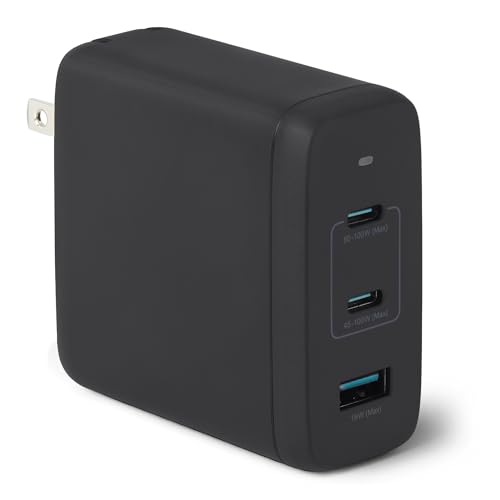
Amazon Basics 120W GaN Wall Charger (3-Port) — The high-total wall unit
Amazon Basics enters the category with a number the specialists should note: 120 watts in a three-port wall charger, the largest total available in this shape among the picks. Three ports dividing 120 is a roomy economy for the traveller — a demanding laptop can hold a high share while a phone and tablet divide a remainder that is still generous by the standards of the class — and the compact, travel-friendly framing in its title says the unit knows its habitat. The black finish and the Nano GaN branding complete a picture of a charger designed to disappear into a bag and a hotel room alike.
The Basics proposition is fundamentally about the absence of theatre. There is no display, no touch interface, no station furniture — just the largest wall total here and three sockets. For the buyer whose decision is arithmetic, that plainness is the appeal: more watts per port-count than the branded rivals, in the shape that travels. The corresponding diligence is that a house brand’s listing must be read for the details the specialists put in their titles — the split behaviour, the port mix, the protocol support — because the title here keeps its promises broad: laptops, tablets and phones, fast charging, compact size. Broad promises are not false ones, but they transfer the verification work to the buyer, and the spec box below records exactly which questions the title leaves open.
Portrait buyer: the frequent flyer whose laptop is a genuinely hungry one, whose phone fast-charges beside it nightly, and who resents every gram of redundant adapter. That traveller’s solo-laptop pace benefits from the 120 ceiling, and their three-device evenings fit the port count precisely. Buyers whose kits run to four devices, or whose phones need a named PPS promise, should let the Nexode or the Baseus argue against this pick before settling.
- Total output: 120W, shared across ports
- Ports: 3
- Design: GaN wall charger, compact and travel-friendly per the title, black
- Stated compatibility: laptops, tablets and phones generally
- Split behaviour and PPS support: not detailed in the listing title — verify both on the full listing if they decide your purchase
Strengths
- The highest wall-charger total here, giving a solo laptop the fastest available pace in a brick.
- Three ports dividing 120W leave a comfortable remainder after the laptop’s share.
- No interface theatre — the budget went into output rather than features.
Trade-offs
- Three ports cap the kit; a fourth device queues.
- Key behaviours are not stated in the title, shifting verification onto the buyer.
- Foldable prongs are not claimed in the title, so bag-friendliness needs a listing check.
Best for: a frequent traveller with a hungry laptop and a three-device kit who shops on wattage arithmetic. Not suited for: a four-device kit, or a Galaxy owner who needs PPS named rather than hoped for.
Arithmetic-first travellers can open the Basics listing to confirm its split chart and prong design before relying on the headline total.

Baseus 100W USB-C Charger (3-Port) — The PPS pick
The Baseus earns its separate place in this guide with three letters: PPS, named in its title where no other pick names it. Programmable Power Supply lets a charger adjust its voltage in fine steps at the phone’s request, and Samsung’s Galaxy fast-charging implementation leans on exactly that ability — a Galaxy plugged into a capable-but-not-PPS charger charges, but at a lesser pace than the phone was built for, with no message explaining the shortfall. For a Galaxy owner, the Baseus title answers the question the rest of the category leaves as homework, and it answers it while offering the standard virtues besides: 100 watts across three foldable-pronged ports, with MacBook, iPad, iPhone and Steam Deck families also named.
Judge the rest of its economy by the familiar arithmetic. Three devices divide a hundred; a laptop travelling with a Galaxy phone is a comfortable pairing, the phone’s PPS conversation happening inside a share that leaves the laptop well fed. The foldable prongs put it in the true travel class alongside the Nexode, and the compact framing is consistent throughout its title. What the Baseus does not offer is a fourth port or a station’s permanence; it is a personal kit charger with a protocol specialism, and its buyer should be someone whose phone makes that specialism worth more than an extra socket.
There is a broader lesson in this pick’s existence. Protocol support is invisible in photographs and absent from most headlines, yet it decides real charging speeds for real phones every night. The category will keep selling totals because totals are easy to print; the informed buyer reads for the dialect as well as the volume. If your household is Apple-centred, PPS may never matter to you and the other picks compete on shape and split alone. If a Galaxy is your daily phone, this paragraph is the most important one in the guide.
- Total output: 100W, shared across ports
- Ports: 3
- Protocol named in the title: PPS, alongside fast charging generally
- Design: foldable, compact wall charger
- Stated compatibility: MacBook Pro and Air, iPad, iPhone, Galaxy S24 and Steam Deck named
Strengths
- PPS is named outright, speaking directly to Samsung Galaxy fast charging.
- Foldable prongs and a compact body make it a genuine travel unit.
- A hundred watts across three ports keeps a laptop-and-phone pairing comfortable.
Trade-offs
- Three ports only; households and four-device kits will feel the ceiling.
- Apple-centred buyers gain nothing from its specialism and may prefer a fourth port.
- Its per-port split is not stated in the title, so laptop pace in company needs the listing’s chart.
Best for: a Galaxy owner travelling with a laptop and one more device, who wants the phone’s fastest charging mode actually engaged. Not suited for: a four-device traveller, or a household needing a permanent multi-device station.
Galaxy owners can confirm on the Baseus listing that their exact model’s fast-charging mode matches the PPS support the title names.
How Do the Six Compare Side by Side?
| Pick | Total | Ports | Shape | Defining trait |
|---|---|---|---|---|
| UGREEN Nexode 100W | 100W | 4 | Wall, foldable | Full travel kit from one socket |
| Anker 100W (3-Port) | 100W | 3 | Wall | Smart display, cable included |
| UGREEN 100W Station | 100W | 6 (4C + 2A) | Desktop | Smart distribution for the household corner |
| Anker Prime 200W | 200W | 6 | Desktop | Two laptops without rationing |
| Amazon Basics 120W | 120W | 3 | Wall | Largest total in a travel brick |
| Baseus 100W | 100W | 3 | Wall, foldable | PPS named for Galaxy fast charging |
How Do You Plan a Charging Setup for a Whole Household?
Begin by counting honestly, on the worst evening rather than the average one. The household’s true simultaneous load is the Friday night census: every phone home, the shared tablet, at least one laptop, plus the small permanent residents — a watch, earbuds, a handheld console. Against that census, a station’s total stops being a spec and becomes a schedule. If the census is six devices and the pattern is overnight, the UGREEN station’s hundred watts will quietly finish the job by morning. If two of the devices are laptops that must also charge during the working day, the census points at the Prime’s two hundred, because daytime charging is a race run in the open.
Placement is the second decision, and it outlasts the hardware. A charging corner succeeds when it sits where devices already land — the hallway table, the kitchen counter’s end — and fails when it asks the household to adopt a new pilgrimage to a spare room. Cable length from the station to each device’s resting spot matters more than another ten watts; a station whose cables cannot reach the sofa-side table will be quietly abandoned for the old bricks. Buy the station for the corner that exists, not the corner in the catalogue photograph.
Finally, leave the system a way to grow. Households acquire devices the way gardens acquire weeds, and a setup bought exactly at capacity becomes a negotiation again within a year. A spare port, a little wattage headroom, a USB-A socket for the legacy gadget that refuses to die — these margins are what separate infrastructure from a purchase. The picks above span the margins honestly; the household’s job is to admit, while shopping, that next year’s census will be larger than this year’s.
What Should a Traveller Check Before Trusting One Brick?
The solo test comes first: plug the laptop in alone and confirm it charges at the pace its own indicator promises, because that is the ceiling every shared evening divides down from. Then run the real test — the full kit, plugged in together, overnight in your own home before the trip rather than for the first time in a hotel. Travellers discover split behaviour, cable bottlenecks and prong awkwardness at home, where the old bricks are still in a drawer, or abroad, where they are not. The home rehearsal is the cheapest insurance in this entire category.
Mind the socket geography of where you are going. A wall charger charges at the wall, and hotel sockets live behind beds, inside lamps and occasionally in ceilings’ distance from anywhere a device can rest. A short extension or a longer cable in the bag rescues more trips than another twenty watts does. And if the trip involves a second traveller, have the two-laptop conversation before departure: either the rota is agreed, the station comes along, or someone carries their own brick — because the hundred-watt division discovered at midnight in a shared room is a small but genuine marital hazard.
How Does Heat Behave When Every Port Is Working?
A multiport charger at full song is a small heater with a second job, and its thermal behaviour decides where it can honestly live. GaN efficiency keeps the waste heat modest, but modest heat in a sealed travel pouch, a crowded power strip behind a sofa, or a station buried under the household’s cable spaghetti still accumulates. The practical habits are simple and worth stating: give a hard-working charger air on most sides, do not charge at full multi-device load inside a closed bag, and treat a unit that becomes genuinely hot to hold — rather than warm — as a unit describing a problem, whether the problem is its workload, its ventilation or its health.
Heat also explains a behaviour owners misread as failure: thermal pacing. A charger protecting itself reduces output when its temperature climbs, so a laptop that charged briskly at nine in the evening may sip at eleven, not because the phone arrived but because the brick is warm from hours of full employment. The remedy is rarely a new charger; it is airflow, a less buried position, or an honest reassessment of whether the total was sized for the crowd. Buyers who understand thermal pacing stop returning good chargers, and buyers who plan for it — station on an open shelf, travel brick on the nightstand rather than under the pillow’s neighbourhood — never meet it.
The bedside deserves its own sentence, because this batch of guides meets there. A charger that runs a household’s whole census overnight is working its hardest shift within arm’s reach of sleeping people, and while every pick here is a mainstream manufactured product, the owner’s habits complete the safety picture: sound cables, no frayed insulation, no charging under bedding, and a strip with room to breathe. Multiport consolidation reduces the total count of warm objects plugged into a home’s walls, which is its own quiet argument — one well-placed station instead of five tired bricks in five forgotten sockets.
What Happens to Charging Speeds as Devices Finish?
The division of watts is not a fixed sentence; it is a continuing negotiation, and its dynamics reward a moment’s attention. As the phone reaches full and stops drawing, a well-designed charger returns that share to the pool, and the laptop still attached finds its pace improving through the night without anyone touching a cable. This is why the overnight pattern flatters modest totals: the crowd thins itself out, device by device, until the last and largest load enjoys nearly the whole budget in the small hours. The station that seemed to be rationing at ten in the evening is generous by two in the morning, and every device is full by seven regardless.
Daytime behaviour is the sterner test, because nothing finishes and leaves. The home office at eleven in the morning has every device awake and drawing, the laptops under active load rather than sipping in sleep, and the charger’s total is spent against live appetites rather than overnight patience. That asymmetry is the cleanest way to choose between the totals in this guide: if your charging is mostly nocturnal, a hundred watts is a comfortable economy at any port count here; if your charging must perform at noon, the budget has to be sized for the noon crowd, and that is the Prime station’s entire argument stated in one sentence.
There is a corollary for travellers sharing a room and a brick. The rota most pairs improvise — one laptop until midnight, the other after — is simply manual load-shedding, and it works because the night is long. Naming it as a plan rather than discovering it as an argument is the whole trick, and couples who agree the schedule at dinner charge in peace. Technology divides the watts; diplomacy divides the hours, and a good trip usually needs a little of both.
Why Do Cables Decide More Than the Box Suggests?
Every charging session is a three-party negotiation among the charger, the device and the cable between them, and the cable is the party nobody interviews. USB-C cables carry current ratings, and the higher charging currents that unlock a laptop’s fastest pace require cables built and marked for them; a cable scavenged from a phone box may cap the session far below what either endpoint could manage, silently, with no error message anywhere in the chain. Owners experience this as a charger that underdelivers, and the misdiagnosis costs returns, replacements and forum threads, when the fix was a cable swap away.
The household discipline that follows is cheap: keep the cables that arrived with capable chargers paired with them, mark the high-capacity cable in the travel kit so it is the one that travels, and treat mystery cables as phone-only until proven otherwise. The Anker wall charger’s included cable earns its second mention here for exactly this reason — it guarantees that on the first night, at least one link in the chain is known to be right, and every troubleshooting step after that starts from solid ground. A multiport charger multiplies ports; it cannot multiply the quality of what is plugged into them, and the buyer who budgets a moment for cables gets the total they paid for.
What Mistakes Do Multiport Charger Buyers Keep Making?
The foundational mistake is reading the total as a per-port promise, and it has been this guide’s refrain because it causes most of the category’s disappointment. Close behind is buying ports instead of watts — choosing six sockets sharing a modest total over three sharing a generous one, then wondering why everything sips. The third mistake is ignoring the cable drawer: pairing a capable brick with cables that quietly cap the current, then blaming the brick for the pace. The fourth is shape blindness — buying a station for a life of travel or a wall brick for a household that needed a corner — because the two shapes solve different problems that happen to share a connector. Each mistake is a failure to shop for the simultaneous case, which is the only case a multiport charger exists for.
Final Recommendation
One final test separates a considered purchase from a hopeful one, and it costs an evening: before the return window closes, run your worst realistic night through the new charger at home. Every device you own, plugged in together, in the positions they will actually occupy. Watch the laptop’s reported pace in company, feel the unit’s warmth after an hour, and confirm the prongs or the station sit where your furniture wants them. A charger that passes its worst night in your own rooms will not surprise you in a hotel, a relative’s spare bedroom or a deadline week — and one that fails the test has failed it while the remedy is still a returns label rather than a second purchase.
Decide the shape first and the crowd second. Travellers with a full kit should start with the Nexode’s four foldable ports; Galaxy owners should let the Baseus’s named PPS support argue hard against it; travellers with a hungry laptop and a tight three-device kit should weigh the Amazon Basics’ 120W total and the Anker’s display-equipped hundred against each other. Households should build a corner: the UGREEN station for the overnight census, the Anker Prime when two laptops must charge at pace through the working day. Everywhere, read the split chart before the headline, test the full kit at home before trusting it abroad, and remember that the number on the box is a budget to be shared — the chargers above are ranked by how gracefully they share it, and by how honestly their makers describe the sharing before the box is ever opened.
Frequently Asked Questions
Does a 100W charger give 100W to every port?
No. The figure is the total across all ports in use at once. A single laptop plugged in alone can draw up to the charger’s per-port ceiling, but each additional device takes a share of the same hundred, and the per-device pace falls accordingly. The listing’s split chart shows the exact division for each combination, and it is the document to read before buying.
What is PPS, and do I need it?
PPS is a part of the USB Power Delivery standard that lets a charger adjust voltage in fine steps at the device’s request. Samsung Galaxy fast charging leans on it specifically, so a Galaxy owner gets their phone’s fastest mode only from a charger that supports it — among these picks, the Baseus names PPS in its title. Apple devices do not depend on it, so iPhone households can shop on shape and split alone.
Is a charging station better than a wall charger?
They solve different problems. A station is permanent infrastructure for a household corner, serving many devices where they live; a wall charger is a travelling consolidation of one person’s kit. Many households end up owning one of each, and the mistake is expecting either to do the other’s job — a station in a suitcase, or a travel brick refereeing a family’s nightly census.
Why does my laptop charge more slowly when my phone is plugged in?
Because the total is being re-divided. Adding a device triggers the charger’s distribution logic, which reduces the laptop’s share to fund the newcomer’s. The laptop has not been slighted; the budget is simply being spent by two instead of one. If the laptop’s pace in company matters — during the working day, say — that is the argument for a larger total, up to the Prime station’s 200.
Can a multiport charger replace my laptop’s original adapter?
For everyday charging, yes, provided the laptop charges over USB-C and the charger’s solo output meets the machine’s appetite. Keep the original as the reference and the spare for troubleshooting. The multiport unit’s advantage is consolidation — one brick for the whole kit — and its limit is the shared total, which the original single-purpose adapter never had to divide.
Will a multiport charger wear out my batteries faster?
A charger that speaks proper Power Delivery gives each device the voltage and current the device itself negotiates for, which is the same conversation the original adapter holds; the multiport difference is only in how much total is available to share. Batteries age from heat, from time spent at extremes of charge, and from years — not from the brand of the negotiation partner. If anything, the overnight pattern these chargers encourage, with its gentler divided pace once several devices are attached, is an easy life for a battery compared with repeated solo fast charging at full tilt.
How many ports do I actually need?
Count the devices that charge simultaneously in your real life, then add one. The addition is not indulgence; it is the margin that absorbs the borrowed phone, the visiting relative’s tablet and next year’s acquisition without reopening the socket negotiation the charger was bought to end. Travellers usually land at three or four, which is where the Nexode, the Anker, the Basics and the Baseus all live; households counting a whole family’s evening land at six, which is station territory. Buying far beyond the count wastes money on sockets that will hold dust, while buying exactly at it guarantees the queue returns.
Do I need GaN, or is it marketing?
GaN is the reason these totals fit in these shapes at all: gallium nitride components run cooler and smaller than the silicon they replaced, so a 100W multiport brick can be pocketable and a 200W station can sit on a desk without a fan’s constant complaint. You do not buy it as a badge; you experience it as the size and temperature of the charger you bought, and every pick here that names it is trading on a real physical advantage.
Related Guides
- Best Bedside Chargers
- Best Portable Chargers That Dont Require A Cable
- Best Laptop Universal Chargers


