What's inside
- Key Takeaways
- Quick Picks
- How We Chose These Picks
- What Makes a Charger Belong on a Nightstand Rather Than a Desk?
- The Six Bedside Picks, Pick by Pick
- How Do the Six Compare Side by Side?
- How Do You Set Up a Nightstand Charging Corner That Stays Tidy?
- What Should Couples Sharing One Nightstand Setup Consider?
- How Does the Guest Room Change the Calculation?
- Why Does Display Brightness Decide Whether a Clock Survives?
- What Happens to the Nightstand When Travel Enters the Picture?
- What Mistakes Do Bedside Charger Buyers Keep Making?
- Final Recommendation
- Frequently Asked Questions
- Related Guides
As an Amazon Associate I earn from qualifying purchases. This post may contain affiliate links at no extra cost to you.
[widgetverdict.com] is reader-supported. When you buy through links on our site, we may earn an affiliate commission.
Where to buy: the six products below are sold through the linked listings, and they divide into alarm clocks that charge and charging stations that tell the time — a distinction worth holding onto while you shop.
The best bedside chargers are bought to solve a nightly clutter problem: the phone face-down on a book, the watch charger sliding off the nightstand’s edge, the earbuds case hunting for a free socket, and an alarm clock from another decade glowing in the middle of it all. The products in this guide consolidate that mess, each in its own way. Some are alarm clocks first, with charging built into the furniture of the morning routine. Some are charging stations first, aimed at the owner whose phone, watch and earbuds should all wake at full. And one is neither a clock nor a station but a surge-protected power strip wearing an alarm clock’s face, for the nightstand that also feeds a lamp, a CPAP-adjacent gadget or a guest’s phone. Choosing well starts with admitting which of those objects your nightstand actually needs.
Two honesty notes belong at the front of this category, because its listings rarely volunteer them. The first concerns speed: any wireless charging pace quoted for these products is a figure stated by the manufacturer for the phone and conditions the manufacturer chose, and real overnight charging — through a case, on a warm night, with the phone slightly off the pad’s sweet spot — will differ. Overnight, that difference barely matters, which is precisely why this category can be relaxed about speed in a way the multiport category cannot. The second note concerns ecosystems: the three-in-one stations here are built overwhelmingly for Apple’s trio of phone, watch and earbuds, with the iPhone named across nearly every title and magnetic alignment designed around it. Android households are served by the clock-and-USB picks instead, and this guide says so at each pick rather than letting a Samsung owner discover it at the nightstand.
What unites all six is the alarm clock question, because the nightstand is the one place where a charger must also be a good citizen of the dark. Display brightness that dims properly, numbers readable at a squint without lighting the room, an alarm that can be set half-asleep and silenced without a treasure hunt — these unglamorous traits decide whether a bedside product is loved or unplugged within a month. The picks below are therefore judged as clocks as seriously as they are judged as chargers, and the ones with no clock at all are judged on what they offer instead.
Key Takeaways
- This category mixes two species: alarm clocks with charging built in (ANJANK, DreamSky, Acer, JACKYLED) and charging stations with no alarm ambitions (GETPALS, Anker Prime).
- The three-in-one stations are Apple-centred designs — iPhone, Apple Watch and AirPods are the trio they exist to serve, and Android owners should shop the clock picks instead.
- Wireless charging speeds in this category are manufacturer-stated figures; overnight charging makes the real-world difference mostly irrelevant.
- The Anker Prime is the only Qi2-certified pick, a foldable 25W magnetic station whose title notes the adapter is included and the unit is not a battery.
- The JACKYLED is the outlier worth understanding: an alarm clock fused with a power strip — three outlets, four USB ports and stated surge protection — for nightstands that feed more than phones.
- The DreamSky is the only pick that leads with furniture values: a wooden clock with large numbers, adjustable volume and brightness, and a USB port beside its wireless pad.
Quick Picks
| Pick | Badge | Why it earns its place |
|---|---|---|
| ANJANK 5-in-1 Charging Station with Alarm Clock | The full nightstand console | Five functions around an alarm clock and magnetic dock for iPhone, Apple Watch and AirPods, with a seven-setting night light. |
| DreamSky Wooden Alarm Clock with Wireless Charging | The furniture-first clock | Wooden digital clock with a wireless charging pad, a USB port, large numbers and proper brightness and volume controls. |
| GETPALS 3-in-1 Wireless Charging Station | The straightforward Apple stand | Three-in-one stand for iPhone, Watch and AirPods that does the consolidation job without clock features to configure. |
| Anker Prime 25W Qi2 3-in-1 Foldable Charger | The certified traveller | Qi2-certified 25W magnetic three-in-one that folds palm-small, with cooling and the adapter included. |
| Acer 7-in-1 Wireless Charging Station | The feature counter | Seven-in-one station for the Apple trio with Bluetooth time synchronisation keeping its clock honest. |
| JACKYLED Alarm Clock with 4 USB Chargers | The nightstand power strip | Alarm clock with four USB ports and three AC outlets plus stated surge protection, for nightstands feeding lamps and guests too. |
How We Chose These Picks
We required every pick to earn its place on a nightstand rather than merely near one, which eliminated the generic charging pads that flood this search term. A pick had to integrate at least two of the nightstand’s real jobs — telling time, sounding an alarm, charging a phone, charging a watch, feeding earbuds, lighting the dark gently, or powering the lamp — because consolidation is the entire premise of the category. All six clear that bar, and the two that clear it without a clock do so by consolidating three devices’ charging into one footprint with a watch perch included.
We then insisted on ecosystem honesty in the titles themselves. Picks that name their devices — iPhone generations, Watch series, AirPods models — scored over picks that gesture at universal compatibility, because a watch charger is not a generic object: the puck that charges one brand’s watch ignores another’s, and a bedside stand bought on a vague promise fails at the exact moment of first use. Where a pick’s title speaks only of phones and USB ports, this guide treats it as a phone-and-whatever pick and says so.
Clock behaviour was the third filter, applied to the four picks that carry one. A bedside display must dim — the DreamSky names its dimmer in its title, the JACKYLED names a dimmable full-screen display, the Acer names a synchronisation feature that keeps its time accurate without manual setting — and we favoured picks whose titles acknowledge the realities of a dark room. A clock that cannot dim is a night light with ambitions, and not in the good way; the ANJANK, tellingly, includes an actual night light with seven settings as a separate, deliberate feature rather than an accidental glow.
Finally, we kept one deliberate outlier. The JACKYLED’s power-strip architecture answers a nightstand reality the elegant stations ignore: many nightstands are the room’s power hub, feeding a lamp and whatever else sleeps nearby. A guide that pretended otherwise would be tidier and less useful. It is included with its nature stated plainly, so the buyer who needs it recognises it and the buyer who does not can pass it by.
What Makes a Charger Belong on a Nightstand Rather Than a Desk?
Light discipline comes first. A desk charger may glow, blink and advertise; a nightstand charger shares a room with a sleeping person, and every unnecessary lumen is a small theft. The good bedside products treat darkness as a feature: displays that dim to a murmur, indicator lights that do not strobe through a charge cycle, night lights that exist as a deliberate, adjustable choice rather than a side effect. When you evaluate any pick below, imagine it at two in the morning from pillow height, because that is the viewing angle it will actually be judged from for years.
Sound discipline follows. The alarm is the nightstand’s oldest job, and its modern form must be settable by a tired person, audible without being violent, and snoozable without a search party. Dual alarms matter to couples and to anyone whose weekdays and weekends keep different hours — the JACKYLED names dual alarm in its title — and adjustable volume, which the DreamSky names, matters to everyone who has been blasted awake by a clock that knows only one loudness. A charging station without an alarm is not failing this test; it is declining to sit it, leaving the phone itself as the alarm, which many owners genuinely prefer.
Reach and fumble complete the picture. The nightstand transaction happens in the dark, half-awake: the phone must land on its pad or magnet without a visual alignment ritual, the watch must find its perch by shape, and the whole arrangement must survive being knocked by a reaching hand without scattering devices onto the floor. Magnetic alignment — the ANJANK’s dock, the Anker’s MagSafe-compatible design — is valuable here not for speed but for forgiveness: the magnet finds the spot the sleeper cannot see. Weighted bases, stands that hold a phone at a glanceable angle for the morning weather check, and cables that route behind rather than across — these are the category’s true engineering, and they never appear in a wattage figure.
Heat and hum are the last citizens’ tests. A wireless pad works all night within a metre of the sleeper’s head, and while every pick here is a mainstream product, the owner’s habits matter: keep the pad’s surface clear rather than buried under books, let air reach it, and retire any cable that frays. The Anker Prime’s title even names its cooling approach — AirCool — which in a bedside context reads less as a speed feature and more as a temperament feature: a station designed to stay composed through the long, slow shift that nightstand charging actually is.
The Six Bedside Picks, Pick by Pick

ANJANK 5-in-1 Charging Station with Alarm Clock — The full nightstand console
The ANJANK is the maximalist answer: five functions gathered around a single nightstand footprint — an alarm clock, a magnetic charging dock for the iPhone, places for the Apple Watch and AirPods, and a night light with seven settings woven through the design. Its title names the current iPhone generations and Watch series explicitly, which tells you both its ecosystem and its intended buyer: the Apple household that wants the nightstand to become one object instead of five. The magnetic dock is the functional heart, because alignment by magnet is what makes a one-handed, lights-out phone drop reliable rather than hopeful.
The night light deserves more respect than it usually gets in a spec list. Seven settings implies a range from a barely-there glow to something that can guide a midnight glass of water, and a light designed into the unit beats the accidental illumination of a too-bright clock display in every way that matters at 3 a.m. Paired with the alarm clock, the ANJANK is best understood as bedroom furniture that charges, rather than a charger with accessories — buy it the way you would buy a lamp, for the room it will live in and the routine it will anchor.
The honest boundaries are ecosystem and simplicity. Nothing in its title speaks to Android phones, and a magnetic dock designed around the iPhone’s alignment will not court a Galaxy; Samsung owners should keep reading. And five functions mean five things to learn once — the light’s settings, the alarm’s habits, the dock’s sweet spot — which is a fine trade for the consolidation offered, but a real one for the buyer who wanted a pad and nothing else. That buyer is served by the GETPALS below; the ANJANK serves the buyer who wants the nightstand solved as a whole.
- Functions stated in the title: alarm clock, magnetic charging dock, night light with seven settings
- Devices named: iPhone generations through the current line, Apple Watch series, AirPods
- Configuration: five-in-one multiple charger stand
- Wireless charging speed: not stated as a figure in the listing title — treat any speed claim as the manufacturer’s, verified on the full listing
- Android support: not named in the title — assume the magnetic dock is an iPhone-centred design
Strengths
- The most complete nightstand consolidation here — clock, three-device charging and a real night light in one footprint.
- Magnetic docking makes the lights-out phone drop forgiving and repeatable.
- Seven light settings let the owner tune the room’s darkness rather than accepting a fixed glow.
Trade-offs
- Built around Apple’s devices; an Android household gains little from its dock.
- Five functions carry a small learning curve a plain pad never asks for.
- Its charging pace is not headlined, so speed shoppers must verify figures on the full listing.
Best for: an iPhone, Watch and AirPods owner who wants the nightstand replaced by a single console with clock and night light included. Not suited for: an Android phone household, or a minimalist who wants a pad and no features at all.
Apple households can open the ANJANK listing to confirm their exact iPhone and Watch generations appear in its compatibility list.

DreamSky Wooden Alarm Clock with Wireless Charging — The furniture-first clock
The DreamSky begins from the opposite end of the category: it is a wooden digital alarm clock that happens to charge, and for a great many bedrooms that is the correct priority. The title’s details are the vocabulary of a serious clock — large numbers, adjustable volume, a brightness dimmer, daylight-saving handling — with a wireless charging surface on top and a USB port for the second device or the partner’s phone. In a bedroom decorated like a room rather than a charging bay, a wooden clock that swallows the nightly phone charge is the pick that will still look right in five years.
Its charging architecture is deliberately modest and should be judged as such. The wireless pad serves the owner’s phone overnight, where pace is irrelevant; the USB port serves whatever else the nightstand hosts, at whatever pace a standard port provides. There is no watch perch and no earbuds dock, and owners of the full Apple trio will feel those absences nightly — this is a two-device nightstand solution wearing it honestly. What it offers instead is clock craft: numbers sized for a squint across the room, volume that can be set to the sleeper rather than the factory, and a dimmer that respects the dark.
The DreamSky is also the most ecosystem-neutral pick in the guide. A wireless pad and a USB port ask nothing about brands; the Android phone, the older iPhone, the e-reader and the partner’s anything all charge here without an ecosystem conversation. For mixed households — still the majority, whatever the three-in-one marketing implies — that neutrality is not a compromise but the entire point, and it is why this clock, rather than a station, is the recommendation we would hand a couple whose phones disagree about operating systems.
- Form: wooden digital alarm clock for the bedroom nightstand
- Charging: wireless charging surface plus a USB port, per the title
- Clock features named: large numbers, adjustable volume, brightness dimmer, DST handling
- Watch or earbuds charging: not offered — this is a phone-plus-one nightstand design
- Ecosystem stance: brand-neutral, since a pad and a USB port serve any phone
Strengths
- Clock features are specified like a clockmaker’s — dimmer, volume and large numerals all named.
- The wooden form suits a bedroom that does not want to look like a device lab.
- Brand neutrality serves mixed-phone households without an ecosystem argument.
Trade-offs
- No perch for a watch and no dock for earbuds; the Apple trio is not consolidated here.
- Wireless pace is a background overnight matter, not a headline — speed shoppers should look elsewhere.
- One wireless spot means a couple’s second phone queues for the USB port’s pace.
Best for: a mixed-brand couple or a single-phone owner who wants a proper wooden alarm clock that quietly absorbs the nightly charge. Not suited for: an Apple Watch owner expecting a three-device stand, or anyone needing two wireless pads.
Clock-first shoppers can read the DreamSky listing for its display dimensions and confirm the numerals suit their eyesight across the room.
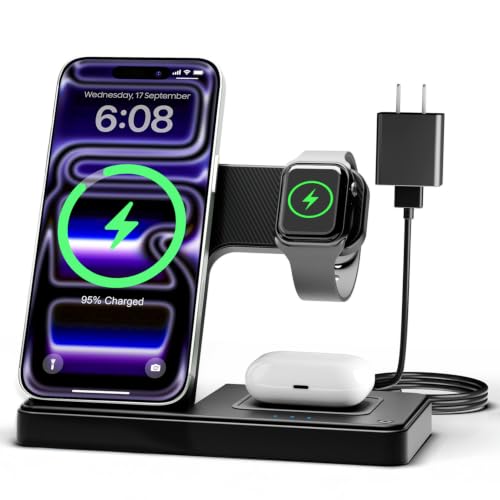
GETPALS 3-in-1 Wireless Charging Station — The straightforward Apple stand
The GETPALS strips the three-in-one idea to its essentials: a stand that charges an iPhone, an Apple Watch and AirPods together, in black, with the compatible generations enumerated in its title at unusual length — iPhone lines from the current models back through several generations, Watch series from the newest down to Series 2, AirPods across their range. That enumeration is the product’s honesty mechanism. A buyer can find their exact trio in the list and buy with the ecosystem question settled, rather than trusting a vague works-with-Apple gesture.
There is no clock here, and the pick is better for admitting what that means: your phone remains your alarm, as it already is for most owners, and the stand’s job is purely to receive the trio each night and return them full. The stand format holds the phone upright at a glanceable angle — useful for the morning check and for the phone’s own standby clock modes — while the watch and earbuds take their places beside it. Judged as furniture it is plain; judged as infrastructure it is exactly sufficient, and there is a real market of nightstands that want sufficiency without a console’s learning curve.
Who should pass it by is equally clear. Android owners gain nothing from a stand whose every perch is Apple-shaped. Owners who want the alarm clock absorbed into the same object should look at the ANJANK or the Acer. And owners who travel with their trio will find a fixed stand stays home — the Anker below exists for them. The GETPALS is the home nightstand’s quiet answer, and its black, unadorned competence is a legitimate aesthetic choice in a category prone to feature confetti.
- Configuration: three-in-one charging stand
- Devices named: iPhone generations across several lines, Apple Watch Series 2 and later including Ultra, AirPods range
- Clock or alarm: none — the phone remains the alarm
- Finish stated in the title: black
- Charging speeds: not stated as figures in the listing title — manufacturer figures on the full listing govern expectations
Strengths
- The title’s device enumeration settles compatibility before purchase, generation by generation.
- Three devices consolidate into one footprint with no clock features to configure or fight.
- An upright phone angle suits morning glances and the phone’s own nightstand display modes.
Trade-offs
- Apple-only in practice; the perches serve no other ecosystem.
- No alarm clock, so owners wanting one object for everything should look at the clock picks.
- A fixed stand does not travel; the trio’s road life needs a different solution.
Best for: an iPhone, Watch and AirPods owner whose phone is already the alarm and who wants the trio consolidated without extra features. Not suited for: Android owners, clock seekers, or frequent travellers with the same trio.
Apple owners can scan the GETPALS listing’s generation list and tick off their own three devices before ordering.

Anker Prime 25W Qi2 3-in-1 Foldable Charger — The certified traveller
The Anker Prime is the pick with a certificate. Its title leads with Qi2 certification at the newer revision — the wireless standard built around magnetic alignment — and a 25-watt figure for the phone pad, wrapped in a palm-sized three-in-one that folds for travel, cools itself by a named AirCool approach, includes its adapter, and states plainly that it is not a battery. Each clause of that title answers a question a previous generation of buyers learned to ask the hard way: is it certified, how fast is the pad by the maker’s own statement, does it fold, what cools it, is the adapter in the box, and is it secretly a power bank. It is not; it is a charger, and the clarity is the luxury.
Read the 25 watts with this guide’s standing caution: it is the manufacturer’s stated figure for the phone pad under the standard’s conditions, and it signals that this pad belongs to the faster class of magnetic wireless charging rather than the slow overnight trickle of older pads. At a nightstand, that pace buys flexibility — a phone dropped on the pad for the evening’s last hour gains meaningfully, not just overnight — and in a hotel it buys the same consolidation the GETPALS offers at home, in a package that folds into a coat pocket’s neighbourhood. The watch and earbuds places complete the trio, making this the one pick that serves the Apple traveller’s whole nightstand in exile.
Its limits are the mirror of its virtues. There is no clock, because clocks do not fold palm-small. The price of certification, cooling and folding engineering is that this is a considered purchase rather than a spare-room afterthought, and a buyer whose trio never leaves one nightstand may be paying for a folding talent that never gets used — the GETPALS or ANJANK would serve that life as well. But for the owner whose nightstand alternates between home and hotels, this is the most complete answer in the guide, and the only one whose wireless standard is certified rather than merely claimed.
- Wireless standard: Qi2-certified at the newer revision, per the title
- Phone pad figure: 25W as stated by the manufacturer in the listing title
- Form: palm-sized three-in-one, foldable, travel-ready
- Cooling named in the title: AirCool wireless charging
- Included per the title: the adapter; the unit is explicitly not a battery
Strengths
- Qi2 certification replaces compatibility guesswork with a standard’s promise.
- Folds palm-small, making the full trio’s charging genuinely portable.
- The adapter is included and the pad’s stated figure leads its class in this guide.
Trade-offs
- No clock or alarm — travellers use the phone’s alarm, as at home.
- Homebound owners pay for folding engineering they will never fold.
- The 25W figure is a manufacturer statement under standard conditions, not a guarantee through every case.
Best for: an iPhone, Watch and AirPods owner who travels regularly and wants one certified station for home and hotel nightstands alike. Not suited for: a buyer wanting an alarm clock in the same object, or a second-room spare where certification and folding are wasted.
Travelling Apple owners can verify on the Anker listing that their iPhone generation supports the magnetic standard this charger is certified for.

Acer 7-in-1 Wireless Charging Station — The feature counter
Acer’s entry competes on count and on one quietly excellent idea. Seven-in-one is the headline arithmetic — the Apple trio’s charging places plus the clock and its supporting functions gathered into one black station — and the idea is Bluetooth TimeSync: the station synchronises its clock via Bluetooth, so the time it shows is the time your phone keeps, set accurately without the fiddle of buttons and immune to the drift and the power-cut resets that make cheap clock radios lie. Anyone who has reset a blinking nightstand clock after a storm understands why synchronisation is a feature worth naming in a title.
The station’s centre of gravity is the home nightstand rather than the road. It consolidates the iPhone, Watch and AirPods in one footprint like the GETPALS, then adds the clock layer the GETPALS declines, which positions it directly against the ANJANK: both are clock-plus-trio consoles, differing in their extra talents — the ANJANK brings its seven-setting night light, the Acer brings its self-setting clock. Which extra matters is a household question. Homes that lose power or hate clock-fiddling will feel the Acer’s talent monthly; homes that read by night light will feel the ANJANK’s nightly.
The diligence note is the count itself. Seven-in-one arithmetic across this category bundles functions generously — a clock, a sync, a light or a port can each claim a number — so the wise buyer reads the listing’s own breakdown of the seven rather than treating the figure as seven chargers. What is solidly stated is the core that matters: the trio’s wireless charging, the station form, and the synchronised clock. Bought for those, the Acer is a coherent console; bought for the arithmetic, it is a number in search of a definition.
- Configuration: seven-in-one wireless charging station, black
- Devices named: iPhone generations across several lines, Apple Watch, AirPods
- Clock feature named in the title: Bluetooth TimeSync
- Charging figures: not stated as numbers in the listing title — the manufacturer’s full listing carries them
- Function count note: the seven bundles charging and clock functions together; read the listing’s breakdown for the exact list
Strengths
- Bluetooth time synchronisation ends manual clock-setting and storm-reset blinking.
- Clock plus trio consolidation matches the ANJANK’s console idea with a different extra talent.
- A familiar PC maker’s name stands behind the station’s documentation and support.
Trade-offs
- The seven-in-one count bundles unlike functions; its value is in the core trio-plus-clock, not the arithmetic.
- Apple-centred like its console rivals; Android households should shop the clock picks.
- No night light is named, so the ANJANK wins that specific comparison.
Best for: an Apple household that wants clock and trio in one station and is tired of resetting unsynchronised clocks. Not suited for: an Android household, or a buyer who needs a night light integrated above all.
Households can read the Acer listing’s breakdown of its seven functions and decide whether the list matches their nightstand’s actual needs.

JACKYLED Alarm Clock with 4 USB Chargers — The nightstand power strip
The JACKYLED abandons elegance for coverage, and a certain kind of nightstand will love it for exactly that. It is an alarm clock fused with a small power strip: four USB charging ports, three AC outlets, and surge protection stated at a 1700-joule figure in its title, wrapped around a dimmable full-screen LED display with dual alarms and a snooze function. This is the nightstand that feeds a lamp, a partner’s phone, a guest’s tablet and the owner’s phone off one object plugged into one wall socket — the reality of older bedrooms with one accessible outlet, solved by consolidation at the power layer rather than the wireless layer.
Nothing here is wireless, and that is a philosophy rather than an omission. Cables charge everything, at whatever pace the ports provide, without alignment rituals or ecosystem exclusions: any phone, any brand, any generation with a cable end that fits a USB port. For the guest room, the teenager’s room, or the household whose devices are a coalition rather than an ecosystem, the JACKYLED’s neutrality is its genius. The surge figure deserves the guide’s standard caution — it is the manufacturer’s stated rating for the strip’s protection, a reason to prefer it over an unprotected strip, not a promise that lightning has been abolished.
Judge it as a clock and it holds up its end: a full-screen display that dims, dual alarms for two schedules, a snooze that can be found in the dark. Judge it as furniture and it is unapologetically utilitarian, a working object for a working nightstand. The buyer who wants a serene wooden clock should buy the DreamSky; the buyer whose nightstand is a power station with a bed attached should buy this, and will wonder why the elegant stations pretend lamps do not exist.
- Power architecture: three AC outlets plus four USB charging ports
- Surge protection stated in the title: 1700 joules, as rated by the manufacturer
- Clock features named: dual alarm, snooze, dimmable full-screen LED display
- Wireless charging: none — every device charges by cable
- Ecosystem stance: fully neutral; if it has a cable, it charges
Strengths
- Solves the one-outlet bedroom by merging clock, USB charging and AC outlets in one unit.
- Total brand neutrality — guests, partners and legacy devices all charge by cable.
- Dual alarms and a dimmable full-screen display cover the clock duties properly.
Trade-offs
- No wireless charging and no watch perch; the Apple trio is fed by cables or not at all.
- Utilitarian looks will not flatter a carefully styled bedroom.
- Cable charging means cable clutter management remains the owner’s nightly job.
Best for: a nightstand that must power a lamp and several mixed-brand devices from one socket — guest rooms, older bedrooms, teenagers’ headquarters. Not suited for: an Apple Watch owner wanting a wireless trio stand, or a minimalist bedroom allergic to cables.
Power-hungry nightstands can check the JACKYLED listing’s outlet layout against the plugs their lamp and devices actually carry.
How Do the Six Compare Side by Side?
| Pick | Clock? | Devices served | Charging style | Defining trait |
|---|---|---|---|---|
| ANJANK 5-in-1 | Yes, with night light | iPhone, Watch, AirPods | Magnetic dock plus places | The full console |
| DreamSky Wooden Clock | Yes, furniture-grade | Any phone plus one USB device | Wireless pad plus USB port | Clock craft and brand neutrality |
| GETPALS 3-in-1 | No | iPhone, Watch, AirPods | Stand charging | Enumerated compatibility, no extras |
| Anker Prime Qi2 | No | iPhone, Watch, AirPods | Certified magnetic, foldable | The travelling station |
| Acer 7-in-1 | Yes, self-syncing | iPhone, Watch, AirPods | Station charging | Bluetooth TimeSync clock |
| JACKYLED | Yes, dual alarm | Anything with a cable, plus AC devices | Four USB ports, three outlets | The power-strip nightstand |
How Do You Set Up a Nightstand Charging Corner That Stays Tidy?
Start at the wall and work outward. One unit plugged into one socket should be the goal the whole arrangement serves, because every additional brick reintroduces the tangle the purchase was meant to retire. Route the unit’s own cable behind the nightstand once, deliberately, and let the devices’ short cables live on the surface where hands can find them in the dark. If the nightstand must also feed a lamp, decide now whether the lamp joins the system — the JACKYLED’s outlets exist for this — or keeps its own socket, because a lamp added later by improvisation is how tidy corners unravel.
Assign each device a home position and let muscle memory do the rest. The phone’s pad or magnet belongs where the hand naturally lands from the pillow side; the watch perch where it cannot be knocked into the gap behind the furniture, that famous device graveyard; the earbuds where they will be seen in the morning, because earbuds left charging invisibly are earbuds forgotten into coat pockets and laundry. A week of consistent placement builds the habit, and after the habit forms the nightstand stops being a nightly puzzle and becomes what it should be: furniture that happens to refill things.
Test the darkness before declaring victory. Lie in the bed, lights out, and audit the corner from pillow height: displays dimmed to their night settings, indicator lights assessed honestly, the night light — if your pick has one — set to the level that guides without glowing. Adjust once, in the first week, with the ruthlessness of a person who will sleep beside the result for years. Most nightstand dissatisfaction is not charging dissatisfaction at all; it is a display two notches too bright, discovered nightly and fixed never.
What Should Couples Sharing One Nightstand Setup Consider?
Two sleepers double every variable in this category. Two phones want charging; two alarms may keep different hours; one partner’s acceptable display brightness is the other’s insomnia. The honest solutions divide by architecture. A clock with dual alarms — the JACKYLED names the feature — serves two schedules from one display. A pad-plus-USB clock like the DreamSky serves two phones of any brand from one object. Two separate stations, one per side, serve the couple whose devices and preferences refuse all consolidation, and there is no failure in that answer; the category’s consolidation promise is a means, not a virtue.
The watch question usually decides the Apple couples. Two Watches and two iPhones will not share a single three-in-one stand gracefully, and couples in that position should either duplicate a stand per side or accept that one partner’s trio consolidates while the other’s phone takes the clock’s pad and the watch keeps its own puck. Naming the arrangement while shopping prevents the slower discovery that the household bought one solution for two problems, and the picks above are priced and shaped so that duplicating the right one is a legitimate plan rather than an extravagance.
How Does the Guest Room Change the Calculation?
A guest nightstand has a different brief from your own, and it exposes the elegant stations’ one true weakness: they assume the guest shares your ecosystem. A visiting Android phone on an Apple trio stand is a small hospitality failure at the end of a long travel day, precisely when a host’s competence is being unconsciously scored. The guest-proof architectures are the neutral ones — the DreamSky’s pad and port, above all the JACKYLED’s four USB outlets and spare AC sockets, which between them can receive any device a traveller carries, including the laptop that needs a real outlet and the hair tool that appears at unexpected hours.
Guests also cannot be expected to learn a console. A clock that shows the time plainly, an alarm they did not set and will not trigger, and a charging spot that explains itself — these are the guest room’s virtues, and they favour the furniture-first picks over the feature consoles. Hosts who travel themselves know the reciprocal truth: the hotel rooms remembered fondly are the ones where charging a phone required no investigation. Building that experience into your own spare room costs one well-chosen object from this guide and repays it at every visit.
There is a security footnote worth one sentence: a guest charging from your nightstand’s USB ports is receiving power only, and the cable-based picks keep the arrangement that simple, which is the correct amount of intimacy between a visitor’s phone and a household’s infrastructure. Hosts and guests alike can leave the data questions unasked, because the hardware never raises them.
Why Does Display Brightness Decide Whether a Clock Survives?
Every clock in this guide will be forgiven almost anything except shining. The physiology is unforgiving: a sleeper’s dark-adapted eyes read a modest display as a floodlight, and the partner whose side faces the clock inherits the decision the buyer made in a brightly lit shop, where every display looks gentle. This is why the dimmer is not a feature among features but the feature — the DreamSky names its brightness control in its title, the JACKYLED names a dimmable display, and buyers of the console picks should hunt the same control in the full listing before ordering, because a clock without a dimmer is a clock with an expiry date measured in nights.
Colour and size pull in opposite directions and both deserve a thought. Large numerals, the DreamSky’s stated pride, serve the sleeper who checks the time without glasses — a real and common need that small elegant displays fail completely. Warm-toned light disturbs less than blue-white at the same brightness, which is part of why a dedicated night light with graded settings, like the ANJANK’s, can coexist with sleep where a cool display cannot. The buyer’s task is to match the display to the eyes and the sleeper it will actually serve, in the dark it will actually serve them in — and then, in the first week, to set it once and stop forgiving it nightly.
The final brightness truth is that the phone itself is the usual offender, not the clock. A phone face-up beside the bed, waking for every notification at full glare, will outshine any dimmed clock in this guide, which is an argument for the stations that hold the phone in a controlled posture and for the owner’s own notification discipline after hours. The nightstand is a system; the clock is merely its most honest component, and the darkness a household achieves is the sum of decisions no single product can make alone.
What Happens to the Nightstand When Travel Enters the Picture?
Habitual travellers live with a split nightstand: the home arrangement, perfected over months, and the hotel improvisation that replaces it a hundred nights a year. The Anker Prime’s folding design is the only pick here that refuses the split, following its owner from the home nightstand to the hotel one with the trio’s whole routine intact — same magnet, same watch perch, same morning. Owners who travel monthly feel that continuity as a genuine quality-of-life feature, because routines are portable comfort, and a charging routine is the first one a hotel room usually breaks.
Everyone else should rehearse the separation honestly. A fixed station stays home and the phone travels with a cable, which means the home nightstand’s perfection is partly theatre if the phone spends its nights elsewhere a third of the year. For such owners, the wiser spend may be the simpler home pick — the DreamSky’s clock will keep perfect time for an empty bed — paired with a travel solution from the multiport guide in this batch. The categories are designed to interlock; the bedside guide’s job is the room, and it should not pretend the room is the whole of a traveller’s life.
What Mistakes Do Bedside Charger Buyers Keep Making?
The ecosystem mistake leads the list: an Android owner buying a three-in-one stand whose every perch is Apple-shaped, because the listing’s photographs showed a phone that looked like theirs. Read the device list, not the photograph. The second mistake is buying speed for an overnight job — paying for the fastest pad to serve a phone that will sit on it for eight hours — when the money belonged in the clock features, the dimmer or the fold that would be felt every night. The third is ignoring the dark test entirely: a display that cannot dim will be unplugged within a month, and its charging talents will be unplugged with it. The fourth is forgetting the lamp, the partner and the guest — the nightstand’s other citizens — and buying a serene single-purpose object for a surface that lives a crowded life.
Final Recommendation
Give the purchase a month before judging it, because the nightstand is the slowest room in the house to reveal a product’s truth. The first week teaches the hands; the second week reveals whether the display’s lowest setting is low enough for the partner’s side of the bed; the first power cut tests the clock’s memory and the household’s patience; the first guest tests the neutrality you either bought or skipped. A bedside product that survives its first month has usually survived, full stop — these objects fail early, socially and in the dark, or they settle into the furniture and are forgotten, which for this category is the definition of success.
Decide what your nightstand is before deciding what charges on it. Apple households wanting the whole routine in one object should choose between the ANJANK’s night-light console and the Acer’s self-syncing clock; Apple households whose phone is already the alarm should take the GETPALS at home or the certified, folding Anker Prime if the trio travels. Mixed-brand couples and clock lovers should take the DreamSky and enjoy a nightstand that looks like furniture. Nightstands that are really power hubs — lamp, guests, coalition of devices — should take the JACKYLED without embarrassment. Whichever you choose, run the dark test in the first week and set the brightness like you mean to sleep beside it for years, because you will — in the dark, half-awake, for thousands of nights, which is the only review that ever really counts in this particular category of product.
Frequently Asked Questions
Will these chargers work with my Android phone?
Some will. The DreamSky’s wireless pad and USB port and the JACKYLED’s cable ports are brand-neutral and serve any phone. The three-in-one stations — ANJANK, GETPALS, Acer and the Anker Prime — are built around the iPhone, Apple Watch and AirPods, and their watch perches in particular serve no other ecosystem. Read each pick’s device list rather than its photographs.
Is wireless charging fast enough overnight?
Overnight is the one use case where almost any wireless pace suffices, because the phone has hours to fill and the final portion of any charge proceeds gently by design. The speeds quoted for this category are manufacturer-stated figures under their chosen conditions; treat them as class indicators — the Anker’s Qi2 pad belongs to the faster class — rather than promises about your phone, your case and your warm bedroom.
Do I still need an alarm clock if my phone has one?
Only you can answer, but the pattern is consistent: owners who like a visible, glanceable time and a backup alarm independent of the phone’s battery and settings keep a clock; owners who run their mornings entirely from the phone do not miss one. That is why this guide includes both species without ranking the clockless stations as lesser — they are answers to a different, legitimate preference.
Can a charging station charge my watch if it is not an Apple Watch?
Not on the perches in this guide. Watch charging is brand-specific hardware, and every watch perch here is built for the Apple Watch, with its series enumerated in the titles. Owners of other smartwatches should plan on their watch’s own charger occupying a USB port — the DreamSky’s or one of the JACKYLED’s four — alongside a phone pad.
What does Qi2 certification actually buy me?
A standardised magnetic alignment and charging behaviour, certified rather than merely claimed, between the charger and phones built to the same standard. In practice it means the snap into place is reliable, the charging conversation follows the specification, and compatibility stops being a listing’s opinion. The Anker Prime is the pick here that carries it; the others rely on their makers’ own compatibility lists, which this guide has treated as the next best evidence.
How do I stop the nightstand cables from taking over?
Consolidation is most of the answer — one unit, one wall cable — and the remainder is routing: let the unit’s own cord drop behind the nightstand rather than across it, keep device cables short and assigned to their spots, and resist adding a second brick for a device that visits occasionally, because occasional bricks become permanent residents. If the corner still grows cables, the household has outgrown its pick’s architecture, and the honest fix is the architecture — usually the JACKYLED’s outlet-and-port approach — rather than another evening of tidying.
Which pick suits a second or spare bedroom?
Judge the spare room by its guests rather than its owner. A clock that shows the time without instruction, a charging spot that accepts any brand, and no console features to learn — that profile points to the DreamSky for a calm room or the JACKYLED where the spare room doubles as the house’s overflow power point. The Apple stations make poor hosts for unknown visitors, however excellent they are in the main bedroom, because hospitality in this category is spelled neutrality.
Is it sensible to leave devices charging beside the bed all night?
It is the use case every product here is designed around, and modern devices manage their own charge once full. The owner’s contribution is housekeeping: sound cables without frayed insulation, pads kept clear rather than buried, and a unit given air rather than bedding for company. With those habits kept, the nightstand charger is among the most benign objects in the house — and far tidier than the five separate bricks it replaced.
Related Guides
- Best Portable Chargers That Dont Require A Cable
- Best Laptop Universal Chargers
- Best Motorcycle Battery Chargers


