What's inside
- Key Takeaways
- Quick Picks
- How We Chose These Picks
- Comparison
- What Does 65W Actually Run — and What Does It Not?
- Why Does Your Cable Decide Half the Result?
- How Do Multi-Port Chargers Divide Their Power?
- How Should You Travel With One Charger for Everything?
- What Should You Check in the First Week With a New Charger?
- How Long Should a Good GaN Charger Last?
- How Do You Build a One-Charger Desk That Actually Stays Tidy?
- What Changes When a Household Standardises on USB-C?
- How Should Students and First-Jobbers Buy Into the 65W Class?
- When Does a Second 65W Charger Beat a Bigger One?
- Common Mistakes
- Final Recommendation
- Frequently Asked Questions
- Related Guides
As an Amazon Associate I earn from qualifying purchases. This post may contain affiliate links at no extra cost to you.
widgetverdict.com is reader-supported. When you buy through links on our site, we may earn an affiliate commission.
The best 65 watt USB-C chargers occupy the sweetest spot in modern charging: enough power to run a thin laptop at full pace, charge a flagship phone at its fastest, and still fit in a jacket pocket. Sixty-five watts became the standard recommendation for a reason — it covers the great majority of USB-C laptops sold in the last several years, from ultraportables to many 14-inch work machines, while GaN electronics keep the brick closer to a matchbox than to the hefty adapters laptops used to drag around. Buy one good 65W charger and the separate laptop brick, phone brick and travel brick can all retire.
Where to buy: each pick below links to a listing confirmed in the checked pool for this guide, except one prose-only entry discussed without a link. One candour note: the final linked pick is rated a touch above the headline figure, at 67W, and the review says so openly rather than rounding it down in silence — the extra headroom changes nothing about how it serves a 65W laptop. Multi-port models divide their output when several devices dock, and each review states how its pick behaves in company. Prices for GaN chargers move with promotions constantly, so check price on Amazon at the moment of ordering.
Understanding what 65W buys prevents the two classic disappointments. It will run most ultraportable laptops while you work, but a gaming laptop or a large workstation expects far more and will sip from a 65W brick only while sleeping, if at all. And a 65W label describes the ceiling of the whole charger, not a promise to every port at once: plug a phone into a busy multi-port unit and the laptop’s share shrinks accordingly. The picks below were chosen for how gracefully they manage those realities — sensible port layouts, honest division, and thermals that stay composed through a working day.
Cables complete the system, and this category punishes cable neglect more than most. A USB-C cable rated only for low power will quietly cap a 65W charger at a fraction of its ability, and the charger will be blamed. The buying-guide sections return to that partnership repeatedly, because the difference between a disappointing setup and a delightful one is so often a five-year-old cable nobody suspected. Keep that suspicion handy as you read the reviews; it will save at least one good charger from an unjust return.
Key Takeaways
- Sixty-five watts runs most ultraportable laptops at full working pace and fast-charges modern phones from the same brick.
- The UGREEN Nexode 65W is the balanced default: compact, single-purpose, and honest about its output.
- Multi-port picks divide their total when devices share, so a docked phone trims the laptop’s share by design.
- Anker’s Nano 65W suits travellers who want one tiny brick for laptop, phone and hotel-room duty.
- Your cable can silently cap the whole setup; a properly rated USB-C cable is part of this purchase.
- One pick is rated 67W rather than 65W — flagged openly, and harmless for any 65W laptop.
- Two matched chargers, one per daily station, beat one hero brick that must commute between rooms.
Quick Picks
| Pick | Badge | Why it makes the cut |
|---|---|---|
| UGREEN Nexode 65W Charger | Best Overall | The reference 65W GaN brick: small, composed, and exactly as powerful as promised. |
| UGREEN Nexode 65W 4-Port Charger | Desk Hub | Four ports sharing 65W for the laptop-plus-everything desk. |
| Anker 65W 3-Port USB C Charger | Family Travel | Three ports that let a laptop and two phones share one hotel socket. |
| Anker Nano 65W GaN II Charger | Smallest Footprint | GaN II miniaturisation for the lightest possible one-brick travel kit. |
| Anker 67W GaN USB-C Charger (3-Port) | Extra Headroom | Rated 67W — a whisker above the brief — with three ports for a busy desk bag. |
| Baseus GaN Fast Charger 65W | Prose-Only Pick | A capable rival whose exact regional listings vary too much to link confidently. |
How We Chose These Picks
Sustained output came first, because a 65W charger earns its keep across eight-hour working days, not ninety-second demonstrations. Designs with owner histories of throttling hard or running uncomfortably hot under a laptop load were filtered out; the survivors are bricks that hold their output beside a working machine from morning standup to evening shutdown. In this category, thermal composure is not a luxury trait — it is the difference between a charger and a space heater with ambitions.
Port behaviour formed the second screen. Single-port picks had to deliver the full headline figure without negotiation games. Multi-port picks were judged on how sensibly they divide: a laptop should keep a workable share when a phone joins, rather than collapsing to a trickle because a second cable appeared. Listings that hid their division tables in fine print were read with suspicion and, where owners confirmed bad behaviour, excluded.
Size and socket manners mattered because 65W chargers live double lives — desk residents on weekdays, travel bricks on weekends. A unit that blocks both sockets of a hotel outlet or levers itself out of a loose wall plate fails its second job. Folding prongs where offered, centred weight, and shells that survive bag life all counted. So did the maker’s wider reputation for standing behind GaN products, since these dense little bricks pack more engineering per cubic inch than any adapter before them.
Every linked pick comes from the verified pool. The prose-only place went to a rival frequently asked about by readers, covered honestly with the reason no link is attached. Nothing in the shortlist requires an app, a firmware update or a proprietary cable to do its one job — a principle this guide applies to chargers of every wattage.
Price tiers within the shortlist were treated as a sanity check rather than a ranking axis. GaN chargers have settled into a band where the established makers compete closely, and a listing dramatically below that band usually pays for its discount in thermal headroom, shell quality or warranty reality. Readers should read a suspiciously cheap 65W claim the way they would read a suspiciously cheap parachute: the technology to make it properly exists at a known cost, and somebody, somewhere, has been asked to absorb the difference.

UGREEN Nexode 65W Charger — Best Overall
If a reader buys one charger from this page and never thinks about charging again, it should be this one. The Nexode 65W is the distilled form of the modern GaN brick: a single USB-C port delivering the full 65W to whatever asks properly, in a body small enough to vanish into a laptop sleeve’s pocket. Attached to an ultraportable, it holds the machine at full working pace through video calls, compiles and the hundred-tab afternoons that define knowledge work, while the battery gauge climbs rather than merely holding its ground.
Composure is its signature. GaN bricks concentrate real power in tiny volumes, and lesser designs announce the strain with heat; the Nexode runs warm under a laptop load the way a good engine runs warm — noticeably, not worryingly. Day after day on the same desk socket, that steadiness builds the trust that makes owners stop carrying the laptop’s original brick as a backup. The original goes into a drawer, then into the box of retired technology, and the Nexode simply becomes “the charger”.
Phones reveal its second talent. A modern flagship on this brick charges at the fastest pace its own circuitry allows, which makes the same unit the bedside sprinter and the desk workhorse. Tablets sit happily in between. Because there is one port, there is no division arithmetic, no port hierarchy to memorise, no wrong socket in the dark — a simplicity that multi-port owners occasionally envy at 1 a.m. in a hotel room.
Its limits are the honest kind: one device at a time, and no USB-A harbour for legacy cables without an adapter. Households needing simultaneous charging should look at its four-port sibling below. But as the purest expression of the 65W idea — full power, tiny body, no games — the Nexode is the pick against which this entire category is sensibly measured.
- Output: single USB-C port, up to 65W Power Delivery
- Technology: GaN construction, compact brick
- Load style: one laptop at full pace, or one phone at full speed
- Typical duties: ultraportable laptops, flagship phones, tablets
- Socket manners: small footprint leaves neighbouring outlets usable
- Cable need: a USB-C cable rated for 65W or better
Strengths
- Full 65W from one port with no division compromises.
- Runs a working laptop all day without thermal drama.
- Tiny enough to make the original laptop brick redundant.
Trade-offs
- One port means devices queue rather than share.
- No USB-A legacy port for older cables.
- Gaming laptops and big workstations need far more power.
Best for: a professional whose ultraportable laptop and phone can finally share one small charger between desk and bag. Not suited for: a parent hoping to charge a laptop and two children’s tablets simultaneously from one brick.

UGREEN Nexode 65W 4-Port Charger — Desk Hub
The four-port Nexode answers the desk’s actual population: a laptop, a phone, earbuds and one rotating guest — a watch, a tablet, a colleague’s handset. Its 65W total is shared across a USB-C and USB-A mix, and the division logic respects the hierarchy a desk implies. The laptop keeps a working share when the phone docks; the phone still charges usefully rather than symbolically; the small accessories sip what remains without disturbing anyone. It is a small parliament of ports that has learned to share a budget.
Working from home exposes why that matters. The old arrangement — laptop brick under the desk, phone charger stolen nightly by the household — collapses into one object that stays. Video calls no longer begin with a low-battery warning because the phone spent the morning feeding from a laptop’s feeble port. Everything on the desk simply stays charged, all day, from one socket, which also frees the desk’s other outlets for the monitor and lamp that were quietly competing for them.
Set expectations by the arithmetic of sharing: dock a hungry laptop alone and it can take the full 65W; add the phone and both settle into slightly slower, perfectly workable rates; fill all four ports and the small devices barely notice while the big two divide what is left. For knowledge work that pattern goes unnoticed, because laptops sip once full and phones finish quickly then stop asking. The hub fails only the user who expects four simultaneous full-speed charges — a user no 65W product can honestly serve.
Against its single-port sibling, the trade is clear: breadth for purity. Desks with a genuine fleet should choose breadth without a second thought. The four-port Nexode turns one wall socket into a department, and departments are what modern desks have become.
- Ports: four total, USB-C and USB-A mix
- Total output: up to 65W shared across docked devices
- Technology: GaN construction, desktop-friendly brick
- Load style: laptop plus phone plus accessories together
- Typical duties: home-office desk, shared family worktop
- Division note: laptop keeps a workable share in company
Strengths
- One socket runs the whole desk fleet sensibly.
- Division logic protects the laptop’s share when phones dock.
- USB-A port welcomes legacy cables without adapters.
Trade-offs
- Full house means no single device gets the whole 65W.
- Bigger than the single-port Nexode for travel purposes.
- Four ports tempt cable sprawl without short-cable discipline.
Best for: a home worker whose desk holds a laptop, a phone, earbuds and a tablet in daily rotation. Not suited for: a minimalist traveller who charges one device at a time and counts every gram.

Anker 65W 3-Port USB C Charger — Family Travel
Hotel rooms ration sockets like wartime sugar, and families arrive with a laptop, two phones and a tablet between them. Anker’s three-port 65W charger was designed in that exact room: one brick in the single reachable socket, the laptop on the lead USB-C port, two phones sharing the remaining capacity, and nobody performing the midnight rotation of whose device charges next. Its three ports divide the total with the laptop’s needs respected first, which matches how families actually prioritise at midnight in an unfamiliar room.
At home it settles into the same role on a kitchen counter or in a guest room — the charger that absorbs visitors. Anker’s build quality shows in the details travellers notice: a shell that shrugs off suitcase life, prongs that sit firmly in tired foreign sockets (with the appropriate travel adapter), and a size that leaves the neighbouring outlet free for a partner’s own brick when the room does offer two.
The division caveat deserves its ritual repetition: three hungry devices at once means three slower charges. Overnight, that arithmetic disappears — everything is full by morning, which is the only deadline a hotel room imposes. The charger struggles only against impatience, and impatience on holiday is a planning problem, not a hardware one. Pack one high-quality USB-C cable per device, keep them in the same pouch as the brick, and the family’s entire charging department weighs less than the paperback in the same bag.
Between this and the four-port UGREEN, the choice is temperament: the Anker for movement, the UGREEN for a fixed desk. Families who travel several times a year will feel the Anker’s value compound trip by trip, in sockets found, arguments avoided and mornings where every screen in the room wakes up full.
- Ports: three total, USB-C led with USB-A support
- Total output: up to 65W shared across docked devices
- Technology: GaN construction, travel-shaped body
- Load style: laptop plus two phones overnight
- Typical duties: family travel, guest rooms, kitchen counters
- Division note: laptop priority, phones share the remainder
Strengths
- Ends the hotel-socket rotation for travelling families.
- Anker build quality survives years of suitcase duty.
- Home role as a guest-absorbing counter charger is genuine.
Trade-offs
- Three simultaneous devices divide 65W three ways in effect.
- Less desk authority than the four-port pick for a fixed fleet.
- Needs one good cable per device to show its worth.
Best for: a family of three or four whose laptop and phones must share one hotel socket all night. Not suited for: a solo desk worker with four permanent residents, better served by the four-port hub.
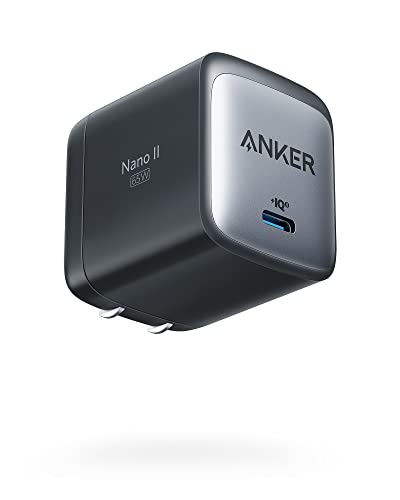
Anker Nano 65W GaN II Charger — Smallest Footprint
The Nano line exists to answer a taunt: how small can a real 65W charger be? Anker’s GaN II generation pushed the answer down to a brick that looks like a phone charger from five years ago yet runs a modern ultraportable without complaint. For the one-bag traveller, the consultant living out of a carry-on, or anyone whose laptop sleeve has a pocket exactly one charger wide, that miniaturisation is not a party trick — it is the difference between carrying the good charger and settling for the bad one.
Small bodies concentrate heat, so the Nano’s thermal behaviour under a working laptop load is the detail that separates it from novelty rivals. It runs warm, as physics insists, yet holds its output across a working day rather than retreating into self-protection by lunch. That steadiness is the GaN II engineering showing: better components, tighter layout, and a design brief that treated sustained output as the product and smallness as the bonus, not the reverse.
Two ports in most configurations of this class let a phone join the laptop, with the expected division when both draw hard. For the traveller that pairing is the whole job: laptop working at the café table, phone recovering beside it, one socket, one brick, no sprawl for neighbouring customers to trip over. At home the Nano becomes the household’s most borrowed charger, so buy it in a colour you can spot across a room and consider engraving your initials on it emotionally, if not literally.
Choose the Nano when the charger’s address is a bag rather than a desk. Fixed desks gain more from the multi-port picks; mobile lives gain more from a brick so small that leaving it behind becomes the only way to be without it — and you will not leave it behind, because it lives in the sleeve permanently.
- Output: up to 65W Power Delivery, USB-C led
- Technology: GaN II, exceptionally compact body
- Load style: laptop solo at full pace; phone shares when docked
- Typical duties: carry-on travel, café working, hot-desking
- Socket manners: minimal footprint in crowded strips
- Ownership note: the household’s most borrowable object
Strengths
- Laptop-grade power in a phone-charger silhouette.
- Sustains output through a working day without retreat.
- Lives permanently in a laptop sleeve, always present.
Trade-offs
- Small body runs warm under sustained laptop loads.
- Fewer ports than the desk hubs in this list.
- Easy to lose in a large home; it needs a home base.
Best for: a consultant whose entire office fits in a carry-on and whose laptop charges in cafés and client sites. Not suited for: a fixed family desk where four devices expect simultaneous berths.

Anker 67W GaN USB-C Charger (3-Port) — Extra Headroom
Sixty-seven is not sixty-five, and this review will not round on Anker’s behalf. The charger is rated 67W, two watts above this guide’s headline, which changes nothing operationally: it serves every 65W laptop exactly as the picks above do — a laptop requesting 65W receives 65W, and the spare capacity sits unused like legroom on a half-empty flight. It earns inclusion because its three-port layout and Anker’s GaN build make it one of the most useful small hubs in the pool, and excluding it over two honest watts would serve arithmetic rather than readers.
Those three ports suit the desk-bag hybrid life: the charger that flies on Monday, runs a home desk on Wednesday, and absorbs a partner’s phone on Sunday. Division across the ports follows the familiar pattern — a solo laptop takes what it needs up to the ceiling, company trims everyone’s share — and the brick’s composure under mixed loads matches the standard set by its siblings in this list. If your household already trusts Anker’s ecosystem of cables and power banks, this unit slots into it without a ripple.
The extra headroom does carry one genuine benefit: chargers age, and a unit with margin meets its specification more comfortably in year three than one built exactly at the line. That is a modest, unglamorous advantage, stated at its true size. Nobody should upgrade from a healthy 65W brick for two watts; everybody shopping fresh can consider this pick without feeling they have left the guide’s brief, because the brief was always “enough for a 65W laptop, honestly delivered”.
File it, then, as the headroom option: same job, same class, a whisker more ceiling, three ports for company. Readers who enjoy precision will appreciate that the number on the box is the number in this review — a small integrity that this category, with its history of creative wattage, could use more of.
- Output: up to 67W total — two watts above the guide’s headline
- Ports: three total, USB-C led with USB-A support
- Technology: GaN construction, compact brick
- Load style: 65W laptops served in full; sharing divides the rest
- Typical duties: hybrid desk-and-travel life, partner phone absorption
- Integrity note: rated figure stated exactly as the maker states it
Strengths
- Serves any 65W laptop completely, with margin to spare.
- Three ports cover the common travel trio in one brick.
- Anker’s GaN build and support record reduce ownership risk.
Trade-offs
- The extra watts bring no benefit a 65W device can detect.
- Simultaneous loads divide the total like every hub here.
- Owners of a healthy 65W charger gain nothing by switching.
Best for: a hybrid worker buying fresh who wants one three-port brick for a 65W laptop at desks on two continents. Not suited for: an owner of any working pick above, for whom this would be a sideways purchase.
Baseus GaN Fast Charger 65W — Prose-Only Pick
Baseus built a genuine following in the GaN era with chargers that pair aggressive miniaturisation with prices that undercut the famous names, and its 65W models are the ones readers most often ask why this guide did not link. The answer is administrative rather than technical: Baseus sells overlapping model families whose names, port layouts and ratings shift between regions and production runs, and our checked pool did not contain a listing we could tie to one exact variant with the confidence a purchase link demands. So the charger is described here, fairly, without a doorway attached.
On the hardware’s merits, the appeal is real. A Baseus 65W brick in hand feels like the category’s promise kept — dense, small, with a finish a step above anonymous rivals — and owners report the expected behaviour: laptops held at working pace, phones sprinting, thermals within the GaN norm. The brand’s broader accessories, particularly its braided cables, are well regarded, which matters because a charger is only ever half of a charging setup.
The caution is entirely about buying the exact thing. Model suffixes matter; a listing that blends photographs of two variants is a listing to leave. Buy through the brand’s official storefront where possible, match the port layout in the photographs to the specification in the text character by character, and keep the returns window in mind while you test it under your own laptop for a full working day. Do that diligence and a Baseus is a rational purchase; skip it and the linked picks above exist precisely to spare you the homework.
Consider this entry the guide’s honesty made visible: a product can be good and still go unlinked when verification cannot keep pace with its catalogue. Readers who value certainty over novelty have five linked alternatives; readers who enjoy the hunt now know exactly what to verify before money moves.
- Output: 65W class Power Delivery, variant-dependent ports
- Status: multiple regional variants under similar names
- Technology: GaN construction, compact bodies
- Reputation: strong value following in the GaN accessories market
- Typical duties: laptops and phones, per the exact variant bought
- Coverage style: described without a link in this guide
Strengths
- Genuine GaN miniaturisation at aggressive prices.
- Owner reports describe expected laptop and phone behaviour.
- Companion cables from the same brand are well regarded.
Trade-offs
- Variant sprawl makes buying the exact model a research task.
- No verified pool listing means no link from this guide.
- Support experience varies more by region than the big names.
Best for: a confident buyer willing to verify the exact variant through the brand’s official storefront. Not suited for: anyone who wants to click once and trust the result — the five linked picks exist for that reader.
Comparison
| Pick | Ports | Ceiling | Format | Headline strength |
|---|---|---|---|---|
| UGREEN Nexode 65W | 1 | 65W | Compact brick | Pure full-power single port |
| UGREEN Nexode 4-Port | 4 | 65W shared | Desk brick | Whole desk from one socket |
| Anker 65W 3-Port | 3 | 65W shared | Travel brick | Family hotel-socket solution |
| Anker Nano 65W | 2 class | 65W | Mini brick | Smallest serious laptop charger |
| Anker 67W 3-Port | 3 | 67W shared | Compact brick | Headroom plus three ports |
| Baseus GaN 65W | varies | 65W class | Compact brick | Value rival, prose only |
What Does 65W Actually Run — and What Does It Not?
The honest map of 65W territory starts with ultraportables: the thin 13- and 14-inch laptops that dominate offices and universities expect between 45W and 65W and will work at full pace, battery climbing, from any pick in this guide. Mainstream tablets and every modern flagship phone sit far below the ceiling and simply take what they want. Handheld gaming PCs and larger phones with exotic charging systems accept 65W gratefully, sometimes at their maximum, sometimes as a strong subset of it.
Beyond the border live the big machines. Gaming laptops and mobile workstations ship with adapters rated two to four times higher; on a 65W brick they may charge slowly while asleep and lose ground while working, because their appetite exceeds the supply. Some refuse politely with a notification; all of them are telling the truth about physics. Owners of such machines should treat a 65W charger as an emergency ration for travel, never as the home supply, and this guide will not pretend otherwise to fill a shortlist.
The grey zone is the 15- and 16-inch performance ultraportable that ships with a 96W or similar adapter yet can sip 65W while doing light work. There, a 65W brick is a legitimate travel compromise: email and documents at a café, battery roughly holding, with the big brick waiting at home. Judge by your own workload’s honesty — spreadsheets forgive, video renders do not.
Why Does Your Cable Decide Half the Result?
USB-C cables carry a hidden rating. Inside the plug of higher-capacity cables sits a tiny marker chip that tells the charger what the cable can safely carry; cables without it are limited to a lower ceiling no matter what the brick offers. Pair a 65W charger with an elderly low-rated cable and the system defaults to the cable’s comfort zone — the laptop charges slowly, the owner blames the new brick, and a perfectly good charger goes back in a returns bag. This single misunderstanding generates a remarkable share of this category’s negative reviews.
The fix is boring and total: buy one or two cables explicitly rated for 100W-class charging from a maker with a name, keep them with the charger, and let the mystery cables of the house serve phones and earbuds where their limits never show. Length matters mildly — very long cables add resistance — yet for desk and travel runs of a metre or two, rating matters far more than reach. A cable is not an accessory to this purchase; it is the second half of it.
Data speed is a separate axis that charging does not care about. A cable can be a superb power carrier and a modest data pipe, which suits charging duty perfectly. Buy for the wattage rating when the cable’s job is power, and keep one known high-speed cable in the bag for the rare hotel-room file transfer.
How Do Multi-Port Chargers Divide Their Power?
Think of the total as a single salary paid to a household. One resident alone receives all of it; each additional resident negotiates a share, and the charger’s circuitry acts as the payroll department following rules the maker sets. Well-designed units protect a sensible minimum for the laptop port, because a laptop that starves mid-work is a worse outcome than a phone charging at three-quarter speed. Poorly designed units divide naively or, worse, renegotiate everything whenever any device is unplugged, causing the laptop to flicker its charging state each time a phone leaves.
That renegotiation hiccup deserves attention when shopping: some multi-port chargers briefly interrupt all outputs whenever the load changes. Phones forgive it; laptops with tired batteries may not. The picks in this guide were favoured partly because owner reports describe their division as uneventful — devices join and leave without ceremony. When you test a new hub at home, plug and unplug the phone while the laptop works and watch the laptop’s charging indicator; ten seconds of observation tells you which payroll department you hired.
Practical strategy follows from the mechanics. Give the laptop the lead port, dock the phone second, and let accessories take what remains. If a deadline demands the laptop’s absolute fastest charge, let it dine alone for half an hour. Shared chargers reward hosts who seat their guests in order.
How Should You Travel With One Charger for Everything?
Build the kit around the laptop, because it is the pickiest traveller. Charger first — one of the compact picks above — then a properly rated USB-C cable long enough for café tables, plus a short twin for the phone. Add the destination’s plug adapter if borders are crossed, and the whole department fits in a pouch smaller than a sandwich. The discipline is in what you leave behind: the laptop’s original brick, the phone’s brick, the tablet’s brick, each a small surrender of bag space to a single 65W unit that covers all three.
Hotels reward one more habit: scout the room’s sockets on arrival and claim the reachable one before bags explode across the floor. A multi-port pick in the bedside socket runs the night shift for every device in the room, and a morning where all screens wake full is the quiet luxury that makes one-charger travel feel like an upgrade rather than a compromise. If the room offers only one socket and it hides behind the bed, the charger’s compactness stops mattering and the cable’s length starts — pack accordingly.
Airports and trains add opportunistic charging to the itinerary: twenty minutes at a gate socket on a 65W brick is worth hours on the feeble USB ports built into seat backs. Keep the charger in hand luggage, never in the hold, both because you will want it and because lithium-adjacent electronics belong in the cabin by rule and by sense.
What Should You Check in the First Week With a New Charger?
Run the working-day test: laptop on the charger from morning, your real workload, battery behaviour noted at lunch and at close. A pick worthy of this guide ends the day with the machine full or filling and the brick merely warm. Then run the company test — phone and accessories docked — and confirm the laptop’s indicator stays calm rather than flickering as devices join and leave. Finally, the night test: phone alone on the brick overnight, waking full without the charger feeling like a hand warmer at dawn.
Inspect the physical marriage between cable and ports. Plugs should seat with a clean click and resist a gentle tug; a socket that feels gritty or loose on day one will not improve. Check that the brick sits in your most-used outlets without sagging, especially older wall plates, because a heavy charger in a tired socket spends the night sliding toward a disconnection nobody notices until the morning alarm fails to exist.
Keep the packaging until those three tests pass. Returns windows exist for the minority of units that misbehave, and a week of honest use separates them from the keepers far more reliably than any unboxing impression. Chargers that pass become invisible for years; chargers that fail should fail fast, while the paperwork is still on the kitchen table.
How Long Should a Good GaN Charger Last?
GaN construction removed the bulk from laptop charging without removing its duties: a desk brick may deliver power ten hours a day, thousands of days in a row. Quality units are built for that residency, with owners routinely reporting years of silent service. The realistic failure points are mechanical and thermal rather than electronic — a port loosened by thousands of insertions, a shell cracked by a drop onto tile, or vents slowly upholstered in dust until a hot-running unit begins protecting itself by throttling.
Habits extend that life cheaply. Let the brick breathe on an open surface rather than under papers; unplug by the body, not the cable; coil cables loosely so their plugs are not bent against the brick in a tight bag. A charger that travels should ride in a pouch, because keys and coins are undefeated against plastic shells and exposed prongs. None of this is precious — it is the same respect you would give any tool expected to work daily for five years.
Retirement signs mirror every charger category: heat out of character, a ticking or buzzing voice, intermittent connection that follows the brick between cables and devices, or any crack that exposes the interior to curiosity. Replace without nostalgia. The picks above were chosen so that a replacement, when the day eventually comes, can be the same model still on sale — continuity being another quiet virtue of buying from makers with staying power.
How Do You Build a One-Charger Desk That Actually Stays Tidy?
A tidy desk begins with the charger living under or behind it, not on it. Fix the brick to the desk’s underside or the rear rail with a removable strap, run one rated cable up through a grommet or around the back edge, and let that cable’s end rest in a small weighted dock or clip at the spot your hand naturally reaches. The laptop connects in one motion, the cable never migrates across the keyboard, and the desk’s surface holds only devices — never the plumbing that feeds them.
Multi-port owners should resist scattering cables to every corner from one hub. Route the phone’s cable to a single landing pad at the desk’s edge and the accessories’ cables to a small tray; a hub with four ports and four directions is a spider, while a hub with four ports and one direction is a system. Velcro ties along the rear edge keep the runs parallel and silent. When a cable fails — one eventually will — a parallel, labelled run can be swapped in minutes without excavating the whole arrangement.
The finishing discipline is a monthly glance behind the desk. Dust gathers, cables slip their ties, and a brick that began life ventilated can end it wearing a cardigan of paperwork. Sixty seconds of restoration keeps the system invisible for another month, which is the entire ambition: charging so thoroughly solved that the desk’s owner thinks about work instead.
What Changes When a Household Standardises on USB-C?
Standardisation day arrives quietly: the last micro-USB and Lightning-era devices retire, and suddenly every phone, tablet, laptop and earbud case in the house speaks one connector. The practical transformation is larger than the technical one. Any cable fits any device; any charger serves any resident; the bedside, the desk and the travel pouch become interchangeable. Households describe the change with surprising emotion, because a decade of connector apartheid ends not with a purchase but with an absence — the adapter drawer simply stops being opened.
That is the world the 65W class was built to run. One charger by the bed covers the night; one at the desk covers the day; the same model in the travel bag covers everywhere else, and because the models match, no resident ever meets a stranger’s charging behaviour. Buying identical units — boring, repeatable, deeply unglamorous — is the final stage of charging maturity, and it is why this guide treats consistency across a home as a feature worth paying for.
Holdouts deserve a plan rather than mockery. A single legacy device — a beloved e-reader, a controller — can keep one USB-A port of a hub pick busy for years, which is precisely why the mixed-port designs above exist. Standardise around them, not against them, and the transition completes itself at the pace your household actually replaces things.
How Should Students and First-Jobbers Buy Into the 65W Class?
Budgets are real, and the student version of this purchase has a clear shape: one good 65W charger, bought once, instead of a procession of bargain bricks bought repeatedly. A dorm room or first flat concentrates every charging problem in this guide into twelve square metres — laptop for lectures, phone for life, earbuds, a tablet if fortune smiles — usually fed by two accessible sockets. A multi-port pick turns one of those sockets into the whole department and leaves the other free for the lamp, which is not a luxury in a room that is also a bedroom, study and cinema.
Durability outranks elegance at this life stage, because the charger will be coiled daily, lent recklessly and dropped on hard floors with institutional regularity. The compact Anker and UGREEN picks survive that curriculum better than anonymous rivals, and their makers’ warranties are written in language a student can actually invoke. Keep the receipt in the same cloud folder as the lecture notes; future you, mid-essay with a dying laptop, will be grateful for both.
Share graciously but mark your territory: a labelled charger in a shared house is a charger that comes home. The social life of a good 65W brick in student housing is intense — it will be borrowed for deadlines across the corridor — and a name on the shell is the difference between a loan and a donation. Buy it once, label it, and let it see you through to the first salary, at which point it becomes the travel brick and the cycle of this guide begins again at a higher desk.
When Does a Second 65W Charger Beat a Bigger One?
Two rooms beat one wattage figure more often than shoppers expect. A professional who works at a desk all week and reads in bed all evening gains nothing from a single heroic brick that must commute nightly between the two sockets; the commute lasts three days before laziness wins and one station degrades to whatever weak adapter was already there. Two identical 65W units — desk and bedside — cost less than most flagship phones’ cases-and-insurance bundles and end the migration permanently. Consistency compounds: the same charger everywhere means the same behaviour everywhere, and behaviour you can predict is the real luxury in this category.
Travel sharpens the same logic. A 65W unit that lives in the travel pouch cannot simultaneously live on the desk, and unpacking it after every trip is a ritual that decays within a month. The second charger is not duplication; it is the price of a system that survives contact with a tired traveller at midnight. Buy the pair in the same model when a promotion makes it painless, label the traveller, and let the desk unit grow roots.
The exception is the genuinely mobile life — the consultant, the student, the digital nomad — where there is one bag and every object must earn its place inside it. There, a single Nano-class brick is not a compromise but the correct architecture, and the second charger’s money is better spent on the rated cables and the pouch that keep the solo unit alive. Architecture follows life; wattage merely serves it.
Common Mistakes
Pairing a 65W charger with an unrated cable and returning the charger is this category’s signature own goal; the cable section above exists because that mistake fills review pages. A second classic is expecting a multi-port hub to deliver its headline wattage to every port simultaneously, then feeling deceived by arithmetic the maker printed plainly. Read division as a feature with rules, not a betrayal. Third: buying a 65W brick for a gaming laptop because the connector fits. USB-C’s universal plug is a triumph of convenience and a trap for the incurious — the wattage must fit the machine, not merely the hole.
Shoppers also overbuy in the wrong direction, purchasing enormous high-wattage bricks for a fleet of ultraportables and phones, then travelling with a brick the size of a paperback for no benefit any device can detect. Sixty-five watts is a sweet spot precisely because it covers the common fleet completely; capacity beyond your largest device’s appetite is weight, not wisdom. Conversely, owners of 16-inch performance laptops who buy 65W “because it was recommended” have read a headline instead of a guide — this one included, if they stopped at the title.
Finally, the drawer problem returns in GaN form: several small bricks, all similar, none labelled, the good one indistinguishable from the weak one at midnight. Mark your 65W charger when it arrives — a dot, a tag, a distinctive cable — and let it be the household’s known quantity. Half of charging satisfaction is simply always reaching for the right brick.
Final Recommendation
Buy the UGREEN Nexode 65W if your life is one laptop and one phone taking turns; buy its four-port sibling if a desk fleet must share; take the Anker three-port for family travel and the Nano for a life lived out of a carry-on; consider the 67W Anker when buying fresh and wanting headroom with your hub. Whichever you choose, spend the small extra on a properly rated cable in the same order, because the pair is the product. A 65W GaN charger is the closest thing modern charging has to a settled answer — one small brick, every ordinary device served — and the picks above are its most trustworthy expressions.
There is a small ritual worth performing the day your charger arrives: plug the laptop in, start your heaviest ordinary workload, and put a hand on the brick after an hour. Warm is a working GaN charger; alarming is a return label. That one touch calibrates your expectations for years of service, because you will know what your unit’s normal feels like and will notice the day it ever changes. Good tools introduce themselves honestly, and an hour of honest work is the introduction that matters here.
Frequently Asked Questions
Will a 65W charger damage a phone that only needs 25W?
No. USB-C Power Delivery is a negotiation: the phone requests what it can accept and the charger supplies no more. A 65W brick serving a modest phone behaves like a gentle small charger that happens to have reserves. The same politeness lets one brick serve earbuds, tablets and laptops across a whole household.
Can a 65W charger run a laptop and charge it at the same time?
For the ultraportables this category targets, yes — that is the entire point of the wattage. The machine works at full pace while the battery fills. Very heavy sustained workloads on borderline machines may slow the battery’s climb, yet the machine will not drain while plugged in, which distinguishes a proper 65W supply from an undersized one.
Why does my laptop say the charger is slow when it is rated 65W?
Check the cable first — an unrated or elderly cable caps the delivery regardless of the brick. Then check company: a multi-port charger sharing with a phone may be giving the laptop only part of its total. Solo laptop, rated cable, persistent warning — in that order — will find the culprit nearly every time.
Is GaN just marketing, or does it matter?
It matters physically. Gallium nitride switches run cooler and smaller than silicon equivalents at these power levels, which is why a 65W brick can now be pocket-sized without cooking itself. The benefit you feel is size and composure, not a different flavour of electricity; the laptop neither knows nor cares which semiconductor delivered its watts.
Can I use a 65W USB-C charger with older USB-A devices?
With the right cable or a multi-port pick that includes a USB-A socket, yes, at standard charging speeds. The legacy device takes its usual 5-volt service while the USB-C residents negotiate their faster arrangements. Mixed fleets are the normal case, and the hub picks in this guide were chosen with exactly that mixture in mind.
Should I buy 65W or go higher to be safe?
Match the largest device you own. If that is a 65W-class ultraportable, extra wattage buys weight and cost without a single detectable benefit. If a 16-inch performance laptop is in your life or your near future, buy for it instead and let the phones share its abundance. Safety in this category is fit, not surplus.
How many years will a phone take to wear out a GaN charger?
Phones will not wear it out; ports and drops might, over years. Expect a quality pick to outlast the laptop it was bought for, provided it breathes, rides in a pouch when travelling, and is retired at the first sign of heat, noise or case damage rather than nursed along.
Can one 65W charger serve two people on a trip?
Comfortably, if the two people stagger their appetites the way hotel evenings naturally do: laptop working in the afternoon, phones charging through dinner and the night, tablet whenever it likes. A multi-port pick makes the sharing graceful, and a single-port pick still works when the couple’s routine is sequential rather than simultaneous. The arrangement fails only when both travellers run laptops with deadlines in the same hour — a scenario that calls for two chargers and, frankly, a different holiday.
Do 65W chargers work in other countries?
The chargers themselves are almost universally dual-voltage, accepting the mains supplies of most countries; what changes is the plug shape, solved by a travel adapter that carries no electronics of its own. Check the fine print on the brick for its input range if you travel beyond the common routes, keep the adapter passive and sturdy, and remember that a charger hanging from a loose travel adapter in a tired socket needs the same sag check as at home.
Related Guides
Complete the charging picture with these companions: best 5 port chargers, best affordable fast wireless chargers and best 3.0 Qualcomm Quick Chargers.
Related guide: Best Car USB Chargers


