What's inside
- Key Takeaways
- Quick Picks
- How We Chose These Picks
- Four More Coolers Worth a Look
- How Do the Best 10 CPU Coolers for Overclocking Compare Side by Side?
- What Should You Check Before Buying a Cooler for Overclocking?
- How Do You Set Up an Air Cooler for a Stable Overclock?
- How Do You Read Cooler Specifications Without Being Misled?
- Air or Liquid for Overclocking: Which Suits Your Build?
- How Does Heat Actually Leave an Overclocked Processor?
- What Mistakes Do Overclockers Make When Choosing a Cooler?
- Final Recommendation
- Frequently Asked Questions
- Related Guides
As an Amazon Associate I earn from qualifying purchases. This post may contain affiliate links at no extra cost to you.
widgetverdict.com is reader-supported. When you buy through links on our site, we may earn an affiliate commission.
Overclocking turns a cooling purchase into a physics problem: every extra watt your processor draws under an all-core load has to leave the case as heat, quietly enough that you can stand sitting next to it. This guide to the best 10 cpu coolers for overclocking narrows a crowded field to six coolers we would actually bolt onto an overclocked chip, then names four more that deserve a look before you decide. Two of the six are large dual-tower air coolers from Noctua, one is a German flagship built around silence, two are Thermalright towers that embarrass far pricier rivals, and one is a compact single tower for builders whose case or budget rules out the giants.
Where to buy: each linked pick below goes to its Amazon listing, where you can check price on Amazon and confirm socket support for your exact motherboard before ordering. Mounting hardware changes between production runs more often than cooler names do, so the listing — not a forum post from three years ago — is the authority on what is in the box. If a cooler here is described without a link, that is deliberate: we could not match it to a verified listing in our pool, and we would rather point you at the manufacturer’s page than guess at a listing.
One scope note before the reviews: this guide covers coolers for mainstream desktop sockets — Intel’s LGA1700 family and AMD’s AM5 and AM4. Threadripper and workstation chips play by different rules, with larger heat spreaders that need coolers built for their wider cold plates, and none of the six picks below should be adapted to them with hope and a bracket. Everything here is a current retail product with mounting for the platforms people are actually buying in 2026.
Key Takeaways
- Dual-tower air coolers remain the overclocking sweet spot: the Noctua NH-D15 and Thermalright Peerless Assassin 120 SE hold sustained all-core clocks without a pump, a radiator, or any liquid to age.
- Case clearance decides more purchases than benchmarks do — the NH-D15 family stands about 168mm tall with fans fitted, which quietly excludes a long list of popular mid-towers.
- A cooler’s fan curve matters as much as its fin stack once an overclock is dialled in; every pick here uses PWM fans you can slow down for idle and unleash for rendering loads.
- Budget towers like the Assassin X120 Refined SE can hold a sensible mid-range overclock, but they run out of headroom fast on flagship chips with power limits removed.
- Buy the mounting kit story, not just the cooler: AM5 and LGA1700 support in the box saves a week of waiting on a free bracket to arrive by post.
- Second-hand flagship air coolers are the safest used purchase in PC building — no pump, no coolant, standard fans — so a clean used NH-D15 with its full mounting kit is a legitimate shortcut to the top of this list.
Quick Picks
| Pick | Badge | Why it earns a place |
|---|---|---|
| Noctua NH-D15 | The air-cooling benchmark | The dual-tower reference point: two 140mm fans, six heat pipes, and a decade of mounting support behind it. |
| Noctua NH-D15 chromax.black | Stealth flagship | The same dual-tower hardware as the standard D15, finished in black for windowed builds. |
| Thermalright Peerless Assassin 120 SE | Value disruptor | Dual-tower, six-pipe cooling that lands within a few degrees of flagships at a fraction of their cost. |
| be quiet! Dark Rock Pro 6 | Quiet-first flagship | Seven heat pipes and Silent Wings fans tuned so an overclocked rig stays a background presence. |
| Cooler Master Hyper 212 Black II | Compact overclocking starter | The modernised Hyper 212: four direct-contact pipes and one quiet fan for mild overclocks in smaller cases. |
| Thermalright Assassin X120 Refined SE | Slim-tower pick | A 148mm-class single tower with four pipes that cools like coolers from a higher price shelf. |
How We Chose These Picks
We ranked these coolers on sustained thermal headroom first, because an overclock that survives a ten-minute benchmark and then throttles during an hour-long compile is not an overclock at all. That meant favouring large fin surface area, heat pipes that spread load across both towers on dual-tower designs, and fans that keep static pressure up at speeds your ears can tolerate. Published cooler round-ups that test on open benches were treated as a starting point only; what matters is behaviour inside a closed case with a graphics card dumping its own heat underneath the socket.
A note on test data, because cooler charts disagree with each other more than almost any other component’s. Reviewers use different processors, different ambient temperatures, different cases and different definitions of ‘load’, so a two-degree gap in one roundup can invert in another. We weighted reviewers who test at fixed noise levels — the only fair way to compare coolers an owner will actually live beside — and we treated any single spectacular result with suspicion until a second source echoed it. Where sources disagreed, we favoured the cooler whose design explains its results: fin area, pipe layout and fan quality leave fingerprints that a lucky test run cannot fake.
Noise came second, and it is weighted heavily because overclocked systems rarely live in another room. A cooler that wins by two degrees at full fan speed but sounds like a desk fan loses to one that gives up those two degrees and stays composed. We also scored mounting systems — how evenly the cold plate seats, whether the bracket fights you, and whether the instructions assume a third hand — plus the practicalities of RAM clearance, fan clips that do not draw blood, and warranty length.
Finally, we checked every linked model against our verified product pool so the name on this page matches a real, current listing. Four additional coolers are covered in prose after the main six: they are genuinely good, but either their listings could not be verified for this guide or they suit narrower builds, and we say which is which in each case.
Longevity evidence counted too. Several designs in this guide have been in production long enough to have service histories, and a cooler that has quietly survived a decade of builds tells you something a launch-week review cannot. Newer designs were held to a higher burden of proof on mounting quality and fan reliability for exactly that reason.
Four More Coolers Worth a Look
The DeepCool Assassin IV deserves a mention for builders who like the dual-tower formula wrapped in a cleaner shroud: its covered top and rear exhaust fan give it a finished look most fin stacks lack, and its cooling sits in the same conversation as the NH-D15. We could not match it to a verified listing in our pool for this guide, so it appears here without a purchase link — check the manufacturer’s page for current socket kits. The Noctua NH-U12A is the other honourable mention: a 120mm-class single tower with two premium fans that performs absurdly well for its footprint, aimed at builders whose RAM or case side panel vetoes the D15.
Thermalright’s Phantom Spirit 120 SE iterates on the Peerless Assassin formula with an extra heat pipe and slightly revised fans; if you find it listed where the Assassin is not, it is a like-for-like substitute rather than an upgrade. And for readers who would rather leave air behind entirely, Corsair’s Titan 360 RX appears in our 360mm liquid guide — a different answer to the same heat problem, with a radiator’s worth of case requirements attached. None of these four is a consolation prize; they are here because six full reviews had to stop somewhere.
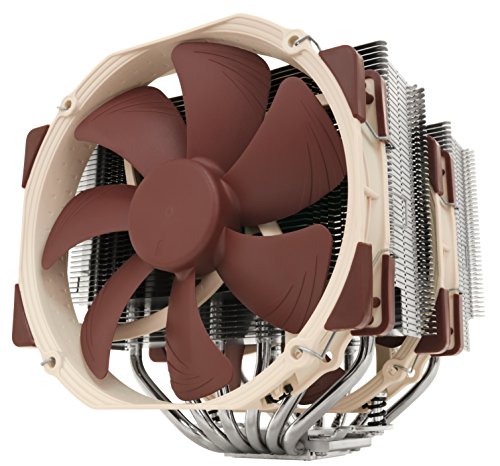
Noctua NH-D15 — The air-cooling benchmark
The NH-D15 has been the cooler other coolers are measured against for so long that its weaknesses are as well documented as its strengths, and for overclocking that familiarity is a feature. Two fin towers fed by six heat pipes give it the surface area to absorb the sustained wattage of an all-core overclock, and the pair of NF-A15 fans move air through those stacks at speeds that stay civilised. On a power-unlocked flagship chip it will not beat a 360mm radiator, but it gets close enough that the difference rarely changes the clock speed you can hold — it changes the noise you hold it at, in the D15’s favour.
Fitting one is a rite of passage. The SecuFirm2 mounting system is the best in the business: a backplate, two spring-loaded screws, and pressure so even you can feel it in the temperatures. Clearance is the tax. At roughly 168mm tall with both fans fitted it simply does not fit a long list of cases, and the front fan sits over the RAM slots, so tall memory either pushes that fan higher — adding height — or forces you to run the middle fan alone. Noctua’s offset mounting options for AMD sockets help with the newer platforms, and the company’s habit of sending free mounting kits for new sockets years after purchase is unmatched.
Buy it as a ten-year part rather than a build component. The fans are rated for enormous service lives, the heatsink itself has nothing to wear out, and Noctua’s six-year warranty plus its bracket programme means this cooler can follow you across three processor generations. For an overclocker who reuses parts, that maths beats saving money on a cooler you will replace with the next socket.
A word about the fans, because they are half the product. The NF-A15 pairs a large diameter with blade geometry tuned for pressure through dense fins, which is why the D15 stays composed at speeds where lesser fans are already working hard. Run them through the included low-noise adapters and the cooler becomes nearly inaudible at idle while keeping most of its load performance — the adapters simply cap the top of the curve. Overclockers who tune by ear will find this the easiest flagship to live with at a desk two feet away.
Second-sitting ownership is where the D15 quietly wins people over. Remounting it for a processor swap takes minutes because the bracket stays on the board; the fans unclip without tools; and the fin stacks shrug off compressed air without bending if you hold the cans at a sane distance. Owners who clean their PCs twice a year develop a genuine fondness for hardware that cooperates, and this cooler cooperates with everything except narrow cases.
- Type: dual-tower air cooler
- Heat pipes: 6
- Fans: 2 × 140mm NF-A15 PWM
- Height: about 168mm with fans fitted
- Sockets: Intel LGA1700/1200/115x and AMD AM5/AM4 (kit dependent)
- Extras: low-noise adapters and Noctua thermal paste in the box
Strengths
- Sustained overclocking headroom that embarrasses many liquid coolers
- Mounting hardware and instructions other brands should copy
- Free future socket kits keep it useful across upgrades
Trade-offs
- Too tall for many mid-tower cases once the front fan is raised over RAM
- Brown-and-beige colour scheme divides opinion sharply
- Front fan can foul on tall memory heat spreaders
Best for: an overclocker building in a full-width case who wants one cooler to survive several CPU upgrades
Not suited for: compact cases, or builds with tall RGB memory that cannot spare the front-fan space
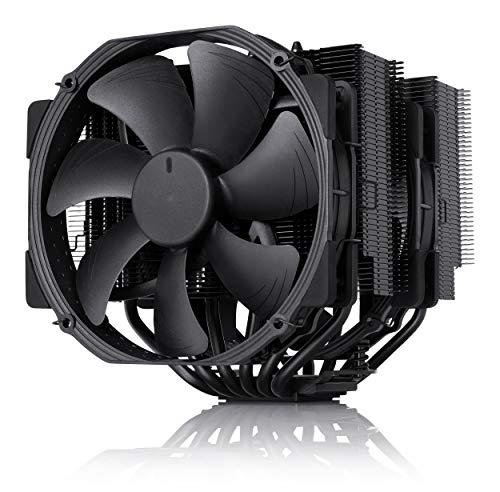
Noctua NH-D15 chromax.black — Stealth flagship
Everything said about the standard NH-D15’s cooling applies here, because underneath the coating this is the same heatsink: twin towers, six heat pipes, two 140mm fans. The chromax.black treatment covers the fins, heat pipes, fan frames and even the cable sleeving, which turns a cooler that used to clash with every themed build into one that disappears into a black interior. For overclockers who show their systems through tempered glass, that is the entire argument — and it is a legitimate one, because a cooler this size is the visual centre of the case whether you planned it that way or not.
The black coating does not measurably change temperatures in either direction at the loads an overclocked desktop chip produces, so choose between this and the beige original on looks and price alone. What you give up is small but real: the chromax package historically trims a few of the extras from the standard box, and the black fans lack some of the accessory richness Noctua bundles elsewhere. The mounting experience, RAM interference and 168mm-class height are identical, so every clearance warning from the D15 review above applies word for word.
Treat this as the default D15 for any build with a window. Overclocking headroom, noise behaviour and long-term socket support carry over untouched, and the black finish means you will not be shopping for a replacement purely because the old one’s colours annoy you every time you look down. Parts you keep are the cheapest parts of all.
One practical detail separates this from the original in daily use: black fans show dust sooner. A beige fan hides a month of household dust; the chromax fans announce it, which is either a maintenance reminder or an annoyance depending on your temperament. The coating itself is durable — it is not paint that flakes at the first fan-clip scrape — and the chromax accessory line (coloured anti-vibration pads, covers) lets owners fine-tune the look later. Small things, but a cooler this prominent in a windowed case earns scrutiny of small things.
It is also worth saying who should skip the chromax premium beyond the budget-minded: builders planning a white or two-tone interior, where the standard D15’s beige is wrong but full black is equally wrong, and anyone whose case has no window at all. Paying for a finish nobody will see — including you, after the panel goes on — is the purest form of wasted budget in PC building. The cooling underneath remains identical either way, which is the chromax line’s blessing and its curse.
- Type: dual-tower air cooler, black-coated finish
- Heat pipes: 6
- Fans: 2 × 140mm NF-A15 chromax PWM
- Height: about 168mm with fans fitted
- Sockets: Intel LGA1700/1200/115x and AMD AM5/AM4 (kit dependent)
- Extras: black fan clips and chromax anti-vibration pads
Strengths
- Full D15 cooling performance in a finish that suits windowed builds
- Identical mounting quality and socket support to the original
- Coating covers fans, pipes and fittings for a genuinely uniform look
Trade-offs
- Costs more than the standard D15 for zero extra cooling
- Same height and RAM-clearance limits as the original
- Accessory bundle is slightly leaner than the beige version’s
Best for: a windowed showcase build that still needs real overclocking headroom from air
Not suited for: buyers counting every penny, since the standard D15 cools identically for less

Thermalright Peerless Assassin 120 SE — Value disruptor
The Peerless Assassin 120 SE is the cooler that made a generation of buyers question what flagship money actually buys. Its formula is not mysterious — two towers, six heat pipes with Thermalright’s anti-gravity layout intended to keep performance consistent in any orientation, and two 120mm PWM fans — but the execution is disciplined, and the result is sustained-load cooling that sits within a few degrees of coolers costing three times as much. Bolted to an overclocked mid-range or even flagship chip, it holds clocks that would have required liquid cooling not long ago.
At about 155mm tall it also fits where the Noctua twins cannot, which quietly makes it the more practical flagship-killer: many cases that reject a D15 accept this without argument. The compromises live in the details. The fans are good rather than great, with a tonal character at high speed that picky listeners will notice; the mounting hardware works but lacks the machined confidence of Noctua’s system; and the included thermal paste and instructions assume you have done this before. None of that matters at stock speeds, and only some of it matters overclocked.
For overclocking specifically, spend the savings on case airflow. A Peerless Assassin fed by a front intake that actually reaches it will outperform a premium cooler starving behind a sealed glass panel. That is the honest summary of this product: it moves the bottleneck off the heatsink and onto the rest of your build, which is exactly where a thinking overclocker wants it.
Thermalright’s support story is the question buyers ask most, and it is better than the price suggests: mounting kits for new sockets have historically appeared quickly and cheaply, and the cooler uses standard 120mm fan mounts, so a failed fan is replaceable with anything from any brand. That last point matters more than it sounds. A proprietary fan on a five-year-old cooler can strand the whole unit; the Peerless Assassin’s fans clip on with wire and standard frames, so its service life is limited by the heat pipes — which is to say, effectively not limited at all.
Builders on AMD’s AM5 should know the Assassin’s mounting story is painless: the bracket uses the socket’s standard backplate, the offset concerns that complicate some coolers do not apply, and contact across the offset chiplet layout is well handled by the flat cold plate. Intel builders get an equally uneventful install. Uneventful is the highest praise a mounting system can earn — the cooler should be the boring part of an overclocking build, so the processor can be the interesting part.
- Type: dual-tower air cooler
- Heat pipes: 6, AGHP layout
- Fans: 2 × 120mm PWM, up to roughly 1550 RPM
- Height: about 155mm
- Sockets: Intel LGA1700/1851-class and AMD AM5/AM4
- Extras: fan clips for a third fan position
Strengths
- Near-flagship sustained cooling for budget-tower money
- Shorter than the Noctua flagships, so it fits more cases
- Dual fans included — no need to budget for a second one
Trade-offs
- Stock fans get audible and slightly coarse at full speed
- Mounting hardware feels workmanlike next to premium rivals
- Finish and packaging are plainly built to a price
Best for: an overclocker who would rather spend the savings on case fans and still hold flagship clocks
Not suited for: silence obsessives who will hear the stock fans working during long renders
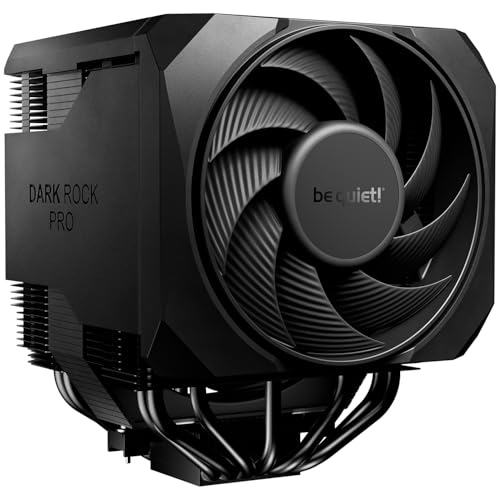
be quiet! Dark Rock Pro 6 — Quiet-first flagship
be quiet! approaches overclocking from the opposite end to most brands: start with the noise budget of a person working beside the machine all day, then fit as much cooling as possible inside it. The Dark Rock Pro 6 is the fullest expression of that idea — a dual-tower heatsink with seven heat pipes, a front fan and a larger middle fan from the Silent Wings family, and a semi-passive mode that lets the fans rest entirely when the processor is idling through documents and browser tabs. The rated TDP class is flagship territory, and the cooler carries an overclocked chip accordingly, but the way it carries it is the point: ramp rates are gentle, and the acoustic character stays a low whoosh rather than a whine.
The top cover deserves its reputation. Brushed, meshed and finished like a piece of hi-fi equipment, it hides the heat pipe tips that make most big air coolers look unfinished, and the whole unit reads as a designed object in a windowed case. Installation is the traditional Dark Rock experience, which is to say you will want the long screwdriver included in the box and a calm ten minutes; the mounting bridge reaches down between the towers, and first-timers should dry-fit before paste. RAM clearance follows the usual dual-tower rules, though the front fan can be raised in its clips for taller modules at the cost of total height.
Choose this cooler when the overclock has to coexist with calls, recordings or a sleeping household. It concedes a degree or two to the absolute thermal leaders at full fan speed — a trade its buyers make knowingly — and returns a machine that never announces itself. In a shared room, that exchange rate is excellent.
The semi-passive behaviour deserves a closer look, because it changes how the whole system sounds. Below a temperature threshold you set, the fans stop completely, so the only moving parts in the PC are the case fans you choose and the GPU at idle. Browsing, writing and calls happen in genuine silence, and when a render starts, the fans wake progressively rather than in a step. Owners coming from performance-first coolers describe the first week as oddly calming. That is a strange thing to say about a heatsink, and it is this cooler’s whole reason to exist.
One caution for transport: like all tall dual towers, the Pro 6 puts real leverage on the socket when a finished PC is shipped or driven across town. be quiet!’s mounting is sturdy, but physics is physics — if the machine travels, lay it motherboard-down or remove the cooler for the journey. Owners who treat the cooler as a semi-permanent installation, as its maker intends, will never meet the problem. It is a desk fixture, and a handsome one.
- Type: dual-tower air cooler with decorative top cover
- Heat pipes: 7
- Fans: 2 × Silent Wings PWM (front and middle)
- Rated class: flagship TDP, semi-passive fan mode at low load
- Sockets: current Intel and AMD desktop platforms (kit in box)
- Extras: long mounting screwdriver included
Strengths
- The quietest sustained-overclock behaviour in this roundup
- Semi-passive mode keeps idle and office work silent
- Fit and finish suit premium windowed builds
Trade-offs
- Gives up a little peak cooling to the NH-D15 at maximum fan speed
- Installation between the towers is fiddly for first-timers
- Premium pricing for what is partly an acoustic purchase
Best for: a creator overclocking in a shared room who records audio or takes calls beside the PC
Not suited for: bench racers chasing the lowest possible temperature regardless of noise

Cooler Master Hyper 212 Black II — Compact overclocking starter
The Hyper 212 line has been the first cooler upgrade for millions of builds, and the Black II is its current form: a single tower with four heat pipes in direct contact with the processor, one 120mm PWM fan, and a blacked-out top plate that looks tidier than the bare aluminium of ancestors. Nobody should pretend it trades blows with the dual towers above — it has roughly half their fin area and a quarter of their fan count — but that is not its job. Its job is to hold a sensible overclock on a mid-range chip: the kind of modest all-core bump or undervolt-plus-boost tuning that most owners actually run, at temperatures the stock cooler cannot approach.
Size is its quiet superpower. A single slim tower leaves the RAM slots completely alone, fits cases the flagships cannot enter, and installs in minutes with a mounting kit that now covers AM5 and current Intel sockets out of the box. The fan is tuned conservatively, favouring a smooth tone over maximum pressure, which suits a cooler that will spend its life at moderate speeds. Push a flagship processor with its power limits removed, though, and the physics win: temperatures climb, the fan runs hard, and the overclock you wanted becomes the overclock the cooler permits.
Read this pick as the floor of the overclocking world rather than a compromise pick. For a six-core chip and a patient hand with voltage settings, it delivers a cooler, quieter, faster machine than the bundled cooler ever will. The moment your ambitions reach flagship silicon, skip straight to the dual towers — the price gap is smaller than the regret gap.
Installation trivia that owners learn once: the Black II’s mounting uses Cooler Master’s current bracket system, which is a genuine improvement over the push-pin era that made the original 212 famous and occasionally feared. Everything is screws and a backplate now, and the cooler can be remounted for a paste change without removing the motherboard. Keep the spare bracket parts in the box, though — this is the cooler most likely to be handed down to a second build on the other platform, and the hand-down only works if the other platform’s hardware travels with it.
There is also a hand-me-down economy to acknowledge. Hyper 212s populate second PCs, home servers and parents’ desktops across the world, because they are adequate for almost any non-flagship chip and the mounting kits keep them current. Buying the Black II today means buying a cooler with a plausible second and third life, which softens its one real limitation — the flagship ceiling — considerably. Few components at this price remain useful for a decade; this one demonstrably does.
- Type: single-tower air cooler
- Heat pipes: 4, direct-contact base
- Fan: 1 × 120mm PWM
- Sockets: AMD AM5/AM4 and Intel LGA1851/1700-class in the box
- Profile: slim tower, no RAM-slot overhang
- Extras: mounting kits for both platforms included
Strengths
- Fits almost any case and never touches the memory slots
- Current socket support included without ordering extra kits
- A genuine step up from stock cooling for mild overclocks
Trade-offs
- Runs out of headroom quickly on flagship chips
- Single fan means no redundancy and less pressure through the stack
- Not the cooler for power-limit-removed tuning
Best for: a first-time overclocker tuning a mid-range six-core chip in a compact case
Not suited for: anyone planning aggressive clocks on a flagship processor

Thermalright Assassin X120 Refined SE — Slim-tower pick
Thermalright’s Assassin X120 Refined SE is the thinking person’s budget tower. Four heat pipes, a dense single fin stack topped with a proper aluminium cover, and one TL-C12C PWM fan add up to cooling that repeatedly embarrasses famous names from the shelf above it. In an overclocking guide its role is specific: it is the cooler for wattage-sensible tuning — the mid-range processor given a firmer boost behaviour, the efficiency chip pushed a few hundred megahertz, the small build where a dual tower physically cannot go. Within that envelope it is not a compromise at all; it is simply correct.
The short stature, around 148mm, opens the door to compact mid-towers and older cases with narrow CPU clearance, and the single-tower layout keeps every memory slot reachable. Thermalright’s mounting gear is straightforward, the fan clips are painless, and the whole thing can be installed by a first-timer in one sitting without video assistance. The fan itself is the honest weak point: effective, but with a harder edge to its sound at the top of its range than the fans on the premium picks, and there is only one of it, so a fan failure someday means a cooler failure until a replacement arrives.
Pair it with realistic expectations and it will not disappoint. Owners of hot flagship chips should read its presence here as a boundary marker — this is where sensible money stops and dual-tower money starts. Everyone below that line gets flagship manners at an entry price.
There is a small overclocking ritual this cooler suits particularly well: the efficiency tune. Take a mid-range chip, cap its package power at a level the Assassin X120 can hold silently, then recover the lost performance with per-core boost settings and, where the silicon allows, a gentle undervolt. The result is a machine that gives up almost nothing in games, renders respectably, and never raises its voice. Coolers twice its size cannot improve that recipe, because the recipe was never limited by peak cooling — it was limited by judgement, which this price point seems to encourage.
A final practical note: the Assassin X120’s fan uses a standard frame and connector, and its clips accept most 120mm fans, so an owner who later falls for a premium fan can upgrade the moving part without replacing the heatsink. Run that way, the little Thermalright becomes a platform rather than a product. Just keep expectations calibrated — a better fan polishes this cooler’s manners, it does not move it into dual-tower territory, and pretending otherwise wastes money that a Peerless Assassin would have spent perfectly.
- Type: single-tower air cooler with aluminium top cover
- Heat pipes: 4
- Fan: 1 × 120mm TL-C12C PWM
- Height: about 148mm
- Sockets: current Intel and AMD desktop platforms
- Profile: narrow tower, full RAM access
Strengths
- Cooling per penny that embarrasses bigger names
- Short and slim — suits compact cases and full RAM access
- Simple, confidence-inspiring installation
Trade-offs
- One fan only, and it gets edgy at maximum speed
- Not built for flagship processors with limits removed
- Plain presentation next to the premium picks
Best for: a compact build overclocking a mid-range chip with sensible power targets
Not suited for: high-wattage flagship tuning, where its single tower saturates
How Do the Best 10 CPU Coolers for Overclocking Compare Side by Side?
| Pick | Form | Fans | Heat pipes | Overclocking headroom |
|---|---|---|---|---|
| Noctua NH-D15 | Dual tower | 2 × 140mm | 6 | Flagship-class on air |
| Noctua NH-D15 chromax.black | Dual tower | 2 × 140mm | 6 | Flagship-class on air |
| Thermalright Peerless Assassin 120 SE | Dual tower | 2 × 120mm | 6 | Near-flagship |
| be quiet! Dark Rock Pro 6 | Dual tower | 2 (front + middle) | 7 | Flagship-class, quiet-tuned |
| Cooler Master Hyper 212 Black II | Single tower | 1 × 120mm | 4 | Mild overclocks |
| Thermalright Assassin X120 Refined SE | Single tower | 1 × 120mm | 4 | Mild to moderate overclocks |
Treat the table as a map of envelopes rather than a league table. The four dual-tower coolers can all hold a serious overclock; they differ in noise character, height and price. The two single towers are separated from them by physics, not quality — half the fin stack cannot shed flagship wattage, and no fan curve changes that. If your processor sits in the top power tier and you intend to remove its limits, your shortlist is the top four rows. If it does not, the bottom two rows save money and space without costing you the overclock you will actually run.
One row of that table deserves a footnote: heat-pipe count is a weak predictor on its own. Seven well-placed pipes in the Dark Rock Pro 6 and six in the NH-D15 both outperform cheaper six-pipe designs because pipe placement, solder quality and fin density decide how much of the stack actually works. Treat the numbers as a description of each design’s intent, not as a score.
What Should You Check Before Buying a Cooler for Overclocking?
Start with the only measurement that cannot be argued with: the distance from your motherboard tray to the inside of your side panel, minus a few millimetres for the socket and processor stack. Case manufacturers publish a maximum CPU cooler height, and that number eliminates more coolers than any review can. A 168mm-class flagship in a case rated for 160mm is not a tight fit; it is a return. Measure your memory too — the distance from the socket centre to the first RAM slot decides whether a dual tower’s front fan sits happily or gets pushed up over tall heat spreaders, adding height you may not have.
Next, be honest about the wattage your overclock will actually produce. A mid-range chip with a mild all-core bump might add twenty watts over stock; a flagship with power limits removed can nearly double its draw under rendering loads. Match the cooler’s envelope to the second number, not the first. Check socket support in the box rather than assuming it — platforms change, old stock lingers, and a free mounting kit that takes nine days to arrive is a build that sits in pieces on the floor. Finally, look at your case’s airflow as part of the cooler purchase: two intake fans feeding the socket area do more for an overclock than the last two degrees of heatsink performance ever will.
Do not forget the humble fan header audit. Dual-fan coolers need either a splitter (usually included) or two headers near the socket, and older boards sometimes place the CPU header where a tall tower’s cable barely reaches. Check your board’s layout photo before ordering, and if you plan a rear exhaust fan as well, count headers for the whole build. Five minutes with the motherboard manual has saved more builds than any benchmark chart — and it costs nothing, which cannot be said of the express-delivery splitter ordered in a panic on build day.
How Do You Set Up an Air Cooler for a Stable Overclock?
Mount the cooler before the motherboard goes into the case whenever the case allows it; backplate access through a tray cutout is a courtesy, not a guarantee. Spread or dot your thermal paste according to the processor’s shape — a pea for small square dies, a thin cross or line for large rectangular ones — then tighten the mounting screws in alternating half-turns so pressure builds evenly. Uneven pressure tilts the cold plate, and a tilted cold plate can cost more temperature than a cooler tier. Connect the fans to the CPU fan header, using the supplied splitter on dual-fan models, and confirm in the BIOS that the header is set to PWM mode rather than DC.
Build your fan curve around coolant reality: air heatsinks respond in seconds, so a curve that waits until 70 degrees before rising, then climbs steeply to full speed near your chip’s throttle point, gives quiet desktops and honest cooling under load. Then validate the overclock under the worst load you actually run — a render, a shader compile, a long gaming session with the GPU heating the case — for at least an hour. Watch the gap between average and peak core temperatures; a wide gap suggests mounting pressure or paste coverage to revisit before you blame the cooler. Log the result. The overclock you can reproduce is worth more than the one you screenshot once.
- Fit the backplate and bracket with the board outside the case if possible
- Apply paste to suit the die shape; less than you think, spread by pressure
- Alternate mounting screws in half-turns until both stop evenly
- Set the CPU header to PWM and use the splitter for dual fans
- Shape the fan curve: calm below 60, committed above 80
- Stress-test for an hour under your real worst-case load
How Do You Read Cooler Specifications Without Being Misled?
The specification most often abused is the TDP figure. There is no single enforced standard for how a cooler maker measures it, so one brand’s 220W claim and another’s 250W claim may describe the same heatsink tested in different rooms. Treat TDP numbers as a rough class marker — this cooler is built for flagship chips, that one is not — and never as a promise about your processor. The same caution applies to fan airflow figures, measured in open air rather than against a fin stack, and to noise figures measured at distances nobody sits at. Specifications describe components; only assembled testing describes coolers.
The numbers that do repay attention are physical. Height decides fit. Weight hints at fin material and density. Fan size and count tell you about noise character — larger fans move the same air slower and lower in pitch. Heat-pipe diameter and count, read alongside a photo of where the pipes enter the fins, tell you whether the stack is evenly fed. And the socket list, checked against your exact board, tells you whether the cooler is a purchase or a project. Read spec sheets for geometry and compatibility; read reviews for temperature and tone.
Finally, check the unglamorous lines: warranty length, whether the fans are standard sizes you can replace, and whether the maker sells mounting kits openly rather than by support ticket. An overclocked PC is a long-term machine, and the cooler is the part most likely to be asked to serve a second and third build. The specifications that predict that service are printed in small type, but they are printed.
Air or Liquid for Overclocking: Which Suits Your Build?
The honest answer is that the best air coolers and good 360mm liquid coolers now overlap so much that the decision is about everything except raw cooling. Air wins on permanence: no pump to fail, no coolant to permeate through tubing over the years, no radiator to fit, and a failure mode — a dead fan — that costs a few pounds and ten minutes. Air also wins on idle silence, because there is no pump hum underneath the fan noise. Liquid wins on peak capacity in cases with room for the radiator, on clearance around the socket for tall memory and elaborate VRM heatsinks, and on moving the heat directly to an exhaust point rather than warming the case interior first.
For a single-GPU gaming and creation rig that will be overclocked once and left alone, the dual-tower air coolers in this guide are the rational default. For a flagship chip in a small case with a 360mm radiator mount, or a showpiece build where the socket area must stay visible, liquid earns its complexity. What neither camp should do is buy a small 120mm liquid cooler for overclocking: it combines liquid’s failure modes with less capacity than the air towers listed here, a trade with nothing on the winning side.
How Does Heat Actually Leave an Overclocked Processor?
Understanding the journey explains most buying decisions in this guide. Heat begins in a die smaller than a postage stamp, crosses into a nickel-plated heat spreader, then into the cooler’s cold plate through a layer of thermal paste whose only job is to fill microscopic gaps — which is why more paste is not better, and why mounting pressure matters. From the cold plate, heat pipes take over: sealed copper tubes with a working fluid that evaporates at the hot end and condenses at the cool end, moving heat along the pipe far faster than solid metal could. That is why pipe count and layout matter, and why pipes that end in the wrong part of a fin stack waste their talent.
The fins finish the job by presenting surface area to moving air, and this is where fan pressure and case airflow meet. A fin stack can only release heat into air that then leaves the case; recirculated warm air raises the baseline for everything. This is also why cooler rankings shuffle between test benches: an open bench feeds the fins room air forever, while your case feeds them air pre-warmed by the graphics card. When two coolers in this guide sit a few degrees apart, assume your case will have opinions of its own, and spend accordingly — on the cooler first, but on the airflow path immediately after.
What Mistakes Do Overclockers Make When Choosing a Cooler?
Buying by height-blind enthusiasm. The most common return in this category is a flagship tower that does not fit the case. Check the published cooler clearance, then check it again against the height with the front fan raised over your memory — that second number is the real one.
Judging coolers on a ten-minute test. Short benchmarks reward heat capacity, not heat rejection. A big fin stack soaks up a burst and looks heroic; an hour into a render the same stack must shed every watt continuously. Shop for sustained behaviour, not sprint results.
Starving the cooler of intake air. A heatsink can only reject heat into the air inside the case. Sealed front panels and a single lazy intake fan raise that air temperature until even the best tower looks ordinary. Fix the case’s breathing before upgrading the cooler.
Cranking fan curves to maximum and calling it tuning. Full-speed fans from 50 degrees upward buy almost no clock speed and cost you your hearing. A shaped curve with a calm low end and a committed top end is faster where it matters and silent where it counts.
Reusing old paste and mounting kits. Dried paste and a bracket from a previous socket are false economies on an overclocked chip. Fresh paste and the correct current-platform kit cost little and protect the entire point of the purchase.
Final Recommendation
If you want one recommendation to act on: the Peerless Assassin 120 SE is where most overclockers should start, because it delivers near-flagship sustained cooling, fits more cases than the giants, and leaves budget for the case airflow that makes any cooler look good. Step up to the NH-D15 or its chromax.black twin when you value the finest mounting hardware, the quietest fans and a bracket programme that treats your cooler as a decade-long part. Choose the Dark Rock Pro 6 when the machine works in a room where other people talk, record or sleep.
A last word on budget allocation, since overclockers routinely overspend at the socket and underspend around it. The gap between the Peerless Assassin and the most expensive air cooler here buys a set of quality case fans, or the faster memory kit, or most of a platform upgrade — and in a case with poor intake, the case fans will lower temperatures more than the flagship heatsink would. Buy the cooler that matches your chip’s real wattage, then make sure the rest of the build lets it breathe.
The two single towers are not also-rans; they are the right answers to smaller questions. A Hyper 212 Black II or Assassin X120 on a mid-range chip, tuned with patience, produces a machine that feels a class above stock — which is, after all, the entire point of overclocking. Pick the envelope that matches your processor and your case, mount it carefully, shape the curve, and validate for an hour. Do that, and the silicon lottery becomes the only gamble left in the build — exactly as it should be.
Frequently Asked Questions
Can an air cooler really handle an overclocked flagship processor?
Yes, with the right expectations. The dual-tower coolers in this guide hold sustained all-core overclocks on flagship chips inside well-ventilated cases. What they cannot do is repeal physics: with power limits fully removed and a synthetic load running indefinitely, a large radiator still has the final word. For gaming, rendering and creation workloads — the loads real overclocks serve — flagship air cooling is a complete answer.
How much temperature difference is there between the NH-D15 and cheaper dual towers?
Under sustained load, typically a few degrees — small enough that case airflow, paste application and mounting pressure can each matter as much as the cooler itself. The premium buys refinement: quieter fans at a given speed, better mounting hardware, longer warranty and future socket support. Whether that refinement is worth the difference is a budget question, not a performance one.
Will a big dual-tower cooler block my RAM slots?
It will usually cover the slot nearest the socket, and tall memory can force the front fan upward, increasing total height. Low-profile memory avoids the issue entirely. The single-tower picks in this guide leave all slots clear, and some builders run a dual tower with only the middle fan fitted — a small cooling cost for guaranteed clearance.
Should I replace the fans that come with my cooler?
Only for a reason you can name: a tonal quality you dislike at working speeds, or a failure. Swapping premium fans onto a budget tower rarely closes the gap to a better heatsink, and the money usually works harder spent on case intake fans. Set a proper PWM curve first — many ‘loud coolers’ are simply coolers with a thoughtless default curve.
How often does an air cooler need maintenance?
Dust is the whole schedule. Blow out the fin stacks every few months, more often in homes with pets, and check that fan clips still hold tension when you do. Thermal paste under an air cooler lasts years; replace it when you remount for another reason rather than on a calendar. There is no coolant, no pump and no evaporation curve to manage. When you blow the fins out, hold each fan blade still with a finger — letting compressed air spin a fan is hard on its bearings and can back-drive current into the header it is plugged into.
Is the chromax.black version of the NH-D15 worse at cooling than the original?
No. The coating does not change temperatures in any way a desktop overclocker could measure, and the fans, pipes and fin stacks are the same design. The choice between them is aesthetic and financial. Buy the finish that suits your build and spend the difference, if any, elsewhere.
Does overclocking void my processor warranty, and does the cooler choice matter?
Processor manufacturers treat overclocking as outside standard warranty terms, and a cooler cannot change that legal position. What a good cooler changes is the risk itself: lower sustained temperatures and stable voltages are gentler on silicon over years of use. If warranty purity matters to you, the same coolers still earn their place running a stock chip cooler and quieter — headroom is valuable even when you never spend it.
Related Guides
Round out your cooling research with these companion guides from our PC hardware coverage: our 360mm liquid cooler guide for DIY builders the best air coolers around the fifty-dollar mark our guide to setting fan curves that stay quiet.


