What's inside
- Where to Buy
- Key Takeaways
- Quick Picks
- How We Chose These Picks
- Comparison
- How to Choose a Sim Racing Monitor
- Is a 49-Inch Super-Ultrawide Really Better Than Triple Monitors?
- How Tight Should the Curve Be for a Racing Seat?
- Can a Racing Monitor Double as Your Work Screen?
- What Does a Racing Screen Ask of Your Graphics Card?
- Common Mistakes When Buying a Sim Racing Monitor
- Final Recommendation
- Frequently Asked Questions
- Related Guides
As an Amazon Associate I earn from qualifying purchases. This post may contain affiliate links at no extra cost to you.
widgetverdict.com is reader-supported. When you buy through links on our site, we may earn an affiliate commission.
Where to Buy
All six ultrawides below are listed on Amazon, and each name opens its own product page. The flagship starting point is the Samsung Odyssey OLED G9 G93SC — pull up its listing to check price on Amazon before you compare it with the rest. The Alienware AW3426DW is the 34-inch OLED alternative, and its page shows the figure that applies today. A larger Samsung, the Samsung Odyssey G9 G91F, covers the 49-inch non-OLED route, so verify its cost on the listing itself. For a 34-inch curved panel with a speaker built in, look at the LG UltraGear 34G600A and its Amazon page. The Alienware AW3426DWM brings a VA panel to the same size class, listed separately with its own current number. Finally, the Deco Gear 49-inch Ultrawide closes the set, and its listing is the place to confirm both the price and the exact specification before ordering.
Shopping for the best sim racing monitors is really shopping for peripheral vision. A racing rig asks a screen to do what no desk monitor is asked to do: fill the edges of your sight with mirrors, apexes and rival cars while the centre holds the road ahead, and to do it from a fixed seat that never swivels, leans back for a film or turns toward a colleague. Every pick in this guide is an ultrawide for that reason. The narrowest screens here are 34-inch 21:9-class panels and the widest are 49-inch 32:9 canvases that replace a triple-monitor rig with a single continuous curve, and the choice between those shapes is the real decision the reviews below are organised around.
One piece of arithmetic must be settled before any review begins, because marketing language blurs it constantly. The 49-inch Samsung panels use DQHD, a resolution class of 5120 by 1440 pixels spread across a 32:9 frame. That is a very wide QHD-height picture. It is not 4K, which describes a taller frame of roughly 3840 by 2160, and nobody should buy a DQHD screen expecting 4K vertical detail. What DQHD offers a racer is width without the rendering cost of a taller image, and for a cockpit view that trade is usually the right one — but it should be made knowingly, with the pixel count read as width, not as sharpness.
The Deco Gear title, helpfully, prints its 5120 by 1440 figure outright and calls the result 5K2K, which is the same wide, short geometry under a friendlier name. The 34-inch picks work at 3440 by 1440 where their titles state it. Across all six, then, the vertical resolution never changes: 1440 lines is the shared foundation, and everything the guide argues about — curve radius, refresh rate, panel type, response figure — is variation built on that single constant. A racer who understands that will read the reviews correctly, as a contest of shape and speed rather than of resolution.
Key Takeaways
- Every pick is ultrawide: three 34-inch panels and three 49-inch panels, with no 16:9 screen in the set.
- DQHD on the 49-inch Samsung models means 5120×1440 across 32:9 — wide QHD height, not 4K.
- Two picks are QD-OLED: the Samsung G93SC at 240Hz and the Alienware AW3426DW at 280Hz, both stating 0.03ms response.
- Curve radius is stated by only three titles: 1800R on the LG 34G600A, 1500R on the Alienware AW3426DWM and R1500 on the Deco Gear.
- The Deco Gear is the connectivity outlier, with USB-C 65W power delivery, a KVM switch and PBP/PIP named in its title.
Quick Picks
| Pick | Badge | Why it earns a place |
|---|---|---|
| Samsung Odyssey OLED G9 G93SC | 49-inch OLED flagship | QD-OLED DQHD at 240Hz and 0.03ms across a 32:9 cockpit canvas. |
| Alienware AW3426DW | Fastest 34-inch OLED | UWQHD QD-OLED at 280Hz with True Black 500 and two HDMI 2.1 inputs. |
| Samsung Odyssey G9 G91F | 49-inch at 144Hz | DQHD 32:9 with DisplayHDR 600 and FreeSync Premium Pro. |
| LG UltraGear 34G600A | 34-inch with speakers | 3440×1440 at 160Hz on an 1800R curve, with a built-in speaker. |
| Alienware AW3426DWM | VA speed at 34 inches | WQHD VA at 240Hz and 1ms on a tight 1500R curve. |
| Deco Gear 49-inch Ultrawide | 49-inch with KVM | 5120×1440 at 120Hz with USB-C 65W, KVM and PBP/PIP. |
How We Chose These Picks
Width was the entry ticket, and it was applied without exceptions. A standard widescreen can serve a casual racer perfectly well, yet a guide written for rigs — wheel stands, fixed seats, pedal sets bolted to a frame — owes its readers screens that use the space a rig creates. Each survivor therefore had to be an ultrawide in its own title, either a 34-inch curved panel or a 49-inch super-ultrawide, and each had to curve, because at these widths a flat panel pushes its edges far enough from a fixed seat to defeat the purpose of buying the width in the first place.
Refresh rate and response formed the second filter, read together rather than separately. Racing is a motion discipline: the world streams past continuously, and clarity during that stream is the product. The set spans 120Hz to 280Hz, with response figures stated as 0.03ms on the two QD-OLED models, 1ms or 1ms MBR on the VA and LG panels, and silence on response from the Samsung G91F title, which the relevant review records instead of repairing. A guide that averaged those figures into a single speed score would hide exactly the differences a rig owner is paying to understand.
Panel technology supplied the third sort. QD-OLED appears twice, VA appears twice by title, and two Samsung titles decline to name a panel while describing their other virtues in detail. Rather than treating the unnamed panels as defects, the guide treats panel identity as one column among several, because a 49-inch canvas at 144Hz can be the right answer for a triple-screen refugee even when its title is terse. What the guide will not do is assign a panel type the title never claims, since rig owners plan brightness, room light and burn-in habits around that single word.
Balance closed the selection. Three screens at each size means the size argument can be had properly, with an OLED, a mainstream and a connectivity-led option at 49 inches in spirit if not in identical specification, and a parallel spread at 34 inches. A reader should finish able to defend either size, because the correct one depends on the rig’s footprint, the graphics card’s appetite and whether the screen must also serve as a working display on weekdays.

Samsung Odyssey OLED G9 G93SC — 49-inch OLED flagship
The G93SC is the screen a triple-monitor racer dreams about during the bezel years. Forty-nine inches of QD-OLED in a DQHD frame, running at 240Hz with a 0.03ms response figure, replaces three panels, two seams and a shelf of alignment frustration with one continuous curve that wraps a cockpit around its driver. In a racing seat the effect is structural rather than decorative: the mirrors sit where mirrors belong, in the periphery, the apex arrives in your vision before it arrives under your wheels, and the whole scene moves as one surface because it is one surface.
Sync support is named in both families, G-Sync Compatible and FreeSync Premium Pro, which suits a panel likely to be driven by whichever graphics card a rig accumulates over the years. The stand is described as adjustable in the title, a modest claim for a flagship, and rig owners will mostly ignore it anyway since a screen of this width commonly lands on a heavy arm or a dedicated mount behind the wheel base. The model code LS49CG932SNXZA is the identifier to trust, because the Odyssey G9 family contains several generations whose panels and rates differ while their names barely move.
Two cautions keep the review honest. The title does not print a curve radius, and on the widest screen in the guide that omission is conspicuous, so the spec box records it plainly and buyers who care about the exact arc should confirm it against the model code. The title also does not print the numeric DQHD resolution, describing the class rather than the count; as established above, DQHD means 5120 by 1440, a wide QHD-height image, and the review repeats that here so nobody mistakes this panel for a 4K screen with extra width. It is a width purchase, proudly, and should be judged as one.
It suits a dedicated rig with a graphics card that can feed a 5120-wide canvas at meaningful frame rates, in a room that can be dimmed for an OLED panel’s strengths. It also suits the patient upgrader retiring a triple setup, who will feel the bezel removal as a daily gift. A casual desk racer with a wheel clamped to the office table will find the footprint and the appetite for pixels out of proportion to the use, and the 34-inch reviews below exist precisely for that reader.
- Size and format: 49 inches, 32:9 class
- Resolution class: DQHD (5120×1440 class — not 4K)
- Panel type: QD-OLED
- Refresh rate: 240Hz
- Response time: 0.03ms
- Sync: G-Sync Compatible, FreeSync Premium Pro
- Stand: adjustable stand
- Curve radius: Not stated in the listing title — verify with the manufacturer documentation
- Model code: LS49CG932SNXZA
Strengths
- One QD-OLED canvas replaces a triple-monitor rig without bezels.
- 240Hz with 0.03ms response is the flagship motion specification here.
- Both major sync families are named in the title.
Trade-offs
- Curve radius and numeric resolution go unstated in the title.
- Feeding 5120 pixels of width at speed demands a strong graphics card.
- The footprint belongs to a dedicated rig, not a shared desk.
Best for: a fixed racing rig replacing a triple-screen setup, with hardware strong enough to drive a 5120-wide image. Not suited for: a wheel clamped to a general-purpose desk, because a 49-inch 32:9 panel leaves no working room for anything else on that surface.
Mounting is the first ownership decision, and it should be made before the box arrives. Measure the distance from your eyes in the driving position to the intended screen plane, because a 32:9 panel placed too close turns its width into head movement and placed too far surrenders the immersion it was bought for. Confirm the mount or arm is rated for the panel’s weight class with margin to spare. Then set the in-game field of view from your actual seating geometry rather than from a forum default, since a screen this wide rewards correct mathematics with a cockpit that finally feels proportioned like a car.

Alienware AW3426DW — Fastest 34-inch OLED
Alienware’s AW3426DW compresses the flagship argument into 34 inches and then raises the rate. The title describes a UWQHD QD-OLED panel at 280Hz with a 0.03ms response figure, the highest refresh ceiling in this guide, paired with G-SYNC and a DisplayHDR True Black 500 badge. For a racer whose rig has room for one wide screen rather than a wraparound canvas, this is the specification that asks the fewest compromises: OLED contrast and motion clarity, at a size a serious desk or a compact rig can actually house.
The supporting numbers are unusually complete for a gaming title. Contrast is printed as 1,500,000:1, colour coverage as 99% DCI-P3, and connectivity is itemised down to the port count: USB-C at 15W, two HDMI 2.1 inputs and one DisplayPort 1.4, with a VESA 100×100 mount pattern stated for arm users. That completeness serves rig builders directly, because mounting and cabling are where ultrawide projects stall. A stated VESA pattern turns an afternoon of forum archaeology into a single line on a shopping list.
USB-C at 15W deserves a precise reading. It is a convenience connection for a laptop or a peripheral chain, not the 65W charging offer the Deco Gear makes further down, and the review refuses to blur that difference. A racer who docks a work laptop at the rig will still keep the laptop’s own charger. What the Alienware offers instead is speed and picture: 280Hz of it, with an HDR badge written for emissive panels and a contrast figure that explains, in one number, why night races on an OLED look like night.
The fit is a single-screen rig driven hard. Competitive sim racers who value response and rate over sheer span, players whose rooms cannot take a 49-inch panel, and owners who want one screen to serve the rig on weekends and a high-end desk on weekdays will all find their argument here. Buyers who specifically want the wraparound cockpit feeling should keep reading toward the 49-inch models, because no refresh rate, however heroic, widens a 34-inch picture.
- Size and class: 34 inches, UWQHD
- Panel type: QD-OLED
- Refresh rate: 280Hz
- Response time: 0.03ms
- HDR: DisplayHDR True Black 500
- Contrast: 1,500,000:1
- Colour: 99% DCI-P3
- Inputs: USB-C 15W, 2x HDMI 2.1, 1x DisplayPort 1.4
- Mount: VESA 100×100
- Curve radius: Not stated in the listing title — verify with the manufacturer documentation
Strengths
- 280Hz is the highest refresh ceiling in this guide.
- Port counts and the VESA pattern are stated outright.
- True Black 500 and 99% DCI-P3 complete a flagship picture spec.
Trade-offs
- USB-C delivers 15W, a data connection rather than laptop charging.
- 34 inches cannot reproduce a 49-inch cockpit wrap.
- Curve radius is not stated in the listing title.
Best for: a single-screen rig or premium desk where 280Hz OLED motion clarity matters more than wraparound width. Not suited for: a laptop dock that must charge through the monitor, because this title caps USB-C power delivery at 15W.
To hear this panel’s best argument, run a familiar circuit at dusk. The contrast figure stops being a number and becomes headlights that bloom without washing the road into grey, brake markers that stay legible at the edge of the light, and a dashboard that reads as an object rather than a glow. Then check the mundane boxes while the return window is open: confirm the rig’s cable run reaches without tension at full steering lock of your monitor arm, verify the refresh mode the graphics card has actually negotiated, and save your picture settings per input if the screen spends weekdays attached to a work machine.

Samsung Odyssey G9 G91F — 49-inch at 144Hz
The G91F offers the 49-inch shape without the OLED flagship’s demands. Its title states DQHD across an ultra-wide 32:9 screen, a 144Hz refresh rate, DisplayHDR 600, AMD FreeSync Premium Pro and an ergonomic stand, dated 2025 under the model code LS49FG910ENXZA. For a racer whose priority is the wraparound canvas itself — the mirrors in the periphery, the uninterrupted horizon — and whose graphics hardware is happier feeding 5120 by 1440 at moderate rates than at extreme ones, this specification is not a compromise so much as a correct match between screen and machine.
HDR 600 is the strongest HDR figure among the non-OLED picks here, and it matters in the specific lighting of racing games: tunnels, sunset endurance stints and floodlit night circuits all live on bright highlights set against dark surroundings. FreeSync Premium Pro covers the variable refresh side for AMD-driven rigs and for the broad family of hardware that speaks that standard. G-Sync language, notably, does not appear in this title, and the spec box leaves that column to what Samsung printed rather than assuming equivalence between sync brands.
The silences in this title are the familiar Samsung pattern. Panel type is not named, response time is not stated, the numeric resolution hides behind the DQHD class label and the curve radius goes unprinted. Each gap is recorded below in the standard wording. None of them prevents a judgement — the shape, rate and HDR tier are all confirmed — but a buyer comparing this screen against the QD-OLED G93SC should understand that part of the flagship’s premium buys a title that tells you more, as well as a panel that does more.
It suits the triple-screen refugee on a realistic budget of pixels, the endurance racer who plays long stints and values the wide view over the last increment of refresh, and the flight-simulation crossover owner whose cockpit benefits from the same unbroken span. The ergonomic stand claim also makes it the most desk-plausible of the 49-inch trio for a hybrid room, though desk-plausible at this size remains a relative term that a tape measure should arbitrate.
- Size and format: 49 inches, ultra-wide 32:9
- Resolution class: DQHD (5120×1440 class — not 4K)
- Refresh rate: 144Hz
- HDR: DisplayHDR 600
- Sync: AMD FreeSync Premium Pro
- Stand: ergonomic stand
- Model code: LS49FG910ENXZA, 2025
- Panel type: Not stated in the listing title — verify with the manufacturer documentation
- Response time: Not stated in the listing title — verify with the manufacturer documentation
- Curve radius: Not stated in the listing title — verify with the manufacturer documentation
Strengths
- The full 49-inch 32:9 wrap at a refresh rate ordinary hardware can feed.
- DisplayHDR 600 leads the non-OLED picks in this guide.
- FreeSync Premium Pro is named for variable refresh play.
Trade-offs
- Panel type, response time and curve radius are unstated.
- 144Hz is the lowest ceiling among the 49-inch Samsung pair.
- G-Sync language does not appear in the listing title.
Best for: an endurance or flight-sim rig that wants the 49-inch wrap at 144Hz without chasing flagship frame rates. Not suited for: a graphics card already struggling at 3440×1440, because a 5120-wide canvas asks roughly half again as much of it in every frame.
Plan the room around the panel’s width before planning the settings. A 49-inch screen throws its light and its reflections across a broad arc, so position lamps and windows behind the screen’s plane rather than behind the seat, and check a night race under your real evening lighting. In the simulator, resist copying a field-of-view value from a 34-inch setup; the wider canvas changes the correct geometry, and ten minutes with a field-of-view calculator matched to your seating distance will do more for lap-time consistency than any picture preset in the menu.
LG UltraGear 34G600A — 34-inch with speakers
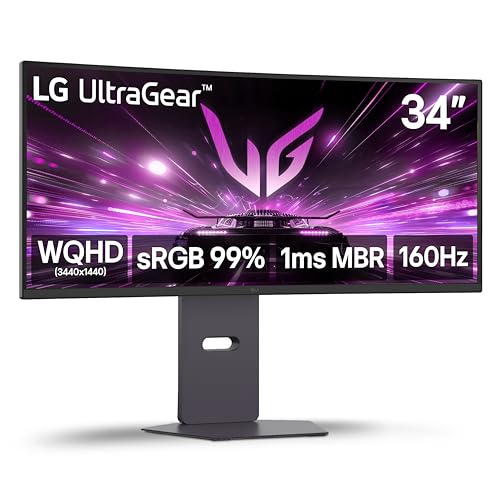
LG’s 34G600A is the pragmatist of the 34-inch group: a WQHD curved panel at 3440 by 1440, refreshing at 160Hz with HDR10, wrapped on an 1800R curve that the title actually states. That last detail is rarer than it should be — three of the six titles in this guide name a radius — and it matters for rig planning, because the radius tells you how aggressively the screen wraps a fixed seat. At 1800R the wrap is gentle, closer to a desk monitor’s courtesy curve than to a cockpit’s embrace, which suits racers who share the screen with ordinary work.
Response is printed as 1ms MBR, a motion-blur-reduction figure that should be read as its own category rather than compared digit-for-digit with the GtG and plain millisecond claims elsewhere in the guide. AMD FreeSync Premium covers variable refresh, inputs are HDMI and DisplayPort, and the stand lists tilt, height and swivel movements. Then comes the detail no other pick here matches in so many words: a built-in speaker. Rig audio usually runs through headsets or soundbars, yet a speaker inside the panel serves menus, replays, voice chat spill and the weekday life of a shared screen with a simplicity external gear never quite achieves.
The absences are equally legible. No USB-C appears in the title, no VESA pattern is printed, and pivot is missing from the stand list, so arm shoppers and portrait hopefuls should verify on the listing page. Panel type goes unnamed as well. None of this undermines the proposition; it defines it. This is a screen bought for its stated virtues — resolution, rate, a known curve and sound from the panel itself — at the size class where a rig and a desk most easily coexist.
It suits the racer whose setup lives in a multipurpose room, clamped or mounted at a desk that earns its living on weekdays. The gentle curve flatters both the cockpit view and the spreadsheet, the speaker removes one box and two cables from the surface, and 160Hz is a rate that mainstream graphics hardware can genuinely feed at 3440 by 1440 in most racing titles. Dedicated-rig owners chasing the tightest wrap or the highest ceiling will outgrow it by design, and the guide’s other 34-inch picks are waiting for exactly them.
- Size and resolution: 34 inches, WQHD 3440×1440
- Refresh rate: 160Hz
- HDR: HDR10
- Curve radius: 1800R
- Response: 1ms MBR
- Sync: AMD FreeSync Premium
- Audio: built-in speaker
- Inputs: HDMI, DisplayPort
- Stand: tilt, height, swivel
- Panel type: Not stated in the listing title — verify with the manufacturer documentation
Strengths
- The 1800R curve radius is stated, aiding rig planning.
- A built-in speaker simplifies a multipurpose racing desk.
- 160Hz at 3440×1440 is a rate mainstream hardware can feed.
Trade-offs
- The 1800R wrap is gentle for a dedicated cockpit.
- No USB-C or VESA pattern is printed in the title.
- Panel type is not stated in the listing title.
Best for: a desk-based racing setup in a shared room, where the same 34-inch screen must handle work, replays and sound without extra boxes. Not suited for: a cockpit built around a tight wraparound arc, because an 1800R curve bends far less than the 1500R-class panels in this guide.
Set this LG up as two devices sharing one panel. Save one picture configuration for the rig, with the motion settings you prefer at speed, and another for desk work at a brightness your eyes can hold for eight hours. Position the screen so its gentle curve centres on the driving seat first and the office chair second if the two differ, since racing is the use that punishes misalignment. And test the built-in speaker with commentary and engine notes before assuming you need external audio; for replays and casual sessions it may retire a soundbar you thought was permanent.

Alienware AW3426DWM — VA speed at 34 inches
The second Alienware in the guide answers its OLED sibling with a different panel philosophy. The AW3426DWM is a 34-inch WQHD VA panel running at 240Hz with a 1ms response figure, bent on a 1500R curve — the tightest radius stated by any title here. Where the QD-OLED model sells contrast and the highest ceiling, this one sells wrap and speed on a VA foundation, with the panel’s native contrast character suited to dark cockpits and night stages. Two screens, one brand, one size, and a genuine argument between them is a healthy thing for a guide to contain.
Its title is a model of specification housekeeping. Colour coverage is printed as 95% DCI-P3, brightness as 400 cd/m², contrast as 3000:1, viewing angle as 178 degrees, and the mount as VESA 100×100. A rig builder can plan around every one of those numbers: the brightness informs room-light decisions, the contrast figure sets expectations for dark scenes, and the stated VESA pattern settles the arm question before checkout. Specifications stated this completely are a courtesy the other manufacturers in this guide extend only in patches.
What the title withholds is connectivity detail and HDR branding. No port list is printed, no HDR badge is named, and no sync technology appears in the wording provided, so the spec box marks those silences rather than laundering the OLED model’s port list into its sibling’s review — a real temptation, since the two Alienwares share a naming scheme while differing in exactly these areas. The model code AW3426DWM, with its final M distinguishing it from the OLED’s W ending, is the string to verify against.
It suits the racer who wants 240Hz and a pronounced wrap without entering OLED territory, and whose rig lives in a room bright enough that a stated 400 cd/m² figure is reassuring rather than academic. It also suits endurance play, where a VA panel’s character and the absence of emissive-panel care routines simplify ownership. Buyers for whom HDR badges and itemised ports are deciding factors should do their listing-page homework first; buyers deciding on curve, rate and panel will find this title unusually forthcoming.
- Size and class: 34 inches, WQHD
- Panel type: VA
- Refresh rate: 240Hz
- Response time: 1ms
- Curve radius: 1500R
- Colour: 95% DCI-P3
- Brightness: 400 cd/m²
- Contrast: 3000:1
- Viewing angle: 178 degrees
- Mount: VESA 100×100
- HDR badge: Not stated in the listing title — verify with the manufacturer documentation
- Sync technology: Not stated in the listing title — verify with the manufacturer documentation
Strengths
- 240Hz on a tight 1500R curve is a dedicated racer’s specification.
- Brightness, contrast and gamut are all printed in the title.
- The VESA 100×100 pattern is confirmed for arm mounting.
Trade-offs
- Ports, HDR badge and sync technology go unstated.
- VA viewing character rewards the centred seat above all.
- It shares a confusingly similar model name with the OLED pick.
Best for: a fixed-seat rig that wants a 240Hz VA panel wrapped at 1500R, mounted on a VESA 100×100 arm. Not suited for: a shared screen watched from wide side angles for a living, because a curved VA panel reserves its best picture for the driver in the centre seat.
Because the wrap is the purchase, spend setup time on seat geometry. The 1500R arc assumes a specific distance; sit in the rig, not in a desk chair, when you set the screen height and reach, and align the panel’s centre with your eye line in the driving posture you actually hold at the end of a long stint, not the upright one you start with. Check the two model codes character by character at checkout, since a single letter separates this VA screen from its OLED sibling, and the mistake would be expensive in both directions.

Deco Gear 49-inch Ultrawide — 49-inch with KVM
Deco Gear’s 49-inch ultrawide approaches the super-wide shape from the direction of the working desk, and its title reads like a docking station’s diary. The panel is a 5120 by 1440 WDQHD screen — the brand’s 5K2K label — on a 32:9 VA panel with an R1500 curve, HDR400 and a 120Hz refresh rate. Around that panel the title arranges USB-C with 65W power delivery, Adaptive Sync, PBP and PIP modes, a KVM switch, built-in speakers and an ergonomic stand. No other pick in this guide attempts to be this many devices at once.
Each of those features maps to a rig reality. The KVM switch lets one keyboard, mouse and wheel-adjacent control set serve two computers through the same screen, which matters for the common arrangement of a gaming PC beside a work laptop. PBP can place both machines on the canvas simultaneously, a racing streamer’s layout or a coach’s telemetry view. USB-C at 65W genuinely charges a laptop, unlike the 15W convenience port on the Alienware OLED, so the weekday half of this screen’s life can run on one cable.
The racing specification is the modest part, and the review should not pretend otherwise. At 120Hz this is the lowest refresh ceiling in the guide, HDR400 is the entry tier of HDR badges, and no response figure is printed in the title. A competitive racer will read those numbers and move up the page. A hybrid owner will read the connectivity list and recognise the only screen here designed for their actual week, in which the rig hosts a job from nine to five and a championship from eight to ten.
It suits that hybrid owner precisely, plus the streamer who wants picture-by-picture layouts without capture gymnastics and the flight-sim fan whose second machine runs charts and weather beside the sim. The R1500 curve is genuinely tight, so the wrap argument survives the productivity framing. What it asks in return is honesty about priorities: this is a connectivity flagship wearing a racing suit, and buyers who will never attach a second computer are paying for talents that will sit in the menu, unused, for the life of the panel.
- Size and resolution: 49 inches, 5120×1440 WDQHD (5K2K)
- Panel type: VA
- Format: 32:9
- Curve radius: R1500
- Refresh rate: 120Hz
- HDR: HDR400
- USB-C: 65W power delivery
- Features: Adaptive Sync, PBP, PIP, KVM switch, built-in speakers
- Stand: ergonomic stand
- Response time: Not stated in the listing title — verify with the manufacturer documentation
Strengths
- KVM, PBP and PIP make it the two-computer champion here.
- USB-C 65W charging supports a true one-cable workday.
- The R1500 curve is tight, preserving the cockpit wrap.
Trade-offs
- 120Hz is the lowest refresh ceiling in this guide.
- HDR400 is an entry-level HDR badge.
- No response figure is printed in the listing title.
Best for: a hybrid rig-and-office desk running two computers through one 49-inch screen, with the KVM and one-cable charging in daily use. Not suited for: a competitive racer who will never connect a second machine, because the 120Hz ceiling gives away pace to every other pick here.
Wire the KVM properly on day one, with both computers permanently connected and the switching shortcut learned before the first session, because a KVM that requires a menu expedition is a KVM that stops being used. Test PBP with your real pair of machines rather than assuming the layout you imagined, and set the laptop’s charging expectation from the stated 65W: enough for most work machines under ordinary load, worth confirming under yours. Judged as a racing screen alone this Deco Gear finishes last in the guide; judged as the centre of a two-computer room, it finishes alone.
One more test belongs in the first week, and it costs nothing but honesty. Load the title you play most, on the circuit you know best, and drive ten laps without touching a single setting after the opening configuration. Familiarity is the sharpest measuring instrument a racer owns: braking points, mirror checks and apex references either settle into their natural places on the new canvas or they do not, and no specification sheet can predict that settlement. If the screen disappears beneath the driving, the size and curve were chosen correctly. If you keep noticing the screen itself, adjust distance before adjusting blame, because at these widths a few centimetres of placement routinely separate a panel that nags from one that vanishes.
Comparison
| Pick | Size / Resolution | Panel | Refresh | Notable from title |
|---|---|---|---|---|
| Samsung Odyssey OLED G9 G93SC | 49″ / DQHD | QD-OLED | 240Hz | 0.03ms, FreeSync Premium Pro |
| Alienware AW3426DW | 34″ / UWQHD | QD-OLED | 280Hz | True Black 500, 2x HDMI 2.1, VESA 100×100 |
| Samsung Odyssey G9 G91F | 49″ / DQHD, 32:9 | Not stated in the listing title | 144Hz | DisplayHDR 600, FreeSync Premium Pro |
| LG UltraGear 34G600A | 34″ / 3440×1440 | Not stated in the listing title | 160Hz | 1800R, built-in speaker, 1ms MBR |
| Alienware AW3426DWM | 34″ / WQHD | VA | 240Hz | 1500R, 95% DCI-P3, 3000:1 contrast |
| Deco Gear 49-inch | 49″ / 5120×1440 | VA | 120Hz | USB-C 65W, KVM, PBP/PIP, speakers |
Two contests hide inside this one table. The first is size: 49 inches buys the cockpit wrap and demands a rig, a room and a graphics card to match, while 34 inches buys agility and coexistence with an ordinary desk. The second is temperament: the OLED pair and the VA Alienware chase motion and contrast, the LG chases balance with a speaker thrown in, and the Deco Gear chases connectivity at the cost of the lowest ceiling here. A buyer who names their contest first will find the table suddenly easy to read.
The blank and modest cells are part of the evidence. Two Samsung titles withhold their panel type, three titles withhold a curve radius, and the Deco Gear withholds a response figure while printing nearly everything else. A rig is a long-lived piece of furniture, and screens bought for one deserve this level of candour about what is promised in writing and what must be confirmed on a listing page before the mount is drilled.
How to Choose a Sim Racing Monitor
Start with the rig’s physical envelope, because it vetoes more screens than any specification does. Measure the width available between walls, doors and other furniture, the depth from your eyes in the driving position to the screen plane, and the mount or stand footprint the setup can support. A 49-inch panel inside a cramped alcove is not immersion; it is a wall you sit too close to. A 34-inch panel on a generous rig, by contrast, can feel perfectly proportioned once the seat distance is set correctly.
Decide the size question with your graphics card in the room. A 5120-wide canvas carries roughly half again the pixels of a 3440-wide one, and the frame rate you enjoy today at the smaller width will fall accordingly unless settings fall with it. Racers who prize a high, stable rate in demanding titles often belong at 34 inches even when their hearts say 49, while racers in lighter titles or with flagship hardware can feed the big canvas honestly. The screen should be bought for the machine that exists, with upgrades treated as a bonus rather than a plan.
Read refresh and response as a pair, and read the fine print of each. The 0.03ms figures belong to the QD-OLED models, the 1ms claims to VA and IPS-class panels, and the LG’s 1ms MBR describes a blur-reduction mode; these are related claims, not identical measurements, and a guide that ranked them on one ladder would be inventing precision. What can be said plainly is that every pick here refreshes at 120Hz or far beyond, so motion clarity differences will come from panel character and settings at least as much as from the headline rate.
Brightness and room light deserve a paragraph of their own, because racing rigs live in stranger lighting than offices do. A rig in a garage, a spare room with blackout blinds or a living room shared with a television will ask very different things of a panel. The Alienware VA model states 400 cd/m² in its title, the kind of figure that reassures a bright-room builder, while the OLED models stake their claim on contrast in controlled light rather than on raw output. Neither approach is wrong; each is a bet about the room. Decide which room you actually have, at the hour you actually race, before letting a brightness column or a contrast figure choose for you.
Finish with the second life of the screen. A rig panel that also serves as a work display needs the connectivity and eye comfort of the Deco Gear or the LG; a pure rig needs the wrap and pace of the Alienwares and Samsungs. Speakers, KVM switching and USB-C charging sound like office concerns until the first week a laptop joins the room, at which point they become the difference between a screen that absorbs the change and one that resents it.
Audio planning closes the inventory. Racing sound usually belongs to a headset or a proper speaker set, and only two titles here — the LG and the Deco Gear — promise a built-in speaker at all. A panel speaker will never carry an engine note the way dedicated gear does, yet it earns its place for replays, system sounds and the sessions where a headset feels like too much ceremony for a quick practice run. Decide which of those you are before the screen arrives, and the first week will be spent driving instead of shopping for the missing half of the experience.
Is a 49-Inch Super-Ultrawide Really Better Than Triple Monitors?
For continuity, unambiguously yes. One canvas has no bezels crossing the windscreen, no colour mismatch between panels bought in different years, no alignment ritual after the rig is moved, and one cable and one settings menu instead of three. The cockpit reads as a single place, and that unity is the deepest argument the 49-inch picks in this guide possess. Drivers who switched from triples rarely describe missing them.
Triples keep two honest advantages. Their combined field of view can wrap further around the driver than even a 32:9 panel, with side screens angled sharply toward the mirrors, and a single failed panel costs a third of the setup rather than all of it. Triples also let each screen be replaced or upgraded independently. A buyer with an existing triple rig in good health should weigh those virtues soberly before paying to consolidate; a buyer starting from one screen should usually skip the triple era entirely and land on the single canvas.
Cost accounting belongs in the same conversation, counted in hardware rather than money. Three panels need three outputs, three mounts and the desk depth to hold their angled wings, while one 49-inch panel needs one output and one serious mount. The single screen is the tidier engineering problem, and tidy engineering is what keeps a rig in use for years instead of becoming a project its owner avoids.
How Tight Should the Curve Be for a Racing Seat?
The radius figures in this guide span 1800R on the LG to 1500R on the Alienware VA and the Deco Gear, with three titles declining to state a figure at all. A smaller number means a tighter arc. In a fixed racing seat, a tighter curve keeps the panel’s edges at a more even distance from your eyes and strengthens the sense of sitting inside the car rather than in front of a picture of one. That is why dedicated rigs gravitate toward the 1500R class when a title confirms it.
Distance arbitrates the preference. Sit closer than the radius assumes and a tight curve can feel theatrical; sit at the intended distance and it disappears into correctness. The gentle 1800R of the LG suits a screen that alternates between cockpit and desk, where documents and second viewers enter the equation, while the tighter panels reward a seat that never moves. Since a racing seat is the least movable furniture in any house, matching the curve to its fixed distance is one of the few setup decisions that will never need revisiting.
Where a title stays silent on radius, treat the listing page and model code as the next step rather than guessing from the product family, because sibling models within the Odyssey line have shipped with different arcs under similar names. The curve is a geometric commitment you will sit inside for years; it deserves the same verification as the resolution.
Can a Racing Monitor Double as Your Work Screen?
The 1440-line height shared by every pick here is a workable foundation for documents and code, and the 34-inch width holds two generous windows side by side, so the dual life is realistic for most desk jobs. The Deco Gear builds an entire proposition around it, with KVM switching, picture-by-picture and laptop charging. The LG adds a speaker and a gentle curve that documents tolerate well. Even the flagship OLEDs can serve a workday, provided their owners respect the ordinary care an emissive panel appreciates with static interfaces.
The cautions are ergonomic rather than electronic. A screen positioned for a reclined driving posture sits wrong for upright typing, so a dual-life setup needs a mount or stand that moves between the two geometries without a fight. Text at 1440 lines across 49 inches is coarser than across 34, which writers and programmers will notice by the second hour. Households planning a genuine fifty-fifty split should weight the 34-inch picks and the Deco Gear heavily; households racing ninety percent of the time can let the rig decide.
What Does a Racing Screen Ask of Your Graphics Card?
Pixels are the tax every frame pays, and ultrawide panels raise the rate. A 3440 by 1440 screen carries close to five million pixels, while a 5120 by 1440 canvas carries well over seven million, and the graphics card must shade every one of them each time the world moves. Racing titles are kinder than open-world games because their scenery streams predictably, yet the arithmetic still governs the experience: the same card that holds a high rate on the smaller canvas will settle noticeably lower on the larger one unless detail settings make up the difference.
That arithmetic should shape the order of upgrades in a growing rig. A screen bought one step ahead of the card can be run at reduced settings or a lower render scale for a season, which many owners accept happily for the sake of the wrap. A screen bought three steps ahead becomes a standing reproach, its native resolution a mode the owner visits only in menus. The honest middle path is to pair the panel with the card you own or have firmly budgeted, and to treat any future card as permission to raise settings rather than as the plan that makes the purchase coherent.
Connection choices ride along with the same decision. High rates at wide resolutions depend on the right port and a cable that genuinely carries the signal, so confirm the pairing your chosen title assumes and keep the cable run short and certified. Flicker or a mysteriously capped refresh rate after an upgrade is far more often a cable confession than a panel failure, and it is the cheapest fault in the entire rig to prevent.
Common Mistakes When Buying a Sim Racing Monitor
Calling DQHD a 4K resolution. DQHD is 5120×1440, a wide QHD-height image. Expecting 4K vertical detail from it guarantees disappointment with an otherwise excellent panel.
Buying width the graphics card cannot feed. A 49-inch canvas at native resolution is a heavy rendering load. If the frame rate collapses, the immersion bought with the width is spent immediately.
Skipping the mount homework. Several titles omit a VESA pattern or a stand movement list. Confirm the mounting story before the panel arrives, not while it leans against the rig.
Judging the screen from a desk chair. A racing monitor must be evaluated from the driving seat, at the driving distance, in the driving posture. Every other viewpoint is a rumour.
Copying field-of-view settings from another size. A value tuned for 34 inches is wrong at 49. Calculate from your own seating geometry and panel width.
Final Recommendation
For a dedicated rig with the hardware to feed it, the Samsung G93SC is the guide’s summit: a 49-inch QD-OLED canvas at 240Hz that retires the triple-monitor era in a single panel. The G91F offers the same grand shape at 144Hz for rigs whose graphics cards prefer a lighter load, while the Deco Gear owns the hybrid room where two computers share one wide screen. At 34 inches, the Alienware AW3426DW is the speed flagship at 280Hz, its VA sibling the AW3426DWM is the wrap-and-contrast alternative at 240Hz, and the LG 34G600A is the balanced desk racer with a speaker and a stated, gentle curve.
Let the seat make the final call: measure from your own driving position, buy the widest screen that distance and your graphics card can honour, and the first lap on the new panel will feel less like an upgrade and more like a relocation — the rig will have moved, permanently, to somewhere inside the car.
Frequently Asked Questions
Is DQHD the same as 4K?
No. DQHD describes 5120×1440 across a 32:9 frame — the width of two QHD screens at QHD height. 4K describes a taller 3840×2160-class frame. The 49-inch picks here are width purchases, and their clarity should be judged as such.
What refresh rate do I need for sim racing?
Every pick here starts at 120Hz, which already transforms motion compared with a 60Hz screen. Higher ceilings reward strong graphics hardware and competitive play, with the Alienware AW3426DW reaching 280Hz. Stability matters as much as the ceiling; a locked rate you can hold beats a higher one you cannot.
Should I choose 34 inches or 49 inches?
Choose 49 inches for a dedicated rig with room and rendering power to spare, and 34 inches for a compact rig or a dual-purpose desk. The seat distance you measured is the honest referee between them.
Does a KVM switch matter on a racing screen?
Only if two computers share the rig, in which case it matters enormously. The Deco Gear’s KVM, PBP and USB-C charging exist for that household. Single-machine rigs should spend the same money on panel and rate instead.
Can I mount these screens on an arm?
Both Alienware titles state a VESA 100×100 pattern outright. Where a title stays silent, confirm the pattern on the listing page against the model code, and choose an arm rated well beyond the panel’s weight, especially at 49 inches.
Why do some titles omit the curve radius?
Manufacturers itemise different virtues for different models, and the radius sometimes goes unprinted even on strongly curved panels. The spec boxes here record the silence, and the listing page for the exact model code is the place to close the gap.
Related Guides
A rig is one corner of a gaming desk, and the neighbouring guides cover the rest of it. Players who also game on a console from the same seat should compare the best xbox series x monitors, where native 4K panels take over from ultrawides. Anyone whose screen must pull weekday duty will find the work-first version of the argument in our guide to the best programmers monitors for text, ports and long sessions. And creators who record and cut their racing footage should finish with the best 2k monitors for video editing, chosen for colour accuracy at QHD.
Related guides
- Best 4K Monitors for MacBook Pro: USB-C Panels With Real Power Delivery
- Best Routers for Remote Work: VPN Gateways, Travel Routers and Home Wi-Fi That Holds a Call
- Best Acer Laptops for School: Six Picks for Pupils, Backpacks and Homework
- Best 32GB Memory SD Cards for Older Cameras and Everyday Devices


