What's inside
- Key Takeaways
- Quick Picks
- How We Chose These Picks
- How Do the Best Adjustable Standing Desks Compare?
- How Do You Choose the Right Standing Desk Size?
- How Should You Set Up a Standing Desk Ergonomically?
- What Should You Know About Motors, Noise and Warranties?
- What Accessories Actually Matter on a Standing Desk?
- How Do You Manage Cables on a Desk That Moves?
- Standing Desk or Desk Converter: Which Should You Buy?
- What Mistakes Do Buyers Make With Adjustable Standing Desks?
- Final Recommendation
- Frequently Asked Questions
- Related Guides
As an Amazon Associate I earn from qualifying purchases. This post may contain affiliate links at no extra cost to you.
widgetverdict.com is reader-supported. When you buy through links on our site, we may earn an affiliate commission.
The best adjustable standing desks share one promise — a work surface that meets your body where it is, seated at dawn, standing after lunch, perched somewhere between during the call that would not end — and they divide on everything that decides whether the promise survives year three: frame geometry, motor count, desktop size and the honesty of the warranty. This guide reviews six desks. Four, all from FLEXISPOT’s range, matched verified listings in our pool and carry links; two famous rivals, Vari and Uplift, sell mainly through their own storefronts and matched no pool listing, so they are covered in prose, clearly labelled, because a standing-desk guide that pretended they did not exist would be lying by omission.
For the four linked picks, the listings carry the details that matter — check price on Amazon there and confirm the desktop size and frame colour in the exact variant you are ordering — standing desks are sold as frame-plus-top combinations, and the listing’s variant selector is where builds go right or wrong. For the prose-only pair, the makers’ own sites are the shop, and their sections below say what to look for when you get there.
A disclosure of method inside the introduction, because it shapes the whole guide: the verified pool for this category returned one brand’s range in depth rather than several brands in shallows. We judged the four FLEXISPOT models against each other and against the class’s standards — stability at height, lift speed and noise, capacity, control logic — and used the two prose-only rivals as the external benchmarks they genuinely are. Where a FLEXISPOT model loses to a rival’s idea, we say so.
One boundary for the guide: these are complete desks — frame and top together — for a single workstation, however large. Two-person sit-stand arrangements live in our two-person desk guide, and desktop converter platforms, which raise a surface on top of an existing desk, are a different product for a different problem, discussed briefly in the final sections.
Key Takeaways
- The FLEXISPOT E6 is the range’s sweet spot: a three-stage dual-motor frame under a 55×28 top, with the lift range and stability most bodies and rooms actually need.
- Four legs change standing work: the 71×32 four-leg model is the steadiest desk here at full height, built for dual monitors and heavy desktops.
- The EN1’s one-piece desktop is the convenience pick — no seam, no alignment step, four memory presets — sized for single-monitor workers.
- Vari and Uplift are reviewed without links because they sell direct and matched no pool listing; their configurators and accessory ecosystems remain the class’s benchmark for choice.
- Capacity figures are working loads, not bragging rights: count your monitors, arms, tower and leaning weight honestly before choosing a frame.
- Cable the desk at full height first: every lead fitted while the desk is down becomes a tow rope when it rises, and the fix is five minutes with the desk up and the strip mounted underneath.
Quick Picks
| Pick | Badge | Why it earns a place |
|---|---|---|
| FLEXISPOT E6 Standing Desk 55×28 | The range’s sweet spot | A three-stage dual-motor frame, 220lb capacity and a 55×28 top — the default recommendation for most people, most rooms and most budgets. |
| FLEXISPOT EN1 Standing Desk | The one-piece convenience pick | A one-piece desktop, four memory presets and a 176lb capacity — the simplest route into sit-stand. |
| FLEXISPOT 4-Leg Standing Desk 71×32 | The planted flagship | Four legs, dual motors and a 71×32 top — standing-height stability the two-leg desks cannot match. |
| FLEXISPOT Standing Desk 71×32 Walnut | The walnut expanse | The same 71×32 expanse in black walnut on a dual-motor two-leg frame rated to 198 lbs. |
| Vari Electric Standing Desk | The direct-sold benchmark | The office-grade desk that popularised the category, sold direct with a famously painless assembly. |
| Uplift V2 Standing Desk | The configurator’s desk | The most configurable standing desk in the business — sizes, tops, frames and accessories à la carte, sold direct. |
How We Chose These Picks
We judged standing desks as machines first and furniture second, because a desk that wobbles at standing height or groans through its third year fails at its only job. The criteria ran in this order: stability at full extension under typing load, lift range against real human elbow heights, motor behaviour — speed, noise, and whether the desk creeps or holds its position for months — control logic including memory presets and anti-collision behaviour, and desktop quality, since the top is the part you touch ten thousand times a year.
Capacity was read as engineers read it: a stated figure is a ceiling for the whole moving system, top included, and a desk loaded to its ceiling lifts slower and ages faster. We favoured desks whose honest working load — monitors, arms, a tower if it must ride, books, and a leaning adult’s partial weight — sat comfortably inside the limit. Cable management provisions, warranty length and the availability of spare parts were scored as the long-term ownership factors they are.
Verification then drew the guide’s map. Four desks matched verified pool listings and carry links and image markers. Vari’s electric desk and Uplift’s V2 — arguably the two most configured standing desks in North America — sell direct and matched nothing in the pool, so they are reviewed in prose with their buying routes explained. The four linked models being one brand’s range is stated openly rather than disguised; the comparisons between them are real, and the two external benchmarks keep the judgements honest.
We also spent time with the handsets, because a standing desk is operated through a two-inch plastic paddle and the relationship is daily. Buttons that can be found by touch, a display legible from standing height, and a child-lock or press-and-hold behaviour on desks in family homes were all scored. The desks below operate kindly; the wider market contains handsets that feel designed by the legal department, and the difference is felt every single day.
FLEXISPOT E6 Standing Desk 55×28 — The range’s sweet spot
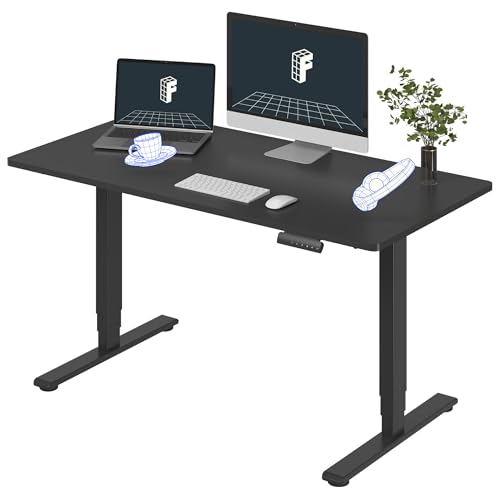
The E6 is where FLEXISPOT’s range stops being adequate and becomes genuinely good, and the specification explains why in two phrases: three-stage legs and dual motors. Three-stage columns extend further and stay steadier doing it, giving the desk a lift range that covers short seated users and tall standing ones without compromise at either end; dual motors — one per leg, synchronised — lift evenly, quickly and without the lagging-corner shudder of single-motor frames asked to carry a real desktop. Under a dual-monitor setup at full standing height, the E6 types the way a desk should: the surface answers your fingers, not your elbows.
The 55×28-inch desktop is the size this guide recommends most often, because it is the smallest top that behaves like a full workstation: two monitors on arms or one wide screen with a laptop, a keyboard with room in front of it, and depth enough — 28 inches — to put the screens at an honest distance. Capacity, rated at 220 pounds for the moving system, swallows that load and a tower besides, though this guide’s standing advice is to keep the tower on a floor stand or a frame-mounted bracket so its cables are not stretched through the lift’s travel every day.
The control handset follows the range’s sensible pattern — up, down, memory positions for the heights you actually use, and a display that tells you where you are — and the desk’s anti-collision behaviour reverses it gently when the return path meets a chair back or a shelf. Lift noise sits in the class’s polite register: a hum you can hold a phone call over, in an office you share. Assembly is the two-leg frame ritual — an hour, two people for the flip — with the crossbar doing the long-term rigidity work.
What the E6 does not offer is the four-leg model’s planted-at-any-height certainty or the giant 71-inch tops; it is a two-leg desk, honestly engineered, and a determined lean at full extension will find the physics that all two-leg desks share. Within that physics, it is as composed as the type gets, and its price within the range reflects the engineering without the flagship tax.
Owners upgrading from a first-generation budget standing desk report the E6 as the moment the category stops feeling experimental: the desk disappears into the work, which is the entire ambition of an adjustable desk. It holds its height for months without creep, its motors stay synchronised, and its memory buttons become as unremarkable as a light switch.
As this guide’s default recommendation for a single worker’s permanent setup, the E6 earns it the plain way — by being the desk against which its own range, and most of the market, is sensibly measured.
One more E6 virtue appears at resale and re-homing time: its frame size is the market’s most standard, so desktops, arms and brackets from every maker fit it, and a household that later needs a bigger top can re-top the frame rather than replacing the machine. Buying the standard size is rarely exciting and almost always wise.
Height-range honesty is the last E6 detail: three-stage columns travel further in both directions than two-stage ones, so the shortest seated users can drop the surface to their elbows without a footrest compromise, and the tallest standing users are not asked to hunch at the range’s ceiling. Households spanning both ends of the height chart should start their shopping here.
- Frame: 3-stage lifting columns, dual motor
- Desktop: 55 x 28in
- Capacity: 220 lbs (moving system)
- Controls: memory presets, height display, anti-collision
- Lift character: fast, even, call-friendly noise level
- Assembly: two people recommended for the flip
Strengths
- Three-stage dual-motor lift is steady across the whole range
- 55×28 top is the honest full-workstation size
- Capacity covers dual monitors and a riding tower if needed
Trade-offs
- Two-leg physics: a hard lean at full height still finds movement
- Desktop finishes are the range’s standard palette, not the walnut flagship’s
- Tower cable management through the lift needs planning
Best for: a single worker building a permanent sit-stand station with dual monitors
Not suited for: a very tall user with a heavy three-monitor array, who should take the four-leg model
FLEXISPOT EN1 Standing Desk — The one-piece convenience pick
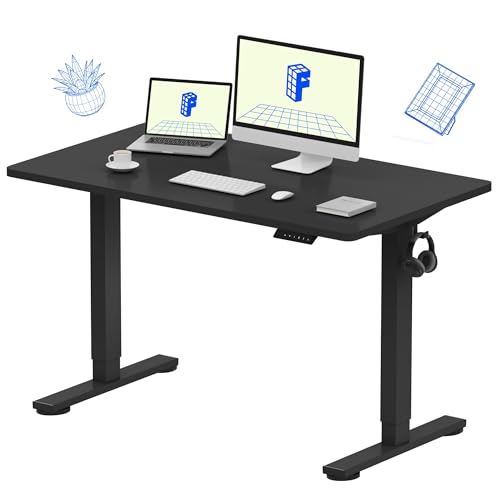
The EN1’s defining decision is printed in its name: the desktop is one piece. Many desks in this class ship their tops in two or three panels to save freight, leaving the owner to align a seam under their keyboard for the life of the desk; the EN1 arrives whole, which makes assembly faster, the surface seamless, and the writing experience — a pen crossing the middle of the desk meets nothing — quietly superior every day. For buyers whose standing desk will also be a writing desk, that single fact can settle the choice.
The frame beneath is the range’s simpler machinery: a two-stage lift with a 176-pound capacity and four memory presets on the handset. Read the capacity as the desk’s honest envelope — a monitor or two, a laptop, books and arms, the standard single workstation — rather than as a challenge. Within it, the lift is smooth and the desk holds its settings with the reliability the brand’s controllers are known for. Four presets is generous at this level: seated, standing, a perch height, and one for the household’s second user covers most homes’ entire repertoire.
Stability follows its class: composed at seated heights, good at standing height under typing, and not the desk for a leaning contest — the four-leg model below exists for that. The EN1’s buyers are typically upgrading from a fixed desk for their backs’ sake, and for that mission its manners are exactly right: it encourages the sit-stand rhythm by making the change effortless and the positions memorable at a button’s press.
The one-piece top cuts both ways in logistics: the box is the size of the desk, so measure the stairwell as you would for any large panel, and the flip during assembly wants two adults. Once placed, though, there is nothing to align, nothing to re-tighten at a seam, and the surface refinishes or replaces as one honest piece of furniture.
Against the E6, the trade is clear and legitimate: the EN1 gives up lift range at the extremes, capacity and some standing-height composure, and returns simplicity, presets and price. Buyers at the middle heights with a single-monitor setup will never meet the E6’s advantages; buyers at the tall end or with heavy arrays will meet the EN1’s limits in the first week.
Choose it as the friendly first standing desk — the one for the worker who wants the habit, not the hobby.
The EN1 also makes a quietly excellent shared-desk for couples on different shifts: four presets hold two people’s seated and standing heights without a negotiation or a note on the fridge, and the desk greets each worker at their own geometry. Households sharing one workstation across a day get more from those four buttons than from any other feature in this guide.
A word about the EN1 in a child’s or teenager’s room, where it quietly excels: the desk grows with its owner across a decade of homework, the presets let a parent set a sane ceiling, and the one-piece top survives the years of craft projects that precede the laptop era. Few desks in this guide can claim a customer from age ten to graduation; this one plausibly can.
- Desktop: one-piece, seamless
- Capacity: 176 lbs (moving system)
- Controls: 4 memory presets
- Frame: 2-stage electric lift
- Suits: single or dual light monitor setups
- Assembly: two adults for the flip; no top alignment step
Strengths
- Seamless one-piece top writes and works beautifully
- Four memory presets at an entry point in the range
- Simplest assembly story of the linked picks
Trade-offs
- 176lb envelope excludes heavy multi-monitor towers-on-top builds
- Two-stage lift has less range than the E6’s three stages
- Large one-piece box needs its route measured
Best for: a first-time sit-stand buyer with a single-monitor setup who also writes at the desk
Not suited for: a tall user or a heavy three-screen array, which outgrow its range and capacity

FLEXISPOT 4-Leg Standing Desk 71×32 — The planted flagship
Every two-leg standing desk, however good, is a compromise with geometry: a wide surface on two columns will rock slightly at height when its owner leans, types hard or bumps it. The four-leg model is FLEXISPOT’s refusal of that compromise. With a lifting leg at each corner of a 71×32-inch top, driven by dual motors, the desk stands at full height with the planted indifference of a workbench — monitors do not tremble, coffee does not ripple, and the standing worker forgets the surface moves at all, which is the highest state a standing desk can achieve.
The top’s dimensions deserve their own sentence: 71 inches wide and 32 deep is executive territory, room for three monitors or two and a laptop farm, with depth that puts screens at a genuinely healthy distance and leaves a writing field in front of the keyboard. For professionals whose desk is a mission control — traders, developers with reference screens, designers with a tablet in play — this is the size that ends the compromises, and the four legs mean the size does not cost stability to buy.
The dual motors drive the four columns in synchronisation, and the lift keeps the big top level through its travel; capacity is the range’s strongest class, though as always the figure is a system ceiling to work inside, not at. Anti-collision sensing guards the descent, a mercy when a desk this size lowers toward a chair, a shelf or a pet with opinions. Assembly is the range’s biggest project — four legs, a large top, an afternoon with a second adult — and the result justifies the logistics in a way owners describe with unusual unanimity.
The costs are the obvious ones: money, floor space, and the impossibility of pretending the desk is not there. It fills a room’s working wall. It also does not offer the walnut finish of its sibling below — this variant is the black, businesslike one — so buyers choosing between the two 71-inch models are choosing between the four-leg frame in black and the two-leg frame in walnut, a fork between stability and warmth that the next review takes up.
For shared and hot-desking setups the four presets and the wide height range cover a household of users, and the frame’s steadiness makes it the only desk here we would cheerfully load with a pair of heavy monitor arms at full extension. It is, in the plainest sense, the most desk in this guide.
Buy it when the workstation is heavy, the screens are many, and standing work is a daily practice rather than an experiment — it is the flagship the range’s other desks are measured against for stability.
A note for buyers planning monitor arms on this frame: clamp them near the legs rather than at the top’s unsupported middle, and the four-leg structure will reward you with a stillness that makes even heavy 32-inch screens feel printed on the air. It is the only desk here where we would mount a pair of them at full standing height without a second thought.
The four-leg frame also future-proofs against the accessory nobody plans: the second worker. A 71-inch top on four legs can host a partner’s laptop station at one end during the weeks a household shares an office, without the surface behaving like a seesaw. Flexibility of that kind is never in the specification table, and it is often what owners praise in year two.
- Frame: 4 lifting legs, dual motor synchronised
- Desktop: 71 x 32in
- Finish: black
- Controls: memory presets, anti-collision
- Stability class: highest in this guide at full height
- Assembly: two adults, the range’s largest project
Strengths
- Standing-height stability no two-leg desk here matches
- 71×32 top ends all space compromises for multi-screen work
- Anti-collision and synced motors suit shared, heavy setups
Trade-offs
- The largest footprint and assembly commitment in the guide
- Black only in this variant — the walnut comes on two legs
- Premium pricing within the range
Best for: a multi-monitor professional who stands daily and loads the desk heavily
Not suited for: a small room, where its 71-inch span becomes the room’s whole story

FLEXISPOT Standing Desk 71×32 Walnut — The walnut expanse
This is the desk for the buyer who stood between the four-leg flagship’s stability and the room’s need for warmth, and chose warmth — knowingly. A 71×32-inch top in black walnut finish rides on a dual-motor two-leg frame rated at 198 pounds: the same grand dimensions as the flagship, the same dual-motor evenness, with the physics of two legs at height accepted in exchange for a surface that makes a home office feel like a study. It is a legitimate fork in the range, and this review treats it as one rather than as the flagship’s lesser sibling.
The walnut finish carries the argument. At 71 inches, a desktop is a room’s largest horizontal surface, and in black it reads as equipment while in walnut it reads as furniture — the difference between an office installed in a home and a room that happens to contain work. The finish also forgives daily life gracefully: mug rings, pen marks and the pale scuffs of laptop feet show less on walnut’s grain than on any flat colour in the range.
Capacity at 198 pounds covers the realistic loads of even a large desk — dual or triple monitors on arms, a laptop, books, the day’s clutter — with the standing reminder that a riding tower’s cables must be managed for the lift’s travel. Stability at full height is the two-leg story told well: composed under typing, with a hint of movement under a determined lean that the four-leg model deletes and this one merely minimises. Most owners, working rather than testing, never provoke it.
The control set mirrors the range — memory presets, anti-collision, a height readout — and the dual motors keep the long top level, which at 71 inches is a genuine engineering courtesy: a long top lifted unevenly twists, and this one does not. Assembly matches the flagship’s scale if not its leg count, and two adults remain the correct crew.
Between this and the four-leg model, decide by what your days actually contain. Hours of standing typing on three screens argues for legs; a mixed day of seated writing, calls and standing stretches, in a room that must stay a room, argues for walnut. Neither answer is a compromise — they are different desks for different working lives that happen to share dimensions.
So the walnut model takes the aesthete’s flagship role among the linked picks: the largest, warmest surface here, on machinery that respects it.
Walnut also ages with more grace than the range’s flat colours: small scratches can be touched in with a furniture pen until they vanish into the grain, while a scratch on flat black is a scratch forever. A desk bought for a decade in a family home will collect its history; this finish is the one that wears history kindly.
Finally, the walnut model’s size makes it the only linked desk that can honestly host a printer within the workstation rather than exiling it to a side table — at the return of the top’s far end, where its weight sits near a leg and its noise stays out of the call’s microphone. Small logistics like that are what the extra inches are actually for.
- Desktop: 71 x 32in, black walnut finish
- Frame: 2 lifting legs, dual motor
- Capacity: 198 lbs (moving system)
- Controls: memory presets, anti-collision, height display
- Suits: large dual/triple monitor setups in living spaces
- Assembly: two adults recommended
Strengths
- 71×32 expanse with a finish that suits living rooms
- Dual motors keep the long top level through its travel
- 198lb capacity covers realistic flagship loads
Trade-offs
- Two-leg frame cannot match the four-leg model’s stillness
- Walnut finish is this variant’s whole point — no black option at this spec
- Large top needs its delivery route measured
Best for: a home worker whose large office must remain a warm room first
Not suited for: a heavy three-monitor standing typist, who should take the four-leg frame
Vari Electric Standing Desk — The direct-sold benchmark
Vari’s electric standing desk is the product that carried sit-stand from ergonomic curiosity to office standard, and it is reviewed here without a link for a simple, stated reason: Vari sells through its own storefront, and our pool matched no verified listing for it at checking time. What the maker’s direct model buys the customer is a famously considered package — a desk whose assembly is the class’s benchmark for painlessness, with legs that attach by a patented simple mechanism and a crossbar design that gives even the two-leg frames a steadiness rivals study.
The desktop range runs through the useful sizes with finishes aimed at offices and homes that want furniture rather than equipment, and the laminate tops have a commercial-grade wear reputation earned in actual offices, where desks are cleaned with whatever is under the sink and leaned on by everyone. Stability at height is the brand’s calling card: Vari desks feel planted in a way that makes first-time standing workers stop noticing the height, which is the whole game.
The control is simple — up, down, and on many models a basic memory — because Vari’s philosophy is that a desk is furniture with a motor, not a gadget with a top. Accessories are the ecosystem’s strength: monitor arms, cable management, active seating and desk organisers all designed against the same dimensions, sold by the same people who will answer the phone in year five.
Why does an unlinkable desk belong in a guide whose other picks are one brand’s range? Because Vari is the comparison every standing-desk buyer eventually makes, and pretending otherwise would make the FLEXISPOT judgements above worth less. Against Vari, the linked picks win on price-for-specification and on Amazon’s delivery convenience; Vari wins on assembly elegance, commercial finish durability and the direct relationship. Both things are true, and a good guide says both.
Buy it from Vari’s own site when the budget allows and the desk is a decade-scale furnishing decision — offices furnishing for staff should start there almost by default. Its warranty and service are structured for that horizon.
For the home buyer choosing between it and the E6, the honest summary is: the Vari is the finer furniture, the E6 the finer value, and both will hold a monitor at exactly the height your elbows ask for.
Vari’s rental and office-programme presence has one more side effect home buyers benefit from: a deep second-hand market in some cities, where ex-office desks surface at friendly prices with their commercial frames barely run in. A used Vari with a working handset is among the safest second-hand standing-desk purchases — though, as ever, test the full lift range before money changes hands.
- Buying route: maker’s own storefront (direct)
- Frame: two-leg electric, crossbar-stabilised
- Desktops: several sizes, commercial-grade laminates
- Assembly: tool-light, the class benchmark
- Ecosystem: matched arms, cable kits and seating
- Warranty class: long, office-oriented
Strengths
- Assembly and stability are the class benchmarks
- Commercial finishes shrug off office-grade wear
- Accessory ecosystem and direct support relationship
Trade-offs
- No verified listing in our pool, so no purchase link here
- Direct pricing sits above the linked range’s value line
- Configurator choice is narrower than Uplift’s
Best for: an office or a decade-horizon home buyer purchasing direct from the maker
Not suited for: households set on marketplace delivery and the linked range’s value line
Uplift V2 Standing Desk — The configurator’s desk
If Vari is the standing desk as finished furniture, the Uplift V2 is the standing desk as a platform. Sold through the maker’s own configurator — and, like Vari, carrying no link here because our pool matched no verified listing for it — the V2 lets a buyer specify frame colour, desktop material from laminate to real bamboo and beyond, sizes from compact to enormous, and an accessory list that runs from casters to hammocks. For buyers whose requirement is specific — an exact width for an alcove, a top that matches a room’s woodwork, a frame rated for an unusual load — the configurator is not a luxury; it is the only shop that stocks their desk.
The engineering underneath the choice is serious: the V2 frame is a dual-motor, three-stage-class platform with a stability reputation built over years of owner testing, and the maker’s published capacity and warranty terms are written for commercial buyers. Grease-the-wheels details — free or cheap accessory bundles in perpetual rotation, a long trial culture in the direct market — make the direct purchase less forbidding than it first appears.
The trade for configurability is decision weight and delivery time. A configured desk is built for you, ships in parts across days, and cannot be impulse-bought for the weekend; the linked FLEXISPOT range, by contrast, arrives as a finished decision. Buyers who love specifying will find the Uplift process a pleasure in itself. Buyers who want the desk to simply arrive should take that preference seriously — it predicts satisfaction better than any specification.
Against the linked picks, Uplift’s wins are specificity and top materials; its losses are price at equivalent specification and the absence from the marketplace this guide links to. Against Vari, it wins on choice and loses on out-of-box simplicity. These are real axes, and different buyers will land differently, which is exactly what a healthy category looks like.
One more consideration for the long term: a platform desk’s parts — a leg, a controller, a desktop — are individually replaceable through the maker, so a V2 can evolve across a decade of rooms and requirements. That evolvability is the deepest argument for the direct, configured route.
Choose it when your desk must be exactly something — a size, a material, a load — and you are willing to wait for it to be built.
Uplift’s configurator also deserves credit for honesty as a shopping tool: it prices every choice as you make it, so the desk’s cost is never a surprise at checkout, and it will happily sell you the modest version of itself. Buyers who arrive with a firm budget can watch the trade-offs happen in numbers rather than in regrets.
- Buying route: maker’s configurator (direct)
- Frame: dual-motor electric, multiple colours
- Desktops: many sizes and materials, including bamboo
- Accessories: extensive à la carte catalogue
- Capacity/warranty class: commercial-grade
- Delivery: configured, ships in parts
Strengths
- Unmatched choice of sizes, tops and accessories
- Commercial-grade frame with replaceable parts
- Real-material desktop options the linked range lacks
Trade-offs
- No verified listing in our pool, so no purchase link here
- Configured delivery takes longer than marketplace stock
- Equivalent specification costs more than the linked picks
Best for: a buyer with an exact size, material or load requirement and patience for configuration
Not suited for: anyone who wants the desk delivered as a finished decision this week
How Do the Best Adjustable Standing Desks Compare?
| Pick | Frame | Top | Capacity class | Buying route |
|---|---|---|---|---|
| FLEXISPOT E6 55×28 | 3-stage, dual motor, 2 legs | 55 x 28in | 220 lbs | Linked listing |
| FLEXISPOT EN1 | 2-stage, 2 legs | One-piece | 176 lbs | Linked listing |
| FLEXISPOT 4-Leg 71×32 | Dual motor, 4 legs | 71 x 32in, black | Flagship class | Linked listing |
| FLEXISPOT 71×32 Walnut | Dual motor, 2 legs | 71 x 32in, walnut | 198 lbs | Linked listing |
| Vari Electric (prose-only) | 2 legs, crossbar | Several sizes | Commercial class | Maker direct |
| Uplift V2 (prose-only) | Dual motor, configurable | Many sizes/materials | Commercial class | Maker direct |
Two axes organise the table. The first is legs: the four-leg FLEXISPOT stands alone for stillness at height, while every two-leg desk here trades a whisper of movement for price, warmth or simplicity. The second is route: the four linked desks are finished decisions delivered by a marketplace, while Vari and Uplift are relationships with a maker — configurators, accessories and parts across years. Neither route is superior in the abstract; they suit buyers who differ in how they like to own things.
Capacity figures in the table deserve the warning the reviews repeat: they are ceilings for the whole moving system — top, equipment and leaning owner together — published under each maker’s own test habits. Compare them as classes, not as decimals, and choose the desk whose ceiling your real load clears with room to spare. A desk living at sixty percent of its ceiling lifts faster, quieter and longer than the same desk living at ninety-five.
How Do You Choose the Right Standing Desk Size?
Start with the screens, because they set the width: a single monitor lives honestly on 48 inches, dual monitors want 55 to 60, and three screens or two-plus-laptop arrangements come into their own at 71. Depth is the undervalued dimension — 28 inches is the minimum at which a monitor sits at a healthy distance with a keyboard and a notebook in front of it, and the 32-inch tops in this guide feel luxurious precisely because they return the desk’s front edge to the user. Measure your room’s wall, then measure what the desk’s depth does to the chair space behind it; a standing desk also needs its owner to stand, and standing takes more floor than sitting.
Then be honest about the second life of the surface. A desk that must also hold a printer, a craft project or a second person’s occasional work should be bought a size up, because standing desks cannot be extended later — the top is the top. The cost of one size too large is a few inches of room; the cost of one size too small is a new desk.
Renters, one extra measurement: the assembled desk’s ability to leave. Every frame here breaks down to legs, a crossbar and a top, and the top is the piece that decides whether the desk exits through the door or stays as a gift to the next tenant. At 71 inches, check the turn from room to hallway before the desk is built, not after.
How Should You Set Up a Standing Desk Ergonomically?
The desk’s height is right when your elbows rest at roughly ninety degrees with your shoulders relaxed — seated and standing are separate measurements, so use the memory presets for both rather than splitting a difference that fits neither. The monitor’s top third should sit near eye level at a full arm’s length; on a standing desk that usually means an arm or a stand, because a screen on the desktop is almost always too low when you stand and too close when you sit. Keyboard and mouse share the elbow height; a tray can help smaller users whose feet need the floor before their elbows find the desk.
The rhythm matters more than any single position: the health evidence favours changing posture through the day over standing heroically for hours, which is tiring in its own right and hard on feet and knees. Alternate in blocks, use an anti-fatigue mat for standing stretches, and let the desk’s presets make the change a two-second decision rather than a project. The best standing desk is the one whose owner actually moves it, several times a day, for years.
Shoes are part of the setup and nobody lists them: the half-inch of a trainer’s sole changes your standing elbow height by exactly that, so set the standing preset wearing the footwear you actually work in, and reset it when the seasons change your shoes. It sounds fussy until the first week of a slightly-too-high desk teaches your shoulders what half an inch means at hour six.
- Set seated height: elbows at ninety degrees, feet flat, shoulders down
- Set standing height independently — do not average the two
- Raise the screen on an arm or stand; top third near eye level
- Save both heights to memory presets and label them
- Alternate posture in blocks through the day; use a mat for standing
- Route cables with slack for the full lift range before first use
What Should You Know About Motors, Noise and Warranties?
Dual motors lift more evenly than a single motor driving two legs through a shaft, and evenness is what keeps a wide top level and a frame unstressed across years of cycles. Lift speed differences of a few seconds are marketing; noise character is ownership — every desk here lifts at a volume a phone call survives, and the cheaper end of the wider market contains desks that announce every adjustment to the household. Duty cycle is the specification nobody reads: electric desks are rated for intermittent use, a few minutes of lifting per hour, which normal sit-stand habits never approach but children with the handset can.
Warranties in this category split into frame, motor and desktop terms, and the split is where to read carefully: a long frame warranty beside a short motor warranty tells you where the maker expects trouble. All four linked desks and both direct rivals publish their terms; compare the motor and electronics years specifically, keep the receipt with the desk’s serial, and register the product if the maker asks. A standing desk is a machine you will own for a decade, and its paperwork is part of the machine.
What Accessories Actually Matter on a Standing Desk?
Three, in order of impact. A monitor arm, because the screen’s correct height and distance almost never coincide with a desktop’s surface, and the arm returns the top’s front half to your arms and notebooks. An anti-fatigue mat, because standing on hard flooring in socks is how new standing habits die in week two. And a cable tray with a mounted power strip, because a moving desk with loose cables is an incident scheduling itself. Everything else — drawers, headphone hooks, cup holders, casters — is personal garnish, to be added after a month of living with the desk has revealed what your particular workday actually reaches for.
One accessory to buy with suspicion is the under-desk treadmill: it is a real tool with real devotees, but it changes the desk’s load, noise and space equation completely, and it should be a deliberate second decision, not a bundle checkbox. Buy the desk, build the habit, then decide whether walking joins it.
How Do You Manage Cables on a Desk That Moves?
A standing desk’s cables must serve two heights, so the discipline is slack, organised: one power strip mounted under the desktop, travelling with it, so that everything on the surface plugs in locally and only one cable — the strip’s — makes the journey to the wall, with a loop generous enough for full extension. Devices on the floor, above all a PC tower, are the trap: their cables stretch at standing height and puddle at seated height, so either mount the tower to the frame with a bracket, place it on a stand close beside the desk’s leg, or budget a cable spine that guides the bundle through its travel.
Do the cabling with the desk at full height, then lower it and check nothing pulls, pinches or lifts a plug. Repeat the check after any new device joins the surface. Five minutes of this, once, prevents the two classic standing-desk incidents: the monitor that blacks out at standing height because its cable became a tow rope, and the slow yank that walks a power strip off its mount over a month of cycles.
Standing Desk or Desk Converter: Which Should You Buy?
The converter — a platform that sits on an existing desk and rises — tempts buyers who already own a good desk, and for a renter forbidden from replacing furniture it can be the right answer. Its compromises are structural: the keyboard and screens share one rising surface at a fixed relationship, the platform eats depth from the desk beneath it, and the whole arrangement’s stability depends on the furniture it stands on. For a permanent home office, a true adjustable desk like the six here is the better machine in every dimension except the one the converter wins: it leaves your existing desk alone.
The deciding question is permanence. If the workspace is yours for years, buy the desk; the converter’s savings are spent once, while its compromises are paid daily. If the workspace is borrowed, temporary or shared with a landlord’s furniture, convert with a clear conscience and revisit the question when the room becomes yours. Categories exist to serve situations, not to win arguments.
What Mistakes Do Buyers Make With Adjustable Standing Desks?
Buying the desktop size for the room they wish they had. A 71-inch desk in a 60-inch alcove is not a tight fit, it is a return. Measure the wall, the depth with chair space, and the delivery route — and remember the top ships at full size even when the frame folds small.
Loading the desk to its rated capacity. That figure includes the desktop itself and assumes an even spread. A tower, three monitors and a leaning adult can put a ‘within spec’ desk at its unhappy edge, where lifts slow and motors age. Work inside the number, not at it.
Cabling at seated height only. Every cable fitted with the desk down becomes a tow rope when it rises. Cable at full extension, check at full drop, and give the wall lead a loop with room to travel.
Standing all day from day one. Bodies adapt over weeks. New owners who stand for six hours on the first day conclude standing desks hurt, when the honest conclusion is that new habits do. Build the standing blocks up gradually and keep the mat under your feet.
Ignoring the floor. A standing desk on thick carpet wobbles in a way no frame can fully cure, and casters make it worse. Hard floor or a firm mat under the feet is part of the desk’s stability system, whether the listing mentions it or not.
Final Recommendation
The E6 is the desk to buy if you want this guide to make the decision: three-stage dual motors, the honest 55×28 size, capacity with headroom, and manners that disappear into the working day. Step down to the EN1 when the setup is light and the one-piece top’s simplicity appeals; step up to the four-leg 71×32 when the screens are many and standing is a daily discipline; choose the walnut 71×32 when the same expanse must live in a room that is a room first. Each step is a real trade, and none of the four is the wrong desk — they are the same engineering idea at four honest sizes of ambition.
One pattern in the four linked desks is worth naming for buyers cross-shopping the wider market: FLEXISPOT’s range climbs by engineering, not by decoration — stages, motors, legs, size — which makes its ladder easy to climb rationally. Decide the largest load and the longest standing hours your real life contains, buy the rung that covers them, and stop. The rung above always exists; that is what ranges are for, and it is not a reason to live on it.
Vari and Uplift stand in prose as the direct route’s benchmarks: Vari for the buyer furnishing for a decade through the maker’s own door, Uplift for the buyer whose desk must be configured to an exact idea. We could not verify marketplace listings for them, so they carry no links here — and the guide is better for showing them anyway. Measure your wall, count your load, save your two heights, and cable for the full journey: a standing desk set up with that care stops being furniture you adjust and becomes the place your body prefers to work.
Frequently Asked Questions
How much height range do I actually need?
Measure your elbow height seated and standing, in your work shoes, and choose a desk whose range covers both with margin. Most adults are served by the ranges in this guide; very tall and very petite users are exactly the people the three-stage frames — the E6 and the four-leg model — exist for, since their columns travel further at both ends.
Is a four-leg standing desk worth it over two legs?
If you stand for long stretches with heavy monitors and you notice movement — yes, the difference is not subtle. If you sit mostly, stand for calls, and run one or two light screens, a good two-leg desk like the E6 will never give you a reason to regret saving the difference. It is a question about your working day, not about which desk is ‘better’.
Can I put my PC tower on a standing desk?
You can if capacity allows — count it honestly — but this guide recommends against it: the tower’s cables must travel through every lift, its weight rides at one corner, and its fans’ vibration lives on your work surface. A floor stand beside the leg, or a frame-mounted CPU bracket, gives the tower air and stillness while the desk keeps only the light things.
Why are two of the six desks not linked?
Vari and Uplift sell through their own storefronts and configurators, and our verification pool matched no marketplace listing for them that we were willing to send readers to. They are included because they are genuine benchmarks of the category; buy them direct from their makers, where their warranties and configurators live.
How loud is an electric standing desk, really?
At the level of a quiet conversation’s hum for the seconds of travel — every desk here can adjust during a phone call without comment from the other end. What you hear more in daily life is not the motors but objects on the desk: a mug near a monitor arm, a loose pen. Felt pads and a tidy surface are the real noise upgrade.
How long should a standing desk last?
A decade is the reasonable expectation for the frames and motors in this guide, with desktops replaceable and controllers serviceable through their makers. The desks are machines with cycle endurance far beyond normal sit-stand habits; their realistic enemies are lost handsets, house moves that bend a leg, and cables sawn by a badly routed edge — all preventable, none mysterious.
Related Guides
Completing the standing workstation? These guides cover the neighbouring decisions: our two-person desk guide for shared offices our corner desk picks for small rooms our guide to monitor arms for standing desks.
Related guide: Best Coding Desks
Related guide: Best RGB Desks


