What's inside
- Key Takeaways
- Quick Picks
- How We Chose These Picks
- Comparison
- Why Does Total Wattage Matter More Than Port Count on a 5-Port Charger?
- Where Should a Family Charging Station Live?
- How Do You Keep Five Cables From Becoming a Nest?
- What Happens When a Multi-Port Charger Gets Old?
- How Should You Set Up a Station for Guests and Grandparents?
- How Should Remote Workers Build a Desk Charging Station?
- How Do You Childproof and Pet-Proof a Charging Station?
- When Should You Add a Second Station Instead of a Bigger One?
- How Much Should a Household Actually Spend on Charging?
- Common Mistakes
- Final Recommendation
- Frequently Asked Questions
- Related Guides
As an Amazon Associate I earn from qualifying purchases. This post may contain affiliate links at no extra cost to you.
widgetverdict.com is reader-supported. When you buy through links on our site, we may earn an affiliate commission.
The best 5 port chargers solve a problem that single adapters never will: the modern household does not own a device, it owns a small fleet. Two phones, a tablet, a watch, earbuds, a partner’s handset, a child’s ageing tablet, a power bank that itself wants feeding — all of them drift toward the same two sockets beside the sofa, and all of them are somehow at nine percent by nine in the evening. A five-port charger turns that nightly pile-up into one calm station: one brick, one wall socket, five cables, everything full by morning.
Where to buy: the picks below link to listings confirmed in the checked pool for this guide, apart from one prose-only entry covered without a link. Two honest disclosures belong up front. The Anker in this list actually carries six ports, not five, and the UGREEN carries four while delivering modern USB-C power the others cannot; both are included openly, labelled accurately, because a strict five-socket census would exclude two of the most useful stations a family can buy. Everything else here is a genuine five-port design. Figures printed anywhere drift too fast to trust, so check price on Amazon when you are ready to order.
What separates a good multi-port station from a frustrating one is rarely the port count. Total output decides how the station behaves when the whole fleet docks at once: a charger whose total wattage barely exceeds a single phone’s appetite will feed five devices at a collective crawl, while a generously rated unit keeps each port useful. Heat management, port spacing for chunky plugs, and whether the unit sits on a desk with a cord or plugs straight into the wall all shape daily life with it. The reviews below dwell on those behaviours, because a charging station is furniture you interact with every single day.
Placement philosophy matters too. Some homes want a desktop station on a hallway console where every device sleeps; others want a wall charger in the kitchen that catches top-ups during cooking. This shortlist spans both styles, plus a twin-pack for homes splitting the fleet between floors. Read the verdicts with your own floor plan in mind — the right charger in the wrong room will still end up unplugged and forgotten.
One more framing note before the shortlist: nobody needs to replace every charger they own on day one. A station earns its place by taking over the busiest socket in the house; the old singles retreat to bags, cars and spares drawers where their slowness stops mattering. Judge the picks below by whether they can run that busiest socket without complaint through a school term of nightly fleets, holiday guests and the occasional five-device pile-up before a family trip. That is the duty cycle this category actually lives, and it is tougher than any laboratory routine.
Key Takeaways
- Total wattage, not port count, decides whether five docked devices charge briskly or merely eventually.
- The MSTJRY station suits a fixed family dock where phones, tablets and accessories sleep together nightly.
- Wall-plug designs like the Upoy keep kitchen counters clear, while desktop stations tame hallway consoles better.
- One pick here honestly has six ports and another has four with USB-C muscle — both labelled, both deliberate.
- A twin-pack of five-port bricks lets two floors run identical stations instead of one floor hoarding the good charger.
- Cable discipline makes or breaks a station: short, varied cables beat five long tangles every time.
Quick Picks
| Pick | Badge | Why it makes the cut |
|---|---|---|
| MSTJRY 5-Port Charging Station | Best Overall | A desktop dock with dividers that keeps a family’s whole fleet in one tidy place. |
| Upoy 5-Port Wall Charger 40W | Countertop Saver | Plugs straight into the wall and fans five ports out without eating counter space. |
| 50W 5-Port USB Wall Charger 2-Pack | Two Floors Covered | Two matched five-port bricks so upstairs and downstairs stop competing. |
| Anker PowerPort 6 Desktop Charger | Six-Port Veteran | Anker’s long-running desktop hub — six ports, honestly labelled, deeply proven. |
| UGREEN Nexode 65W 4-Port Charger | USB-C Power Pick | Four ports with laptop-grade USB-C output for homes whose fleet has modernised. |
| RAVPower 5-Port USB Charger | Prose-Only Pick | A once-ubiquitous station whose brand wind-down makes listings unreliable. |
How We Chose These Picks
Total output under full load was the first screen. A five-port charger is a promise that five devices can dock together, so listings were read for their combined wattage and for any honest statement of how that power divides. Chargers whose totals implied each port would starve the moment a tablet joined the phones were demoted, however pretty their shells. The survivors all keep a tablet, two phones and small accessories moving at useful speeds simultaneously, which is the real-world load a family station actually faces.
Physical design formed the second screen. Desktop stations were judged on footprint, divider sense and whether the power cord gives placement freedom; wall chargers on whether their bulk blocks the neighbouring socket and how their weight sits in a tired outlet. Port spacing received particular attention, because a station whose ports are too close for two chunky plugs side by side is secretly a three-port charger with decoration. Owner reports about heat under sustained multi-device loads filtered out the remaining weak designs.
The two deliberate rule-bends — Anker’s six ports and UGREEN’s four — survived because this category is bought for outcomes, not numerology. A household comparing stations deserves to see the proven six-port hub and the modern USB-C option on the same page as the strict five-port designs, with the difference stated in plain language at every mention. Pretending they do not exist would make the guide tidier and worse. The prose-only slot went to a brand whose story, told below, explains a great deal about how this market evolved.
Finally, every linked listing had to come from the verified pool, and every pick had to make sense as a station a family would still enjoy in year three: no fragile novelty mechanisms, no proprietary cables, nothing that requires an app to charge a phone. Simplicity ages well in this category, because the station’s job description never changes even as the fleet around it slowly turns over from one connector generation to the next. Boring, capacious and dependable was the brief the shortlist set itself.
Reader scenarios were used as a final sense check, because stations are bought for households, not benchmarks. Each pick had to answer a concrete scene convincingly: the school-night fleet, the grandparent visit, the two-floor split, the tiny rental kitchen, the modernised desk. A charger that could not star in at least one scene without excuses left the list, however respectable its specifications looked in isolation. What remains is a shortlist organised around real evenings in real homes, which is the only test a charging station ultimately has to pass.

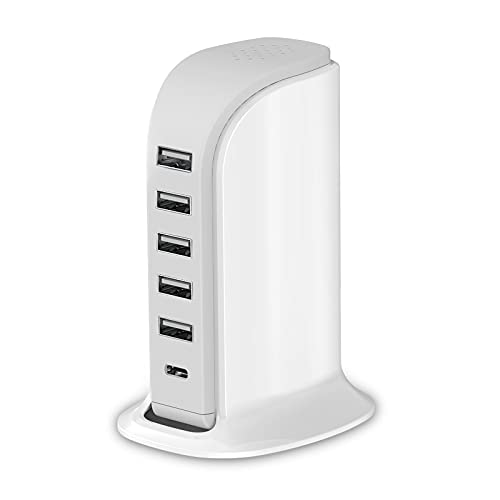
MSTJRY 5-Port Charging Station — Best Overall
A charging station with dividers changes household behaviour in a way a bare brick never does: devices acquire a home. The MSTJRY unit combines five USB ports with a slotted dock, so phones stand upright in a row, a tablet leans at the end, and the whole fleet is visible at a glance rather than buried in a drawer tangle. Visibility is an underrated feature — a parent can see whose phone is actually charging, a guest can find a free slot without excavation, and the morning grab-and-go takes seconds because everything slept in formation.
Power delivery across the five ports suits the overnight rhythm this dock is built for. Phones and tablets docked together in the evening are full by morning without the station growing worrying hot, and the smart distribution means a nearly full phone stops hogging capacity that a flat tablet needs. This is not the station for a twenty-minute emergency sprint — no shared station is — but for the twelve-hour nightly residency that defines family charging, its manners are exactly right.
The dividers deserve a practical note: they accommodate phones in ordinary cases comfortably, while very thick rugged cases or a tablet in a chunky folio may claim two slots’ width. Most households arrange the fleet once — tablet at the end, phones in the middle, watch charger or earbuds cable at the spare port — and never think about the geometry again. The unit’s own power cord gives enough reach to sit on a console or kitchen worktop away from the socket, keeping the dock where people actually pass.
Families transitioning from charger chaos will feel the difference within a week: one station, one switch, no archaeological digs through cable nests, and a visible answer to the eternal question of whether the spare phone is charged. As the default recommendation for a fixed family dock, the MSTJRY earns its place at the top of this list by solving the organisational problem and the electrical problem in the same object.
- Ports: five USB-A ports with a slotted device dock
- Style: desktop station with detachable dividers
- Load style: overnight fleet charging for phones and tablets
- Power: shared total across ports with per-device distribution
- Typical duties: family console, kitchen worktop, hallway dock
- Case note: thick rugged cases may span two divider slots
Strengths
- Dividers give every device a visible, permanent parking place.
- Five ports cover the realistic family fleet in one unit.
- Corded desktop format sits where people actually gather.
Trade-offs
- USB-A only, so modern USB-C devices charge at standard pace.
- Dock footprint claims real counter or console space.
- Shared output means no single port is a sprinter under full load.
Best for: a family of four parking two phones, a tablet and accessories on one hallway console every night. Not suited for: a renter with one phone and a laptop who needs USB-C speed more than berths.
Upoy 5-Port Wall Charger 40W — Countertop Saver
Not every home can spare the surface for a desktop dock. The Upoy takes the opposite approach: a single unit that plugs directly into a wall socket and offers five USB ports from that one point, turning a kitchen or utility-room outlet into a charging post without claiming a single inch of worktop. For small flats, crowded kitchens and rental bathrooms where drilling shelves is not an option, that format is not a compromise — it is the only design that fits the life being lived.
The 40W total tells you how to use it honestly. Five lightly hungry devices — phones overnight, earbuds, a watch, a bike light, a handheld console — share that budget contentedly. Ask it to fast-charge two large tablets simultaneously at midday and it will divide its output like a parent splitting a dessert: fairly, and with everyone getting less than they hoped. Judged as an always-available utility post rather than a speed machine, its output is sensibly matched to its mission.
Wall-plug designs live or die on socket manners. This unit’s weight sits close to the wall rather than levering outward, and its port fan keeps cables dropping downward instead of spraying sideways into the neighbouring socket’s territory. In a double outlet it will usually claim the whole plate for itself — five cables need room to leave — so dedicate a socket to it and let it be infrastructure. Utility rooms, garages and the socket behind the sofa are its natural habitats.
There is a particular joy in a charger that asks for nothing: no shelf, no cord management project, no furniture rearranged. Plug the Upoy in, thread five cables to the devices that live nearby, and the room quietly gains a charging post. For the many homes where the charging problem is really a space problem, that simplicity outranks every specification on this page.
- Ports: five USB-A ports in a wall-plug body
- Total output: 40W shared across docked devices
- Style: direct plug-in, no desktop footprint
- Load style: overnight and background charging for mixed small gear
- Typical duties: kitchen post, utility room, garage bench, rental flat
- Socket note: plan to dedicate a full outlet plate to it
Strengths
- Creates a five-device post from one socket with zero surface used.
- Ideal for rentals and small kitchens where docks cannot live.
- Simple format with nothing to assemble, pair or configure.
Trade-offs
- 40W total means heavy simultaneous loads share modest power.
- Five departing cables need a tidy route or the socket looks busy.
- No USB-C port for newer devices wanting their native standard.
Best for: a small flat whose kitchen socket must feed two phones, earbuds, a watch and a bike light nightly. Not suited for: a power user expecting two tablets to fast-charge side by side at noon.
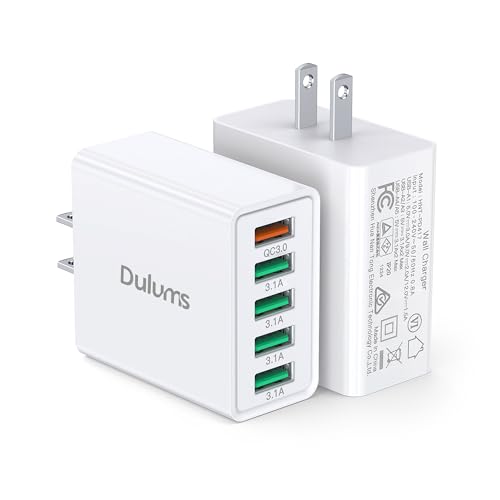
50W 5-Port USB Wall Charger 2-Pack — Two Floors Covered
Houses with stairs have a charging geography problem: the good station migrates to wherever it was last needed, and the other floor reverts to a drawer of tired single bricks. This twin-pack answers geography with duplication — two five-port wall chargers rated at 50W apiece, one for each level of the home, identical in behaviour so nobody upstairs envies anybody downstairs. Ten ports across the house sounds extravagant until the first weekend with visiting grandchildren, when it feels merely adequate.
Each unit’s 50W total gives a floor’s overnight fleet — typically two phones, a tablet and small accessories — enough shared headroom to finish comfortably before morning. The wall-plug format keeps both stations off surfaces, which suits landings, spare rooms and the socket-rich but shelf-poor spaces that stairs create. Because the bricks match, a cable setup perfected downstairs can be copied upstairs without thought, and a failure anywhere is diagnosed by swapping floors rather than shopping.
Singles households will find the second brick just as useful split differently: one at home, one at a workplace, a holiday let, or a partner’s flat. The pack logic is about ending scarcity, and scarcity lives wherever your devices sleep in two places. Even a flat-dweller with a home office gains a station per room, which quietly abolishes the cable-carrying commute between desk and sofa that everyone performs and nobody enjoys.
Set expectations as with any shared-output design: a brick feeding five devices divides its 50W among them, so solo sprints belong to whichever device docks alone. Within that honest frame, this is the most life-improving purchase on the list for multi-floor homes, because it removes a daily friction at both ends of the staircase at once — and daily frictions, removed twice daily, compound into genuine quality of life.
- Contents: two five-port wall chargers
- Total output: 50W per unit, shared across its ports
- Style: direct plug-in bricks, no counter footprint
- Load style: per-floor overnight fleets of phones, tablets, accessories
- Typical duties: upstairs/downstairs stations, home plus office
- Household logic: identical units simplify cables and troubleshooting
Strengths
- Two floors gain real stations in a single purchase.
- 50W per brick covers a typical family’s nightly load per floor.
- Matched pair keeps behaviour and cable setups consistent house-wide.
Trade-offs
- Full five-device loads still divide output among all ports.
- Wall format gives devices no dock; cables rest where they fall.
- Single-floor minimalists may never deploy the second brick well.
Best for: a two-storey family home where phones charge upstairs and the kitchen fleet docks downstairs. Not suited for: a studio dweller with three devices total, who would strand most of the pack’s capacity.

Anker PowerPort 6 Desktop Charger — Six-Port Veteran
Count the ports on the name and you will find six, not five — this guide will not pretend otherwise. The PowerPort 6 has been on sale, in evolving revisions, for so long that it functions as the category’s reference point: a desktop brick with a mains cord, six USB-A ports along its face, and a reputation built across millions of family consoles, office desks and airport power strips. It is included because any honest survey of multi-port charging that omitted it would be protecting a number at the expense of its readers.
Desktop format is its quiet advantage over the wall-plug picks. The mains cord lets the unit sit on a desk or inside a media cabinet while the socket stays hidden, and the brick’s weight keeps it planted when cables tug. Six ports swallow the classic full house — two phones, a tablet, a watch puck, earbuds and a power bank — with the shared output distributed by Anker’s long-refined circuitry. Under a full overnight load it behaves the way veterans of any field behave: without drama, warmth or surprise.
Age brings honest limitations. This is a USB-A design from the era before USB-C Power Delivery colonised everything, so modern laptops and the newest phones receive standard charging rather than their headline speeds. For the fleet it was built for — and that fleet still fills most homes — the trade is invisible. Judge it as the definitive version of the classic station, not as a contender for a USB-C future it never claimed to join.
If your household’s devices are mostly USB-A era and you want the single most proven object in the category, this is it. Buy it, give the fleet a permanent home on the console, and expect to forget it exists — the fate of all great infrastructure. Readers who need five ports exactly will find three worthy designs above; readers who need a station that simply works, with a spare port for the guest phone, have found their answer here.
- Ports: six USB-A ports — one more than this guide’s headline count
- Style: desktop brick with mains cord
- Load style: full-family overnight charging, six devices at once
- Power: shared total with mature distribution circuitry
- Typical duties: media console, office desk, family hallway
- Era note: USB-A standard charging; no USB-C Power Delivery
Strengths
- The most proven design in the multi-port category’s history.
- Sixth port absorbs guests and power banks without evicting anyone.
- Desktop cord format reaches shelves and cabinets wall plugs cannot.
Trade-offs
- It is a six-port charger in a five-port guide — surplus for some.
- No USB-C output for modern laptops or fast-charge phones.
- Larger desktop footprint than the wall-plug picks.
Best for: a media-console household docking two phones, a tablet, a watch, earbuds and a power bank every night. Not suited for: a traveller counting grams, or a desk built around a USB-C laptop’s fast-charge appetite.

UGREEN Nexode 65W 4-Port Charger — USB-C Power Pick
Four ports, and again this guide says so plainly. The Nexode earns its seat at a five-port table by doing the one thing no other pick here can: delivering up to 65W of modern USB-C power, enough to run a thin laptop at full working pace while its remaining ports feed a phone and accessories. Households whose fleet has crossed into USB-C — recent phones, a tablet with a USB-C port, a laptop that charges over the same connector — will get more real charging out of these four intelligent ports than out of five USB-A sockets stuck in an earlier era.
The port mix reflects the modern fleet’s shape: USB-C sockets for the laptop and the flagship phone, a USB-A for the legacy stragglers that still visit. Power divides intelligently as devices join, with the laptop’s share protected sensibly rather than collapsing the moment a phone docks. GaN construction keeps the brick startlingly small for its output, small enough that it doubles as a travel charger in a way the desktop stations above never will.
Consider this pick the bridge recommendation. A home mid-transition — new laptop and phone on USB-C, older tablet and the children’s hand-me-downs on USB-A — needs exactly this blend, and needs it in one object rather than a two-brick compromise. The Nexode’s four ports will feel like five the moment you notice the laptop no longer keeps its own charger hostage by the desk.
Purists counting sockets should still look upward to the true five-port designs; nobody here will argue. But if your nightly reality is a laptop, a modern phone, earbuds and one legacy device, this charger covers that reality completely, at speeds the five-port USB-A stations cannot approach for the devices that matter most. Categories are tidy; households are not, and this pick sides with households.
- Ports: four total — USB-C and USB-A mix (one fewer than headline)
- Total output: up to 65W, laptop-capable on USB-C
- Technology: GaN construction, compact brick
- Load style: laptop plus phone plus accessories simultaneously
- Typical duties: modern desk setup, travel, mixed-era households
- Distribution: power re-divides intelligently as devices join
Strengths
- Laptop-grade USB-C output none of the five-port rivals match.
- Compact GaN body doubles as a serious travel charger.
- Port mix mirrors a modernising household’s actual fleet.
Trade-offs
- Four ports is four ports; a six-device family will feel it.
- Peak output is shared, so a hungry laptop trims the others.
- Less suited to a fleet that is entirely USB-A era.
Best for: a desk where a USB-C laptop, a recent phone and earbuds charge together every evening. Not suited for: a family docking six USB-A devices nightly, which needs the Anker or MSTJRY above.
RAVPower 5-Port USB Charger — Prose-Only Pick
There was a stretch of years when RAVPower’s five-port desktop charger was the default answer in this category, recommended by everyone, stocked everywhere, and present on what felt like every third desk in the country. The hardware deserved its fame — a sensible desktop brick, honest output, a price that made multi-port charging feel like a utility rather than a luxury. We cover it in prose only, because the brand was wound down and its nameplate withdrawn from major marketplaces, leaving a residue of listings whose provenance ranges from old stock to opportunistic imitation.
That residue is exactly why no link accompanies this pick. A reader clicking through on the strength of the old reputation might receive anything from a genuine late unit to a lookalike with none of the original’s safety pedigree, and a charging station is the wrong product category for that lottery. If you already own a RAVPower five-port in good condition, it remains a perfectly serviceable station; the thousands still running on desks are not suddenly obsolete because their maker exited the stage.
The brand’s story also explains the shape of this entire guide. When a category’s default disappears, buyers scatter toward whatever the search results surface first, and quality signals blur. The linked picks above were chosen as the trustworthy successors to that default role — traceable makers, verifiable listings, behaviour you can predict. Readers who loved their RAVPower will recognise its virtues distributed across the MSTJRY’s organisation and the Anker’s proven desktop format.
Should a genuine, sealed RAVPower surface through a reputable retailer, a nostalgic buyer would not be foolish to consider it — the design was sound. But go in with open eyes about warranty support that no longer exists in any meaningful form, and weigh that against linked rivals whose makers still answer email. Sentiment is a fine reason to keep a charger; it is a poor reason to buy one.
- Ports: five USB-A ports, desktop format
- Status: brand wound down; listings vary in provenance
- Load style: classic family overnight station
- Reputation: the category’s former default recommendation
- Typical duties: still serving on desks bought in its prime
- Coverage style: described without a link in this guide
Strengths
- Design set the template every desktop station since has followed.
- Units in service continue to perform their nightly duty reliably.
- Balanced output and format suited ordinary family fleets.
Trade-offs
- No meaningful warranty or maker support remains.
- Listings under the name include stock of uncertain origin.
- USB-A era design with no path to USB-C speeds.
Best for: an owner whose RAVPower still anchors a desk and who wants reassurance it can stay there. Not suited for: a new buyer seeking a supported station with a live warranty — choose the MSTJRY or Anker instead.
Comparison
| Pick | Ports | Format | Total output style | Headline strength |
|---|---|---|---|---|
| MSTJRY 5-Port Station | 5 | Desktop dock | Shared, overnight pace | Dividers organise the whole fleet |
| Upoy 5-Port Wall Charger | 5 | Wall plug | 40W shared | Zero counter space consumed |
| 50W 5-Port 2-Pack | 5 each | Wall plug ×2 | 50W shared each | Two floors, identical stations |
| Anker PowerPort 6 | 6 | Desktop brick | Shared, proven circuitry | The category’s reference design |
| UGREEN Nexode 65W | 4 | Compact brick | 65W with USB-C | Laptop-grade modern power |
| RAVPower 5-Port | 5 | Desktop brick | Shared | Former default, prose only |
Why Does Total Wattage Matter More Than Port Count on a 5-Port Charger?
Ports are doors; wattage is the kitchen behind them. A five-port charger with a small total output is a restaurant with five tables and one overwhelmed cook — everyone gets seated, nobody gets fed on time. When a phone, a tablet and three accessories dock together, they draw against one shared budget, and the charger’s circuitry divides that budget among them. A generous total keeps each device in its contented zone; a stingy one stretches an overnight charge toward the limits of the night itself.
Tablets expose weak totals first, because a tablet’s battery is several times a phone’s and its appetite matches. Add a tablet to a marginal station and the phones around it slow noticeably, which owners misread as a faulty unit. The station is not faulty; it is arithmetic. This is why the reviews above keep returning to the load a pick can carry in company, and why the twin-pack’s 50W per floor and the Nexode’s 65W headline matter more than any port census.
Future purchases should be judged the same way. When a listing leads with ports and whispers its wattage, read the whisper first. Divide the total by the devices you honestly dock together nightly; if each share looks like the output of the feeblest single adapter you own, the station will feel like five of those adapters sharing one socket — because electrically, that is what it is.
Where Should a Family Charging Station Live?
Choose the room where devices already congregate when their owners come home, not the room you wish they did. For most families that is the hallway console, the kitchen’s far worktop, or the living-room media unit — places bags drop and pockets empty. A station exiled to a spare room will be visited for a week and then quietly abandoned in favour of whichever single charger lives near the sofa. Behaviour beats intention in every household system, and charging is a household system.
Height and surface matter more than décor. A station at waist height on a hard surface invites docking; one on the floor behind a plant teaches everyone to step over their phones. Keep the station away from the kitchen’s wet zone and the bathroom entirely, give its cables a route that does not cross a walkway, and park a small tray or the dock’s own dividers where devices land. If children dock tablets there, a spot within adult sightlines quietly solves the mystery of the “charging” tablet that was actually playing video all evening.
Finally, defend the station’s socket. The fastest way a family dock dies is another appliance — a vacuum, a fan, a visiting hairdryer — evicting its plug “just for tonight” three nights a week. Dedicate the outlet, label it if your household runs on labels, and let the station become as permanent as the Wi-Fi router. Infrastructure that stays plugged in is infrastructure that gets used.
Sound travels with the decision too: a station placed where the family eats will be used by guests without instruction, while one hidden in a study serves only its owner. When in doubt, put the dock where the coats land. Homes run on arrival rituals, and charging joins them most smoothly at the exact spot where the day is taken off and hung up.
How Do You Keep Five Cables From Becoming a Nest?
Short cables are the whole secret, and everything else is commentary. A station’s devices sit within arm’s reach of the brick, so cables of a foot or so reach every berth without surplus to tangle. Keep one longer cable only if a device must charge in a lap nearby. Mixed lengths in one dock create the classic nest within a fortnight, because every surplus loop invites the next cable to join it. Buy a small bundle of short cables with the station and consider it part of the same purchase.
Colour or tag each cable by device when several family members dock similar phones. The morning scramble improves measurably when nobody must trace a cable by hand to learn whose handset is whose. Velcro ties — never tight zip ties, which bite insulation — keep the spare port’s cable coiled politely instead of wandering. And give the station a monthly ten-second audit: reseat cables, evict the one that migrated in from elsewhere, and remove the deceased earbud case that has been “charging” since spring.
Wireless accessories complicate the picture pleasantly: a watch puck or earbud pad can occupy one port permanently, its cable never moving, which reduces the daily plugging to just phones and tablets. Stations feel calm when most of their cables are fixtures and only two are travellers. Design yours that way from the start and the nest never forms.
What Happens When a Multi-Port Charger Gets Old?
Ports wear mechanically long before electronics fail. A USB socket cycled twice daily for years develops a loose grip, and the symptom is a device that charges only when its cable hangs at one blessed angle. Rotating devices among ports spreads that wear, and retiring a sloppy cable — often the true culprit — should precede blaming the station. When a port genuinely dies, a five-port unit degrades gracefully into a four-port unit, which is more dignity than a single charger gets.
Heat tells the other ageing story. Dust drawn into a desktop brick insulates its components over years, and a station that once ran merely warm may begin running hot under the same load. A blast of compressed air, a relocation out of a sun-baked windowsill, and an honest check that no bedding or paper has colonised its vents restore most units. Any charger that smells hot, ticks, or discolours its case has finished its service regardless of age; replace it with the same lack of sentiment you would apply to a smoke alarm.
Plan replacement on behaviour, not birthdays. A station that still charges the fleet overnight, stays composed under load and holds its cables firmly has years left, whatever its purchase date. The picks in this guide were chosen partly for that longevity profile — simple designs, proven makers, nothing delicate — because a charging station is bought to be forgotten, and the best ones oblige for a very long time.
How Should You Set Up a Station for Guests and Grandparents?
Guest-proofing a station means removing every decision. Leave one clearly free port with a common cable already attached — ideally a USB-C and a Lightning-era option if your visitors span generations — so a guest never has to unplug a family device or ask where chargers live. A small note is not necessary; a visible, waiting cable communicates everything. Grandparents staying over will use the station exactly as placed if it sits at a height and in a room they naturally pass, which argues for the hallway or kitchen over a teenager’s bedroom.
For an elderly parent’s own home, install the station yourself and make it the only charging place in the house that matters. One dock, on a hard surface, at waist height, with their phone’s cable permanently resident and long enough to reach their chair. Remove the competing drawer of elderly bricks to a cupboard, because a parent offered five similar adapters will reliably choose the weakest. Simplicity is the feature; the five ports are for the visiting family whose devices will colonise the dock at Christmas.
Children visiting with tablets benefit from the same clarity: show them their slot on day one and the devices will migrate there voluntarily, especially if the station sits near where the family gathers rather than in exile. A station everyone understands survives holidays; a station that requires a briefing becomes a museum piece by Boxing Day.
How Should Remote Workers Build a Desk Charging Station?
A work desk asks different things of a station than a hallway does. The fleet is professional: work phone, personal phone, headset, a tablet for notes, perhaps a presentation clicker and a spare power bank for travel days. These devices charge in the middle of the day, in view, while their owner is trying to look composed on video calls — so cable routing and visual calm matter as much as wattage. A desktop station at the desk’s rear corner, fed by short cables that drop straight down to each device, keeps the working surface clear and the background of every call reassuringly uncluttered.
Desk duty also exposes the USB-C question earlier than family duty does, because work laptops and modern work phones live on that standard. A hybrid answer suits many desks: the five-port station handles the USB-A fleet and accessories, while the laptop keeps its own high-power connection. Workers tempted to consolidate everything into the Nexode pick should count their nightly residents honestly — four ports cover a laptop, a phone, earbuds and one legacy device elegantly, and run out exactly when a fifth resident arrives.
Finally, give the work station its own identity in a hybrid household. When the desk brick doubles as the family’s overflow charger, work gear ends the day scattered and the morning stand-up begins with a search. A station that belongs to the desk, defended like the hallway one, keeps professional kit professional — charged, parked, and boring in the best possible way.
How Do You Childproof and Pet-Proof a Charging Station?
Charging stations attract small hands and curious animals because they gather warm objects and dangling cables in one fascinating place. Start with placement: a station on a high console or shelf, with cables routed down the back where they cannot be swung on, removes most of the temptation. Cable slack is the enemy — a loop hanging at toddler height is a handle, and a cable a cat can bat will be batted nightly. Short cables, the recurring hero of this guide, are also the safe cables.
Choose the station’s berth away from water and soft furnishings, on a hard surface where a knocked device lands safely rather than in a sink or a dog bed. Devices charging generate mild warmth; stacked under cushions by a helpful child they can grow properly hot, so teach the household that docked devices stay visible. A dock with dividers, like the MSTJRY, doubles as a visual rule — a device out of its slot is a device out of place, obvious to any passing adult.
Pets add the chewing variable. A cable that crosses a rabbit’s territory or a teething puppy’s route will be sampled; route behind furniture, use a cable channel where a run must cross open space, and inspect the fleet’s cables weekly for tooth marks. A damaged cable retires immediately, no exceptions for “it still works”. Stations survive childhood and pets easily when the design assumes curiosity rather than hoping for indifference.
When Should You Add a Second Station Instead of a Bigger One?
Distance is the signal. When devices routinely charge in two places — the desk by day, the bedside by night; the kitchen on weekdays, the living room on weekends — one heroic station forces a daily migration that humans reliably abandon by Thursday. Two modest stations, each permanently resident, outperform one magnificent station that lives in the wrong room half the time. The twin-pack in this guide exists because that pattern repeats in house after house.
Load is the second signal. A single station whose total output is genuinely saturated nightly — the tablet still hungry at breakfast, phones taking turns — needs either a higher-total replacement or a sibling to split the fleet. Splitting by person often works better than splitting by device: each partner’s gear gets a station, and nobody’s alarm phone is ever queued behind anybody’s tablet.
There is also a resilience argument. One station is a single point of failure the night before a trip; two stations mean a failure is an inconvenience absorbed by the survivor while a replacement ships. Households that travel for work, host often, or simply hate mornings will find the redundancy cheap at the price. Buy the second station before you need it, in the same model as the first, and the house gains the calm uniformity this guide keeps praising.
How Much Should a Household Actually Spend on Charging?
Step back from individual products and the economics of this category look almost comic: the devices being charged cost hundreds of times what the station costs, yet the station is where buyers pinch hardest. A household that feeds several phones, a tablet and a stream of accessories through one undersized brick pays for the saving in mornings — devices not full, cables borrowed between rooms, a low-grade friction applied to the start of every day. Against that bill, the difference between a bargain station and a good one is trivially small, spread over years of nightly service.
The smarter calculation counts replacements. Anonymous multi-port bricks fail socially and electrically at a rate that turns their low price into a subscription: a new one every year or so, plus the cables they take with them. A traceable station from this list, bought once, typically outlasts two or three of its bargain rivals and the phones it was bought for. Cost per year of calm mornings is the metric that matters, and by that metric the mid-priced proven designs win easily.
None of this argues for extravagance. Beyond a sound total output, honest distribution and a maker who answers email, extra money buys decoration. Spend to the level of reliability, stop there, and redirect the savings toward the short cables that make any station pleasant. That allocation — good brick, good cables, defended socket — is the entire financial wisdom of the category in one sentence.
Common Mistakes
Buying by port count alone tops the list of errors in this category, for the arithmetic reasons the wattage section explains. A close second is deploying a desktop station with the five long cables that came with five separate devices, guaranteeing a nest and blaming the dock. Stations and short cables are one purchase psychologically, however many boxes they arrive in. Third comes socket politics: plugging the station into a switched or timer outlet that cuts power at midnight, then waking to a fleet at forty percent and a mystery nobody connects to the lamp timer.
Overloading with simultaneous heavy loads is another quiet disappointment. Five ports invite five devices, yet two large tablets plus three phones at midday will share the total and crawl; stagger the heavy residents overnight instead. Owners also neglect port spacing when shopping, discovering at home that two chunky plugs cannot sit side by side — read the port layout as carefully as the wattage, or dock the bulkiest plugs at the ends where they have an elbow free.
Lastly, stations die socially before they die electrically: someone unplugs the brick for the vacuum and never restores it, a cable emigrates to a car, the dock drifts to a junk drawer during a tidy-up. Treat the station as a fixed utility — same socket, same cables, same spot — and it will still be quietly running the household’s mornings years after sleeker gadgets have been replaced twice over.
Final Recommendation
For the classic family dock, the MSTJRY station is the purchase to make: five ports, a home for every device, and manners suited to the nightly residency that defines real charging. Kitchens and small flats should take the Upoy’s wall-plug route, two-storey homes the twin-pack, and anyone whose fleet includes a USB-C laptop should seriously consider the four-port Nexode despite the arithmetic, because its power serves modern devices the way they ask to be served. The Anker six-port remains the proven veteran’s choice, and the RAVPower’s story is a reminder to buy from makers who will still exist at warranty time. Pick the station that matches your floor plan, feed it short cables, defend its socket — and enjoy mornings where everything you own is simply, unremarkably, full.
It is worth ending on the human detail that sells these stations better than any specification: the moment a household stops negotiating over chargers. Nobody remembers the wattage a month later; everybody remembers that the phones live on the console now, that guests get offered a port instead of a hunt, and that the morning question changed from “who took my charger” to nothing at all. Buy the station that fits your rooms and your fleet’s real connectors, set it up once with short cables and a defended socket, and let it disappear into the background of family life — which is where all the best household technology eventually belongs.
Frequently Asked Questions
Will five devices charging together damage their batteries?
No. Each device controls its own intake and tapers as it fills; the station merely supplies a shared budget. If anything, the gentle pace of a shared overnight charge is kinder to cells than repeated solo fast-charge sprints. Heat is the variable worth watching, and a sound station on an open surface keeps it unremarkable.
Can a 5-port charger run from a power strip or extension lead?
Yes, provided the strip is a sound, undamaged one and the station is not sharing it with heaters or other heavy appliances. A desktop station’s own cord often removes the need entirely by reaching the wall socket directly. Avoid daisy-chaining strips, and keep the whole arrangement visible rather than buried behind furniture.
Why does my tablet charge so slowly on a multi-port station?
Because it is sharing. A tablet docking beside two phones receives a fraction of the station’s total, and its large battery makes that fraction feel slow. Give the tablet the station to itself when speed matters, dock it earliest in the evening, or choose a higher-total pick like the Nexode for USB-C tablets.
Do I need special cables for a charging station?
Ordinary sound cables work; short ones work better organisationally. Keep each device’s correct connector type, replace any cable whose plug feels loose, and avoid the very thinnest bargain cords for the tablet berth where current draw is highest. A station reveals weak cables quickly because devices sit side by side for comparison.
Is it safe to leave a multi-port charger plugged in permanently?
A traceable maker’s station is designed for exactly that residency. Keep it on a hard, ventilated surface, out of bedding and direct sun, and inspect it occasionally as you would any small appliance. Retire it for heat, noise, smell or case damage — the same rules as any charger, applied to a bigger brick.
Should I choose a wall-plug or desktop station?
Wall-plug designs win where surface is scarce and devices can rest nearby on a counter edge or floor cushion. Desktop stations win where devices need a dock, a visible home, or distance from the socket. Many two-floor homes end with one of each, which is why this list includes both shapes in strength.
What if I need to charge a laptop too?
Then port count stops being your headline metric. A USB-C laptop wants real Power Delivery wattage, which among these picks only the UGREEN Nexode provides at laptop level. USB-A stations will maintain a sleeping laptop’s peripherals happily but will not feed the machine itself at working pace.
Can a charging station replace all the individual chargers in my house?
For overnight and background charging, largely yes — and that consolidation is the point. Keep one fast single charger somewhere for genuine emergencies, because a shared station deliberately trades peak speed for breadth. Everything else — the drawer of elderly bricks, the charger that lives behind the sofa, the one nobody can identify — can retire to a single labelled box of spares. Most households find the drawer stays closed for months once the station settles in.
How do I know if a station’s total output is enough for my family?
List the devices that dock together on your busiest night and be honest about the two largest. If that list holds two tablets plus phones, favour the higher-total designs or split the fleet across the twin-pack. If it holds phones and small accessories only, even the 40W wall pick will finish the fleet by morning. The arithmetic is forgiving overnight and unforgiving at midday, so judge by the night, not the noon panic.
Related Guides
Continue with the neighbouring charging roundups: best 65 watt USB-C chargers, best 3.0 Qualcomm Quick Chargers and best affordable fast wireless chargers.



[…] out your charging setup with our neighbouring roundups: best 5 port chargers, best 65 watt USB-C chargers and best 10 foot chargers […]
[…] Round out the battery shelf — charger, harness, a multimeter for rested readings and a roll of tape for dates are the complete kit — with our guides to the best 10 amp auto battery chargers for faster recovery, the best 12 volt solar chargers for off-grid maintenance, and the best 18650 battery chargers for loose lithium cells. […]