What's inside
- Key Takeaways
- Quick Picks
- How Did We Choose These GaN Laptop Chargers?
- What Does GaN Actually Change in a Laptop Charger?
- Is 65W Enough for a Laptop in Real Life?
- How Did GaN Chargers Get Small So Quickly?
- How Do You Read a GaN Charger’s Specification Honestly?
- Which GaN Charger Fits Your Laptop Bag? The Six Picks in Detail
- Which GaN Charger Suits Which Kind of Worker?
- Which GaN Charger Matches Which Class of Laptop?
- How Do the Six GaN Laptop Chargers Compare Side by Side?
- How Should You Pair a GaN Charger With the Right Cable?
- What Does a GaN Charger Mean for Your Electricity Bill and the Planet?
- How Should You Organise Charging Once the Brick Is Gone?
- What Mistakes Do People Make When Buying a GaN Charger?
- How Do You Test a New GaN Charger in Its First Week?
- What Should You Do With Your Old Brick Once a GaN Charger Arrives?
- How Do You Choose Between Two Chargers That Look Identical on Paper?
- Final Recommendation
- How Does Temperature Affect a GaN Charger Day to Day?
- What Comes After GaN, and Should You Wait for It?
- Frequently Asked Questions
- Related Guides
As an Amazon Associate I earn from qualifying purchases. This post may contain affiliate links at no extra cost to you.
widgetverdict.com is reader-supported. When you buy through links on our site, we may earn an affiliate commission.
Where to buy: Amazon stocks all six chargers reviewed below, and the quick picks table links each one to the listing we verified. GaN chargers are frequently imitated, so check that the brand, the port count and the wattage in the listing title are exactly what you intended.
The best GaN laptop chargers exist because of a materials swap. Gallium nitride switches power more efficiently than the silicon inside older chargers, losing less energy as heat — and heat is what forced old laptop bricks to be big, since they needed the surface area and air gaps to get rid of it. A GaN charger can therefore do a laptop’s job from a body closer to a phone charger’s size, and the six picks here show where that idea has arrived: every one of them sits in the 65W to 67W band that covers most thin laptops, yet they divide into single-port purists, three-port desk hubs, a slimline design, a PPS-equipped all-rounder, a 67W Anker, and UGREEN’s miniature Nexode Air with its 60W AVS mode.
Because the wattages cluster so tightly, this guide is not a power contest. It is a study in shapes and sharing. Anker’s Nano is the compact PPS traveller; UGREEN fields three different answers — the original Nexode as a three-in-one desk block, the Nexode Pro as a slim three-port design, and the Nexode Air as the miniaturised option. Anker’s 67W three-port block is the headroom pick, and Amazon Basics strips the idea down to one honest port. The sections below explain what GaN does and does not change, so the reviews can concentrate on which shape of 65W belongs in your life.
Key Takeaways
- GaN’s real gift is size and heat, not magic wattage: these chargers do a laptop’s job from a much smaller body.
- All six picks sit between 65W and 67W total — the differences are ports, shape and sharing, not raw power.
- Anker’s Nano is the single-cable traveller with PPS; UGREEN’s Nexode Pro is the slim three-port alternative.
- The original UGREEN Nexode and Anker’s 67W block are the desk-hub shapes, feeding a laptop plus smaller devices.
- Amazon Basics is the one-port purist: the whole 65W devoted to a single device.
- UGREEN’s Nexode Air miniaturises hardest and adds a 60W AVS mode named in its listing.
Quick Picks
| Pick | Badge | Why it earns its place |
|---|---|---|
| Anker Nano 65W GaN II Charger | Best Travel GaN | GaN II plus PPS in a compact foldable body built around one cable done well. |
| UGREEN Nexode 65W USB C Charger | Best Established Desk Hub | Three ports and a GaN II chip in the design that defined this category. |
| UGREEN Nexode Pro 65W Charger | Best Slim Three-Port | A slim wall charger with three ports and PPS for tight sockets and bags. |
| Anker 67W GaN Wall Charger | Best Three-Port Headroom | 67W across three ports from Anker, the most total power in this guide. |
| Amazon Basics 65W GaN Charger | Best One-Port Purist | One port, PD 3.0 and a foldable plug — the idea with nothing added. |
| UGREEN Nexode Air 65W Charger | Best Miniature | The smallest shape here, in grey, with a 60W AVS fast-charging mode. |
How Did We Choose These GaN Laptop Chargers?
The entry ticket was the technology itself, stated in the listing: each pick names GaN or a GaN chip generation — GaN II appears repeatedly — rather than merely looking small. A charger that is compact for other reasons is fine, but this guide is about the material, so the material had to be claimed where we could read it. The second filter was laptop legitimacy: 65W-class output with USB-C Power Delivery, the tier that runs thin-and-light laptops at working speed.
Within that band we deliberately chose variety of form, because form is the remaining decision. Three UGREEN designs might look like repetition until you notice they are three different shapes — hub, slim, mini — and the two Ankers split by port philosophy, one port with PPS against three ports with the guide’s highest total. Amazon Basics represents the specification-first buyer. Every listing’s identity was readable from its title, and the recalled products named in our standing rules were excluded from consideration entirely.
What Does GaN Actually Change in a Laptop Charger?
Inside a charger, transistors switch the incoming mains power into the form your laptop drinks, and every switch wastes a little energy as heat. Gallium nitride transistors switch faster and cleaner than silicon ones, so less heat is made in the first place. The visible consequences are the two that matter to owners: the charger can be much smaller for the same output, because it no longer needs bulk to shed heat, and it can sit in a bag or behind furniture without becoming the warmest object in the room.
What GaN does not change is the negotiation. A GaN charger speaks the same USB-C Power Delivery as any other, the laptop still sets its own ceiling, and 65W from a GaN block is the same 65W the laptop would draw from a silicon brick. Buy GaN for the size, the cool running and the travel manners — the qualities on display across all six picks here — and not for any promise of charging a given laptop faster than its maker allows. The technology shrinks the charger; it does not rewrite the laptop.
Is 65W Enough for a Laptop in Real Life?
For the laptops most people carry, yes — and the market’s shape proves it. The 65W tier became the default for thin-and-light machines because it covers a full working charge: the laptop fills while you type, presentations and video calls included, rather than merely slowing its decline. Every pick in this guide was chosen in that tier precisely because it is the tier of the MacBook Air class, the slim Windows ultrabook and the travel Chromebook-plus machines that dominate bags.
The exceptions are worth naming so nobody buys blind. Large workstation laptops and gaming machines with discrete graphics can demand far more under full load; a 65W charger will often keep such a machine alive or charge it while it sleeps, but it is not a like-for-like replacement for the brick it came with — and none of these listings claims to be one. The second exception is sharing: a 65W three-port charger feeding a laptop and two phones is a 65W budget divided three ways. The laptop still charges, just at the pace the remaining share allows, which on a desk is normally plenty.
How Did GaN Chargers Get Small So Quickly?
A short history explains the present shelf. For decades, laptop chargers were bricks because their silicon transistors switched slowly and wastefully, and the waste heat dictated everything: aluminium, air gaps, bulk. The first GaN chargers appeared as novelties — expensive, single-port, aimed at travellers who counted grams. What changed the category was not the material alone but the pairing of GaN with the USB-C Power Delivery standard’s maturity: once one plug and one negotiation could serve nearly every laptop, a small charger stopped being a compromise and became a platform.
The second generation, which is where most of this guide lives — GaN II appears in the Anker Nano and UGREEN Nexode listings — refined the integration. Chargers shrank again, multi-port designs became practical because the heat budget allowed three ports in a body that once held one, and features like PPS moved from flagship curiosities to ordinary specification lines. The Nexode Pro’s slim silhouette and the Nexode Air’s miniaturisation are what a maturing technology looks like: the engineering stops proving the material works and starts exploring what shapes the material permits.
The lesson for a buyer in the present moment is that GaN is no longer a premium experiment to be weighed cautiously; it is the default construction for any new laptop charger worth buying, and the remaining decisions are the human ones — ports, shape, sharing, maker. A silicon brick still works, in the sense that it still charges, but it now asks its owner to carry yesterday’s cooling problem in today’s bag. The six picks here were chosen as the current shapes of the idea, and the differences between them are deliberately not about the material they share.
How Do You Read a GaN Charger’s Specification Honestly?
Begin with the total, and ask the only question that matters about it: total for what? On a single-port charger the figure is a promise to one device. On a three-port charger it is a budget for a family, and the honest listings — all six in this guide state their totals plainly — leave the division to be understood rather than discovered. A buyer who reads one number and stops has read the charger’s advertising; a buyer who asks how the number behaves with every port busy has read its specification.
Next, look for the generation and the dialects. GaN II, named in several listings here, signals the refined integration of the material’s second wave — smaller, cooler, better mannered. PPS signals a charger that can fine-tune its conversation with the phones that ask for it. AVS, on the Nexode Air, signals the newest dialect of all. None of these badges changes what a laptop receives through ordinary Power Delivery, and a buyer should value them for what they are — signs of a current design — rather than as wattage in disguise.
Finally, read what the listing does not say. A cable included will be announced, because it is a selling point; silence means bring your own. A port count will be announced; silence, as with the Nexode Air’s title, means the layout must be confirmed on the listing page itself rather than assumed. This guide has flagged each silence where it occurs, and the habit generalises: in a category this mature, the specification is complete only when the unanswered questions have been noticed. The charger that survives that reading is the charger that will not surprise you.
Which GaN Charger Fits Your Laptop Bag? The Six Picks in Detail
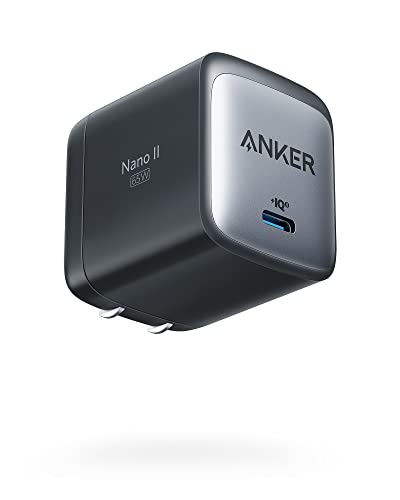
Anker Nano 65W GaN II Charger — Best Travel GaN
The Nano line is where Anker shows off what GaN II does to size, and this 65W version is the traveller of the guide. Its listing describes a PPS USB-C charger that is fast, compact and foldable — three adjectives that, combined, describe the charger an Air-class laptop deserves: one that folds flat against a bag wall, weighs the journey down not at all, and still delivers the laptop tier of power when the hotel desk finally appears. PPS, the programmable element of the PD standard, broadens its manners beyond laptops to phones that request fine-tuned output.
Its philosophy is one cable, properly served. There is no port crowd here, no sharing arithmetic to learn; the block’s whole 65W stands behind whichever device is plugged in, which makes it the fastest route in this guide to charging a single laptop at the tier’s full pace. The compromises follow from that purity. A phone and the laptop cannot share it at the same moment, and no cable is named in the title, so the pairing lead is yours to supply — choose a laptop-rated one, because a GaN block this capable deserves better than a drawer cable. For the one-laptop traveller, it remains the benchmark shape.
- Output: 65W (per listing title)
- Technology: GaN II, PPS
- Form: compact and foldable
- Role: single-cable travel charger
Strengths
- The full 65W stands behind one device — no sharing arithmetic.
- PPS widens its usefulness to phones that ask for tuned output.
- Folds flat and disappears into a laptop bag’s spare corner.
Trade-offs
- Laptop and phone take turns rather than charging together.
- Cable not named in the title — supply a laptop-rated lead.
- Desk users with three devices will outgrow its single-cable focus.
Best for: one laptop, one bag, and a charger that matches the laptop’s lightness.
Not suited for: a workstation corner where three devices expect dinner simultaneously.

UGREEN Nexode 65W USB C Charger — Best Established Desk Hub
The original Nexode is the design that taught buyers a laptop charger could also be the desk’s power strip. Its listing describes a 65W block with three ports, a GaN II chip, a compact body and foldable construction, pitched as a three-in-one wall charger. On the desk that translates to a small parliament of devices: laptop on the main share, phone beside it, earbuds or a watch taking the crumbs, all from one socket and one tidy block.
Experience with this shape teaches one lesson, which the honest buyer should hear before ordering: the 65W is a shared purse. Plug the laptop in alone and it charges at the tier’s pace; fill all three ports and each device receives a portion. For a working day that portioning is invisible — the laptop sips steadily, the phone fills by lunch — but a traveller wanting a sprint charge should unplug the entourage. UGREEN’s standing in this category and the GaN II internals make this the reference hub of the guide: not the slimmest, not the newest, but the shape the others are measured against.
- Output: 65W total (per listing title)
- Ports: 3-port design
- Technology: GaN II chip
- Form: compact, foldable
Strengths
- Three ports retire the phone charger and the earbud charger from the desk.
- An established design from a maker identified with this category.
- Compact and foldable despite the hub role.
Trade-offs
- Shared output means the laptop’s pace dips when all ports are busy.
- Bigger than the single-purpose travel picks.
- Cables for three ports are yours to organise.
Best for: a laptop anchoring a small fleet of desk devices.
Not suited for: a sprinter who wants the laptop’s fastest charge with everything else plugged in.

UGREEN Nexode Pro 65W Charger — Best Slim Three-Port
The Nexode Pro takes the hub idea and puts it on a diet. Its listing describes a 65W GaN USB-C charger with three ports in a slim wall-charger body, with PPS fast charging, naming iPhones and the MacBook Air class among its company. Slim is not vanity here: a flat charger sits better in the shallow socket behind a sofa, crowds its neighbours less on a power strip, and slides into the document pocket of a laptop bag where a cube-shaped hub would bulge.
PPS is the Pro’s second distinction, bringing the tuned-output manners of the Anker Nano to a three-port body — a combination for households where a Samsung phone with specific tastes shares the block with the laptop. The sharing caveat applies as it does to every multi-port pick: 65W divided is 65W divided, however elegant the casing. What the Pro offers over the original Nexode is not more power but better posture — the same parliament of devices, seated flatter. Buyers choosing between the two UGREEN hubs are really choosing a silhouette, and for bags and tight sockets the slim one wins.
- Output: 65W (per listing title)
- Ports: 3-port slim wall charger
- Technology: GaN, with PPS
- Named fit: iPhone and MacBook Air class devices in the listing title
Strengths
- Slim body fits shallow sockets and flat bag pockets.
- PPS plus three ports covers picky phones and the laptop together.
- The hub idea without the hub bulk.
Trade-offs
- Total output still divides three ways under full load.
- Slim shapes can sit awkwardly in some vertical sockets.
- No cable is named in the title.
Best for: a laptop bag that wants hub service from a flat, pocketable block.
Not suited for: a power user expecting three devices to each receive 65W.

Anker 67W GaN Wall Charger — Best Three-Port Headroom
Two extra watts will not change anyone’s afternoon, and this review will not pretend otherwise. What Anker’s 67W block offers is the guide’s highest total in the guide’s most familiar three-port shape: its listing describes a 67W GaN wall charger with three ports in a compact body, for MacBook Pro and Air class machines and phones. The marginal headroom matters only in the sharing scenario — a laptop and a phone dividing the pool keep slightly larger shares — but the shape and the maker are the substance of the pick.
Anker’s long presence in charging shows in the proposition’s balance: nothing exotic is claimed, the ports are there for the desk’s reality, and the GaN construction keeps a three-port block compact enough to travel when the desk becomes a hotel. Against UGREEN’s hubs, the choice is ecosystem preference as much as specification — buyers already standardised on Anker cables and blocks will find this the natural hub. The sharing rule still governs: three busy ports divide 67W, and a laptop in a hurry should be given the block to itself. Within the rules of its class, it is the most the class offers.
- Output: 67W (per listing title)
- Ports: 3-port design
- Technology: GaN
- Named fit: MacBook Pro and Air class devices in the listing title
Strengths
- The highest total output among the six picks.
- Three ports in a body still compact enough to travel.
- Anker’s category experience behind a balanced, unexotic design.
Trade-offs
- The 2W edge over 65W rivals is headroom, not a transformation.
- Shares divide when all three ports are occupied.
- Cable provision is not part of the title’s claim.
Best for: a three-device desk that wants every watt of shareable headroom.
Not suited for: a single-device user paying for ports that will stay empty.

Amazon Basics 65W GaN Charger — Best One-Port Purist
In a guide full of hubs, the Basics charger is the monk: one port, and its listing says so in the first line. It describes a 65W one-port GaN USB-C wall charger with Power Delivery PD 3.0, a foldable plug and a portable build. Every part of that specification serves a single idea — a laptop charger that does the laptop, completely, without negotiation tables or port politics — and there is a real constituency for it: owners whose desk has one laptop, whose bag has one cable, and whose patience for sharing arithmetic is zero.
GaN keeps the monk honest, because a one-port silicon brick of this output would be a lump; here the body stays portable and the plug folds, so the purist design travels as well as the hubs do. What is surrendered is optionality itself. The phone charges from the laptop or waits; a second laptop in the household needs its own arrangement. PD 3.0 keeps the negotiation current-standard, and the Basics proposition — specification first, decoration nowhere — will suit buyers who read spec boxes the way this guide writes them. For a single-laptop life, it is arguably the most rational object here.
- Output: 65W (per listing title)
- Ports: one-port, stated in the title
- Standard: Power Delivery PD 3.0
- Form: foldable plug, portable
Strengths
- The laptop never shares; the full output is always its own.
- GaN efficiency keeps a single-port block genuinely portable.
- No features to learn, configure or work around.
Trade-offs
- One port is one port — the phone waits or charges elsewhere.
- No PPS is claimed in the listing title.
- Households with several devices will need additional chargers.
Best for: a one-laptop household that wants the whole charger devoted to it.
Not suited for: a family charging station where devices queue for the socket.

UGREEN Nexode Air 65W Charger — Best Miniature
The Nexode Air is UGREEN miniaturising its own idea, and its listing is the most interesting to read in this guide: a 65W USB-C GaN charger in grey, in a mini size, with 60W AVS fast charging named among its features. AVS — adjustable voltage supply — is the newer, finer-grained part of the USB-C PD conversation, letting a charger offer voltages in small steps to devices that ask for them; its presence signals a design aimed at current phones as much as at the laptop tier the 65W headline serves.
Miniaturisation has a practical edge beyond elegance. The smaller a charger, the less it levers itself out of a loose socket, the less it overlaps the neighbouring outlet on a strip, and the more likely it is to be in the bag on the day it is needed. The grey finish distinguishes it from the black-block crowd in a shared household — a small thing that prevents charger emigration. What the title does not give us is a port manifesto, so read the listing’s own port details before assuming hub service; the Air’s pitch is size and modern manners, not parliament seating. As the smallest full-strength answer here, it closes the guide’s argument: GaN began by shrinking chargers, and this is the shrink, perfected.
- Output: 65W (per listing title)
- Named feature: 60W AVS fast charging in the listing title
- Form: mini size, grey finish
- Technology: GaN
Strengths
- The smallest body here at full laptop-tier output.
- AVS support speaks the newest dialect of the PD standard.
- A grey finish that survives shared-household identification.
Trade-offs
- Port layout must be confirmed from the listing itself.
- Mini size is easy to misplace in a big bag’s depths.
- AVS benefits only devices that request it.
Best for: the smallest possible bag that still carries a full-strength charger.
Not suited for: a buyer who wants a declared three-port hub in a familiar shape.
Which GaN Charger Suits Which Kind of Worker?
The daily commuter with a laptop bag has the simplest brief in this guide: one charger, carried everywhere, that must never be the reason the bag feels heavy. The Anker Nano is that worker’s pick — folded flat, full output behind one cable, forgotten until the desk. Commuters who charge at a fixed desk as well as on the move should consider whether the bag charger and the desk charger should be the same object at all; for many, a Nano in the bag and a hub at the desk ends the daily unpacking ritual that quietly wears out cables and patience alike.
The hot-desking professional lives out of sockets other people own. Shared desks, meeting rooms, client offices: the charger must work in a crowded strip, behind a monitor, in the one free outlet under the table. Slim and small bodies win this life — the Nexode Pro’s flat silhouette and the Nexode Air’s mini size are designed for sockets that were not designed for guests. The hot-desker should also value foldable prongs above almost everything, because the charger is plugged and unplugged more in a week than a desk charger is in a year, and prongs are where that wear shows.
The home-office worker has the opposite problem: a permanent desk that has accreted devices. Laptop, phone, earbuds, a tablet that attends meetings — the desk wants a parliament, and the three-port picks divide it between them. The original Nexode is the settled choice, the Anker 67W the choice for a desk whose laptop is hungrier or whose owner wants the headroom, and both should be bought with the cables they deserve, routed once and left alone. The home worker’s charger is furniture; judge it by whether the desk looks calmer a month after it arrives.
The field worker and the frequent flyer share a final brief: unreliable environments. Airport sockets are loose, train sockets are scarce, hotel sockets hide behind furniture. Miniature chargers stay seated in loose sockets where heavy bricks lever themselves out; a charger that travels in a pocket is present for the twenty-minute layover charge that decides whether the laptop survives the day. For this worker the Nexode Air’s size is not an aesthetic preference but an operational one — and a spare cable, coiled in the same pocket, completes the smallest serious charging kit this guide can assemble.
Which GaN Charger Matches Which Class of Laptop?
The ultrabook class — the Air and its Windows counterparts, the machines this guide was built around — is the 65W tier’s home ground, and any pick here serves it completely. The interesting decisions for this class are not electrical but physical: the traveller takes the Nano or the Nexode Air, the desk takes a hub, the purist takes the Basics. Owners of this class who agonise over the last few watts are optimising the wrong variable; their laptops cannot tell the difference, and their bags can.
The mainstream 14 and 16 inch class, laptops a step heavier with a step more appetite, still lives comfortably in this tier for ordinary work — documents, browsing, calls, the office day. Under sustained heavy load such a machine may draw on its battery to supplement a 65W charger, a behaviour worth knowing rather than fearing: the charger is keeping the laptop working, merely not at a surplus. Owners who run those loads daily should treat this guide’s tier as their travel and spare solution and keep the maker’s own brick at the main desk, a division of labour the picks here support happily.
The workstation and gaming class stands outside this guide’s promise, and the guide says so in its own voice rather than letting a buyer discover it. Those machines ship with chargers far beyond 65W because their workloads demand it. A GaN block from this page will charge them while they sleep and sustain them through light use — a genuinely useful travel fallback — but it is not their charger. Matching the tier to the machine’s class, once, is the entire discipline; everything else in this guide is shape, and shape is a pleasure to choose once the discipline is satisfied.
How Do the Six GaN Laptop Chargers Compare Side by Side?
| Pick | Output (per title) | Ports (per title) | Distinguishing feature | Character |
|---|---|---|---|---|
| Anker Nano 65W | 65W | Single-cable focus | PPS, foldable | The traveller |
| UGREEN Nexode 65W | 65W | 3-port | GaN II chip | The reference hub |
| UGREEN Nexode Pro 65W | 65W | 3-port | Slim body, PPS | The flat hub |
| Anker 67W | 67W | 3-port | Highest total here | The headroom hub |
| Amazon Basics 65W | 65W | One-port | PD 3.0, foldable plug | The purist |
| UGREEN Nexode Air 65W | 65W | Not stated in title | 60W AVS, mini size | The miniature |
How Should You Pair a GaN Charger With the Right Cable?
Treat the cable as a specification, not an accessory. A laptop-tier charger delivers its output through the lead, and the lead must be rated for that duty: a cable sold for laptop charging, of a length matched to where the charger will live. The failure mode of the wrong cable is silent — the laptop charges, just slowly, and the owner blames the expensive new block for a cheap old lead’s ceiling. When a GaN charger disappoints in its first week, the cable is the first suspect and the cheapest acquittal.
Length deserves a decision rather than a default. Desk cables should be exactly long enough to reach from socket to laptop with a little grace, because surplus cable on a desk becomes a snare for cups and elbows. Travel cables can be shorter — hotel desks forgive less, but bags punish every extra coil — and the traveller who carries one mid-length cable for both laptop and phone has understood the GaN era’s real promise: a whole charging life in a coat pocket. Keep one spare at home; cables fail at their ends, at night, before trips, and the spare is what turns that story into a shrug.
Care for the pairing and it will outlast the laptop. Coil cables loosely rather than wrapping them tight around the charger, pull them out by the plug rather than the lead, and retire any cable whose connector wobbles or whose sheath has split near the end. None of this is precious treatment; it is the ordinary respect owed to the half of the circuit that does the flexing. The charger will still be ready for your next machine — see that its cable is too.
What Does a GaN Charger Mean for Your Electricity Bill and the Planet?
Less than enthusiasts claim and more than cynics allow, and the honest arithmetic is worth doing once. A charger that wastes less energy as heat wastes it on every charge, for years; across one household the saving is small enough to be symbolic, across a city’s worth of households it is a power station’s opinion. The larger environmental fact about GaN is not efficiency but longevity and consolidation: one well-chosen block serving a laptop, a phone and a tablet for half a decade replaces a procession of device-specific chargers, each manufactured, shipped and eventually discarded. The greenest charger in this guide is whichever one you buy once and keep.
That argues for a particular buying temperament: choose the shape you will still want in three years, from a maker whose name will still mean something, and resist the seasonal upgrade that the category’s marketing invites. A GaN charger is infrastructure. Infrastructure is bought slowly, kept long, and replaced on evidence of failure rather than evidence of fashion. The six picks here were chosen to be keepable — current standards, plain specifications, forms matched to durable human arrangements like desks and bags — because a guide that respects the reader’s money and the reader’s planet gives the same advice for both: buy the right one, once.
How Should You Organise Charging Once the Brick Is Gone?
GaN’s smallness creates a new household problem: chargers that can be anywhere tend to be nowhere in particular. The brick, for all its faults, had a gravitational field — it lived at one desk and everyone knew it. A charger the size of a matchbox migrates in pockets, bags and coat linings, and the household that does not assign it a home will hold the familiar evening inquiry about its whereabouts. The fix is the station discipline this site’s guides keep recommending, applied with more vigilance because the objects are now easier to lose: a charger per location, a cable per charger, and a bag charger that returns to the bag the way a key returns to its hook.
The drawer deserves rethinking too. The old charging drawer was a cable museum organised by hope. The GaN-era drawer can be an honest inventory: the desk hub’s spare cable, the travel charger’s twin, one retired block kept as the household’s emergency understudy, each labelled if the household is wise. Because these chargers serve across devices and across laptop generations, the inventory stays valid for years — the drawer stops being where chargers go to be forgotten and becomes the small, sufficient stockroom of a system that works.
There is a pleasure in this worth naming, because it is the real product GaN sells. A household whose charging is organised — laptop charging anywhere, from a block that fits a pocket, with a hub where the devices gather — has removed a small daily friction so completely that it becomes invisible. Nobody praises the absence of an annoyance. But the first trip taken with a full-strength charger in a jacket pocket, the first desk cleared of three bricks in favour of one hub, registers quietly as the way things should always have been.
What Mistakes Do People Make When Buying a GaN Charger?
The first mistake is expecting GaN to repeal arithmetic. A 65W hub with three busy ports still divides 65W; the material shrinks the charger, not the sharing. Buy the port count for your real desk and the total for your hungriest single device. The second mistake is buying a 65W charger as a like-for-like brick replacement for a gaming or workstation laptop that shipped with something far larger, then blaming the technology when the machine throttles under load. Check what your laptop’s own adapter claims before downsizing.
Third, buyers pair a fine GaN block with a cable that cannot carry the tier — the lead is half the circuit, and a laptop-rated cable is not an upsell but a requirement. Fourth, people overlook socket geometry: a slim charger like the Nexode Pro exists because cube hubs crowd strips and shallow sockets, so look at where the charger will live before choosing its silhouette. Finally, there is the duplicate purchase — a travel Nano and a desk hub bought in the wrong order. Decide which location annoys you daily, fix that one first, and let the second charger be the considered purchase.
How Do You Test a New GaN Charger in Its First Week?
Give it the working-day test this site’s guides keep prescribing, because it separates specification from experience faster than any instrument. One full day of your real workload, the laptop plugged into the new block from morning, and a glance at the battery at the end: full or filling is success. Run the same day with your other devices attached if it is a hub, because the sharing behaviour — how the laptop’s pace changes when the phone joins — is the property you will live with for years, and the first week is when discovering it costs nothing.
Attend to the physical details in the same week. Does the block sit firmly in your desk’s socket and your bag’s routine? Do the prongs fold and unfold without complaint? Does the cable you paired with it reach with grace rather than tension? And after an hour at full work, is the block warm in the ordinary way or hot in the memorable way? A charger that passes the week on all counts has effectively been hired; one that fails any count should be exchanged while the packaging still exists, not accommodated until the accommodation becomes the complaint.
What Should You Do With Your Old Brick Once a GaN Charger Arrives?
Give it a post, not a pension. The brick’s remaining virtues are real: it is the charger whose loss would not matter, the one that can live in the garage, the workshop, the spare room, the bag that stays in the car. Posted there, it covers the locations the new GaN block should not have to — the dusty, the borrowed, the occasionally damp — and it serves as the household’s diagnostic spare, the known quantity swapped in when a setup misbehaves and the culprit must be isolated. A brick with a post is equipment; a brick in the cable drawer is a rumour.
Resist, equally, the sentimental second use that does not fit: the brick as the travel charger, out of loyalty, while the GaN block stays home in state. That arrangement inverts the entire purchase. The small charger was bought for the bag; send it. And when the brick finally fails or its cable frays beyond trust, let it go without replacing it in kind — its post can be inherited by the next GaN block the household buys, when the current one is itself promoted to the honourable spare. Fleets modernise by cascade, and the brick’s last service is to teach the household how the cascade works.
How Do You Choose Between Two Chargers That Look Identical on Paper?
It happens constantly in this tier: two blocks, same wattage, same port count, same technology badges, and a buyer frozen between them. Break the tie with the physical evidence. Which body suits the socket it will live in — slim against the wall, cube on the strip, mini in the bag? Which maker’s other products already live in your house, sharing cables and habits? Which listing answers the cable question the way you need it answered? These are not consolation criteria; in a mature category, they are the criteria, because the electrical specification has converged and the remaining differences are the ones you will touch daily.
Break it, if it still will not break, with the second location. Almost every charger in this guide will eventually serve two posts in its life — desk then spare room, bag then office — and the pick whose shape suits both of its likely posts beats the pick that suits only the first. And if the tie survives even that, choose the one you can return most easily and run the first-week test described earlier without sentiment. In a category this honest, a coin weighted by evidence is a legitimate instrument; what is not legitimate is a third week of deliberation over a decision the first week of use would have settled.
Final Recommendation
Let your locations decide. The bag wants the Anker Nano, or the Nexode Air if smallest is the whole point; the desk wants a hub, and among hubs the original Nexode is the reference, the Pro is the flat one, and Anker’s 67W is the headroom. The one-laptop purist should take the Amazon Basics and enjoy the silence of a decision with no sub-decisions. Whichever you choose, the brick era ends the day it arrives — and the first time a full-strength laptop charger vanishes into a jacket pocket, the old adapter in the drawer starts to look like museum equipment.
How Does Temperature Affect a GaN Charger Day to Day?
GaN’s efficiency buys cool running, not immunity from physics. A charger working at full output in a warm room, tucked behind furniture with no air around it, will moderate itself — the same self-protection every charger in this guide carries — and the moderation looks, to an owner watching a battery percentage, like inconsistency. The remedies are placement rather than complaint: give the block air, keep it out of the sun patch on the desk, and do not stack it under the laptop it is feeding, where two warm devices conspire. In ordinary rooms with ordinary ventilation, a GaN charger at this tier simply gets on with it, which is the experience the technology’s reputation was built on.
Cold, by contrast, barely troubles the charger at all — it is the laptop’s battery that dislikes winter, accepting charge reluctantly until it warms. Owners in cold climates who see a slow morning charge are usually watching the battery’s manners, not the charger’s failure, and the pattern resolves as the room and the machine come up to temperature. Knowing which half of the partnership is responsible for a slow hour is, as in so much of charging, most of the wisdom on offer.
What Comes After GaN, and Should You Wait for It?
Every charger technology invites the same question: is something better about to arrive and make today’s purchase foolish? The honest answer for GaN is that the material is mid-life, not end-of-life. Refinements continue — the AVS feature on the Nexode Air in this guide is one, finer voltage steps for devices that ask — and chargers will keep shrinking at the margins. But the negotiation your laptop speaks, USB-C Power Delivery, is stable, and a GaN charger bought today will serve the next laptop and very likely the one after that. Waiting buys a slightly smaller block someday; buying equips every journey between now and someday.
The better question is whether your current charger is costing you anything today. A brick that keeps you tethered to one desk, a charger too big for the bag so the laptop travels unaccompanied, a desk served by three ageing blocks where one hub would do — those are present costs, paid daily, against a future improvement that is speculative and small. The owners who regret charger purchases regret the shape they chose, not the season they bought it in. Choose the shape for your life as it is, from the six forms this guide maps, and let the technology’s next chapter arrive whenever it likes.
Frequently Asked Questions
Is a higher-wattage GaN charger always the better buy?
No — beyond your laptop’s own ceiling, extra wattage buys sharing room and future headroom, not speed, and both are worth paying for only when your life contains the second device or the next laptop they serve. Within this guide the totals cluster tightly for a reason: 65W is where the thin-and-light class lives. Buy the tier your machines inhabit, spend the difference on the cable the setup deserves, and let the larger numbers belong to the larger laptops they were built for.
Are GaN chargers safe for my laptop?
Yes. A GaN charger negotiates USB-C Power Delivery exactly as a conventional one does — the laptop requests, the charger supplies, and neither exceeds the agreement. The material difference is inside the charger, in how efficiently it converts power and how little heat it makes. Buy from listings that state their standard and wattage plainly, as all six here do.
Why are GaN chargers smaller than my old laptop brick?
Because they waste less energy as heat, they need less body to get rid of heat. Size in an old brick was mostly cooling strategy; remove the heat and the housing can shrink around the electronics. That is why a 65W GaN block can resemble a phone charger while doing a laptop’s job.
Can one 65W GaN charger replace all my chargers?
For a thin-and-light laptop plus phones and earbuds, very nearly — especially a three-port hub, which serves the desk from one socket. The exceptions are high-demand gaming or workstation laptops, and households where two laptops must charge at full pace simultaneously. Everyone else can consolidate and enjoy the drawer space.
What is PPS, and does my laptop need it?
PPS is the programmable part of the USB-C PD standard, letting a charger fine-tune voltage for devices that ask — certain phones benefit most. Your laptop does not need it; standard PD covers laptops. It earns its mention on the Anker Nano and Nexode Pro because a charger shared with a PPS-capable phone serves that phone better.
Does a GaN charger need a special cable?
It needs a cable rated for the power being delivered — a laptop-tier USB-C cable for laptop charging. The charger and cable are a system, and the weaker half sets the pace. If your current cable came bundled with a small phone charger, treat a proper laptop-rated lead as part of this purchase.
Can a GaN charger charge my phone as well as my laptop?
Yes — the negotiation protects the phone exactly as it protects the laptop, supplying only what the handset requests. Owners routinely run one GaN block for both, and the PPS-equipped picks in this guide, the Anker Nano and the UGREEN Nexode Pro, are especially well mannered with phones that ask for tuned output. The laptop charger in your bag is also your best phone charger; that doubling is half the reason the category exists.
Why does my GaN charger feel warm if GaN runs cool?
Cool is relative. A GaN charger wastes less energy than a silicon one, so at the same output it runs cooler and can be smaller — but 65W of conversion still makes some heat, and a small body concentrates the warmth it has into a smaller surface. Warm to the touch under load is normal behaviour. Hot enough to be uncomfortable, or warm while doing nothing, is a charger asking to be retired.
Related Guides
GaN is the engine; the neighbouring guides cover the vehicles. Best Dual Usb C Wall Chargers looks at two-port layouts in detail, Best Internal Hard Drives turns to the storage inside the machine you are powering, and Best Backup Hard Drives covers keeping that machine’s contents safe.


