What's inside
- Key Takeaways
- Quick Picks
- How We Chose These Picks
- Why Does a Dock Beat the Cable Your Controller Came With?
- Which DualSense Docks Deserve the Space Beside Your Console?
- Two Berths or One, Official or Third-Party: How Do the Six Stations Compare?
- How Do You Set Up a Controller Dock So It Is Ready Every Session?
- What Should DualSense Edge Owners and Two-Console Homes Know?
- How Does a Dock Fit Into the Life of a Controller Battery?
- What Do PS5 Owners Most Often Get Wrong About Controller Chargers?
- Final Recommendation
- Frequently Asked Questions
- Related Guides
As an Amazon Associate I earn from qualifying purchases. This post may contain affiliate links at no extra cost to you.
[widgetverdict.com] is reader-supported. When you buy through links on our site, we may earn an affiliate commission.
Where to buy: you can order any of the six docks below from the listing attached to its name; each one is a home for DualSense controllers, so check first whether you need berths for one controller or two, because that single answer halves this page.
Let us define the best ps5 chargers honestly before a single pick is named, because the phrase misleads almost everyone who searches it. These are not chargers for the PlayStation 5 console — the console plugs into the wall and needs no charger. They are charging docks for the console’s DualSense wireless controllers, the pads that run on internal batteries and die, with theatrical timing, in the middle of a boss fight or a cup final. A controller dock replaces the loose cable draped over the console with a fixed home: set the pad down on its contacts, and it charges where it lives, ready at full battery whenever a session starts. That is the entire category, and it is a better category than its name suggests, because the problem it solves — the dead controller at the worst moment — is universal among PS5 owners.
The six picks divide along three honest axes. The first is berths: five of the six charge two controllers at once, and one — the Razer Quick Charging Stand — charges a single pad, deliberately, as a display-grade stand for a one-controller player. The second axis is provenance: Sony’s own DualSense Charging Station is the official object, PowerA’s Twin Charging Station is officially licensed by PlayStation, and the remaining four are third-party docks from OIVO, NEWDERY, Nyko and Razer, judged on their stated features rather than their badges. The third axis is power and detail: one dock ships with its own fast-charging AC adapter, one is USB powered, one adds LED charge indicators and a spare USB port, and one extends its compatibility to the DualSense Edge controller alongside the standard pad.
Every claim in this guide comes from the listing titles. Where a title does not state a charging time, an adapter or an indicator, the spec box beneath that pick says so in plain language — because a dock is a ten-second purchase decision that lives on your media unit for years, and the details are exactly what you will live with.
Key Takeaways
- Every pick is a DualSense controller charging dock — none of them charges the PS5 console itself, which draws mains power directly.
- Five docks charge two controllers; the Razer stand charges one, as a deliberate single-pad display and quick-charge design.
- Sony’s station is the official product and PowerA’s is officially licensed; the rest are third-party docks assessed on stated features.
- The NEWDERY is the only title that names DualSense Edge compatibility — Edge owners should start there and verify on the listing.
- The OIVO ships with a fast-charging AC adapter, freeing a console USB port; the Razer is USB powered, drawing from the console or another USB source.
- The Nyko adds LED charge indicators and an extra USB port, the most information any dock here offers at a glance.
Quick Picks
| Pick | Badge | Why it earns its place |
|---|---|---|
| PlayStation DualSense Charging Station (Sony) | The official dock | Sony’s own two-controller station — the design the category is measured against, from the console’s maker. |
| PowerA Twin Charging Station for DualSense | The licensed twin | An officially licensed two-pad station from a long-standing console accessory maker. |
| Razer Quick Charging Stand for DualSense | The single-pad showcase | A curved-cradle stand for one controller, with a full charge in under three hours and overcharge protection, USB powered. |
| OIVO PS5 Controller Charger Dock | The adapter-included dock | A two-controller dock bundled with a fast-charging AC adapter, so it needs no console USB port to do its work. |
| NEWDERY PS5 Controller Charger Station | The Edge-compatible dock | A dual station whose title names the DualSense Edge alongside the standard controller, with cable included. |
| Nyko DualSense Charging Station | The informative dock | A drop-and-charge base for two controllers with LED indicators and an extra USB port for the media unit’s other needs. |
How We Chose These Picks
Provenance came first, not as snobbery but as information. A controller dock is an electrical interface with a specific, shaped contact arrangement, and the closer a maker sits to the platform holder, the fewer surprises that interface tends to hold — so the guide leads with Sony’s own station and includes the officially licensed PowerA as the two reference points against which the third-party docks are read. The third-party four then had to earn their places on features a buyer can verify from a title: an included AC adapter, a stated charge time, named Edge compatibility, indicators and a spare port. Features that could not be stated could not be scored, which is why several spec boxes below contain honest blanks.
The second selection axis was the household’s controller census. Most PS5 homes run two pads — a pair for couch co-op, or one in play while its twin charges — and a guide that ignored the single-controller minority would mislead them into a twin dock’s extra berth and footprint. Keeping the Razer, a proud single, in the six was a deliberate representation decision: its section argues the one-pad case on its merits, including the display logic of a stand that presents the controller rather than warehousing it. Conversely, the twin docks are not allowed to win by default; each must say what its second berth and its particular details add to a two-pad life.
Third, we read for the power arrangement, because it decides where the dock can live. A USB-powered dock draws from the console or a nearby USB source and suits the media unit where the console already sits. A dock with its own AC adapter — the OIVO’s stated arrangement — can live anywhere a socket exists and leaves the console’s ports to other duties. Neither is superior in the abstract; they are answers to different furniture. The picks were kept spread across that divide too, and each section names its pick’s arrangement, or names the absence of the information, so the furniture question can be settled before the order rather than after the unboxing.
Why Does a Dock Beat the Cable Your Controller Came With?
Because the cable asks for a decision every time, and the dock asks for none. Charging by cable means finding the lead, plugging it into the pad’s port, and draping the arrangement somewhere it will not be knocked — a small friction that, repeated nightly, becomes the reason controllers are discovered dead. Human beings charge what is effortless and defer what is fiddly, and a wireless controller’s battery is unforgiving of deferral. The dock converts charging into storage: the pad’s home is its charger, the act of putting it away is the act of plugging it in, and the battery’s fullness becomes the default state of the household rather than an achievement of its most organised member.
The contact design is the mechanism. These docks charge through contacts that meet when the controller is set into its cradle or dropped onto its base — the titles’ language of click-in, drop-and-charge and curved cradles describes variations of the same idea — which spares the controller’s USB-C port the daily insertion wear a cable imposes and removes the alignment fumble entirely. A pad set down at midnight, in the dark, by feel, charges. That reliability in the least attentive moment of the day is the product; everything else in this guide is refinement.
There is a household-order dividend too. Two controllers on a dock are furniture — a matched pair at rest beside the console, in a known place, at a known charge. Two controllers on cables are clutter with a trip hazard, migrating between cushions and side tables, each battery a mystery until the low-battery warning interrupts a session. Players who have lived both ways rarely argue about which they prefer; the only real argument, conducted in the rest of this guide, is which dock fits a given home’s pads, ports and habits.
Which DualSense Docks Deserve the Space Beside Your Console?

PlayStation DualSense Charging Station (Sony) — The official dock
Sony’s station is the category’s reference object, and its title is the shortest in this guide — a name, a product, nothing else — because it does not need to argue. This is the dock designed by the company that designed the controller, shaped to the DualSense’s lines and contact placement with first-party knowledge, charging two pads at once and presenting them in the console’s own design language. On a media unit built around the PS5’s white-and-black aesthetic, it is the one dock that looks less like an accessory and more like a part of the machine that was sold separately. For a great many owners, that coherence, plus the maker’s accountability if anything ever misbehaves, settles the question before the rivals are read.
Its promise is the category’s ideal in plainest form: two berths, set the pads down, walk away, return to full batteries. Owners of the standard two-controller household — which is most households, since the second pad is the PS5’s most common accessory purchase — are its exact audience, and its design assumes the rhythm of that household: both pads living on the station between sessions, neither ever meeting a cable. There is a discipline argument for the official dock too: platform holders design their accessories to the controller’s electrical expectations by definition, so the buyer who wants zero interpretive distance between the pad and its charger has precisely one option, and it is this one.
Its section must also say what the title does not. Sony’s listing title states no charge time, no adapter detail and no indicator arrangement, so a buyer who wants those specifics — how the station is powered, how a pad announces its fullness — takes them from the full product page rather than from this guide, which will not invent them. Nor does the title claim DualSense Edge compatibility; Edge owners should verify fit on the listing or start at the NEWDERY below, whose title makes that claim outright. The official dock’s case rests on provenance and design coherence, and for its audience those are not soft virtues — they are the whole purchase, honestly stated.
- Berths: two DualSense controllers
- Maker: Sony — the platform holder’s own accessory
- Design: styled to the console and controller’s own language, per its first-party nature
- Power arrangement: the listing title does not describe the station’s power supply — confirm it on the full product page
- Charge time: no figure is stated in the title, so any number you meet elsewhere should be checked against the listing
- DualSense Edge: compatibility is not claimed in the title; Edge owners should verify before ordering
Strengths
- First-party design and accountability — the dock and the controller share a maker and a design language.
- Two berths match the standard two-pad household exactly.
- Its presence beside the console reads as part of the system rather than an addition to it.
Trade-offs
- The title’s silence on power, indicators and charge time makes its listing a required read for detail shoppers.
- Edge compatibility is unclaimed in the title, leaving the Edge household to verify or look below.
- Buyers paying for provenance get no extra stated features for it — the rivals below compete on exactly those.
Best for: a two-pad PS5 household that wants the console maker’s own dock and the design coherence that comes with it. Not suited for: a DualSense Edge owner who needs compatibility promised in writing before purchase. If provenance leads your thinking, open Sony’s station listing to confirm its power arrangement, and let the reference dock take its place beside the console.

PowerA Twin Charging Station for DualSense — The licensed twin
PowerA occupies the thoughtful middle of the accessory world: not the platform holder, but licensed by it, with a long history of console controllers and docks behind the name. Its Twin Charging Station carries the words “Officially Licensed” in its title alongside the PlayStation branding, and that licence is a concrete thing — it signifies a product made to the platform’s specifications under its holder’s oversight, rather than a dock reverse-engineered from a controller’s silhouette. For the buyer who wants the assurance structure of the official dock with a third party’s pricing logic and retail presence, this is the standing answer, and it has been the standing answer across several console generations of PowerA hardware.
The station’s job description is the twin life, plainly stated: two DualSense pads, charged together, in a station built for the purpose. That plainness is the product’s character. Where rivals below compete on adapters, indicators and Edge compatibility, the PowerA competes on being the licensed, uncomplicated twin dock from a maker whose entire business is console accessories — the dock a buyer chooses when the decision itself is what they want to finish. Where the second controller exists for a partner, child or visiting friend, the twin berth is not a luxury; it is the difference between both pads ready on game night and the evening beginning with a battery negotiation.
The title’s brevity cuts the same way as Sony’s: charge times, power arrangement and indicator details are not stated there, and the buyer who comparison-shops on those specifics must gather them from the full listing, where this guide’s other picks have printed theirs in their names. Nor is Edge compatibility claimed. What is claimed — licensed, twin, PowerA — is a complete proposition for its audience, and its section is content to let that proposition stand at its natural size: the safe pair of hands of the category, from the accessory trade’s licensed establishment.
- Berths: two DualSense controllers
- Status: officially licensed for PlayStation, per the title
- Maker: PowerA — a long-standing console accessory manufacturer
- Power arrangement: not described in the listing title; the full listing carries the station’s power details
- Charge time: no figure appears in the title
- DualSense Edge: the name stops at standard DualSense pads, so Edge fit needs checking on the full listing first
Strengths
- Official licensing brings platform-spec assurance without the first-party-only route.
- A specialist accessory maker’s experience stands behind the contact fit and build.
- The twin format answers the two-pad household’s whole problem in one object.
Trade-offs
- Feature shoppers will find the title spare — adapters, indicators and times must be gathered from the listing.
- Edge owners get no compatibility promise from the title.
- Its case is assurance rather than extras; buyers who want stated features have sections below written for them.
Best for: a two-pad household that values licensed assurance and a specialist maker over a feature list. Neither a charge time nor any word on Edge fit appears in its title, so households needing either answer settled upfront face a listing trip first. If licensed and uncomplicated is your brief, the PowerA twin’s listing will confirm its power details in a minute — and game night will never open with a dead second pad again.

Razer Quick Charging Stand for DualSense — The single-pad showcase
Razer looked at a category of twin docks and asked what the solo player actually needs. The answer is this: a curved cradle that holds one DualSense the way a stand holds a watch, charging it fully in under three hours by the title’s claim, protecting it with overcharge circuitry, drawing its power over USB, in black. The single berth is not a missing feature; it is the design’s thesis. A one-controller household — the competitive solo player, the single-player devotee, the second console in a bedroom — gains nothing from a twin dock’s empty second berth except footprint, and gains from this stand a piece of desk furniture that presents the pad as the precision instrument Razer believes it is.
The stated details repay attention, because Razer is the only maker here who prints a charge time in the title: under three hours to full. Set beside that, the overcharge protection is the quiet professional touch — a stand whose pad may live on it for days between sessions should manage the battery’s top end thoughtfully, and Razer says, in the title, that it does. The USB powering cuts both ways in the familiar pattern: it frees the stand from needing a wall socket, letting it draw from the console or any USB source on the desk, and it ties the stand’s appetite to that source’s generosity. The title also performs a small honesty this guide appreciates: “Controller Sold Separately”, printed where a careless shopper might assume otherwise. The stand is a stand; the pad is yours already.
Who should walk past is equally clear. The two-pad household would need two of these, at which point the twin docks’ logic overwhelms the stand’s elegance. The buyer whose second pad is a DualSense Edge gets no compatibility claim here either — the title names the DualSense, and the Edge’s different shape is exactly the sort of thing to verify rather than assume. And a buyer who wants indicators and extras should read the Nyko’s section. But for the single-pad player with a desk that is also a display, this is the only pick designed for their life rather than adapted to it — the category’s solo instrument, finished in black, from a maker that treats gaming hardware as jewellery that happens to work.
- Berths: one DualSense controller — a deliberate single-pad design
- Charge time: full charge in under 3 hours, stated in the title (the only pick that prints one)
- Protection: overcharge protection, stated in the title
- Power: USB powered — draws from the console or another USB source
- Design: curved cradle stand, black finish
- Controller: sold separately, as the title states; DualSense Edge fit is not claimed
Strengths
- The only stated charge time in the guide, under three hours, sets a measurable expectation.
- Overcharge protection suits a pad that lives on its stand for days between sessions.
- The cradle presents a single controller as a display piece, with no empty second berth.
Trade-offs
- One berth is a hard ceiling; a second pad means a second stand or a different pick.
- USB powering depends on the source’s output — a weak port makes a slow stand.
- Edge compatibility is unclaimed, and the cradle’s shaping makes that a verify-first question.
Best for: a single-controller player who wants a fast, protective, display-grade stand on a desk or media unit with USB power nearby. Not suited for: any household with two pads in rotation, where a twin dock’s logic wins on contact. If you play solo and your pad deserves a pedestal, the Razer stand’s listing confirms the rest — under three hours, protected, and built for one.
OIVO PS5 Controller Charger Dock — The adapter-included dock
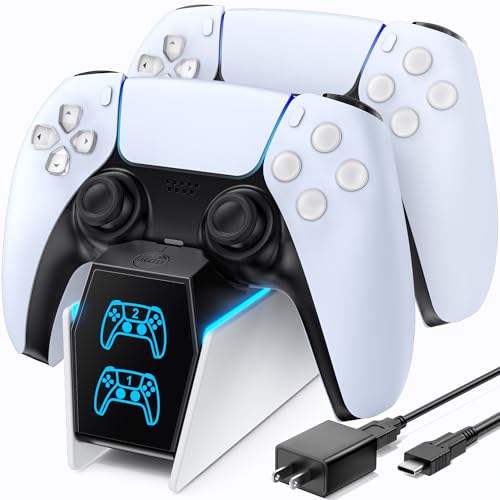
OIVO’s dock competes on the arrangement the reference picks leave unstated: it ships with a fast-charging AC adapter of its own. That single inclusion reorganises where the dock can live and what it asks of the console. A USB-dependent dock borrows the PS5’s ports and power; the OIVO asks for a wall socket and nothing else, which means it can sit on a side table across the room, in the bedroom where the second television lives, or beside a sofa whose nearest console port is spoken for by an external drive. It also means the dock’s pace is set by its own adapter rather than by whatever a console’s USB port offers in rest mode — a variable that has quietly disappointed many owners before they understood it.
The dock presents itself, in its title’s words, as a charging station stand and a replacement for the official accessory kit — a direct pitch at the buyer who wants the twin-dock function without the first-party route, and whose media unit values the self-contained power story. OIVO is a familiar name in the controller-dock aisle specifically; this is the company’s home fixture, iterated across console generations, and the twin-berth format with a bundled adapter is its settled answer to the category’s two recurring complaints: not enough ports on the console, and not enough pace from them.
The cautions are the standard third-party cautions, stated without drama. The title claims no licence, so the assurance structure is the maker’s own reputation rather than the platform’s programme; the fit and contacts are OIVO’s engineering, bought on OIVO’s name. Charge time is described as fast rather than numbered, so the buyer who wants a figure to hold against the Razer’s under-three-hours must find it on the full listing. And Edge compatibility is, once again, unclaimed — the Edge household’s section is the next one. For the standard two-pad household that wants its dock independent of the console’s ports, though, the included adapter is not a bullet point. It is the reason this dock exists, and it earns the pick its place in the six.
- Berths: two DualSense controllers
- Included: fast-charging AC adapter — the dock powers itself from a wall socket
- Console ports: none required, which frees the PS5’s USB ports for drives and other duties
- Charge pace: described as fast charging in the title; a specific time figure belongs to the full listing
- Status: third-party dock; no licence is claimed in the title
- DualSense Edge: nowhere in the name — treat Edge support as unconfirmed until the product page says otherwise
Strengths
- Its own adapter makes the dock location-independent and its pace independent of console USB behaviour.
- Twin berths cover the standard two-pad household.
- A dock-specialist maker iterates this exact product as its home fixture.
Trade-offs
- It needs a wall socket within cable reach, which not every media unit offers where the dock wants to sit.
- No licence claim — assurance rests on the maker’s name alone.
- Fast is an adjective here, not a number; the Razer’s stated time sets a bar this title does not meet in print.
Best for: a two-pad household whose console ports are busy, or whose dock should live away from the console entirely. Not suited for: a setup with no spare wall socket near the intended spot, where a USB-powered pick fits better. If self-powered is the requirement, the OIVO dock’s listing spells out its adapter and pace — read it, place it, and free the console’s ports for good.
NEWDERY PS5 Controller Charger Station — The Edge-compatible dock
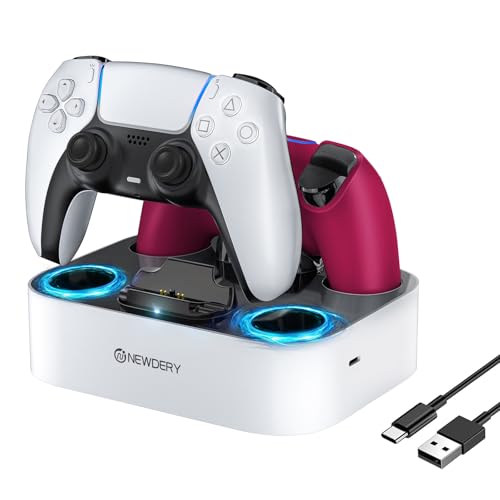
One line in this title justifies the pick’s existence and directs its entire audience: compatible with the DualSense Edge. The Edge — Sony’s premium, modular controller — differs from the standard DualSense in shape and fittings, and dock compatibility cannot be assumed across that difference; a cradle moulded for the standard pad may hold the Edge badly or not at all. NEWDERY is the only maker in this guide who puts the Edge in the title, alongside the standard controller, which makes this station the starting point — really, the shortlist of one — for the household whose primary or second pad is the premium controller. The station charges two controllers, ships with its cable, and frames itself as a fast-charging dock stand for the PlayStation 5 family in both its controller forms.
The mixed household is the deeper story. A serious player’s setup often pairs an Edge — customised, profiled, precious — with a standard DualSense for guests and co-op, and that household’s dock must serve two different shapes with equal security. A station titled for both is solving the actual problem rather than the average one. NEWDERY’s broader accessory trade is batteries and charging gear, and the station’s proposition follows that trade’s logic: fit the devices, feed them properly, include the cable, and let the compatibility list do the persuading.
The verification duty remains, and this guide assigns it plainly: because the Edge’s fit is the purchase, the buyer should confirm on the full listing exactly how the station accommodates it — whether by a cradle shape that accepts both or by fittings supplied for the purpose — before the order, since a title’s compatibility line is a claim to be checked against the product’s own detail. Charge time and power arrangement are likewise listing matters here; the title spends its words on compatibility and the included cable instead. None of that diminishes the pick’s unique position. If an Edge lives in your house, the other five sections are background reading and this one is the decision.
- Berths: two controllers
- Compatibility: DualSense Edge and standard DualSense, both named in the title — unique in this guide
- Included: cable, per the title
- Charge pace: framed as fast charging in the title; the specific figure is a listing detail
- Power arrangement: the title does not specify an adapter, so confirm the station’s power source on the product page
- Fit verification: how the cradle accommodates the Edge’s shape should be confirmed on the listing before ordering
Strengths
- The only title here that promises a home for the DualSense Edge as well as the standard pad.
- Twin berths suit the mixed household — Edge for the owner, standard pad for the guest.
- An included cable completes the kit without a second purchase.
Trade-offs
- The Edge fit mechanism must be verified on the listing; the title asserts compatibility without describing it.
- Power and charge-time specifics are listing matters, not title claims.
- Standard-pad-only households pay attention to a feature they will never use, though they lose nothing by it.
Best for: a DualSense Edge owner, alone or in a mixed two-controller household, who needs both shapes docked. Beyond the Edge claim and the included cable, its title goes quiet — charge pace and power details wait on the listing, which detail-first shoppers must accept. If the Edge is your controller, open the NEWDERY station’s listing, confirm the fit arrangement with your own eyes, and give the premium pad the home the other docks did not promise it.

Nyko DualSense Charging Station — The informative dock
Nyko is one of the accessory trade’s elders — decades of controller gear stand behind the name — and its station competes on information. The title promises a drop-and-charge base for two PS5 controllers, LED indicators, and an extra USB port, and each of those details answers a small, real annoyance of dock ownership. The drop-and-charge action is the category’s most forgiving gesture: no seating, no clicking, the pad is set onto the base and gravity and the contacts do the rest, which matters at the end of a long session when precision is not among the player’s remaining resources. The LEDs answer the question every dock owner asks with their eyes — is it charged? — at a glance across the room, distinguishing the pad that is ready from the pad that is still drinking, without picking either up.
The extra USB port is the detail that reveals a maker thinking about the media unit as a whole. The space beside a console is an ecosystem of small powered things — a headset dongle, a light, a phone cable, the drive that did not fit the console’s own ports — and a dock that returns a port to that ecosystem while taking power for two pads is practising a courtesy the other picks do not offer. Nyko’s framing of the station as a PS5 accessory in a wider sense, rather than a single-purpose block, follows from that port: this is infrastructure for the gaming corner, built by a company that has furnished gaming corners since long before the DualSense existed.
Its silences are the familiar ones, and they are recorded here as faithfully as its features: the title does not state a charge time, does not describe its power source beyond the station’s own arrangement, and does not claim Edge compatibility or a licence. A buyer ranking docks by stated pace must consult the listing, as with most of this guide. What the title does state, though, is the combination no rival matches — drop-in ease, at-a-glance charge information, and a spare port — and for the household whose media unit is a small civilisation of devices, that combination is not a garnish. It is the reason to choose this dock over the reference objects at the top of the page.
- Berths: two DualSense controllers, drop-and-charge design
- Indicators: LED charge indicators, stated in the title — the only pick that promises them
- Extra: a spare USB port on the station, for the media unit’s other devices
- Maker: Nyko — among the longest-established names in console accessories
- Charge time: no figure is given in the title; the listing holds the station’s pace details
- DualSense Edge: silence in the name on the premium pad; confirm support in the detailed listing before buying for an Edge
Strengths
- LED indicators end the pick-it-up-to-check ritual; readiness is visible across the room.
- Drop-and-charge is the most forgiving docking gesture in the guide, especially late at night.
- The extra USB port gives back to the media unit’s ecosystem instead of only taking from it.
Trade-offs
- No stated charge time in the title, so pace shoppers must visit the listing.
- Edge owners get no compatibility claim here.
- Buyers who want first-party or licensed assurance have their sections above; Nyko’s is a features case.
Best for: a two-pad household that wants to see charge status at a glance and has other small devices crowding the console’s ports. Not suited for: a DualSense Edge household, whose compatibility promise lives in the NEWDERY section. If your gaming corner is an ecosystem, the Nyko station’s listing will confirm its power arrangement — and its LEDs will answer the nightly question before you have finished asking it.
Two Berths or One, Official or Third-Party: How Do the Six Stations Compare?
| Pick | Berths | Status | Power story from the title | Signature detail |
|---|---|---|---|---|
| PlayStation DualSense Charging Station | 2 | Sony official | Not stated in title | First-party design coherence |
| PowerA Twin Charging Station | 2 | Officially licensed | Not stated in title | Licensed assurance from a specialist |
| Razer Quick Charging Stand | 1 | Third-party | USB powered | Under-3-hour charge; overcharge protection |
| OIVO PS5 Controller Charger Dock | 2 | Third-party | Own AC adapter included | Console-port independence |
| NEWDERY PS5 Controller Charger Station | 2 | Third-party | Cable included | DualSense Edge compatibility claimed |
| Nyko DualSense Charging Station | 2 | Third-party | Not stated in title | LED indicators; extra USB port |
The status column and the signature column pull in opposite directions, and that tension is the guide in one view. Provenance concentrates at the top, where titles say the least; stated features concentrate below, where makers must argue. Neither column is the true one. A buyer who has been burned by a third-party fit should weight status; a buyer whose console ports are full, whose pad is an Edge, or who wants to see the charge from the sofa should weight signatures. The census question — one pad or two — outranks both, which is why it is the table’s second column and this paragraph’s last word: settle the census first, and the rest of the table becomes a shortlist instead of an argument.
How Do You Set Up a Controller Dock So It Is Ready Every Session?
Place it where the controllers already land. The dock’s power is behavioural — it works because putting the pad away and charging it become the same motion — and that survives only if the dock sits at the pad’s resting place: beside the console if that is where pads gather, on the side table if the sofa owns them. A dock exiled to a shelf across the room for tidiness’ sake will be visited for a week and then routed around, and a routed-around dock is a cable with extra steps. Choose the spot by watching one evening’s habits before the dock arrives, and let the furniture win the argument against the photograph.
Power it deliberately, according to its kind. The USB-powered Razer wants the strongest convenient USB source, and its owner should know that a console’s ports behave differently when the machine sleeps — check your console’s settings for powering USB in rest mode if the dock is expected to charge overnight, because a dock fed by a sleeping port that has gone dark is a stand, not a charger. The OIVO, with its own adapter, wants a wall socket and repays it with independence from those settings entirely. For the docks whose titles leave the arrangement to their listings, the listing visit this guide keeps prescribing is where this paragraph gets its facts: make it before the dock is placed, not after its first flat morning.
Finally, build the ritual and protect it. Both pads on the dock whenever they are not in hands — no exceptions for “just watching something”, because the pad on the armrest is the pad that dies on Saturday. Guests and children get the same ten-second induction: the dock is where controllers live. And keep the contacts clean with an occasional dry wipe, since the contact interface that makes docking effortless is also a surface that collects the media unit’s dust. A dock maintained this way disappears into the room’s furniture and the household’s habits, and the dead-controller moment — the category’s founding enemy — simply stops occurring.
What Should DualSense Edge Owners and Two-Console Homes Know?
Edge owners first, because their constraint is the sharpest. The Edge is not a standard DualSense with a premium label; its shape, its replaceable components and its fittings differ, and a dock is a shaped object. In this guide only the NEWDERY title promises compatibility, and even that promise should be verified against the listing’s description of how the fit is achieved, as its section instructs. Owners tempted by the official station or the Razer stand for their other virtues should treat those titles’ silence on the Edge as exactly that — silence, not a yes — and either verify fit through the listing’s detail and owner questions or keep the Edge on its cable beside a dock that serves the standard pads. A dock that holds the household’s most expensive controller insecurely is worse than no dock for that controller at all.
Two-console homes — the living-room PS5 and the bedroom or office machine — face the arithmetic version of the same problem. Controllers migrate between consoles less than owners expect; pads pair where they are used and tend to stay, which means each console wants its own dock more than the household wants one dock to share. The economical pattern is a principal dock where the main pads live — chosen by the full logic of this guide — and a simpler berth at the second console, where a single pad’s overnight top-up is the whole job; the Razer stand, notably, reads differently in that light, as a second room’s perfect single rather than a main station’s compromise. Count pads per console, not per house, and the purchases size themselves.
Both cases teach the guide’s recurring lesson in new clothes: a dock is a fitted object, fitted to a controller’s shape, a household’s census and a room’s power. The specifications that decide satisfaction are therefore the unglamorous ones — berth count, fit claims, power source — and they are all knowable before purchase from titles and listings, which is why this guide has spent its length on them rather than on the aesthetics that photographs settle instantly. The prettiest dock in the world, holding the wrong pad in the wrong room on a dead port, loses to every pick on this page correctly placed.
How Does a Dock Fit Into the Life of a Controller Battery?
A DualSense battery lives a harder life than its size suggests. It powers not only the sticks and buttons but adaptive triggers that push back, a haptic system that is essentially a pair of small motors, a speaker, a light bar and a microphone — and it does so for sessions that players measure in evenings. The battery’s enemies are the familiar lithium ones: heat, deep discharge left sitting, and time. A dock speaks to the second of these directly. A pad that returns to its station after every session never sits empty for a week in a drawer, the quiet killer of small rechargeable cells; it lives in the battery’s comfortable middle, topped and ready, and its service years stretch accordingly.
Heat is the enemy the dock cannot fight alone, and placement is the owner’s share of the battle. A dock parked on top of a console that vents its warmth upward, or sealed inside a closed media cabinet where the console’s exhaust pools, bathes its charging pads in warm air for hours a day. The same media unit usually offers a better spot a shelf away — beside the console rather than above it, in the cabinet’s open front rather than its sealed back — and the move costs nothing but attention. The docks in this guide are small; the rooms they live in are the variable. Give the station air, and it returns the favour in battery years.
There is also a rhythm worth adopting for households whose play comes in seasons — the pad that serves nightly for a month and then rests while life intervenes. A controller entering a long rest is best left charged rather than empty, and a controller returning from one deserves a full dock cycle before its first session, not a hopeful ten minutes. None of this requires instruments or anxiety; it requires only that the dock be the pad’s home in fallow times as faithfully as in busy ones. The stations above were all designed for a pad that lives on them. Let it, and the battery’s decline becomes a matter of years rather than seasons — the slowest, dullest, most satisfactory outcome in this entire guide.
What Do PS5 Owners Most Often Get Wrong About Controller Chargers?
The founding misunderstanding is the keyword itself: expecting a charger for the console, or imagining the dock somehow improves the console, when the entire category serves the controllers. Owners who arrive with that confusion sometimes dismiss docks as pointless — the console has a cable, after all — and miss that the cable was always the problem the dock exists to retire. The second error is census blindness: the twin dock bought for a one-pad life, occupying a media unit’s prime shelf with an empty berth for years, or its mirror, the elegant single stand bought by a two-pad household whose second controller then lives on a cable anyway, splitting the household into a docked pad and a feral one.
The third error is powering by assumption. A dock plugged into a console port that sleeps when the console sleeps will be discovered, repeatedly, holding two beautifully docked and entirely flat controllers — the most frustrating failure in the category precisely because everything looks right. The fix is a console setting, a different port, or an adapter-powered dock like the OIVO, but it must be applied knowingly. The fourth error is Edge assumption, covered above: compatibility inferred from a controller family’s name rather than claimed in a title. The fifth is treating the dock as the battery’s enemy — worrying that a pad living at full charge on its station is being harmed — when the docks’ charge management, and in the Razer’s case its stated overcharge protection, exist for exactly that life; a pad used hard and docked always will out-serve a pad cycled through neglect and deep discharge.
The last error is buying the photograph. A dock is handled twice a day in the dark, by feel, at the end of sessions; its virtues are the click, the drop, the glance at an indicator — tactile and behavioural, invisible in a render. Read the titles for those virtues, as this guide has: drop-and-charge, indicators, cradle, adapter. The dock that fits your hand’s habits at midnight is the right one, and no product photograph has ever shown a hand at midnight.
Final Recommendation
Settle the census, then choose your assurance. Two-pad households that want the platform’s own hand should take Sony’s station; those who want licensed assurance from a specialist should take the PowerA twin. Feature-driven two-pad homes should divide by need: the OIVO if the console’s ports are spoken for and the dock must power itself, the NEWDERY if a DualSense Edge is in the house — after verifying its fit on the listing — and the Nyko if charge status at a glance and a spare port serve your media unit’s ecosystem. The solo player should take the Razer stand without a backward glance at the twin docks: under three hours, overcharge protection, one beautiful berth. Whichever you choose, place it where the controllers already land, power it knowingly, and the phrase “my controller died” leaves your household’s vocabulary — which was the entire point of a charger that charges the thing that actually runs out.
Frequently Asked Questions
Does a charging dock charge the PS5 console itself?
No. The console draws mains power through its own power cable and has no battery to charge. Every product in this guide charges DualSense controllers — the wireless pads — and nothing else. If your console has a power problem, it is a cable or mains problem, and no dock on this page speaks to it. The keyword is a historical accident; the category is controllers, all the way down.
Can I charge a DualSense Edge on any of these docks?
Only one title promises it: the NEWDERY station names the Edge alongside the standard DualSense, and its section advises confirming the fit arrangement on the listing before ordering. The other five titles are silent about the Edge, and the Edge’s different shape makes silence a reason to verify rather than assume. When in doubt, the Edge’s own cable remains the fallback while a dock decision is made carefully.
Is it bad for a controller to live on its dock all the time?
It is the life these docks are designed for. Charging stations manage the pad’s intake as it fills, and the Razer states overcharge protection outright in its title. A controller that is used regularly and docked between sessions lives the gentlest battery life available to it — far gentler than repeated deep discharges followed by desperate cable sessions. The dock is not the battery’s enemy; neglect is.
Why are my controllers flat even though they sat on the dock all night?
Work the causes in order. Power first: a USB-fed dock drawing from a console whose ports sleep with it delivers nothing overnight — check the console’s rest-mode USB settings, or move to an adapter-powered dock. Contact second: a pad set down carelessly, or contacts dulled by dust, can sit in a cradle uncharged; reseat it and wipe the contacts dry. The pad itself third: test it on a cable to separate a dock problem from a battery problem.
How long does a dock take to charge a DualSense?
Only one title in this guide prints a figure: the Razer stand claims a full charge in under three hours for its single pad. The other makers describe pace in adjectives or not at all, and this guide will not convert adjectives into hours. For a twin dock charged overnight — the dominant real-world pattern — any pick here returns full pads by morning; for a between-sessions sprint, take the figure from the specific dock’s listing and hold the maker to it.
Can these docks charge controllers while the console is off?
That depends on the dock’s power source and, for USB-fed docks, on the console’s settings. A dock with its own AC adapter — the OIVO’s arrangement — charges whenever its socket is live, console or no console. A USB-powered dock drawing from the PS5 depends on whether the console is set to supply power to its USB ports in rest mode, an option in the console’s settings that every dock owner should check once. Set it knowingly, and overnight charging becomes automatic; leave it unexamined, and you own the category’s most confusing failure — pads docked all night and flat by morning.
Do I need a dock if I only ever play with one controller?
Need is strong, but the case is real. A single pad is the controller most likely to be discovered dead, because no charged twin waits behind it — the dock is its only insurance, and the Razer stand exists precisely for this household: one berth, quick charging, overcharge protection, and a pad that is always where you left it and always full. The cable works too, right up until the evening it was left unplugged.


