What's inside
- Key Takeaways
- Quick Picks
- How We Chose These Picks
- How Much Wattage Does an iPad Actually Use?
- Which iPad Charging Kits Fit Which Tablets and Days, One by One?
- Six Ways to Feed a Tablet: How Do the Kits Line Up?
- How Do You Know Whether Your iPad Takes USB-C or Lightning?
- How Do You Charge an iPad Quickly and Kindly?
- What Do iPad Owners Most Often Get Wrong When Replacing a Charger?
- Final Recommendation
- Frequently Asked Questions
- Related Guides
As an Amazon Associate I earn from qualifying purchases. This post may contain affiliate links at no extra cost to you.
[widgetverdict.com] is reader-supported. When you buy through links on our site, we may earn an affiliate commission.
Where to buy: each kit below waits at the listing behind its name; five are iPad kits in the full sense — block and long cable, matched to named iPad generations — and one is a general high-power charger we include with its nature stated plainly, so read the badges before the brands.
The best ipad chargers are bought in a moment of mild betrayal: the iPad’s own charger is missing, lent, left at another house, or simply too slow for a tablet whose battery is the size of a small laptop’s. The replacement market answers with kits, and the kits differ in ways that matter more than their shared USB-C plugs suggest. Wattage is the first difference — the six picks here span 20W, 30W and 40W iPad kits, plus one 70W multi-port charger of a different species. Cable length is the second: iPads are charged on sofas, in beds and across classroom desks, and the 6 ft and 6.6 ft cables in these kits are not generosity, they are the point. The third difference is generational fit: every pick here serves the USB-C iPads — the Pro line from 2018 onward, the Air from its 4th generation, the mini 6 and 7, and the standard iPad from the 10th generation — while the older Lightning iPads belong to a different shelf entirely, and no kit in this guide will plug into one.
The 70W pick needs its honesty paragraph up front, and it gets one here rather than buried. The Anker Nano 70W is a three-port general charger — an excellent one, from a major maker, with a cable included — whose title names iPhones and MacBooks and mentions the iPad among its devices without claiming any iPad-specific design or certification. We include it because a large class of iPad owners does not want an iPad charger; they want one strong charger for the iPad, the phone and the laptop together, and pretending that buyer does not exist would make this guide purer and less useful. Its section presents it as exactly what it is: the multi-device option, judged by multi-device standards.
The remaining five are iPad kits proper, and their contest is closer and more interesting: a 20W kit with a 6.6 ft cable covering the widest generation list, a 20W kit whose cable and compatibility reach back to the 2018 Pros, a 40W MFi-certified kit at the top of the dedicated range, a 30W adapter with a 6.6 ft cable wearing an “original quality” claim, and a two-pack that equips two rooms at once. Every figure below comes from the listing titles; where a title is silent — about a block’s port count, say — the spec box says so in its own words.
Key Takeaways
- All six picks serve USB-C iPads only — Pro (2018 onward), Air 4th generation and later, mini 6/7, iPad 10th generation and later; Lightning iPads need a different charger family.
- Dedicated iPad kits here run 20W, 30W and 40W; higher wattage shortens the big-battery fill most noticeably in the first half of the charge.
- The Anker Nano 70W is a general three-port charger, not an iPad-specific product — included, and labelled, as the multi-device choice for iPad-plus-phone-plus-laptop owners.
- One kit claims MFi certification in its title, the 40W pick; the others compete on wattage, cable length and pack count.
- Cables run 6 ft or 6.6 ft in the dedicated kits — sofa and bedside lengths, deliberately longer than a phone kit’s typical lead.
- The two-pack is the only pick that equips two rooms in one purchase; every other pick is a single kit.
Quick Picks
| Pick | Badge | Why it earns its place |
|---|---|---|
| iPad Charger 20W USB-C with 6.6FT Cable | The wide-coverage 20W kit | 20W block with a 6.6 ft cable, titled for the full modern range from the M5/M4 Pros to the A16 iPad and mini 7. |
| USB-C Fast Charger for iPad Pro (with Cable) | The Pro-line specialist | A fast-charging kit with a 6 ft cable aimed at iPad Pro 2018–2026, reaching the Air 5th, mini 7th and iPhone 15–17 lines as well. |
| 40W iPad Charger MFi Certified with 6FT Cable | The certified 40W kit | The strongest dedicated kit here, 40W with a 6 ft cable and MFi certification claimed in the title. |
| 30W USB-C Power Adapter for iPad Pro (with Cable) | The 30W middle path | A 30W adapter with a 6.6 ft cable covering Pros, Airs, minis and the A16 iPads — the balanced wattage of the dedicated kits. |
| Anker Nano 70W 3-Port Fast Charger | The multi-device station block | 70W across three ports with a cable included — a general charger for iPad, iPhone and MacBook together, honestly not iPad-specific. |
| Fast iPad Charger 2-Pack with Cables | The two-room pack | Two fast-charging kits with 6 ft cables for the Pro, Air, mini and A16 iPad range — coverage over peak wattage. |
How We Chose These Picks
The first rule was generational legibility. An iPad charger listing earns trust by naming the iPads it serves, because the iPad line’s long history — three connector eras across a decade and a half — makes vague compatibility claims worthless. Every pick here names its generations in its title, and the lists agree with the USB-C era they belong to: Pros from 2018, the Air 4 and 5 and the M-series Airs, the mini 6 and 7, the 10th and 11th standard iPads with their A16 silicon named outright in several titles. A buyer can match their exact model against these titles in seconds, and that matchability was weighted as heavily as any wattage figure.
The second rule was that wattage had to be argued, not assumed. An iPad’s battery is several times a phone’s, so the difference between a 20W kit and a 40W kit is not a rounding error — it is a visibly shorter afternoon recharge — yet the iPad still sets its own ceiling, and a kit beyond that ceiling buys headroom rather than speed. We therefore kept the spread: the 20W kits for owners whose iPad charges overnight or at a desk, the 30W as the balanced middle, the 40W for the Pro owner who charges in bursts between uses, and the 70W Anker for the different job of feeding several devices at once. Each section argues its wattage against its owner’s day rather than reciting it.
Third, we treated the cable as half the product, because for a tablet it is. iPads are used at a distance from sockets — the sofa’s far end, the bed, the kitchen counter during a recipe — in a way phones are not, and every dedicated kit here bundles a cable of 6 ft or more for exactly that reason. Pack count and certification completed the picture: the two-pack solves the two-house problem, and the single MFi claim in the group is examined in its own section for what certification does and does not mean on a USB-C accessory.
How Much Wattage Does an iPad Actually Use?
More than a phone, less than a laptop, and the exact figure depends on the model and the moment. An iPad charging from low draws hard in its first stretch and tapers as the battery fills — the same protective curve as every modern lithium device, stretched over a much larger tank. That shape is what makes the wattage tiers in this guide meaningful in a specific way: the gap between a 20W kit and a 40W kit is widest in the first half of the charge, the half that decides whether a drained iPad Pro is usable after lunch or only after dinner. For the overnight charge, where the tablet sits for eight hours, the tiers converge to the same full battery by morning, and the honest advice for a bedside buyer is to stop shopping wattage and start shopping cable length and pack count.
The ceiling question deserves the same honesty. An iPad accepts what its charging circuitry accepts, and a block rated above that ceiling — the Anker’s 70W most obviously — does not force anything; the tablet negotiates its own rate and the surplus wattage simply waits, available for the phone and laptop sharing the block. That is why the multi-port pick’s wattage is not an iPad claim at all: it is a household budget, divided among devices, of which the iPad is one. Buyers comparing the dedicated kits should compare them as iPad instruments — 20, 30, 40 — and buyers considering the Anker should compare it against other multi-device chargers, a different contest in which its three ports and included cable are the arguments.
One more variable hides under the wattage conversation: use while charging. An iPad driving a bright screen, a video call or a game while plugged in spends part of the incoming power on the present rather than the battery, and a modest kit can appear to stall — holding the level, filling nothing — while a stronger kit fills and runs at once. Students and remote workers who live on the tablet all day are therefore the buyers for whom the 30W and 40W tiers are not luxuries; the block is not just refilling the iPad, it is co-powering the working day, and the battery percentage is merely where the surplus is stored.
Which iPad Charging Kits Fit Which Tablets and Days, One by One?

iPad Charger 20W USB-C with 6.6FT Cable — The wide-coverage 20W kit
Start with the title’s roll call, because it is the widest in the guide: iPad Pro 13 with M5 and M4 silicon, the 12.9 and 11 inch Pros, the A16 and 10th-generation standard iPad, the Air in 13 and 11 inch sizes across M4, M3 and M2 plus the 5th and 4th generations, and the mini 6 and 7. That is, in one list, essentially the whole USB-C iPad era, and a kit that names it so completely is making a coverage argument: whatever modern iPad your household owns — and households own several, of several vintages — this is the spare charger that serves it. The 20W block and 6.6 ft USB-C to C cable are the standard instruments of that coverage, competently specified and honestly rated.
Twenty watts on a tablet is the overnight and desk-drawer tier, and this kit should be bought in that spirit. It will fast-charge by the standards the smaller iPads were designed around, refill any model in the list across a night or a long desk session, and hold an iPad’s level through a day of use at a desk. What it will not do is win the burst-charge contest against the 30W and 40W kits below — a drained 13 inch Pro handed to this block at lunchtime returns to service more slowly than its owner might hope. The kit’s buyer knows their pattern: the iPad charges while they sleep or while they work at the same desk, and the drama of the percentage climbing is not part of the product they need.
The 6.6 ft cable is the kit’s second argument, and at bedside and sofa distances it may be the decisive one. Six and a half feet reaches from the socket behind the bed to the pillow, from the wall behind the sofa to its far cushion, from a classroom’s wall outlet to the desk — the geography of tablet life. A household buying a spare for the shared iPad, the one that migrates between rooms and owners, will find this kit’s combination of universal modern fit and genuine reach covers more real situations than a faster block on a shorter lead. It is the guide’s baseline recommendation for exactly that reason: the kit you buy when the question is not speed but certainty.
- Output: 20W USB-C fast charging
- Cable: 6.6 ft USB-C to C, included
- Named iPads: Pro 13 (M5/M4), 12.9 and 11 inch; iPad A16 and 10th generation; Air 13/11 (M4/M3/M2), 5th and 4th; mini 6 and 7
- Lightning iPads: not served — the cable is USB-C at both ends
- Pack: single kit
- Port count on the block: the title describes a fast-charging block without enumerating extra ports — treat it as a single-device kit unless the listing says otherwise
Strengths
- The widest named compatibility in the guide — one spare kit covers a multi-iPad, multi-vintage household.
- The 6.6 ft cable matches the distances tablets are actually used at.
- 20W is the right-sized, cool-running tier for overnight and desk charging.
Trade-offs
- Burst charging a large Pro is leisurely next to the 30W and 40W kits.
- A single kit equips a single location; migrating iPads will migrate this charger too.
- No certification claim appears in its title, for buyers who shop by that mark.
Best for: a household with several USB-C iPads of different generations that wants one trustworthy spare kit with real reach. Not suited for: a Pro owner who charges in short bursts between heavy sessions and counts the minutes. If coverage is your question, this kit’s listing is a short confirmation — match your model to its list and order the household’s new default spare.
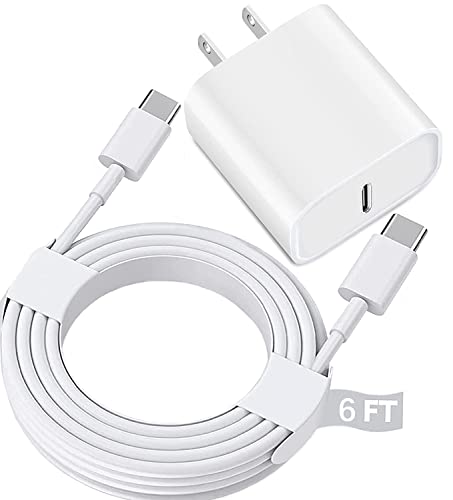
USB-C Fast Charger for iPad Pro (with Cable) — The Pro-line specialist
This kit introduces itself by its flagship relationship: a USB-C fast charger for the iPad Pro in 13, 12.9 and 11 inch sizes, across the full span the title dates from 2026 back to 2018 — which is to say, every USB-C Pro ever made. Around that centre it gathers the 11th-generation A16 iPad, the Air 5th, the mini 7th, and the iPhone 17, 16 and 15 series, with a 6 ft USB-C to C cable in the box. The Pro-first framing matters because the Pro line carries the largest batteries in the iPad family and the owners least tolerant of a slow refill; a kit designed and titled around them is at least aimed at the hardest job in the range.
The cross-compatibility deserves a word, because it reflects how these devices actually live. The same owner who carries an iPad Pro commonly carries a recent iPhone, and a kit whose cable and block serve both — the phone at its full pace, the tablet at the kit’s — collapses two chargers into one travel roll. The title’s inclusion of the iPhone lines is therefore not padding; it is an accurate sketch of the bag this kit expects to ride in. Within the home, it plays the same consolidating role on the desk of the Pro owner whose other devices are of the same USB-C generation.
Its cautions are about what the title does not say. The headline calls it a fast charger without printing a wattage in the portion of the title a shopper sees first, so the buyer who cares about the exact tier — and after the explainer above, you know whether you are that buyer — must take the figure from the full listing and hold it against the 20W, 30W and 40W rivals named in theirs. Nor does the title claim certification. Neither gap makes the kit suspect; they make its listing a required read rather than a formality. A Pro owner who does that reading and finds the figure right has the guide’s most Pro-focused kit, with a cable and a compatibility list drawn around the flagship line.
- Role: fast-charging kit centred on the iPad Pro line
- Cable: 6 ft USB-C to C, included
- Named devices: iPad Pro 13/12.9/11 (2026–2018), iPad 11th (A16), Air 5th, mini 7th, iPhone 17/16/15 series
- Output figure: the kit is titled as a fast charger; its exact wattage is a number to take from the full listing before comparing tiers
- Pack: single kit
- Certification: no MFi or similar claim appears in the title
Strengths
- Pro-first design and titling, covering every USB-C iPad Pro generation in one list.
- Phone cross-compatibility consolidates a Pro owner’s travel kit into one block and cable.
- A full 6 ft cable keeps the sofa and desk distances honest.
Trade-offs
- The wattage must be fetched from the listing; rival kits print theirs in their titles.
- Its list leans Pro and recent — older Air and mini generations are better covered by the first pick’s wider roll call.
- Single kit, single location, like most of the guide.
Best for: an iPad Pro owner, especially with a recent iPhone alongside, who wants one kit drawn around the flagship tablet. One figure decides this kit and its title withholds it: no wattage is printed there, only the 6FT cable and the Pro models it serves. If the Pro is your tablet, open this kit’s listing, note its wattage figure, and judge it against the tiers above with full information.

40W iPad Charger MFi Certified with 6FT Cable — The certified 40W kit
Two claims share this kit’s title, and either alone would earn it a section. The first is 40W — the strongest output among the dedicated iPad kits here, aimed at owners who charge in bursts: the Pro drained by a morning of work and needed again after lunch, the family iPad seized by a child an hour before a flight. At this tier the first half of the charge, the half that decides usability, arrives at a pace the 20W kits cannot match, while the iPad’s own ceiling keeps the arrangement honest — the block offers, the tablet accepts what it accepts, and the surplus is simply headroom rather than force. The second claim is certification: MFi, Apple’s licensing programme, printed in the title as a badge of the kit’s standing.
The certification deserves a precise explanation, because on a USB-C accessory it means something subtler than it does on Lightning gear. USB-C is an open standard, so no licence is needed to make the plug; an MFi claim on a kit like this is the maker volunteering for Apple’s accessory programme and its requirements — a signal about the maker’s relationship with the ecosystem and the testing the product has passed through, rather than a permission slip for the connector itself. Buyers should value it as such: not magic, not meaningless. In a field of anonymous kits, the maker who submits to a programme is telling you something about how they expect to be judged, and the 40W figure beside it is the performance half of the same seriousness.
The kit’s named range is a touch narrower than the first pick’s — the Pro in 13, 11 and 12.9 inch sizes, the A16 iPad, the Air 5th and the mini 6th headline it, with the iPad 10 in the product’s own name — so owners of the newest Airs or mini 7 should match their model against the full listing rather than assume. And a buyer whose iPad charges overnight gains nothing from the 40W tier but a shorter wait they will sleep through; the wattage is for the awake. For the awake — the burst chargers, the Pro professionals, the households whose tablet is always needed in an hour — this is the dedicated kit with the strongest hand, played openly.
- Output: 40W — the highest among this guide’s dedicated iPad kits
- Certification: Apple MFi Certified, claimed in the title
- Cable: 6 ft USB-C cable, included
- Named iPads: Pro 13/11/12.9 inch, iPad A16 and the 10th-generation iPad, Air 5th, mini 6th
- Newer Air and mini generations: match your exact model on the full listing, as the title’s roll call is shorter than the first pick’s
- Pack: single kit
Strengths
- 40W delivers the fastest burst charging of any dedicated kit here — the lunch-hour refill is its home ground.
- The MFi claim signals a maker operating inside Apple’s accessory programme rather than outside it.
- A 6 ft cable keeps the strong block usable at sofa distance, not just at the wall.
Trade-offs
- Overnight chargers sleep through its advantage; the tier is wasted on an eight-hour charge.
- Its named list is narrower than the wide-coverage pick’s, so edge models need a listing check.
- The iPad’s own ceiling caps the benefit — 40W is headroom the tablet spends only in its fastest phase.
Best for: a Pro or family-iPad owner who charges in daytime bursts and wants the strongest dedicated kit, certification included. Not suited for: a bedside-only buyer, whose eight-hour charges make its wattage irrelevant. If your iPad’s day is measured in bursts, confirm your model on this kit’s listing and let the 40W tier shorten the waits you are actually awake for.

30W USB-C Power Adapter for iPad Pro (with Cable) — The 30W middle path
Thirty watts is where the dedicated kits find their balance, and this adapter is the tier’s representative: a 30W USB-C power adapter with a 6.6 ft cable, titled for the iPad Pro in 13, 11 and 12.9 inch sizes, the Air in 13 and 11 inch plus the 5th and 4th generations, the mini 6 and 7, and the 10th and 11th standard iPads on A16 silicon. The coverage rivals the first pick’s roll call, and the wattage sits exactly between the tiers around it — half again the 20W kits’ offer, short of the 40W kit’s burst pace — which in practice is the profile of an iPad that is charged during the day, during use, by an owner who wants the percentage climbing while the screen is on and the work is happening.
The title carries one phrase that this guide will handle with tongs: “Original Quality”. Read it as the maker’s positioning — a claim to match the standard of the adapter the iPad would have shipped with in an earlier era — and not as a statement that this is Apple’s own product, because it is not, and no section of this guide will blur that line. What the kit verifiably offers is its specification: 30W, a long cable, a thorough compatibility list. Judged on those, it needs no borrowed identity. The middle tier plus the long cable plus the wide list is a coherent, defensible product, and owners who value the balance will find the phrase unnecessary rather than disqualifying.
Who should pass it by? The burst charger, for whom the 40W kit’s extra headroom is the difference between ready and waiting, and the pure overnight charger, for whom the 20W kits do the same job with less to pay for. Who should take it is the largest group in the middle: the student whose iPad is a laptop by day, the home worker on the tablet through calls, the family whose iPad lives on the kitchen counter in near-constant use and near-constant charge. For that pattern — plugged in, in use, filling against a running drain — 30W is the tier where the battery visibly wins, and this kit pairs the tier with the cable length the pattern needs.
- Output: 30W USB-C
- Cable: 6.6 ft USB-C cable, included
- Named iPads: Pro 13/11/12.9 inch; Air 13/11 inch, 5th and 4th; mini 6/7; iPad 10th/11th (A16)
- Maker’s phrase: the title says “Original Quality” — a positioning claim by the maker, not a statement that this is an Apple product
- Pack: single kit
- Certification: no programme claim appears in the title
Strengths
- The balanced tier: strong enough to fill an iPad while it is being used, not just while it sleeps.
- Compatibility coverage rivals the widest list in the guide.
- The 6.6 ft cable suits the counter-and-desk life its wattage is aimed at.
Trade-offs
- Burst chargers will still prefer the 40W kit’s headroom for the lunch-hour refill.
- The “Original Quality” phrasing asks to be read carefully; the product is a third-party adapter and is judged here as one.
- Overnight-only owners pay for daytime pace they will not use.
Best for: a student or home worker whose iPad charges while it works, all day, at a desk or counter. At 30W it deliberately sits between the bargain overnight blocks and the 40W fast kit above, so extremists at either end will shop past it. If your iPad lives plugged-in and in-use, this adapter’s listing confirms a specification matched to exactly that life.
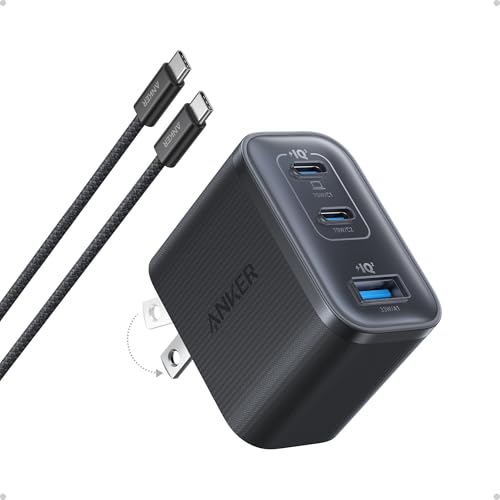
Anker Nano 70W 3-Port Fast Charger — The multi-device station block
Now for the pick that is not like the others, presented as such. The Anker Nano 70W is a three-port general fast charger — compact and stylish, per its title, with a cable included — whose named devices run across the iPhone 18 Pro and 17 and 16 lines, the MacBook Pro, and the iPad. Nothing in its title claims an iPad-specific design, an iPad certification, or an iPad-first purpose, and this guide will not invent one for it. What it offers an iPad owner is a different proposition entirely: one strong block, on one socket, that charges the iPad alongside the phone and the laptop, dividing a 70W budget among them — the bedside-table and travel-bag consolidation that a growing number of owners actually want from a charger purchase.
Judged on that proposition, it is formidable. Seventy watts shared three ways still leaves an iPad a healthy ration while a phone takes its fill and a laptop sips or charges in its turn; the same block that tops the tablet in the evening tops the phone overnight and stands ready for the MacBook in the morning. Anker’s Nano line is built for exactly this compact multi-device life, and the included cable removes the category’s usual hidden variable for one of the three devices. For the traveller whose bag holds the Apple trio — tablet, phone, laptop — this single block replaces three chargers and their three cables’ worth of tangle, and the iPad’s charging experience inside that system is strong, because the block’s ceiling per device, when the iPad charges alone or with light company, exceeds every dedicated kit in this guide.
The honest costs are the mirror of the dedicated kits’ virtues. There is no iPad-matched kit thinking here: no generation roll call in the title, no tablet-first cable story beyond the included lead, and when all three ports are busy the iPad’s share is a negotiation, not a guarantee — the heavy simultaneous session is where a dedicated 40W kit, selfishly devoted to one tablet, defends its existence. Nor should a buyer with only an iPad to charge pay the multi-port premium for two sockets that will sit empty. This pick is for the owner whose charging problem is plural. For that owner, it is not a compromise in an iPad guide; it is the answer, and the dedicated kits are the narrow ones.
- Total output: 70W across 3 ports (shared; the iPad’s share depends on its company)
- Nature: a general multi-device charger — its title makes no iPad-specific design or certification claim, and none is implied here
- Named devices: iPhone 18 Pro/17/17 Pro Max/16 series, MacBook Pro, iPad
- Cable: included, per the title
- Colour: black
- iPad generations: any USB-C iPad negotiates over standard PD; the title does not print a generation list, so match by connector, not by roll call
Strengths
- One block consolidates iPad, phone and laptop charging — the travel and bedside-table problem solved whole.
- A 70W ceiling gives the iPad a stronger solo ration than any dedicated kit here when ports are free.
- Anker’s name and the included cable cover the trust and bottleneck questions in one purchase.
Trade-offs
- Shared output means a fully loaded block negotiates the iPad’s share down; a dedicated kit never does.
- No iPad-specific design or certification is claimed — buyers shopping for that assurance should take the MFi kit.
- A single-iPad household pays for ports it will never populate.
Best for: the owner of an iPad plus a phone plus a laptop who wants one block to run the whole bedside or travel bag. Three ports and 70W are wasted on a one-tablet household: this block earns its size only when a phone and a laptop charge beside the iPad. If your charging problem is plural, the Nano 70W’s listing lays out its three-port system plainly — and the dedicated kits above become your comparison for what devotion to one tablet is worth.

Fast iPad Charger 2-Pack with Cables — The two-room pack
The final pick makes the argument this guide has circled in every category: for most households, the second charger matters more than the faster one. This two-pack puts a fast-charging iPad kit — block and 6 ft USB-C to C cable — in two places at once, titled for the iPad Pro 12.9 and the 11 and 13 inch M4 models, the Air 5th and 4th, the mini 6 and 7, and the 10th and 11th A16 iPads. Bedside and living room. Home and the grandparents’ house. The tablet’s two gravitational centres, each with its own kit, so the charger stops migrating and the low-battery negotiation — whose room, whose socket, whose cable — stops happening.
The pattern it serves is the family iPad’s actual life. A shared tablet is charged where it is used, and it is used in the room with the people, then carried to bed for a film, then left in the kitchen after a recipe. A single kit, however fast, serves one of those rooms and strands the others behind a cable hunt. Two matched kits end the hunt; the iPad’s owner learns that every room has its lead, and the battery anxiety that makes families guard a single charger like a heirloom evaporates. The 6 ft cables keep both stations honest at sofa and bedside distances, and the named range covers the generations a family fleet realistically spans.
Its trade-offs are the pack’s priorities stated plainly. The title sells fast charging without headlining a wattage figure in the way the 30W and 40W kits do, so the tier-conscious buyer takes the number from the listing and compares it knowingly; and two modest kits will never burst-charge like the certified 40W pick for the Pro professional working against a clock. But those buyers were never this pack’s audience. Its audience is the household that has said, at least once this month, “where is the iPad charger?” — and for that household, this is the only pick in the guide that answers the question permanently, in both rooms at once.
- Pack: 2 fast-charging kits (block plus cable each)
- Cables: 6 ft USB-C to C, one per kit
- Named iPads: Pro 12.9, Pro 11/13 inch (M4), Air 5th/4th, mini 6/7, iPad 10th/11th (A16)
- Output figure: titled as fast charging; take the exact wattage from the full listing if the tier decides your purchase
- Lightning iPads: not served by the bundled USB-C cables
- Role: two fixed charging stations for a shared or migrating iPad
Strengths
- Two complete kits end the charger migration that defines shared-iPad households.
- 6 ft cables make both stations genuine sofa-and-bedside stations, not wall-hugging compromises.
- Generation coverage spans the Pro, Air, mini and standard lines a family fleet actually contains.
Trade-offs
- Neither kit will burst-charge like the 40W pick; coverage was chosen over peak pace.
- The wattage figure belongs to the listing, not the title’s headline.
- A single-iPad, single-room owner buys a second kit that may sit unused.
Best for: a family or shared iPad that lives in two rooms and is always being hunted a charger for. Not suited for: a solo Pro professional whose metric is minutes-to-ready on one desk. If the two-room pattern is your household’s truth, this two-pack’s listing is the shortest path to never asking where the charger is again.
Six Ways to Feed a Tablet: How Do the Kits Line Up?
| Pick | Output | Cable | Kits | Defining trait |
|---|---|---|---|---|
| iPad Charger 20W with 6.6FT Cable | 20W | 6.6 ft | 1 | Widest generation roll call |
| USB-C Fast Charger for iPad Pro | Fast (figure on listing) | 6 ft | 1 | Pro-line focus, 2018–2026 |
| 40W iPad Charger MFi Certified | 40W | 6 ft | 1 | Strongest dedicated kit; MFi claim |
| 30W USB-C Power Adapter for iPad Pro | 30W | 6.6 ft | 1 | Balanced tier for charge-while-using |
| Anker Nano 70W 3-Port | 70W shared, 3 ports | Included | 1 block | Multi-device consolidation, not iPad-specific |
| Fast iPad Charger 2-Pack | Fast (figure on listing) | 6 ft each | 2 | Two rooms equipped at once |
Notice what the table cannot show: your iPad’s day. The same 20W kit is the wisest purchase in the guide for a tablet that charges overnight and a poor one for a tablet that works in bursts, and the 70W block is a consolidation triumph for a three-device owner and an extravagance for a one-device one. The columns narrow the field to two or three finalists for any reader; the day — burst or overnight, solo or shared, one room or two — makes the final call, and it is a call only the owner can make honestly.
How Do You Know Whether Your iPad Takes USB-C or Lightning?
By generation, and the generations divide cleanly once you know the landmarks. The iPad Pro crossed to USB-C in 2018 and never went back; every Pro with a full-screen, no-home-button design charges by USB-C. The iPad Air crossed with its 4th generation, the home-button-free redesign; Airs with a home button are Lightning. The mini crossed at the 6th generation, again with the redesign. The standard iPad held out longest, crossing at the 10th generation — which is why the titles in this guide name the 10th and 11th standard iPads so carefully, and why an owner of a 9th-generation iPad, a fine and common machine, must not order from this page at all: its port is Lightning, and its chargers live in the Lightning family alongside the older iPhones.
The physical check takes three seconds and settles arguments that model names start. USB-C is the same oval port as a modern phone’s or laptop’s, with a thin tongue at its centre; Lightning is a slimmer slot whose cable ends in a flat paddle. If the cable that charged your previous phone generation’s iPad was a paddle, you are shopping the wrong guide; if your iPad’s cable could plug into a recent MacBook’s charger — and be plugged by it in return — you are in the right one. Households with several iPads should perform the check per tablet, because a family’s fleet commonly straddles the divide, with a hand-me-down Lightning mini in a child’s hands and a USB-C Pro on the desk.
One consequence follows for the spare-charger strategy: blocks are portable across the divide and cables are not. Any USB-C PD block in this guide can feed a Lightning iPad through a Lightning cable, and a USB-C iPad through a C-to-C cable, which means a household mid-transition can standardise its blocks now and let the cables sort themselves out per tablet. The kits here bundle C-to-C cables because the USB-C era is their subject; the Lightning tablet in the same house needs its own cable on one of these same blocks, not a separate charging regime.
How Do You Charge an iPad Quickly and Kindly?
Quickly is a chain, as it is everywhere in charging: a block of the right tier, a sound cable, and a tablet cool enough to accept the pace. Use the kit’s own cable or one of known quality — the bundled 6 ft and 6.6 ft leads in these kits are specified for their blocks, which removes the variable that silently caps so many home setups. Charge from low when speed matters, because the fast phase lives in the battery’s lower half; a top-up from nearly full will crawl on any kit in this guide, by the tablet’s own protective design, and judging a new charger by that crawl is the surest way to return a good one.
Kindly is mostly about heat and habit. A tablet charging under a cushion, inside a folio in the sun, or while running the brightest game in the library is a tablet managing its temperature by slowing down and ageing faster; the kind setup is a hard surface, open air, and — for the long overnight charge — no anxiety about the tier, since a full night forgives any wattage in this guide. Owners who keep an iPad for many years, as iPad owners characteristically do, might also favour the middle habit of not living at the extremes: charge before the battery is gasping, unplug when the day allows, and let the device’s own battery-health features do the fine work.
The last practice is placement, and it is where these kits’ long cables earn their design. Fix the charging station where the iPad rests — the bedside, the counter, the desk’s corner — rather than where the socket happens to be, and let the 6 ft or 6.6 ft lead bridge the difference. A tablet charged at its resting place is a tablet that is charged often, briefly and without ceremony; a tablet that must be carried to a socket is a tablet that arrives at its moments of need at whatever percentage procrastination left it. The two-pack exists because households have two resting places. However many yours has, equip them, and the iPad’s battery leaves your list of household concerns.
What Do iPad Owners Most Often Get Wrong When Replacing a Charger?
The generational error leads, as it must in a line with three connector eras: the USB-C kit ordered for a Lightning iPad — most often a 9th-generation standard iPad or an older Air or mini — discovered when the cable meets the port. The check takes three seconds and is described above; do it for the specific tablet, not for the idea of your tablet. The second error is wattage theatre in both directions: the 20W kit bought for a burst-charged 13 inch Pro, whose owner then concludes that all replacement chargers are slow; and the high-output block bought for an overnight tablet, whose owner paid for a sprint they sleep through nightly. Match the tier to the day, not to the shelf’s ordering.
The third error is cable amnesia — reusing a cable of unknown provenance and unknown rating because it fits, then blaming the block for the pace the cable imposed. Kits exist precisely to retire that variable, and a buyer who purchases a block alone should audit the cable they intend to pair with it with real suspicion. The fourth error is the single-station household: one kit, however good, serving a tablet that lives in three rooms, until the charger joins the household’s list of contested objects. The two-pack’s entire existence is a commentary on that error.
The fifth error is subtler and worth naming in a guide that includes a general charger: assuming a product’s presence in an iPad guide makes it an iPad product. The Anker Nano 70W is here because multi-device owners are real, and it is labelled, in its section and in this one, as a general charger with no iPad-specific claim. A buyer who wants the assurance of a kit designed and certified around the iPad should take that desire seriously and choose the dedicated kits — the MFi-claiming 40W foremost — rather than letting a famous name blur a distinction this guide has kept bright on purpose.
One household pattern deserves its own paragraph before the verdict, because it quietly decides more purchases than any specification: the iPad as the shared screen. In many homes the tablet is not a personal device but a circulating one — the recipe display at lunch, the child’s lesson at three, the film screen at nine, the video call to grandparents on Sunday. A circulating device has no single owner to manage its battery, so its charging must be ambient: a kit where it lands, a cable that reaches the sofa, a block strong enough to recover it between shifts. Read the six picks through that lens and the two-pack and the wide-coverage 20W kit explain themselves, the 40W kit becomes the turnaround artist between the child’s lesson and the evening film, and wattage stops being a specification and becomes what it always was — time, returned to a household that shares one screen.
Final Recommendation
Match the kit to the tablet’s day. Overnight and desk owners should take the wide-coverage 20W kit and enjoy its reach; Pro owners who live on the tablet while it charges should take the 30W middle path; burst chargers and certification shoppers should take the 40W MFi kit; Pro loyalists who travel with a recent iPhone should read the Pro specialist’s listing for its wattage and judge it as the consolidation kit it is. Households with two rooms and one wandering iPad should take the two-pack and end the hunt. And the three-device owner should take the Anker Nano 70W with open eyes, knowing it is a superb general charger rather than an iPad instrument. Every tablet in the USB-C era is one honest kit away from never being thought about at charging time — choose by the day your iPad actually lives, and that thought-free state is yours.
Frequently Asked Questions
Will these chargers work with my 9th-generation iPad?
No — and this is the most useful answer in the FAQ. The 9th-generation standard iPad uses Lightning, as do the Air 3 and earlier and the mini 5 and earlier. Every kit in this guide bundles USB-C cables for the USB-C generations. Your tablet needs a USB-C PD block — any block here would do — paired with a USB-C to Lightning cable, which is a separate purchase from a different shelf.
Is a 40W charger safe for a smaller iPad like the mini?
Yes. The iPad negotiates its own intake over USB Power Delivery and accepts only what its circuitry is built for; the block’s rating is an offer, not an instruction. A mini on the 40W kit charges at the mini’s pace, and the headroom simply goes unused. The same logic protects every model in these kits’ lists on every block in this guide, including the 70W Anker.
What does MFi certification mean on a USB-C iPad charger?
Something narrower than on Lightning gear. USB-C is an open standard, so no licence is required for the connector; an MFi claim on a USB-C kit — the 40W pick makes one — signals that the maker participates in Apple’s accessory programme and submits to its requirements. Value it as a maker’s-standards signal rather than a technical permission, and weigh it alongside the kit’s wattage, cable and named compatibility.
Why is my iPad charging slowly on a new kit?
Check the chain in the usual order. The cable first — use the kit’s own before suspecting anything else. The battery level second: an iPad near full tapers deliberately, so judge speed from low. Use-while-charging third: a bright screen and a heavy app spend the incoming power in the present, and a modest kit can hold the level without visibly filling. Heat fourth. Only after those should the block itself be questioned — and if it comes to that, compare its tier against your iPad’s day using the sections above.
Can one of these kits charge my iPhone too?
Any USB-C iPhone — the 15 series onward — charges from these blocks and cables at its full pace, and the Pro-specialist kit names those iPhones in its own title. A Lightning iPhone needs a USB-C to Lightning cable on the same block. The Anker pick is the one designed for the mixed desk, with ports for the tablet and phone simultaneously; the dedicated kits serve devices one at a time.
Should a spare iPad charger live at home or travel with the tablet?
Both, if the household can manage it — and the two-pack exists because that answer is common. A home station earns its place by never moving: it is the fixed point the tablet returns to, immune to being left in a hotel or a relative’s spare room. A travel kit earns its place by never being unpacked: it lives in the bag, so packing is a matter of adding the tablet itself. Owners who force one kit to do both jobs discover that it eventually does neither, having been left wherever the last trip ended. If only one kit is possible, let it live where the iPad spends more nights — and put a reminder in the bag, not a charger, for the other life.
How long a cable do I actually need for a bedside iPad?
Measure from the socket to where the tablet rests in your hand, not to the bed’s edge — the difference is usually a body’s width, and it is the difference between charging in comfort and charging at a stretch. Most honest measurements land inside the 6 ft and 6.6 ft leads these kits bundle, which is why those lengths recur throughout the guide. If your socket hides behind heavy furniture, add its depth to the measurement before deciding.


