What's inside
- Key Takeaways
- Quick Picks
- How We Chose These Picks
- What Does a Wall Charger’s Wattage Actually Tell You?
- Which Wall Chargers Earn Their Keep, One Block at a Time?
- How Do the Six Blocks Stack Up on Ports, Power and Portability?
- How Should You Match a Charger to Your Devices, Rather Than to a Number?
- How Do You Set Up a New Wall Charger So It Actually Charges Fast?
- How Should Heat, Placement and Safety Shape the Choice?
- What Mistakes Do Buyers Make When Choosing a Wall Charger?
- Final Recommendation
- Frequently Asked Questions
- Related Guides
As an Amazon Associate I earn from qualifying purchases. This post may contain affiliate links at no extra cost to you.
[widgetverdict.com] is reader-supported. When you buy through links on our site, we may earn an affiliate commission.
Where to buy: every charger named below is sold through the linked listing attached to its name, and each of the six was chosen because its title states its wattage and port layout plainly enough to be checked before you pay.
The best wall chargers used to be the ones that came in the box. That era ended when phone makers stopped including a brick, and it ended for laptops even earlier, when a second charger for the desk or the travel bag became a separate purchase rather than a spare. What replaced the bundled brick is a crowded shelf of gallium nitride blocks that all promise speed, and the honest problem with that shelf is that the headline wattage — the one number every title shouts — is the least informative figure on it. A 65W charger with one port and a 67W charger with three ports are not near-identical products separated by two watts. They are different tools: one gives a single device everything it has, the other divides its output across a phone, a tablet and a pair of earbuds, and what each device actually receives depends on a sharing arrangement the headline never describes.
So this guide reads the six picks below the way a buyer should: port by port, device by device. Two are single-purpose high-output blocks — the Amazon Basics 65W with one USB-C port and no PPS, stated honestly in its own title, and the Anker Nano 65W GaN II, a foldable PPS charger aimed at phones and laptops alike. Two are multi-port splitters at opposite ends of the scale: the UGREEN 30W with three ports for a phone-first household, and the Anker 140W Max with four ports, a smart display and touch controls for a desk that charges everything at once. Between them sit the Anker 67W three-port block, the generalist of the group, and the Belkin 112W with its three USB-C ports and one USB-A legacy socket. Every wattage, port count and compatibility claim in this article comes from the listing titles themselves; where a title is silent about something a buyer would want to know, the spec box under that pick says so in plain words.
One habit will serve you through all six sections: decide what the charger must feed before you decide how many watts it must claim. A charger bought for a laptop and a phone together lives a different life from one bought for a phone alone, and the right answer below changes completely depending on which life you are buying for.
Key Takeaways
- Headline wattage is a shared ceiling on multi-port chargers, not a promise to each socket; port count and your device mix matter more than the biggest number.
- The Anker 140W Max is the only pick with four ports and a smart display, and its title is explicit that it is a wall charger, not a power bank.
- PPS appears in exactly one title here — the Anker Nano 65W GaN II — while the Amazon Basics 65W states plainly that it is Non-PPS; Samsung owners should read those two lines carefully.
- The UGREEN 30W spreads its output across three ports (two USB-C, one USB-A), which suits phones and accessories rather than a hungry laptop.
- The Belkin 112W keeps one USB-A port among three USB-C sockets, the only legacy socket besides the UGREEN’s in this line-up.
- Foldable plugs or prongs are stated for the Anker Nano 65W, the Amazon Basics 65W and the Belkin 112W — a real travel distinction the other three titles do not claim.
Quick Picks
| Pick | Badge | Why it earns its place |
|---|---|---|
| Anker 67W GaN Wall Charger | The three-port generalist | 67W across three ports in a compact block whose title names everything from a MacBook Pro to an Apple Watch. |
| Anker Nano 65W GaN II Charger | The PPS traveller | 65W GaN II with PPS and a foldable body, pitched at iPhones, iPad Pro and MacBook Pro in one pocketable block. |
| Anker 140W Max 4-Port GaN Charging Blocks | The desk command centre | 140W over four ports with a smart display, touch controls and a 5 ft cable in the box — a fixed charging station, not a battery. |
| UGREEN 30W 3-Port USB C Charger | The phone-first splitter | 30W of GaN II output divided between two USB-C ports and one USB-A, sized for phones, tablets and earbuds. |
| Amazon Basics 65W GaN Charger | The single-port purist | One USB-C port, PD 3.0, a foldable plug and an honestly stated Non-PPS design that gives one device the whole output. |
| Belkin 112W GaN USB-C Charger Block | The high-output mixed desk | 112W across three USB-C ports and one USB-A, with foldable prongs, for a laptop plus legacy accessories. |
How We Chose These Picks
We began with the title test. A wall charger listing that cannot state its total wattage, its port count and its port types in its own name is asking the buyer to excavate basic facts, and every pick below passes that test — you can learn what each block is before opening a single section. Beyond that threshold we looked for spread: a guide with six near-identical 65W single-port bricks would be a catalogue, not a verdict, so the six were chosen to occupy genuinely different jobs, from the UGREEN’s modest 30W three-way split to the Anker 140W Max’s four-port desk station.
GaN itself earned no points. Gallium nitride is how modern chargers get small at high wattage, and all six titles here invoke it, so it separates nothing. What separated picks was candour about the details buyers trip over. The Amazon Basics title admits Non-PPS where a vaguer listing would have stayed silent. The Anker 140W Max title interrupts its own sales pitch to insist it is not a power bank, because a block with a display and a cable invites exactly that confusion. The Belkin title spells out its 3C1A layout — three USB-C, one USB-A — instead of hiding the legacy port in the photographs. Those small honesties predict how a listing will treat you after the sale, and we weighted them accordingly.
Finally, each pick had to name its intended devices in its title, because a charger is a relationship between a block and a specific set of hardware. The Anker 67W names MacBook Pro and Air, Pixelbook, iPad Pro, recent iPhones, Galaxy phones, Note20, Pixel and Apple Watch. The UGREEN names iPhones, Galaxy models, iPad and MacBook Neo and Air. Where a title’s device list and its wattage disagree in spirit — a modest output naming a laptop, for instance — the pick’s own section below says so rather than letting the claim pass.
What Does a Wall Charger’s Wattage Actually Tell You?
Less than the marketing implies, and the gap lives in one word: total. On a single-port charger, the headline figure is the whole story — the Amazon Basics 65W can offer its one connected device up to its full rated output, subject to what that device negotiates. On a multi-port charger, the headline is a shared budget. The Anker 67W’s three ports draw from one 67W pool; plug in a laptop alone and it can take the lion’s share, but add a phone and a watch and the pool divides according to a distribution table that lives in the charger’s documentation, not in its title. This is not a scam and not a flaw. It is arithmetic. The flaw is only in reading 67W as a per-port promise.
The second thing wattage hides is protocol. Two chargers with identical wattage can behave very differently with the same phone, because fast charging is a negotiation conducted in a shared language. USB Power Delivery is the common tongue across this whole guide. PPS — Programmable Power Supply, a refinement that lets a phone request finely graded voltage steps — is spoken by the Anker Nano 65W GaN II, named in its title, and is the language Samsung’s fastest charging modes expect. The Amazon Basics 65W states Non-PPS in its title with unusual honesty, which does not make it slow for an iPhone or a laptop, both of which charge happily over standard PD; it makes it the wrong block for a buyer whose Samsung phone’s fastest mode is the entire point of the purchase.
The third hidden variable is the cable, the most neglected component in the whole chain. A charger can only deliver what the cable between it and the device can carry, and the cable bundled with a phone years ago may cap a modern block well below its rating. One pick below, the Anker 140W Max, includes a 5 ft cable in the box, which removes that variable for its buyer. For the other five, the cable is yours to supply, and an unmarked cable of unknown rating is the single most common reason a new fast charger feels no faster than the old slow one. Judge the block by its ports and protocols; then audit the cable with the same suspicion.
There is one more figure no title prints and every owner discovers: time spent near the top of the battery costs more than time spent in the middle. Phones and laptops charge fastest when their batteries are low and taper deliberately as they fill, protecting the cells from the stress of a full-speed finish. A bigger charger therefore shows its advantage in the first half of a charge — the airport top-up, the half-hour before leaving — and almost none of it in the last stretch overnight. This is why the honest way to compare any two picks below is the low-battery sprint, not the full charge: plug both into the same drained phone, give each twenty minutes, and the difference you measure is the difference the wattage and protocol figures were trying to describe all along.
Which Wall Chargers Earn Their Keep, One Block at a Time?

Anker 67W GaN Wall Charger — The three-port generalist
This is the block for the household charging drawer that has to serve everything and specialise in nothing. Its title promises 67W across three ports and then lists its intended partners without embarrassment: MacBook Pro and Air, Pixelbook, iPad Pro, iPhone 17 and 16 lines, Galaxy S23 and S22, Note20, Pixel phones and Apple Watch. Read that list as the design brief. The 67W pool is sized so a thin laptop can draw a serious share while a phone charges beside it at a reduced but still useful rate, and the third port absorbs the watch or the earbuds that would otherwise queue for a socket of their own.
The working pattern it suits is the shared nightstand or the family kitchen counter, where devices arrive in twos and threes and nobody’s phone is important enough to monopolise the block. A traveller with a laptop and a phone will also find the shape of the thing right: one compact block in the bag instead of a laptop brick plus a phone brick, with the third port as slack for whatever the trip adds. Anker describes it as compact, and at this wattage with three ports, compactness is the GaN dividend paid in the currency that matters — bag space.
Its limits are the arithmetic of its own pool. Sixty-seven watts divided three ways is not sixty-seven watts each, and a buyer whose laptop alone wants the full output while two phones charge will watch everything slow down together. The title also says nothing about foldable prongs or PPS, so a Samsung owner chasing that phone’s fastest mode, or a traveller counting on a flat-folding block, should confirm both points on the full listing rather than assume them from the brand’s other models.
- Total output: 67W, shared across the ports in use
- Ports: 3 (the title does not break down the USB-C to USB-A mix — confirm the layout on the full listing)
- Technology: GaN
- Named devices: MacBook Pro/Air, Pixelbook, iPad Pro, iPhone 17/16/Pro, Galaxy S23/S22, Note20, Pixel, Apple Watch
- Form: compact block
- PPS support: absent from the listing title, so treat the fastest Samsung modes as unconfirmed for this block
Strengths
- Three ports turn one wall socket into a small charging station for a laptop, a phone and a wearable at once.
- The device list in the title spans Apple, Google and Samsung hardware, so mixed households are the design target, not an afterthought.
- 67W is enough headroom for a thin laptop to remain the priority device while companions charge more slowly.
Trade-offs
- The shared pool means a fully loaded block slows every connected device; it is not three chargers in one housing.
- Port types are not itemised in the title, which matters if your cables are mostly USB-A.
- No foldable-prong claim in the title, a small but real travel consideration the Nano below makes explicitly.
Best for: a mixed-device household or a laptop-and-phone traveller who wants one block to cover the whole kit. Not suited for: a desk where a high-draw laptop and two phones must all charge at full speed simultaneously, because the 67W ceiling is shared. If that shared-counter life sounds like yours, open the Anker 67W’s listing, confirm its port mix against your cables, and it will quietly replace two or three older bricks.
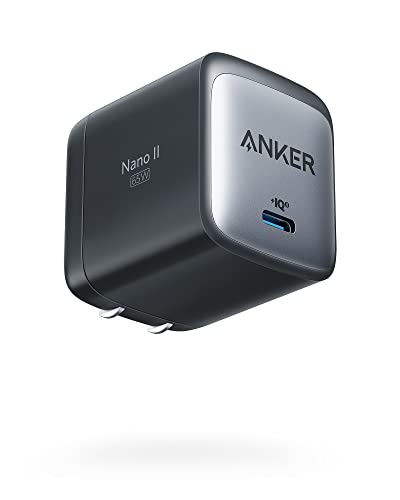
Anker Nano 65W GaN II Charger — The PPS traveller
The Nano 65W is Anker’s travel argument in its purest form: GaN II construction, PPS in the title, a foldable body, and a device list that runs from iPhone 17 models through iPad Pro to MacBook Pro. The PPS line is what lifts it above generic 65W blocks for a specific and large group of buyers. Samsung’s fastest charging tiers are built on PPS negotiation, and a charger that cannot speak it leaves those phones on a slower PD profile no matter how impressive its wattage figure looks. Naming PPS in the title is Anker telling that group, in writing, that this block speaks their phone’s language.
Foldable is the other word doing real work. A charger that folds flat survives in a bag’s side pocket without its prongs spearing the lining or snapping against a laptop shell, and it sits flush enough against crowded hotel outlets and power strips where a rigid block gets levered out by its own cable. Pair that with 65W — enough for a MacBook Pro at a working rate and more than any phone can accept — and the Nano becomes the one-block travel kit for a phone-and-laptop traveller: the same block that fast-charges the phone in an airport corner tops up the laptop overnight at the hotel.
The honest constraint is focus. This is a charger built around a primary device, and buyers who routinely charge a laptop, a tablet and a phone together should be looking at the three-port and four-port picks instead of asking a travel block to run a desk. The title also leaves its exact port arrangement to the listing page — it says USB C charger and names its devices, but the port census belongs to the full product page, and anyone whose kit depends on a second socket should verify it there before packing around this block.
- Total output: 65W
- Protocol note: PPS named in the listing title (GaN II generation)
- Form: foldable, compact travel block
- Named devices: iPhone 17/17 Plus/17 Pro Max, 16 series, 15 Pro Max, iPad Pro, MacBook Pro and more
- Port census: the title identifies it as a USB-C charger without enumerating sockets — check the listing for the exact count
- Cable: none mentioned in the title, so budget for a rated USB-C cable of your own
Strengths
- PPS support, stated outright, unlocks the fastest charging modes on phones that negotiate in PPS.
- The foldable body is genuinely pocket- and bag-friendly in a way rigid-prong blocks are not.
- 65W covers a MacBook Pro’s needs and every phone’s ceiling with one small block.
Trade-offs
- Built around a primary device; simultaneous multi-device charging is not its brief.
- The title does not enumerate its ports, so a two-device routine needs a listing check first.
- No bundled cable is mentioned, and an underrated cable will quietly cap its speed.
Best for: a Samsung or iPhone owner who travels with a laptop and wants one folding block that fast-charges both. Not suited for: a family charging point where three devices plug in every night, since this block’s talents are concentrated rather than divided. Travellers matching that profile should read the Nano 65W’s full listing for its port layout, then retire the separate laptop brick from the bag.

Anker 140W Max 4-Port GaN Charging Blocks — The desk command centre
Most chargers in this guide are appliances; this one is furniture. The 140W Max offers four ports fed from a 140W pool, a smart display on the block itself, touch controls, and a 5 ft cable included in the box — and its title closes with a parenthesis that deserves respect: not a power bank. There is no battery inside. This block lives plugged into a wall, permanently, and turns one outlet into the fixed charging station for an entire desk: laptop at full draw, phone beside it, tablet and earbuds filling the remaining sockets, with the display reporting what the station is doing instead of leaving you to guess from a phone’s battery icon.
The display is the feature to think about hardest, because it changes the charger’s role. On a blind block, a slow charge is a mystery solved by swapping cables at random. On a block that shows its output, a cable that negotiates badly announces itself, a device that has stopped drawing is visible at a glance, and the shared-pool arithmetic this guide keeps returning to becomes something you can watch rather than wonder about. The touch controls belong to the same philosophy: this is a station you interact with, set up once on a desk or a shelf edge, and then read like an instrument.
The costs of the concept are placement and price of admission in space. A display and four populated ports want a permanent home with cable runs in several directions, which is a desk or a media console, not a travel pouch — the traveller’s picks are elsewhere in this guide. The title names MacBook, iPad and iPhone models among its targets, and while USB-C PD is a common language, a buyer building the station around non-Apple laptops should confirm the per-port distribution on the full listing, since 140W shared four ways still obeys the arithmetic: one demanding laptop can leave the other three ports sharing the remainder.
- Total output: 140W across four ports
- Display: smart display with touch controls, stated in the title
- Included: 5 ft cable in the box
- Named devices: MacBook, iPad, iPhone 18 Pro / 17 (per the listing title)
- Battery: none — the title states explicitly that this is not a power bank
- Per-port distribution: the split of the 140W pool between sockets is a listing-page detail, not a title claim
Strengths
- The largest output and the most ports in this guide, enough for a laptop-centred desk to charge everything from one outlet.
- The smart display turns charging from guesswork into something observable, exposing bad cables and finished devices at a glance.
- A 5 ft cable is included, removing the most common hidden bottleneck for its primary device.
Trade-offs
- It is a fixed station, not a travel block; the display and four cables want a permanent desk home.
- The 140W pool still divides when all four ports are busy, so simultaneous peak charging for everything is not on offer.
- Buyers who never look at a charger gain nothing from the display they are paying for in size and complexity.
Best for: a desk-bound worker whose laptop, phone, tablet and earbuds all return to the same outlet every evening. Not suited for: a carry-on, where its four ports and display would sit unused while smaller blocks do the travelling. If a permanent station is the goal, study the 140W Max’s listing for its per-port split, then give it the corner of the desk it asks for.

UGREEN 30W 3-Port USB C Charger — The phone-first splitter
Thirty watts sounds modest on a page that also contains a 140W station, until you ask what the watts are for. The UGREEN divides its 30W GaN II output across two USB-C ports and one USB-A — a layout aimed squarely at the bedside and the hallway socket, where the nightly load is a phone, perhaps a partner’s phone or a tablet, and something small and old that still charges over USB-A: a torch, a speaker, a previous-generation wearable. For that load, 30W shared is not a compromise. A single phone can draw a fast charge, and two phones can share the pool at rates that fill both overnight without either owner noticing the division.
The title’s device list tells the same story with one eyebrow raised: iPhone 18, 17 and 16 models, Galaxy S26 and S25, iPad — and MacBook Neo and Air. A MacBook Air sipping from a shared 30W pool will charge, slowly, and will hold its level while used lightly, but nobody should read that listing line as a promise of laptop-class speed. Treat the laptop mention as emergency compatibility — the block will not refuse your Air — and the phone list as the actual brief. UGREEN also names multiple protection in the title, the umbrella term for the over-voltage, over-current and temperature safeguards that matter most on a block left plugged in beside a bed around the clock.
What you give up is ceiling. There is no headroom here for a power-hungry laptop, no PPS claim in the title for a Samsung’s fastest tier, and no fourth port when a third device joins the nightly queue. What you get in exchange is the smallest, simplest answer to the most common charging problem in any house: several small devices, one socket, every night. It is the pick most likely to be bought twice — one for each side of the bed — and its section of this guide is short on drama because the product is, happily, short on drama too.
- Total output: 30W, shared across ports
- Ports: 2 x USB-C and 1 x USB-A, stated in the title
- Technology: GaN II; multiple protection named in the title
- Named devices: iPhone 18/17/16, Galaxy S26/S25, iPad, MacBook Neo/Air
- Colour: black
- Laptop pace: the title names MacBook models, but a shared 30W pool means laptop charging is a slow top-up, not a work-rate feed
Strengths
- Three ports at bedside scale solve the nightly phone-plus-accessory queue without a power strip.
- The USB-A socket keeps legacy accessories charging alongside modern USB-C phones.
- Compact size and stated multi-layer protection suit a block that stays plugged in permanently.
Trade-offs
- Thirty shared watts cannot fast-charge a laptop, whatever the compatibility list includes.
- Two phones charging together split the pool, so neither gets the block’s full single-device pace.
- No PPS is claimed in the title, leaving Samsung’s fastest mode unconfirmed here.
Best for: a bedside or hallway socket feeding phones, a tablet and one legacy accessory every night. Not suited for: a laptop workstation, where its shared 30W would crawl behind a working machine’s appetite. If your nightly queue is phones rather than computers, the UGREEN 30W’s listing is a short read — and one block per side of the bed is a defensible plan.

Amazon Basics 65W GaN Charger — The single-port purist
There is a clarity to this block that the multi-port picks cannot match: one USB-C port, 65W behind it, Power Delivery 3.0, a foldable plug, and nothing to divide. Whatever you plug in is the only claimant on the output, which makes its behaviour the most predictable in this guide — a laptop gets a laptop-class feed, a phone gets everything it can negotiate, and the shared-pool arithmetic that haunts the other sections simply never arises. For a buyer whose routine is one device at a time, that predictability is not a limitation. It is the product.
Its title also performs the most honest act in this entire guide: it says Non-PPS, in the open, where a less scrupulous listing would let Samsung buyers discover it later. Read that admission correctly. iPhones charge over standard PD and lose nothing here. Laptops negotiate over PD and lose nothing here. The only buyers who should walk past are those whose Samsung phone’s PPS-based fastest mode is the specific feature they are shopping for — and for everyone else, the disclosure is a reason to trust the rest of the title, including the foldable plug and the portable framing aimed at laptops, tablets and phones.
The single port does impose a discipline: devices queue. A household that charges in parallel will find one socket a bottleneck no wattage can fix, and the traveller who wants the phone charging while the laptop works from the same block should take the Nano or the 67W instead. Nor does the title mention an included cable. But as a second laptop charger — the one that lives in the bag so the original can live under the desk — a single-port 65W GaN block with a folding plug is close to the ideal shape of the thing, and Amazon’s own brand keeps the proposition plain.
- Total output: 65W through a single port
- Ports: 1 x USB-C
- Protocol: Power Delivery 3.0; Non-PPS, stated openly in the title
- Form: foldable plug, portable block, black
- Named devices: laptops, tablets and phones (general framing in the title)
- Cable: the title mentions none included, so pair it with a cable rated for the wattage you intend to draw
Strengths
- One device receives the full output with no sharing, making its charging pace the most predictable here.
- The foldable plug and compact GaN body suit a permanent place in a laptop bag.
- The Non-PPS disclosure in the title is candour most listings avoid, and it makes the remaining claims easier to trust.
Trade-offs
- One port means one device at a time; parallel charging households will queue at it.
- Samsung owners seeking that brand’s PPS fastest mode are told, by the title itself, to look elsewhere.
- No cable is bundled according to the title, so the full setup cost includes a rated cable if you lack one.
Best for: a laptop owner who wants a second, bag-resident 65W charger whose single device always gets everything. Not suited for: a Samsung user buying specifically for PPS fast charging, or a family socket serving three devices nightly. If one-at-a-time is your rhythm, the Amazon Basics 65W’s listing confirms the simple bargain — full output, no division, no surprises.

Belkin 112W GaN USB-C Charger Block — The high-output mixed desk
Belkin’s block is the heavyweight that still travels. Its 112W pool feeds three USB-C ports and one USB-A — the title’s 3C1A shorthand — and the prongs fold, which at this output is not a given. The combination sketches its owner precisely: someone whose main devices are modern and hungry (a MacBook-class laptop heads the title’s list, joined by Chromebook, iPhone 17, Samsung Galaxy, Pixel, iPad and AirPods) but whose desk still hosts one or two accessories from the USB-A era that refuse to retire. The legacy port is not nostalgia. It is an acknowledgement that the kindle, the bike light and the older power bank on your desk did not get the USB-C memo.
Against the Anker 140W Max, the Belkin trades peak output and the display for a simpler proposition: no screen to read, no station to configure, just a large pool and four sockets with foldable prongs for the days the desk becomes a hotel room. A laptop can draw a full working share while a phone and a tablet divide a still-generous remainder, and 112W is high enough that the division rarely becomes the story. Belkin’s long history in Apple-adjacent accessories also shows in the device list’s ordering — MacBook first — though the protocol underneath is the same USB-C PD the whole guide runs on, and Galaxy and Pixel are named in the same breath.
Its cautions are about appetite and evidence. Four devices at once will divide 112W in ways the title does not tabulate, so the per-port split belongs on your listing checklist if your laptop is a high-draw model. And a buyer with no USB-A stragglers is paying for a socket that will sit empty; the pure USB-C picks divide their pools among ports that will all be used. But for the mixed desk — modern core, legacy fringe, occasional travel — this is the most complete single block in the guide, and its foldable prongs mean completeness does not have to stay home.
- Total output: 112W, shared across ports
- Ports: 3 x USB-C and 1 x USB-A (the title’s 3C1A layout)
- Form: foldable prongs, travel-framed block
- Named devices: MacBook, Chromebook, iPhone 17, Samsung Galaxy, Pixel, iPad, AirPods
- Display: none — output is not shown on the block, unlike the Anker 140W Max
- Per-port split: how the 112W divides under full load is not tabulated in the title; the listing carries that table
Strengths
- A 112W pool is deep enough that a working laptop plus two smaller devices rarely feel the division.
- The single USB-A port keeps legacy accessories on the same block as the modern core kit.
- Foldable prongs at this wattage keep it a genuine travel option rather than desk-only furniture.
Trade-offs
- No display, so a slow negotiation is diagnosed by the device’s behaviour rather than read off the block.
- The USB-A socket is dead weight for an all-USB-C household.
- Full-load distribution figures live on the listing, not in the title, and high-draw laptops should check them.
Best for: a mixed desk with a hungry laptop, modern phone and tablet, and one legacy accessory still on USB-A. Not suited for: a minimalist traveller whose whole kit is two USB-C devices, who would carry unused ports and unused watts. If your desk matches the mixed description, read the Belkin 112W’s listing for its distribution table and let one block evict the strip of ageing bricks beneath it.
How Do the Six Blocks Stack Up on Ports, Power and Portability?
| Pick | Total output | Ports | Signature detail from the title | Natural home |
|---|---|---|---|---|
| Anker 67W GaN Wall Charger | 67W shared | 3 | Device list spans laptops to Apple Watch | Shared counter or nightstand |
| Anker Nano 65W GaN II | 65W | USB-C (count on listing) | PPS stated; foldable body | Travel bag |
| Anker 140W Max 4-Port | 140W shared | 4 | Smart display, touch controls, 5 ft cable included | Permanent desk station |
| UGREEN 30W 3-Port | 30W shared | 2C + 1A | Multiple protection; phone-first device list | Bedside socket |
| Amazon Basics 65W GaN | 65W, undivided | 1 x USB-C | PD 3.0; Non-PPS stated openly | Laptop bag, second charger |
| Belkin 112W GaN Block | 112W shared | 3C + 1A | Foldable prongs at high output | Mixed desk that also travels |
Read the table by home rather than by wattage and the six stop competing and start specialising. The two blocks that fold — the Nano and, by its prongs, the Belkin, plus the single-port Amazon Basics with its folding plug — are the travellers, at three different scales of ambition. The two that stay plugged in — the UGREEN at the bedside, the 140W Max at the desk — are infrastructure. The Anker 67W sits between the camps, portable enough to travel and sociable enough to run a counter. Choosing among them is mostly a matter of admitting which of those lives your charger will actually lead.
How Should You Match a Charger to Your Devices, Rather Than to a Number?
Start with an inventory, written down, of everything the block must feed in a typical week — not the devices you own, but the ones that will actually meet this charger. Beside each, note what it drinks: a thin laptop wants a large continuous share, a phone wants a fast burst then a trickle, a tablet sits between, and accessories sip. The pattern that emerges decides the pick. One large drinker plus sippers points to the Belkin or the 140W Max. One large drinker alone points to the single-port Amazon Basics or the Nano. No large drinker at all points to the UGREEN, and money saved on unneeded wattage is money honestly saved.
Then audit connectors before wattage. Count your USB-A dependents honestly — the cable collection in most drawers is a museum of standards — and decide whether the legacy socket on the UGREEN or the Belkin earns its place in your setup or whether your kit has fully crossed to USB-C. A block with the wrong port mix fails every day, in a small way, forever; a block with twenty surplus watts fails never. Buyers consistently shop the number and live with the ports, and it should be the other way round.
Protocol comes third, and for most buyers it is a short check. If a Samsung phone’s fastest tier matters to you, PPS is the requirement and the Nano is the pick whose title states it. If your world is Apple and laptops, standard PD covers everything and the PPS question evaporates. If your devices are older and charge over legacy USB-A arrangements, the two picks carrying an A port are your shortlist. Only after inventory, connectors and protocol should the wattage headline be allowed a vote — and by then, it is usually voting between two finalists rather than choosing the winner.
Last, place the charger in the room, physically, before ordering. A block behind a sofa lives by its cable length; a block on a kitchen counter lives by its footprint and how many cables its ports will trail across the worktop; a block in a hallway socket lives by whether its body blocks the second outlet. The 140W Max wants a shelf edge where its display can be seen. The folding blocks want bags and strips. The right charger in the wrong socket is a daily irritation, and no specification in any title will warn you about your own furniture.
How Do You Set Up a New Wall Charger So It Actually Charges Fast?
Begin with the cable, because it is where fast charging quietly goes to die. Use the cable the device maker supplied for fast charging, or a cable you know is rated for the wattage your largest device will draw — and if a block includes a cable, as the 140W Max does with its 5 ft lead, use that one for the primary device first. An unmarked cable inherited from a drawer is a hypothesis, not a component. If the new block feels no faster than the old one, the cable is the first suspect, ahead of the charger, ahead of the phone.
Second, give the biggest device first claim. On a shared block, plug the laptop in before the accessories, and where a listing’s distribution table gives one port priority — many multi-port blocks reserve their strongest output for a designated socket — the laptop belongs in that socket and the earbuds belong anywhere else. The spec boxes above flag where a title leaves the distribution to the listing; that table is the most useful paragraph on the whole product page, and five minutes with it will save a month of vague dissatisfaction.
Third, test once, deliberately, before the routine sets in. Charge your phone from low on the new block with a timer running and the screen off, and compare the result with the claim your phone maker makes for fast charging. Then add the second device and repeat, so you know your block’s loaded behaviour rather than its brochure behaviour. Finally, retire the old bricks the new block replaces — physically remove them from the drawer to a spares box — because a household that keeps five chargers in circulation will keep using the slow one that happens to be nearest, and the upgrade will have bought nothing but inventory.
How Should Heat, Placement and Safety Shape the Choice?
A wall charger converts mains power at an efficiency that is high but never total, and the difference leaves as heat through the block’s shell. That is why a compact GaN block working at full output feels warm, and why warmth alone is not a fault — a block that never warms is a block that is barely working. What deserves attention is the environment you give it. A charger buried under sofa cushions, sealed in a drawer while in use, or left in direct sun on a windowsill cannot shed its heat, and heat is the slow enemy of every electronic component inside it. The picks that live permanently plugged in — the bedside UGREEN, the desk-bound 140W Max — deserve the same courtesy you would give any appliance: open air around the shell, and a socket that is not hidden behind upholstery.
Placement has a second, electrical dimension. A block’s prongs carry its weight plus the leverage of its cable, and a heavy multi-port block in a loose, worn wall socket can sag until its prongs partially unseat — a fault that announces itself as intermittent charging long before it becomes anything worse. Foldable-prong designs such as the Belkin and the Nano reduce the leverage when travelling, but at home the fix is simpler: if a block will live in one socket for years, that socket should grip it firmly, and a charging station like the 140W Max, with its included 5 ft cable, can sit on a shelf with the cable running to the wall instead of hanging its whole weight from the outlet. Treat the socket as part of the product you are assembling, because electrically it is.
Safety, finally, is mostly a matter of buying from makers who state their protections and their specifications plainly. The UGREEN title names multiple protection outright; the Amazon Basics title’s Non-PPS candour signals a listing written by people who expect to be checked. Those habits correlate with the unglamorous internals — over-current cutoffs, thermal throttling, proper isolation — that no buyer can inspect from a photograph. The practical rules are old and unglamorous too: do not charge a phone under a pillow whatever block feeds it, replace a cable whose jacket has split near the connector, and retire any charger that has survived a drop onto concrete with its shell cracked. A wall charger is the one gadget in the house that is trusted, unattended, with mains electricity every single night; choosing it with the seriousness that trust deserves is not caution theatre, it is the whole point of a guide like this one.
What Mistakes Do Buyers Make When Choosing a Wall Charger?
The headline error is buying wattage as a score rather than a budget: choosing the largest number on the shelf, then plugging a phone into it and receiving exactly what the phone would have drawn from a block a third of the size, because the device, not the charger, sets the pace once the charger’s ceiling clears the device’s. The second error is the mirror image — buying a shared multi-port block for a laptop workstation and discovering that its headline figure was the whole pool, so the working machine slows the moment a phone joins it. Both errors come from reading the number without asking the only question that matters: shared or single, and for which devices?
The third mistake is protocol blindness, and it has a postcode: it lives wherever a Samsung owner buys a powerful Non-PPS block, or a PPS block for a household of iPhones that cannot use the feature. The Amazon Basics title in this guide states its Non-PPS nature openly, and buyers should reward that candour by reading it rather than skimming to the wattage. Fourth comes the cable afterthought — a new block paired with a cable from the era of the old one, capping the whole arrangement at yesterday’s speed. Fifth, buyers forget the second socket: a wide block in a twin outlet can annex both, and a folding, compact body is sometimes worth more than twenty watts.
The last mistake is buying for the photograph instead of the routine. A display-equipped station is a joy on a desk that is used as a station and a waste in a hallway. A travel block is liberation in a bag and a bottleneck on a family counter. Every pick in this guide is the right answer to a specific daily pattern and the wrong answer to several others; the sections above were written pattern-first for exactly that reason. Match the pattern and the specifications take care of themselves.
Final Recommendation
For most readers, the Anker 67W three-port block is the balanced answer: enough output for a laptop-and-phone life, enough ports for the accessories that accumulate around it. Travellers should narrow to the Nano 65W if PPS matters or the Amazon Basics 65W if a single device at full pace is the whole brief. Desks should choose between the Belkin 112W’s quiet capacity and the 140W Max’s observable station, and bedsides should simply take the UGREEN 30W and stop shopping. A wall charger is bought once and used twice a day for years — choose the one whose ports, protocols and pool match the devices you actually own, and it will disappear into your routine the way the best tools always do.
Frequently Asked Questions
Is a higher-wattage charger safe for a phone that needs less?
Yes. USB Power Delivery is a negotiation: the phone requests what it can accept and the charger supplies no more than that, so a 112W block charges a modest phone at the phone’s own pace. The wattage figure is a ceiling on what the charger can offer, not a force it applies. What matters for speed is that the ceiling clears the device’s appetite and that the protocol matches.
What is PPS, and do I need it?
PPS, Programmable Power Supply, lets a phone request finely adjusted voltage during charging, and it underpins the fastest charging modes on Samsung’s recent phones. The Anker Nano 65W states PPS in its title; the Amazon Basics 65W states Non-PPS just as plainly. If your household is Apple phones and PD laptops, standard Power Delivery already covers your fastest modes and PPS is a feature you will never call on.
Why does my multi-port charger slow down when I plug in a second device?
Because the headline wattage is one pool shared by every socket in use. The second device does not get its own supply; it takes a share of the same total, and the first device’s share shrinks accordingly. The exact division is set by the charger’s design and published in its listing’s distribution table, which is why this guide keeps directing laptop owners to that table before they buy.
Does GaN actually matter, or is it marketing?
It matters for size, which is a real thing. Gallium nitride components switch more efficiently than silicon at these power levels, so a GaN block can be smaller and run cooler at a given wattage — compare any pick here with the laptop bricks of a decade ago. It does not make a charger faster than its rating; it makes the rating portable. All six picks use it, so within this guide it is background, not a deciding factor.
Can one charger replace both my laptop brick and my phone charger?
For most thin laptops and all phones, yes — that consolidation is the main event of this category. A 65W-class block such as the Nano or the Amazon Basics covers a MacBook Air or Pro’s working needs and any phone’s ceiling. The exceptions are high-draw gaming or workstation laptops whose own bricks exceed these ratings; check your laptop maker’s stated adapter wattage against the block’s total before retiring the original.
Why do some of these chargers include a cable and others do not?
Because the makers are solving different problems. The Anker 140W Max includes a 5 ft cable because a fixed station is sold as a complete setup, and its primary device’s cable is part of the promise. Travel and bedside blocks assume you already own cables for your devices and keep the box — and the size — minimal. Either way, the cable you use must be rated for the wattage you expect, or it becomes the ceiling on the whole arrangement.


