What's inside
- Key Takeaways
- Quick Picks
- How We Chose These Picks
- Which Charger Belongs in Your Bag, and Which Belongs on Your Desk?
- How Do These Six Laptop Chargers Compare at a Glance?
- USB-C Power Delivery or a Barrel Plug: Which World Does Your Laptop Live In?
- Why Does a Plugged-In Laptop Still Lose Battery?
- What Mistakes Do Laptop Owners Make When Buying a Spare Charger?
- How Should You Set Up Charging at a Desk You Use Every Day?
- What Changes When You Charge a Laptop Abroad?
- How Do Students, Creators and Gamers Choose Differently?
- How Fast Should a Laptop Charge, and When Is Slow Actually a Problem?
- What Should You Check in the Five Minutes Before Ordering?
- Why Do Two Chargers With the Same Wattage Behave So Differently?
- One Charger or Two? The Spare-Charger Strategy That Actually Works
- Final Recommendation
- Frequently Asked Questions
- Related Guides
As an Amazon Associate I earn from qualifying purchases. This post may contain affiliate links at no extra cost to you.
widgetverdict.com is reader-supported. When you buy through links on our site, we may earn an affiliate commission.
Where to buy: each charger below links to a checked Amazon listing; five are USB-C Power Delivery models and one is a universal barrel-tip adapter, so confirm which side of that divide your laptop lives on before the box arrives.
The best laptop chargers share a problem that phone chargers never face: a laptop under load is a moving target. It might sip fifteen watts while you read email, then demand ninety the moment a video export, a game or a dozen browser tabs arrive together. A charger that cannot keep up does not simply charge slowly; on many machines it quietly lets the battery drain while plugged in, which is how a laptop dies during the presentation it was supposedly charging through. This guide gathers six chargers built around that reality, five of them 100W-class USB-C Power Delivery units and one universal adapter for the large fleet of older barrel-plug laptops still doing honest work.
The USB-C era has genuinely simplified things. Power Delivery negotiates voltage and current between charger and laptop, so one well-chosen brick can feed a MacBook in the morning, a Dell XPS after lunch and a phone overnight. But the simplification has edges: some laptops want a full 100W before they will fast-charge or even run at full performance, some business machines still ship with proprietary barrel connectors, and a charger’s headline wattage splits the moment a second device plugs in. The reviews below take those edges seriously, model by model, because the difference between a charger that delights and one that disappoints is almost always a negotiation detail rather than raw power.
Two Anker flagships anchor the list, one built around a smart display and touch control, the other around foldable compactness. A slim third-party unit dedicated to Dell machines and Dell’s own official GaN adapter cover the corporate fleet from both directions. UGREEN’s Nexode Air brings a bundled cable and a particularly travel-friendly shell. The ELECBRAIN universal adapter closes the list by serving the barrel-plug generation with sixteen connector tips. Between them, nearly every laptop sold in the last decade has a considered answer here.
Key Takeaways
- One hundred watts of USB-C Power Delivery is the safe universal target: it satisfies ultrabooks, MacBook Pro models and most 14-inch performance laptops without negotiation drama.
- Headline wattage is a single-port figure on multi-port chargers; plugging in a second device redistributes the budget, which is fine for a phone and limiting for two laptops.
- GaN construction is why these 100W chargers fit in a jacket pocket when the bricks bundled with older laptops filled a shoebox corner.
- Barrel-plug laptops still outnumber USB-C models in many homes and offices, and the universal adapter here covers them with sixteen interchangeable tips.
- A bundled USB-C cable rated for 100W matters: an older 60W cable silently caps a 100W charger, so check what your cable can carry.
- Foldable prongs and slim profiles decide whether a charger lives in your bag permanently or gets left behind on the trips where you need it most.
Quick Picks
| Pick | Badge | Why it earns its place |
|---|---|---|
| Anker 100W Max USB C Charger | The display-equipped flagship | Three ports, 100W maximum and a smart display with touch control that shows what each device is actually drawing, cable included. |
| Anker Prime Charger, 100W Max 3-Port Compact Foldable USB C Charger | The pocketable Prime | Anker’s Prime line folds its prongs and shrinks the shell, delivering the same 100W class in a charger built for daily carry. |
| 100W USB C Laptop Charger for Dell Computer Charger Type C Gan | The Dell-fleet specialist | An ultra-slim GaN adapter aimed squarely at Dell Precision, Latitude, XPS and Inspiron machines with USB-C charging. |
| Dell 100W Laptop Charger USB C Type C GAN AC Adapter | The official Dell answer | Dell’s own DA100PM220 GaN adapter for XPS 14 9440 and Latitude 9440, for buyers who want the logo on the brick to match the laptop. |
| UGREEN Nexode Air 100W GaN Wall Charger with USB C Cable | The slim traveller with cable | Nexode Air pairs a compact foldable body with a USB-C cable in the box, in a grey shell that disappears into a tech pouch. |
| ELECBRAIN 90W Universal AC Adapter Laptop Charger | The barrel-plug rescuer | Ninety watts and sixteen connector tips covering HP, Dell, Acer, Asus, Toshiba and more of the pre-USB-C generation. |
How We Chose These Picks
The first filter was sustained, honest wattage. Laptop charging is a long negotiation, not a sprint, and a charger that advertises 100W but throttles hard after ten warm minutes fails the actual job. We favoured established GaN designs from makers with a record of holding their ratings, and we treated the two Dell-specific picks as a deliberate pair: one official adapter for buyers who value first-party certainty, one slim third-party unit for the same fleet at a different shape and value proposition. Both earned their place on fit and finish rather than on the badge alone.
Second, we weighed the port layout against real desks and real bags. Three ports suit a laptop-plus-phone-plus-earbuds life; a single dedicated port suits a charger that will live behind a monitor and feed one machine forever. Neither is superior in the abstract, so the list carries both philosophies and the reviews say plainly which routine each charger serves. Cable inclusion counted as a genuine feature, because a 100W charger paired with a random 60W cable from a drawer is a 60W system wearing a costume.
Third, we insisted on covering the barrel-plug fleet rather than pretending every laptop charges over USB-C. Millions of serviceable HP, Acer, Asus and Toshiba machines still run on proprietary tips, and their owners deserve a considered recommendation instead of an adapter lottery. The ELECBRAIN’s sixteen-tip approach is the pragmatic answer, and its review explains the voltage discipline that universal adapters demand. Finally, we checked physical design: foldable prongs, shell dimensions and heat behaviour, because a charger that stays home charges nothing at all.
Which Charger Belongs in Your Bag, and Which Belongs on Your Desk?
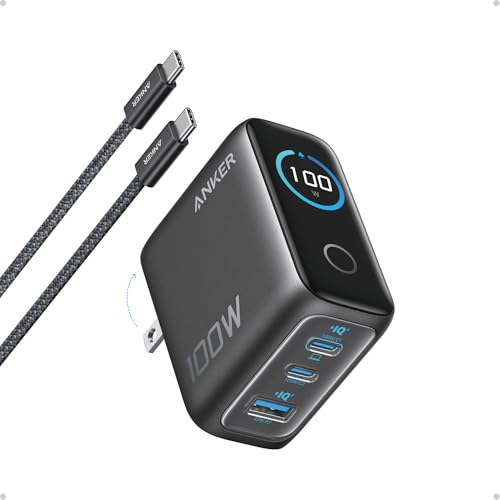
Anker 100W Max USB C Charger — The display-equipped flagship
Most chargers are black boxes in every sense: power goes in, power comes out, and you trust the laptop’s battery icon to tell the story. This Anker flagship breaks that pattern with a smart display and touch control on the charger itself, showing live output so you can watch a MacBook Pro pull its full share or confirm that a phone has negotiated fast charging rather than sipping at a legacy rate. That visibility sounds like a gimmick until the first time a cable underperforms; with the display, the weak link identifies itself in seconds instead of after an hour of slow charging.
The electrical foundation matches the theatre. One hundred watts maximum across three ports covers the standard modern trio of laptop, phone and tablet, and a single device on the primary port can take the full output, which is what a 14-inch MacBook Pro or a performance ultrabook expects. Anker includes a cable in the box, removing the most common hidden bottleneck in a new charging setup. The listing is explicit that this is a charger rather than a power bank, with no battery inside, which keeps the weight where a wall charger should be and the expectations honest.
Who should pay for the screen? Anyone who troubleshoots by feel will love it, and anyone who shares a charger among several machines will finally see the redistribution happen when a second device plugs in. If your charging life is one laptop and total indifference to the numbers, the Prime below folds smaller and asks less of your attention. For the curious and the multi-device desk, Anker’s display-equipped 100W charger turns an invisible process into information you can act on.
- Output: 100W maximum across three ports
- Interface: smart display with touch control showing live charging data
- In the box: USB-C cable included, rated to carry the charger’s output
- Form: ultra-compact GaN body for its power class
- Suits: MacBook Pro and Air, iPad and flagship phones from the major makers
Strengths
- The display exposes weak cables and lazy negotiations instantly, ending slow-charge guesswork.
- Full 100W single-device output satisfies demanding laptops without compromise.
- An included cable means the system is complete the day the box opens.
Trade-offs
- The screen and touch interface add cost that a single-laptop owner may never recoup in value.
- Three devices sharing the budget will each see less than the headline figure.
- Information-rich hardware rewards owners who look at it; ignore the display and it is simply a good charger.
Best for: multi-device desks, shared family charging points and anyone who enjoys seeing the numbers. Not suited for: minimalists who want the smallest possible brick and will never glance at a wattage readout.
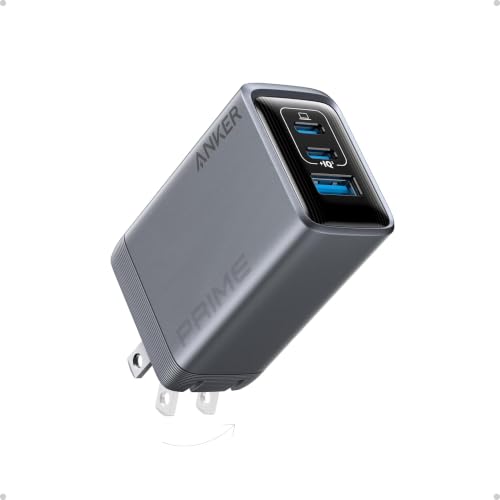
Anker Prime Charger, 100W Max 3-Port Compact Foldable USB C Charger — The pocketable Prime
The Prime line is Anker’s answer to a specific embarrassment: the 100W charger that technically fits a bag but bullies everything else in it. This model folds its prongs flat, keeps the shell compact, and still delivers the full 100W class across three ports, which makes it the charger most likely to be present when a battery warning appears in an airport, a lecture hall or a client’s meeting room. Presence is the first specification of any travel charger, and the Prime is engineered around it.
Electrically it mirrors its display sibling: a single laptop can draw the maximum, and adding a phone and earbuds splits the pool in the usual negotiated way. The compatibility list in its title reads like a modern roll call, MacBook Pro and Air, iPad Pro, recent iPhone generations and Galaxy flagships, which reflects the real virtue of Power Delivery done properly: one brick, no brand anxiety. GaN construction keeps the shell small enough that the charger hangs on a crowded power strip without evicting its neighbours, a courtesy older bricks never learned.
Choose the Prime over the display model when your charging happens in motion and your patience for interfaces is low. It asks nothing, shows nothing and simply works at full class speed, which is precisely the personality a bag charger should have. Desk-bound buyers who charge the same three devices nightly might prefer the display model’s feedback, but for everyone whose laptop lives in a backpack, the foldable Anker Prime 100W is the natural default.
- Output: 100W maximum across three ports
- Prongs: foldable, for flat packing in bags and pouches
- Body: compact GaN shell sized for daily carry
- Compatibility: MacBook Pro and Air, iPad Pro, iPhone and Galaxy flagships named in the listing
- Role: travel-first charger that still holds its own on a desk
Strengths
- Foldable prongs and a small shell make it the most carryable full-power pick here.
- Three ports cover the standard laptop, phone and accessory trio in one unit.
- Anker’s Prime fit and finish feels a class above generic bag chargers.
Trade-offs
- No display, so diagnosing a slow cable still means swapping parts and guessing.
- Cable inclusion varies by listing configuration, so check the box contents before assuming.
- Sharing 100W between two hungry laptops leaves both of them underfed.
Best for: commuters, students and frequent flyers whose charger must live in the bag. Not suited for: a fixed desk feeding two performance laptops at once, which needs a bigger shared budget.

100W USB C Laptop Charger for Dell Computer Charger Type C Gan — The Dell-fleet specialist
Dell sells more business laptops than almost anyone, and its USB-C generation, Precision 5680 workstations, Latitude portables, XPS 14 machines and Inspiron 14 and 16 models, shares one appetite: a proper 100W feed. This third-party GaN adapter is built exclusively for that appetite, in an ultra-slim profile that slides into the laptop sleeve pocket the original Dell brick never could. Specialisation is its argument; it does not pretend to be a universal multi-port hub, and that focus keeps the shape honest.
The slimness deserves emphasis because it changes behaviour. A charger shaped like a phone gets carried; a charger shaped like a house brick gets rationed, borrowed and eventually lost to a desk drawer. For the Latitude-toting consultant or the student whose Inspiron commutes daily, the flat profile is the feature, with the 100W GaN output simply doing what a Dell USB-C machine requires, including running at full performance while charging rather than merely holding the battery level during heavy work.
The honest caveats belong to any third-party adapter: it serves USB-C Dell models, not the older barrel-plug Latitudes, and buyers should match their exact model against the compatibility list rather than assuming every Dell qualifies. Within its stated fleet, though, it solves the two genuine Dell-owner problems, bulk and a lost original adapter, in one flat package. If your working life runs on a USB-C Dell, this slim 100W Dell charger is the spare that will actually travel with you.
- Output: 100W over USB-C for Dell laptops
- Profile: ultra-slim GaN body sized for sleeve pockets
- Named fit: Dell Precision 5680, Latitude, XPS 14, Inspiron 14 and 16 lines
- Role: dedicated single-machine adapter rather than a multi-port hub
- Includes: power cord as part of the adapter package
Strengths
- The flat shape is the most bag-friendly design in this entire guide.
- Full 100W output lets Dell machines run at full performance while charging.
- A focused compatibility list removes guesswork for the models it names.
Trade-offs
- Dell-only focus means a household of mixed brands needs something else as well.
- Barrel-plug Dell models are outside its reach entirely.
- A single-purpose adapter offers no spare ports for a phone at the same outlet.
Best for: Dell USB-C owners replacing a lost brick or adding a travel spare. Not suited for: mixed-brand households wanting one charger to rule every device they own.

Dell 100W Laptop Charger USB C Type C GAN AC Adapter — The official Dell answer
Some buyers, and nearly all IT departments, sleep better when the adapter carries the same logo as the laptop. This is that adapter: Dell’s own DA100PM220, a 100W GaN USB-C unit specified for the XPS 14 9440 and Latitude 9440, in black. First-party status buys more than a logo. It buys certainty that the negotiation between charger and machine has been tested by the people who built both ends, that firmware updates on the laptop will not meet a stranger, and that a warranty conversation never starts with a question about third-party power.
GaN construction matters here too, because Dell’s older 130W-class bricks earned their travel-unfriendly reputation honestly. The DA100PM220 shrinks that heritage into a modern, pocketable adapter while keeping the full 100W delivery its named machines expect. For the XPS 14 9440 owner, that means full-speed charging and full performance headroom from the adapter Dell itself specifies, and for Latitude fleets it means one standard spare that any employee can grab without a compatibility meeting.
Set it beside the slim third-party Dell pick above and the choice becomes philosophical rather than technical. The specialist wins on flatness and value-minded design; the official adapter wins on provenance and fleet standardisation. Neither answer is wrong, and many Dell households will own one of each before long, the official unit at the desk and the slim one in the bag. When provenance is the priority, Dell’s own DA100PM220 is the charger that ends the discussion.
- Output: 100W USB-C Power Delivery
- Model: Dell DA100PM220, first-party adapter
- Named fit: XPS 14 9440 and Latitude 9440, plus Dell USB-C models in its class
- Construction: GaN, in a black finish
- Role: the standardised spare for Dell homes and fleets
Strengths
- First-party testing removes every negotiation doubt for its named machines.
- Fleet buyers can standardise on one adapter with a single support story.
- GaN sizing finally makes the official Dell adapter a genuine travel candidate.
Trade-offs
- Its value concentrates on Dell machines; other brands gain nothing from the badge.
- A single-purpose adapter still leaves phones to find their own port elsewhere.
- Buyers outside the named models should confirm their machine’s wattage class first.
Best for: XPS and Latitude owners, and IT buyers standardising spares across a Dell fleet. Not suited for: a mixed-brand desk that needs one multi-port charger for everything at once.

UGREEN Nexode Air 100W GaN Wall Charger with USB C Cable — The slim traveller with cable
UGREEN’s Nexode Air line exists for a recognisable frustration: chargers that are powerful on paper and pudgy in the pouch. The Air treatment trims the 100W GaN formula into a compact, foldable grey shell that rides in a tech kit without announcing itself, and UGREEN includes a USB-C cable in the box so the kit is complete without a second purchase. For MacBook owners especially, where the laptop’s own bundled adapter is often the bulkiest object in the bag, the Air reads as a deliberate downgrade in size and an upgrade in everything else.
Performance follows the class standard: up to 100W for a single demanding device, with Power Delivery negotiation handling MacBooks, flagship iPhones such as the 18 Pro Max generation named in the listing, and Galaxy phones at their proper rates. The foldable prongs keep the shell smooth against other gear, and the grey finish shrugs off the scuffs that make glossy chargers look tired within a month of travel. It is a charger designed by people who clearly pack bags for a living.
Compared with the Anker Prime above, the Air’s argument is the bundled cable and UGREEN’s particular take on slimness; compared with the display flagship, it trades information for invisibility. Neither trade is a flaw. Travellers building one permanent kit, cable included, pouch-sized, ready for any outlet on the itinerary, will find the Nexode Air 100W the easiest pick on this page to live with.
- Output: 100W GaN fast charging over USB-C
- In the box: USB-C cable included with the charger
- Prongs: foldable, in a compact grey shell
- Protocol: PD Type C fast charging for laptops and phones
- Named fit: MacBook range, flagship iPhone and Galaxy models
Strengths
- A complete kit in one box, charger and cable together, ready for a pouch.
- The Air shell is genuinely slim rather than merely smaller than a brick.
- UGREEN’s GaN tuning keeps a travel charger cool-running at laptop loads.
Trade-offs
- One included cable means a second device still needs a cable of your own.
- No readout, so slow-charge mysteries require old-fashioned part swapping.
- Grey minimalism will not help you spot it in a dark hotel room corner.
Best for: MacBook travellers and one-kit minimalists who want cable and charger sorted together. Not suited for: a desk charging three devices nightly, which outgrows a travel layout quickly.

ELECBRAIN 90W Universal AC Adapter Laptop Charger — The barrel-plug rescuer
Every other pick in this guide speaks USB-C, and a vast, still-working fleet of laptops does not. The ELECBRAIN universal adapter serves that fleet: 90W of output and sixteen interchangeable connector tips covering HP, Dell, Acer, Asus, Toshiba, IBM, Sony, Fujitsu and Gateway notebooks, ultrabooks and Chromebooks. For the owner of a five-year-old machine whose original adapter has frayed, been lost or been borrowed permanently by a relative, this is often the difference between a laptop that works and a laptop that becomes e-waste over a missing brick.
Universal adapters demand one discipline that USB-C never asks for: you must match the tip and confirm the voltage suits your machine before the first charge. The sixteen-tip set exists because barrel dimensions and polarities varied by maker and era, and the correct routine is to find the tip that seats snugly, check the laptop’s original adapter label for its voltage, and only then plug in. Ninety watts covers the great majority of that generation’s machines, which were designed around 65W and 90W adapters long before USB-C existed.
Judge this pick by its own mission and it succeeds completely. It will not fast-charge a modern ultrabook, it offers no ports for phones, and it asks a few minutes of setup care that the USB-C picks never do. In exchange it resurrects machines that every other charger in this guide must refuse. Households keeping a spare older laptop for the kids, a workshop or a guest room will find the ELECBRAIN 90W universal adapter quietly indispensable.
- Output: 90W universal AC adapter
- Connectors: sixteen interchangeable tips in the package
- Named fit: HP, Dell, Acer, Asus, Toshiba, IBM, Sony, Fujitsu and Gateway
- Covers: notebooks, ultrabooks and Chromebooks of the barrel-plug generations
- Setup: tip selection and voltage confirmation required before first use
Strengths
- Sixteen tips cover an entire era of laptops that USB-C chargers cannot touch.
- Ninety watts matches the original adapter class of most machines it serves.
- One adapter can rotate between several older laptops in the same household.
Trade-offs
- Tip and voltage matching is a manual step that careless setup can get wrong.
- No USB-C output, so modern machines in the same house need a second charger.
- It restores older laptops rather than advancing them; performance stays period-correct.
Best for: owners of barrel-plug laptops from the major makers, and households reviving a spare machine. Not suited for: any USB-C laptop, which should choose from the five Power Delivery picks above instead.
How Do These Six Laptop Chargers Compare at a Glance?
| Charger | Output | Ports and extras | Primary fleet | Defining trait |
|---|---|---|---|---|
| Anker 100W Max with display | 100W max | Three ports, smart display, cable included | MacBook, iPad, flagship phones | Live output visibility |
| Anker Prime 100W | 100W max | Three ports, foldable prongs | MacBook, iPad, iPhone, Galaxy | Pocketable travel build |
| Slim 100W Dell GaN adapter | 100W | Single-purpose USB-C, ultra-slim | Dell Precision, Latitude, XPS, Inspiron | Flat sleeve-friendly shape |
| Dell DA100PM220 | 100W | First-party USB-C GaN adapter | XPS 14 9440, Latitude 9440 | Official Dell provenance |
| UGREEN Nexode Air 100W | 100W | Foldable shell, USB-C cable included | MacBook, iPhone, Galaxy | Slim complete travel kit |
| ELECBRAIN 90W Universal | 90W | Sixteen barrel tips | HP, Dell, Acer, Asus, Toshiba and more | Revives pre-USB-C laptops |
The table exposes the guide’s real structure: four universal USB-C answers differentiated by information, size and provenance, one Dell specialist in slim third-party form, and one adapter for the previous connector era. Wattage barely separates the USB-C five, which is why the reviews dwell on shape, cables and certainty instead. Choose by the laptop you own and the bag you carry, and the table becomes a formality.
USB-C Power Delivery or a Barrel Plug: Which World Does Your Laptop Live In?
Look at your laptop’s charging port before anything else. A USB-C port that accepts charging means Power Delivery negotiation handles the rest: charger and laptop agree on voltage, and any pick from the first five here will serve, with 100W covering the demanding end. A round barrel socket means a proprietary world of tip sizes and fixed voltages, where the universal adapter’s sixteen tips and a careful label check are the price of admission. Machines from the transition years sometimes carry both, and those lucky owners should standardise on USB-C for travel and keep the barrel adapter at the desk.
Wattage class is the second question. Most ultrabooks sip between 45W and 65W at their hungriest, performance 14-inch machines want the full 100W to charge quickly while working, and large gaming laptops often exceed what any USB-C charger here offers, expecting their bundled 200W-plus bricks instead. The honest boundary of this guide is that last category: if your laptop shipped with a very large adapter and a barrel plug, treat these picks as travel top-ups at best, and only where the maker supports USB-C charging at reduced performance.
Cables close the triangle. A 100W charger behind a 60W-rated cable is a 60W system, and the cable rarely confesses. The Anker flagship and the UGREEN remove the doubt by including a cable; for the others, use the cable that came with your laptop or a replacement explicitly rated for 100W, and mark it with tape so the drawer gremlins cannot swap it for a phone cable. The display-equipped Anker earns a final mention here, because its readout is the fastest cable audit ever built into a charger.
Why Does a Plugged-In Laptop Still Lose Battery?
Because consumption can outrun supply. A laptop rendering video or gaming may draw more than a modest charger delivers, and the battery makes up the difference even while the cable is connected. The fix is wattage headroom: a 100W charger on a machine that peaks near that figure keeps the battery out of the equation entirely. A second cause is negotiation failure, where an old cable or an odd adapter convinces the laptop to accept a low legacy rate. The battery icon’s time estimate usually exposes this; a machine claiming many hours to full while idling is negotiating badly, and swapping the cable is the first experiment to run.
Heat is the third suspect. Chargers protect themselves by reducing output when hot, and a brick buried under bedding or baking in a sunlit bag pocket will throttle politely and silently. Give any 100W charger air, keep it off soft surfaces during long charges, and the rated performance mostly takes care of itself. These are not exotic failures; they are the ordinary physics of asking a pocket-sized object to feed a workstation.
What Mistakes Do Laptop Owners Make When Buying a Spare Charger?
The commonest is buying by connector shape alone, grabbing any USB-C charger and discovering that a low-wattage phone brick cannot run a performance laptop under load. Second is ignoring the cable, as covered above. Third is assuming a multi-port headline figure applies per port, then wondering why two laptops crawl when sharing. Fourth is forcing a universal adapter’s almost-right tip into a barrel socket, when the correct tip should seat with a firm, wobble-free fit. Fifth is leaving the good charger at home because it is bulky, which is a design failure masquerading as a habit, and the reason the slim picks in this guide exist at all.
How Should You Set Up Charging at a Desk You Use Every Day?
A daily desk rewards permanence. Fix one charger in place, route its cable once, and let the laptop meet the same plug at the same corner every morning; the routine removes the daily archaeological dig through a bag that makes people late and cables frayed. The three-port Anker models suit this best, because a desk charger inevitably adopts the phone and the earbuds case by the end of its first week. Keep the brick ventilated rather than entombed in a cable-management box with no airflow, since a 100W unit working through a long video call generates real heat that needs somewhere to go.
Cable length is the unglamorous desk variable that decides satisfaction. A charger plugged into a floor socket behind a desk needs a longer cable than the stubby lead bundled for travel, and straining a short cable at an angle wears both the plug and the laptop’s port. If your desk layout fights the included cable, buy a longer 100W-rated replacement and keep the short one in the travel pouch, where its brevity becomes a virtue. Two chargers, one fixed and one travelling, is the arrangement most full-time laptop workers eventually arrive at, and this guide conveniently contains both personalities.
There is also a battery-health argument for a desk setup done well. A machine that lives plugged in benefits from its maker’s battery-care settings, which cap charge or learn your schedule, and a stable, correctly rated charger lets those systems behave as designed. The charger cannot manage your battery’s long-term health by itself, but an underpowered or erratic one can certainly undermine the software trying to.
What Changes When You Charge a Laptop Abroad?
Less than travellers fear, provided the charger is a modern switching unit. The GaN picks in this guide accept the wide input-voltage ranges that make them effectively world chargers; what changes abroad is the shape of the wall socket, not the electricity your laptop receives. A simple plug adapter, the passive kind that changes geometry without touching voltage, is all most trips require. The trap is the opposite device: a cheap voltage converter, unnecessary for these chargers and capable of feeding them power they never asked for in a waveform they dislike.
The universal ELECBRAIN adapter follows the same logic for older machines, but check its input range on the label before a long trip rather than assuming. Hotels add a practical wrinkle: sockets are scarce, often hidden behind furniture, and occasionally switched with the room lights. A three-port charger earns its keep in that environment by turning one grudging socket into a full charging station for laptop, phone and watch, which is another reason the multi-port picks dominate the travel end of this list.
Airport charging deserves a sentence of caution. Public USB ports in terminals are best treated as data-hostile and power-mediocre; your own charger in a wall socket is faster, safer for your devices’ data, and kinder to your schedule. The foldable, compact picks here exist so that carrying your own power never feels like a burden worth gambling against.
How Do Students, Creators and Gamers Choose Differently?
Students should buy for the bag and the budget of attention: a charger that folds flat, survives being sat on inside a backpack, and charges the phone from the same brick during a library session. The Prime and the Nexode Air speak directly to that life. Creators should buy for sustained wattage, because a laptop exporting video for an hour is the hardest charging workload in ordinary use; the 100W flagships hold their output through that work, and the display model lets an editor watch the draw during a render to confirm the machine is fed rather than borrowing from its battery.
Gamers sit at the honest edge of this guide. A thin-and-light gaming laptop that supports USB-C charging can travel on a 100W pick at reduced performance, which is a fair trade for a weekend away. A full-size gaming rig with a barrel plug and a bundled brick the size of a paperback book belongs to another category entirely, and no charger here pretends otherwise. Knowing which side of that line your machine occupies is the whole decision, and the maker’s own specification page answers it in one line.
Remote workers splitting time between home and a company office should consider the two-charger pattern seriously: identical capability in both places, no nightly packing ritual, and no Monday-morning discovery that the charger spent the weekend at the other desk. The Dell pair in this guide serves that pattern neatly for corporate fleets, one official unit per location, while the Anker pair does the same for mixed-brand households.
How Fast Should a Laptop Charge, and When Is Slow Actually a Problem?
A healthy modern ultrabook on a correctly matched 100W charger typically recovers a large share of its battery in the first hour, then slows deliberately as the cells approach full, because lithium charging tapers to protect the battery. That taper fools many owners into diagnosing a fault at exactly the moment the system is behaving best. Judge speed by the first half of the charge, not the last stretch: a machine that climbs briskly from low to past halfway in well under an hour is negotiating properly, whatever it does near the top.
Slow becomes a genuine problem in three recognisable situations. The first is the plugged-in drain covered earlier, where workload outruns a small charger. The second is a machine that charges at a crawl even while asleep, which points at a cable or negotiation failure rather than demand. The third is a charger that starts fast and fades within minutes, the signature of heat throttling in a confined space. Each has a different remedy, which is why the display-equipped pick in this guide is more than a toy: it separates the three stories at a glance, showing whether the limit is the draw, the negotiation or the brick itself giving up.
There is one more expectation to set honestly. A bigger charger does not make a laptop charge faster than its design allows. The 100W picks will not hurry a machine capped at 65W, and nothing here will match the proprietary high-wattage bricks bundled with large gaming laptops. What the right charger guarantees is that your laptop reaches its own ceiling, every time, without borrowing from the battery to do ordinary work.
What Should You Check in the Five Minutes Before Ordering?
First, the port: USB-C or barrel, settled by looking at the machine rather than remembering the advertisement. Second, the wattage class printed on your original adapter or the maker’s specification page, which tells you whether 100W is headroom or barely enough. Third, your cable inventory, because the order that forgets the cable bottleneck repeats the most common disappointment in this entire category. Fourth, your second location: if this charger is a spare for a bag or an office, confirm its shape suits that life, foldable and flat for travel, multi-port for a desk.
Fifth, for universal-adapter buyers, the tip discipline: locate your machine in the compatibility list, identify its tip, and plan the two minutes of voltage checking as part of the purchase rather than an optional extra. Sixth, and most often skipped, decide what happens to the old charger. A working bundled brick becomes the fixed desk unit, a frayed one gets recycled rather than trusted, and a lost one explains why you are here. Five honest minutes against that checklist will land you on the right pick in this guide more reliably than an hour of comparing headline numbers that mostly agree with each other anyway.
Why Do Two Chargers With the Same Wattage Behave So Differently?
Because wattage is a ceiling, not a personality. Two 100W chargers can differ in how they divide power when a second device arrives, how gracefully they handle heat over a three-hour charge, how their negotiation firmware treats an unusual laptop, and how honestly their rating survives a warm room. The established makers in this guide, Anker, Dell and UGREEN among them, have reputations built on the unglamorous parts: stable output, sensible port-sharing logic and shells that do not cook themselves. That is also why this guide resists the temptation of anonymous ultra-high-wattage bargains, whose ceilings tend to be theoretical in exactly the situations where a laptop needs the real thing.
Port-sharing logic deserves a closer look, because it is where daily satisfaction is decided. A well-mannered three-port charger gives the laptop the dominant share and lets the phone take what remains, adjusting smoothly when the phone unplugs. A clumsy one renegotiates everything at every change, blinking the laptop’s charging state and occasionally dropping a device to a legacy trickle. You cannot read this behaviour off a spec sheet; you infer it from the maker’s track record, which is precisely the kind of judgement a shortlist exists to make on your behalf.
Longevity is the final invisible variable. A charger is a small power supply that heats and cools daily for years, and its capacitors age with every cycle. Buying from a maker who will still exist, and whose safety certifications are genuine, is not brand snobbery; it is the rational response to a device you will trust unattended in hotel rooms and offices for half a decade. Every pick in this guide clears that bar, which is why the list is shorter than the marketplace.
One Charger or Two? The Spare-Charger Strategy That Actually Works
Most laptop owners buy a second charger only after the original fails or vanishes, and then they buy it in a hurry, at an airport, at the worst possible price-to-quality ratio. The calmer strategy is to choose the spare while the original still works, assign each unit a territory, and never move either again. The bundled brick stays at the main desk, where its bulk does no harm. The pick from this guide, chosen for flatness or folding prongs, takes permanent residence in the bag. The daily packing ritual shrinks to the laptop itself, and the charger question simply leaves your life.
Fleets formalise the same idea. An office that standardises on the official Dell adapter for every Latitude seat can keep a drawer of identical spares, and any employee with a failure is back at work in minutes rather than after a procurement cycle. Households can borrow the logic at smaller scale: one multi-port Anker at the family charging shelf, one slim unit per working adult’s bag, and the ELECBRAIN in the cupboard keeping the old spare laptop alive for guests and homework emergencies. None of this requires extravagance; it requires deciding once, deliberately, instead of improvising repeatedly.
The strategy also clarifies what to do when a charger dies. Replace like with like inside the system you have built, rather than seizing the moment to buy a different shape that reopens every habit. Chargers are infrastructure, and infrastructure rewards boring consistency. The six picks here were chosen to fill those fixed roles for years, which is a longer promise than any single trip or semester ever asks of them.
Final Recommendation
Start with your port, then your wattage class, then your bag. USB-C owners who want insight choose the Anker display flagship; travellers choose between the foldable Prime and the cable-included Nexode Air by pouch preference. Dell households split by philosophy, the slim specialist for the sleeve and the official DA100PM220 for the desk, while barrel-plug loyalists keep the ELECBRAIN’s sixteen tips within reach. Buy the charger that matches the machine on your desk today, and a laptop that once died mid-presentation with its cable attached will instead finish the meeting, the export and the journey home with charge to spare and no drama left to narrate.
Frequently Asked Questions
Will a 100W charger damage a laptop that only needs 65W?
No. Power Delivery is a negotiation, and the laptop requests only what it is designed to accept. A 100W charger feeding a 65W machine simply runs with headroom, which also keeps it cooler during long sessions.
Can one of these chargers run two laptops at once?
The three-port Anker models will charge two modest ultrabooks acceptably, but two performance machines will share 100W and both will slow down. A desk that regularly feeds two demanding laptops deserves two chargers, one per machine.
Why does my laptop charge slowly with a new 100W charger?
The cable is the usual culprit, followed by heat throttling and a second device quietly sharing the budget. Try the cable supplied with the charger or the laptop, give the brick ventilation, and unplug everything else for a clean test.
Does GaN actually matter, or is it marketing?
Gallium nitride switching runs cooler and smaller than silicon at the same power, which is why every 100W pick here fits a pocket that older 100W bricks could not. The benefit you feel is size and heat, not a different quality of electricity.
How do I use a universal adapter safely?
Find the tip that seats firmly without force, read your original adapter’s voltage label, confirm the universal unit matches, and test with the laptop off for the first minutes. A tip that wobbles or a voltage that disagrees means stop and recheck, not plug and hope.
Should I replace a working bundled charger with one of these?
Only if the bundled brick fails the bag test or you need a second location covered. The strongest reason to buy here is a spare that travels, a desk unit that stays, or a rescue for a machine whose original adapter is gone.
Is it safe to leave a laptop plugged in all week?
With a correctly rated charger and the laptop maker’s battery-care settings enabled, yes, this is how most office machines live. Modern battery management limits the harm of sitting at full charge, and the chargers here deliver clean, negotiated power rather than forcing current into the machine.
Can I charge a laptop from a phone charger in an emergency?
Usually, slowly. A USB-C phone charger will often keep a sleeping ultrabook alive or add charge overnight, but it will not run a working performance laptop. Treat it as a lifeboat rather than a plan, and let it convince you to carry one of the 100W picks instead.
Do I need a special charger for a Chromebook?
Most modern Chromebooks charge over USB-C at modest wattages, so any 100W pick here covers them with enormous headroom, and the same charger can usually serve the family phone as well. Older Chromebooks with barrel plugs belong to the ELECBRAIN’s sixteen-tip world instead; check the port before assuming either way, because the Chromebook label spans both eras.
Why is my charger hot to the touch?
Converting wall power at 100W generates heat, and a compact GaN shell has little surface to shed it, so warm is normal and expected during a fast charge. Too hot to hold comfortably, a smell of hot electronics, or heat that arrives within a minute at light load are different stories; unplug, let it cool, and retire a unit that repeats the behaviour.
What does a blinking charging light usually mean?
On many models it signals a negotiation or adapter-identification problem: the laptop sees power but not the handshake it expects. Reseat both ends, try the cable that came with the charger, and if the blinking persists with an official adapter, let the maker’s support conversation start from that symptom.
Should a spare charger live in the car?
A wall charger belongs where walls are; cars need a proper vehicle charger designed for a 12-volt socket and its voltage swings. Keeping one of these GaN picks in a glovebox invites disappointment at the exact moment of need, so treat the car as its own charging problem with its own hardware, and let the laptop chargers in this guide serve desks, bags and hotel rooms where their design assumptions hold.
Can a laptop charger also charge my tablet and earbuds?
Yes, and the multi-port picks here are designed for exactly that household pattern. USB-C negotiation scales down as gracefully as it scales up, so a tablet takes its modest share and earbuds sip almost nothing. The only discipline required is remembering that everything plugged in shares one budget, so the laptop’s fastest charging happens when it has the charger to itself.
How long should a good laptop charger last?
Years of daily service is the reasonable expectation from the established makers gathered here, with cables usually wearing out before the electronics do. Treat the cable as the consumable it is, replace it when the jacket frays or the plug loosens, and the brick itself will typically outlive the laptop it was bought for and move on to serve its successor.
Related Guides
Laptop power is one corner of a wider charging life, and the same negotiation logic follows you out the door in best travel chargers for phones, where adapters meet foreign sockets as well as hungry batteries. Back home, the multi-device tangle is better handled by best desktop chargers than by borrowing the laptop brick for every gadget on the desk. And when the itinerary leaves sockets behind altogether, best camping solar panel phone chargers shows how the top-up habit survives on sunlight alone.



[…] half of a tournament weekend, phones and laptops in the truck and the hotel, is served by best laptop chargers for the machine that edits the day’s footage. And the pocket companion to every launch […]