What's inside
- Key Takeaways
- Quick Picks
- How We Chose These Picks
- The Six Engines Side by Side
- What Do Pages-Per-Minute Figures Really Tell a Laser Buyer?
- When Does Wired Ethernet Beat Wireless on a Shared Printer?
- How Should Toner Be Budgeted Across a Year of Two-Sided Printing?
- How Does a Duplex Unit Change Life Inside a Laser Engine?
- Which Laser Belongs on Which Desk? A Scale Tour
- Missteps That Undermine an Otherwise Good Laser Purchase
- How Do Shared Lasers Survive Multi-User Households and Offices?
- What Should Happen in the First Fortnight of Ownership?
- Final Recommendation
- Frequently Asked Questions
- Related Guides
As an Amazon Associate I earn from qualifying purchases. This post may contain affiliate links at no extra cost to you.
widgetverdict.com is reader-supported. When you buy through links on our site, we may earn an affiliate commission.
There is a particular satisfaction in a printer that does one thing relentlessly well, and the best duplex laser printers are built around that idea. Every machine in this guide is a laser, every one prints on both sides of the page automatically, and every one is print-only — no scanner lid, no copier glass, no fax circuitry competing for space or budget. What remains is the purest form of the category: toner, paper, speed, and a duplex unit that flips each sheet without asking anyone to supervise.
The field divides along two lines. Three Brother monochrome models cover the black-and-white spectrum from a compact household machine through a business unit with Gigabit Ethernet to a high-capacity model whose title states a 520-sheet tray and a 100-sheet multipurpose feed. Canon answers with a 30 PPM monochrome printer sized for homes and a 26 PPM color model for documents that need more than black. HP closes the set with a color LaserJet Pro aimed at home offices. Speeds appear only where a listing title states them — Canon supplies figures for both of its machines, while the Brother and HP titles emphasize capacity and connectivity instead.
Why insist on laser at all, when inkjets print two-sided pages too? Because the duplex path is where laser engineering feels most at home. A laser page emerges from the fuser dry and stable, so the return journey through the flip mechanism changes nothing about its surface; the second side prints onto a sheet in exactly the condition the first side did. Text stays needle-sharp, pages stack flat, and toner waits patiently through idle weeks that would punish ink nozzles. For document households and small offices — the natural audience for this class — those traits outweigh the absence of photo printing by a wide margin.
Print-only design carries a second, quieter advantage: shared placement. A machine without a lid that must open can live on a shelf, inside a cabinet with ventilation, or at the end of a credenza, serving every computer in the building over the network. Several picks here add wired Gigabit Ethernet to wireless, which suits that utility role perfectly — plug the printer into the network backbone once, and its address never wanders the way a purely wireless device occasionally can.
No static prices and no fixed ratings appear in this guide. Positioning is done by configuration instead: tray sizes, stated speeds, connectivity, and color capability, all drawn from listing titles. Where a title withholds a figure, the spec box records that honestly rather than borrowing a number from a sibling model — a discipline worth insisting on, because laser lines are notorious for near-identical names covering meaningfully different hardware.
Key Takeaways
- Six lasers, six print-only cabinets: this class trades scanning and copying for focus, placement freedom, and mechanical simplicity.
- The Brother HL-6210DW states the largest paper story here — a 520-sheet tray plus a 100-sheet multipurpose feed.
- Canon publishes the speeds: 30 PPM for the monochrome LBP122dw and 26 PPM for the color LBP646Cdw.
- Color arrives through the Canon LBP646Cdw and the HP Color LaserJet Pro 4201dn; the other four picks are monochrome.
- Gigabit Ethernet appears in the titles of both business-leaning Brother models, the HL-6210DW and HL-L5210DW, giving shared offices a wired anchor that wireless alone cannot always guarantee across busy buildings and thick walls.
- HL-L2460DW anchors the class as its most accessible entry, a compact mono laser with wireless and mobile printing.
A word about longevity before the picks begin, because laser buyers keep their machines longer than almost any other technology purchasers. A duplex laser installed this year will plausibly still be printing when the computers around it have been replaced twice, and that horizon changes what matters: driver support, network standards that will not vanish, and a paper path built for repetition. The six machines below were chosen with that decade in view. None of them chases a fashionable extra; all of them concentrate on the durable core of printing, which is exactly what a ten-year appliance should do. When a specification in a title sounds unglamorous — a tray size, a wired port, a stated pace — remember that unglamorous is what the tenth year feels like, and it feels wonderful.
Quick Picks
| Pick | Badge | Why it is here |
|---|---|---|
| Brother HL-L2460DW | Class Entry Point | The compact monochrome laser that introduces most households to automatic two-sided printing. |
| Brother HL-6210DW | Capacity Leader | A 520-sheet tray and 100-sheet multipurpose feed for teams that print by the hundreds. |
| Brother HL-L5210DW | Business Network Pick | Wireless plus Gigabit Ethernet in a business monochrome laser built for shared duty. |
| Canon imageCLASS LBP122dw | Home Laser Pace | A stated 30 PPM from a print-only Canon sized for home desks and studies. |
| Canon Color imageCLASS LBP646Cdw | Color With a Number | Color laser duplex at a stated 26 PPM in a clean white print-only cabinet. |
| HP Color LaserJet Pro 4201dn | Office Color Standard | HP’s single-function color laser for home offices printing polished documents. |
How We Chose These Picks
The entry rules for this guide were stricter than a general duplex roundup. A candidate needed laser technology, automatic duplex named in its listing title, and a print-only design — multifunction machines were deliberately excluded so the comparison could focus on the printing engine itself. That filter produces a purer contest: with scanning and copying off the table, differences in tray capacity, network hardware, stated speed, and color capability carry the entire decision.
Within the filter, we arranged the six as a ladder rather than a heap. Two color machines sit at one end for document color; four monochrome machines divide by scale — home, business-shared, and high-capacity. Every specification in the spec boxes comes from the corresponding listing title. The Brother HL-6210DW’s tray figures, the Canon pair’s speeds, and the Ethernet mentions are all title-stated; anything a title leaves silent is recorded as not stated, even when a sibling model in the same family is known to differ.
We also weighed the ownership texture of laser printing: how toner behaves during idle stretches, how a duplex unit treats a long run at page eighty, and how a shared printer should connect to a network it may serve for a decade. Those considerations rarely headline a listing, yet they decide whether a machine is still pleasing its owner in year five.
One more filter deserves disclosure, because it shaped the bench: every machine here had to earn its place without leaning on a scanner to justify its price. In mixed guides, a mediocre printer can hide behind a good feeder; in this one there is nowhere to hide. If a pick appears below, its engine, its paper handling, or its network story justified the inclusion on printing merits alone, and the two color machines cleared the same bar with the additional burden of proving their color belongs in documents rather than in photographs.
Readers comparing this bench against general duplex roundups will notice the absence of inkjet entirely, and that absence is the thesis. Laser duplex is a distinct discipline with distinct economics, and it deserves a comparison uncontaminated by technologies playing by different rules.

Brother HL-L2460DW — Class Entry Point
Every category has a machine that serves as its front door, and in the duplex laser class that role belongs to this compact Brother. Read it as the class in miniature: monochrome laser output, automatic duplex, wireless networking, and mobile printing inside a cabinet small enough for a shelf. Households arriving from inkjet — tired of cartridges drying between school terms — usually land here first, and the landing is gentle because the machine asks so little of its owner.
The class-overview angle matters. What this Brother teaches a new owner is the laser rhythm: pages arrive dry, two-sided documents stack without curl, and the printer can sit untouched for a month and still produce a perfect first page when the tax forms come due. Those are not features of this model alone; they are the inheritance of the technology, delivered here without the size or the shared-office hardware of its bigger siblings further down this page. Buying the entry model of a sound class is a respectable strategy, and this is the entry model at its most coherent.
Because the title explicitly lists mobile printing, households can count on sending jobs straight from a phone. The documents of domestic life increasingly begin on phones — a landlord’s form, a coach’s schedule, a receipt that must become paper — and a printer that accepts them directly, two-sided, without a desktop intermediary earns its counter space weekly. Alexa compatibility and a Refresh trial also appear in the title; the trial is best understood as an optional toner-delivery introduction, not a core virtue.
Growth is the honest caveat. A household whose volume swells — a home business, a student entering a thesis year — may eventually covet the tray capacity of the HL-6210DW or the wired networking of the HL-L5210DW. Nothing about this machine prevents that future; it simply serves the present one economically. Check price on Amazon when comparing it against its larger brothers, because the family’s real question is scale, not quality.
Placement flexibility deserves the final word for this pick. Print-only and compact means the hallway shelf, the study corner, and the top of a filing cabinet are all legitimate homes, and wireless networking means the printer’s neighbors need not include a computer at all. Few machines in any category adapt to a house as politely as a small laser does.
One more angle on this entry model deserves air, because it decides many real purchases: noise and presence. A compact laser at home prints in short, purposeful bursts and then returns to silence, asking for no warm-up ritual and no cleaning performance before the first page. In a flat or a shared house that temperament matters. The machine behaves like a good appliance — invisible until summoned, finished before it can annoy — and its duplex habit works silently inside that temperament, halving paper without ever announcing the fact.
- Print technology: Laser, monochrome output
- Functions: Printing only
- Two-sided printing: Automatic duplex, per listing title
- Connections: Wireless, phone printing, Alexa voice support
- Speed figure: None printed in the title
- Tray figure: None printed in the title
Strengths
- The gentlest introduction to laser duplex ownership in this entire guide.
- Compact cabinet fits shelves that multifunction machines cannot use.
- Toner patience suits households whose printing comes in seasonal bursts.
Trade-offs
- Monochrome only, with no path to color documents at home.
- No wired Ethernet named in the title for fixed network installations.
- Heavy-volume households may outgrow its unstated paper capacity.
Best for: households switching from inkjet to their first laser.
Not suited for: shared workgroups printing hundreds of pages weekly.

Brother HL-6210DW — Capacity Leader
Paper capacity is the least glamorous specification in printing and the one heavy users feel most. The HL-6210DW’s title leads with it: a 520-sheet tray, a 100-sheet multipurpose feed, Gigabit Ethernet, and dual-band wireless on a monochrome duplex laser. A 520-sheet tray swallows an entire ream at once, which transforms the printing week — the tray stops being a consumable you manage and becomes infrastructure you forget, refilled on a rhythm measured in weeks rather than days.
The multipurpose feed deserves equal attention. A 100-sheet auxiliary path handles the odd media of office life — envelopes, labels, letterhead, heavier stock — without emptying the main tray or disturbing its settings. In a duplex workflow this division of labor is precious: plain paper flows two-sided from the big tray all day, while special media enters through the feed for its single-sided moments, and neither stream interrupts the other. Small offices that mail, label, and file will recognize how much friction that removes.
Dual connectivity completes the workgroup profile. Gigabit Ethernet anchors the printer to the office network with a fixed, dependable address; dual-band wireless serves the laptops and visitors that arrive without cables. Either path delivers the same duplex engine, so the machine can migrate from wired to wireless as an office rearranges itself — a flexibility that matters over a printer’s long service life.
Scale is the consideration on the other side. This is a machine dimensioned for volume, and a quiet household printing a dozen pages a week would be parking a bus in a bicycle space. Its monochrome output also draws the usual line: color, when needed, must come from elsewhere. For the team whose month includes multi-hundred-page two-sided runs, though, capacity is not a luxury — it is the difference between a printer and a printing system.
Think of the duty pattern honestly before choosing it. The HL-6210DW rewards organizations: the shared printer at the end of the hall, the back-office machine behind the invoices, the workgroup engine whose tray empties because the whole team’s work passed through it. Judged on that stage, its title reads like a checklist completed by someone who has managed an office printer before.
Capacity also changes who notices the printer. In offices running smaller trays, the printer becomes a shared grievance precisely at deadline moments, when an empty tray halts a two-sided run halfway and the missing pages surface in the meeting. A ream-deep tray moves those moments off the calendar. The multipurpose feed adds a second social benefit: the colleague with envelopes no longer unloads everyone’s plain paper to run a mailing, so the main supply stays loaded, aligned, and dedicated to the duplex stream.
- Print technology: Monochrome laser
- Functions: Print only
- Duplex: Automatic, stated in listing title
- Main tray: 520-sheet capacity, stated in listing title
- Multipurpose feed: 100-sheet, stated in listing title
- Connectivity: Gigabit Ethernet and dual-band wireless
Strengths
- A full-ream tray turns paper refills into a rare, scheduled event.
- The 100-sheet multipurpose feed keeps special media out of the main tray’s way.
- Wired and dual-band wireless networking cover fixed and flexible offices alike.
Trade-offs
- Dimensioned for volume that a light household will never supply.
- Strictly monochrome output across every job.
- No mobile-printing or voice features named in its title.
Best for: workgroups and back offices with heavy two-sided volume.
Not suited for: quiet households printing a dozen pages a week.

Brother HL-L5210DW — Business Network Pick
Between the compact household Brother and the capacity flagship sits this business model, and its title tells a connectivity story: duplex, wireless, Gigabit Ethernet, mobile printing, and Alexa compatibility on a business monochrome laser. That combination describes the printer as a network citizen first. It can anchor itself to the office backbone by cable, accept jobs from phones and laptops over the air, and still respond to a voice command — a range of doors into the same engine that suits genuinely mixed workplaces.
The business designation is worth interpreting rather than merely repeating. In Brother’s line it signals a machine built for shared duty cycles and administrative sanity: the printer that an office manager points every new laptop toward, confident the connection story will be short. Gigabit Ethernet is the backbone of that confidence. Wireless is convenient until a router changes, a wall intervenes, or an office grows; a wired printer simply remains where the network left it, year after year, which is why experienced IT volunteers always ask about the Ethernet port first.
Duplex on a shared business printer carries an organizational benefit beyond paper savings. Two-sided becomes the office default not by policy memo but by architecture — the machine everyone uses flips pages automatically, so reports, agendas, and internal drafts emerge two-sided unless someone deliberately overrides the setting. Paper consumption drops without a single meeting about paper consumption. Multiply that quiet default across a year of shared printing and the duplex unit has justified itself entirely.
What this model does not claim, its title leaves unstated: no speed figure and no tray capacity are given, so neither is asserted here. Buyers for whom those numbers are decisive should compare the HL-6210DW’s stated capacity above or Canon’s stated speeds below. The HL-L5210DW’s argument rests on connection breadth and business positioning, and for a shared office that argument is often the deciding one.
Mobile printing and Alexa support, sometimes dismissed as garnish, serve a real purpose in hybrid workplaces: the colleague printing from a phone in the corridor, the assistant starting a job hands-full from the storeroom. A business printer’s job is to be reachable by everyone it serves, through whatever device they happen to be holding.
Administration, briefly, is where this business model quietly wins its keep. A printer that appears on the network by cable, by both wireless bands’ neighborhood, and by phone tends to generate almost no help requests, because every user’s preferred route already works. Office managers measure printers in interruptions per month rather than pages per minute, and by that ledger a broadly reachable monochrome laser is a bargain at almost any specification. Its duplex default then compounds the calm by halving the paper orders nobody enjoys placing.
- Print technology: Monochrome laser
- Functions: Print only
- Duplex: Automatic, stated in listing title
- Connectivity: Wireless and Gigabit Ethernet
- Additional access: Mobile printing, Alexa compatible
- Print speed: Not stated in listing title
Strengths
- The broadest connection menu in this guide: cable, wireless, mobile, and voice.
- Business positioning suits shared duty and simple administration.
- Automatic duplex makes two-sided the office default without policy effort.
Trade-offs
- No speed or tray figures stated in the title to plan volume around.
- Monochrome output only, like both of its Brother siblings here.
- Network talents are wasted on a single-desk, single-user setup.
Best for: small offices sharing one monochrome printer across many devices.
Not suited for: solo desks with no network to share across.

Canon imageCLASS LBP122dw — Home Laser Pace
Canon’s smallest entry here arrives with something the Brother titles withhold: a number. The LBP122dw is a wireless monochrome duplex laser, print only, mobile ready, at 30 PPM for the home, per its title. Thirty pages a minute reframes what a home laser feels like. The ten-page document a child needs before school is a twenty-second errand; the two-sided contract packet finishes before the coffee maker does. Speed at home is rarely about volume — it is about impatience, and 30 PPM is where impatience goes quiet.
The home positioning in the title also signals scale honestly. This is not a workgroup engine pretending to be furniture; it is a household machine whose duplex unit exists for the family’s real two-sided work — school packets, household finance printouts, the occasional novella of a rental agreement. Print-only design keeps it shelf-friendly in the same way as the compact Brother, and the comparison between those two is the natural duel of this guide’s monochrome home tier: Brother’s ecosystem and Alexa note against Canon’s stated pace and mobile-ready simplicity.
Mobile ready, in Canon’s phrasing, acknowledges where home documents live now. Phones and tablets originate most household printing, and a laser that accepts those jobs without ceremony — and flips them two-sided by default — removes the last excuse for the wasteful single-sided stack. Wireless networking, stated plainly in the title, places the machine wherever the household’s paper lives rather than tethering it to a desk.
Restraint defines the limits. No Ethernet is named, so fixed network installations should look at the Brother business models; no tray capacity is stated, so volume planners should treat this as a home-scale supply rhythm. Color, as with every monochrome pick here, is simply absent. Within the home brief, however, the LBP122dw makes the cleanest speed claim of any pick in this guide, and home buyers who value a stated number over an implied one will appreciate Canon for supplying it.
There is also a simplicity dividend worth naming. A print-only home laser has one job, one supply, and one behavior to learn, which makes it the easiest printer in a house for guests, grandparents, and children to use without instruction. The duplex default does the conservation work silently in the background of family life.
Homes with several school-age children will feel this Canon’s pace differently from offices. The evening pile — three children’s worksheets, a permission form, a reading packet — arrives as one tangled queue of small jobs, and an engine that clears each in seconds keeps the queue from becoming the evening’s entertainment. Thirty stated pages per minute is headroom the family will rarely use at full stretch, yet headroom is exactly what a queue of impatient small jobs consumes.
- Print technology: Monochrome laser
- Functions: Print only
- Duplex: Automatic, stated in listing title
- Print speed: 30 PPM, stated in listing title
- Connectivity: Wireless, mobile ready
- Paper capacity: Not stated in listing title
Strengths
- A stated 30 PPM gives home buyers a real pace figure to plan around.
- Print-only compactness keeps placement and learning effortless.
- Mobile-ready design matches where household documents originate.
Trade-offs
- No wired Ethernet named in the title.
- Home-scale positioning, not a workgroup duty machine.
- Black-and-white output only, with no color path.
Best for: homes wanting laser pace without office scale.
Not suited for: wired office networks or color document work.
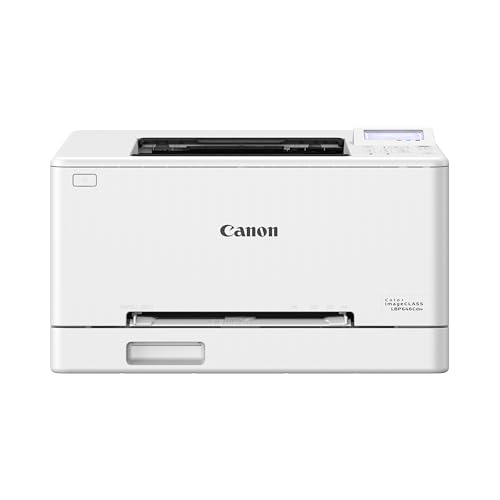
Canon Color imageCLASS LBP646Cdw — Color With a Number
Color changes the duplex conversation, because a two-sided color document is the format of finished business: the proposal, the curriculum packet, the client report. Canon’s LBP646Cdw is a wireless color laser with duplex at a stated 26 PPM, print only, finished in white. That speed figure deserves context — color laser engines commonly run a touch slower than their monochrome siblings, and 26 PPM keeps two-sided color firmly in the realm of the practical rather than the ceremonial.
The white cabinet is more than cosmetics. Color lasers often live in visible places — reception corners, studio desks, the home office that doubles as a guest room — and a light finish suits those rooms better than the traditional black slab. Print-only design keeps the footprint honest: no scanner lid demanding clearance, just a color engine that can sit where documents are actually produced.
Consider what color duplex does to ordinary paperwork. A two-sided color report reads as a designed object; charts survive the flip without show-through drama because toner sits on the surface rather than soaking in; handouts can be handled immediately, stacked, and stapled while the meeting that needs them is still gathering. For tutors, consultants, real-estate professionals, and anyone whose documents persuade for a living, that finish is not decoration — it is part of the argument the document makes.
Four cartridges are the standing cost of color toner, and the economics reward owners whose color is purposeful rather than habitual. Drafts can route to a monochrome sibling or to this machine’s own black cartridge discipline, reserving color pages for audiences that matter. Photographs remain outside the brief: color laser serves documents and graphics, and the title makes no photo claim, so none is made here.
Connectivity in the title is wireless alone, which suits its likely homes — the studio, the spare-room office, the small practice — where one network serves everything and cable runs are nobody’s hobby. Check price on Amazon alongside the HP color model below; the duel between them is stated Canon speed against HP’s home-office positioning, and either outcome is defensible.
Small practices should notice how this Canon changes client-facing paper. A two-sided color estimate, printed on the spot and handed over still warm from the fuser, carries a credibility that emailed PDFs and single-sided drafts do not. The white cabinet supports that theater by looking like studio equipment rather than back-office machinery. None of this appears in a specification list, and all of it influences whether a one-person firm looks established or improvised.
- Print technology: Color laser
- Functions: Print only
- Duplex: Automatic, stated in listing title
- Print speed: 26 PPM, stated in listing title
- Connectivity: Wireless
- Finish: White cabinet, stated in listing title
Strengths
- Stated 26 PPM keeps two-sided color documents on a practical schedule.
- White print-only cabinet suits visible desks and studio corners.
- Toner finish lets color pages be stacked and stapled immediately.
Trade-offs
- Four toner cartridges to keep in the supply drawer.
- No wired networking named in the title.
- Document color, not photographic color, despite the palette.
Best for: consultants, tutors, and small practices printing color documents.
Not suited for: photo work or monochrome-only volume printing.

HP Color LaserJet Pro 4201dn — Office Color Standard
HP’s entry closes the set with the establishment choice: a Color LaserJet Pro whose title repeats its essentials — color laser, wireless, duplex, printer only, single function, aimed at the home office. The repetition itself is informative. HP is telling buyers, twice, that this machine prints and only prints, and that its engineering budget went entirely into that act. For home offices burned by multifunction machines whose scanners failed first, that purity reads as a promise.
The LaserJet Pro name carries expectations of administrative calm: a printer that joins the network, accepts jobs from every device in the house-office, and produces color documents with the fused, handle-immediately finish that makes toner the medium of business paper. Duplex completes the professional effect — the two-sided color document is the calling card of a one-person firm that intends to look established, and this machine produces it without a manual flip or a prayer about orientation.
Positioning it against the Canon color model clarifies both. Canon states a speed; HP states an audience. Neither title gives the other’s headline figure, so the honest comparison is philosophical: buyers who plan around numbers will lean Canon, buyers who plan around ecosystem and office fit will lean HP, and both will receive a wireless color laser that flips its own pages. That is a healthy market, and this guide declines to fake a precision the titles do not support.
Single-function discipline also shapes the desk. Without scanning, the top of the machine is a landing surface rather than a lid; without a feeder, nothing towers. The 4201dn can occupy the printer shelf of a home office that already owns its scanning answer — a phone, a separate scanner, or simply no paper originals worth digitizing. Many mature home offices discover that is exactly their situation.
Color economics apply here as everywhere in this class: four cartridges, purposeful color, monochrome discipline for drafts. Owners who respect that rhythm find a color laser’s running story entirely reasonable; owners who print full-color pages by the hundred should do their arithmetic with open eyes and check price on Amazon before committing the supply shelf.
There is a maturity argument for the HP that suits its home-office brief. Offices that have owned printers for years eventually stop shopping for novelty and start shopping for predictability: a known driver story, a known cartridge shelf, a known behavior when a two-sided job runs long. The LaserJet Pro badge speaks directly to that buyer. Its single-function clarity is the specification — everything the machine is, it is on purpose, and everything it omits was omitted on purpose too.
- Print technology: Color laser
- Functions: Print only, single function
- Duplex: Automatic, stated in listing title
- Connectivity: Wireless
- Print speed: Not stated in listing title
- Scanner or copier: None — print only
Strengths
- Single-function purity backed by the LaserJet Pro office lineage.
- Two-sided color documents with a handle-immediately toner finish.
- No lid or feeder, so the cabinet fits ordinary printer shelves.
Trade-offs
- No speed figure stated in the title for pace planning.
- Four-cartridge color supply to stock and manage.
- Scanning must live elsewhere in the office, permanently.
Best for: established home offices printing polished color documents.
Not suited for: buyers needing a scanner in the same cabinet.
The Six Engines Side by Side
| Pick | Color? | Stated speed | Headline detail from its title |
|---|---|---|---|
| Brother HL-L2460DW | No | Not stated in listing title | Compact wireless design with mobile printing |
| Brother HL-6210DW | No | Not stated in listing title | 520-sheet tray plus 100-sheet multipurpose feed |
| Brother HL-L5210DW | No | Not stated in listing title | Gigabit Ethernet with wireless and mobile printing |
| Canon imageCLASS LBP122dw | No | 30 PPM | Print-only home laser, mobile ready |
| Canon Color imageCLASS LBP646Cdw | Yes | 26 PPM | White print-only cabinet for color documents |
| HP Color LaserJet Pro 4201dn | Yes | Not stated in listing title | Single-function design for home office documents |
The table’s silences are as instructive as its figures. Only Canon publishes speed in its titles, so any cross-brand pace contest beyond those two numbers would be invention. What the columns do support is a scale reading: capacity headlines the Brother flagship, connectivity headlines its business sibling, and the color pair divides by stated pace versus office positioning. Buy the headline that matches your bottleneck.
Notice, too, what no column needed to record: scanning, copying, and faxing are absent from every row by design, and duplex is present in every row by requirement. That uniformity is the class’s gift to the shopper. With the two biggest variables settled before the comparison even begins, attention lands where it belongs — on the size of the building the printer will serve and the color of the documents it will produce. Comparisons in most printer categories drown in feature matrices; this one can be settled by two honest questions, and the six machines above sort themselves almost immediately once those questions are answered truthfully.
What Do Pages-Per-Minute Figures Really Tell a Laser Buyer?
A PPM figure measures an engine’s sustained pace under the manufacturer’s test conditions, usually simple text pages with the printer already warmed and running. It predicts the feel of long jobs honestly — a stated 30 PPM machine will clear a fifty-page two-sided packet in a different mood from an engine half its speed — and it predicts almost nothing about the first page out of sleep, which is the wait home users actually experience. Treat PPM as a long-run planning number, not a stopwatch promise for single pages.
Duplex pace deserves its own mental model. Flipping each sheet adds a mechanical step, so two-sided throughput always trails the single-sided headline. Manufacturers rarely publish a separate duplex figure in a listing title, and none of the six titles here does; the practical lesson is to buy headroom. An office whose two-sided volume is growing should choose an engine whose single-sided pace feels generous, because the duplex path will spend some of that generosity on every sheet.
Warm-up and processing hide inside the same story. A complex PDF with dense graphics can pause a modest printer’s processor between pages regardless of engine speed, which is why document lasers in offices feel faster on text than on slide decks. None of this diminishes the stated figures in this guide — Canon’s 30 and 26 PPM are real planning data — it simply assigns them their correct jurisdiction.
When Does Wired Ethernet Beat Wireless on a Shared Printer?
Wireless printing fails in boring ways: a router replaced over a weekend, a password rotated, a printer asleep on the far side of two masonry walls when the job arrives. Wired Ethernet fails almost never, which is why both business Brother models in this guide carry Gigabit Ethernet in their titles. A shared printer is infrastructure, and infrastructure earns a cable wherever a cable can reasonably go — along the office wall, into the switch beside the router, anywhere the machine will sit for years.
Wireless keeps one decisive advantage: placement freedom during the printer’s first month, while a household or office learns where the machine truly belongs. Dual connectivity, as on the HL-6210DW and HL-L5210DW, is therefore the grown-up answer — start wireless, settle the location, then wire the machine into permanence if the final spot allows it. The printer’s network identity stays stable, every device keeps finding it, and the mysterious Monday-morning disappearance of the shared printer stops occurring.
Speed of the network link itself is rarely the bottleneck for document printing, since even dense pages are small files by modern standards. Gigabit in a title signals class and headroom rather than a measurable printing advantage over ordinary Ethernet — buy it for reliability and future-proofing, not because your invoices will arrive measurably sooner.
How Should Toner Be Budgeted Across a Year of Two-Sided Printing?
Begin with the duplex dividend: every two-sided page is a sheet not consumed, so a laser’s paper budget halves for suitable documents before toner enters the discussion. Toner budgeting then follows volume honesty. Estimate your monthly pages from evidence — the last ream’s purchase date is a better witness than optimism — and remember that cartridge yields are quoted against standardized coverage, meaning a page of dense charts spends more toner than a page of letter text.
Color machines multiply the bookkeeping by four, but not evenly: black typically depletes first in document offices, while color cartridges drain in bursts around projects. Keeping one spare black on the shelf is the classic discipline; spares of every color suit only genuinely color-heavy operations. Subscription trials, where a title mentions them, convert this budgeting into a service — judge any such program against your counted pages once the trial period ends.
The drum deserves a line in the annual budget for heavy users. Laser imaging drums wear with page count and eventually ask for replacement on high-volume machines; at household volumes many owners never meet that bill, while the workgroup running an HL-6210DW at full stretch should treat it as scheduled maintenance rather than a surprise. Either way, toner patience remains the laser’s economic signature: no ink dries out, no cleaning cycle spends supplies to rescue neglected nozzles, and a cartridge bought this year prints happily next year.
How Does a Duplex Unit Change Life Inside a Laser Engine?
A laser’s paper path is a choreographed route: pickup rollers lift a sheet from the tray, the imaging stage lays toner onto the moving page, and heated fuser rollers bond that toner permanently before the sheet exits. Duplex inserts a loop into the choreography. After fusing, the sheet is diverted downward into a reversing path, turned over by a second set of rollers, and presented to the imaging stage again with its blank side ready. The whole detour happens inside the cabinet, which is why duplex lasers are slightly deeper machines than their single-sided ancestors.
Because the first side is already fused when the loop begins, laser duplexing handles heavy coverage gracefully — a dense second side prints onto a stable, dry first side. The mechanical price is paid in rollers and timing rather than in output quality, and it is why the duplex path’s rollers are the component to watch as a shared machine ages. When two-sided jobs begin to misfeed on a veteran printer while single-sided work stays flawless, the loop’s rollers are politely announcing their retirement.
Alignment between sides is the other hidden craft. A well-kept duplex laser registers front and back closely enough that a two-sided form’s boxes line up when held to the light. Driver utilities include alignment routines for a reason; running one after installation, and again after any move to a new desk, keeps that registration honest for the machine’s whole working life.
Which Laser Belongs on Which Desk? A Scale Tour
Picture four desks. The first is a student’s: a shelf, a laptop, a dozen pages a week of essays and forms. The compact Brother or the Canon LBP122dw belongs there — small, patient toner, no wasted capacity. The second desk belongs to a consultant whose documents leave the building and persuade people; the color pair competes for it, Canon offering a stated pace and HP an office lineage, both delivering the two-sided color finish that desk trades in.
The third desk is really a room: the shared corner of a small office where five people’s printing converges. That room needs the HL-L5210DW’s connection breadth at minimum, because five people arrive with five different devices and no patience. The fourth is a back office with genuine volume — invoices, statements, packets by the hundred — where the HL-6210DW’s ream tray and multipurpose feed stop being specifications and become the difference between a printer that is managed and a printer that simply runs.
Notice that print quality barely enters the tour. Within this class, text quality is uniformly excellent; the decisions that separate a delighted owner from a frustrated one are scale, color, and connection. That is the mature way to shop the category — buy the logistics, and let the laser engine’s competence take care of itself.
Missteps That Undermine an Otherwise Good Laser Purchase
Buying capacity for an imaginary office ranks first. The 520-sheet tray is a triumph for a workgroup and a silent rebuke in a studio flat printing eight pages a week; match the machine’s scale to counted volume, not to ambition. The mirror error is buying a home-scale laser for a growing team and discovering that tray refills and shared-duty strain, not print quality, are what actually frustrate people.
Assuming every laser in a family shares the headline feature of its flagship is the second trap. This guide’s own Brother trio proves the point: one title states tray figures, another states Ethernet, a third states neither. Read the individual title of the exact model in the cart. A related misstep is expecting color behavior from a monochrome engine’s driver screenshots, or photo behavior from any laser at all — the class prints documents superbly and photographs not at all.
Finally, neglecting the duplex default wastes the purchase. Owners who leave single-sided as the driver default out of inertia surrender the paper savings and the thinner files that justified choosing this class. Set two-sided as the standing preference on every connected computer during installation week, and let single-sided become the deliberate exception it deserves to be.
How Do Shared Lasers Survive Multi-User Households and Offices?
Sharing changes a printer’s enemies. Instead of one owner’s habits, the machine meets everyone’s: the teenager’s midnight essay burst, the partner’s board papers, a grandparent’s single careful page. A print-only laser survives this democracy well because there is so little to misconfigure — no scanner settings to leave in a strange state, no copy defaults altered by the last user. The next person’s job simply prints, two-sided, as the last person’s did.
Queue fairness becomes the social layer. Long two-sided jobs on a shared machine should be scheduled with a whisper of courtesy — the hundred-page packet at lunch rather than at the homework hour — and several picks here, with their wireless and Ethernet reach, let the owner send that job from anywhere and collect it later. A printer’s location at the end of a hall, rather than on one person’s desk, also distributes its noise and its warmth democratically.
Supplies in shared settings need a named owner, or they become nobody’s job until the tray and the toner expire on the same deadline morning. The capacity flagship’s ream tray and the class’s patient toner both lengthen the interval between supply events, which is precisely why shared spaces gravitate to lasers: fewer events, fewer emergencies, fewer meetings about a printer.
What Should Happen in the First Fortnight of Ownership?
Day one belongs to placement and connection. Put the machine where its trays can open fully, connect it by the most permanent route available — cable for the Brother business pair if the desk allows — and print the built-in test page before any computer is involved. That page proves the engine and the duplex loop in one gesture: run it two-sided and confirm the reverse emerges correctly oriented.
The first week belongs to defaults. Walk every computer and phone in the building through its print dialog once, set two-sided as the standing preference, and save named presets where the operating system allows them. Print one genuinely long document during this week — the manual, the lease, the policy — because long jobs are where tray habits, alignment, and paper behavior introduce themselves, and it is better to meet them in a calm week than during a deadline.
The second week belongs to supplies discipline. Note which cartridge the machine reports, write the model name on a card taped inside the supply drawer, and decide the household rule for spares before the first low-toner warning makes the decision under pressure. Owners who complete these three small rituals rarely think about their printer again, which is, once more, the entire point of this class of machine.
Finish the fortnight by retiring the old habits the laser replaces: the single-sided draft pile, the flip-it-yourself stack by the tray, the emergency inkjet in the cupboard with its permanently clogged nozzles. A duplex laser earns its place partly by subtraction, clearing away the workarounds that accumulated around lesser machines.
Final Recommendation
Climb the ladder by scale. A household entering the class belongs with the HL-L2460DW or the Canon LBP122dw — compact versus stated-pace, a matter of taste between two sound answers. A shared office belongs with the HL-L5210DW for its connection breadth, rising to the HL-6210DW when volume makes its ream-sized tray and multipurpose feed the working heart of the building. Color document work divides between Canon’s LBP646Cdw, carrying its stated 26 PPM, and HP’s 4201dn, carrying its office pedigree.
What unites all six is the discipline of the class itself: laser focus, automatic two-sided output, and no functions diluting the mission. A duplex laser chosen at the right scale becomes the least interesting appliance in the building — present in every document, absent from every complaint — and for shared infrastructure there is no higher achievement available.
Before ordering, run one honest audit of the building the printer will serve. Count the people, count their devices, and count a typical week’s pages with the same unsentimental arithmetic you would apply to a grocery budget. That census points unerringly at one rung of this ladder: the solitary counter lands on the compact home machines, the converging crowd lands on the networked business models, and the genuine volume lands on the capacity flagship. Color is the only census question with a flavor of desire rather than arithmetic, and it should be answered by looking at the last ten documents the building actually produced — if three of them needed color to make their point, buy a color engine and never apologize for it.
Frequently Asked Questions
Why does this guide contain no multifunction lasers?
Deliberately. Restricting the field to print-only machines isolates the printing engine — tray, network, speed, duplex — as the whole decision. Readers who need scanning and faxing alongside laser duplex will find those machines in the monochrome and color laser guides linked below, where the multifunction trade-offs get their own full treatment.
Is a 520-sheet tray overkill for a home office?
For one person, usually yes; for a household of students and remote workers printing through the same machine, it can be the difference between weekly and monthly refills. The HL-6210DW’s tray earns its size when several people’s volume converges on one printer, which is precisely the workgroup pattern its title describes.
Do color lasers print black-and-white pages economically?
They print them from the black cartridge, and for mixed offices that is the sensible pattern: monochrome drafts and internal pages spend black toner while color stays reserved for audience-facing documents. A household printing almost no color at all, though, will usually find a monochrome machine the leaner purchase.
Can a print-only laser still print from phones and tablets?
Yes, where the title says so. Mobile printing is named for the HL-L2460DW and the HL-L5210DW, and the Canon LBP122dw calls itself mobile ready. The absence of a scanner changes nothing about phone printing — jobs travel over the wireless network straight to the engine, duplex setting included.
What paper weight handles duplex best in a laser?
Ordinary office paper in the standard everyday range flips most reliably; very light sheets can wrinkle and very heavy stock may refuse the curved duplex path entirely. Route card and labels through a multipurpose feed where one exists, as on the HL-6210DW, and keep two-sided work on the plain stock the path was designed around.
How long does toner last if the printer sits idle?
Toner is a dry powder sealed in a cartridge, so idle months do not degrade it the way liquid ink degrades in neglected nozzles. A gentle shake of a cartridge that has sat for a season redistributes the powder. This patience is a core reason seasonal printers — tax preparers, teachers, holiday-card households — gravitate to this class.
Related Guides
Laser shoppers ready to split the field by output type can continue with best color laser printers with duplex for the two-sided color analysis in depth, then best monochrome laser printers with duplex where cost per page takes center stage, and finally best compact printers with duplex if the winning laser also needs to shrink onto a shelf.


