What's inside
- Key Takeaways
- Quick Picks
- How We Chose These Picks
- The Monochrome Ledger in One Table
- How Does Cost Per Page Actually Work on a Monochrome Laser?
- Print-Only or Multifunction: Which Monochrome Shape Saves More?
- What Habits Keep a Monochrome Laser Cheap for a Decade?
- How Long Should a Monochrome Laser Last, and What Decides It?
- Where Does the Scanner Earn Its Place in a Monochrome Machine?
- Buying Errors Specific to Black-and-White Lasers
- How Should Paper Be Managed When One Machine Serves Everyone?
- How Do Toner and Drum Choices Differ Across This Bench?
- What Does the First Month With a Central Monochrome Machine Teach?
- What Should Be Verified on the Exact Unit Before Ordering?
- Final Recommendation
- Frequently Asked Questions
- Related Guides
As an Amazon Associate I earn from qualifying purchases. This post may contain affiliate links at no extra cost to you.
widgetverdict.com is reader-supported. When you buy through links on our site, we may earn an affiliate commission.
Black and white is not a limitation in most offices; it is the workload. Invoices, contracts, statements, shipping documents, applications, and reports all live in monochrome, and the best monochrome laser printers with duplex are the machines built to carry that workload at the lowest sensible cost per page. This guide gathers six of them — four Brother models spanning print-only and multifunction designs, and two Canon imageCLASS multifunction machines carrying the only stated speeds in the set, 42 PPM and 37 PPM.
The Brother contingent divides by function. The MFC-L2820DW is a compact all-in-one with copy, scan, and fax. The DCP-L2640DW is a three-function multifunction — copy and scan, no fax claimed — in a compact frame. The HL-L5210DN is a business print-only model with versatile paper handling and Gigabit Ethernet. The HL-6210DW is the capacity play, its title stating a 520-sheet tray and a 100-sheet multipurpose feed. Canon’s pair, the MF465dw II and MF462dw II, both combine print, copy, scan, and fax, separated by their stated pace and by the MF462dw II’s 3 year limited warranty.
Cost per page is the governing idea of this category, and it deserves an honest frame before the picks begin. A monochrome laser spends one cartridge — black toner — and spreads that spend across every page the machine produces. Duplex halves the paper side of the ledger automatically. What remains variable is discipline: how much of the printing is genuinely needed, how the machine is maintained, and whether its drum and rollers are treated as the long-life components they are. This guide positions each pick inside that economy without printing static prices or invented yield figures; where a title withholds a number, the spec box says so.
Durability is the second theme. Monochrome lasers are the cockroaches of office equipment, in the admiring sense: simple imaging, one consumable color, and paper paths refined over decades. Offices routinely keep them through several computer generations. The picks below were chosen with that horizon in mind, favoring machines whose titles describe business or office duty rather than novelty features.
Read the six as a ladder of paper flow. At the bottom, compact multifunction machines for desks that do everything in small quantities. In the middle, a business print-only engine and a three-function Brother. At the top, a ream-tray workgroup printer and two Canon multifunction machines fast enough to serve a whole team’s black-and-white output without a queue forming.
One more framing before the details, because it governs how the picks should be compared: in this category, the purchase price is the smallest number in the machine’s life. Toner, paper, and time dominate the ledger by the second year, which is why this guide spends so much of its attention on capacities, defaults, and maintenance rather than on the day-one transaction. A buyer who internalizes that ordering will read every spec box below correctly — as a statement about the next several years of Tuesdays, not about the afternoon of the purchase.
Key Takeaways
- Canon states the speeds in its titles: 42 PPM for the MF465dw II and 37 PPM for the MF462dw II, both with print, copy, scan, and fax.
- The Brother HL-6210DW states the supply story in full — a 520-sheet tray plus a separate 100-sheet multipurpose feed.
- Fax separates the Brother multifunction pair cleanly: the MFC-L2820DW lists it in its title, the DCP-L2640DW does not.
- The HL-L5210DN is the lone print-only pick in the Brother half of this bench, a business model with Gigabit Ethernet and versatile paper handling for mixed office stock.
- One black cartridge serves every machine here, which is the foundation of the category’s low page costs over years of use.
- The MF462dw II carries a 3 year limited warranty in its title, a durability signal worth real money for team duty.
Quick Picks
| Pick | Badge | Why it is here |
|---|---|---|
| Brother MFC-L2820DW | Compact Full Suite | Copy, scan, and fax join duplex printing in a compact monochrome all-in-one. |
| Brother DCP-L2640DW | Three-Function Honesty | Copy and scan with duplex, and no fax circuitry inflating the brief. |
| Brother HL-L5210DN | Business Print Engine | Print-only focus with versatile paper handling and Gigabit Ethernet networking. |
| Brother HL-6210DW | Ream-Tray Workhorse | A 520-sheet tray and 100-sheet multipurpose feed for serious black-and-white volume. |
| Canon imageCLASS MF465dw II | Fastest Stated Pace | Forty-two stated PPM across print, copy, scan, and fax, with expandable capacity. |
| Canon imageCLASS MF462dw II | Warranty-Backed MFP | Thirty-seven stated PPM and a 3 year limited warranty for home and office. |
How We Chose These Picks
The gate was monochrome laser technology with duplex in the listing title — a filter that excludes the entire color conversation and lets cost, capacity, and function design carry the comparison. Within it, we deliberately spanned the function spectrum: one print-only business engine, one three-function multifunction, and four full multifunction machines, because monochrome buyers divide sharply on whether scanning belongs in the same cabinet.
Specification claims are title-bound, as in every guide in this series. The Canon speeds, the Brother flagship’s tray figures, the Ethernet and paper-handling notes, and the Canon warranty all come straight from listing titles. Brother’s compact pair receive no speed claims here because their titles offer none; the spec boxes record the silence rather than filling it with a sibling’s number — an important discipline in a category where model names differ by a few characters and specifications differ by more.
We weighted page-cost architecture heavily: single-cartridge simplicity, duplex as a paper policy, and capacities that match stated duty. A monochrome laser is an economic instrument as much as a printer, and the six below were chosen as instruments a finance-minded owner would approve of in year three, not merely admire in week one.

Brother MFC-L2820DW — Compact Full Suite
The smallest complete office in this guide lives inside this Brother: a wireless compact monochrome all-in-one with copy, scan, and fax, duplex printing, black-and-white output, a Refresh subscription trial, and Alexa compatibility, all per its title. The word compact does heavy lifting here. Full-suite multifunction machines usually announce themselves as furniture; this one is scaled for a desk corner, a small practice’s reception counter, or the home office that occupies a spare room’s only free wall.
Fax is the inclusion that defines its audience most sharply. A compact machine with fax speaks to the solo professional whose institutions — clinics, insurers, courts, agencies — still live on that protocol: the therapist, the bookkeeper, the property manager. For those desks, the MFC-L2820DW collapses four separate errands into one small cabinet, and its duplex engine means the documents flowing out to those institutions arrive two-sided and professional.
The Refresh trial in the title introduces Brother’s toner subscription as an option rather than an obligation. Solo professionals are precisely the owners who forget to stock toner until the cartridge dies mid-contract, so a replenishment trial has genuine logic here — judge it, as always, against your counted monthly pages once the trial ends. Alexa compatibility, also titled, suits the hands-busy solo desk more than it suits a department.
Page-cost thinking flatters this machine. One black cartridge, duplex halving paper, and a multifunction suite that removes the need for a separate scanner purchase — the economics stack in the owner’s favor from three directions at once. What it does not offer is scale: no tray figures or speed are stated in the title, and a team of six would lean on it harder than its compact brief intends. For the one-to-three-person operation, though, the suite-to-footprint ratio here is the best in this guide.
Placement completes the argument. A compact all-in-one can sit where its owner actually works — within reach of the desk chair — and proximity is an underrated multifunction feature, because scanning and copying are physical acts performed standing at the machine. Big shared units earn their corridor; this Brother earns its arm’s length.
Think of this Brother as the office a solo professional would assemble from separate devices if space were free: a printer for the contracts, a scanner for the intake, a copier for the school and the staff room, a fax for the institutions. Space is never free, which is why the assembled version loses. The MFC’s compact consolidation wins the desk, and its duplex engine keeps the running story as lean as the footprint.
- Print technology: Monochrome laser
- Functions: Print, copy, scan, fax
- Duplex: Automatic, stated in listing title
- Connectivity: Wireless, works with Alexa
- Toner program: Refresh subscription trial included, per title
- Print speed: Not stated in listing title
Strengths
- The complete four-function suite inside a genuinely compact cabinet.
- Fax eligibility for institution-facing solo professionals.
- Single-cartridge economy with duplex halving the paper bill.
Trade-offs
- No speed or capacity figures stated for volume planning.
- Compact scale suits small teams, not departments.
- Subscription toner is optional and must be judged against real usage.
Best for: solo professionals and micro-offices needing every function nearby.
Not suited for: departments with heavy shared volume.

Brother DCP-L2640DW — Three-Function Honesty
The DCP-L2640DW is the machine for buyers who have looked at their fax usage and found it to be zero. Its title lists a wireless compact monochrome multifunction printer with copy, scan, duplex, and mobile printing — and stops there. That restraint is the product. Every function present is one a household or small desk uses weekly; the absent fax is circuitry, cost, and menu clutter removed in honor of a truthful audit.
Copy and scan are the functions that survive every audit, because paper originals keep arriving even in digital lives: the signed form to digitize, the certificate to copy for a school file, the receipt book to archive. A three-function machine covers those errands at the desk where they occur, and its duplex engine sends the resulting paperwork out two-sided as a matter of routine. In cost terms, this is the category’s economy perfected — one cartridge, three functions, no unused fourth.
Its documents increasingly start on a phone or tablet, and the title’s explicit mention of mobile printing means the DCP can receive them directly. The DCP’s natural home is the household-office borderland: homework forms from a parent’s phone, a partner’s work documents from a tablet, household records from whoever is holding the relevant device. Wireless compactness lets it live in that borderland physically, too — a shelf in the study, a corner of the utility room — serving every device without belonging to any one desk.
Compare it directly with its MFC sibling above, because the duel is instructive. The MFC-L2820DW adds fax and a subscription trial; the DCP answers with simplicity. Buyers whose institutions fax should pay for the MFC without resentment; buyers whose world is email and portals should pocket the DCP’s honesty and never think about the missing function again. Brother sells both because both audits are common, and this guide refuses to declare one audit morally superior.
Nothing in the title states a speed or a tray size, so neither is claimed. The machine’s case rests on fit: the right three functions, in a compact wireless cabinet, with duplex doing quiet economic work in the background of every job. For a remarkable number of desks, that is not a compromise configuration — it is the exact specification they would have written themselves.
Households running a small business from the same desk will recognize this machine’s double life instantly. By day it is the business’s copy-and-scan station; by evening it prints the family’s forms and the children’s reading packets, two-sided, from whichever phone holds them. Machines that serve two masters usually serve neither; the DCP’s short, honest function list is exactly why it can serve both without strain.
- Print technology: Laser, black-and-white only
- Functions: Print, copy, and scan
- Two-sided printing: Automatic duplex, per listing title
- Connections: Wireless with mobile printing
- Fax: Absent from the title’s function list
- Rated pace: No figure printed in the title
Strengths
- Exactly the three functions most desks use weekly — nothing decorative.
- Compact wireless cabinet fits the household-office borderland.
- One-cartridge economy at its purest in this guide.
Trade-offs
- No fax, which institution-facing users will feel immediately.
- No stated speed for buyers planning around pace.
- Household scale rather than workgroup scale.
Best for: home offices and families whose world runs on email, not fax.
Not suited for: clinics, legal desks, or agency-facing work.

Brother HL-L5210DN — Business Print Engine
Print-only machines survive in a multifunction age because some paper flows in one direction only, and the HL-L5210DN is this guide’s representative of that discipline: a business monochrome laser with duplex printing, versatile paper handling, mobile printing, Gigabit Ethernet networking, and Alexa compatibility. Every phrase in that title is about the printing act or the road to it. There is no scanner to configure, no copier menu to govern — the machine presents one service to its network and performs it with business intent.
Versatile paper handling deserves translation, because it is the vaguest phrase in any title here and one of the most practical. Business paper is not uniform: letterhead for correspondence, plain stock for drafts, envelopes for mailings, heavier sheets for covers. A printer whose handling accommodates that variety without tray-emptying rituals saves its office minutes every day, and minutes are the currency small businesses actually run out of. Paired with duplex for the plain-stock stream, the handling breadth makes this engine the office’s default destination for everything black and white.
Gigabit Ethernet anchors the proposition. A business printer should be a fixed point — same address, same availability, immune to the wireless weather that moves through a building as routers age and walls rearrange. The DN’s wired backbone delivers that fixity, while mobile printing and Alexa support keep the transient routes open for phones and voice. It is the same connection philosophy as its DW sibling in our laser guide, tuned here for the monochrome cost story: maximum reachability in service of minimum page cost.
Cost per page is where a print-only business engine justifies its existence most cleanly. No multifunction premium sits in the purchase, one cartridge feeds the whole output, and duplex halves the paper line. An office that already owns its scanning answer — a dedicated scanner, a multifunction elsewhere in the building — should not pay to duplicate that answer inside its volume printer, and the HL-L5210DN is priced by its design around exactly that logic.
The honest boundary is equally clear. The day the office needs to digitize a stack at this machine’s location, it has nothing to offer. Place it as the second printer in a building, or the only printer in a digital-born office, and its purity becomes its virtue.
There is an administrative elegance to a printer that cannot be misconfigured into uselessness. With no scanner settings, no copy defaults, and no fax headers to corrupt, the HL-L5210DN presents the same face to every user on every day: send the job, receive the pages. Offices tired of the shared multifunction’s mystery states — the scan that went to a stranger’s folder, the copies at the wrong scale — will understand the appeal immediately.
- Print technology: Monochrome laser
- Functions: Print only
- Duplex: Duplex printing, stated in listing title
- Paper handling: Versatile paper handling, stated in title
- Connectivity: Gigabit Ethernet, mobile printing, Alexa
- Print speed: Not stated in listing title
Strengths
- Business print focus with no multifunction premium in the design.
- Versatile paper handling suits letterhead, envelopes, and mixed stock.
- Wired Gigabit backbone plus mobile and voice access routes.
Trade-offs
- Scanning and copying must live on another machine.
- No speed figure stated for throughput planning.
- Business talents exceed a single casual desk’s needs.
Best for: offices with scanning covered elsewhere and volume to print.
Not suited for: desks needing an all-in-one at the same location.

Brother HL-6210DW — Ream-Tray Workhorse
In a guide governed by cost per page, this Brother’s contribution is the supply side of the equation: a 520-sheet tray and a 100-sheet multipurpose feed, stated in its title, on a monochrome duplex laser with Gigabit Ethernet and dual-band wireless. Capacity is an economic feature. Every tray refill avoided is labor saved; every job that finishes without a paper interruption is a job that did not consume a second person’s attention. Across a year of workgroup printing, those saved interruptions are worth as much as any toner calculation.
The multipurpose feed extends the economics to special media. Envelopes, labels, and letterhead run through their own 100-sheet path while the main tray’s plain stock keeps flowing two-sided undisturbed. In offices that mail and file as well as print, that separation prevents the classic sabotage: a colleague unloading the shared tray for a label run and leaving the department’s duplex stream empty at the worst hour of the month.
Viewed purely as a cost instrument, the HL-6210DW attacks the three lines of the monochrome ledger simultaneously. Toner: one black cartridge across the whole output. Paper: duplex halving consumption, with capacity ensuring the policy never stalls. Labor: the fewest refill and interruption events of any pick here. Machines rarely align all three; when one does, high-volume buyers should pay attention even without a stated speed in the title — and none is claimed here, because the title offers capacity instead.
Dual connectivity future-proofs the investment. Wire it to the office backbone today; move it to dual-band wireless when the office rearranges next year. A workhorse printer is a decade-scale purchase, and connection flexibility is how a machine survives a decade of network changes without becoming the legacy device everyone routes around.
The scale caveat from our laser guide applies with equal force here: this is volume equipment, and a quiet desk will never feed it enough work to justify its tray. But for the back office, the shared corridor, the accounts department — the places where monochrome pages are produced by the hundreds — the HL-6210DW is the cost-per-page argument made physical. Check price on Amazon against the Canon pair below if your office is choosing between capacity and stated pace.
Volume changes the meaning of duplex itself. At household scale, two-sided printing is a thrift; at workgroup scale it becomes logistics, because the output tray, the filing system, and the archive shelf all feel the halved thickness of every document. A hundred-page report that leaves this machine occupies half the binder and half the courier envelope. The HL-6210DW’s capacity exists to keep that logistics flowing without a human refilling the middle of it.
- Print technology: Laser, black-and-white only
- Functions: Printing only
- Two-sided printing: Automatic duplex, per listing title
- Home tray: 520 sheets, per listing title
- Auxiliary feed: 100 sheets, per listing title
- Connections: Gigabit Ethernet plus dual-band wireless
Strengths
- Ream-deep tray makes paper refills a monthly rather than weekly event.
- Separate multipurpose feed protects the duplex stream from special media.
- Attacks toner, paper, and labor costs at the same time.
Trade-offs
- Print-only, so originals are handled elsewhere in the building.
- No stated speed in the title for pace-based comparisons.
- Volume scale that a small desk cannot feed.
Best for: workgroups producing black-and-white pages by the hundreds.
Not suited for: light desks or scan-at-the-same-spot workflows.
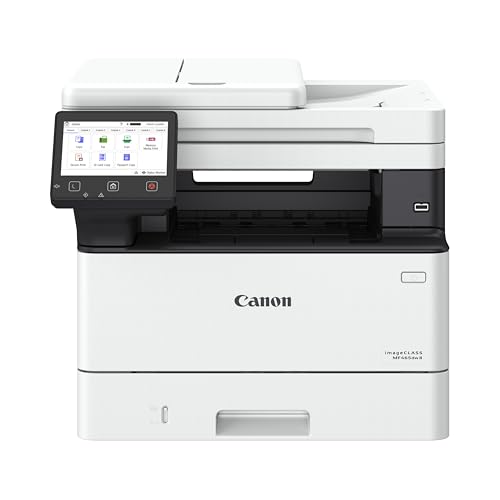
Canon imageCLASS MF465dw II — Fastest Stated Pace
Canon’s first entrant reframes the monochrome economy around time: print, copy, scan, and fax from a wireless duplex laser with expandable paper capacity at a stated 42 PPM. Speed is a cost variable that spreadsheets miss. A team waiting on a slow printer pays in salaries what it saved in hardware, and at 42 pages a minute the waiting largely evaporates — a hundred-page two-sided packet becomes a coffee-length errand instead of a scheduling decision.
Expandable paper capacity, named in the title, is the growth clause. Offices expand paper capacity for the same reason they expand anything: the volume arrived faster than the plan. A machine whose capacity can grow with the team protects the original purchase, and in a category where machines serve for many years, that protection compounds. Pair it with the full function suite and the MF465dw II presents itself as the one-machine answer for a monochrome office that refuses to think small.
Fax and scan complete the institutional circuit. Documents enter through the scanner, leave through the printer, and reach the stubborn counterparties through the fax — a complete paper utility in one cabinet, at a pace that keeps the utility from becoming a bottleneck. For monochrome offices, this is the flagship pattern: not the cheapest machine to buy, but the one whose cost per page and cost per hour both fall as volume rises.
Durability thinking belongs in this pick’s ledger too. High-pace multifunction machines live or die by their paper paths, and a model positioned with expandable capacity is declaring its intent to accumulate pages. Owners should honor that intent with the boring rituals — clean paper, fanned reams, the occasional roller inspection — that separate a five-year flagship from a two-year disappointment.
Solo desks should look at the compact Brothers instead; this Canon is team equipment. But a monochrome office choosing its central machine will find the combination here — suite, pace, expandability — difficult to argue with, and it is the natural benchmark against which the rest of this guide’s value claims should be measured.
Speed also changes how an office treats drafts. When a forty-page document costs under a minute of machine time, staff print the draft, mark it in pencil, and print the revision — a working rhythm that slow printers quietly abolish, pushing everyone into screen-proofing habits that tire eyes and let errors through. The MF465dw II’s stated pace is therefore not a luxury statistic; it restores a healthier way of working with long documents.
- Print technology: Laser, black-and-white only
- Functions: Print, copy, scan, and fax in one cabinet
- Two-sided printing: Automatic duplex, per listing title
- Rated pace: 42 PPM, per listing title
- Paper supply: Expandable capacity, per listing title
- Connections: Wireless networking
Strengths
- The fastest stated pace in this guide across a full function suite.
- Expandable capacity protects the purchase as team volume grows.
- Time savings compound the usual toner and paper economy.
Trade-offs
- Team scale and presence exceed a solo desk’s requirements.
- Wireless is the only connectivity the title names.
- High-pace machinery rewards owners who maintain it properly.
Best for: growing monochrome offices needing one central machine.
Not suited for: single desks with modest weekly output.
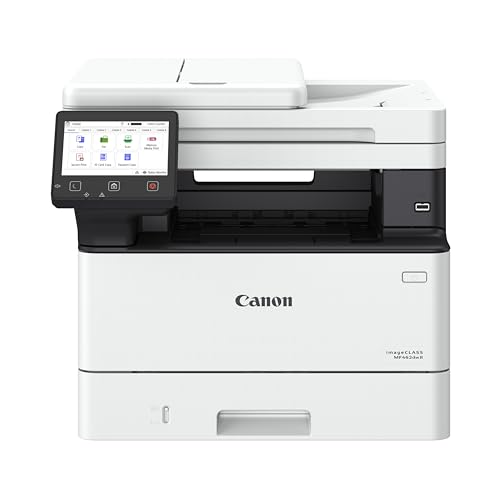
Canon imageCLASS MF462dw II — Warranty-Backed MFP
The second Canon trades a measure of its sibling’s pace for a promise: a wireless monochrome duplex laser, all-in-one with scanner, copier, and fax, a 3 year limited warranty, mobile readiness, and a stated 37 PPM for home and office. Thirty-seven pages a minute remains firmly in team territory — the five-PPM difference from the flagship will be invisible in almost every real job — while the warranty term moves to the foreground as this model’s defining economic feature.
Warranty is a page-cost variable in disguise. A machine’s true cost per page divides its total ownership spend by its lifetime output, and every year of warranted service extends the denominator while capping the repair side of the numerator. A maker printing a three-year term in the listing title is making a durability claim in the most enforceable language available to it. Buyers comparing the two Canons should read that claim as the MF462dw II’s counter-argument to its sibling’s extra pace and expandability.
The function suite matches the flagship’s breadth exactly — print, scan, copy, fax — so the choice between them is not about capability but about emphasis. Offices whose volume is heavy and growing lean toward expandable capacity; offices whose volume is steady and whose planning horizon is long lean toward the warranted machine. Both instincts are rational, and the existence of the pair lets a buyer express either without leaving the same engine family.
Mobile readiness in the title suits the home-and-office positioning: the hybrid professional printing a contract from a phone at the kitchen table in the morning and a report from a laptop at the office in the afternoon meets the same machine through both doors. Duplex, as everywhere in this guide, quietly halves the paper under both workflows.
Home offices with genuine volume — the consultant billing by the document, the administrator serving several clients — are this model’s sweet spot: too much work for the compact Brothers, not enough growth pressure to demand the flagship’s expandability, and a planning temperament that values a warranted three years over a faster five pages per minute.
The home-and-office phrasing in this Canon’s title is more precise than it first appears. A growing number of professionals run office-grade volume through a home address — administrators serving remote firms, consultants with several clients, tutors with a full roster. Their machine must be office equipment that happens to live at home, and a warranted 37 PPM all-in-one is exactly that species, sized for the spare room but specified for the workload.
- Print technology: Monochrome laser
- Functions: Print, scan, copy, fax (all-in-one)
- Duplex: Automatic, stated in listing title
- Print speed: 37 PPM, stated in listing title
- Warranty: 3 year limited warranty, stated in title
- Connectivity: Wireless, mobile ready
Strengths
- A three-year warranty term anchoring the ownership arithmetic.
- Stated 37 PPM keeps team jobs moving without flagship scale.
- The full four-function suite including fax.
Trade-offs
- No expandable-capacity claim, unlike its faster sibling.
- Wireless only, per the title, for network placement.
- More machine than a truly light home desk requires.
Best for: steady-volume offices planning around a long service life.
Not suited for: rapidly growing teams needing expandable capacity.
The Monochrome Ledger in One Table
| Pick | Functions | Stated speed | Signature detail from its title |
|---|---|---|---|
| Brother MFC-L2820DW | Print, copy, scan, fax | Not stated in listing title | Compact frame with a Refresh trial |
| Brother DCP-L2640DW | Print, copy, scan | Not stated in listing title | Compact multifunction with mobile printing |
| Brother HL-L5210DN | Print only | Not stated in listing title | Versatile paper handling, Gigabit Ethernet |
| Brother HL-6210DW | Print only | Not stated in listing title | 520-sheet tray, 100-sheet multipurpose feed |
| Canon imageCLASS MF465dw II | Print, copy, scan, fax | 42 PPM | Expandable paper capacity |
| Canon imageCLASS MF462dw II | Print, copy, scan, fax | 37 PPM | 3 year limited warranty |
Read the speed column’s pattern carefully: only Canon publishes pace in its titles, so the Brother half of the table must be chosen by function and capacity rather than by numbers. That is not a defect in the comparison — it is the comparison. Brother’s titles argue from configuration, Canon’s from pace and warranty, and a buyer who knows which language their office speaks can shop this table in under a minute.
The functions column carries the second lesson. Four of the six machines digitize paper; two refuse to, and the refusal is priced into their designs as focus. A buyer should be able to state, in one sentence, which kind of office they run — one whose paper flows outward only, or one whose paper arrives as originals and must be captured — because that sentence selects the column before any other specification gets a vote. Monochrome shopping becomes remarkably simple once that sentence exists, and remarkably confusing for exactly as long as it does not.
How Does Cost Per Page Actually Work on a Monochrome Laser?
Strip the idea to its arithmetic and it becomes manageable. Total ownership cost — machine, toner cartridges, paper, and the occasional drum or roller — divided by total pages printed equals cost per page. Monochrome lasers attack every term of that fraction. The machine price spreads across a long service life. One black cartridge replaces the four-cartridge color shelf. Duplex halves the paper term automatically. The owner’s remaining levers are behavioral: printing only what is needed, and maintaining the machine so its life reaches the long end of its design.
Yield figures deserve a careful reading wherever they are published, because they are measured against a standard page with modest coverage. A page of dense tables or bold graphics spends toner faster than the standard assumes, while a page of ordinary correspondence spends it slower. Offices should therefore treat any yield as a comparison tool between cartridges, not as a promise about their own documents — and this guide deliberately prints no yield numbers at all, since none appears in the listing titles it is built from.
The drum is the cost newcomers forget. In many laser designs the imaging drum is a separate long-life component that eventually requires replacement after a large page count; in others it rides inside the cartridge. Either way, at household volumes the drum question may never arise, while at workgroup volumes it belongs in the annual budget as scheduled maintenance. Knowing which design your machine uses — a question for the manufacturer’s documentation — turns a potential surprise into a planned line item.
Print-Only or Multifunction: Which Monochrome Shape Saves More?
The print-only argument is arithmetic purity. An office that already scans elsewhere pays nothing for a second scanner, stocks the same single cartridge, and owns a machine with fewer mechanisms to maintain. The HL-L5210DN and HL-6210DW embody that argument at business and workgroup scale respectively. Their cost per page benefits from every function they omit.
The multifunction argument is consolidation. One cabinet replaces a printer plus a scanner plus a fax endpoint, with one network connection, one supply shelf, and one learning curve. For the solo professional in the MFC-L2820DW’s sights, consolidation also saves the scarcest resource — space — and removes the interoperability friction between separate devices. The four multifunction picks here spread that argument across compact, mid, and flagship scales.
The tiebreaker is the originals audit. Count the paper documents your office digitized last month. If the count is near zero and another scanner exists in the building, print-only wins honestly. If the count is weekly and the scanning currently happens by phone camera over a desk, multifunction wins by more than its premium. Let the audit, not fashion, decide.
What Habits Keep a Monochrome Laser Cheap for a Decade?
Feed it clean paper and store the paper dry. Most jams blamed on aging machines are paper events — damp sheets, dusty reams, mixed stocks in one tray. Fan each ream before loading, keep the multipurpose feed for the odd media it exists to serve, and the paper path will repay the courtesy for years. The duplex loop in particular rewards clean stock, since every sheet travels the path twice.
Treat toner gently and honestly. A cartridge reporting low is beginning a conversation, not issuing an ultimatum; many machines print respectably for a while after the first warning, and a gentle shake redistributes powder for a final stretch of pages. Keep one spare on the shelf so the end of a cartridge is an errand rather than an emergency, and buy spares against counted usage rather than anxiety.
Finally, schedule the unglamorous inspection. Once or twice a year, with the machine off and cool, look along the accessible paper path for fiber buildup, check the rollers’ grip, and run the alignment and cleaning routines the driver offers. Ten minutes of this, twice a year, is the entire secret behind the monochrome lasers still printing cheerfully in their second decade — there is no other secret, and there never was.
How Long Should a Monochrome Laser Last, and What Decides It?
The honest answer is that the engine usually outlives the office’s patience with everything around it. Laser imaging is a mature, low-drama technology: a cartridge, a drum, a set of rollers, and a fuser that bonds toner with heat. The components that end service lives are rarely the exotic ones — they are rollers polished smooth by years of paper, feed tires that have lost their grip, and the occasional fuser at the end of a very long career. All of which is to say that lifespan is mostly a maintenance story wearing a calendar costume.
Volume distribution matters as much as volume itself. A machine printing fifty pages every day ages more gracefully than one printing fifteen hundred pages in a single monthly convulsion, because heat cycles, roller work, and tray mechanics all prefer rhythm to shock. Offices with spiky patterns should size up — the capacity and pace headroom in the HL-6210DW and the Canon pair are, among other things, shock absorbers for the machine’s own longevity.
The owner’s contribution is unglamorous and decisive: clean paper, dry storage, the occasional path inspection, and prompt attention to the first misfeed rather than the fiftieth. Machines that receive that care routinely print through several generations of the computers feeding them, which is why the secondhand market in business monochrome lasers is so calm — everyone involved knows the engines are barely middle-aged.
Where Does the Scanner Earn Its Place in a Monochrome Machine?
Scanning looks like a convenience until the first paper-heavy week arrives: the onboarding packet, the insurance claim, the school district’s annual forms, the client file that must become digital before it can become anything else. In those weeks a built-in scanner converts a two-device relay — phone photographs, transfers, straightening, printing — into a single act performed at the machine. The four multifunction picks in this guide exist for offices whose weeks look like that with any regularity.
Copying rides on the same glass and deserves its own sentence, because copying is the function offices forget they use until it vanishes. The quick duplicate of a signed page before the original leaves the building, the handout multiplied before a meeting — these are daily acts in paper-literate workplaces, and they require no computer at all. A multifunction monochrome machine is, in this sense, the office’s photocopier shrunk to desk scale, with a printer and scanner folded in almost as bonuses.
The print-only counterargument remains honorable, and this guide keeps two print-only picks in the bench to honor it. But buyers tempted by purity should perform the audit in weeks, not in theory: watch one ordinary week and count every time a sheet of paper needed to become data. The count, whatever it is, settles the question more reliably than any philosophy of minimalism.
Buying Errors Specific to Black-and-White Lasers
Overbuying functions is the gentle error: the fax-equipped suite purchased by an office that has not sent a fax since the previous decade, the flagship pace bought by a desk printing twenty pages a week. The DCP-L2640DW and the compact end of this guide exist to protect buyers from their own thoroughness. Audit first; equip second.
Underbuying capacity is the expensive error, because it masquerades as thrift. A small-tray machine in a growing office generates refill interruptions, split jobs, and eventually a second purchase that erases the original saving. The HL-6210DW’s tray and the Canon flagship’s expandable capacity are insurance policies priced in hardware, and offices on a growth path should read them that way.
The subtlest error is comparing across title languages. Brother’s titles in this set publish configuration; Canon’s publish speed and warranty. A buyer who demands a speed figure from every brand will either invent one for the Brothers or dismiss them unfairly — both failures of shopping discipline. Compare each machine on the evidence its maker actually printed, then verify the remaining questions against manufacturer documentation for the exact model in the cart.
How Should Paper Be Managed When One Machine Serves Everyone?
Shared monochrome machines die socially before they die mechanically, and paper is usually the cause. Establish one rule and label it on the tray: plain everyday stock lives in the main tray, and everything else — letterhead, labels, envelopes, the good cover sheets — enters through the multipurpose feed or a designated second location. The HL-6210DW’s separate 100-sheet feed exists to make that rule physical rather than aspirational; on smaller machines, a labeled shelf beside the printer does the same work less elegantly.
Refill responsibility needs a name attached to it. In offices, the person whose job empties the tray refills it; in households, the rule is whoever prints the last visible sheet. These sound like jokes until the first deadline morning spent discovering an empty tray and an emptier paper cupboard. The capacity picks in this guide lengthen the interval between such mornings, but no tray size abolishes the need for a named human.
Storage closes the system. Keep the working ream beside the machine and the reserve case somewhere dry and boring. Paper that lives in a steamy utility room or a sunlit window will curl, cling, and jam its way through the duplex path, and the machine will be blamed for the paper’s biography. Offices that master these clerical details find their cost per page falling for reasons no cartridge comparison can explain.
How Do Toner and Drum Choices Differ Across This Bench?
Without inventing figures a title does not print, the structural differences still matter. Compact machines like the Brother pair are built around modest cartridges matched to modest volumes — the economics work because the page counts are small and the cartridge changes are rare events in a small office’s calendar. Workgroup machines invert the proposition: their value depends on high-capacity supply options and long-life imaging components, because at hundreds of pages a week the cartridge change itself becomes a recurring labor cost.
Buyers should therefore ask one question of the manufacturer’s documentation for the exact model in the cart: what supply options exist for this machine, and which components are separate from the cartridge? The answer determines whether the printer’s cost curve flattens with volume, as a workgroup needs, or stays proportional, as a small desk can happily accept. This guide’s titles cannot answer that question — none prints yield or drum data — and any guide pretending otherwise would be inventing its authority.
What the titles do support is the positioning logic. Brother’s capacity flagship and Canon’s expandable model are clearly built for the flattening-curve world; the compact multifunction pair are built for the proportional world; the print-only business engine and the warranted Canon sit between. Match the curve to your counted volume and the monochrome ledger will behave for years.
What Does the First Month With a Central Monochrome Machine Teach?
It teaches the office its own volume, usually with some surprise. The tray’s fall and the cartridge’s endurance turn guesses into data, and by the second month the buyer knows whether the machine was sized correctly — knowledge that arrives too late to change the purchase but in plenty of time to set the supply rhythm. This is the practical argument for the expandability and capacity headroom in this guide’s upper rungs: they forgive an optimistic first estimate.
It also teaches the defaults’ power. Offices that set duplex and draft discipline during installation week watch those settings silently govern thousands of pages; offices that postponed the conversation discover, a month in, that single-sided printing has become the culture and must now be reformed rather than merely set. Culture, in printing as elsewhere, is just defaults that have had time to harden.
Finally, the first month reveals the machine’s social rank. A central printer that never strands a job becomes invisible infrastructure, mentioned only when it is admired. One that interrupts, misfeeds, or confuses becomes a character in office folklore. The six machines in this guide were chosen to audition for the first role; the rituals in this section are how the winning office keeps them cast in it.
What Should Be Verified on the Exact Unit Before Ordering?
Three things the listing titles in this guide cannot settle for you deserve ten minutes with the manufacturer’s documentation. The first is rated monthly volume for the specific model — the figure that tells you whether your counted pages sit comfortably inside the machine’s design or press against its ceiling. Titles in this set describe positioning, not duty ratings, and an office buying for a decade should know the ceiling it is purchasing under.
The second is the supply architecture: which cartridges the model accepts, whether a high-capacity option exists, and how the drum is arranged. As the toner section above explains, those answers decide how the machine’s cost curve behaves as volume grows, and they differ between models whose names differ by two characters. The third is physical: dimensions and clearance, measured against the actual shelf, counter, or corridor corner the machine will occupy, including the space its trays and lids need while working rather than while parked.
None of this diminishes the titles. The claims they do make — Canon’s speeds and warranty, Brother’s trays and Ethernet, the function lists that separate the MFC from the DCP — are the load-bearing facts of the comparison, and they were sufficient to build this guide. Verification simply extends the same discipline to the questions a headline has no room to answer.
Final Recommendation
Let the originals audit and the volume count decide together. Desks that scan, copy, and fax in small quantities belong with the MFC-L2820DW, or with the DCP-L2640DW when the fax audit comes back empty. Offices with scanning covered and black-and-white volume to move belong with the HL-L5210DN, rising to the HL-6210DW when the volume justifies its ream tray and feed. Teams choosing a central multifunction engine should decide between Canon’s pair by temperament: the MF465dw II for pace and expandability, the MF462dw II for its warranted three years at a still-brisk 37 PPM.
Every path through this guide lands on the same economic foundation — one cartridge, duplex paper discipline, and machinery built to be boring for a decade. In the monochrome category, boring is the highest praise available, and it is earned one unremarkable, two-sided page at a time.
One closing discipline for the undecided: write your office’s last month on a single sheet of paper — pages printed, originals scanned, faxes sent or mercifully not sent, and the largest single job anyone ran. That census, honestly kept, points at exactly one rung of this ladder, because each rung was designed around a recognizably different census. Buy the machine your census describes rather than the one your ambitions describe, and the monochrome engine will repay the honesty with the lowest-drama decade any appliance in the building is likely to offer.
Frequently Asked Questions
Why choose monochrome if color lasers exist at similar sizes?
Because most office paper is black and white, and a monochrome engine spends nothing on the other three cartridges — in purchase, in stocking, or in maintenance. Offices whose documents genuinely persuade in color should buy color deliberately; offices whose color need is a logo and an occasional chart often find the monochrome economy, year after year, impossible to argue with.
What is the practical difference between the Brother MFC and DCP lines here?
By their titles: the MFC-L2820DW includes fax in its function list, while the DCP-L2640DW lists copy and scan without it. Both are compact wireless monochrome machines with duplex and mobile-era connectivity. The choice is an audit of your fax reality, nothing more mysterious than that.
Does duplex printing wear a laser out faster?
Each two-sided sheet travels the paper path twice, so rollers accumulate journeys faster than the page count alone suggests — one more reason high-volume owners should treat roller inspection as scheduled care. Against that, duplex halves paper handling everywhere else and produces thinner files that are gentler on everything downstream, from staplers to storage.
How should an office choose between the two Canon models?
By growth versus steadiness. The MF465dw II pairs the faster stated pace, 42 PPM, with expandable paper capacity — the growth machine. The MF462dw II pairs 37 PPM with a 3 year limited warranty — the steady-state machine. Their function suites match, so the decision is about the office’s trajectory rather than its feature list.
Can a print-only monochrome laser serve a whole office?
Yes, when the office’s scanning lives somewhere sensible. The HL-6210DW’s capacity and dual connectivity are designed for exactly that shared role, and the HL-L5210DN’s Gigabit Ethernet and versatile paper handling suit smaller shared floors. The requirement is honesty: a building that digitizes paper daily needs a multifunction somewhere within walking distance.
Is a toner subscription worth it for monochrome printing?
It depends on the steadiness of your volume, which is why the MFC-L2820DW’s inclusion of a Refresh trial is the right way to meet the idea — as an experiment with an end date. Steady, predictable printing makes subscriptions tidy; spiky, seasonal printing often makes shelf-stocking a spare cartridge the leaner policy.
Related Guides
Monochrome shoppers working out the surrounding questions — size, budget, and the rest of the household’s technology — can continue with best compact printers with duplex if the chosen engine also needs to live on a shelf, then best inexpensive duplex printers for the budget tier where several of this guide’s machines have cousins, and finally best console gaming TVs for the very different screen decision waiting in the living room.



[…] or still deciding how much machine their paper flow honestly requires, can step sideways into best monochrome laser printers with duplex to see what the same money buys in black and white, then into best compact printers with duplex […]