What's inside
- Key Takeaways
- Quick Picks
- How Did We Narrow a Whole Market Down to These Six Console Sets?
- How Do the Six Line Up When the Room Lights Are the Variable?
- Which Console Features Should You Actually Pay For?
- How Far Should You Sit From a 55- or 65-Inch Gaming Screen?
- How Do You Set Up a Console Television on Its First Evening?
- What Changes When the Same Screen Must Also Serve Film Nights?
- Why Does Upscaling Quality Matter More Than Native Resolution for Consoles?
- What Should a Second Console or a PC Do to Your Choice?
- Common Mistakes When Buying a Television for Console Play
- Final Recommendation
- Frequently Asked Questions
- Related Guides
As an Amazon Associate I earn from qualifying purchases. This post may contain affiliate links at no extra cost to you.
widgetverdict.com is reader-supported. When you buy through links on our site, we may earn an affiliate commission.
A console asks more of a television than a film ever will. A film arrives at a fixed pace and forgives a slow panel; a game reads your thumbs sixty or more times a second and punishes every layer of processing standing between the stick and the screen. That is why the hunt for the best console gaming tvs is really a hunt for a short, honest signal path: a panel that refreshes quickly, a game mode that strips out showroom processing, and a processor smart enough to upscale a performance-mode image without smearing it. The six televisions below were picked for living rooms where a PlayStation 5 or an Xbox actually gets played, not for showrooms where brightness wins arguments.
Two ground rules govern every claim in this guide, and they are worth stating before any model names appear. First, a specification is only asserted here when the product’s own listing title states it. Where a title is silent — on refresh rate, on port counts, on variable refresh behaviour — the guide says so plainly and treats the figure as something to confirm on the listing page rather than something to repeat from habit. Second, console gaming is not one activity. A household grinding ranked shooters, a household working through a story epic in Dolby Vision, and a household splitting a screen between siblings need different things from the same wall, and the picks below are arranged so each of those households can find its own answer quickly.
Screen size in this set runs from 55 to 65 inches, which is the band where a console setup usually lives: large enough that a heads-up display stays legible from a sofa, small enough that a room does not have to be rearranged around the panel. Panel technology splits three ways — OLED, Mini-LED, and a conventional LED set carrying PlayStation-specific features — and that split is deliberate, because the console question cannot be separated from the room question. A dark media room and a glass-walled family room will crown different winners from the same six names.
Prices are deliberately absent from what follows. Console televisions are discounted on a rhythm that has little to do with their quality, and a figure printed today would mislead within weeks; each linked pick instead invites you to check price on Amazon at the moment of decision, where the live figure belongs. What does not change with the sales calendar is everything this guide is actually about: panel behaviour, printed refresh claims, console features, and the fit between a screen and the room it will live in.
Key Takeaways
- Sony fields two televisions here whose listing titles state exclusive features for PlayStation 5 — the BRAVIA XR8B OLED and the BRAVIA 2 II — making them the natural starting point for a PS5-only household.
- The Hisense U8 is the specification outlier of the six: its title states a native 165Hz panel, VRR 288, and 5000 nits, figures no other pick in this guide puts in writing.
- The TCL QM7L states 144Hz in its title and pairs it with Dolby Vision IQ, a combination aimed at consoles that render in Dolby Vision gaming modes.
- Where a listing title gives no refresh figure — the LG C4 and both Sonys here — this guide refuses to invent one; check the listing’s own specification block before ordering.
- Panel choice follows the room: OLED for controlled light and film-grade contrast, Mini-LED for bright rooms where glare fights back.
Quick Picks
| Television | Badge | Why it is here |
|---|---|---|
| Sony BRAVIA XR8B OLED 55″ | PlayStation Household OLED | An OLED whose listing title names exclusive features for PlayStation 5 alongside Dolby Vision and Atmos. |
| LG OLED evo C4 65″ | OLED All-Rounder | The 65-inch OLED anchor of the set, sold on its panel and processor rather than on printed gaming figures. |
| Hisense U8 Series 55″ ULED Mini-LED | Specification Leader | Its title states native 165Hz, VRR 288, and 5000 nits — the boldest printed gaming specification in this guide. |
| TCL QM7L 55″ | 144Hz Dolby Vision Route | A 55-inch SQD-Mini LED set whose title states 144Hz and Dolby Vision IQ for consoles that use it. |
| Samsung M70H 65″ | Big-Screen Mini-LED | The 65-inch Mini-LED option, with Motion Xcelerator and DLG 120Hz named in its title. |
| Sony BRAVIA 2 II 65″ | PlayStation Features, LED Tier | PlayStation 5 features and the X1 processor on a 65-inch LED panel — the accessible Sony route. |
How Did We Narrow a Whole Market Down to These Six Console Sets?
The filter started with the console itself. A television earned consideration only if its listing title or its maker’s stated positioning spoke to gaming directly — a high native refresh figure, a variable refresh range, a game-oriented processor feature, or, in Sony’s case, features built specifically for the PlayStation 5. General-purpose sets with nothing gaming-specific to say were set aside, however good their film performance might be, because a console guide that recommends televisions for reasons unrelated to consoles has failed before it begins.
Start by treating the numbers on a television listing with suspicion. Retail listings for televisions are notorious for blending a panel’s native refresh with marketing multipliers, and for quoting brightness measured on a small window as though it described a full screen. This guide leans on what each title actually commits to. The Hisense U8 commits to a great deal; the LG C4’s title commits to almost nothing beyond its processor and its remote, so the C4 is discussed here for its panel type and its series role rather than for figures its listing declines to print. Readers should apply the same suspicion everywhere: a number a seller will not put in the title is a number to verify, not to assume.
Finally, the six were balanced against each other. Two Sonys cover the PlayStation household at two panel tiers. The LG covers the OLED all-rounder position. Hisense and TCL cover the Mini-LED value-and-specifications position at 55 inches, while Samsung’s M70H stretches that same Mini-LED argument to 65 inches. No brand appears twice with the same argument, and no argument appears without a television that embodies it.
One more discipline shaped the final six: every pick had to survive a plain-language test. If a television’s gaming case could not be explained to a non-technical buyer in two honest sentences — what it does for a console, and what its listing declines to promise — it did not belong in a guide that readers will use to spend real money. Marketing vocabulary that dissolves under that test, and several well-known models carried plenty of it, was treated as decoration rather than evidence, and the sets built on it were left for guides with looser standards.

Sony BRAVIA XR8B OLED 55″ — PlayStation Household OLED
Sony builds both the console and this television, and the XR8B’s listing title leans on that fact: it states exclusive features for PlayStation 5 outright, which no other OLED in this guide claims in writing. For a PS5 household that sentence matters more than any single specification, because features designed around one console tend to cover the unglamorous details — automatic tone mapping behaviour, automatic genre picture switching — that generic gaming sets leave to menus and memory. The 55-inch size suits the room most consoles actually live in, close enough to a desk-adjacent setup to stay sharp, large enough for a sofa.
The panel is OLED, so the contrast story is the familiar one: each pixel lights itself, blacks are genuinely off rather than dark grey, and a night scene in a story game holds detail that backlit panels wash out. The XR Processor with AI technology, named in the title, is Sony’s image engine, and its relevance to gaming is upscaling — a console in performance mode often renders below 4K, and the quality of the reconstruction decides whether that trade looks clean or soft. Dolby Vision and Dolby Atmos, both stated in the title, cover the cinematic side of a console library: the films, the streaming apps, and the growing set of games mastered with dynamic metadata.
Google TV is the stated platform, which keeps the console from being the only way content reaches the screen; a household that games at night and streams at breakfast gets one interface for both. What the title does not state is equally worth recording: no refresh figure, no port count, and no variable refresh range appears in it. A buyer whose priority is a printed 120Hz-or-better guarantee should treat the XR8B’s gaming case as resting on its PlayStation features and its OLED panel, and should confirm the remaining figures on the listing page itself.
One further consideration belongs to households where the PlayStation is also the film player. Because picture settings live per input, films streamed through the console inherit the game input’s configuration unless the household routes streaming through the television’s own Google TV apps — which, on this set, is the tidier arrangement anyway. Set the console input up for play, let the apps carry their own film mode, and the XR8B stops asking its owner to think about modes at all, which is the quiet luxury its PlayStation features are really selling.
- Screen size: 55 inches
- Panel: OLED
- Processor: XR Processor with AI technology
- HDR and audio named in title: Dolby Vision, Dolby Atmos
- Console feature named in title: Exclusive features for PlayStation 5
- Smart platform: Google TV
- Refresh rate: Not stated in listing title
Strengths
- Listing title states PlayStation 5 features directly, removing guesswork for a Sony-console household
- OLED panel delivers true black levels for dark story games and films alike
- Dolby Vision and Dolby Atmos both named, covering the cinematic half of a console library
Trade-offs
- Title prints no refresh rate, so high-frame-rate claims must be verified on the listing page
- 55 inches is the only size in this guide for this model — larger rooms must look elsewhere in the six
- OLED care habits (varied content, screen-saver use) apply as they do to any self-lit panel
Best for: a PlayStation 5 household that plays in a dim room and wants the console maker’s own features on an OLED panel
Skip it if your shortlist only starts once a refresh figure is printed in the listing, or if the wall is planned for a screen well beyond 55 inches

LG OLED evo C4 65″ — OLED All-Rounder
The C4 occupies the position in this guide that needs the least introduction and the most care. It is a 65-inch OLED evo panel from the 2024 model year, and its listing title is strikingly restrained: it names the 4K processor, the flat screen, the Magic Remote, and Alexa built in, and then stops. No refresh rate, no gaming acronym, no brightness claim. That restraint cuts both ways. It means this guide will not credit the C4 with figures its seller did not print, and it also means a buyer comparing printed specifications side by side will underrate what is, by panel type alone, one of the most naturally responsive kinds of television sold — OLED pixels change state almost instantly compared with liquid-crystal layers, a property of the technology rather than of any one model.
At 65 inches the C4 is sized for the main living room rather than the spare room, and that changes the gaming it suits. Split-screen sessions, a racing game watched by three people on a sofa, a story epic treated as a family event — scale serves all of them. The Magic Remote, named in the title, is LG’s pointer-style controller; households tend to love or tolerate it, but for a console television its real job is simply moving between the console input and the streaming apps without friction, and a single remote that the whole household understands has genuine value in that role.
Treat the C4 as the OLED benchmark against which the brighter Mini-LED picks below argue their case. Its argument is contrast, viewing angle, and panel response; its weakness, shared with the technology generally, is that a very bright room will ask more of it than it prefers to give, and its listing gives the buyer no printed brightness figure with which to settle that question in advance. A controlled-light room remains its home ground.
Ownership details round out the C4’s case. A flat screen — the title’s own words — matters in rooms with windows to the side, since curved or heavily treated surfaces can complicate reflections, and the 2024 model year means the set sits at a mature point in its series’ life, with firmware that has had seasons to settle. None of that appears in a specification race, and all of it appears in the second year of ownership, when the household has stopped admiring the purchase and started simply living with it.
- Screen size: 65 inches
- Panel: OLED evo
- Model year in title: 2024
- Remote named in title: Magic Remote
- Voice assistant named in title: Alexa built in
- Refresh rate: Not stated in listing title
- Gaming features: Not stated in listing title
Strengths
- 65-inch OLED evo panel gives the set’s widest, most even picture for group viewing
- Self-lit pixels suit fast console play by the nature of the technology itself
- A restrained listing that claims little is easy to verify — what it states, it states plainly
Trade-offs
- No gaming figure of any kind appears in the title, so competitive buyers must dig into the listing’s specification block
- Bright, sunlit rooms are not OLED’s favourite working conditions
- 2024 model year means later model years exist in the same series line
Best for: a mixed household — games, films, sport — in a room where the lights can be dimmed, wanting one large OLED to cover everything
Think twice if your habit is confirming every gaming number in the title before a set makes your shortlist

Hisense U8 Series 55″ ULED Mini-LED — Specification Leader
If the C4’s listing whispers, the Hisense U8’s title shouts. It states a native 165Hz panel, a VRR figure of 288, up to LD5600 local dimming, and 5000 nits of brightness, alongside HDR10+, Dolby Vision IQ, Dolby Atmos, and IMAX Enhanced certification. For console gaming, the figures that matter most are the first two. A native refresh well beyond 120Hz gives the panel headroom that high-frame-rate console modes can grow into, and a wide variable refresh range is what keeps a game whose frame rate wanders from tearing or juddering — the console and the television negotiate each frame’s timing instead of fighting over it.
The brightness claim deserves a careful reading rather than a reflexive one. Five thousand nits, as printed, describes peak capability, and peak figures in television listings are measured under conditions that flatter them. Even discounted heavily, though, a Mini-LED set built around that class of backlight will hold a bright room in a way no OLED in this guide attempts to. Daylight gaming — a Saturday afternoon session with the curtains open — is a real use case that OLED households quietly schedule around, and the U8 is the pick here that refuses to schedule around anything.
The 4.1.2-channel audio named in the title is unusual enough to note: most televisions in this class treat sound as an afterthought to be fixed by a soundbar purchase, while the U8 at least arrives claiming a multi-channel arrangement of its own. Google TV is the platform. The honest caveat is that a specification sheet this full invites verification — the figures are the seller’s own, stated in the title, and a buyer should confirm the ones that drive the decision on the listing page, particularly how the VRR range behaves at console frame rates.
The U8 also invites a word about local dimming behaviour, because LD5600 — the title’s figure for its dimming arrangement — is the mechanism that decides whether Mini-LED brightness comes with discipline. A backlight divided into many zones can darken the letterbox bars of a cutscene while a torch flares in the centre; a coarse one blooms halos around bright objects on dark backgrounds. Zone counts in titles are seller figures, but the direction of travel is real, and a buyer sensitive to haloing should look for it in the listing’s demonstration material before ordering.
- Screen size: 55 inches
- Panel: ULED Mini-LED, QLED colour
- Native refresh stated in title: 165Hz
- Variable refresh stated in title: VRR 288
- Peak brightness stated in title: 5000 nits
- Local dimming stated in title: Up to LD5600
- Audio stated in title: 4.1.2 channel, Dolby Atmos
- Smart platform: Google TV
Strengths
- The only pick whose title prints both a native refresh above 120Hz and a wide VRR figure
- Mini-LED brightness suits daylight play that OLED owners reschedule
- 4.1.2-channel audio claim reduces the urgency of an immediate soundbar purchase
Trade-offs
- Peak brightness is a seller’s peak figure; real full-screen brightness will sit lower
- A specification this dense rewards careful reading of the listing’s fine print
- 55 inches only, in this guide — the argument does not stretch to a bigger wall here
Best for: a bright-room console player who reads specifications closely and wants printed headroom for high-frame-rate modes
Dark-room film nights argue against it: perfect blacks, not daylight punch, are the priority there

TCL QM7L 55″ — 144Hz Dolby Vision Route
The QM7L is TCL’s entry in the same argument the Hisense U8 makes — Mini-LED brightness and a printed high refresh rate at 55 inches — but it makes that argument at 144Hz rather than 165Hz, and it adds a detail the U8’s gaming story shares but states differently: Dolby Vision IQ, named in the title alongside HDR10 and Dolby Atmos. Dolby Vision matters to console players on the Xbox side in particular, where Dolby Vision gaming modes exist, and IQ denotes the variant that adapts to ambient light — a television adjusting its tone mapping to a room that brightens and darkens across a day of play.
The panel is described in the title as SQD-Mini LED QLED, TCL’s naming for its quantum-dot Mini-LED construction, with claims of ultimate colour and high brightness and contrast that this guide records as positioning rather than as measured fact, since no nit figure is printed. That absence is worth a sentence: where the Hisense prints 5000 nits, the TCL prints none, so a buyer cross-shopping the two on brightness alone has only one side’s number to work with and should compare the sets in person or lean on the listing’s fuller specification section.
Google TV with Gemini is the stated platform — the 2026 model-year software story, with Google’s assistant layer built into the television’s own interface. For a console household, the platform’s job is mostly to stay out of the way: fast input switching, a home screen that surfaces the console tile, and streaming apps for the hours the console is off. The QM7L’s case, in one line, is a printed 144Hz panel and Dolby Vision IQ at the size most console rooms use, from the brand that has made a habit of undercutting the specification leaders on their own turf.
There is a software angle to the QM7L worth weighing alongside its panel. Google TV with Gemini, as the title phrases it, signals TCL’s current interface generation, and interface speed is a genuine gaming-adjacent quality: the seconds between sitting down and the console input appearing are seconds a household experiences every single day. A television that wakes quickly, remembers the last input, and does not bury the console tile under promoted content respects the ritual of play in a way no refresh figure captures.
- Screen size: 55 inches
- Panel: SQD-Mini LED QLED
- Refresh stated in title: 144Hz
- HDR named in title: HDR10, Dolby Vision IQ
- Audio named in title: Dolby Atmos
- Smart platform: Google TV with Gemini
- Model year in title: 2026
- Peak brightness: Not stated in listing title
Strengths
- 144Hz printed in the title — a real figure a buyer can hold the listing to
- Dolby Vision IQ adapts tone mapping to room light across a long session
- Mini-LED construction promises bright-room resilience without OLED pricing logic
Trade-offs
- No brightness figure in the title, unlike its closest rival in this guide
- Variable refresh behaviour is not described in the title and needs listing confirmation
- TCL’s picture processing divides opinion among film purists more than among gamers
Best for: an Xbox-leaning household that wants Dolby Vision gaming support and a printed 144Hz panel at 55 inches
Peak brightness is not its pitch: shoppers who rank sets by that printed figure first will look elsewhere

Samsung M70H 65″ — Big-Screen Mini-LED
Samsung’s M70H stretches the Mini-LED argument to 65 inches, and its listing title frames the set around Samsung Vision AI Companion and a Mini LED Processor 4K — intelligence and processing first, raw figures second. The one motion figure printed is Motion Xcelerator with DLG 120Hz, and it deserves an honest unpacking: DLG is a dual-line-gate technique that reaches a 120Hz-class motion result through processing rather than through a panel natively refreshing at that rate in the way the Hisense’s title claims. That is not a dismissal — processed motion can look perfectly convincing in console play — but a buyer comparing this title against the U8’s native 165Hz should understand they are reading two different kinds of claim.
Pure Spectrum Color is the other named feature, Samsung’s colour positioning for the set, and the 2026 model year places it as the newest design in this guide alongside the TCL. The practical console case for the M70H is scale plus brand ecosystem: 65 inches of Mini-LED for a main room, from the maker whose televisions many households already know how to drive, with free content services named in the title for the hours between gaming sessions.
What the title leaves unstated is a familiar list by now: no variable refresh range, no port specification, no brightness figure. Samsung’s gaming features on its wider range are well documented elsewhere, but this guide’s rule is that a listing earns claims, not a brand’s reputation, so the M70H is recommended here for its size, its panel type, and its processing story — with the same advice given for the C4: confirm the gaming figures that matter to you on the listing page before the order is placed.
The M70H’s free-content emphasis, named in its title, hints at its intended household: one where the television is the room’s entertainment hub and the console is a citizen of it rather than its ruler. Samsung’s platform aggregates streaming and free channels into that hub. Gamers sometimes dismiss such features, but the household that shares the screen experiences them daily, and a set that serves the non-gaming majority of its hours gracefully earns goodwill that a purely specification-led purchase can lack.
- Screen size: 65 inches
- Panel: Mini LED
- Processor: Mini LED Processor 4K
- Motion feature stated in title: Motion Xcelerator + DLG 120Hz
- Platform feature named in title: Samsung Vision AI Companion
- Model year in title: 2026
- Native refresh rate: Not stated in listing title
- Variable refresh range: Not stated in listing title
Strengths
- 65 inches of Mini-LED for main rooms that found the 55-inch picks small
- Newest model year in the guide, with Samsung’s current AI platform features
- Brand familiarity: menus and behaviour many households already know
Trade-offs
- The 120Hz figure is a processed DLG result, not a stated native panel rate — a different claim from the Hisense’s
- No VRR range or brightness figure printed in the title
- Console-specific features are not named in the title at all
Best for: a household wanting the larger screen and Samsung’s current platform, playing a mix of console titles and streamed sport
Frame-rate purists, take note: the native-versus-processed distinction drives your buying, and this set sits on the processed side of it
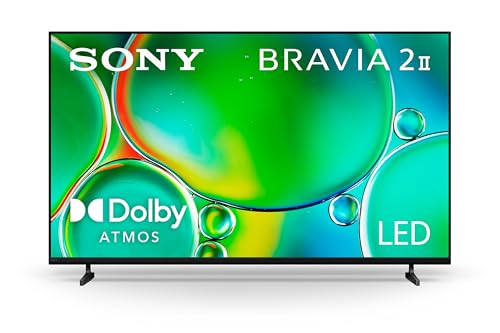
Sony BRAVIA 2 II 65″ — PlayStation Features, LED Tier
The second Sony in this guide shares its headline feature with the first — exclusive features for PlayStation 5, stated in the title — but delivers it on a 65-inch LED panel rather than a 55-inch OLED, and that single change reorders everything about who should buy it. LED backlighting cannot switch pixels off individually, so the perfect blacks of the XR8B are off the table; in exchange the buyer gets ten more inches of screen and the same console-maker relationship. For a family room where the console is one input among several and the audience sits scattered across sofas, that trade is often the right one.
The processing named in the title is the 4K Processor X1 with 4K X-Reality PRO, Sony’s upscaling line, plus Triluminos Pro colour and Motionflow XR motion handling. X-Reality PRO is the feature with the most console relevance: games rendered below native 4K — the majority, in performance modes — are rebuilt by this stage, and Sony’s database-driven approach to that rebuilding has been the brand’s calling card for years. Motionflow XR is a motion-processing suite; gamers should note that such suites belong switched off in game mode, a point the how-to section below returns to, since interpolation and low latency are natural enemies.
Google TV completes the stated picture. The BRAVIA 2 II is, in short, the pick for a PlayStation household that wants Sony’s console features at family-room scale without stepping to OLED — accepting LED contrast limits as the price of the size, and gaining a set whose daytime brightness and relaxed panel-care profile suit a room where children, sport, and games all share the screen.
Placement deserves a mention for a 65-inch LED set in particular. LED panels of this size are forgiving about ambient light but less forgiving about viewing angle than the OLEDs above them, so the main gaming seat should sit near the centre line and the television should be mounted or stood at seated eye height. Do that, and the BRAVIA 2 II’s Triluminos colour holds together for the whole sofa; ignore it, and the far cushions watch a paler game than the centre seat does.
- Screen size: 65 inches
- Panel: LED
- Processor: 4K Processor X1 with 4K X-Reality PRO
- Colour named in title: Triluminos Pro
- Motion feature named in title: Motionflow XR
- Console feature named in title: Exclusive features for PlayStation 5
- Smart platform: Google TV
- Refresh rate: Not stated in listing title
Strengths
- PlayStation 5 features at 65 inches without the OLED step-up
- Sony’s X-Reality PRO upscaling serves performance-mode rendering well
- LED panel asks nothing of the household in panel-care habits
Trade-offs
- LED backlighting cannot match OLED black levels in a dark room
- Motion processing must be tamed by game mode for low-latency play
- No refresh or VRR figure printed in the title
Best for: a PlayStation family room needing 65 inches, mixed content, and zero panel anxiety
After-dark sessions expose the compromise: when black level is your first and last criterion, an LED tier is hard to forgive
How Do the Six Line Up When the Room Lights Are the Variable?
Read the table below as a room-matching exercise rather than a league table. The two OLEDs and the LED Sony divide the dark-room and family-room cases between them, while the three Mini-LED sets compete for bright rooms on the strength of the figures their titles are willing to print. The refresh column is deliberately literal: it records what each listing title states, including where it states nothing, because the difference between a printed figure and an assumed one is exactly where console television purchases go wrong.
| Television | Panel | Refresh figure in listing title | Defining trait |
|---|---|---|---|
| Sony BRAVIA XR8B OLED 55″ | OLED | Not stated in listing title | PlayStation 5 features stated in title |
| LG OLED evo C4 65″ | OLED evo | Not stated in listing title | Panel-led case; title prints no gaming figures |
| Hisense U8 Series 55″ ULED Mini-LED | Mini-LED (ULED) | Native 165Hz stated | VRR 288 and 5000 nits stated in title |
| TCL QM7L 55″ | SQD-Mini LED QLED | 144Hz stated | Dolby Vision IQ named in title |
| Samsung M70H 65″ | Mini LED | DLG 120Hz (processed) stated | Largest Mini-LED here; AI platform led |
| Sony BRAVIA 2 II 65″ | LED | Not stated in listing title | PlayStation features at the LED tier |
Which Console Features Should You Actually Pay For?
Start with the handshake features, the ones that let console and television cooperate without your involvement. Automatic low-latency switching means the set drops into its game mode the moment the console wakes, rather than relying on whoever holds the remote to remember a menu path. Automatic HDR tone mapping, the kind of behaviour bundled into Sony’s PlayStation features, means the console calibrates the television’s HDR once, correctly, instead of every game negotiating its own brightness curve against a showroom preset. These features never appear in a screenshot comparison, and they are worth more across five years of daily use than a specification that wins a forum argument.
Variable refresh is the second feature worth paying for, and the one whose absence is most visible. Games rarely hold a perfectly steady frame rate outside of menus; a demanding scene dips, and on a fixed-refresh television that dip becomes a tear across the screen or a judder in the camera pan. A television whose refresh can follow the console’s output — the capability the Hisense and, in processed form, the Samsung titles gesture toward — smooths those dips into something the eye forgives. When a listing prints a VRR range, the low end of that range matters as much as the high end, because dips fall downward.
High frame rate modes are the third consideration, and the most oversold. A console game must offer a 120Hz mode before any panel figure above 60Hz earns its keep, and many celebrated titles still render at 60 or 30. Buy refresh headroom for the library you actually own and the genres you actually play — competitive shooters and racing titles exploit it, slow strategy and adventure titles mostly do not — and treat any figure in a listing title as a ceiling the console must still climb to, not a result the television delivers alone.
How Far Should You Sit From a 55- or 65-Inch Gaming Screen?
Console interfaces are designed around the ten-foot living room, but the games themselves reward sitting closer than film does. A heads-up display parks its smallest text in the corners; a minimap assumes you can resolve it at a glance. For a 55-inch 4K screen, a viewing distance around two metres keeps text crisp without forcing your eyes to travel; for 65 inches, two and a half metres lands in the same place. Sit much farther and the resolution advantage of 4K quietly evaporates — the panel is showing detail your eyes cannot collect — while sitting much closer makes the edges of the screen a head movement rather than a glance, which tires a player across a long session.
Distance also interacts with panel type. OLED’s wide viewing angles forgive the scattered seating of a family room, where not everyone gets the centre cushion. Mini-LED and LED panels hold their contrast best near the centre line, so a bright-room setup should arrange its main gaming seat square to the screen and let the casual seats take the angles. None of this requires furniture theatre: measure from the screen to the main seat’s head position, compare it honestly with the bands above, and let that measurement arbitrate the 55-versus-65 argument more than any showroom instinct — showrooms make every screen look smaller than it will look on your wall.
How Do You Set Up a Console Television on Its First Evening?
Begin with the cable and the input, because both quietly cap everything downstream. Use the high-speed cable that shipped with the console, connect it to the television, and then find the input settings that govern that port: most modern sets gate their full-bandwidth behaviour behind a per-input enhanced-format toggle that ships in a conservative position. Enable it for the console’s input before judging anything else about the picture, since a console limited by a default port setting will underperform in ways owners often blame on the panel.
Next, engage the television’s game mode for that input and confirm the console’s own display settings afterwards: resolution, HDR calibration, and any high-frame-rate permission the console asks you to grant. Run the console’s HDR calibration screens in the room lighting you actually play in — calibrating under bright setup lights and then playing in the dark bakes the wrong brightness curve into every game. Finish by disabling, for the game input only, the motion interpolation and noise reduction the television applies to film; those features cost latency and smear fast camera movement, and turning them off per-input leaves your film settings untouched on the other inputs.
What Changes When the Same Screen Must Also Serve Film Nights?
A console television in a shared home leads a double life, and the settings architecture of every set in this guide supports it: picture modes are stored per input, so the console’s input can live in a low-latency game configuration while the streaming apps keep a film-friendly one. The households that struggle are the ones where the console doubles as the film player, because then one input must serve two masters. The practical answer is to let game mode own the input and to accept its picture for films played through the console, or to route films through the television’s own apps, where a separate mode applies automatically.
Panel care is the other double-life consideration, and it belongs to the OLED picks. A screen that shows a game’s static interface elements for hours and then a film’s letterbox bars is accumulating exactly the varied diet modern OLED care features are designed around — pixel refresh cycles, logo luminance adjustment, and simple habits like letting the set run its standby maintenance. The guidance is not to avoid OLED for gaming; thousands of households game on OLED daily. It is to respect the two or three automatic features the set provides, keep them enabled, and vary content naturally, which a double-life screen does by definition.
Why Does Upscaling Quality Matter More Than Native Resolution for Consoles?
Most console games, most of the time, do not render at the panel’s native 4K. Performance modes trade internal resolution for frame rate, dynamic resolution scaling slides the render target up and down with scene complexity, and older titles in a library may render lower still. Everything the console sends below 4K is rebuilt to fill the screen by the television’s upscaling stage, which makes that stage — the X-Reality PRO named in one title here, the AI upscaling implied by another — a picture-quality feature of the first rank for gamers, arguably ahead of the panel’s native resolution itself.
Good upscaling is conservative: it sharpens edges the source implies, leaves textures it cannot know alone, and never invents detail that crawls or shimmers in motion. Poor upscaling announces itself on exactly the content games produce constantly — fine geometry like fences and foliage, small text in interfaces, distant characters — as ringing, crawling, or a waxy smoothness. When a listing title names its processing with pride, as several here do, that is the stage being advertised, and reviewers’ motion footage of real games will tell you more about it than any still photograph.
The practical consequence is that a console television should be judged with a performance-mode game, not only with a pristine 4K demo. If a showroom or a listing video lets you see one demanding scene rendered below native resolution and rebuilt, you have learned more about five years of daily play than an hour of test patterns provides.
What Should a Second Console or a PC Do to Your Choice?
Many gaming rooms eventually host more than one machine — a second console from the other camp, a PC drifting toward the big screen, a retro box resurrected for a season. Each addition multiplies the value of the unglamorous parts of a television: enough full-bandwidth inputs, an interface that labels and remembers them, and per-input settings that keep one machine’s configuration from disturbing another’s. Listing titles in this guide rarely print port counts — the honourable exception in the wider cluster is a Sony title stating four HDMI 2.1 ports — so a multi-machine household should treat the port section of the listing page as required reading, not fine print.
The second machine also changes the picture-settings calculus. Two consoles may prefer different HDR behaviour, and a PC will want a chroma-faithful mode for desktop text that a console never asks for. Televisions store modes per input, which quietly solves most of this, provided the owner spends one evening assigning each input its own configuration rather than tuning a single global picture and wondering why one source always looks wrong.
Plan for the second machine even if it is hypothetical. A television bought with one console in mind and no thought for the next arrival tends to be replaced for connectivity reasons years before its panel gives anyone cause for complaint — the most avoidable upgrade in the whole category.
Common Mistakes When Buying a Television for Console Play
Chasing a refresh figure the library cannot use. A panel figure only matters when a game offers a mode that reaches for it. Buying the highest printed number while owning a library of 30- and 60-frame titles spends the budget on headroom that sits idle, while the features those games would actually use — tone mapping, upscaling quality, black level — go underfunded. Inventory your ten most-played games first; let their modes, not a headline, set the refresh target.
Believing every number in a listing title equally. Titles mix native measurements, processed results, and peak figures measured under flattering conditions into one breathless string. The DLG-processed 120Hz in one title here and the native 165Hz in another are different species of claim. Neither seller is lying; both are selecting. The buyer’s defence is to ask, of every figure, whether it describes the panel, the processing, or a momentary peak — and to weight the answers accordingly.
Leaving the console on a default port setting. The most common console television disappointment is not a bad panel but a capped input: the enhanced format toggle left off, the game mode never engaged, the console’s own high-frame-rate permission never granted. The television then gets blamed, sometimes returned, for a configuration that took four menu steps to fix. Work the setup sequence in this guide before forming any opinion of a new set’s gaming performance.
Judging the picture under showroom or setup lighting. Televisions are demonstrated under light that flatters brightness and hides black-level weakness, and first-evening setup usually happens under ceiling lights the room never uses for play. Calibrate and judge in playing light. A set that looks merely good under setup lighting may be superb at midnight, and the reverse — a dazzling showroom performer with grey midnight blacks — is the classic dark-room regret.
Forgetting the sound half of the session. Games mix dialogue, directional cues, and score through whatever the television provides, and thin built-in speakers flatten all three. One pick here claims a 4.1.2-channel arrangement in its title; the rest make no such claim, and their owners should budget attention — if not money — for the audio path, even if that only means enabling the set’s dialogue-clarity mode and placing a future soundbar where the stand allows.
Final Recommendation
For the PlayStation household, the guide resolves into a two-question decision: how dark is the room, and how large is the wall? A dim room and a 55-inch wall point to the Sony BRAVIA XR8B, whose title promises PlayStation features on an OLED panel; a family room at 65 inches points to its LED sibling, the BRAVIA 2 II, trading perfect blacks for scale and simplicity. Between those poles sits the LG C4, the 65-inch OLED for the household whose gaming is one pleasure among several and whose listing restraint should be read as an invitation to verify, not as an absence of capability.
A word, too, for the household that has not yet chosen its console. Nothing in this guide locks a buyer to one machine: the variable-refresh and high-refresh arguments serve both major consoles, and only the Sony pair’s stated PlayStation features tilt toward one camp — a tilt an Xbox household can weigh as a bonus it will not use rather than a capability it lacks. The television will outlast the console generation it was bought for, so the panel and the room fit deserve the deciding votes.
The Mini-LED three argue a different case: that modern console play happens in real rooms, at real hours, under real light. The Hisense U8 makes that case with the boldest printed figures in the guide — native 165Hz, VRR 288, 5000 nits — while the TCL QM7L answers with 144Hz and Dolby Vision IQ, and the Samsung M70H stretches the argument to 65 inches under Samsung’s current AI platform. A bright room, honestly assessed, will be happier with any of these than with an OLED straining against the sun.
Whichever of the six lands on the wall, the console will only ever be as good as its setup: the enhanced port enabled, game mode engaged, HDR calibrated in playing light. Do that half-hour of work and a television chosen from this page will show you the console you actually bought — which was, after all, the entire point of the purchase.
Frequently Asked Questions
Do I need a 120Hz-or-higher television for a PlayStation 5 or Xbox?
Only for the games that offer a high-frame-rate mode. Many titles render at 60 frames per second or below, where any competent modern panel keeps up. Competitive shooters, racing games, and a growing list of performance modes do reach higher, and for those a printed native figure — 144Hz on the TCL here, 165Hz on the Hisense — gives the console somewhere to go. Buy for your library’s modes, not for the largest number on a box.
Why do some listings in this guide state no refresh rate at all?
Because the sellers chose not to print one in the title, and this guide asserts only what titles state. A missing figure is not evidence of a slow panel — the LG C4’s OLED technology is inherently fast-responding — but it does mean the burden of verification shifts to the buyer. The listing’s full specification section, or the manufacturer’s page for the exact model code, is where that figure should be confirmed before purchase.
What does variable refresh actually do during a game?
It lets the television wait for the console. Instead of refreshing on a fixed schedule and showing a torn or repeated frame when a game misses its deadline, a variable-refresh display presents each frame when it is ready, within its supported range. The visible result is smoother camera movement in games whose frame rates wander — open-world titles especially — and it is the single gaming feature whose absence experienced players notice fastest once they have lived with it.
Is OLED risky for gaming because of burn-in?
Modern OLED televisions carry layered protections — pixel refresh cycles, logo dimming, panel-shift — and gaming interfaces are exactly the kind of content those systems were designed around. The sensible habits are simple: leave the protections enabled, let the set complete its standby maintenance, and avoid leaving a paused game on screen for hours. Households that follow those basics game on OLED for years; the technology asks for awareness, not anxiety.
Should a console use the same picture settings as films on the same TV?
No, and the television does not expect it to. Picture settings are stored per input, so the console’s input can run a low-latency game mode with processing disabled while the streaming apps keep a film mode with motion handling intact. The one awkward case is films played through the console itself, which inherit the game input’s settings — routing films through the television’s own apps sidesteps that entirely.
How important is the cable between console and television?
More than its price suggests. The full-bandwidth features consoles offer — 4K at high frame rates, variable refresh, automatic low-latency switching — travel over the cable, and an old or damaged cable can silently cap all of them. Use the cable supplied with the console or a certified high-speed replacement, keep the run short, and if a feature refuses to appear in the console’s settings, suspect the cable before suspecting the television.
Related Guides
Console play connects naturally to the rest of the gaming television cluster: panel technology, response behaviour, and screen size each get a dedicated treatment in the guides that follow.
our dedicated guide to the best gaming OLED TVs the best TVs with minimal input lag, explained by mechanism using the best 4K TVs as gaming monitors on a desk


