What's inside
- Where Can You Buy a Headset That Actually Fits a Larger Head?
- Key Takeaways
- Quick Picks
- How Did We Choose These Picks for Bigger Heads?
- Why Does Headband Design Matter More Than Driver Size for Large Heads?
- How Can You Test a Headset’s Fit Before You Commit to It?
- What Should You Check on Your Current Headset Before Replacing It?
- How Do You Set Up a New Headset for the Longest Sessions?
- Which of These Six Headsets Fits a Large Head Best?
- Does Weight Matter as Much as Size for Bigger Heads?
- When Should You Choose Comfort Over Competitive Audio Features?
- How Do the Six Large-Head Picks Compare Side by Side?
- How Should You Care for Straps, Foam, and Frames So the Fit Lasts?
- What Mistakes Do Large-Headed Buyers Keep Making?
- Final Recommendation
- Frequently Asked Questions
- Related Guides
As an Amazon Associate I earn from qualifying purchases. This post may contain affiliate links at no extra cost to you.
**[widgetverdict.com] is reader-supported. When you buy through links on our site, we may earn an affiliate commission.**
Where Can You Buy a Headset That Actually Fits a Larger Head?
Every headset in this guide can be bought on Amazon, and the honest starting point is that none of their listing titles prints a maximum head size, so the best gaming headsets for large head comfort are chosen here by mechanism — suspension straps, floating bands, steel reinforcement, and generous adjustment travel — rather than by a number nobody published. Read the fit notes under each pick, measure your current headset’s extension before ordering, and treat the first full session, not the first minute, as the real trial. If your household also includes a smaller-headed player, Best Gaming Headsets for Small Heads applies the same mechanism-first thinking at the opposite end of the size range.
One promise before the details: this guide will never tell you a headset fits a large head merely because it is popular. Popularity is measured across average heads, and your problem begins exactly where the average ends, so each recommendation below has to earn its place with hardware you can point to.
Key Takeaways
- Fit mechanism beats fit marketing: suspension and floating bands adapt, while a plain sliding band has a hard end stop.
- Suspension designs (G733, Acer) remove the rigid arc that causes crown pressure on bigger heads.
- Steel reinforcement (Arctis 1) matters because larger heads flex a frame harder every single day.
- Memory foam earpads (Atlas 200) relieve the ear-side half of the pressure problem.
- Wireless models avoid cable drag, which slowly pulls a marginal fit out of position.
- No title here states a head circumference, so a full-session home trial is part of the buying process.
Quick Picks
| Pick | Badge | Why it earns its place |
|---|---|---|
| Logitech G733 Lightspeed Wireless | Best Suspension Fit | The fabric suspension strap spreads weight across the crown instead of pressing one padded band into it. |
| Turtle Beach Atlas 200 | Best Floating Headband | A floating headband paired with memory foam earpads gives big heads two separate pressure reliefs at once. |
| Acer Tri-Mode Wireless Gaming Headset | Most Connection Options | Three connection modes plus a suspension band make it the easiest pick to move between machines without refitting your setup. |
| SteelSeries Arctis 1 Wired | Best Steel-Reinforced Band | A steel-reinforced headband tolerates being opened wide every day without the flex fatigue that weakens plastic frames. |
| Logitech G ASTRO A20 Gen 2 | Best Console Wireless | A wireless PlayStation-focused design that keeps the fit hardware simple and the setup nearly invisible. |
| HyperX Cloud Stinger 2 (PlayStation) | Best Simple Wired Value | An adjustable headband and HyperX’s comfort-first tuning make it the uncomplicated wired starting point. |
How Did We Choose These Picks for Bigger Heads?
We started from the fit hardware each listing title actually names, because that is the only evidence a buyer can check before ordering. A suspension headband, a floating headband, a steel-reinforced frame, memory foam earpads, and an adjustable band with stated comfort tuning all made the cut for different reasons, and each pick below explains which pressure problem its mechanism addresses. Models whose titles offered no fit-relevant information at all were left out, however strong their audio claims sounded.
Connection type was the second filter, applied honestly rather than as a ranking. Wireless headsets genuinely help a marginal fit by removing cable weight and drag, so three wireless or tri-mode options are included, but wired models earned places where their frames or foam solved a problem the wireless ones did not. Platform coverage came third: every pick names its platforms in its title, and we repeat those lists exactly so nobody buys a PlayStation-focused headset for an Xbox desk. Brand depth in gaming audio counted as a tiebreaker, never as a substitute for a fit mechanism.
Finally, we refused to invent measurements. You will find no head-circumference promises, no earcup millimetre figures, and no clamp-force numbers in this article, because the listings do not publish them and a guessed number would send you shopping with false confidence. Where a title is silent, the pick’s section says what to test instead. Readers comparing brand lineups rather than fit mechanisms may prefer Best Logitech Headsets, which organises Logitech’s range by tier instead of by headband design.
A last word about evidence. Everything claimed in the pick sections below can be traced to words printed in the listings themselves — a strap described as suspension, a band described as floating, foam described as memory foam. Where a listing offered nothing about fit, the corresponding section says so and turns the discussion toward testing instead of praise. That restraint is deliberate: a buying guide for readers whom sizing charts have failed owes them mechanisms they can reason about, not fresh numbers to be failed by.
Why Does Headband Design Matter More Than Driver Size for Large Heads?
A headset can carry superb drivers and still be unwearable after forty minutes if its band runs out of travel. The geometry is unforgiving: earcups must sit centred over your ears for the soundstage and the microphone position to work as designed, and when a band reaches its end stops early, the cups ride high, the seal breaks at the jaw, bass leaks away, and pressure concentrates on a narrow strip of crown. Players often blame the earpads and buy thicker replacements, when the real fault is an arc that was never long enough for their head in the first place.
Suspension straps change that geometry by decoupling the load-bearing part from the sizing part. The outer frame can stay compact while the inner strap stretches and settles, which is why the G733 and the Acer tri-mode model lead this list. Floating bands take a halfway step, letting the band pivot and slide against the frame so the cups find their level. A conventional adjustable band is not automatically bad — the Cloud Stinger 2 shows how far padding and sensible clamp tuning go — but its ceiling is fixed the day it leaves the factory, and your head either fits under that ceiling or it does not.
Clamp force deserves its own word. Designers set clamp to keep a headset sealed and stable on an average head; on a wider head the same spring geometry presses harder, because the cups are pushed further from their rest position. That is why two headsets with identical padding can feel completely different at the two-hour mark. Memory foam helps by distributing the extra force over a larger contact patch, which is the Atlas 200’s whole strategy, while lighter headsets reduce the total load your neck and crown carry regardless of how the force is spread.
How Can You Test a Headset’s Fit Before You Commit to It?
Begin with the headset you already own. Extend its band fully, count the clicks or measure the exposed slider on each side, and note whether you are at the limit. Then measure the distance over the top of your head from ear to ear with a soft tape, following the path a headband takes. Those two numbers turn vague discomfort into a diagnosis: if your current band is maxed out and still tight, you need a different mechanism, not a softer version of the same one.
When a new headset arrives, run a structured trial instead of a quick try-on. Wear it for one complete gaming session at your normal posture, then check four things in order: whether the earcups still centre over your ears, whether any single point on your crown aches, whether your jaw feels the cups pressing when you talk, and whether the whole unit has crept forward or backward. A fit problem that appears at minute ninety is still a fit problem, and it will appear every session, so judge by the end of the session rather than forgiving early warning signs.
Glasses wearers should run the trial with their frames on, because temple arms change both the seal and the pressure map, and a headset that feels fine bare-headed can saw at your ears once frames are in the way. If you share the headset with a smaller-headed partner, check the bottom of the adjustment range too, and keep Best Headsets to Hear Footsteps in Games in mind if your shared sessions are competitive shooters where audio cues matter as much as comfort. Keep the packaging until the trial is done; a careful home test is the substitute for the measurements the listings never gave you.
What Should You Check on Your Current Headset Before Replacing It?
Replacement is not always the first move, and a ten-minute audit of the headset you already own can save a purchase or sharpen it. Start by extending the band fully and looking at the sliders: if bare metal or plastic shows well beyond the padded section on both sides, the frame is living at its limit and no accessory will change that. Press the earpads and watch the recovery; foam that stays dented has stopped distributing clamp force, and fresh pads are a legitimate fix when the band itself still has travel in reserve. Check the cable entry and the microphone hinge for play, because looseness there tells you how the frame has been coping with the spread your head demands of it.
Then be honest about the pattern of your discomfort, because each pattern indicts a different component. A single aching strip across the crown points at the band. Sore ears and a feeling of being squeezed point at clamp force and pad foam. A headache that builds behind the eyes during long sessions often traces back to total weight combined with a fit that forces your neck to compensate. One-sided discomfort suggests the headset sits crooked, which happens when a band at full extension twists under load. Match the pattern to the mechanism before you spend anything: the six picks above were chosen so that each pattern has at least one direct answer among them.
How Do You Set Up a New Headset for the Longest Sessions?
Setup for comfort is mostly subtraction. Remove every avoidable gram and tug before your first long session: route a wired cable with enough slack that turning your head never pulls it, position a wireless receiver where its signal is clean so you are not troubleshooting dropouts mid-match, and take detachable microphones off entirely for solo play. Set the band so the earcups centre over your ears with the least extension that achieves it, rather than defaulting to maximum, because an over-extended band can let the headset wander and create the very pressure shifts you bought it to avoid.
Build the session in layers during your first week. Wear the new headset for one ordinary session before judging it, then a long one, and adjust one variable at a time — band position, glasses on or off, microphone attached or removed — so you learn which change caused which improvement. Keep a short note if your memory is as fallible as everyone else’s. By the end of that week you should know your settings the way you know your controller layout, and the headset should have disappeared from your attention, which is the only five-star review a fit can honestly earn.
Which of These Six Headsets Fits a Large Head Best?

Logitech G733 Lightspeed Wireless — Best Suspension Fit
A suspension headband solves the large-head problem in a fundamentally different way from a sliding band. Rather than asking a rigid arc to stretch wider, the G733 hangs the earcups from a flexible strap that settles wherever your crown actually sits, so the frame stops fighting you for position. For players who normally run a conventional band at its last click and still feel the cups ride high, that floating fit is the single most relevant feature in this entire roundup.
The audio side is built around Logitech’s PRO-G drivers, and the microphone carries Blue VO!CE processing, which lets you shape how your voice sounds to teammates instead of sending raw room noise down the line. LIGHTSYNC RGB is decoration, plain and simple, but it costs you nothing in fit. Wireless freedom matters more here than in most categories, because a cable tugging at a headset that already sits near its adjustment limit will slowly drag it out of place during a long session.
Think about where the G733 will actually live in your routine. It is the headset in this group most likely to be worn for an entire evening that mixes ranked matches, a film, and a call, because nothing about its fit asks you to take a break from wearing it. The LIGHTSYNC lighting can be dimmed or switched off when battery matters more than appearance, and doing so is the sensible default for marathon sessions. Owners of earlier fixed-band Logitech models will feel the difference within minutes: the pressure map moves from a narrow line across the crown to a broad, soft contact that you stop noticing, which is precisely what a fit-first purchase is supposed to buy.
One more consideration separates the G733 from the wired picks: battery habits become part of fit discipline. A wireless headset that dies mid-session gets swapped in a hurry for whatever is nearby, and the replacement is rarely the comfortable one, so keeping the G733 charged is quietly part of keeping it on your head. The good news is that its fit asks nothing else of you. There are no clicks to count, no preferred side, and no break-in week where the strap learns your head; it settles the same way on day one and day ninety, which makes it the easiest recommendation in this article to hand to another large-headed player without a lecture attached.
- Connection: Lightspeed wireless (per listing title)
- Headband: suspension strap design
- Microphone: Blue VO!CE technology, detachable style boom class
- Drivers: PRO-G audio drivers
- Extras: LIGHTSYNC RGB lighting
Strengths
- Suspension strap removes the hard ceiling a fixed band imposes on taller crowns
- Wireless connection means no cable drag pulling a marginal fit out of position
- Blue VO!CE filtering keeps callouts intelligible without shouting over game audio
Trade-offs
- RGB lighting draws battery that a plain finish would spend on play time
- PlayStation-focused buyers should confirm feature support before ordering this PC-leaning model
- The strap is a wear item, so heavy daily use will eventually call for a replacement
Best for: players whose current headset bottoms out its adjustment and still pinches at the temples.
Not suited for: tournament players tied to a wired-only desk setup with no USB port spare for a dongle.
Compare the G733’s strap design against your current band before you order through the listing.

Turtle Beach Atlas 200 — Best Floating Headband
Turtle Beach attacked the same fit problem from the earcup side as well as the band. The Atlas 200 floats its headband so the structure can open wide without a hard stop, then lets memory foam earpads absorb whatever clamp remains by moulding around the ear instead of resisting it. If your discomfort usually arrives as a hot spot above one ear after an hour, that foam is doing more for you than any headline audio feature on the box.
The 50mm drivers handle game audio with the low-end weight racing and shooter players tend to want, and the flip-to-mute microphone removes any doubt about whether your side conversation is private: lift it and you are silent. Because the connection is wired and multiplatform, the same headset moves between a PlayStation console and a PC without dongles, pairing menus, or battery anxiety before a long evening session.
The Atlas 200 also deserves credit for how it behaves in ordinary, unglamorous use. The wired connection means it is always ready when you sit down, with no battery gauge to check before a session and no receiver to lose behind the console. Memory foam does ask for a little patience: it softens as it warms, so the fit at minute twenty is kinder than the fit at minute one, and judging it instantly undersells it. PlayStation licensing is not a trivial badge either, since it tells you the headset was built to behave properly with the console’s controller and audio handling rather than merely plugging into it.
Sound character deserves a mention alongside fit, because a headset you enjoy listening to gets worn more willingly for longer. The Atlas 200’s 50mm drivers give explosions and engine notes a physical presence that suits the PlayStation catalogue, while the 3D audio support named in its title is there for games that use it. None of that rescues a bad fit, but here it does not have to: the floating band and foam have already done the rescue, and the audio simply gets to be enjoyed. For a player whose last headset sounded fine and hurt constantly, that order of priorities finally runs the right way round.
- Connection: wired, multiplatform
- Drivers: 50mm
- Microphone: flip-to-mute boom
- Earpads: memory foam
- Headband: floating design
- Licensing: officially licensed for PlayStation
Strengths
- Floating band plus memory foam tackles crown pressure and ear pressure together
- Flip-to-mute gesture is faster and more certain than hunting for an inline switch
- Wired multiplatform cable works across console and PC with zero setup
Trade-offs
- A cable is a permanent companion, which desk players with tidy setups may resent
- White finish shows scuffs and desk grime sooner than darker colourways
- No wireless receiver means couch-distance play needs an extension or another pick
Best for: PlayStation players who want pressure relief at both the crown and the ears.
Not suited for: living-room players seated far beyond comfortable cable reach of the console.
Check the Atlas 200 listing for the white finish and confirm the cable length suits your seating distance.

Acer Tri-Mode Wireless Gaming Headset — Most Connection Options
Acer’s entry earns its place on breadth. The title lists three distinct ways to connect — a 2.4GHz wireless link for low-latency play, Bluetooth 5.4 for phones and handhelds, and a plain 3.5mm cable for anything with a jack — and pairs that flexibility with the same suspension headband approach that serves larger heads well. One headset can therefore live on a PC all week, then travel with a Switch at the weekend, without a second purchase.
The 50mm dynamic drivers are the largest class named in this group, and the detachable microphone carries ENC, which works to keep fan noise and keyboard clatter out of your voice channel. Detaching the boom also matters for fit: on a big head, a fixed microphone arm is one more rigid part near your jaw, and being able to remove it for single-player sessions takes that contact point away entirely.
There is a practical rhythm to a tri-mode headset that single-mode owners never develop. The 2.4GHz link stays parked on your main machine for serious play, Bluetooth handles the phone and handheld without re-pairing drama, and the cable rescues you on the one evening you forgot to charge anything. Each mode change is also a chance to notice how the suspension band reseats itself, which it does without the click-counting ritual a slider demands. For a larger head in a multi-device home, that combination of fit forgiveness and connection forgiveness is the Acer’s real identity, more than any single specification on its box.
The Acer is also the natural travel pick of the six, and travel is an underrated fit test. Hotel rooms, trains, and a partner’s spare room all punish a headset that only works in one carefully arranged desk setup, whereas the tri-mode Acer connects to whatever the trip provides and its suspension band forgives the slouched postures travel imposes. The detachable microphone packs away instead of snapping, and the wired fallback means a dead battery never ends a session. If your gaming life is spread across addresses rather than concentrated at one desk, this flexibility is worth more than a marginal difference in driver tuning.
- Connection: 2.4GHz wireless, Bluetooth 5.4, and 3.5mm wired
- Drivers: 50mm dynamic
- Microphone: detachable, with ENC
- Headband: suspension design
- Platforms named in title: PS5, PC, PS4, Switch, Mac, laptop
Strengths
- Tri-mode connection covers consoles, PCs, handhelds, and phones from one purchase
- Suspension band shares the forgiving fit logic of the G733 at a different tier
- Detachable ENC microphone comes off completely for solo play or media use
Trade-offs
- Three radios and modes mean more settings to learn than a single-purpose wired set
- ENC quality varies with room noise, so a loud shared space still tests it
- Brand support history for gaming audio is shorter than the specialist names here
Best for: multi-device households where one headset must serve a PC, a console, and a handheld.
Not suited for: players wanting a single fixed wired link with no modes, menus, or batteries to manage.
Open the Acer listing and match its three connection modes against the ports on your own machines.

SteelSeries Arctis 1 Wired — Best Steel-Reinforced Band
Durability is a fit feature when your head is the thing stressing the frame. Every time a larger-headed player spreads a headset open to put it on, the band flexes further than its designers’ average test head demanded, and plastic frames answer that treatment with creaks, then cracks. The Arctis 1 reinforces its band with steel, so the daily stretch that kills lesser headsets is absorbed by a material chosen for exactly that repeated bending.
SteelSeries also made the ClearCast microphone detachable, which keeps the wired package light and lets the headset double as ordinary headphones for a commute or a handheld session. The platform list in the title is the widest of any wired pick here, spanning Xbox, PlayStation, PC, Switch, and mobile. Nothing about the Arctis 1 chases spectacle; its argument is that it will still fit, and still work, long after flashier frames have loosened or snapped.
Consider the Arctis 1 as the answer to a specific history: if your previous headsets died at the hinge or the band, this frame is built from the material that survives that treatment. Steel also keeps its adjustment honest over years, because the band does not gradually take a set and loosen the way ageing plastic can. The trade is that you feel the frame’s honesty in its styling and its feature list, both deliberately plain. Buyers who equate visible technology with quality will walk past it; buyers who have held a snapped headband in two pieces will understand exactly what they are paying for.
It is worth saying plainly who the Arctis 1 is not trying to impress. There is no lighting, no wireless radio, no software suite headline, and no attempt to look like anything other than a well-made tool. That restraint keeps its weight down, and weight is a fit variable larger heads feel acutely, because every gram hangs from a band that is already working at full stretch. SteelSeries understood that a reinforced band plus a light total package is a coherent philosophy rather than a compromise. Players who want their headset to disappear — structurally, visually, and on their head — will find this the most grown-up option in the group.
- Connection: wired
- Microphone: detachable ClearCast
- Headband: lightweight, steel-reinforced
- Platforms named in title: Xbox, PC, PS5, PS4, Nintendo Switch, mobile
Strengths
- Steel reinforcement directly addresses the flex stress larger heads apply daily
- Detachable ClearCast microphone keeps weight down and broadens everyday use
- Wired connection suits every platform named, with no pairing or charging routine
Trade-offs
- No wireless option at all, so freedom of movement stops at the cable’s end
- The restrained styling will not satisfy players who want lighting or bold colour
- Padding is functional rather than plush beside the memory foam rivals above
Best for: heavy daily users who have already cracked one plastic headband by spreading it wide.
Not suited for: players who stand, pace, or play in VR-adjacent setups where a cable becomes a hazard.
Look at the Arctis 1 listing if frame survival matters more to you than wireless freedom.
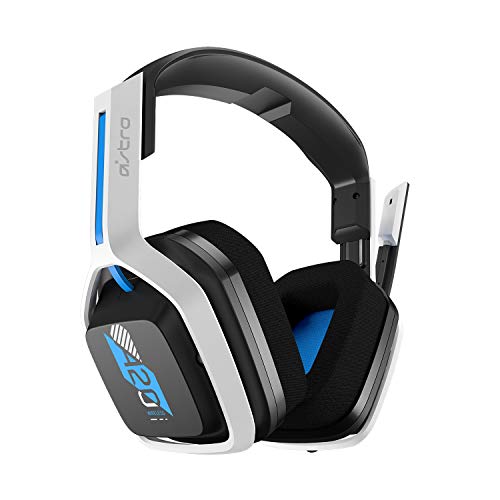
Logitech G ASTRO A20 Gen 2 — Best Console Wireless
The A20 Gen 2 is the console-first wireless option in this group, built under the ASTRO name that Logitech keeps for its living-room gaming line. Its listing title is quiet about exotic fit hardware, and that honesty shapes the advice: this is the pick for a larger-headed PlayStation player who values a clean wireless setup and a brand with deep console support, and who is willing to verify the band’s extension range hands-on rather than trusting a headline claim.
That verification is easy to do well. Extend the band fully before your first session, wear it for a full match rather than a two-minute try-on, and judge it by whether the earcups cover your ears completely without the band’s end stops digging in. Wireless play helps the assessment, because there is no cable weight biasing one side. If the fit passes that honest test, the A20 Gen 2 gives you console convenience without the strap complexity of the suspension designs.
The A20 Gen 2 asks for a slightly different kind of trust. Its title makes no fit promises beyond its platform list, so the burden of proof sits with your own trial, and that is a fair arrangement as long as you actually run the trial properly. Give it a full evening at full extension, including a session where you talk constantly, since jaw movement is where marginal earcup placement shows itself first. If it passes, you own the cleanest console setup in this group. If it fails, it fails honestly and early, and the suspension designs above it are waiting with a mechanically different answer.
There is also a household argument for the A20 Gen 2 that fit guides rarely make. A console headset gets shared, borrowed, and handed to guests, and a design without delicate strap mechanisms or detachable small parts survives that social life better than intricate hardware does. Its wireless receiver keeps the console area tidy, which matters in a living room in a way it never does at a desk. Judge it by the trial described in its section, certainly, but judge it as a piece of household equipment too, because that is the job it will actually be doing for most of its life.
- Connection: wireless
- Platforms named in title: PlayStation 5, PlayStation 4, PC, Mac
- Brand line: Logitech G ASTRO
- Generation: Gen 2
Strengths
- Wireless console setup keeps the living room free of trailing cables
- ASTRO lineage brings long experience with PlayStation households
- Works with PC and Mac as well, so it is not stranded on one machine
Trade-offs
- The title names no suspension or floating band, so maximum extension needs personal checking
- Xbox players are outside the platform list printed in the title
- Fewer headline audio extras than the PRO-G and Blue VO!CE equipped Logitech above
Best for: PlayStation households wanting wireless freedom and a straightforward, uncluttered design.
Not suited for: Xbox-only players, since the title’s platform list stops at PlayStation, PC, and Mac.
Read the A20 Gen 2 listing’s platform line carefully, then plan a full-session fit test if you order it.

HyperX Cloud Stinger 2 (PlayStation) — Best Simple Wired Value
HyperX built its reputation on comfort that does not need explaining, and the Cloud Stinger 2 carries that brief into the budget end of this list. The title promises an adjustable headband and the line’s signature comfort approach, which in practice means generous padding and a clamp tuned for long sessions rather than a vice grip. For a larger head, an adjustable band with real travel is the whole ballgame, and this is the least expensive route to test whether that simpler mechanism is enough for you.
Keep expectations aligned with its class. This is a wired PlayStation headset without the wireless radios, suspension straps, or microphone processing suites of the pricier picks, and its listing title does not pretend otherwise. What it offers instead is a low-risk first step: if a well-padded adjustable band solves your problem, you never needed the exotic hardware, and if it does not, you have learned exactly which upgrade — suspension, floating band, or steel reinforcement — your head is asking for.
The Cloud Stinger 2’s role in this list is diagnostic as much as it is competitive. A player who has never owned a comfort-tuned headset cannot know whether padding and sensible clamp will satisfy them, and this is the least punishing way to find out. HyperX’s comfort reputation was earned on exactly this class of product, worn by players who keep headsets for years. Treat it as the baseline experiment: wear it for a week of real sessions, note precisely where it succeeds and where it runs out of answers, and you will know your own head better than any size chart could have told you.
Finally, the Stinger 2’s simplicity protects it from the most common budget-headset failure, which is not poor sound but abandoned features: the app never opened, the surround mode never configured, the detachable cable lost. There is almost nothing here to abandon. You plug it in, adjust the band, and play, and the comfort either suits your head or teaches you what to buy next. In a category addicted to feature lists, a headset whose entire promise is that it will be pleasant to wear for hours is making a more honest promise than most, and for many larger-headed PlayStation players it will turn out to be promise enough.
- Connection: wired
- Brand line: HyperX Cloud Stinger 2, PlayStation version
- Fit note in title: Signature Comfort
- Headband: adjustable
Strengths
- Adjustable band with comfort-first padding suits a cautious first purchase
- Wired PlayStation focus keeps setup to a single plug
- Lightweight class reduces neck fatigue across evening-long sessions
Trade-offs
- No wireless mode for players who dislike being tethered to a controller or console
- Title lists fewer driver and microphone details than rival listings provide
- Players needing maximum band extension may still graduate to a suspension design
Best for: PlayStation players testing whether a padded adjustable band alone cures their fit problem.
Not suited for: PC-first players wanting software microphone processing and multi-mode wireless in one headset.
Start with the Cloud Stinger 2 listing if you want the simplest wired route into a roomier fit.
Does Weight Matter as Much as Size for Bigger Heads?
Weight and size interact in a way that surprises people. A larger head gives a headset more surface to rest on, which should help, but it also means the band is extended further, and an extended band changes the leverage of every gram the frame carries. A heavy headset on a fully extended band behaves like a weight at the end of a longer lever: small movements swing it more, the cups shift against your ears, and your neck does quiet corrective work all session. This is why the lighter designs in this list punch above their specification sheets for long sessions, and why a specification you cannot find in a title — total weight — deserves a check on the manufacturer’s own documentation before ordering.
The practical test is the nod test. With the headset fitted as you would play, nod slowly, turn to look at a second screen, and lean back. A well-matched headset follows without sliding, creaking, or needing a hand to reseat it. One that migrates during those gentle movements will migrate during a match, and you will spend the session adjusting instead of playing. Wireless models remove the cable’s contribution to migration, suspension straps reduce it by keeping contact broad and even, and memory foam increases friction at the cup in a way that quietly helps. None of these is a substitute for the right size, but together they decide whether the right size stays right at hour three.
When Should You Choose Comfort Over Competitive Audio Features?
Competitive features only pay out while you are wearing the headset, and that obvious point settles most arguments. A player who removes their headset between rounds because their crown aches is losing more — in focus, in warmup, in willingness to queue again — than any microphone filter or surround mode can repay. Comfort is therefore not the soft option in this category; it is the enabling one, and for larger heads it has historically been the scarce one, because the industry designs around an average head and treats everyone else as an edge case to be absorbed by padding.
That does not mean surrendering audio quality. The picks here were filtered so that no model asks you to accept genuinely poor sound as the price of a wearable fit; the G733’s PRO-G drivers, the Atlas 200’s 50mm units, and the Acer’s 50mm dynamic drivers are all credible hardware. The real choice is about emphasis: spend first on the mechanism that keeps the headset on your head, then take the best audio that mechanism comes with. Reverse that order and you own an excellent-sounding headset that lives on its stand, which is the most expensive outcome of all.
How Do the Six Large-Head Picks Compare Side by Side?
| Model | Fit mechanism | Connection | Microphone |
|---|---|---|---|
| Logitech G733 Lightspeed Wireless | Suspension strap | Wireless | Blue VO!CE boom |
| Turtle Beach Atlas 200 | Floating band, memory foam pads | Wired | Flip-to-mute |
| Acer Tri-Mode Wireless Gaming Headset | Suspension strap | 2.4GHz, Bluetooth 5.4, 3.5mm | Detachable ENC |
| SteelSeries Arctis 1 Wired | Steel-reinforced adjustable band | Wired | Detachable ClearCast |
| Logitech G ASTRO A20 Gen 2 | Adjustable band | Wireless | Boom (title gives no processing detail) |
| HyperX Cloud Stinger 2 (PlayStation) | Adjustable band, comfort padding | Wired | Boom (title gives no processing detail) |
Read the table by mechanism first and connection second. If your current headset’s band physically runs out of travel, only the suspension and floating designs change your situation; a better-padded version of the same arc will disappoint you again. If your band has travel to spare but the frame creaks or the cups ache, the steel frame and the memory foam models answer those narrower complaints directly. Connection then decides between the survivors: wireless for couch and multi-room play, wired for zero charging discipline and universal compatibility.
How Should You Care for Straps, Foam, and Frames So the Fit Lasts?
A fit you love can quietly degrade, and the degradation usually starts with the soft parts. Suspension straps stretch permanently if the headset is stored hanging by the strap on a hook, so store it resting on its earcups or on a stand that supports the outer frame. Memory foam absorbs sweat and skin oil across a season of long sessions; wipe the pads after heavy use, let them dry fully before the next session, and treat replacement pads as scheduled maintenance rather than an admission of defeat. Foam that has gone flat changes clamp distribution, and players often blame the band for a problem that new pads would have solved in five minutes.
Frames ask for gentler handling than their marketing suggests. Put the headset on with two hands, spreading it evenly, instead of wrenching one cup out and dragging the other across; that one-handed yank is how hinges loosen and bands take a twist. Keep wired cables from becoming the headset’s leash — a cable that repeatedly catches on a chair arm applies exactly the sideways force that extended bands tolerate worst. Once a month, run the extension test again and compare it with your first-week notes. If the numbers or the pressure pattern have drifted, something is wearing, and catching it early is the difference between replacing a pad and replacing the whole headset.
None of this care is burdensome, but it protects the specific thing you paid for. Anyone can buy a headset that fits on the day it arrives; keeping that fit for the second and third year is what separates a good purchase from a recurring expense, and it is entirely within the owner’s control.
What Mistakes Do Large-Headed Buyers Keep Making?
Buying thicker earpads to fix a short headband
Replacement pads change the last few millimetres of a fit, not the arc length of the frame. If the cups cannot reach the centre of your ears, no pad restores the seal or moves the pressure off your crown; you have spent money decorating the actual problem. Diagnose the band first, with the extension test described above, and only shop for pads once the cups demonstrably sit where they belong.
Judging fit in the first five minutes
Almost every headset feels acceptable fresh out of the box, because pressure discomfort is cumulative and heat builds slowly inside sealed cups. The buyers who regret purchases are usually the ones who unboxed, nodded, and threw the packaging away. Protect yourself with one full session before deciding, at your real posture, with your glasses on if you wear them, and with the microphone down if that is how you play.
Assuming one brand’s size fits like another’s
There is no shared sizing standard across headset makers, and a generous fit from one company tells you nothing about the next. Treat every brand change as a fresh fit question, lean on the mechanism rather than the badge, and be especially careful with console-specific versions, whose bands are sometimes tooled differently from their PC siblings despite sharing a product name.
Ignoring the return window until it closes
Because listings omit the measurements that would settle fit in advance, the return window is functionally part of the product you are buying. Note its length on the day the headset arrives, keep the box and inserts until your long-session trial is finished, and do not cut tags or peel films early. A buyer who plans the trial on day one keeps every option open; a buyer who drifts discovers the deadline from the wrong side.
Before you order, run one last comparison against your own notes from the extension audit: the winning headset should answer the exact failure you wrote down, in the first paragraph of its section, without you having to argue yourself into it. If you find yourself constructing reasons, the mechanism is wrong and the next pick on the list is probably right. Fit bought by reasoning tends to be returned; fit bought by recognition tends to be kept for years.
Final Recommendation
Start with the mechanism that matches your diagnosis. If your band runs out of travel, the G733’s suspension strap is the most complete answer here, with the Acer tri-mode headset close behind and far more flexible about connections. If pressure at the ears is your complaint, the Atlas 200’s floating band and memory foam attack it from both sides at once, while the Arctis 1 is the honest choice for anyone who has physically broken a frame before. PlayStation players who simply want wireless ease should test the A20 Gen 2 carefully, and the Cloud Stinger 2 remains the sensible first experiment before spending on exotic hardware.
For a head that every ordinary headset treats as an afterthought, the G733 earns the top spot in this household’s judgement — not because its audio outclasses the field, but because its strap is the one design here that stops asking your crown to fit the headset and lets the headset fit your crown instead.
Whichever of the six you choose, buy it as a fitting exercise rather than a gadget purchase. Run the extension audit on your old headset tonight, pick the mechanism that answers what you find, and give the newcomer one honest week of full sessions before you judge it. Players with larger heads have spent years being told to tolerate equipment designed around somebody else; the designs in this list are proof that tolerance is no longer the only option, and the modest effort of testing properly is all that stands between you and a headset that finally feels like it was made with your head in the room.
Frequently Asked Questions
Do any of these headsets publish a maximum head size?
No. None of the six listing titles states a head circumference, a maximum band extension, or an earcup dimension, which is exactly why this guide ranks fit mechanisms instead of numbers. Use the extension test on your current headset, choose the mechanism that answers your diagnosis, and confirm with a full-session trial inside the return window.
Is a suspension headband really better for big heads?
For the specific problem of a band reaching its end stops, yes, because the strap carries the load and settles independently of the outer frame’s arc. It is not magic: a suspension design can still clamp firmly at the cups, which is why the trial matters. But it removes the single hardest limit a larger head runs into, and no amount of padding on a fixed arc can do the same.
Should I choose wireless to help with fit?
Wireless helps indirectly. A cable adds weight on one side and tugs whenever you turn or lean, and a headset already sitting near its adjustment limit gets dragged out of place by that tug. Removing the cable will not make a small headset big, yet it preserves a good fit once you have one, which is why three of the six picks here connect without a wire.
What if I wear glasses while gaming?
Run every fit judgement with your frames on. Temple arms lift the earpad seal slightly and create a pressure point where the pad presses the arm into your head, so a headset that feels fine without glasses can ache within the hour with them. Memory foam pads forgive frames best, because the foam moulds around the arm instead of bridging over it.
Can I just stretch a tight headset over a box overnight?
Stretching can relax clamp force a little, and players do it, but it does nothing for a band that is too short, and it stresses the frame at exactly the points where larger heads already stress it daily. If a headset needs overnight stretching to be tolerable, its mechanism is wrong for you; the steel-reinforced and suspension designs exist so you never have to negotiate with the hardware.
Which pick suits a shared headset between two different head sizes?
Choose the design with the widest usable adjustment behaviour: a suspension strap, because it self-settles on each wearer without counting clicks, or the floating-band Atlas 200. Fixed bands force the larger-headed player to the last click and the smaller-headed player to the first, and both end up compromising. Self-adjusting designs remove that daily renegotiation entirely.
How long should a headset for a large head last?
The frame should outlast the soft parts by years if the mechanism suits you. Expect straps and earpads to be the consumables: foam flattens and straps relax with daily use, and both are cheaper to renew than the headset is to replace. A steel-reinforced or suspension design bought for the right reason should serve through several pad changes, whereas a fixed band that was marginal when new tends to be replaced whole, because its problem was never a wearing part.
Is it worth paying more purely for a better fit mechanism?
Price the alternative honestly: a cheaper headset that hurts gets worn less, replaced sooner, and resented daily, so its cost per comfortable hour is often worse than the suspension model that felt expensive in the basket. Fit is also the one quality you cannot upgrade later with software or settings. If the budget forces a choice, drop lighting, drop surround processing, drop the second wireless mode — and keep the mechanism that matches your head, because that is the part you will feel in every single session.
Related Guides
Fit questions rarely stop at one head size or one brand. Households at the other end of the range should read Best Gaming Headsets for Small Heads, brand-focused shoppers can compare tiers in Best Logitech Headsets, and competitive players who care most about directional audio should continue to Best Headsets to Hear Footsteps in Games.
Related guide: Best Comfortable Gaming Headsets
Related guide: Best Folding Gaming Headsets


