What's inside
- Where Do You Start With a Catalogue This Wide?
- Key Takeaways
- Quick Picks
- How Did We Rank One Brand’s Headsets Against Each Other?
- ASTRO or PRO: Which Logitech Family Fits Your Life?
- What Do PLAYSYNC, Blue VO!CE, and Graphene Actually Buy You?
- Which Six Logitech Headsets Earn Their Places?
- How Should You Set Up a Logitech Headset Ecosystem Without Regrets?
- What About Comfort Across a Whole Evening?
- When Does It Make Sense to Own Two of These?
- Logitech’s Six, Placed Shoulder to Shoulder
- How Do You Read a Headset Title Like a Contract?
- What Mistakes Do Logitech Buyers Keep Making?
- What Should You Do in the First Week With a New Logitech Headset?
- Final Recommendation
- Frequently Asked Questions
- Related Guides
As an Amazon Associate I earn from qualifying purchases. This post may contain affiliate links at no extra cost to you.
**[widgetverdict.com] is reader-supported. When you buy through links on our site, we may earn an affiliate commission.**
Where Do You Start With a Catalogue This Wide?
Amazon carries all six models covered here, and the best logitech headsets separate cleanly once you see the two families Logitech runs under one roof: the ASTRO line, built around consoles, docks, and switching, and the PRO line, built around desks, drivers, and microphones. Decide which family your life belongs to before comparing models, and half the catalogue resolves itself. Players whose priority is competitive information should also keep Best Headsets to Hear Footsteps in Games nearby, since several models below appear in that conversation from a different angle.
One discipline governs everything that follows: features are only claimed where the listing titles claim them. Switching, battery figures, driver materials, and audio bit depths below all come from the titles, and where a title is silent — as several are about drivers — the sections say so rather than filling the gap with the brand’s general reputation.
Read the six sections in family order if you already know your room, or in article order if you do not; the guide was arranged so that the family decision comes first either way, because every later comparison is cheaper once that one is made.
Key Takeaways
- Two families: ASTRO for console rooms and switching, PRO for desks and competitive play.
- The A50 X alone adds HDMI 2.1 video switching; the A50 keeps PLAYSYNC audio switching and the dock.
- PRO X 2 leads on drivers and connections; PRO X Wireless leads on Blue VO!CE voice processing.
- The wired Pro X includes the fullest box: USB DAC, spare memory foam pads, and a bag.
- The A20 X is the only title here naming Nintendo Switch, and the accessible door into ASTRO wireless.
- Battery figures and audio bit depths in this article come from the listing titles, not from review folklore.
Quick Picks
| Model | Badge | Case in one line |
|---|---|---|
| Logitech G Astro A50 X | Flagship Multi-Platform Pick | The base station’s PLAYSYNC A/V switching and HDMI 2.1 passthrough make it the hub of a three-machine setup. |
| Logitech G Astro A50 | Best A50 for Most Rooms | PLAYSYNC audio switching, a 24-hour battery claim in the title, and the same docked ecosystem without the video switcher. |
| Logitech G PRO X 2 Lightspeed | Best for Competitive PC Play | 50mm graphene drivers, DTS:X 2.0, and three connection paths built for players who live at a desk. |
| Logitech G PRO X Wireless | Blue VO!CE Wireless Pick | Lightspeed wireless plus Blue VO!CE microphone filtering for players whose voice matters as much as their aim. |
| Logitech G Pro X Wired Gaming Headset | Best Wired PRO Model | Blue VO!CE, a USB DAC, spare memory foam pads, and a carry bag make it the most complete wired package here. |
| Logitech G Astro A20 X | Accessible ASTRO Wireless | PLAYSYNC audio switching and a 48kHz microphone bring the ASTRO multi-platform idea down to an accessible tier. |
How Did We Rank One Brand’s Headsets Against Each Other?
Ranking a single catalogue demands different evidence from ranking a market. With the brand constant, the questions become architectural: which ecosystem does each model belong to, what does its title actually promise, and which buyer pays for features they will never touch? We read the six titles as contracts. PLAYSYNC appears in three of them in two different forms, Blue VO!CE in three, graphene in one, and those distributions — not launch order or price — structured the ranking and the family split this article is built on.
We also respected the silences. The A20 X’s title names no driver, so its section argues from switching and microphone instead of inventing an audio story. The A50’s title distinguishes console and PC audio figures, so its section repeats that distinction rather than rounding it into a single flattering number. A guide that only reports what titles say will sometimes know less than the internet’s folklore, and that is a price worth paying for never sending a reader to buy a feature that was never promised.
Finally, each model was assigned the buyer it serves best and the buyer it would waste money for, because within one brand the costliest mistake is not buying badly but buying up — paying for a switcher with one console, or for graphene drivers with a narrative-game library. The work-and-calls reader may also want Best Jabra Headsets for Work and Calls open, since Logitech’s gaming microphones and Jabra’s office line answer the same voice question from opposite directions.
ASTRO or PRO: Which Logitech Family Fits Your Life?
The ASTRO family assumes your gaming happens in a room with a screen, several machines, and other people. Its ideas are the dock, the switch, and the shared premium headset that lives in one place and serves whoever sits down. Everything about the A50 models — the station, the battery story, the console-first platform lists — follows from that assumption. If your household recognises itself in that description, the ASTRO sections are your shortlist and the PRO models are interesting strangers.
The PRO family assumes a desk, a chair that stays yours, and games where information wins rounds. Its ideas are the driver, the microphone, and connections that follow one player across their own machines. Nothing in the PRO line docks, switches video, or tries to run a room; everything in it tries to make one competitor hear earlier and speak clearer. Racing players inside the PRO family should note that endurance comfort gets its own treatment in Best Gaming Headsets for Racing Sims, where several of these qualities are weighed for hour-long stints rather than rounds.
Households can, of course, contain both lives, and the catalogue quietly allows a two-headset answer: an ASTRO on the television and a PRO at the desk is not extravagance but specialisation, the same logic as owning both a sofa and a desk chair. What does not work is expecting one model to be both, because the features that make each family excellent are precisely the ones the other family spends nothing on. Choose the room first; the model follows.
What Do PLAYSYNC, Blue VO!CE, and Graphene Actually Buy You?
PLAYSYNC is a switching promise, and it comes in two strengths in these titles. On the A50 X it switches audio and video together through the HDMI-equipped station; on the A50 and A20 X it switches audio between platforms. The value is measured in rituals removed: no re-pairing, no cable swapping, no settings menu archaeology when you change machines. If you change machines weekly, it is a headline. If you changed machines once, in 2023, it is a brochure.
Blue VO!CE is a microphone promise: processing that shapes your outgoing voice, cleaning the room out of it and giving teammates a clearer, more consistent version of you. It appears on the PRO X Wireless and the wired Pro X, and its value is measured by other people’s ears, which makes it the rare feature your friends can review for you. Graphene, on the PRO X 2, is a driver promise about precision of movement, valued by players who treat audio as information. Three promises, three different buyers — and the catalogue’s honesty is that no single model here makes all three.
Which Six Logitech Headsets Earn Their Places?

Logitech G Astro A50 X — Flagship Multi-Platform Pick
The A50 X is less a headset than the centre of a multi-platform room. Its base station carries the PLAYSYNC A/V switcher and HDMI 2.1 passthrough rated in the title for 4K120 with VRR, which means a PlayStation, an Xbox, and a PC can all live behind one dock, and the headset follows whichever machine is awake. For a player whose gaming is genuinely spread across three platforms, that switching is the product; the headset is the part you wear while the station does the organising.
Understand what you are paying for, because it is not primarily audio refinement over the plain A50 below. The X model’s premium buys the video path and the switching: one button moving both picture and sound between consoles is a daily convenience in a shared living room, and HDMI 2.1 passthrough means the convenience does not cost you the consoles’ best video modes. Households with a single console should read its section and the A50’s side by side and ask whether the switcher solves a problem they actually have.
The wireless side runs over 2.4GHz with Bluetooth alongside, and the title’s 24bit/48kHz figure describes the audio path the station offers. The base station also gives the headset a home: a dock it returns to, charged and findable, rather than a cable draped over a monitor. In households where headsets vanish into sofas, that dock is a real feature, and it keeps the A50 X ready for the unplanned session in a way loose headsets rarely are.
Fit and feel follow the ASTRO pattern of a substantial, console-first frame. This is not the lightest way to hear a game, and players sensitive to weight should note that the A50 X spends its mass budget on the station ecosystem rather than on shaving grams. What the mass buys is stability and a considered, living-room-grade build. Judge it as furniture-grade equipment for a multi-console room, because that is the role its designers clearly had in mind.
Buy the A50 X when the switching problem is real: three machines, one screen, one seat, and a player tired of swapping cables and re-pairing headsets. In that room it has no direct rival in this list. In a one-console room it is an indulgence, and the honest guide says so, because the A50 below exists precisely for the player who wants this headset’s character without underwriting a switcher they will never switch.
Picture the room this headset is really for: a screen that three machines share, a sofa that two players share, and a tangle that used to live behind the television. The A50 X replaces the tangle with a ritual — sit down, dock out, switch, play — and rituals are what shared rooms run on. Guests can use it without a tutorial, partners can switch it without a negotiation, and the headset returns to its station like a tool to a bench. That domestic order is the true flagship feature, and it is why the X belongs in a different mental category from every purely personal headset in this article.
- Connection: 2.4GHz wireless and Bluetooth, via base station
- Switching: PLAYSYNC A/V switcher
- Video: HDMI 2.1, 4K120, VRR (per listing title)
- Audio: 24bit/48kHz (per listing title)
- Platforms named in title: PS5, Xbox, PC
Strengths
- PLAYSYNC switching moves audio and video between PS5, Xbox, and PC together
- HDMI 2.1 passthrough preserves 4K120 and VRR console video modes
- Base station dock keeps the headset charged, stored, and findable
Trade-offs
- The premium largely buys switching that single-console homes cannot use
- Substantial frame is not the lightest option for long sessions
- Full value depends on HDMI routing through the base station
Best for: three-platform households running PS5, Xbox, and PC through one screen and one seat.
Not suited for: single-console players with no switching problem for the base station to solve.
Map your consoles against the A50 X listing’s switching claims before paying for the flagship.
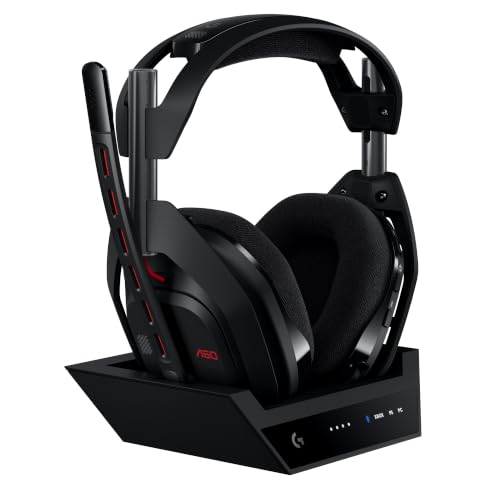
Logitech G Astro A50 — Best A50 for Most Rooms
The A50 is the version of the flagship idea most rooms actually need. It keeps the base station ecosystem and adds PLAYSYNC in its audio form, so the headset can follow you between PlayStation, Xbox, and PC without re-pairing rituals, while leaving the video switching — and its cost — to the X model above. If your consoles already reach your screen happily and only the audio is a tangle, this is the correctly sized solution.
The title is unusually informative about the audio path, distinguishing the console figure from the PC figure, and that transparency deserves rewarding with attention: PC players get the fuller path, console players a slightly reduced one, and nobody is promised uniformity that the hardware does not deliver. The 24-hour battery figure in the title is the other practical headline, because it changes charging from a nightly chore into an occasional one, and the dock makes even that occasional charge effortless.
Living with the A50 is about the dock as much as the sound. A headset with a home gets put home, and a headset that gets put home is charged, undamaged, and where you left it. Families sharing one premium headset between players will feel this benefit most, since the station enforces a truce about where the headset lives. The frame itself is the familiar ASTRO console-first design: substantial, stable, and built for a couch rather than a carry case.
Where the A50 asks for thought is in its ecosystem commitment. The base station wants a permanent place in your setup and a role in your audio routing, and players who rearrange rooms or game in several places may find the dock a tether of its own. It is also, deliberately, a console-leaning product that also serves PC, rather than a PC product with console support; desk-first players with microphone ambitions should compare the PRO X models below before deciding.
Choose the A50 when your room has more than one console, your screen arrangements are already settled, and you want the docked, always-ready life without paying for video switching. It is the flagship experience with the one extravagance removed, and for most multi-platform homes that makes it the flagship worth buying.
The A50 also ages gracefully in a way worth planning around. Because the station handles the connections, adding a machine to the room later does not orphan the headset; the ecosystem absorbs the newcomer. Because the battery rhythm is weekly, the headset spends its life charged rather than cycling desperately. And because the frame is a known, widely owned design, advice, parts, and second-hand knowledge are easy to find years in. Flagships are often bought for their first month; the A50’s case rests on its fortieth, which is a more grown-up reason to spend flagship money.
- Connection: 2.4GHz wireless and Bluetooth
- Switching: PLAYSYNC audio switcher
- Battery: 24hr (per listing title)
- Audio: under 16 bit/48kHz on console, under 24 bit/48kHz on PC (per listing title)
- Platforms named in title: PS5, Xbox, PC
Strengths
- PLAYSYNC audio switching covers PS5, Xbox, and PC from one dock
- Title’s 24-hour battery figure reduces charging to an occasional habit
- Docked storage keeps a shared premium headset charged and findable
Trade-offs
- No HDMI video switching, so the A50 X remains the hub model
- Base station needs a permanent home in the setup
- Console audio path is reduced compared with the PC figure in the title
Best for: multi-console homes whose screens are sorted and whose audio needs one docked home.
Not suited for: players who game in several locations and cannot give a base station a permanent post.
Check the A50 listing’s PLAYSYNC description against the consoles actually under your television.

Logitech G PRO X 2 Lightspeed — Best for Competitive PC Play
The PRO X 2 is Logitech’s argument that a competitive headset should be judged by its driver material and its connection discipline. The 50mm graphene drivers are the headline: graphene’s stiffness-to-weight story is about a diaphragm that moves precisely without flexing into distortion, and Logitech puts that story at the centre of this model. Whether or not a given player hears the full difference, the intent is clear — this is the accuracy-first model in the catalogue, built for players who listen for information.
Its connection list is the most complete of the desk models here: Lightspeed wireless for the main rig, Bluetooth for a phone or second device, and USB plus 3.5mm wired paths for anything else, including the tournament machine you did not configure. That breadth makes the PRO X 2 the easiest premium headset to lend to a situation — a LAN, a borrowed PC, a console evening — without a compatibility conversation first. The detachable boom microphone follows the same philosophy: full voice hardware when you need it, clean headphones when you do not.
DTS:X 2.0 with 7.1 surround processing serves the PC player who uses spatial audio as a tool rather than a treat. Footsteps, reloads, and vertical cues are the currency of competitive shooters, and this model is tuned and marketed for that economy. Players whose library is narrative and single-player will still enjoy it, but they should know the PRO X 2’s premium is aimed at information retrieval, and weigh whether their games pay that premium back.
Against the ASTRO models, the trade is ecosystem for agility. There is no dock and no console switching theatre; instead there is a lighter, desk-native headset that moves between devices by cable and radio rather than by station. Players who split time between a gaming PC and a work laptop may find that agility worth more than a dock, particularly since Bluetooth covers the second machine without any receiver moving. The PRO X 2 is the catalogue’s traveller, where the A50s are its residents.
Buy it if your gaming is competitive, PC-centred, and spread across more than one device you personally own. It is the model in this list most clearly designed by listening to tournament players, and the graphene driver story gives it an identity distinct from both the ASTRO flagships above and its own wired and wireless siblings below.
Tournament practicality deserves one more paragraph, because the PRO X 2 was clearly designed by people who have packed a bag for an event. Wireless for your own rig, wired paths for the venue’s machines, Bluetooth for the phone that runs your life between matches, and a boom that detaches so the headset can be headphones on the journey home. Each transition in a competitor’s day has a connection waiting for it. That completeness is easy to underrate in a specification table and impossible to underrate in an airport, which is where this headset quietly wins its owners.
- Connection: Lightspeed wireless, Bluetooth, USB, and 3.5mm aux (per listing title)
- Drivers: 50mm graphene
- Surround: DTS:X 2.0, 7.1 (per listing title)
- Microphone: detachable boom
- Platform stated in title: PC
Strengths
- 50mm graphene drivers headline a genuinely accuracy-led design
- Wireless, Bluetooth, USB, and aux connections cover nearly any machine
- Detachable boom keeps the headset clean for media and travel
Trade-offs
- No base station or console switching ecosystem
- Surround value concentrates on PC play
- Premium pricing buys competitive features casual players may not use
Best for: competitive PC players who also move between a laptop, a phone, and borrowed machines.
Not suited for: console households wanting a docked headset that switches between PlayStation and Xbox.
Read the PRO X 2 listing’s connection list and count how many of your devices it retires dongles for.
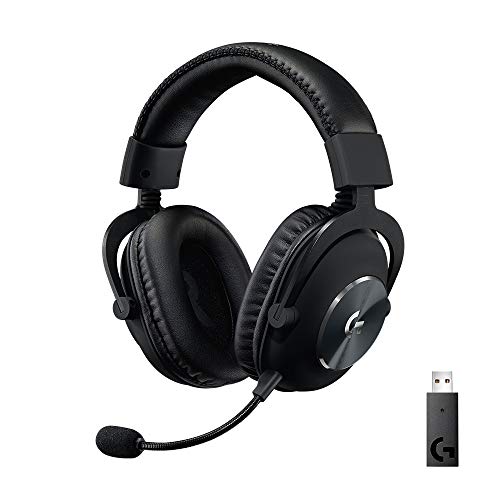
Logitech G PRO X Wireless — Blue VO!CE Wireless Pick
The original PRO X Wireless built its identity around the microphone. Blue VO!CE filtering lets a player shape and clean their outgoing voice — taming room echo, keyboard clatter, and the flatness of a untreated bedroom — and for team players, streamers, and anyone whose friends judge them through a headset mic, that processing is not a garnish. It is the difference between sounding present and sounding like you are calling from inside the game rather than playing it.
Around that microphone sits a complete wireless package: Lightspeed connection for lag-free play, 50mm PRO-G drivers, DTS Headphone:X 2.0 surround, and a title-claimed battery life beyond twenty hours. That combination made this model the default recommendation of its generation, and it remains coherent now: nothing in its list is decorative, and every element serves either hearing the game or being heard in it. Players choosing between this and the PRO X 2 are really choosing between voice polish and the newer graphene driver story.
The honest comparison deserves care. The PRO X 2 adds connection breadth and the graphene drivers; this model answers with Blue VO!CE and a proven, widely understood package that many players already know from teammates’ recommendations. If your recordings and your friends’ ears matter more than the last increment of driver technology, the older model’s priorities may match yours better. Logitech keeping both in the catalogue is an admission that competitive players disagree about what premium means.
Daily life with the PRO X Wireless is simple in the way good tools are. The battery figure means charging is a weekly rhythm rather than a nightly anxiety, the wireless link means the desk stays clean, and the microphone processing means you stop apologising for your room. Its limits are the generation’s limits: no Bluetooth in the title’s story, and a PC-centred outlook that console players should register before ordering.
Choose this model when your voice is part of your game — shot-calling, streaming, coaching, or simply being the teammate everyone can understand. In a list full of headsets chosen for how they sound to their wearer, the PRO X Wireless is the one chosen for how its wearer sounds to everyone else, and for social players that is the correct priority.
There is a social test the PRO X Wireless passes that specification sheets cannot capture: teammates stop commenting on your microphone. No more requests to repeat callouts, no more keyboard percussion under your voice, no more sounding like the away player in your own team’s stack. Blue VO!CE’s value compounds across hundreds of small moments like those, and players who have experienced the before and after rarely volunteer to go back. If your current headset’s microphone is the running joke of your group, this model’s headline feature is aimed at your exact embarrassment.
- Connection: Lightspeed wireless
- Drivers: 50mm PRO-G
- Microphone: Blue VO!CE filter
- Surround: DTS Headphone:X 2.0
- Battery: 20+ hour life (per listing title)
Strengths
- Blue VO!CE processing cleans and shapes outgoing voice
- Lightspeed wireless with 20+ hour battery claim suits weekly charging
- PRO-G 50mm drivers and DTS surround complete a proven package
Trade-offs
- No Bluetooth path named for phones or second devices
- PC-centred design gives console players less to use
- Newer PRO X 2 offers broader connections and graphene drivers
Best for: team players, shot-callers, and streamers whose microphone quality is judged nightly.
Not suited for: players who need one headset to pair with a phone by Bluetooth as well as a PC.
Listen to your own recorded voice, then decide whether the PRO X Wireless listing’s Blue VO!CE is your upgrade.
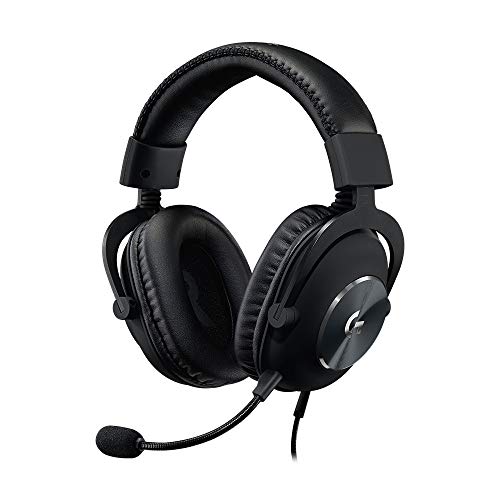
Logitech G Pro X Wired Gaming Headset — Best Wired PRO Model
The wired Pro X is the connoisseur’s version of the PRO line: no battery to manage, no radio to pair, and a box whose contents read like an apology for every accessory other headsets sell separately. The title lists a USB DAC, a set of spare memory foam pads alongside the standard ones, and a carry bag, which together say that Logitech expected this headset to be configured, travelled with, and kept. For a player who treats their headset as equipment rather than a gadget, that completeness is the appeal.
Blue VO!CE appears here in its wired home, where the USB DAC gives the processing a clean digital path from the microphone. The result is the same voice-shaping story as the wireless model, delivered with the reliability of a cable: no battery anxiety before a long tournament day, no wireless environment to troubleshoot in a crowded venue. DTS 7.1 processing and 50mm drivers handle the incoming side, and the detachable boom means the headset can clock off and become travel headphones with the bag it arrived in.
The spare pads deserve more respect than accessory lists usually get. Two pad materials change sound and feel measurably — one seals tighter, one breathes better — and being able to swap them turns fit and tuning into a choice you make per game or per season rather than a fate you accept. For players who have ever wished their headset felt slightly different in summer, this box quietly contains the answer, and almost no rival at any tier bothers to include it.
Platform reach is the wired model’s other quiet victory: the title names PC, Xbox, PlayStation 5, and PlayStation 4, because a 3.5mm connection asks nothing of its host. The USB features concentrate on PC, as with the G432 class of headsets generally, but the analogue path keeps the Pro X useful on every controller in the house. In a catalogue increasingly divided by console ecosystems, a headset that simply plugs into everything has a clarifying honesty.
Buy the wired Pro X if you value completeness and permanence over wireless freedom: the DAC, the spare pads, the bag, the voice processing, and a cable that will work on machines not yet released. It is the model in this list most likely to be serving its owner, unchanged and fully understood, five years from now.
Ownership of the wired Pro X has a craftsmanlike pleasure the wireless models cannot offer: everything is inspectable and configurable. Swap the pads and hear the tuning change; route through the DAC or straight from a controller and know why each sounds as it does; pack the bag knowing the headset inside is complete. In a product category drifting toward sealed, software-mediated black boxes, a headset whose owner can understand and adjust all of it is quietly radical. Players who maintain their equipment rather than replacing it will recognise their own philosophy in this box.
- Connection: wired, USB and 3.5mm
- Drivers: 50mm
- Microphone: detachable boom, Blue VO!CE
- Surround: DTS 7.1 (per listing title)
- Extras in title: spare memory foam pads, USB DAC, bag
- Platforms named in title: PC, Xbox, PS5, PS4
Strengths
- USB DAC and Blue VO!CE deliver the full voice-processing path
- Spare memory foam pads included for fit and tuning choices
- Widest platform list here, thanks to the universal wired connection
Trade-offs
- A cable is a permanent companion at the desk
- USB features centre on PC even though audio works everywhere
- No wireless mode for couch-distance play
Best for: desk players who keep equipment for years and want the full accessory box on day one.
Not suited for: living-room players whose seating sits beyond a cable’s comfortable reach.
Inventory the Pro X wired listing’s box contents against the accessories you have bought separately before.

Logitech G Astro A20 X — Accessible ASTRO Wireless
The A20 X exists to answer a fair question: how much of the ASTRO flagship experience can be had without flagship commitment? Its answer, per the title, is the multi-platform switching. PLAYSYNC audio switching appears here too, letting the headset move between PlayStation, Xbox, PC, and — distinctively in this list — Nintendo Switch generations, which makes the A20 X the natural pick for households whose platform collection includes Nintendo hardware that the bigger ASTROs’ titles do not name.
The 48kHz microphone figure in the title signals that voice was not the place Logitech chose to economise. Casual and family players still live on voice chat, and a headset at this tier that treats the microphone as a headline understands its audience. What you should not expect is the base station theatre of the A50 models: the A20 X’s proposition is switching and wireless convenience in a simpler package, not a docked command centre for the living room.
That simplicity has a household logic of its own. A headset that moves between a child’s Switch, a parent’s PC, and the family console without a station to reconfigure is a headset that actually gets shared instead of argued about. Its tier also forgives the realities of shared ownership — knocks, loans, and the occasional trip in a school bag — in a way that should make flagship owners slightly nervous on its behalf. Accessibility here is not a euphemism; it is a design brief about how households really use things.
Compare it honestly with its own family before buying. The A50 adds the dock, the battery story, and the flagship frame; the A50 X adds video switching. The A20 X counters with the Switch-inclusive platform list and a simpler life. If your household’s centre of gravity is Nintendo plus one other platform, the A20 X may not be the budget compromise at all — it may be the only model in this article whose title actually names your whole setup.
Choose the A20 X for breadth on a budget: many platforms, wireless freedom, a microphone taken seriously, and no station demanding furniture space. It is the catalogue’s welcome mat, and welcome mats get more use than chandeliers.
The A20 X also plays a role in the catalogue that flagship thinking undervalues: it is the headset a household buys second. The first headset is researched for months; the second is bought because the first is always in use by somebody else, and it needs to work with everything, offend nobody, and cost a sane amount. The A20 X’s Switch-inclusive switching and serious microphone fit that second-headset brief almost suspiciously well. Many homes will find it becomes the first headset in practice — the one that is always charged, always compatible, and always the one grabbed — while the flagship waits for its occasion.
- Connection: wireless
- Switching: PLAYSYNC audio switcher
- Microphone: 48kHz (per listing title)
- Platforms named in title: PS5, Xbox, PC, Switch 1 and 2
Strengths
- PLAYSYNC audio switching at an accessible tier
- Platform list uniquely includes Switch 1 and 2 here
- 48kHz microphone keeps voice quality a headline, not an afterthought
Trade-offs
- No base station dock or charging theatre
- Flagship A50 models offer the fuller ecosystem and battery story
- Title gives no driver detail, so audio rests on the ASTRO brief
Best for: households mixing Nintendo with PlayStation, Xbox, or PC who want one wireless headset for all.
Not suited for: players wanting a docked flagship station as the centre of a fixed setup.
Check the A20 X listing if your platform list includes a Switch the bigger models never mention.
How Should You Set Up a Logitech Headset Ecosystem Without Regrets?
Decide the geography before the model. ASTRO stations want a fixed home with HDMI and power within reach of the screen, so measure that shelf and claim it permanently; a station that gets unplugged weekly is a station whose benefits evaporate. PRO models want the opposite discipline: keep the receiver in the machine you play on most, store the cables you use weekly in the same drawer as the headset, and if you bought the wired Pro X, try both pad sets in the first week while the comparison is fresh, rather than leaving one sealed in the box as a forgotten option.
Then configure once, properly, and stop. Set the microphone processing with a recording of your own voice in your actual room, choose your surround preference with a game you know by heart, and write down what you chose if your memory is human. The players who enjoy premium headsets for years are the ones who did this setup once; the players who fiddle nightly are usually compensating for a model that never matched their life in the first place. Setup is where the catalogue’s promises become your room’s facts, and an unhurried hour there repays itself every session.
What About Comfort Across a Whole Evening?
Logitech’s two families wear differently, and the distinction matters for long sessions. The ASTRO models are console furniture: substantial frames that sit with a planted, stable feel suited to a couch and a controller. The PRO models are desk instruments: they prioritise staying precisely placed through the small, constant head movements of mouse-and-keyboard play. Neither philosophy is warmer or cooler in the abstract; the question is which posture your evenings actually involve, and the honest answer to that question predicts your comfort better than any padding description.
Whichever family you choose, give the fit a week before judging it final. New headbands relax, new pads learn your ears, and your own habits adjust to a new weight distribution. The exception is pain: pressure that hurts in the first session is information, not a phase, and it should send you back to the family split at the top of this article rather than into another week of endurance. Comfort in this catalogue is findable for almost everyone, but it is found by matching family to life, not by outlasting a mismatch.
When Does It Make Sense to Own Two of These?
More often than the industry admits. A docked A50 at the television and a wired Pro X at the desk is a combination that appears in household after household, because the two rooms ask for genuinely different things and each model is compromised exactly where the other is strong. The economics are kinder than they look: two specialised headsets kept for years cost less per year than one flagship replaced twice for being almost right in both rooms. If your gaming life is honestly two lives, the catalogue is not upselling you when it suggests two answers; it is describing your house.
Logitech’s Six, Placed Shoulder to Shoulder
| Model | Family | Connection | Signature feature |
|---|---|---|---|
| Logitech G Astro A50 X | ASTRO | Wireless via base station | PLAYSYNC A/V switching, HDMI 2.1 |
| Logitech G Astro A50 | ASTRO | Wireless via base station | PLAYSYNC audio switching, dock |
| Logitech G PRO X 2 Lightspeed | PRO | Wireless, Bluetooth, USB, aux | 50mm graphene drivers |
| Logitech G PRO X Wireless | PRO | Lightspeed wireless | Blue VO!CE microphone |
| Logitech G Pro X Wired | PRO | USB and 3.5mm wired | DAC, spare pads, Blue VO!CE |
| Logitech G Astro A20 X | ASTRO | Wireless | PLAYSYNC audio, Switch support |
The table’s family column does most of the deciding. ASTRO rows sell an ecosystem organised around a room; PRO rows sell a personal instrument organised around a player. Within ASTRO, the steps are switching strength and dock commitment, from the A20 X’s simple breadth to the A50 X’s video hub. Within PRO, the steps are connection philosophy: wired completeness, wireless voice, or the PRO X 2’s everything-at-once breadth with graphene on top. No row is the catalogue’s best in the abstract; each is the best answer to a differently shaped life.
How Do You Read a Headset Title Like a Contract?
This article has modelled a habit worth keeping for every future purchase: treat the title as the contract and everything else as commentary. The titles here told you which models switch video and which only switch audio, which print battery figures and which stay silent, which name Nintendo and which stop at the big two consoles. Every one of those distinctions changes what a headset will do in your house, and every one was available before a single review was read. Readers who internalise that habit will find most buying guides, this one included, become confirmations rather than revelations — which is exactly the position a buyer wants to be in.
What Mistakes Do Logitech Buyers Keep Making?
Paying for the X model’s video switching with one console
The A50 X’s premium is substantially a switcher, and a switcher with nothing to switch is furniture. Count your machines honestly before admiring the flagship: one console and a PC that lives elsewhere equals the A50 or A20 X’s audio switching at most, and the money saved buys games for all of them.
Assuming newer automatically means better for you
The PRO X 2 is newer than the PRO X Wireless, but the older model’s Blue VO!CE headline serves voice-led players more directly than graphene serves them. Generations in this catalogue are branches as much as ladders. Buy the branch whose headline feature matches your actual bottleneck — hearing, speaking, switching, or travelling.
Ignoring the box contents on wired models
Buyers compare the wired Pro X with wireless rivals on connection alone and miss that its title lists a DAC, spare pads, and a bag that others charge for or omit. Judge the whole purchase: a wired model with a complete box can be the better-equipped buy even before its reliability advantages enter the argument.
Forgetting that console and PC audio can differ
The A50’s own title prints different audio figures for console and PC, which is honest and easy to skim past. Set expectations by the platform you will actually use, and do not carry a PC figure into a console purchase. Reading titles as contracts, the way this guide does, prevents the disappointment that skimming creates.
What Should You Do in the First Week With a New Logitech Headset?
Treat the first week as calibration, for the headset and for yourself. With an ASTRO model, practise the switching until it is muscle memory, and notice which machine you actually switch to most; that observation tells you whether you bought the right strength of PLAYSYNC. With a PRO model, record your voice in your real room, play one familiar game rather than five new ones, and learn what the headset does to sounds you already know by heart. Familiar content is the only honest test material, because novelty flatters every headset and teaches you nothing about it.
By the end of the week, make the keep-or-return decision with the packaging still intact and the evidence fresh: sessions logged, voice recorded, switching counted. Premium headsets are long commitments, and a week of deliberate testing is a small premium to pay for years of a correct match. The catalogue is deep enough that a wrong first choice has a right sibling waiting, and finding it in week one is a success, not a failure.
One last check before the basket: say your room, your machines, and your main game out loud, then read the six titles again in order. The model whose title answers all three without a footnote is your headset, and it is rarely the one with the longest feature list. Logitech printed the differences on purpose; the reader who uses them buys once, and buys correctly.
It is also worth keeping the receipt of your reasoning, not just the receipt of the purchase: a note of which feature decided it — switching, voice, drivers, or the box contents — will make the eventual replacement decision in some future year a five-minute task instead of a fresh research project.
Final Recommendation
Most buyers should start in the middle of their family. Console rooms: the A50, whose dock and audio switching deliver the flagship life without the video switcher’s tax. Desk competitors: the PRO X 2 for its drivers and connections, unless your voice is your weapon, in which case the PRO X Wireless or its wired sibling earns the money instead. Nintendo-inclusive households should not overlook the A20 X, the only title here that names their whole shelf.
Logitech’s catalogue rewards the reader: every meaningful difference between these six is printed in their titles for anyone willing to read them as carefully as this guide has — and the model whose title describes your room, your machines, and your habits most exactly is the one that will still feel correctly bought years from now.
Frequently Asked Questions
What is the difference between the A50 and the A50 X?
The titles draw it clearly. The A50 X adds the PLAYSYNC A/V switcher with HDMI 2.1 passthrough for 4K120 and VRR video, making the base station a video hub as well as an audio one. The A50 offers PLAYSYNC audio switching and the docked ecosystem without the video path. Buy the X for a three-machine, one-screen room; buy the A50 when your screens are already connected the way you like them.
Which Logitech headset is best for competitive shooters?
The PRO X 2 Lightspeed is the catalogue’s competitive flagship, with 50mm graphene drivers, DTS:X 2.0 surround, and the broadest connection list for moving between machines. The PRO X Wireless is the alternative when microphone quality leads, thanks to Blue VO!CE. Both are desk-first designs; console competitors should weigh the ASTRO models’ switching instead.
Does Blue VO!CE really change how I sound?
Blue VO!CE is processing applied to your outgoing voice, and its effects — clarity, consistency, less room in the signal — are audible to the people listening rather than to you. That makes it easy to evaluate: record yourself with and without it, or ask a regular teammate. Players in noisy rooms gain the most, which is why the feature headlines two of the PRO models here.
Which of these works with Nintendo Switch?
The A20 X is the only title in this group that names Switch 1 and 2 among its platforms, alongside PS5, Xbox, and PC. Other models may connect in particular modes, but this guide only promises what titles print. Nintendo households should treat the A20 X’s platform list as the safest evidence in the article.
Is the wired Pro X outdated next to the wireless models?
No — it is differently aimed. Its title lists a USB DAC, spare memory foam pads, and a bag, plus Blue VO!CE and DTS processing, and its cable works across PC, Xbox, and both PlayStation generations. Wireless buys freedom; this buys completeness and permanence. Players who keep equipment for years often find the wired box the smarter spend.
Do I need the base station models if I only play on PC?
Probably not in their full glory. The A50’s dock and switching serve multi-platform rooms, and a PC-only player pays for machinery aimed at consoles. The PRO line — X 2, Wireless, or wired — concentrates its money on drivers, microphones, and connections a desk actually uses. Let your platform list, not the flagship’s shine, make this call.
Can I use these headsets for work calls too?
The PRO models travel best into the working day: the PRO X Wireless and wired Pro X carry Blue VO!CE, which was built for being understood, and the PRO X 2’s Bluetooth covers a work laptop without extra hardware. The ASTRO models can serve calls on their platforms, but their ecosystems are room-bound. Readers whose headset must earn its keep in meetings as much as in matches should compare this list with the dedicated office selection in the Jabra guide linked above.
Are replacement parts part of the Logitech argument?
They are part of the ownership argument rather than any single title here. A widely owned catalogue means pads, cables, and advice remain findable long after purchase, and the wired Pro X even includes its spare pads in the box. When you buy the model a large community owns, you are also buying that community’s accumulated knowledge about keeping it alive, which never appears in a specification table and frequently decides how long equipment actually lasts.
How long do the wireless models last between charges?
Only two titles here print battery figures: the A50 claims 24 hours and the PRO X Wireless claims more than 20 hours. The other wireless models’ titles are silent, and this guide leaves them silent rather than borrowing numbers from elsewhere. If battery life is your deciding factor, those two printed claims are the evidence you have, and both describe weekly rather than nightly charging rhythms.
Related Guides
Logitech shoppers with a competitive streak should compare these models against the wider field in Best Headsets to Hear Footsteps in Games, endurance-focused players can weigh the same catalogue for long stints in Best Gaming Headsets for Racing Sims, and anyone whose headset doubles for work should read Best Jabra Headsets for Work and Calls before deciding which brand owns their desk.


