What's inside
- Key Takeaways
- Quick Picks
- What Qualified a Television for an OLED-Only Gaming Shortlist?
- Six OLEDs, Three Makers: Where Do They Actually Differ?
- Why Does Pixel Response Matter More Than Almost Any Printed Number?
- How Should an OLED Owner Think About Burn-In Without Spoiling the Hobby?
- Which Size of OLED Fits Which Kind of Gaming Room?
- How Do You Configure an OLED for Its First Gaming Session?
- What Do OLED Owners Gain From the Television’s Other Life?
- How Does OLED Handle the Bright Scenes It Is Supposed to Fear?
- What Should You Look for When an OLED Listing Refuses to Say Much?
- Common Mistakes When Buying a Gaming OLED
- Final Recommendation
- Frequently Asked Questions
- Related Guides
As an Amazon Associate I earn from qualifying purchases. This post may contain affiliate links at no extra cost to you.
widgetverdict.com is reader-supported. When you buy through links on our site, we may earn an affiliate commission.
Every gaming television technology asks the player to accept a compromise, except in one specific place: the moment a frame changes. An OLED pixel is its own light source, switched on and off individually, so when a game cuts from a corridor to a muzzle flash, the panel does not wait for a backlight zone to catch up or a liquid-crystal layer to twist into place. The best gaming oled tvs are built on that single physical fact, and everything else about them — the perfect blacks, the viewing angles, the panel-care rituals — radiates outward from it. This guide gathers six of them, from LG, Samsung, and Sony, and treats them as gaming instruments first and televisions second.
A discipline runs through the page, and it matters more in this category than most. Refresh rates, port counts, and gaming features are asserted only where a listing title states them. OLED listings are unusually coy: of the six titles below, exactly one prints a motion figure, and only one prints its port count. Rather than filling those silences with figures borrowed from reputation, this guide names the silence, explains what the technology itself guarantees by its nature, and tells you precisely where to confirm the rest. A reader who finishes here should know both what OLED gaming genuinely offers and what paperwork to demand before paying for it.
The six split by maker and by size. LG fields the C4 and its successor-generation C5, both at 65 inches. Samsung fields the S90D at 65 and the larger S84F at 77. Sony fields the 55-inch XR8B and the 65-inch BRAVIA 6 OLED, the latter carrying the most explicit gaming paperwork in its title of any set here. Between them they cover the desk-adjacent room, the main living room, and the dedicated gaming den — and they disagree with each other in instructive ways about what an OLED buyer should prioritise.
Burn-in is addressed head-on in its own section below rather than whispered about, because a gaming guide for OLED that dodges the topic insults its readers. Interfaces hold static elements on screen for hours; that is a fact of the hobby. The protections modern panels carry, and the handful of habits that genuinely matter, are laid out plainly so the decision can be made on evidence instead of folklore from either direction — neither the panic of old forum threads nor the breezy dismissal of sales copy.
Prices, as throughout this cluster of guides, are left to the moment of purchase: each linked listing is where the live figure belongs, and OLED pricing in particular moves with model-year turnover in ways a printed number cannot honour. What follows instead is the durable part of the decision — panels, paperwork, sizes, and care — the parts still true when the sales calendar has turned twice.
Key Takeaways
- All six picks are OLED; the argument here is never OLED versus something else, but which OLED, at which size, with which paperwork.
- Sony’s BRAVIA 6 OLED prints the strongest gaming credentials in its title: four HDMI 2.1 ports, stated outright.
- Samsung’s S84F is the only title here printing a motion figure — Motion Xcelerator 120Hz — and the only 77-inch screen in the set.
- LG’s C5 succeeds the C4 with Dolby Vision, HDR10, and AI Super Upscaling named in its title; the C4’s title names almost nothing, so verify its figures on the listing page.
- Panel care on a gaming OLED is a short list of habits and automatic features, not a reason to avoid the technology.
- Size is a room decision before it is a budget decision: 55 inches for the dedicated space, 65 for the main room, 77 only where seating distance can honour it.
Quick Picks
| Television | Badge | Why it is here |
|---|---|---|
| LG OLED evo C4 65″ | The Quiet Benchmark | A 65-inch OLED evo panel whose case rests on the technology itself rather than on printed claims. |
| LG OLED evo AI C5 65″ | Successor Generation | The 2025 C-series step, naming Dolby Vision, HDR10, AI Super Upscaling, and FILMMAKER Mode in its title. |
| Samsung S90D OLED 65″ | Sound-Aware OLED | Samsung’s 65-inch OLED naming Dolby Atmos and Object Tracking Sound Lite in its title. |
| Sony BRAVIA XR8B OLED 55″ | PlayStation’s Own OLED | The 55-inch OLED whose title states exclusive features for PlayStation 5. |
| Sony BRAVIA 6 OLED 65″ | The Paperwork Pick | Four HDMI 2.1 ports stated in the title — the most explicit gaming credential in this guide. |
| Samsung S84F OLED 77″ | The Big OLED | A 77-inch OLED whose title prints Motion Xcelerator 120Hz — scale and a stated figure together. |
What Qualified a Television for an OLED-Only Gaming Shortlist?
The first qualification was the panel itself, verified from each listing title: every set here is OLED by its seller’s own description, whether the title says so in the model name, as LG’s and Samsung’s do, or in a feature line, as Sony’s BRAVIA 6 does with its stated OLED Contrast. Sets with OLED-adjacent marketing but backlit construction were excluded, because a guide about gaming on self-lit pixels owes its readers panels that actually light themselves.
The second qualification was a gaming story that could be told honestly. For some picks that story is printed — Sony’s four HDMI 2.1 ports, Samsung’s Motion Xcelerator 120Hz, the PlayStation features in the XR8B’s title. For others, principally LG’s pair, the story rests on the technology’s inherent response behaviour plus the set’s position in its maker’s range, and the guide says so openly rather than dressing inference as specification. A pick whose gaming case could not be stated without invention was dropped, however celebrated its film performance.
Balance was the third test. Three makers, three sizes, and two distinct philosophies — LG’s and Samsung’s platform-led sets against Sony’s console-integrated approach — give the reader real forks in the road. Six near-identical panels at one size would have made an easier page and a worse guide.
Finally, every pick had to make sense as a purchase a household would live with for years: streaming platforms for the non-gaming hours, sound arrangements that do not embarrass the picture, and panel-care systems mature enough that a gaming household can follow the guidance without turning maintenance into a hobby of its own.
A note on what was not required: no pick needed a printed brightness figure, a celebrity endorsement of its gaming mode, or a specification invented by an earlier review and copied from page to page since. The shortlist was built from titles and from the physics of the panel type — the two sources a buyer can independently check — which is why several famous names with foggy listings are absent and why every claim in the six entries below can be traced to a line its seller wrote.

LG OLED evo C4 65″ — The Quiet Benchmark
In a guide about console televisions, this same panel argues from features; here, among OLEDs, it must argue from essence, and the argument changes character. Stripped of specification talk — its title offers a 4K processor, a flat screen, a Magic Remote, and Alexa, and then falls silent — the C4 is a 65-inch self-lit panel from LG’s 2024 line, and its gaming virtues are the ones the technology cannot help having: pixel-level light control, near-instant pixel response by the nature of emissive display, and viewing angles that keep contrast honest for every seat in the room.
Those inherent virtues map onto games with unusual precision. Pixel response is the quiet killer specification in gaming: a panel that transitions slowly smears dark scenes into trails behind moving objects, a fault players describe as ghosting and often blame on the game. Emissive pixels sidestep the mechanism entirely. Likewise, the perfect black level is not merely cinematic — in a horror title or a night raid, it is informational, separating a shadow that hides geometry from a shadow that hides an opponent, without the halo a backlit zone throws around bright objects in dark scenes.
The buyer’s homework, stated plainly, is the gaming paperwork: this title prints no refresh figure and no port details, so the listing’s specification section must confirm the high-frame-rate and variable-refresh behaviour before purchase. That is a ten-minute task, and it should be done with the exact model code from the title — OLED65C4PUA — since figures drift between sizes and model years within a series.
Ownership texture matters too. The Magic Remote’s pointer divides households, the flat screen suits rooms with side windows, and a 2024 set arrives with mature firmware. Judged among OLEDs rather than against backlit rivals, the C4 is the reference point: the panel the others must beat on paperwork, size, or price positioning, because on the technology’s core virtues they are all, by construction, close kin.
A final C4 consideration is resale and hand-me-down logic, unglamorous but real in a fast-moving category. A widely sold 65-inch OLED from a flagship-adjacent line is the easiest kind of television to move to a second room or a second owner when the main room eventually upgrades, because its virtues need no explanation to anyone who has seen one lit. Purchases at this level are rarely final; they are postings, and the C4 posts onward gracefully.
- Screen size: 65 inches
- Panel: OLED evo
- Model code in title: OLED65C4PUA, 2024
- Processor named in title: 4K processor
- Remote named in title: Magic Remote
- Refresh rate: Not stated in listing title
- Gaming features: Not stated in listing title
Strengths
- Emissive panel response suits fast, dark gaming scenes by the technology’s own nature
- 65-inch scale with OLED viewing angles serves a whole sofa of players
- Mature model year with settled firmware and a widely understood ownership profile
Trade-offs
- Title prints no gaming figures whatsoever — verification homework is mandatory
- A successor generation exists in this very guide, inviting a generational comparison
- Panel-care habits apply, as on every OLED here
Best for: a player who understands OLED’s inherent gaming virtues and is happy to confirm the remaining figures from the listing’s specification block
Paperwork-first shoppers should look at the BRAVIA 6 instead: its title prints the gaming figures this one leaves to the specification block

LG OLED evo AI C5 65″ — Successor Generation
The C5 is what the C4 becomes a model year later, and its listing title is more forthcoming than its predecessor’s: Dolby Atmos, Dolby Vision, HDR10, AI Super Upscaling 4K, and FILMMAKER Mode are all named. For a gaming household, the item in that list with daily consequences is the upscaling. Consoles spend much of their lives rendering below native resolution — performance modes see to that — and an AI upscaling stage, as LG labels it, is the machinery that decides whether a 1440p performance image arrives at the panel looking composed or looking apologetic.
Dolby Vision’s presence matters on the Xbox side of the room, where Dolby Vision gaming modes exist, and HDR10 covers the universal baseline every game falls back to. FILMMAKER Mode, by contrast, is a film-night feature — a one-press route to the picture as mastered — and its inclusion signals the C5’s intended double life. A gaming OLED that cannot also host a respectable film night will be resented by the rest of the household; LG has clearly specced this one to avoid that resentment.
What the title still withholds is the gaming paperwork: no refresh figure, no port count, no variable-refresh statement. The generational story — 2025 against the C4’s 2024 — suggests refinement rather than reinvention, and a buyer choosing between the two LGs should let the listing pages arbitrate: compare the printed gaming specifications of OLED65C5PUA against its predecessor, weigh the upscaling and HDR differences the titles do state, and let any price gap be judged against those specifics rather than against the romance of the newer badge.
As the successor, the C5 also frames a timing question honestly. Last year’s model rarely disappears when the new one lands; it lingers, discounted, beside it. The C5’s case must therefore be won on its stated improvements — the AI upscaling, the format support — and not on novelty. For a buyer who plays a great deal of performance-mode content, the upscaling line in this title is a substantive reason, not a cosmetic one.
Consider, too, what the C5’s HDR pairing means across a mixed week. A Dolby Vision film on Friday, an HDR10 game on Saturday, a broadcast match on Sunday — the set’s format support, as printed, covers each without the owner learning which badge belongs to which evening. Format coverage is the kind of specification that only becomes visible when it is missing, mid-purchase-regret, and the C5’s title closes that particular door in advance.
- Screen size: 65 inches
- Panel: OLED evo AI
- Model code in title: OLED65C5PUA, 2025
- HDR named in title: Dolby Vision, HDR10
- Audio named in title: Dolby Atmos
- Upscaling named in title: AI Super Upscaling 4K
- Refresh rate: Not stated in listing title
Strengths
- AI Super Upscaling speaks directly to performance-mode console rendering
- Dolby Vision and HDR10 both named, covering Xbox gaming modes and the universal fallback
- FILMMAKER Mode gives the set a credible film-night personality
Trade-offs
- Gaming figures still absent from the title — the specification block must be consulted
- Generational gains over the C4 are refinements; the older set remains a live alternative
- No port information in the title for multi-console households
Best for: a performance-mode player whose console renders below 4K for hours at a time and who values the newest LG processing
Watch the budget here: a previous-generation panel at a keener street position will tempt anyone happy to trade newness for savings

Samsung S90D OLED 65″ — Sound-Aware OLED
Samsung’s S90D enters the OLED argument carrying something the LG pair does not print: an audio story. Its title names Dolby Atmos and Object Tracking Sound Lite, Samsung’s system for steering effects toward their on-screen position. Games are spatial media — footsteps behind a wall, a vehicle crossing the frame — and a television that attempts positional audio from its own speakers gives a soundbar-free household a measurably more legible game world than one that treats sound as mono-with-volume. It will not replace a dedicated system, but it respects the medium.
The picture features named are OLED HDR+, Motion Xcelerator, Real Depth Enhancer, and 4K AI Upscaling. Read them with the discipline this guide applies everywhere: Motion Xcelerator is Samsung’s motion-processing brand, printed here without a hertz figure, so it promises smoothness work rather than stating a panel rate; Real Depth Enhancer is a contrast-and-depth processing claim aimed at perceived dimensionality; the AI upscaling joins the same performance-mode argument made for the C5. The panel itself — OLED, 65 inches, 2024 model — carries the technology’s inherent response and black-level virtues that need no brand vocabulary to be real.
Alexa built in and Samsung’s smart platform cover the non-gaming hours. The honest gaps in the title are the familiar ones: no refresh figure, no variable-refresh statement, no port count. Samsung’s wider gaming reputation is strong, but this guide grades listings, and the S90D’s listing asks to be chosen for its panel, its sound ambitions, and its processing suite — with the gaming paperwork confirmed on the listing page by any buyer for whom a printed figure is decisive.
One more angle distinguishes the S90D in a six-OLED field: it is the set for the household that will never buy a soundbar. The remaining five sets either stay silent on audio or, like the Sony below, name formats rather than a sound system. If the television’s own speakers are the permanent audio plan, the S90D’s title is the only one in this guide that treats that plan as a design brief.
Samsung’s platform deserves its sentence as well. The S90D’s smart system aggregates the streaming services a household rotates among, and its game-adjacent conveniences — quick input switching, a gaming hub layer on Samsung sets of this era where offered — should be confirmed on the listing rather than assumed, in keeping with this guide’s habits. What is printed is the picture-and-sound core, and that core is where the S90D stakes its claim.
- Screen size: 65 inches
- Panel: OLED
- Model code in title: QN65S90D, 2024
- HDR named in title: OLED HDR+
- Audio named in title: Dolby Atmos, Object Tracking Sound Lite
- Motion feature named in title: Motion Xcelerator (no figure stated)
- Upscaling named in title: 4K AI Upscaling
- Refresh rate: Not stated in listing title
Strengths
- Only title here that builds a positional-audio system into the set’s own speakers
- OLED panel with Samsung’s depth and motion processing for mixed content
- 4K AI Upscaling addresses performance-mode rendering directly
Trade-offs
- Motion feature printed without a hertz figure — a processing claim, not a panel rate
- Gaming paperwork (ports, VRR) absent from the title
- 2024 model year, with a newer Samsung OLED generation also in this guide
Best for: a soundbar-free household that plays cinematic games and wants the television’s own audio to attempt spatial work
Already own a dedicated sound system? Then the built-in audio ambition here is budget spent on speakers that will rarely be heard

Sony BRAVIA XR8B OLED 55″ — PlayStation’s Own OLED
Among six OLEDs, the XR8B is the one designed by the company that also designs the console, and in an OLED-specific guide that fact sharpens rather than blurs. Sony’s stated exclusive features for PlayStation 5 mean the television and console were engineered against each other: HDR tone mapping calibrated by the console itself, picture behaviour that recognises game content. On any panel those features are conveniences; on an OLED, whose HDR presentation depends so heavily on tone mapping decisions because its brightness is precious, a console that sets the curve correctly is protecting the panel’s one scarce resource.
The XR Processor with AI technology, named in the title, handles the upscaling and image work, and Dolby Vision with Dolby Atmos cover the format side. At 55 inches the XR8B is the smallest set in this guide, which in OLED terms is a position of strength for a certain room: the dedicated gaming space, the bedroom setup, the desk-adjacent arrangement where a 65-inch panel would overwhelm the viewing distance and a smaller emissive screen delivers the technology’s contrast at a comfortable scale.
The title’s silences match the pattern of its peers: no refresh figure, no port count. Sony’s PlayStation features are the printed gaming credential here, and they are meaningful ones, but a buyer whose checklist begins with a stated high-refresh figure will again be sent to the listing’s specification block — a errand this guide keeps assigning because the titles keep requiring it.
Google TV runs the set’s other life. Taken whole, the XR8B is the specialist of the six: the smallest, the most console-integrated, and the one whose gaming argument is about cooperation between two machines from one maker rather than about any specification a rival could simply print larger.
The XR8B also rewards a note on seating geometry. At 55 inches, two players sharing a screen sit comfortably inside the panel’s best angles at ordinary distances, and a single player can pull a chair to the distance where the frame fills the gaze — the arrangement competitive players prefer and larger sets physically resist. Small, here, is not the compromise position; for the dedicated room it is the deliberate one.
- Screen size: 55 inches
- Panel: OLED
- Model code in title: K-55XR8B
- Processor named in title: XR Processor with AI technology
- HDR and audio named in title: Dolby Vision, Dolby Atmos
- Console feature named in title: Exclusive features for PlayStation 5
- Refresh rate: Not stated in listing title
Strengths
- PlayStation features engineered by the console’s own maker, valuable on a tone-mapping-sensitive panel
- 55-inch OLED scale suits dedicated gaming rooms and closer seating
- XR processing and full Dolby format support in the title
Trade-offs
- Smallest screen here — main-room households may find it undersized
- No refresh or port figures printed in the title
- Its headline features serve one console ecosystem specifically
Best for: a PlayStation 5 owner building a dedicated gaming space at 55 inches who wants maker-level console integration
Xbox-first households, and rooms planned around 65 inches or more, are both better served elsewhere in this guide

Sony BRAVIA 6 OLED 65″ — The Paperwork Pick
One line in this title does what five other listings decline to do: it states 4xHDMI 2.1. Four full-bandwidth ports, printed where a buyer can hold the seller to them. For a gaming household, that single phrase settles arguments the rest of this guide must leave open — both consoles and a PC can live on full-bandwidth inputs simultaneously, with a soundbar’s eARC still accommodated, and nobody performs the cable shuffle that quietly ruins multi-machine rooms. In a category where gaming paperwork is scarce, the BRAVIA 6’s title is a model of how to write one.
The rest of the title supports the headline: Dolby Vision and Dolby Atmos, OLED Contrast, Triluminos Pro colour, and a stated Wide Viewing Angle — the last of these being an OLED virtue Sony chose to print, useful confirmation for scattered family seating. Google TV with Gemini is the platform, Google Cast is named for phone-to-screen duties, and the title even mentions free 4K movie credits, a small ownership sweetener that costs the buyer nothing to accept.
Balance requires noting what remains unstated: no refresh figure appears, so the panel’s rate joins the verify-on-listing list, and no variable-refresh range is printed either. The BRAVIA 6’s paperwork is the best in this guide, not complete. But the direction of its completeness matters — ports are the specification households discover too late, after the second console arrives, while a refresh figure can be checked in a moment before purchase.
At 65 inches with Sony processing heritage behind it, the BRAVIA 6 is the OLED here that asks the fewest acts of faith. A buyer tired of asterisks — and this guide has issued many — will find its title refreshingly close to a contract.
There is a subtle benefit to the BRAVIA 6’s completeness that deserves naming: it shortens the research phase of the purchase itself. The other entries in this guide each assign the buyer verification errands — worthwhile ones, but errands. A title that prints its ports, its formats, its viewing angle, and its platform lets the decision move to the questions that actually differentiate evenings: size, room, and taste. Time is a specification too, and this set spends less of yours.
- Screen size: 65 inches
- Panel: OLED
- Model code in title: K-65A60
- Ports stated in title: 4x HDMI 2.1
- HDR and audio named in title: Dolby Vision, Dolby Atmos
- Colour named in title: Triluminos Pro
- Viewing angle: Wide Viewing Angle stated in title
- Smart platform: Google TV with Gemini, Google Cast
- Refresh rate: Not stated in listing title
Strengths
- Four HDMI 2.1 ports printed in the title — multi-machine rooms solved on paper
- Wide viewing angle stated, backing the OLED family-seating case in writing
- Dolby Vision and Atmos complete a title with unusually few gaps
Trade-offs
- Refresh figure still absent from the title despite the strong paperwork elsewhere
- Newer platform generation means a household learns a fresh interface
- Movie credits are a sweetener, not a picture-quality argument
Best for: a two-console or console-plus-PC household that refuses to shuffle cables and wants the ports guaranteed in writing
One console on the stand changes the maths: the extra ports would sit empty for years, and that money could have bought a larger screen
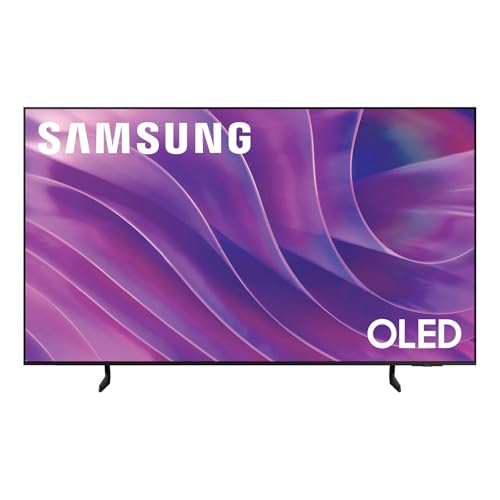
Samsung S84F OLED 77″ — The Big OLED
Scale changes what OLED gaming feels like, and the S84F is the only set here playing at 77 inches. Peripheral vision fills; a racing game’s sense of speed stops being an inference and becomes a sensation; a horror title’s darkness occupies the room rather than a rectangle within it. The counterweight is equally physical: at this size the viewing distance must grow with the screen, the wall and the stand must genuinely accommodate it, and the household is committing its room to the television in a way a 55-inch set never demands.
Its title is the most forthcoming of the six on motion: Motion Xcelerator 120Hz, a figure actually printed. Samsung’s naming bundles panel and processing under one banner, so the prudent reading is that 120Hz-class motion is the set’s stated capability — the only such statement in this guide — while the precise native-versus-processed composition remains a listing-page question. Even read cautiously, a printed figure outranks five silences, and competitive players shortlisting from titles alone will land here and on the Sony’s ports.
The NQ4 AI Gen2 Processor, 4K AI Upscaling, OLED HDR, and Pantone Validated colour complete the stated picture, under Samsung Vision AI for the 2025 model year. Pantone validation is a colour-accuracy credential aimed at film and photography, but a gaming household benefits sideways: accurate colour is accurate colour, whether the source is a mastered film or a game’s art direction, and titles with deliberate palettes — stylised indies especially — are shown as their artists signed them.
The S84F is therefore the maximalist’s OLED: the largest canvas, the only printed motion figure, current-generation processing. Its demands — room, distance, budget tier — are the price of admission, and the guide’s room guidance below exists largely to help a household decide whether it can pay them gladly.
Wall-mounting a 77-inch OLED is a two-person, measure-thrice undertaking, and the set’s thin emissive construction makes it more handleable than its diagonal suggests while remaining unforgiving of flex. Plan the mount, the cable route, and the socket positions before delivery day. The S84F’s drama on the wall is considerable; the drama of installing it should be scheduled, staffed, and entirely boring.
- Screen size: 77 inches
- Panel: OLED
- Model year in title: 2025
- Processor named in title: NQ4 AI Gen2 Processor
- Motion stated in title: Motion Xcelerator 120Hz
- HDR named in title: OLED HDR
- Colour credential in title: Pantone Validated
- Upscaling named in title: 4K AI Upscaling
Strengths
- 77-inch OLED immersion no other pick here attempts
- The only motion figure printed in any title in this guide
- Current-generation Samsung processing and colour validation
Trade-offs
- Demands viewing distance and wall space smaller rooms cannot offer
- The 120Hz claim’s native-versus-processed composition needs listing confirmation
- Largest screen means the largest commitment if the room fit was misjudged
Best for: a dedicated gaming room with the distance to honour 77 inches and a player who wants a printed motion figure
Measure the room before falling for the scale: compact spaces and close seating break the distance this diagonal assumes
Six OLEDs, Three Makers: Where Do They Actually Differ?
With panel technology held constant, the differences that remain are the ones that decide purchases: size, paperwork, sound, and processing philosophy. The table records each title’s own statements — including, in the refresh column, the five silences and the one figure — because in an OLED shortlist the honest comparison is not between rival technologies but between rival promises.
| Television | Panel | Refresh figure in listing title | Defining trait |
|---|---|---|---|
| LG OLED evo C4 65″ | OLED evo | Not stated in listing title | Benchmark panel; paperwork left to listing |
| LG OLED evo AI C5 65″ | OLED evo AI | Not stated in listing title | Upscaling-led generational step |
| Samsung S90D OLED 65″ | OLED | Not stated in listing title | Audio-led OLED case |
| Sony BRAVIA XR8B OLED 55″ | OLED | Not stated in listing title | Console integration over specifications |
| Sony BRAVIA 6 OLED 65″ | OLED | Not stated in listing title | 4x HDMI 2.1 stated in title |
| Samsung S84F OLED 77″ | OLED | Motion Xcelerator 120Hz stated | Largest screen; only printed motion figure |
Why Does Pixel Response Matter More Than Almost Any Printed Number?
A display’s response time is the interval a pixel needs to travel from one shade to another, and it governs whether motion looks carved or smeared. Liquid-crystal panels must physically reorient molecules to change shade, and in dark transitions that journey is slow enough to trail behind fast objects — the ghosting artefact. Emissive pixels change state by changing current, orders of magnitude more directly, which is why OLED’s response advantage is a property of physics rather than of any brand’s engineering budget. No title in this guide prints a response figure; none needs to, because the mechanism is the specification.
The gaming consequence concentrates in dark content. A bright sports game forgives slow transitions because consecutive shades are similar; a night scene in a stealth title, where a character crosses from black to charcoal to grey, exposes every millisecond of hesitation as a visible smear. Players who describe a backlit set as somehow muddy in dark games are usually reporting response behaviour, not contrast. OLED removes that entire failure mode, which is why this guide treats panel response as the technology’s first gaming argument, ahead of even its famous blacks.
Response also interacts with frame rate in the player’s favour. Higher frame rates shorten the time each frame is displayed, which reduces the eye’s perception of blur during camera pans; a fast-responding panel preserves that benefit instead of reintroducing its own smear on top. The pairing — a console mode rendering quickly, a panel answering quickly — is the technical heart of why OLED gaming feels different within the first minute of play.
How Should an OLED Owner Think About Burn-In Without Spoiling the Hobby?
Burn-in is uneven wear: pixels driven hard and statically age faster than their neighbours, and a ghost of the static element can eventually show on uniform backgrounds. Games supply static elements generously — health bars, minimaps, crosshairs, score bugs — so the concern is legitimate and this guide will not wave it away. What has changed across OLED generations is the defence in depth: pixel-refresh cycles that run in standby, luminance adjustment aimed at detected logos, subpixel shifting that moves the image imperceptibly, and panel materials more resistant than early sets. The systems named in listings vary; the layered approach does not.
The owner’s share of the defence is short enough to memorise. Leave the automatic protections enabled rather than disabling them for brightness. Let the television spend its nights in standby, plugged in, so maintenance cycles can run. Use the console’s and the set’s screen-dimming features during pauses instead of leaving a static menu up while dinner happens. Vary content across a week — a gaming-only diet of one title is the hardest pattern any panel can be fed, and most households naturally watch films, sport, and streams alongside.
Calibrated expectations complete the picture. A panel treated as above asks for no heroics, and the households that report problems are disproportionately those running news-channel tickers at maximum brightness for twelve hours a day — a duty cycle no game resembles. Buy the OLED for the games you play, run the protections, and let the technology’s engineers carry the worry they designed for.
Which Size of OLED Fits Which Kind of Gaming Room?
The three sizes in this guide describe three rooms. At 55 inches, the XR8B suits the dedicated gaming space: seating two metres away, one or two players, a room where the screen is the point. At 65 inches — four of the six picks — the television becomes the main room’s centrepiece, serving group sessions and film nights at two and a half to three metres. At 77 inches, the S84F assumes a room arranged around it: seating beyond three metres, a wall that can take the width, and a household that wants the screen to be an event.
Bigger is not automatically better for play. Interface text scales with the game’s design, not with your panel, so a larger screen at the same distance enlarges everything proportionally — including the head movement needed to check a corner minimap. Competitive players often prefer the smaller end, where the whole frame sits inside a single gaze. Cinematic players lean the other way. The honest method is to sit in your actual seat, hold your actual viewing distance, and ask which of the three sizes keeps the full screen inside comfortable vision — then buy that one, whatever the showroom urged.
One practical note: measure the route, not just the wall. A 77-inch panel must travel through doorways, stairwells, and corners before it can be enjoyed, and more large televisions are defeated by architecture than by any specification. The delivery path is part of the purchase.
How Do You Configure an OLED for Its First Gaming Session?
Start by routing the console to a full-bandwidth input — on the BRAVIA 6, the title guarantees four HDMI 2.1 ports, so any will do; on the others, the listing’s port information identifies which inputs carry the full specification, and the console deserves one of them. Enable that input’s enhanced format, engage the set’s game mode for it, and then run the console’s own HDR calibration in the lighting you play in. OLED’s tone mapping makes that calibration unusually consequential: the panel’s brightness is finite and precious, and a curve set under ceiling lights will misallocate it all evening.
Turn off, for the game input, the motion interpolation the set applies to film. On an emissive panel, interpolation adds latency to solve a blur problem the technology barely has — the worst trade in the settings menu. Leave noise reduction and similar processing off for the same reason. Then find the panel-care menu once, confirm the automatic protections are on, set the screen-dimmer behaviour for pauses, and never think about that menu again; it is designed to be forgotten.
Finish with the console’s display page: resolution at the panel’s native 4K, high-frame-rate permissions granted where the console asks, and variable refresh enabled if the listing confirmed the set supports it. Play something dark and fast for ten minutes. On a correctly configured OLED, that test scene is the moment the purchase explains itself.
What Do OLED Owners Gain From the Television’s Other Life?
A gaming OLED spends most of its hours not gaming, and the features the titles here print for that other life are not filler. FILMMAKER Mode on the C5, Pantone Validated colour on the S84F, the movie credits in the BRAVIA 6’s title, Object Tracking Sound on the S90D — each is a maker’s answer to the question of what the screen is for on a Tuesday evening. Households that share the set should weigh those answers seriously, because the television that delights only its gamer will lose the room’s politics to the next purchase that promises to please everyone.
Variety, it turns out, is what keeps an emissive panel young. Films one night, sport the next, a stream in between and games at the weekend — that rotating diet is exactly the pattern self-lit pixels age best under, whatever the household intended. Far from diluting the gaming screen, the second life quietly looks after it: entertainment doubling as upkeep.
How Does OLED Handle the Bright Scenes It Is Supposed to Fear?
The standard criticism of OLED gaming concerns brightness, and it contains a kernel of truth wrapped in a misunderstanding. Emissive panels reserve their highest output for small areas — a sun glint, an explosion’s core — while full-screen brightness sits lower than a strong backlit rival’s. Games, however, rarely present full-screen white; they present worlds, mostly mid-toned, punctuated by highlights. In that real distribution, an OLED’s highlights sparkle against true blacks in a way that reads as brighter to the eye than a technically stronger full-screen figure on a panel whose blacks are grey.
Automatic brightness limiting is the mechanism behind the criticism, and it is a protection, not a defect: the panel moderates sustained full-field output to manage heat and wear. Its visible effect in games is confined largely to uniformly bright scenes — a snowfield at noon — where the picture settles slightly rather than glaring. Players who game in daylight rooms should weigh that behaviour honestly, and the Mini-LED guides in this cluster exist for them; players in ordinary evening light will meet it rarely and forgive it instantly.
What Should You Look for When an OLED Listing Refuses to Say Much?
Silence in a title is a prompt, not a verdict. The verification routine is short and worth learning once, because it serves every television purchase after this one. Take the exact model code from the title — the string in parentheses, such as OLED65C4PUA or QN65S90D — and search the manufacturer’s own page for that code, not for the series nickname. Series pages blend sizes and years; model pages commit to one product. On that page, the gaming figures live in the specifications table: native refresh, variable-refresh support and range, port count and bandwidth, and the low-latency features by name.
Cross-check one figure against the retail listing’s own specification section, because the two occasionally disagree on regional variants, and the listing is the document your purchase contract follows. If a figure cannot be found in either place, treat it as absent for decision purposes — a maker who will not print a capability anywhere is telling you something about its priority. None of this requires expertise; it requires refusing to let a famous series name substitute for a model code, which is the entire trick.
Keep the results. A screenshot or a saved page of the specification table, taken before purchase, is the reference that settles any later argument with a seller about what was promised — and on the rare occasion a delivered set differs from its listing, it is the difference between a smooth return and a long correspondence.
Common Mistakes When Buying a Gaming OLED
Assuming every OLED prints the same gaming paperwork. The six titles in this guide range from Sony’s explicit four HDMI 2.1 ports to LG’s near-total silence on gaming figures. The panels are kin; the listings are not. A buyer who assumes the set they fancy carries the features they read about on a different model is shopping by family resemblance. Check the exact model code’s listing, every time, for the figures that drive the decision.
Disabling panel protections in pursuit of brightness. Logo dimming, pixel shifting, and refresh cycles occasionally annoy owners who notice them working, and forums happily explain how to switch them off. Doing so trades the panel’s long-term uniformity for a marginal brightness preference today. The protections are the manufacturer’s accumulated knowledge about its own materials; overriding them to win an argument with a settings menu is the most expensive free decision in OLED ownership.
Mounting a large OLED at cinema height. Televisions inherited a mounting fashion from artwork — centre of the panel well above seated eye level — that films forgive and games do not. Interface elements live at screen edges, and hours of looking upward at them strain necks and patience. Mount so the centre sits near seated eye height, especially at 65 and 77 inches, and let the room’s art hang higher instead.
Feeding the panel a single static diet. One game, one interface, maximum brightness, ten hours a day, protections off: that pattern, and essentially only that pattern, is what panel wear stories are made of. Ordinary mixed use never resembles it. The mistake is not playing a favourite title for a long campaign — it is constructing the one usage profile the technology asks its owners to avoid, usually by accident and bright lighting rather than by intent.
Judging OLED brightness in a bright showroom. Showrooms are lit like operating theatres, and emissive panels look restrained under that assault while backlit rivals blaze. The same OLED, in a dim living room at night, will present contrast the showroom could not demonstrate. Judge the technology in conditions resembling your room, or discount the showroom impression entirely — it is evidence about the shop’s lighting, not about your evenings.
Final Recommendation
Six OLEDs, and the choice among them is refreshingly un-technical once the paperwork is on the table. The multi-machine household should start with the Sony BRAVIA 6, whose title alone guarantees the four HDMI 2.1 ports such a room consumes. The PlayStation loyalist in a smaller room takes the XR8B and its maker-built console features. The maximalist with the wall and the distance takes Samsung’s 77-inch S84F, the only set here printing a motion figure, while the soundbar-free cinematic player takes the S90D and its positional audio ambitions.
LG’s pair divide the remaining ground by generation and by philosophy: the C5 for the buyer who values current processing — its AI upscaling named in the title — and the C4 for the buyer content to verify figures on the listing page in exchange for the older model’s street position. Neither asks to be chosen on panel quality, where they are peers of everything here; they ask to be chosen on paperwork and processing, which is where this guide has insisted the real differences live all along.
What every buyer of any of the six receives is the technology’s core gift: frames answered at the speed of electricity rather than of liquid crystal, blacks that are truly off, and dark scenes rendered as information instead of fog. Set the panel up once, leave its protections alone, and an OLED will spend years making other screens feel a half-second behind the game — because, in the only sense that matters to your thumbs, they are.
One sentence of parting discipline: whichever of the six you choose, spend the first evening on setup and the first week simply playing, and let the panel’s protections do their silent work in the background — an OLED asks for exactly that much partnership, and repays it every dark scene thereafter, in every genre you own, for years.
Frequently Asked Questions
Is OLED really better for gaming than a high-end Mini-LED?
For response and dark-scene clarity, yes — those are properties of emissive pixels, not of tuning. For bright-room play and printed specification value, Mini-LED argues back strongly, and the companion guides in this cluster make that case. The technologies divide by room and by taste more than by quality, which is why this guide compares OLEDs against each other and leaves the cross-technology verdict to the room you actually play in.
Will my games’ static interfaces damage an OLED screen?
They are the content the panel’s protections were designed around: logo luminance adjustment targets exactly such elements, pixel refresh runs in standby, and image shifting spreads wear invisibly. Leave those systems on, avoid leaving paused screens up for hours, and mix your viewing normally. Under that ordinary regime, interface wear is a managed engineering problem, not an expected outcome.
Why do so few OLED listings state a refresh rate in the title?
Titles are marketing space, and makers spend it on the features they believe sell the set — processing brands, sound systems, platform features. The refresh figure usually lives in the listing’s specification section or the manufacturer’s model page. Its absence from a title is not evidence of a slow panel, but it does mean the buyer must fetch the figure rather than inherit it, using the exact model code to avoid cross-year confusion.
Does the Sony BRAVIA 6’s four HDMI 2.1 ports matter if I own one console?
Less today, more across the set’s life. Televisions outlast console generations; a second machine, a PC, or a soundbar with eARC ambitions can each claim a full-bandwidth port over the years. Four stated ports are future-proofing printed in the title — valuable precisely because port counts are the specification households discover too late on sets that skimped.
How close can I sit to a 77-inch OLED for gaming?
Far enough that the full frame sits inside comfortable vision without head movement — for most players that means roughly three metres or more at 77 inches. Closer, and corner interface elements become a neck exercise; farther, and the immersion the size was bought for dissipates. The S84F rewards a room arranged for it and quietly penalises one that merely contains it.
Should I run an OLED at maximum brightness for HDR games?
Let the console’s HDR calibration, done in your playing light, set the curve — that process exists to allocate the panel’s brightness where the game intends it. Forcing maximum brightness globally flattens that allocation, raises wear, and usually looks worse. OLED HDR is about the distance between true black and the highlight, not about winning a brightness contest the panel was not built to enter.
Related Guides
OLED gaming sits inside a wider console-television conversation, and the neighbouring guides take up response behaviour, desk use, and the panel-technology decision itself.
the best TVs with minimal input lag, and how to verify responsiveness yourself the best 4K TVs as gaming monitors, for OLED at desk distance OLED or QLED TVs compared as panel technologies


