What's inside
- Key Takeaways
- Quick Picks
- How We Chose These Picks
- What Does a 2.0 Speaker Set Actually Give Up — and What Does It Keep?
- How Does the Connection Type Change What You Actually Hear?
- Why Does Nearfield Listening Forgive Small Speakers?
- Which Desks Suit Which Kind of Stereo Pair?
- How Do the Six PC Picks Compare Side by Side?
- What Do Controls, Remotes and Build Quality Decide Over Years of Use?
- How Does Each Genre Expose a Different Weakness?
- What Should You Check Before Choosing a Stereo Pair for Your Desk?
- How Do You Set Up a 2.0 Pair So It Sounds Its Best?
- Can a Desk Pair Double for a Television, a Turntable or a Second Machine?
- How Do You Troubleshoot the Faults New Owners Blame on the Speakers?
- What Mistakes Do Buyers Make With Desktop Stereo Speakers?
- How Long Should a Good Stereo Pair Last, and When Is an Upgrade Actually Worth It?
- Final Recommendation
- What About Wireless Lag, Standby Draw and Other Small Print?
- Frequently Asked Questions
- Related Guides
As an Amazon Associate I earn from qualifying purchases. This post may contain affiliate links at no extra cost to you.
widgetverdict.com is reader-supported. When you buy through links on our site, we may earn an affiliate commission.
Where to buy: the six systems in this guide are stocked by Amazon and by the makers’ own stores, and the linked names below lead to the listings we checked while preparing it. Desktop stock turns over quickly in this category, so if one model shows a long delivery estimate, its maker’s store is usually the next sensible stop.
A pair of loudspeakers either side of a monitor is the oldest upgrade in personal computing, and the search for the best 2 0 pc speakers still starts with a simple frustration: the drivers built into laptops and most monitors are an afterthought, tuned to be thin enough to fit a bezel rather than good enough to carry a voice. A 2.0 set removes the subwoofer from the equation entirely. Two cabinets, two amplifiers channels’ worth of signal, nothing under the desk — and in exchange for giving up the lowest octave, you get a footprint that fits student desks, shared workstations, kitchen counters and the narrow gap between a monitor arm and a wall.
That trade suits more people than the marketing of bigger systems admits. Podcasts, video calls, lectures, streams and most pop music live in the midrange, exactly where a competent pair of powered desktop speakers earns its keep. What separates the six picks below is not raw volume — all of them play louder than a desk needs — but how each one handles voices, how it connects, how much desk it surrenders, and whether its controls sit where your hand actually reaches. We have arranged them from the smallest USB-powered pebbles to a genuine pair of nearfield bookshelf monitors, because the honest answer to this keyword depends on which of those objects your desk can hold.
Key Takeaways
- A 2.0 set trades the bottom octave for space: no subwoofer means nothing under the desk and no cable run to the floor.
- Connection type is the first filter — USB audio avoids your computer’s noisy headphone jack, while analogue-only sets depend on the quality of the source feeding them.
- Voices are the real test at a desk; dialogue enhancement and a forward midrange matter more than headline wattage.
- Powered bookshelf speakers such as the Edifier R1280T and Audioengine A2+ behave like small hi-fi, and they reward a little placement care.
- Controls you can reach beat features buried in an app: a front volume knob changes how often you actually adjust anything.
- Every pick below is a current, checked listing; where a model also appears in other guides on this site, it is judged here purely as a stereo desktop pair.
Quick Picks
| Pick | Badge | Why it earns its place |
|---|---|---|
| Creative Pebble Pro | Best all-round desktop pair | USB-C audio, Bluetooth and a dialogue mode inside the smallest footprint here. |
| Creative Pebble 2.0 | Best minimal setup | One USB plug for power and a single cable run — the tidy-desk answer. |
| SteelSeries Arena 3 | Best for bigger sound at a desk | Four-inch drivers give it the fullest low end of any sub-free set in this list. |
| Edifier G2000 | Best compact gaming-leaning pair | Small angled cabinets, three sound modes and Bluetooth in a bookshelf-friendly shell. |
| Edifier R1280T | Best bookshelf value | A real powered monitor pair with dual inputs and tone controls on the side. |
| Audioengine A2+ | Best premium mini speaker | Hand-finished small cabinets, a proper DAC input and wireless that behaves. |
How We Chose These Picks
We began with the constraint in the keyword itself: no subwoofers. That single rule removes most of the famous names in computer audio and leaves a field that splits into three families — USB-powered mini speakers that draw everything from the computer, mains-powered compact sets built for desks, and true powered bookshelf speakers that happen to fit beside a monitor. A useful guide needs all three families represented, because the reader with a laptop on a kitchen table and the reader with a dedicated study desk are solving different problems with the same two words.
Within each family we weighed the things that decide daily satisfaction. First, the signal path: a speaker that takes USB audio carries its own digital-to-analogue conversion and sidesteps the hiss and interference that leak from many motherboard headphone outputs. Second, driver size against cabinet volume, because physics sets the floor for bass and no equaliser preset repeals it. Third, control placement — a knob on the front face or a remote you will keep, versus buttons on the rear panel you will touch twice a year. Fourth, the unglamorous details: cable length between the two cabinets, whether the pair can run from a laptop alone, and whether the grille and finish survive life next to coffee cups and keyboard trays.
We also held every candidate to a plain honesty test. Manufacturer wattage figures in this category mix peak and continuous ratings so freely that we treat them as size labels rather than measurements, and we say so wherever a number appears in a specification list. What we report instead is the character you will hear: where a pair is voiced forward for speech, where it rolls off in the bass, and which genres flatter or expose it.
What Does a 2.0 Speaker Set Actually Give Up — and What Does It Keep?
The honest loss is the lowest octave. Kick drums, film explosions and the chest-thump of electronic basslines sit in territory a four-inch driver in a small sealed or ported box cannot reproduce at desk volumes, and no member of this six pretends otherwise. If your listening is mostly action films and bass-led music played loud, a 2.1 system with a floor subwoofer is the correct tool, and this site covers those elsewhere.
What a good 2.0 set keeps is coherence. With no crossover handing off to a separate box under the desk, voices and instruments arrive from exactly where the speakers sit, and stereo imaging — the sense that a singer stands between the two cabinets — is often cleaner than on cheap 2.1 systems whose subwoofer smears the lower midrange. There is also a practical dividend: two cables at most, no third box competing for the power strip, and nothing for a chair wheel or a cat to find. For spoken content, which dominates desk listening for most people, a well-voiced stereo pair is not a compromise at all. It is the appropriate instrument, sized to the room and the chair.
Placement still matters. Desktop speakers fire at your chest unless they are angled or raised toward ear height, and several picks below build that tilt into the cabinet for exactly this reason. Give any pair in this guide a few centimetres of clearance from the wall behind them if they are rear-ported, keep the tweeters roughly level with your ears, and the difference over laptop speakers will not be subtle.

Creative Pebble Pro — Best all-round desktop pair
The Pebble Pro keeps the spherical, tilted-up shape that made Creative’s Pebble line a desk staple and rebuilds nearly everything inside it. The drivers are larger than the original’s, the cabinets fire upward at an angle chosen so the sound meets your ears rather than your sternum, and the connectivity finally matches how people actually use a desk in this decade: USB-C for digital audio from the computer, Bluetooth for the phone that is also sitting there, and an analogue input for anything else. A headphone jack on the front means a late-night switch to cans does not involve reaching behind a monitor.
Two features lift it above the budget crowd. Clear Dialog processing leans on the frequencies speech occupies, which makes YouTube explainers, recorded lectures and call recordings easier to follow at modest volume — the level desks actually run at. The RGB ring lighting at each base is tasteful at its dim settings and can be switched off entirely, which matters in a bedroom. Driven over USB-C from a modern laptop, the pair also draws more power than the old USB-A generation could, and it sounds like it: there is a weight to the lower midrange that the first Pebbles never had, though true bass still ends where physics says it ends.
- Connections: USB-C audio, Bluetooth, 3.5mm analogue in, headphone out
- Form: two tilted spherical cabinets, RGB base lighting
- Speech feature: Clear Dialog enhancement mode
- Power: USB-C powered, higher draw than USB-A predecessors
Strengths
- USB-C digital audio keeps laptop hiss out of the signal entirely.
- Dialogue mode genuinely helps spoken content at low volume.
- Tilted cabinets solve the aiming problem without stands or books.
Trade-offs
- Bass extension is modest; bass-led music sounds polite rather than physical.
- The lighting, while defeatable, adds nothing for buyers who want invisible hardware.
- Full output depends on a USB-C port that can supply the higher power draw.
Best for: laptop users who split their day between calls, video and music and want one small pair to handle all three. Not suited for: listeners who judge a system by sub-bass, or desks with no spare USB-C port.
Ownership details round the package out sensibly. The volume knob on the right cabinet doubles as the control you will touch most, and it has a positive, damped feel rather than the scratchy travel of the cheapest sets. Because the pair runs from USB power, it sleeps when the computer sleeps and wakes with it, which sounds trivial until you have lived with a speaker that needs its own switch ritual every morning. Creative also sells this line in a white finish that disappears against pale desks and rental walls — a small thing, but the black-or-nothing choice of most rivals is a real constraint in bright rooms. In short, the Pro is the Pebble idea finished properly, and it is the set we would hand to a colleague without a paragraph of caveats.
Creative Pebble 2.0 — Best minimal setup
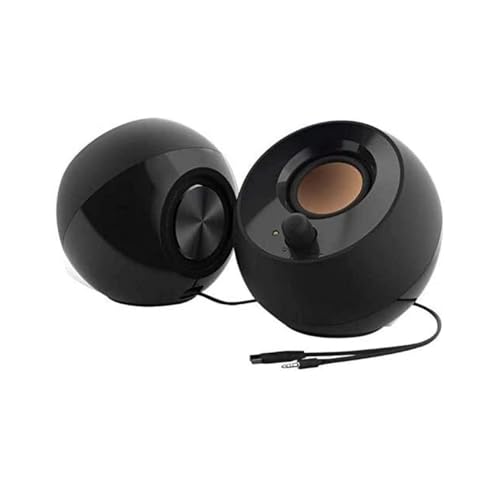
The original Pebble 2.0 is the answer to a narrower question: what is the least hardware that still sounds clearly better than a laptop? Two small spheres, one USB plug that supplies all the power, one analogue cable that carries the sound, and a single volume knob on the front of the right cabinet. There is no Bluetooth, no remote, no app and no lighting, and that absence is the design. It installs in under a minute and disappears into a workstation, a reception desk or a child’s homework corner.
Sound follows the same philosophy. The angled drivers aim up at the listener, the tuning is warm and forgiving, and the whole presentation favours voices and acoustic material over spectacle. It will not fill a living room and does not try to; at half a metre, in the nearfield bubble a desk creates, it is composed and pleasant. Because power comes from the computer’s USB port, maximum volume is capped by that supply — enough for one listener at a desk, not enough for a group around a table. Buyers who understand that bargain tend to keep these for years, because there is almost nothing on them to break, update or configure.
- Connections: 3.5mm analogue input; USB for power only
- Form: two small tilted spherical cabinets
- Controls: single front volume knob on the right speaker
- Power: USB-powered, no mains adapter required
Strengths
- The simplest install in this guide — one power plug, one audio cable.
- Front knob is exactly where a hand expects it to be.
- Small enough for desks where monitor arms already own the space.
Trade-offs
- Analogue-only input inherits any hiss from a poor headphone output.
- USB power limits headroom; group listening is beyond it.
- No wireless input for a phone or tablet.
Best for: tidy-desk minimalists, shared workstations and anyone upgrading a laptop on a strict space budget. Not suited for: buyers who want Bluetooth, or a speaker that doubles for room listening.
There is a second, quieter virtue to the Pebble 2.0: it is the speaker least likely to be stolen by the rest of the house. It migrates happily to a kitchen laptop for recipe videos, to a child’s desk for homework playlists, to a spare room for a weekend of streamed radio, and it never demands a power brick hunt because the computer is the power brick. Owners tend to describe it the way they describe a good kettle — not exciting, never regretted. If your household runs several occasional listening posts rather than one throne, two of these can make more sense than one premium pair, and the total outlay still undercuts the top of this guide.

SteelSeries Arena 3 — Best for bigger sound at a desk
SteelSeries built the Arena 3 around a four-inch driver in a cabinet substantially larger than the Pebbles, and the difference is audible in the first minute: this is the fullest, roundest low end available in this guide without a subwoofer. The organic fibre cone and the cabinet volume behind it let bass guitars and kick drums register as notes rather than hints, while the silk dome tweeter keeps the top end civilised at close range. It is the pick for the reader who keeps asking why every sub-free speaker sounds thin.
The rest of the package respects desk reality. Controls live on the right speaker, Bluetooth is built in for phone streaming, and the wired connection covers the computer. Through SteelSeries’ software ecosystem the Arena 3 also offers equalisation for those who like to tune, though it sounds balanced without intervention. The cabinets do claim real estate — measure the gap beside your monitor before ordering, especially on dual-screen desks where the outer edges are already spoken for. In return you get the only set here that can credibly soundtrack a film night for two people in a small room, and the one whose owners least often describe the missing subwoofer as a problem.
- Drivers: 4-inch woofer with silk dome tweeter per cabinet
- Connections: wired to PC, Bluetooth for mobile devices
- Controls: on-speaker controls on the right cabinet
- Software: equaliser available through the maker’s desktop app
Strengths
- Fullest bass of any sub-free pair in this guide.
- Two-way design keeps vocals clear even when the low end is busy.
- Bluetooth covers the phone-on-desk use case without extra cables.
Trade-offs
- Largest footprint here; tight desks need measuring first.
- No USB audio input, so the computer’s analogue stage is in the chain.
- Gaming-brand styling will not blend into every office.
Best for: music-first desk listeners who refuse a floor subwoofer but still want weight. Not suited for: the smallest desks, or buyers who want an invisible, furniture-like speaker.
One caution belongs with the praise: the Arena 3’s strengths tempt owners to push it into room duty it was not built for. It will soundtrack a small bedroom film night happily, but a large open-plan space will have it working hard and thinning out. Keep it in its nearfield kingdom, on a desk or a close stand, and it stays composed at any sane volume. SteelSeries also sells larger siblings with subwoofers for those who outgrow it, yet as a self-contained stereo pair this is the complete article — the set for the reader who read the words “no subwoofer” in this guide’s premise and felt a flicker of doubt.
Edifier G2000 — Best compact gaming-leaning pair
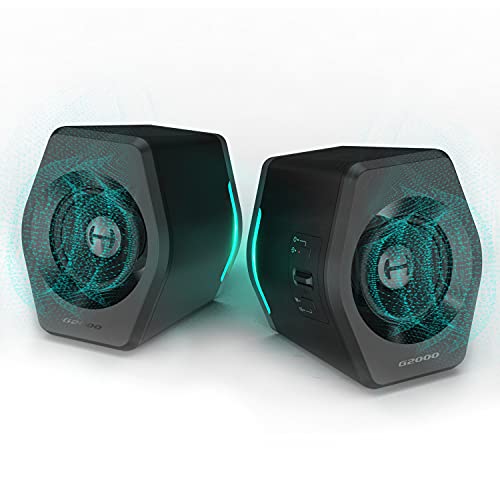
Edifier’s G2000 packs a surprising amount of machinery into two angled cabinets small enough to flank a laptop. Three sound modes — music, game and movie — reshape the tuning at a button press, and the differences are not imaginary: game mode pushes effects forward, movie mode widens the presentation, and music mode is the honest default the other two depart from. Inputs cover USB, analogue and Bluetooth, so the same pair can serve a PC in the morning and a phone or handheld console at night.
The design language is unapologetically playful, with sculpted cabinets and accent lighting, yet the footprint stays genuinely small, which is the combination most gaming-leaning speakers get wrong. Sound is lively and forward; these are not neutral monitors and do not pretend to be, but for streams, casual play and video they are engaging at the low volumes a shared house demands. Bass is punchy in the upper registers and absent in the lowest, as expected at this size. The control scheme relies on the cabinet buttons more than some rivals, and mode switching becomes a habit rather than a chore within a week.
- Connections: USB, 3.5mm analogue, Bluetooth
- Sound modes: music, game and movie presets
- Form: compact angled cabinets with accent lighting
- Use case: mixed PC, console and phone duty
Strengths
- Three genuinely distinct sound modes in a very small box.
- Input set covers PC, phone and handheld consoles without adapters.
- Footprint suits laptop stations and small gaming desks.
Trade-offs
- Voiced for excitement, not accuracy; mixing or editing audio is not its job.
- No headphone output for quick late-night switching.
- Styling divides opinion in professional-looking setups.
Best for: younger desks, dorm rooms and mixed entertainment setups short on space. Not suited for: buyers who want a neutral reference sound or a furniture-grade finish.
Parents and partners feature in the G2000’s real-world reviews for a reason: the movie mode at low volume is a genuinely considerate piece of engineering, keeping dialogue and effects legible without the wall-shaking lows that wake a house. The lighting can be subdued to match, so the whole setup can run in night mode without announcing itself. It is also the pair here most likely to be borrowed — small enough to carry to a friend’s place for a console evening, with Bluetooth covering the controller-side soundtrack duties. Versatility this broad usually costs coherence; the G2000 stays fun and focused, which is why it holds its place in a guide that otherwise leans toward sober hi-fi values.
Edifier R1280T — Best bookshelf value
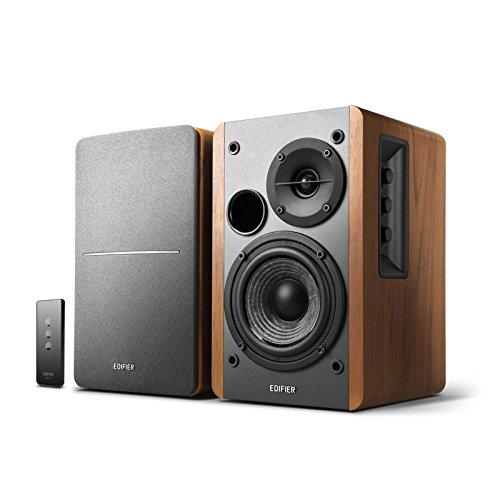
The R1280T is where this guide crosses from computer accessory into small hi-fi. These are powered bookshelf speakers in the classic mould: a four-inch woofer and a small dome tweeter per cabinet, wood-effect enclosures, dual analogue inputs so a computer and a turntable or television can stay connected at once, and bass and treble dials on the side of the active cabinet for shaping the sound to the room. A compact remote handles volume from the chair.
That formula has kept the model in production for years because it solves the everyday problems well. The midrange is full and unforced, voices carry body, and the bass — while it stops short of the deepest notes — is tuneful rather than boomy when the speakers sit a little off the wall. The trade is size and simplicity: these are the joint-largest cabinets in the guide, they need mains power, and there is no Bluetooth or USB in this variant, so a phone joins by cable only. For a study, a bedroom desk or a first vinyl setup, that is a fair exchange; you are buying the sound of a real speaker pair at the price of a gadget.
- Drivers: 4-inch woofer and dome tweeter per cabinet
- Connections: two analogue line inputs, no wireless
- Controls: side bass and treble dials, infrared remote for volume
- Enclosure: wood-effect bookshelf cabinets, removable grilles
Strengths
- Dual inputs keep two sources connected permanently.
- Tone controls fix room problems a preset cannot.
- The most speaker-like, least gadget-like sound in this guide.
Trade-offs
- No Bluetooth or USB input in this version.
- Cabinets need genuine bookshelf or wide-desk space.
- Remote covers volume and mute only, not input switching.
Best for: study desks, first turntable setups and listeners graduating from mini speakers. Not suited for: anyone who needs wireless, or whose desk is already full.
A word on the remote and the dials, because they shape the R1280T’s daily rhythm more than its drivers do. The side-mounted bass and treble controls invite a set-and-forget relationship with the room: most owners add a touch of treble if the speakers sit under a shelf, leave the bass flat, and never touch them again. The infrared remote, meanwhile, turns the pair into armchair speakers for the bedroom-desk hybrid, and its mute button is the most-used control in the house during calls taken away from the keyboard. Edifier sells Bluetooth variants of this cabinet for buyers who cannot live without wireless; this analogue original remains the value anchor of the family and the one whose sound-per-cost arithmetic is hardest to beat.

Audioengine A2+ — Best premium mini speaker
The A2+ answers a question the budget end never asks: how good can a truly small speaker be when the cabinet, drivers and electronics are all specified without a strict cost ceiling? The enclosures are dense, hand-finished and available in colours that treat the speaker as furniture; the amplification and the built-in digital conversion are a class above the mini-speaker norm; and the current generation adds modern Bluetooth with aptX support alongside USB audio and an analogue input. There is also a subwoofer output, should a future upgrade ever want one — a rare escape hatch in a 2.0 guide.
At the desk, the A2+ sounds composed in a way smaller rivals do not: imaging is precise, the midrange has real texture, and the speakers stay tidy when a recording gets busy. Bass is honest about the cabinet size, present and tuneful rather than deep. The rear-panel volume control is the one ergonomic misstep — most owners set it once and steer volume from the computer or a keyboard dial. What you are paying for is refinement per cubic centimetre, and for design-conscious desks, home offices that appear on camera, and listeners who keep equipment for a decade, the arithmetic works.
- Connections: USB audio, Bluetooth with aptX, analogue in, subwoofer out
- Form: compact hand-finished cabinets in several colours
- Electronics: built-in DAC for the USB input
- Controls: rear volume knob, designed to be set and left
Strengths
- Best finish and component quality in this guide.
- USB and high-quality Bluetooth cover every modern source.
- Subwoofer output leaves a genuine upgrade path open.
Trade-offs
- Premium pricing for a speaker of this physical size.
- Rear volume control is awkward for frequent adjustment.
- Bass still obeys physics; it is refined, not deep.
Best for: design-led desks, long-term keepers and listeners who value finish as much as sound. Not suited for: strict budgets, or anyone who adjusts volume on the speaker itself all day.
The A2+ also rewards a longer view of value. Its maker sells replacement parts, supports the model for years and builds the cabinet to be repaired rather than landfilled, so the premium buys a decade-scale object rather than a two-year gadget. On camera it reads as a design object; in a small apartment it can serve desk duty by day and, on stands, modest room duty by night without embarrassing itself. Buyers choosing between it and the R1280T are really choosing a philosophy: the Edifier spends its budget on size and sound-per-cost, the Audioengine on finish, electronics and compactness. Neither answer is wrong, and this guide’s badges exist precisely because the two philosophies peak in different rooms.
How Does the Connection Type Change What You Actually Hear?
It surprises buyers that the same speaker can sound clean from one input and slightly veiled from another, but the signal path is part of the instrument. An analogue connection hands conversion duties to whatever sits inside your computer, and laptop headphone stages are built to a price: many hiss audibly through sensitive speakers, some roll off bass to protect tiny internal drivers, and a few pick up interference from the machine’s own electronics that rises and falls with processor load. None of this is the speaker’s fault, yet the speaker gets blamed for it in review after review.
USB audio moves the conversion into the speaker, where the designer controls it. The Pebble Pro, G2000 and A2+ all take this route, and the practical result is a quiet background — the silence between tracks is actually silent — plus consistent behaviour from machine to machine. That consistency matters for shared desks and hot-desking offices, where the speaker meets a different computer every day. Bluetooth adds a third character: modern codecs sound very good, but the convenience arrives with a small latency that video calls tolerate and rhythm games do not, and with the occasional reconnection ritual when two paired devices compete for the speaker’s attention.
Our advice is unglamorous: use USB for the computer the speakers live with, keep Bluetooth for the phone, and treat the analogue input as the universal fallback for turntables, older consoles and anything with a headphone socket. The picks above were chosen partly because their input sets let you follow that advice without adapters.
Why Does Nearfield Listening Forgive Small Speakers?
A desk is not a small living room; it is a different acoustic regime. At half a metre, the direct sound from the drivers reaches your ears well before reflections from walls and ceiling can muddy it, so clarity survives at volumes that would sound lost across a room. This is why modest speakers delight at desks and disappoint on a television stand, and why judging a desktop pair by room-filling standards misses the point of the category entirely.
Nearfield listening also explains the tuning choices in this guide. A slight forwardness in the presence region — the frequencies that carry consonants — reads as clarity at close range and low volume, which is why speech-first models like the Pebble Pro feel articulate without sounding bright. Conversely, bass that would be merely adequate in a lounge becomes satisfying at a desk, because you sit inside the speakers’ intended throw and the desk surface itself lends a little reinforcement. The Arena 3 exploits this best: its four-inch drivers, unremarkable on paper, produce a genuinely full presentation precisely because the listener is exactly where the design assumes.
The regime has one strict demand: symmetry. Sit off to one side — a corner desk with the pair pushed left, say — and the stereo image collapses toward the nearer cabinet. Centre the pair on your seating position, even if that means the setup looks slightly asymmetric on the desk, and every pick in this guide rewards you for it.
Which Desks Suit Which Kind of Stereo Pair?
The laptop-on-a-table worker, whose office packs away at night, belongs to the Pebble family: speakers that power from the machine itself, weigh little and tolerate being moved daily. Between the two, the Pro is the keeper if the budget allows, because its USB-C audio and dialogue mode solve problems the original leaves to chance; the 2.0 remains the honest minimum, a pair that simply works wherever a USB port exists.
The permanent study desk, with a monitor on an arm and a shelf of books behind it, is R1280T and Arena 3 territory. Both reward the fixed installation: tone controls and placement care on the Edifier, cabinet volume on the SteelSeries. Owners of such desks listen longer per session, and the fuller low end of these larger pairs is exactly what long music sessions expose as missing in smaller speakers.
The design-conscious home office — the one that appears on video calls and in the background of a professional life — is where the A2+ earns its premium, because it is the only pick here that looks like it was chosen by an interior designer rather than a peripherals catalogue. And the dorm room or first flat, where one pair must serve laptop, phone and handheld console in rotation, maps to the G2000 and its everything-inputs, everything-modes flexibility. None of these assignments is a ranking; they are fits, and a fit chosen well is the difference between a speaker that is used daily and one that is apologised for.
How Do the Six PC Picks Compare Side by Side?
| Speaker | Signal path | Wireless | Character | Desk footprint |
|---|---|---|---|---|
| Creative Pebble Pro | USB-C, analogue | Bluetooth | Clear, speech-friendly | Very small |
| Creative Pebble 2.0 | Analogue, USB power | None | Warm, nearfield | Very small |
| SteelSeries Arena 3 | Analogue | Bluetooth | Fullest low end | Large |
| Edifier G2000 | USB, analogue | Bluetooth | Lively, mode-driven | Small |
| Edifier R1280T | Two analogue inputs | None | Bookshelf hi-fi | Large |
| Audioengine A2+ | USB, analogue | Bluetooth aptX | Refined, precise | Small |
Read the table by signal path first. If your computer’s headphone output hisses — many do — the USB-fed picks remove that flaw at the source. If your desk also hosts a turntable or a television, the R1280T’s second input is worth more than any wireless feature. Footprint runs the other way: the two largest cabinets produce the most convincing bass, and no preset on the small pairs fully closes that gap.
What Do Controls, Remotes and Build Quality Decide Over Years of Use?
Specifications describe the first week of ownership; controls describe the next five years. The single most-used part of any desktop speaker is its volume control, and its placement predicts behaviour with embarrassing accuracy. A front knob, like the Pebble 2.0’s, gets used constantly and without thought. A remote, like the R1280T’s, gets used from the chair and lost twice a year. A rear knob, like the A2+’s, gets set once and effectively retires, handing volume duty to the operating system — which is fine, provided your keyboard offers media keys and your calls software does not reset levels on its own schedule.
Build quality shows in quieter places. Cabinet resonance is the enemy of clarity at desk volumes: tap a hollow plastic shell and a dense wooden or well-braced enclosure with a knuckle and the difference explains itself. Dense cabinets, like Audioengine’s and Edifier’s, stay silent while the drivers work; thin shells join in, adding a honk to male voices that no equaliser fully removes. Cable quality matters in the same unglamorous way — the lead between the two cabinets is flexed every time a desk is cleaned, and a detachable, replaceable cable outlives a moulded one. None of the six picks here is fragile, but the bookshelf models and the A2+ are built to a visibly longer horizon than the mini speakers, and their prices say so.
Lighting deserves one honest paragraph. RGB on a desk speaker is neither the crime purists claim nor the feature marketing promises; it is furniture jewellery. The Pebble Pro and G2000 both let you dim or kill it, which is the only acceptable implementation, because a speaker that cannot go dark will eventually annoy the person who shares the room. Judge it as you would a lamp: pleasant when chosen, intolerable when imposed.
How Does Each Genre Expose a Different Weakness?
Run a familiar test set through any pair in this guide and a pattern emerges. Spoken word is the kindest genre and the most revealing of midrange flaws: a narrator with a chesty voice exposes cabinet honk instantly, while a well-tuned pair like the R1280T simply gets out of the way. Acoustic music — guitar, piano, small ensembles — rewards imaging and driver quality, and here the A2+ separates itself, placing instruments with a precision the smaller Creative models approximate but cannot match.
Rock and pop sit in the middle: they want energy in the upper bass and a treble that stays composed when cymbals pile up. The Arena 3’s larger drivers give it the easiest time, and the G2000’s music mode is tuned for exactly this material. Electronic music is the sternest examiner of a sub-free system, because its foundations live below most of these speakers’ reach; what you hear instead is the harmonic skeleton of the bassline, which good small speakers render readably and poor ones turn to mush. Film splits the difference — dialogue rides the midrange where these pairs are strong, while effects ask for the octave that is not there. Knowing which genre dominates your desk tells you which weakness you will never notice and which one will greet you daily.
What Should You Check Before Choosing a Stereo Pair for Your Desk?
Start with the port audit nobody does. Count the free USB ports on your machine, note whether they are USB-C or the older rectangular type, and decide whether the speakers may occupy one permanently. A USB-audio speaker that must share a hub with a webcam and a drive is a compromise waiting to happen. Then measure the desk, honestly: the width beside your monitor, the depth behind it, and the height to any shelf above. Several excellent speakers fail not on sound but on geometry.
Next, interrogate your sources. A desktop with a decent sound card feeds analogue speakers well; a thin laptop with a noisy jack argues for USB audio; a phone that carries half your music argues for Bluetooth. Then think about what plays most. Spoken content rewards midrange clarity and dialogue features. Music rewards driver size and cabinet volume. Film rewards headroom. No speaker in this guide wins all three, and the Quick Picks badges are arranged so the winner of your category is easy to find.
Finally, plan the cable reality. The two cabinets connect to each other with a fixed or detachable lead; check its length against a monitor that sits between them, especially on wide dual-screen desks. Mains-powered sets need a reachable socket that is not already hosting a charger farm. These are dull checks that take four minutes and prevent nearly every return this category generates.
How Do You Set Up a 2.0 Pair So It Sounds Its Best?
Form an equilateral triangle: the two speakers and your head as its three corners, tweeters aimed at your ears. On a desk that usually means the cabinets angled inward slightly and raised or tilted so the drivers point up at listening height — the Pebble models build the tilt in, while bookshelf pairs may want small stands or foam wedges. Keep rear-ported cabinets a hand’s width from the wall; pushed flat against it, their bass thickens and voices lose definition.
Then set levels in the right order. Put the computer’s output near its upper range without clipping, set the speaker volume to the loudest you will realistically use, and make daily adjustments from whichever control your hand finds first. Run one familiar recording — a voice you know well — and nudge the balance until that voice sits dead centre between the cabinets. If it leans, your seating position or a cabinet is off-axis. Five minutes of this unglamorous work does more for a 2.0 setup than any cable upgrade ever sold.
Can a Desk Pair Double for a Television, a Turntable or a Second Machine?
Often, yes — and this second life is where input count quietly becomes the most valuable specification on the page. A bedroom television with an analogue output pairs happily with the R1280T, whose second input means the computer never has to be unplugged; the same trick serves a turntable with a built-in phono stage, turning a desk setup into a small listening corner. Buyers planning this should check one detail: televisions increasingly offer only digital outputs, so confirm your set still provides an analogue path or a headphone socket before assuming any of these speakers will connect directly.
A second computer is the other common request, and the honest answer is that most pairs serve one digital master at a time. The practical workaround is division of labour: USB for the main machine, analogue for the second, Bluetooth for the phone. The Pebble Pro, G2000 and A2+ all support that three-way split without a switch box. What none of them does is mix sources — you are choosing an input, not blending two — and for call-heavy work that is arguably a virtue, since the meeting cannot be ambushed by a notification chime from the other machine.
Headphone users should note the divide in this guide: the Pebble Pro offers a front headphone socket for the quick late-night switch, while the bookshelf models expect you to plug cans into the computer itself. If your evenings alternate between speakers and headphones hourly, that small socket saves real friction, and it is worth weighting in the decision more heavily than any single specification.
How Do You Troubleshoot the Faults New Owners Blame on the Speakers?
Start with hiss, the most reported and least understood. Hiss that changes when you move the mouse or scroll a window is the computer’s analogue stage talking, not the speaker failing; switch to the USB input where one exists, or raise the computer’s output level and lower the speaker’s volume so the noise floor drops with it. Hiss that stays constant at zero volume, by contrast, belongs to the speaker’s own amplifier and is a legitimate complaint — none of the six picks here suffers it at desk distances.
One-sided sound is almost always geometry or a half-seated cable: reseat both ends of the inter-speaker lead and the input cable before suspecting a dead driver. Thin, distant sound usually means the speakers are aimed at your chest or pushed against a wall; fix the geometry first. Bluetooth stutter at a desk is typically a range-and-obstruction problem in miniature — the phone in a drawer under a metal desk is farther, radio-wise, than the same phone across a room. Each of these faults takes under five minutes to diagnose, and together they account for most of the returns this category sees.
What Mistakes Do Buyers Make With Desktop Stereo Speakers?
The classic error is buying by wattage headline. Figures in this category mix measurement methods so freely that a higher number routinely belongs to the worse speaker; driver size, cabinet volume and tuning predict the sound, and this guide leans on those instead. A second mistake is placing speakers flat on a reflective desk at chest height and blaming the speakers for the resulting muddle — raise and aim them before judging them. Third, buyers forget the source: feeding a revealing speaker from a hissing laptop jack and concluding the speaker is faulty. Fourth, shoppers buy bookshelf-sized cabinets for a desk that cannot hold them and spend a year with one speaker behind the monitor. Measure first; the tape measure is the cheapest audio tool there is.
How Long Should a Good Stereo Pair Last, and When Is an Upgrade Actually Worth It?
Speakers are the longest-lived objects in a computer setup, outlasting three or four machines when they are chosen well, because the physics of moving air does not obsolete the way processors do. A pair bought today for its sound will sound the same in a decade; what ages is the connectivity around it. That is the strongest argument for the input-rich models in this guide — USB-C, Bluetooth and analogue together cover the past and the plausible future — and the strongest argument against any speaker, however cheap, that accepts only one kind of signal.
Upgrade logic follows from the same fact. Moving from laptop speakers to any pick here is a transformation; moving between adjacent picks is a refinement. The owner of a Pebble 2.0 who wants more should skip sideways steps and go directly to a larger-driver pair — the Arena 3 or R1280T — where the change is physical rather than cosmetic. The owner of either of those who still wants more is no longer shopping in this category at all: the next honest step is a subwoofer or a larger monitor speaker, and chasing it inside the 2.0 mini class only buys disappointment in instalments.
Care is minimal but real. Keep cabinets out of direct sun, which fades finishes and ages driver surrounds; dust the domes with a soft brush rather than a vacuum; and give the volume knob an occasional full sweep to keep its travel clean. Do those small things and the pair you choose from this page will likely be the oldest working object on your desk — still doing, years from now, the one job it was bought for.
Final Recommendation
For most desks, the Creative Pebble Pro is the pair to buy first: it connects the way modern laptops want to connect, it flatters the spoken content desks mostly play, and it asks for almost no space in return. Listeners whose desks can hold real cabinets should stretch to the Edifier R1280T for music or the SteelSeries Arena 3 for weight, while the Audioengine A2+ remains the connoisseur’s small speaker. Choose by your sources and your square centimetres, in that order — a stereo pair chosen that way tends to stay on the desk for years, quietly making every working hour sound better than the laptop ever promised.
What About Wireless Lag, Standby Draw and Other Small Print?
Three practical questions trail every model in this category. The first is Bluetooth latency: for video and casual listening the delay is small enough to ignore, but musicians playing along through a Bluetooth-fed speaker and players in rhythm games will feel it, which is why every wireless pick here also offers a wired path and why we recommend that path for the main computer. The second is standby behaviour. USB-powered pairs like both Pebbles draw nothing when the host sleeps, while mains-powered sets idle at a small draw unless switched off; over a year the difference is minor, but on a crowded power strip the self-managing USB models are simply easier citizens.
The third is interference discipline in a dense desk environment. Analogue cables routed alongside power bricks and charging leads can collect a faint hum; crossing power cables at right angles rather than running parallel, and keeping the input lead as short as the layout allows, cures nearly every case. None of these details appears on a box, and all of them appear in a household within the first month — which is why this guide treats setup and ownership as part of the product, not as an afterthought.
Frequently Asked Questions
Do 2.0 speakers need a subwoofer to sound complete?
For speech, calls and most music at a desk, no. The missing territory is the lowest octave — film effects and bass-led electronic music. If that content dominates your listening, choose a 2.1 system instead; otherwise a good stereo pair sounds coherent and complete in the nearfield.
Is USB audio better than the headphone jack?
Usually, yes, on laptops. A USB speaker performs its own digital conversion, bypassing the interference and hiss that many built-in headphone outputs add. On a desktop with a quality sound card the gap narrows, but USB remains the safer default.
Can I use these speakers with a phone or tablet?
The Bluetooth-equipped picks — Pebble Pro, Arena 3, G2000 and A2+ — pair directly. The analogue-only models need a cable and, on phones without a headphone jack, a small adapter. Check the Quick Picks table for which is which.
Where should desktop speakers point?
At your ears. Angle the cabinets inward, raise or tilt them so the tweeters aim at listening height, and sit centred between them. Aimed at your chest, even excellent speakers sound dull and distant.
Will a 2.0 pair work for gaming?
Yes, for everything except the physical rumble of explosions. Stereo imaging on a good pair is precise, which helps with directional cues, and the G2000 and Arena 3 are voiced with play in mind. Competitive players chasing footsteps may still prefer headphones.
Related Guides
Readers comparing formats may also find our coverage of 2.1 bluetooth computer speakers, 2.1 speaker systems with subwoofers and desktop speakers in the 100 to 200 dollar class useful before deciding.


