What's inside
- Key Takeaways
- Quick Picks
- How We Chose These Picks
- What Does a Desk Do to a Speaker’s Sound?
- What Do These Pairs Sound Like Across a Working Day?
- Which Connections Matter Most at a Modern Desk?
- How Do the Six Pairs Compare Side by Side?
- How Should You Position Speakers on a Desk?
- Are Stands, Pads and a Subwoofer Worth Adding?
- What Mistakes Do Desktop Speaker Buyers Make?
- How Long Will a Pair in This Tier Serve?
- What About Gaming, Calls and the Desk’s Other Jobs?
- Why Does This Tier Outperform Its Price So Consistently?
- Final Recommendation
- What Should You Check in the First Week of Ownership?
- Can a Desktop Pair Replace a Living-Room System?
- Frequently Asked Questions
- Related Guides
As an Amazon Associate I earn from qualifying purchases. This post may contain affiliate links at no extra cost to you.
widgetverdict.com is reader-supported. When you buy through links on our site, we may earn an affiliate commission.
Where to buy: four of the six desktop pairs below carry Amazon listings we verified for this guide, linked at their names in the table and the reviews. The remaining two are long-running enthusiast favourites sold mainly through audio retailers, so they are named in full for local or specialist ordering rather than linked to listings we could not verify.
The best 100 200 dollar desktop speakers occupy the most honest price band in computer audio: the tier where a pair of powered speakers stops being a peripheral and becomes a small hi-fi system that happens to live on a desk. Below this band, desktop speakers are built to a bill of materials that shows in every chorus. Above it, you pay for finishes, features and brand. Inside it, the money buys real wooden cabinets, proper amplifiers, drivers with actual engineering behind them and the connectivity a modern desk needs — computer, phone, turntable and television all asking for sound at different hours of the same day.
A desk is a demanding listening position. You sit close, often off-centre, with a monitor between the speakers and a wall directly behind them, in a room that also contains a bed, a bookshelf or a family’s living space. Speakers designed for that reality — nearfield voicing, controlled bass that does not bloom against the wall, volume controls where a hand can reach them — outperform living-room speakers shrunk to fit, and the six pairs below were chosen precisely for desk reality rather than despite it.
All six are powered pairs: plug them into the wall, connect a source, and listen, with no amplifier shopping required. They divide by temperament — the all-rounder, the feature-rich hub, the miniature, the bargain, and two enthusiast options for buyers who want the desk to sound like a listening room. Judge them by the desk you actually have and the hours you actually spend at it, because in this tier the right pair is the one that fits the life as well as the shelf.
Key Takeaways
- At this tier a powered pair is a genuine small hi-fi system: real cabinets, real amplifiers and nearfield voicing made for close listening.
- The Edifier R1700BT is the default recommendation — balanced, well built and equipped with Bluetooth and a remote for desk-and-sofa use.
- The Kanto YU4 is the connectivity hub of the group, adding a phono input for turntables and a subwoofer output for later growth.
- The Audioengine A2+ Gen 3 proves size is optional: a miniature pair with a built-in USB DAC for the smallest desks.
- The Edifier R1280T is the tier’s entry ticket, delivering most of the experience for the least commitment in the band.
- Desk placement matters as much as the purchase: angle the pair toward your ears and lift them off the surface, whatever you buy.
Quick Picks
| Pick | Badge | Why it earns its place |
|---|---|---|
| Edifier R1700BT | Best overall desktop pair | Wooden cabinets, a balanced nearfield voice and Bluetooth with a remote cover the whole desk day. |
| Kanto YU4 | Best connectivity hub | Phono preamp, optical input, Bluetooth and a subwoofer output make it the desk’s switching centre. |
| Audioengine A2+ Gen 3 | Best for small desks | A palm-sized pair with a proper USB DAC that sounds far larger than its footprint. |
| Edifier R1280T | Best value in the tier | The classic budget bookshelf pair, with dual inputs and a remote, at the band’s entry point. |
| Edifier R2000DB | Best for desk-and-TV duty (prose-only) | A larger, optical-equipped sibling for desks that double as entertainment centres. |
| Swan HiVi M200MKII | Best sound-first enthusiast pick (prose-only) | A long-running audiophile favourite with a refinement the linked picks admire. |
How We Chose These Picks
Desktop duty rewrites speaker priorities, so we filtered for nearfield virtues first. A pair listened to from a metre away must image precisely at low volume, keep its balance when the listener leans back or reaches for coffee, and avoid the treble glare that close range turns from detail into fatigue. We favoured speakers voiced for that distance — which is a design decision, not a marketing claim — and penalised models that only sounded right from across a room their owners do not have.
Connectivity was the second filter, because a desk is a crossroads. The modern desk hosts a computer that should connect digitally where possible, a phone that expects Bluetooth, and increasingly a turntable or a television making guest appearances. Pairs that handle those sources gracefully — with inputs that can stay connected simultaneously and controls reachable from the chair — outranked pairs that sounded marginally finer but made every source change a cable expedition behind the monitor.
Build and bass behaviour closed the selection. Cabinets in this tier should be wood or properly engineered composite, heavy enough to sit still and quiet enough not to join in with the music; bass should be tuned for a boundary behind and a desk beneath, which means controlled rather than deep, with tone controls or a subwoofer output as the honest escape routes. The two prose-only picks pass every product test; their sales run through specialist retailers, and we would rather name them without a link than attach one we cannot verify.
What Does a Desk Do to a Speaker’s Sound?
Three things, all of them fixable once understood. First, the desk surface itself reflects sound upward into the direct path, smearing the image and thickening the lower midrange — which is why lifting a pair on stands or angled pads, so the tweeters aim at your ears rather than your chest, transforms the same speakers without spending anything on new ones. Second, the wall behind the desk reinforces bass, generously and unevenly, so a pair voiced for open space booms at a desk while a pair voiced for the boundary sounds balanced; tone controls exist largely to negotiate this treaty.
Third, the monitor between the speakers is an acoustic object as well as a visual one. A large screen reflects and blocks, and a pair pushed wide to clear it can end up too far apart for the distance you sit at, collapsing the centre image where voices and game dialogue live. The practical geometry of a desk is a smaller, closer triangle than a living room’s, and the pairs in this guide — the A2+ above all — are designed to make that small triangle sound like a system rather than a compromise.
None of this requires acoustic treatment panels or measurement microphones. It requires ten minutes of placement, a pair of stands or foam wedges, and the willingness to move things ten centimetres at a time while a familiar track plays. In this tier, placement is worth more than the price difference between any two picks in this guide — a fact the manufacturers know, and the reason the best of them voice their speakers for the desk as it is, not as a studio would wish it.
What Do These Pairs Sound Like Across a Working Day?
A desk speaker’s day is longer and stranger than a living-room speaker’s, and the pairs here separate themselves across its hours. The morning belongs to voices — news, podcasts, calls — where the Kanto’s midrange clarity and the R1700BT’s natural balance make speech effortless at low volume, and where lesser speakers’ boom and glare would already be fatiguing. Video calls deserve their own sentence: a good nearfield pair renders colleagues’ voices with a presence that laptop speakers cannot approach, and in the years of remote work that quality has quietly become a professional tool rather than a luxury.
The afternoon belongs to focus music and the games of the evening, two duties with opposite demands. Focus listening is low-volume, long-duration and treble-sensitive — the Swan’s unforced refinement and the Edifiers’ warmth serve it best — while gaming wants positional clarity, dynamic snap and dialogue that survives an effects mix, where the A2+’s imaging and the YU4’s liveliness earn their keep. Film and streamed drama close the day, asking for the scale the R2000DB was built for and the composure all six linked and unlinked picks share at desk distances.
Judged across that whole day rather than across a demonstration track, the tier’s value becomes obvious: these are not accessories that serve one application, but the room’s entire audio system in miniature. The pair that suits your day’s particular mixture — voice-heavy, game-heavy, music-heavy — is the right pair in a sense no specification can overrule, which is why the per-pick notes above describe days as much as drivers.
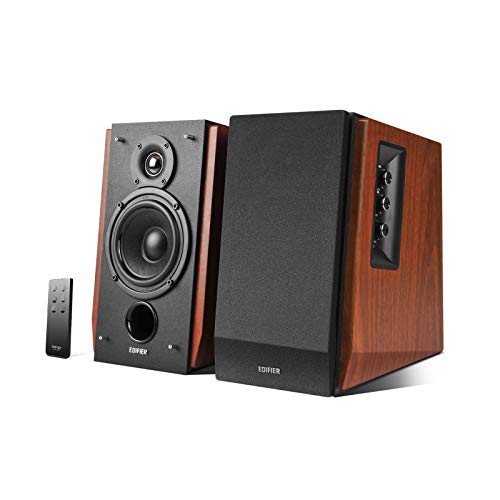
Edifier R1700BT — Best overall desktop pair
The R1700BT is the pair this tier is measured against, and a few minutes at a desk explains why. The cabinets are real wood with an angled front baffle that aims the drivers up toward a seated listener — a small piece of geometry that does more for the sound than any feature on the box. The voicing is balanced and grown-up: voices sit naturally, the silk dome tweeter extends without glare at arm’s length, and the 4-inch woofers produce bass with shape rather than the one-note thump of lesser desktop pairs. Played quietly during work or properly during a film, it keeps its composure, which is the quality a desk speaker lives or dies by.
The feature set matches the modern desk without overwhelming it. Bluetooth connects the phone for the hours the computer is asleep, dual wired inputs keep the PC and a second source permanently attached, and the remote control — volume, mute, input — turns the pair into a small living-room system when the desk shares space with a sofa. Front-panel tone controls on the side of the master speaker let you trim bass for a wall-hugging placement in seconds.
Its limits are the tier’s limits: no digital input, so the computer connects by analogue cable, and no subwoofer output for the bass-led future. Within those, the R1700BT is the most complete answer here — the pair we would buy for a desk that must do everything, and the pair least likely to be replaced when the rest of the setup improves.
Second-room owners add a note in the R1700BT’s favour: its remote and Bluetooth make it the pair most often promoted from the desk to the bedroom or kitchen when an upgrade arrives, because it serves a room’s casual listening as completely as it served the chair’s critical kind. A speaker with two careers in it is a speaker whose price amortises twice.
The YU4’s automatic wake deserves its paragraph, because it changes the desk’s daily rhythm. The pair sleeps when the computer sleeps and wakes with the first sound of the morning, so the system is simply always ready — a small behaviour that, across a year of working days, is the difference between speakers that are used for everything and speakers that are used for occasions.
Dorm rooms and shared flats are the A2+’s natural republic. Its nearfield focus delivers a private-scale listening experience — full and detailed at the chair, modest beyond it — which is precisely the social contract a shared space requires. Roommates hear that music is playing; only the listener hears the system.
The R1280T also earns a mention as the troubleshooting-proof gift: no pairing, no apps, no accounts, nothing to update. For recipients who want better sound without inheriting a technology project, that analogue simplicity is not a missing feature — it is the feature, and it explains the model’s longevity better than any measurement.
- Drivers: 4-inch woofers with a silk dome tweeter in angled wooden cabinets
- Inputs: Bluetooth plus dual analogue inputs for two wired sources
- Controls: remote for volume and input, side-panel bass and treble trim
- Character: balanced nearfield voice that stays composed at both volume extremes
Strengths
- Angled cabinets solve desk geometry before it starts
- Balanced sound suits work, film and music in equal measure
- Remote and Bluetooth make it a room system, not just a PC accessory
Trade-offs
- No USB or optical input for a digital connection
- No subwoofer output for later bass expansion
- Cabinets need genuine desk space either side of the monitor
Best for: the all-purpose desk — work by day, music and film by night. Not suited for: turntable owners or buyers planning a subwoofer from day one.

Kanto YU4 — Best connectivity hub
The YU4 approaches the desk as a switching problem and solves it completely. Around the back: an optical input for a television or console, a line input, and — the feature that defines it — a phono input with a built-in preamp, so a turntable connects directly with no extra box. Bluetooth handles the phone, a subwoofer output waits for the day the desk wants a foundation, and the remote runs the whole desk’s audio from the chair. No other pair in this guide, at any temperament, matches that roster.
The sound justifies the hub status rather than apologising for it. Kanto voices the YU4 clean and lively, with a 4-inch Kevlar driver giving midrange clarity that serves voices, calls and acoustic music particularly well, and a silk tweeter that stays civilised at nearfield distance. Bass is tidy rather than deep — the subwoofer output is the honest answer for listeners who need more — and the automatic power features, waking with a signal and sleeping without one, suit a desk that is used in bursts through the day.
Vinyl listeners building a first turntable setup around a desk will find the YU4 the shortest path in this guide from unboxing to records playing. Streamers and television viewers are equally served. It is the systems thinker’s pick: buy it, and every source you own or acquire has a home.
- Drivers: 4-inch Kevlar woofers with silk dome tweeters
- Inputs: optical, line, phono with built-in preamp, plus Bluetooth
- Expansion: subwoofer output and a full-function remote control
- Character: clean and lively, midrange clarity first
Strengths
- Phono input makes it the turntable-friendly pick of the tier
- Optical input serves televisions and consoles digitally
- Subwoofer output gives the system a growth path
Trade-offs
- Bass depth is modest until a subwoofer joins
- Feature richness costs more than the simpler Edifiers
- Auto-standby behaviour takes a day of use to learn
Best for: multi-source desks, turntable newcomers and system builders. Not suited for: buyers who want maximum bass from the pair alone.

Audioengine A2+ Gen 3 — Best for small desks
The A2+ Gen 3 is the pick for the desk that has no room for a pick. Each cabinet is barely larger than a paperback, yet inside sits a proper powered design with a built-in USB digital-to-analogue converter, so the computer connects digitally and the conversion happens in the speaker rather than in the laptop’s noisy interior. The third generation adds modern Bluetooth with extended range and better codecs, and the result — heard from the chair — is a soundstage and clarity that make visitors look for the bigger speakers they assume are hidden somewhere.
Nearfield is its native habitat. At a metre, the A2+ images with the precision small drivers and close listening conspire to produce: voices centred, instruments placed, games given a positional clarity that serves competitive play as well as it serves music. Volume is the honest limit — it fills a desk and the space around it, not a party — and bass is present and tuneful rather than deep, with a subwoofer output provided for owners who later find the room and the budget for one.
Build quality punches above the size: proper cabinets, quality connectors, and a finish that survives on executive desks where the Edifiers’ scale would not fit. For students, small-home-office workers and anyone whose desk is a corner of another room, the A2+ Gen 3 is not the compromise pick. It is the correctly sized one.
- Drivers: compact custom woofers with silk dome tweeters in miniature cabinets
- Inputs: USB DAC for the computer, Bluetooth, and an analogue input
- Expansion: subwoofer output despite the tiny footprint
- Character: precise nearfield imaging that belies the size
Strengths
- Fits desks no other pick in this guide can serve
- Built-in USB DAC cleans up computer audio at the source
- Imaging at the chair is genuinely hi-fi in miniature
Trade-offs
- Volume and bass are sized for a desk, not a room party
- Premium pricing for the miniature engineering
- Small cabinets need stands or pads to aim at ear height
Best for: small desks, students and nearfield listeners who value precision. Not suited for: buyers wanting room-filling volume or deep bass from the pair.
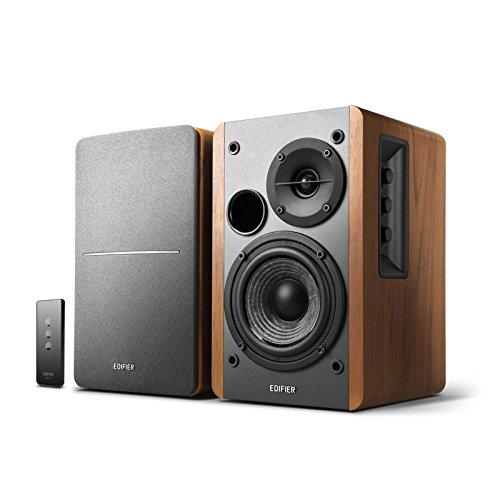
Edifier R1280T — Best value in the tier
The R1280T is the pair that defined this tier for a generation of buyers, and its formula remains unbeaten at the band’s entry point: wooden cabinets, a 4-inch woofer and a small dome tweeter per side, dual analogue inputs so the computer and a second source stay connected, and a remote control that most rivals at the level still treat as a luxury. The sound is warm and friendly — voices clear, music rounded, games perfectly served — with bass and treble controls on the master speaker to tune the pair to its wall and its desk.
What the entry price omits is connectivity’s modern half: there is no Bluetooth on this model and no digital input, so phones connect by cable and the computer by its analogue output. For a fixed desk where sources rarely change, those omissions may never be felt — and the sibling models with wireless exist precisely for buyers who will feel them. Judged as a wired desk pair, the R1280T’s sound-per-commitment ratio remains the tier’s benchmark, which is why it anchors so many first systems and second rooms.
It is also the gift pick of this guide: a pair that improves any desk it lands on, connects to anything with a headphone socket, and asks nothing of its owner but a power outlet. First apartments, student rooms, a parent’s study — the R1280T is the safe, satisfying answer to all of them.
- Drivers: 4-inch woofers with dome tweeters in wooden cabinets
- Inputs: dual analogue inputs for two permanently connected sources
- Controls: remote control plus side-panel volume and tone adjustment
- Character: warm, friendly and forgiving of ordinary sources
Strengths
- The most sound for the least commitment in this tier
- Dual inputs keep PC and a second source connected
- Warm voicing flatters streamed and everyday material
Trade-offs
- No Bluetooth or digital input on this model
- Refinement sits a step behind its R1700BT sibling
- Bass is fuller than it is precise
Best for: first desktop systems, gifts and wired desks on a budget. Not suited for: buyers who need wireless or digital connections.
Edifier R2000DB — Best for desk-and-TV duty (prose-only)
The R2000DB is the R1700BT’s larger sibling, built for the desk that is also the room’s entertainment centre. Bigger cabinets and 5.25-inch woofers give it more scale and bass authority, an optical input connects a television or console digitally, and Bluetooth plus the remote complete a package aimed at rooms where one pair must serve the computer by day and the screen by night. Its glossy finish divides opinion and suits modern rooms better than traditional desks.
We list it without a link because its marketplace listings mix model variants and bundles in ways we could not verify cleanly at the time of writing; through Edifier’s own channels and reputable audio retailers it is a straightforward purchase. Buyers choosing between it and the R1700BT should decide by distance: at a metre, the smaller pair’s focus wins; across a room, the R2000DB’s scale does. It is the natural upgrade for R1280T owners who want to stay with a voicing they already like while gaining the digital input and the remote-driven room role.
A placement note specific to the R2000DB: give its larger cabinets the stands or wedges the smaller pairs can sometimes skip. At across-the-room distances its scale is the point, but at the desk its tweeters still need the ear-height geometry every pick in this guide depends on.
- Drivers: 5.25-inch woofers in larger cabinets with a room-filling voice
- Inputs: optical for television and consoles, Bluetooth, analogue
- Controls: full remote for sofa-distance operation
- Buying note: buy the exact model through verified channels; listings vary
Strengths
- Scale and bass suit combined desk-and-television rooms
- Optical input closes the digital gap of the smaller Edifiers
- Familiar voicing makes it an easy upgrade within the brand
Trade-offs
- No stable verified Amazon listing at the time of writing
- Larger cabinets crowd genuinely small desks
- Gloss finish shows dust and fingerprints readily
Best for: rooms where one pair serves both the desk and the television. Not suited for: tight desks or buyers who want one-click verified buying.
Swan HiVi M200MKII — Best sound-first enthusiast pick (prose-only)
The M200MKII is the connoisseur’s footnote in this tier: a powered pair from Swan’s HiVi research stable that has been quietly recommended among enthusiasts for years on the strength of its midrange. The presentation is refined and unforced, with voices and acoustic instruments rendered at a level of naturalness that the linked picks approach but do not quite reach, in cabinets whose sloped baffles and real-wood feel announce that the money went into the sound.
The trade-offs are the enthusiast’s usual ones. Connectivity is analogue and minimal — no Bluetooth, no digital input, no remote worth the name — because the design predates the desk’s transformation into a hub and has never chased it. Availability runs through specialist audio retailers, which is why it stands here without a link. For the listener whose desk is a listening post first and a workstation second, who connects one good source and leaves it there, the M200MKII remains the sound-per-commitment connoisseur’s answer in this band — the pair the other picks’ owners graduate toward when features stop mattering.
The Swan rewards one particular source above others: a good recording played from a quiet room at the end of the day, when its midrange refinement has nothing competing with it. Enthusiasts keep pairs like this for decades precisely because that hour never gets old.
- Drivers: 5.25-inch woofers with dome tweeters in sloped, furniture-grade cabinets
- Inputs: analogue only — a deliberate, sound-first minimalism
- Character: refined midrange, unforced and natural presentation
- Buying note: specialist retailer product; audition where possible
Strengths
- Midrange naturalness leads the entire tier
- Cabinet quality feels a class above the price band
- Unforced presentation suits long, attentive listening
Trade-offs
- No Bluetooth, digital input or meaningful remote
- Specialist availability rather than marketplace convenience
- Minimalism frustrates multi-source desks
Best for: single-source listening desks and midrange connoisseurs. Not suited for: hub-style desks with many sources to switch.
Which Connections Matter Most at a Modern Desk?
Rank the inputs by the sources you own, not by the brochure’s order. USB, offered here by the Audioengine, is the cleanest computer connection because it bypasses the machine’s internal audio entirely — worthwhile in proportion to how noisy your computer’s headphone output is, which on many laptops is very. Optical is the television and console connection, and its presence on the Kanto and the R2000DB is what qualifies those pairs as room systems rather than PC accessories. Analogue inputs are the universal donors: everything with a headphone socket can feed them, which is why even the minimal Swan remains connectable to the modern world through a single cable.
Bluetooth deserves a fairer assessment than purists give it. At desk range, with modern codecs, it serves music, podcasts and video with a quality that satisfies all but critical listening, and its convenience — the phone joining the system without a cable, the laptop docked without a ritual — changes how often the system gets used. The correct hierarchy for most desks is a wired connection for the main source and Bluetooth for everything transient, and the linked pairs in this guide are specified in exactly that shape.
The phono input is the specialist that decides one whole constituency. Turntable owners without it face an extra box, extra cables and extra cost before a record plays; with the YU4’s built-in preamp, a deck connects directly and the vinyl setup is complete. If records are in your desk’s future, that single input outweighs every other line in the comparison table — a reminder that in this tier, the right feature is worth more than the finest specification you will never use.
How Do the Six Pairs Compare Side by Side?
| Pick | Key inputs | Character | Strongest use |
|---|---|---|---|
| Edifier R1700BT | Bluetooth, dual analogue | Balanced, composed | The all-purpose desk |
| Kanto YU4 | Phono, optical, Bluetooth | Clean, lively | Multi-source hub, turntables |
| Audioengine A2+ Gen 3 | USB DAC, Bluetooth | Precise, miniature | Small desks, nearfield |
| Edifier R1280T | Dual analogue | Warm, friendly | First systems, gifts |
| Edifier R2000DB | Optical, Bluetooth | Fuller, room-scale | Desk plus television rooms |
| Swan HiVi M200MKII | Analogue only | Refined, natural | Single-source listening |
How Should You Position Speakers on a Desk?
Three moves, in order of value. First, raise the tweeters to ear height — with stands, wedges or even a pair of sturdy books as an experiment — because a speaker aimed at your chest is a speaker whose treble you will never hear properly. Second, angle the pair inward so their axes cross near your head, forming the small triangle that nearfield imaging is built on; a voice in a familiar recording should sit on the monitor, not inside either cabinet. Third, pull the pair as far from the wall as the desk honestly allows, and use the bass trim to negotiate whatever distance remains.
Then manage the desk itself. Keep the space between the speakers and your ears free of tall obstructions, route cables so the pair can be nudged without a wrestling match, and set the volume control habit early: run the speakers’ own volume at a healthy level and control daily listening from the source, or the reverse — but pick one master, because two volume controls fighting is how desks end up too quiet, too loud or distorted. Ten minutes of this geometry is worth more than the difference between any two pairs in this guide, and it is free every time the desk is rearranged.
Are Stands, Pads and a Subwoofer Worth Adding?
Stands and isolation pads are the highest-value accessories in this tier, because they fix geometry and vibration — the two flaws every desk imposes — for a fraction of any speaker upgrade. Raising a pair to ear height sharpens imaging immediately; decoupling them from the desk surface with foam or purpose-made pads cleans the lower midrange that desk resonance thickens. Owners routinely describe the result as a new pair of speakers, and for once the cliché is measurement-honest: the speakers were always capable of it, and the desk was preventing it.
A subwoofer is a more conditional purchase. At a desk, the wall and the surface already reinforce bass, so many listeners will never want one; the listeners who will are those whose music lives in the lowest octave, whose games trade in explosions, or whose desk doubles as a film station in a larger room. The Kanto and Audioengine pairs anticipate that future with dedicated outputs, and a small subwoofer placed under the desk — where its output is felt as much as heard — completes those systems gracefully. Add it after a month of living with the pair, not on the first day, because a month teaches you whether your library actually visits the depths the subwoofer serves.
Cables, by contrast, deserve the smallest share of thought in this entire guide. The pairs here ship with what they need; adequate replacements are inexpensive; and no cable ever fixed a placement problem. Spend the accessory budget in the order given — geometry first, decoupling second, depth third, wire last — and a tier-priced system will embarrass systems bought without the order.
What Mistakes Do Desktop Speaker Buyers Make?
The first is buying for the room the desk is in rather than the chair the listener sits in — desktop speakers are nearfield instruments, and their specifications should be read from a metre away. The second is placing a new pair flat on the desk, aimed at the listener’s ribs, and judging them forever by that geometry. The third is chasing bass depth at a desk, where walls and surfaces manufacture boom for free, instead of chasing the clarity that close listening actually rewards. The fourth is ignoring the input list until the turntable or television arrives and discovers it has no home. And the fifth is underestimating the tier itself — assuming desktop speakers are a commodity, when the difference between the bottom of this band and the top of it is the difference between a peripheral and a system.
How Long Will a Pair in This Tier Serve?
Longer than the computer it sits beside, in most cases. A powered pair has no software to orphan it — the Bluetooth pairings and analogue inputs of a decade-old design still work with today’s sources — and the makers in this guide build cabinets and amplifiers for years of daily duty. The realistic ageing points are domestic: a volume knob worn by a thousand adjustments, a remote lost to a sofa, foam surrounds and finishes marked by sunlight and moves. All are survivable, and the pairs that survive best are the ones bought with their second role in mind — desk today, bedroom or child’s room tomorrow — because a speaker with a future gets kept, and a kept speaker is the cheapest kind there is.
That longevity reframes the tier’s arithmetic. A pair at the top of this band, used daily for six years across two rooms, costs less per month of service than the disposable alternatives it replaces twice in the same period — and sounds better every one of those days. Buyers hesitating between the band’s floor and its ceiling should run that arithmetic honestly: in a category defined by daily use, durability and satisfaction compound, and the pair you will still be glad of in year four is the bargain, whatever the receipt said in week one.
What About Gaming, Calls and the Desk’s Other Jobs?
Gaming makes specific demands that music listening does not, and the pairs here divide interestingly under them. Positional clarity — footsteps placed, dialogue centred, effects spread across a believable stage — favours the precise imagers: the A2+ at close range and the YU4 with its lively midrange. Scale and impact favour the bigger cabinets when the room allows them. Latency, the hidden specification, argues for wired connections during competitive play on every pair here, with Bluetooth reserved for the casual hours; all six accept a wire without complaint, which is the correct design answer to a problem wireless marketing prefers to ignore.
Calls and meetings reward the opposite virtues: midrange naturalness and low-volume clarity, the qualities the Edifiers and the Swan trade in. A voice reproduced without boom or glare is a voice a listener can attend to for an hour, and in the remote-work era that is a productivity feature wearing an audio costume. Households speccing a desk for both work and play should weight the picks accordingly — the R1700BT’s refusal to specialise is, once again, the reason it leads this guide for the general case.
Content creation closes the triangle. Streamers and podcasters listening back to their own recordings need honesty more than flattery, and the neutral-leaning pairs here — the Kanto, the Audioengine, the Swan above all — serve as serviceable nearfield monitors for voice work and video editing at this level. They are not studio monitors and do not pretend to be; they are the desk’s own speakers, honest enough to catch a boomy recording before it is published, which is the level of honesty most creators actually need.
Why Does This Tier Outperform Its Price So Consistently?
Because the physics and the economics align here as they do nowhere else in audio. Nearfield listening forgives small drivers — at a metre, a 4-inch woofer in a good cabinet produces levels and bass that would require a far larger speaker across a room — so the manufacturer’s budget can go into quality rather than scale. Powered design removes the amplifier-matching lottery and lets the maker tune amplification to the exact drivers fitted. And the desk itself, wall behind and surface beneath, contributes bass reinforcement that living-room speakers must manufacture from cabinet volume. A buyer in this tier is, in effect, letting geometry subsidise the purchase.
That subsidy explains the tier’s cult following among listeners who own far more expensive systems elsewhere in the house. The desk pair is where music actually happens on weekdays — during work, during play, during the hours a main system sits silent — and a pair chosen from this guide serves those hours at a level that makes the big system’s absence unlamented. Spend the tier’s money on the pair whose character matches your day, place it with the care the setup section describes, and the smallest system in the house may become the most used one. That is not a consolation. For many households, it is the point.
Final Recommendation
Buy the Edifier R1700BT if you want one pair that does the whole desk day without a weakness worth discussing — it is the tier’s complete answer. Choose the Kanto YU4 when your desk is a crossroads of turntable, television and computer, and its input list will pay for itself in avoided adaptors. Take the Audioengine A2+ Gen 3 when the desk is small and the listening is close, the R1280T when the budget is the band’s floor and the sources are wired, and hunt the R2000DB or the Swan through specialist channels when your priorities are room scale or midrange purity respectively. In this tier, more than any other, the right pair disappears into the working day and reappears every evening as the best seat in the house — which, at a desk, is exactly where you already are.
A last practical ritual for the day the pair arrives: before judging anything, play the three recordings you know best at the volume of an ordinary evening, from your ordinary chair, with the speakers placed by the book. Then move one thing — the angle, the height, the distance from the wall — and play them again. That single comparison teaches more about your desk, your room and your new speakers than a week of specifications, and it sets the baseline every later adjustment is measured against. Owners who perform it keep their systems tuned for years; owners who skip it sometimes blame a fine pair of speakers for a geometry problem that cost ten minutes to solve.
What Should You Check in the First Week of Ownership?
Four small things, each of which separates a settled system from a nagging one. First, that both speakers play at equal volume on a mono recording — a voice should sit dead centre, and if it leans, a cable, a balance setting or a placement asymmetry is confessing. Second, that no input hums or buzzes at idle with the volume raised, because a ground-loop whisper tolerated in week one becomes the sound you hear in every quiet passage for years. Third, that the remote, the standby behaviour and the Bluetooth pairing all work the way your household will actually use them, while returning the pair is still painless if they do not. Fourth, that the bass trim setting you chose on day one still suits the desk after the novelty has worn off — most owners end one notch lower than their first excitement suggested, and the system is better for the honesty.
None of these checks requires equipment beyond a familiar recording and a quiet room. Together they take twenty minutes, and they convert a purchase into a known quantity — after which the correct activity is the one the whole tier exists for: sitting down, in the front-row seat in the house, and listening to something on purpose.
Keep the packaging until that first week has passed without a complaint, and photograph the final placement once it sounds right. Desks get rearranged — new monitors, new rooms, new houses — and a photograph of the geometry that worked restores in minutes what memory would reconstruct in an evening of nudging. Small documentation habits are how good desk systems stay good across the upheavals of the rooms they serve.
Can a Desktop Pair Replace a Living-Room System?
For a growing number of households, honestly, yes — and the reasons are demographic as much as acoustic. Smaller homes, open-plan rooms and lives centred on screens have moved listening to the desk’s chair, and a nearfield pair serves that chair better than a distant living-room system serves a sofa nobody sits in to listen. The pairs here will not fill a large room with party volume or reproduce a film’s lowest octave unaided, and households whose listening is communal and cinematic should keep their towers. But for the listener whose music, games and films all happen within a metre of the screen, a tier-level desktop pair is not a compromise awaiting a real system. It is the real system, correctly located — and recognising that is the most money-saving insight in this entire guide.
Register the warranty, keep the remote in one known place — a desk drawer, a tray, anywhere the household agrees on — and resist the urge to keep shopping the tier once the pair is placed. The restlessness that follows a good purchase is the hobby’s tax on the satisfied, and the correct response to it is a record you have not played in a year, heard properly for the first time. Every pair in this guide can deliver that hearing tonight.
And if the pair is a gift — for a student leaving, a parent upgrading, a partner’s first real desk — set it up for them if you can, stands, angle and all. The difference between a good pair heard properly and the same pair heard flat on a desk is the difference between a present that changes a room and one that decorates it, and ten minutes of your geometry is the most generous part of the gift.
One month in, revisit the bass trim and the angle once, with ears that have learned the system and a desk that has settled into its real arrangement of monitors, books and clutter. The correction made then — small, informed, final — is the one that lasts, and after it the only remaining task is the one the speakers were bought for, repeated daily: listening, at the best seat in the house, which, it turns out, was your own chair from the start.
Note the serial numbers alongside the receiver’s or the computer’s in whatever file your household keeps for such things. A powered pair outlives several computers, and its paperwork should be filed for the decade it will serve rather than the warranty window alone — when a knob, a remote or a driver needs attention in year six, the owner who can name the model, the date and the seller in one breath is the owner whose problem gets solved in one conversation.
Then stop setting up and start using, because a desk system’s whole virtue is the hours it accumulates. The pairs in this guide were not chosen to be admired in a photograph of a tidy desk; they were chosen to be switched on at the start of a working day and still be earning their place at the end of a film that night, and the measure of the purchase — a month from now, a year from now — is simply how often that happens without anyone having to think about it.
That thoughtlessness is engineered, not accidental: inputs that stay connected, remotes that live in one place, standby that wakes without ceremony. When you audition or unbox a pair from this guide, judge those behaviours alongside the sound, because they decide whether the sound gets heard on an ordinary Tuesday — and ordinary Tuesdays, accumulated, are what a desktop system is actually for.
Choose the pair that fits your Tuesday as faithfully as your Saturday, and the tier will do the rest — quietly, daily, and for far longer than the modest band of its price would ever suggest.
That is the quiet promise of this whole price band, and it has kept the same pairs on the same desks for years while faster technologies cycled around them: honest cabinets, honest amplification, and a chair’s worth of distance between the listener and the music.
Keep that distance in mind when the next upgrade tempts you: at a desk, the shortest path to better sound is rarely a bigger speaker, and almost always a better-placed one.
Place yours well, keep the receipt and the remote somewhere sensible, and the search can end exactly where the listening begins — at your desk, tonight, with the first track already chosen.
Frequently Asked Questions
Do desktop speakers need an amplifier or DAC?
No amplifier — every pair here is powered, with amplification built in. A DAC is optional: the Audioengine includes one via USB, and the others accept the computer’s analogue output happily. A separate DAC is a later refinement, not an entry requirement.
Can these speakers connect to a television?
Several can, gracefully. The Kanto YU4 and the Edifier R2000DB offer optical inputs made for televisions, and every pair accepts an analogue connection from a TV’s headphone or line output. Check the input list against your set before buying.
Is Bluetooth sound quality good enough for desktop listening?
For everyday listening, comfortably yes — modern Bluetooth at the desk’s short range is a mature connection, and the pairs here implement it well. Critical listeners with a wired source available will still prefer the wire, and every Bluetooth pair here keeps wired inputs for exactly that reason.
Do I need a subwoofer with desktop speakers?
Most desk listeners do not: nearfield listening and wall reinforcement give these pairs more bass presence than their size suggests. The Kanto and Audioengine provide subwoofer outputs for listeners whose music or games demand the deepest octave later.
How far apart should desktop speakers be?
As far apart as you sit from them, roughly — the small equilateral triangle of nearfield listening. On most desks that means either side of the monitor, angled inward, tweeters at ear height. If the monitor forces them wider, angle them in more firmly to hold the centre image.
Related Guides
Finish the desk with our best 2 0 pc speakers, our best 5 1 pc speakers, and our best 15 inch powered speakers.


