What's inside
- Key Takeaways
- Quick Picks
- How We Chose These Picks
- Compact Contenders in a Single View
- How Much Space Does a Working Printer Really Need?
- Laser or Inkjet When the Room Is Small?
- Setup Habits That Suit Temporary and Shared Homes
- How Does Duplex Change Storage in a Small Home?
- What Does a Compact Printer Owe a Shared Household?
- Small-Space Buying Errors to Sidestep
- Which Compact Machine Fits Which Small Life?
- What Maintenance Fits a Machine With No Spare Room Around It?
- How Should a Compact Printer Be Packed, Moved, and Reborn?
- Do Smaller Cabinets Mean Higher Running Costs?
- Final Recommendation
- Frequently Asked Questions
- Related Guides
As an Amazon Associate I earn from qualifying purchases. This post may contain affiliate links at no extra cost to you.
widgetverdict.com is reader-supported. When you buy through links on our site, we may earn an affiliate commission.
Space is the specification nobody lists first and everybody lives with daily, and the best compact printers with duplex answer a specific modern problem: how to keep automatic two-sided printing when the printer’s home is a shelf, a wardrobe top, a dorm desk, or the corner of a kitchen counter. This guide gathers six machines that shrink the duplex idea without surrendering it — two compact Brother monochrome lasers with scanning built in, two Canon PIXMA inkjets designed for homes, a Brother Work Smart inkjet with a touchscreen and automatic duplex, and an Epson all-in-one whose title pairs its two-sided printing with a 150-sheet tray.
Compactness is not one thing, and the six picks divide by how they achieve it. The Brother HL-L2480DW and DCP-L2640DW shrink a laser multifunction: toner patience and two-sided output in cabinets that fit where office machines cannot. The Canon PIXMA TS7720 shrinks an inkjet around a 2.7-inch touchscreen and stated speeds of 15/10 PPM, with auto duplex named outright. Its sibling, the PIXMA TS4320, is the smallest Canon proposition here — print, copy, and scan in a compact design with easy setup, though its listing title does not state a duplex figure, a point this guide handles honestly in its spec box. The Brother Work Smart 1410 states automatic duplex printing beside its touchscreen, and the Epson XP-5250 states automatic 2-sided printing beside borderless photos.
A caution about dimensions belongs at the front: none of these listing titles states measurements or weight, so no measurements are invented here. Compact in this guide is a design claim made by the makers’ own titles — Brother prints the word in both of its titles, Canon prints “Compact Design” in the TS4320’s — supported by the functional shape of each machine. Buyers with a shelf of exact dimensions should confirm the manufacturer’s stated footprint for the specific model before ordering; the guidance sections below explain how to measure the space a working printer truly needs, which is always more than its parked footprint.
Why insist on duplex in a small machine at all? Because small spaces feel paper clutter fastest. A two-sided household prints half the stack, stores half the bulk, and keeps the one clear surface in a small flat clearer for longer. In a studio or a dorm, duplex is not an economy feature — it is a tidiness feature, and tidiness is the entire design problem of compact living. The same logic governs the archive, the filing box, and the move at the end of the lease, when every two-sided year of paper leaves the building in half the boxes.
No static prices or fixed ratings appear here. Positioning runs on stated functions, stated speeds where titles offer them, and the honest architecture of each cabinet.
One more compact truth deserves stating before the picks: small printers are judged by their worst day, not their best. The best day is any machine’s brochure. The worst day — the deadline evening, the form that must be scanned before a office closes, the packet due at school in the morning — is when cabinet size, interface clarity, paper supply, and duplex reliability either cooperate or collapse together. Every pick below was interrogated against its worst day in a small room, and the write-ups keep returning to that evening because compact buyers are, whether they know it or not, shopping for it.
Key Takeaways
- Two compact Brother lasers — the HL-L2480DW and DCP-L2640DW — bring toner patience and built-in scanning to genuinely shelf-sized cabinets.
- The Canon PIXMA TS7720 states the compact inkjet pace in its title: 15/10 PPM with auto duplex and a 2.7-inch touchscreen.
- The Brother Work Smart 1410 pairs automatic duplex printing with a 2.7-inch touchscreen in a friendly home inkjet frame.
- The Epson XP-5250 states a 150-sheet tray, the largest paper supply claimed by any title in this set of compact machines.
- The PIXMA TS4320’s title claims compact design and easy setup but does not state duplex — check its spec box and Canon’s documentation before assuming.
- No title here states dimensions or weight, so measure your shelf against the manufacturer’s figures for the exact model.
Quick Picks
| Pick | Badge | Why it is here |
|---|---|---|
| Brother HL-L2480DW | Compact Laser MFP | Copy and scan join duplex in a compact monochrome laser for tight desks. |
| Canon PIXMA TS4320 | Smallest Canon Footprint | Print, copy, and scan in a compact design with easy setup for home use. |
| Canon PIXMA TS7720 | Touchscreen Inkjet | Auto duplex at a stated 15/10 PPM behind a 2.7-inch touchscreen. |
| Brother Work Smart 1410 | Touchscreen All-Rounder | Automatic duplex printing and a 2.7-inch touchscreen in a color inkjet all-in-one. |
| Epson Expression Home XP-5250 | Tray-Equipped Compact | Automatic 2-sided printing with a stated 150-sheet tray and borderless photos. |
| Brother DCP-L2640DW | Compact Laser Honesty | Copy, scan, and duplex in a compact monochrome multifunction with mobile printing. |
How We Chose These Picks
The gate combined two requirements that rarely coexist peacefully: a compact design claim in the listing title or an unmistakably home-scaled multifunction shape, and two-sided capability as part of the model’s brief for this guide. Laser and inkjet both qualified, because compact living contains both printing rhythms — the bursty, idle-tolerant pattern toner serves, and the photo-inclusive pattern ink serves.
Honesty about evidence shaped the bench. Where a title states duplex outright — the TS7720, the Work Smart 1410, the XP-5250, and both Brother lasers — the spec boxes say so. The TS4320’s title does not state it, so its box records that plainly and its write-up concentrates on what the title does claim: compact design, easy setup, and a cost-efficient multifunction shape. Readers should treat that transparency as the guide’s method rather than a defect in the machine, and verify the TS4320’s two-sided specification against Canon’s documentation if it is decisive for them.
We also weighed the working envelope of small machines: lids that must lift in low shelves, output that must land somewhere, and trays that must open toward the user rather than into a wall. A compact printer succeeds in a room, not on a spec sheet, and the sections below return to that room repeatedly.
Representation across brands was a final, deliberate choice. Brother appears three times because its compact line genuinely spans laser and inkjet answers to the same spatial problem; Canon appears twice with two different interface philosophies; Epson appears once with the set’s only stated tray. A compact guide assembled from one maker’s catalog would have been easier to write and useless to read, because small rooms do not care about brand loyalty — they care about which cabinet, among all cabinets, respects their dimensions and their rhythms. The bench below is that argument, made six ways.

Brother HL-L2480DW — Compact Laser MFP
Laser multifunction machines are not supposed to be small, which is what makes this Brother interesting: a wireless compact monochrome multi-function laser with copy and scan, duplex, mobile printing, black-and-white output, a Refresh trial, and Alexa compatibility. The combination reads like a checklist for the smallest possible complete office — the spare-room desk, the studio’s one cabinet, the hallway console that has become a household’s administrative headquarters.
The scanner is the feature that justifies the cabinet’s existence in tight quarters. A print-only laser can hide almost anywhere, but the moment a household needs to digitize a document, a separate scanner demands its own territory. Folding scan and copy into a compact laser means one small territory serves every paper errand, and in a flat where every surface is contested, that consolidation is worth more than any single specification. Duplex then halves the paper the small territory must store.
Toner patience suits compact living’s rhythms. Small homes print in bursts — the term’s paperwork, the holiday letters, the sudden form — separated by quiet weeks in which an inkjet’s nozzles would be silently drying in their cramped corner. The Brother waits without complaint and produces a clean first page when the burst arrives, which is precisely the temperament a part-time office in a full-time home requires.
Mobile printing, named in the title, completes the small-space logic: the printer need not sit beside any computer, so its small cabinet can claim the one free shelf in the home while every phone and laptop in the building reaches it equally. Alexa compatibility and the Refresh trial ride along as titled extras — the trial worth judging, as always, against counted pages after it ends.
Boundaries, honestly drawn: output is monochrome, so color lives elsewhere or nowhere; no speed or tray figure is stated in the title; and the scanner lid still needs room to open, which low shelves must be measured for. Within those lines, the HL-L2480DW is the most complete answer this guide offers to the question of how little space a real office can occupy.
One scenario captures this machine’s value better than any specification: the evening a household’s paperwork converges — a form to scan, a contract to copy, a report to print two-sided — in a home with exactly one free surface. The HL-L2480DW absorbs the entire evening from its shelf, function after function, without asking the family to clear a stage for each act. Compact multifunction design is really about evenings like that one.
- Print technology: Monochrome laser
- Functions: Print, copy, scan (multi-function)
- Duplex: Automatic, stated in listing title
- Connectivity: Wireless, mobile printing, works with Alexa
- Toner program: Refresh subscription trial included, per title
- Print speed: Not stated in listing title
Strengths
- A complete scan-copy-print office inside a compact laser cabinet.
- Toner tolerates the bursty rhythm of small-home printing.
- Wireless freedom lets the machine claim any free shelf in the home.
Trade-offs
- Monochrome output only, with no color path at home.
- The scanner lid needs vertical clearance low shelves may deny.
- No stated speed for buyers planning around pace.
Best for: small homes needing one compact machine for every paper errand.
Not suited for: color printing or very low shelves.

Canon PIXMA TS4320 — Smallest Canon Footprint
Canon’s smallest proposition in this guide leads with the two promises compact buyers actually shop for: a compact design and easy setup, wrapped around a wireless color inkjet with print, copy, and scan, described as a cost-efficient multifunction photo printer for home use. In small spaces, setup is not a one-time event — a machine that joins the network painlessly and explains itself clearly gets moved, shared, and reconfigured without dread, and that temperament matters in dorms, first flats, and grandparents’ spare rooms alike.
The honesty note comes early with this pick, because it shapes how to buy it. The TS4320’s listing title does not state duplex printing, unlike its TS7720 sibling below, whose title names auto duplex outright. This guide therefore makes no two-sided claim for the TS4320 from its title, and its spec box records the gap plainly. Buyers for whom automatic duplex is the deciding feature should verify the specification in Canon’s documentation for this exact model before ordering — and if certainty is required today, the TS7720 states its duplex in writing.
What the title does support is a coherent small-home brief. Color inkjet output covers the household spectrum — documents, school projects, and photographs, with the title calling it a photo printer — while copy and scan handle the paper that arrives from the outside world. Cost-efficient positioning, Canon’s own phrase in the title, speaks to the compact buyer’s usual arithmetic: one modest machine, modestly fed, covering a modest and varied workload without a second device.
Easy setup deserves one more sentence, because in shared and temporary housing the printer is often installed by whoever drew the short straw. A machine that connects wirelessly without a wrestling match, and whose copying works from its own controls, respects that reality. The TS4320’s brief is hospitality as much as engineering: be small, be simple, be ready.
Judge it, then, as the compact field’s minimalist: the least imposing cabinet story in this guide, with a verification homework assignment attached to its duplex line. Households whose two-sided needs are occasional may find that trade entirely acceptable; households printing long documents weekly should take the stated-duplex picks around it more seriously.
Renters should weigh one more of this Canon’s traits: impermanence-friendliness. A compact machine with easy setup is the printer most likely to survive three addresses in three years, rejoining three different networks without a specialist’s help. In a life stage defined by moving, that resilience is a specification, whatever the box chooses to emphasize — and it is why small, simple machines dominate student and first-job households.
- Print technology: Color inkjet
- Functions: Print, copy, scan
- Duplex: Not stated in listing title — verify with Canon documentation
- Design: Compact design, stated in listing title
- Setup: Easy setup, stated in listing title
- Positioning: Cost-efficient multifunction photo printer for home use
Strengths
- Compact design and easy setup headline a genuinely small-home brief.
- Color, copy, and scan cover the varied household workload in one cabinet.
- Photo printing belongs to its stated purpose, unlike the lasers here.
Trade-offs
- Duplex is not stated in the title and must be verified before buying for it.
- No stated speeds for buyers planning around pace.
- Inkjet upkeep rewards regular use over long idle stretches.
Best for: dorms, first flats, and small homes valuing size and simplicity.
Not suited for: long-document two-sided printing as the main job.

Canon PIXMA TS7720 — Touchscreen Inkjet
If the TS4320 is Canon’s minimalist, the TS7720 is its communicator: a wireless all-in-one color inkjet with print, copy, and scan, auto duplex stated outright, speeds of 15/10 PPM stated in the title, a 2.7-inch touchscreen, and a compact home photo printer brief with easy setup. The touchscreen is the design’s center of gravity. In a compact machine, controls cannot sprawl across a wide panel, so Canon puts the conversation into a small screen — copy counts, scan destinations, and settings presented as a dialogue rather than a thicket of buttons.
The stated speeds deserve their compact context. Fifteen and ten pages per minute — the pairing conventionally describing mono and color pace — will not impress an office, and they are not meant to. They describe a home machine that clears the family’s queue without turning printing into an event: the worksheet before school, the two-sided reading packet, the photograph for the frame. In small spaces, a printer’s noise and duration matter as much as its rate, and a measured pace in a small cabinet is a livable combination.
Auto duplex, stated plainly, does the compact household’s favorite trick: long documents arrive at half thickness, which in a small home is a storage policy as much as a paper saving. The photo side of the brief completes the machine’s double life — the same cabinet that prints the two-sided homework prints the birthday photograph, and neither task requires the machine to be larger than it is.
Easy setup, also titled, pairs with the touchscreen to make this the most approachable machine in the guide for mixed-ability households. Grandparents, children, and the family’s reluctant technician all meet the same forgiving interface. That approachability is a genuine specification in compact living, where the printer’s owner and its support department are usually the same person.
Inkjet disciplines apply as ever: regular use keeps nozzles happy, and heavy text volume will eventually make a household glance at the lasers in this guide. For the mixed, moderate, photo-inclusive workload of a compact home, the TS7720 states the most complete small-inkjet case in this set — check price on Amazon beside its sibling to price the touchscreen and the stated duplex for yourself.
The touchscreen also changes the copying of fragile originals, a quiet compact-home specialty. Photographs, certificates, and the children’s artwork that families copy for grandparents all benefit from a preview-led interface that shows the job before it runs. Fewer wasted sheets, fewer rescans of a treasured original — in a small home with a small paper stock, that economy of attempts matters more than raw pace.
- Print technology: Color inkjet
- Functions: Print, copy, scan
- Duplex: Auto duplex, stated in listing title
- Print speed: 15/10 PPM, stated in listing title
- Display: 2.7-inch touchscreen, stated in listing title
- Positioning: Compact home photo printer, easy setup
Strengths
- Auto duplex and speeds both stated in writing — no guessing required.
- A touchscreen interface that suits every ability level in the house.
- Photo and document work share one compact cabinet gracefully.
Trade-offs
- Home-scale pace that busy offices will find unhurried.
- Inkjet running story suits moderate, regular volume best.
- No fax or feeder in its home-focused brief.
Best for: compact homes mixing photos, homework, and two-sided documents.
Not suited for: office queues or heavy text volume.
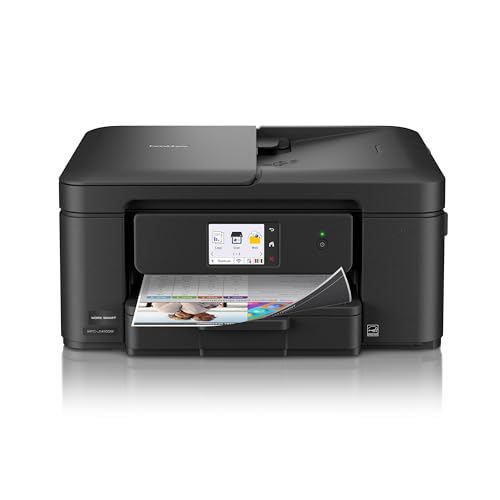
Brother Work Smart 1410 — Touchscreen All-Rounder
Brother’s inkjet entry in the compact field makes its case through the control panel: a wireless color inkjet all-in-one with a 2.7-inch touchscreen and automatic duplex printing, carrying a Refresh subscription trial and the model designation MFC-J1410DW. A touchscreen of that size on a home machine changes who can operate it. Copying becomes a conversation in pictures and plain words rather than a memorized button sequence, and in households where the printer serves everyone from a ten-year-old to a grandparent, interface generosity is a space-saving feature too — one machine everyone can use replaces the machine plus its resident expert.
Automatic duplex printing, stated in the title, anchors the machine in this guide’s premise. The Work Smart 1410’s two-sided output keeps the small home’s paper stack thin, while color inkjet breadth covers the invitations, projects, and documents that pass through a family week. The all-in-one shape — print, scan, copy implied by its all-in-one designation and model family — consolidates the errands without the office scale of the machines in our other guides.
The Refresh trial in the title speaks to the compact household’s characteristic failure mode: the cartridge discovered empty on the evening of a deadline, in a home with no supply shelf because there is no room for one. A replenishment program converts that emergency into a delivery. As with every trial in this series, the honest sequel is arithmetic — count the household’s pages during the trial and decide whether the service earns its continuation.
Compare it with the Canon TS7720, its closest rival here: both offer a 2.7-inch touchscreen and stated automatic duplex in a home inkjet frame. The Canon adds stated speeds and a photo-printer brief; the Brother adds the subscription trial and its Work Smart household positioning. The duel is genuinely close, and households may fairly decide it on which ecosystem already lives in their home.
Small cautions remain. No speed is stated in this Brother’s title, and inkjet upkeep follows the familiar rhythm of regular use. But as a compact all-rounder whose interface invites the whole household in, the Work Smart 1410 makes one of the friendliest cases in this guide.
Brother’s Work Smart naming invites a household census, and this model passes it in a particular way: its features map onto the family’s recurring week rather than its exceptional days. The touchscreen serves the daily copy, the duplex serves the weekly packet, the trial serves the monthly supply question. Machines bought for exceptional days spend their lives waiting; this one is specified for Tuesdays, which is where printers earn their keep.
- Print technology: Color inkjet
- Functions: All-in-one (print, scan, copy class)
- Duplex: Automatic duplex printing, stated in listing title
- Display: 2.7-inch touchscreen, stated in listing title
- Ink program: Refresh subscription trial included, per title
- Print speed: Not stated in listing title
Strengths
- A touchscreen that opens copying and scanning to the whole household.
- Automatic duplex stated outright in the title.
- Subscription trial addresses the small home’s empty-cartridge emergency.
Trade-offs
- No speed figure stated for pace planning.
- Inkjet economics favor regular, moderate use.
- Family scale rather than office scale throughout.
Best for: families wanting an inviting touchscreen and stated duplex.
Not suited for: high-volume or fax-led households.

Epson Expression Home XP-5250 — Tray-Equipped Compact
Compact printers usually apologize for their paper supply; the Epson states one. Its title pairs automatic 2-sided printing with a 150-sheet paper tray — a supply figure no other pick in this guide prints — alongside scan, copy, borderless photos, and a 2.4-inch color display. In a small home, a 150-sheet tray is the difference between a printer that is loaded and a printer that is perpetually about to be loaded, and that difference decides whether the machine feels like an appliance or a chore.
Read this pick through the compact lens rather than the photo lens it wore in our general duplex guide. The question here is how much home one machine can serve from a small footprint, and the XP-5250’s answer is unusually complete: documents two-sided from a real tray, originals through the scanner, copies from the color display, and photographs borderless when the occasion calls. Each function individually exists elsewhere in this guide; their combination at this supply level, in a home-sized cabinet, is the Epson’s distinction.
The 2.4-inch color display, slightly smaller than the touchscreens on the Canon TS7720 and Brother 1410, still moves copying and setup onto the machine itself — the compact household’s recurring need, since the nearest computer may be a phone in another room. Wireless networking completes the placement freedom that compact buyers are actually purchasing: the printer lives where the shelf is, not where a cable dictates.
Borderless photos remain part of its character and should be weighed by photo-printing households, for whom this is the strongest compact candidate in the set. Households that never print photographs are paying for a talent they will not use, and the lasers above will serve them more leanly.
Inkjet rhythm applies: regular modest use keeps the machine at its best, and the tray’s generosity should not tempt anyone into office volume. As the compact all-rounder with a stated supply, though, the XP-5250 earns its place near the top of this guide’s affections.
The tray figure deserves one more moment of respect, because it changes the machine’s social life in a small home. A printer that is reliably loaded gets used without a preliminary negotiation — nobody asks whether there is paper, nobody’s job fails at page three. Reliability of supply, in a household, is indistinguishable from reliability of the machine itself, and the XP-5250 is the only pick here whose title guarantees the supply side in writing.
- Print technology: Inkjet, color
- Functions: Printing, scanning, and copying
- Two-sided printing: Automatic 2-sided, per listing title
- Paper supply: 150-sheet tray, per listing title
- Screen: 2.4-inch color display, per listing title
- Photographs: Borderless output, per listing title
Strengths
- The only stated paper capacity in this guide — 150 sheets of breathing room.
- Borderless photographs beside two-sided everyday documents.
- On-machine color display keeps copying computer-free.
Trade-offs
- Display is smaller than the rival touchscreens here.
- No fax or document feeder in its home brief.
- Inkjet upkeep prefers a regular printing rhythm.
Best for: compact homes wanting a real paper tray and photo ability.
Not suited for: office volume or fax workflows.

Brother DCP-L2640DW — Compact Laser Honesty
The second compact Brother laser in this guide earns its place on footprint logic: a wireless compact monochrome multifunction printer with copy, scan, duplex, and mobile printing. Where its HL-L2480DW sibling adds a subscription trial and voice compatibility to the compact brief, the DCP-L2640DW states the essentials and stops — copy, scan, print, two-sided, wireless — which for many small spaces is the entire requirement written in one line.
Consider the rooms this machine is auditioning for. The studio flat where the printer shares a wardrobe top with the ironing. The dorm-adjacent study nook. The narrowboat, the garden office, the spare-room corner measured in centimeters of clearance. In those rooms a multifunction laser’s value is that it refuses to sprawl: one compact cabinet digitizes, duplicates, and prints, and its duplex output keeps the room’s paper population at half the density a single-sided machine would impose.
Mobile printing is the connectivity that compact rooms actually use, because compact rooms rarely contain a desk-bound computer. Documents arrive from phones on the sofa and laptops on the bed, and the printer’s wireless compactness lets it serve both from its shelf without a cable ever crossing the room. That is the lived meaning of its title’s modest feature list.
The monochrome boundary is the standing one: no color, no photographs, and no fax in the function list — the same honesty this model showed in our monochrome guide, where it was judged on page costs. Here the judgment is spatial, and spatially it is exemplary: the smallest complete laser office in this guide alongside its sibling, differentiated by restraint.
Households choosing between the two compact Brothers should decide by the extras. Voice control and a toner trial point one way; the leaner statement of essentials points the other. Either way, the footprint verdict is identical, and it is the verdict this guide exists to deliver: a real office, two-sided, in a cabinet a small room can forgive.
There is a dignity argument for this Brother that compact guides rarely make. Small rooms are often treated as temporary — the studio before the house, the spare room before the office — and their equipment is bought as disposable. A compact laser multifunction refuses that logic: it is a decade-class engine in a small cabinet, built to move with its owner into larger rooms and keep serving there. Buyers tired of disposable technology will recognize the proposition.
- Print technology: Laser, black-and-white only
- Functions: Printing, copying, and scanning
- Two-sided printing: Automatic duplex, per listing title
- Connections: Wireless with mobile printing
- Cabinet: Compact design, per listing title
- Rated pace: No figure printed in the title
Strengths
- The essential multifunction trio in a compact, shelf-friendly laser.
- Mobile printing matches rooms without a desk-bound computer.
- Duplex halves the paper population of a small room.
Trade-offs
- No fax in its function list.
- Monochrome output excludes color and photo work.
- No stated speed or tray figure in the title.
Best for: studios, dorms, and spare rooms needing a complete small office.
Not suited for: color households or fax users.
Compact Contenders in a Single View
| Pick | Technology | Functions | Signature detail from its title |
|---|---|---|---|
| Brother HL-L2480DW | Mono laser | Print, copy, scan | Compact multi-function design with mobile printing |
| Canon PIXMA TS4320 | Color inkjet | Print, copy, scan | Compact design with easy setup |
| Canon PIXMA TS7720 | Color inkjet | Print, copy, scan | Auto duplex at 15/10 PPM, 2.7-inch touchscreen |
| Brother Work Smart 1410 | Color inkjet | All-in-one | Automatic duplex with a 2.7-inch touchscreen |
| Epson Expression Home XP-5250 | Color inkjet | Print, scan, copy | 150-sheet tray and borderless photos |
| Brother DCP-L2640DW | Mono laser | Print, copy, scan | Compact multifunction with mobile printing |
The table’s story is convergence: every machine here scans and copies, because compact living cannot spare a second cabinet for originals. The real divisions are technology — toner patience versus inkjet color — and evidence: five titles state their duplex outright, while the TS4320 asks for a verification step. Choose the technology by your printing rhythm and the model by the room it must survive in.
Interfaces form the quiet third division. Two machines put a 2.7-inch touchscreen at the center of the household’s relationship with printing; one makes do with a smaller color display; the lasers keep their counsel behind simpler controls and phone apps. In a full-size office those differences are trivia. In a compact home, where the printer is operated by everyone and explained by no one, the interface is the machine’s personality — and personalities, in small rooms, are impossible to ignore.
How Much Space Does a Working Printer Really Need?
More than its parked footprint, always. A printer’s working envelope includes the tray extended toward you, the output landing zone in front, the scanner lid’s swing above, and enough rear clearance for the duplex path’s paper journey and the occasional jam clearance. Compact machines shrink the parked box heroically and the working envelope only modestly, which is why shelf shopping by footprint alone ends in printers that must be pulled forward for every long job.
Measure like an owner, not like a catalog. Take the shelf’s depth and subtract the space a hand needs to load paper; take the height and subtract the lid’s full opening, because a lid that opens halfway makes a scanner theoretical. If the numbers fail, change the furniture plan rather than the printer plan — a wall shelf at standing height, a rolling cart that parks in a closet, or the top of a sturdy filing cabinet all serve compact machines better than a beautiful nook that fights them weekly.
Air belongs in the measurement too. Lasers vent warmth; inkjets dislike steamy corners; both dislike the dust of a workshop shelf. The right compact location is boring — dry, reachable, within honest wireless range — and finding it before the purchase is the cheapest upgrade in this entire guide.
Laser or Inkjet When the Room Is Small?
Small rooms amplify each technology’s temperament. The compact lasers here — both Brothers — offer silence between jobs, toner that survives idle months in a spare room, and two-sided text of filing-cabinet quality. They ask for no color and no photographs in return. For the studio worker whose printing is documents and whose space doubles as a bedroom, that temperament is close to perfect: the machine is furniture when idle and an office when summoned.
The compact inkjets answer with breadth. Color for the project, photographs for the wall, scanning and copying for the paperwork — the TS7720, Work Smart 1410, and XP-5250 each cover a whole household’s variety from one small cabinet. Their price of admission is rhythm: ink prefers weekly exercise, and a compact inkjet exiled to a closet for a season will ask for cleaning attention when it returns. Households that print something most weeks will never notice the condition; households that print quarterly should take the lasers seriously.
Noise is the small-room tiebreaker nobody lists. A duplex mechanism’s soft page-return rhythm carries in a studio at midnight. If the printer must live where someone sleeps, favor the machine whose jobs are shortest for your typical work — and schedule the long two-sided runs for waking hours as a household courtesy.
Setup Habits That Suit Temporary and Shared Homes
Compact printers disproportionately live in rented, shared, and temporary homes, and their setup should honor that impermanence. Photograph the network settings page after installation, so the next move’s re-setup starts from evidence rather than archaeology. Keep the printer’s name on the network recognizable — the name housemates will hunt for in print dialogs — and write the household’s duplex default on a card taped near the machine, because shared homes re-teach every habit with every new arrival.
Make two-sided the default during the first session, while motivation is high. In compact homes the paper saving is also a storage saving, and habits formed on installation day are the ones still operating at the next move. Test the scanner lid’s clearance and the tray’s reach in the same session, and rearrange the shelf immediately if either is compromised — small frictions ignored in week one become the reasons a printer gathers dust by month three.
Finally, decide where the paper lives before the first ream arrives. A compact home has no supply room; a single designated drawer or box, holding paper and the spare cartridge together, prevents the archaeological digs that make small-space printing feel chaotic.
How Does Duplex Change Storage in a Small Home?
Follow a year of household paper through a small flat and the duplex effect stops being abstract. School terms generate their packets; insurers and landlords generate their forms; the household generates its own archive of warranties, records, and keepsakes. Printed single-sided, that year fills a deep drawer and starts colonizing a second. Printed two-sided, the same year sits in half the depth — one drawer, closed, with room for the board games that were exiled by paper in the single-sided timeline.
Filing furniture follows the same arithmetic. Compact homes own compact storage: one file box, one shelf of binders, one cabinet. Halving the thickness of everything filed doubles the effective capacity of furniture the household already owns, which is a saving no cartridge comparison will ever show and every small-home dweller will feel. Duplex, in this light, is a furniture feature disguised as a printer feature.
The benefit compounds at moving time, the compact household’s recurring audit. Paper is the heaviest ordinary possession per box, and the two-sided archive moves in half the boxes. Anyone who has carried a single-sided archive down three flights of stairs understands, in their shoulders, why this section exists.
What Does a Compact Printer Owe a Shared Household?
Predictability, above all. In a shared small home the printer’s users did not choose each other as colleagues, and the machine must mediate between a student’s midnight deadline, a parent’s morning form, and a housemate’s occasional boarding pass. The picks here mediate through simplicity: wireless access from every device, copying that works at the machine, and duplex defaults that make the paper policy identical for every user without a house meeting on the subject.
Supply honesty is the second debt. A shared compact printer needs its paper and cartridge status to be legible to whoever stands in front of it — a visible tray, a clear display, a household rule about the spare’s location. The touchscreen models in this guide pay that debt through their interfaces; the lasers pay it through the sheer rarity of their supply events. Either currency is acceptable. What fails is the machine whose needs are discoverable only by its owner, in a home where its owner is not always present.
Noise courtesy is the third. Compact homes have no far room, so a printer’s working sounds are household sounds. Short jobs, sensible scheduling of long ones, and a surface that does not turn the cabinet into a drum are the whole etiquette — small things that decide whether a shared machine is loved or resented by the people who did not choose it.
Small-Space Buying Errors to Sidestep
Shopping by parked footprint leads the list, for the working-envelope reasons above. Second comes assuming compact means light-duty in every respect: the Epson’s stated 150-sheet tray and the Brother lasers’ toner economy both serve real workloads, and a household should not underbuy its only machine out of a misplaced belief that small cabinets are toys.
Third is the duplex assumption — the belief that every machine in a duplex guide states its duplex identically. This guide contains the counterexample in its own bench: the TS4320’s title does not state duplex, and the honest response is verification against the manufacturer’s documentation, not vibes. Fourth, exiling the printer to an unreachable corner to save space, then never printing because retrieval is a project. A compact machine slightly visible and constantly used beats an invisible one that might as well not exist.
Last, ignoring the lid. Scanner lids in low cabinets are the compact category’s signature disappointment, discovered by thousands of buyers one centimeter too late. Measure the swing before the order, not after the delivery.
Which Compact Machine Fits Which Small Life?
Walk through four small lives. The graduate student’s studio: documents in bursts, originals to scan for applications, no color requirement worth the name. The compact Brother lasers were built for that room, and the only question is whether the HL-L2480DW’s extras or the DCP-L2640DW’s restraint suits the student’s temperament. The young family’s first flat: color everywhere, photographs beginning, forms multiplying. That flat belongs to the inkjets — the XP-5250 if photos and paper supply lead, the TS7720 if interface and stated pace lead, the Work Smart 1410 if the household already speaks Brother.
The downsizer’s apartment is the third life, and it inverts the usual assumptions: the space is small but the standards are not, because its owners have left a house with a full office behind them. For that apartment, the compact machine must not feel like a demotion — the touchscreen models and the tray-equipped Epson carry themselves with enough completeness to respect a lifetime of paperwork habits. The remote worker’s spare room is the fourth life: documents by day, household overflow by evening, and a premium on a machine that can be an office at nine and furniture by six. Every pick here auditioned for that room; the lasers win it on silence and patience, the inkjets on breadth.
Notice that budget barely decided any of these portraits. In compact living the binding constraint is the room, and the second constraint is the household’s rhythm. Money refines the choice within the right shape; it should never be allowed to select the wrong shape cheaply.
What Maintenance Fits a Machine With No Spare Room Around It?
Compact placement complicates the ordinary rituals, because the machine’s surroundings are tight by definition. Build the maintenance into the placement decision: if the shelf leaves no room to open the rear path or lift the lid fully, the first jam becomes a furniture-moving event, and owners start avoiding the machine. A compact printer should sit where its panels can open — that single condition predicts most of its lifetime satisfaction.
The rituals themselves are small. A monthly glance along the paper path for fiber and dust, a cloth for the scanner glass that compact households use for everything from certificates to children’s drawings, and a test page after any long idle stretch. Inkjets in small homes benefit from a standing weekly job — the shopping list, the calendar page — whose real purpose is exercise; lasers need only to be kept fed with dry paper and left in peace.
Supplies storage is the last compact puzzle. One drawer, one box, one rule: paper and the spare cartridge live together, at arm’s reach of the machine, never in the steamy room or the sunny corner. Households that solve that small logistics problem discover their compact printer behaves like a much larger installation — because, organizationally, it has become one.
How Should a Compact Printer Be Packed, Moved, and Reborn?
Compact machines move house more often than any other printer class, and a little protocol protects them. Before a move, run the manufacturer’s transport preparation if one exists, remove paper from every tray, and keep inkjet cartridges installed unless the manual instructs otherwise — an inkjet’s seals are part of its survival kit. Photograph the cable and network arrangement at the old address; the photograph is the fastest setup guide at the new one.
At the new home, resist the first available surface. Compact machines get placed in the excitement of moving day and then live for years wherever the box was opened. Spend the ten minutes the working-envelope section demands — lid swing, tray reach, wireless range, steam and heat — and the machine’s second life starts as well as its first. Run one two-sided test job and one scan before the boxes are recycled, while solutions are still cheap.
Treat each move as a defaults audit as well. Networks change, households change, and the duplex preset set in a previous life deserves a fresh confirmation in the new one. Machines that receive this small ceremony at every address are the ones still printing, compactly and two-sided, a decade after their first shelf.
Do Smaller Cabinets Mean Higher Running Costs?
Not inherently, and the confusion is worth dissolving before it distorts a purchase. Running cost follows technology and volume, not cabinet dimensions. The compact lasers in this guide share the one-cartridge, idle-tolerant economy of their full-size relatives; nothing about shrinking the box raises the cost of a page. The compact inkjets follow the standard inkjet pattern — happiest at moderate, regular volumes — again independent of their footprint. A buyer who avoids compact machines on cost grounds is usually avoiding a phantom.
What compact ownership genuinely changes is the margin for supply error. A full-size office absorbs a forgotten cartridge order with a storeroom shelf; a small home discovers the same forgetfulness at the worst possible page. The countermeasure is proportionate: one spare, bought when the installed cartridge is half spent, stored with the paper in the single designated place. That tiny discipline erases the only running-cost penalty compact living actually imposes.
There is even a sense in which smallness saves money. A machine that fits the home gets used for the jobs that would otherwise travel to a copy shop — the form copied at home, the packet printed two-sided instead of downtown at per-page counter prices. Compact printers repay their shelf not only in pages but in errands abolished.
Final Recommendation
Choose by rhythm, then by room. Bursty, document-led households in tight quarters belong with the compact Brother lasers — the HL-L2480DW for its fuller extra list, the DCP-L2640DW for its leaner one. Variety-led households belong with the inkjets: the TS7720 where stated speeds and a touchscreen lead, the Work Smart 1410 where Brother’s interface and subscription trial appeal, and the XP-5250 where a stated 150-sheet tray and borderless photos settle the argument. The TS4320 remains the minimalist’s option, with its duplex line to verify before committing.
Every machine here accepts the same compact bargain: less cabinet, same two-sided intelligence. Kept on a shelf that respects its working envelope and set to duplex from the first day, a compact printer stops being a compromise and becomes the room’s quietest piece of competence.
A final measurement ritual for the undecided: stand in the room where the printer will live, hold the largest document your household prints regularly, and look honestly at the surfaces around you. The machine that belongs in that room is the one whose cabinet, lid, trays, and paper supply can all operate inside the scene you are looking at — not the scene in a catalog photograph. Compact buying is scene buying. Choose the machine that fits the life already happening in the room, and the two-sided pages will take care of themselves.
Frequently Asked Questions
Are compact printers slower than full-size models?
Generally they are paced for home rather than office queues, and the one stated example here — the PIXMA TS7720 at 15/10 PPM — reflects that. For household volumes the difference rarely matters; what matters is that the machine finishes the family’s actual jobs without turning printing into an event, which every pick here is designed to do.
Can a compact printer really handle a scanner lid in a low shelf?
Only if the shelf’s height clears the lid’s full swing, which is why this guide insists on measuring the working envelope rather than the parked box. If clearance fails, relocate the machine to a cart or cabinet top instead of abandoning scanning — the multifunction consolidation is half the value of these picks.
Which compact pick is best for photographs?
The Epson XP-5250, whose title claims borderless photos outright, with the two PIXMA models behind it as Canon’s home photo printers. The Brother lasers print no photographs at all — their compactness serves documents, and households should choose with that line clearly in view.
Does the PIXMA TS4320 print two-sided automatically?
Its listing title does not state duplex, so this guide claims nothing for it either way. Canon’s documentation for the exact model is the authority to check before buying it for two-sided work; the TS7720, by contrast, states auto duplex in its title, as do the Work Smart 1410 and the XP-5250.
Laser or inkjet for a dorm room?
For document-led coursework printed in bursts across terms, the compact Brother lasers’ toner patience is hard to beat. For color coursework, projects, and photographs, the inkjets earn their shelf. Either way, duplex matters more in a dorm than anywhere — storage is the scarcest resource in the building.
Where should a compact printer live in a studio flat?
On a stable surface within wireless range, clear of steam and radiator heat, with room for its lid and trays to work — a wardrobe top, a filing cabinet, or a rolling cart all qualify. Avoid the floor, where dust and kicks shorten any machine’s life, and avoid the bedside if midnight printing is part of your life.
Related Guides
Compact hunters ready to widen the search beyond the shelf — and to test whether the budget tier hides an even smaller, thriftier answer — can move next into best inexpensive duplex printers where small machines meet small budgets head-on, then take a complete and welcome change of scene with best console gaming TVs for the other screen competing for the same small room, and finish with best gaming OLED TVs when the living-room wall finally becomes the household’s next project.



[…] questions — size, budget, and the rest of the household’s technology — can continue with best compact printers with duplex if the chosen engine also needs to live on a shelf, then best inexpensive duplex printers for the […]