What's inside
- Key Takeaways
- Quick Picks
- How Did We Choose These $100 PC Cases?
- Why Does Airflow Dominate Every Conversation in This Price Band?
- What Should You Measure Before Falling for a Case?
- Our Six Picks in Detail
- How Do the Six Compare Side by Side?
- How Do You Build in a Modern Airflow Case Without Fighting It?
- What Mistakes Do Case Buyers Make at This Price?
- How Quiet Can a Hundred-Dollar Case Honestly Be?
- Solid Panels, Tempered Glass and the Vertical GPU Question
- How Should You Plan Fans and Radiators as One System?
- Why Is the Case the Longest-Lived Part of the Build?
- What Do Front-Panel Ports and Buttons Tell You About a Case?
- How Can You Tell Good Steel and Finishing From Good Photography?
- How Much Lighting Is Enough — and Who Controls It?
- Where Should the Finished Machine Actually Live?
- How Do You Future-Proof a Case Purchase at This Price?
- Final Recommendation
- Frequently Asked Questions
- Related Guides
As an Amazon Associate I earn from qualifying purchases. This post may contain affiliate links at no extra cost to you.
widgetverdict.com is reader-supported. When you buy through links on our site, we may earn an affiliate commission.
Where to buy: all six cases below carry verified Amazon links, from airflow specialists by NZXT, Corsair and Lian Li to Montech’s value-engineered pair and Fractal’s quietly characterful Pop Air, so the hundred-dollar case that fits your build is one click from its listing.
There is a price band in PC building where the compromises stop being structural and start being merely preferential, and the best 100 pc cases live exactly there. Below this band, cases ask you to forgive thin steel, absent fans, cable management as an afterthought and airflow designed by the marketing department. At around a hundred dollars, the excuses end: perforated panels and multiple included fans become normal, tempered glass arrives properly framed, radiators fit where the brochure implies they should, and the case stops being the part of the build you apologise for. It is also the band where a case can plausibly serve two or three builds across a decade, which quietly makes it the best-value component in the entire machine.
This guide compares six verified cases that orbit the hundred-dollar mark from different directions. Two are airflow aristocracy — the NZXT H5 Flow and Lian Li LANCOOL 216 treat moving air as a religion. One is the industry’s default answer, Corsair’s 4000D in its RGB Airflow form. One is Fractal Design doing something uncharacteristically playful with the Pop Air. And two Montech cases demonstrate how aggressively the value end of this band can be engineered, one full-size and one compact. They share a price neighbourhood and almost nothing else, which is precisely what makes the band worth a guide: at this money, you are no longer buying adequacy, you are choosing a philosophy.
Key Takeaways
- Around $100 is where cases stop compromising on steel, fans and airflow all at once.
- Perforated front panels are the single biggest thermal decision; glass fronts are jewellery, mesh fronts are engineering.
- Included fans change the true cost — a case with four good fans fitted can undercut a bare case plus a fan pack.
- Check graphics card length and radiator clearance against your actual parts, not the case’s marketing renders.
- Cable management space behind the motherboard tray decides whether the build feels crafted or wrestled.
- A good case outlives several builds, so buy for the machine you will assemble in three years as well as today’s.
Quick Picks
| Pick | Badge | Why it earns its place |
|---|---|---|
| Lian Li LANCOOL 216 | The airflow benchmark | Two huge 160mm front fans and a mesh-first design that cools like cases well above this band. |
| NZXT H5 Flow | The perforated modernist | NZXT’s clean design language rebuilt around airflow, with perforation nearly everywhere air might want to go. |
| Corsair 4000D RGB Airflow | The default answer | The most recommended mid-tower of its era, here with three RGB fans and Corsair’s ecosystem polish. |
| Montech AIR 903 MAX | The generous giant | E-ATX room and four included fans from the value brand that keeps embarrassing pricier rivals. |
| Fractal Design Pop Air | The character piece | Scandinavian restraint with a mesh front, hidden storage drawer and colours beyond the usual black. |
| Montech AIR 100 | The compact value | Micro-ATX dimensions, mesh airflow and four fans for small desks and small form factors. |
How Did We Choose These $100 PC Cases?
We set the filter at the band’s real meaning: cases whose normal positioning orbits a hundred dollars, judged as complete purchases. That second clause did heavy work. A case is not its shell price; it is the shell plus whatever fans, splitters and patience you must add before a modern graphics card can breathe inside it, so we weighted included fans and stock airflow heavily and treated bare cases as carrying a hidden surcharge. Build quality was assessed the way owners meet it — panel fit, steel stiffness, glass mounting, the threading of screws into holes that should align — because at this band those details are the difference between a case that feels engineered and one that feels assembled.
The six were then spread deliberately across the band’s personalities rather than ranked as near-duplicates. The LANCOOL 216 and H5 Flow argue for airflow maximalism with different aesthetics. The 4000D represents the polished mainstream and its ecosystem gravity. The AIR 903 MAX tests how much sheer case the band can be stretched to contain, while its smaller sibling tests the opposite direction. The Pop Air holds the place for buyers who want a machine with a face, not just a specification. Every pick fits a standard ATX or Micro-ATX build with a current graphics card; specialist needs — E-ATX beyond the Montech, vertical GPU showcases, silence-obsessed sealed designs — are flagged in the pick sections where they apply.
Why Does Airflow Dominate Every Conversation in This Price Band?
Because modern components made it the case’s primary job. A current graphics card can draw as much power as entire PCs once did, and it deposits that energy as heat inside a glass box whose other resident, the CPU, is doing something similar. The case is the machine’s lungs, and its front panel is the mouth: perforated mesh or drilled panels inhale freely, while the sealed glass and solid fronts that defined the previous design era effectively ask the fans to breathe through a straw. The thermal results are not subtle. Identical components run measurably cooler and quieter in a mesh-front case, because fans that move air easily can turn slowly, and slow fans are quiet fans — airflow and acoustics are the same purchase made once.
The six picks divide by how completely they embrace that logic. The LANCOOL 216 builds the entire front around two enormous 160mm fans whose size lets them move serious air at low speed. The H5 Flow perforates not just the front but the top and even the power supply shroud’s side, giving heat multiple exits. The 4000D’s Airflow front uses a patterned cut-out design behind which its fans draw respectably. The Pop Air’s fine mesh and the Montech pair’s open fronts complete a list in which — notably — no sealed-glass-front case appears at all. That is not an oversight; it is the band’s verdict, delivered by physics and ratified by every reviewer who has pointed a thermometer at both designs.
Dust is airflow’s tax, and the better cases here collect it politely: filters at the intakes that slide or unclip for washing, rather than panels that must be unscrewed quarterly. When you read the pick sections, treat filter access as a first-class feature. A case you clean is a case that keeps its temperatures; a case whose filters require tools and temper will be cleaned annually at best, and its second-year thermals will tell that story.
What Should You Measure Before Falling for a Case?
Four dimensions decide compatibility, and all four are published for every pick, so the discipline is simply to check them against your parts list before desire takes over. Graphics card length is the famous one: modern cards have grown long and thick, and a case’s clearance figure must exceed your card’s length with room for its power cables to bend without pressing the glass. CPU cooler height matters to the shrinking minority of tall air coolers, radiator support matters to liquid builders — a case that advertises 360mm support should be checked for whether that radiator fits at the top, the front, or only in the brochure’s imagination — and power supply length matters when a long modular unit meets a drive cage or a compact chassis.
The fifth dimension is invisible in photographs: the space behind the motherboard tray where your cables will live. Twenty millimetres is a wrestling match; thirty is a craft project that closes with a satisfying click. Relatedly, count the cable pass-throughs and whether they carry rubber grommets, note where the case expects the graphics card’s thick power cable to travel, and look for tie points where your runs will actually run. Cases in this band have largely standardised on competent answers, but the spread between the best and the rest of the six is felt most here, in the hour of the build nobody photographs. The pick sections call out each case’s building manners individually, because at a hundred dollars you are entitled to manners.
Desk reality deserves a line as well. Measure the space the case will occupy — under a desk, the tower’s height meets knees and drawers; on a desk, its footprint competes with monitors and elbows. The AIR 100 exists in this guide precisely because some desks are small and some builders prefer the machine present but not dominant. A case is furniture you also compute in, and the right size is the one your room votes for.
Our Six Picks in Detail

Lian Li LANCOOL 216 — The airflow benchmark
The LANCOOL 216 opens its argument with two 160mm front fans — larger than the 120s and 140s the industry defaults to — spinning slowly behind a full mesh front, and the rest of the case is engineered to deserve them. Air that enters so generously finds a roomy interior, a rear 140mm exhaust, top mounting for fans or a radiator, and a layout that can be rearranged for an airflow-focused or storage-focused build by moving its motherboard tray components. Lian Li’s cable management includes a channel with covers that hides the main runs completely, so the finished build looks curated rather than merely tidy. Cooling results in independent testing have consistently placed it at or near the top of its class, and the mechanism is no mystery: big fans, open mesh, nothing in the air’s way.
Ownership pleasures accumulate in small denominations. The glass panel mounts cleanly, the front fans’ size means the machine stays composed under gaming load without a rising whine, and the case accommodates long graphics cards and tall coolers without negotiation. It is not a small case — its generosity is physical — and buyers with RGB ambitions should note that fan lighting variants and ecosystem choices deserve a moment’s attention at ordering, since the 216’s appeal is primarily aerodynamic rather than luminous. For the builder whose first question is “how cool and quiet can this band run,” the 216 is the answer the rest of this list is compared against, and most comparisons end with respect.
- Form factor: Mid-tower ATX
- Included fans: 2 × 160mm front, 1 × 140mm rear
- Front panel: full mesh
- Radiator support: up to 360mm class at the top
- Standout: movable layout elements for airflow or storage bias
Strengths
- Class-leading stock airflow from the big front fans
- Covered cable channel produces exceptionally clean builds
- Room for long cards, tall coolers and large radiators
Trade-offs
- Physically large for a mid-tower
- Design prioritises air over light-show features
- Heavier than the compact picks when moving the build
Best for: performance-first builders who want the band’s best thermals. Not suited for: small desks or builders wanting the tiniest footprint.

NZXT H5 Flow — The perforated modernist
NZXT spent years as the case industry’s minimalists, and the H5 Flow is what happened when that design discipline met the airflow era: the same clean, architectural lines, now perforated with intent. The front panel is a field of fine holes, the top panel likewise, and in the design’s signature flourish, the side of the power supply shroud is perforated too, feeding the graphics card’s appetite from below. Inside, NZXT’s cable management system — channels, straps and a wide rear chamber — remains the most forgiving in the business for builders whose cable runs are more enthusiastic than precise. Two fans are included, and the case’s thermals punch above that modest count because the perforation lets them work without resistance.
The H5 Flow’s ownership character is calm competence. It suits builders who want the machine to look like a designed object on the desk — NZXT’s proportions and panel fit are genuinely handsome — without paying a thermal tax for the aesthetics, which was precisely the tax the brand’s earlier sealed designs levied. Caveats are honest: two stock fans is the minimum viable count, and a builder chasing the LANCOOL’s temperatures will add a fan or two and should count that in the comparison; the perforation pattern, while effective, asks for the occasional wipe where dust settles on its fine holes. As a complete proposition — looks, manners, airflow, ecosystem — it is the case most likely to be chosen by someone who has read everything and simply likes it best, which at this band is a legitimate way to win.
- Form factor: Mid-tower ATX
- Included fans: 2
- Front panel: fine perforation; perforated top and shroud
- Cable management: NZXT channel and strap system
- Radiator support: front and top mounting options
Strengths
- Design-led looks with genuinely open airflow
- Most forgiving cable management in this list
- Perforated shroud feeds the graphics card directly
Trade-offs
- Two included fans is a starting point, not a finish
- Fine perforations show dust sooner than coarse mesh
- Compact interior versus the largest picks
Best for: builders wanting design and airflow without choosing between them. Not suited for: buyers wanting maximum fans included at purchase.

Corsair 4000D RGB Airflow — The default answer
Ask a room of builders for a case recommendation and the 4000D is the name that surfaces first, because Corsair executed the mainstream mid-tower brief so completely that the case became the segment’s reference. This RGB Airflow edition pairs the patterned steel front — cut-outs that let its three included RGB fans breathe — with the interior that made the line famous: a cable bar that hides the main run, a spacious rear chamber, sensible radiator support and build tolerances that feel a class up. The three fans connect into Corsair’s lighting ecosystem, which is either a doorway to coordinated illumination across the whole build or a software commitment to evaluate with open eyes.
The 4000D’s deepest strength is the absence of surprises. Parts fit as the specifications promise, panels align as the photographs suggest, accessories and replacement parts exist in abundance, and every build guide on the internet seems to feature it, which means any question you meet has been answered in public already. Its compromises are the mainstream’s compromises: airflow is good rather than class-leading — the LANCOOL moves more air — and the ecosystem polish is most valuable to builders already inside Corsair’s world of fans and controllers. For the first-time builder especially, there is a rational case for choosing the case the crowd chose, and this is that case in its most complete factory form.
- Form factor: Mid-tower ATX
- Included fans: 3 RGB fans
- Front panel: patterned airflow steel
- Cable management: cable bar and roomy rear chamber
- Ecosystem: Corsair lighting and fan control
Strengths
- The segment’s most proven, best-documented build experience
- Three RGB fans included, wired for Corsair’s ecosystem
- Excellent panel fit and finishing for the band
Trade-offs
- Airflow good, but not the LANCOOL 216’s equal
- Lighting ecosystem invites further Corsair purchases
- Design is familiar to the point of ubiquity
Best for: first-time builders and Corsair ecosystem fans wanting a safe pair of hands. Not suited for: thermal maximalists, who should take the LANCOOL.

Montech AIR 903 MAX — The generous giant
Montech has built a reputation on a single mischievous trick — reading the specification sheet of cases costing half again as much and matching it — and the AIR 903 MAX is the trick performed at scale. It is a big case: E-ATX motherboards fit, four fans are included with three of them lit, the front is open mesh, and the interior swallows long graphics cards, tall coolers and radiators with the ease of a case that never learned scarcity. For builders whose plans include a workstation board, a stack of drives or simply a horror of cramped cable work, the 903 MAX offers the band’s most generous cubic capacity, wrapped in steel that feels honest rather than luxurious.
The trade is written in its dimensions and its finishing. This is furniture-sized; measure the desk. Panel refinement and material flourish sit a notch below Corsair and Lian Li — the case spends its budget on space and fans rather than on the last degree of polish — and its sheer volume can make a modest Micro-ATX build look lost inside, like a tent rented for a bicycle. But for the builder assembling a high-power machine on a disciplined budget, the arithmetic is compelling: the fans you do not have to buy, the radiator that simply fits, the second build in three years that will also fit. Montech’s giant is the pragmatist’s pick, and pragmatism at this band buys a great deal of computer.
- Form factor: Full-size tower, E-ATX support
- Included fans: 4, three with lighting
- Front panel: open mesh
- Clearance: generous for cards, coolers and radiators
- Character: maximum space per dollar in this guide
Strengths
- E-ATX room and four fans at a mid-band positioning
- Swallows oversized components without negotiation
- Future builds of almost any size remain possible
Trade-offs
- Largest footprint here; measure your space
- Finishing polish a step behind Corsair and Lian Li
- Small builds look undersized inside it
Best for: high-power builds and workstation plans on a budget. Not suited for: compact desks or minimal-component builds.

Fractal Design Pop Air — The character piece
Fractal Design built its name on Scandinavian understatement, which makes the Pop Air’s existence a small delight: a mesh-fronted mid-tower with the brand’s build quality, offered in colours that include actual colours, with a hidden front drawer — a little storage compartment behind the front panel — that owners use for USB drives, dongles and the screwdriver of destiny. Beneath the charm, the engineering is properly Fractal: three included fans, a fine mesh front that breathes well, clean interior routing and the panel solidity that makes the brand’s cases feel machined rather than folded. It is the case in this guide most likely to be described by its owner with affection rather than specifications.
The Pop Air’s compromises are matters of scope. Radiator support is more modest than the airflow specialists offer, the interior is a standard rather than expansive canvas, and buyers planning a forest of RGB will find Fractal’s restraint unhelpful. In exchange, the machine gains a personality rare in this band: it looks like an object someone chose, in a colour someone picked, with a drawer that becomes a tiny ritual of ownership. For a living-room PC, a studio desk or any build meant to be seen by people who do not care about computers, the Pop Air argues that a case can be liked, not just used — and then quietly cools the components as well as cases with no charm at all.
- Form factor: Mid-tower ATX
- Included fans: 3
- Front panel: fine mesh, with hidden storage drawer
- Colours: options beyond standard black
- Character: design-led with Fractal build quality
Strengths
- Genuine design character in a sea of sameness
- Hidden drawer is a small, beloved practicality
- Fractal-grade panel solidity and finish
Trade-offs
- Radiator support more modest than the specialists
- Interior room is standard rather than generous
- Restrained lighting support for RGB-heavy plans
Best for: visible desks and living spaces where the PC should look chosen. Not suited for: maximum radiator or expansion plans.
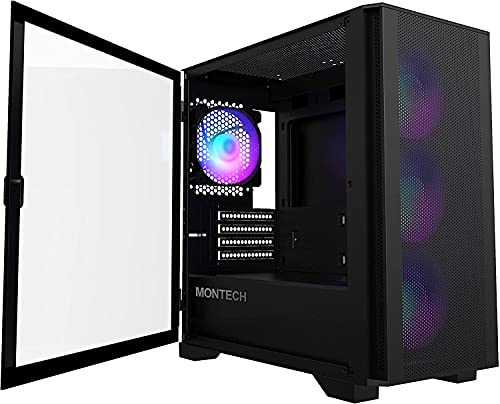
Montech AIR 100 — The compact value
The AIR 100 compresses the Montech formula into Micro-ATX dimensions without surrendering its principles: a mesh front that actually breathes, four included fans — a count some full-size cases in this band should be embarrassed by — and an interior that routes cables with more grace than its size promises. It is the guide’s answer for the small desk, the bedroom build, the living-room machine and the first PC assembled by hands that would rather not wrestle a full tower. Graphics card clearance suits the compact and mid-length cards such builds actually use, and the whole machine can be carried by one person without a risk assessment.
Its limits are geometry’s, honestly stated. Full ATX motherboards do not fit; the largest graphics cards and tallest coolers belong to other cases; radiator ambitions should be modest and checked twice. Expansion across future builds is narrower than the 903 MAX’s promise — this case serves the build it was bought for and perhaps one refresh, not a decade of reinvention. Within those lines, it is complete in a way budget compact cases rarely are: nothing essential is missing, the airflow is real, and the fans are already installed. Small is a legitimate specification, and the AIR 100 is this guide’s proof that choosing it need not mean choosing less care.
- Form factor: Micro-ATX mini-tower
- Included fans: 4
- Front panel: mesh
- Motherboard support: Micro-ATX and Mini-ITX
- Character: compact footprint for small desks
Strengths
- Four fans and real mesh airflow at compact size
- Small footprint suits bedrooms and living rooms
- Complete package — nothing essential left to buy
Trade-offs
- No full ATX motherboard support
- Long cards and tall coolers need careful checking
- Narrower future-build flexibility than full towers
Best for: Micro-ATX builds, small desks and first PCs. Not suited for: ATX boards or flagship-length graphics cards.
How Do the Six Compare Side by Side?
| Pick | Size | Fans included | Defining strength |
|---|---|---|---|
| Lian Li LANCOOL 216 | Mid-tower | 3 (2 × 160mm) | Stock airflow |
| NZXT H5 Flow | Mid-tower | 2 | Design plus perforation |
| Corsair 4000D RGB Airflow | Mid-tower | 3 RGB | Polish and ecosystem |
| Montech AIR 903 MAX | Full-size | 4 | Space per dollar |
| Fractal Pop Air | Mid-tower | 3 | Character and finish |
| Montech AIR 100 | Micro-ATX | 4 | Compact completeness |
The fan column deserves a second look, because it rewrites the price column: the Montech pair’s four included fans are worth real money against cases that arrive with two, and the LANCOOL’s two enormous fans move more air than rivals’ three ordinary ones. Count what a case includes before judging what it costs — at this band, the box contents are half the product.
How Do You Build in a Modern Airflow Case Without Fighting It?
Sequence is the whole secret. Fit the power supply first and route its cables through their exits before the motherboard lands, because the CPU power cable’s top-left journey is easy with the board absent and miserable with it present. Install the CPU, cooler and memory on the motherboard outside the case wherever the cooler’s size allows, then lower the assembly in and connect front-panel wires while your hands still have room — the tiny power and LED connectors are the build’s fiddliest minute in every case here, and good light matters more than good tools. Route the main cable runs through the grommets nearest their destinations, keep the rear chamber’s bundles flat rather than knotted, and close the back panel once before installing the graphics card; a panel that refuses to close is telling you about a cable, and it is politer to hear it early.
Fan configuration rewards a moment’s thought. The stock arrangements in these cases are sane — intake at the front, exhaust at the rear and top — and the goal of any addition is gentle positive pressure: slightly more intake than exhaust, drawn through filtered openings, so dust is discouraged from entering through every unfiltered seam. Connect fans to motherboard headers where curves can be set, and set them by temperature rather than by fixed speed, because a case tuned to its components’ heat is quiet at the desktop and purposeful in a game. Finish with the graphics card, whose support deserves respect: long cards sag, and a simple support or a well-routed power cable takes the strain off the slot. Then boot with the glass off, watch every fan spin, and only dress the machine when it has proven it can breathe.
What Mistakes Do Case Buyers Make at This Price?
The expensive mistake is falling for a sealed glass front in a render photograph and discovering thermals in August. The avoidable mistake is measuring nothing: graphics cards, coolers and radiators all publish dimensions, cases publish clearances, and the two lists take four minutes to reconcile — preferably before ordering rather than during the build’s saddest hour. The quiet mistake is ignoring the fans in the box, comparing a fully-fanned case against a bare one as if the prices were the whole story. And the recurring mistake is buying for the build in the photograph rather than the build in the future: a case is the longest-lived component you own, and the extra slot room, radiator support or motherboard size you skip today is the rebuild you fund in three years.
Two smaller errors complete the set. Builders forget the desk — the tower that fits the components but not the room, humming at knee height or exiled to the floor’s dust. And builders treat cable management as vanity, then meet its practical face when the rear panel bulges, a side fan’s cable finds a blade, or an upgrade requires excavating a knot. None of the six cases here forces any of these errors; all six forgive most of them. That forgiveness, at this price, is the product.
How Quiet Can a Hundred-Dollar Case Honestly Be?
Silence in this band is achieved by airflow efficiency rather than by insulation, and understanding that distinction saves buyers from the wrong case. Dedicated silent cases seal their panels and line them with foam, which works — until a hot graphics card raises internal temperatures and the fans, starved of intake, spin harder against the sealed box. The airflow cases in this guide take the opposite road to the same destination: open panels let fans loaf at low speeds, and a large fan turning slowly is quieter than a small fan working hard, whatever the foam says. Under a gaming load, the LANCOOL 216’s big slow fans and the H5 Flow’s unobstructed breathing produce the composed, low whoosh that owners actually mean by a quiet PC.
At the desktop, the contest is closer still, because modern components idle coolly and every case here can be tuned to near-silence with sensible fan curves — the discipline described in the build section. What separates the six is behaviour at the extremes: sustained rendering, summer rooms, dust-aged filters. Mesh cases hold their temperatures without raising their voices; that headroom is the real acoustic specification, and it is why this guide’s airflow bias is also, indirectly, a noise recommendation. Buyers whose PCs live in bedrooms or recording spaces should also weigh fan quality — the bearing hum of a cheap fan at low speed is the sound that survives every curve — and the included fans across these six are reputable enough that none needs replacing on day one, which has not always been true at this price.
Solid Panels, Tempered Glass and the Vertical GPU Question
The side panel is the case’s face, and the band offers it in glass almost by default now. Tempered glass done well — the panels across this list — is thick, tinted lightly, mounted on captive screws or hinges and edged so it reads as part of the design rather than as a window bolted on. Its practical effects deserve honesty: glass shows the build and the dust with equal fidelity, adds weight, and asks for care during removal, since a glass panel set down on a tile floor is a story with one ending. Solid steel panels remain the choice for machines that live under desks and in workshops, where invisibility is a feature; several picks offer variants, and choosing steel is not choosing less case — it is choosing a different room for it.
Vertical graphics card mounting is the era’s other temptation, displaying the card’s lit face through the glass like a shop window. It costs a riser cable, sometimes a bracket, and — the part the photographs omit — it moves the card’s fans close to the glass, where their intake can be strangled precisely when the card works hardest. In airflow cases with generous width the penalty is manageable; in narrower bodies it can be the difference between the thermals you read about and the thermals you get. Our advice across all six picks is unfashionable and practical: mount the card conventionally, let it breathe, and let the glass show a tidy build rather than a suffocating portrait. The exception is the builder who has measured their specific case and card combination and accepts the trade knowingly — knowledge being, as ever, the difference between a mod and a mistake.
How Should You Plan Fans and Radiators as One System?
Treat air as a river with a source and a destination. The healthy pattern in every pick here is front-to-back and bottom-to-top: cool air enters low and at the front, washes over the motherboard and graphics card, and leaves at the rear and top carrying the heat with it. Radiators complicate the river and deserve placement thought. A radiator mounted at the front as intake pre-warms the air the graphics card then breathes; a radiator at the top as exhaust receives the case’s warmest air and cools the CPU slightly less well, but leaves the graphics card — usually the hotter, louder component — breathing fresh air. Most builders with one radiator and a gaming focus should choose the top mount where the case allows it, which is one reason the LANCOOL’s and Montech’s top support matters.
Fan curves complete the system. Set intake and exhaust to respond to the temperatures that actually rise — graphics card heat drives gaming noise, so curves slaved to GPU temperature, where the motherboard allows, behave more intelligently than CPU-only curves that ignore a hot card until the case is already warm. Keep a floor speed that never fully stops case fans in a gaming machine; a gentle idle movement prevents heat pooling around drives and voltage regulators. And revisit the curves after a month, when dust and a new game have changed the machine’s habits — a case is a system that ages, and five minutes of seasonal tuning is the maintenance contract that keeps a hundred-dollar case performing like the reviews promised in year two as well as week one.
Why Is the Case the Longest-Lived Part of the Build?
Standards in this industry move at different speeds, and the case sits on the slowest glacier of all. Motherboard form factors have been stable for decades; power supply dimensions likewise; the 2.5-inch and 3.5-inch drive formats are elderly; even the front-panel connectors change at a pace that adapters forgive. Against that stillness, processors turn over yearly and graphics cards biennially, which means the case you buy today will plausibly host three generations of the parts that feel like “the computer.” That longevity reframes the band’s economics completely: the difference between an adequate case and a good one, divided by ten years and three builds, is a rounding error with daily interest paid in build pleasure and thermal headroom.
Longevity also argues for headroom as the band’s wisest purchase. The graphics card that fits with an inch to spare today is the card that still fits when the next generation grows; the radiator support you do not need yet is the liquid cooling you can adopt without a new case; the E-ATX room in the AIR 903 MAX and the clean cable channels of the LANCOOL are options on futures you cannot yet specify. Buyers sometimes apologise for “overbuying” a case. Veterans rarely do, because they have met the alternative: a beautiful build planned around a component that the old case, bought tightly for the old build, physically refuses. At a hundred dollars, generosity toward your future self is the entire point of the band.
What Do Front-Panel Ports and Buttons Tell You About a Case?
The front panel is the part of the case you touch daily, and its specification predicts small daily pleasures and irritations with unusual accuracy. A USB-C port has become the band’s dividing line: genuinely useful for phones, drives and peripherals, and its presence across the stronger picks here signals a case designed recently enough to expect a long service life. Count the USB-A ports against your desk’s habits — headset dongles, wireless receivers and the occasional flash drive all queue there — and note whether audio arrives as a combined headset jack, which modern headsets prefer, or the older split pair. Power button feel sounds beneath discussion until you have lived with a mushy one; the cases in this guide come from makers who sweat it, and the difference is a tiny daily dividend.
Placement matters as much as provision. Top-mounted ports suit a case that lives on the floor; front-facing ports suit a case on the desk; and the builder should choose with the machine’s actual home in mind rather than its showroom pose. Reset buttons have shrunk across the industry to pinhole status, which owners discover during the one hung overclock of the year — a minor grief, universally shared. None of these details headlines a specification sheet, and all of them outlast the novelty of any lighting mode, which is why this guide bothers with a section on buttons at all: a case is interacted with thousands of times, and its manners at those moments are its character.
How Can You Tell Good Steel and Finishing From Good Photography?
Every case photographs well; the differences arrive in the hands. Weight is the first informant — a case in this band with real steel and thick glass has a heft that a cost-cut impostor cannot fake, and the six picks here all carry it. Panel gaps are the second: run an eye along the seams where front meets side and glass meets frame, and you are reading the maker’s tooling budget directly. The third informant is the screw — case screws that thread smoothly into captive, aligned holes signal a factory that assembled its own product thoughtfully, while cross-threading and wobbling standoffs confess the opposite within the build’s first ten minutes. Paint and coating finish fourth: even, matte, resistant to the fingerprint archaeology that glossy black collects.
These qualities are why this guide’s brand list reads conservatively. Lian Li, NZXT, Corsair, Fractal and Montech have each shipped enough cases that their finishing habits are known quantities, and at a hundred dollars the buyer is purchasing precisely that predictability — the near-certainty that the case in the box matches the case in the reviews. Unknown brands occasionally match the specification sheet; they rarely match the seams. When a component is bought to serve for a decade, predictability is not a boring virtue. It is the virtue the decade is made of.
How Much Lighting Is Enough — and Who Controls It?
Lighting is the band’s loudest optional extra, and the six picks stake out the spectrum: Corsair arrives with an ecosystem and software ambitions, the Montechs include lit fans as simple value, and the Fractal and airflow-first designs treat light as garnish rather than entrée. The practical questions are two. First, control: motherboard-controlled lighting via the standard addressable header keeps one piece of software in charge of the whole machine, while a proprietary ecosystem like Corsair’s offers finer effects at the cost of another control universe — neither is wrong, but mixing universes is how builders end up with three lighting applications and a screensaver of mismatched colours. Decide whose software runs your lights before the fans multiply.
Second, taste over time. The lighting you choose will be seen daily for years, in a room whose other occupants have votes. Effects that delight in a showroom can fatigue in a study, and every pick here can be dimmed or darkened entirely — a feature worth verifying in any case with lit fans, because the off switch is the lighting feature owners use most after the first month. Glass tint interacts here too: a light tint flatters components and softens lighting to a glow, while clear glass broadcasts. Buy lighting the way you buy the case itself — for the room and the decade, not for the photograph on the first evening.
Where Should the Finished Machine Actually Live?
The build ends, and then the case begins its real life in a specific spot with specific air. On the desk, a tower is visible, audible and accessible — ports at hand, dust slower to accumulate than on the floor, and the glass panel earning its keep; the price is footprint and the light and fan presence in your peripheral vision. Under the desk, the machine gains invisibility and loses air quality: floor level is the dustiest stratum of any room, intakes clog faster, and knees negotiate with the case for territory. On the floor beside the desk is the traditional compromise and the dust champion; if the machine must live there, a small stand that lifts it even a few centimetres meaningfully slows the filter-clogging that quietly raises temperatures across a year.
Whichever home you choose, give the case its clearances: space behind for exhaust to escape rather than pool against a wall, space at the intakes’ face, and a cable run that does not drape across the rear fan’s weather. Heat rises and rooms stratify, so a case under a desk in a warm room works harder than the same case on that desk — one more reason the airflow headroom this guide prizes is a practical rather than theoretical virtue. The machine’s address, chosen well, is the last specification you set, and like the case itself, it will quietly shape every day the computer is used.
How Do You Future-Proof a Case Purchase at This Price?
Future-proofing a case is less about predicting components than about refusing to foreclose them. The foreclosures are physical and specific: a graphics card clearance that fits today’s card with nothing to spare, a radiator chart that tops out at the size you already own, a motherboard tray that stops at ATX when a workstation board is even a rumour in your plans, a front panel whose ports belong to a connector generation your next phone will not speak. The six picks defend against these differently — the AIR 903 MAX by sheer volume, the LANCOOL 216 by clearance and radiator generosity, the 4000D and H5 Flow by current, complete connectivity, the Pop Air and AIR 100 by honestly serving a defined present rather than pretending to every future.
The second defence is ecosystem and support. A case from a maker who sells replacement panels, spare fans and accessory kits can be repaired into its second decade; a case whose maker has dissolved cannot, whatever its steel. All six brands here maintain that afterlife, which is a quiet part of what the hundred-dollar band buys. The final defence is your own record-keeping: keep the accessory box, the spare screws and the manual, because the future build that needs a particular bracket will arrive on the one weekend when ordering it means waiting. Future-proofing, in cases as elsewhere, is mostly the art of not throwing away options — and at this price, the options are finally worth keeping.
Final Recommendation
Let your first question choose. If it is cooling, take the LANCOOL 216 and stop shopping — its fans and mesh settle the matter. If it is looks with airflow intact, the H5 Flow is the design piece that learned physics. If it is a first build that must simply go right, the 4000D RGB Airflow’s polish and documentation are worth their mainstream premium. The AIR 903 MAX serves the builder whose plans are large, the Pop Air serves the room the machine must live in, and the AIR 100 proves a small build deserves the same completeness as a big one. A hundred dollars, spent on any of these six, buys the component your next two builds will probably inherit — choose the one whose philosophy you would like to keep living with.
Frequently Asked Questions
Is a mesh front really better than a glass front?
For temperatures and noise, yes, measurably. Mesh lets fans draw air freely, so components run cooler and fans can turn slower and quieter. Glass fronts look striking in photographs and cost degrees in practice. Every pick in this guide chose airflow; if your heart is set on glass, budget for stronger fans and accept the warmth as the price of the view.
How many case fans do I actually need?
Three is a comfortable working number for a gaming build — typically two intake and one exhaust — and four covers nearly everything. Beyond that, returns diminish quickly unless radiators enter the picture. Judge cases by what is included: the Montech pair’s four stock fans and the LANCOOL’s two oversized ones are stronger starting points than their counts suggest.
Will a 360mm radiator fit in these cases?
In the larger picks, yes, with position caveats — top mounting is the LANCOOL 216’s and AIR 903 MAX’s natural arrangement, while the compact AIR 100 is a smaller-radiator case. Always check the specific case’s radiator chart against the position you intend, because front and top support often differ, and thick radiators with fans consume clearance that graphics cards also want.
Does case size affect performance?
Indirectly, through airflow and fit. A larger case gives air room to move and components room to fit, but a well-designed compact case like the AIR 100 cools a proportionate build perfectly well. Performance suffers when size and components mismatch — flagship cards in cases that cannot feed them air — not from size alone.
What is the difference between the 4000D and 4000D Airflow?
The front panel. The standard 4000D wears a solid front; the Airflow edition replaces it with a cut-out steel design that lets the front fans breathe, and the RGB Airflow in this guide adds three lit fans. Same interior, meaningfully different temperatures — the Airflow is the one to buy.
How long should a good case last?
Across several builds, if you let it. Standards for motherboards, power supplies and storage change slowly, and a case with generous clearance and radiator support adapts to components that do not exist yet. Buyers routinely keep a good hundred-dollar case for a decade, which is why this guide weighs build quality and room to grow as heavily as day-one thermals.
How often should I clean the dust filters?
Every few months in an average room, more often if the machine lives on the floor or shares the home with pets. The better cases here make it a two-minute, tool-free job, and that convenience is itself a feature: filters that are easy to reach get cleaned, and cleaned filters are why a mesh case in year two still cools like the reviews said it would in week one. A clogged filter quietly converts an airflow case into a sealed one, with the temperatures to prove it.
Can these cases fit an E-ATX motherboard?
Only the Montech AIR 903 MAX in this guide is built for E-ATX; the mid-towers accept ATX and below, and the AIR 100 stops at Micro-ATX. E-ATX boards are workstation territory, wider than standard ATX, and forcing the question late is a classic build-day sorrow — check the motherboard column of the comparison table against your board before anything is ordered.
Related Guides
Compare the tighter budgets with our guides to the best $50 PC cases, the best $30 PC cases and the best 6 GPU motherboards.



[…] workstation brief, best 5600x motherboards for the six-core gaming end of the same platform, and best 2080 ti compatible motherboards if a veteran flagship card shares the build with this […]
[…] out the build with our guides to the best 3D printer motherboards, the best $100 PC cases and the best motherboards for modern gaming […]