What's inside
- Key Takeaways
- Quick Picks
- How Did We Choose Monitors for the $100 to $200 Band?
- What Should $100 to $200 Actually Buy You at This Size?
- When Is the Cheapest Screen a False Economy?
- How Do Sales Cycles Change What This Budget Buys?
- What Does the Warranty Buy You in This Bracket?
- Which Are the Best 23 Inch Monitors 100 200 Dollars Can Buy?
- How Do the Six Compare Side by Side?
- How Do You Stretch a $100 to $200 Monitor Budget Furthest?
- How Should You Compare Two Screens Inside the Same Budget?
- When Should You Step Above the $100 to $200 Band Entirely?
- How Do You Read a Budget Monitor’s Specification Sheet Honestly?
- How Long Should a Budget Monitor Last, and What Kills Them Early?
- How Do You Spot a Genuine Bargain in This Band?
- A Last Word on Value That Lasts
- What Mistakes Waste Money in This Price Band?
- Final Recommendation
- Frequently Asked Questions
- Related Guides
As an Amazon Associate I earn from qualifying purchases. This post may contain affiliate links at no extra cost to you.
widgetverdict.com is reader-supported. When you buy through links on our site, we may earn an affiliate commission.
Where to buy: the six screens below are the verified listings that habitually compete inside this budget band, and because prices move, each review judges the hardware you keep rather than a number that changes next week — check the live price on the listing before you decide.
The best 23 inch monitors 100 200 dollars shoppers can buy live in the most competitive bracket in the entire monitor market. The $100 to $200 range is where the big brands fight hardest, where last year’s mid-range features — 100Hz panels, slim bezels, eye-care engineering, even gentle curves — wash down into screens that ordinary budgets can reach, and where a careful buyer gets ninety percent of the experience of screens costing far more.
Careful is the operative word. Inside this band the difference between a satisfying purchase and a false economy is rarely the panel; it is the stand that only tilts, the port list missing the input your laptop needs, or the refresh rate that exists only in the product name. This guide therefore judges each pick the way an owner would after a month: what it is like to sit at, what it connects to, and where its maker saved the money.
A note on sizes and prices, in the spirit of this whole series: the screens here are 23.5-to-24-inch class models sold around the 23-inch search term, and their street prices drift with sales inside the $100 to $200 band. We describe value in terms of features and build, and we never promise a figure the market will not sit still for.
This bracket also has a social role worth acknowledging: it is the price of the monitor you buy for somebody else. Parents equipping a student, households replacing the family screen, small employers furnishing a first office — the $100 to $200 decision is usually made on behalf of another person’s eyes, which raises the stakes on reliability and lowers them on exotic features. The picks below were chosen with that responsibility in mind: nothing here requires expertise to set up, and nothing here will embarrass the giver in six months.
So the reviews below spend less time on headline numbers than a budget guide usually does, and more on the texture of ownership: the stand’s wobble, the menu’s temper, the port that is missing, the week-one check that matters. In this band, those are the specifications that decide whether the saving was real.
Key Takeaways
- The $100 to $200 band buys a genuinely good 23-to-24-inch screen if you spend on stand, ports and panel rather than badges.
- 100Hz has become the sweet-spot refresh in this range; 75Hz is the floor worth accepting.
- Every pick here is 1080p — at this budget, resolution upgrades cost more than they return at this size.
- A curve is available inside the band, which surprises buyers who assume it is a premium extra.
- Prices inside the band move with promotions, so judge the hardware and pounce when your pick drifts low.
- VA panels bring contrast for film and evening use; IPS brings viewing angles for shared desks.
Quick Picks
| Pick | Badge | Why it earns its place |
|---|---|---|
| Dell SE2422HX | Safest value buy | Dell’s 24-inch VA screen at 75Hz with ComfortView is the low-risk anchor of the band. |
| Dell SE2425H | Newer Dell value | The refreshed Dell 24 value model keeps the VA contrast and 75Hz pace with ComfortView Plus and a cleaner design. |
| Samsung CF396 23.5-Inch Curved | Curve inside the budget | A 23.5-inch curved VA screen with FreeSync proves the curve is no longer a premium-only feature. |
| Sceptre Curved 24-Inch Gaming | Console-corner value | Sceptre’s curved 24-inch screen adds two HDMI ports and built-in speakers, a self-contained setup for tight spaces. |
| Samsung S36GD 24-Inch Curved | 100Hz all-rounder | Samsung’s Essential curved screen brings 100Hz and Game Mode to the band’s middle, balancing work and play. |
| LG UltraGear 24G411A | Gaming-leaning value | LG’s 24-inch UltraGear brings 120Hz IPS gaming pace with G-Sync compatibility and HDR10 support to the top of the band. |
How Did We Choose Monitors for the $100 to $200 Band?
We treated the budget as a filter, not a target. Each candidate had to be a screen that regularly competes within the $100 to $200 range from a brand with real support behind it, in the 23-to-24-inch class, with a verified listing in the pool behind this guide. No-name panels with spectacular claims were excluded, because in this bracket the warranty and the returns path are part of the product.
Scoring rewarded the things owners feel: a panel with honest colour and contrast, a refresh rate of at least 75Hz, flicker-free backlighting for long days, and a bezel design that will not look dated in two years. Height-adjustable stands are rare air in this band, so their absence was not fatal — but screens were marked down for wobbly feet, hostile menus and port lists that strand modern laptops.
Finally we spread the six across the band’s real sub-roles: the safe office buy, the newer value Dell, the curved option, the console-friendly Sceptre, the 100Hz Samsung all-rounder and the gaming-leaning LG. A reader should be able to land on one pick by recognising their own desk in its description.
What Should $100 to $200 Actually Buy You at This Size?
At the lower edge of the band, expect a competent 1080p panel at 75Hz, a tilt stand, HDMI input and a brand name on the bezel — already a complete, satisfying monitor for a second screen or a family PC. As you move through the middle of the range, the upgrades arrive in a predictable order: 100Hz refresh, slimmer bezels, better colour coverage, a DisplayPort input, and eye-care features that used to headline business lines.
Toward the top of the band you are choosing a specialisation rather than more of everything: a curve, a gaming feature set, or a faster panel. That is the right way to spend the top of this budget. The wrong way is chasing resolution — a QHD panel at this size and price point exists only by sacrificing the stand, the ports and the panel quality that make a screen pleasant, which is why every pick here is a well-made 1080p instead.
Hold one principle through the whole range: the panel is the part you cannot upgrade later, while stands can be replaced by arms and speakers by headphones. When two screens compete, fund the picture first, the connections second and the cosmetics last.
When Is the Cheapest Screen a False Economy?
A screen below this band usually saves money in places that bill you later: a stand that fixes the panel at the wrong height, a TN panel whose colours shift when you lean back, or a seller whose warranty is a polite fiction. The repair for each is a new purchase, which is why experienced buyers treat the bottom of the $100 to $200 range as the true entry point for a primary monitor.
The opposite trap waits at the band’s ceiling: paying top-of-range money for a feature your life does not use. A gaming refresh rate on a screen that only ever shows email is harmless but wasteful; a curve on a shared family screen is an active annoyance. The picks below are labelled by role precisely so the budget lands on the feature you will feel every day.
How Do Sales Cycles Change What This Budget Buys?
The monitor market discounts in waves — major shopping events, back-to-school season, and the model-changeover months when last year’s line makes room for this year’s. Inside the $100 to $200 band those waves are powerful: a screen that anchors the top of the range in spring can sit near the bottom by autumn without changing in any way. The practical consequence is that model choice and timing choice are equally important, and a flexible shortlist beats a fixed favourite.
Model changeovers deserve special attention from value hunters. When a line refreshes — as Dell’s SE range did between two picks in this very list — the outgoing model often becomes the best hardware-per-money in the band while stocks last, because its replacement’s improvements are usually ergonomic and cosmetic rather than pictorial. Buying last year’s screen is not settling; in this bracket it is frequently the expert move.
The discipline that makes timing work is knowing your floor. Decide the specification below which you will not go — for most readers: 1080p, at least 75Hz, a named brand, the inputs your machine needs — and then let price movements choose among the picks that clear it. That converts sale-season chaos from a pressure into a tool.
What Does the Warranty Buy You in This Bracket?
In premium tiers the warranty is background; in this band it is a differentiator, because the screens are built to a price and the brands know it. The names in this list stand behind their panels with real service networks and advance-replacement habits learned from their business customers. The no-name alternatives that undercut them often treat a dead backlight as the buyer’s problem — a saving that evaporates the first time it is tested.
Read the pixel policy before you need it. Every brand tolerates some number of subpixel defects before a panel counts as faulty, and the thresholds differ. At this screen size a single bright dot sits close to your central vision, so a generous policy — or a retailer whose returns window covers your inspection week — is worth real money. This is the unglamorous paragraph that separates a bargain from a lottery ticket.
Keep the paperwork digital and the box for a month. Value screens are the ones most likely to be exchanged early for a uniformity issue, and the exchange is painless exactly when the packaging and proof of purchase are where you left them. After that first month, the statistics turn in your favour: panels that pass their early weeks usually serve for years.
Which Are the Best 23 Inch Monitors 100 200 Dollars Can Buy?
Six verified screens, six different ways to spend the same band wisely — read for the role that matches your desk, not for a single winner.

Dell SE2422HX — Safest value buy
Every budget guide needs a floor of sanity, and in this band the SE2422HX is it. Dell’s formula is deliberately unglamorous: a VA panel with pleasing contrast, a 75Hz refresh that feels a step smoother than the 60Hz screens it typically replaces, ComfortView for long reading sessions, and setup menus that a non-technical buyer can navigate without a manual. It is the screen you can recommend to a relative and never receive a support call about.
The savings are visible if you look for them — a tilt-only stand, a VGA port keeping one foot in the past, and viewing angles that remind you VA is a one-or-two-viewer technology. For a primary screen on a tight budget or a second screen beside a better one, none of that disqualifies it. Within the $100 to $200 conversation, this is where the money is safest, and for many desks safe is the correct ambition.
The SE2422HX’s deepest virtue is that it behaves like a Dell in the ways ownership actually tests: it wakes reliably, its menus never hide the setting you need, its colours are consistent from unit to unit, and support exists if the unlikely happens. Those qualities are why offices bought its predecessors by the hundred, and a household buying one inherits the same calm. In a band full of screens shouting specifications, it is the quiet product — and quiet, in a purchase meant to last five years, is a specification too.
One more SE2422HX scenario deserves naming: the rental and the short lease. A screen that is inexpensive, reliable and backed everywhere suits furnished and temporary living in a way a delicate premium panel does not, and its resale afterwards is painless because the next buyer recognises the badge. Transience is a legitimate buying brief, and this is its pick.
The SE2422HX’s verdict is trust at the floor of the band: the screen against which every cheaper temptation should be measured and usually found wanting. If your budget reaches it, the search for a safe value monitor is over, and the remaining picks are about wanting more, not needing safer.
One last SE2422HX note: it is the answer to give a friend who asks for a monitor recommendation and wants no follow-up questions — the safest sentence in this entire guide is its name.
- Panel: 24-inch class VA, 1920 x 1080
- Refresh rate: 75Hz
- Features: ComfortView, anti-glare finish
- Ports: HDMI and VGA
- Stand: tilt adjustment
Strengths
- Trusted brand and painless setup at the band’s accessible end
- VA contrast flatters video and evening browsing
- 75Hz is a real step over legacy screens
Trade-offs
- Tilt-only stand
- No DisplayPort or USB-C
- Viewing angles narrow off-centre
Best for: first monitors, family PCs and second screens where reliability outranks features.
Not suited for: gamers, or buyers who need modern ports and ergonomic adjustment.

Dell SE2425H — Newer Dell value
The SE2425H is the same Dell value idea, one generation on, and the updates are the ones a daily user notices: a cleaner cabinet, ComfortView Plus eye-care tuning, and contrast in the 3000:1 class that gives the VA panel real depth in films and dark interfaces. Sitting beside its older sibling in this list, it is the one to choose when both compete at similar money inside the band — which, given how this range moves, is a decision to make on the day with live prices in front of you.
Nothing about the brief has changed: 75Hz, tilt stand, HDMI and VGA, no hub ambitions. That conservatism is the point of the SE line. Buyers who want the Dell ownership experience — tidy menus, dependable support, a screen that simply works — in its freshest value form will be well served, while feature hunters should keep reading toward the Samsung and LG picks, where the top of the band buys speed instead of serenity.
Comparing the two Dells in this list teaches the band’s central lesson in miniature. The newer SE2425H improves the design, the eye-care tuning and the contrast specification; the older SE2422HX answers with the same essential picture and, frequently, the friendlier position in the range. Neither choice is wrong, and the right one is decided by the live gap between them on the day you buy. That is not indecision — it is exactly how a mature value market is supposed to be shopped, and readers who internalise it will buy well in this bracket for years.
The SE2425H’s ComfortView Plus deserves its precise credit: it is the feature a buyer in this band will benefit from without ever opening a menu, reducing the blue-light harshness of long evening sessions while keeping colours believable. Features that work without being managed are the rarest kind in budget hardware, and they are why this refresh of the line matters more than its spec sheet suggests.
The SE2425H refines that same verdict for buyers who prefer the current model: same calm, same support, a fresher design and better eye-care tuning. Between the two Dells, let the day’s prices arbitrate — the band’s most civilised rivalry, and the one where the buyer wins either way.
One last SE2425H note: choose it over its sibling when the price gap is small, and spend the difference in confidence that you own the line’s current, longest-supported form.
- Panel: 24-inch class VA, 1920 x 1080
- Refresh rate: 75Hz
- Contrast: 3000:1 class
- Features: ComfortView Plus eye care
- Ports: HDMI and VGA
Strengths
- Refreshed design with strong VA contrast
- ComfortView Plus suits long workdays
- Dell support behind a value price point
Trade-offs
- Still a tilt-only stand
- Port list stays traditional
- No refresh-rate excitement for gamers
Best for: home-office buyers who want the calmest, newest version of the safe Dell formula.
Not suited for: players, or anyone hoping the top of the band buys them speed or docking.
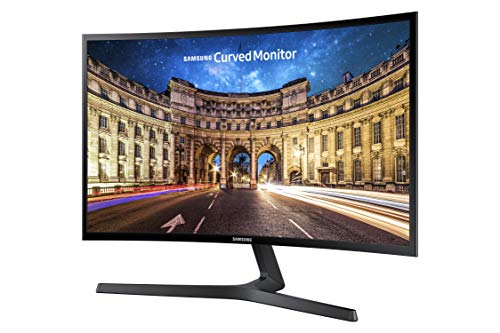
Samsung CF396 23.5-Inch Curved — Curve inside the budget
The CF396’s party trick is existing at all: a curved screen, from the brand that invented the category, competing inside the $100 to $200 band. The gentle wrap and VA contrast change the character of a small desk more than any specification in this list — films feel richer, evening browsing feels calmer, and the slim cabinet keeps a compact setup looking deliberate rather than assembled.
It earns its place on merit beyond the curve. FreeSync smooths casual gaming, the panel’s viewing behaviour within its sweet spot is friendly, and Samsung’s menus and build feel a class above the no-name curved screens that crowd this price territory. Height adjustment and high refresh were never part of its brief. If your band-budget shortlist assumed curved meant expensive, this is the pick that corrects the assumption.
The CF396 inside this budget deserves a note on who should not let its charm decide for them. Its curve and contrast flatter dim rooms and solo viewing; a bright family desk where three people watch a screen together will spend its life in the panel’s weakest posture. Value is contextual, and this pick’s value is highest in the bedroom, the study and the evening room. Matched to those rooms, it delivers something the flat picks cannot at this money — a screen that feels like a place, not a window.
Gift buyers, take note of the CF396 specifically. A curved screen is the rare technology gift that visibly delights on first switch-on while remaining a safe, mainstream product underneath — no exotic standards, no compatibility traps, a brand the recipient trusts. In a band where most presents are sensible, this one manages to be sensible and surprising at once.
The CF396’s verdict inside this budget is that character is available at value prices if you know where it hides. It will not win a specification contest, and it will win the room it sits in, evening after evening. Buyers who measure value in experience rather than in table rows should let it win theirs.
One last CF396 note: in a band defined by sensible sameness, it is the one pick with a personality — and personality, at this money, is the rarest specification of all.
- True size: 23.5-inch viewable curved VA
- Resolution: 1920 x 1080
- Response: 4ms class
- Sync: AMD FreeSync
- Design: ultra-slim cabinet
Strengths
- A genuine curve from a major brand inside the budget
- Contrast-rich VA picture for film and browsing
- FreeSync covers casual gaming smoothly
Trade-offs
- Everyday refresh class only
- Tilt-focused stand
- Ports reflect its generation
Best for: buyers who want their value screen to feel like an experience, not an appliance.
Not suited for: competitive players, or shared screens watched from the side.

Sceptre Curved 24-Inch Gaming — Console-corner value
Some budgets are not just about money; they are about objects. The Sceptre curved screen is the pick for the desk that cannot accumulate separate speakers, a soundbar and a port hub — because it arrives with the essentials inside one cabinet. Two HDMI inputs let a PC and a console share the screen without cable swapping, the speakers cover voice chat and casual video, and the 1500R curve gives the picture a sense of occasion that flat value screens do not attempt.
The panel itself is the strongest part of the deal, with colour coverage that embarrasses many pricier rivals and VA contrast for games and films. The stand is basic and the speakers are convenience-grade, as this brand’s honest trade always goes, and early inspection of your unit is wise. As a complete, self-contained corner for a student room or a spare bedroom, it spends the band’s money on the experience rather than the spec sheet, and many buyers will call that the smartest trade here.
The Sceptre’s place in a budget guide is to remind readers that included things are worth money. Price the speakers it saves you buying, the second HDMI cable swap it saves you daily, and the console corner it makes possible in a room with no space for separates, and its position in the band looks less like a compromise and more like a bundle designed by someone who has lived in a small room. The panel inspection advice stands — but inspected and kept, it returns its cost in avoided accessories alone.
The Sceptre also quietly serves the work-from-home overflow desk: the bedroom or kitchen-table setup assembled for two days a week, where its speakers, curve and single-cabinet completeness beat a technically better screen that needs accessories the room has no space for. Not every monitor purchase is a battlestation decision, and this pick understands the overflow desk better than any other here.
The Sceptre verdict is bundle logic: count everything it includes and everything it saves, and its position in the band transforms from outsider to strategist. For the small, self-contained setup it was designed for, it is not the cheap option — it is the complete one, which is a different and better thing to be.
One last Sceptre note: students furnishing a first room should price the whole corner — screen, speakers, console switching — before dismissing it, because its bundle arithmetic beats almost every rival’s.
- True size: 24-inch viewable curved, 1500R class
- Resolution: 1920 x 1080
- Colour: up to 98% sRGB class coverage
- Ports: two HDMI, VGA; built-in speakers
- Mounting: VESA compatible
Strengths
- Self-contained: speakers and dual HDMI included
- Tighter curve and strong colour for the class
- VESA mounting keeps upgrade paths open
Trade-offs
- Basic stand ergonomics
- Speakers are for convenience, not fidelity
- Inspect your unit early for uniformity
Best for: students and spare-room gamers who need one box to do the whole job.
Not suited for: audio enthusiasts, or buyers who want a full ergonomic stand included.

Samsung S36GD 24-Inch Curved — 100Hz all-rounder
If the band has a centre of gravity, the S36GD sits on it. The 100Hz refresh is the single most felt upgrade in this price territory — scrolling, window movement and games all gain a fluidity that 75Hz screens hint at and 60Hz screens cannot offer — and Samsung wraps it in a gentle 1800R curve and eye-comfort engineering that make the same screen a civilised place to work until five o’clock.
The compromises are about connections rather than picture: an HDMI-and-VGA port list that serves mixed-age setups but offers no DisplayPort, and a stand from the tilt school. For the hybrid buyer this guide mostly serves — office by day, games and films by night, one screen throughout — those are acceptable trades for the panel’s pace and manners. It is the pick we would hand to the reader who cannot decide what their monitor is for, because it refuses to be bad at any of it.
The S36GD is the pick for the buyer who suspects — correctly — that they will keep this screen a long time. Its virtues compound: the 100Hz smoothness that never gets old, the eye-comfort engineering whose value is measured in years of evenings without headaches, the gentle curve that ages into invisibility. Screens at the band’s centre rarely excite on delivery day; they win on the thousandth day. If your instinct is to buy once and buy well within the range, this is the instinct’s correct target.
A word on the S36GD’s 100Hz for non-gamers, since they are its majority buyers: the smoothness shows up in scrolling a long document, in dragging a window across the screen, in the small animations of a modern operating system — hundreds of micro-moments a day. Owners routinely report that going back to a 60Hz screen at the office feels broken. That is the upgrade this pick is really selling, and games are merely where it shouts loudest.
The S36GD is this guide’s balancing point made physical: pace without aggression, curve without theatre, eye care without compromise, at the band’s centre. If a single screen must be recommended to the widest range of budget buyers, it is this one, and the recommendation is made without a single asterisk.
One last S36GD note: it is the screen to buy when the reader of this guide is also the person who will be asked, in a year, whether they chose well — the answer will be yes, quietly, every day.
- True size: 24-inch viewable curved, 1800R
- Resolution: 1920 x 1080
- Refresh rate: 100Hz
- Features: Game Mode, advanced eye comfort
- Ports: HDMI and D-sub (VGA)
Strengths
- 100Hz is the band’s most noticeable upgrade
- Gentle curve suits work as well as play
- Samsung eye-comfort features for long sessions
Trade-offs
- No DisplayPort in the port mix
- Tilt-class stand
- Not a dedicated esports tool
Best for: hybrid users who want one curved screen to do every job respectably.
Not suited for: DisplayPort-dependent setups, or serious competitive players.

LG UltraGear 24G411A — Gaming-leaning value
At the top of the $100 to $200 band, the money should buy a specialisation, and the 24G411A spends it on pace. Its IPS panel runs at 120Hz with headroom beyond, carries both G-Sync compatibility and FreeSync, and benefits from LG’s well-practised overdrive tuning — so games feel responsive in the way this brand’s UltraGear line has made its reputation on. IPS viewing angles also make it the most shareable screen in this list, a real consideration for a family gaming corner.
Everyday manners are better than the gaming badge suggests: LG’s Switch software makes input and setting changes painless, and reader-friendly modes soften the screen for homework and browsing. HDR10 support is a compatibility note rather than a transformation at this level, and the stand keeps to basics. Judged as the band’s gaming ceiling — the most play you can buy before leaving the range — it is a compelling place for the budget to land.
Spending at the band’s ceiling on the LG is a bet on a specific future: that games will matter more to this desk than docking will. It is a good bet for the young, the competitive and the console-sharing, because refresh rate is the one specification that cannot be added later by any accessory. An arm can fix a stand, a hub can fix ports, but a 75Hz panel is 75Hz forever. Readers who recognise their desk in that sentence should climb to this pick without guilt; readers who do not should let the Samsungs and Dells keep their money calmer.
The LG’s presence at the band’s ceiling raises the honest question of whether to wait for a sale on something above the range instead. Our answer: only if the something is a docking or QHD model serving a named need. For gaming pace, the 24G411A already delivers the experience; a pricier gaming screen buys refinement in build and features, not a different class of play, and the budget discipline that brought you here deserves its reward.
The LG’s verdict is that the top of a budget band should buy a feeling, and the feeling it buys — genuine gaming pace from a major brand — is the one this range’s buyers most often wish they had chosen a year later. Ceilings exist to be spent against; for players, this is the correct wall.
One last LG note: at the ceiling of the band, it converts budget into the one sensation money usually cannot retrofit — speed — and that conversion is why it, and not a safer pick, closes the list for players.
- Panel: 24-inch class IPS, 1920 x 1080
- Refresh rate: 120Hz, overclockable to 144Hz class
- Sync: G-Sync compatible and FreeSync
- Features: HDR10 support, LG Switch software
- Use case: PC and console gaming corners
Strengths
- 120Hz-class IPS pace leads this list
- Both sync families supported
- Wide angles suit shared gaming corners
Trade-offs
- HDR is nominal rather than dramatic
- Basic stand for the band’s top end
- No USB-C or hub for laptop desks
Best for: players spending at the top of the band who want genuine gaming pace from a major brand.
Not suited for: office-first buyers, who get more from the Samsung’s manners or the Dells’ calm.
How Do the Six Compare Side by Side?
| Pick | Panel and size | Refresh | Stand and mounting | Best use |
|---|---|---|---|---|
| Dell SE2422HX | VA flat 1080p | 75Hz | HDMI, VGA | Safest value buy |
| Dell SE2425H | VA flat 1080p | 75Hz | HDMI, VGA | Newer calm office value |
| Samsung CF396 | VA curved 1080p | Everyday class | HDMI class | Curve on a budget |
| Sceptre Curved 24 | VA curved 1080p | Gaming class | HDMI x2, speakers | Self-contained corner |
| Samsung S36GD | VA curved 1080p | 100Hz | HDMI, VGA | Balanced work and play |
| LG UltraGear 24G411A | IPS flat 1080p | 120Hz class | HDMI, DP class | Gaming pace at band top |
Read the refresh column as the band’s ladder: each step from 75Hz to 100Hz to 120Hz is a step you can feel, and the table shows what each step costs in other features. The Dells trade pace for calm and support; the LG trades docking and curve for speed; the Samsungs sit between, which is why they anchor so many shortlists.
Notice what no row offers: QHD resolution, USB-C docking or a height-adjustable stand as standard. Those features live above this band, and a screen claiming all of them inside it is claiming something untrue. The honest picks above each give up a different one, openly.
How Do You Stretch a $100 to $200 Monitor Budget Furthest?
Time the purchase to the market’s rhythm rather than your impatience. Monitor pricing in this band breathes with seasonal sales, and the same screen can sit at opposite ends of the range in different months. If your current screen still works, shortlist two picks from this guide — a first choice and an alternate — and buy whichever enters the lower half of the band first. Flexibility between near-equal models is the budget buyer’s greatest asset.
Spend the savings on the setup, not on a badge upgrade. A basic monitor arm transforms any tilt-stand pick in this list into an ergonomic equal of screens far above the band, and a decent HDMI or DisplayPort cable prevents the refresh-rate mysteries that plague budget builds. Ten minutes checking the port list against your laptop before ordering prevents the most common return in this category.
Finally, protect the purchase in its first week. Check for dead pixels and backlight bleed, confirm the advertised refresh rate is selectable over your cable, and run your darkest film or game to judge the VA picks’ uniformity. Inside the returns window, a value screen is a safe experiment; outside it, the same screen is a commitment.
How Should You Compare Two Screens Inside the Same Budget?
Put them through the same evening. The fair test for any pair in this band is not a specification table but a sequence: an hour of your real work, your darkest film scene, your fastest game, and a video call. Screens in this range differ less in their best moments than in their worst — the uniformity issue, the smearing chase scene, the stand that trembles when the desk is knocked — and the worst moments are what a year of ownership is made of.
Compare the ownership terms with the same rigour. Warranty length, pixel policy, the retailer’s returns window and the brand’s support reputation are all part of the product at this price, because the panel itself is built to a cost everywhere. A slightly lesser screen with a generous returns path is frequently the better buy than a slightly better screen sold as-is by a stranger.
And compare the totals, not the stickers. Add the cable you will need, the arm the stand will eventually demand, the speakers one pick includes and another omits. Budget screens are bundles of included and excluded things, and the honest comparison prices the bundle you will actually live with.
When Should You Step Above the $100 to $200 Band Entirely?
Three needs justify leaving this range, and naming them protects the budget from vague dissatisfaction. The first is resolution: if your work is text at small sizes all day, the QHD models in our dedicated compact roundup will repay their premium in comfort, and no screen here can imitate them. The second is docking: a one-cable USB-C desk with power delivery lives above this band, and laptop owners who dream of it should fund the dream rather than approximate it.
The third is the stand. If your neck, your chair and your desk geometry demand full ergonomic adjustment today, the business lines above this range include it in the box, and buying a cheap screen plus an arm plus the patience to fit both can cost more than the integrated answer. Notice what is absent from the list: gaming speed and curve, both of which this band now supplies honestly, and brand prestige, which it supplies at no extra charge if you shop the names in this guide.
Everyone else should stay. The $100 to $200 range exists because it is where monitor value lives, and stepping above it without one of those three reasons buys refinement, not transformation.
How Do You Read a Budget Monitor’s Specification Sheet Honestly?
Budget specifications are written to be technically true and practically misleading, and learning to translate them is the skill this price band rewards most. Brightness figures describe a panel’s best moment under test conditions, not its behaviour on your desk; what matters is whether the screen reaches a comfortable level for your room with headroom to spare, which every pick here does for ordinary indoor light. Contrast figures on VA panels are genuinely meaningful — the technology’s advantage is real — while dynamic contrast numbers in the millions describe a backlight trick, not a picture you will ever see.
Response-time claims need the same scepticism. The figures in this class are measured under the most flattering conditions and say little about the smearing or clarity you will perceive; the honest proxies are panel type, refresh rate and the brand’s tuning reputation, which is why this guide leans on those and treats millisecond headlines as decoration. Similarly, a colour-coverage percentage is only useful when it names its standard — sRGB coverage in the high nineties, as on the Sceptre here, is a real and relevant claim for everyday work.
HDR badges at this level deserve a flat translation: the screen accepts an HDR signal. It does not possess the brightness or local dimming to render HDR as its creators intended, and no pick in this guide pretends otherwise. Treat the badge as future-proofing for console menus, not as a picture feature, and it will never disappoint you.
The specification that never lies is the port list, counted physically, and the stand description, read literally. A buyer who verifies those two, trusts panel type over response claims, and discounts dynamic numbers entirely will read any budget sheet like an engineer — and will buy well in this band for the rest of their life.
How Long Should a Budget Monitor Last, and What Kills Them Early?
A screen in this band, from the brands listed here, should be planned as a five-to-eight-year object. LED backlights fade slowly and evenly; panels rarely die dramatically; the electronics are mature. What actually ends budget monitors’ lives early is almost never the picture — it is the accident, the failed stand hinge on a no-name unit, the power supply on a brand without a service network, or the port that stops detecting inputs. Those failure modes are precisely what the names in this list insure against, which is the deepest reason the band’s floor sits where it does.
Care is simple and mostly consists of not doing things: do not clean the panel with household sprays, do not run maximum brightness in a dark room for years, do not let cables hang their weight from the ports. A surge-protected power strip is the one accessory with a genuine claim to extending the screen’s life, and it costs less than the delivery fee on most of these monitors.
Plan the succession while you are at it. A budget screen’s second career — second display, family hand-me-down, spare-room duty — is where its value finishes accumulating, and the picks here were chosen to age into those roles without embarrassment. Bought this way, the $100 to $200 monitor is not a compromise purchase at all; it is one of the longest-serving objects in the house.
How Do You Spot a Genuine Bargain in This Band?
A genuine bargain in this range has a recognisable shape: a named brand, a panel type you can identify, a port list you can count, and a price sitting low in the band because of timing rather than because of hidden subtraction. The false bargain inverts every term — an unknown badge, a panel described in adjectives instead of technology, ports listed as ‘multiple inputs’, and a price low because the stand, the warranty and the support were the product all along.
Model age is the bargain hunter’s friend and deserves repeating in this final section: the outgoing generation of a good line is the single most reliable source of value in the entire monitor market. Two picks in this guide are a living demonstration, separated by one product cycle and both recommendable, with the older one frequently the smarter buy on any given day.
Finally, let the calendar work for you without letting it rule you. Set the shortlist, set the floor specification, and buy when a pick crosses into the band’s lower half — then stop watching prices. The screen’s job is the next five years of your desk; the saving’s job was one afternoon, and both jobs are done.
A Last Word on Value That Lasts
The budget buyer’s real enemy was never a low specification; it is the short-lived purchase — the screen replaced in eighteen months because its stand hurt, its panel tired the eyes, or its seller vanished. Every pick in this guide was chosen to defeat that enemy, which is why brand, support and panel honesty outrank headline numbers throughout, even at the cost of a few exciting claims.
Spend the band once, spend it on the role your desk actually plays, and let the screen become the oldest, calmest object in the setup. That is what value means at $100 to $200: not the cheapest afternoon, but the longest service — and it is available, today, in every pick above.
What Mistakes Waste Money in This Price Band?
Chasing the lowest sticker in the band is the first waste. The cheapest screens save on the stand, the panel’s viewing angles and the seller’s support, and each saving returns as discomfort or a second purchase. The bottom of this range exists so you do not have to shop below it.
Believing a resolution claim without reading the panel line is the second. Screens in this territory occasionally wear QHD-adjacent naming over 1080p panels; every pick here is honestly 1080p, and at this size and budget that is the right specification — but verify it on any screen you consider beyond this list.
Third, buyers forget that a monitor outlives the laptop it was bought beside. A port list that only serves today’s machine, with no HDMI spare and no VESA mount, narrows every future setup. The picks above were chosen partly for the options they keep open.
Finally, do not let a promotion rush you past the inspection week. A discount explains urgency; it does not repeal dead pixels. Buy the deal, then check the panel like a sceptic while returning it is still free.
Final Recommendation
For the reader who wants one answer: the Samsung S36GD is the band’s best balance, the screen that works, plays and treats your eyes kindly in a single cabinet. For the reader who wants the safest possible spend, the Dell SE2425H — or its SE2422HX sibling at the lower price on the day — is the calm choice that will never embarrass the recommendation.
Players should climb to the LG UltraGear at the band’s ceiling, and anyone whose desk cannot hold speakers should look hard at the Sceptre. The $100 to $200 range rewards buyers who know which feature their life actually uses — spend the band on that one thing, and a modest monitor becomes the best-value object on the desk.
The band will keep moving after this guide is published — prices breathing with the seasons, models refreshing, last year’s heroes becoming this year’s bargains. The method, though, does not move: name the role, verify the panel and the ports, respect the stand, protect the first week, and let timing choose among equals. A reader who keeps that method owns this price range permanently, whatever it contains next year.
And if the decision still feels heavy for what is, after all, a modest purchase, remember the asymmetry that makes this band forgiving: a well-chosen screen here can be promoted, demoted, gifted and resold through a decade of desks, while a badly chosen one announces itself within a month. The six above were picked so that the announcement, in your house, is a pleasant one — that is the whole promise a budget guide is allowed to make, and this one makes it.
Frequently Asked Questions
Can I really get a good monitor for under $200?
Yes — this is the most competitive band in the market, and the six verified picks here are all screens we would use ourselves. What the band will not buy is QHD resolution, USB-C docking or a premium stand, and honest expectations on those three points are the key to satisfaction.
Is 1080p enough at 23 to 24 inches?
For this budget and size, yes. Text and video look clean at normal desk distances, games run at high frame rates on modest hardware, and the money saved funds the stand, ports and panel quality that shape daily comfort far more.
Should I choose 75Hz, 100Hz or 120Hz in this range?
Each step is noticeable, in gaming most of all. Choose 75Hz for office and family use, 100Hz for a hybrid desk, and the 120Hz class if games are the priority — and confirm your cable and settings actually deliver the rate you paid for.
Are the curved picks here worth it over flat ones?
If you sit centred and mostly alone at the screen, the curve adds comfort and atmosphere at no real cost in this band. For shared viewing or precision line work, choose one of the flat picks instead.
Why are there no QHD monitors in this guide?
Because at this size, a QHD panel inside this budget forces sacrifices in stand, ports and panel quality that outweigh the sharpness gain for most buyers. If QHD is your priority, our dedicated WQHD roundup covers the compact models that do it properly.
How do I know a price I see is fair for these models?
Compare within the band rather than against a single figure: these models drift with promotions, and a pick near the lower half of the $100 to $200 range is a strong buy, while one at the ceiling should be weighed against the specialisation it offers.
Is it better to buy one good screen or two cheaper ones in this budget?
For most desks, one good screen from this list beats two screens from below the band: the primary display is where your eyes live, and its stand, panel and support shape every day. Add the second screen later — every pick here can become it — rather than compromising both today.
Do these monitors include the cables I need?
Typically an HDMI cable is in the box, and DisplayPort cables vary by model. Check the listing’s contents against your PC’s outputs before ordering, especially if you are counting on DisplayPort for a high-refresh pick; a missing cable is the most common day-one delay in this bracket.
Related Guides
The value hunt continues in these related roundups from the same series: Best 23.8 monitors for real desks Best 23 inch curved monitors with honest sizes Best 23 inch PC monitors for everyday computing.


