What's inside
- Key Takeaways
- Quick Picks
- How Did We Shortlist Gaming Screens in This Size?
- Why Do Competitive Players Still Like Smaller Screens?
- Flat IPS, TN or Curved VA: Which Panel Suits Your Games?
- How Fast Is Fast Enough at This Size?
- What Else Belongs in a Small Gaming Setup?
- Which of the Best 23.6 Inch Gaming Monitors Earn a Place on the Desk?
- How Do the Six Compare Side by Side?
- How Do You Set Up a Small Gaming Monitor for Its Best Performance?
- How Should You Test a Gaming Monitor in Its First Matches?
- What Upgrades Pair Best With a Small Gaming Monitor?
- How Does a Small Gaming Screen Handle the Rest of Your Life?
- What Is the Right Upgrade Path From a Small Gaming Screen?
- How Do You Choose Between the Three Speeds in This List?
- A Last Word on the Room Around the Screen
- What Mistakes Ruin a Small Gaming Monitor Purchase?
- Final Recommendation
- Frequently Asked Questions
- Related Guides
As an Amazon Associate I earn from qualifying purchases. This post may contain affiliate links at no extra cost to you.
widgetverdict.com is reader-supported. When you buy through links on our site, we may earn an affiliate commission.
Where to buy: each screen below links to a verified listing, and every review gives the true viewable size in its first lines, because the 23.6-inch label hides more variation than any other in gaming.
The best 23.6 inch gaming monitors occupy a curious shelf in the gaming aisle. A true 23.6-inch viewable panel was once the standard esports size, and the keyword survives because players still search for the screen that fits a narrow desk, a LAN-party bag or a second battlestation in a shared room. Today’s honest shortlist is built from 23.8-inch viewable panels sold in the 24-inch class — close enough that the cabinets measure within millimetres of the old 23.6 screens — plus one long-running 24-inch esports veteran.
We say that up front because size honesty is the whole game in this category. What matters for play is not the tenth of an inch on the box but the combination underneath it: refresh rate, response behaviour, adaptive sync and a panel that keeps colours readable when the action turns dark. The six picks below span 144Hz to 240Hz, flat and curved, IPS and TN, and each review explains which kind of player the screen actually serves.
Consoles are welcome here too. Every pick accepts HDMI input from a PlayStation or Xbox, and the faster screens reward a PC most of all. What none of them does is pretend to be a living-room display — these are close-range instruments for desks, and they are judged that way.
One more group should feel directly addressed: players in rented rooms and shared houses, where the battlestation shares a wall with somebody else’s sleep. A screen this size keeps light spill low, runs happily at the end of a small desk, and — in the cases of the LG and ASUS here — can even cover casual audio without waking the house through separate speakers. Compact gaming is considerate gaming, and several of these picks are better neighbours than any 32-inch panel could be.
Treat the six below as a ladder rather than a league table: each rung is the right answer for a recognisable player, and the reviews name that player in plain language, because in this size the wrong specialisation is a worse purchase than a modest specification.
Key Takeaways
- True 23.6-inch panels are legacy stock now; the live class is 23.8-inch viewable screens in the 24-inch category.
- 144Hz is the sensible floor for PC play in this size, and 240Hz only pays off with a GPU that feeds it.
- IPS models suit mixed gaming and everyday use; the TN veteran still serves pure competitive play.
- Curved VA picks trade a little motion sharpness for deeper contrast in dark games.
- Use DisplayPort for the highest refresh rates; HDMI is the console path.
- A compact gaming screen doubles well as a second monitor later, which softens the upgrade cost.
Quick Picks
| Pick | Badge | Why it earns its place |
|---|---|---|
| Dell SE2426HG | Fastest flat pick | Dell’s 23.8-inch IPS gaming screen runs at 240Hz, the highest refresh in this roundup, with FreeSync Premium support. |
| ASUS TUF Gaming VG249QE5A | Best balanced gamer | A 23.8-inch IPS TUF screen at 144Hz with ELMB Sync and Shadow Boost, built for varied game libraries. |
| LG UltraGear 24G414B | Console-friendly IPS | LG’s 24-inch UltraGear runs 144Hz IPS with HDR10 support and built-in speakers, suiting PC and console corners. |
| BenQ ZOWIE XL2411P | Esports veteran | The long-running 24-inch TN esports monitor with Black eQualizer and Color Vibrance, for competitive purists. |
| AOC C24G42E | Fast curved pick | A 24-inch curved VA screen at 180Hz with a tight curve, for players who want immersion in a small cabinet. |
| SANSUI 24-Inch Curved 160Hz | Budget curved speed | A 1500R curved 24-inch VA screen at 160Hz with FreeSync, undercutting the big brands on features per pound of desk. |
How Did We Shortlist Gaming Screens in This Size?
We began by retiring the fiction that a modern 23.6-inch gaming class exists in depth. Searches return a mixture of old stock, 21.5-inch screens stretched by marketing, and 27-inch models that wandered in from neighbouring keywords. We kept only screens whose viewable diagonal genuinely sits in the 23.6-to-24-inch band, and we state each one’s true size in its review so the comparison stays honest.
Performance filters came next. A gaming pick needed at least 144Hz on its PC input, adaptive sync to smooth frame-rate swings, and published response behaviour we could describe without inventing numbers. Screens that reached high refresh only through misleading overclock footnotes were dropped. Panel variety was deliberate: most players are best served by IPS, but the list keeps one fast TN esports design and two curved VA models because those preferences are real and long-standing.
Finally we looked at the desk around the screen. In rooms where a 23.6-class monitor makes sense, space is the constraint, so VESA mounting, stand stability and sensible port placement all counted. A screen that wobbles every time the desk is bumped fails this category no matter how fast its panel is.
Why Do Competitive Players Still Like Smaller Screens?
The case for a small gaming monitor is about information distance. On a 23.8-inch panel at a normal desk distance, the minimap, the health bar and the centre of the screen all sit inside one comfortable field of view, so the eyes travel less and the head stays still. Many professional players in arena shooters choose this size for exactly that reason, even when a sponsor would happily give them something larger.
There is a performance dividend too. Every pick here is a 1080p screen, and 1080p is dramatically easier for a graphics card to drive at 180 or 240 frames per second than 1440p. A mid-range PC that wheezes at QHD high-refresh will hold beautifully smooth rates here, which is why this size remains the honest recommendation for players who value frame rate over spectacle.
None of this makes bigger screens worse. Story-driven games with wide vistas genuinely gain from a 27-inch or ultrawide panel. The small screen’s claim is narrower and stronger: for competitive play, small rooms and second setups, it puts the whole game where your eyes already are.
Flat IPS, TN or Curved VA: Which Panel Suits Your Games?
IPS is the default recommendation in this roundup because it forgives. Colours stay accurate when you slouch, teammates watching over your shoulder see the same picture, and the same screen handles homework, browsing and video without complaint. Modern fast IPS panels have closed most of the old motion gap, which is why four of our six picks use the technology.
TN survives in exactly one place: the dedicated esports design, where its motion clarity tricks and dedicated equaliser features still earn a following among players who compete seriously and touch nothing else on the screen. Curved VA takes the opposite corner — its contrast makes night scenes, horror games and space sims look rich, and the gentle wrap suits single-player immersion, at the cost of some smearing in fast dark transitions. Read the pick reviews with your own game library in mind; the right panel is the one matched to the titles you actually launch.
How Fast Is Fast Enough at This Size?
Refresh rate marketing counts in headlines; players should count in frame times and in the titles they actually run. The jump from 60Hz to 144Hz transforms tracking and target acquisition in fast games — it is the largest single smoothness upgrade in gaming hardware. The step from 144Hz to 240Hz is real but narrower, visible mainly to experienced players in fast titles on PCs that sustain the frame rate. That is why this list is content with three speeds: it lets the hardware you own, not the advertisement, pick your tier.
Response behaviour matters alongside refresh, and it is where panel tuning earns its keep. A well-tuned 144Hz IPS panel with sensible overdrive will look cleaner in motion than a poorly tuned faster panel smearing halos across every pan. When you test a new screen, pan the camera across a detailed scene and watch high-contrast edges: clean edges mean the tuning is right, bright or dark trails mean it is time to change the overdrive setting before judging the monitor.
Input lag, the third leg, is reassuringly a solved problem in this class: every pick here is a proper gaming panel whose delay sits below perception for all but the most specialised measurement. Spend your worry on frame rates and tuning, where the differences actually live.
What Else Belongs in a Small Gaming Setup?
The monitor is the centre of a compact battlestation, not the whole of it, and the surrounding choices decide whether the size feels clever or cramped. A tenkeyless keyboard returns the mouse room this screen size is designed around; a headset hook or stand keeps the desk’s small surface clear; and a monitor arm, using the VESA mounts most picks here provide, floats the panel so the footprint underneath returns to the mousepad. Small setups reward tidiness out of proportion to their size.
Lighting deserves a sentence of its own. A simple bias light behind the screen reduces eye strain in dark rooms and makes VA contrast look even deeper, while a lamp blazing behind the player does the opposite to any panel. Players who game at night in shared spaces will also appreciate that two picks here carry speakers adequate for low-volume play — a small mercy for thin walls.
Finally, keep the second machine in mind. A compact gaming desk often hosts a console or a work laptop beside the PC, and the picks with two HDMI inputs turn that sharing into a button press. In a small room, the screen that serves everything is worth more than a slightly faster screen that serves one thing.
Which of the Best 23.6 Inch Gaming Monitors Earn a Place on the Desk?
Six screens, three panel philosophies, one shared promise: fast, honest 1080p play in a cabinet that fits where bigger monitors cannot.

Dell SE2426HG — Fastest flat pick
If the brief is simply the fastest honest screen in this size, the SE2426HG is where the search ends. Dell is not a name most players associate with esports hardware, yet this 23.8-inch IPS panel runs at 240Hz with FreeSync Premium, and in fast shooters the step up from 144Hz is the kind of difference you feel in tracking and flick shots within the first match. The image stays composed at speed because IPS pixel transitions here are tuned for gaming rather than office duty.
The compromises are the ones Dell’s SE line always makes. The stand tilts and that is all, so plan on a VESA arm or a stack of books if your chair sits high; there is no USB hub; and the design language is office-calm rather than gaming-loud, which some buyers will count as a strength. For a player whose PC can genuinely hold very high frame rates in their main title, this is the performance ceiling of the category at a sane size. Everyone else should read on before spending for refresh they cannot feed.
The SE2426HG rewards a particular setup decision: pair it with an arm. Freed from its tilt-only stand, the panel’s speed becomes the whole story, and its calm office styling turns into an asset in a shared room — nothing about it shouts at midnight. Owners should also explore its colour presets per game rather than globally; the tuning that flatters a bright arena shooter dulls a dark survival title, and the Dell remembers profiles well enough to make per-game habits worthwhile. Treated as a panel to build around, rather than a finished product, it is the enthusiast’s value in this list.
One caution belongs to the Dell’s speed crown: verify your favourite title’s real frame rate before ordering, using an overlay for a week of normal play. If the number lives near 150 rather than 240, the honest pick is a tier down and the saving belongs in your next hardware fund. The monitor will not be offended; it will simply wait for an owner whose PC speaks its language.
The Dell’s verdict is conditional and proud of it: feed it frames and it is the best screen here; starve it and it is an ordinary one wearing a fast badge. That honesty makes it the easiest pick to assign — the overlay on your own games has already decided whether this paragraph is your recommendation.
One last Dell note: its plain styling ages better in a shared room than any gaming aesthetic here, which matters when the battlestation shares a wall with family life. Speed for the player, calm for the household — a rarer combination than the spec sheet admits.
- Panel: 23.8-inch IPS, 1920 x 1080
- Refresh rate: 240Hz
- Sync: AMD FreeSync Premium
- Ports: two HDMI, DisplayPort 1.4
- Stand: tilt adjustment; compact footprint
Strengths
- 240Hz IPS at this size is genuinely fast company
- FreeSync Premium smooths frame-rate swings well
- Two HDMI ports make console sharing painless
Trade-offs
- Tilt-only stand on a gaming screen is a real omission
- No USB hub or height adjustment
- 240Hz demands a strong PC to mean anything
Best for: PC players with a capable graphics card whose main games reward the highest frame rates.
Not suited for: anyone on entry-level hardware, or players who need ergonomic adjustment from the included stand.

ASUS TUF Gaming VG249QE5A — Best balanced gamer
The VG249QE5A is the pick we would hand to the widest range of players, because ASUS tuned it for the mixed library most people actually own. The 144Hz IPS panel is quick enough for competitive sessions, ELMB Sync attacks motion blur when you want it, and Shadow Boost lifts detail out of dark corners in a way that helps in everything from extraction shooters to moody RPG dungeons. Colours out of the box are lively without tipping into cartoonish.
TUF branding also buys practical touches: a sturdy-feeling chassis, VESA mounting for arm users, and built-in speakers that are adequate for voice chat and casual video even if a headset remains the serious choice. The refresh ceiling is the honest limit — players chasing 240Hz should look at the Dell above — and the stand’s adjustment range is modest. But as a single screen for a bedroom or study battlestation, switched between PC, console and coursework, this is the most forgiving recommendation in the group.
Long-term, the VG249QE5A’s strength is how little it asks of its owner. It boots into the right input, its gaming features are one menu layer away rather than buried, and its picture stays honest across the brightness range a bedroom actually uses. Players who split a desk with school or office work will find its daytime manners better than the TUF styling suggests — text is clean, colours are not forced into gaming saturation, and the speakers handle a lecture or a call without a headset hunt. It is the pick least likely to generate a regret in either of its two lives.
The ASUS also deserves credit for its behaviour at low frame rates, the forgotten half of gaming. When a demanding scene drags a mid-range PC toward fifty frames, its variable refresh keeps the picture composed instead of tearing, and Shadow Boost keeps the scene readable. Screens are reviewed at their ceilings; they are lived with at their floors, and this one’s floor is unusually civilised.
If the guide had to ship one screen to a hundred unknown players, it would ship this ASUS. Its balance is not a compromise between audiences but a genuine overlap of them, and its ownership manners — inputs, features, daytime behaviour — are the most forgiving in the list. The default recommendation exists for buyers who want the decision to be right more than they want it to be interesting.
One last ASUS note: its speakers, easily dismissed in a spec table, are the feature spare-room owners cite most — they complete the setup without a second purchase, which in a compact room is a genuine design virtue.
- Panel: 23.8-inch viewable IPS, 1920 x 1080
- Refresh rate: 144Hz, overclockable slightly
- Features: ELMB Sync, Shadow Boost, speakers
- Sync: variable refresh support
- Design: TUF Gaming styling, VESA mountable
Strengths
- Well-judged 144Hz IPS performance for mixed libraries
- Useful gaming features including Shadow Boost
- Speakers and VESA mounting broaden its roles
Trade-offs
- Not the fastest panel here for pure esports
- Stand adjustment is limited
- ELMB modes trade brightness for clarity
Best for: players who split time between competitive titles, story games and everyday desktop use.
Not suited for: specialists who want either maximum refresh or a fully ergonomic stand out of the box.

LG UltraGear 24G414B — Console-friendly IPS
LG’s UltraGear line has a house style — fast IPS, restrained design, sensible menus — and the 24G414B applies it cleanly at 24 inches. The 144Hz panel pairs G-Sync compatibility with FreeSync, so it plays nicely with either GPU family, and its motion handling feels a touch more polished than the raw spec sheet suggests, the product of LG’s long experience tuning overdrive. For a desk that alternates between a gaming PC and homework, the included Reader Mode and on-screen control software are small kindnesses you will use weekly.
The built-in speaker deserves a mention because compact setups often lack desk space for separate audio; it will not thrill anyone, but it keeps a console corner self-contained. HDR10 support should be read modestly — this is an edge-lit IPS panel, so HDR is a compatibility checkbox rather than a transformation. Judge this screen on its core virtues: quick, accurate, unfussy. In a category full of shouty designs, its calm competence stands out.
The 24G414B’s quiet advantage is LG’s software discipline. The on-screen control lets a PC user adjust brightness, inputs and gaming features with the mouse instead of the chin-straining joystick dance, and in a compact setup where the monitor may sit in a corner or on a shelf, that convenience is weekly, not theoretical. Its reader mode is also the most usable in this list for late-night study sessions between matches. None of this appears on a spec sheet comparison, and all of it shapes whether the screen feels like a tool or an obstacle by the second month.
For console-leaning readers, the LG’s second HDMI life is its quiet headline: a PC on DisplayPort and a console on HDMI share the screen with an input swap, its speaker covers the console’s audio without extra boxes, and its IPS angles suit a bed-facing setup. As the one-screen entertainment centre of a small room, it has the fewest compromises in this list.
The LG’s verdict is polish. Nothing about it leads a spec table, and almost everything about living with it — software, tuning, speaker, sync manners — feels considered. Households and shared rooms, where a monitor is infrastructure rather than a shrine, will get the most from that polish, and they should rank it higher than solitary players might.
One last LG note: its reader mode makes it the only gaming pick here we would assign to a student with heavy reading loads without a second thought — the after-hours screen that also respects the homework hours.
- Panel: 24-inch class IPS, 1920 x 1080
- Refresh rate: 144Hz, 1ms-class response
- Sync: G-Sync compatible and FreeSync
- Extras: HDR10 support, built-in speaker
- Features: Reader Mode and LG Switch software
Strengths
- Polished motion tuning from an experienced line
- Works smoothly with both GPU families
- Speaker and reader modes suit shared-room desks
Trade-offs
- HDR is nominal rather than impactful
- Stand ergonomics are basic
- Design is understated if you want a gaming look
Best for: households where one compact screen serves PC gaming, console sessions and ordinary work.
Not suited for: players who prioritise maximum refresh or deep HDR contrast.

BenQ ZOWIE XL2411P — Esports veteran
The XL2411P is the elder statesman of this list, a 24-inch TN design that has sat on tournament desks for years, and its inclusion is deliberate. ZOWIE built this line around two ideas competitive players still swear by: Black eQualizer, which lifts shadow detail so opponents stop hiding in dark corners, and Color Vibrance, which makes enemy models pop against muted maps. The stand — height adjustable, stable, unglamorous — is better than several newer rivals manage.
Age brings honest caveats. TN viewing angles are narrow, so colours shift if you lean back or share the screen; there is no modern adaptive sync over every input; and the port selection reflects its generation, so check your cables before it arrives. None of that matters to its intended buyer, who plays one or two competitive titles seriously, sits square in front of the screen, and wants the exact tool a generation of players trained on. For everyone else, the IPS picks above are the modern answer.
Ownership of the XL2411P is a commitment to a discipline, and its community reflects that: settings guides for specific titles, shared colour vibrance values, and stand-position rituals are all part of the ZOWIE folk knowledge a new owner inherits. That ecosystem is a genuine feature for a developing competitive player, because it shortens the experiment phase — you start from the configurations experienced players already trust, then adjust. The screen’s age even helps here, since nothing about its behaviour is undocumented. Buy it as a training instrument with a library attached, not as a general monitor, and it makes complete sense.
New ZOWIE owners should resist one temptation: copying a professional’s settings wholesale. Pro configurations assume pro frame rates, pro seating distance and pro eyes. Start from the shared baselines, then adjust vibrance and equaliser values in your own matches over a week. The screen’s features are instruments; your settings, earned in your games, are the performance.
The ZOWIE verdict is the simplest in the guide: if you compete, seriously and specifically, this remains a legitimate instrument with a community’s knowledge behind it; if you do anything else with your screen, buy any other pick and do not look back. Specialisation this pure is not a flaw to apologise for — it is the product.
One last ZOWIE note: buy it from a seller with a real returns policy even as a purist, because TN panels are the most love-it-or-leave-it technology in this guide, and the first week at your own desk is the only honest trial.
- Panel: 24-inch TN, 1920 x 1080
- Refresh rate: 144Hz
- Features: Black eQualizer, Color Vibrance
- Ports: DisplayPort, HDMI, DVI-DL on this generation
- Stand: height adjustable esports stand
Strengths
- Esports-specific features that genuinely aid visibility
- Proper height-adjustable stand
- Proven design with a long competitive track record
Trade-offs
- TN colours and viewing angles trail every IPS pick
- Port selection shows its age
- No speakers and no all-round media ambitions
Best for: dedicated competitive players who value visibility features over colour richness.
Not suited for: mixed-use buyers, movie watchers or anyone who shares the screen at an angle.
AOC C24G42E — Fast curved pick
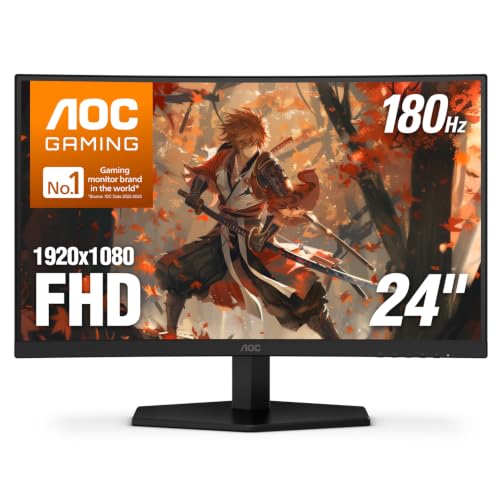
Curvature at 24 inches is subtle — the wrap is gentle, more a sense of the screen leaning toward you than a cockpit embrace — and the C24G42E uses it well. Its VA panel delivers the deep blacks that IPS cannot, so night raids, horror titles and space games gain real atmosphere, while the 180Hz refresh keeps competitive sessions fluid. AOC’s gaming menus are sensibly organised, and the inclusion of both modern DisplayPort and HDMI keeps PC and console sharing simple.
The VA trade-offs apply in their usual places. Dark transitions can smear slightly in the fastest scenes, and the curve makes the screen a solo instrument: a friend watching from the side gets a distorted, dimmer view. Text work is fine for everyday purposes, though the curved geometry bothers a minority of spreadsheet users. If your gaming leans single-player and atmospheric but you still want genuine speed on tap, this is the most characterful screen in the roundup.
The C24G42E is the pick most likely to change a flat-screen loyalist’s mind about small curves, because its wrap is paired with pace: many curved converts arrive for the immersion and stay for the 180Hz. Its ownership caveat is placement discipline — the curve wants you centred and at a consistent distance, so a chair that wanders or a desk shared by two positions will undersell it. Give it a fixed seat and a DisplayPort cable, run its overdrive at the middle setting, and it delivers the most atmospheric fast gaming this size offers.
The AOC’s curve has one more beneficiary: the racing and flight player. At this size the wrap plus 180Hz gives cockpit-adjacent immersion without the desk conquest of an ultrawide, and its VA contrast renders night stages and instrument panels with real depth. If your library leans vehicular, this pick’s ranking in your personal list should rise above its place in ours.
The AOC is the enthusiast’s curved answer: the fastest way to discover whether wrap and pace together are your thing, from a gaming line that understands both. Players whose libraries mix arena speed with atmospheric worlds will find no other pick here speaking to both halves of their taste at once.
One last AOC note: its modern ports make it the easiest curved pick to recommend for a combined PC-and-console desk, where the console’s HDMI and the PC’s DisplayPort can both stay permanently connected.
- Panel: 24-inch curved VA, 1920 x 1080
- Refresh rate: 180Hz
- Response: fast MPRT figures for the class
- Ports: DisplayPort 1.4, HDMI 2.0
- Mounting: VESA support
Strengths
- 180Hz with VA contrast is a rare, enjoyable mix
- Curve adds immersion without overwhelming a small desk
- Good port selection for PC plus console
Trade-offs
- Some dark-scene smearing in fast motion
- Poor off-angle viewing for spectators
- Curve will not suit every productivity user
Best for: solo players who love atmospheric games and still want high-refresh headroom.
Not suited for: shared screens, colour-critical work or players sensitive to VA smearing.

SANSUI 24-Inch Curved 160Hz — Budget curved speed
SANSUI’s curved 24-inch screen makes the value argument in this category, and it makes it credibly. A 1500R curve is tighter than most rivals use at this size, the VA panel’s contrast is the real thing, and 160Hz with FreeSync covers the needs of the overwhelming majority of players — all in a cabinet that leaves change for the headset or the second game controller. In play it feels like what it is: a modern, quick, contrast-rich panel without the brand tax.
The savings show up around the edges rather than in the picture. The stand is basic, the menu system is functional rather than delightful, and long-term support will never match Dell or LG. Quality control variance is the standing warning with value brands, so buy from a seller with a painless returns policy and inspect the panel for dead pixels and backlight bleed in the first week. Treated with that small diligence, it is the smart-money pick of the curved pair.
The SANSUI’s ownership bargain is diligence in week one traded for savings all year. Spend an evening with test patterns and your darkest game, confirm the refresh over your cable, and set the overdrive conservatively; from then on it behaves like the bigger brands’ screens in the ways that reach your eyes. Its tighter curve also makes it the most involving film screen in this list for a solo viewer, a second life that pure esports picks cannot offer. Value screens are often described as gambles; this one is better described as a small inspection followed by a long, ordinary satisfaction.
Budget honesty requires one more SANSUI note: buy it from a retailer whose returns process you have read. That single precaution converts its entire risk profile — sample variance, plain menus, basic stand — into a checklist rather than a gamble, and it costs nothing. Value buying done carefully is not lesser buying; it is buying with your eyes open.
The SANSUI verdict is arithmetic: inspected carefully in its first week, it delivers the curved, fast, contrast-rich experience at the list’s most accessible position, and the saving is real money toward the rest of a small setup. Value this well executed is not the budget option; for many readers it is simply the smart one.
One last SANSUI note: pair it with the arm its stand makes you want, and the total still undercuts the premium curved competition — the value case, stated in its strongest honest form.
- Panel: 24-inch curved VA, 1500R, 1920 x 1080
- Refresh rate: 160Hz
- Contrast: 3000:1 class VA contrast
- Sync: FreeSync support
- Ports: HDMI 2.0, DisplayPort 1.4; VESA support
Strengths
- Strong contrast and a tight curve for the money
- 160Hz is plenty for most players and PCs
- FreeSync and modern ports included
Trade-offs
- Basic stand and menu polish
- Sample variance means early inspection matters
- Brand support is thinner than the big names
Best for: value-focused players who want curved immersion and speed without the premium badge.
Not suited for: buyers who want top-tier support, ergonomics or guaranteed panel uniformity.
How Do the Six Compare Side by Side?
| Pick | Panel and size | Refresh | Stand and mounting | Best use |
|---|---|---|---|---|
| Dell SE2426HG | 23.8-inch IPS flat | 240Hz | Tilt only | Maximum PC frame rates |
| ASUS TUF VG249QE5A | 23.8-inch IPS flat | 144Hz | Limited adjustment, VESA | Mixed gaming libraries |
| LG UltraGear 24G414B | 24-inch IPS flat | 144Hz | Basic stand | PC plus console corners |
| BenQ ZOWIE XL2411P | 24-inch TN flat | 144Hz | Height adjustable | Competitive purists |
| AOC C24G42E | 24-inch VA curved | 180Hz | VESA support | Atmospheric solo play |
| SANSUI 24 Curved | 24-inch VA curved 1500R | 160Hz | Basic stand, VESA | Budget curved speed |
The table’s real divide is panel philosophy. The three flat IPS screens are all-rounders that happen to game well; the ZOWIE is a single-purpose instrument; the two curved VA models trade a little competitive edge for contrast and mood. Choosing by refresh rate alone would scramble those priorities.
Note also how the fastest screen carries the plainest stand, while the oldest design carries one of the best. If your setup will grow a monitor arm anyway, stand differences shrink; if the included stand is permanent, weigh that column heavily.
How Do You Set Up a Small Gaming Monitor for Its Best Performance?
Setup decides whether the refresh rate on the box becomes the refresh rate in your games, so work through it once, properly. Connect with DisplayPort for PC play, then open your operating system’s display settings and set the refresh rate manually — a surprising number of fast monitors spend their lives running at 60Hz because nobody visited that menu. Enable adaptive sync in the monitor’s own menu first, then in your GPU control panel, and confirm with a frame-rate overlay in game.
In the monitor menu, set overdrive to its middle or normal mode rather than the maximum; the highest settings usually introduce bright halos around moving objects that cost more clarity than they add. Turn off dynamic contrast and eco brightness features, which fight your settings mid-game. If your title supports it, cap the frame rate a few frames below the panel maximum to keep adaptive sync in its happiest range.
Position matters at this size. Sit close enough that the screen fills your central vision without head-turning — for most players that means fifty to seventy centimetres — with the top of the panel near eye level. A small screen placed too far away wastes its one structural advantage, which is keeping the whole game inside a single glance.
How Should You Test a Gaming Monitor in Its First Matches?
Test with your main game first, not with a benchmark tour. Play the title you know frame by frame, on the settings you actually use, and pay attention to the three sensations that decide satisfaction: how targets feel to track, how dark scenes read, and whether the frame pacing stays smooth when the action crowds. A screen that flatters your main game and merely satisfies your occasional titles is the right purchase; the reverse ranking is how good monitors get returned.
Then test the edges of your library deliberately. Your darkest game exposes VA smearing and TN washout; your fastest exposes overdrive halos; your most colourful exposes saturation habits. Spend twenty minutes in each extreme during the returns window, with the monitor’s gaming features both on and off, because some features — motion blur reduction above all — are per-game tools rather than global improvements.
Finish with the desk test: a full day of ordinary use. Browsing, video, messages, perhaps work. Competitive specialists can skip this paragraph; everyone else will spend half their screen hours outside games, and a panel that only pleases in matches will quietly annoy across a year. The all-rounders in this list exist precisely for readers who recognise themselves in that sentence.
What Upgrades Pair Best With a Small Gaming Monitor?
The highest-value companion is the monitor arm. Most picks here include VESA mounting, and floating a compact panel returns desk depth to the mousepad, lets the screen sit at the exact competitive distance, and makes the eventual second-screen arrangement symmetrical. In a small setup the arm is not furniture; it is the component that makes the size choice work at full potential.
Second comes the cable audit. A certified DisplayPort lead of the right length, routed without tension, eliminates the flicker and refresh mysteries that haunt gaming forums. Third, consider the lighting: a dim, indirect room light behind the monitor flatters every panel here and reduces the eye strain of evening sessions more than any menu setting.
Save the glamorous upgrades for last. A faster panel tier only pays when the graphics card already feeds this one; a second screen only helps when the first is positioned correctly. The compact gaming desk rewards sequence — position, connection, calibration, then expansion — and each step is cheaper than the hardware it makes unnecessary.
How Does a Small Gaming Screen Handle the Rest of Your Life?
A gaming monitor in a small room is never only a gaming monitor, and the picks that survive longest in this size are the ones that accept their second jobs gracefully. Coursework and office work arrive first: text at 1080p on a 23.8-inch panel is perfectly comfortable, the fast panels’ smoothness flatters scrolling and window management, and the IPS picks hold their colours for the photo sorting and light editing that student and family life generate between matches.
Films and streams are the second job, and here the list divides by panel in the familiar way. The curved VA pair flatter dark, cinematic content; the IPS screens serve brighter rooms and shared viewing; the TN veteran simply declines the assignment, which is honest of it. If your screen is also your television — a common arrangement in the rooms this size serves — weight that job properly in your choice, because it may consume more hours than the gaming that named the purchase.
The third job is the machine’s old age. A compact gaming screen retires beautifully: it becomes the second display beside a future larger panel, the spare-room screen, the console’s dedicated home. Its size, the very thing that made it a compromise in some eyes, makes it the most re-deployable object in the setup. Buyers who think in these lifecycles will notice that every pick here, even the specialist ZOWIE, has a dignified second career waiting.
None of this dilutes the gaming brief; it disciplines it. Choose the panel philosophy your games demand, then check that the same screen can carry your Tuesdays. The six here were shortlisted to pass both tests in different proportions, and your proportions — not a reviewer’s ranking — are the final specification.
What Is the Right Upgrade Path From a Small Gaming Screen?
The healthiest way to view this purchase is as the first stage of a battlestation, not its final form. Stage one is the screen itself, positioned and cabled properly. Stage two, when budget allows, is the arm that perfects its position and frees the desk. Stage three is the second screen — often the first one, demoted gracefully — beside whatever larger or faster panel ambition eventually buys. Every pick here was chosen to survive that journey without becoming e-waste at any stage.
Notice what that path implies about spending today. The panel and its tuning are permanent; the stand is replaceable; the role is changeable. So fund the panel’s quality first, accept a modest stand you may later arm away, and never pay a premium for a feature whose only job is to impress in the first week. Small gaming setups reward that discipline because their space forces every object to justify itself repeatedly.
And keep the receipts of your settings, not just your purchases. The overdrive level, profiles and positions you settle on are part of the setup’s value, and the player who records them rebuilds in an evening what the player who does not rebuilds in a month of re-tuning after any move, upgrade or replacement.
How Do You Choose Between the Three Speeds in This List?
Decide with your frame-rate overlay, not your aspirations. Play your main titles for a few evenings with the counter visible and note where the number honestly lives: the sustained rate in real fights, not the menu screen’s boast. That number, matched against the tiers in this list, is your answer — 144Hz territory, the curved pair’s middle ground, or the Dell’s 240Hz ceiling.
Then correct for trajectory. A graphics card upgrade planned this year justifies buying one tier up, because the monitor will meet the card halfway and outlive it afterwards. An upgrade that is merely hoped for justifies nothing; hope has filled more desks with underfed flagship panels than any marketing campaign. Buy for the machine on your desk, with one honest eye on the machine already budgeted.
Correct finally for genre. Arena shooters monetise every frame; strategy, simulation and story titles monetise none beyond smoothness, and they spend their budgets better on the curved pair’s atmosphere or the LG’s polish. The same player can rationally choose different tiers for different libraries — which is why this list is a ladder, and why your library, not our ranking, holds the tape measure.
A Last Word on the Room Around the Screen
Small gaming setups live or die by their rooms, and the final calibration is environmental. Kill the light directly behind you, soften the one behind the screen, and let the panel be the brightest object in your field of view by a comfortable rather than dramatic margin. Every pick here, curved or flat, will look a tier better under that discipline — a free upgrade that no specification in this guide can sell you.
Then play. The analysis in this list exists to be forgotten in the first match, and a screen that lets you forget it — no glare, no tearing, no hunting for the minimap — has done the whole job this size was invented to do.
What Mistakes Ruin a Small Gaming Monitor Purchase?
Paying for 240Hz with a PC that delivers 110 frames per second is the classic error in this category. The monitor shows what the GPU sends; match the panel to your real frame rates in your real games, and the 144Hz picks stop looking like compromises.
Judging a gaming screen by a store demo or a slow video is the second trap. Motion behaviour only reveals itself in your own titles at your own settings, which is why the first week at home — testing dark scenes, fast pans and your main game — matters more than any showroom impression.
Third, players forget the cable in the box is not always the cable they need. High refresh over the wrong HDMI port or an ancient cable produces a screen stuck at lower rates and a buyer blaming the panel. Check which input carries the full specification and use it.
Finally, do not buy a curved VA screen for a shared setup or a TN screen for movie nights and then blame the technology. Each panel here is excellent at its own job; the mistakes happen when the job description changes after purchase.
Final Recommendation
For most players reading a guide with this keyword, the ASUS TUF VG249QE5A is the recommendation we would defend in person: quick, accurate, flexible across PC and console, and honest about what it is. The LG runs it close for households that value polish and built-in sound.
Specialists should specialise without guilt. The Dell SE2426HG is the speed ceiling, the ZOWIE remains the purist’s tool, and the AOC and SANSUI curved pair serve players who want their small screen to feel like an event. Pick the philosophy that matches your library, and a screen this size stops feeling like a compromise at all — it becomes the setup you would choose again on purpose.
Keep one perspective through the whole decision: a monitor this size is bought with the body as much as with the wallet. Your eyes travel less, your desk breathes more, and your PC spends its power on frames instead of pixels. The players who understand that trade rarely return to larger, slower screens for their competitive hours — and the six above ensure that understanding never has to arrive at the cost of colour, comfort or common sense.
Frequently Asked Questions
Are there really new 23.6-inch gaming monitors?
Barely. The 23.6-inch viewable panel is legacy stock, so the current class consists of 23.8-inch viewable screens sold as 24-inch models. The cabinet sizes are effectively identical, which is why honest guides group them together and state the true size of every pick.
Is 144Hz enough, or should I hold out for 240Hz?
144Hz is enough for the majority of players and PCs, delivering most of the smoothness gain over 60Hz. Move to 240Hz only when your graphics card sustains very high frame rates in your main titles; otherwise the money serves you better elsewhere in the setup.
Can I use these monitors with a PlayStation or Xbox?
Yes, all six accept HDMI from current consoles and look sharp at 1080p. Console refresh support depends on the console and the game rather than the panel’s PC ceiling, so expect an excellent picture and smooth play within console limits.
Does a curved screen help at only 24 inches?
Modestly. The wrap is gentle at this size, adding a sense of immersion for solo play and keeping edge distances more even. It is a preference, not a performance feature, and it counts against the screen for shared viewing.
IPS or TN for competitive shooters?
Modern fast IPS has become the mainstream answer because it pairs strong motion with usable colours. TN in the ZOWIE design still appeals to purists for its visibility features and tournament pedigree, but it is a specialist choice in 2026 rather than the default.
What should I check in the first week with a value-brand screen?
Run a dead-pixel check, look for backlight bleed on a dark screen in a dim room, confirm the advertised refresh rate is selectable over your cable, and test your darkest game for smearing. Doing this inside the returns window turns the value gamble into a routine inspection.
Do these small monitors work for streaming and content creation?
Yes, with the IPS picks preferred for their colour behaviour on camera-adjacent work. Many small streamers use a screen this size as the main display and a second for chat; the compact footprint leaves room for a microphone arm and camera that a larger panel would crowd out.
What graphics card pairs sensibly with a 240Hz pick here?
Look for a card that sustains very high frame rates at 1080p in your specific titles — competitive settings help enormously. If your current card holds 120 to 160 frames in your main game, the 144Hz picks will serve you better today, and the money difference funds the eventual GPU upgrade.
Related Guides
For the next step in building a compact battlestation, start with these sibling roundups: Best 24-inch 144Hz monitors for PC play Best curved gaming monitors in small sizes Best budget gaming monitors that still feel fast.