What's inside
- Key Takeaways
- Quick Picks
- How Did We Choose These 13×19 Photo Printers?
- How Do the Six Picks Compare Side by Side?
- What Makes a 13 by 19 Print Different from a Big 8 by 10?
- How Do You Get the First Big Print Right Instead of the Third?
- How Should You Choose Paper for Super B Without Burning Money?
- What Does a Sensible Big-Print Setup Look Like Around the Printer?
- What Are the Common Mistakes When Buying for 13 by 19?
- How Does Printing at Home Change a Photographer’s Practice?
- What Should You Budget Beyond the Printer Itself?
- Which Big Print Should You Make First? A Starter Project at Super B
- How Do You Store, Frame and Reprint Big Prints Across the Years?
- Final Recommendation
- Frequently Asked Questions
- Related Guides
As an Amazon Associate I earn from qualifying purchases. This post may contain affiliate links at no extra cost to you.
widgetverdict.com is reader-supported. When you buy through links on our site, we may earn an affiliate commission.
Where to buy: every machine below is available through a verified Amazon link, and every one prints a full 13 by 19 inch sheet — the size photographers call Super B — with the route each takes to that sheet stated in its section.
Thirteen by nineteen is the photographer’s threshold size. Smaller prints are proofs; a 13 by 19 goes on a wall, into a portfolio sleeve, or across a client’s table and changes the conversation. The best 13×19 photo printers exist to cross that threshold at home, because the economics of the lab run in reverse at this size: a single large print ordered out costs enough, and takes long enough, that a serious photographer’s third or fourth big print has already justified the machine that replaces the ordering. This guide compares six ways to own the size — two accessible specialists, one pigment professional at 13 inches, two 17-inch flagships for whom Super B is a small sheet, and one office machine included with its limits labelled, for readers whose 13 by 19 work is posters and plans rather than photographs.
The size has a second, quieter constituency. Architects and designers proof at 13 by 19 because it holds a reduced drawing legibly; crafters print oversize pages and trim them to anything smaller; poster-makers for classrooms and church halls live on it. Those readers will find their machine here too — the last pick is theirs — but the guide’s centre of gravity is photographic, because at 13 by 19 the difference between a photo printer and a document printer stops being a nuance and becomes the whole print. Ink sets of eight, nine and ten colours, papers with baryta and cotton-rag gravitas, profiles matched to each sheet: this is the size where printing becomes a craft discipline, and the picks below are ordered by how far into that discipline each one takes you.
Budget honesty belongs in the introduction at this size. A 13 by 19 print is a large meal of ink on an expensive sheet of paper, and a failed one — wrong profile, wrong side of the paper, a head strike on a curled corner — is a memorable waste. The machines differ less in whether they can produce a beautiful Super B print than in how reliably they produce it on the first sheet, for a photographer whose paper costs real money. That reliability, and the workflow that supports it, is what the pick sections actually compare.
Finally, a word for the photographer hesitating between this size and the lab. The comparison that matters is not machine price against print price; it is control against convenience. A lab print arrives finished and blameless, and for a single image in a year it is the rational purchase. But printing at home returns something the lab cannot post back: iteration. The second version of a print, made ten minutes after the first revealed a shadow that needed opening, is where photographers actually improve — and at 13 by 19, where the image is large enough to judge honestly, that loop is the real product being bought. Every machine in this guide is, in that sense, a teacher with a paper tray, and the tuition compares kindly with any workshop.
Key Takeaways
- 13 by 19 inches — Super B — is the smallest print that behaves like a wall piece, and the size where home printing beats lab economics for regular work.
- Dye ink sets flatter glossy and lustre papers; pigment sets own matte and fine-art papers and carry the archival ratings.
- Paper handling decides reliability at this size: straight paths, vacuum feed and rear trays protect expensive sheets.
- Every failed Super B print is costly, so first-sheet reliability and good profiling matter more than headline resolution.
- The two 17-inch flagships print 13 by 19 as an easy subset and add roll media; buy them only if larger work is genuinely coming.
- An office wide-format machine prints the size cheaply for posters and plans, but it is not a photo printer and this guide labels it accordingly.
Quick Picks
| Pick | Badge | Why it earns its place |
|---|---|---|
| Epson Expression Photo HD XP-15000 | The accessible Super B starter | Six-colour photo printing at the full size in a compact body that still scans and copies. |
| Canon PIXMA PRO-200S | Gloss and lustre specialist | Eight dye colours give big prints a luminous, lab-like finish on coated papers. |
| Canon imagePROGRAF PRO-310 | The 13-inch pigment professional | Nine pigment inks plus optimiser for matte mastery and prints built to last. |
| Epson SureColor P900 | The 17-inch step-up | Super B is its small work; gallery pigment quality with roll media in reserve. |
| Canon imagePROGRAF PRO-1100 | Canon’s flagship at this size and beyond | Chroma-optimised richness and vacuum-fed care for heavy fine-art sheets. |
| Epson WorkForce Pro WF-7840 | The size without the photo pretence — office wide | Prints full 13 by 19 documents, posters and plans at office cost; labelled honestly as no photo printer. |
How Did We Choose These 13×19 Photo Printers?
Full-size capability came first and was verified sheet by sheet: a pick had to print a complete 13 by 19 page, borderless where the maker claims it, from its normal paper path — not by tiling, not by banner tricks. We then ranked by the qualities that decide large-print ownership: the ink set’s colour range and its behaviour on the papers photographers actually buy, the paper path’s kindness to heavy and expensive sheets, and the maturity of the profiling ecosystem, because a 13 by 19 print made on the wrong profile is an expensive abstract painting. Machines that also serve a household or office earned credit for versatility; machines that refuse all compromise earned credit for purity. Both kinds appear below, labelled.
One deliberate inclusion needs explaining at the start rather than the end. The final pick is an office all-in-one whose four pigment colours cannot render a photograph to the standard of the five machines above it. It is here because a meaningful share of 13 by 19 searching is done by people whose big sheets carry posters, plans and display work, for whom photo-grade ink is money spent on an invisible virtue. Its section states its photographic limits in plain terms. A guide that pretended it belonged beside the specialists would be lying; a guide that omitted it would be snobbery dressed as expertise.

Epson Expression Photo HD XP-15000 — The accessible Super B starter — prints 13 × 19 in
For most photographers stepping up to big prints, this is where the size becomes affordable in every sense. The XP-15000 prints a full 13 by 19 sheet from a compact, home-friendly body, using six ink colours whose extra red and grey channels give landscapes their sunset reach and portraits their skin-tone manners. It borderless-prints at the full size, feeds thicker fine-art sheets from the rear, and — almost uniquely among photo printers at this size — still scans and copies, so it can be the household’s only printer while it moonlights as the studio’s big gun.
Its character at Super B is generous rather than ultimate. Colour on glossy and lustre papers is rich and immediately pleasing, the kind of print that delights its maker and its subject alike; on matte fine-art papers it is good, while the pigment specialists below are better, with deeper blacks and a more archival chemistry. Print speed at full size asks for a little patience, and the six-colour ink set, in cartridges sized for a home machine, makes a heavy printing month noticeable in the supplies budget. None of that dents its role: it is the lowest-friction route to owning the size, and for portfolios, gifts, camera-club walls and family statement prints, its quality is not the limiting factor — the photograph is.
Ownership rhythm suits a home: it wakes for one print without ceremony, tolerates the mixed diet of homework documents and weekend photographs, and asks only for regular small jobs to keep its ink system content. Photographers who later graduate to pigment flagships often keep this class of machine as the household printer, which tells you where its value sits — not as a stepping stone to be discarded, but as the versatile base of a two-printer life.
A camera-club perspective is worth adding: this is the printer most often recommended when a member asks how to start printing for the club’s own exhibitions, because its running costs forgive the learning curve — the test prints, the reprints, the experiments with a new paper — that the professional machines tax heavily. A photographer can afford to become good on this machine, which is a more valuable property than any single specification it carries.
- Print technology: 6-colour dye inkjet
- Maximum print size: 13 × 19 in, borderless
- Functions: print, scan, copy
- Media: rear feed for thick and fine-art sheets
- Ink: six colours including red and grey
- Connectivity: Wi-Fi, Ethernet, USB
Strengths
- Full Super B photo printing from a compact, affordable body
- Six colours give portraits and landscapes unusual subtlety at the price
- Scanning and copying make it a genuine household printer too
Trade-offs
- Matte fine-art results trail the pigment specialists
- Cartridge capacity makes heavy big-print months costly
- Slower at full size than the professional machines
Best for: photographers making their first serious big prints, and households wanting one machine for documents and wall-worthy photos alike.
Not suited for: archivists and matte-paper purists, whose work belongs on the pigment picks below.

Canon PIXMA PRO-200S — Gloss and lustre specialist — prints 13 × 19 in
Canon’s dye flagship at 13 inches is built around a single conviction: that a photograph on glossy or lustre paper should look wet with colour. Eight dye inks deliver that conviction at Super B scale — saturated but controlled colour, smooth gradients in sky and skin, and the particular depth that makes a big print read as a lab production rather than a home one. A clear colour screen, straightforward setup and well-behaved wireless make the machine approachable, while its output keeps the promises its ink set makes.
At 13 by 19 the dye advantage shows most in high-key and colourful work: weddings, travel, product and food photography, anything whose life is in its sheen. The printer handles the big sheet confidently, borderless printing is a standard feature rather than a mode to be unlocked, and colour consistency across a matched set of prints — the exhibition series, the client’s wall — is dependable when paper and profile are held constant. Photographers printing for competitions and club exhibitions, where prints are judged under bright lights on coated papers, will find this machine’s strengths aimed precisely at their arena.
Its boundaries are dye’s boundaries. Matte papers receive good rather than definitive treatment, with blacks that sit a shade above the pigment machines’ depth; and dye chemistry, while perfectly durable behind glass for ordinary purposes, does not carry the pigment class’s archival ratings for work sold as permanent. Thick media handling is competent rather than indulgent. None of this is hidden in Canon’s positioning, and none of it should trouble the photographer whose papers are glossy and whose walls are waiting.
Event photographers who print on location-adjacent schedules — the wedding delivered as a boxed set of large prints within the week — value this machine’s combination of speed at size and colour that needs no apology to a client. The big dye print, sleeved the same evening it was shot, has a commercial theatre to it that no download link reproduces.
- Print technology: 8-colour dye inkjet
- Maximum print size: 13 × 19 in, borderless
- Functions: print only
- Display: colour LCD
- Ink: eight dye colours for coated papers
- Connectivity: Wi-Fi, Ethernet, USB
Strengths
- Luminous colour on glossy and lustre papers at full size
- Borderless Super B as a standard, reliable mode
- Consistent output across a matched exhibition series
Trade-offs
- Matte and fine-art papers are served well, not superbly
- Dye permanence sits below pigment for archival work
- Thick media handling is less generous than pro rivals
Best for: photographers whose big prints live on glossy and lustre papers — events, travel, colour-led work for walls and competitions.
Not suited for: matte fine-art specialists and sellers who need pigment archival ratings.

Canon imagePROGRAF PRO-310 — The 13-inch pigment professional — prints 13 × 19 in
The PRO-310 is the machine for the photographer who has chosen matte paper and permanence and stopped apologising for either. Nine pigment inks plus a chroma optimiser produce 13 by 19 prints whose blacks are genuinely black on matte and fine-art stock — the test that separates professional pigment printers from everything else — and whose surface stays even on lustre papers, without the patchy gloss differential that betrays lesser prints under a window’s light. Prints from it are made to be sold, archived and inherited, and its ink chemistry carries the ratings to support the claim.
Professional discipline is built into its workflow rather than bolted on: Canon’s layout and print software gives exact control over the big sheet’s margins, borders and profile selection, and the machine handles fine-art media with the slow respect expensive paper deserves. A photographer producing a portfolio or a small edition at Super B will find the whole chain — file, profile, paper, print — unusually coherent, because Canon designs the papers and profiles as a system and the printer as its endpoint. First-sheet success, the metric that matters when a sheet costs what these cost, is this machine’s quiet headline.
The costs of the discipline are real: pigment cartridges at professional prices, a machine that rewards calibration and punishes casual settings with expensive mediocrity, and no scanning or office talent anywhere in its design. It is also, deliberately, a 13-inch ceiling — photographers certain they will print 17-inch work within the machine’s life should read the next two sections before buying. Within its size, though, the PRO-310 is the most complete photographic instrument in this guide.
Print-sellers at craft fairs form an unexpected constituency for this machine: its matte output on cotton-rag papers reads as unmistakably premium to a buyer holding it, and its pigment chemistry lets the seller promise longevity without crossing their fingers. Repeatability across a fair season — the same image, the same paper, the same result — is the commercial virtue underneath the artistic ones.
- Print technology: 9-colour pigment inkjet plus chroma optimiser
- Maximum print size: 13 × 19 in
- Functions: print only
- Media: fine-art, matte, glossy and lustre papers
- Software: professional layout and profiling suite
- Connectivity: Wi-Fi, Ethernet, USB
Strengths
- True matte blacks and archival pigment permanence at Super B
- Chroma optimiser keeps gloss even across the whole sheet
- System-designed papers and profiles raise first-sheet success
Trade-offs
- Professional ink pricing on every large print
- Rewards a calibrated workflow; casual settings waste costly sheets
- A firm 13-inch ceiling with no roll media
Best for: photographers printing matte and fine-art work to sell, exhibit or archive at the full 13 by 19 size.
Not suited for: households wanting versatility, and photographers already certain they need 17-inch output.
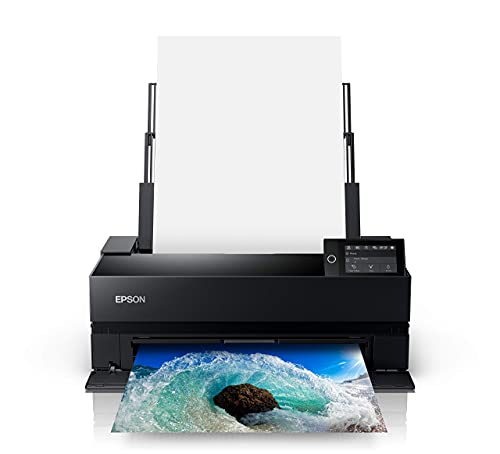
Epson SureColor P900 — The 17-inch step-up — Super B is its small work
The P900 enters this guide from above: a 17-inch professional printer for which 13 by 19 is a routine, almost casual size. Its ten-colour pigment set, with black channels arranged to give both matte and glossy papers their deepest possible anchor, produces Super B prints of exhibition standard — and then keeps going, to 17-inch sheets and roll media, for the photographer whose ambitions are still expanding. Buying it for 13 by 19 alone is defensible only as foresight; as a machine for a growing practice, it is the purchase that ends the upgrade question.
Daily operation is the calmest in the professional class: a large touchscreen, a paper path you can watch while loading, and roll handling that treats panoramas as ordinary work. Its matte black performance is a signature — large, moody prints hold their shadows without the greying that lesser pigment sets allow — and its colour accuracy under a profiled workflow is the kind studios build client promises on. A 13 by 19 from this machine is not a compromise version of its big work; it is the same instrument playing a smaller sheet, with the same authority.
The terms are professional throughout: studio-priced ink, no scanner, a footprint and weight that claim a permanent station, and output speeds that prioritise the print over the clock. Photographers should also budget honestly for the fact that a machine capable of 17 inches creates 17-inch appetites — paper, framing and ink all scale with ambition. For the right buyer that is not a warning but a description of the next five happy years.
Studio owners add a practical footnote: the P900’s roll capability turns 13 by 19 from a sheet size into a layout choice, since several Super B prints can be ganged along a roll and trimmed together, cutting paper cost per print meaningfully across an edition. The sheet size that names this guide becomes, on this machine, merely one rectangle among many the roll can yield.
- Print technology: 10-colour pigment inkjet
- Maximum print size: 17 in wide, sheet and roll
- Functions: print only
- Media: fine-art, matte, glossy and roll stock
- Borderless: yes at standard sizes including Super B class sheets
- Connectivity: Wi-Fi, Ethernet, USB
Strengths
- Exhibition pigment quality at 13 by 19 with 17-inch headroom
- Roll media for panoramas and batch work
- Exceptional matte black density and profiled accuracy
Trade-offs
- Professional ink and paper costs scale with its capability
- Print-only, with a permanent station’s footprint
- Capability invites larger, costlier ambitions
Best for: photographers whose work is growing toward 17-inch and roll printing, and who want one flagship to grow into.
Not suited for: anyone whose big printing will stay at 13 by 19 forever — the PRO-310 serves them for less.

Canon imagePROGRAF PRO-1100 — Canon’s flagship — 13 × 19 in passing, 17 in in reserve
Canon’s flagship treats a 13 by 19 sheet the way a grand piano treats a scale: as a small exercise of a large capability. Its pigment ink system with chroma optimiser lays down colour of notable richness — portraitists and saturated-landscape photographers are its natural constituency — and at Super B the results have the finished, manufactured quality of a fine lab’s best work, with gloss so even that the print’s surface never argues with its image. Step up to its full 17-inch width and nothing about that quality thins; the machine was born there.
Paper handling is where the flagship earns its keep on expensive media. A vacuum feed holds heavy fine-art sheets flat through the print zone, eliminating the corner lift and head rub that ruin costly paper on lesser paths, and the layout software places the image on the sheet with repeatable precision — vital when a 13 by 19 is one panel of a matched pair or triptych. Studios producing client work at this size value predictability over novelty, and this machine’s whole design is a promise of the same print, every time, on demand.
As with its Epson counterpart, the ledger’s other column is frank: professional cartridges, no office functions, a substantial chassis, and a workflow that assumes the photographer profiles their papers and calibrates their screen. The choice between this and the P900 is one of colour taste and brand ecosystem, not of capability — both are flagships, and photographers tend to know which family’s rendering they dream in. For Canon loyalists printing at Super B with larger work ahead, this is the destination machine.
Canon’s professional software ecosystem deserves its footnote too: the print layout tools make arranging a Super B sheet — border choices, matched pairs, exact margins for a frame’s rebate — a precise, repeatable operation rather than a negotiation with a generic driver. Client work lives on such repeatability, and flagship buyers are usually buying the workflow as much as the ink.
- Print technology: pigment inkjet with chroma optimiser
- Maximum print size: 17 in wide
- Functions: print only
- Media: fine-art and heavy stock, vacuum feed
- Borderless: yes at standard sizes
- Connectivity: Wi-Fi, Ethernet, USB
Strengths
- Rich, even flagship colour at Super B and full width alike
- Vacuum feed protects heavy, expensive fine-art sheets
- Repeatable precision for matched sets and client work
Trade-offs
- Professional running costs on every sheet
- No scanning or document capability
- Large, heavy and unapologetically studio-bound
Best for: Canon-system photographers printing client and exhibition work at 13 by 19 today and 17 inches tomorrow.
Not suited for: versatility seekers and anyone whose large sheets are documents rather than photographs.

Epson WorkForce Pro WF-7840 — The size without the photo pretence — office wide, prints 13 × 19 in
Read this pick’s label carefully, because it is the most honest one in the guide: the WF-7840 prints a full 13 by 19 sheet — genuinely, from its trays, all day — and it is not a photo printer. Its four pigment colours are an office ink set, tuned for text, charts and graphics, and a photograph printed on it will look like what it is: a good office rendition, with flatter gradients and less subtle colour than any specialist above. What it offers instead is the size itself, at office cost, with a wide scanner, automatic duplex and 500-sheet capacity wrapped around it.
For a large population of 13 by 19 searchers, that trade is exactly right. The teacher printing classroom posters, the church producing event displays, the small firm whose plans and presentations need presence rather than gallery fidelity, the crafter proofing oversize layouts before committing photo paper elsewhere — all of them need the sheet, not the ink set, and this machine gives them the sheet with the lowest running costs in the guide and a scanner that copies the same size back. Its pigment output on matte poster stock is bold and durable, shrugging off the handling and daylight that display work involves.
The boundary must be respected in both directions. Photographers should not let its price talk them into photographic disappointment; office buyers should not let the specialists’ ink prices scare them off a size their work genuinely needs. Between those errors sits this machine’s honest constituency, and it is a large one. As a second printer beside a photo specialist, it also makes a quietly brilliant pairing — documents and posters here, photographs there — each machine doing the work its ink was born for.
One more honest use deserves naming: signage and display for small businesses, where a 13 by 19 poster behind a counter or in a window is produced, revised and reprinted in-house across a season. The WF-7840’s owners in that world report that the wide scanner earns its keep weekly, copying supplier sheets and certificates at full size — a reminder that for this pick, the scanner is not a bonus but half the product.
- Print technology: 4-colour pigment inkjet (office set)
- Maximum print size: 13 × 19 in
- Functions: print, scan, copy, fax — wide-format scanner
- Automatic two-sided printing: yes
- Paper capacity: 500 sheets, dual trays
- Connectivity: Wi-Fi, Ethernet, USB
Strengths
- Full Super B size at office running costs
- Wide scanner copies 13 by 19 originals at full size
- Bold, durable pigment output for posters and display work
Trade-offs
- Photographs render as office renditions, not photo prints
- Four colours cannot match the specialists’ range or subtlety
- Large footprint for a machine some will use only for size
Best for: teachers, churches, firms and crafters whose 13 by 19 sheets carry posters, plans and display work rather than fine photographs.
Not suited for: photographers — every machine above this one exists to serve them better.
How Do the Six Picks Compare Side by Side?
| Pick | Max size | Ink system | Scanner? | Paper personality | Best role |
|---|---|---|---|---|---|
| Epson XP-15000 | 13 × 19 in | 6-colour dye | Yes | Coated photo papers, rear-fed art sheets | Accessible all-round Super B |
| Canon PIXMA PRO-200S | 13 × 19 in | 8-colour dye | No | Gloss and lustre | Colour-led exhibition prints |
| Canon imagePROGRAF PRO-310 | 13 × 19 in | 9-colour pigment | No | Matte and fine-art | Archival 13-inch professional |
| Epson SureColor P900 | 17 in + roll | 10-colour pigment | No | Fine-art and roll media | Growing flagship practice |
| Canon imagePROGRAF PRO-1100 | 17 in | Pigment + optimiser | No | Heavy fine-art, vacuum-fed | Canon flagship work |
| Epson WF-7840 | 13 × 19 in | 4-colour office pigment | Yes, wide | Plain, matte and poster stock | Documents and display at size |
The table’s lesson is that at 13 by 19, the ink column is the destiny column. Everything else — speed, screens, footprint — is negotiable; the chemistry laid on the sheet decides whether the big print is a photograph, a keepsake or a poster, and each row above is honest about which of those it makes.
What Makes a 13 by 19 Print Different from a Big 8 by 10?
Scale changes the photograph’s demands in ways that surprise photographers stepping up for the first time. At 13 by 19, resolution stops being a specification and becomes a viewing experience: the file that looked flawless at 8 by 10 reveals its soft corners, its noisy shadows and its over-sharpened edges at the larger size, because the viewer stands closer to the detail instead of farther from the print. Files for Super B deserve a second pass of craft — gentler sharpening tuned for the size, noise handled before it is enlarged, and a soft proof on screen at 100 percent in the corners, not just the centre. The printers in this guide will faithfully enlarge whatever they are given; the discipline of preparing a big file is the photographer’s half of the bargain.
Paper asserts itself at this size too. A sheet of 13 by 19 has enough area to curl, to catch light unevenly, and to make its surface — gloss, lustre, matte, textured rag — a compositional element rather than a substrate. Photographers discover preferences they did not know they had: the landscape that wants matte’s quiet, the portrait that needs lustre’s life. Budget for that discovery. A sampler pack of fine papers and a weekend of test prints at reduced size on each is the cheapest education in large-format printing, and every serious printer in this guide has an owner who took it.
How Do You Get the First Big Print Right Instead of the Third?
The professional habit that saves the most money at this size is the strip test: print a narrow strip of the image — its most demanding region, usually faces or shadow detail — on the actual paper at the actual size, judge it under the light the print will live in, and only then commit the full sheet. Combined with a soft proof using the paper’s profile, the strip test converts the first full print from an experiment into a formality. Photographers who skip it pay tuition in whole sheets; photographers who adopt it speak of their printer as reliable, when in fact it is their process that is.
Handling completes the discipline. Let a big print dry or cure untouched for the time its ink family asks — dye prints dry to the touch quickly but settle in colour over hours, pigment prints are robust sooner but mark under a fingernail while fresh — then handle by the edges, trim or frame promptly, and store flat rather than rolled wherever the print’s future matters. The large sheet’s enemies are mundane: dust settling during drying, a sleeve’s static, a thumbprint in a dark sky. A clean, flat surface reserved for big prints is not studio vanity; at 13 by 19 it is quality control.
How Should You Choose Paper for Super B Without Burning Money?
Paper is where large-format printing keeps its tuition fees, and a system beats a series of impulses. Begin with the manufacturer’s own papers for your machine: their profiles are exact, their behaviour is documented, and they establish the baseline against which every exotic sheet is judged. A photographer who cannot yet make a beautiful 13 by 19 on the maker’s lustre has a workflow problem, not a paper problem, and third-party papers will only hide it expensively. Once the baseline is boring — the same file producing the same excellent print on demand — exploration becomes profitable: one fine-art matte, one baryta, one cotton rag, bought in small packs and tested with strip prints before a large sheet is committed.
Keep a paper log with the same seriousness as a darkroom book: paper name, profile used, the file’s rendering intent, and a sentence of verdict taped to a corner of the test print itself. Six months later, when a client asks for that print again or a competition demands a reprint, the log is the difference between a recipe and a séance. Studios that sell prints treat this record as part of the product’s provenance; home photographers discover it is what turns a lucky print into a repeatable one.
Storage finishes the system. Large sheets warp in humidity and scuff in stacks; keep them flat, in their bags, in the driest cupboard the house offers, and handle them with the two-handed respect their size demands. A 13 by 19 sheet lifted by one corner has already begun its argument with gravity, and the crease it wins is permanent. The printers in this guide can only print the paper they are given; the paper’s condition on arrival at the feed rollers is the owner’s contribution to every result.
What Does a Sensible Big-Print Setup Look Like Around the Printer?
The printer is the centre of a small system, and the photographers who print happily at this size arrange the system once. A flat, clean surface beside the machine — for the emerging print to land on, for trimming, for sleeving — prevents the dust and thumbprints that ruin more big prints than any colour error. Sleeves and a portfolio case in the printer’s size live within arm’s reach, because a 13 by 19 print left unsleeved while its owner searches a cupboard is a print collecting the room’s dust at exactly its most vulnerable hour. A paper trimmer that truly cuts nineteen inches in one pass replaces the ruler-and-knife improvisation that has ended more prints than any printer fault.
Light deserves a thought too. Prints are judged where they hang, not where they dry, and a viewing spot lit like the destination room — daylight-balanced if the wall is daylit, warm if the print is for a lamp-lit hallway — prevents the classic disappointment of a print that was perfect under the studio light and muddy in its home. None of this equipment is exotic, and all of it together costs less than a single set of flagship cartridges. That is the quiet truth of large-format printing: the machine is the famous part, and the system around it is the part that decides whether its fame is deserved in your house.
What Are the Common Mistakes When Buying for 13 by 19?
The first is buying size without ecosystem: a printer whose papers you cannot source locally, whose profiles your software lacks, or whose ink your budget resents will produce its beautiful demo print and then a year of avoidance. The second is underestimating the furniture — these are wide, deep machines, and the 17-inch pair are furniture in their own right; measure the home the printer will live in, including the clearance its paper path needs behind it. The third is printing big on speculation: photographers who buy Super B capability for a wall they have not chosen often discover that framing at this size costs more than the printer did, and the machine idles while the wall stays bare. Choose the print, the paper and the frame’s budget together, and the printer earns its place from the first month.
Two technical mistakes recur. New owners print their most saturated file first, on an unprofiled glossy sheet, and judge the machine by the predictable mismatch — profile first, judge second. And owners of the dye machines leave prints unframed in bright rooms and blame the ink for fading that a frame’s glass would have prevented for any chemistry. Big prints are semi-permanent objects; treat them as such from the day they dry, and every machine in this guide will make you proud of the size.
How Does Printing at Home Change a Photographer’s Practice?
Photographers who begin printing at Super B consistently report the same quiet revolution: they start photographing for the print rather than for the screen. Compositions simplify, because a wall-sized image punishes clutter that a phone forgives. Exposures grow more careful, because shadow detail that a backlit display invents must actually exist in the file. Editing becomes restrained — the print reveals every heavy hand — and sequences tighten, because paper and ink charge rent on every frame that reaches the sheet. None of this is nostalgia. It is the discipline of a physical endpoint, and it is available from every specialist machine in this guide within the first month of ownership.
The print also re-enters the photograph’s social life. A 13 by 19 handed to its subject, sold at a market stall or hung in a local café participates in the world in a way no shared link has ever managed, and photographers find their work discussed by people who would never have followed an account. Studios built around this size speak of the printer as the second camera — the one that decides what the first one was for. That is a large claim for a desktop machine, and the owners of the PRO-310, the P900 and the PRO-1100 make it without embarrassment, because their walls and their clients make it for them.
What Should You Budget Beyond the Printer Itself?
The honest first-year budget for Super B printing has four lines beyond the machine, and naming them here saves the resentment of discovering them serially. Paper first: a working stock of two or three loved papers in the full size, bought in the largest packs your storage keeps flat and dry, because a photographer out of paper owns a sculpture. Ink second: one full spare set for the specialists, bought before the first cartridge empties mid-print at midnight. Presentation third: sleeves, a portfolio, and the framing conversation — at this size a frame costs what it costs, and the print deserves the discussion before it is made, not after. And fourth, the humble line that protects all the others: a trimmer that cuts the full width cleanly, a flat storage drawer or box, and the cleaning and head-check supplies the maker recommends.
Set against lab ordering, the budget still favours the home studio for anyone printing monthly or more — the machine’s cost dissolves across the first year of prints that would each have carried a lab’s price and a week’s patience. Set against doing nothing, of course, it is pure expense, which is why this guide keeps returning to the same test: the wall, the portfolio, the client — a destination named in advance. A 13 by 19 printer with a destination is an instrument. Without one, it is a very capable guest who never quite earns his keep.
Which Big Print Should You Make First? A Starter Project at Super B
The first full-size print should be chosen like a first dive: deep enough to matter, safe enough to succeed. Pick the strongest image from the last year of your photography — not the most technically difficult, not the one with the impossible shadows, but the one whose composition already survives being looked at for a full minute. Print it on the manufacturer’s own paper with the manufacturer’s own profile, at the full sheet, and hang it where you will see it daily for a month. That month of looking is the real first lesson of large-format printing: the print will teach you what your screen concealed, and your second print will be better for reasons you can articulate, which is the definition of learning a craft.
The second project should be a pair — two images that converse, printed to match and hung together — because matching is the skill that separates printing from production. The third should be a gift, because a print given away completes the circuit that a print kept only begins: someone else’s wall becomes the judge, and their untechnical delight or indifference is data no histogram provides. Photographers who run this small curriculum in their first season with a Super B machine arrive at competence by the direct road. Those who begin with their most difficult image, on an exotic paper, for a deadline, arrive by the scenic route, with tuition paid in sheets — and this guide, having described both roads, leaves the choice where it belongs.
One practical seal on the curriculum: keep the first print. Date it on the back, note the paper and the profile, and store it flat. A year later it will be the most instructive object in the studio — proof of distance travelled, and a calibration standard no test chart can match, because it was made by the photographer you were, on the machine you still own, from the file you can print again today and compare. Studios keep such prints the way sailors keep first charts. Begin the archive with the first sheet, and the big printer has already started paying its deepest dividend.
How Do You Store, Frame and Reprint Big Prints Across the Years?
A Super B print begins its vulnerable life the moment it leaves the machine, and its owner’s habits in the first day decide its condition in the tenth year. Dry it flat and untouched for the full time its ink family asks. Sleeve it or frame it promptly — the unprotected week on a sideboard, collecting dust and a coffee ring’s splash, is where big prints go to become test sheets. Store the unframed flat, interleaved with acid-free paper, in the driest cupboard available; a rolled print can be flattened, but a print stored against a damp wall cannot be unfoxed. These are not collector’s rituals. They are the minimum viable respect for an object that cost a large sheet, a measure of ink and a photographer’s best attention.
Framing at this size deserves one honest paragraph, because it is where budgets surprise. A frame and mount for a 13 by 19 print can cost more than the print’s paper and ink many times over, and the photographers who print happily at this size decide their presentation standard before the printing begins — a simple frame and a generous mount, bought repeatedly in the same style, turns a wall into a gallery over a year and keeps the economics sane. The mount matters beyond looks: it holds the print away from the glass, and a big print pressed against glazing in a humid room will eventually marry it. Space, air and shade — the print’s three requests of its frame — are cheap to grant and expensive to retrofit.
Finally, the file is the print’s insurance and its afterlife. Keep the print-ready version — cropped, sized, sharpened for the sheet — beside the original, with the paper and profile noted in its filename or a log. Machines are replaced, papers are discontinued, profiles improve; a well-kept print file reprints in any decade on whatever flagship then exists, and the wall need never know the difference. The photographers in this guide’s audience are building, print by print, a body of work. The file archive is what makes it a body rather than a pile.
Final Recommendation
Start where your papers live. Gloss and lustre photographers should take the Canon PRO-200S for its luminous colour, matte and archival workers the PRO-310 for its pigment depth, and households wanting one machine for everything the Epson XP-15000, whose versatility at this size is unmatched. If your practice is visibly growing — larger walls, client work, roll-worthy panoramas — skip the intermediate step and buy the flagship your ecosystem points to, P900 or PRO-1100, once. And if your 13 by 19 sheets carry posters and plans rather than photographs, the WF-7840 gives you the size at office cost with its limits honestly stated. The best 13×19 photo printers reward the buyer who knows which paper they love; the size is the same for everyone, and the chemistry is the choice.
Frequently Asked Questions
Why is 13 by 19 called Super B?
Super B is the North American name for the 13 by 19 inch sheet, the size above B (11 by 17, tabloid). It is the largest common cut-sheet photo size for desktop printers, big enough for wall display and portfolio work while still feeding through a home machine. European readers may see it described by its dimensions rather than the letter name.
How much resolution does a file need for a good 13 by 19 print?
More than a small print, less than folklore demands. A well-exposed file from a modern camera, prepared carefully, prints beautifully at this size; the practical enemies are noise in shadows, over-sharpening and soft corners, all of which enlargement exposes. Prepare the file at full size, inspect it at 100 percent in its corners, and use a strip test before committing the sheet.
Dye or pigment at this size — which lasts longer?
Pigment inks, as in the PRO-310, P900 and PRO-1100, carry the stronger permanence ratings and are the choice for prints sold or archived as heirlooms. Dye inks, as in the XP-15000 and PRO-200S, are durable for ordinary display behind glass and give glossier colour. Both outlast casual handling; framing and light exposure matter as much as chemistry.
Can a 13 by 19 printer also print my everyday sizes?
Yes — every pick prints the full range downward, and the XP-15000 and WF-7840 double as complete household and office machines. The professional models print small sizes perfectly well but waste their talents and your ink budget on documents; most owners pair them with a cheap everyday printer and keep the flagship for photographs.
Is borderless printing available at 13 by 19?
On the photo models, yes — borderless at the full sheet is a headline feature of the XP-15000 and PRO-200S and is supported across the professional picks for standard photo papers. Fine-art and very thick media may require a small margin depending on the paper path; check the media specification for the exact stock you intend to live on.
What does a 13 by 19 print cost to make?
Paper and ink together make a full-coverage Super B print a deliberate expense on the photo machines — several times the cost of a small print — and a modest one on the office WF-7840. The honest way to budget is per finished print, including the occasional failed sheet while learning. Photographers who print regularly still find the economics beat lab ordering at this size within a handful of prints.
How long should a fresh 13 by 19 print rest before I frame or stack it?
Longer than impatience suggests. Dye prints on glossy and lustre papers need their surface gases to escape before glass or another sheet seals them in, so give a big print a full day lying flat in the open air, out of direct light, before framing it. Pigment prints settle faster on matte papers but still benefit from several undisturbed hours while the surface hardens fully. Stacking fresh prints face to face invites offsetting, where ink lifts onto the neighbouring sheet, and sliding one print across another scratches coatings that look dry long before they truly are. If prints must wait together, interleave them with clean plain paper and keep the pile small and unweighted. A print that has rested properly frames cleanly, stays put under glass and avoids the faint ghosting that rushed framing can lock in permanently. Keep a simple log of which paper and profile each rested print used, and later reprints will match the framed original without another round of trial sheets.
Related Guides
Keep exploring with our companion guides: best 12 x 12 photo printers, best 11×17 inkjet printers and best 2 x 3 photo printers.