What's inside
- Where to Buy
- Key Takeaways
- Quick Picks
- How We Chose These Picks
- Comparison
- How to Choose an Affordable i7 Laptop
- Is a Newer i7 Always Faster Than an Older i7?
- What Does the U or H Suffix on an i7 Actually Mean?
- How Long Will an Affordable i7 Laptop Stay Useful?
- Should You Buy an i7 at All, or Save Money With a Lesser Badge?
- Common Mistakes When Buying an Affordable i7 Laptop
- Final Recommendation
- Frequently Asked Questions
- Related Guides
As an Amazon Associate I earn from qualifying purchases. This post may contain affiliate links at no extra cost to you.
[SITE_DOMAIN] is reader-supported. When you buy through links on our site, we may earn an affiliate commission.
Where to Buy
All six laptops below link to their own Amazon listings, and the chip generation in each title is the detail to verify before anything else. The HP Core i7 15.6 Laptop leads with its 2026 Edition framing, so check price on Amazon for the 16GB and 1TB configuration named there. Power shoppers should open the Lenovo V15 Gen 5 page, where the i7-13620H build’s current figure is posted. The HP Pavilion 15 i7 is the memory-heavy option and its listing carries the live price for the 32GB build, while the Acer Aspire 5 i7 shows today’s figure for the older-generation configuration. Portability seekers will land on the Acer Aspire 5 14 listing, and the Dell Inspiron 15 Touch page closes the set — see its Amazon price for the touchscreen build before comparing it with the non-touch picks.
Anyone hunting the best affordable i7 laptops quickly discovers that the badge is a family name, not a specification. Inside this one guide, the i7 label covers four processor generations and two entirely different classes of chip: an 11th-generation i7-1165G7 at one end, a 13th-generation i7-13620H at the other, and a row of U-series processors between them that share a badge while behaving quite differently under sustained work. Two laptops can both say i7 on the box and be separated by years of architecture, a doubling of cores, and a different relationship with heat and battery. This guide is organised around that truth, because it is the single most useful thing a buyer in this category can learn.
Read the generations as a ladder. The i7-1165G7 in the older Acer Aspire 5 is an 11th-generation chip, respectable in its day and still capable for office work, but the oldest silicon here. The i7-1255U, found in two HP machines, is 12th generation. The i7-1355U in the smaller Acer and the Dell is 13th generation in its efficiency-oriented U form, while the Lenovo V15’s i7-13620H is also 13th generation but from the H line, built to sustain heavier loads at higher power. Newer is not automatically better for every job — an H chip in a thin chassis spends battery faster — but pretending the generations are interchangeable would be the one genuinely dishonest move available to this guide, so it will not be made.
Everything else in the six follows a steadier pattern. Memory is 16GB almost everywhere, with one HP doubling it to 32GB. Storage runs from 512GB to 1TB. Screens are 15.6 inches at Full HD except for one 14-inch WUXGA outlier, and Windows 11 Pro appears on three picks against Home on the others. The reviews take the machines one at a time, generation first, because that is the order in which their characters were decided.
Key Takeaways
- The i7 badge spans four generations here: 1165G7 (11th), 1255U (12th), 1355U (13th U-series) and 13620H (13th H-series) — generation and suffix matter more than the badge.
- The Lenovo V15 Gen 5 carries the only H-series chip, the i7-13620H, making it the sustained-load pick of the six.
- The HP Pavilion 15 i7 doubles the field’s memory with 32GB of RAM beside its 1TB SSD.
- Five picks are 15.6-inch Full HD machines; the Acer Aspire 5 14 is the exception, with a 14-inch WUXGA 1920×1200 IPS panel and Thunderbolt 4.
- Windows 11 Pro is stated outright on two titles — the Lenovo V15 Gen 5 and the HP Pavilion 15 i7 — while the other four titles say Windows 11 without naming the edition.
- Storage is 1TB on both HP 15.6-inch picks and 512GB on the Lenovo, both Acers and the Dell.
Quick Picks
| Pick | Badge | Why it earns a place |
|---|---|---|
| HP Core i7 15.6 Laptop | Terabyte all-rounder | i7-1255U with 16GB of memory and a 1TB PCIe SSD in a 15.6-inch FHD frame. |
| Lenovo V15 Gen 5 | H-series power | The i7-13620H, DDR5 memory, Ethernet, fingerprint reader and Windows 11 Pro. |
| HP Pavilion 15 i7 | Memory champion | i7-1255U with 32GB of RAM, a 1TB SSD, backlit keyboard and Windows 11 Pro. |
| Acer Aspire 5 i7 | Previous-generation value | The 11th-gen i7-1165G7 with 16GB DDR4, a 512GB SSD and a fingerprint reader. |
| Acer Aspire 5 14 | Compact and connected | i7-1355U, a 14-inch WUXGA IPS screen, Wi-Fi 6E and USB4/Thunderbolt 4. |
| Dell Inspiron 15 Touch | Touchscreen business | i7-1355U with ten cores, a 15.6-inch FHD touchscreen and an SD card reader. |
How We Chose These Picks
The shortlist was built by generation coverage first. A guide to affordable i7 laptops that quietly mixed an 11th-generation machine among 13th-generation ones without comment would fail its readers, so the six were chosen to make the ladder visible: one 11th-generation pick as the value floor, two 12th-generation HP machines, two 13th-generation U-series picks, and one H-series machine to show what the same generation does when it is allowed more power. Every review names its chip’s generation in the first paragraph, and the comparison table sorts by it.
Verification ran through the listing titles, as it does across this site. Clock figures, core counts and memory types appear below only where a title prints them — the Dell’s ten cores and 5.0GHz ceiling, the HP’s 4.7GHz ceiling, the Lenovo’s DDR5 — and the spec boxes mark the gaps with the standard not-stated wording. Memory technology is a good example of why this matters: DDR5, LPDDR5 and DDR4 all appear in these six titles, and they are not interchangeable details to be smoothed over.
What was excluded matters too. Machines with an i7 badge but only 8GB of memory were cut, because at this level the memory ceiling would dominate the ownership experience and make the processor badge a decoration. Gaming laptops with i7 chips were also cut, not for lack of merit but because their graphics cards move them into a different budget conversation. What remains is the working heart of the category: six business-and-household laptops whose differences are generation, memory, screen and licence — in that order.
A note on the two HP 15.6-inch machines, which a careless reader might merge into one. They share a processor, the i7-1255U, and a screen size, and there the resemblance ends: one pairs it with 16GB of memory and Windows 11 aimed at business and academic buyers generally, the other with 32GB, a backlit keyboard, a fingerprint reader and Windows 11 Pro under the Pavilion name. They are reviewed separately because they will live differently.

HP Core i7 15.6 Laptop — Terabyte all-rounder
HP’s plainly named Core i7 laptop is the sensible centre of this guide. Its processor is the Intel Core i7-1255U, a 12th-generation U-series chip that the title credits with speeds up to 4.7GHz, paired with 16GB of memory and a 1TB PCIe SSD behind a 15.6-inch FHD screen. That combination — mid-ladder generation, full memory, double storage — is exactly the configuration a household or small office would specify if it wrote its own brief, and HP’s title aims it at business and academic buyers in so many words.
Generation honesty matters here. The 1255U is not the newest silicon in this guide; the 13th-generation picks below are a step ahead in architecture, and the Lenovo’s H-series chip is a step ahead in sustained power. What the 1255U offers instead is maturity and balance: a well-understood processor whose behaviour in office suites, browsers, video calls and light creative work is predictable, with an efficiency profile suited to a machine that may spend its day away from a charger. The title’s claim of long battery life is a claim, not a figure, and the spec box treats it that way — but the U-series design philosophy behind it is real.
The terabyte SSD is this pick’s quiet headline. In a guide where half the field carries 512GB, a 1TB PCIe drive changes how the machine is used: a full photo library, years of documents, a clutch of large applications and a media collection can coexist without the quarterly purge. Paired with 16GB of memory, it makes the HP the pick least likely to generate a storage warning or a memory complaint in its first three years, which is the practical definition of an all-rounder.
Who it suits: the generalist. A family replacing its main computer, a student whose course mixes documents, data and media, a home worker whose employer allows personal hardware. The webcam is named in the title, the screen is the standard 15.6-inch FHD format that every bag and dock in this class expects, and Windows 11 arrives without the title specifying an edition — buyers who specifically need Pro should confirm the edition on the listing or step to the Pavilion below, which states it.
Ownership should be uneventful, and uneventful is high praise for a work laptop. Nothing in this configuration is exotic, nothing requires an accessory to function, and the specification has headroom in the two places — memory and storage — where headroom is actually felt. If the guide had to stock a shelf with one i7 laptop for unknown buyers, this is the one it would stock.
- Processor: Intel Core i7-1255U, up to 4.7GHz
- Memory: 16GB RAM
- Storage: 1TB PCIe SSD
- Display: 15.6-inch FHD
- Webcam: stated in the listing title
- Operating system: Windows 11 (edition not specified in the title)
- Battery capacity: Not stated in the listing title — verify with the manufacturer documentation
Strengths
- A 1TB PCIe SSD doubles the storage of half the picks in this guide.
- 16GB of memory matches the field’s comfortable standard.
- The 12th-gen U-series chip balances performance with an efficiency-first design.
Trade-offs
- Two picks here carry newer 13th-generation processors.
- The Windows edition is not specified in the listing title.
- No fingerprint reader or backlit keyboard is named in the title.
Best for: a household or student who wants one balanced i7 laptop with room to grow into. Not suited for: a buyer whose employer requires Windows 11 Pro confirmed in writing, because this title says Windows 11 without naming the edition.
There is a temptation, in a guide organised by generation, to treat this HP as merely the middle rung. Resist it. The middle rung is where most computing actually happens, and a machine that pairs it with the joint-largest storage in the set has understood the assignment better than several of its flashier rivals.

Lenovo V15 Gen 5 — H-series power
The V15 Gen 5 is the muscle of this guide, and the reason is one letter. Its Intel Core i7-13620H is a 13th-generation processor from the H series — the line Intel builds for sustained, high-power work — rather than the U series that fills the rest of this page. Under a long export, a heavy spreadsheet recalculation, a code build or a batch of photo processing, an H chip keeps its pace after U chips have settled into their efficiency rhythm. Buyers whose work arrives in sustained loads rather than short bursts should read this review first and the others as alternatives.
Lenovo dresses that power in business clothing. The title lists DDR5 memory at 16GB with a 512GB drive, a numeric keypad on the 15.6-inch FHD frame, Ethernet, HDMI, a fingerprint reader, Wi-Fi 6 and Windows 11 Pro, sold with a bundle. Ethernet deserves its sentence: in a guide of wireless-only listings, a wired network port is a working feature for offices, schools and anyone whose desk sits far from a router, and it signals that this machine was specified by people who deploy laptops rather than merely admire them.
The bundle wording and the Pro licence point the same way. This is a laptop for a small firm, a school department, a freelancer with client security requirements — a machine bought to be managed, signed in with a fingerprint and plugged into whatever network the building offers. The 512GB drive is the one specification that reads modestly beside the HP pair’s terabyte drives, and heavy media hoarders will feel it; for document-and-application work it remains ample, and the DDR5 memory keeps the platform current.
Who it suits is therefore specific: the buyer with sustained workloads and a workplace to satisfy. A data analyst whose models run for minutes, a developer compiling through the day, an office manager standardising a small fleet. Who it does not suit is equally clear — a traveller counting grams and charger hours, because H-series power is bought with energy, and the title makes no lightweight or long-battery claim for this machine.
Judged as this guide’s performance pick, the V15 is coherent in a way spec sheets rarely are: the strongest chip, the modern memory standard, the business licence, the wired port, the security reader. Each choice points at the same desk. If that desk is yours, the search can reasonably end here.
- Processor: Intel Core i7-13620H
- Memory: 16GB DDR5
- Storage: 512GB
- Display: 15.6-inch FHD
- Ports named: Ethernet, HDMI
- Security: Fingerprint Reader
- Wireless: Wi-Fi 6
- Operating system: Windows 11 Pro
Strengths
- The only H-series processor in the guide, built for sustained workloads.
- Ethernet and a fingerprint reader make it the most office-ready pick here.
- DDR5 memory and Windows 11 Pro keep the platform and licence current.
Trade-offs
- 512GB of storage is half what the two HP 15.6-inch picks provide.
- H-series performance is bought with higher power draw under load.
- The title names no touchscreen, unlike the Dell in this set.
Best for: an analyst, developer or small firm that needs sustained processor power with business trimmings. Not suited for: a media collector building a local library, because 512GB fills where the terabyte picks in this guide would not.
A closing calibration: the gap between this chip and the U-series picks will not appear in email, documents or browsing, where all six feel alike. It appears at minute ten of a heavy job. Buy the H if your work has a minute ten.

HP Pavilion 15 i7 — Memory champion
If the first HP in this guide is the balanced pick, the Pavilion 15 is the generous one. It uses the same 12th-generation Intel Core i7-1255U, then doubles the memory to 32GB of RAM and keeps the 1TB SSD, adding a fingerprint reader, a backlit keyboard, an HD webcam and Windows 11 Pro, all stated in the title behind a 15.6-inch Full HD display. In a category where buyers are usually asked to choose between memory and storage, this configuration simply declines the choice.
Thirty-two gigabytes deserves an honest account of who feels it. Most office days never trouble 16GB. The buyers who feel 32GB are the ones who keep everything open at once — a browser with dozens of tabs, a large spreadsheet, a design or statistics package, a video call, a second user account for a family member — or who run virtual machines, large datasets or heavy multitasking as a routine rather than an accident. For those buyers, memory is not a luxury; it is the difference between a machine that swaps and stutters and one that simply continues.
The supporting cast is unusually complete for the class. A backlit keyboard matters at real desks in real evenings. A fingerprint reader removes the small daily friction of passwords. Wi-Fi and Bluetooth are both named in the title, which is more than several rivals manage, and the Pavilion name places the machine in HP’s mainstream line, with the accessory and support ecosystem that follows a mainstream badge around.
Generation, again, is the caveat to state plainly. The 1255U is a 12th-generation chip, and buyers intoxicated by the number 32 should notice that the Dell and the small Acer below carry 13th-generation processors, while the Lenovo carries the H-series. The Pavilion’s bet is that memory and storage shape more working days than a single generation of architecture does. For the multitasker described above, that bet is sound; for a buyer running one demanding application at a time, the newer chips argue back.
It suits the keeper: the buyer who replaces a laptop every five or six years and wants the specification to still feel roomy in year four. It suits the household where one machine serves two adults’ work and a student’s projects in separate sessions that never quite close. And it suits anyone who has ever watched a laptop crawl under a pile of open work and sworn, correctly, never again.
- Processor: 12th Generation Intel Core i7-1255U
- Memory: 32GB RAM
- Storage: 1TB SSD
- Display: 15.6-inch Full HD
- Security: Fingerprint Reader
- Keyboard: Backlit Keyboard
- Webcam: HD Webcam
- Operating system: Windows 11 Pro
Strengths
- 32GB of memory doubles the figure carried by the other five picks.
- A 1TB SSD matches the guide’s largest storage figure.
- Backlit keyboard, fingerprint reader and Windows 11 Pro complete the package.
Trade-offs
- The 12th-generation chip sits behind the 13th-generation picks on architecture.
- Light users will never touch the second 16GB they are paying for.
- Memory type is not specified in the listing title.
Best for: a heavy multitasker or long-cycle buyer who keeps everything open and replaces machines rarely. Not suited for: a single-application worker, because the premium here buys memory headroom that one app at a time will never use.
The Pavilion’s lesson generalises beyond this guide: when two laptops share a processor badge, the one with double the memory is not a trim level, it is a different ownership experience. Buyers comparing it against its HP sibling should decide which of them they actually are — the balanced user or the everything-open user — and the choice makes itself.
Acer Aspire 5 i7 — Previous-generation value
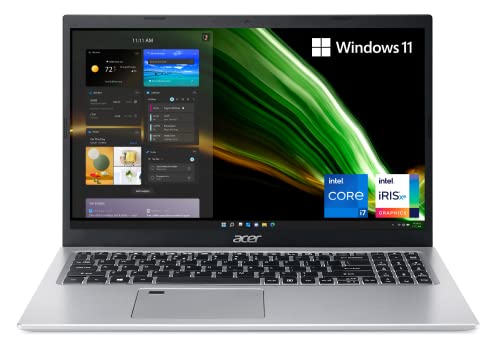
This Aspire 5 is the guide’s lesson in what an older generation still does well. Its Intel Core i7-1165G7 is an 11th-generation processor — the oldest chip on this page by two generations — paired with Intel Iris Xe graphics, 16GB of DDR4 memory and a 512GB SSD behind a 15.6-inch Full HD IPS display, with WiFi 6, a fingerprint reader and a backlit keyboard named in the title. Read that specification without the generation line and it could pass for a current mid-range laptop, which is precisely why it earns its place: the discount in this class usually comes from the chip’s birth year, not from missing features.
Honesty requires the other half of the paragraph. An 11th-generation i7 will lose a benchmark race to every other machine here, and its four-core-era architecture shows its age in heavy multitasking and sustained loads. Buyers who compile code, edit long videos or run large models should not let a familiar badge talk them into yesterday’s silicon. But the ordinary workload of an office — documents, spreadsheets, browsers, calls, streaming, light photo work — does not use the headroom the newer chips provide, and for that workload this Acer remains a fully competent machine with a complete set of trimmings.
The trimmings deserve emphasis because they are where older models usually get cut. A fingerprint reader is present. The keyboard is backlit. The panel is IPS, stated in the title, which promises wider viewing angles than the unnamed panel types elsewhere in this guide. WiFi 6 keeps it current with modern routers. A buyer comparing this Aspire against a newer but barer machine is making a real trade — architecture against equipment — and reasonable people can land on either side of it.
Who it suits: the value-led household, the student on a strict budget whose work is documents and research, the second-laptop buyer who wants a complete machine rather than a stripped one. The 512GB SSD is the standard figure in this guide, the 16GB of memory is the comfortable standard, and DDR4 rather than DDR5 is a difference felt in benchmarks far more than in mornings.
One environmental point belongs here, where it fits best: keeping a well-specified previous-generation laptop in service is not a compromise to apologise for. If the workload fits — and for most households it does — the Aspire 5 i7 is the rational purchase wearing an unfashionable birth year.
- Processor: 11th Gen Intel Core i7-1165G7
- Graphics: Intel Iris Xe Graphics
- Memory: 16GB DDR4
- Storage: 512GB SSD
- Display: 15.6-inch Full HD IPS
- Wireless: WiFi 6
- Security: Fingerprint Reader
- Keyboard: Backlit Keyboard (BL Keyboard)
- Operating system: Windows 11
Strengths
- A complete trimming set — fingerprint reader, backlit keyboard, IPS panel — at the previous-generation rung.
- 16GB of memory and a 512GB SSD match the guide’s comfortable standards.
- Iris Xe graphics handle everyday display and light creative work capably.
Trade-offs
- The 11th-generation chip is two generations behind the newest picks here.
- DDR4 memory is the older standard beside the Lenovo’s DDR5.
- Sustained heavy loads are where its age will show first.
Best for: a value-led household or student whose workload is documents, browsing and calls. Not suited for: a developer compiling large projects daily, because the 11th-generation architecture is the oldest silicon in this guide.
One practical note for buyers choosing between this Acer and its smaller sibling below: they are not the same laptop in two sizes. The 14-inch Aspire carries a 13th-generation chip and a sharper screen; this 15.6-inch model carries the older chip and the larger, calmer workspace. Generation or size — the guide cannot choose for you, but it insists you notice that the choice exists.

Acer Aspire 5 14 — Compact and connected
The second Acer in this guide could hardly differ more from the first. The Aspire 5 14, model A514-56M-71A9, pairs a 13th-generation Intel Core i7-1355U with 16GB of LPDDR5 memory and a 512GB Gen 4 SSD in a 14-inch frame, behind a WUXGA IPS panel at 1920×1200. It adds Wi-Fi 6E and a USB4/Thunderbolt 4 port, both stated in the title, plus a backlit keyboard and Intel Iris Xe graphics. This is the traveller’s pick: the newest U-series generation in the smallest body here, with the sharpest screen and the most modern connections.
The display earns its paragraph. WUXGA at 1920×1200 gives a 14-inch screen more vertical room than the 15.6-inch Full HD panels elsewhere in this guide, and at this size the pixel density makes text noticeably crisper. Writers, editors and spreadsheet readers who carry their laptop between rooms, offices and trains will feel that panel every hour. The taller 16:10 shape also suits the way documents and web pages are actually built — vertically — in a way the wider, shorter screens do not.
Thunderbolt 4, delivered through USB4 in the title’s wording, is the connectivity headline. One cable can carry a desk’s monitor, power and peripherals through a dock, which turns this small laptop into the centre of a proper workstation at home and a self-sufficient machine away from it. Wi-Fi 6E adds the newest wireless band named anywhere in this guide. Together they make the Aspire 5 14 the pick most ready for a modern desk and a modern router alike.
The compromises are the honest costs of the format. Fourteen inches is a smaller canvas for side-by-side windows than the 15.6-inch picks offer, and there is no numeric keypad at this size — accountants and data-entry hands should look at the Lenovo or the Dell. Storage is the standard 512GB rather than a terabyte. And the U-series chip, for all its newness, remains an efficiency design; the H-series Lenovo will outlast it under sustained heavy load.
It suits the mobile professional, the postgraduate moving between library and lab, the commuter whose laptop is also the home workstation through a dock. Buyers who picture their laptop travelling weekly should start here; buyers who picture it parked should let the bigger screens argue their case first.
- Processor: Intel Core i7-1355U
- Graphics: Intel Iris Xe Graphics
- Memory: 16GB LPDDR5
- Storage: 512GB Gen 4 SSD
- Display: 14-inch WUXGA (1920×1200) IPS
- Wireless: Wi-Fi 6E
- Ports named: USB4/Thunderbolt 4
- Keyboard: Backlit Keyboard
- Model: A514-56M-71A9, Gray
Strengths
- The sharpest screen in the guide: WUXGA resolution on a 14-inch IPS panel.
- USB4/Thunderbolt 4 enables a one-cable docked desk setup.
- Wi-Fi 6E is the newest wireless standard named in any title here.
Trade-offs
- No numeric keypad fits a 14-inch chassis.
- Side-by-side document work is tighter than on the 15.6-inch picks.
- 512GB of storage, where two HP picks offer a terabyte.
Best for: a commuting professional or postgraduate who docks at home and travels light. Not suited for: a data-entry worker who types figures all day, because a 14-inch chassis has no room for the numeric keypad their work depends on.
Model discipline matters with this pick more than most: Acer sells Aspire 5 machines across several generations and sizes, and the A514-56M-71A9 code in the title is the string that guarantees the 13th-generation chip, the WUXGA panel and the Thunderbolt port described above. Match the code at checkout, not just the name.

Dell Inspiron 15 Touch — Touchscreen business
Dell’s entry pairs the same 13th-generation Intel Core i7-1355U as the small Acer — the title spells out ten cores and speeds up to 5.0GHz — with 16GB of memory and a 512GB PCIe SSD, then does something no other pick here does: it makes the 15.6-inch FHD display a touchscreen. Dell frames it as a business laptop, and the port selection supports the framing, with USB-C, HDMI and an SD card reader all named in the title under Windows 11.
The touchscreen deserves a sober assessment rather than a reflexive one. On a conventional laptop — this is not a convertible, and the screen does not fold flat — touch earns its place in specific moments: signing a document, scrolling a long page on a train tray, tapping through a presentation, zooming a photograph or a plan. Buyers who present, annotate or review visually will use it weekly. Buyers whose hands never leave the keyboard will use it twice and forget it exists, and for them the Dell’s case rests on its chip, its ports and its badge rather than its glass.
The SD card reader is the quiet differentiator. Photographers, field workers, drone hobbyists and anyone whose cameras still speak in memory cards will save themselves a dongle on every single working day, and in a guide where ports are mostly implied, a stated card reader is a working feature. USB-C and HDMI cover the modern desk and the meeting-room screen between them.
Generation places the Dell near the top of this guide’s ladder: 13th-generation U-series, the same architecture as the small Acer, a step above the two 12th-generation HP machines and two above the older Acer. The U suffix keeps it an efficiency design — the Lenovo’s H chip remains the sustained-load choice — but for the mixed office workload the Inspiron was built for, the 1355U’s core count and clock ceiling are more than sufficient, and its manners on battery will be better than the H machine’s.
It suits the presenter, the photographer with a card-based workflow, the business buyer who wants a touchscreen without a convertible hinge, and the Dell loyalist who values the brand’s business support culture. It asks those buyers to accept the standard 512GB of storage and a Windows edition the title does not specify beyond Windows 11 — confirm Pro on the listing if your workplace requires it in writing.
- Processor: 13th Gen Intel Core i7-1355U, 10 cores, up to 5.0GHz
- Memory: 16GB RAM
- Storage: 512GB PCIe SSD
- Display: 15.6-inch FHD touchscreen
- Ports named: USB-C, HDMI, SD Card Reader
- Operating system: Windows 11 (edition not specified in the title)
- Fingerprint reader: Not stated in the listing title — verify with the manufacturer documentation
Strengths
- The only touchscreen among the six picks, on a full 15.6-inch panel.
- An SD card reader serves camera-based workflows without a dongle.
- A 13th-generation chip with ten cores stated in the title.
Trade-offs
- Touch on a non-convertible serves moments, not postures.
- 512GB of storage where the HP pair offers a terabyte.
- The Windows edition is not specified in the listing title.
Best for: a presenter or photographer who wants touch input and a card reader on a business laptop. Not suited for: a tablet-mode reader, because this screen does not fold back — it is a touchscreen laptop, not a convertible.
Dell’s pick closes the reviews with the guide’s recurring moral in its purest form: the badge said i7, and everything that actually distinguishes this machine — the generation, the touch panel, the card reader, the core count — lived in the rest of the title. Read whole titles and this category stops being confusing.
Comparison
| Pick | Processor (generation) | Memory / Storage | Display | Notable from title |
|---|---|---|---|---|
| HP Core i7 15.6 Laptop | i7-1255U (12th gen) | 16GB / 1TB PCIe SSD | 15.6-inch FHD | Webcam, business and academic framing |
| Lenovo V15 Gen 5 | i7-13620H (13th gen, H) | 16GB DDR5 / 512GB | 15.6-inch FHD | Ethernet, fingerprint reader, Windows 11 Pro |
| HP Pavilion 15 i7 | i7-1255U (12th gen) | 32GB / 1TB SSD | 15.6-inch Full HD | Backlit keyboard, fingerprint reader, Windows 11 Pro |
| Acer Aspire 5 i7 | i7-1165G7 (11th gen) | 16GB DDR4 / 512GB SSD | 15.6-inch Full HD IPS | Fingerprint reader, backlit keyboard, WiFi 6 |
| Acer Aspire 5 14 | i7-1355U (13th gen) | 16GB LPDDR5 / 512GB Gen 4 SSD | 14-inch WUXGA IPS | USB4/Thunderbolt 4, Wi-Fi 6E |
| Dell Inspiron 15 Touch | i7-1355U (13th gen) | 16GB / 512GB PCIe SSD | 15.6-inch FHD touchscreen | USB-C, HDMI, SD card reader |
Sort this table by the second column and the guide’s argument becomes visible at a glance. One badge, four generations, two power classes. The performance order a buyer should carry in their head runs 13620H first for sustained work, then the two 1355U machines, then the two 1255U machines, then the 1165G7 — with the immediate caveat that memory, storage and screens reshuffle the value order completely. The Pavilion, third by silicon, is first by memory. The older Acer, last by silicon, is mid-table by equipment. That is why this guide reviews configurations rather than crowns chips.
The storage column draws the second line through the set. Two machines carry a terabyte, four carry half of it, and the divide does not follow the generation divide at all — the terabyte pair are the 12th-generation HP machines. A buyer whose files are large and local should weight that column heavily; a buyer whose work lives in cloud storage can safely ignore it and buy by chip and screen instead.
Memory type is the table’s quiet third story. DDR5 in the Lenovo, LPDDR5 in the small Acer, DDR4 in the older Acer, and silence from the HP pair and the Dell — a spread that mirrors the generation ladder almost exactly, since memory standards travel with processor generations. In daily use the difference between these standards is small beside the difference between 16GB and 32GB, and buyers should rank capacity far above type. But the column is worth reading as a dating tool: when a listing’s memory type and processor generation disagree with the seller’s description of a machine as current, believe the components.
How to Choose an Affordable i7 Laptop
Start with the processor’s full name, never the badge alone. The string after i7 — 1165G7, 1255U, 1355U, 13620H — tells you the generation in its first two digits and the power class in its suffix. As a working rule for this category: prefer 13th generation over 12th, 12th over 11th, other things equal; then ask whether your work is bursty or sustained. Bursty work — documents, browsing, calls — suits the U series and rewards its efficiency. Sustained work — builds, exports, calculations that run for minutes — is the H series’ entire reason to exist.
Memory comes second, and at this level the answer is simpler than the marketing suggests. Sixteen gigabytes is the comfortable standard for a machine bought to be kept, and this guide excluded 8GB i7 machines deliberately, because a fast processor behind too little memory produces a laptop that feels slow in the exact moments its badge promised speed. Thirty-two gigabytes, as the Pavilion shows, is a specialist’s luxury that becomes a necessity only for genuinely heavy multitasking, virtual machines or large datasets.
Storage third. A terabyte matters to photographers, media collectors and anyone whose work files are large and local; 512GB is ample for document-and-cloud lives. Because storage can be supplemented later with external drives and cloud plans while memory and processor cannot be changed at all, a forced trade should always sacrifice storage first — the one specification in the laptop that the aftermarket can rescue.
Finish with the physical audit. Screen size decides whether a numeric keypad exists and whether the machine travels happily. Panel type and resolution decide how text feels at hour six. Ports decide the dongle count — notice how the titles here reward close reading, with Ethernet on the Lenovo, Thunderbolt on the small Acer and an SD reader on the Dell. And the Windows edition decides whether a workplace will accept the machine at all, which is why the two titles that state Pro outright earn a mention in every summary of this guide.
One more test separates careful buyers from badge buyers, and it costs nothing: write the four processor strings from your shortlist on paper and rank them by generation before you look at a single price. If the ranking surprises you — if the machine you had emotionally chosen turns out to carry the oldest silicon — that surprise is the guide working as intended. Then rank the same shortlist by memory, then by storage, and notice how rarely the three rankings agree. The laptop that wins two of the three lists is usually the right purchase, and the list it loses tells you exactly which compromise you are accepting, in writing, before money moves. Buyers who skip this exercise are not choosing a laptop; they are choosing a badge and receiving whatever laptop happens to be attached to it.
Battery expectations deserve a final calibration, because no title in this guide prints a capacity figure a buyer can plan around, and only one even claims long life in words. U-series machines as a class are built for efficiency and will generally outlast the H-series Lenovo away from a socket, but the honest planning assumption for any laptop in this category is a working day of mixed use with a charger somewhere in the building. Buyers whose days are spent in the field, away from sockets entirely, should treat battery verification on the manufacturer’s documentation as a mandatory step rather than an optional one — the not-stated lines in the spec boxes exist precisely to mark where a listing title stops being a sufficient source.
Is a Newer i7 Always Faster Than an Older i7?
For the same kind of work, generally yes — architecture improves, core counts grow, and the 13th-generation chips in this guide will finish a heavy job sooner than the 11th-generation Acer. But that answer has a second half: most working days never ask the question. Email, documents, browsing, calls and streaming run at the speed of the network and the human, not the processor, and on those days the six machines in this guide feel far more alike than their birth years suggest.
Where generation truly bites is at the edges of a workload: the export that runs ten minutes, the dataset that recalculates, the compile that gates your next task, the dozen heavy tabs that stay open all week. Buyers whose days contain those edges should pay for generation. Buyers whose days do not should pay for memory, storage and screen instead, and let an older chip be the discount it honestly is. The mistake is not buying an older i7; the mistake is buying one unknowingly, at a newer machine’s price, because the badge looked identical.
What Does the U or H Suffix on an i7 Actually Mean?
The suffix is Intel’s power class label. U-series processors are designed for thin laptops and efficiency: they sip power, run cool and quiet, and deliver their speed in bursts that cover the rhythm of office work beautifully. H-series processors are designed for performance laptops: they draw substantially more power, sustain high speeds through long workloads, and ask the chassis and battery to keep up. Neither is the real i7 and neither is the fake one; they are two tools sharing a badge.
This guide contains exactly one H machine, the Lenovo V15 with its 13620H, and five U machines, and the split mirrors the affordable market honestly — most buyers are better served by efficiency. Choose the H when your work has long, heavy passages and the laptop lives near a desk and a socket. Choose a U when the machine travels, when quiet matters, or when your heavy moments are measured in seconds. The buyers who regret their suffix are the ones who never knew they had chosen one.
How Long Will an Affordable i7 Laptop Stay Useful?
Longer than its price suggests, if the configuration was chosen with the fixed things first. The processor and memory a laptop ships with are the two specifications that decide its fifth year, and the six here were selected to make that fifth year plausible: modern or near-modern chips, 16GB of memory as the floor, solid-state storage throughout. A machine so configured does not stop being useful when a newer generation launches; it stops being useful when its owner’s workload outgrows its memory or its battery gives out, and both of those clocks run slower than the marketing calendar.
The generations in this guide will age at different rates, and buyers should price that in calmly. The 11th-generation Acer will feel its years first, in multitasking headroom rather than in any single task. The 13th-generation picks have the longest runway. But all six share the trait that matters most for longevity in this class: none of them is balanced on a knife’s edge of 8GB of memory or a spinning hard drive, the two specifications that historically turned budget laptops into e-waste ahead of schedule. Buy the configuration, keep the battery healthy, and an affordable i7 remains a working tool for the better part of a decade of ordinary use.
Should You Buy an i7 at All, or Save Money With a Lesser Badge?
The neighbouring shelves deserve one honest paragraph. Below the i7 sit the i5 and Core 5 class machines, which run the ordinary office workload — documents, browsing, calls, streaming — at speeds most users cannot distinguish from the six laptops in this guide, because that workload is bounded by networks and humans rather than silicon. A buyer whose days are entirely ordinary, whose budget is genuinely tight, and who is choosing between an i7 with 8GB of memory and a lesser badge with 16GB should take the memory every time. The badge hierarchy is a weaker predictor of daily satisfaction than the memory figure, and this guide’s own exclusion of 8GB i7 machines is the proof.
Above the i7, the i9 and workstation classes buy sustained speed for professional rendering, simulation and production work, at prices that leave the affordable frame entirely. The i7’s case, made properly, is narrower than its marketing: it is the badge for buyers whose work has genuine peaks — many applications at once, periodic heavy jobs, a wish for headroom across a long ownership — and who want those peaks covered without paying workstation money. If your workload has no peaks, the i7 is a comfort rather than a necessity. If it has peaks you can name, the six machines above are where the affordable versions of that comfort live, and the generation ladder in this guide is the map for choosing among them.
Common Mistakes When Buying an Affordable i7 Laptop
Shopping by badge alone. An i7-1165G7 and an i7-13620H share two characters and little else. The full processor string is the product; the badge is the family name.
Paying for processor and starving the memory. An i7 behind 8GB of memory will feel slower in daily multitasking than a lesser chip behind 16GB. This guide cut every 8GB i7 it found, and buyers should too.
Assuming every Windows 11 is the same edition. Two titles here state Pro outright; four do not name the edition. If a workplace requires Pro, that sentence in the title is worth more than a generation of silicon.
Ignoring the suffix. A U chip and an H chip serve different working lives. Buying the H for travel or the U for sustained rendering are mirror-image mistakes, both made by reading the badge and stopping.
Forgetting the ports you use weekly. Ethernet, Thunderbolt and SD readers each appear exactly once in this guide’s titles. The machine that matches your desk’s actual cables saves a small annoyance every day for years.
Final Recommendation
For sustained power, the Lenovo V15 Gen 5 is this guide’s performance answer: the only H-series chip, DDR5 memory, Ethernet and Windows 11 Pro. For the heaviest multitasking, the HP Pavilion 15 i7 counters with 32GB of memory and a terabyte of storage on the same Pro licence. The plainly named HP Core i7 15.6 is the balanced default for everyone else — modern-enough silicon, full memory, double storage. Travellers should take the Acer Aspire 5 14 and its Thunderbolt port, presenters and photographers the touchscreen Dell, and value hunters the previous-generation Acer Aspire 5 with its eyes open about its birth year.
Whatever you choose from these six, let the purchase be a small act of literacy: read the whole processor string, count the memory, check the edition, and the i7 badge will never mislead you again — it is a surname, and you are buying the person.
A practical closing sequence, for buyers who like their decisions in order. First, write down the heaviest thing you do weekly and how long it takes; that sentence chooses the suffix and the generation. Second, count the applications you genuinely keep open at once; that number chooses between 16GB and the Pavilion’s 32GB. Third, measure your local files; that total chooses between 512GB and a terabyte. Fourth, list the cables on your desk; that list chooses among Ethernet, Thunderbolt, card readers and touch. Run those four steps against the comparison table and the six collapse into one or two finalists, at which point the listing pages can confirm the last details — edition, exact configuration, current figure — and the decision is done properly.
Frequently Asked Questions
Which i7 generation should I buy in 2026?
As a rule, the newest your budget reaches: 13th generation if possible, 12th as a sound middle, 11th only as a knowing value purchase for light workloads. This guide contains all three rungs so the trade can be made deliberately rather than by accident.
Is 16GB of memory enough for an i7 laptop?
For the great majority of buyers, yes — it is the comfortable standard across this guide. Step up to the Pavilion’s 32GB only if you run virtual machines, very large datasets, or a genuinely extreme number of applications at once.
What is the difference between the two HP i7 laptops here?
Both use the i7-1255U and a 15.6-inch screen. The Pavilion 15 doubles the memory to 32GB, adds a fingerprint reader and a backlit keyboard, and states Windows 11 Pro; the plainly named HP carries 16GB, the same 1TB storage, and a business-and-academic framing with the Windows edition unspecified in its title.
Can these i7 laptops play games?
All six rely on Intel Iris Xe integrated graphics where graphics are stated, which suits older, lighter or casual games at modest settings. None of them is a gaming laptop, and buyers whose evenings centre on demanding titles should look at machines with discrete graphics instead.
Does the H-series chip drain the battery faster?
Under sustained heavy load, an H-series processor draws substantially more power than a U-series one — that is the price of its sustained speed. For desk-centred work near a socket the trade is usually worth it; for all-day travel it usually is not.
Why do two Acer Aspire 5 models appear in one guide?
Because the name covers very different machines. The 15.6-inch Aspire 5 carries an 11th-generation i7-1165G7; the 14-inch Aspire 5 carries a 13th-generation i7-1355U with a WUXGA screen and Thunderbolt 4. The model code, not the name, is the reliable identifier.
Related Guides
The processor decision usually sits beside two others — shape and screen size — and both have dedicated shortlists. Shoppers who want their i7 in a folding format should compare the best affordable 17 inch laptops for buyers who want the biggest screen in the class after settling the chip question, while the convertible branch of the family lives in our guide to the best affordable thin laptops where portability leads and power follows. Readers whose work is mostly carried rather than desked should finish with the best affordable mini laptops, the smallest machines that still call themselves laptops, where the i7 badge gives way to a different set of virtues entirely.


