What's inside
- Where to Buy
- Key Takeaways
- Quick Picks
- How We Chose These Picks
- Comparison
- How to Choose a 17-Inch Laptop
- Is Full HD Sharp Enough on a 17-Inch Screen?
- Can a 17-Inch Laptop Replace a Desktop Computer?
- How Much Memory Does a Big-Screen Laptop Need?
- What Should a 17-Inch Laptop Sit On?
- Common Mistakes When Buying an Affordable 17-Inch Laptop
- Final Recommendation
- Frequently Asked Questions
- Related Guides
As an Amazon Associate I earn from qualifying purchases. This post may contain affiliate links at no extra cost to you.
[SITE_DOMAIN] is reader-supported. When you buy through links on our site, we may earn an affiliate commission.
Where to Buy
Each of the six big laptops below links to its own Amazon listing, and the configuration inside each title is the thing to verify. The HP 17 Ryzen 5 opens the set as the mainstream 2026 Edition, so check price on Amazon for its 16GB and 512GB build. The HP OmniBook 3 17.3 carries a model code, 17-dk0099nr, worth matching on its listing page where today’s figure is posted. Memory hunters should pull up the HP 17.3 i7 Laptop listing for the 32GB configuration, while the Dell Inspiron 7706 2-in-1 page shows the current price of the guide’s only 17-inch convertible. The HP 17.3 FHD Laptop bundles an external disc drive, which its Amazon page details, and the HP 17 Ryzen 5 in DDR5 trim closes the set — see its listing for the live figure and the accessory bundle it names.
The best affordable 17 inch laptops answer a need that smaller screens keep failing: room. Room for two documents that both stay readable, room for a spreadsheet whose columns end before the alphabet does, room for a film that feels like a film at kitchen-table distance, and room for eyes that have stopped enjoying small text. A 17-inch laptop is not a portable device in the commuter sense. It is a desk that folds, a workstation that can move rooms, and for a growing number of households it is the main computer precisely because it never has to be small.
Five of the six picks here wear HP badges and one wears Dell’s, and that imbalance is itself information about this corner of the market: HP’s 17.3-inch line is where affordable big-screen variety currently lives, spanning a lean OmniBook with 8GB of memory, two Ryzen 5 builds with different memory standards, an i7 machine with 32GB and a terabyte, and a Ryzen build that ships with an external disc drive in the box. The Dell counters with the class’s party trick — a 17-inch convertible with a QHD+ touchscreen and the largest memory and storage figures in the guide.
Resolution needs a plain sentence before the reviews. Big does not automatically mean sharp. Most of these panels are Full HD across 17.3 inches, which spreads the same pixel count as a 15.6-inch laptop over a larger area; text is bigger, not finer. Only the Dell states a higher QHD+ resolution. Buyers who want a big screen for size should buy any of the six happily; buyers who want a big screen for pixel density should read the Dell’s review twice and the others with that single caveat in mind. Every figure below comes from the listing title of the exact configuration, and the spec boxes say so where a title falls silent.
Key Takeaways
- Five picks are HP 17.3-inch machines and one is a Dell 17-inch convertible; HP’s big-screen line defines this affordable class.
- Memory spans the widest range in this batch of guides: 8GB on the OmniBook 3 and one Ryzen 5 build, 16GB on the mainstream HP, 32GB on two picks, and 64GB on the Dell.
- Storage runs from 512GB to the Dell’s 2TB SSD, with one HP adding a 512GB SD card on top of its 1TB SSD.
- Only the Dell Inspiron 7706 states a resolution above Full HD — a QHD+ touchscreen — and it is the sole convertible and sole touchscreen here.
- Two Ryzen 5 HP builds differ in memory standard: one pairs its chip with 16GB, the other with 8GB of DDR5 and Windows 11 Pro.
- One HP 17.3 ships with an external CD/DVD drive and an office licence in the listing, a bundle aimed at legacy-media households.
Quick Picks
| Pick | Badge | Why it earns a place |
|---|---|---|
| HP 17 Ryzen 5 | Mainstream big screen | Ryzen 5 with 16GB of memory, a 512GB SSD, a numeric keypad and a 17.3-inch FHD display. |
| HP OmniBook 3 17.3 | Leanest entry | Intel Core 5 120U with 8GB of memory and a 512GB SSD in Glacier Silver. |
| HP 17.3 i7 Laptop | Memory and storage | Core i7-1355U, 32GB of memory, 1TB SSD plus a 512GB SD card, Windows 11 Pro. |
| Dell Inspiron 7706 2-in-1 | The convertible | A 17-inch QHD+ touchscreen with 64GB of memory, a 2TB SSD and Thunderbolt 4. |
| HP 17.3 FHD Laptop | Disc-drive bundle | Ryzen 5 7430U, 32GB of memory, a 2TB SSD and an external CD/DVD drive included. |
| HP 17 Ryzen 5 | DDR5 and Pro | Ryzen 5 with 8GB of DDR5 memory, a 512GB SSD and Windows 11 Pro. |
How We Chose These Picks
The category was defined by the screen and policed by the configuration. Every candidate had to be a genuine 17-inch-class laptop — 17 or 17.3 inches as stated in its title — and every configuration had to be complete enough to name its processor, memory and storage without a guessing game. That second rule cut several famous big-screen listings whose titles hid their memory behind configuration menus, because a guide that cannot state what a laptop contains cannot honestly recommend it.
Within the class, the six were arranged to expose the decisions a big-screen buyer actually faces. Memory is the largest of them, so the set deliberately spans 8GB to 64GB and treats that span as the story rather than an embarrassment. Processor allegiance is the second decision, and the set splits between AMD Ryzen 5 builds, an Intel Core 5, an Intel Core i7 and the Dell’s older i7. The third decision is whether a big laptop should also fold and touch, which only the Dell answers yes.
One duplication was kept on purpose and is flagged wherever it matters. The HP 17.3 FHD Laptop with the external disc drive appears in this guide on its big-screen merits, and it also appears in this site’s guide to laptops with DVD drives, where the same machine is judged by its bundle. Its configuration is identical in both places; the arguments around it are not, because a 17-inch buyer and a disc-drive buyer are asking different questions of the same box.
Gaming machines were excluded, as were desktop replacements with discrete graphics cards, because both leave the affordable frame this guide works in. What remains is the honest shape of the class in 2026: big, mostly HP, mostly Full HD, wildly variable in memory, and bought by people who have decided that their laptop’s home is a desk, a table or a lap — in that order.

HP 17 Ryzen 5 — Mainstream big screen
This is the configuration most 17-inch buyers picture when they picture the purchase: a current AMD Ryzen 5, 16GB of memory, a 512GB SSD and a 17.3-inch FHD display with a numeric keypad, running Windows 11, in HP’s 2026 Edition framing. Nothing in that list is extreme and nothing is missing, which at this screen size is a genuine achievement — the class is full of big panels bolted to small specifications, and this machine refuses that trade in both directions.
The numeric keypad earns more than its usual passing mention at this size. A 17.3-inch chassis is one of the few laptop formats where a full keypad fits without crushing the main keyboard, and for buyers who enter figures — bookkeepers, shop owners, teachers marking grades, anyone whose spreadsheet work is numeric at its core — the keypad converts the big screen from a viewing luxury into a working tool. The display and the keypad together describe the intended owner precisely: a desk worker whose documents are wide and whose data is numerical.
Sixteen gigabytes of memory is the comfortable standard for a machine bought to be kept, and it is the figure that separates this HP from the two 8GB picks further down the page. Paired with the Ryzen 5, it supports the multitasking pattern big screens invite — two windows side by side, both active, with a browser’s worth of reference tabs behind them. The 512GB SSD is the standard storage figure of this guide; households with large local photo or media libraries should read the terabyte and 2TB reviews below before deciding, but document-centred lives will not trouble it for years.
The title also carries two soft claims worth handling carefully. It promises long battery life in words rather than figures, and it mentions Office 365 for the Web, which is the browser-based form of the office suite rather than a promise about installed software. Both are recorded in the spec box as the claims they are. Neither changes the central assessment: this is the balanced big laptop, the one against which the leaner and richer picks below are measured.
It suits the home office that has graduated from a 15-inch machine and felt the walls, the family whose main computer lives on a kitchen or dining table, and the figure-worker who wants screen and keypad in one purchase. Its size closes one door — this is not a commuter’s laptop, and no honest review should pretend a 17.3-inch machine belongs in a daily train bag — but for the desk-bound life it was built for, the configuration is the class’s centre of gravity.
- Processor: AMD Ryzen 5 (latest, per listing title)
- Memory: 16GB RAM
- Storage: 512GB SSD
- Display: 17.3-inch FHD
- Keyboard: Numeric Keypad
- Operating system: Windows 11, with Office 365 for the Web
- Battery capacity: Not stated in the listing title — verify with the manufacturer documentation
Strengths
- 16GB of memory matches the comfortable standard for a long-kept machine.
- A full numeric keypad uses the big chassis the way workers actually want.
- The balanced specification has no weak column for ordinary desk work.
Trade-offs
- 512GB of storage is half or less of what the richer picks here carry.
- Full HD across 17.3 inches gives size, not extra pixel density.
- A 17.3-inch frame is a room-to-room machine, not a commuter’s.
Best for: a desk-based home worker or family whose main computer should be big, balanced and keypad-equipped. Not suited for: a daily rail commuter, because a 17.3-inch laptop and its charger turn a standard work bag into a shoulder workout.
Consider this HP the guide’s reference point. Every other review on the page can be summarised as a deliberate departure from it — less memory for a lower rung, more memory for a longer life, a hinge for flexibility, a disc drive for legacy media — and a buyer who understands this machine understands the class.
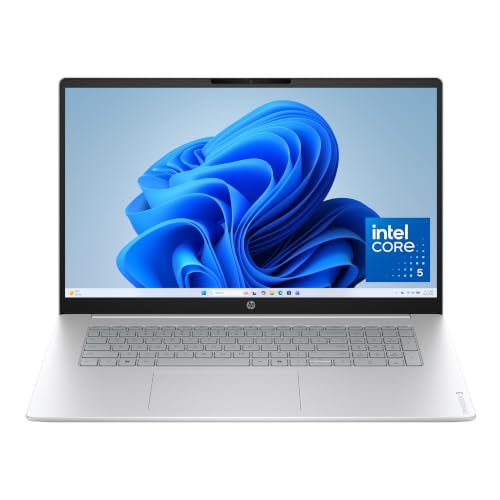
HP OmniBook 3 17.3 — Leanest entry
The OmniBook 3 is the floor of the 17-inch class, and it knows it. An Intel Core 5 120U with 8GB of memory and a 512GB SSD drives a 17.3-inch FHD display in Glacier Silver, model 17-dk0099nr, running Windows 11 Home with Intel Graphics. The proposition is stark and, for the right buyer, entirely sensible: the biggest screen in the guide’s price conversation, attached to a specification sized for browsing, documents, streaming and calls rather than for ambition.
Eight gigabytes is the number to interrogate, because it decides who this machine can serve. For the workload just described — a browser with a household’s worth of tabs, webmail, office documents in the cloud or in light local use, video in the evenings — 8GB remains workable, and the big panel makes that light workload genuinely pleasant. The moment the job grows teeth — dozens of tabs held open for days, large local spreadsheets, photo libraries managed on the machine, several heavy applications at once — 8GB becomes the wall the owner meets daily, and no screen size compensates for a wall.
The Core 5 120U deserves a word of defence. It is a modern Intel processor from the line that sits below the Core 7 class, and for the OmniBook’s intended duties its speed is not the limiting factor in any hour of the day. Buyers sometimes apologise for a processor when they should be auditing their memory and storage instead; here the audit is simple, because the storage is a healthy 512GB SSD and the memory is the deliberate economy.
Who it suits follows directly. A household replacing a television-adjacent laptop used for browsing, shopping, banking and streaming will find the big screen transformative and the specification invisible. A grandparent whose computing is email, news, photographs of grandchildren and video calls gets the largest, kindest text in the guide. A student in a browser-based school system gets room to spread out. The buyer it does not suit is the one who will grow into heavier work within the machine’s lifetime, because that buyer should spend the difference on the 16GB HP above instead.
The model code matters for this pick more than for most. HP’s OmniBook and 17-inch lines contain many near-identical listings, and 17-dk0099nr is the string that pins the Core 5, the 8GB and the Glacier Silver finish described here. Match the code on the listing, and the leanest big laptop in the guide is exactly the machine that arrives.
- Processor: Intel Core 5 120U
- Memory: 8GB RAM
- Storage: 512GB SSD
- Display: 17.3-inch FHD
- Graphics: Intel Graphics
- Colour: Glacier Silver
- Model: 17-dk0099nr
- Operating system: Windows 11 Home
Strengths
- The full 17.3-inch FHD canvas at the leanest configuration in the guide.
- A 512GB SSD keeps storage healthy despite the economy elsewhere.
- A modern Core 5 processor covers browsing, documents and streaming without strain.
Trade-offs
- 8GB of memory is the ceiling heavy multitaskers will meet daily.
- No numeric keypad is named in the title, unlike the mainstream HP above.
- Windows 11 Home, where two picks in this guide state Pro.
Best for: a light-duty household, a grandparent, or a browser-based student who wants the biggest screen for everyday tasks. Not suited for: a growing home business, because 8GB of memory cannot absorb the multitasking that a business adds year by year.
There is a dignity in a floor model that knows its job, and the OmniBook has it. It does not pretend to be a workstation; it promises a very large, pleasant window onto a light computing life, and on the evidence of its title, that is exactly what it delivers.

HP 17.3 i7 Laptop — Memory and storage
HP’s i7 entry in the big class is built around abundance in the two columns that age fastest. An Intel Core i7-1355U — a 13th-generation processor, the newest Intel generation in this guide — pairs with 32GB of memory and a 1TB SSD, and the title then adds a 512GB SD card for expanded storage on top, with Windows 11 Pro, Wi-Fi 6 and a Copilot Key in the specification, all in a silver 17.3-inch FHD frame the listing describes as thin and lightweight for its class.
Thirty-two gigabytes at 17 inches is a statement about how the machine will be used: everything open, all day, on a screen big enough to show it. Two documents side by side, a browser forest behind them, a call in the corner, a statistics or design package in the middle — this is the configuration for the worker whose previous laptop’s memory was the daily complaint. The terabyte of internal storage, supplemented by the SD card the title includes for expansion, gives that worker’s files a local home with room to spare, and the SD card doubles as a camera-ingest route for photographers whose cards can move straight from camera to laptop.
The i7-1355U places this HP a generation ahead of the Dell convertible below, whose i7-1165G7 belongs to an earlier architecture. That ordering is worth stating plainly because the Dell counters with double the memory and storage, and a buyer comparing the two is trading silicon youth against sheer capacity. For work that is broad rather than deep — many things at once, none of them individually extreme — capacity usually wins the day. For a single demanding application run hard, the newer chip argues back. Both arguments are honest; the buyer’s workload is the judge.
Windows 11 Pro and the Copilot Key mark the machine’s intended desk. Pro suits the freelancer with client requirements and the small firm standardising its fleet, and at 17.3 inches this is a fleet machine for people whose office is a room, not a route. The thin-and-lightweight wording in the title is relative to the class — no 17-inch laptop is light in the ultrabook sense, and the spec box records the claim as a claim — but within the big-screen world, a slimmer chassis is the difference between a laptop that moves rooms willingly and one that stays where it was first placed.
It suits the power-leaning desk worker, the photographer who ingests cards and edits on one machine, the small-business buyer who wants Pro and capacity in a single order. It is the pick this guide would hand to a buyer who said the words: I keep everything open and I am tired of closing things.
- Processor: Intel Core i7-1355U
- Memory: 32GB RAM
- Storage: 1TB SSD plus 512GB SD Card for expanded storage
- Display: 17.3-inch FHD
- Wireless: Wi-Fi 6
- Keyboard detail: Copilot Key
- Operating system: Windows 11 Pro
- Weight: Not stated in the listing title — verify with the manufacturer documentation
Strengths
- 32GB of memory with a terabyte of storage removes both everyday ceilings.
- The included 512GB SD card adds expansion and a camera-ingest route.
- A 13th-generation i7 and Windows 11 Pro keep chip and licence current.
Trade-offs
- Full HD is the resolution, where the Dell below offers QHD+.
- No touchscreen, in a guide where the Dell folds and touches.
- The thin-and-lightweight claim is relative to a heavy class.
Best for: a heavy multitasker, photographer or small firm that wants capacity and Pro at 17 inches. Not suited for: close-range photo and design work that lives at full zoom, because this Full HD panel cannot render fine detail the way the QHD+ Dell can.
If the mainstream HP at the top of this guide is the class’s centre, this machine is its sensible ceiling for conventional laptops — the point beyond which a buyer should be asking for a convertible hinge, a sharper panel or a workstation badge, rather than simply more of the same numbers.

Dell Inspiron 7706 2-in-1 — The convertible
The Dell Inspiron 7706 is the outlier this guide is grateful for: a 17-inch 2-in-1 with a QHD+ touchscreen, an Intel Core i7-1165G7, 64GB of DDR4 memory and a 2TB SSD, plus a webcam, backlit keyboard, fingerprint reader, HDMI, Thunderbolt 4 and Wi-Fi 6, all stated in its title under Windows 11 Home. Every category in that sentence either leads this guide or ties for the lead. It is simultaneously the biggest-memory pick, the biggest-storage pick, the sharpest-screen pick and the only pick that folds.
Start with the panel, because it rewrites what a big affordable laptop can show. QHD+ across 17 inches delivers the pixel density the Full HD picks cannot: text stays crisp at the size this screen invites, photographs show their detail, and two documents side by side remain genuinely readable rather than merely visible. Add touch, and the screen becomes an input as well as a window — scrolling plans, annotating documents, presenting to a small group gathered around a table where the laptop stands in tent posture.
Then the capacity figures, which are not typos. Sixty-four gigabytes of DDR4 is four times the mainstream HP’s memory and double the i7 HP’s, and 2TB is the largest internal storage in this guide. A machine so configured is bought for a particular life: virtual machines, enormous datasets, a media library that lives locally, a decade of photographs, several users’ worth of everything. Buyers whose lives are smaller than that specification should enjoy reading this review and then buy something else, because unused headroom at this scale is money parked in silicon.
The honest caveat is the processor’s birth year. The i7-1165G7 is an 11th-generation chip, the oldest architecture in this guide, and under a single sustained heavy load the 13th-generation HP above will show its youth. The Dell’s counter-argument is everything else: capacity, panel, hinge, ports. Thunderbolt 4 gives it the one-cable docked desk that the smaller Acer in the i7 guide trades on, and the fingerprint reader and backlit keyboard complete a trimming set no other pick here matches in full.
It suits the buyer whose desk is a studio: the photographer-presenter, the data hoarder with standards, the household that wants one spectacular machine instead of a laptop plus a tablet plus an external drive. A 17-inch convertible is a commitment — tablet mode at this size is a lap event, not a hand event — but as a folding desk centrepiece, nothing else in the affordable class is attempting what the 7706 attempts.
- Processor: Intel Core i7-1165G7
- Memory: 64GB DDR4 RAM
- Storage: 2TB SSD
- Display: 17-inch QHD+ Touchscreen
- Ports named: HDMI, Thunderbolt 4
- Wireless: Wi-Fi 6
- Security: Fingerprint Reader
- Keyboard: Backlit Keyboard
- Operating system: Windows 11 Home
Strengths
- 64GB of memory and a 2TB SSD are the largest figures in this guide by a wide margin.
- The QHD+ touchscreen is the sharpest panel here and the only touch display.
- Thunderbolt 4, a fingerprint reader and a backlit keyboard complete the fullest trimming set.
Trade-offs
- The 11th-generation processor is the oldest architecture in the guide.
- Windows 11 Home, where two rivals state Pro.
- A folding 17-inch screen is a two-handed, lap-based tablet at best.
Best for: a photographer, presenter or data-heavy household that wants one folding centrepiece with maximum capacity. Not suited for: a buyer running one sustained heavy application daily, because the 11th-generation chip will show its age there before the 13th-generation HP does.
Longevity cuts both ways for the Dell, and the review should say so. Its memory and storage will still look generous in six years; its processor will look its age sooner. A buyer who values the first sentence over the second — and there are many such buyers, correctly — gets the most distinctive machine in this guide.

HP 17.3 FHD Laptop — Disc-drive bundle
This HP arrives with a piece of hardware the rest of the industry retired: an external CD/DVD drive, named in the title alongside an office lifetime licence, an AMD Ryzen 5 7430U described as 6-core, a 250-nits IPS display, a webcam and Wi-Fi 6 under Windows 11 Pro — in this configuration, 32GB of memory and a 2TB SSD. In this guide it is judged as a big laptop; in the DVD-drive guide elsewhere on this site, the same machine is judged as a bundle. Both judgements start from the same fact: the drive is external, a USB companion in the box, not a tray built into the chassis.
As a big laptop in its own right, the specification is formidable. Thirty-two gigabytes matches the i7 HP, 2TB of storage matches the Dell, and the Ryzen 5 7430U is a capable six-core processor for the office-and-media workload this class lives on. The display is a 17.3-inch FHD IPS panel with a stated 250-nits brightness — one of the few titles in this guide to print a brightness figure at all, and the spec box honours it by recording the number rather than an adjective.
The bundle is the personality. An external drive in the box serves the household with shelves of DVDs, a drawer of software and backup discs, a car-era music collection waiting to be ripped, or installation media for older programs. Because the drive is external, it can also serve every other computer in the house and be left in a drawer for the eleven months of the year it is not needed — an arrangement many owners will find better than a built-in tray. The office lifetime licence, as the title phrases it, aims the bundle squarely at the home-and-small-business desk.
Windows 11 Pro completes a specification that keeps surprising for its class. It suits the legacy-media household, the small firm with disc-based archives, the buyer who wants one order to arrive with laptop, drive and office software settled together. Buyers with no discs in their lives should weigh the same money against the i7 HP’s newer processor, because the bundle’s value lives entirely in a drawer they may not own.
A configuration note belongs in this review, because this listing is sold in more than one memory and storage combination and a near-identical title appears in the DVD-drive guide at a different configuration. The machine reviewed here is the 32GB and 2TB build as stated in this guide’s title. At checkout, match the memory and storage figures in the listing to the ones in the spec box below, digit for digit.
- Processor: AMD Ryzen 5 7430U (6-core)
- Memory: 32GB RAM
- Storage: 2TB SSD
- Display: 17.3-inch FHD, 250 Nits IPS
- Included: External CD/DVD Drive, Office Lifetime License (per listing title)
- Wireless: Wi-Fi 6 (Wifi6)
- Operating system: Windows 11 Pro
- Numeric keypad: Not stated in the listing title — verify with the manufacturer documentation
Strengths
- 32GB of memory and a 2TB SSD match the guide’s richest conventional specification.
- An external CD/DVD drive is included, serving legacy media from day one.
- The title states a 250-nits IPS panel, a brightness figure most rivals omit.
Trade-offs
- The disc drive’s value is zero to a household with no discs.
- The Ryzen 5 7430U sits below the i7 HP’s newer 13th-generation chip for peak work.
- Bundle listings demand extra care to match the exact configuration at checkout.
Best for: a household or small firm with DVD and CD archives that also wants a richly specified big laptop. Not suited for: a fully streaming household, because the bundle’s headline extra — the external drive — would never leave its drawer.
Judged purely as a 17-inch laptop, this HP is one of the two richest configurations on the page. Judged as a bundle, it is a reminder that in the affordable class, what is in the box can matter as much as what is in the chassis.

HP 17 Ryzen 5 — DDR5 and Pro
The second Ryzen 5 HP in this guide is a study in how two machines can share a badge, a brand and a screen size and still be aimed at different buyers. This build pairs its AMD Ryzen 5 — the title claims up to 4.3GHz and a comparison against the older i7-1165G7 — with 8GB of DDR5 memory and a 512GB SSD behind a 17.3-inch FHD display, running Windows 11 Pro in silver, with an accessory bundle from Alpacatec named in the title and a video-editing framing in its wording.
The interesting tension is between the memory figure and the memory standard. Eight gigabytes is the lean capacity this guide has already interrogated in the OmniBook review: workable for browsing, documents, streaming and calls, confining for heavy multitasking. DDR5 is the current memory standard, faster in specification than the DDR4 in several rivals. A buyer choosing between this HP and the OmniBook is therefore choosing between two kinds of economy — the OmniBook’s 8GB of unstated-standard memory with a Core 5, or this machine’s 8GB of DDR5 with a Ryzen 5 and a Pro licence. The standard will not rescue the capacity in a heavy session, and the review will not pretend otherwise; what DDR5 buys is platform currency, not headroom.
Windows 11 Pro is the second differentiator, and for a specific buyer it outweighs the memory debate entirely. A freelancer whose client requires Pro, a small firm adding one big-screen machine to a managed fleet, a household that uses Pro’s features for work-from-home compliance — for those buyers, this is the cheapest route in the guide to a Pro licence on a 17.3-inch screen with current-standard memory, and the accessory bundle sweetens a purchase already justified on paper.
The video-editing framing in the title should be read with the memory figure in hand. Light editing — trimming, titles, family footage — is a fair description of what a Ryzen 5 with 8GB can attempt. Sustained editing of long, layered projects is the workload that memory ceilings punish most, and buyers whose editing is serious should step to the 32GB machines above without hesitation. Titles describe aspirations; configurations describe capabilities, and this guide sides with configurations.
It suits the Pro-requiring light user: the compliant freelancer, the fleet buyer, the household whose work is documents and calls but whose employer audits operating systems. Beside its Ryzen sibling at the top of the guide, it trades 8GB of memory for DDR5, Pro and a bundle — a trade that is wrong for most households and exactly right for that narrower desk.
- Processor: AMD Ryzen 5, up to 4.3GHz
- Memory: 8GB DDR5 RAM
- Storage: 512GB SSD
- Display: 17.3-inch FHD
- Colour: Silver
- Included: Alpacatec Accessories (per listing title)
- Operating system: Windows 11 Pro
- Numeric keypad: Not stated in the listing title — verify with the manufacturer documentation
Strengths
- Windows 11 Pro at the lean end of the big-screen class.
- DDR5 memory keeps the platform on the current standard.
- An accessory bundle is included in the listing.
Trade-offs
- 8GB of memory caps multitasking whatever its standard.
- The title’s video-editing framing overpromises for heavy projects.
- 512GB of storage, where richer picks here carry up to 2TB.
Best for: a freelancer or small firm that needs Windows 11 Pro on a big screen for light, document-centred work. Not suited for: a serious video editor, because 8GB of memory will throttle long, layered projects regardless of the processor’s badge.
Placed beside the first review on this page, this HP completes the guide’s favourite lesson in a new key: same brand, same chip family, same screen — different memory, different licence, different buyer. The 17-inch class rewards readers, and punishes skimmers, as reliably as any category on this site.
Comparison
| Pick | Processor | Memory / Storage | Display | Notable from title |
|---|---|---|---|---|
| HP 17 Ryzen 5 (2026 Edition) | AMD Ryzen 5 | 16GB / 512GB SSD | 17.3-inch FHD | Numeric keypad, Office 365 for the Web |
| HP OmniBook 3 17.3 | Intel Core 5 120U | 8GB / 512GB SSD | 17.3-inch FHD | Glacier Silver, model 17-dk0099nr |
| HP 17.3 i7 Laptop | Intel Core i7-1355U | 32GB / 1TB SSD + 512GB SD card | 17.3-inch FHD | Windows 11 Pro, Copilot Key, Wi-Fi 6 |
| Dell Inspiron 7706 2-in-1 | Intel Core i7-1165G7 | 64GB DDR4 / 2TB SSD | 17-inch QHD+ Touchscreen | Thunderbolt 4, fingerprint reader, backlit keyboard |
| HP 17.3 FHD Laptop | AMD Ryzen 5 7430U | 32GB / 2TB SSD | 17.3-inch FHD 250-nits IPS | External CD/DVD drive, Windows 11 Pro |
| HP 17 Ryzen 5 (DDR5) | AMD Ryzen 5 | 8GB DDR5 / 512GB SSD | 17.3-inch FHD | Windows 11 Pro, accessory bundle |
Read this table by its memory column and the class snaps into focus. The six machines divide into three pairs: two lean 8GB builds for light lives, one balanced 16GB build for the mainstream, and a rich tier — 32GB, 32GB and 64GB — for buyers who keep everything open or keep everything, full stop. Processor badges cut across those tiers without respecting them, which is why this guide insists on configuration-first reading: the strongest chip here sits in a mid-capacity machine, and the largest capacity sits behind the oldest chip.
The display column tells a quieter story. Five Full HD panels and one QHD+ touchscreen means the class has decided that at affordable prices, big means big rather than sharp. Buyers who accept that bargain get remarkable screen area for their money. Buyers who do not should be honest that they are shopping in a different price conversation, with the Dell as the bridge between the two.
How to Choose a 17-Inch Laptop
Begin by admitting where the machine will live. A 17-inch laptop is a desk with a hinge: it moves between rooms, floors and occasionally houses, and it does not commute. Measure the desk or table it will own — the screen needs roughly an arm’s length of viewing distance to feel generous rather than overwhelming — and confirm the household is genuinely buying a stationary computer. Shoppers who secretly need a traveller should leave this guide for the thin and mini shortlists linked at the foot of the page, where the virtues run the other way.
Memory is the decision that outranks the processor at this size. Big screens invite big multitasking — two full windows, always — and the memory figure decides whether that invitation stays pleasant in year three. Eight gigabytes serves a light, browser-shaped life. Sixteen serves a household. Thirty-two and above serve the everything-open worker and the local archivist. Because memory in this class is the specification least likely to be upgradeable later, it deserves the largest share of the budget after the screen itself.
Resolution third, with clear eyes. Full HD at 17.3 inches produces large, comfortable text and honest video; it does not produce fine detail. Readers and spreadsheet workers are well served. Photographers, designers and anyone whose work is detail should weigh the Dell’s QHD+ panel heavily, because at this screen size the difference between the two resolutions is the largest single quality gap in the guide — larger than any processor gap on the page.
Then the working furniture: a numeric keypad if figures are your trade, stated outright in only the mainstream HP’s title; a touchscreen and hinge if the machine must present or annotate, which only the Dell offers; the Windows edition if an employer audits it, stated as Pro on three picks; and the bundle contents, which in one case include an entire external disc drive. A 17-inch laptop is a five-to-eight-year fixture of a room. Choose the fixture by the room’s habits, and the specification follows.
Is Full HD Sharp Enough on a 17-Inch Screen?
For text, spreadsheets, browsing and video — the workload this class exists for — yes, with a caveat about distance. Full HD spread across 17.3 inches yields pixels large enough to see at close range, which is precisely why the text on these machines looks big and kind rather than fine and dense. Seated at the arm’s length a desk provides, most readers experience that as comfort. The readers who experience it as coarseness are the ones doing detail work: photo editing at full zoom, design, fine print proofing at close quarters.
The Dell’s QHD+ panel exists in this guide as the control experiment. Its pixels are small enough that text edges disappear at normal distances, and once a buyer has worked on it, the Full HD panels feel like what they are — a sensible economy. Neither answer is wrong. What is wrong is buying Full HD at 17 inches while expecting QHD behaviour, or paying for QHD while sitting so far back that the difference evaporates. Match the panel to the chair’s distance and the work’s detail, and the resolution question answers itself.
Can a 17-Inch Laptop Replace a Desktop Computer?
For the majority of households, it already has. A 17-inch laptop carries a full-size-feeling keyboard — in one case here with a numeric keypad — a screen that rivals smaller desktop monitors, and none of the cable, tower and desk-commitment of a desktop setup. It folds away when the table is needed for dinner, moves to another room for a call, and goes to a repair shop in a bag instead of a car boot. The households in this guide’s audience are not choosing between a laptop and a desktop on performance; they are choosing on furniture, and the big laptop wins the furniture argument outright.
The honest limits are expansion and sustained power. A desktop can grow new drives, cards and cooling across a decade; a laptop is the configuration it shipped as, which is why this guide presses the memory question so hard at the point of purchase. And under the heaviest sustained loads, desktop cooling remains a different league. Households whose work is documents, media, browsing and light creation will never meet those limits. Households with a rendering pipeline or a growing drive farm already know who they are, and it is not this guide’s audience.
How Much Memory Does a Big-Screen Laptop Need?
More than the same workload would need on a small screen, because the big screen changes behaviour. Owners of 17-inch machines keep two windows open side by side as a default rather than an exception, leave reference material up all day, and treat the laptop as the household’s always-on hub. That behaviour is memory-shaped. Eight gigabytes supports it only in its lightest, browser-based form. Sixteen supports it fully for documents and media. Thirty-two supports it with professional applications in the mix, and the Dell’s 64GB supports it alongside virtual machines or an archivist’s library.
The practical advice is to buy for the behaviour you are growing into, not the behaviour you have today, because the screen itself will pull your habits upward. A buyer graduating from a cramped 13-inch machine will use a 17-inch screen more, in more windows, with more left open — everyone does. The two 8GB picks in this guide are honest machines for lives that will stay light. Everyone else should read the memory column of the comparison table as the real price ladder of this class, and climb it as high as the budget honestly allows.
What Should a 17-Inch Laptop Sit On?
Ergonomics is the section big-screen buyers skip and then pay for in neck ache. A 17-inch screen is large enough that its centre sits noticeably below eye level on a standard desk, and its width invites the owner to sit closer than the panel’s size warrants. The comfortable arrangement is unglamorous: the laptop on a low stand or a thick book so the top of the screen approaches eye level, the seating distance at a full arm’s length or a little beyond, and — for anyone working hours at a stretch — a separate keyboard and mouse so the screen can sit at viewing distance while the hands stay at typing distance. Two of the picks here hint at that desk life in their titles, the mainstream HP with its keypad-centred work framing and the Dell with its dock-friendly Thunderbolt port.
Heat and surface matter at this size too. Big laptops move a lot of air through vents that often exit at the sides or rear, and a machine parked on a bed, a sofa arm or a pile of papers will run hotter and louder than the same machine on a hard, clear surface. A desk mat or a simple laptop board transforms a kitchen-table setup, and keeping the area behind the hinge clear costs nothing. None of this is exotic advice, but a 17-inch laptop is a five-year fixture, and fixtures reward the owners who arrange their surroundings once, properly, instead of adjusting their posture ten thousand times.
Sound finishes the room. A big chassis has room for better speakers than a small one, yet no title in this guide makes an audio claim worth printing, so buyers who watch films at the table should plan on the machine’s own speakers being serviceable rather than celebrated, or on a small external speaker joining the setup. Judge the sound in the room where the laptop will actually live, at the distance you will actually sit — a screen this size pulls its audience back, and volume that seemed ample across a shop counter can feel thin across a kitchen.
Common Mistakes When Buying an Affordable 17-Inch Laptop
Buying the screen and starving the specification. The class’s classic trap is a huge panel on 8GB of memory bought by a heavy user. Size impresses in the shop; memory decides in March.
Expecting Full HD to behave like a high-resolution panel. At 17.3 inches, Full HD means large text, not fine detail. Detail workers belong on the QHD+ Dell or in a different price conversation.
Planning to commute with it. A 17-inch laptop in a daily bag is a short experiment. Buy the big screen for a desk life, or buy a smaller laptop for a travelling one — not one machine compromised for both.
Skipping the keypad question. Figure-workers should confirm the numeric keypad in the title, as only the mainstream HP states one. At this size its absence is a daily annoyance, not a detail.
Merging the two Ryzen 5 HP builds. They differ in memory capacity, memory standard, Windows edition and bundle. The badge is identical; the laptops are not.
Final Recommendation
Most buyers should start with the mainstream HP 17 Ryzen 5 and test their needs against it: 16GB, a keypad, a balanced Ryzen build. Step down to the OmniBook 3 only for a genuinely light life, and consider the DDR5 Ryzen build when a Pro licence is the requirement that outranks memory. Step up to the i7 HP for capacity with a current chip, to the disc-drive HP for capacity with legacy media, and to the Dell Inspiron 7706 when the wish list includes a sharper screen, a hinge and the largest numbers in the class — accepting its older processor as the price of everything else.
A big laptop is a piece of furniture that computes, and furniture is bought by the room: measure the desk, count the windows you keep open, weigh the discs in your drawer, and the right seventeen inches will be the one still earning its space on the table when the novelty of size has long worn off.
Buyers still torn between two of these machines after all of the above should run one final, very practical test: picture the laptop closed. A 17-inch machine spends its closed hours somewhere — a shelf, a drawer, a bag by the door, the end of the table — and the households that love their big laptops are the ones with a natural home for that closed rectangle. Then picture it open at the hour you work most, in the light that room actually has, with the applications you actually use arranged the way you arrange them. The pick that fits both pictures, closed and open, is the right one, and in this guide that pick is identifiable by configuration rather than by badge: memory for your multitasking, storage for your archive, a licence for your employer, a hinge or a disc drive for your particular past. Size brought you to this page; let the configuration, read carefully, finish the job.
Frequently Asked Questions
Is a 17-inch laptop too big to travel with?
For daily commuting, yes — it belongs in the room-to-room category. For occasional travel by car, or between a home and a holiday house, it is perfectly manageable in a suitable bag. Buyers who fly weekly or ride trains daily should look at the thin and mini guides instead.
Why do five of the six picks come from HP?
Because HP’s 17.3-inch line is where the affordable variety in this class currently sits — lean, mainstream, high-capacity and bundled configurations under one screen size. The Dell earns its place by offering what the HP line does not: a folding QHD+ touchscreen.
Does a bigger screen use more battery?
A larger panel is one of the main power draws in any laptop, and none of these titles prints a battery capacity to plan around. Treat every pick here as a machine that lives near a socket, and verify battery figures in the manufacturer documentation if unplugged hours matter to you.
Can I connect a second monitor to a 17-inch laptop?
Big laptops are often used as the centre of a desk with an additional screen, and the Dell’s Thunderbolt 4 and HDMI are stated in its title. For the HP picks, the titles do not enumerate video outputs, so confirm the port on the specific listing before planning a two-screen desk around it.
Which pick is best for spreadsheets and figure work?
The mainstream HP 17 Ryzen 5, because it is the pick whose title states a numeric keypad alongside 16GB of memory. The i7 HP is the step up for figure work at heavier multitasking scale.
Is the Dell’s older processor a deal-breaker?
Not for its intended buyer. The i7-1165G7 is the oldest chip here and will show its age under sustained heavy loads, but the Dell’s case rests on its QHD+ touch panel, 64GB of memory, 2TB of storage and its hinge. Buyers whose work is one heavy application at a time should choose the 13th-generation HP instead.
Related Guides
Big-screen buyers usually arrive here from one of two directions, and both continue onward. Readers who chose size for a stationary desk may want the portability counterweight next, in our guide to the best affordable thin laptops, where the same money buys lightness instead of area. Those who suspect the whole laptop could shrink should visit the opposite pole of the market in the best affordable mini laptops, the smallest machines that still call themselves laptops. And households whose big screen exists partly to play their disc collection should finish with the best affordable laptops with dvd drive, where external-drive bundles and the last built-in optical drives are judged on their own terms.


