What's inside
- Key Takeaways
- Quick Picks
- How did we choose these picks?
- Comparison table
- Why did fixed 17-inch monitors disappear, and why did portables take the size?
- How do you run a portable monitor well, at a desk and on the road?
- What separates a good portable from a disappointing one in daily use?
- How should you shop the refurbished channel for a legacy panel?
- What else competes for the same job — tablets, small TVs and the laptop itself?
- Can a portable monitor serve as your only screen, long term?
- Which portable makes the best 17-inch monitor for which traveller?
- What should you expect from brightness, speakers and HDR on a portable?
- How should you test a portable monitor during its return window?
- Which mistakes catch buyers of this size most often?
- Final Recommendation
- Frequently Asked Questions
- Related Guides
As an Amazon Associate I earn from qualifying purchases. This post may contain affiliate links at no extra cost to you.
widgetverdict.com is reader-supported. When you buy through links on our site, we may earn an affiliate commission.
Where to buy: the three portable picks below link to verified Amazon listings. The three legacy and specialist picks are covered in prose only, because the honest way to buy them is the refurbished and industrial channels, not a standard retail listing.
Here is the truth this guide is built on: if you went searching for the best 17 inch monitors imagining a modern desktop screen in that size, the industry quietly left that category behind. Fixed 17-inch desktop monitors are a legacy format — the 5:4 panels that filled offices in the 2000s survive in warehouses, point-of-sale systems and refurb channels, but no major brand’s current range is built around them. What the size means now, in products you can actually buy new, is the 17.3-inch portable monitor: a laptop-class panel in a slim shell, fed by USB-C, that works as a travel screen, a second display and, increasingly, a small desk’s main screen. This roundup covers both halves of that reality honestly — three excellent modern portables with links, and the legacy fixed panels in prose for the readers who genuinely need them.
The portable half deserves respect rather than apology. A 17.3-inch portable gives you more working area than the largest laptop screens, weighs about as much as a hardback book, and runs from a single cable that carries picture and power together. For hybrid workers, students, console players in shared rooms and anyone whose “office” moves between kitchen table and co-working desk, it is not a compromise product; it is the correct one. The legacy half serves different masters — software written for 5:4 screens, industrial enclosures cut for 17-inch panels, server racks — and for those readers the prose sections explain what to hunt for and what to avoid in channels where listings vary by the week.
A word about who should read no further, in the spirit of saving everyone time. If your desk is permanent, your budget healthy and your work visual, the modern 24 and 27-inch classes will serve you better than anything in this article, and the related guides at the foot of the page point that way. This guide is for the two readerships the size genuinely belongs to now: people whose screens must travel, and people whose fixed installations are shaped by the past. Both are larger groups than the industry’s marketing admits, and both deserve better than being told their size no longer exists.
Key Takeaways
- Fixed 17-inch desktop monitors are a legacy format; the living category is the 17.3-inch portable.
- Portables divide by refresh and resolution: 1080p all-rounders, 144Hz gaming models, QHD 165Hz flagships.
- One USB-C cable carries video and power on all three linked picks — check your laptop’s port supports video out.
- Legacy 5:4 1280×1024 panels remain the right answer for old software, POS and industrial fits.
- Portable screens need a stand or case plan; the kickstand and folio designs here differ more than the panels do.
- Buy legacy panels refurbished from graded channels, never as “new old stock” at novelty prices.
Quick Picks
| Pick | Badge | Why it earns its place |
|---|---|---|
| ARZOPA 17.3 Portable Monitor (A1M) | The all-round portable | Colour-rich 1080p IPS with a proper kickstand for desk and travel. |
| ZSCMALLS 17.3 Portable Monitor 144Hz | The gaming portable | 144Hz smoothness for laptop and console play away from the main desk. |
| MNN 17.3 QHD 165Hz Portable Monitor | The flagship portable | 1440p sharpness and 165Hz pace in a slim metal shell. |
| Dell E1715S (legacy 5:4) | The legacy office survivor (prose only) | The fixed 17-inch panel for software that still thinks in 1280×1024. |
| Industrial 17-inch touch panels | The POS and kiosk class (prose only) | Touch, metal housings and mounting standards for commercial fits. |
| 17-inch rackmount console drawers | The server-room class (prose only) | Keyboard and 17-inch screen in a 1U drawer for rack work. |
How did we choose these picks?
Two different selection problems share this article, so we solved them separately. For the portables, the filters were panel quality at the size, a stand solution that works on a real desk rather than only in product photography, single-cable USB-C operation, and a refresh or resolution story that justifies the model’s existence against its siblings. Dozens of near-identical 17.3-inch portables compete on marketplace listings; the three linked here are the ones whose specifications separate cleanly into all-round, gaming and flagship roles without overlap or exaggeration.
For the legacy half, “choosing” means something else: there is no current production line to rank, so the picks are the three surviving forms the fixed 17-inch monitor takes — the 5:4 business panel, the industrial touch panel and the rackmount console — each described with its buying channel and its traps. We deliberately gave these no purchase links. Refurbished stock changes weekly, condition grading matters more than model numbers, and a link that was honest in November could point at a different-grade unit by spring. The prose tells you how to shop the channel instead, which is the genuinely useful information.
One boundary worth stating: 15.6-inch portables are cheaper and more common, and 18.5-inch portables exist for maximum area. Neither is in this guide, because the keyword asks about seventeen inches and the 17.3-inch class is where the size’s modern story is actually written. If your bag or desk says otherwise, the criteria below still transfer.
We should also admit what a guide like this weights against the marketplace’s instincts. Listings for portables compete on specification theatre — implausible brightness claims, gaming language on office panels, accessory bundles padding the box. Our shortlist ignored the theatre and weighted the three things owners report after six months: whether the stand still works, whether the screen wakes without argument, and whether the colour still looks right beside the laptop it serves. A portable is a daily tool disguised as a gadget, and it was judged as a tool throughout.
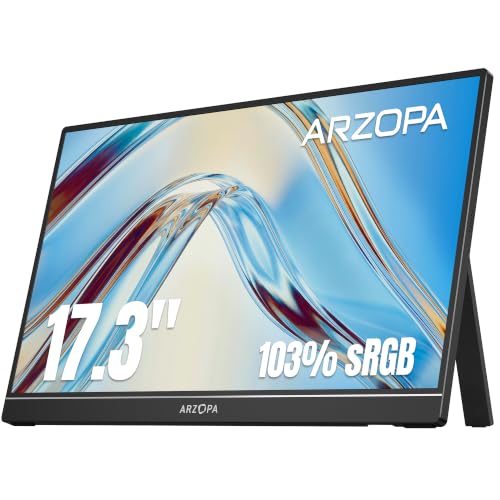
ARZOPA 17.3 Portable Monitor (A1M) — The all-round portable
ARZOPA sells more portable monitors than almost anyone, and the A1M shows the benefit of that focus: it is the sensible default of the 17.3-inch class. The IPS panel covers a wider-than-standard slice of the sRGB gamut — the listing quotes 103% — which in practice means colours that look rich rather than washed, the first thing lesser portables sacrifice. The built-in kickstand is the design decision we would copy across the category: it folds from the back of the shell, holds the screen at a usable angle on any flat surface, and removes the origami-cover ritual that makes rival portables feel like craft projects every time they move rooms.
Connection is the expected modern pair — USB-C for the single-cable laptop life, mini-HDMI for consoles, older laptops and cameras — and the screen draws its power from the same USB-C connection when the host can supply it, so a laptop bag needs one cable and no brick. Brightness is adequate for indoor work and shaded outdoor use rather than sun-blasted terraces, and the built-in speakers are for notification sounds and the occasional call, not for films. None of that dents its role: as the portable a non-specialist should buy — for a second screen at home, a main screen in a dorm, a presentation display in a bag — it is the complete, uncomplicated answer.
Ownership notes from the category apply cleanly here. The shell is slim and light enough that a laptop sleeve or padded case is a necessary companion rather than an accessory, and the kickstand’s single-angle range means tall users on low tables may still want a small riser. But judged as the class’s all-rounder, the balance of colour, stand design, weight and connections is exactly where it should be, which is why it opens the list.
- Diagonal: 17.3 inches, portable format
- Resolution: 1920×1080 IPS
- Colour: 103% sRGB (manufacturer figure)
- Stand: built-in kickstand
- Ports: USB-C (video and power), mini-HDMI
- Extras: built-in speakers, HDR mode
Strengths
- Kickstand makes desk setup instant and stable.
- Colour coverage lifts it above washed-out budget portables.
- Single-cable USB-C working with most modern laptops.
Trade-offs
- Brightness suits indoor use, not direct sunlight.
- Speakers are functional only.
- Needs a padded case for travel; none of the shell is armour.
A second week-two observation: the A1M’s panel uniformity and colour hold up when it is demoted to second-screen duty beside a good laptop display, which is where portables usually embarrass themselves. Beside a washed-out screen it would look rich; beside a strong one it simply looks correct, and correct is what lets you drag a photo, a spreadsheet or a timeline across the seam without the content changing character. That consistency, more than any single feature, is what makes it the recommendation for people who will live with the purchase daily.
Best for: the default second screen for laptops, dorms and hybrid desks. Not suited for: outdoor work in bright sun, or buyers wanting high refresh for gaming.

ZSCMALLS 17.3 Portable Monitor 144Hz — The gaming portable
The question this model answers is why a portable screen should refresh at 144Hz, and the answer is the modern gaming laptop and the console in the shared house. Paired with a laptop, the ZSCMALLS turns any table into a high-refresh gaming position with a bigger, better-placed screen than the laptop’s own; paired with a console over HDMI, it gives a bedroom or a partner-friendly second room its own display, so the main television stops being contested territory. The IPS panel keeps colours honest at angles, which matters when the screen sits low on a coffee table or bed.
Its stand solution differs from the ARZOPA’s: a smart cover that folds into support duty and protects the panel in transit. Covers are the category’s traditional answer and they work, with the caveat that the angles on offer are fewer and the whole arrangement feels less planted on a desk than a kickstand. Built-in speakers are present and, as ever in this class, adequate for game audio in a pinch rather than a reason to buy. HDR support is listed; treat it as tone-mapping politeness rather than true HDR performance, the honest reading of the feature on every portable here.
The buying logic is refresh-led. If your portable screen will spend its life on documents, the ARZOPA above is the calmer purchase; if it will spend evenings on fast games — especially from a gaming laptop whose own screen is smaller or slower — the 144Hz panel earns its place every session. Check the connection path before ordering: full refresh needs the right cable and a host output that supports it, and consoles will feed it 1080p at their own frame rates, which it displays without complaint.
- Screen: 17.3-inch portable
- Resolution: 1920×1080 IPS
- Refresh: 144Hz
- Stand: smart cover folds into a support
- Ports: USB-C and HDMI inputs
- Extras: built-in speakers, HDR mode
Strengths
- 144Hz transforms laptop and console play away from home.
- Cover protects the panel in a bag and doubles as the stand.
- IPS angles suit low, informal seating positions.
Trade-offs
- Cover stand offers fewer angles than a kickstand design.
- High refresh is wasted on document-only use.
- HDR is nominal at portable brightness levels.
Worth knowing before a trip: at full brightness and high refresh this screen drinks more from a laptop battery than a 60Hz portable does, so the wall adapter earns its bag space on gaming weekends. In exchange, the motion clarity at 144Hz is the genuine article — fast pans in shooters stay readable in a way that makes returning to a 60Hz travel screen feel like a downgrade you can see. Players who split time between a home gaming desk and everywhere else will recognise the feeling: this is the everywhere-else screen that stops feeling like the compromise.
Best for: gaming laptops and consoles needing a portable high-refresh screen. Not suited for: pure office use, or buyers wanting the sharpest text — that is the MNN below.

MNN 17.3 QHD 165Hz Portable Monitor — The flagship portable
MNN’s flagship answers the portable class’s oldest criticism — that travel screens are dim compromises — by refusing the two biggest compromises at once. The panel is QHD, 2560×1440 across 17.3 inches, which produces text sharpness no 1080p portable can match and gives a genuine second workspace rather than a mirror of a laptop’s limitations. It is also fast: 165Hz with adaptive-sync behaviour, so the same screen that renders documents beautifully all day can run fast games properly in the evening. The slim metal shell and kickstand complete a package that reads as equipment rather than accessory.
The requirements deserve stating, because flagship specifications have flagship appetites. QHD at high refresh asks more of the host: the laptop’s USB-C port must carry a full-bandwidth video signal, and gaming at native resolution needs a graphics card with real muscle, or the sense to render at 1080p and let the panel upscale. Power draw is higher than the 1080p picks too, so battery-powered sessions shorten. None of this is hidden cost so much as physics, and for the buyer with a strong laptop the trade is obviously worth it — this is the only portable here that can serve as a genuine main screen for a minimalist desk without the owner feeling the compromise daily.
Colour coverage is quoted at full sRGB, and the panel’s rendering suits photo-adjacent work on the move better than its 1080p siblings, though a colour-critical workflow still belongs on a calibrated desktop display. Consider it the class’s ceiling: the screen that proves how far the portable format has come, priced and powered accordingly, and the correct purchase for the traveller whose work is visual and whose laptop can feed it.
- Panel: 17.3-inch portable, slim metal shell
- Resolution: 2560×1440 (QHD) IPS
- Refresh: 165Hz
- Colour: 100% sRGB (manufacturer figure)
- Ports: USB-C and HDMI
- Stand: integrated kickstand
Strengths
- QHD sharpness makes it a true main-screen candidate.
- 165Hz pace matches its resolution ambition for gaming.
- Metal shell and kickstand suit serious travel duty.
Trade-offs
- Demands a strong host output and graphics card to shine.
- Higher power draw shortens battery-fed sessions.
- Flagship of the class, with the flagship’s price position.
There is a minimalist-desk scenario where this screen is not the travel option but the destination: a powerful laptop, a small desk, one beautiful panel that appears when work starts and slides into a drawer when it ends. The MNN is the only pick here that sustains that fantasy without the owner quietly shopping for a “real” monitor by month two, because QHD at this size is genuinely desktop-grade sharpness. If your computing life is heading toward fewer, better objects, this is the seventeen-inch expression of that idea.
Best for: powerful laptops, visual work on the move, minimalist main-screen desks. Not suited for: older laptops with weak video outputs, or battery-critical travel.
Dell E1715S (legacy 5:4) — The legacy office survivor (prose only)
Now for the fixed panel, covered without a link because the right way to buy one is the refurbished market. The E1715S is the archetype of the surviving 17-inch desktop monitor: a 1280×1024 TN panel in the 5:4 shape that office software of a certain age was designed around, with VGA and DisplayPort inputs and a stand that tilts and adjusts for height like office equipment should. Businesses still deploy panels like it for a simple reason — legacy applications, industrial control interfaces and point-of-sale software laid out for 5:4 look wrong, sometimes unusably wrong, when stretched across a widescreen.
Shopping for one is an exercise in grading rather than model research. Buy from refurbishers who grade cosmetics and backlight hours, state a dead-pixel policy and offer a real warranty measured in months; avoid auction listings photographed in warehouses. Expect TN viewing angles and colours that serve text and interfaces rather than images, and expect to pay commodity money — the moment a listing prices a 17-inch 5:4 panel like a collectible, walk away, because fleets of them retire from offices every month. For a home user, the honest question is whether you need 5:4 at all: if a modern application is your goal, the portables above are better screens in every measurable way.
- Format: fixed desktop monitor, 17-inch class
- Resolution: 1280×1024 (5:4)
- Panel: TN, office-grade
- Inputs: VGA and DisplayPort on the archetype model
- Channel: refurbished and ex-fleet stock
- Role: legacy software, POS, control interfaces
Strengths
- Native 5:4 suits legacy layouts nothing else displays correctly.
- Ex-fleet supply is plentiful and inexpensive through graded channels.
- Simple, repairable, stand-equipped office hardware.
Trade-offs
- TN angles and colour are poor by modern standards.
- Condition varies; grading and warranty decide the real value.
- No modern inputs beyond DisplayPort on most units.
One practical test before committing a legacy panel to a station: run the actual software on it for an hour. The 5:4 shape either restores a layout your application was born for — immediately obvious, and deeply satisfying — or it reveals that the application has quietly learned to live widescreen and the panel is nostalgia rather than necessity. Fleet retirements make the experiment cheap, and a graded unit with a warranty makes it reversible. That hour of testing has saved more buyers from the wrong kind of retro than any specification sheet.
Best for: legacy software stations, POS and workshop information screens. Not suited for: general home use, media, or anyone expecting a modern image.
Industrial 17-inch touch panels — The POS and kiosk class (prose only)
The second surviving form of the fixed 17-inch monitor never appears in consumer roundups at all, because it is sold through industrial channels: touch-equipped panels in metal housings, built for point-of-sale terminals, kiosks, factory interfaces and medical carts. Seventeen inches became a fixture size in those enclosures, so the class persists with its own logic — resistive or capacitive touch depending on whether gloved hands are involved, brightness specified for bright commercial spaces, mounting via VESA or panel-mount frames, and connectors chosen for permanence rather than fashion.
Advice here is procurement advice. Specify the touch technology for the glove and stylus reality of your site, confirm the ingress protection rating if the environment is wet or dusty, and buy the mounting hardware from the same drawing as the panel, because industrial fits punish improvisation. Brands in this space sell through distributors rather than retail listings, which is the second reason this pick carries no link: the correct purchase is a specified unit with a datasheet, not a marketplace bargain. Home users occasionally adapt these panels for kitchen or workshop duties; they are tougher than consumer screens and entirely viable, provided the touch drivers for your operating system are confirmed before money moves.
- Format: fixed industrial panel, 17-inch class
- Touch: resistive or capacitive, by application
- Housing: metal, panel-mount or VESA options
- Brightness: specified for bright commercial spaces
- Channel: industrial distributors, datasheet-led buying
- Role: POS, kiosks, factory and cart interfaces
Strengths
- Built for continuous commercial duty and abuse.
- Touch options cover gloved and public use.
- Mounting standards suit enclosures and arms.
Trade-offs
- Sold through distributors; no casual retail route.
- Image quality targets legibility, not beauty.
- Driver and OS support must be verified per unit.
Support is the hidden specification in this class. An industrial panel is a ten-year commitment living in a wall or a terminal, so the questions that matter at purchase are whether the manufacturer still stocks the touch controller, whether the datasheet’s operating-temperature range covers your site, and whether the distributor answers email. Those unglamorous checks, rather than any panel statistic, decide whether an installation is still running happily in year seven — and they are precisely the checks a retail listing cannot perform for you.
Best for: commercial fits, kiosks and harsh-environment information points. Not suited for: home entertainment, or buyers wanting plug-and-play simplicity.
17-inch rackmount console drawers — The server-room class (prose only)
The third survivor lives in the server rack: a 1U drawer that slides out to reveal a keyboard, a touchpad and a 17-inch screen, connected to a KVM switch so one console can administer an entire rack. Seventeen inches is the natural size here because it is the largest panel that fits the width of a 19-inch rack with the keyboard beneath it, and the class has standardised accordingly. Resolution on modern units is typically 1280×1024 in keeping with the 5:4 heritage, and the buying questions are about rails, cable management arms, KVM compatibility and the keyboard layout your administrators’ fingers expect.
Home-lab enthusiasts are the consumer edge of this market, and the prose-only treatment suits them too: the second-hand channel is full of retired enterprise consoles, which are superb value if the rails match your rack depth and the KVM speaks your machines’ language, and expensive sculpture if they do not. Measure the rack, confirm the video connectors of your servers, and prefer units whose manufacturer still publishes firmware and spares. Like the industrial panels above, this is a specified purchase, not an impulse one — and for the reader who needs it, nothing in the portable world substitutes.
- Format: 1U rackmount drawer console
- Screen: 17-inch class, typically 1280×1024
- Integrated: keyboard and touchpad
- Connection: KVM switch, by model
- Channel: enterprise suppliers and retired-stock channels
- Role: rack administration, home labs
Strengths
- One console administers a whole rack from 1U of space.
- Enterprise build quality floods the used market with value.
- Keyboard and screen travel together on rails.
Trade-offs
- Rail and depth compatibility must be measured, not assumed.
- KVM protocols vary; mismatches are expensive.
- Screen quality serves administration, not image work.
Home-lab buyers should also budget attention for noise and heat rather than money: a rack dense enough to need a console drawer is a rack whose fans will share your room, and the console itself is the one component you will physically touch weekly, so keyboard feel and latch quality matter more than the panel’s colour depth ever will. Retired enterprise units vary enormously in how tired their hinges and keys are; a slightly newer, slightly dearer unit from a seller who photographs the actual item beats a mystery box from a pallet photograph, every time.
Best for: data-centre and home-lab rack administration. Not suited for: anyone without a rack, or buyers wanting a general-purpose display.
Comparison table
| Pick | Type | Resolution | Refresh | Best setting |
|---|---|---|---|---|
| ARZOPA A1M | Portable | 1920×1080 | 60Hz class | Everyday second screen |
| ZSCMALLS 144Hz | Portable | 1920×1080 | 144Hz | Laptop and console gaming |
| MNN QHD | Portable | 2560×1440 | 165Hz | Flagship travel/main screen |
| Dell E1715S type | Fixed legacy | 1280×1024 | 60Hz class | Legacy 5:4 software |
| Industrial touch | Fixed industrial | Varies by unit | Varies | POS and kiosks |
| Rackmount console | Rack drawer | 1280×1024 typical | 60Hz class | Server administration |
Why did fixed 17-inch monitors disappear, and why did portables take the size?
The desktop disappearance was a pincer movement. From below, laptops absorbed the small-screen buyer entirely; from above, panel economics made 21.5 and 23.8 inches so cheap that a 17-inch desktop panel could not undercut them enough to justify existing. Offices, the last stronghold, standardised on larger widescreens as software went widescreen-native, and the 5:4 panel retreated to the niches where its shape is a requirement rather than a preference. Nothing about the size failed — it was simply surrounded.
The portable revival came from the opposite direction: laptop panels themselves. Once 17.3-inch laptop displays existed in volume, enclosing one in a slim shell with a USB-C input created a product the remote-work era was waiting for. The size hits a sweet spot the smaller 15.6-inch portables miss — enough area to work on all day — while staying bag-portable in a way 18-inch-plus screens are not. So the honest answer to the keyword in this decade is that seventeen inches did not die; it changed jobs, from furniture to luggage, and this guide’s split between linked portables and prose legacy picks simply maps that migration.
There is a lesson in the migration that applies to monitor buying generally: sizes survive when they match a human constraint. Seventeen inches matched the office cubicle of one era and the laptop bag of the next, and in both eras the panels that thrived were the ones honest about the constraint — the 5:4 that fit the software, the portable that fits the bag. The screens that failed, in both eras, were the ones specified by marketing rather than by the furniture and the workflow. Keep that test in mind and most of this category, legacy and modern alike, sorts itself.
How do you run a portable monitor well, at a desk and on the road?
Confirm the host first. Single-cable operation needs a USB-C port that carries DisplayPort video — most modern laptops qualify, some budget models reserve USB-C for charging and data, and that distinction is the number one cause of portable-monitor returns. If your port cannot do video, the HDMI-plus-power route still works, it just travels with more cables. Once connected, set the portable as an extended desktop rather than a mirror unless you are presenting; extension is the entire productivity point.
At a desk, treat the portable like a real monitor: raise it toward eye level on a stand or a stack of books, match its brightness to your main screen, and give it a defined job — documents, chat, timelines, monitoring — so the extra space becomes a habit rather than a novelty. On the road, the disciplines are protection and power: a padded sleeve, awareness that a portable sipping from a laptop battery shortens the laptop’s day, and a wall adapter in the bag for long sessions. Owners who build those two habits keep their portables for years; the screens themselves are sturdier than their slimness suggests, provided the panel is never the thing absorbing a bag’s impacts.
Sound and sharing deserve a plan too. A portable’s speakers will carry a video call in a hotel room acceptably, and that is their ceiling; if the screen’s job includes presenting to a small group, a pocket Bluetooth speaker in the same bag closes the gap completely. For presenting, mirror rather than extend, rehearse the fold of whichever stand you own until it is muscle memory, and carry the HDMI lead even if you never expect to use it — presentation rooms are where the one cable you left behind turns out to be the one the projector speaks. None of this is complicated; all of it is the difference between a screen that travels as a tool and one that travels as a hope.
What separates a good portable from a disappointing one in daily use?
Not the panel, surprisingly often. The 17.3-inch panels across this class come from a small pool of laptop-display production, and the honest differences between good and bad portables live in everything wrapped around the glass. The stand is the first separator: a kickstand that deploys in two seconds and holds its angle will be used happily a thousand times, while a folding cover that needs both hands and a flat, patient surface quietly trains its owner to leave the screen in the bag. The second separator is power behaviour — a screen that wakes reliably from the laptop’s port, remembers its brightness and never demands a negotiation with an adapter becomes furniture; one that flickers, renegotiates or drains oddly becomes a chore with a display attached.
The third separator is the cable in the box. A portable monitor is a system of screen plus lead, and the lead must be a full-featured USB-C cable rated for video; a charging-only cable bundled by a careless brand has generated more one-star confusion in this category than any panel defect. All three linked picks ship with workable cabling, but the habit is worth forming anyway: label the video-capable cable, keep it with the screen, and never let it migrate to phone-charging duty. Finally, firmware and controls matter at the margins — a readable on-screen menu and a brightness you can change without a ritual are small mercies that compound across years of hotel desks.
Notice what is absent from that list: exotic specifications. At this size and price, the category has converged on decent IPS glass, and the brands that win are the ones that sweat the stand, the cable and the wake-from-sleep behaviour. That is exactly the pattern the three linked picks were chosen by, and it is why their detailed sections talk as much about kickstands and covers as about pixels.
How should you shop the refurbished channel for a legacy panel?
Treat the grade as the product. Reputable refurbishers sort ex-fleet panels into grades that describe cosmetic wear and, more importantly, screen condition; the grade, the stated backlight expectations and the warranty length are the specification sheet that matters, because the model number underneath is a known quantity. Prefer sellers who photograph or describe the actual unit’s condition policy, who state a dead-pixel threshold, and who have a returns process that survives contact with reality. A panel that costs slightly more from such a channel is cheaper than a bargain unit replaced twice.
On arrival, test like an inspector: full-screen fields of white, black and mid-grey reveal dead pixels, pressure marks and backlight unevenness in two minutes, and a photograph taken on day one settles any later dispute about condition. Check every input you intend to use, confirm the stand’s adjustments move and hold, and keep the packaging until the warranty’s first month has passed. Retired fleet panels were built for a decade of office service and usually have years left — the channel’s whole appeal — but the variance between the best and worst unit of the same model is wide enough that the testing ritual, not the listing, is what protects you.
What else competes for the same job — tablets, small TVs and the laptop itself?
Every buyer in this size range is quietly choosing between four different objects, and naming the rivals clarifies the purchase. The first rival is the tablet: a large tablet with a second-screen app can extend a laptop wirelessly, and for a traveller who already owns one it costs nothing to try. Its weaknesses are latency, compression softness and the negotiation of apps and connections every session; as a dedicated, wired, always-ready display the portable monitor is simply more serious, which is why people who try the tablet route for real work so often end up here.
The second rival is the small television, the hotel-room answer. A 19 or 24-inch TV is cheap and everywhere, but its panel is built for viewing distance — lower pixel density, aggressive processing, input lag — and it stays where it is bolted. As a console screen in a fixed spare room it competes; as a working display it does not. The third rival is the laptop’s own screen, upgraded at purchase: paying for the 17-inch laptop itself. That buys integration at the price of a heavier machine carried everywhere, including the days it never leaves the desk, and it cannot reposition independently of the keyboard — the ergonomic flaw that external screens exist to fix.
The fourth rival is doing nothing: one laptop screen, windows stacked, alt-tab as a lifestyle. It deserves respect as the zero-cost option and honest description as the productivity tax it is; the entire portable-monitor category exists because a second screen repays its cost in reduced window-shuffling within weeks for most knowledge work. Set against those four, the 17.3-inch portable’s proposition is precise — a real display, wired and instant, sized for work, priced below a tablet, and gone into a drawer when the desk has other duties. Buyers who recognise their situation in that sentence are the ones this class delights.
Can a portable monitor serve as your only screen, long term?
For a growing number of people, demonstrably yes — and the conditions are worth naming, because they separate a satisfying minimalism from a slow irritation. The arrangement works when the laptop is strong, the work is laptop-shaped (documents, code, browsing, media, light creative work), and the desk can give the screen a stable, raised position. Under those conditions the MNN in particular delivers a working experience that owners stop describing as portable within a week; it is simply their monitor, which happens to fold away. The arrangement fails when the work needs a large canvas all day — dense spreadsheets, multi-window design, video timelines — or when the screen must be shared, because a 17.3-inch panel serves one pair of eyes at one distance.
Ergonomics is the deciding discipline. A portable at raw table height sits lower than a desktop monitor on its stand, and eight daily hours at that height will invoice your neck regardless of panel quality. The fix is cheap — a folding laptop-style stand or a small riser that lives with the screen — but it must actually be bought and used, which is why the kickstand designs score so well in this guide: they start the screen at a sane angle before any accessory arrives. Add a separate keyboard and the laptop closed beneath the desk, and the portable-only desk becomes a genuinely ergonomic workstation that packs into a drawer.
The honest boundary is permanence of place. A fixed desk used twelve hours a day still belongs to a fixed monitor, with its bigger canvas, its height-adjustable stand and its indifference to being moved. The portable’s kingdom is the desk that must also be a dining table, the room that must also be a guest room, the life that relocates termly or weekly. Judged inside that kingdom, the question inverts: not whether a portable can replace a desktop screen, but why anyone with a moving life would buy a screen that cannot move.
Which portable makes the best 17-inch monitor for which traveller?
The weekly commuter — train or plane, hotel desk, office hot-desk — belongs to the ARZOPA. Its virtues are all friction-reducers: the kickstand that sets up in seconds, the colour that makes shared review documents look right on an unfamiliar desk, the single cable that works with whatever the office provides. Nothing about it demands planning, and travel gear that demands no planning is the gear still in the bag in month six.
The gamer who travels — to friends, to family, to tournaments and LANs — belongs to the ZSCMALLS, because its one exotic specification is the one that traveller will feel every evening. The cover-stand is the tax; the 144Hz panel is the refund, paid nightly. The visual professional — photographer, designer, video editor with a powerful laptop — belongs to the MNN, and not only for the QHD panel: colour work on the road needs the sharpest available canvas, and clients read the metal shell and the crisp image as competence before a word is spoken. Three travellers, three different definitions of “best”, one size class that now contains all of them — that spread is the strongest evidence that the seventeen-inch monitor did not die at all. It emigrated, and it is thriving.
What should you expect from brightness, speakers and HDR on a portable?
Calibrated expectations are the difference between a portable that pleases and one that disappoints despite being identical hardware. Brightness first: portables run from USB power, and their panels are lit accordingly — perfectly adequate indoors, competitive with a laptop screen in an office or hotel, and outmatched by direct sunlight or a bright conservatory. Readers whose work genuinely happens outdoors should treat that as a class boundary, not a model flaw, and plan shade the way photographers plan light. For everyone else, brightness parity with the laptop beside it is the test that matters, and all three linked picks pass it.
Speakers second: in a shell a few millimetres thick, speakers are a courtesy for calls, notifications and casual video, and every model in this guide — and this class — should be judged on that basis. The moment audio matters, headphones or a small external speaker transform the experience for less than the price difference between the picks. HDR third: the badge on portables means the screen accepts an HDR signal and tone-maps it gracefully, not that it can produce the brightness and contrast HDR was invented for. Films still look good; they do not look like a flagship television, and a buyer who understands that ordering of things will find these screens honest performers rather than oversold ones.
The general principle travels beyond this size: portable monitors are exercises in intelligent compromise, and the brands worth buying are the ones that choose their compromises openly — panel and stand first, everything else second. That is the standard the linked three were selected against, and it is why their sections praise kickstands as warmly as pixels.
How should you test a portable monitor during its return window?
Portables fail in specific, testable ways, and a twenty-minute routine on day one finds nearly all of them. Start with the cable test: connect with the supplied USB-C lead alone, wake the laptop from sleep three times, and confirm the screen returns every time without replugging — flaky wake behaviour never improves and is the defect most likely to be tolerated into permanence by an owner who skips this test. Move to flat fields: full-screen white, black and grey expose dead pixels, backlight bleed and the pressure marks that shipping occasionally presses into slim panels. View them in a dim room at working brightness, the conditions you will actually use.
Then test the stand like furniture, because you will operate it daily: deploy and stow it ten times, nudge the desk, and watch whether the angle creeps. Test the power budget honestly — a full working session on laptop battery, noting how much endurance the screen costs your machine — and test the second input with the console, camera or older laptop you bought it for, not someday but this week. Finally, carry it: one real journey in your real bag tells you more about weight, shell toughness and cable discipline than a month of specifications. A screen that passes all of that has earned its place; one that fails has failed while returning it is still a formality rather than a negotiation.
The legacy channels have their own version of the same ritual, already described in the refurb section above: grade, warranty, flat fields, every input. The principle is identical across both halves of this guide — in categories where units vary, the inspection is part of the product, and the buyers who perform it are the ones whose seventeen-inch screens, portable or fixed, are still serving them years later.
Which mistakes catch buyers of this size most often?
Ordering a fixed 17-inch monitor expecting a modern widescreen experience leads the list — the legacy panels are 5:4 tools for specific jobs, and the disappointment is always in the expectation, not the hardware. Second is assuming every USB-C port outputs video and discovering otherwise at a hotel desk. Third is buying a portable by panel specifications alone and ignoring the stand, then fighting a folding cover for a year. Fourth is paying flagship QHD money for a laptop that cannot feed QHD at speed. Fifth, in the legacy channels, is chasing the cheapest ungraded unit and inheriting someone else’s backlight hours and dead pixels.
Final Recommendation
Most readers should buy the present, not the past: the ARZOPA A1M is the portable we would hand to a friend — colour, kickstand, one cable, no drama — while gamers step to the ZSCMALLS for its refresh rate and power users with strong laptops step to the MNN for the sharpest, fastest screen the size offers. The legacy picks are real recommendations too, aimed at real niches: if your software, your kiosk or your rack is shaped for a fixed 17-inch panel, buy it graded, specified and warrantied through the channels those sections describe. What no reader should do is buy a fixed 17-inch panel by accident, expecting a modern desktop monitor; that product retired years ago, and its portable successors are better at the job it used to do.
Decide by the desk, or the bag, that the screen must serve. If it moves weekly, buy portable and buy the stand design as carefully as the panel. If it must never move and its software is old enough to vote, buy legacy and buy the grade as carefully as the model. Either way, seventeen inches remains a working size with a clear logic — it simply asks the buyer to know which of its two lives they are shopping for, and this guide’s whole structure exists to make that one distinction impossible to miss.
Frequently Asked Questions
Can I still buy a new fixed 17-inch desktop monitor?
Essentially no, from mainstream brands. The fixed 17-inch survives as refurbished 5:4 office panels, industrial touch units and rackmount consoles. Anything advertised as a new consumer 17-inch desktop monitor deserves careful reading — it is usually old stock, a mislabelled size, or an industrial unit in disguise.
Will a 17.3-inch portable work with my laptop over one cable?
If the laptop’s USB-C port supports DisplayPort Alt Mode video, yes — one cable carries picture and power. If it does not, use HDMI for video plus a USB connection or adapter for power. Check the laptop’s port specifications before ordering; it is the single most common compatibility question in this category.
Is 17.3 inches noticeably bigger than a 15.6-inch portable?
Yes — roughly a quarter more screen area, which is the difference between a screen you glance at and a screen you can work on all day. The cost is a larger bag footprint and slightly more weight. For desk-first use with occasional travel, the 17.3 class is the better balance for most people. The difference shows most in side-by-side work: two documents at readable size, a timeline with its preview monitor open, a spreadsheet beside the email it answers. Travellers who mostly mirror a laptop for presentations feel the size least and may prefer the smaller class; travellers who work on the screen feel it every hour, and for them the step up is the entire point of this category.
Can these portables run from a phone or a console?
Consoles, yes, over HDMI, and they make excellent personal console screens. Phones vary: models with USB-C video output can drive them directly, others cannot, and phone power delivery may need help from an adapter for longer sessions. Check your specific handset’s video-out support.
Why are the legacy picks not linked for purchase?
Because their honest buying channels are graded refurbishment and industrial distribution, where the specific unit, its condition grade and its warranty matter more than a product page. A fixed link would pretend a stability those markets do not have; the prose sections explain how to buy each class safely instead. When a graded unit from a reputable refurbisher is in front of you, that listing — with its grade and warranty stated — is the right thing to buy, and it will not be the same listing next month.
Related Guides
More screens for tight spaces and moving desks: best 19-inch computer monitors for compact fixed desks, best 23-inch 16:9 monitors in the modern 23.8-inch class, and best 1080p monitors in the 22–24 inch range.
Related guides
- Best 14-Inch High-End Laptops: Flagships From Apple, Lenovo, ASUS and LG
- Best 15 Laptops Under $1000: Six 15-Inch Machines That Spend the Budget Honestly
- Best Battery NiMH Chargers: Six Units That Understand the Chemistry
- Best 3D Printers With Auto Leveling: Beds That Set Themselves, Ranked by How Much Else They Calibrate


