What's inside
- Key Takeaways
- Quick Picks
- How Did We Choose These Printers for a Square Page?
- How Do the Six Picks Compare Side by Side?
- How Do You Actually Print a 12 by 12 Page, Step by Step?
- What Paper Should a Square Be Printed On?
- How Should You Build a Square-Printing Workflow That Survives Real Projects?
- Why Has the Square Format Endured from Film to the Feed?
- What Are the Common Mistakes When Printing Square Pages?
- How Do Square Prints Live in Albums, Frames and Gifts?
- What Should a Crafter’s First Month with a Square Printer Look Like?
- Which Square Should You Print First? A Starter Project for Each Kind of Owner
- How Do You Store and Display Square Prints So They Survive Their Fans?
- Final Recommendation
- Frequently Asked Questions
- Related Guides
As an Amazon Associate I earn from qualifying purchases. This post may contain affiliate links at no extra cost to you.
widgetverdict.com is reader-supported. When you buy through links on our site, we may earn an affiliate commission.
Where to buy: each machine below is sold through a verified Amazon link, and each one genuinely accepts a 12 by 12 inch sheet or prints one from a larger sheet with room to spare — the method is stated in every pick, because in this niche the method is the product.
Twelve by twelve is the scrapbooker’s sheet, the crafter’s canvas and the square-format photographer’s frame size — and it is a size almost no printer advertises. Search for the best 12 x 12 photo printers and you will find no machine with 12 by 12 on its box, because the square page is served sideways by the wide-format world: printers built for 13 by 19 inch sheets, or 17-inch professional rolls, that accept a custom 12 by 12 size without blinking. This guide is honest about that from the first paragraph. Every pick here earns its place by printing a true square foot of image well — from dedicated 12 by 12 stock where the paper path allows it, or from a larger sheet you trim — and each section says which route that machine takes, what its rear feed does with thick scrapbook card, and what the square actually costs in ink.
Why do crafters and photographers converge on the square? A 12 by 12 scrapbook page is an album’s architecture: photographs, journalling cards, patterned paper and embellishments composed on one generous grid. A square photograph carries the composition language of medium-format film and the social feed alike, and at twelve inches it is large enough to frame and live with. Printing that page at home, on demand, in the middle of a project at midnight, is the entire appeal — the alternative is ordering prints and watching a creative weekend wait on a delivery van. The machines below divide into the creative all-rounder that most crafters should buy, the two 13-inch photo specialists, the two 17-inch professionals for whom twelve inches is a small print, and one honest budget route through an office wide-format machine.
One material fact shapes everything that follows: scrapbook paper is not photo paper. The 12 by 12 cardstock and patterned sheets of the craft aisle are thicker, more textured and sometimes heavier than anything a printer’s front tray was designed to bend around a roller path. The picks that serve crafters best feed that stock from the rear, on a straighter path, one sheet at a time. Read the media lines in each spec list as carefully as the ink lines; in this category, the paper path is destiny.
Key Takeaways
- No printer is sold as a native 12 by 12 machine — square pages come from wide-format printers (13 by 19 or 17 inch) using a custom size or a trimmed larger sheet.
- Rear-feed paper paths matter more than resolution for crafters, because 12 by 12 scrapbook card is thick and resents being bent through a front tray.
- Dye inks give the liveliest colour on glossy and lustre photo paper; pigment inks suit matte fine-art squares and archival ambitions.
- A 12 by 12 print covers four times the area of a 6 by 6 — budget ink for the square accordingly, especially on full-bleed pages.
- Borderless custom-size printing is not universal; some machines print the square with a small margin you trim away.
- If your square is a photograph for a frame, the 13-inch specialists are the sweet spot; if it is an album page, the all-rounder wins.
Quick Picks
| Pick | Badge | Why it earns its place |
|---|---|---|
| Epson Expression Photo HD XP-15000 | Best for scrapbook and craft squares | Six-colour photo quality, a rear feed that takes thick 12 by 12 card, and custom sizes handled without fuss. |
| Canon PIXMA PRO-200S | Best 13-inch dye photo squares | Eight-colour dye inks make square photographs glow on glossy and lustre stock. |
| Canon imagePROGRAF PRO-310 | Best 13-inch pigment squares | Pigment inks and matte mastery for square prints meant to be kept, sold or exhibited. |
| Epson SureColor P900 | The 17-inch professional route | Prints the square from sheet or roll with gallery pigment quality and room to grow far beyond it. |
| Canon imagePROGRAF PRO-1100 | Canon’s 17-inch flagship for squares and beyond | Chroma-optimised gloss and deep colour for large square statement prints. |
| Epson WorkForce Pro WF-7310 | The honest budget wide route | A document engine that prints the square size cheaply — fine for proofs, posters and craft layouts, not fine-art photos. |
How Did We Choose These Printers for a Square Page?
We set three tests shaped by how a 12 by 12 page is actually made. First, the machine had to print the square for real: either feeding 12 by 12 stock directly as a custom size, or printing it on a 13 by 19 or larger sheet with the quality to justify the trim. Second, the paper path had to respect craft materials — a rear or straight-through feed for thick card scored heavily, because a front tray that buckles scrapbook stock disqualifies a machine for the very readers who search this keyword. Third, the ink system had to suit images: multi-colour dye or pigment sets ranked above office four-colour engines, with one deliberate exception kept at the end of the list as the budget route and labelled as such.
We also weighed the unglamorous software question. Printing a custom square lives or dies in the driver: machines whose drivers accept user-defined sizes cleanly, remember them as presets, and do not silently rescale the image to fit a nearby standard size earned their places. A square that emerges at 11.8 inches because a driver was being helpful is a ruined album page, and the picks below are the ones whose custom-size behaviour we trust with a crafter’s Saturday.

Epson Expression Photo HD XP-15000 — Best for scrapbook and craft squares — prints up to 13 × 19 in
If one machine in this guide was unknowingly designed for the scrapbook desk, it is this one. The XP-15000 prints to 13 by 19 inches, so a 12 by 12 page fits with margin to spare; its driver accepts the square as a custom size and remembers it; and its rear feed takes the thick cardstock, watercolour paper and textured craft sheets that front trays reject, feeding them on a gentle path one sheet at a time. Six ink colours — with red and grey extending the range — give photographs printed for album pages a warmth and subtlety that office printers cannot approach, and the same machine scans and copies for the journalling cards and ephemera that complete a layout.
In a craft room the details accumulate in its favour. Borderless printing at standard sizes keeps photo elements clean-edged; the body is compact enough to share a desk with a die-cutting machine and a paper trimmer; and the printer is patient with the crafter’s rhythm — a flurry of pages on a Saturday, silence until the next crop night — provided it gets a small job every week or two to keep its nozzles honest. Owners printing patterned-paper backgrounds at full bleed should note the honest limit: full-bleed at a custom square size is not guaranteed, and most crafters print the square with a hairline margin and trim, which the 13 by 19 sheet makes painless.
Its costs are the photo printer’s usual pair. Six-colour ink is not cheap per page, and a full-coverage 12 by 12 background drinks noticeably; document printing is slow beside an office machine, which matters not at all to its intended owner. Judge it as the creative square’s natural home — the machine a scrapbooker, card-maker or hybrid crafter-photographer will use most happily — and it leads this guide on merit.
In the craft community this machine has a particular reputation as the album printer, and it is earned in the unglamorous details: it wakes reliably for a single page, its ink cartridges are sold everywhere craft supplies are discussed, and its output on matte journalling cards — printed text, small photographs, decorative elements — is crisp enough that a finished page reads as designed rather than assembled from compromises. A scrapbook is a hundred small printing decisions; this is the machine that makes nearly all of them easy.
- Print technology: 6-colour dye inkjet
- Maximum print size: 13 × 19 in; 12 × 12 as custom size
- Functions: print, scan, copy
- Media: rear feed for thick card and fine-art stock
- Borderless: yes at standard photo sizes
- Connectivity: Wi-Fi, Ethernet, USB
Strengths
- Rear feed swallows thick 12 by 12 scrapbook card that front trays refuse
- Six-colour output flatters the photographs at the heart of an album page
- Custom sizes are accepted and remembered by the driver
Trade-offs
- Full-bleed at custom square sizes is not guaranteed — expect to trim
- Six-colour ink makes full-coverage squares a real expense
- Slow at documents, irrelevant though that is to crafters
Best for: scrapbookers, card-makers and creative households printing square pages on mixed media, from photo paper to thick card.
Not suited for: high-volume document users, and anyone expecting a dedicated 12 by 12 tray to exist — it does not, on any machine.

Canon PIXMA PRO-200S — Best 13-inch dye photo squares — prints up to 13 × 19 in
The PRO-200S is a photographer’s printer that happens to make a magnificent square. Its eight-colour dye ink set is tuned for the glossy and lustre papers where dye inks sing — deep, saturated colour, smooth skin tones, blacks with a wet look — and a 12 by 12 print from it, on a good lustre sheet, has the presence of a lab print without the lab’s timetable. The 13-inch carriage means the square prints from a 13 by 19 sheet with a clean trim margin, or from custom stock the driver handles precisely, and a clear colour display walks the setup through without manual-diving.
Square-format photographers will appreciate the machine’s manners with aspect ratio. Printing a square image centred on a larger sheet, with margins you choose rather than margins the driver imposes, is straightforward, and the printer’s borderless capability at standard sizes covers the 8 by 8 and 10 by 10 squares many photographers actually frame. Colour consistency across a series — the triptych of squares for a hallway wall — is a quiet strength of the dye system, provided the same paper and profile are used throughout.
Dye ink’s known trade applies: prints destined for decades behind glass are fine, but pigment rivals below offer the more archival chemistry, and on matte papers the PRO-200S is good rather than transcendent — dye belongs on gloss. Paper handling for very thick card is more limited than the XP-15000’s rear-feed generosity, so this is a photographer’s square first and a crafter’s second. For the square as photograph, though, it is the most joyful printer in this guide to watch work.
Wedding and event photographers use this class of printer for a specific square job: the proof set and the parent album. A run of matching squares, printed the week of the wedding while the images are still warm, carries an emotional charge no delivery schedule can match, and the dye system’s speed and gloss make the set feel like a gift rather than a proof. It is not the printer for the couple’s archival wall print — the pigment machines below hold that honour — but for squares that live in hands and albums, its colour is the most immediately loved here.
- Print technology: 8-colour dye inkjet
- Maximum print size: 13 × 19 in; square via custom size or trim
- Functions: print only
- Display: colour LCD for setup and ink status
- Borderless: yes at standard photo sizes
- Connectivity: Wi-Fi, Ethernet, USB
Strengths
- Eight dye colours give square photographs luminous gloss and lustre results
- Precise custom-size handling for centred square compositions
- Consistent colour across a matched series of prints
Trade-offs
- Dye inks are less archival than the pigment rivals here
- Matte paper results are good, not class-leading
- Thick craft card handling is more limited than the Epson all-rounder
Best for: square-format photographers printing for frames and walls on glossy or lustre paper.
Not suited for: scrapbookers feeding heavy card weekly, and archivists who want pigment permanence.

Canon imagePROGRAF PRO-310 — Best 13-inch pigment squares — prints up to 13 × 19 in
Where its dye sibling glows, the PRO-310 endures. Its pigment ink set — nine colours plus a chroma optimiser — prints square photographs on matte and fine-art papers with a depth and surface control that dye cannot match, and those prints carry the archival ratings that matter when a square is a product: a print sold at a market, a portfolio page, an heirloom album leaf. On matte stock especially, the PRO-310’s blacks stay black instead of going charcoal, which is the difference between a moody square photograph and a washed one.
The 13-inch format keeps the machine desk-sized while covering the 12 by 12 page completely, and Canon’s professional print software gives precise control over layout, margins and paper profiles — the square placed exactly where the sheet demands, printed once, printed right. Fine-art papers feed with the respect their surfaces require, and the chroma optimiser evens the gloss on lustre media so a square’s darker corners do not shine differently from its highlights under room light.
Pigment ownership has its disciplines: the ink set costs professional money, the machine rewards a calibrated screen and a consistent paper workflow, and printing a square on the wrong profile wastes an expensive sheet more memorably than any letter-page mistake. None of this will trouble the photographer or fine-art crafter it is built for. For the square as a kept object — the album that outlives its maker, the print that is sold — this is the 13-inch answer.
Artists selling square prints at markets learn to love this machine’s predictability: the same file, the same paper and the same profile produce the same print in March as in November, and that repeatability is what turns a printer into a production tool. The PRO-310’s matte blacks deserve a second mention in that context — a square night photograph or a dark botanical print holds its shadow detail on matte stock in a way buyers notice without knowing why.
- Print technology: 9-colour pigment inkjet plus chroma optimiser
- Maximum print size: 13 × 19 in; square via custom size or trim
- Functions: print only
- Media: fine-art, matte, glossy and lustre papers
- Software: professional layout and profiling tools
- Connectivity: Wi-Fi, Ethernet, USB
Strengths
- Pigment permanence for squares that are sold or kept for decades
- Superb matte and fine-art rendering with true, deep blacks
- Chroma optimiser evens gloss across the print surface
Trade-offs
- Professional ink pricing per cartridge
- Demands a profiled, deliberate workflow to shine
- Print-only — no scanning for the hybrid crafter
Best for: photographers and fine-art crafters whose square prints are products or heirlooms, especially on matte media.
Not suited for: casual crafters wanting cheap, cheerful squares, and anyone needing a scanner in the same box.
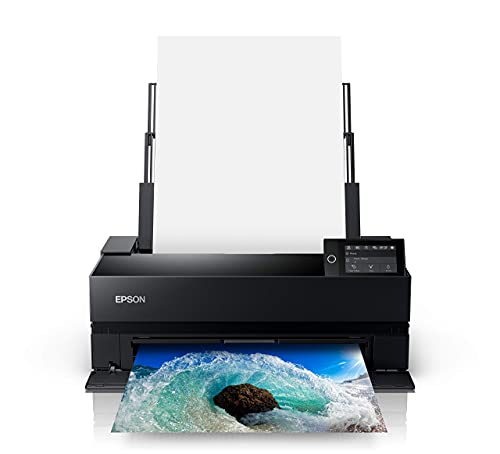
Epson SureColor P900 — The 17-inch professional route — the square is its small size
For the P900, a 12 by 12 print is a modest request made of an immodest machine. This 17-inch professional printer lays a ten-colour pigment set onto sheet or roll media with gallery precision, and a square printed on it — from a 17-inch sheet, or from roll stock cut to length — carries the tonal subtlety and black density that exhibition work requires. Photographers who shoot square on medium-format film or crop square from high-resolution files will find nothing in the print to apologise for, at twelve inches or at twice that.
Roll media quietly changes the square workflow: a series of square prints can run along a roll and be trimmed in batch, which suits the photographer producing an edition or a set of matching frames for a client. The machine’s handling — a large touchscreen, an inspectable paper path, calm loading of delicate fine-art sheets — respects both the media and the operator. Its black-density performance on matte papers is a particular signature, giving square monochrome work the gravity that the format’s stillness invites.
The familiar professional terms apply in full: no scanner, no office functions, ink priced as a studio material, and a workflow that assumes a calibrated screen. A scrapbooker would be buying a concert piano to play chopsticks. But for the reader whose 12 by 12 search is really the shallow end of a serious printing practice, the P900 is where the deep end leads, and buying it once is cheaper than climbing through two lesser machines to arrive there anyway.
A studio note on sizing: because the P900 prints from roll media, a photographer can gang a dozen different square images along a single length of roll, print them in one unattended run, and trim the set together — an efficiency that sheet feeding never matches. For editioned square work, where ten identical sets leave the studio in a month, that workflow alone can justify the machine over its 13-inch rivals.
- Print technology: 10-colour pigment inkjet
- Maximum print size: 17 in wide, sheet and roll media
- Functions: print only
- Media: fine-art, matte, glossy and roll stock
- Borderless: yes at standard photo sizes
- Connectivity: Wi-Fi, Ethernet, USB
Strengths
- Exhibition-grade pigment quality at square size and far beyond
- Roll media suits batch square editions and panoramas
- Outstanding matte black density for monochrome squares
Trade-offs
- Print-only professional instrument — no craft-room versatility
- Studio ink pricing makes playful printing expensive
- Oversized in every sense for album-page work
Best for: serious photographers whose square prints are exhibited, sold or archived, with larger formats in their future.
Not suited for: scrapbookers and crafters, whose thick card and mixed media belong on the XP-15000 instead.

Canon imagePROGRAF PRO-1100 — Canon’s 17-inch flagship — squares with statement size in reserve
Canon’s flagship answers the square the way the P900 does — from above. At 17 inches wide, the PRO-1100 prints a 12 by 12 with the full ceremony of its pigment ink system and chroma optimiser: rich, even colour, gloss that behaves uniformly across the sheet, and a surface finish that makes a framed square look manufactured by a lab with a reputation to protect. Photographers loyal to Canon’s colour rendering — particularly for portraits and saturated work — will find their files translated faithfully at this contemplative size.
The machine’s vacuum feed keeps heavy fine-art sheets flat through the print zone, which at square sizes matters more than it sounds: a 12 by 12 sheet of thick matte paper that lifts a corner mid-print is an expensive lesson, and this printer’s handling is designed to never teach it. Layout control is precise, profiles are well supported, and the printer settles into a studio rhythm of deliberate, excellent output — a few prints an evening, each one final.
Its terms mirror its Epson rival’s: professional ink costs, no scanner, no interest in documents, and a physical presence that claims a dedicated surface. Choosing between the two flagships is a matter of colour taste and ecosystem loyalty rather than capability. Choosing either for square work alone is justified only when the square is serious — printed to be sold, hung or kept — because both machines’ virtues are wasted on paper that will be glued into a book, however lovely the book.
The PRO-1100’s software deserves a word, because at flagship level the driver is half the instrument: Canon’s professional layout tools make placing a square on a 17-inch sheet with exact, repeatable margins a thirty-second task rather than a measuring ritual. Studios producing matching square pairs for diptych frames rely on exactly that repeatability, and it is a virtue no specification table captures.
- Print technology: pigment inkjet with chroma optimiser
- Maximum print size: 17 in wide
- Functions: print only
- Media: fine-art and heavy stock with vacuum feed
- Borderless: yes at standard photo sizes
- Connectivity: Wi-Fi, Ethernet, USB
Strengths
- Flagship colour and gloss control for large square prints
- Vacuum feed protects thick, expensive sheets
- Precise layout and profile support for edition work
Trade-offs
- Professional running costs on every sheet
- No scanning or office capability at all
- Demands dedicated space and a deliberate workflow
Best for: Canon-system photographers printing square work for walls, clients and sale, with larger sizes in reserve.
Not suited for: album crafters and casual users, for whom this is magnificent excess.

Epson WorkForce Pro WF-7310 — The honest budget wide route — prints the square, as a document engine can
This pick needs its label read aloud: the WF-7310 is an office document printer, not a photo printer, and it sits in this guide for one honest reason — it is the cheapest credible way to put ink on a full 12 by 12 sheet. Its wide paper path takes the square as a custom size up to 13 by 19, its pigment inks print crisply on plain and matte craft papers, and for the crafter whose squares are layouts, patterned backgrounds, posters, signage and proofs — work where colour fidelity means cheerful rather than exact — it delivers the size at office running costs.
Scrapbookers use it in a particular, sensible pattern: design and proof the album page on the WF-7310, print the layout’s backgrounds and journalling elements on it directly where matte craft paper is the destination anyway, and send only the hero photographs to a photo printer or lab. Its rear feed handles respectable card weights, its speed makes a batch of party decorations an afternoon’s light work, and its per-page cost never makes a crafter hesitate before reprinting a page that was not quite right — a creative freedom the photo machines’ ink bills quietly ration.
The limits must stay in view. Four office colours cannot render a photograph’s subtle skin tones or a sunset’s gradient without visible compromise, glossy photo paper is outside its talents, and there is no scanner for the hybrid workflow. Buy it as the square’s budget workhorse for paper craft and proofing, and it is a shrewd purchase. Buy it expecting album photographs to glow, and the disappointment will be total and entirely predictable from this paragraph.
Teachers quietly form this machine’s other constituency: a classroom’s worth of square posters, flashcards and display work emerges at a pace and price no photo printer would tolerate, and the pigment ink survives the classroom’s sunlight and small fingers better than dye would. If the square in your life is educational rather than artistic, this is not the compromise pick — it is the correct one.
- Print technology: 4-colour pigment inkjet (office engine)
- Maximum print size: 13 × 19 in; 12 × 12 as custom size
- Functions: print only
- Media: rear feed for card and heavy stock
- Automatic two-sided printing: yes, for documents
- Connectivity: Wi-Fi, Ethernet, USB
Strengths
- Lowest cost per square sheet in this guide by a wide margin
- Crisp pigment output on matte craft papers and card
- Fast enough for batches of decorations, posters and proofs
Trade-offs
- Four office colours cannot do photographs justice
- Glossy photo paper results are poor
- No scanner for hybrid craft workflows
Best for: paper crafters, teachers and party-decorators printing square layouts, backgrounds and proofs on matte media at low cost.
Not suited for: anyone whose square is a photograph they care about — the photo picks above exist for them.
How Do the Six Picks Compare Side by Side?
| Pick | Max size | How the 12 × 12 is made | Ink | Thick card? | Best role |
|---|---|---|---|---|---|
| Epson XP-15000 | 13 × 19 in | Custom size, rear feed | 6-colour dye | Yes — rear path | Scrapbook and craft all-rounder |
| Canon PIXMA PRO-200S | 13 × 19 in | Custom size or trim | 8-colour dye | Limited | Glossy square photographs |
| Canon imagePROGRAF PRO-310 | 13 × 19 in | Custom size or trim | 9-colour pigment | Fine-art sheets | Archival matte squares |
| Epson SureColor P900 | 17 in | Sheet or roll, trimmed | 10-colour pigment | Fine-art sheets | Exhibition squares and beyond |
| Canon imagePROGRAF PRO-1100 | 17 in | Sheet, trimmed | Pigment + optimiser | Yes — vacuum feed | Flagship large squares |
| Epson WF-7310 | 13 × 19 in | Custom size, rear feed | 4-colour office pigment | Moderate card | Budget craft and proofing |
The honest summary of the table is that the square is a setting, not a product: every row reaches 12 by 12 by a slightly different route, and the route — rear-fed card, trimmed sheet, roll stock — decides which machine belongs on your desk more than any difference in print quality at the top of the list.
How Do You Actually Print a 12 by 12 Page, Step by Step?
Begin in the driver, because that is where squares are won and lost. Create a user-defined paper size of exactly 12 by 12 inches and save it under a name you will recognise in six months — Square Album, not Custom 7. Set the paper source to the rear feed for any stock heavier than photo paper, load one sheet at a time with the printable side facing the way your machine’s manual diagrams, and turn off any fit-to-page or borderless expansion setting for the first proof, because those settings rescale silently and a square rescaled is a square ruined. Print the proof on cheap stock of the same size, measure it with a ruler — actually measure it — and only then commit the good card.
For the trim route, the discipline is different: compose the square centred on a 13 by 19 sheet with crop marks or a hairline border in the file itself, print on the photo paper the image deserves, and trim with a rotary cutter on a mat rather than scissors, because a twelve-inch edge exposes every wobble a hand can make. Leave the printed sheet to dry fully before trimming — dye prints especially can offset onto a ruler — and trim in two passes, rough then final, if the paper is thick. Crafters who batch their squares, printing four album pages on Sunday and trimming them together, develop the rhythm quickly; the first careful session teaches everything the subsequent ones repeat.
What Paper Should a Square Be Printed On?
Match the paper to the square’s destination. An album page wants matte, acid-free stock that accepts both ink and adhesive, takes journalling pen without feathering, and survives being turned by thumbs for years — dedicated scrapbook card printed on its smoother face is the craft standard for a reason. A framed photograph wants the paper its ink was tuned for: lustre for dye, matte fine-art for pigment landscapes, gloss where the image’s drama lives in its reflections. A poster square for a classroom or a party wants the cheapest matte stock that takes colour cheerfully, printed on the budget route without a pang.
Weight is the hidden variable. Paper too light cockles under heavy ink coverage and dries wavy; paper too heavy defeats feed rollers and emerges scuffed. Every pick’s manual states a media weight range, and the square sizes make respecting it more important, not less — a large sheet presents more surface for a roller to fight. When a beloved craft paper sits outside the range, the rear feed and a patient single-sheet rhythm sometimes succeed where the tray cannot, and sometimes the honest answer is to print the design on printable stock and mount it onto the beloved paper with adhesive, as crafters have done since long before inkjets.
How Should You Build a Square-Printing Workflow That Survives Real Projects?
The difference between crafters who love their printer and crafters who list it for sale is rarely the machine; it is whether a workflow grew around it. Start by standardising your square: one custom size preset, one default paper for album pages, one for photographs, and a small labelled stock of each kept beside the printer rather than in a distant cupboard. Projects die of friction — the card is upstairs, the preset was never saved, the good paper ran out in October — far more often than they die of print quality. A square-printing station that is always ready gets used; one that requires assembly gets admired.
Proofing discipline is the second pillar. Keep one sacrificial pack of inexpensive matte stock in the exact 12 by 12 size, and run every new design, new paper and new ink set through it before the real sheet is committed. Check the proof at the distance the finished piece will be seen — an album page at reading distance forgives what a framed print at nose distance does not — and check its edges against a metal ruler, because a square that is secretly a rectangle announces itself only when it meets the album protector or the frame. Two minutes of proofing saves the two most expensive things in a craft room: the last sheet of a discontinued paper and the mood of a Saturday.
Finally, keep a small physical log — a notebook page per project, noting paper, preset, ink levels before and after, and anything that misbehaved. It sounds excessive until the day a perfect print from three months ago must be matched exactly, and the log turns a guessing session into a recipe. Professional printmakers have kept such books for centuries, not from fussiness but because paper, ink and memory all drift, and the written record is the only one that does not. The square format rewards this steadiness disproportionately: its geometry is unforgiving, its materials are precious, and its finished form — a page, a frame, a set — is meant to be looked at for years.
Why Has the Square Format Endured from Film to the Feed?
The square is photography’s oldest argument with the rectangle, and understanding it helps a buyer choose how seriously to take their square printing. Medium-format film made the square a discipline: compose within equal sides and the image gains a stillness, a refusal to be hurried horizontally. The social feed revived the format for a generation that had never loaded a roll of 120 film, and album craft gave it a physical home at exactly twelve inches. A square print at that size sits in a sweet spot of presence — large enough that a face in it meets your eye at life scale’s neighbour, small enough to hold, pass and shelve.
That endurance matters for a purchase because it means the square is not a trend to be served by the cheapest machine that survives the season. Album systems are built around 12 by 12 protectors and papers sold in that size by every craft brand; frames for square photographs are a permanent category, not a fad’s residue. Buying a printer for square work is buying into an ecosystem with decades behind it and no retirement in sight — which argues for the machine you will still respect in five years, the XP-15000’s versatility or a 13-inch specialist’s quality, over the merely adequate. The format will outlast the printer; choose the printer that honours it longest.
What Are the Common Mistakes When Printing Square Pages?
The first is trusting a size preset. Drivers offer nearby sizes with helpful names, and a square sent as a 13 by 13 or scaled to fit emerges wrong in a way discovered only when the page meets the album’s protectors. Measure the proof; the ruler is the only authority. The second is feeding treasured card through a front tray because it fit, once — thick stock that survives one bent journey may delaminate a roller for every sheet that follows. Rear-feed the heavy work, always. The third is ink blindness: a full-bleed 12 by 12 background consumes roughly four times the ink of a 6 by 6, and crafters who design dark, saturated album backgrounds meet their cartridge bills with genuine surprise.
Two craft-specific errors complete the list. Printing the photograph and the patterned background on the same stock because it was loaded — the photograph deserves photo paper and the background deserves card, and the hybrid page is assembled, not printed in one pass. And trimming too soon: a dye print trimmed and stacked within the hour can offset onto its neighbour, and a pigment print handled by its face before curing wears a fingerprint in its blacks forever. The square rewards patience at exactly the points where enthusiasm urges speed.
How Do Square Prints Live in Albums, Frames and Gifts?
An album page and a framed print ask different things of the same square file, and experienced square printers prepare two versions without thinking of it as extra work. The album version can carry slightly richer colour and contrast, because it will be seen at reading distance under room light, handled and turned; the framed version deserves a gentler hand, because glass and a wall’s steady light reward subtlety and punish the saturation that looked cheerful on screen. Saving both versions under clear names — the file, the destination, the paper — is the kind of small archival discipline that separates a printing practice from a printing hobby, and it costs ninety seconds per image.
Gifting has its own grammar at this size. A single square print, mounted on a card with a border of breathing room, is the photographic equivalent of a letter — personal, unhurried, complete. A matched pair or trio, printed in one session on one paper so their colour agrees, becomes a small exhibition that fits an envelope. The printers in this guide make such gifts at the speed of thought compared with any ordering service, and that immediacy changes what people give: not the safe, generic present, but the photograph from last month that only the giver could have chosen. Crafters discovered this economy of meaning long ago; the square is their format precisely because it carries it so well.
What Should a Crafter’s First Month with a Square Printer Look Like?
Week one belongs to calibration of expectations: print the same beloved photograph at three sizes on three papers, live with them on the desk, and learn what the machine, the inks and your own taste actually agree on. Week two belongs to the album system — protectors, papers, the custom preset saved and named — assembled before the first real page is attempted, because a page printed into a system that does not yet exist becomes an orphan size that fits nothing. Week three is for the production rhythm: a batch session, proofs first, good stock second, trimming in a pile rather than page by page, until the sequence feels like cooking a familiar meal.
By week four the printer should disappear. That is the honest test of every pick in this guide — not whether it dazzles on delivery day, but whether, a month in, it has become furniture of the creative life: charged, stocked, preset, and reached for without a decision. The XP-15000 reaches that state fastest for crafters because it asks the fewest workflow changes; the specialists reach it for photographers because their output ends the argument about quality. Choose the machine whose fourth week you can picture, and the square will take care of itself for years.
Which Square Should You Print First? A Starter Project for Each Kind of Owner
For the scrapbooker, the first project should be a single completed page, start to finish, before any grand album is planned: one photograph printed at a generous size, one journalling card, one patterned background, assembled and slipped into its protector the same evening. The completed page teaches more than a dozen test prints — how the card feeds when the design is real, how the colours of photograph and paper negotiate, how much ink a background truly drinks — and it leaves the maker with a finished object rather than a pile of evidence. Every subsequent page is a variation on that first success, and the album grows by confidence rather than by resolution.
For the photographer, the first project is a triptych: three square images that belong together, printed in one session on one paper, trimmed and hung as a set. The triptych exposes everything a single print hides — whether the machine holds colour steady across a session, whether your trimming hand is true, whether the three images’ tones agree when they share a wall. It is also, not incidentally, a beautiful thing to own within a week of the printer arriving, and beauty early in ownership is a practical matter: it is what carries a buyer through the learning curve’s occasional wasted sheet to the competence on the other side.
For the budget-route crafter on the WF-7310, the first project is a set of classroom or party squares — posters, name cards, decorations — where the machine’s speed and cheap pages turn an afternoon into a finished event. Success there defines the machine’s role honestly and happily: the workhorse of paper celebration, while the photographs wait for their own instrument. Owners who begin with the right first project rarely regret their printer. Owners who begin with the wrong one — the archival masterpiece on day one, the hundred-page album in week one — blame the machine for a curriculum they set themselves. Start where success is sized to a single evening, and let the square grow from there.
How Do You Store and Display Square Prints So They Survive Their Fans?
A square print’s enemies are the ordinary ones wearing small disguises: the album page turned by a thumb placed exactly on a face, the framed print hung where afternoon sun rehearses its fading daily, the loose print stored against a coloured paper whose dye is quietly migrating. The defences are equally ordinary. Album pages live in protectors, always, and are turned by their edges. Framed squares hang out of direct sun regardless of ink family — pigment buys time, not immunity. Loose prints store flat, interleaved with plain acid-free sheets, in a box that closes against dust. None of this requires archival obsession; it requires the two minutes of care that separate a keepsake from a casualty.
Display has one square-specific joy worth exploiting: rotation. A frame sized for the square lets its owner change the image with the seasons at the cost of one print, and a household that rotates its squares keeps its walls alive in a way fixed art never manages. The printers in this guide make rotation cheap enough to be a habit rather than an event — the XP-15000 for the household’s everyday squares, the specialists when a season deserves ceremony. A wall that changes is a wall that gets looked at, and a print that gets looked at has justified every drop of its ink.
And when a square is loved past its paper’s strength — the album page handled by three generations of thumbs — the file is the immortality clause. Keep the print-ready file, named and backed up, for every square that matters. Papers yellow, inks are mortal, albums meet floods; a file reprinted in a decade on whatever machine then exists is the same page reborn. The printers in this guide are the present tense of that arrangement. The file is its future, and the wise square printer archives both.
One more constituency deserves its sentence before the verdicts: the hybrid journal-keepers who mix printed squares with handwriting, tickets and tape in a single spread. For them the printer is a supplier to a larger craft, and the square that matters is rarely perfect — it is the one that exists, printed at midnight from the day’s photographs while the day is still describable. The XP-15000’s patience with mixed media and the budget machine’s cheap proofs both serve that midnight economy, and the specialists wait, rightly, for the pages that deserve them. A guide that ranked only by print quality would miss why most squares are printed at all: not to be judged, but to be kept company with.
Final Recommendation
Most readers of this guide are making album pages and craft squares, and for them the Epson XP-15000 is the clear first choice: it feeds the card, remembers the size, and prints the photographs inside the layout beautifully. If your square is a photograph for a frame, choose by finish — the Canon PRO-200S for glossy life, the PRO-310 for matte permanence — and if your ambitions run past twelve inches toward the gallery wall, the P900 and PRO-1100 are the honest top of the stairs. The WF-7310 earns its place for proofs, posters and paper craft at office prices, with its limits stated plainly. The best 12 x 12 photo printers are really wide-format printers wearing a square setting — and once that is understood, the right one chooses itself by the paper you feed it.
Frequently Asked Questions
Is there a printer made specifically for 12 by 12 paper?
No mainstream printer is sold as a dedicated 12 by 12 machine. The size is served by wide-format printers — 13 by 19 inch models and 17-inch professionals — that accept 12 by 12 as a custom paper size or print it on a larger sheet for trimming. Any listing implying a native 12 by 12 tray is describing a custom setting in different words.
Can I print on 12 by 12 scrapbook cardstock directly?
On the picks with a rear feed — the XP-15000 above all — yes, one sheet at a time, within the machine’s stated media weight range. Thick, textured or glittered craft papers may exceed any printer’s path; the standard crafter’s solution is to print on printable matte stock and mount it to the decorative card. Always proof one sheet of a new card before committing a project to it.
Borderless or trimmed — which gives the better square?
For photographs at standard sizes, borderless printing is clean and immediate. At a custom 12 by 12, most machines print with a small margin or scale the image slightly, so printing on a 13 by 19 sheet and trimming usually gives the truest square with the cleanest edges. Crafters with a rotary trimmer generally prefer the trim route for album pages.
How much ink does a 12 by 12 print use?
Roughly four times a 6 by 6 print of the same image, since area quadruples — and full-bleed, dark or saturated designs use far more than pale ones. On the photo machines a large square is a deliberate expense; on the office-pigment WF-7310 it is modest. Designers of album backgrounds often lighten coverage or use patterned-paper textures precisely to keep the square affordable.
Dye or pigment ink for square prints?
Dye inks, as in the XP-15000 and PRO-200S, give the most vivid colour on glossy and lustre papers and suit album pages and framed gloss prints. Pigment inks, as in the PRO-310, P900 and PRO-1100, offer superior permanence and matte performance for prints that are sold, exhibited or kept as heirlooms. Choose by the paper you love and the lifespan you need.
Can these printers handle square prints smaller than 12 by 12?
Yes — custom sizes work downward as well, and standard borderless sizes such as 8 by 8 and 10 by 10 are directly supported on the photo models. Many photographers print a matched series of squares at several sizes from the same machine, which is one reason the 13-inch specialists are such a sweet spot for square-format work.
How should I organise finished square pages before they reach an album?
Treat the back of every print as its filing system. As soon as a square has dried fully, note the date, the paper and the printer profile in soft pencil along one rear edge, where a sleeve or mount will hide the writing later. Slide each finished page into a clear protective sleeve before stacking anything, because fresh prints pick up fingerprints and neighbouring pages can offset onto glossy surfaces left face to face overnight. Keep work in progress in one shallow box, finished pages in another, and never let trimmed offcuts share either box, since their sharp corners dent soft coatings. When a project pauses for weeks, that small labelling habit means you can resume mid-album without reprinting a test square to rediscover which settings produced the pages already mounted. Store both boxes flat, away from heat and bright shelves.
Related Guides
Keep exploring with our companion guides: best 13×19 photo printers, best 11×17 inkjet printers and best 2 x 3 photo printers.
Related guides
- Best Affordable Android Phones: Value Measured Across Four Years
- Best Battery NiMH Chargers: Six Units That Understand the Chemistry
- Best 3D Printers With Auto Leveling: Beds That Set Themselves, Ranked by How Much Else They Calibrate
- Best Barebones Keyboards: Six Kits You Finish With Your Own Switches and Keycaps


