What's inside
- Key Takeaways
- Quick Picks
- How We Chose These Picks
- Why Has 24 Inches Become Gaming’s Default Size?
- How Does the Second-Screen Question Shape the Choice?
- Which 24-Inch Gaming Monitor Matches Your Ambition?
- How Do the Best 24 Inch Gaming Monitors Compare?
- What Happens to a 24-Inch Gaming Monitor After the Upgrade?
- What Is the Total Cost of a 24-Inch Gaming Setup?
- How Do These Monitors Handle the Working Day?
- How Should You Choose Between 144Hz, 200Hz, 240Hz and Beyond?
- How Do You Set Up a 24-Inch Gaming Monitor Properly?
- What Should You Know About Response Time Claims?
- What Mistakes Do Buyers of 24-Inch Gaming Monitors Make?
- Which Pick Suits a Gaming Laptop Dock?
- Final Recommendation
- Frequently Asked Questions
- Related Guides
As an Amazon Associate I earn from qualifying purchases. This post may contain affiliate links at no extra cost to you.
widgetverdict.com is reader-supported. When you buy through links on our site, we may earn an affiliate commission.
Where to buy: all six picks below link to verified Amazon listings, and the range is deliberate — this is the head-term guide for the size, so it spans the whole territory from a 144Hz all-rounder to a 280Hz esports instrument rather than crowding one corner of it.
Ask a room of PC players what size a gaming monitor should be and the argument starts immediately — but it starts around a centre, and the centre is 24 inches. The best 24 inch gaming monitors occupy that centre for reasons that compound: the whole screen fits inside a competitive player’s glance, the desk footprint suits real rooms, 1080p at this size lets ordinary graphics cards produce extraordinary frame rates, and the category’s maturity means every panel technology and every refresh tier is represented at prices that reward shopping around. This is the general guide to the size — the one to read before the specialised shortlists narrow the question to a sync standard or a single refresh rate.
The six picks are arranged as a map of the territory rather than a podium. At the summit sits a 280Hz esports flagship built for professional play. Below it, two 200Hz-class IPS screens and a 240Hz all-rounder serve the serious mainstream, a 1440p dissent argues that resolution belongs in this size after all, and a 144Hz value pick anchors the class where most buyers actually live. Read the map by your own games and hardware; the right pick is the one whose compromises are invisible in your library.
Key Takeaways
- 24 inches is gaming’s centre of gravity because the full picture fits one glance, the desk footprint stays modest, and 1080p lets mid-range PCs reach very high frame rates without exotic cooling or cost.
- Refresh rate is a spectrum to match to your hardware, not a score to maximise: the picks run 144Hz to 280Hz, and each ceiling has a graphics card tier that belongs under it and a library that justifies it.
- Five picks are 1080p and one is 1440p. The dissent is deliberate — it serves the desk that works as hard as it plays, and it is labelled as a dissent wherever it appears.
- Panel character decides daily satisfaction more than specifications: esports TN for visibility features, IPS for the balanced mainstream, and the 1440p Fast IPS for sharpness at work.
- Every pick carries adaptive sync of some certified kind, because fluctuating frame rates are the normal condition of real games on real hardware.
- Buy for the library you own. A monitor matched to your actual games beats a flagship matched to someone else’s, every season of the year.
Quick Picks
| Pick | Badge | Why it earns its place |
|---|---|---|
| BenQ ZOWIE XL2546X+ | Esports flagship | 280Hz Fast TN with DyAc 2 blur reduction — the professional instrument of the size class. |
| Dell SE2426HG | Best 240Hz all-rounder | 240Hz IPS with two HDMI ports and DisplayPort, in a design that also behaves at work. |
| Samsung Odyssey G3 | Best big-brand 200Hz | 200Hz IPS from Samsung’s gaming line, with FreeSync Premium and an adjustable stand. |
| AOC 24G42HE | Best value at 200Hz | 200Hz IPS with NVIDIA G-SYNC Compatible certification and a shooter’s response profile. |
| KTC H24T7 | The 1440p dissent | QHD at 180Hz in the 24-inch footprint, for desks split between documents and ranked play. |
| ASUS TUF Gaming VG249QE5A | Best 144Hz anchor | Native 144Hz IPS with ELMB Sync, speakers and a long warranty — the class’s balanced centre. |
How We Chose These Picks
A head-term guide has a different duty from a specialist one: it must map the category honestly before it ranks within it. So the first pass collected the size class’s genuine archetypes — the esports flagship, the high-refresh mainstream, the value anchor, the resolution dissent — and required each archetype’s representative to be the strongest current example of its kind, verified against the pool of confirmed listings. A pick that merely duplicated another’s argument at a different price was cut; the six that remain disagree with each other productively, which is what a map is for.
The technical floor was uniform: 23.8-to-24.5-inch panels, a refresh rate of at least 144Hz, adaptive sync in a certified form, and response behaviour suited to fast games. Beyond the floor, we weighted the fit between each panel’s ceiling and the hardware that plausibly drives it, because a general guide’s readers own everything from ageing mid-range cards to fresh flagships. Each pick section names the machine it assumes, so a reader can locate their own system on the map before they fall for a ceiling.
We also deliberately included one pick — the ZOWIE — whose price will strike general readers as unreasonable, because a map that hides its territory’s summit misleads everyone below it. Knowing what the professional instrument costs and what it buys calibrates every other decision on the page; several readers will choose the Dell or the AOC more confidently for having seen the alternative clearly.
The final pass was about ownership texture — stand range, port layout, warranty, menu sanity, and how each screen behaves in the non-gaming hours that dominate most desks’ weeks. A gaming monitor is also the household’s document screen, video screen and video-call backdrop, and a general guide that ignored those hours would be recommending half a product.
Why Has 24 Inches Become Gaming’s Default Size?
Start with the human geometry — and with the honest admission that defaults are partly self-fulfilling. Because tournaments chose the size, players practise on it; because players practise on it, guides assume it; because guides assume it, new players buy it. A standard that feeds on itself is not necessarily the optimum for every individual, and the reader whose room, eyes or library genuinely argue for another size should let them. But a default with this much ecosystem behind it deserves to be beaten by an argument, not merely by a preference for novelty. At a normal desk distance, a 24-inch 16:9 screen fills the comfortable centre of vision without asking the eyes to travel: the minimap, the health bar and the centre of the action are all inside one glance, which is why competitive players converged on the size and why tournament organisers standardised it. Larger screens add immersion and subtract that glance-economy; smaller ones feel cramped for everything else a desk does. Twenty-four inches is where the trade settles for the largest number of players.
Then the economics. At 1080p, this size asks so little of a graphics card that high frame rates — the thing modern gaming monitors exist to display — are available to ordinary hardware. The panel itself is manufactured at enormous scale, so its price reflects commodity competition rather than novelty. And the physical footprint, stand and all, fits the desks of bedrooms, dorms and shared flats where most gaming actually happens. A default is rarely an accident; it is what remains when geometry, economics and furniture all vote the same way.
There is a final, quieter reason the size persists: it is the largest screen that disappears. A 24-inch monitor does not dominate a room, demand a furniture decision, or turn a bedroom into an arcade in the eyes of the people who share it. For the majority of players, whose gaming lives inside ordinary homes, that discretion is not a compromise — it is the feature that lets the hobby keep its room.
The size also anchors an ecosystem. Settings guides assume it, streamers broadcast from it, racing and flight rigs multiply it, and the second-hand market in it is deep and liquid. Buying the default size is buying into the deepest pool of advice, accessories and eventual resale — unglamorous advantages that compound quietly over the years a monitor stays in service.
How Does the Second-Screen Question Shape the Choice?
Most 24-inch gaming monitors do not stay alone for long. They are joined — by the screen they replaced, by a matching twin bought in a sale, by a portable panel for travel — and the picks differ in how gracefully they accept company. Thin, even bezels matter once two panels share a desk edge; matched colour matters when a document spans both; and a stand that lifts matters most of all, because alignment between neighbours is the difference between a battlestation and a pile. The Dell and the ASUS, with their mounts and manners, are the natural citizens of multi-screen desks, and the guide’s triple-display companion piece takes the logic to its three-panel conclusion.
The planning advice is simple and often skipped: if a second screen is even a someday idea, buy the first one with its future partner in mind — a current model from a stocked line, a VESA mount, a bezel that will not embarrass the pair. Someday purchases fail when the original model vanishes from shelves; the mainstream picks here are the insurance against that particular regret.
Which 24-Inch Gaming Monitor Matches Your Ambition?

BenQ ZOWIE XL2546X+ — Esports flagship
The XL2546X+ is what the top of this category looks like when a manufacturer stops negotiating. A 24.1-inch Fast TN panel runs at 280Hz, and ZOWIE’s DyAc 2 technology attacks motion blur with backlight strobing tuned for exactly the fast, bright scenes competitive shooters produce. Around that core sit the line’s signature instruments: Black eQualizer for shadow visibility, Color Vibrance for target separation, the S Switch puck for changing settings without menu-diving, a shielding hood for stage lighting, and the XL Setting to Share system that lets players exchange exact configurations. It is less a monitor than a piece of tournament infrastructure that happens to fit on a home desk.
The buyer it assumes is specific, and its section should be equally specific about who should walk past. If your evenings are ranked tactical shooters, your card can feed very high frame rates, and your settings are a competitive variable you actively manage, this is the instrument the professionals chose and the guide’s ceiling. If your library is broad, your room is shared, or your card is mid-range, the flagship’s price buys capabilities your games will never interrogate — and its TN panel’s colour and angles will remind you of the trade during every film.
ZOWIE’s longevity in this niche is itself a feature: profiles, firmware and community knowledge for this line run deep, and a player joining the ecosystem inherits years of accumulated settings wisdom for specific titles. Specialists value that inheritance; generalists will never open the box it comes in.
One more consideration separates it from home rivals: it assumes an audience of one, centred, close. The hood, the angles, the tuning all presume the tournament geometry. A player who recreates that geometry at home gets the full instrument; a player who games from a sofa with friends gets a panel optimised for a room they are not in. The guide keeps it at the top of the map because the summit should be marked honestly — and because for its intended reader, nothing else on this page is a substitute.
- Panel: 24.1-inch Fast TN, 1920 × 1080
- Refresh rate: 280Hz
- Sync: esports fixed-refresh design with DyAc 2
- Inputs: HDMI, DisplayPort
- Extras: S Switch, shielding hood, Black eQualizer, Color Vibrance
Strengths
- The most complete competitive feature set in the size class, bar none.
- 280Hz with DyAc 2 delivers motion clarity the IPS picks cannot match.
- Settings-sharing ecosystem and tournament pedigree run deep.
Trade-offs
- TN colour and viewing angles are the class’s weakest for media.
- Priced for specialists; general libraries cannot spend its advantages.
- Demands a strong PC to feed its ceiling.
Best for: competitive FPS players whose rank and hardware justify a professional instrument. Not suited for: mixed libraries, film lovers, or mid-range PCs.

Dell SE2426HG — Best 240Hz all-rounder
Dell’s entry is the guide’s argument that 240Hz has gone mainstream. The SE2426HG puts a 23.8-inch IPS panel at 240Hz — a rate that was flagship territory recently — behind a design restrained enough for a workplace, with two HDMI ports and DisplayPort 1.4 giving a PC and two consoles or a laptop permanent homes. FreeSync Premium covers the sync side, and the eye-comfort certification is a genuine programme rather than an adjective. For the player who wants the high ceiling without the gaming-aesthetic tax, this is the shape of the answer.
The IPS panel is the point. At 240Hz the historical bargain was TN speed against IPS colour; this pick declines the bargain, keeping viewing angles and colour that survive the working day and the shared room. Its compromises are the hub features it skips — no USB-C docking, no KVM — and a tilt stand that assumes an arm or a riser may follow. Neither matters to the desk it targets: a gaming-first setup whose owner values a screen that does not shout.
There is also the Dell factor: distribution, warranty handling and the likelihood that the model remains supported and findable for years. In a category full of exciting strangers, the all-rounder from the biggest name in monitors is a legitimate preference, not a failure of imagination.
Picture the household it suits best: a PC under the desk, a console beside it, a partner’s laptop that visits on work-from-home days. The Dell hosts all three without a cable swap, presents a face the living room approves of, and still lines up at 240Hz when the ranked queue opens. Versatility at this level is not the absence of specialisation — it is specialisation in the household itself.
- Panel: 23.8-inch IPS, 1920 × 1080
- Refresh rate: 240Hz
- Sync: AMD FreeSync Premium
- Inputs: 2 × HDMI, DisplayPort 1.4
- Extras: TÜV eye-comfort certification, tilt stand
Strengths
- 240Hz IPS without the esports aesthetic or the flagship price logic.
- Two HDMI ports make it a genuine multi-device screen.
- Big-brand support and a work-appropriate design.
Trade-offs
- No USB-C or KVM for laptop-docking desks.
- Tilt-only stand.
- NVIDIA owners rely on adaptive sync behaviour rather than a named certification.
Best for: serious mainstream players who want 240Hz and a grown-up design. Not suited for: docking-focused desks or esports specialists.

Samsung Odyssey G3 — Best big-brand 200Hz
Samsung’s Odyssey G3 brings the company’s gaming line down to the size class in its most accessible form: a 24-inch IPS panel at 200Hz with a 1ms response profile and FreeSync Premium. The Odyssey design language — the stand with real adjustment, the gaming menu system, the black-equaliser and virtual-aim conveniences the line is known for — arrives intact, which matters because Samsung’s software polish is a genuine differentiator in daily use. Menus you can navigate without resentment are a feature; owners of lesser interfaces will confirm it weekly.
The G3’s position on the map is the comfortable middle: faster than the 144Hz anchor, short of the Dell’s 240Hz, with a brand and a retail presence that make it the easiest pick here to see in a store before buying. Its panel keeps the IPS virtues — colour, angles — that shared rooms and mixed use demand. For the buyer whose decision process is “the good one from the name I trust, at the rate my PC can feed”, the G3 is the guide’s most frictionless answer.
Its honest limits are the line’s entry-level ones: the HDR story is modest, the hub features are absent, and the specification sheet will lose arguments to the AOC below on value. What it wins is the ownership argument — support, software and the confidence of a giant’s gaming division standing behind a mainstream product.
Its menu system deserves the specific praise reviewers usually reserve for panels. Input switching, game modes and the equaliser live where a player expects them, and the joystick control is the kind you can operate by feel during a loading screen. On a screen that may host a console and a PC in the same evening, that operability is the difference between features that exist and features that get used.
- Panel: 24-inch IPS, 1920 × 1080
- Refresh rate: 200Hz
- Sync: AMD FreeSync Premium
- Inputs: HDMI, DisplayPort
- Extras: Odyssey gaming menu features, adjustable stand
Strengths
- 200Hz IPS with Samsung’s polished gaming software around it.
- Adjustable stand, unlike several rivals at the rate.
- The easiest pick to audition in a physical store.
Trade-offs
- Value specialists will find the AOC’s certification story stronger.
- No USB hub or USB-C docking.
- HDR is a label more than an experience at this level.
Best for: brand-trusting buyers who want 200Hz with polished software. Not suited for: certification-focused NVIDIA owners or docking desks.
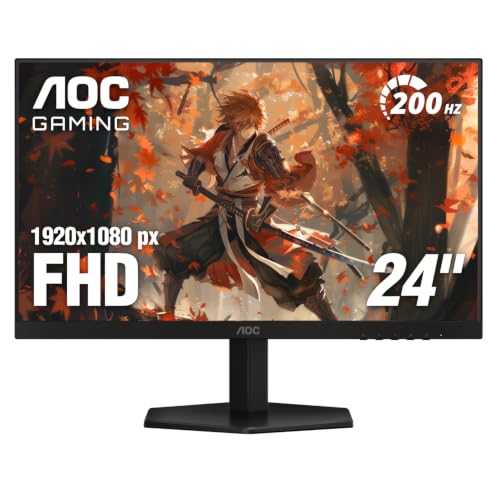
AOC 24G42HE — Best value at 200Hz
AOC built its reputation by selling the specification other brands charge for, and the 24G42HE is that strategy at 200Hz: an IPS panel with NVIDIA G-SYNC Compatible certification stated on the listing, a 0.3ms response figure aimed at shooters, HDR10 support and a VESA mount. The certification is the headline for this guide’s purposes — at the value end of 200Hz, plenty of panels offer adaptive sync in the abstract, but the AOC offers NVIDIA’s validated version of it, which converts a hope into a programme.
The rest of the ownership picture is value-brand honest: a functional stand, a three-year warranty on the listing that punches above the price class, and an earphone output that respects the headset reality of competitive play. The design will not win the desk a photography feature, and there are no hub pretensions. What the buyer gets is the rate, the certification and the panel — the three things that cannot be added later — at the point where the guide’s 200Hz argument is cheapest to accept.
Placed beside the Samsung, the choice is temperament: the G3’s polish and presence against the AOC’s certification and value. Placed beside the Dell, it is ceiling against price. That a single size class sustains this many legitimate answers is the category’s maturity showing.
For the streaming-curious it has a quiet advantage: a single, certified, high-refresh panel that behaves predictably with capture software and overlays, at a price that leaves budget for the microphone and lighting that actually decide a stream’s quality. Not every pick needs a second vocation, but the AOC’s combination of rate, certification and restraint makes it the natural foundation of a first serious battlestation assembled in stages.
- Panel: 24-inch IPS, 1920 × 1080
- Refresh rate: 200Hz
- Sync: NVIDIA G-SYNC Compatible
- Inputs: HDMI, DisplayPort
- Extras: HDR10, VESA mount, earphone output
Strengths
- Certified G-Sync behaviour at 200Hz for the least commitment in the guide.
- IPS panel keeps the value honest for mixed use.
- Three-year warranty backing on the listing.
Trade-offs
- Basic stand; an arm is the assumed upgrade.
- No speakers or hub features.
- Design is functional rather than handsome.
Best for: NVIDIA players who want certified 200Hz without flagship money. Not suited for: desks needing speakers, docking or design presence.

KTC H24T7 — The 1440p dissent
Every map needs its argument, and the H24T7 is this one’s: a 24-inch Fast IPS panel at 2560 × 1440, running 180Hz with an overclock to 185Hz, naming both G-Sync and FreeSync among its certifications, with HDR400 and a height-adjustable stand. Its claim is that the size class’s 1080p consensus underserves the desk that works — that text at 1440p density, images with real detail, and games with finer geometry are worth the frame-rate tax, and that at 24 inches the tax is smaller than the 27-inch world assumes because the panel remains easy to drive compared with its larger QHD cousins.
The claim survives scrutiny for a specific reader: the one whose screen time is half documents, design or code, whose graphics card is modern and mid-range or better, and whose games value image quality alongside speed. For that reader the H24T7 is not a compromise but the only pick here that refuses to choose between the day’s two halves. Its dual certification keeps both GPU camps welcome, and its stand supports the posture a working screen owes its owner.
The counterargument is equally clear, which is why this is a dissent and not the headline: pure gaming desks will get more from the 1080p picks’ higher, cheaper frames, and consoles gain least from this panel. KTC is also a smaller name than the giants elsewhere in the guide, and its support network is the consideration that accompanies its aggressive specification.
There is a creative constituency for it as well: the hobbyist who edits video or photographs in the evening and games after. At 24 inches the QHD panel will not replace a colourist’s reference screen, but its density and gamut make casual creative work respectable in a way the 1080p picks cannot claim, and its refresh keeps the timeline scrubbing fluid. One screen, three shifts — documents, edits, ranked — is the H24T7’s complete argument.
- Panel: 24-inch Fast IPS, 2560 × 1440
- Refresh rate: 180Hz, overclock to 185Hz
- Sync: G-Sync, FreeSync
- Inputs: HDMI, DisplayPort
- Extras: HDR400, height-adjustable stand
Strengths
- 1440p sharpness in the competitive footprint — the guide’s only such pick.
- Dual sync certification and a proper stand.
- A panel that survives the next graphics card upgrade.
Trade-offs
- Costs frame rate everywhere; weaker GPUs feel it first.
- Smaller brand, thinner support network.
- Consoles are guests here, not the audience.
Best for: work-and-play desks with a capable PC that value text and detail. Not suited for: pure gaming rigs on modest cards or console-led setups.

ASUS TUF Gaming VG249QE5A — Best 144Hz anchor
The anchor of the map is the pick for the reader who declines the ceiling race entirely. The VG249QE5A runs a 23.8-inch IPS panel at a native 144Hz — with a small overclock to 146Hz for those who want it — and wraps it in the completeness the TUF line is known for: ELMB Sync blur reduction that works with variable refresh, built-in speakers, variable overdrive, desktop settings software and a three-year warranty. At 1080p, 144 frames is what a vast installed base of graphics cards actually produces in the games people play, which makes this pick not the budget concession but the matched component for most real systems.
Its virtues compound in ownership. The speakers remove a peripheral from small desks. The software removes the rear-button ritual from settings changes. The warranty outlasts the typical upgrade itch. And the panel’s IPS character — colour, angles, even backlight — makes it the pick least likely to be regretted by a buyer whose library turns out broader than expected, which is most buyers.
Against the faster picks, the honest statement is that it offers less ceiling and more completeness. A general guide needs exactly one such anchor, placed where the majority of readers’ hardware and libraries actually live, and the ASUS holds that ground against every value rival we weighed.
It is also the pick most likely to be bought twice — once for the main desk, and again when a second room, a second child or a second machine needs the same known quantity. Standardising on a complete, warranted, speaker-equipped panel simplifies a household’s spares, settings and expectations. The flagship picks inspire more conversation; the anchor inspires repeat purchases, which is its own kind of verdict.
- Panel: 23.8-inch IPS, 1920 × 1080
- Refresh rate: 144Hz native, overclock to 146Hz
- Sync: adaptive sync with ELMB Sync
- Inputs: HDMI, DisplayPort
- Extras: built-in speakers, variable overdrive, 3-year warranty
Strengths
- The most complete 144Hz package here — speakers, software, warranty.
- Matched to the frame rates most real PCs produce.
- Blur reduction that coexists with variable refresh.
Trade-offs
- Ceiling is the class floor; fast-PC owners will want more.
- Tilt-only stand.
- Utilitarian design.
Best for: the majority — balanced libraries on mid-range PCs. Not suited for: players whose hardware and ambitions already live at 200Hz and beyond.
How Do the Best 24 Inch Gaming Monitors Compare?
| Pick | Panel | Resolution | Refresh | Character |
|---|---|---|---|---|
| BenQ ZOWIE XL2546X+ | 24.1″ Fast TN | 1080p | 280Hz | Professional esports instrument |
| Dell SE2426HG | 23.8″ IPS | 1080p | 240Hz | Grown-up all-rounder, 2 × HDMI |
| Samsung Odyssey G3 | 24″ IPS | 1080p | 200Hz | Big-brand polish |
| AOC 24G42HE | 24″ IPS | 1080p | 200Hz | Certified value |
| KTC H24T7 | 24″ Fast IPS | 1440p | 180Hz | Sharpness dissent |
| ASUS TUF VG249QE5A | 23.8″ IPS | 1080p | 144Hz | Complete anchor |
What Happens to a 24-Inch Gaming Monitor After the Upgrade?
It becomes infrastructure, and that is a compliment of the highest order in a hobby built on upgrades. Nobody writes odes to the monitor that simply served for six years, through two graphics cards, one house move and a change of games — but that monitor delivered more value than every exciting component that passed beneath it. The first gaming monitor a household buys tends to anchor the desk for years, absorbing new PCs beneath it, hosting consoles that arrive later, and finally retiring — when a larger or faster panel takes the centre — into the second-screen role it was secretly designed for. This lifecycle is why the guide weights mounts, speakers and certification breadth alongside speed: the wing-screen years are longer than the flagship years, and a pick that serves both halves of its life is worth more than its launch-day specification suggests.
The lifecycle also reframes the budget. Spread across a primary life plus a secondary one, the difference between the anchor and the flagship compresses to a modest annual figure, which cuts both ways: it excuses the specialist who will truly use the ZOWIE, and it exposes the ceiling purchase made for a library that never asked. Buy the monitor your next five years describe, not the one your most ambitious weekend describes.
What Is the Total Cost of a 24-Inch Gaming Setup?
The monitor’s price is the headline, not the total — and treating it as the total is how careful budgets acquire their mysterious overruns, one small accessory at a time. The honest ledger adds a DisplayPort cable if the box’s is short, an arm or riser for the tilt-only picks, and — for the speakerless screens — whatever the desk’s audio plan costs. None of these is large, and several picks pre-pay parts of the ledger: the ASUS includes speakers, the Dell includes the second HDMI residence that saves a switch, the AOC’s VESA mount is ready for the arm you may already own. Reading each pick’s extras list as a budget document is the habit this guide most wants to teach, because the cheapest monitor is often the one that demands the fewest companions.
Against that ledger, set the category’s mercy: at 24 inches and 1080p, the graphics card required to do these panels justice is the one most players already own or can buy without heroics. The expensive version of gaming — the 4K card, the flagship panel, the power supply to feed both — is a different hobby’s budget. This class is where high-refresh gaming remains a modest, completable purchase, and its total cost, honestly counted, is the strongest argument in the entire guide.
How Do These Monitors Handle the Working Day?
Better than their branding admits — in several cases better than the office monitors sold for the same desks, which rarely offer this combination of refresh, sync and panel quality at the price. The IPS picks are, panel for panel, entirely respectable office displays — accurate enough colour, flicker-free backlights, reader modes on the LG-derived designs and eye-comfort certification on the Dell. Text at 1080p on 24 inches is coarse beside the KTC’s 1440p, which is the dissent’s whole case, but it is the density most offices still run and it bothers fewer people than forum arguments suggest. The TN flagship is the honest exception: its angles and colour mark it as a single-purpose tool, and a workday spent on it is a workday spent negotiating.
Ergonomics is the working day’s other half. Only some of these stands lift, and the rest ask for an arm or a riser to reach a healthy eye line — a small, one-time cost that the guide counts as part of the purchase for tilt-only picks. Readers assembling a desk for a decade of mixed use should treat that line item as non-optional; the monitor will be looked at for more hours than every game in the library combined.
How Should You Choose Between 144Hz, 200Hz, 240Hz and Beyond?
Work backwards from the frame rates your system produces in your games, not forwards from the numbers on the boxes — and be suspicious of any test that uses a game you do not play at settings you would not choose. Your library at your settings is the only benchmark with a vote. A card that holds 150 frames in your library makes the 144Hz anchor a perfect fit and the 200Hz picks a modest headroom purchase; a card that holds 230 makes the Dell’s ceiling the honest match; the ZOWIE’s 280Hz is professional territory that assumes hardware and intent to match. In every case the adaptive sync on these panels smooths the gap between the system’s output and the screen’s ceiling, so buying one tier of headroom is safe — buying three tiers is a donation.
A word about diminishing returns, since the ladder invites the question. Each doubling of refresh rate halves the time between frames, so the absolute gains shrink as the numbers grow: the step from 60 to 144 removes far more waiting than the step from 144 to 240, which removes more than 240 to 280. None of the steps is imaginary, but they are not equal, and a buyer deciding between the Dell’s 240 and the AOC’s 200 should know they are choosing between two points on the flat part of the curve — where panel, price and features rightly take over the decision.
Then let the library arbitrate. Competitive titles convert refresh into information; cinematic titles convert it into very little, and would rather have the KTC’s pixels or a larger screen. The mixed library — most libraries — should weight the middle picks, where the rate is high enough for the fast games and the panel is civilised enough for the slow ones. That is not indecision; it is the correct reading of a varied catalogue.
How Do You Set Up a 24-Inch Gaming Monitor Properly?
The physical setup comes first and is most often skipped, usually because the screen works the moment it is plugged in and the incentive to optimise evaporates: the top of the screen near eye level, the panel an arm’s length away, tilted slightly up. At 24 inches that geometry puts the whole image inside the glance the size was chosen for; a screen mounted too low or pushed too far back quietly forfeits the format’s advantage. Tilt-only stands in this guide reach the geometry with a riser or a book in the interim and an arm as the permanent answer, and the VESA patterns on most picks make that answer cheap.
The signal setup is the five-minute ritual this batch of guides repeats because it keeps being necessary: DisplayPort for the PC, the operating system’s refresh rate set to the panel’s maximum rather than its default, adaptive sync enabled in the driver, and the monitor’s information page consulted to confirm the incoming signal matches the intention. Consoles need only their own video settings set to automatic and the correct HDMI input. Every later disappointment in this category traces to one of those steps skipped on day one.
Finally, calibrate by eye for your room rather than by screenshot for someone else’s — and revisit the calibration when the room changes, because a screen tuned for a dark winter evening will glare through a bright summer morning. Monitors are not set-and-forget appliances so much as furniture that occasionally wants adjusting, and the owners who accept that rhythm get the best of every panel in this guide. Set brightness for the room’s actual light, choose the overdrive’s middle setting before experimenting, and save separate profiles for work and play if the monitor allows them. A week of small adjustments, made against your own games and documents, produces a setup no downloaded profile can match — because it was fitted to the only eyes that will ever use it.
What Should You Know About Response Time Claims?
Every pick in this guide advertises a response figure, and the figures are not measured on a shared standard, which makes them the least comparable numbers in the category. A 1ms claim and a 0.3ms claim describe different test methodologies more than different panels. What a buyer can trust is the pattern: Fast IPS and Fast TN panels in this class all respond quickly enough that motion clarity is governed more by refresh rate and overdrive tuning than by the advertised figure, and the honest differentiators are the blur-reduction technologies — DyAc on the ZOWIE, ELMB Sync on the ASUS — whose effect is visible rather than numerical.
The practical advice follows, and it is liberating once absorbed: you may stop comparing decimal points that were never measured the same way twice. Do not rank these six by their response claims; rank them by ceiling, panel and features, and use the overdrive setting as the tuning dial it is. If a panel ghosts, the middle overdrive usually cures it; if it coronas with bright halos, the gentler setting does. Your eyes, in your games, are the only instrument calibrated to the thing you actually care about.
What Mistakes Do Buyers of 24-Inch Gaming Monitors Make?
The category’s classic mistake is ceiling worship, and it has a recognisable biography: the buyer reads three ladders disguised as guides, buys the tallest screen the budget survives, and spends the next two years in the bottom half of its range wondering why the upgrade feels theoretical. The cure is the diary method from the FAQ — measure your own frame rates first, and let the evidence choose the ceiling.
The mirror error is feeding a tall screen with a system that lives at half its rate while the panel’s other qualities — colour, stand, ports — quietly underperform the picks that were passed over. The second is the reverse snobbery, dismissing 144Hz as last generation’s rate when it remains the matched rate for the majority of installed hardware. Both errors come from reading the category as a ladder instead of a map.
A subtler error is buying against a future that is not scheduled. Headroom for the next card is wisdom when the card is genuinely coming; when it is a someday-object, the headroom premium would have served better as the stand, the arm or the games themselves. This guide’s ceilings are labelled with the hardware they assume precisely so that someday-purchases can recognise themselves.
Practical mistakes follow. Forgetting that Windows must be told to run the panel at full rate. Assuming a console will use the PC’s ceiling. Buying a TN esports panel for a shared room and discovering its angles at the first film night. And neglecting the second-screen future: a 24-inch gaming monitor is the most reusable object in the setup, and the picks with VESA mounts and decent speakers retire into that role with the least friction.
Which Pick Suits a Gaming Laptop Dock?
The docked laptop is now one of this category’s main constituencies — students, hybrid workers and travellers all arrive at the same desk shape — and it reorders the picks in instructive ways. The laptop’s card is usually a tier below its desktop namesake, which pulls the sensible ceiling down toward the 144–200Hz picks; the laptop also arrives with its own screen, making the external panel a natural primary for games and the internal one a companion for chat and guides. The Dell’s twin HDMI ports welcome the laptop beside the console, the ASUS’s speakers serve a desk with no room for a soundbar, and the KTC gives the laptop the external workspace its portability taxes away.
One verification matters before purchase: the laptop’s video output must route from its discrete graphics, not only its integrated chip, if the full refresh and sync features are to appear — a specification buried in laptop documentation and worth the two minutes it takes to confirm. With that confirmed, any of the six turns a portable machine into a desk machine, which is increasingly the entire point of owning both.
Final Recommendation
One closing observation from the category as a whole: the distance between the cheapest and the finest pick here is smaller, in daily experience, than the distance between any of them and the 60Hz screen they replace. The first decision — joining this class at all — is the large one. The second decision, which of the six, is a matter of fit, and fit is a question your desk, your card and your library can already answer.
Read the map by your own coordinates. The ASUS VG249QE5A is the anchor and the default for the broad middle of players; the AOC 24G42HE and Samsung Odyssey G3 serve the 200Hz mainstream from the value and brand directions respectively; the Dell SE2426HG is the grown-up 240Hz answer; the KTC H24T7 is the dissent for desks that work; and the ZOWIE XL2546X+ is the professional instrument, bought knowingly or not at all. The size is the constant — the glance-sized, desk-friendly, hardware-friendly centre of gaming — and any of these six honours it in a different dialect.
Frequently Asked Questions
What should I check in the first week with a new gaming monitor?
Run the verification ritual from the setup section, then use the panel the way you actually live your week: your heaviest game, your longest document, a film in a dark room. Check for the panel faults that warranties exist for — dead pixels, backlight blotching in dark scenes, a stand that creeps — while the return window is open and the discovery costs nothing. A week of honest use is the real review; this guide’s job is to make sure the right candidate gets it.
How long will a 24-inch gaming monitor last?
As a primary screen, realistically through two PC builds; as a second screen, several years beyond that — assuming the household’s needs stay desk-shaped, which for most they do. The panels themselves are mature and durable, the connectors are current, and the size class shows no sign of being displaced as the competitive standard. The traits that decide whether yours completes that lifespan pleasantly are the unglamorous ones this guide keeps naming — stand, mount, warranty, certification breadth — which is why they are weighted like specifications rather than garnish.
Is a TN panel still worth buying in this class?
For one reader, yes: the competitive specialist whose games and settings are built around visibility and motion clarity, and who accepts the colour trade as the known price of the instrument. The ZOWIE’s section makes that case in full. For everyone else the modern Fast IPS picks have retired the question — they are fast enough that TN’s remaining advantage belongs to the professional tier, where it is bought knowingly.
Is 24 inches too small for modern gaming?
For desk gaming, no — it is the size the competitive scene standardised on precisely because the whole image stays within a glance at desk distance. There is also a pixel-density comfort to it: at 1080p the interface elements of games and operating systems render at the sizes their designers assumed, so nothing arrives tiny, scaled or awkward the way it can on larger, denser panels. It feels small only when the viewing distance grows: a couch setup, a bed-desk, or a screen shared by two viewers argues for a larger panel. Match the size to the chair’s distance, not to the showroom’s wall.
Should I choose 1080p or 1440p at 24 inches?
1080p for pure gaming on ordinary hardware, because the frame rates it unlocks are the point of this size class. The mistake to avoid is choosing by pixel count alone: a 1440p panel fed at 70 frames by an overmatched card delivers a worse gaming experience than a 1080p panel fed at 160 by a comfortable one, whatever the spec sheets imply about progress. 1440p — the KTC’s argument — for the desk that splits its hours with text-heavy work and owns a card that can pay the pixel tax. Consoles sit happily with either, at their own output limits.
How much refresh rate do I actually need?
As much as your system reliably produces in the games you play most, plus a little headroom for the heavier sequel and the busier map. The measurement is easy to make honestly: watch your current frame rates for a week before shopping, and let that diary — not a benchmark of a game you do not own — set the ceiling you pay for. For the majority of PCs that means the 144–200Hz band where four of these six picks live. Rates above that are professional tools and future-headroom purchases, and they should be bought as such — knowingly.
Can a console use these monitors well?
Yes. Consoles output up to 120Hz, which every pick here accepts, and the Dell’s twin HDMI ports make it the natural console-plus-PC screen of the six. Console players should set the machine’s video output to automatic and let it negotiate its performance modes; the panel’s job is simply to be ready, and at these ceilings it always is. The console simply leaves the upper refresh range to the PC, which costs the console player nothing and the household nothing.
Is a curved panel better at 24 inches?
At this size the curve is a matter of taste rather than geometry — the screen is not wide enough for the edges to retreat. Players who sit close and play immersive titles sometimes prefer the slight wrap even here, and the neighbouring 144Hz guide includes curved options for exactly that taste; within this head-term shortlist, the flat panels simply won more arguments. This guide’s six are flat because the class’s best gaming panels are; readers who love the wrap for racing and flight titles will find curved specialists in the neighbouring guides, where the format’s case is argued on its own terms.
What is the best second monitor to pair with one of these?
Another of the same size, ideally the same model, so colour and height align without a fight — and so the pair reads as a designed battlestation rather than an accumulation. If the budget forces asymmetry, put the better panel in the centre and the lesser at the wing, and match their brightness by eye at your room’s usual light. A retired pick from this very list is the classic answer: buy the anchor now, let it become the wing when the flagship arrives, and the desk grows without waste. VESA compatibility on most of these picks makes the pairing physically painless.
Is it worth paying more for the same refresh rate?
Sometimes — when the money buys the things refresh rate cannot: a stand that lifts, a second HDMI port, a longer warranty, speakers, a certification your card actually uses. The picks in this guide differ at identical rates for exactly those reasons, and the sections price the differences in words. What is never worth paying for is the same panel, the same stand and the same ports wearing a larger number achieved by an overclock you could have read about in the fine print.
Do these monitors work for sim racing and flight rigs?
They are the classic building block for them — three matched 24-inch panels are the traditional triple-screen rig, which is why the neighbouring guide in this batch treats the triple-display question in full. A single pick from this list serves a desk racer well today and tonight and becomes one third of a rig tomorrow, provided the model remains available; buyers with rig ambitions should choose a current, widely stocked pick and consider buying the set within the same season.
What refresh rate do streamers prefer at this size?
The 144–200Hz band, for a practical reason: capture and encoding pipelines are happiest at the rates and resolutions this class’s mainstream produces, and the stream’s viewers watch at a fraction of the panel’s rate regardless of what the broadcaster’s own screen is doing in the room with them at the time of broadcast. The AOC and Samsung picks are the natural streamer’s foundations — certified or polished, high-refresh, and priced to leave budget for the audio and lighting that audiences actually judge.
Related Guides
Narrowing the search? The specialist shortlists go deeper into each corner of the map: the best 24 inch 144hz monitors for the anchor rate in full, the best 24 gaming monitors with gsync for NVIDIA-certified panels, and the best 2 hdmi gaming monitors for multi-device desks.



[…] class? Keep the character question in front of the numbers at every step of the comparison. Read the best 24 gaming monitors with gsync for the NVIDIA-certified shortlist in full, the best 24 inch gaming monitors for the full category […]