What's inside
- Key Takeaways
- Quick Picks
- How We Chose These Picks
- Comparison
- Should You Print on the Object, or Print a Sticker for It?
- What Does White Ink Actually Ask of You?
- How Do You Set Up a Small UV Workspace?
- Which Materials Behave on a UV Bed, and Which Ones Fight Back?
- How Do the Running Costs of UV Printing Really Accumulate?
- What Should Your First Production Week Look Like?
- When Does Stepping Up to an A3 Bed Actually Pay?
- What Are the Common Mistakes When Buying a First UV Printer?
- Final Recommendation
- Frequently Asked Questions
- Related Guides
As an Amazon Associate I earn from qualifying purchases. This post may contain affiliate links at no extra cost to you.
widgetverdict.com is reader-supported. When you buy through links on our site, we may earn an affiliate commission.
Each linked machine below leads to its Amazon listing, where the current figure can be checked and the exact bundle in the listing title confirmed before money changes hands. Bundles shift in this category more than in most, so the title on the day you order is the document that counts.
Ask a sign shop what changed their business in the last five years and many will point at a squat desktop box that prints straight onto acrylic, glass, leather and phone cases, curing the ink with ultraviolet light the instant it lands. The best uv printers compress that industrial trick into machines a small studio can own, and the six below span the real shape of the current market: one dedicated UV DTF sticker machine, two compact Procolored flatbeds, two DXZ flatbeds including a laminator bundle, and a RAINBOWDGT A3 unit with a vacuum platform and bottle holder. They are not interchangeable. Two of them make stickers you apply to objects; four of them print on the object itself, and confusing those two families is the costliest beginner error in the whole category.
UV printing earns its keep through adhesion and immediacy. The ink sits on the surface rather than soaking in, a UV lamp hardens it within the same pass, and the finished piece can be handled, stacked or shipped without a drying rack or a waiting period. White ink is the quiet hero of the process: laid down first, it gives colour something opaque to sit on when the object is dark, clear or metallic. That white channel is also the part of the machine that demands the most from its owner, because white pigment settles, thickens and sulks in lines that are left idle. Every verdict in this guide weighs that maintenance reality alongside print size and resolution, because a UV printer is a small chemical plant as much as it is a printer.
Read the six reviews with your actual product list in hand. A maker selling personalised phone cases and golf balls lives in a different size class from a workshop printing A3 acrylic signage, and the sticker route suits some businesses better than any flatbed. The guide keeps those lanes separate from the first table to the final recommendation.
Key Takeaways
- The Procolored VF13 Pro is a UV DTF sticker machine per its listing title — it prints film you apply to objects, and it is not a direct flatbed.
- Four picks print directly onto objects: the Procolored V11 Pro and V6 Panda, the DXZ A4, and the RAINBOWDGT A3; the DXZ A3 bundle straddles both worlds and includes A/B film plus a laminator.
- Print width splits the field cleanly — 6.7 inches on the V6 Panda, 11.4 inches on the V11 Pro, and A3-class beds on the DXZ A3 and RAINBOWDGT.
- White ink care decides ownership happiness: mixing, circulation and auto-cleaning features named in the DXZ and RAINBOWDGT titles exist because idle white ink clogs.
- Resolution figures in these titles run from 1440×2880 DPI on the DXZ A4 to 5760×2880 DPI on the RAINBOWDGT, and real-world texture work depends as much on white laydown as on headline DPI.
Quick Picks
| Pick | Badge | Why it is here |
|---|---|---|
| Procolored VF13 Pro Panda UV DTF Printer | Sticker Production Pick | A 13-inch A3+ UV DTF machine with dual XP600 heads, bundled ink and film, built to produce durable stickers for objects a flatbed cannot hold. |
| Procolored V11 Pro UV Printer | Direct-to-Object Flagship | An 11.4-inch A3 flatbed with dual TX800 heads aimed at acrylic, metal, leather, bottles and phone cases. |
| Procolored V6 Panda UV Printer | Compact Starter Flatbed | A 6.7-inch A4 machine with an L800 head and UV ink included, sized for cases, gifts and small rigid goods. |
| DXZ A4 UV Flatbed Printer (2026) | Texture and Emboss Pick | An A4 direct-to-object flatbed with 3D emboss printing, a white ink mixing system and 1440×2880 DPI output. |
| DXZ A3 UV Printer with Laminator | Hybrid Bundle Pick | An A3 flatbed that also runs UV DTF, bundled with a laminator and A/B film for shops doing both jobs. |
| RAINBOWDGT A3 UV Printer | Production Feature Pick | An A3 machine at 5760×2880 DPI with white ink circulation, auto cleaning, a vacuum platform and a bottle holder. |
How We Chose These Picks
Listing titles did the first sort, because in this category the title is where makers declare which of the two UV families a machine belongs to. Anything calling itself a sticker making machine was judged as a film workflow, however large or fast it looked; anything describing a flatbed, a vacuum platform or direct-to-object printing was judged on bed size and object handling. That single discipline rearranged the field: the largest Procolored here is a sticker machine, and treating it as a flatbed would have produced a confident, wrong review.
Bed and print width came next. A 6.7-inch A4 print area covers phone cases, coasters, small plaques and gift items; an 11.4-inch or A3 bed opens signage, larger panels and batch layouts of small goods side by side. Resolution claims were recorded exactly as titled and weighed modestly, since UV output quality in practice leans on ink laydown, white underbase control and curing consistency at least as much as on the DPI line. Head configuration mattered where stated — dual-head machines separate white and colour work in ways single-head designs cannot.
Finally, we scored the ownership features that titles bother to name: white ink mixing on the DXZ machines, white ink circulation and auto cleaning on the RAINBOWDGT, the bottle holder for cylindrical work, and the film and ink actually included in the box. A UV printer’s purchase price is the smaller commitment; ink, film, cleaning fluid and the owner’s weekly minutes are the larger one, and the picks below are frank about that split.

Procolored VF13 Pro Panda UV DTF Printer — Sticker Production Pick
Begin with the sentence this whole review hangs on: the VF13 Pro is a UV DTF printer. Its title says so in plain words, adds “A3 Sticker Making Machine”, and lists ink and film in the box. It does not print on your product. It prints a design onto film, with the adhesive and white layers built into that film, and you then apply the finished sticker to the product — a bottle, a helmet, a curved panel, a shape no flatbed could ever accept. Shops that understand that distinction buy this machine happily; shops that miss it unpack a very good sticker press while mourning the flatbed they imagined.
Judged on its own terms, the specification is serious. The 13-inch A3+ width handles wide sticker sheets and gang layouts of smaller decals, and the dual XP600 head arrangement — the title’s “2-in-1” phrasing reflects its combined print arrangement — separates the white and colour workload that makes UV DTF film look opaque on dark goods. Because the output is a transfer, one print run can stock a drawer of finished designs ready to apply at the point of sale, which changes the rhythm of a personalisation business: printing happens in batches during quiet hours, application happens in seconds in front of the customer.
The honest limitation is tactile. A UV DTF sticker is a film on a surface, with an edge you can feel and a look that sits proud of the object. On packaging, equipment, helmets and promotional goods that reads as premium; on a product you hoped would look printed-into-the-material, it reads as a sticker, because it is one. Curved and irregular objects are where the trade reverses — the film wraps shapes that would defeat any bed in this guide. Decide which of those two sentences describes your product line before this machine’s width tempts you.
- Print method: UV DTF film printing, per the listing title
- Print width: 13 inches, A3+ class
- Printheads: Dual XP600, 2-in-1 arrangement
- Included: Ink and film stated in the title
- Direct-to-object flatbed printing: Not stated in the listing title — verify with the manufacturer documentation
Strengths
- Widest output in this guide at 13 inches, ideal for gang-run sticker sheets.
- Transfers apply to curved and awkward objects no flatbed can hold.
- Ink and film included, so the first production run starts from the box.
Trade-offs
- The result is an applied film with a perceptible edge, not ink cured on the object.
- Film is a continuing consumable cost on every single job.
- Useless for a buyer whose products must be printed directly, such as textured acrylic signage.
Best for: personalisation shops decorating bottles, helmets, packaging and irregular goods in batches. Not suited for: direct printing onto rigid panels — the machine has no bed, and its output is film by design.
Before ordering, look at the live listing for the VF13 Pro and confirm the film size and ink set named that day, since bundle contents are the detail sellers adjust most often.
Working rhythm matters with a film machine. Print your transfers in consolidated runs rather than one sticker at a time: head cleaning cycles and film handling both reward batching, and a drawer of finished designs decouples the printer’s schedule from the shop’s. Store printed film flat, away from heat, and apply with a squeegee from the centre outward — the technique takes ten minutes to learn and decides whether the premium look survives contact with a curved bottle. Keep a small stock of finished bestsellers ready and the VF13 Pro behaves like a vending machine for personalisation; treat it as an on-demand flatbed substitute and it will frustrate you daily.

Procolored V11 Pro UV Printer — Direct-to-Object Flagship
The V11 Pro is the largest direct-to-object Procolored in this guide: an 11.4-inch A3 print width, dual TX800 heads, and a title that names its territory — acrylic, metal, leather, golf balls, bottles and phone cases. That material list is the flatbed promise in miniature. The object sits on the bed, the gantry passes over it, white goes down where the design needs a foundation, colour follows, and the lamp cures the stack before the next pass. What comes off the bed is the finished product, not an intermediate.
Dual heads shape the working experience. Separating white from colour lets the machine lay an underbase and a colour layer in a coordinated rhythm instead of asking one head to juggle both, and on dark acrylic or leather that underbase is the difference between a design that glows and one that looks printed through tinted glass. The A3-class width earns its footprint in batch work: a bed of phone cases, a grid of coasters, a row of golf balls in a jig — flatbeds repay owners who think in trays rather than single pieces, and the V11 Pro’s size is chosen exactly for that habit.
Nothing in the title promises a bottle attachment or a vacuum platform, so cylindrical work should be planned around jigs and the stated bottle suitability rather than assumed hardware. Height clearance for thick objects is likewise a figure to confirm in the manufacturer’s documentation before committing a product line of deep boxes or tall bottles. Those are documentation questions, not defects; the machine’s stated ground — flat and gently curved rigid goods at A3 width — is the busiest ground in the small-shop UV market.
- Print width: 11.4 inches, A3 class
- Printheads: Dual TX800
- Stated materials: Acrylic, metal, leather, golf balls, bottles, phone cases and more
- Print method: Direct-to-object flatbed
- Bottle holder or vacuum platform: Not stated in the listing title — verify with the manufacturer documentation
Strengths
- Largest direct-print width among the Procolored picks here.
- Dual TX800 heads separate white and colour duties for stronger dark-object work.
- Material range covers the core small-shop catalogue in one machine.
Trade-offs
- A3 footprint and workflow demand a dedicated bench, not a desk corner.
- Cylindrical printing depends on jigs rather than a stated rotary attachment.
- White ink upkeep is a weekly obligation, not an optional extra.
Best for: established personalisation shops printing A3 layouts of cases, plaques, leather goods and balls. Not suited for: a first UV purchase on a small desk — the 6.7-inch V6 Panda teaches the same craft in half the space.
Shoppers comparing this model should pull up the V11 Pro listing and read the current bundle description closely, particularly which inks ship in the box.
Plan the bench before the machine arrives. A flatbed wants a level, vibration-calm surface, room at the sides for a computer and jig storage, and ventilation thought through, because UV ink has a smell during curing that a closed room concentrates. Build or buy jigs for your three best-selling blanks in the first week; a jig turns a fiddly alignment ritual into a drop-in motion, and the V11 Pro’s width only pays when the bed is filled deliberately. Owners who treat setup as a one-afternoon project tend to underuse the machine for months, while owners who build the tray system early find the printer becoming the shop’s default answer to short-run work.
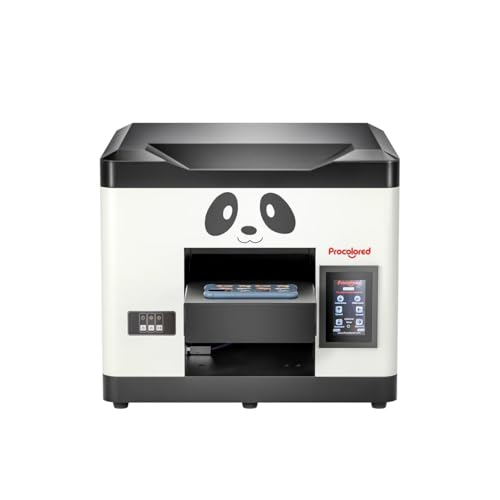
Procolored V6 Panda UV Printer — Compact Starter Flatbed
Every category needs an honest entry point, and the V6 Panda is this one’s: a 6.7-inch A4 print area, an L800 head, UV ink included in the box, and the same material family as its bigger siblings — acrylic, metal, leather, golf balls, bottles and phone cases. The smaller bed is a genuine constraint and also the machine’s charm. Phone cases, luggage tags, coasters, keyrings, small plaques and gift items all live comfortably inside A4, and a new owner can learn white underbase, curing and jig work on products that cost little when a run goes wrong.
The included ink matters more than it might appear. A first UV printer that arrives without ink invites a week of reading cartridge listings; this one is specified as printer plus UV ink, so the learning curve starts with printing rather than purchasing. Expect the early weeks to teach the two lessons every UV owner learns: adhesion varies by material and some surfaces want preparation the listing does not discuss, and white ink rewards a machine that is used regularly over one that sleeps. A compact machine run daily stays healthier than a large machine run monthly.
Growth is the fair criticism. A shop that discovers its bestseller is an A3 sign will outgrow the V6 Panda’s bed, and no accessory enlarges a print area. Read the purchase as tuition with resale value: the skills transfer entirely to a larger flatbed, and the Panda remains useful as a small-goods specialist even after a bigger machine arrives. What it cannot be is a signage printer, and the title never pretends otherwise.
- Print width: 6.7 inches, A4 class
- Printhead: L800
- Included: UV ink stated in the title
- Stated materials: Acrylic, metal, leather, golf balls, bottles, phone cases and more
- Maximum object height: Not stated in the listing title — verify with the manufacturer documentation
Strengths
- Smallest footprint in the guide, suited to a single workbench.
- Ink included, so the first prints happen without a second order.
- Same material family as the larger Procolored flatbeds, at learning scale.
Trade-offs
- A4 area excludes signage and large panels outright.
- Single-head layout asks more patience on white-heavy designs.
- Successful shops will feel the size ceiling within a year or two.
Best for: new UV sellers and craft businesses printing cases, tags, coasters and small gifts. Not suited for: A3 signage or batch layouts of large panels — the bed physically ends at A4.
If the Panda fits your product list, the sensible move is to view its Amazon page and note the ink set included in the current offer before deciding.
Small beds reward product discipline. Pick five blanks that fit the area, master their surface preparation and jigging, and resist the urge to improvise on objects at the edge of the bed where alignment gets eccentric. A compact UV printer run as a focused production tool for a narrow catalogue will out-earn a large machine used sporadically for everything. Keep a simple log of material, preparation and result for the first fifty prints; by the end of it you will own a recipe book that makes the little Panda feel considerably less little.

DXZ A4 UV Flatbed Printer (2026) — Texture and Emboss Pick
The DXZ A4 leads its title with two phrases that deserve attention: “3D Emboss Printing” and “White Ink Mixing System”. The emboss claim describes raised, tactile output — designs you can feel, built from layered ink — and it moves this compact flatbed beyond flat decoration into braille-style signage, textured art, raised logos and premium gift surfaces. Plenty of small UV machines print a picture; fewer advertise building a relief. For sellers whose margin lives in texture, that one feature rearranges the shortlist.
The mixing system addresses the category’s oldest headache. White pigment is heavy and settles in any ink path left still; a system that keeps white ink mixed fights the sedimentation that starves nozzles and greys out underbases. Paired with the stated 1440×2880 DPI and a direct-to-object brief covering acrylic, glass, wood, metal and phone cases, the DXZ reads as a machine designed by people who listened to owner complaints. Glass deserves a special note: printing on the reverse of a glass panel, viewed through the material, produces a depth effect customers notice immediately, and an A4 bed handles coasters, small frames and photo glass comfortably.
As a 2026 upgraded model from a less established brand than Procolored, the DXZ asks for a different kind of diligence: read the documentation, confirm support channels, and treat the stated feature list as the contract. The title is silent on included ink and on object height, both of which belong in your pre-purchase questions. None of that dims the appeal for the right buyer — it simply prices in the homework.
- Print area: A4 class flatbed
- Resolution: 1440×2880 DPI, per the listing title
- Special features: 3D emboss printing, white ink mixing system
- Stated materials: Acrylic, glass, wood, metal, phone cases
- Included ink set: Not stated in the listing title — verify with the manufacturer documentation
Strengths
- Raised 3D emboss output opens tactile, premium product lines.
- White ink mixing attacks the main cause of underbase failures.
- Glass and wood join the material list alongside the usual acrylic and metal.
Trade-offs
- A4 bed shares the size ceiling of every compact flatbed here.
- Newer brand, so long-term parts and support depth are less proven.
- Emboss work consumes more ink per piece than flat printing.
Best for: makers selling textured gifts, raised signage and printed glass at A4 scale. Not suited for: wide-format panel work — A4 is the whole stage, however clever the printing on it.
Anyone weighing the DXZ should open its listing and confirm what ships in the carton, since the title leaves the ink question open.
Emboss printing changes how you design. Raised work rewards bold shapes, generous line weights and restraint — fine detail that sings in flat print can turn muddy when built up in layers, and each raised pass adds time as well as ink. Prototype on your cheapest blank, photograph the result in raking light, and let customers touch samples, because texture sells through fingertips rather than screens. The white mixing system reduces one chore; it does not abolish the weekly nozzle check, and owners who keep that small ritual will find the DXZ’s party trick reliable enough to build a product line on.
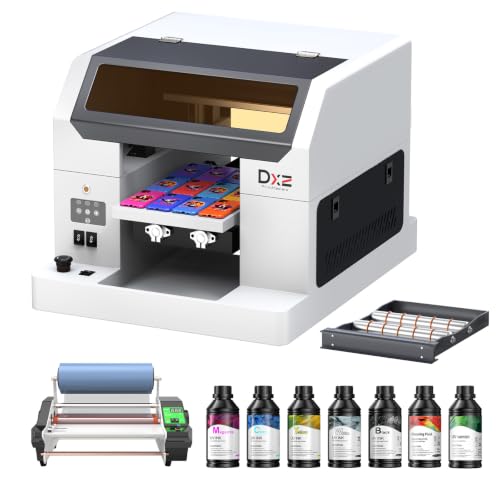
DXZ A3 UV Printer with Laminator — Hybrid Bundle Pick
Most shops eventually discover they need both UV families: a flatbed for rigid goods and film for everything the bed rejects. This DXZ bundle is built on that discovery. The title describes an A3 UV flatbed printer with 3D emboss printing and a white ink mixing system, calls out UV DTF capability, and bundles a laminator plus A/B film. One purchase, both workflows, with the laminator that film work needs for clean, durable application included rather than researched separately.
The flatbed side mirrors the smaller DXZ’s virtues at A3 scale: emboss texture, mixed white ink, and a material list spanning acrylic, glass, wood, metal and phone cases. The film side covers bottles with awkward shoulders, curved panels, and products too tall or irregular for the bed. For a growing shop, the strategic value is sequencing — print the rigid catalogue directly, keep film for the odd shapes, and let one ink ecosystem and one learning curve serve both. Bundle economics help too, provided each component is something you would genuinely buy.
Hybrid machines carry a hybrid caveat: neither workflow should be assumed equal to a dedicated specialist. The VF13 Pro above is a purpose-built sticker machine with a wider film path; a shop whose volume is ninety percent stickers should compare honestly. Likewise the laminator’s size and the film width it handles are specifications to confirm in the documentation, since the title confirms their presence rather than their dimensions. Bought with eyes open, the bundle is the most flexible single purchase in this guide.
- Print area: A3 class flatbed
- Workflows: Direct flatbed printing and UV DTF, per the listing title
- Special features: 3D emboss printing, white ink mixing system
- Bundled: Laminator and A/B film stated in the title
- Film width and laminator size: Not stated in the listing title — verify with the manufacturer documentation
Strengths
- Both UV workflows in one purchase, sharing one learning curve.
- A3 bed plus emboss covers the premium rigid-goods catalogue.
- Laminator and film included, removing two separate buying decisions.
Trade-offs
- Dedicated sticker machines offer a wider, faster film path.
- Two workflows mean two sets of consumables to stock and track.
- Bundle value depends on using both sides regularly.
Best for: growing shops whose orders mix rigid goods with curved and irregular items. Not suited for: a sticker-only business — the VF13 Pro’s dedicated film path serves that work better.
To judge the bundle fairly, visit the DXZ A3 listing and check which film size and laminator model the current package names.
Running two workflows from one bench asks for modest organisation. Dedicate shelf space to film and blanks separately, keep a shared job book that records which route each product takes, and schedule flatbed and film production on different days until the routines are automatic. Shops that blur the two end up with film dust on beds and blanks stacked on film rolls. The bundle’s promise — one machine answering almost any personalisation request that walks in — is real, and it is earned through that small tidiness rather than through any single specification.

RAINBOWDGT A3 UV Printer — Production Feature Pick
The RAINBOWDGT reads like a checklist written by flatbed owners. Start with the headline resolution, 5760×2880 DPI, the highest figure in this guide. Add white ink circulation — the active version of the DXZ’s mixing idea, keeping white moving so it cannot settle — and auto cleaning, which automates the purge routines that owners otherwise perform by hand and by calendar. Add a vacuum platform, which holds thin or slightly warped media flat against the bed so the head passes at a constant distance. Then add a bottle holder, extending the machine from flat goods to cylinders without improvised jig surgery.
Each of those features answers a named frustration. Vacuum hold-down is the difference between printing flexible acrylic sheet confidently and watching it bow toward the head. Circulation is the difference between a white channel that wakes up ready and one that needs coaxing after a quiet weekend. Auto cleaning does not eliminate maintenance, but it converts some of it from a remembered chore into a machine habit, and habits are what survive busy seasons. The material list — phone cases, cups, acrylic, metal, leather, wood and more — matches the hardware’s ambition.
The 3D embossing claim appears here too, giving the RAINBOWDGT the texture option alongside its production features. What the title does not state is the head configuration and the exact bed dimensions behind the A3 label, both worth confirming in documentation for buyers planning tight batch layouts. As with the DXZ machines, the brand is a specialist name rather than a household one, so support research is part of the purchase. On stated features alone, though, this is the most completely equipped flatbed in the guide.
- Print area: A3 class
- Resolution: 5760×2880 DPI, per the listing title
- White ink: Circulation system stated
- Maintenance: Auto cleaning stated
- Media handling: Vacuum platform and bottle holder stated
- Printhead configuration: Not stated in the listing title — verify with the manufacturer documentation
Strengths
- Highest stated resolution in the guide at 5760×2880 DPI.
- Circulation plus auto cleaning target the real causes of UV downtime.
- Vacuum platform and bottle holder widen the printable catalogue immediately.
Trade-offs
- Feature richness means more systems for a new owner to learn.
- Specialist brand, so verify support and parts channels before ordering.
- Bed dimensions behind the A3 label need confirming for batch planning.
Best for: production-minded shops printing mixed flat and cylindrical goods daily. Not suited for: occasional hobby printing — its systems earn their keep under regular workloads, and idle weeks waste the advantage.
Serious buyers should read the RAINBOWDGT listing end to end and note the stated platform and holder details against their own product list.
Getting value from a feature-rich machine is a sequencing problem. Learn flat work on the vacuum bed first, add bottles once alignment is second nature, and try embossing after flat colour is consistent, because each layer of technique compounds the previous one. Keep the auto cleaning schedule the machine wants rather than overriding it to save ink; the arithmetic of one saved purge against one clogged head is brutal. Owners who climb that ladder steadily will find the RAINBOWDGT less a printer than a small production department, which is precisely what its specification sheet is trying to be.
Comparison
| Pick | Workflow | Size class | Distinguishing feature |
|---|---|---|---|
| Procolored VF13 Pro | UV DTF film | 13-inch A3+ | Dual XP600; ink and film included |
| Procolored V11 Pro | Direct flatbed | 11.4-inch A3 | Dual TX800 heads |
| Procolored V6 Panda | Direct flatbed | 6.7-inch A4 | L800 head; UV ink included |
| DXZ A4 UV Flatbed | Direct flatbed | A4 | 3D emboss; white ink mixing; 1440×2880 DPI |
| DXZ A3 with Laminator | Flatbed and UV DTF | A3 | Laminator and A/B film bundled |
| RAINBOWDGT A3 | Direct flatbed | A3 | 5760×2880 DPI; circulation; vacuum platform |
Should You Print on the Object, or Print a Sticker for It?
This is the buying question underneath the whole category, and it deserves a direct answer. Direct flatbed printing wins when the object is flat or gently curved, rigid enough to sit still on a bed, and valuable enough that an applied film would cheapen it: acrylic signage, plaques, leather goods, wooden gifts, phone cases sold at premium prices. The ink becomes part of the object, edges disappear, and emboss machines add touch to the argument. If your catalogue reads like that list, buy a bed — the V11 Pro for width, the DXZ A4 for texture, the RAINBOWDGT for production features, the V6 Panda for a small start.
Film wins on geometry. Bottles with shoulders, helmets, curved equipment housings, textured surfaces and anything taller than a bed’s clearance all refuse flatbed printing, and UV DTF film simply goes where the object is. It also wins on timing: transfers printed in advance turn personalisation into an application step measured in seconds. The costs are the film itself on every job and the faint edge that announces the method. Many mature shops run both, which is the logic of the DXZ A3 bundle and the reason the VF13 Pro and a flatbed so often end up in the same building.
One name sits outside this comparison deliberately. The eufyMake E1 drew attention as a crowdfunding-era desktop UV machine, but no Amazon listing for the machine itself was found when this guide was assembled, so it appears here as context rather than as a pick: interesting technology, not something this guide can point you to buy. Everything recommended above can be ordered through a normal listing with normal returns, which for equipment at this level is a feature in itself.
What Does White Ink Actually Ask of You?
White is the price of admission for printing on dark, clear or metallic objects, and it charges in attention. The pigment is dense and settles toward the bottom of any still container or line. Leave a white channel idle for days and the first prints show it: weak underbase, banding, colours that look washed because the foundation under them is grey. The features named in these titles — mixing on the DXZ machines, circulation and auto cleaning on the RAINBOWDGT — exist to fight that settling automatically, and they are worth real money to a shop that prints in bursts.
Your side of the bargain is rhythm. Print something with white in it at least a few times a week, run the machine’s cleaning and nozzle routines on the schedule it asks for, and store ink as directed rather than on a sunny shelf. Budget for cleaning fluid and the occasional sacrificed print the way restaurants budget for spoilage: as a normal cost of a process that involves liquid pigment, not as a sign of failure. Owners who accept that rhythm describe UV printing as reliable; owners who expect laser-printer neglect from a white-ink machine describe it as cursed, and both are reporting the same hardware.
How Do You Set Up a Small UV Workspace?
Start with the bench. A flatbed needs a level surface that does not wobble when the gantry moves, plus clearance to load media and reach the ink area without leaning across the bed. Put the computer within cable reach, keep blanks and finished goods on opposite sides of the machine, and give film work — if you run it — a clean, dust-aware corner, because every speck under a transfer is preserved like a fossil. Lighting matters more than newcomers expect: a bright, neutral lamp over the inspection area reveals underbase problems that dim room light hides until the customer sees them.
Ventilation and housekeeping come next. UV printing produces a noticeable odour during curing, so a room you can air out — or extraction you trust — keeps long sessions pleasant. Wipe the bed and jig surfaces on a schedule, cap and store ink properly, and keep uncured prints out of casual reach until they have finished their pass under the lamp. Finally, build a recipe book from day one: material, preparation, settings, result. Fifty entries in, that notebook is the most valuable peripheral you own, and it transfers to any larger machine you buy later.
One last piece of setup advice concerns power and patience. Give the machine a stable supply on a surge-protected outlet, let it complete its own start-up and cleaning sequences without interruption, and resist switching it off at the wall between sessions unless the manufacturer directs otherwise; UV machines are generally happiest in the standby rhythm their designers intended, with ink kept ready and white kept from settling undisturbed for days. The owner who treats start-up impatience as a saving usually pays it back in cleaning cycles and clogged nozzles, at several times the price.
Which Materials Behave on a UV Bed, and Which Ones Fight Back?
Acrylic is the friendly face of this category, and most owners start there for good reason. It sits flat, tolerates handling, and shows colour beautifully over a white underbase; printed on the face it looks crisp, printed in reverse on the back of clear sheet it gains a depth that customers read as quality. Phone cases behave nearly as kindly, provided the case material is one the ink can grip — hard shells take print readily, while some soft, rubbery cases flex enough to crack a cured design, a lesson best learned on a sample rather than on a customer’s order. Metal plaques and coated boards sit in the same cooperative family: flat, stable, and forgiving of a beginner’s alignment.
Leather rewards patience. Its surface varies from piece to piece, it flexes in use, and a design that survives the bed must also survive being bent by a wallet’s daily life, so test prints should be flexed, scratched and carried for a week before the product is listed for sale. Wood brings grain into the picture — literally, since the grain shows through lighter inks and becomes part of the design whether you planned it or not; many sellers lean into that, printing darker, bolder artwork that treats the grain as texture. Glass is the perfectionist’s material: every fingerprint and dust speck under the print is preserved and magnified, so cleaning ritual before printing matters as much as the print itself.
The honest rule across all of them is that adhesion is a property of the pair — this ink on this material — and no listing title can promise it for your specific blank from your specific supplier. Buy sample quantities, print hard on them, abuse the samples the way customers will, and only then commit to stock. Sellers who keep a tested-materials shelf, each blank labelled with its preparation and result, build a catalogue they can trust; sellers who assume every glossy object in a craft store will behave spend their first season refunding surprises.
How Do the Running Costs of UV Printing Really Accumulate?
Ink is the visible cost, and even it is widely misunderstood. A design’s ink consumption depends on coverage, on how much white underbase it needs, and on whether texture or emboss layers multiply the passes; a pale design on a white blank sips, while a full-bleed photograph on black acrylic with a raised logo drinks. Cleaning cycles draw their share too, which is why machines that sit idle can consume ink without producing a single saleable piece. None of the titles in this guide states ink yields, and any per-print figure quoted without knowing your designs would be fiction, so the practical approach is empirical: track ink levels against finished pieces for your first month and derive your own cost per product.
Film, where your workflow uses it, is easier to count and easier to forget. Every UV DTF job consumes film whether the sticker sells or not, and test prints, misalignments and the occasional ruined transfer belong in the product’s costings alongside the successful ones. Blanks themselves are the third cost, including the sacrificial ones: jigs need test pieces, new materials need destructive testing, and a sensible studio budgets a spoilage allowance into every new product line rather than treating each failure as an anomaly.
Time is the fourth cost and the one owners most often omit. A flatbed printing a tray of cases is fast; the loading, aligning, inspecting and unloading around it is human work, and a product priced only on machine minutes will quietly underpay its maker. The shops that thrive in this category tend to share a habit: they know, per product, the full cost of ink, material, minutes and spoilage, and they retire designs whose numbers never worked. A UV printer makes almost anything printable. Whether it makes it profitable is arithmetic, and the arithmetic is yours to keep.
What Should Your First Production Week Look Like?
Day one belongs to setup and humility. Level the bench, install the software, run the machine’s own alignment and nozzle routines, and print the test patterns on the cheapest blanks you bought. Resist the urge to christen the machine with a paying job; the first prints exist to teach you how your unit behaves, and a flaw discovered on a sample coaster costs pennies against the same flaw on a customer’s plaque. Photograph the results, note the settings beside them, and start the recipe book while the lessons are fresh.
The middle of the week is for controlled variety. Print each of your intended materials once, with the same design, so differences in colour, adhesion and finish belong to the material rather than the artwork. Flex the leather, wash the bottle, scratch the acrylic, leave one piece in a sunny window. By the end of that exercise you will know which of your planned products are real and which were wishes, and your listings can be written from evidence. This is also the moment to practise the white-ink routine at the times of day you will actually run it, because a maintenance habit that fits your schedule survives, and one that fights it does not.
Close the week with a small, complete production run: a tray of one product, start to finish, timed. You will learn your true throughput, your real spoilage rate, and the step in the process that annoys you most — which is the step to fix with a better jig, a rearranged bench or a changed design before orders arrive. A first week spent this way feels slow beside the excitement of a new machine. It is, in practice, the fastest route to a UV printer that earns money instead of demonstrating potential.
When Does Stepping Up to an A3 Bed Actually Pay?
Size envy is the most expensive emotion in this category, and it usually strikes about a month after the first A4 machine starts earning. The honest test for a larger bed is not whether bigger prints are imaginable — they always are — but whether your order book contains work the small bed is actively refusing. A seller turning away signage commissions every week has a revenue argument for A3. A seller whose A4 machine runs two afternoons a week has a marketing problem, not a size problem, and a larger printer will simply idle at greater expense.
Batch geometry is the subtler argument, and for many shops the decisive one. A bed that holds twelve phone cases in a jig does not merely print larger things; it prints small things twelve at a time, collapsing the load-align-print cycle that dominates a small machine’s day. If your bestselling products are small but numerous, measure your current machine’s day in cycles rather than in pieces: when the cycles, not the printing, consume the hours, width is buying you time, and time is the one input a growing shop cannot manufacture. That is the circumstance in which the V11 Pro or the RAINBOWDGT stops being an upgrade and becomes a hire.
There is also a discipline worth keeping when you do step up: retain the small machine. A compact flatbed that has paid for itself remains the perfect home for rush singles, tests and the small-goods catalogue, freeing the big bed for the batch work that justifies it. Shops that sell the starter machine often find themselves interrupting long A3 runs for one urgent case, which is the most expensive way to print anything. Two beds, each doing the work it suits, is how the modest end of this industry quietly becomes its productive end.
What Are the Common Mistakes When Buying a First UV Printer?
Confusing the two families leads the list, and it is a reading mistake before it is a buying one: a sticker machine bought as a flatbed, or a flatbed expected to decorate a helmet. The second mistake is shopping by DPI alone. Resolution figures in this category span a wide range, yet customers judge output by colour strength, white quality and finish, all of which depend on ink handling more than on the largest number in a title. A third error is ignoring object height and shape — falling for a bed, then discovering your bestselling blank is too tall, too curved or too awkward to sit on it.
Underestimating consumables follows close behind. Ink, film, cleaning supplies and test blanks are the running cost of every job, and a purchase that consumes the whole budget leaves nothing for the materials the machine exists to print on. The final mistake is letting the printer sleep. UV machines, white channels especially, are healthiest in regular use; a business plan built on one print run a month fights the technology itself. Buy the size and workflow your order book justifies today, run it often, and the category rewards you.
Final Recommendation
Match the machine to the object, and the choice mostly makes itself. Shops decorating curved and irregular goods should start from the VF13 Pro’s film path, while rigid-goods sellers should choose among the flatbeds by bed size: the V6 Panda to learn on, the DXZ A4 for textured A4 work, the V11 Pro for A3 direct printing with dual heads, the DXZ A3 bundle when both workflows genuinely call, and the RAINBOWDGT when circulation, auto cleaning, vacuum hold-down and a bottle holder describe your working week. Whichever you choose, commit fully to the white-ink rhythm from the very first day of ownership. For a small studio ready to print on almost anything a customer carries through the door, the RAINBOWDGT A3 is the most complete single purchase here — and the textured acrylic sign it produces, cool and raised under your thumb, is the moment the category stops being a specification sheet and starts being your business.
Frequently Asked Questions
Is UV DTF the same as printing directly with a UV flatbed?
No. UV DTF prints the design onto a film that is then applied to the object, adhesive and all; a flatbed cures ink directly on the object’s surface. Film reaches curved and irregular shapes a bed cannot hold, while direct printing has no edge and feels like part of the product. Several shops run both, which is why one pick in this guide bundles the two workflows together.
Why does every UV printer make such a fuss about white ink?
White ink is the underbase that lets colour show correctly on dark, clear or metallic objects, and its pigment settles when left still. Settled white clogs lines and weakens the foundation of every print. Mixing systems, circulation and auto cleaning — all named in titles in this guide — exist to keep white moving, and regular printing remains the owner’s half of the arrangement.
Can these machines print on bottles?
Some can, in different ways. The RAINBOWDGT lists a bottle holder among its features, the Procolored titles name bottles among their materials, and UV DTF film sidesteps the question entirely by wrapping the finished sticker around the bottle. Rotation hardware, diameter limits and jig needs differ, so confirm the arrangement for your bottle shape in the manufacturer’s documentation before building a product line on it.
What size UV printer should a beginner buy?
Buy for the products you already sell. An A4 machine such as the V6 Panda or the DXZ A4 covers cases, coasters, tags and small plaques, teaches the full craft, and costs less to feed while you learn. Step up to A3 when an actual product — signage, batch layouts, larger panels — demands the bed, not when a specification tempts you.
Is the printed result durable outdoors?
UV-cured ink is generally hard-wearing and handles moisture and handling well, which is why it is used for signage and equipment marking. Exact outdoor lifespan depends on the ink set, the material and exposure, none of which the listing titles quantify, so treat any specific year figure with suspicion and test your own products in the conditions your customers will use.
Can a UV printer handle a product taller than a phone case?
Flatbeds have a maximum object height set by the gantry, and the listing titles in this guide do not state that figure for any pick, so it is one of the specifications to confirm in the manufacturer’s documentation against your tallest product before ordering. Tall or awkwardly shaped items are also the natural territory of UV DTF film, which has no gantry to clear: if your catalogue mixes flat goods with tall bottles and deep housings, that split is a strong argument for the hybrid bundle or for pairing a flatbed with a dedicated film machine later.
Do I need a laminator for UV printing?
Only for the film workflow. Lamination protects and finishes UV DTF transfers, which is why the DXZ A3 bundle includes a laminator with its A/B film. Direct flatbed printing cures finished on the object and needs no laminator at all.
Related Guides
Once your UV workflow is settled, the neighbouring crafts in this series cover the transfer and marking machines that often share the same bench: start with our guide to the best tattoo printers for thermal stencil work, then compare the best envelope printers for the mailing side of a print business, and finish with the best printers for printing transparencies for screen printing if screen work is part of your studio’s future.


