What's inside
- Key Takeaways
- Quick Picks
- How Did We Choose Cards for This Budget Without Lying About Them?
- What Can a Card at This Budget Actually Do, Job by Job?
- Which of These Cards Fits the Job Your PC Actually Has?
- How Can You Tell a Display Card from a Gaming Card in a Listing?
- What About the Second-Hand Market at This Budget?
- Which Common Machines Do These Cards Revive Best?
- How Should You Handle Drivers and Support on Finished Architectures?
- How Do the Six Budget Picks Compare Side by Side?
- How Should You Install a Budget Card in an Older PC?
- What Should You Check in an Old PC Before Any of These Cards Arrive?
- What Mistakes Do Buyers at This Budget Keep Making?
- When Is the Right Purchase No Purchase at All?
- How Do You Keep a Budget Card’s Purchase Honest After It Arrives?
- Final Recommendation
- What Is the Kindest Way to Gift or Hand Down a PC with One of These Cards?
- Why Does This Guide Refuse to Apologise for These Cards?
- What Should You Check on the Evening the Card Is Installed?
- What Is the One-Sentence Version of This Guide?
- Frequently Asked Questions
- Related Guides
As an Amazon Associate I earn from qualifying purchases. This post may contain affiliate links at no extra cost to you.
widgetverdict.com is reader-supported. When you buy through links on our site, we may earn an affiliate commission.
Where to buy: every card in this guide is an Amazon listing, linked from the quick picks table. Read each listing’s memory type and outputs carefully before ordering — at this end of the market, listings for cards with the same name can differ in the details that matter.
This guide about the best graphics cards under 200 dollars has to begin with the sentence its readers least want and most need: there is no new, current-generation gaming graphics card for sale at this budget. None. The shelves under this price are stocked with two kinds of product — basic display cards built on elderly architectures, the GT 710, GT 730, GT 740, GT 1030 and RX 550 among them, whose real job is putting a picture on one or more monitors, and one genuinely game-capable veteran, the RX 580, a design from 2017 that still plays the games of its era properly. Any guide that presents this price bracket as a gaming wonderland is selling something. This one instead tells you exactly what each card is, what it can honestly do, and which narrow jobs it does well enough to deserve your money.
That framing is not a counsel of despair, because the jobs these cards do are jobs millions of PCs actually need. A processor with no integrated graphics leaves a machine blind without a display card. An office PC may need three monitors, or a modern DisplayPort output its motherboard never had. A home theatre PC wants a low-profile card that fits a slim case and drives a television quietly. A child’s first PC, stocked with the classic games of the last decade, wants the RX 580 and nothing fancier. And a broken PC whose expensive card died wants the cheapest possible way back to a desktop while its owner decides what to do next. Six cards, six honest jobs — the sections below grade each pick against its own job and no other, and where a card cannot game in any modern sense, the section says so in its first paragraph rather than its last.
Key Takeaways
- No current-generation gaming card exists at this budget new — the honest choices are display cards plus one elderly gaming veteran.
- The MOUGOL RX 580 is the only pick here that plays a real back catalogue of 3D games at 1080p.
- The GT 1030 and RX 550 are display-first cards with light, older gaming ability at reduced settings.
- The GT 740, GT 730 and GT 710 are monitor cards: buy them for outputs, low-profile fit and basic desktops.
- Memory type matters more than memory size down here — DDR3 and DDR4 versions of a card are much slower than GDDR5 versions with the same name.
- If modern games are the goal, the correct purchase at this budget is patience: save toward the affordable tier instead.
Quick Picks
| Pick | Badge | Why it is here |
|---|---|---|
| MOUGOL Radeon RX 580 8GB | The Only Real Gaming Card Here | 8GB of GDDR5 and a 256-bit bus keep the classic library smooth at 1080p. |
| MSI GeForce GT 1030 4GB | Best Modern Display Card | Low-profile, single-fan, with DisplayPort and HDMI for a tidy two-screen desk. |
| MAXSUN AMD Radeon RX 550 4GB | Best Light-Duty All-Rounder | GDDR5 memory in an ITX body — displays plus the lightest older games. |
| SOYO GeForce GT 740 4GB Low Profile | Best for Triple Outputs in SFF | HDMI, VGA and DVI-D on a half-height board for small office cases. |
| QTHREE GeForce GT 730 4GB | Best Multi-Monitor Budget Card | Two HDMI ports plus DisplayPort and VGA on a low-profile board. |
| GIGABYTE GT 710 2GB | Cheapest Way to a Desktop | The minimum viable graphics card, from a major maker, for a PC that needs a picture. |
How Did We Choose Cards for This Budget Without Lying About Them?
The selection rule for this guide was job honesty. Every card had to have a real job it performs properly today — display output, multi-monitor duty, small-case fit, legacy gaming — and the section for each card grades it on that job alone. Cards were excluded if their listings dressed a display chip in gaming language with nothing behind it, if the brand was untraceable, or if the same money bought a strictly better tool for the same job elsewhere in the list. That process produced a line-up dominated by old architectures, because at this budget old architectures are what exist; the guide’s loyalty is to the reader’s actual PC, not to the dignity of the price bracket.
Specifications are taken from the verified listing titles and quoted with their memory types attached, because down here the memory type is the specification. A GT 1030 with DDR4, a GT 730 with DDR3, an RX 550 with GDDR5 — these are different instruments wearing similar names, and the spec boxes below keep the distinction in front of you. Where a listing title does not state a figure, the box omits it. One more rule governed the writing: the word “gaming” appears in this guide only where a card can actually play games, at the settings and vintage stated. Everywhere else, the cards are called what they are.
What Can a Card at This Budget Actually Do, Job by Job?
Display duty is the foundation job, and all six cards do it: they give a PC a picture, at desktop resolutions, across the outputs listed for each. For an office desktop, a point-of-sale machine, a home server that occasionally needs a screen, or a PC built around a processor with no graphics of its own, that is not a consolation prize — it is the entire requirement, met completely. Multi-monitor duty is the second job, and the low-profile cards here with three and four outputs exist for it: two or three screens of documents, spreadsheets, chat and browser is a workload these chips handle without breathing hard, because desktop composition is light work that has not grown heavier in a decade.
Media duty is the third job: video playback, streaming to a television, a home theatre PC in a slim case under the TV. The GT 1030 and RX 550 are the natural picks, being the newest designs here with the most modern display outputs. Gaming, the fourth job, is where honesty bites. Only the RX 580 plays a broad 3D library at full HD. The RX 550 and GT 1030 manage older and very light games at reduced settings. The GT 740, GT 730 and GT 710 do not play modern 3D games in any sense a buyer would accept, and this guide will not use phrases like “entry-level gaming” to blur that. If gaming is your job, your shortlist in this guide has one name on it, and your alternative plan — saving toward the affordable tier — is discussed in the final recommendation without embarrassment.
Which of These Cards Fits the Job Your PC Actually Has?
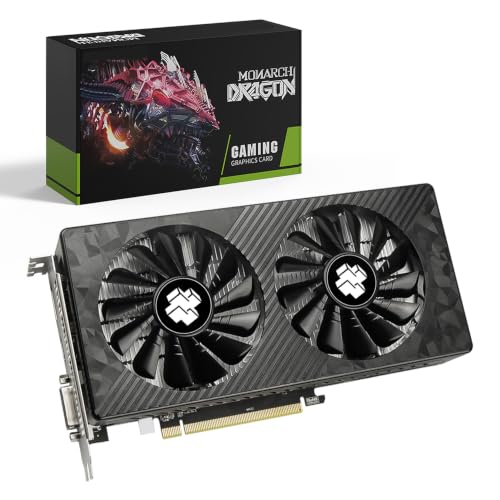
MOUGOL Radeon RX 580 8GB — The Only Real Gaming Card Here
The RX 580 is the exception that defines this guide’s rule. Its design dates from 2017, but unlike everything else on this page it was a gaming card at birth and remains one within its era’s borders: 8GB of GDDR5 across a 256-bit bus, 2048 stream processors per the listing title, and outputs spanning HDMI, DisplayPort and DVI. The games of the mid-to-late 2010s, the esports titles that never stopped being played, and the indie catalogue run at 1080p on this card the way they were meant to run. If the machine being built is a first gaming PC stocked with classics, a second PC for the household, or a living-room box for the back catalogue, this is the purchase — the only one in the guide whose gaming claim needs no footnote.
The footnotes it does need are about age, not ability. There is no modern upscaling here and no ray tracing; AMD’s driver development has moved to newer generations, so the card should be bought as finished hardware. Its architecture also belongs to a thirstier era, which in practice means checking that an old power supply is up to the job and that a small case can move the heat. MOUGOL is a smaller brand than the makers elsewhere in this guide, so the individual listing deserves a careful read. Within those terms, the RX 580 is the one card under this budget that a games library would recognise as a colleague rather than an apology.
- Memory: 8GB GDDR5, 256-bit bus
- Stream processors: 2048SP (as stated in the listing title)
- Interface: PCIe 3.0 x16
- Outputs: HDMI, DisplayPort and DVI
- Role: 1080p gaming in classic-era and esports titles
Strengths
- Genuine 1080p gaming across the classic library — unique in this guide.
- 8GB of memory is generous beyond anything else at this budget.
- DVI output keeps older gaming monitors in service.
Trade-offs
- A 2017 architecture with a finished driver story.
- No modern upscaling and no ray tracing hardware.
- Older, warmer design — check the power supply in elderly PCs.
Best for: classic-library gaming PCs and second machines at 1080p. Skip it if your library is this year’s releases — no card at this budget serves them, and the affordable tier is the honest next step.

MSI GeForce GT 1030 4GB — Best Modern Display Card
The GT 1030 is the newest design among the display cards here, and its section must start with the specification that decides its character: this MSI board’s 4GB is DDR4, per the listing title, not the GDDR5 fitted to some other GT 1030s. DDR4 memory is far slower, and it confines this card firmly to the display-and-media shelf — which is, to be fair, the shelf MSI’s low-profile design is visibly built for. The card is a low-profile, single-fan board with DisplayPort and HDMI outputs, HDCP support and DirectX 12 compatibility: a tidy instrument for giving a slim office PC two modern screens, or a home theatre PC a clean connection to a television.
Judged as that instrument, it is the best in this guide. The low-profile format fits the small-form-factor cases that dominate office fleets and living-room builds. The single fan and modest design suit machines that sit within earshot. Its video and desktop behaviour is modern and unremarkable in the best sense — it will not be the reason a video call stutters or a spreadsheet scrolls badly. Its gaming ability should be described at its true size: very light and old titles at reduced settings will run; anything with contemporary ambitions will not, and the DDR4 memory is the main reason. Buyers who find a GDDR5 version of this chip elsewhere are looking at a meaningfully quicker card for light gaming; buyers of this board should want it for displays, where it excels.
- Memory: 4GB DDR4, 64-bit bus
- Format: low profile, single fan
- Outputs: DisplayPort and HDMI
- Support: DirectX 12, HDCP
- Role: displays and media first
Strengths
- Low-profile fit for slim office and home theatre cases.
- DisplayPort plus HDMI covers modern monitor pairings.
- Newest display-card design in this guide, from a major maker.
Trade-offs
- DDR4 memory rules out all but the lightest gaming.
- Two outputs only — triple-screen desks should look below.
- Shares its chip name with a faster GDDR5 variant; check listings carefully.
Best for: two-screen office PCs, home theatre builds and slim cases needing modern outputs. Skip it if any real gaming is in the plan — the RX 580 is this guide’s only gaming answer.

MAXSUN AMD Radeon RX 550 4GB — Best Light-Duty All-Rounder
The RX 550 occupies the narrow ground between the display cards and the RX 580, and its distinguishing asset is memory: 4GB of GDDR5, the real graphics memory, across a 128-bit bus. That gives this ITX-sized card a light gaming ability the DDR3 and DDR4 cards here cannot match — older titles, indie games and esports staples at reduced settings and resolutions are genuinely playable, where the GT cards below would merely start. MAXSUN builds the board in ITX form, short enough for the small cases that are this budget’s natural habitat, on a PCIe 3.0 interface that fits essentially any desktop of the last decade, with DirectX 12 support rounding out a specification that reads, accurately, as a small general-purpose card rather than a pure display adapter.
The discipline this pick requires is expectation management. The listing language calls it a gaming card; the honest label is a display card that can game a little, in the past tense — the games it plays are the older and lighter ones, and modern releases are outside its reach at any settings a player would accept. Within that label, it is arguably the most versatile card in the guide: one slot solves a no-graphics processor, adds modern outputs, drives multiple screens, plays films, and still has something left for a library of classics on a quiet evening. Buyers torn between this and the RX 580 should decide by library size: a handful of light favourites points here, a real back catalogue points up the page.
- Memory: 4GB GDDR5, 128-bit bus
- Format: ITX-sized compact board
- Interface: PCIe 3.0 x16
- Support: DirectX 12
- Role: displays, media and light older games
Strengths
- GDDR5 memory gives it light gaming reach the DDR cards lack.
- ITX length fits small cases across the board.
- The most versatile single slot in this guide.
Trade-offs
- Modern releases are beyond it at any acceptable settings.
- An ageing architecture with a finished driver story.
- Its gaming label on listings overstates a light-duty reality.
Best for: small PCs needing displays, media and a little light gaming in one card. Skip it if the games library is the point of the machine — that is the RX 580’s section, above.

SOYO GeForce GT 740 4GB Low Profile — Best for Triple Outputs in SFF
The GT 740’s era is the early 2010s, and nothing in this section will pretend otherwise. What SOYO’s board offers a modern buyer is a specific mechanical proposition: a low-profile, half-height card carrying three outputs — HDMI, VGA and DVI-D — with 4GB of DDR3 memory and a 128-bit bus, built for the small-form-factor office PCs that fill second-hand markets and spare-room desks. That output trio is the point. A slim Dell or HP from a decade ago, with a VGA monitor on one side and an HDMI screen on the other, is a machine this card understands completely: it fits the half-height bracket, feeds both displays plus a third, and asks almost nothing of the power supply or the case’s airflow.
Its 3D ability belongs to its decade and should be bought accordingly: desktop work, video and the lightest legacy software are its world, and contemporary games are simply not part of the conversation. The 384 stream processors in the listing title were a modest specification when new and are a historical one now. SOYO is a budget brand, and the sensible buyer’s check is the listing itself — bracket included, outputs as pictured. For the narrow, common job of resurrecting a small office PC into multi-monitor service, though, this card’s combination of fit and outputs is exactly right, and paying more for a faster card would buy speed the job cannot use.
- Memory: 4GB DDR3, 128-bit bus
- Stream processors: 384SP (as stated in the listing title)
- Format: low profile, half-height SFF board
- Outputs: HDMI, VGA and DVI-D
- Role: multi-monitor office duty in small cases
Strengths
- Three outputs including VGA for legacy monitors.
- Half-height format fits the SFF office PCs it is aimed at.
- Undemanding power and cooling requirements.
Trade-offs
- DDR3 memory and an early-2010s design cap it at desktop work.
- No place in any gaming conversation, modern or otherwise.
- Budget-brand purchase — verify bracket and outputs on the listing.
Best for: small-form-factor office PCs needing two or three screens including a VGA one. Skip it if DisplayPort or any gaming matters — the GT 1030 and RX 580 divide those jobs between them.

QTHREE GeForce GT 730 4GB — Best Multi-Monitor Budget Card
Count the outputs, because outputs are this card’s entire thesis: two HDMI ports, a DisplayPort and a VGA, on one low-profile board. Four display connections is a specification the GT 1030 above cannot match and the GT 710 below does not attempt, and for a certain kind of desk — the trader-style home office, the admin workstation, the monitoring screen wall in miniature — it is the whole requirement. QTHREE’s GT 730 carries 4GB of DDR3 across a 64-bit bus, and that memory system tells the rest of the story without any help: this is a card for desktops, documents and dashboards, full stop.
The GT 730 chip belongs to the same elderly generation as the GT 740, and its 3D ability is best described as theoretical. What it does well is precisely what its connector panel promises — many screens, cheaply, in a low-profile slot, in a PC whose owner cares about screen count and nothing else. That is a real market and a respectable job. The caution is the usual one for this shelf: confirm the bracket and the exact output arrangement on the listing before ordering, since budget listings vary. Buyers whose multi-monitor need stops at two screens and who value a newer design should take the GT 1030 instead; buyers who need three or four panels lit from one cheap slot have found their card.
- Memory: 4GB DDR3, 64-bit bus
- Format: low profile board
- Outputs: 2x HDMI, DisplayPort and VGA
- Interface: PCI Express
- Role: multi-monitor desktop duty
Strengths
- Four outputs is the most screen connections in this guide.
- Low-profile fit for compact office machines.
- DisplayPort included alongside the legacy VGA.
Trade-offs
- DDR3 on a 64-bit bus is the slowest memory system here.
- 3D performance is not a reason to buy it, at any settings.
- Budget-brand listing details need verifying before purchase.
Best for: desks that count their needs in screens — three or four panels of desktop work. Skip it if even light gaming is hoped for; the RX 550 above is the cheapest card here with any.

GIGABYTE GT 710 2GB — Cheapest Way to a Desktop
The GT 710 is the minimum viable graphics card, and there is no insult in that: minimum viable is a product category with honourable uses. GIGABYTE’s board carries 2GB of DDR3 memory and the simplest specification in this guide, and its jobs are the foundational ones — a PC built around a processor with no graphics, a server that needs a screen twice a year, a desktop whose original card failed and whose owner needs the machine back today while deciding its future. In each case the requirement is identical: a picture, reliably, for the least money and fuss, from a maker whose name means the card will simply work. That is what this is.
Everything beyond that picture is outside the brief, and this section will not audition for exceptions. The GT 710 does not play modern games; it barely plays old ones; its memory is the slowest kind fitted to any card here. It is also, for its actual jobs, unimprovable at its price — a faster card in a headless server’s rescue kit is money spent on a specification the job never reads. Buy it knowingly, as the floor of the market, and it will never disappoint you. Buy it hopefully, as a gaming card in disguise, and the disappointment was scheduled at purchase. The distinction between those two buyers is the entire editorial purpose of this guide.
- Memory: 2GB DDR3
- Maker: GIGABYTE board (GV-N710D3-2GL REV2.0)
- Format: compact desktop board
- Role: basic display output
Strengths
- The cheapest reliable route to a working desktop picture.
- A major maker’s board — the rescue-kit choice.
- Fits and runs in essentially any desktop with a slot.
Trade-offs
- 2GB of DDR3 is the smallest, slowest memory here.
- Gaming, in any modern sense, is not among its abilities.
- Two screens of modest resolution is its comfortable ceiling.
Best for: rescue duty, graphics-less processors and basic desktops. Skip it if the PC will ever be asked to play a game or feed a modern multi-screen desk — both jobs have their own picks above.
How Can You Tell a Display Card from a Gaming Card in a Listing?
Learn to read three lines and you will never need this guide’s protection again. The first line is the memory type, and it is the most reliable tell in the entire budget market. GDDR5 or GDDR6 means the card was built with graphics memory — the kind designed to feed a rendering processor at speed. DDR3 or DDR4 means the card carries adapted system memory, dramatically slower, and no chip attached to it can game beyond the lightest level regardless of what the listing’s headline promises. When a budget listing buries the memory type in the small print or omits it entirely, that omission is itself the information: sellers advertise GDDR loudly and DDR quietly. The second line is the memory bus, which works the same way — 128 bits and above suggests a card with real intentions, 64 bits is the signature of a display adapter, and the QTHREE GT 730 and MSI GT 1030 in this guide both wear that signature openly in their spec boxes.
The third line is the chip’s birthday. Every graphics architecture has one, and a search of the chip’s name returns it in seconds. A design from the last several years belongs to the modern driver and feature world. A design from a decade ago — the GT 710, GT 730 and GT 740’s generation — belongs to a finished one, and its abilities were fixed at its launch, when the games it could play were new. Listings for old chips work hard to obscure the birthday, dressing the card in current packaging language and the word “gaming” in large type. The discipline is simple: no purchase at this budget until you know the memory type, the bus width and the architecture’s age. With those three facts, the card’s honest shelf — display, light gaming, or real gaming within an era — is never in doubt, and the marketing loses its vote.
One more tell deserves naming because it catches careful buyers too: memory capacity used as camouflage. Four gigabytes sounds substantial, and on a GDDR5 card like the RX 550 it is a real, working specification. On a DDR3 card it is a large, slow warehouse attached to a small door — the capacity is genuine and nearly irrelevant, because the processor behind it cannot move data fast enough for the capacity to matter in games. This is why the spec boxes in this guide never print a memory figure without its type beside it, and why the comparison table below should be read down the memory column with the type, not the number, doing the talking. Sellers know which figure buyers compare. Compare the other one.
What About the Second-Hand Market at This Budget?
It would be evasive to write a budget graphics guide without acknowledging the room’s largest elephant: at this money, the used market offers cards that outclass everything in this guide — newer architectures, real gaming performance, the works. Many budget buyers are better served there, and this guide says so without flinching. What the used market cannot offer is the thing a new listing, however humble, includes by default: a warranty, a return window, and a card whose history is a blank page rather than a previous owner’s mining rig, overclocking hobby or failing fan. The buyers for whom those protections matter — a machine that must simply work, a gift, an office PC whose downtime costs more than the card — are the buyers this guide serves, and for them the new-old-stock shelves catalogued here are the rational market.
For buyers who do go second-hand, the reading skills from the previous section are the whole toolkit, applied with one addition: test before trust runs out. A used card should be run under a real workload inside its return window, watched for the artefacts and crashes that announce a dying card, and bought only through channels whose protections survive a dispute. And a boundary should be drawn in the other direction too — the display-card jobs in this guide, the rescue kits and multi-monitor office machines, are usually worse served used, because a new GT 710’s entire value is its certainty, and certainty is the one thing the second-hand market never sells. Match the market to the job, as with everything else in this guide.
Which Common Machines Do These Cards Revive Best?
Walk through the machines that actually arrive at this budget and the picks assign themselves. The first is the ex-office small-form-factor desktop — the slim tower retired from a workplace, sold cheaply, with a decent processor, no graphics worth the name and a case that accepts only half-height cards. Its destiny in this guide is written in brackets: the SOYO GT 740 for a multi-screen office second life, the QTHREE GT 730 when the screens multiply, or the MSI GT 1030 when two modern displays and media duty are the ambition. The second machine is the family tower with a graphics-less processor and a child attached to it. If the child’s library is the classics, it is the RX 580 machine; if the library is homework and video with a game-shaped garnish, the RX 550 serves it for less and the difference buys the monitor a stand.
The third machine is the home theatre PC, where the requirements invert the gaming world’s: silence, a low-profile body, an HDMI socket that behaves, and a picture. The GT 1030 is its natural citizen, with the RX 550 as the alternative for the household whose films share the machine with light games. The fourth machine is the casualty — any PC whose card has died mid-life, leaving a good machine blind. Its buyer’s question is not which card is best but which card is fastest to certainty, and the answer is the GT 710 when the machine’s future is undecided, or a same-tier replacement when it is not. Four machines, and notice what never happens in any of them: nobody’s correct answer is “the most gaming card the budget stretches to,” because at this budget the stretch buys the wrong virtue. The machines asked for fit, outputs and certainty. This guide’s six cards are those three virtues, in six bodies.
How Should You Handle Drivers and Support on Finished Architectures?
Five of the six cards here belong to architectures their makers have finished developing, and living well with finished hardware is a learnable skill rather than a risk. The first rule is to install the correct driver once, from the manufacturer’s own site, matched to the chip family and the operating system — and then to leave it alone. A display card doing display work does not benefit from driver tourism; stability is its feature set. The second rule is to record what you installed, in a note with the machine, because the person troubleshooting it in three years — possibly you — will bless the foresight. The third rule is to treat operating system upgrades as decisions rather than weather: before a major system update, confirm the finished architecture’s driver still supports the new release, and if it does not, the update waits or the card is replaced knowingly, not discovered dead on a work morning.
None of this should frighten the buyer these cards are for. A GT 710 driving an office screen under a stable driver is among the most reliable objects in computing, precisely because nothing about it is still changing. Finished hardware does not decay; it simply stops improving, and for the jobs in this guide — screens, media, classics — improvement stopped being necessary years ago. The RX 580 asks slightly more of its owner, being a gaming card whose games still receive patches, but the same discipline covers it: correct driver, recorded version, updates by decision. Buy finished hardware with open eyes and it will repay you in the only currency it deals in — uneventful years.
How Do the Six Budget Picks Compare Side by Side?
| Pick | Memory | Outputs | Format | Honest role |
|---|---|---|---|---|
| MOUGOL RX 580 | 8GB GDDR5, 256-bit | HDMI, DP, DVI | Full-size board | Classic-era 1080p gaming |
| MSI GT 1030 | 4GB DDR4, 64-bit | DP, HDMI | Low profile, single fan | Two modern screens, media |
| MAXSUN RX 550 | 4GB GDDR5, 128-bit | As listed per board | ITX compact | Displays plus light older games |
| SOYO GT 740 | 4GB DDR3, 128-bit | HDMI, VGA, DVI-D | Low profile, half-height | SFF office multi-monitor |
| QTHREE GT 730 | 4GB DDR3, 64-bit | 2x HDMI, DP, VGA | Low profile | Three to four desktop screens |
| GIGABYTE GT 710 | 2GB DDR3 | Basic desktop outputs | Compact board | A picture, reliably, for least money |
Read the memory column as the guide’s conscience. GDDR5 marks the two cards with any gaming pulse; DDR4 and DDR3 mark the display cards, whatever their listings claim. Read the outputs column second: at this budget, connector panels are destiny, because the jobs are defined by which screens a card can light. And notice what is absent from the table — any row claiming modern gaming. That absence is the most accurate specification in this guide.
How Should You Install a Budget Card in an Older PC?
Older machines reward a specific order of operations. Before ordering, open the case and check three things: that a PCIe slot is actually free and physically accessible, whether the case needs a low-profile bracket — slim office PCs do, and the low-profile picks in this guide exist for them — and whether the power supply is a standard unit or one of the modest proprietary supplies fitted to small office machines, which is another argument for the undemanding cards in this list. With the PC off and unplugged, seat the card, secure the bracket, and connect the monitor to the card’s outputs rather than the motherboard’s; a display plugged into the wrong socket is the classic reason a working card looks dead.
Drivers deserve one careful step at this end of the market. These are elderly architectures, and the correct driver is the current release for that chip family from NVIDIA or AMD — not whatever a marketplace listing links to, and not a driver disc. Install it, reboot, then set the resolution and refresh rate for each screen in the operating system’s display settings, arranging multi-monitor layouts there rather than in game menus. Finally, test with the machine’s real workload — the office suite, the browser, the video service — rather than a benchmark. At this budget, the workload is the benchmark, and a card that does the job quietly for a week has passed the only examination that matters.
What Should You Check in an Old PC Before Any of These Cards Arrive?
Old machines keep their surprises in predictable places, and a ten-minute inspection finds most of them. Begin with the slot itself: confirm a PCIe x16 slot exists and is not already occupied by the very card being replaced in a state of confusion, and look at what sits beside it, because a neighbouring card or a cable bundle can crowd a new board’s fan. Continue with the case’s bracket height, the measurement that decides between the standard boards and the low-profile picks in this guide — slimline cases are not a suggestion, and the half-height picks exist precisely because this measurement so often comes back small. Then read the power supply’s label and note its age honestly; the display cards here ask almost nothing of a supply, while the RX 580, as its section states, belongs to a thirstier generation and deserves a supply with something in reserve.
Finish with the software archaeology. An old PC may carry drivers from two previous cards, and a clean installation of the current driver for the new chip’s family — from the manufacturer’s site, as the setup section advises — prevents the hauntings that mixed driver remains can cause. Note also the operating system’s expectations: elderly architectures pair most peacefully with the systems of their broad era and the current releases that still carry their drivers, and a moment spent confirming driver availability for your exact system is cheaper than a card in transit. None of this is advanced practice. It is the difference between an upgrade that takes an afternoon and one that takes a week of parcels.
What Mistakes Do Buyers at This Budget Keep Making?
The first and most expensive is believing the word “gaming” on a display card’s listing. A GT 730 with 4GB of DDR3 is not a gaming card that happens to be cheap; it is a monitor card with a marketing department, and the buyer who discovers that after installation has paid tuition. The second mistake is comparing memory sizes without memory types: 4GB of DDR3 is dramatically slower than 4GB of GDDR5, and at this end of the market the type, not the number, is the specification. Third is buying a full-height card for a slim case, or forgetting to check whether a low-profile bracket is included — the SFF picks in this guide are low profile for a reason.
Fourth is expecting driver futures from finished architectures: these cards receive what their families receive, and the purchase should be made for today’s job. Fifth is the mirror error — sneering at a display card for failing at games it never claimed, in this guide at least, to play. And sixth, the strategic one: spending this budget on a display card when the actual goal is modern gaming, which strands the money. If games are the goal and the budget is fixed, the RX 580 is the only honest purchase here; if the library is current, the honest purchase is a later one, at the affordable tier, and there is no shame in a guide saying so.
When Is the Right Purchase No Purchase at All?
There is a reader this guide has been quietly addressing since its first paragraph: the one whose actual goal is modern gaming, whose budget is this one, and who is hoping a guide will find the loophole. There is no loophole, and the kindest service a guide can render that reader is arithmetic rather than encouragement. A display card bought today for a gaming purpose will be replaced the moment the budget allows, which means its entire price becomes a fee paid for impatience — money that, kept, would have shortened the wait for the card that actually serves the library. The affordable tier in our companion guide is not a distant country; it is the next tier up, populated by cards with current drivers, modern upscaling and 1080p competence without footnotes. For the modern-gaming reader, the distance between this budget and that tier is the real product specification, and patience is the only currency that buys it down.
The same logic, reversed, protects the readers this guide does serve. If your job is displays, media or classics, the tiers above are not a better version of your purchase — they are a different purchase, priced for capabilities your job never invokes. The office manager who buys a current gaming card for a three-screen spreadsheet desk has made the mirror-image mistake of the gamer who buys a GT 730. Both errors come from shopping by aspiration rather than by job description. This guide’s six cards, honestly labelled, exist so that neither error is necessary: the jobs are named, the cards are graded against them, and the reader whose job is not here has been told so in the introduction rather than the returns process.
How Do You Keep a Budget Card’s Purchase Honest After It Arrives?
The honesty discipline of this guide does not end at checkout, because a budget card’s most common failure is not dying — it is drifting into a job it was never bought for. The office machine’s GT 730 acquires a nephew’s game library. The media PC’s GT 1030 is asked to stream and game at once. The rescue GT 710 becomes, by inertia, the permanent card of a machine that deserved a decision. Each drift ends in the same review: the card is blamed for a brief it never signed. The antidote is the sentence written at purchase time — this card is for these screens, these tasks, this library — kept with the machine’s records the way the driver note was. When the job changes, the sentence makes the change visible, and the upgrade conversation happens on purpose rather than by disappointment.
There is a companion habit for the gaming end of the guide. The RX 580’s owner, and the RX 550’s, should curate the library the way the card curates the settings: the classics are not a waiting room for modern gaming, they are a canon, and played on hardware of their era they are complete experiences rather than compromised ones. A budget card judged against its own canon will be loved. Judged against next season’s releases, it will be resented — and the resentment will be the buyer’s editing, not the card’s failure. This guide has tried to write the correct judgement into every section in advance, so that the verdict delivered by the evenings matches the verdict promised at purchase.
Final Recommendation
Buy the job, not the adjective. If the job is gaming the classics, the MOUGOL RX 580 is the one card here that does it, and it does it well. If the job is screens — two modern ones, take the MSI GT 1030; three or four including legacy connectors, take the SOYO GT 740 or QTHREE GT 730; a small case that also wants a little light gaming, take the MAXSUN RX 550 — each is the right tool priced as one. If the job is simply a picture where none exists, the GIGABYTE GT 710 closes the question for the least money in the guide. And if the job is modern gaming, this guide’s final recommendation is to close the listings, keep the money, and let it grow toward the affordable tier — because the most expensive graphics card is the one bought twice, and under this budget, for that job, every card is bought twice.
What Is the Kindest Way to Gift or Hand Down a PC with One of These Cards?
Hand-me-down machines are where this budget’s cards do some of their best work, and the handover deserves the same honesty as the purchase. Tell the recipient what the card is, in the guide’s own terms: this machine plays the classics beautifully, runs the office suite without a murmur, and will not run this year’s releases — said in advance, as a description, rather than discovered later as a defect. Include the driver note and the listing’s record with the machine. Set the machine up before the handover, with the library it serves already installed and working, because a gifted PC that boots into its strengths teaches its new owner what it is for far better than any speech. The RX 580 machine given this way is a generous gift. The same machine given with a vague promise that it “plays games” is a disappointment with a bow on it, and the difference cost nothing but candour.
Why Does This Guide Refuse to Apologise for These Cards?
Because an apology would accept the premise that a tool is only respectable if it games. The machines these cards serve — the office desk with three screens, the media box under the television, the rescued family tower, the classics PC — are not failed gaming rigs. They are successful computers, doing jobs that most of the world’s computing actually consists of, and the cards that serve them at this price are engineering matched to reality. This guide’s honesty cuts both ways: it will not call a GT 730 a gaming card, and it will not call it a bad card either. It is a good card, for its job, and the job is printed on its section in plain language.
What Should You Check on the Evening the Card Is Installed?
Install it slowly, photograph the listing before the box is recycled, and test the exact job it was bought for before anything else: light every screen it was meant to light, play the exact classic it was meant to play, run the exact film it was meant to show. A budget card verified against its own brief in its first evening will never be misjudged later, because its owner possesses the evidence of what it was for. Keep the note with the machine — card, driver, job — and the purchase is complete in the only sense this guide recognises: the tool, the task and the record all agree.
What Is the One-Sentence Version of This Guide?
At this budget there are no modern gaming cards, there are only honest jobs — displays, media, classics and rescues — and the six cards above are the right tools for those jobs, bought knowingly, at prices that leave the modern-gaming money unspent for the tier where modern gaming actually lives. Every section of this guide exists to keep that sentence true in the face of listings written to blur it: the memory types printed beside every capacity, the architectures dated, the gaming claims rationed to the one card that earned them. A reader who finishes this page knowing exactly what each card cannot do has been served better than a reader of any guide that promised more.
Frequently Asked Questions
Why is there no new gaming card at this budget?
Because the economics of current silicon do not reach this far down. Modern architectures, current memory and present-day manufacturing costs set a floor above this bracket, so the shelves here hold older designs: display cards built on elderly chips, and surviving stock of veterans like the RX 580. That is a market fact, not a gap this guide can wish away.
Can any of these cards run current popular games?
The RX 580 runs the classic library and esports staples at 1080p and can start less demanding current titles at reduced settings. The RX 550 and GT 1030 manage older and very light games only. The GT 740, GT 730 and GT 710 are display cards — current 3D games are outside their abilities at any settings worth accepting.
What does DDR3 versus GDDR5 memory actually change?
Bandwidth — how fast the card can feed its own processor. GDDR5 is graphics memory designed for that work; DDR3 and DDR4 are system-memory types adapted to budget cards, and they are far slower. At this budget the memory type predicts a card’s gaming ability more accurately than its capacity, which is why every spec box in this guide prints the type beside the number.
Which card should I buy for three monitors?
For three desktop screens, the QTHREE GT 730 offers four outputs including two HDMI and a DisplayPort, and the SOYO GT 740 offers HDMI, VGA and DVI-D in a half-height board for small office cases. Choose by the connectors your monitors actually have. Both are desktop-duty cards; neither is for gaming across those screens.
Is the RX 580 a risky buy because of its age?
Its age is a known quantity rather than a risk: the architecture is finished, driver development has moved on, and it draws power like a card of its era. Bought knowingly for the classic library — with the power supply and case heat checked — it is the most capable card in this guide. The risk lies in buying it for modern releases, which is a mismatch of job, not a defect of the card.
Related Guides
Continue to Best NVIDIA Graphics Cards for Video Editing to see what the next tier up does for creator work, drop the power requirements with Best Low Power Graphics Cards for Gaming, or cool whatever you build with Best Aftermarket CPU Coolers.



[…] the budget with Best Graphics Cards Under 200 Dollars if the monitor is staying but the wallet is not, consider the same class of card from a […]